

Vue Deep Dive — 00 · Reactivity Internals
Most Vue bugs that reach production are not template bugs. They are reactivity bugs: a value that stopped updating after a refactor, a watcher that fires three times or never, a list that re-renders on every keystroke, a store that leaks between SSR requests. All of them come from one small engine — — and all of them become obvious once its model is clear. This post takes the engine apart: how builds on , how and build a dependency graph, why is lazy and when it recomputes, what really means, how the scheduler batches updates into one microtask, and how Vue's model compares with the signals in Solid, Preact, Angular and the TC39 proposal. Examples target Vue 3.5 (3.5.42 at the time of writing). Where the 3.6 release candidate (3.6.0-rc.7) differs, it is called out. Every behaviour claim with an output comment was checked by running it against 3.5.
> Series map: 00 Reactivity Internals (this post) → 01 Composition API at Scale → 02 Compiler, Virtual DOM & Vapor Mode → 03 Ecosystem & Production (Pinia, Router, Nuxt). Future: see the extensions table in 03.
Learning Outcome
- Explain the effect / dependency / trigger model and draw the dependency graph for a component.- Describe how uses traps, lazy deep conversion and a proxy cache, and what that means for object identity.- Choose between , , , , and on purpose.- Predict when a recomputes, and why a computed whose value does not change does not wake its dependents.- Predict when and callbacks run for each mode, and use , , and pause/resume.- Explain the scheduler queue, the parent-before-child ordering, and what actually awaits.- Use to own and dispose groups of effects outside components.- Recognise the common ways reactivity is lost, and fix each one.- Place Vue's model next to signals and explain what Vue 3.6's alien-signals based core changes (and what it does not).
Chapter 1 — The model: effects, deps, triggers
Terminology
- Effect (subscriber) — a function that reads reactive state and must re-run when that state changes. A component's render, a , a getter and a getter are all effects.- Dep — the list of subscribers attached to one reactive property (one key of one object, or the of one ref).- Track — during an effect run, record "this effect read this property" by linking the effect to the property's dep.- Trigger — on a write, notify every subscriber in the property's dep.- Active subscriber — the effect currently running. only does something while one exists; a read outside any effect is invisible to the system.- Dirty — a subscriber whose dependencies changed since its last run.- Scheduler — the function an effect calls instead of re-running itself directly. Components and watchers use it to queue work.
The core loop
The official docs describe the engine in about twenty lines of pseudo-code. It is worth keeping this sketch in mind, because the production code is an optimised version of exactly this:
Three properties fall out of this design and explain most of Vue's behaviour:
1. Dependencies are discovered at run time. An effect depends on exactly what it read during its last run. A branch that was not taken creates no dependency.2. Reads outside an effect are not tracked. in plain code reads once and never updates.3. Tracking is synchronous. Only reads made while the effect is on the stack count. A read after an happens after the effect returned, so it is not tracked (Chapter 5).
The real data structures (3.5)
In 3.5 the storage is a called . Because the outer map is weak, an object that nobody references any more can be garbage-collected together with its deps.
The 3.5 release rewrote the internals around two ideas taken from Preact signals: version counting and doubly-linked lists. Each has a that increases on every trigger. Each subscriber keeps a linked list of nodes, one per dep it read; each also sits in the dep's list of subscribers, and records the dep version seen at the last run. On a re-run, links that were not visited again are removed, so a dependency from a branch no longer taken is dropped in O(1) per link rather than by clearing and rebuilding sets.
The Vue 3.5 announcement reports 56% lower memory use for the reactivity system with no behaviour change, and up to 10x faster operations on large, deeply reactive arrays in some cases. The pull request that did this measured 1,426k down to 631k in a test of 1,000 refs, 2,000 computeds and 1,000 effects.
Vue 3.6 (release candidate at the time of writing) replaces this core again with a refactor based on alien-signals, a signals library by a Vue core team member. The shape changes — the 3.6 package exposes internal functions such as , , and — but the public API (, , , , ) is the same. The rc release notes list no breaking change to the reactivity API.
Chapter 2 — : Proxy traps and their consequences
What the proxy intercepts
returns a whose handler tracks reads and triggers writes:
| Trap | Operation | Action ||---|---|---|| | | ; if the value is an object, return || | | write, then if the value changed ( comparison) or the key is new || | | || | | trigger if the key existed || | , | track a special iteration key, triggered on add or delete |
Collections (, , , ) cannot be intercepted by traps alone, because their data lives in internal slots, so Vue wraps their methods (, , , , , , iterators) with instrumented versions.
Lazy deep conversion
does not walk the object when you call it. A nested object is wrapped only when it is read through the proxy:
This keeps cheap to create. The cost moves to access time: every nested read goes through a trap and a cache lookup.
Identity: the proxy cache
Vue keeps a from raw object to proxy, so wrapping the same object twice returns the same proxy. But the proxy is not the original object, and identity checks across the boundary break:
> Watch out: , keys and checks in your own code do not get that retry. Store ids, not objects, when identity matters, or compare with on both sides.
Arrays and length
Mutating array methods (, , , , ) read and write . If they tracked it, an effect that pushes into an array it also reads would trigger itself forever, so Vue pauses tracking inside those methods. Checked: runs once, not five times.
What refuses to wrap
- Primitives — a proxy needs an object. This is the reason exists.- Frozen or non-extensible objects — returns the frozen object unchanged; is .- Objects marked with — useful for class instances from third-party libraries (map SDKs, editors, Three.js scenes) that should never be proxied.- Classes with fields, in practice. The proxy wraps fine, but a method called through the proxy runs with set to the proxy, and the private-field check fails:
> Common pitfall: putting an SDK instance, a class with private fields, or a large immutable dataset into or state. Wrap it with or hold it in a .
Chapter 3 — , , and friends
is an object with a tracked
A ref is an object whose getter calls and whose setter calls ; the real class holds its own instead of going through . A ref works for any value, including primitives, and replacing is always reactive. When the value is an object, passes it through , so is tracked too.
Unwrapping rules
| Where the ref is | Unwrapped automatically? ||---|---|| Top-level binding in a template () | Yes || Nested in a plain object, inside an expression () | No, unless is reactive. A bare still shows the value, because text interpolation unwraps its final result || Property of a object | Yes: returns the number, and assignment writes through to the ref || Element of a reactive array | No: is || Value in a reactive Map | No: is |
Choosing the primitive
| Primitive | Tracks | Use for ||---|---|---|| | , and deeply if is an object | The default. Any value, any shape. || | Every property, deeply, lazily | Grouped state you never replace wholesale (form models, local UI state) || | only | Large immutable data, external class instances, anything you replace instead of mutate || | Top-level properties only | Objects whose nested values are opaque || | Nothing writable; reads still tracked | Exposing state from a composable or store without allowing writes || | Never proxied | SDK instances, class instances with fields || | You call / yourself | Debounce, throttle, storage-backed values |
and immutable updates
A ignores nested mutation:
For a table of 10,000 rows fetched from an API, avoids creating a proxy per row and per nested object, and pushes you toward immutable updates, which pair well with (Post 02). Nuxt 4 made from a by default for this reason (Post 03).
: a debounced ref
> Trick: the Vue docs recommend as the primary API. cannot be reassigned, cannot hold primitives, and loses reactivity when destructured. Teams that standardise on avoid a whole class of review comments.
Chapter 4 — : lazy, cached, and quiet when nothing changed
Laziness and caching
A computed is both a subscriber (it reads deps) and a dep (effects read it). It does not run until someone reads , and after that it re-runs only when a dependency changed and someone reads it again:
This is a push-pull design. A write pushes a "maybe dirty" notice down the graph; the actual recomputation is pulled by a read. Expensive computeds that nobody reads cost nothing.
Since 3.5, a computed subscribes to its own dependencies only while it has at least one subscriber, and unsubscribes when it loses the last one. A computed read only from plain code (no effect reading it) is never registered as a subscriber of its dependencies, so writes never notify it. On each read it first checks a global version counter, which skips recomputation outright when nothing reactive has changed anywhere, and otherwise compares the versions of its own deps. The same refactor removed the ability to "stop" a computed, which fixed old bugs where a computed could return a stale value after its component unmounted.
A computed that returns the same value does not wake its dependents
Since 3.4, when a computed recomputes and gets a value equal to the previous one (), its subscribers are not triggered:
The write to marks as possibly dirty and notifies the effect. Before re-running, the effect asks whether it really changed; recomputes, compares with , and answers no. The effect is skipped. The rule: a computed whose new value is -equal to the old one does not trigger its subscribers. The practical corollary:
The previous value (3.4+)
The getter receives the previous value, which lets a computed keep its last good result:
Rules for computed getters
- No side effects. No writes to other state, no requests, no DOM work. Use a watcher.- Do not mutate the returned value. It is a derived snapshot; mutating it changes nothing upstream and the next recompute throws the change away.- Writable computed () is for adapters, typically on a transformed value. The setter should write the source, never the computed itself.- Writing to a read-only computed does not throw: Vue logs in development and ignores the write.
Chapter 5 — and
Sources and depth
can be a ref, a reactive object, a getter, or an array of those. The depth rules are asymmetric, and they are the most common source of "my watcher never fires":
| Source | Deep by default? ||---|---|| A object: | Yes: nested mutation fires the callback || A getter: | No: fires only when the getter returns a different object || A ref holding an object: | No: fires on replacement only || Any of the above with | Yes || With (3.5+) | Only to that depth: top-level key replaced fires, a change two levels down does not |
> Watch out: a deep watcher traverses the whole object on every run to register dependencies. On a large tree this is real CPU time. Prefer a getter that returns exactly what you care about, or .
Options
Besides and (Chapter 6): runs the callback once at creation with ; (3.4+) runs it once and stops; / are development-only debug hooks — put a in to see exactly which write re-ran a watcher.
The handle: stop, pause, resume (3.5+)
and return a . It is callable (same as ) and has and . A change made while paused is not lost: it is delivered once on :
Cleanup: (3.5+)
The canonical use is cancelling a stale request when the input changes again:
The cleanup runs before the next run of the same watcher, and when the watcher stops. With going 2 then 3, the order is . must be called synchronously, before the first ; after it there is no active watcher to attach to. The third callback argument, , works the same way and has no such restriction.
and
Checked: after the first run, changing does not re-run the effect. Read every dependency before the first , or use with an explicit source list.
vs
| | | ||---|---|---|| Dependencies | Explicit source | Whatever the body reads || Runs at creation | Only with | Always || Old value | Yes | No || Risk | Forgetting | Tracking more than intended || Best for | Reacting to one specific change | Syncing state to an external system |
Chapter 6 — The scheduler and
Why writes do not re-render immediately
A component's render effect does not re-run on each trigger. Its scheduler queues a job, and the queue is flushed in a microtask. Three synchronous writes cost one render and one watcher callback:
The watcher sees 0 and 3; the intermediate values never exist from its point of view.
One flush, in order
The queue is flushed by a function scheduled with . Inside one flush:
1. watcher callbacks and component update jobs, in one queue sorted by component id. A parent is created before its children, so it has a lower id and updates first. That guarantees a child is never rendered with props its parent is about to change, and lets the queue skip a child update that its parent's re-render already covered. Pre jobs for a component run just before that component's own update.2. Post-flush callbacks: watchers, / hooks and template ref updates. At this point the DOM is patched.3. If any of those queued more work, the flush loops.
watchers are outside the queue: they run inside , before the write statement even returns. Checked on 3.5 with three watchers on the same ref:
| Flush | Runs | DOM state | Use for ||---|---|---|---|| | Inside the write | Not updated | Rare: invariants that must hold immediately. Defeats batching. || (default) | Before the owning component re-renders | Old | Deriving state that the render will use || | After the DOM is patched | New | Measuring elements, third-party DOM libraries |
and are aliases for with set.
That is the actual 3.5 implementation, minus a binding. returns the promise of the flush that is pending or running, so awaiting it means "after this round of DOM updates". When no flush is pending, it resolves after an already-resolved promise — one microtask.
> Common pitfall: inside a watcher to "wait for the DOM". It works, but says what you mean and avoids an extra hop.
Infinite loops
A job that re-queues itself — a watcher that writes its own source, an hook that changes state the template reads — is caught in development after 100 recursive runs ( in the scheduler), with a "Maximum recursive updates exceeded" warning naming the component. In production the check is compiled out and the page simply spins.
Chapter 7 — : owning effects outside components
Inside , every , and is collected into the component's scope and stopped on unmount. Outside a component — a shared composable, a store, a test — nothing collects them, and they leak. is the public version of that collector:
Useful details:
- returns the active scope, or . A composable can use it to decide whether it is safe to register cleanup.- works in components too, where it is equivalent to for the setup scope. Prefer it in composables: it also works inside a standalone .- creates a detached scope that is not collected by the parent scope. Use it for state that must outlive the component that first created it.- Since 3.5 a scope can be paused and resumed ( / ), which pauses every effect it owns.
The main consumer of is the shared composable: state created by the first caller, kept alive by a detached scope, and disposed when the last caller unmounts. Post 01 builds one with reference counting.
Chapter 8 — How reactivity is lost
Every item below was a real production bug somewhere. The fix is always the same idea: keep a reference to the container (the proxy or the ref), not a copy of the value.
1. Destructuring a reactive object
2. Passing into a composable
Post 01 shows how to write composables that accept all three via and .
3. Replacing a object
rebinds a local variable; the template still holds the old proxy. mutates the same proxy and works. With a , is reactive by design.
4. Destructuring props (before 3.5) and stores
Since 3.5, is compiled to and stays reactive (Post 01). Passing that destructured name straight to is a compile error in 3.5; the compiler tells you to pass . Pinia stores are objects: breaks, works (Post 03).
5. Reads after , identity checks, unproxyable objects
Only reads before the first of an effect are tracked (Chapter 5). , so / keys, checks and caches see the proxy: compare ids or values. Frozen and objects are returned as-is, and classes with fields break through the proxy (Chapter 2): all three usually belong in a .
6. State created at module scope in SSR
On the server, a module is evaluated once and shared by every request, so this leaks one user's cart into another user's page. Per-request state belongs in , Pinia (which creates a store per app instance) or Nuxt's (Post 03).
> Trick: when a value "stops updating", ask one question: at the moment the effect ran, did it read a proxy property or a ref's ? If it read a plain variable holding a copy, nothing can ever trigger it.
Chapter 9 — Vue and signals
Same idea, different surface
A signal is a value container that tracks reads and notifies on writes. By that definition is a signal, and the Vue docs compare it directly with Preact and Qwik signals. The frameworks differ mostly in API shape and in what re-runs:
| | Read | Write | Deep objects | What re-runs on change ||---|---|---|---|---|| Vue | | | Yes (via ) | Component render (VDOM) or, in Vapor mode, a DOM binding || Vue | | | No | Same || Solid | | | Stores, separate API | The DOM binding that read it || Preact Signals | | | No | Component, or text node when bound directly || Angular | | , | No | Views marked for check || TC39 proposal | | | No | Nothing built in: lets a framework schedule |
The TC39 Signals proposal (, , ) is at Stage 1. It standardises the graph, not the rendering. Nothing in Vue depends on it.
Where Vue is different
- Deep reactivity by default. makes the whole object reactive via proxies. Most signal libraries are shallow and expect immutable updates. Vue gives you both ( and ).- Coarse re-render in the VDOM model. In classic Vue, fine-grained tracking decides which component re-renders; within the component, the virtual DOM diff (helped by the compiler's patch flags, Post 02) decides what changes. Solid and Svelte 5 skip the component level and update DOM nodes directly.- Vapor mode closes that gap. A Vapor component compiles its template into direct DOM operations, each wrapped in a small render effect, so a change to updates one text node. Post 02 shows the compiled output.- 3.6's alien-signals core. The 3.6 refactor changes the engine, not the model: the same push-pull graph, a leaner implementation. The code you write in this post is unchanged.
> Trick: if you are coming from Solid or Preact, map to , to , to , and to . The model transfers directly; the deep is the only extra concept.
Practice Exercises
Exercise 1 — Draw the graph
For this component, list every dep and every subscriber, then say what re-runs when changes and when one item's flag changes.
<details><summary>Solution</summary>
Deps: , , the array's iteration/length, and each item's (only read when is not ) and and (read by the render). Subscribers: (reads , , and when filtering) and the component render (reads , each , each ). Changing dirties ; the render re-runs and pulls a new array. Changing while triggers nothing that reads — never read it in that branch — so nothing re-renders, which is correct because nothing visible changed. With , it dirties and the render.
</details>
Exercise 2 — Predict the log
<details><summary>Solution</summary>
. The sync watcher runs inside each write (twice). The pre and post watchers are queued once each, because a queued job is not queued again, and run in the flush: pre first, then post-flush callbacks.
</details>
Exercise 3 — Fix the composable call
shows the first price forever. Fix it without changing the composable's callers more than necessary, and state what signature the composable should have.
<details><summary>Solution</summary>
Pass the ref or a getter: or . The composable should accept and read it with inside a or , so the read happens inside an effect every time.
</details>
Exercise 4 — Choose the primitive
For each, pick , , or : (a) a 50,000-row report you replace on each fetch; (b) a Mapbox map instance; (c) a login form with six fields; (d) a counter.
<details><summary>Solution</summary>
(a) : no per-row proxies, and you replace rather than mutate. (b) (or a holding it): the SDK must never be proxied. (c) or a of an object: grouped, mutated in place, never replaced. (d) .
</details>
Exercise 5 — The async watcher
Rewrite this so a fast typist never sees results for an old query, and no request is left running after the component unmounts.
<details><summary>Solution</summary>
The cleanup aborts the previous request when changes, and when the component unmounts (the watcher stops).
</details>
Cheat-sheet
| Need | Use ||---|---|| Any reactive value | || Big data you replace, SDK objects | (+ after in-place mutation) || Never proxy this | || Destructure without losing reactivity | / || Derived value, cached | — no side effects || React to one source | || Watch a nested field | || Limit deep traversal | (3.5+) || Cancel stale async work | before any (3.5+) || After DOM update | or || Pause a watcher | (3.5+) || Own effects outside components | , , , || Debug why something re-ran | on a watcher or computed (dev only) |
What's next
Post 01 turns this engine into architecture: how to design composables whose inputs are refs or getters, how cleanup and fit into them, typed /, every macro including reactive props destructure and , generic components, , and async components with . The JavaScript Deep Dive series covers the language features this post leans on (, , microtasks and the event loop), and the React Deep Dive series is a useful contrast: React re-runs the component function and compares, where Vue tracks what was read.
References
- Reactivity in Depth — the official model, pseudo-code and the connection to signals.- Reactivity API: Core · Advanced — options, , , , .- Watchers guide — flush timing, deep watchers, cleanup.- Announcing Vue 3.5 — reactivity refactor and memory figures.- vuejs/core PR #10397 — the 3.5 version-counting / linked-list refactor.- vuejs/core releases — 3.6 alpha and rc notes (Vapor mode, alien-signals).- alien-signals — the signals library the 3.6 core is based on.- TC39 Signals proposal — Stage 1.- MDN: Proxy — traps and invariants.
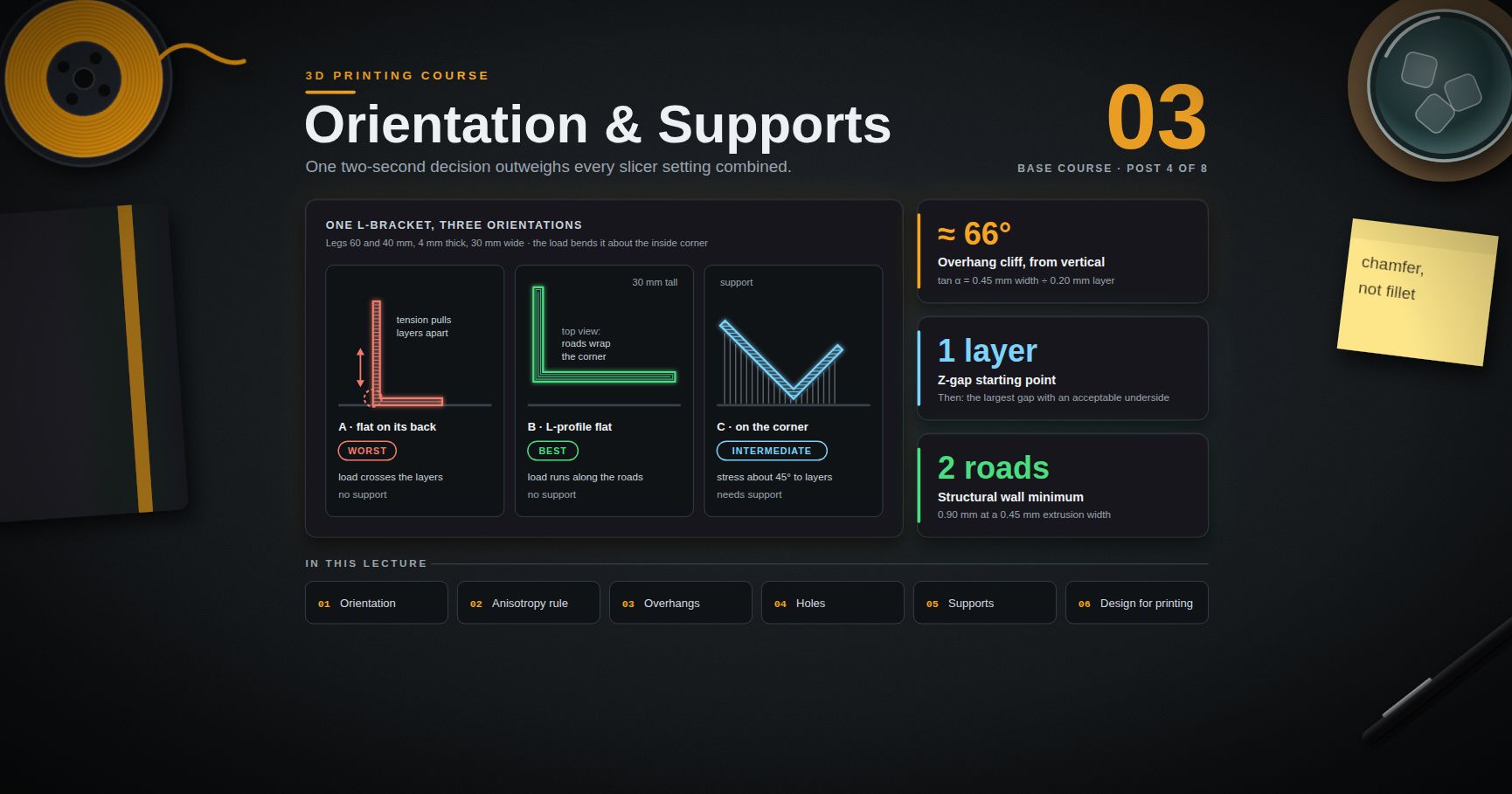
3D Printing Course — 03 · Orientation, Supports and Design for Printing
There is one decision in 3D printing that outweighs every slicer setting combined, and it is made in about two seconds by dragging a model around a build plate. Orientation simultaneously determines which direction the part is strong in, which surfaces come out smooth, how much support material is needed, how long the print takes, and how accurate the holes are — and those five objectives conflict with each other, so there is no orientation that wins on all of them. This post makes that trade-off explicit by working a real part through it, then covers the machinery of overhangs, bridging, holes and supports, and finishes with the design habits that let you avoid most of the problem in the first place.
> Series map: 00 How 3D Printing Works → 01 First Print and Calibration → 02 Slicing in Depth → 03 Orientation, Supports and Design for Printing (this post) → 04 Materials → 05 Dimensional Accuracy and Tolerances → 06 CAD for Printing → 07 Strength, Failure Modes and Functional Parts.
Learning Outcome
- Evaluate a part's orientation against five conflicting objectives and defend the choice you make.- Apply the anisotropy rule — load along layers, never across them — to a real bracket in three orientations.- State the 45-degree overhang guideline properly, derive where it comes from, and compute how it shifts with layer height and extrusion width.- Explain what makes a bridge succeed, and run a bridging test to find your machine's usable span.- Explain why horizontal holes come out undersized and egg-shaped, and apply the teardrop and chamfer fixes.- Choose between normal and tree supports, and set the Z-gap that decides whether supports snap off or fuse on.- Design overhangs out of a part rather than supporting them.- Apply the minimum wall, minimum feature, bottom-chamfer and text rules relative to your own extrusion width.- Split a part sensibly and join it with the right method for the material.- Design a print-in-place mechanism and know what determines its clearance.
Chapter 1 — Orientation as the master decision
Terminology
- Build orientation — the rotation of the part relative to the build plate. Three rotational degrees of freedom, and every one of them matters.- Strength axis — the direction in which the part's layers run continuously, and therefore the direction it is strongest in.- Overhang — a downward-facing surface with nothing directly beneath it.- Bridge — an unsupported horizontal span with both ends anchored in solid material.- Support — sacrificial structure printed to hold up overhangs, then removed.- Interface layer — the dense top layers of a support, which form the surface the part rests on.- Z-gap / contact distance — vertical clearance between support top and part underside.- Self-supporting — geometry whose every downward face is shallow enough to print without support.- Scar — the rough surface left where support touched the part.
The five conflicting objectives
Every orientation is a bet across these:
1. Strength. The service load should run along the layers, not across them (post 00, Chapter 3).2. Surface quality. Vertical walls get layer lines; top faces get skin; downward faces get support scars; sloped faces get stepping.3. Support volume. More overhangs means more sacrificial material, more time, more cleanup, more scars.4. Print time. Roughly, taller means more layers means longer — but a tall thin part also has short layers with long minimum-layer-time waits, so it is not linear.5. Dimensional accuracy. XY features are accurate in a different way than Z features; holes behave completely differently depending on axis; the first layer is squashed.
They conflict. The orientation that makes a bracket strongest usually also makes it tallest, slowest, and puts its bolt holes on their sides. Rank the objectives for this specific part before you rotate anything. For a functional bracket, strength and hole accuracy outrank surface finish. For a display model, the reverse.
A worked part: the L-bracket
Take a concrete part. An L-shaped bracket: two legs, 60 mm and 40 mm, each 4 mm thick and 30 mm wide, with two clearance holes through each leg. In service it is bolted to a wall by the short leg, and a load hangs from the end of the long leg, bending the bracket about the inside corner.
Three orientations, all of which someone will suggest:
Orientation A — flat on its back. The short leg lies on the plate, the long leg stands vertically. Layers are horizontal planes stacked up the long leg.
Orientation B — L-profile flat on the plate. The L profile lies in the plane of the bed and the 30 mm width becomes the build height. Each layer is a complete L outline, 4 mm thick, repeated 30 mm tall.
Orientation C — standing on the corner. The bracket balanced at 45°, corner down, both legs rising.
| | A — flat on its back | B — L-profile flat | C — on the corner ||---|---|---|---|| Layer direction relative to the service load | tensile stress at the corner runs across layers | tensile stress runs along continuous roads that wrap the corner | stress at roughly 45° to layers || Strength under the design load | worst — a clean interlayer break at the inside corner is the predicted failure | best — the corner is a continuous loop of material every layer | intermediate || Support needed | none | none | yes, under the corner and the underside of both legs || Print time | short — 60 mm tall, big cross-sections | moderate — 30 mm tall, small L cross-sections, many layers of little material | longest — support plus a tall diagonal envelope || Bed footprint | small | large — the whole L profile | small || Hole axis | vertical through the short leg, horizontal through the long leg | horizontal through both legs | diagonal through both || Hole quality | mixed: one good, one egg-shaped | both need teardrop or chamfer treatment, or drilling | worst — diagonal holes are both overhung and stepped || Visible surface quality | good on the outer faces; layer lines up the long leg | layer lines wrap the profile; the two big flat faces are top-skin and bed-face | support scars on the underside of both legs || Adhesion risk | good — a big flat first layer | good — a long thin first layer, watch corner lift | poor — small contact area, needs a brim |
The decision. For a load-bearing bracket, orientation B, with the holes handled by chamfering (Chapter 4) or by drilling them out afterwards. The strength difference between A and B is the largest single effect available in this entire course, and it costs nothing but bed space and a hole-detailing decision.
For a bracket that carries nothing and just needs to look tidy on a shelf, orientation A is faster, uses less bed, and gives one good hole for free.
That is the shape of the reasoning. It is not "which orientation is correct" but "which objective am I optimising, and what am I paying for it".
> Trick: before rotating a part, write down in one sentence how it will be loaded in service. Half of all orientation mistakes are made by people who have not consciously answered that question.
Chapter 2 — The anisotropy rule
The rule: load should run along layers, never peel them apart.
Everything in post 00, Chapter 3 reduces to this. Material along a road is continuous polymer. Material across a layer interface is held together only by the chains that diffused across during the moments the interface was hot. The interface is always the weaker path.
The failure modes even look different, which makes diagnosis easy:
| | In-plane failure | Interlayer failure ||---|---|---|| Fracture surface | ragged, drawn, fibrous | flat, follows a single layer line, often glassy || Warning before failure | visible yielding, whitening, deformation | usually none — it goes suddenly || Fracture path | wanders through the section | perfectly planar and horizontal |
If you snap a printed part and the break is a flat horizontal plane, the part was oriented wrong. That is the whole diagnosis.
Three orientations of the same bracket, mechanically
Return to the L-bracket. The load bends the long leg about the inside corner. Bending puts the outside of the corner in tension.
- Orientation A: the tensile stress at the outer corner is vertical, i.e. perpendicular to the horizontal layers. The load is directly peeling the interfaces apart, one at a time, starting at the outermost fibre where the stress is highest. Failure is a clean horizontal snap at the corner, at a load far below what the material could take.- Orientation B: the tensile stress runs around the L profile, which is exactly the direction the perimeter roads run. Continuous polymer carries the load. The interfaces are loaded in shear rather than tension, and shear is a far more favourable loading for a weld.- Orientation C: the stress is at roughly 45° to the interfaces, giving a mixed mode. Better than A, worse than B, and it costs support material and surface quality on top.
Two corrections to the rule
It is not "print everything standing up" or "print everything flat". The rule is about the load, not about the part. A hook loaded in its own plane wants that plane flat on the bed; a hook loaded out of its plane wants the opposite. Reason from the load path every time.
Walls do more than infill. As post 02 noted, in bending, material far from the neutral axis dominates. A part in the right orientation with four walls and 15 % infill will usually beat the same part in the wrong orientation at 60 % infill. Orientation first, walls second, infill third.
Chapter 3 — Overhangs and bridging
The 45-degree guideline, stated properly
The number 45 is a rule of thumb, not a physical constant, and it is worth knowing where it comes from because that tells you when it moves.
Let α be the overhang angle measured from vertical — 0° is a vertical wall, 90° is a flat horizontal ceiling. Each layer is offset horizontally from the one below by:
The fraction of each new road that hangs out over nothing is . The geometric cliff — the angle at which the new road is entirely unsupported and the process becomes bridging rather than overhanging — is where the offset equals the road width:
Put numbers in it:
| Extrusion width | Layer height | αcritical (from vertical) ||---|---|---|| 0.45 mm | 0.30 mm | ≈ 56° || 0.45 mm | 0.20 mm | ≈ 66° || 0.45 mm | 0.10 mm | ≈ 77° |
So thinner layers support steeper overhangs — a directly useful result, and a good reason to drop layer height locally rather than add support.
That is only the geometric limit. Quality degrades well before it, because the unsupported portion of a road droops under gravity and surface tension before it solidifies. How much it droops depends on:
- Cooling. More airflow means faster solidification and better overhangs. This is the same trade against layer adhesion as always.- Speed. A slower overhang perimeter gives each road time to set before the next lands on it.- Material. PLA solidifies quickly and overhangs well; PETG stays soft longer; ABS and ASA in a hot enclosure are the worst case.- Extrusion width. A wider road has more supported area relative to its overhang.
45° is simply an angle that is comfortably inside every one of these limits for common settings, which is why it survived as folklore.
> Watch out: slicers do not agree on which end of the angle they measure from. PrusaSlicer's support threshold is stated with 90° meaning vertical; Cura's overhang angle is measured such that 0° supports everything and 90° supports nothing. The two conventions are complementary, and 45 is the one value where they happen to agree — which is exactly why the confusion goes unnoticed until you type 60. Check your slicer's tooltip before trusting the number.
Measuring your own overhang threshold
Print a stepped overhang test model with faces at 30°, 40°, 45°, 50°, 55°, 60°, 65° and 70° from vertical, with your normal profile and material. Inspect the undersides in raking light and pick the steepest angle whose underside you would accept on a real part. Then set your slicer's support threshold a few degrees conservative of that value.
Repeat per material. The answer for PLA is not the answer for PETG.
Bridging
A bridge is different from an overhang: it is a road spanning from one anchor to another with nothing beneath any of it. It works because the extrudate is laid under tension — the nozzle is moving away from an anchored end, drawing the strand taut — and cools enough to hold its own weight before it sags appreciably.
What a successful bridge needs:
1. Both ends anchored in solid material. A bridge to nowhere is a string.2. Slicer detection. Slicers identify bridging regions and apply dedicated bridge settings: full cooling, a specific bridge speed, and often a reduced bridge flow so the strand is drawn thinner and tauter.3. Unidirectional first layer. The first bridging layer is printed as parallel lines aligned with the span, not at the usual infill angle. Slicers do this automatically; when a bridge fails oddly, check the preview to see whether the slicer detected it as a bridge at all.4. Cooling. Bridging is the one place where maximum fan is nearly always right, whatever the material.
Span limits depend on material, cooling, speed and width, so measure rather than quote. Print a bridging test with steadily increasing spans, and record the span at which sag becomes unacceptable for each material you use. PLA with strong cooling bridges impressively; PETG less so; ABS or ASA in a warm enclosure least of all — which is one more reason enclosed materials benefit from support-free design.
Bridge failure modes and what they mean:
| Symptom | Cause ||---|---|| Strands sag into a curve | too hot, too slow, or too little cooling || Strands snap mid-span | bridge flow too low, or speed too high || Strands pull the anchor walls inward | bridge speed too high with too much tension; slow it down || Surface above the bridge is lumpy | normal — the layer above a bridge is always the worst layer; add one more solid layer over it |
Chapter 4 — Holes
Vertical holes (axis parallel to Z)
Each layer contains a circular inner contour, and the hole is formed by perimeter loops following it. This is the good case, but it is not perfect:
- Consistently undersized. Roads following a concave inner curve are compressed on their inner edge, so material bulges into the bore. Add die swell and elastic recovery and vertical holes come out reliably a little small. This is systematic and repeatable, which means it is correctable — post 05 covers the compensation.- Polygonal. The hole is only as round as the mesh's tessellation. A coarsely exported 5 mm hole can be a visible dodecagon.- Seamed. The perimeter loop's start/stop lands somewhere in the bore, leaving a small ridge. Painted seam placement helps.
Horizontal holes (axis parallel to the bed)
This is the problem case, and the mechanism is worth seeing clearly.
Walk up a horizontal cylindrical bore layer by layer. At the widest point of the circle the bore wall is vertical. As you climb toward the crown, the wall angle sweeps continuously from vertical through 45° and on to horizontal at the very top. So the upper part of every horizontal hole is an increasingly severe overhang, and the last stretch before the crown is effectively an unsupported bridge across the bore.
The results are consistent:
- The top of the bore sags into the hole, so the hole is undersized at the top.- The cross-section becomes egg-shaped or D-shaped rather than circular.- The overhanging surface is rough, so a shaft binds even where the hole is nominally large enough.- The effect worsens with larger diameters (longer unsupported span) and with taller layers.
The fixes, in order of preference
1. Reorient so the hole is vertical. Always consider this first. It is free and it is the best result. It is also why hole axes should be part of the orientation decision in Chapter 1, not an afterthought.
2. Teardrop the hole. Replace the top arc of the circle with two straight faces at 45° from vertical, meeting at a point — the classic teardrop profile. Every surface then satisfies the self-supporting criterion and nothing droops. Cost: the hole is no longer a true circle, so it suits clearance holes, cable passes and bolt shanks rather than precision bearing seats.
3. Chamfer the top of the hole. A less intrusive variant: replace only the top of the arc with a short flat roof and two 45° chamfers, giving a hexagon-topped bore. Preserves more of the circular profile than a full teardrop, still self-supporting, and the flat roof is a short, reliable bridge.
4. Print undersize and machine to size. Model the hole a little small, then drill or ream it. This is the accurate answer for anything that must actually be round and on-size, and it is the standard practice for bearing seats and dowel holes.
5. Leave it and rely on bridging. For large holes with a well-tuned bridging profile, the crown can be acceptable. Check the slicer preview to confirm the crown is being treated as a bridge.
> Common pitfall: teardropping a hole that a bolt head or a bearing has to sit in. The teardrop's point is above the nominal circle, so the hole is larger than nominal at the top and a press fit will be loose there. Teardrops belong on clearance features, not on fits.
Chapter 5 — Supports
Normal versus tree/organic
| | Normal (linear/grid) supports | Tree / organic supports ||---|---|---|| Structure | vertical columns or a grid extruded straight down from every overhang | branching trunks that grow up from the plate or the model and reach out to touch only the points that need it || Material use | high | much lower || Print time | high | lower || Removal | often difficult, especially in deep pockets; comes off in fragments | usually snaps away in a few large pieces || Rigidity | high — good for very large flat overhangs | lower — branches can flex or topple on wide flat ceilings || Compute time | fast | can be slow on complex parts || Best for | large flat overhangs, tall parts needing stabilisation | organic shapes, figurines, parts with scattered small overhangs |
Tree supports originated in the Cura engine; PrusaSlicer added its organic support implementation in version 2.6, and the PrusaSlicer-lineage slicers carry it. Both types are worth having in your repertoire — tree supports are not a strict upgrade.
Interface layers
The top few layers of a support can be printed denser than the body — the interface. A dense interface gives the part's downward face something continuous to land on, so the underside is smoother. The trade is direct: more interface density and more interface layers means a better underside and a harder removal.
Where the machine allows it, an interface printed in a different material solves this outright. Water-soluble PVA or BVOH dissolves away completely. Alternatively, an interface in a material that bonds poorly to the part material — PETG under PLA is the classic pairing, and vice versa — releases cleanly with no dissolution needed.
The Z-gap: the parameter that decides everything
The Z-gap (contact distance, top contact Z distance) is the vertical clearance left between the top of the support and the part's underside. It is the single parameter that determines whether supports snap off or fuse on.
- Too large: the part's first layer over the support has nothing to sit on, and droops badly. You get an ugly underside and, at the extreme, a failed region.- Too small, or zero: the support welds to the part. Removal tears the surface, or is simply not possible without damaging the part.
A common starting point is one layer height. The correct value is a material property in practice, because it depends on how aggressively the material bonds to itself — PETG self-bonds far more strongly than PLA and generally needs a larger gap for the same removability.
Procedure: find your Z-gap
1. Model or download a small test block with a flat overhanging ledge, and put four copies on the plate.2. Use per-object settings (post 02) to give each copy a different Z-gap: 0, 0.5×, 1.0× and 1.5× layer height.3. Print in the material you care about, with your normal profile.4. Remove the supports from each and judge two things: how hard removal was, and how good the resulting underside is.5. Choose the largest gap that still gives an acceptable underside. Record it in your material profile.6. Repeat per material. Do not carry a PLA value into a PETG profile.
There is a matching XY separation parameter controlling horizontal clearance between support and vertical part walls; the same logic applies, and it matters most for supports inside pockets and against tall walls.
Support strategy options
- Support on build plate only. Supports are generated only where they can reach the plate, so nothing ever touches the model's own surfaces except the underside of true overhangs above the plate. No scars on model faces. It fails whenever an overhang sits above the part itself.- Painted supports (enforcers and blockers). Paint directly on the model where you want support and where you forbid it. Almost always better than adjusting the global angle threshold, which is a blunt instrument that adds support everywhere the threshold catches.- Support blockers as modifier volumes. Drop a box over a region that must stay clean.
The scar
Supports always leave a mark. The interface never separates perfectly cleanly, so a supported face is rougher than an unsupported one and dimensionally less reliable. Three responses, in order of quality:
1. Design the overhang away (Chapter 6). Best answer.2. Orient so the scar lands on a face nobody sees or measures. Second best.3. Accept it and post-process — knife, file, sanding. Real, but it is manual labour on every copy.
Chapter 6 — Support-free design
Support is a workaround. The superior answer, wherever the part's function permits, is geometry that does not need it.
Chamfers instead of overhangs
Under a horizontal ledge, boss or shelf, add a 45° chamfer rather than leaving a square underside. The chamfer is self-supporting, prints cleanly and adds material exactly where a bending stress concentration would otherwise sit.
Note the asymmetry with fillets: a fillet under a ledge is not a good substitute, because a fillet's surface becomes tangent to horizontal at its lower end — the worst possible overhang, right where the geometry starts. Chamfer downward-facing transitions; fillet upward-facing ones.
Self-supporting geometry throughout
Once you have measured your machine's overhang threshold (Chapter 3), design to it. Cones instead of cylinders on downward faces, pyramidal instead of rectangular bosses, sloped instead of flat undersides. On a part designed this way, the support setting is simply "off", and that is worth a great deal of cleanup time over a print run.
Sacrificial bridge layers
Over a large horizontal internal hole or pocket, a single sacrificial layer of bridging material gives the layers above something to build on. Many slicers can add this automatically for internal features; it can also be modelled deliberately as a thin membrane to be drilled out afterwards.
Split the part
If a part cannot be made support-free in any single orientation, cut it. Two halves, each oriented for its own loads and each printing support-free, glued or bolted together, will often beat one supported part on strength, surface and time simultaneously. See Chapter 7 for where to cut and how to join.
Print in place
Sometimes the correct answer to "how do I assemble this" is "don't". Print-in-place hinges, captive nuts, chain links and compliant mechanisms remove assembly entirely. They are clearance problems, and that is the topic of Chapter 7's last section.
Put text and detail where the process can print it
Embossed text on a top or vertical face prints legibly. Engraved text on a top face prints legibly. Text on a downward face is a support problem and will be a mess. Move it.
Chapter 7 — Designing for the process
Minimum wall thickness relative to extrusion width
A wall is built from an integer number of roads. If your extrusion width is 0.45 mm, then:
A wall of 1.0 mm asks for 2.22 roads. Classic perimeter generation lays two roads and dumps the remaining 0.10 mm into gap fill; variable-width extrusion (post 02) instead widens both roads to 0.50 mm, which is better but still a compromise.
The rule: design walls as whole multiples of your extrusion width, and treat two roads as the practical structural minimum for anything that carries load or needs to survive handling. Single-road walls exist and are useful for vase-mode parts and light enclosures, but they are not structure.
Note the dependency: this rule is tied to your nozzle and profile. If you design a 0.90 mm wall and later print with a 0.6 mm nozzle, the wall becomes an awkward 1.5 roads. Parametrise the wall thickness in CAD (post 06) rather than hard-coding it.
Minimum feature size
- Nothing narrower than one extrusion width can exist. A 0.3 mm rib on a 0.45 mm profile is simply not printed, or is printed at 0.45 mm and is therefore wrong.- Embossed or engraved detail should be at least two extrusion widths wide and at least two layers deep or tall to be legible. Below that it disappears into the surface texture.- Small holes close up. A 1 mm vertical hole in a 0.4 mm nozzle profile has room for barely one road around it; expect it to be undersized and rough, and plan to drill it.
Chamfer the bottom edge
Elephant foot (post 01) bulges the bottom edge outward. Slicers offer a compensation setting that shrinks the first layer inward, but the better fix lives in the model: put a small chamfer — typically a few tenths of a millimetre at 45° — on every bottom edge.
The chamfer gives the squashed first layer somewhere to bulge into rather than past the nominal footprint. The part still sits flat, the base dimension is preserved, and the fix travels with the model into any slicer, on any printer, forever. This is one of the highest value-per-effort habits in the whole discipline.
Text
- Cap height of roughly 4–5 mm and above reads reliably; below that, legibility depends heavily on the font and on your extrusion width.- Stroke width should be at least two extrusion widths. Thin serif and script fonts do not survive; a bold sans-serif does.- Relief depth of at least two layers, both for embossed and engraved.- Embossed text generally reads better than engraved on FDM, because engraved text's fine channels get partially filled.- On a vertical face, vertical resolution of the glyph is limited by layer height, so curves and thin horizontals suffer.
Thin unsupported pillars
A tall, thin pillar is the classic failed feature, and there are three separate reasons:
1. It has no time to cool. Each layer is tiny, so the nozzle returns before the previous layer has solidified, and the pillar turns into a soft blob.2. It has no rigidity. The nozzle's drag and the travel moves knock it around.3. It is unstable. A tall narrow column has a small base and a high aspect ratio.
Fixes, in order: taper it (a cone is stronger and cools better than a cylinder); enable minimum layer time or slow down for short layers; print several parts at once so each pillar has time to cool between visits; add a sacrificial cooling tower next to it; or reorient so the pillar lies down.
Splitting and joining
Where to cut. Choose a plane that (a) lets each half print support-free, (b) puts each half's layers in the right direction for its own loads, (c) does not pass through the region of highest stress, and (d) leaves a joint you can align. Cutting straight through a bending corner puts the joint exactly where the part is trying hardest to break.
Alignment features. Never rely on a plain butt joint plus glue for alignment. Add:
- Dowel pins — printed pins and matching holes, or bought steel/brass pins in reamed holes (more accurate).- Dovetails or keyed slots — self-aligning and carry shear load without relying on the adhesive.- Lip and groove — a step around the joint that locates the halves and increases bonded area.- A screw plus a heat-set insert — a mechanical joint that can be taken apart again.
Adhesives by material. Surface preparation dominates joint strength: abrade the mating faces, degrease them, and clamp. Published bond-strength figures do not transfer between filaments, so test on scrap from the same spool.
| Material | Best practical option | Notes ||---|---|---|| PLA | cyanoacrylate for speed; two-part epoxy for strength and gap filling | no convenient hobby solvent; CA is brittle, epoxy is tougher || PETG | two-part epoxy | CA bonds indifferently to PETG; roughen the surfaces thoroughly || ABS / ASA | acetone solvent welding | dissolves and re-fuses the polymer, giving the closest thing to a parent-strength joint available in hobby printing. An acetone/ABS slurry fills gaps. Ventilate properly || Nylon (PA) | mechanical fastening, or a nylon-specific primer with CA | notoriously difficult to bond; plan a screwed or dovetailed joint instead || TPU | flexible cyanoacrylate or polyurethane adhesive | rigid adhesives crack out of a flexing joint || Any | screws, heat-set inserts, dovetails | the answer that always works and can be disassembled |
Print-in-place mechanisms
A print-in-place mechanism is one whose moving parts are printed already assembled, separated only by a designed gap that the process does not bridge. Hinges (a pin printed inside a barrel), chain links, ball joints, captive nuts and compliant flexures all work this way.
Two design considerations that are not about the gap:
Orient flexures correctly. A living hinge or compliant flexure is a thin web that bends repeatedly. If the web's thin dimension lies along Z, bending it peels the layers apart and it will delaminate within a few cycles. Orient the part so the web's thin dimension lies in the XY plane, so bending loads run along the roads instead. This is the anisotropy rule applied to a fatigue problem, and post 07 returns to it.
You cannot post-process the inside. Mating faces inside a print-in-place mechanism are whatever the process left them. If they need to be smooth, the mechanism needs to be assembled rather than printed in place.
Clearance
The gap is the whole design. Too small and the parts fuse into a solid lump; too large and the mechanism is sloppy. The right value is not a single universal number, because it depends on:
- extrusion width and layer height,- whether the gap is vertical (between layers) or horizontal (between roads) — these behave differently,- material shrinkage, which differs enormously between PLA and ABS,- the accuracy of your flow and dimensional calibration,- whether the mating surfaces are curved or flat.
> Watch out: the numeric treatment of clearances, fits and tolerances — including the measurement procedure for finding your machine's numbers, and how to compensate for systematic hole and dimensional error — is the subject of post 05, Dimensional Accuracy and Tolerances. Do not take a clearance figure from a forum post and design a mechanism around it. Print a clearance ladder — a test coupon with a series of gaps stepping across a range — measure what your machine actually produces, and design from that.
Practice Exercises
Exercise 1 — Compute your overhang cliff
Your profile uses 0.42 mm extrusion width. Compute the geometric critical overhang angle (measured from vertical) at layer heights 0.28 mm, 0.20 mm and 0.12 mm. Then state, in one sentence, why the practically usable angle is lower than each of these.
<details><summary>Solution</summary>
</details>
Exercise 2 — Orient a part, and defend it
A pulley bracket is a flat plate 50 × 30 × 5 mm with a 20 mm tall boss on one face carrying a horizontal 8 mm shaft hole. In service, belt tension pulls the shaft sideways, bending the boss where it meets the plate. Choose an orientation and justify it against all five objectives from Chapter 1.
<details><summary>Solution</summary>
</details>
Exercise 3 — Wall thickness audit
Your profile uses a 0.4 mm nozzle at 0.45 mm extrusion width. A model has walls specified at 1.0 mm, 1.2 mm and 2.0 mm. For each, state how many full roads fit, what the leftover is, and what you would change the CAD dimension to.
<details><summary>Solution</summary>
</details>
Exercise 4 — Overhang test
Print a stepped overhang test model in each material you own, with your normal profile. Record the steepest acceptable angle for each. Then set each material's slicer profile support threshold a few degrees conservative of that value, and note the values in your calibration log from post 01.
Exercise 5 — Z-gap ladder
Run the Chapter 5 procedure: four copies of an overhang test block with Z-gaps of 0, 0.5×, 1.0× and 1.5× layer height, set via per-object settings. Record removal difficulty and underside quality for each. Repeat for a second material and compare the answers.
Exercise 6 — Design the supports out
Take any model you have previously printed with supports. Redesign it: chamfers under ledges, self-supporting transitions, teardropped horizontal holes, and a split if necessary. Slice both versions and compare print time, material use, and the number of surfaces that will need post-processing.
Exercise 7 — Split and join
Take a part that does not fit your build volume, or one that cannot be printed support-free in any orientation. Choose a cut plane, justify it against the four criteria in Chapter 7, add alignment features, and state which adhesive or mechanical joint you would use for your chosen material and why.
Cheat-sheet
| What | How ||------|-----|| The first question | how is this part loaded in service? || The anisotropy rule | load along layers, never peeling them apart || Interlayer failure signature | a flat, planar break following one layer line || Orientation trades | strength, surface, support, time, accuracy — they conflict; rank them first || Geometric overhang cliff | || Thinner layers | support steeper overhangs || Slicer angle convention | check the tooltip — PrusaSlicer and Cura measure from opposite ends || Bridge requirements | both ends anchored, detected as a bridge, unidirectional first layer, full cooling || Horizontal holes | undersized and egg-shaped — the crown is an unsupported overhang || Horizontal hole fixes | reorient → teardrop → chamfered top → drill/ream → tuned bridging || The decisive support setting | Z-gap / contact distance || Z-gap rule | the largest gap that still gives an acceptable underside; per material || Under a ledge | chamfer, not a fillet || Wall design rule | whole multiples of extrusion width; parametrise it in CAD || Defeat elephant foot | model a small 45° chamfer on every bottom edge || Tall thin pillars | taper them, enable minimum layer time, or print several parts at once || Strongest hobby joint | acetone solvent welding, ABS/ASA only || Flexure orientation | thin dimension in XY, so bending runs along the roads || Clearance numbers | measure them yourself with a clearance ladder — post 05 |
What's next
Post 04 covers materials: what PLA, PETG, ABS/ASA, TPU, nylon, PC and the filled composites actually are, how their thermal and mechanical properties differ, what each one's failure behaviour looks like, how moisture affects them and how to dry them, which need an enclosure and why, and how to choose a material from a part's requirements rather than from what is on the shelf. It supplies the property data that this post's orientation and design decisions have been leaning on.
References
- PrusaSlicer knowledge base — including Organic supports and the support-parameter articles.- Ultimaker Cura documentation — tree support and overhang-angle settings, and the convention used for the overhang angle.- OrcaSlicer wiki — support parameters, painted supports and per-object settings.- Hubs knowledge base — design for 3D printing — process-by-process design guidelines, including FDM feature-size guidance.- Protolabs design tips — manufacturability guidance covering additive alongside machining and moulding.- Ellis' Print Tuning Guide — practical overhang, bridging and support-parameter tuning.- ISO/ASTM 52900 — Additive manufacturing, general principles, terminology — the standard vocabulary for build orientation and process terms.
> Note: this post is in progress. Planned additions: photographs of the L-bracket printed and broken in all three orientations; a printable overhang-and-bridging test coupon; a gallery of horizontal holes with and without teardrop and chamfer treatment.

Real Analysis — 05 · Sequences of Functions, Uniform Convergence and Power Series
Much of analysis builds functions as limits: $e^x$ as a power series, $\sin x$ as a Taylor series, the Weierstrass function of post 03 as a sum of cosines, solutions of differential equations as limits of approximations. The question is always the same: which properties survive the limit? Continuity, integrals and derivatives can all be lost under the obvious "point by point" notion of convergence. This post introduces the stronger notion that repairs most of this, uniform convergence, proves exactly what it preserves (continuity and integrals) and what it does not (derivatives, without an extra hypothesis), and then applies it to power series: radius of convergence, term-by-term calculus, Abel's theorem, and the difference between a Taylor series and the function it came from. It closes the core course with the Weierstrass approximation theorem and a map of where analysis goes next.
> Series map: 00 The Real Numbers & Completeness → 01 Sequences & Series → 02 Topology of ℝ & Continuity → 03 Differentiation & Taylor's Theorem → 04 The Riemann Integral → 05 Uniform Convergence & Power Series (this post).
Learning Outcome
- Define pointwise and uniform convergence of a sequence of functions, and tell them apart with $x^n$ on $[0, 1]$.- Use the sup-norm test and the Cauchy criterion for uniform convergence.- Prove that a uniform limit of continuous functions is continuous (the $\varepsilon/3$ argument).- Prove that integrals commute with uniform limits, and show with an example that pointwise limits break this.- State the theorem on limits of derivatives and give the counterexample that shows why it needs uniform convergence of the derivatives.- State and prove the Weierstrass M-test and use it on series of functions.- Compute the radius of convergence with the Cauchy–Hadamard formula and the ratio test, and check the endpoints.- Prove that a power series converges uniformly on every closed interval inside its radius, and differentiate and integrate it term by term.- State Abel's theorem and use it to show $1 - \frac12 + \frac13 - \dots = \ln 2$.- Explain why a smooth function need not equal its Taylor series, and state the Weierstrass approximation theorem with the Bernstein-polynomial idea.
Chapter 1 — Pointwise versus uniform convergence
Terminology
- Sequence of functions — functions $fn : A \to \mathbb{R}$, $n = 1, 2, \dots$, all on the same domain $A \subseteq \mathbb{R}$.- Pointwise convergence — $fn \to f$ pointwise on $A$ if for each fixed $x \in A$, the number sequence $fn(x)$ converges to $f(x)$. In quantifiers: for every $x \in A$ and every $\varepsilon > 0$ there is $N$ (which may depend on both $x$ and $\varepsilon$) with $\lvert fn(x) - f(x)\rvert < \varepsilon$ for $n \geq N$.- Uniform convergence — $fn \to f$ uniformly on $A$ if for every $\varepsilon > 0$ there is $N$ (depending on $\varepsilon$ only) with $\lvert fn(x) - f(x)\rvert < \varepsilon$ for all $n \geq N$ and all $x \in A$.- Sup norm — for a bounded $g : A \to \mathbb{R}$, $\lVert g\rVert\infty = \sup{x \in A}\lvert g(x)\rvert$.- Epsilon-tube — the band of width $\varepsilon$ on each side of the graph of $f$. Uniform convergence says: from some $N$ on, the whole graph of every $fn$ lies inside the tube.
The only difference between the two definitions is the order of "there is $N$" and "for all $x$". Uniform convergence implies pointwise convergence; the converse fails.
Sup-norm test. $fn \to f$ uniformly on $A$ if and only if $\lVert fn - f\rVert\infty \to 0$ (where $\lVert fn - f\rVert\infty$ is finite for large $n$). This is the definition rewritten: "$\lvert fn(x) - f(x)\rvert < \varepsilon$ for all $x$" gives $\sup \leq \varepsilon$, and $\sup < \varepsilon$ gives it for all $x$.
The key example: x to the n on [0, 1]
Let $fn(x) = x^n$ on $[0, 1]$. For $0 \leq x < 1$, $x^n \to 0$ (post 01); at $x = 1$, $1^n = 1$. So the pointwise limit is
$$f(x) = \begin{cases} 0 & 0 \leq x < 1, \\ 1 & x = 1. \end{cases}$$
Every $fn$ is continuous, and the limit is not. The convergence is not uniform: the point $xn = (1/2)^{1/n}$ lies in $[0, 1)$ and $fn(xn) - f(xn) = \frac12$, so $\lVert fn - f\rVert\infty \geq \frac12$ for every $n$ (in fact the sup over $[0,1)$ is $1$). The "bad point" slides towards $1$:
| $n$ | 1 | 2 | 5 | 10 | 50 ||---|---|---|---|---|---|| $xn = (1/2)^{1/n}$ | $0.5$ | $0.7071$ | $0.8706$ | $0.9330$ | $0.9862$ |
For each fixed $x < 1$ you eventually get close to $0$, but no single $N$ works for all $x$ at once.
On a smaller domain the problem disappears. On $[0, \frac12]$, $\lVert x^n - 0\rVert\infty = (\frac12)^n \to 0$, so $x^n \to 0$ uniformly on $[0, \frac12]$, and indeed on $[0, r]$ for any $r < 1$.
Damping the bad point. Multiply by $(1 - x)$: $kn(x) = x^n(1 - x)$ on $[0, 1]$. The pointwise limit is $0$ everywhere (including $x = 1$, where $kn(1) = 0$). Setting $kn'(x) = x^{n-1}\bigl(n - (n+1)x\bigr) = 0$ gives the maximum at $x = \frac{n}{n+1}$, so
$$\lVert kn\rVert\infty = \left(\frac{n}{n+1}\right)^n \frac{1}{n+1} < \frac{1}{n+1} \to 0.$$
So $kn \to 0$ uniformly on all of $[0, 1]$. For example, $\lVert k{10}\rVert\infty = \frac{10^{10}}{11^{11}} \approx 0.0350$. The factor $(1 - x)$ kills the values near $1$ exactly where $x^n$ misbehaved.
A uniform example: smoothing the corner of the absolute value
Let $gn(x) = \sqrt{x^2 + 1/n^2}$ on $\mathbb{R}$. With $h = 1/n$,
$$0 \leq \sqrt{x^2 + h^2} - \lvert x\rvert = \frac{h^2}{\sqrt{x^2 + h^2} + \lvert x\rvert} \leq \frac{h^2}{h} = h,$$
with equality at $x = 0$. So $\lVert gn - \lvert x\rvert\rVert\infty = \frac1n \to 0$: uniform convergence to $\lvert x\rvert$ on all of $\mathbb{R}$. With $\varepsilon = 0.25$, every $gn$ with $n \geq 5$ lies inside the $\varepsilon$-tube around $\lvert x\rvert$ (its largest error is $\frac15 = 0.2$), while $g2$ (error $0.5$) does not.
Every $gn$ is smooth, and the limit $\lvert x\rvert$ has a corner. Uniform convergence preserved continuity but not differentiability. Chapter 2 explains both facts.
The Cauchy criterion for uniform convergence
Theorem. A sequence $(fn)$ converges uniformly on $A$ if and only if for every $\varepsilon > 0$ there is $N$ with
$$\lvert fn(x) - fm(x)\rvert < \varepsilon \quad \text{for all } m, n \geq N \text{ and all } x \in A.$$
Proof. ($\Rightarrow$) If $\lvert fn - f\rvert < \varepsilon/2$ everywhere for $n \geq N$, then $\lvert fn - fm\rvert \leq \lvert fn - f\rvert + \lvert f - fm\rvert < \varepsilon$.
($\Leftarrow$) For each fixed $x$, $(fn(x))$ is a Cauchy sequence of reals, so it converges (completeness, post 01); call the limit $f(x)$. Given $\varepsilon$, take $N$ from the hypothesis. For $n \geq N$ and any $x$, let $m \to \infty$ in $\lvert fn(x) - fm(x)\rvert < \varepsilon$ to get $\lvert fn(x) - f(x)\rvert \leq \varepsilon$. The same $N$ works for every $x$, so the convergence is uniform. $\blacksquare$
The value of the criterion: it proves uniform convergence without knowing the limit in advance. The M-test in Chapter 3 is built on it.
Chapter 2 — What uniform convergence preserves
Continuity
Theorem. If each $fn$ is continuous at $c \in A$ and $fn \to f$ uniformly on $A$, then $f$ is continuous at $c$.
Proof (the $\varepsilon/3$ argument). Let $\varepsilon > 0$. Choose $N$ with $\lvert fN(x) - f(x)\rvert < \varepsilon/3$ for all $x \in A$. Since $fN$ is continuous at $c$, choose $\delta$ with $\lvert fN(x) - fN(c)\rvert < \varepsilon/3$ for $\lvert x - c\rvert < \delta$. Then for such $x$,
$$\lvert f(x) - f(c)\rvert \leq \lvert f(x) - fN(x)\rvert + \lvert fN(x) - fN(c)\rvert + \lvert fN(c) - f(c)\rvert < \frac\varepsilon3 + \frac\varepsilon3 + \frac\varepsilon3 = \varepsilon. \qquad \blacksquare$$
The first and third terms need the same $N$ at two different points, $x$ and $c$. That is exactly what uniformity supplies and pointwise convergence does not. The theorem also gives a quick proof that $x^n$ does not converge uniformly on $[0, 1]$: the limit is discontinuous.
A partial converse (Dini's theorem). If $K$ is compact, each $fn$ is continuous on $K$, $fn(x) \geq f{n+1}(x)$ for all $x$ and $n$, and $fn \to f$ pointwise with $f$ continuous, then the convergence is uniform. (Rudin, Theorem 7.13.) All four hypotheses are needed; $x^n$ on $[0, 1]$ fails only "the limit is continuous".
Integrals
Theorem. If each $fn$ is Riemann integrable on $[a, b]$ and $fn \to f$ uniformly on $[a, b]$, then $f$ is integrable and
$$\inta^b f = \lim{n \to \infty} \inta^b fn.$$
Proof. Let $\varepsilonn = \lVert fn - f\rVert\infty$, which tends to $0$. Then $fn - \varepsilonn \leq f \leq fn + \varepsilonn$ on $[a, b]$ (so $f$ is bounded). Upper and lower sums respect these inequalities, so the upper and lower integrals of $f$ (post 04) satisfy
$$\inta^b fn - \varepsilonn(b - a) \leq \underline{\inta^b} f \leq \overline{\inta^b} f \leq \inta^b fn + \varepsilonn(b - a).$$
The gap between the upper and lower integrals is at most $2\varepsilonn(b - a) \to 0$, so they are equal and $f$ is integrable. The same inequalities give $\left\lvert \inta^b f - \inta^b fn\right\rvert \leq \varepsilonn(b - a) \to 0$. $\blacksquare$
Pointwise convergence is not enough. Let $fn(x) = n x (1 - x^2)^n$ on $[0, 1]$. For $0 < x < 1$, $fn(x) \to 0$ (a geometric factor beats the factor $n$), and $fn(0) = fn(1) = 0$. So $fn \to 0$ pointwise. But
$$\int0^1 n x (1 - x^2)^n\,dx = \left[-\frac{n}{2(n+1)}(1 - x^2)^{n+1}\right]0^1 = \frac{n}{2(n+1)} \to \frac12 \neq 0 = \int0^1 0\,dx.$$
The convergence is far from uniform: the maximum of $fn$, at $x = 1/\sqrt{2n + 1}$, grows without bound (about $1.34$ for $n = 10$ and $4.28$ for $n = 100$). A travelling spike keeps area $\approx \frac12$ while its base shrinks.
Derivatives need more
Uniform convergence of $fn$ says nothing about $fn'$. Two warnings:
- $gn(x) = \sqrt{x^2 + 1/n^2} \to \lvert x\rvert$ uniformly (Chapter 1): smooth functions, non-differentiable limit.- $hn(x) = \frac{\sin(n^2 x)}{n} \to 0$ uniformly on $\mathbb{R}$ (the sup norm is $\frac1n$), but $hn'(x) = n\cos(n^2 x)$, and $hn'(0) = n \to \infty$. The derivatives do not converge to the derivative of the limit, which is $0$.
The fix is to assume uniform convergence of the derivatives.
Theorem (limits of derivatives). Let each $fn$ be differentiable on $[a, b]$. Suppose $(fn(x0))$ converges for some $x0 \in [a, b]$, and $(fn')$ converges uniformly on $[a, b]$. Then $(fn)$ converges uniformly on $[a, b]$ to a function $f$, and $f'(x) = \lim{n \to \infty} fn'(x)$ for every $x \in [a, b]$. (Rudin, Theorem 7.17.)
Idea of proof (with the extra assumption that each $fn'$ is continuous). By FTC 2 (post 04), $fn(x) = fn(x0) + \int{x0}^x fn'$. The integrals converge uniformly by the integral theorem above, so $fn \to f(x) = f(x0) + \int{x0}^x g$ with $g = \lim fn'$, which is continuous as a uniform limit. FTC 1 gives $f' = g$. The general proof uses the Mean Value Theorem instead of integrals.
> Watch out: "uniformly" in this theorem is about the derivatives. Uniform convergence of $fn$ alone never licenses swapping $\lim$ and $\frac{d}{dx}$.
Chapter 3 — Series of functions and the Weierstrass M-test
A series of functions $\sum{k=1}^{\infty} uk(x)$ converges pointwise or uniformly on $A$ when its partial sums $Sn(x) = \sum{k=1}^{n} uk(x)$ do. The three theorems of Chapter 2 become:
| If the series converges uniformly on the interval and | then ||---|---|| each $uk$ is continuous | the sum is continuous || each $uk$ is integrable on $[a, b]$ | $\int \sum uk = \sum \int uk$ (integrate term by term) || each $uk$ is differentiable, $\sum uk'$ converges uniformly, $\sum uk(x0)$ converges | $(\sum uk)' = \sum uk'$ (differentiate term by term) |
Theorem (Weierstrass M-test). Suppose $\lvert uk(x)\rvert \leq Mk$ for all $x \in A$ and all $k$, and $\sum Mk$ converges. Then $\sum uk$ converges uniformly (and absolutely) on $A$.
Proof. For $n > m$ and every $x \in A$,
$$\lvert Sn(x) - Sm(x)\rvert = \left\lvert \sum{k=m+1}^{n} uk(x)\right\rvert \leq \sum{k=m+1}^{n} Mk.$$
The right side does not depend on $x$, and it is small for large $m$ because $\sum Mk$ converges (Cauchy criterion for number series, post 01). So the partial sums satisfy the uniform Cauchy criterion of Chapter 1. $\blacksquare$
Worked example. $F(x) = \sum{k=1}^{\infty} \frac{\sin(kx)}{k^2}$. Take $Mk = \frac{1}{k^2}$; $\sum \frac1{k^2}$ converges (its value is $\frac{\pi^2}{6}$). So the series converges uniformly on $\mathbb{R}$ and $F$ is continuous. Term-by-term differentiation would give $\sum \frac{\cos(kx)}{k}$, which diverges at $x = 0$ (harmonic series). So the M-test gives continuity, and says nothing about differentiability.
The same test proves the continuity of the Weierstrass function in post 03: $\lvert a^n\cos(b^n\pi x)\rvert \leq a^n$ with $\sum a^n$ a convergent geometric series.
> Common pitfall: the M-test is sufficient, not necessary. $\sum{k \geq 1} \frac{(-1)^{k+1}}{k}$ (constant functions) converges uniformly, trivially, but no summable $Mk \geq \frac1k$ exists.
Chapter 4 — Power series
Terminology
- Power series about $x0$ — a series $\sum{k=0}^{\infty} ak (x - x0)^k$ with real coefficients $ak$. Below, $x0 = 0$ for simplicity.- Radius of convergence — the number $R \in [0, \infty]$ such that the series converges absolutely for $\lvert x\rvert < R$ and diverges for $\lvert x\rvert > R$. At $x = \pm R$ anything can happen.- Limit superior — $\limsup{k} bk = \lim{n \to \infty} \sup{k \geq n} bk$, which always exists in $[-\infty, \infty]$ (monotone convergence, post 01).
Radius of convergence
Theorem (Cauchy–Hadamard). Let $\beta = \limsup{k \to \infty} \lvert ak\rvert^{1/k}$. Then the radius of convergence is $R = 1/\beta$ (with $R = \infty$ if $\beta = 0$ and $R = 0$ if $\beta = \infty$).
Proof. Apply the root test (post 01) to $\sum \lvert ak x^k\rvert$: $\limsup \lvert ak x^k\rvert^{1/k} = \beta\lvert x\rvert$. If $\beta\lvert x\rvert < 1$ the series converges absolutely; if $\beta\lvert x\rvert > 1$ the terms do not tend to $0$, so it diverges. $\blacksquare$
Ratio formula. If $\lim \left\lvert \frac{ak}{a{k+1}}\right\rvert$ exists (in $[0, \infty]$), it equals $R$. When it applies it is easier; when it does not, the root formula still works.
| Series | $R$ | At $x = R$ | At $x = -R$ ||---|---|---|---|| $\sum x^k$ | $1$ | diverges | diverges || $\sum x^k / k$ (from $k = 1$) | $1$ | diverges (harmonic) | converges (alternating) || $\sum x^k / k^2$ (from $k = 1$) | $1$ | converges | converges || $\sum x^k / k!$ | $\infty$ | — | — || $\sum k!\,x^k$ | $0$ | — | — |
The first three show that all endpoint behaviours occur with the same radius.
When the ratio test fails. Let $ak = 2^k$ for even $k$ and $ak = 1$ for odd $k$. The ratios $\lvert ak / a{k+1}\rvert$ alternate between values tending to $0$ and to $\infty$, so they have no limit. But $\lvert ak\rvert^{1/k}$ is $2$ for even $k$ and $1$ for odd $k$, so $\limsup = 2$ and $R = \frac12$.
Uniform convergence inside the radius
Theorem. If $0 < r < R$, the power series converges uniformly on $[-r, r]$. Consequently it converges uniformly on every compact subset of $(-R, R)$, and its sum is continuous on $(-R, R)$.
Proof. Since $r < R$, the series converges absolutely at $x = r$, so $\sum \lvert ak\rvert r^k$ converges. On $[-r, r]$, $\lvert ak x^k\rvert \leq \lvert ak\rvert r^k = Mk$. Apply the M-test. A compact $K \subset (-R, R)$ is closed and bounded, so its max of $\lvert x\rvert$ is some $r < R$ and $K \subseteq [-r, r]$. Every $x \in (-R, R)$ lies in some $[-r, r]$, and continuity is local. $\blacksquare$
> Watch out: the convergence need not be uniform on the whole open interval. For $\sum x^k$ on $(-1, 1)$ the tail after $x^n$ is $\sum{k > n} x^k = \frac{x^{n+1}}{1 - x}$, which is unbounded as $x \to 1^-$ for every $n$.
Term-by-term differentiation and integration
Theorem. Let $f(x) = \sum{k=0}^{\infty} ak x^k$ with radius $R > 0$. Then on $(-R, R)$:
$$f'(x) = \sum{k=1}^{\infty} k\,ak x^{k-1}, \qquad \int0^x f(t)\,dt = \sum{k=0}^{\infty} \frac{ak}{k+1} x^{k+1},$$
and both new series also have radius $R$. Hence $f$ is infinitely differentiable on $(-R, R)$, and $ak = \frac{f^{(k)}(0)}{k!}$: a power series is the Taylor series of its own sum.
Proof sketch. Since $k^{1/k} \to 1$, $\limsup (k\lvert ak\rvert)^{1/k} = \limsup \lvert ak\rvert^{1/k}$, so the differentiated series has the same radius (similarly for the integrated one). On any $[-r, r]$ with $r < R$ the differentiated series converges uniformly, so the derivative theorem (Chapter 2) applies. Integration follows from the integral theorem. Repeating gives all derivatives, and evaluating the $k$-th derivative at $0$ leaves only $k!\,ak$. $\blacksquare$
Worked example 1. From $\frac{1}{1 - x} = \sum{k \geq 0} x^k$ on $(-1, 1)$, differentiate: $\frac{1}{(1 - x)^2} = \sum{k \geq 1} k x^{k-1}$. Multiply by $x$ and put $x = \frac12$:
$$\sum{k=1}^{\infty} \frac{k}{2^k} = \frac{1/2}{(1 - 1/2)^2} = 2.$$
Worked example 2. From $\frac{1}{1 + t} = \sum{k \geq 0} (-1)^k t^k$ on $(-1, 1)$, integrate from $0$ to $x$:
$$\ln(1 + x) = x - \frac{x^2}{2} + \frac{x^3}{3} - \dots = \sum{k=1}^{\infty} \frac{(-1)^{k+1}}{k}x^k, \qquad \lvert x\rvert < 1.$$
Worked example 3. $E(x) = \sum{k \geq 0} \frac{x^k}{k!}$ has $R = \infty$. Differentiating term by term gives $E' = E$, with $E(0) = 1$. So $E(x) = e^x$ (the function $E(x)e^{-x}$ has zero derivative, hence is constant, by post 03).
Abel's theorem at the edge
The formula for $\ln(1 + x)$ was proved for $\lvert x\rvert < 1$. At $x = 1$ the series $1 - \frac12 + \frac13 - \dots$ converges (alternating series test, post 01), but does it converge to $\ln 2$?
Theorem (Abel). Suppose $\sum{k=0}^{\infty} ak$ converges. Then $f(x) = \sum ak x^k$ converges for $\lvert x\rvert < 1$ and
$$\lim{x \to 1^-} f(x) = \sum{k=0}^{\infty} ak.$$
Proof. Let $s = \sum ak$. Replacing $a0$ by $a0 - s$ changes $f$ by the constant $-s$ and makes the sum $0$, so assume $s = 0$. Let $sn = a0 + \dots + an$; then $sn \to 0$, so $(sn)$ is bounded and $\sum sk x^k$ converges for $\lvert x\rvert < 1$. Summation by parts ($ak = sk - s{k-1}$) gives, for $0 < x < 1$,
$$f(x) = \sum{k=0}^{\infty} ak x^k = (1 - x)\sum{k=0}^{\infty} sk x^k.$$
Given $\varepsilon > 0$, choose $N$ with $\lvert sk\rvert < \varepsilon$ for $k > N$. Then
$$\lvert f(x)\rvert \leq (1 - x)\sum{k=0}^{N}\lvert sk\rvert + \varepsilon(1 - x)\sum{k > N} x^k \leq (1 - x)\sum{k=0}^{N}\lvert sk\rvert + \varepsilon.$$
The first term tends to $0$ as $x \to 1^-$, so $\lvert f(x)\rvert < 2\varepsilon$ for $x$ close enough to $1$. Hence $f(x) \to 0 = s$. $\blacksquare$
Apply it to $ak = \frac{(-1)^{k+1}}{k}$: the left side is $\lim{x \to 1^-}\ln(1 + x) = \ln 2$ by continuity of $\ln$. So
$$1 - \frac12 + \frac13 - \frac14 + \dots = \ln 2 \approx 0.693147.$$
The same argument with $\arctan x = \sum{k \geq 0} \frac{(-1)^k x^{2k+1}}{2k+1}$ gives $1 - \frac13 + \frac15 - \dots = \frac{\pi}{4}$. (These series converge slowly: the first 10 terms of the $\ln 2$ series sum to $0.6456$.)
> Common pitfall: Abel's theorem needs the series at $x = 1$ to converge. For $ak = (-1)^k$, $f(x) = \frac{1}{1 + x} \to \frac12$ as $x \to 1^-$, but $\sum (-1)^k$ diverges; the limit $\frac12$ is not a sum in the ordinary sense.
Chapter 5 — Taylor series, approximation, and what comes next
Taylor series versus the function
For a $C^\infty$ function $f$, the Taylor series at $0$ is $\sum \frac{f^{(k)}(0)}{k!}x^k$. Two things can go wrong:
1. The series can have radius $0$ (there are $C^\infty$ functions like this).2. The series can converge, to a different function.
Case 2 is the function of post 03: $f(x) = e^{-1/x^2}$ with $f(0) = 0$. All derivatives at $0$ vanish, so its Taylor series is $0 + 0x + 0x^2 + \dots$, with radius $\infty$ and sum $0$. It equals $f$ only at $x = 0$.
The link to Taylor's theorem is the remainder: the Taylor series of $f$ converges to $f(x)$ exactly when $Rn(x) \to 0$. For $e^x$ at any $x$, the Lagrange remainder satisfies $\lvert Rn(x)\rvert \leq e^{\lvert x\rvert}\frac{\lvert x\rvert^{n+1}}{(n+1)!} \to 0$, so $e^x$ equals its Taylor series everywhere. A function is real analytic at $x0$ when it equals a convergent power series on some interval around $x0$. By the term-by-term theorem, such a power series must be the Taylor series. So: analytic ⇒ $C^\infty$, but not conversely.
The Weierstrass approximation theorem
Not every continuous function is a power series, but every continuous function is uniformly close to a polynomial.
Theorem (Weierstrass, 1885). Let $f$ be continuous on $[a, b]$. For every $\varepsilon > 0$ there is a polynomial $p$ with $\lvert f(x) - p(x)\rvert < \varepsilon$ for all $x \in [a, b]$.
Bernstein's constructive proof (idea). On $[0, 1]$, define
$$Bn f(x) = \sum{k=0}^{n} f\!\left(\frac{k}{n}\right)\binom{n}{k} x^k (1 - x)^{n-k}.$$
The weights $\binom{n}{k}x^k(1-x)^{n-k}$ are the binomial probabilities of $k$ successes in $n$ trials with success probability $x$. They add up to $1$ and concentrate near $k/n \approx x$ as $n$ grows, so $Bn f(x)$ is a weighted average of values of $f$ near $x$. Uniform continuity of $f$ (post 02) turns this into $\lVert Bn f - f\rVert\infty \to 0$.
Worked example. For $f(x) = x^2$ a direct computation gives
$$Bn f(x) = x^2 + \frac{x(1 - x)}{n},$$
so the error is $\frac{x(1-x)}{n}$, largest at $x = \frac12$, and $\lVert Bn f - f\rVert\infty = \frac{1}{4n}$. An error of at most $0.01$ needs $n \geq 25$. The convergence is uniform but slow; Bernstein polynomials are valued for their shape-preserving properties (they are the basis of Bézier curves), not their speed.
Compare with the Weierstrass function of post 03: a continuous, nowhere-differentiable function can still be approximated uniformly, to any accuracy, by polynomials, which are as smooth as functions get. Uniform limits keep continuity and lose everything finer.
A look ahead
- Metric spaces. Uniform convergence is convergence in the metric $d(f, g) = \lVert f - g\rVert\infty$ on $C[a, b]$. Chapter 1's Cauchy criterion, together with the continuity theorem of Chapter 2, says this space is complete, and Weierstrass says polynomials are dense in it. The same words (complete, dense, compact) from posts 00–02 now describe spaces of functions.- Lebesgue integration. The spike example $n x(1 - x^2)^n$ shows that pointwise limits and integrals do not commute in general. Lebesgue's theory says exactly when they do (monotone and dominated convergence), without asking for uniformity.- Fourier series. Replacing powers $x^k$ by $\cos(kx)$ and $\sin(kx)$ gives Fourier series. Their convergence is subtler than for power series: the Fourier series of a discontinuous square wave converges pointwise at every point but never uniformly, which ties back to the continuity theorem of Chapter 2.
Practice Exercises
Exercise 1. Show that $fn(x) = \frac{x}{n}$ converges uniformly on $[0, 1]$ but not on $\mathbb{R}$.
<details><summary>Solution</summary>
The pointwise limit is $0$. On $[0, 1]$, $\lVert fn\rVert\infty = \frac1n \to 0$: uniform. On $\mathbb{R}$, $\supx \lvert x/n\rvert = \infty$ for every $n$ (take $x = n$ to get $fn(n) = 1$): not uniform.
</details>
Exercise 2. Let $fn(x) = x^n$. Prove that $fn \to 0$ uniformly on $[0, r]$ for each $r < 1$, and explain in one line why it cannot be uniform on $[0, 1)$ even though the limit $0$ is continuous there.
<details><summary>Solution</summary>
On $[0, r]$, $\lVert x^n\rVert\infty = r^n \to 0$. On $[0, 1)$, the points $xn = (1/2)^{1/n}$ give $xn^n = \frac12$, so $\sup{[0,1)} x^n \geq \frac12$ for every $n$. (The continuity theorem only says a discontinuous limit rules out uniformity; a continuous limit does not guarantee it.)
</details>
Exercise 3. Use the M-test to show that $\sum{k=1}^{\infty} \frac{x^k}{k^2}$ converges uniformly on $[-1, 1]$. Is its sum continuous at $x = 1$?
<details><summary>Solution</summary>
For $\lvert x\rvert \leq 1$, $\left\lvert \frac{x^k}{k^2}\right\rvert \leq \frac1{k^2} = Mk$, and $\sum \frac1{k^2}$ converges. So the series converges uniformly on $[-1, 1]$ and the sum is continuous there, including at the endpoint $x = 1$ (one-sided).
</details>
Exercise 4. Find the radius of convergence of $\sum{k \geq 1} \frac{k^2}{3^k}x^k$ and of $\sum{k \geq 0} \frac{(2k)!}{(k!)^2}x^k$.
<details><summary>Solution</summary>
First: $\lvert ak\rvert^{1/k} = \frac{k^{2/k}}{3} \to \frac13$, so $R = 3$. Second, by the ratio formula: $\frac{a{k+1}}{ak} = \frac{(2k+2)(2k+1)}{(k+1)^2} \to 4$, so $R = \frac14$.
</details>
Exercise 5. Compute $\sum{k \geq 1} \frac{k}{3^k}$ using term-by-term differentiation.
<details><summary>Solution</summary>
From $\sum{k \geq 1} k x^{k} = \frac{x}{(1 - x)^2}$ for $\lvert x\rvert < 1$, put $x = \frac13$: $\frac{1/3}{(2/3)^2} = \frac{1/3}{4/9} = \frac34$.
</details>
Exercise 6. For $fn(x) = n x (1 - x^2)^n$ on $[0, 1]$, compute $\int0^1 fn$ for $n = 10$ and explain why this does not contradict the integral theorem.
<details><summary>Solution</summary>
$\int0^1 fn = \frac{n}{2(n+1)}$, so for $n = 10$ it is $\frac{10}{22} = \frac{5}{11} \approx 0.4545$. The pointwise limit is $0$ with integral $0$. No contradiction: the convergence is not uniform (the maximum of $f{10}$ is about $1.34$ and the maxima grow without bound), so the theorem does not apply.
</details>
Exercise 7. Show that the Bernstein polynomial $Bn f$ of $f(x) = x$ is $x$ itself for every $n$.
<details><summary>Solution</summary>
$Bn f(x) = \sum{k=0}^{n} \frac{k}{n}\binom{n}{k}x^k(1 - x)^{n-k}$. This is $\frac1n$ times the mean of a binomial distribution with $n$ trials and success probability $x$, which is $nx$. So $Bn f(x) = x$. (Bernstein polynomials reproduce linear functions exactly; the first error appears for $x^2$.)
</details>
Cheat-sheet
| Idea | Statement ||---|---|| Pointwise | for each $x$, $fn(x) \to f(x)$; $N$ may depend on $x$ || Uniform | $\lVert fn - f\rVert\infty \to 0$; one $N$ for all $x$ || Key example | $x^n$ on $[0,1]$: pointwise, not uniform; uniform on $[0, r]$, $r < 1$ || Uniform Cauchy | $\lvert fn(x) - fm(x)\rvert < \varepsilon$ for all $x$, $m, n \geq N$ || Continuity | uniform limit of continuous is continuous ($\varepsilon/3$) || Integrals | uniform on $[a,b]$ $\Rightarrow \int fn \to \int f$ || Derivatives | need $fn'$ uniform plus one convergent $fn(x0)$ || M-test | $\lvert uk\rvert \leq Mk$, $\sum Mk < \infty \Rightarrow$ uniform || Radius | $1/R = \limsup \lvert ak\rvert^{1/k}$; or $R = \lim \lvert ak/a{k+1}\rvert$ || Inside the radius | uniform on $[-r, r]$ for $r < R$; not always on $(-R, R)$ || Term by term | $f'$ and $\int f$ by term, same $R$; $ak = f^{(k)}(0)/k!$ || Abel | $\sum ak$ converges $\Rightarrow \lim{x \to 1^-}\sum ak x^k = \sum ak$ || Smooth, not analytic | $e^{-1/x^2}$: Taylor series is $0$ || Weierstrass approximation | continuous on $[a,b]$ ⇒ uniform limit of polynomials || Bernstein for $x^2$ | error $x(1-x)/n$, sup $1/(4n)$ |
Course core complete — what's next
This post completes the core course: the real numbers (00), limits of sequences and series (01), topology and continuity (02), derivatives (03), integrals (04), and limits of functions (05). The series is built to grow. The posts below are planned, in roughly this order.
Planned future extensions
| Post | Topic | What it covers ||---|---|---|| 06 | Metric spaces and completeness | open and closed sets, compactness and sequential compactness, completeness of $C[a,b]$, the contraction mapping theorem and Picard's existence theorem for ODEs || 07 | Multivariable analysis | the derivative as a linear map, the chain rule in $\mathbb{R}^n$, the inverse and implicit function theorems || 08 | Measure theory and the Lebesgue integral | outer measure, measurable functions, monotone and dominated convergence, why $L^1$ is complete || 09 | Fourier analysis | Fourier series, Dirichlet and Fejér kernels, pointwise and $L^2$ convergence, Parseval's identity || 10 | Complex analysis | holomorphic functions, Cauchy's theorem and integral formula, why complex-differentiable implies analytic || 11 | Functional analysis | normed and Banach spaces, Hilbert spaces, bounded operators, the Arzelà–Ascoli theorem |
References
- Stephen Abbott, Understanding Analysis, 2nd ed., Springer (Undergraduate Texts in Mathematics), 2015 — Chapter 6, "Sequences and Series of Functions" (uniform convergence, power series, Taylor series, the Weierstrass approximation theorem).- Walter Rudin, Principles of Mathematical Analysis, 3rd ed., McGraw-Hill, 1976 — Chapter 7 (Theorems 7.8 Cauchy criterion, 7.10 M-test, 7.12 continuity, 7.13 Dini, 7.16 integration, 7.17 differentiation, 7.26 Weierstrass) and Chapter 8 (power series, Abel's theorem 8.2).- Robert G. Bartle and Donald R. Sherbert, Introduction to Real Analysis, 4th ed., Wiley, 2011 — Chapter 8 (sequences of functions) and Section 9.4 (series of functions and power series).- Michael Spivak, Calculus, 4th ed., Publish or Perish, 2008 — Chapters 23–24 (infinite series; uniform convergence and power series) and Chapter 20 (Taylor polynomials).- Jiří Lebl, Basic Analysis I: Introduction to Real Analysis, free textbook — jirka.org/ra, Chapter 6.- MIT OpenCourseWare, 18.100A Real Analysis (Fall 2020), lecture notes on uniform convergence, power series and the Weierstrass approximation theorem.
> Note: this post is in progress. Planned additions: Tauber's partial converse of Abel's theorem, a proof of the Weierstrass approximation theorem via Bernstein polynomials with the Chebyshev inequality, the Arzelà–Ascoli theorem, and a worked Fourier-series example showing the Gibbs phenomenon.

3D Printing Course — 02 · Slicing in Depth
The slicer is where almost all of your decisions actually live. The printer executes; the slicer decides. Yet most people use it as a box with a "quality" dropdown, which means the interesting settings — the ones that decide whether a part is strong, accurate, fast or pretty — are being chosen by a vendor who has never seen your part. This post opens the box: what the slicer computes, what the G-code it emits actually says, and what each of the two hundred settings is really controlling. The organising principle throughout is that a slicer setting is only worth changing if you can state the physical mechanism it acts through.
> Series map: 00 How 3D Printing Works → 01 First Print and Calibration → 02 Slicing in Depth (this post) → 03 Orientation, Supports and Design for Printing → 04 Materials → 05 Dimensional Accuracy and Tolerances → 06 CAD for Printing → 07 Strength, Failure Modes and Functional Parts.
Learning Outcome
- Describe the slicer's computation from mesh to G-code, stage by stage, and say which stage a given artefact comes from.- Read G-code fluently enough to find a layer change, a retraction, a temperature command and an extrusion, and to compute how much filament a move deposits.- Choose layer height with reference to nozzle diameter, and state precisely what layer height does and does not control.- Explain why extrusion width is decoupled from nozzle diameter, and use that decoupling deliberately.- Set perimeter count, perimeter order and seam placement from the mechanism rather than from habit.- Specify solid skins by thickness rather than by layer count.- Compare infill patterns honestly, separating what is measurable at hobby level from what is not.- Reason about speed and acceleration well enough to know when a speed setting is not being reached at all.- Use modifiers, per-region settings and the quality features (ironing, adaptive layers, fuzzy skin, Arachne) for the cases each was built for.- Maintain a profile discipline that makes a good print reproducible six months later.
Chapter 1 — What a slicer actually computes
Terminology
- Mesh — the triangle soup the slicer receives. Must be manifold (watertight, every edge shared by exactly two faces, consistent normals) for slicing to be well defined.- Layer polygon — the set of closed 2D contours produced by intersecting the mesh with a horizontal plane at one Z. Outer contours are the part; inner contours are holes.- Offset (inset) — shrinking a polygon inward by a fixed distance. Perimeter generation is repeated offsetting.- Perimeter / wall — a closed extrusion loop following the layer's contour.- Skin / solid layer — fully dense region on a top or bottom surface.- Sparse infill — the low-density interior lattice.- Toolpath — an ordered sequence of moves with extrusion amounts attached.- Seam — the point where a closed perimeter loop starts and ends.- Extrusion width — the intended width of one deposited road. A slicer parameter, not a nozzle property.
The pipeline
Two things are worth noticing about this list.
Step 3 is why mesh quality matters. A plane–mesh intersection only yields closed loops if the mesh is closed. A hole in the mesh gives an open polyline, which the slicer must guess how to close — and its guess is where the weird stray extrusion in the middle of your part comes from. Fix the model, not the slicer settings.
Step 5 is why "top layers" behaves unintuitively. Solid skin is not a property of the top face; it is a boolean result computed per layer. A shallow dome has a top surface at nearly every layer, so it gets skin over a large part of its height, and that is why gently sloped surfaces are slow and material-hungry.
The extrusion amount
For each extrusion path, the slicer computes how many millimetres of filament to feed:
The road cross-section is where slicers differ slightly. A naive model treats it as a rectangle, . A better one treats it as a rectangle with semicircular ends — the shape a squashed extrudate actually takes:
For a 0.45 mm wide, 0.20 mm tall road these differ by around 10 %. That difference is real, it is one reason two slicers produce visibly different results from the same settings, and it is exactly the kind of systematic error your flow calibration from post 01 absorbs — which is why flow is calibrated in the slicer you actually use.
Chapter 2 — Reading the G-code
G-code is a flat list of commands. There is no loop, no variable, no geometry — every move is spelled out. A 40 MB file is 40 MB of lines.
The commands that matter
| Command | Meaning ||---|---|| / | linear move. nominally means "rapid, no extrusion"; most printer firmwares treat the two identically, and many slicers emit for everything || | target coordinates in mm || | the extruder axis, in mm of filament — not mm of travel || | feedrate in mm per minute. Divide by 60 to get the mm/s in your slicer UI || / | absolute / relative extrusion mode. Relative () is now the common choice || | reset the extruder position counter (used by absolute-mode slicers to avoid huge E values) || | set nozzle temperature and continue || | set nozzle temperature and wait until reached || / | same pair for the bed || | part cooling fan speed || | fan off || | home axes || | set acceleration || | linear advance (Marlin) |
A layer change, annotated
Reading it back:
- The and lines are comments. The printer ignores them; the slicer's preview, and any post-processing script, rely on them entirely. Cura uses instead — different dialect, same idea.- The layer change is a Z move surrounded by a retract/unretract pair. That pair is where seam blobs are born.- The travel move has no word, so the extruder does not turn.- on a 15.176 mm move means 0.5063 mm of 1.75 mm filament was fed over that distance. Working backwards gives the road cross-section, which is how you audit what your slicer is really doing.
> Trick: when a slicer setting does not appear to be doing what you expect, slice a 20 mm cube, open the G-code in a text editor and search for the feature. Five minutes of reading beats an hour of speculation, and G-code cannot lie about what it is going to do.
Chapter 3 — Layer height and extrusion width
Layer height versus nozzle diameter
The widely used rule of thumb is a practical ceiling of roughly 75–80 % of nozzle diameter — about 0.30–0.32 mm on a 0.4 mm nozzle. It is a rule of thumb, not a physical constant, and it exists for a mechanical reason worth understanding.
The flat annular face around the nozzle orifice acts as a shoe. It rides above the previous layer at the layer height and irons the emerging extrudate down into it, which is what creates the wide contact patch and the pressure that drives interdiffusion (post 00). As layer height approaches nozzle diameter, the shoe stops touching the extrudate at all: material simply falls out of the orifice as a round noodle, keys poorly to the layer below, and stacks unstably.
Caveats in both directions:
- High-flow hotends and internally-restructured nozzles change the melting side of the problem but not the shoe geometry. Some users run higher ratios successfully; verify on your own machine before designing around it.- Going very thin has its own floor. Below roughly a quarter of nozzle diameter, small Z errors and bed-mesh residuals become a large fraction of the layer, and print time grows without a proportional gain in quality.
The first-layer exception
The first layer routinely ignores the rule and runs thicker — commonly 0.2–0.3 mm even in fine profiles — for two reasons: a thicker layer swallows small bed irregularities and mesh residuals, and it produces a larger contact patch for adhesion. It is also frequently printed wider than other layers for the same reason.
What layer height does and does not control
| Layer height controls | Layer height does not control ||---|---|| Visible stepping on sloped and curved surfaces | detail in the XY plane — that is nozzle diameter and extrusion width || The Z resolution of features (a 0.15 mm step cannot exist in a 0.2 mm layer) | hole roundness or XY dimensional accuracy || Print time — roughly inversely, but not exactly | wall thickness || The number of layer interfaces per millimetre of height | whether a part is strong (interface count and interface quality pull in opposite directions; see below) || Overhang behaviour, indirectly (each layer's unsupported step scales with height) | support requirement |
On strength, resist the confident claim in either direction. Thinner layers give more interfaces but each one is smaller, cools differently and reheats more often. The published results are material- and geometry-dependent, and the effect is generally much smaller than the effect of orientation (post 03) or of wall count. Spend your attention there instead.
Extrusion width is not nozzle diameter
This surprises people, and it is the single most useful conceptual unlock in the slicer.
The width of a deposited road is set by how much material you push per unit of travel and how high the nozzle is, not by the orifice diameter. Push more, and the extrudate spreads sideways under the shoe until it is wider. Push less, and it is narrower. The orifice only limits how fast you can push it.
Usable range is roughly 100–200 % of nozzle diameter. Below about 100 %, the road becomes unreliable and the nozzle drags. Above about 200 %, the extrudate escapes past the shoe's control and the surface becomes lumpy.
How to use the decoupling deliberately:
| Setting | Typical choice | Why ||---|---|---|| First layer | wider than default | more contact patch, better adhesion, more tolerance of bed variation || External perimeter | at or slightly below nozzle diameter | narrower roads follow corners more tightly and give better dimensional control on the visible surface || Internal perimeters | above nozzle diameter (often 110–120 %) | fewer, fatter roads for the same wall thickness — faster and fewer internal interfaces || Solid infill | above nozzle diameter | fewer passes to fill an area || Sparse infill | wider still | infill is invisible; width buys speed directly || Support interface | narrower | finer surface where the part rests on it |
> Common pitfall: setting an extrusion width and forgetting that flow calibration (post 01) targets a specific width. Change your external perimeter width and your measured wall thickness changes, which looks like a flow error and is not.
Chapter 4 — Walls: count, order, seams, gap fill
Perimeter count
Wall thickness ≈ perimeter count × extrusion width. Two perimeters at 0.45 mm gives a 0.9 mm wall; four gives 1.8 mm.
Perimeter count is usually a better investment than infill density for stiffness and strength, and the reason is elementary beam mechanics: in bending, material's contribution to stiffness scales with the square of its distance from the neutral axis. The walls are the material furthest from the neutral axis. Infill in the middle of the section contributes comparatively little. Going from two walls to four on a bracket typically does more than doubling infill, and costs less time and material.
Typical practice: 2 walls for decorative parts, 3–4 for general functional parts, 5+ for parts under real load or that need to be watertight or tapped.
Perimeter order
Two orders, both defensible:
Inner first, external last (the usual default). The external perimeter is laid against already-solid inner walls, so it has something to lean on, and nothing is printed afterwards to disturb it. Generally better surface quality and better behaviour on overhanging walls.
External first. The outer wall is laid before any inner wall can push it outward, which can improve dimensional accuracy on some machines. Costs surface quality and overhang reliability.
Slicers in the PrusaSlicer lineage expose this as an "external perimeters first" toggle, and some offer a hybrid ordering. The honest guidance is that the effect size is machine-dependent: print a test part both ways, measure it with calipers and look at it, and decide for your machine. Post 05 returns to the accuracy side of this.
Seams
Every closed loop must start and stop somewhere. At that point the extruder transitions from zero pressure to steady pressure and back, and the result is a small defect — a blob, a notch, or both — stacked on every layer.
Seam placement strategies:
| Strategy | Result ||---|---|| Nearest | seam goes wherever travel is shortest; fastest, scattered, unpredictable || Aligned | seams stack into a single vertical line; ugly but predictable, and you can rotate it to the back || Rear | forced to the back of the plate || Random | scattered; hides the line at the cost of scattering small defects across the whole surface || Painted | you choose, per region, in the slicer — put it inside a corner where geometry hides it |
Mechanically, a stack of aligned seams is a line of small stress concentrations and reduced wall continuity, so on a pressure-bearing or load-bearing part, do not let the seam line up with the region of highest stress.
Reducing the seam artefact itself: tune pressure advance (post 01), and use the slicer's wipe and coasting options, which stop extruding slightly before the end of the loop and move the nozzle to smear the remainder. Some slicers additionally offer a scarf or ramped seam that spreads the transition over a Z ramp instead of a single point; where available, it is the most effective option for a visible cylindrical surface.
Gap fill
When a region is too narrow for another whole perimeter but too wide to ignore, classic perimeter generation leaves a gap and fills it with a short, thin extrusion. Gap fill is a common source of noise, vibration, blobs and stuttering motion, because it is many tiny moves with rapid flow changes.
The modern answer is variable-width extrusion (Chapter 6), which mostly eliminates the problem by widening the perimeters themselves to close the gap.
Chapter 5 — Skins and infill
The thickness-not-count rule
Solid layers are specified in most slicers as a count, which is a trap. What matters physically is total thickness of solid material.
Halving your layer height silently halves your top skin. The result is pillowing: the top surface sags into the infill voids and shows holes and bumps.
The rule: specify a thickness, then derive the count. Around 0.8–1.2 mm of top solid is a sensible general target; more if infill density is low, because thin skin has to bridge longer unsupported spans. Modern slicers have a "minimum shell thickness" setting that enforces this automatically — turn it on. Bottom skins can be thinner, because the build plate supports them.
Monotonic ordering for the top solid layer is worth enabling where available: it forces solid infill lines to be laid in a consistent direction so each new road overlaps the previous one the same way, producing a visually uniform surface instead of a patchwork.
Infill patterns, honestly
First, what is reliably measurable at hobby level and what is not.
Measurable, repeatable, and worth optimising: estimated and actual print time, material mass (weigh the part), whether the pattern self-intersects within a layer (which makes the nozzle run over its own deposits, adding noise and artefacts), and whether the pattern is 2D (identical every layer) or 3D (varies with Z, giving out-of-plane structure).
Not reliably measurable without a test rig, standardised coupons and repeated samples: the small percentage strength differences between patterns that appear in blog comparisons. These figures are usually a single specimen, in a single load direction, on a single machine, and they do not generalise. Treat them as anecdote.
| Pattern | Structure | Print speed | Material at equal density | Honest strength note ||---|---|---|---|---|| Rectilinear / lines | 2D, alternating direction per layer | fastest | lowest | no intersections within a layer; layers only touch at crossings, so poor out-of-plane contribution || Grid | 2D, both directions in the same layer | fast | low | nozzle crosses its own deposits at every intersection — can cause knocking and artefacts at high density || Triangles | 2D, three directions | moderate | moderate | good in-plane isotropy; more material at nodes || Honeycomb | 2D hexagonal | slow — many direction changes | moderate | high in-plane stiffness for its mass, paid for in time || Cubic / adaptive cubic | 3D, stacked cubes on a corner | moderate | moderate; adaptive saves a lot | contributes in all three axes; adaptive subdivides only near surfaces || Gyroid | 3D, smooth continuous non-intersecting surface | moderate | moderate | near-isotropic by construction; smooth continuous motion; the common default for functional parts, and good for flexibles because it compresses evenly || Lightning | tree-like, grows only where a top surface needs support | very fast | very low | contributes essentially nothing structurally — that is the point. For decorative parts and hollow bodies || Concentric | follows the contour | moderate | moderate | used for flexible parts, where following the wall keeps the part uniformly compliant |
Density
Strength does not scale linearly with infill density; the returns diminish, and the time cost does not. The efficient move is almost always: add walls before you add infill, for the second-moment-of-area reason in Chapter 4. Typical practice:
- Decorative: 5–15 %, or lightning.- General functional: 15–25 % with 3–4 walls.- Loaded parts: 30–50 % with 5+ walls — and read post 07 before assuming that is enough.- 100 %: rarely correct. Over-packing solid infill causes over-extrusion, dimensional growth and worse surfaces. If you need a solid part, increase walls until they meet in the middle.
Chapter 6 — Motion, and the quality features
Per-feature speeds
Slicers set a different speed for external perimeters, internal perimeters, solid infill, sparse infill, top solid, bridges, gap fill and travel. The important asymmetry:
Outer-wall speed dominates surface quality, and costs very little total time. The external perimeter is the only extrusion anyone sees; it is where ringing lands, where pressure-advance error is visible, and where corner rounding shows. It is also a small fraction of total extruded volume on most parts. Halving outer-wall speed typically adds a few percent to print time and produces a visibly better part. This is the best quality-per-minute trade in the whole slicer.
Conversely, sparse infill speed is nearly free to raise — until it hits the volumetric flow ceiling you measured in post 01.
Acceleration is the real print-time variable
On small parts the toolhead rarely reaches its commanded speed at all. The distance needed to accelerate from rest to speed at acceleration is:
Accelerating and decelerating therefore needs about 15.6 mm of travel. A 10 mm wall segment never sees 250 mm/s. It accelerates over half its length and decelerates over the other half, so its peak speed is = = = 200 mm/s, and its average is lower still.
Consequences:
- Raising the speed setting on a part made of short segments changes nothing. Raising acceleration does.- Raising acceleration excites resonance, which is what input shaping (post 01) exists to manage. The two settings are coupled.- Jerk (Marlin's classic model), junction deviation and Klipper's square corner velocity all describe the same thing: how much speed is retained through a direction change. Raising it speeds up detailed parts and adds ringing.- Minimum layer time / "slow down for short layers" forces small cross-sections to take long enough to solidify. It is a cooling setting wearing a speed setting's clothes.
Cooling
Set from material, as measured in post 01. Briefly: PLA wants a lot, PETG a moderate amount, ABS/ASA very little in an enclosure, nylon and PC little. Cooling buys overhang and detail quality and pays in layer adhesion; that trade never goes away.
The quality features
Ironing. After the top solid layer is complete, the nozzle sweeps the surface again at very low flow, remelting and smoothing it. Produces a genuinely flat, near-glossy top face. Costs time proportional to top-surface area, and can push a bead of material to the edges if flow is too high. Only applies to flat, horizontal top surfaces.
Adaptive layer height. Layer height varies with local surface slope — thin layers where the surface is shallow (where stepping is visible), thick where it is vertical (where stepping is invisible). Excellent on organic and curved shapes, useless on prisms, and it complicates any setting that is expressed per layer. Some slicers additionally let you paint a height range by hand.
Fuzzy skin. The outer wall is deliberately jittered in XY by a small random amount, giving a matte, textured surface. It hides layer lines, hides seams, and improves grip on handles. Costs a little time and a little dimensional precision on the fuzzed surface — never fuzz a mating face. Better slicers let you paint it onto selected surfaces only.
Variable-width extrusion (Arachne). The perimeter generator that, instead of laying fixed-width loops and dumping the remainder into gap fill, varies each loop's width to fill the available space exactly. Thin walls, tapering ribs, embossed text and small features all improve substantially. It originated in the Cura engine and became the default perimeter generator in PrusaSlicer from version 2.5; OrcaSlicer and Bambu Studio, both of PrusaSlicer lineage, carry it too. The classic fixed-width generator remains selectable and is occasionally preferred when you want perfectly uniform road width for its own sake.
Modifiers and per-region settings
The most under-used capability in every modern slicer. You are not limited to one setting per part.
- Per-object settings — different infill, walls or supports for each object on the plate.- Height ranges — different settings for a Z band, e.g. more solid layers around a threaded region.- Modifier meshes — drop a box or cylinder into the scene and any setting inside its volume is overridden. The canonical use is 100 % infill only inside a screw boss, or extra walls only around a bearing seat.- Negative volumes — subtract geometry at slice time without touching the CAD model. Useful for a quick clearance test.- Support blockers and enforcers — force supports on or off in a region rather than fighting the global threshold.- Painted seams and painted supports — direct manual control on the model surface.
> Trick: a modifier mesh is the correct answer almost every time you are tempted to raise a global setting for the sake of one feature. Raising global infill from 20 % to 60 % because one boss needs to be solid costs you the whole part's print time; a modifier box costs you the boss.
Brims, rafts and skirts
| Feature | What it is | Use when ||---|---|---|| Skirt | one or more loops around the part, not touching it | always — it purges the nozzle and gives you a free look at the first layer before the part starts || Brim | a flat collar attached to the part's first layer | small footprints, tall thin parts, warp-prone materials, sharp corners that lift. Costs cleanup and can mar the bottom edge || Raft | a full printed platform under the part | a genuinely bad bed surface, materials that will not adhere directly, or parts whose footprint is nearly nothing. Costs material, time and the bottom-face finish |
"Mouse ear" brims — small discs added only at the corners that lift — give most of the benefit of a full brim with a fraction of the cleanup, and are available as a brim type or can be added as small modifier objects.
Chapter 7 — Profiles, slicers, and estimates
Profile discipline
The rule: start from the vendor profile, change one variable, keep notes.
1. Begin from the printer manufacturer's profile for your machine and a material profile for your filament. These encode machine limits you may not know about.2. Change one thing. Print the test that isolates it. Record the result.3. Save as a new named profile whose name says what changed — beats .4. Export the project as a 3MF with settings embedded for anything you might reprint. A bare STL plus a memory of what you did is not reproducible; a project file is.5. Keep the same notebook you started in post 01. Slicer changes and machine changes belong in the same log because they interact.
The slicer landscape, by capability
All four of the mainstream desktop slicers below share substantial code lineage, so most setting names transfer between them.
| Slicer | Lineage | Notable capabilities ||---|---|---|| PrusaSlicer | descends from Slic3r; open source | strong documentation; Arachne default from 2.5; organic supports from 2.6; modifier meshes, height ranges, negative volumes; wide community printer profiles || OrcaSlicer | fork in the PrusaSlicer/Bambu Studio lineage; open source | built-in guided calibration suite (flow, pressure advance, temperature, maximum volumetric speed, retraction); broad printer support; fast adoption of new features || Cura | Ultimaker; open source | very large printer profile library; plugin marketplace; the engine where tree supports, lightning infill and the Arachne generator originated || Bambu Studio | PrusaSlicer lineage | tight integration with its own hardware, multi-material and multi-plate workflow |
Choose on the capability you need — the calibration suite, the profile library, the plugin, the hardware integration — rather than on identity. Being able to read a setting in one and find it in another is a more valuable skill than loyalty to any of them.
Print time and material cost estimates
Print time. The slicer estimates by simulating its own motion model: every move, with acceleration and jerk applied. It is a good model, and the error comes from the places where the printer does not behave like the model — firmware acceleration limits that clamp the slicer's requests, input shaping smoothing that changes effective acceleration, per-move minimum times, and heating and homing at the start.
The right response is calibration rather than complaint:
If the ratio is wildly different for small versus large parts, the discrepancy is in acceleration handling, not in the estimator.
Material. The slicer reports extruded filament length and usually a mass. Mass comes from , and the density value lives in the filament profile. For unfilled PLA and PETG the default is usually close; for carbon- or glass-filled, metal-filled, wood-filled or foaming materials it can be significantly off. Verify once per material by weighing a printed part on a kitchen scale and comparing.
Cost. The naive figure is . The realistic figure adds electricity, amortised machine and consumable cost (nozzles, plates, belts), and — the term everyone omits — a failure allowance. If one print in eight fails at 70 % completion, your effective material cost is meaningfully higher than the slicer's number, and your effective time cost is much higher.
Practice Exercises
Exercise 1 — Compute an extrusion
A move is 15.20 mm long, extrusion width 0.45 mm, layer height 0.20 mm, filament 1.75 mm, flow 1.00. Compute the value under both the rectangle and stadium cross-section models, and state the percentage difference.
<details><summary>Solution</summary>
</details>
Exercise 2 — Does the move reach its speed?
Your profile requests 200 mm/s for internal perimeters, and your printer's acceleration is set to 3000 mm/s². Compute the distance needed to accelerate to 200 mm/s, and the peak speed actually reached on a 12 mm straight segment.
<details><summary>Solution</summary>
</details>
Exercise 3 — Fix a silently broken profile
You take a working 0.20 mm profile with 5 top layers and 5 bottom layers, and switch to a 0.12 mm layer height for a finer finish. The top surfaces now show holes and dimpling. Diagnose it and give the corrected values.
<details><summary>Solution</summary>
</details>
Exercise 4 — Walls versus infill
Slice the same bracket twice: (a) 2 walls with 40 % gyroid infill, (b) 4 walls with 15 % gyroid infill. Record estimated print time and estimated mass for each. Then state which you would choose for a load-bearing application and justify it in terms of where the material sits relative to the neutral axis.
Exercise 5 — Audit your own G-code
Slice a 20 mm cube. In the G-code, find: the first , the first layer change, one retraction, one external-perimeter extrusion, and the fan command. For the external-perimeter move you found, compute the road cross-section from the move length and value, and compare it to your configured extrusion width and layer height.
Exercise 6 — Modifier mesh
Take any part with a screw boss or a bearing seat. Instead of raising global infill, add a modifier box around that feature only, set to 100 % infill and extra walls. Compare estimated print time to the global-setting version. Record the difference.
Exercise 7 — Calibrate your time estimate
Time three real prints of clearly different sizes with a stopwatch or the printer's own log. Compute for each. Report whether the ratio is consistent, and if it is not, state which direction the discrepancy runs with part size and what that implies about acceleration handling.
Cheat-sheet
| What | How ||------|-----|| Slicer pipeline | mesh → layer polygons → perimeters → skin/infill split → supports → toolpath ordering → G-code || Extrusion amount | || in G-code | mm per minute — divide by 60 for the slicer's mm/s || Layer-height ceiling | rule of thumb, roughly 75–80 % of nozzle diameter || Extrusion width range | roughly 100–200 % of nozzle diameter; it is a slicer choice, not a nozzle property || Stiffness per gram | add walls before adding infill (distance from the neutral axis, squared) || Perimeter order | inner-first for surface and overhangs; outer-first can help accuracy — test on your machine || Seam control | aligned + rotate to the back, or paint it into a corner; tune pressure advance and enable wipe || Solid skin | specify thickness (0.8–1.2 mm top), derive the count; enable minimum shell thickness || Pillowing | too little top skin thickness over sparse infill || Infill default for functional parts | gyroid, 15–25 %, with 3–4 walls || Infill for decorative parts | lightning || 100 % infill | almost never the right answer — add walls instead || Best quality-per-minute setting | slow the external perimeter || Print time on small parts | governed by acceleration, not by the speed setting || Accel distance | ; peak on a short move of length L is || Feature for one region only | modifier mesh, not a global setting change || Always enable | a skirt — a free preview of the first layer || Reproducibility | export the project as 3MF with settings embedded || Estimate trust | calibrate on three prints and apply the ratio |
What's next
Post 03 covers the highest-leverage decision in the whole process: orientation. One choice simultaneously sets the strength axis, the surface quality, the support volume, the print time and the dimensional accuracy — and those objectives conflict, so the post works a single real part through the trade-off explicitly. It then covers overhangs and the 45-degree guideline stated properly, bridging, vertical versus horizontal holes, support types and the Z-gap that decides whether supports snap off or fuse on, and design techniques that avoid supports altogether.
References
- PrusaSlicer knowledge base — including the Arachne perimeter generator and Organic supports articles.- OrcaSlicer wiki — setting-by-setting documentation and the calibration suite.- Ultimaker Cura documentation — settings reference for the Cura engine.- RepRap wiki — G-code — the cross-firmware command reference.- Marlin firmware documentation — authoritative behaviour for , , , , and the rest.- Klipper documentation — kinematics, acceleration, square corner velocity and pressure advance.- Ellis' Print Tuning Guide — practical, well-reasoned coverage of extrusion width, flow and speed interactions.
> Note: this post is in progress. Planned additions: annotated slicer preview screenshots for each infill pattern; a side-by-side seam comparison across placement strategies; a worked modifier-mesh example with before/after time and mass figures.

3D Printing Course — 01 · First Print and Calibration
Almost every dramatic 3D printing failure is a boring first-layer failure that was allowed to continue for six hours. Post 00 established what the machine does physically; this post makes it do it repeatably. The organising idea is that calibration is not a ritual you perform once and forget, but a short ordered sequence of measurements — each one produces a number you write down, and each one must be done before the next because the next depends on it. Copying settings from a forum post skips the measurement and therefore skips the calibration entirely.
> Series map: 00 How 3D Printing Works → 01 First Print and Calibration (this post) → 02 Slicing in Depth → 03 Orientation, Supports and Design for Printing → 04 Materials → 05 Dimensional Accuracy and Tolerances → 06 CAD for Printing → 07 Strength, Failure Modes and Functional Parts.
Learning Outcome
- State the first-layer doctrine and explain mechanically why the first layer determines most print outcomes.- Tram a bed, set a Z-offset by the paper method and by feeler gauge, and explain what mesh bed levelling does and does not fix.- Compare probe technologies (inductive, BLTouch-style, eddy current, strain gauge) by what each actually senses.- Choose a build surface and a cleaning regime, and explain why a fingerprint is an adhesion failure.- Read a first-layer test print and say precisely whether the nozzle is too high, too low, or correct.- Execute the calibration sequence in the correct order, taking a real measurement at each step: rotation distance/e-steps, temperature, flow, retraction, pressure advance, maximum volumetric flow, cooling.- Explain which settings belong to the printer and which belong to the spool.- Diagnose the common first-week failures from their visual signature.
Chapter 1 — The first layer: doctrine, tramming and Z-offset
Terminology
- Tramming — physically adjusting the bed so its plane is parallel to the plane the nozzle travels in. Often loosely called "levelling", which is misleading: gravity is irrelevant, parallelism is everything.- Z-offset — the distance between the point the printer calls Z = 0 and the point where the nozzle actually touches the bed. A single scalar, and the most consequential number on the machine.- Nozzle-to-bed gap — the physical clearance while printing the first layer. Deliberately smaller than the first-layer height, so that material is squashed.- Squish — the intentional compression of the first layer. It is what converts a round extrudate into a flat road with a wide contact patch.- Mesh bed levelling — probing a grid of points and compensating for bed shape by modulating Z during the print.- Probe repeatability — the spread of readings when the probe measures the same point many times. The floor on how good your mesh can be.- Elephant foot — the outward bulge at the bottom of a part caused by excessive first-layer squish, excessive bed temperature, or both.
Why the first layer decides everything
Three separate mechanisms, all rooted in the same event:
1. Adhesion is contact area. A squashed road has a wide flat contact patch against the plate; an unsquashed one touches along a line. Adhesion force scales with that contact patch, so a nozzle 50 µm too high can halve it.2. The first layer is the datum for every layer above it. Layer 2 is deposited onto layer 1 at a fixed Z step. If layer 1 is thinner than commanded, layer 2 is deposited into empty space and the error propagates upward as under-extrusion that never recovers. If layer 1 is thicker than commanded, layer 2 collides with it.3. Warping starts at the corners of the first layer. As upper layers cool and contract, they pull inward on the part. That force is resisted only by the bond between first layer and plate. A weak first layer does not resist it, so the corner lifts, and once a corner lifts the nozzle starts hitting the raised edge.
The operational rule: watch the first layer finish before you leave the room. Nothing else in this hobby has a better ratio of attention spent to failures avoided.
Step 1: mechanical prerequisites, before any of this
Levelling compensates for shape. It cannot compensate for movement. Before touching Z-offset:
- Check that the bed does not rock. Press each corner; if it moves, springs are too loose or the mounts are worn.- Check belt tension (X and Y): a belt should feel taut, and plucking it should give a defined note rather than a dull thud. Loose belts show up later as ringing and dimensional error that no calibration will fix.- Check that the gantry is square and, on dual-Z machines, that both Z motors are synchronised — Marlin's and Klipper's / exist for exactly this.- Check the nozzle is clean and cold-pulled free of debris. A blob of burnt plastic on the nozzle tip makes every subsequent measurement meaningless.- Heat everything to printing temperature before probing. Beds change shape by a measurable amount between cold and 60 °C; probes drift with temperature. Probing cold and printing hot is a common self-inflicted wound.
Step 2: tram the bed
Even with automatic levelling, the bed should be physically parallel to within a few tenths of a millimetre. On a four-screw bed the classic procedure is manual and works:
1. Heat bed and nozzle to the temperatures you will print at.2. Home all axes, then disable the steppers' Z compensation ( on Marlin, or simply skip mesh loading).3. Move the nozzle over screw 1, drop to Z = 0, adjust the screw until a sheet of paper drags with light, consistent friction.4. Repeat for screws 2, 3, 4, then repeat the whole cycle at least twice — adjusting one corner moves the others.5. Check the centre. If the centre is markedly high or low relative to all four corners, the bed is dished or crowned; that is what mesh compensation is for.
Some machines use screw-tilt-calibrate helpers ( in Klipper, in Marlin) that probe and tell you how far and which way to turn each screw. Use them if available — they replace a subjective feel with a number.
Step 3: set the Z-offset
Two methods, both legitimate:
The paper method. A sheet of ordinary office paper is roughly 0.1 mm thick, which is conveniently close to a good first-layer gap. Lower Z in 0.02–0.05 mm steps until the paper can still be moved but drags noticeably. The weakness is that "drags noticeably" is subjective, that paper thickness varies by brand, and that the paper compresses under the nozzle.
A feeler gauge. A 0.1 mm feeler gauge is a known, incompressible thickness. Same procedure, but the result is a number you can reproduce next month. If you intend to be systematic, buy a feeler gauge set.
Live adjustment during the first layer. The most practical method on a machine that supports baby-stepping: start a large first-layer test, and adjust Z live while watching the extrusion until it looks correct (Chapter 3), then save. This is the method that converges fastest because it optimises the thing you actually care about — the printed result — rather than a proxy.
> Trick: record your Z-offset in your notes with the build plate it belongs to. Every plate has a different thickness, and swapping a smooth PEI sheet for a textured one changes the correct offset by an amount you will otherwise rediscover by scraping the plate.
Step 4: mesh bed levelling, and its limits
A probe measures the bed at a grid of points and builds a height map. During printing, the firmware adds a small Z correction as a function of X and Y so the nozzle follows the bed's actual shape.
Probe technologies differ in what they physically sense:
| Probe type | Senses | Strengths | Limitations ||---|---|---|---|| Inductive (proximity sensor) | proximity of a conductive/ferrous target | no moving parts, fast, cheap | only works over a metal bed; readings drift with the sensor's own temperature; senses the metal plate, not the print surface on top of it || BLTouch / CRTouch style | mechanical contact of a deployed pin | works over any surface material, well understood | deploying mechanism is a moving part that eventually fails; has an X/Y offset from the nozzle, so it cannot probe the bed edges || Eddy current | distance to a conductive plate, continuously | very fast, can scan while moving, no deployment | needs temperature compensation and calibration against a known reference; conductive plate required || Strain gauge / load cell | the force when the nozzle itself touches the bed | zero X/Y offset because the probe point is the nozzle; senses the real print surface | sensitive to what is on the nozzle tip; needs a clean nozzle every time |
Whatever the type, measure its repeatability: in Klipper, in Marlin. Probe the same point ten times and look at the standard deviation. If repeatability is worse than a few tens of micrometres, your mesh is noise and you should fix that before trusting it.
What auto-levelling does not fix
This list saves more time than anything else in the chapter.
- It does not set your Z-offset. A mesh describes the bed's shape; the offset describes the gap. You still set the gap yourself.- It does not fix a tilted bed. Compensation is applied by moving Z during motion, which skews the part's geometry and, on a badly tilted bed, can exceed the compensation range or run the Z motor at absurd speeds. Tram first, compensate second.- It does not fix a bed that moves. If the bed rocks, the mesh you measured is not the bed you print on.- It does not fix a warped plate beyond mesh resolution. A sharp local dent between probe points is invisible to a 5×5 grid.- It does not fix a dirty plate. Grease under the first layer defeats any Z value.- It does not fix an unsquare gantry. If X sags in the middle, the correction changes as Z increases, and a mesh probed at Z ≈ 0 does not know that.- It does not persist automatically. Check whether your start G-code actually loads the mesh ( / ). A probed-but-not-loaded mesh is a common silent failure.
Chapter 2 — Build surfaces and adhesion
The surfaces
| Surface | Adhesion mechanism | Grip | Release | Best for | Watch out ||---|---|---|---|---|---|| Smooth PEI (spring steel) | chemical/polar interaction with the hot polymer | strong | good once cool, by flexing the sheet | PLA, PETG with a release agent, glossy first-layer finish | PETG can bond hard enough to tear the PEI off; use a glue-stick release layer || Textured PEI (powder-coated) | mechanical keying into the texture | strong but distributed | excellent — parts often pop free as the bed cools | the general-purpose default; PLA, PETG, TPU, ABS/ASA | texture is imprinted into the part's bottom face; hides first-layer imperfections, which cuts both ways when diagnosing || Glass | mostly adhesive-assisted; very flat | weak bare, strong with glue/hairspray | excellent as glass cools | perfectly flat bottom faces | heavy, can chip; needs an adhesive for most materials || Garolite / FR4 | mechanical + surface chemistry | strong for nylon specifically | good | nylon (PA), which sticks to garolite and to little else | mediocre for PLA || Adhesive sheets (PET/BuildTak-style) | tack | strong | varies | budget option, replaceable | consumable; gouges easily |
Cleaning: soap and water beats IPA
Isopropyl alcohol is a fine solvent for the last print's release agent, but it is a poor degreaser for skin oils — it dissolves them and then, as it flashes off, redeposits a thin film across the whole plate. Washing the removable sheet in a sink with warm water and ordinary dish soap, then drying with a clean paper towel, physically carries the oil away.
Practical regime:
- Every few prints: wipe with IPA (99 % if you can get it; the water in 70 % dries slowly).- When adhesion drops, or every 10–20 prints: soap and water wash in the sink.- Never: aggressive solvents, abrasive scourers, or metal tools on PEI. Scrape stuck plastic with a plastic scraper, or reheat the bed and let the plastic release.
Why fingerprints matter
PEI's adhesion is chemical. Skin oil is a non-polar film sitting between the polymer and the plate — it is a release agent, and a very effective one. A single fingerprint in the middle of the plate produces a print that adheres everywhere except a palm-sized region, and lifts there. Handle the sheet by its edges. This is not fussiness; it is the most common cause of "my bed suddenly stopped working".
Chapter 3 — Reading a first-layer test print
Print a large single-layer patch — most slicers can do this, and dedicated first-layer test models are common. Look at it in raking light and, if in doubt, put a caliper on it.
Too high (gap too large)
- Individual extrusion lines are visibly separate, with valleys between them; you can see the plate through the gaps.- Each road is round-topped rather than flat-topped.- Poor adhesion: the patch can be lifted with a fingernail, or curls at the corners.- The surface feels ribbed.- Measured thickness is approximately the commanded first-layer height (no squish) or slightly less.
Too low (gap too small)
- Roads are pressed so wide they overlap, and excess material is pushed up as ridges between the lines.- Surface looks translucent, burnished or scratched; on textured plates the texture is smeared.- Audible scraping, and a visible line on the plate.- Extrusion becomes inconsistent because back-pressure is fighting the extruder — sometimes with under-extrusion appearing several centimetres later.- Downstream: pronounced elephant foot on real parts.- Measured thickness is noticeably below the commanded first-layer height.
Correct
- Adjacent roads have merged into a continuous sheet with no gaps and no raised ridges.- Line boundaries are faintly visible but the surface is flat.- The patch is uniformly matte (textured plate) or uniformly glossy (smooth plate) — uniformity is the signal, not the finish itself.- The patch peels off the cooled plate in one piece with moderate effort and shows a clean, evenly-textured underside.- Caliper reading is close to, and slightly under, the commanded first-layer height.
> Common pitfall: judging the first layer at the centre of the plate only. Check all four corners and the centre. Uniformly wrong is a Z-offset problem; wrong in one region only is a tram/mesh problem. They have completely different fixes.
Chapter 4 — The calibration sequence
Do these in order. Each step's result depends on all the previous ones, so a step done out of order will have to be redone.
4.0 — Prerequisites
Mechanical checks from Chapter 1, a trammed bed, a clean plate, dry filament, and a known-good vendor profile as the starting point. Do not begin with a profile you found on the internet.
4.1 — Extruder rotation distance / e-steps
What it fixes: the machine delivering a different length of filament than it was asked for. Everything downstream is scaled by this error, so it is first.
Procedure:
1. Heat the nozzle to printing temperature (the extruder must be able to actually push).2. Put the extruder in relative mode and disable any modifiers.3. Mark the filament at a known distance above the extruder inlet — 120 mm is convenient because it leaves 20 mm after a 100 mm extrusion.4. Command a slow 100 mm extrusion. Slow matters: fast extrusion can skip or grind and will corrupt the measurement.5. Measure the remaining distance from the inlet to the mark with calipers. Actual extruded = 120 − remaining.6. Repeat three times and average.
Applying the result:
Note the inversion: e-steps are steps per millimetre, rotation distance is millimetres per rotation, so the correction goes the opposite way. Getting this backwards doubles your error, which is an obvious enough result that you will notice.
Acceptance: repeat the test after applying. Actual extruded should land within roughly a millimetre of 100 mm. If it does not converge, the drive gear is slipping, the tension is wrong, or the filament path has a restriction.
Scope: this is a per-printer value. It does not change with filament brand.
4.2 — Temperature tower
What it fixes: picking a nozzle temperature by evidence rather than by the number printed on the spool.
Procedure: print a tower whose temperature drops (or rises) by 5 °C per block, using either a pre-built model with embedded temperature changes or a slicer height-triggered custom G-code ( at the layer where each block starts).
What you evaluate on each block, and what each tells you:
| Observation | Meaning ||---|---|| Layer separation when you try to snap the block | too cold — insufficient interdiffusion (post 00, Chapter 3) || Stringing between features | too hot, or a retraction problem (isolate later, not now) || Blobbing, drooping overhangs, glossy over-melted surface | too hot || Poor bridging, curled bridge strands | too cold, or too little cooling || Rough, matte, under-fused surface | too cold |
Decision rule: do not just pick the prettiest block. Pick for the property the part needs. Functional part → the hottest temperature that does not string, droop or degrade, because layer bonding improves with temperature. Visual part → the coolest temperature that still fuses cleanly. Write the choice and the reason down.
Scope: per material, per spool. Pigment loading alone shifts the optimum; a black and a white PLA from the same manufacturer regularly want different temperatures.
4.3 — Flow / extrusion multiplier
What it fixes: the difference between the volume the slicer thinks it deposited and the volume actually deposited. Causes include filament diameter variation, nozzle wear, and material-specific die swell.
Procedure (single-wall cube):
1. Slice a simple cube (or the standard single-wall calibration cube) with one perimeter, zero top layers, zero infill, and no gap fill. Vase mode also works.2. Note the extrusion width the slicer used for that wall — this is the target, and it is not the nozzle diameter (post 02 explains why).3. Print it at your chosen temperature.4. Measure the wall thickness with calipers at eight or more places — different heights, different faces, avoiding the seam and the corners. Use light, consistent pressure; plastic deforms under a caliper jaw.5. Average the measurements.
Applying the result:
Acceptance: reprint and remeasure. The spread between your individual measurements tells you how much precision you actually have — if measurements vary by more than a couple of hundredths of a millimetre, your measurement technique or the machine is the limiting factor, not the flow number.
Modern slicers ship guided flow calibrations (OrcaSlicer's two-pass flow-rate test, for example) that use a printed surface-quality judgement instead of a caliper. They are faster and less prone to caliper-pressure error; the single-wall method remains the one that produces a number you can defend.
Scope: per spool. This is the setting most worth re-checking on every new roll.
4.4 — Retraction
What it fixes: oozing during travel moves, which shows as stringing, blobs and zits.
Procedure: print a retraction tower or a two-pillar stringing test, stepping one variable per tower. Tune in this order: distance, then speed, then extra restart distance / wipe / Z-hop if still needed.
Typical starting ranges — these depend on melt-zone volume, extruder architecture and Bowden tube length, so treat them as where to begin the tower, not as answers:
| Setup | Retraction distance, typical starting range ||---|---|| Direct drive | roughly 0.5–2 mm || Bowden | roughly 3–7 mm, longer with a longer tube |
Acceptance: the shortest retraction distance that eliminates strings. Over-retraction is not free: it pulls molten material back into the cold zone where it can jam, grinds a groove into the filament on repeated retractions at the same point, and causes gaps at the start of each extrusion.
> Watch out: stringing has three plausible causes — too little retraction, too high a temperature, and wet filament. Wet filament strings and pops audibly and will defeat every retraction value you try. If you hear crackling from the nozzle, dry the filament before tuning anything.
Scope: per material.
4.5 — Pressure advance / linear advance
What it fixes: the lag between commanded flow and actual flow caused by pressure building and releasing in the melt zone. Symptoms are bulges after a deceleration and thin, starved lines after an acceleration — most visible at corners and at the start of each line.
Klipper calls it pressure advance; Marlin calls it linear advance with a K factor. Same physics, different scaling, so the numbers are not interchangeable.
Procedure (Klipper): use the tuning-tower mechanism, which ramps the parameter continuously with height:
Print the standard tuning tower object, then find the height where corners are sharpest and line width is most uniform through the corner. The value is — with the factor above, a good band at 8 mm means a pressure advance of 0.04.
Procedure (Marlin): use the K-factor test pattern (Marlin publishes a generator) and set with . Read the pattern for the K where the fast-to-slow transition shows no bulge and the slow-to-fast transition shows no gap.
Reported typical values span a wide range and depend strongly on architecture — direct-drive setups sit far lower than Bowden ones, because Bowden systems store much more compliance. Do not carry a number across from a different machine; run the tower.
Scope: per material (and re-check if you change hotend or extruder).
4.6 — Maximum volumetric flow
What it fixes: the ceiling on print speed. Above it, the hotend cannot melt filament fast enough and the print silently under-extrudes.
Procedure: print a flow-ramp test that increases volumetric flow with height — OrcaSlicer's "Max Volumetric Speed" test does this directly, and equivalent speed towers exist for other slicers. A typical sweep starts around 5 mm³/s and climbs in small steps.
Reading it: find the height where the surface changes character — extrusion becomes visibly inconsistent, the finish shifts from even to rough or unevenly glossy, or the wall thins. That height's flow is the point of failure, not the working limit.
Applying the result: set your profile's maximum volumetric speed 10–20 % below the failure point. The test is a best case: it does not include retractions, sharp corners, small layers or an already-hot enclosure.
Dependency: this number moves with nozzle temperature. If you later raise the temperature, the ceiling rises too — and if you re-run 4.2, re-run this.
Scope: per material, per hotend, per nozzle.
4.7 — Cooling
What it fixes: overhang quality, bridging, small-feature definition — traded directly against layer adhesion (post 00, Chapter 3).
Procedure: print an overhang/bridging test at several fan settings, or a small tower where fan speed steps with height. Also set minimum layer time (or "slow down for short layers"), which forces small cross-sections to print slowly enough to solidify.
Starting points by material, all subject to measurement:
| Material | Part cooling, typical starting point | Reason ||---|---|---|| PLA | high, often near maximum | crystallises quickly; benefits from fast solidification; layer adhesion stays adequate || PETG | moderate | needs some cooling for overhangs, but too much visibly weakens layer bonding || ABS / ASA | minimal or none, in an enclosure | high shrinkage; rapid cooling causes warping and delamination || TPU | low to moderate | slow-flowing; cooling helps definition but the material is tolerant || Nylon (PA) | low | strong, hygroscopic, and very sensitive to rapid cooling || PC | low | high glass transition; needs a warm environment to bond |
> Trick: cooling is the one setting where "more is better" is actively wrong for functional parts. If a bracket keeps snapping along a layer line, drop the fan before you change anything else.
Scope: per material.
Chapter 5 — Discipline: per spool, and one variable at a time
Why calibration is per spool, not per printer
Split your settings into two buckets:
| Belongs to the printer | Belongs to the spool / material ||---|---|| e-steps / rotation distance | nozzle temperature || XY and Z steps per mm | bed temperature || input shaper frequencies | flow / extrusion multiplier || bed mesh | retraction distance and speed || probe offsets | pressure advance || kinematic limits (max accel, jerk/square corner velocity) | maximum volumetric flow || — | cooling and minimum layer time |
The right-hand column moves because filament varies. Diameter tolerance differs between manufacturers and between batches. Pigments and fillers change melt viscosity, thermal conductivity and optimum temperature. Moisture content changes everything at once. Even two spools of nominally identical material from one vendor can want a different flow number.
Practically: create a slicer filament profile per spool type you buy, not per material category, and put the measured numbers in it.
The tuning-order rule
Never chase two variables at once. If you change temperature and flow together and the result improves, you have learned nothing you can reuse. The sequence in Chapter 4 is ordered by dependency: rotation distance scales all extrusion, temperature changes flow behaviour and the flow ceiling, flow changes how corners look, pressure advance is judged on corner appearance, and cooling changes both bonding and overhang quality.
Keep a notebook — a text file is fine. For each change record: date, printer, spool, the setting changed, the old value, the new value, the test used, and the observation. Six months later this file is the only thing that distinguishes "my printer got worse" from "I changed something in March".
Chapter 6 — Common first-print failures
| Symptom | Most likely causes | First thing to check ||---|---|---|| First layer not sticking | Z-offset too high; greasy plate; bed too cold; unsuitable surface for the material; draught | Wash the plate with soap and water, then print a first-layer patch and read it per Chapter 3 || Elephant foot (bulged bottom edge) | Z-offset too low; bed temperature too high; heavy part squashing a still-soft first layer | Raise Z-offset a few hundredths; enable the slicer's elephant-foot compensation only after fixing the offset || Warping / corners lifting | material shrinkage (ABS, ASA, PC, nylon) plus insufficient adhesion or cool ambient air | Enclosure or draught shield; raise bed temperature; add a brim; reduce part cooling || Stringing | wet filament; temperature too high; insufficient retraction; long travel moves over open space | Listen for crackling and check filament dryness before changing retraction || Under-extrusion (thin, gappy walls) | flow ceiling exceeded; partial clog; extruder slipping; flow multiplier too low; nozzle worn or filament diameter mis-set | Slow the print by half — if it improves, it is a flow-rate/clog problem, not a settings problem || Layer shifts | belt slipping or loose pulley grub screw; acceleration beyond what the mechanics support; nozzle collided with a warped part; stepper driver overheating | Check the pulley grub screws on the shifted axis; then belt tension; then reduce acceleration || Clogs | wet or contaminated filament; heat creep in an all-metal hotend; over-retraction; debris; PTFE liner degraded | Cold pull; check the heatsink fan actually spins; reduce retraction distance || Zits and blobs on the surface | seam placement; pressure advance untuned; retraction restart error | Set seam to "aligned" or "rear" and tune pressure advance (post 02 covers seams) || Rough/inconsistent top surface | under-extrusion; too few top layers; flow multiplier low | Increase top solid thickness, then re-check flow || Ringing / ghosting after corners | mechanical resonance excited by acceleration | Measure resonance with an accelerometer and enable input shaping; check belt tension |
Chapter 7 — Firmware and maintenance
Firmware landscape, at orientation level
| Firmware | Where the work happens | Configuration | Notable for ||---|---|---|---|| Marlin | entirely on the printer's microcontroller | compile-time C++ headers (, ); reflash to change most things | the reference implementation; runs on an enormous range of boards; recent versions include input shaping || Klipper | kinematics and planning on a host computer (usually an SBC); the MCU only executes precisely timed steps | a plain-text , editable live, no reflash for config changes | resonance measurement with an accelerometer, input shaping, pressure advance, macros; the strongest tuning toolset || RepRapFirmware | on the controller board (Duet and compatibles) | G-code macro configuration plus a web interface | strong on multi-tool and industrial-style setups || Vendor forks | on the printer | vendor UI, sometimes closed | Prusa maintains a well-documented Marlin fork; many consumer machines ship a fork whose sources may or may not be published. Check before buying if firmware freedom matters (post 00, Chapter 7) |
The practical question is not "which is best" but "can I measure and change what I need to measure and change". Klipper is popular among people who tune because it makes every value in Chapter 4 adjustable from a text file and re-loadable in seconds.
Maintenance schedule
| Interval | Task ||---|---|| Every print | Confirm the plate is clean and the first layer looks right; confirm the model is where you think it is || Weekly (or per 20 h) | Wipe the plate; check the nozzle for accumulated plastic; visually check belts and the filament path || Monthly | Soap-and-water wash the plate; check belt tension; check pulley grub screws; check that the hotend heatsink fan spins freely; check bed screws for rock || Quarterly | Clean and lightly re-lubricate linear rails or rods with the manufacturer's recommended lubricant; check for Z-lead-screw binding; re-check e-steps; check nozzle wear if you print composites || On material change | Re-check temperature, flow, retraction, pressure advance, cooling for the new spool || On hardware change (nozzle, hotend, extruder, plate) | Re-run the affected calibrations; a new plate always means a new Z-offset || Annually, or on symptoms | Replace the nozzle; inspect PTFE liner if fitted; inspect wiring at flex points, especially the heated-bed cable |
> Watch out: do not lubricate belts, and do not put grease on a bed-adhesion surface or on the nozzle. Also do not over-lubricate rails: excess lubricant collects dust and becomes an abrasive paste.
Practice Exercises
Exercise 1 — Probe repeatability
Run your probe's repeatability test ten times at the bed centre and record the standard deviation. Then repeat with the bed and nozzle at printing temperature. Compare. State whether your mesh resolution is limited by the probe or by the bed.
Exercise 2 — Rotation distance from a measurement
You command 100 mm of extrusion. Your mark was at 120 mm; after extruding, the mark sits 26.4 mm above the inlet. Your Klipper is currently 22.6, and a friend with the same extruder running Marlin has e-steps of 397. Compute the corrected value for both firmwares.
<details><summary>Solution</summary>
</details>
Exercise 3 — Flow from a single-wall cube
Your slicer used an extrusion width of 0.45 mm for the single wall. Eight caliper readings, away from the seam: 0.47, 0.48, 0.47, 0.49, 0.47, 0.48, 0.48, 0.47 mm. Current flow is 0.98. Compute the new flow, and state one thing about the spread of the measurements.
<details><summary>Solution</summary>
</details>
Exercise 4 — Diagnose from a description
A print adheres perfectly at the front-left of the bed, and the first layer at the back-right is a set of separate round strands that lift. The Z-offset was set at the bed centre and looks correct there. Name the fault and the fix, and say why changing Z-offset is the wrong move.
<details><summary>Solution</summary>
</details>
Exercise 5 — Temperature tower with a purpose
Print a temperature tower for a spool you own. Then answer in writing: which block would you choose for a decorative model, which for a load-bearing bracket, and why they are different blocks.
Exercise 6 — Build your calibration notebook
Create a text file with one section per spool you own. Fill in nozzle temperature, bed temperature, flow, retraction distance and speed, pressure advance, maximum volumetric flow and fan settings, marking each as measured or inherited from the vendor profile. Every "inherited" line is a task on your list.
Exercise 7 — Break the tuning-order rule on purpose
Take a known-good profile, change both temperature (+15 °C) and flow (+5 %) at once, and print your standard test part. Then change them back one at a time and print again. Write down how many prints it took to work out which change caused which effect. This is the argument for the rule, delivered by experience rather than assertion.
Cheat-sheet
| What | How ||------|-----|| Tram, then mesh — never the reverse | physical parallelism first, compensation second || Probe hot | heat bed and nozzle to printing temperature before probing || Z-offset reference | 0.1 mm feeler gauge, or live baby-stepping during a first-layer patch || First layer too high | separate round strands, visible gaps, lifts at corners || First layer too low | ridges between lines, burnished look, scraping sound, elephant foot || First layer correct | continuous merged sheet, flat, uniform finish, no ridges || Handle the plate | by the edges only — a fingerprint is a release agent || Calibration order | rotation distance → temperature → flow → retraction → pressure advance → max flow → cooling || E-step correction (Marlin) | , set with , save with || Rotation distance (Klipper) | || Flow correction | || Pressure advance (Klipper) | , then || Max volumetric flow | ramp test, find the failure point, set 10–20 % below it || Cooling for strength | less fan — it trades directly against layer adhesion || Stringing checklist | dry filament → temperature → retraction, in that order || Layer shift first check | pulley grub screws on the shifted axis || Probe repeatability | (Klipper) / (Marlin) || Per-printer settings | e-steps, steps/mm, input shaper, mesh, probe offsets || Per-spool settings | temperature, flow, retraction, pressure advance, max flow, cooling || Tuning rule | one variable at a time, and write it down |
What's next
Post 02 opens the slicer and works out what it is actually computing: mesh to per-layer polygons to perimeters, infill, skins and supports, then toolpaths, then G-code. It covers layer height and its relationship to nozzle diameter, why extrusion width is decoupled from nozzle diameter, perimeter count and ordering, seam placement, solid-layer thickness, an honest comparison of infill patterns, speeds and accelerations, and the profile discipline that keeps all of it reproducible.
References
- Klipper documentation — in particular Rotation distance, Pressure advance, Resonance compensation and Bed mesh.- Marlin firmware documentation — G-code reference including , , , , and the linear advance guide.- OrcaSlicer calibration wiki — documented procedures for flow rate, pressure advance and maximum volumetric speed.- Ellis' Print Tuning Guide — the most methodical community tuning reference, including determining maximum volumetric flow rate.- Prusa Knowledge Base — first-layer calibration, bed surface care and troubleshooting articles.- RepRap wiki — G-code — command reference across firmwares.
> Note: this post is in progress. Planned additions: annotated macro photographs of too-high, too-low and correct first layers; a printable one-page calibration log sheet; a worked example of reading a Marlin K-factor pattern.
3D Printing Course — 00 · How 3D Printing Works
Desktop 3D printing looks like a solved problem from the outside: load a file, press print, collect a part. In practice the machine is a small chemical process plant with a motion system bolted to it, and almost every failure a beginner hits is a physics problem wearing a software costume. This course treats 3D printing as an engineering discipline rather than a hobby ritual: what the process actually does to the material, which decisions are load-bearing, and how to measure things on your own machine instead of copying numbers from strangers. Post 00 builds the mental model everything else stands on — the process families, the physics of melt deposition, the anatomy of a printer, and the file pipeline from CAD to G-code.
> Series map: 00 How 3D Printing Works (this post) → 01 First Print and Calibration → 02 Slicing in Depth → 03 Orientation, Supports and Design for Printing → 04 Materials → 05 Dimensional Accuracy and Tolerances → 06 CAD for Printing → 07 Strength, Failure Modes and Functional Parts.
Learning Outcome
- Explain what additive manufacturing genuinely does better than subtractive manufacturing, and where it is the wrong tool.- Compare FDM/FFF, resin MSLA/SLA and SLS on resolution, cost, material properties, isotropy and post-processing burden.- Describe the physics of FDM: the filament plunger, the melt zone, extrusion, and interlayer bonding by polymer chain diffusion.- State why FDM parts are anisotropic and why that fact dominates every later post in this series.- Identify every major subsystem of a printer — extruder, hotend, nozzle, bed, motion system — and say what each one contributes to speed, quality and reliability.- Describe the resin process including lift/peel forces, and list the non-negotiable safety requirements for handling uncured resin.- Trace a part end to end through CAD → mesh → slicer → G-code → printer, and name what can go wrong at each hand-off.- Evaluate a printer by criteria rather than by model recommendations.
Chapter 1 — Additive versus subtractive
Terminology
- Additive manufacturing (AM) — building a part by adding material, usually in layers, from a digital model. The formal ISO/ASTM term; "3D printing" is the colloquial synonym.- Subtractive manufacturing — starting from a solid blank and removing material: milling, turning, drilling, grinding, laser and waterjet cutting.- Formative manufacturing — forcing material into a shape without adding or removing it: injection moulding, casting, forging, sheet bending.- Layer — one planar slice of the part, deposited or cured in a single pass. The layer is the fundamental quantum of almost all AM processes.- Anisotropy — direction-dependent material properties. A part that is strong along X and weak along Z is anisotropic.- Build volume — the maximum envelope the machine can print inside, usually quoted as X × Y × Z in millimetres.
What additive is genuinely good at
The honest list is shorter than the marketing list:
1. Geometric complexity is free. A lattice, an internal channel that curves, a topology-optimised bracket — all cost the same per gram as a plain block. On a mill, every feature costs a setup, a tool and a toolpath.2. Quantity one is cheap. There is no tooling. The marginal cost of the first part equals the marginal cost of the thousandth, which is exactly the property injection moulding does not have.3. Iteration latency is hours, not weeks. The design loop closes the same day. For fixtures, jigs and prototypes this is the entire value proposition.4. Internal voids and enclosed geometry. A hollow shell with internal ribs is trivial additively and often impossible subtractively without splitting the part.5. On-demand spares. A discontinued knob or bracket becomes a file rather than a supply-chain problem.
What subtractive is still better at
1. Tolerance and surface finish out of the machine. A milled feature can hold tolerances an order of magnitude tighter than a hobby FDM part, with a surface that needs no post-processing.2. Isotropic material properties. Stock aluminium or acetal has the same strength in every direction because it was never built in layers.3. Certified material provenance. You can buy a billet with a mill certificate. Filament data sheets are far weaker evidence.4. Volume economics. Above a few hundred identical parts, moulding or machining wins on cost per part, usually decisively.5. Flatness, roundness and bore quality. A reamed hole is round. A printed hole is a polygon approximation with a seam in it — post 03 and post 05 spend real time on this.
| Criterion | Additive (desktop) | Subtractive (CNC) | Formative (injection moulding) ||---|---|---|---|| Tooling cost | none | fixturing only | high, dominates low volumes || Cost at quantity 1 | lowest | moderate | prohibitive || Cost at quantity 10 000 | worst | moderate | lowest || Geometric complexity | nearly free | expensive | limited by draft and ejection || Internal channels | easy | hard or impossible | needs cores/inserts || Achievable tolerance | loosest | tightest | tight and repeatable || Material isotropy | poor (FDM) to good (SLS) | excellent | excellent || Lead time for a change | hours | days | weeks (retool) |
> Trick: the question is never "can I print this?" but "is printing the cheapest path to a correct part?" A 3 mm dowel pin should be bought, not printed. A bracket that holds three bought parts in a specific relative position should almost always be printed.
Chapter 2 — The process families
Four families cover essentially everything a reader of this course will encounter. Only the first two are realistically owned at home; the third is bought as a service; the fourth is named for completeness.
FDM / FFF — fused deposition modelling
A thermoplastic filament is pushed through a heated nozzle and deposited as a road of molten polymer that fuses to its neighbours. "FDM" was a Stratasys trademark; "FFF" (fused filament fabrication) is the vendor-neutral name for the identical process. This is the overwhelming majority of desktop machines and the default assumption of this course unless stated otherwise.
Resin — SLA and MSLA
A photopolymer resin is cured layer by layer with ultraviolet light. SLA steers a laser spot across the surface; MSLA (masked stereolithography) shines a UV LED array through an LCD panel that masks the whole layer image at once, so exposure time is independent of how much area is being cured. Every affordable desktop resin printer today is MSLA.
SLS — selective laser sintering
A laser fuses regions of a bed of polymer powder (usually nylon PA12). Unfused powder supports the part, so overhangs and captive geometry need no support structures. Industrial and service-bureau territory; a handful of "benchtop" SLS machines exist but the powder handling is a serious commitment.
Metal processes — one line
Laser powder bed fusion (L-PBF/SLM/DMLS), binder jetting and directed energy deposition all exist and all produce genuinely useful metal parts, but they are capital equipment with inert-gas, powder-safety and post-machining requirements that put them entirely outside the hobby envelope — buy metal parts as a service, do not plan to own the machine.
Honest comparison
Numbers below are typical ranges for the desktop/entry class, not specifications of any product. Where a figure depends on a variable, that variable is named, because the variable is the part you can actually control.
| | FDM / FFF | Resin MSLA | SLS (PA12) ||---|---|---|---|| XY resolution driver | nozzle diameter and extrusion width (commonly 0.4 mm nozzle) | LCD pixel pitch = panel width ÷ horizontal pixel count; typically tens of micrometres | laser spot size and powder particle size || Z resolution driver | layer height, typically 0.1–0.3 mm | layer height, typically 0.02–0.1 mm | layer height, typically 0.1 mm || Fine detail | poor: a feature narrower than one extrusion width cannot exist | excellent: crisp text and sub-millimetre detail | good, but grainy surface from powder || Material cost | lowest; commodity spools sold by the kilogram | higher per unit volume than commodity filament | powder plus a refresh ratio of virgin powder per build || Typical part cost | lowest of the three | low to moderate | highest; usually priced per part by a bureau || Mechanical properties | tough, ductile options (PETG, ABS, nylon); weak across layers | mostly stiff and brittle unless a "tough"/engineering resin; properties drift with post-cure | tough and consistent; the best all-round hobby-accessible plastic parts || Isotropy | poor — the defining problem of the process | moderate — chemical crosslinking crosses the layer boundary, so much better than FDM but not perfect | good — near-isotropic, which is why functional bureau parts are often SLS || Support needed | yes, for overhangs | yes, plus drain/vent planning | no — the powder bed supports everything || Post-processing burden | remove supports, optional sanding; otherwise print-and-use | high: drain, IPA wash, dry, UV post-cure, support removal, and PPE throughout | depowdering, bead blast, optional dye || Safety burden | ventilation for styrenics; hot surfaces; mains-heated bed | chemical PPE, ventilation, solvent and waste handling — not optional | powder inhalation and dust-explosion controls || Realistic home ownership | yes | yes, with a dedicated ventilated space | effectively no |
> Watch out: every "resolution" number quoted by a vendor is an XY pixel or a minimum layer height, not an accuracy claim. Resolution is the smallest step the machine can command. Accuracy is how close the resulting dimension is to the model. They are unrelated, and post 05 is entirely about the second one.
Chapter 3 — The physics of FDM
Terminology
- Melt zone — the region inside the hotend where the filament is above its melting or softening point and behaves as a viscous fluid.- Heatbreak — the deliberately thin-walled, low-conductivity section between the heatsink and the heater block that keeps the melt zone short and well defined.- Heat creep — failure mode where the melt zone migrates upward past the heatbreak, softening filament in the cold section and jamming it.- Extrudate — the material that has left the nozzle.- Road / extrusion — one deposited line of extrudate. Its cross-section is roughly a rectangle with rounded ends, width × layer height.- Weld / interface — the boundary between two roads, either side by side within a layer or stacked between layers.- Volumetric flow — the rate at which the hotend can melt and deliver material, in mm³/s. The real speed limit of the machine.
The filament is a plunger
The extruder gears grip the filament and push it into the hotend. Solid filament above the melt zone acts as a piston; the molten polymer below it is the working fluid. This is a positive-displacement pump, and the consequences are worth stating explicitly:
- Flow is commanded by distance, not by pressure. The firmware asks for "extrude 2.31 mm of filament", and the volume delivered is that length times the filament cross-section. If the filament diameter is not what the slicer assumed, every extrusion in the file is wrong by the same ratio.- The system is compliant. Molten polymer compresses slightly, the filament itself buckles slightly, the PTFE liner or Bowden tube stretches. Pressure therefore lags the commanded flow — which is exactly the problem that pressure advance / linear advance exists to correct (post 01).- The grip is the weak link. If the drive gear cannot push hard enough, it grinds a flat into the filament and stops gripping. Under-extrusion that gets progressively worse over minutes is nearly always this.
Melting, and why volumetric flow is the real limit
Heat has to travel from the heater block into the filament core by conduction, and polymers are poor thermal conductors. The maximum flow the hotend supports is set by how much filament it can bring to temperature per second — which depends on melt-zone length, nozzle temperature, and the material's own thermal properties. This is why the same hotend will happily run PLA far faster than PETG, and why raising nozzle temperature raises attainable flow.
Practically: your printer does not have a "maximum speed" in mm/s. It has a maximum volumetric flow in mm³/s, and speed follows from it.
If that number exceeds what the hotend can melt, the print under-extrudes no matter what the slicer says. Post 01 gives the measurement procedure for finding your own machine's ceiling; do not trust a headline figure from a product page, because it is measured with a specific material at a specific temperature that is probably not yours.
Layer bonding is polymer chain diffusion
This is the single most important piece of physics in the course.
When a hot road is laid onto a cooler road below it, the two do not glue together and they do not melt into a homogeneous mass. What happens is interdiffusion: polymer chains near the interface, if they are above the glass transition and mobile enough, wriggle across the boundary by reptation — snake-like motion along the tube formed by neighbouring chains — and entangle with chains on the other side. The strength of the weld is a function of how many chains crossed and how far, which is a function of interface temperature and time above that temperature. The classic treatment is Wool and O'Connor's crack-healing theory, and it maps onto FDM almost directly.
The engineering consequences follow immediately:
- Hotter nozzle → stronger layer bond, up to the point where the material degrades or the part slumps. This is a real, repeatable lever.- More cooling → weaker layer bond. Part cooling fans buy overhang quality and surface detail and pay for it in Z strength. Post 04 and post 07 return to this trade.- Smaller layer height → more interfaces per millimetre, but each interface is also smaller and the part reheats more often. The net effect on strength is material-dependent and genuinely contested; do not repeat a blanket claim in either direction.- An enclosure raises ambient temperature, which slows cooling at the interface and improves bonding. This is most of why ABS, ASA and PC want an enclosure.- Long print times per layer let the previous layer cool further. A tall thin part and a tall wide part with identical settings do not have identical layer adhesion.
Anisotropy, stated properly
A load applied along the roads is carried by polymer chains that run continuously through the extrudate — essentially the bulk strength of the material, minus voids. A load applied across the layers is carried only by the chains that diffused across each weld interface, plus whatever mechanical interlock the road geometry provides.
The Z direction is therefore always weaker, and the failure mode is different too: in-plane failure tends to be ductile yielding, while interlayer failure tends to be a clean, brittle-looking separation along a layer line.
How much weaker? Published figures for Z-direction tensile strength as a fraction of in-plane strength scatter enormously — across materials, nozzle temperatures, layer heights, cooling settings, enclosure conditions and test-coupon geometry. Treat any single percentage you read as a statement about that study's conditions, not about your printer. What is robust, and what you should carry forward, is the ordering: in-plane strong, interlayer weak, and the gap is large enough to change the design.
> Common pitfall: printing a hook, a lever or a bracket flat on the bed because it "fits better that way", so that the working load pulls the layers apart. This is the most common structural failure in hobby printing and it is entirely an orientation decision. Post 03 works the example through in detail.
Chapter 4 — Printer anatomy
The extruder: direct drive versus Bowden
The extruder is the geared drive that grips and pushes the filament. Two architectures:
Direct drive puts the extruder motor on the moving toolhead, immediately above the hotend. The filament path from gear to melt zone is short — typically tens of millimetres.
Bowden puts the motor on the frame and pushes filament through a PTFE tube, often several hundred millimetres, to a hotend that carries no motor.
| | Direct drive | Bowden ||---|---|---|| Toolhead mass | higher | lower || Achievable acceleration before ringing | lower | higher || Retraction distance needed | short (roughly a couple of millimetres) | long (often several times more) || Responsiveness to flow changes | good | sluggish; more pressure-advance compensation needed || Flexible filament (TPU) | workable | difficult to painful || Maintenance access | motor in the hot, moving area | motor accessible, tube is a wear item |
Neither is "better". Direct drive trades acceleration for control; Bowden trades control for acceleration. Modern direct-drive extruders have got light enough that the historical acceleration argument is much weaker than it was.
The hotend
Stacked from cold to hot: heatsink (with a fan that must never be switched off while hot), heatbreak, heater block carrying a cartridge heater and a thermistor, and the nozzle.
The heatbreak's whole job is to make the transition from cold to molten as short as possible. A long, sloppy transition zone means a long column of soft filament that behaves like a spring, degrading extrusion control, and it invites heat creep.
Two hotend classes matter:
- PTFE-lined: a PTFE tube runs all the way down to the nozzle. Cheap, forgiving, excellent for PLA and PETG. The ceiling is the PTFE itself, which begins to degrade at elevated temperature and releases decomposition products; the widely used practical limit is around 240–250 °C, and going above it is both a part-quality and an air-quality problem.- All-metal: no PTFE in the hot zone, so high-temperature materials become possible. In exchange the melt zone is less well constrained and heat creep is a more real risk, particularly with materials that soften gradually.
The nozzle
- Diameter sets the minimum feature width and, with layer height, the volumetric flow available. 0.4 mm is the default for good reasons: it balances detail against speed. 0.2 mm buys detail and costs enormous print time; 0.6 and 0.8 mm buy speed and strength on functional parts and cost fine detail.- Material matters as soon as you print composites. Brass conducts heat well and is soft; any filament loaded with carbon fibre, glass fibre, metal powder or glow-in-the-dark phosphor is abrasive and will wear a brass nozzle out of round in hours. Hardened steel, tool steel or a carbide/ruby-tipped nozzle is required for those, at a small cost in thermal conductivity.- Wear is invisible until it is not. A worn nozzle prints wider than commanded and loses corner definition. If dimensional behaviour drifts over months, measure the nozzle orifice or simply replace it — nozzles are consumables.
The bed and adhesion surfaces
The bed must be flat, at a controlled temperature, and chemically willing to hold the first layer and then let it go. Common surfaces, covered properly in post 01:
- Smooth PEI — strong, chemically-driven adhesion; glossy first-layer finish; can hold some materials (PETG especially) hard enough to damage the sheet without a release agent.- Textured PEI — mechanical keying rather than pure chemical grip; matte first layer that hides imperfections; releases much more willingly as the bed cools. The forgiving default.- Glass — extremely flat, usually needs an adhesive (glue stick, hairspray); prints release as the glass cools.- Garolite / FR4 — the traditional answer for nylon, which sticks to it well and to most other things poorly.
Removable spring-steel sheets on a magnetic base have become the norm because flexing the sheet is the single most reliable release mechanism.
Motion systems
| System | How it moves | Consequences ||---|---|---|| Bedslinger (Cartesian i3) | bed moves in Y, gantry carries X, Z lifts the gantry | simple, cheap, easy to service. Moving mass in Y includes the part, so ringing and accuracy get worse as the print gets taller and heavier. Tall thin parts are its weakness. || CoreXY | two frame-mounted motors drive both X and Y through a crossed belt path; the bed only moves in Z | constant, low moving mass regardless of part size; supports much higher acceleration; the natural choice for fast machines. Belt path is longer and belt tension/squareness matter more. || Delta | three vertical towers with arms meeting at an effector | very low moving mass, very high speed potential, tall cylindrical build volume. Position is a trigonometric function of three carriages, so calibration is fussy and accuracy varies across the bed. |
Ringing (also called ghosting) is the ripple you see downstream of a sharp corner: the toolhead's acceleration step excites a mechanical resonance in the frame and gantry, and the vibration is printed into the surface. It is a function of moving mass, frame stiffness, belt tension and acceleration. The modern fix is input shaping — the firmware pre-shapes the motion command to cancel the dominant resonance, with the resonant frequency measured using an accelerometer. Klipper implements this as ; Marlin has its own input-shaping implementation in recent versions. Either way it is a measurement, not a preset: the frequency belongs to your machine.
Chapter 5 — The resin process, and its safety requirements
How MSLA actually works
1. The build plate descends into a vat of liquid photopolymer until the gap between plate (or the last cured layer) and the transparent film at the bottom equals one layer height.2. A UV LED array beneath the vat illuminates an LCD panel. The panel is driven as a mask: pixels for the current cross-section are transparent, everything else is opaque.3. The resin in the illuminated gap crosslinks and cures for the programmed exposure time. Because the whole layer is exposed at once, exposure time is independent of layer area — a full-plate layer takes the same time as a single tiny part.4. The plate lifts, peeling the cured layer off the film, then returns for the next layer.
Cure chemistry is free-radical or cationic photopolymerisation initiated by UV, on desktop machines typically around the 405 nm range. The correct exposure time is a property of the resin, the panel and the layer height together, so it must be found by test — printed exposure-test models are the standard method, and every resin change means a new test.
Lift and peel forces — the real difficulty
The cured layer is stuck to two things: the previous layer (which is what you want) and the release film at the bottom of the vat (which you do not). Separating it requires overcoming adhesion and the suction created as resin has to flow in behind the retreating part. Peel force scales with the cross-sectional area being separated, which is why:
- Large flat cross-sections parallel to the plate are the worst case, and are why parts are usually tilted rather than laid flat.- Hollowing a model with adequate drain holes dramatically reduces both peel force and resin consumption. Without drain holes, a hollow shell becomes a suction cup and can pull itself off the plate or deform.- Slow lift speed, a lift height that clears the part, and a light-off delay (a pause before exposure that lets resin flow back into the gap) all buy reliability at the cost of print time.- Failures show up as layers torn off and left stuck to the film, a part detached from the supports, or a "layer shift" that is really a partial delamination.
Bottom layers get a much longer exposure to key the part to the plate. Over-exposing them causes elephant foot in exactly the same way that a too-low first layer does on FDM.
Post-processing is part of the process, not an afterthought
Drain the part, wash it in isopropyl alcohol (or water for water-washable resins) to remove uncured surface resin, dry it, then post-cure it under UV. Post-cure is not cosmetic — mechanical properties and, to a small degree, dimensions change between the green state and the fully cured state. Over-curing makes many resins more brittle.
Safety — the non-negotiable part
Uncured photopolymer resin is a skin and respiratory irritant, and formulations commonly contain sensitisers: substances where repeated exposure can trigger an allergic response that becomes progressively worse and can be effectively permanent. This is not a "be a bit careful" hazard; it is a "the third exposure can be much worse than the first" hazard, and it is the reason experienced resin users are strict about it.
The working rules:
- Nitrile gloves, always. Not latex — latex is not an adequate barrier for these chemistries. Change them when contaminated; do not touch door handles, phones or keyboards while gloved.- Eye protection when handling the vat, decanting resin, or working with a wash tank.- Ventilation. A dedicated ventilated space, extracted outdoors where possible. A closed cupboard in a bedroom is not ventilation. Enclosures with carbon filters reduce odour more reliably than they reduce hazard.- Skin contact → soap and warm water immediately. Do not wash resin off with IPA or any other solvent; solvents carry the resin into the skin rather than off it.- Read the SDS for the specific resin. Formulations differ substantially between vendors and even between product lines from one vendor, and the safety data sheet is the authoritative document.- Waste disposal. Never pour resin, resin-contaminated IPA or wash water down a drain. Cure liquid waste to a solid under UV or sunlight, then dispose of the solid according to local regulations. Contaminated IPA can be cured, the solids filtered out, and the IPA reused. Paper towels, gloves and failed prints are all contaminated waste until cured.- Keep it out of food areas and away from children and pets, permanently.
> Watch out: the largest exposure risk with resin is not printing; it is the wash and cleanup step, where hands are near liquid resin and solvent for extended periods. Set that station up properly before the first print, not after the first mess.
Chapter 6 — The pipeline: CAD → mesh → slicer → G-code → printer
Every post in this series lives at one stage of this chain. Knowing which stage a problem belongs to is most of debugging.
Stage by stage
CAD holds exact geometry. A cylinder is a mathematical cylinder. Post 06 covers CAD for printing properly.
Mesh export is lossy and irreversible. The solid is tessellated into triangles, and the tessellation tolerance you choose at export decides how faceted your curves are. Export too coarse and a 20 mm hole visibly becomes a polygon; export absurdly fine and you get a slow, enormous file for no benefit.
- STL stores nothing but a bag of triangles. No units, no colour, no materials, no assembly structure, no metadata. The unit ambiguity is why models occasionally arrive at 1/25.4 scale.- 3MF is a modern zipped-XML format that carries units, transforms, colours, materials, multiple objects and slicer metadata, and is far less prone to invalid geometry. Prefer 3MF wherever both ends support it — which today is essentially all mainstream CAD and all mainstream slicers.- STEP is a true solid format; several slicers now import it directly and tessellate internally, which removes the export-tolerance decision from your hands but also removes a failure mode.
Slicing turns the mesh into toolpaths and is the subject of post 02. This is where the overwhelming majority of your decisions actually live.
G-code is a flat, human-readable list of machine commands. A one-line taste:
Resin printers are the exception: they consume a stack of sliced images plus per-layer exposure and motion parameters, in vendor container formats (, , and friends) rather than G-code. Some FDM vendors also ship binary G-code containers to cut file size and parse time.
Firmware parses the file, does look-ahead motion planning and acceleration limiting, runs the heater control loops and the safety interlocks. Post 01 gives an orientation to the firmware landscape.
> Trick: when something is wrong, identify the stage before you change a setting. Wrong shape → CAD or mesh. Right shape, wrong toolpaths → slicer. Right toolpaths, wrong physical result → printer, material or calibration. Changing slicer settings to fix a mesh problem is the most common wasted afternoon in this hobby.
Chapter 7 — Capabilities, limits, and how to buy a machine
Can, reliably, with a tuned machine
- Functional brackets, mounts, enclosures, spacers, adapters and cable management.- Jigs and fixtures — arguably the single highest-value application, because a fixture only has to be right once.- Replacement parts for things that are otherwise scrap: knobs, clips, feet, gears in low-load applications.- Prototypes for form, fit and ergonomics, same day.- Geometry that cannot be machined: internal channels, lattices, captive assemblies, print-in-place mechanisms.- Short-run production of tens of parts, where tooling would never pay for itself.
Cannot, or not without much more work than expected
- Hold a tolerance out of the box. Dimensional accuracy is achievable, but it is an outcome of calibration and compensation, not a default. Post 05.- Survive heat. PLA loses stiffness not far above room temperature and creeps under sustained load; a PLA part in a parked car or clamped under permanent tension is a slow failure. Material choice fixes this; post 04.- Be watertight or pressure-tight by default. Achievable with wall-count, material and sealing strategy, but never assume it.- Be food-safe. Layer crevices harbour bacteria, and neither the filament additives nor the brass nozzle are automatically food-contact rated. Treat "food safe" as an engineering claim requiring evidence.- Be optically clear. "Transparent" filaments give translucent parts with visible layer structure without significant post-processing.- Print large engineering-plastic parts without warping. ABS, ASA, PC and nylon shrink as they cool; large flat parts in these need an enclosure and good design, and sometimes still fail.- Beat injection moulding on cost at volume. At a few hundred identical parts, run the numbers again.- Run unattended without thought. Mains-powered heaters and a moving machine deserve a smoke alarm in the room, thermal-runaway protection enabled in firmware, and a hard look at anything you are tempted to leave running overnight.
Buying criteria, not model names
Specific model recommendations date within months. Criteria do not. Score candidates against these:
1. Build volume you actually need. Most parts most people print fit in a 200 mm cube. Paying for a larger machine you use twice is a worse deal than paying for a better small one.2. Enclosure — required or not? If ABS, ASA, PC or nylon are on the roadmap, an enclosure is close to mandatory. If it is PLA and PETG only, an enclosure is a nice-to-have that mostly buys quiet.3. Hotend class and maximum temperature. All-metal and a genuine 280–300 °C capability keep engineering materials available. PTFE-lined caps you around 240–250 °C.4. Extruder architecture. Direct drive if TPU or fine retraction control matters; either is fine otherwise.5. Motion system. CoreXY if speed and tall parts matter; bedslinger if simplicity, serviceability and price matter.6. Bed levelling and probe type. Some form of automatic mesh probing is close to standard now; what varies is probe technology and whether the machine can also tram the bed physically. Post 01 covers what auto-levelling does and does not fix.7. Firmware and profile openness. Can you flash your own firmware? Are slicer profiles open and editable? Can you use a third-party slicer? A closed ecosystem is convenient right up to the day you need something it does not do.8. Consumables lock-in. Does it require proprietary filament, proprietary build plates, or a cloud account to print? Check whether local printing works with no network.9. Spare parts and documentation. Can you buy a nozzle, a hotend, a belt, a mainboard? Is there a wiring diagram? This is what separates a five-year machine from a two-year one.10. Community size. The practical value of a large user base is that your specific failure has already been diagnosed by someone, in public, with photos.11. Safety features. Thermal runaway protection, sane mains wiring for a heated bed, a thermistor that is mechanically captive.12. Total cost. Add spare nozzles, extra build plates, filament, a dry box, and — for resin — gloves, IPA, a wash/cure station and ventilation. Resin's sticker price is the smaller half of its cost.
> Common pitfall: buying for the maximum-speed number in the marketing material. Maximum speed is quoted at a flow rate and a quality level nobody prints at. The number that predicts your experience is reliable volumetric flow with the material you actually use, and no vendor prints that on the box.
Practice Exercises
Exercise 1 — Classify five parts
For each, decide whether you would print it (and by which process), machine it, or buy it, and give the deciding reason: (a) an M4 bolt, (b) a bracket holding a camera at 37° to a desk edge, (c) a chess piece with fine surface detail, (d) a gear that will run continuously under load, (e) a replacement drawer runner clip.
<details><summary>Solution</summary>
</details>
Exercise 2 — Compute the flow ceiling
Your profile uses 0.45 mm extrusion width and 0.24 mm layer height. Compute the volumetric flow demanded at 80, 150 and 250 mm/s. Then state, in one sentence, what you would need to measure before believing that any of these is achievable on your machine.
<details><summary>Solution</summary>
</details>
Exercise 3 — Predict the failure direction
A hook is printed standing up, so the hook's curve lies in a vertical plane and the layers are horizontal slices across it. A bag is hung from it. Sketch (or describe) where and how it fails. Then describe an orientation that fixes it and say what that orientation costs.
<details><summary>Solution</summary>
</details>
Exercise 4 — Read the G-code
Take the G-code snippet in Chapter 6 and answer: which line would cause the printer to pause and wait, which line commands material to be deposited, and how much filament (in millimetres of filament, not of travel) does that line deposit?
Exercise 5 — Export tolerance experiment
Export the same 20 mm-diameter cylinder from your CAD tool three times at coarse, default and fine tessellation settings. Open all three in a slicer, zoom to the top face, and describe the difference. Record the file sizes. Decide which setting you will use as your default and write down why.
Exercise 6 — Build a buying scorecard
Take the twelve buying criteria in Chapter 7, weight each 1–3 for your own situation, and score two real printers you can currently buy. If the winner surprises you, examine which weighting drove it — that weighting is the real decision.
Exercise 7 — Resin safety audit
Whether or not you own a resin printer, write the plan you would need before the first print: where the machine goes, how the space is ventilated, where the gloves and eye protection live, where washing happens, where contaminated IPA is stored, and how waste gets cured and disposed of under your local rules. If any line is blank, that is the line that will cause the problem.
Cheat-sheet
| What | How ||------|-----|| Process family for detail | Resin MSLA || Process family for functional plastic parts | FDM, or SLS via a bureau || The real speed limit | volumetric flow in mm³/s, not mm/s || Volumetric flow formula | || Why layers bond | polymer chain interdiffusion across the interface || Lever that improves layer bonding | higher nozzle temperature, less cooling, enclosure || Lever that improves overhangs and detail | more cooling — the direct trade against the line above || Weakest direction of an FDM part | Z, across the layers || Nozzle for abrasive (CF/GF/glow) filament | hardened steel or carbide — brass wears out fast || PTFE-lined hotend ceiling | roughly 240–250 °C || Bowden vs direct drive | acceleration vs extrusion control || Bedslinger weakness | moving mass grows with the part → ringing on tall prints || CoreXY strength | constant low moving mass → higher usable acceleration || Fix for ringing | input shaping, with the resonance measured on your machine || Preferred mesh format | 3MF over STL (units, colours, materials, validity) || Resin gloves | nitrile, never latex || Resin on skin | soap and warm water, never solvent || Resin waste | cure to solid under UV, then dispose per local rules || Pipeline | CAD → mesh/3MF → slicer → G-code → firmware → part |
What's next
Post 01 puts a real part on the bed. It covers the first-layer doctrine — bed tramming, the nozzle-to-bed gap, Z-offset and mesh levelling — then the full calibration sequence in the order that actually works: extruder rotation distance, temperature tower, flow, retraction, pressure advance, maximum volumetric flow and cooling, each as a procedure with a measurement you take yourself. It closes with a failure-to-cause table for the problems that show up in the first week.
References
- ISO/ASTM 52900 — Additive manufacturing, general principles, terminology — the standard that defines the process-category vocabulary used throughout this course.- RepRap wiki — G-code — the community reference for what each G-code command means across firmwares.- Marlin firmware documentation — G-code reference and configuration.- Klipper documentation — including Rotation distance and the input-shaping and pressure-advance guides used later in this series.- PrusaSlicer knowledge base — one of the better-written vendor documentation sets, and largely applicable to PrusaSlicer forks.- OrcaSlicer calibration wiki — documented, repeatable calibration test procedures.- Ellis' Print Tuning Guide — the most careful community-maintained tuning methodology available.- R. P. Wool and K. M. O'Connor, "A theory of crack healing in polymers", Journal of Applied Physics 52, 5953 (1981) — the interdiffusion/healing model underlying layer adhesion.- RadTech — Safe handling of 3D printing resins — industry association guidance on photopolymer handling and PPE.
> Note: this post is in progress. Planned additions: a cross-section diagram of the hotend melt zone; a photographed comparison of in-plane versus interlayer fracture surfaces; a worked cost model comparing print, machine and buy at quantities 1, 50 and 5000.

Real Analysis — 04 · The Riemann Integral
"The area under the curve" is a picture, not a definition. This post turns it into one. You trap the area between an upper sum that overestimates it and a lower sum that underestimates it, and call the function integrable when the trap can be closed as tightly as you like. From that single idea come proofs that every continuous function and every monotone function is integrable, a function that is not integrable (the Dirichlet function), a surprising one that is (Thomae's function), and both halves of the Fundamental Theorem of Calculus, the result that links this post to the derivatives of post 03. The post ends with improper integrals, Lebesgue's exact criterion for Riemann integrability, and the reason a better integral had to be invented.
> Series map: 00 The Real Numbers & Completeness → 01 Sequences & Series → 02 Topology of ℝ & Continuity → 03 Differentiation & Taylor's Theorem → 04 The Riemann Integral (this post) → 05 Uniform Convergence & Power Series.
Learning Outcome
- Define partitions, upper and lower Darboux sums, and the upper and lower integrals of a bounded function.- Prove the refinement lemma and deduce that every lower sum is at most every upper sum.- State and prove the Riemann criterion: $f$ is integrable if and only if $U(f,P) - L(f,P)$ can be made smaller than any $\varepsilon > 0$.- Compute $\int0^1 x^2\,dx$ from the definition, with exact upper and lower sums.- Prove that continuous functions and monotone functions on $[a, b]$ are integrable.- Show that the Dirichlet function is not integrable and that Thomae's function is integrable with integral $0$.- Prove linearity, monotonicity and the triangle inequality for integrals.- State and prove both parts of the Fundamental Theorem of Calculus, and use integration by parts and substitution.- Decide convergence of the improper integrals $\int1^\infty x^{-p}\,dx$ and $\int0^1 x^{-p}\,dx$.- State Lebesgue's criterion and explain why the Lebesgue integral exists.
Chapter 1 — Partitions and Darboux sums
Terminology
- Bounded function — throughout, $f : [a, b] \to \mathbb{R}$ with $a < b$ and $\lvert f(x)\rvert \leq B$ for all $x$. Riemann integration is only defined for bounded functions on closed, bounded intervals; everything else is handled by improper integrals (Chapter 6).- Partition — a finite set $P = \{x0, x1, \dots, xn\}$ with $a = x0 < x1 < \dots < xn = b$. The $k$-th subinterval is $[x{k-1}, xk]$, of length $\Delta xk = xk - x{k-1}$.- Mesh — the length of the longest subinterval, $\maxk \Delta xk$.- Refinement — $Q$ refines $P$ if $P \subseteq Q$ (it keeps every point of $P$ and may add more). The common refinement of $P1$ and $P2$ is $P1 \cup P2$.- Local sup and inf — $Mk = \sup\{f(x) : x \in [x{k-1}, xk]\}$ and $mk = \inf\{f(x) : x \in [x{k-1}, xk]\}$. These exist because $f$ is bounded (completeness, post 00).- Upper and lower sums —
$$U(f, P) = \sum{k=1}^{n} Mk\,\Delta xk, \qquad L(f, P) = \sum{k=1}^{n} mk\,\Delta xk.$$
Since $mk \leq Mk$, $L(f, P) \leq U(f, P)$ for every partition. Picture tall rectangles that cover the graph and short rectangles that sit under it.
The refinement lemma
Lemma. If $P \subseteq Q$, then
$$L(f, P) \leq L(f, Q) \leq U(f, Q) \leq U(f, P).$$
Refining can only raise lower sums and lower upper sums.
Proof. By induction it is enough to add one point $z$ to $P$, inside $[x{k-1}, xk]$. Only the $k$-th term of the upper sum changes. It is replaced by
$$M'\,(z - x{k-1}) + M''\,(xk - z),$$
where $M'$ and $M''$ are the sups of $f$ over $[x{k-1}, z]$ and $[z, xk]$. A sup over a smaller set is no bigger, so $M', M'' \leq Mk$, and the new term is at most $Mk(xk - x{k-1})$. So $U(f, Q) \leq U(f, P)$. The argument for lower sums is the same with infs, which can only go up. $\blacksquare$
Corollary. For any two partitions $P1, P2$: $L(f, P1) \leq U(f, P2)$.
Proof. With the common refinement $Q = P1 \cup P2$: $L(f, P1) \leq L(f, Q) \leq U(f, Q) \leq U(f, P2)$. $\blacksquare$
Upper and lower integrals
Every lower sum is a lower bound for the set of upper sums, so by completeness the following exist and satisfy $L(f,P) \leq \underline{\int} f \leq \overline{\int} f \leq U(f,P)$ for every $P$:
$$\underline{\inta^b} f = \supP L(f, P), \qquad \overline{\inta^b} f = \infP U(f, P).$$
Definition. A bounded $f$ is (Riemann) integrable on $[a, b]$ if $\underline{\inta^b} f = \overline{\inta^b} f$. The common value is $\inta^b f$ or $\inta^b f(x)\,dx$.
> Watch out: this is the Darboux form of the definition. The Riemann-sum form picks a sample point $tk$ in each subinterval and asks that $\sum f(tk)\Delta xk$ tend to a limit as the mesh tends to $0$. The two definitions give the same integrable functions and the same values (Bartle and Sherbert, Section 7.4). The Darboux form is easier to prove things with, because upper and lower sums do not depend on any choice of points.
Chapter 2 — The Riemann criterion and a worked example
Theorem (Riemann criterion). A bounded $f$ is integrable on $[a, b]$ if and only if for every $\varepsilon > 0$ there is a partition $P$ with
$$U(f, P) - L(f, P) < \varepsilon.$$
Proof. ($\Leftarrow$) For any such $P$,
$$0 \leq \overline{\int} f - \underline{\int} f \leq U(f, P) - L(f, P) < \varepsilon.$$
The difference is a non-negative number smaller than every $\varepsilon > 0$, so it is $0$.
($\Rightarrow$) Let $I$ be the common value and $\varepsilon > 0$. Since $I = \infP U$, there is $P1$ with $U(f, P1) < I + \varepsilon/2$. Since $I = \supP L$, there is $P2$ with $L(f, P2) > I - \varepsilon/2$. For the common refinement $P = P1 \cup P2$ the refinement lemma gives
$$U(f, P) - L(f, P) \leq U(f, P1) - L(f, P2) < \varepsilon. \qquad \blacksquare$$
The criterion is what you use in practice: you never compute a sup over all partitions, you exhibit one good partition for each $\varepsilon$.
Worked example: the integral of x squared on [0, 1]
Let $f(x) = x^2$ and let $Pn$ be the uniform partition $xk = k/n$, $k = 0, \dots, n$, so every $\Delta xk = 1/n$. Since $f$ is increasing on $[0, 1]$, on $[x{k-1}, xk]$ the inf is at the left end and the sup at the right end:
$$mk = \left(\frac{k-1}{n}\right)^2, \qquad Mk = \left(\frac{k}{n}\right)^2.$$
Using $\sum{k=1}^{n} k^2 = \frac{n(n+1)(2n+1)}{6}$:
$$U(f, Pn) = \frac{1}{n^3}\sum{k=1}^{n} k^2 = \frac{(n+1)(2n+1)}{6n^2}, \qquad L(f, Pn) = \frac{1}{n^3}\sum{k=1}^{n} (k-1)^2 = \frac{(n-1)(2n-1)}{6n^2}.$$
Subtracting,
$$U(f, Pn) - L(f, Pn) = \frac{1}{n^3}\bigl(n^2 - 0^2\bigr) = \frac{1}{n},$$
because the two sums share every term except the largest square $n^2$ and the smallest $0^2$. Given $\varepsilon > 0$, any $n > 1/\varepsilon$ works, so $f$ is integrable. Both sums tend to $\frac{2}{6} = \frac13$, and $L(f, Pn) \leq \int0^1 x^2\,dx \leq U(f, Pn)$ for every $n$, so
$$\int0^1 x^2\,dx = \frac13.$$
| $n$ | $L(f, Pn)$ | $U(f, Pn)$ | $U - L$ ||---|---|---|---|| 4 | $7/32 = 0.21875$ | $15/32 = 0.46875$ | $1/4$ || 10 | $57/200 = 0.285$ | $77/200 = 0.385$ | $1/10$ || 100 | $0.32835$ | $0.33835$ | $1/100$ |
> Trick: for an increasing function on a uniform partition, the gap rectangles stack into a single column of width $\frac{b-a}{n}$ and height $f(b) - f(a)$. So $U - L = \frac{(f(b) - f(a))(b - a)}{n}$ at once. That is the whole proof of the next chapter's monotone theorem.
Chapter 3 — Which functions are integrable?
Monotone functions
Theorem. If $f$ is monotone on $[a, b]$, then $f$ is integrable.
Proof. Say $f$ is increasing (it is then bounded by $f(a)$ and $f(b)$). On the uniform partition $Pn$, $Mk = f(xk)$ and $mk = f(x{k-1})$, so the sum telescopes:
$$U(f, Pn) - L(f, Pn) = \frac{b - a}{n}\sum{k=1}^{n}\bigl(f(xk) - f(x{k-1})\bigr) = \frac{(b - a)\bigl(f(b) - f(a)\bigr)}{n}.$$
This is smaller than any given $\varepsilon$ once $n$ is large. $\blacksquare$
A monotone function may have infinitely many jumps (for instance one at every $1/k$), and it is still integrable.
Continuous functions
Theorem. If $f$ is continuous on $[a, b]$, then $f$ is integrable.
Proof. A continuous function on the compact set $[a, b]$ is bounded (EVT) and uniformly continuous (post 02). Let $\varepsilon > 0$. Choose $\delta > 0$ such that $\lvert x - y\rvert < \delta$ implies $\lvert f(x) - f(y)\rvert < \frac{\varepsilon}{b - a}$. Take any partition $P$ with mesh $< \delta$. On each subinterval, $f$ attains its max and min (EVT again) at points $sk, tk$ with $\lvert sk - tk\rvert < \delta$, so $Mk - mk = f(sk) - f(tk) < \frac{\varepsilon}{b - a}$. Therefore
$$U(f, P) - L(f, P) = \sum{k=1}^{n} (Mk - mk)\,\Delta xk < \frac{\varepsilon}{b - a}\sum{k=1}^{n} \Delta xk = \varepsilon. \qquad \blacksquare$$
> Common pitfall: plain continuity is not enough for this proof. You need one $\delta$ that works on every subinterval at once, which is exactly uniform continuity. That is why the theorem is stated on a closed, bounded interval.
Finitely many discontinuities
Theorem. If $f$ is bounded on $[a, b]$ and continuous except at finitely many points, then $f$ is integrable.
Sketch. Say $\lvert f\rvert \leq B$ and the bad points are $c1, \dots, cm$. Put a small interval of length $\eta$ around each $cj$. Their total contribution to $U - L$ is at most $2B \cdot m\eta$, which is small when $\eta$ is. On the remaining closed intervals $f$ is continuous, so the previous theorem makes their contribution as small as you like. $\blacksquare$
Changing a function at finitely many points does not change whether it is integrable, or the value of the integral.
A function that is not integrable: Dirichlet
Let $D(x) = 1$ if $x \in \mathbb{Q}$ and $D(x) = 0$ otherwise, on $[0, 1]$. Every subinterval of positive length contains both rationals and irrationals (density of $\mathbb{Q}$ and of the irrationals, post 00), so $Mk = 1$ and $mk = 0$ for every $k$ and every partition. Therefore $U(D, P) = 1$ and $L(D, P) = 0$ always, the upper integral is $1$, the lower integral is $0$, and $D$ is not Riemann integrable.
A function that is integrable: Thomae
Thomae's function on $[0, 1]$ is
$$T(x) = \begin{cases} 1/q & \text{if } x = p/q \text{ in lowest terms with } q \geq 1, \\ 0 & \text{if } x \text{ is irrational}, \end{cases}$$
with $T(0) = 1$ (as $0 = 0/1$). It is continuous at every irrational and discontinuous at every rational (post 02). Even so:
Claim. $T$ is integrable on $[0, 1]$ and $\int0^1 T = 0$.
Proof. Every subinterval contains an irrational, so $mk = 0$ and $L(T, P) = 0$ for every $P$. Let $\varepsilon > 0$. The points where $T(x) \geq \varepsilon/2$ are the fractions $p/q$ with $q \leq 2/\varepsilon$; there are finitely many, say $N$. Choose a partition in which each of these $N$ points lies in subintervals of total length less than $\varepsilon/2$ (for example, give each point its own interval of length less than $\frac{\varepsilon}{4N}$; a point on a boundary touches at most two). On those subintervals $Mk \leq 1$, contributing less than $\varepsilon/2$. On all other subintervals $Mk < \varepsilon/2$, contributing at most $\frac{\varepsilon}{2}\cdot 1$. So $U(T, P) < \varepsilon$. By the Riemann criterion $T$ is integrable, and since every lower sum is $0$, the integral is $0$. $\blacksquare$
For a feel of the numbers: with $\varepsilon = \frac15$, the points where $T \geq \frac1{10}$ are the fractions in $[0, 1]$ with denominator at most $10$, and there are exactly $33$ of them.
Chapter 4 — Properties of the integral
Let $f, g$ be integrable on $[a, b]$ and $k \in \mathbb{R}$.
| Property | Statement ||---|---|| Linearity | $f + g$ and $kf$ are integrable; $\int (f + g) = \int f + \int g$ and $\int kf = k\int f$ || Monotonicity | if $f \leq g$ on $[a, b]$ then $\inta^b f \leq \inta^b g$ || Additivity | for $a < c < b$: $f$ integrable on $[a, b]$ iff integrable on $[a, c]$ and $[c, b]$, and $\inta^b f = \inta^c f + \intc^b f$ || Triangle inequality | $\lvert f\rvert$ is integrable and $\lvert \inta^b f\rvert \leq \inta^b \lvert f\rvert$ || Bound | if $m \leq f \leq M$ then $m(b - a) \leq \inta^b f \leq M(b - a)$ || Products | $fg$ is integrable |
Proof of the sum rule. On any subinterval, $\sup(f + g) \leq \sup f + \sup g$ and $\inf(f + g) \geq \inf f + \inf g$. So $U(f + g, P) \leq U(f, P) + U(g, P)$ and $L(f + g, P) \geq L(f, P) + L(g, P)$. Given $\varepsilon$, take a common refinement where both $U - L$ gaps are below $\varepsilon/2$; then the gap for $f + g$ is below $\varepsilon$, and its integral is squeezed between $L(f,P) + L(g,P)$ and $U(f,P) + U(g,P)$, which both lie within $\varepsilon$ of $\int f + \int g$. $\blacksquare$
Proof of monotonicity. $g - f \geq 0$ has every lower sum $\geq 0$, so $\int (g - f) \geq 0$; then use linearity. $\blacksquare$
Proof of the triangle inequality. On any subinterval, for $x, y$ in it, $\bigl\lvert \lvert f(x)\rvert - \lvert f(y)\rvert \bigr\rvert \leq \lvert f(x) - f(y)\rvert$, so the oscillation $\sup\lvert f\rvert - \inf\lvert f\rvert$ is at most $Mk - mk$. Hence $U(\lvert f\rvert, P) - L(\lvert f\rvert, P) \leq U(f, P) - L(f, P)$ and $\lvert f\rvert$ is integrable. Since $-\lvert f\rvert \leq f \leq \lvert f\rvert$, monotonicity gives $-\int\lvert f\rvert \leq \int f \leq \int \lvert f\rvert$. $\blacksquare$
Convention. Define $\intb^a f = -\inta^b f$ and $\inta^a f = 0$. Then the additivity formula holds for any order of $a, b, c$.
Mean Value Theorem for integrals. If $f$ is continuous on $[a, b]$, there is $c \in [a, b]$ with $\inta^b f = f(c)(b - a)$.
Proof. With $m, M$ the min and max of $f$ (EVT), the bound property gives $m \leq \frac{1}{b-a}\inta^b f \leq M$, and the IVT gives a $c$ where $f$ takes this average value. $\blacksquare$
For example, $\int0^2 x^2\,dx = \frac83$, so $c^2 \cdot 2 = \frac83$, $c = \frac{2}{\sqrt 3}$: the same point as the MVT example for $x^3$ in post 03, and that is no coincidence, because $\frac{x^3}{3}$ is an antiderivative of $x^2$.
Chapter 5 — The Fundamental Theorem of Calculus
Part 1: integrating then differentiating
Theorem (FTC, part 1). Let $f$ be integrable on $[a, b]$ and define
$$F(x) = \inta^x f(t)\,dt, \qquad x \in [a, b].$$
Then $F$ is continuous on $[a, b]$ (in fact Lipschitz). If $f$ is continuous at $c \in [a, b]$, then $F$ is differentiable at $c$ and $F'(c) = f(c)$ (one-sided at an endpoint).
Proof. Let $\lvert f\rvert \leq B$. For $x < y$, additivity and the bound give $\lvert F(y) - F(x)\rvert = \left\lvert \intx^y f\right\rvert \leq B(y - x)$. So $F$ is Lipschitz, hence continuous.
Now let $f$ be continuous at $c$ and $\varepsilon > 0$. Choose $\delta$ with $\lvert f(t) - f(c)\rvert < \varepsilon$ for $\lvert t - c\rvert < \delta$. For $0 < \lvert x - c\rvert < \delta$,
$$\frac{F(x) - F(c)}{x - c} - f(c) = \frac{1}{x - c}\intc^x \bigl(f(t) - f(c)\bigr)\,dt,$$
and the right side has absolute value at most $\frac{1}{\lvert x - c\rvert}\cdot \varepsilon \lvert x - c\rvert = \varepsilon$. $\blacksquare$
So every continuous function has an antiderivative. One famous use: define $\ln x = \int1^x \frac{dt}{t}$ for $x > 0$. Then FTC 1 gives $\ln'(x) = \frac1x$ at once.
Worked example. Let $G(x) = \int0^{x^2} \cos(t^2)\,dt$. With $F(u) = \int0^{u} \cos(t^2)\,dt$, FTC 1 gives $F'(u) = \cos(u^2)$, and $G(x) = F(x^2)$. By the chain rule (post 03),
$$G'(x) = \cos\bigl((x^2)^2\bigr)\cdot 2x = 2x\cos(x^4).$$
Part 2: differentiating then integrating
Theorem (FTC, part 2). Let $F$ be differentiable on $[a, b]$ (one-sided at the endpoints) and suppose $f = F'$ is integrable on $[a, b]$. Then
$$\inta^b f = F(b) - F(a).$$
Proof. Take any partition $P$. Apply the Mean Value Theorem (post 03) to $F$ on each $[x{k-1}, xk]$: there is $tk$ in the open subinterval with $F(xk) - F(x{k-1}) = F'(tk)\Delta xk = f(tk)\Delta xk$. Summing, the left side telescopes:
$$F(b) - F(a) = \sum{k=1}^{n} f(tk)\,\Delta xk.$$
Since $mk \leq f(tk) \leq Mk$, this gives $L(f, P) \leq F(b) - F(a) \leq U(f, P)$ for every $P$. So $F(b) - F(a)$ lies between the lower and upper integrals, which are equal. $\blacksquare$
> Watch out: the hypothesis "$F'$ is integrable" cannot be dropped. $F(x) = x^2\sin(1/x^2)$ with $F(0) = 0$ is differentiable on $[-1, 1]$, but $F'(x) = 2x\sin(1/x^2) - \frac{2}{x}\cos(1/x^2)$ for $x \neq 0$ is unbounded near $0$, so it is not Riemann integrable. A derivative can even be bounded and still not Riemann integrable (Volterra's function, 1881).
Integration by parts and substitution
Integration by parts. If $u, v$ are differentiable on $[a, b]$ and $u', v'$ are integrable, then
$$\inta^b u\,v' = u(b)v(b) - u(a)v(a) - \inta^b u'\,v.$$
This is FTC 2 applied to $(uv)' = u'v + uv'$. Example: $\int0^1 x e^x\,dx = \bigl[x e^x\bigr]0^1 - \int0^1 e^x\,dx = e - (e - 1) = 1$.
Substitution. If $\varphi : [a, b] \to \mathbb{R}$ is continuously differentiable and $f$ is continuous on an interval containing $\varphi([a, b])$, then
$$\inta^b f(\varphi(t))\,\varphi'(t)\,dt = \int{\varphi(a)}^{\varphi(b)} f(u)\,du.$$
Proof: both sides, as functions of the upper limit $b$, have the same derivative (FTC 1 and the chain rule) and agree when $b = a$. Example: with $u = x^2 + 1$, $\int0^1 2x(x^2 + 1)^3\,dx = \int1^2 u^3\,du = \frac{2^4 - 1^4}{4} = \frac{15}{4}$.
Chapter 6 — Improper integrals
The Riemann integral needs a bounded function on a closed, bounded interval. An improper integral relaxes one of these by a limit.
- Unbounded interval. If $f$ is integrable on $[a, R]$ for every $R > a$, define $\inta^\infty f = \lim{R \to \infty} \inta^R f$ when the limit exists (the integral converges).- Unbounded function. If $f$ is integrable on $[a + \eta, b]$ for every small $\eta > 0$, define $\inta^b f = \lim{\eta \to 0^+} \int{a+\eta}^b f$.
The p-test. For $p > 0$:
$$\int1^R x^{-p}\,dx = \begin{cases} \dfrac{1 - R^{1-p}}{p - 1} & p \neq 1, \\ \ln R & p = 1. \end{cases}$$
As $R \to \infty$: if $p > 1$ then $R^{1-p} \to 0$ and the integral converges to $\frac{1}{p - 1}$; if $p \leq 1$ it diverges to $\infty$. Near $0$ the roles swap: $\int0^1 x^{-p}\,dx$ converges (to $\frac{1}{1 - p}$) exactly when $p < 1$.
| Integral | Converges? | Value ||---|---|---|| $\int1^\infty x^{-2}\,dx$ | yes ($p = 2 > 1$) | $1$ || $\int1^\infty x^{-1}\,dx$ | no ($p = 1$) | diverges || $\int0^1 x^{-1/2}\,dx$ | yes ($p = \frac12 < 1$) | $2$ || $\int0^\infty e^{-x}\,dx$ | yes | $1$ |
This mirrors the $p$-series test of post 01: $\sum 1/k^p$ converges exactly when $p > 1$. The integral test makes the link precise: for $f$ positive and decreasing on $[1, \infty)$, $\sum f(k)$ and $\int1^\infty f$ converge or diverge together.
> Common pitfall: $\int{-\infty}^{\infty} f$ is defined as $\int{-\infty}^0 f + \int0^\infty f$ with both limits existing separately. $\lim{R \to \infty}\int{-R}^{R} x\,dx = 0$, but $\int{-\infty}^\infty x\,dx$ diverges.
Chapter 7 — Lebesgue's criterion, and why Lebesgue integration exists
Measure zero
A set $A \subseteq \mathbb{R}$ has measure zero if for every $\varepsilon > 0$ it can be covered by countably many open intervals whose total length is less than $\varepsilon$.
- Every finite set has measure zero.- Every countable set $\{a1, a2, \dots\}$ has measure zero: cover $ak$ by an interval of length $\varepsilon/2^{k+1}$; the total is at most $\varepsilon/2$. So $\mathbb{Q}$ has measure zero (it is countable, post 00).- An interval $[c, d]$ with $c < d$ does not have measure zero.
Theorem (Lebesgue's criterion). A function $f : [a, b] \to \mathbb{R}$ is Riemann integrable if and only if $f$ is bounded and the set of points where $f$ is discontinuous has measure zero.
This explains every example in the post at once:
| Function | Discontinuities | Integrable? ||---|---|---|| continuous $f$ | none | yes || monotone $f$ | countable (jumps) | yes || Thomae $T$ | the rationals: countable | yes || Dirichlet $D$ | every point of $[0, 1]$ | no || $x^{-1/2}$ on $(0, 1]$ | — but unbounded | not Riemann; only improper |
The proof is in Abbott, Section 7.6, and Rudin, Theorem 11.33.
Why a better integral was needed
The Riemann integral does not behave well under limits. Enumerate the rationals in $[0, 1]$ as $q1, q2, \dots$ and let $fn$ be $1$ at $q1, \dots, qn$ and $0$ elsewhere. Each $fn$ has finitely many discontinuities, so it is integrable with $\int0^1 fn = 0$. The functions increase and are bounded by $1$, and $fn(x) \to D(x)$ at every $x$. But the limit $D$ is not Riemann integrable, so "$\int fn \to \int \lim fn$" is not even meaningful.
Lebesgue's integral (1902) partitions the range of $f$ instead of its domain, and measures the sets where $f$ takes values in each range slice. It integrates $D$ (answer $0$, since $\mathbb{Q}$ has measure zero), agrees with the Riemann integral whenever the latter exists, and satisfies clean limit theorems such as the Monotone and Dominated Convergence Theorems. Post 05 shows the Riemann-world substitute: limits and integrals commute when convergence is uniform.
Practice Exercises
Exercise 1. For $f(x) = x$ on $[0, 1]$ and the uniform partition $Pn$, compute $U(f, Pn)$ and $L(f, Pn)$ and deduce $\int0^1 x\,dx$.
<details><summary>Solution</summary>
$Mk = k/n$ and $mk = (k-1)/n$, each times $\Delta xk = 1/n$. With $\sum{k=1}^n k = \frac{n(n+1)}{2}$: $U = \frac{n+1}{2n}$ and $L = \frac{n-1}{2n}$. So $U - L = \frac1n \to 0$ and both tend to $\frac12$. Hence $\int0^1 x\,dx = \frac12$.
</details>
Exercise 2. For $f(x) = x^3$ on $[0, 2]$ with the uniform partition into $n$ pieces, show $U - L = \frac{16}{n}$. How large must $n$ be for $U - L < 0.01$?
<details><summary>Solution</summary>
By the trick of Chapter 2 (increasing function, uniform partition), $U - L = \frac{(b - a)(f(b) - f(a))}{n} = \frac{2 \cdot 8}{n} = \frac{16}{n}$. Explicitly, $U = \frac{4(n+1)^2}{n^2}$ and $L = \frac{4(n-1)^2}{n^2}$, whose difference is $\frac{16n}{n^2}$. Then $\frac{16}{n} < 0.01$ needs $n > 1600$, so $n = 1601$ is the smallest. Both sums tend to $4 = \int0^2 x^3\,dx$.
</details>
Exercise 3. Let $f = 0$ on $[0, 1]$ except $f(\frac12) = 5$. Prove from the definition that $f$ is integrable with integral $0$.
<details><summary>Solution</summary>
Every lower sum is $0$ (each subinterval contains points where $f = 0$). Given $\varepsilon > 0$, take $0 < \delta < \min(\frac{\varepsilon}{10}, \frac12)$ and the partition $\{0, \frac12 - \delta, \frac12 + \delta, 1\}$. Only the middle subinterval has $Mk = 5$, so $U = 5 \cdot 2\delta < \varepsilon$. By the Riemann criterion $f$ is integrable, and the integral is squeezed to $0$.
</details>
Exercise 4. Evaluate $\int0^1 \frac{dx}{\sqrt x}$ and decide whether $\int1^\infty \frac{dx}{x}$ converges.
<details><summary>Solution</summary>
$\int\eta^1 x^{-1/2}\,dx = 2 - 2\sqrt\eta \to 2$ as $\eta \to 0^+$, so the first integral is $2$. For the second, $\int1^R \frac{dx}{x} = \ln R \to \infty$: it diverges ($p = 1$).
</details>
Exercise 5. Let $f$ be continuous on $[a, b]$ with $f \geq 0$ and $\inta^b f = 0$. Prove $f(x) = 0$ for all $x$.
<details><summary>Solution</summary>
Suppose $f(c) > 0$ for some $c$. By continuity there is an interval $[c', d'] \subseteq [a, b]$ of positive length containing $c$ on which $f \geq \frac{f(c)}{2}$. By additivity and monotonicity, $\inta^b f \geq \int{c'}^{d'} f \geq \frac{f(c)}{2}(d' - c') > 0$. Contradiction. (Continuity is needed: Thomae's function is $\geq 0$, not identically $0$, and has integral $0$.)
</details>
Exercise 6. Find $H'(x)$ for $H(x) = \int{x}^{x^2} \frac{dt}{t}$ on $x > 0$, and explain the answer.
<details><summary>Solution</summary>
Write $H(x) = \int1^{x^2} \frac{dt}{t} - \int1^{x} \frac{dt}{t}$. By FTC 1 and the chain rule, $H'(x) = \frac{1}{x^2}\cdot 2x - \frac1x = \frac1x$. Indeed $H(x) = \ln(x^2) - \ln x = \ln x$.
</details>
Exercise 7. Explain why the pointwise limit of integrable functions need not be integrable, using the functions $fn$ from Chapter 7.
<details><summary>Solution</summary>
Each $fn$ is $1$ at $n$ rationals and $0$ elsewhere, so it has $n$ discontinuities and $\int0^1 fn = 0$. At a rational $x = qm$, $fn(x) = 1$ once $n \geq m$; at an irrational $x$, $fn(x) = 0$ for all $n$. So $fn \to D$ pointwise, and $D$ is not Riemann integrable (upper integral 1, lower integral 0). The convergence is not uniform: $\sup\lvert fn - D\rvert = 1$ for every $n$.
</details>
Cheat-sheet
| Idea | Statement ||---|---|| Upper / lower sum | $U = \sum Mk\Delta xk$, $L = \sum mk\Delta xk$ || Refinement | $P \subseteq Q \Rightarrow L(P) \leq L(Q) \leq U(Q) \leq U(P)$ || Integrable | lower integral $=$ upper integral || Riemann criterion | for every $\varepsilon$ some $P$ has $U - L < \varepsilon$ || Increasing, uniform partition | $U - L = (b - a)(f(b) - f(a))/n$ || $x^2$ on $[0,1]$ | $U - L = 1/n$, integral $1/3$ || Always integrable | continuous; monotone; bounded with finitely many discontinuities || Not integrable | Dirichlet (upper 1, lower 0); unbounded functions || Thomae | integrable, integral 0 || Triangle inequality | $\lvert \int f\rvert \leq \int \lvert f\rvert$ || FTC 1 | $F(x) = \inta^x f$ is Lipschitz; $F'(c) = f(c)$ where $f$ is continuous || FTC 2 | $F' = f$ integrable $\Rightarrow \inta^b f = F(b) - F(a)$ || p-test | $\int1^\infty x^{-p}$ converges iff $p > 1$; $\int0^1 x^{-p}$ iff $p < 1$ || Lebesgue criterion | bounded and discontinuities of measure zero |
What's next
Post 05 studies sequences and series of functions. It separates pointwise from uniform convergence, proves that uniform limits of continuous functions are continuous and that integrals commute with uniform limits (the theorem the Dirichlet example above was missing), and then applies everything to power series: radius of convergence, term-by-term differentiation and integration, Abel's theorem and the Weierstrass approximation theorem.
References
- Stephen Abbott, Understanding Analysis, 2nd ed., Springer (Undergraduate Texts in Mathematics), 2015 — Chapter 7, "The Riemann Integral", including Section 7.6 on Lebesgue's criterion.- Walter Rudin, Principles of Mathematical Analysis, 3rd ed., McGraw-Hill, 1976 — Chapter 6, "The Riemann–Stieltjes Integral", and Chapter 11 for Lebesgue theory.- Robert G. Bartle and Donald R. Sherbert, Introduction to Real Analysis, 4th ed., Wiley, 2011 — Chapter 7 (Riemann sums, the Darboux integral and their equivalence, FTC, Lebesgue's criterion).- Michael Spivak, Calculus, 4th ed., Publish or Perish, 2008 — Chapters 13–14 (integrals and the Fundamental Theorem).- Jiří Lebl, Basic Analysis I: Introduction to Real Analysis, free textbook — jirka.org/ra, Chapter 5.- MIT OpenCourseWare, 18.100A Real Analysis (Fall 2020), lecture notes on the Riemann integral and the Fundamental Theorem of Calculus.
> Note: this post is in progress. Planned additions: the Riemann–Stieltjes integral, a full proof of Lebesgue's criterion, the integral test with its error bounds, and the integral form of the Taylor remainder from post 03.
React Deep Dive — 03 · Performance, Testing & Architecture at Scale
The first three posts built the model: how React renders, how hooks and state fit together, and how concurrent React schedules work. This last core post is about keeping a large React codebase fast, correct and usable as it grows. It starts with measurement — the Profiler, DevTools and React 19.2 Performance Tracks — because most React performance work fails by fixing the wrong thing. Then it covers the fixes in order of how often they matter: fewer renders (memoisation, with and without React Compiler), less rendered (virtualisation), less shipped (code splitting). The second half covers the parts that keep a big app healthy: error boundaries, a testing strategy with Vitest, React Testing Library and Playwright, accessibility, and the architecture of reusable component libraries — compound components, headless UI and polymorphism. Examples target React 19.2.
> Series map: 00 Rendering Model → 01 Hooks & State Architecture → 02 Concurrent React & React 19 → 03 Performance, Testing & Architecture at Scale (this post). Future topics: see the "Planned future extensions" table at the end of this post.
Learning Outcome
- Profile a slow interaction and classify the cause before changing code.- Read the React DevTools Profiler (flame graph, ranked view, "why did this render") and the API.- Decide when , and pay off, and what changes with React Compiler.- Virtualise long lists and split code by route and by interaction.- Place error boundaries so one failure does not blank the whole app, and report errors from the root.- Build a test strategy: Vitest + React Testing Library for components, MSW for the network, Playwright for end-to-end.- Catch common accessibility failures with semantic HTML, focus management, linting and axe.- Design reusable components with compound components, headless hooks, controlled/uncontrolled props and polymorphism.
Chapter 1 — Measure first
Terminology
- Render time — time spent calling components and reconciling (the render phase, Post 00).- Commit time — time spent applying DOM changes and running layout effects.- — time spent rendering a subtree for this commit, after memoisation.- — estimated time to render the whole subtree with no memoisation. The gap between the two shows how much memoisation is saving.- INP (Interaction to Next Paint) — the Core Web Vital for responsiveness since March 2024. "Good" is 200 ms or less at the 75th percentile.
The workflow
1. Reproduce the slow interaction with a production-like build and realistic data. Development builds are several times slower and StrictMode doubles renders; do not judge speed there.2. Record it: React DevTools Profiler for components, the browser Performance panel for everything else.3. Classify the cost (table below).4. Fix the one thing the profile points at.5. Profile again. A fix that does not move the number is reverted.
| Symptom in the profile | Cause | Fix ||---|---|---|| Many components render with the same output | Too many renders | Move state down, pass , split context, memoise || One component renders slowly on every change | Expensive render | the calculation, / Transition, move work off render || Commit is long, huge DOM | Too much rendered | Virtualise, paginate, || Long "Evaluate script" before first interaction | Too much JavaScript | Code splitting, lighter dependencies, Server Components || Long tasks from non-React code | Third-party scripts, layout thrashing | Out of React's scope — fix in the Performance panel |
React DevTools Profiler
- Flame graph — each bar is a component in one commit; width is render time, colour shows how long it took relative to others; grey means it did not render.- Ranked — components sorted by render time for one commit.- Settings → "Record why each component rendered while profiling" — shows "Props changed: (onSelect)", "Hook 2 changed", "Parent component rendered". This one setting answers most "why is this rendering?" questions.- "Highlight updates when components render" — flashes a border around rendering components while you use the app.
in code
is , or . Profiling is disabled in the normal production build; to measure in production, build with the profiling bundle (), which adds a little overhead.
Performance Tracks (React 19.2)
React 19.2 adds custom tracks to the Chrome Performance panel: Scheduler (work by priority — blocking, transition — Post 02) and Components (which components rendered and ran effects). They put React's view next to network, layout and paint on one timeline, which is the fastest way to see whether a long task is React work at all.
> Watch out: "it re-renders a lot" is not a performance problem until it shows up in a profile as time the user waits for. A component that renders 50 times in 0.1 ms each is fine; one that renders once in 180 ms is not.
Chapter 2 — Memoisation, with and without the compiler
The three tools
| Tool | Caches | Pays off when ||---|---|---|| | The render of a component, if props are equal | The component is expensive and its parent renders often with the same props || | A computed value | The calculation is measurably slow (roughly 1 ms or more), or the value's identity matters (a child prop, an effect dependency) || | A function's identity | The function is passed to a child or used as an effect dependency |
They are a chain: alone does nothing useful unless the receiver is or uses the function as a dependency. And one unstable prop anywhere breaks :
Before memoising, try the structural fixes from Post 00 — they cost nothing at runtime and cannot go stale:
- Move state down into the component that uses it, so its siblings stop rendering.- Lift content up into , so a stateful wrapper does not re-render its content.- Split contexts so a fast-changing value does not re-render every consumer.
With React Compiler
React Compiler 1.0 (Post 02) memoises JSX, objects, callbacks and computations automatically, at a finer grain than hand-written hooks. In a compiled codebase:
- New code rarely needs , or . Write plain code.- Keep manual memoisation where a value's identity is part of correctness — an effect dependency that must not change — so the intent is explicit.- Do not bulk-delete existing memoisation; the React team advises leaving it or removing it carefully with tests, because removal can change the compiled output.- Components the compiler skips (Rules of React violations) get no help. The compiler rules list them; fixing them is usually the real performance work.- The compiler does not fix expensive algorithms, huge DOM trees or big bundles. Chapters 3 and 4 still apply.
> Common pitfall: where is rebuilt by the parent on every render. The memo recomputes every time and adds overhead. Memoisation has to start at the source of the value.
Chapter 3 — Rendering less: virtualisation
A list of 10,000 rows creates 10,000 sets of DOM nodes. Even if React renders them quickly, the browser must lay them out and keep them in memory, and every commit that touches the list is slow. Virtualisation renders only the rows in (or near) the viewport and uses spacer height for the rest.
Trade-offs to plan for:
- Find in page (Ctrl+F) cannot find rows that are not rendered.- Accessibility: screen readers see only rendered rows. Set / on grids, or offer pagination.- Variable heights need measurement, which can cause scroll jumps.- Scroll restoration needs the virtualiser's offset, not .
A lighter option for long content pages (not data grids) is the CSS property with : the browser skips layout and paint for off-screen sections while keeping them in the DOM (and so in find-in-page and the accessibility tree). It saves browser work, not React render work.
Chapter 4 — Shipping less: code splitting with
Rules and techniques:
- Declare at module level. Calling inside a component creates a new component type every render — the remount bug from Post 00.- Split by route first, then by heavy interaction-only features (editors, charts, maps, date pickers).- Preload on intent: start the on hover or focus of the link, so the chunk is ready at click time. Keep the loader function in a variable and call it in both places; the module cache makes the second call free.- Navigate in a Transition so the current page stays visible while the next chunk loads (Post 02), instead of showing the top-level fallback.- Handle chunk load failures. After a deploy, old HTML can ask for chunk files that no longer exist. Put an error boundary around lazy routes that offers a reload, and keep old chunks available for a while if the hosting allows.
> Trick: check what actually ships with a bundle analyser (for example for Vite). One date or icon library imported the wrong way often outweighs all of your own components.
Chapter 5 — Error boundaries
An error thrown during rendering, in a lifecycle method, or in an effect of a component unmounts the whole root unless an error boundary above it catches it. Error boundaries are still class components (there is no hook equivalent in React 19.2):
Most teams use the package, which provides the same component with , and .
What error boundaries do not catch:
- errors in event handlers (use , or show the error through state),- errors in async code that is not part of rendering (, a promise in a handler),- errors in the boundary itself,- errors during server rendering.
Promises rejected through and errors thrown by Actions (Post 02) do reach the nearest boundary.
Placement
- Root: a last-resort "something went wrong" page with a reload button.- Per route: one broken page does not take the navigation down.- Per widget for independent panels (a dashboard card, a third-party embed).- Reset on navigation: pass (or key the boundary) so moving away clears the error.
Root error reporting (React 19)
These give one place to send errors to monitoring, with the component stack in .
Chapter 6 — Testing strategy
What to test where
| Layer | Tool | Tests ||---|---|---|| Static | TypeScript, ESLint (, ) | Types, Rules of Hooks, obvious a11y errors || Unit | Vitest | Reducers, selectors, formatters, custom hooks () || Component / integration | Vitest + React Testing Library (+ MSW) | A component or a screen, with real children and a mocked network || End-to-end | Playwright | Critical user journeys in real browsers against a running app |
Most confidence per minute of effort comes from the component/integration layer: render a real screen, interact like a user, assert on what the user sees.
Vitest + React Testing Library
Principles that keep these tests valuable:
- Query like a user. Prefer with an accessible name, then , ; use last. Role queries double as accessibility checks: if the test cannot find the button by role and name, neither can a screen reader.- Use , not : it simulates the full sequence of browser events (focus, keydown, input, keyup).- Wait for async UI with or , not with timers.- Mock the network, not your modules. MSW intercepts requests, so the component, its hooks and the data library all run for real.- Do not test implementation details — internal state, hook call counts, component names. Tests that survive refactors are the ones worth keeping.
For components that depend on real layout, CSS or browser APIs that jsdom lacks, Vitest's Browser Mode (stable since Vitest 4.0) runs the same tests in a real browser through Playwright or WebdriverIO.
Playwright for end-to-end
Playwright's locators auto-wait for elements to be actionable, and retries until a timeout, so tests do not need sleeps. Keep the E2E suite small — login, checkout, the flows that earn money — and run it on every merge in Chromium, Firefox and WebKit.
> Common pitfall: snapshot tests of whole component trees. They fail on every markup change, reviewers approve the new snapshot without reading it, and they catch almost nothing. Assert on behaviour instead.
Chapter 7 — Accessibility
Accessibility problems in React apps are mostly the same few mistakes, repeated in shared components and so multiplied across the app.
| Mistake | Fix ||---|---|| as a button | Use ; it gives focus, Enter/Space and the role for free || Inputs without labels | or wrap the input; only when there is no visible text || Custom dropdowns, tabs, dialogs built from divs | Follow the ARIA Authoring Practices pattern, or use a headless library that does (Chapter 8) || Focus lost after route change or dialog close | Move focus to the new page heading; return focus to the trigger when a dialog closes || Async results not announced | A polite live region () for results and toasts || Motion that ignores user settings | Respect || Duplicate s from reused components | for / pairs |
Automate what can be automated: at build time, and axe in tests — in E2E:
Automated tools find only part of the problems. Keyboard-only walkthroughs and a screen-reader check of the key flows are still required.
Chapter 8 — Component-library architecture
Terminology
- Compound components — a set of components that work together and share state through context: , , , .- Headless component — behaviour, state and accessibility without styling, delivered as hooks or unstyled components (Radix UI Primitives, React Aria, Headless UI, TanStack Table).- Controlled / uncontrolled — the parent owns the value ( + ) or the component does ().- Polymorphism — one component that can render as different elements () or merge its behaviour into a child ().
Compound components
Consumers compose freely — reorder tabs, put icons inside, wrap panels — without a prop explosion like . The same code supports controlled and uncontrolled use, which is the convention to follow for every stateful library component. (A production version also needs , s from , and arrow-key navigation — exactly the work a headless library does for you.)
Headless first
Splitting behaviour from appearance lets one design system serve many products. The behaviour layer — keyboard handling, focus management, ARIA attributes, positioning — is the hard, bug-prone part; the visual layer is the part each product wants to change. Mature headless libraries implement the ARIA patterns and test them across browsers and screen readers. Wrapping one with your design tokens is usually cheaper and more accessible than building from divs.
Polymorphism: vs
The prop gets complicated in TypeScript (generic props, refs, conflicting prop names) and type-checks slowly in big unions. keeps the child's own types and works with any router's , at the cost of a merging step (class names, event handlers, refs). Many design systems now prefer or a render prop.
> Trick: keep library components free of data fetching and app state. A component library that imports your API client cannot be reused, tested in isolation, or shown in Storybook.
Practice Exercises
Exercise 1 — Classify the profile
A table re-renders all 300 rows when a user types in a header search box. Each row takes 0.4 ms. What do you do first?
<details><summary>Solution</summary>
Classify: many components render with the same output, total about 120 ms per keystroke. First try structure: keep the search box state in the header component (move state down) so the table does not render on keystrokes; filter with so typing stays urgent. Memoise rows (, or the compiler) only if the table must still re-render. Profile again after each change.
</details>
Exercise 2 — Why is useless here?
<details><summary>Solution</summary>
and are new on every render, so the prop comparison always fails. Hoist to a module constant; pass (stable via or dispatch) and let the row call . Or enable React Compiler, which memoises both.
</details>
Exercise 3 — Boundary placement
A dashboard has a navigation bar and six independent widgets. One widget's third-party chart throws on bad data and the whole page goes white. Design the boundaries.
<details><summary>Solution</summary>
A root boundary with a reload page; a route-level boundary under the navigation bar so navigation survives; one boundary per widget with a small "This widget failed — retry" fallback and tied to the widget's inputs. Report from (or ) and from the root's / .
</details>
Exercise 4 — Rewrite a brittle test
<details><summary>Solution</summary>
It queries by what the user sees (and proves the label and button name exist), uses real event sequences, mocks the network with MSW instead of the module, and asserts the visible result.
</details>
Exercise 5 — Make a compound component
Design , and that work controlled and uncontrolled and are accessible.
<details><summary>Solution</summary>
The root holds (controlled via / , uncontrolled via ) and a id in context. renders a that toggles. renders . Test it with role queries: , then assert and panel visibility after .
</details>
Cheat-sheet
| Task | Tool / rule ||---|---|| Find why a component rendered | DevTools Profiler → "Record why each component rendered" || Measure in code | ; production needs the profiling build || React work on the browser timeline | React 19.2 Performance Tracks (Scheduler, Components) || Fewer renders, no runtime cost | Move state down; pass ; split context || Memoise by hand | + stable props (, , module constants) || Memoise automatically | React Compiler; keep explicit memo where identity is correctness || Long lists | Virtualise (); for long content || Split code | at module level + ; preload on hover || Catch render errors | Error boundary (class or ), per route and per widget || Report errors | || Component tests | Vitest + RTL + + MSW; query by role || E2E | Playwright, role locators, auto-waiting, small suite || a11y automation | , || Reusable components | Compound + controlled/uncontrolled + headless behaviour + |
What's next
This post completes the core of the React Deep Dive. The Next.js Deep Dive series continues from here with the framework layer: the App Router, Server Components and Server Functions in production, streaming, caching and deployment. The Vue Deep Dive series shows the other major model — fine-grained reactivity with proxies — and is a useful contrast to everything in Posts 00 and 01. The JavaScript Deep Dive series covers the language and runtime underneath all of them. The table below lists the React topics planned as later posts in this series.
Planned future extensions
| # | Topic | Planned content ||---|---|---|| 04 | View Transitions and animation | , , Fragment refs (experimental as of 19.2), Motion, reduced motion || 05 | Forms at scale | React Hook Form vs Actions, schema validation with Zod, multi-step forms, server errors || 06 | TypeScript for React | Generic components, discriminated-union props, polymorphic types, typing context and reducers || 07 | SSR and hydration without a framework | , / , hydration mismatches, streaming order || 08 | Micro-frontends and monorepos | Module Federation, shared React versions, design-system packaging, Turborepo / Nx || 09 | Real-time and offline | WebSockets with , optimistic sync, TanStack Query persistence, service workers || 10 | React Native and cross-platform | New Architecture, Expo, sharing logic across web and native || 11 | Large-scale migrations | Class to hooks, React 18 to 19 codemods, enabling React Compiler across a monorepo |
References
- React DevTools · · React Performance Tracks.- · · · React Compiler.- · Error boundaries · options.- Interaction to Next Paint (INP) · .- TanStack Virtual · react-error-boundary.- Testing Library: guiding principles and query priority · user-event.- Vitest and Vitest 4.0 release · Mock Service Worker · Playwright · Playwright accessibility testing.- WAI-ARIA Authoring Practices Guide · eslint-plugin-jsx-a11y.- Radix UI Primitives · React Aria · Headless UI.
Dev Essentials — 01 · Text Encoding — Bytes, Unicode, UTF-8, BOM and Mojibake
A file on disk holds bytes, not letters. Text only appears when a program picks an encoding and turns those bytes into characters. Pick the wrong one and you get "mojibake": garbled text such as , or a middle dot that turns into a Chinese character. This post explains the whole chain, from bits to UTF-8 to grapheme clusters, and ends with a real case: a bulk edit that damaged 44 posts on this blog. It is the first post of the Dev Essentials series and opens Part A, where each post explains a class of real bugs.
> Series map: 01 Text Encoding (this post) → 02 Dates & Time Zones → 03 Git Rescue Kit → 04 Line Endings → 05 Command Line → … → 24 Desk Health. Part A · Real bugs, explained.
Learning Outcome
- Explain the difference between a byte, a code point, a code unit and a grapheme.- Read and write the UTF-8 bit patterns by hand, and say why UTF-8 is ASCII-compatible.- Know what ASCII, Latin-1, Windows-1252 and CP950 (Big5) are, and why the Windows "ANSI code page" matters.- Explain UTF-16 surrogate pairs and why in JavaScript.- Use Unicode normalization (NFC/NFD) and count user-visible characters correctly.- Handle vs in Python and always pass .- Inspect raw bytes with / in bash and in PowerShell.- Tell reversible mojibake from destroyed text, and repair each kind.
Chapter 1 — Bits, bytes and characters
Terminology
| Term | Meaning ||------|---------|| Byte | 8 bits. A value from to (0–255). Files and network packets are made of bytes. || Character set | A list of characters, each with a number. || Code point | The number Unicode gives a character, written plus hex. is , is . || Encoding | The rule that turns code points into bytes and back. UTF-8, UTF-16 and CP950 are encodings. || Code unit | The smallest chunk an encoding works in: 1 byte in UTF-8, 2 bytes in UTF-16. || Grapheme cluster | What a reader sees as one character. It may be several code points. || Encode / decode | Encode: text → bytes. Decode: bytes → text. || Mojibake | Garbled text from decoding bytes with the wrong encoding. |
The one rule
Bytes do not carry a label that says which encoding made them. The reader must know, or guess.
If the decoder uses the same encoding as the encoder, you get your text back. If not, you get mojibake, an error, or silent data loss. Every bug in this post is a version of that one mismatch.
Chapter 2 — Old encodings: ASCII, Latin-1, Windows-1252, CP950
ASCII, Latin-1 and Windows-1252
ASCII defines 128 characters, codes –: English letters, digits, punctuation and control codes such as (line feed). It uses only 7 bits, so the top bit of every ASCII byte is . One byte can hold 256 values, so many "8-bit" encodings added 128 more characters on top of ASCII:
- ISO-8859-1 (Latin-1) maps bytes – straight to –.- Windows-1252 is the same for most bytes, but fills – with printable characters. For example, is .
> Watch out: browsers treat the labels , and even as windows-1252. The WHATWG Encoding Standard maps them that way on purpose, because real web pages labelled "Latin-1" were usually Windows-1252.
CP950 (Big5) — a double-byte encoding
Chinese needs thousands of characters, so one byte is not enough. Big5 uses one byte for ASCII and two bytes for each Chinese character. Microsoft's version is code page 950 (CP950). Microsoft lists it as "ANSI/OEM Traditional Chinese (Taiwan; Hong Kong SAR, PRC); Chinese Traditional (Big5)".
- A lead byte (–) starts a two-byte character.- A trail byte (– or –) finishes it.- A byte below on its own is plain ASCII.
For example, gives (2 bytes), while gives (3 bytes).
The Windows "ANSI code page"
Windows keeps a system-wide legacy code page. Microsoft calls it the "ANSI code page" (the name is historical). It depends on the system locale: 1252 on a US or Western European setup, 950 for Traditional Chinese, 936 for Simplified Chinese, 932 for Japanese. Programs that do not ask for a specific encoding often fall back to it. Check it on your own machine:
> Watch out: in PowerShell 7 (built on modern .NET), is always UTF-8. Only Windows PowerShell 5.1 reports the ANSI code page there. Microsoft's own docs warn: "ANSI code pages can be different on different computers, or can be changed for a single computer, leading to data corruption."
Chapter 3 — Unicode and UTF-8
Unicode gives one code point to every character in every script, plus symbols and emoji. The code space runs from to , a 21-bit range. Unicode itself is only the numbering. UTF-8, UTF-16 and UTF-32 are the encodings that turn those numbers into bytes.
UTF-8: 1 to 4 bytes
RFC 3629 defines UTF-8 with this table. The bits hold the code point.
| Code point range | Bytes | Bit pattern ||------------------|-------|-------------|| – | 1 | || – | 2 | || – | 3 | || – | 4 | |
| Char | Code point | UTF-8 bytes | Bits ||------|-----------|-------------|------|| | U+0041 | | || | U+00E9 | | || | U+00B7 | | || | U+4E2D | | || | U+1F600 | | |
Encode by hand
1. in binary is (16 bits).2. It is between and , so it needs 3 bytes: .3. Split the 16 bits as 4 + 6 + 6: · · .4. Fill the slots: = . Check with .
Why UTF-8 won
- ASCII-compatible. Every ASCII file is already valid UTF-8, byte for byte. RFC 3629 also guarantees that ASCII byte values never appear inside a multi-byte character. So a or byte always means or , and old tools that split on ASCII still work.- Self-synchronising. Continuation bytes always start with . From any position you can step back to the start of a character.- No byte-order problem. UTF-8 works in single bytes, so there is no big-endian vs little-endian question.- Required for new formats. The WHATWG Encoding Standard says new protocols and formats "must use the UTF-8 encoding exclusively".
Chapter 4 — UTF-16, surrogate pairs and "length"
UTF-16 uses 16-bit code units. Code points up to (the Basic Multilingual Plane) take one unit. Anything above takes two units, called a surrogate pair:
1. Subtract from the code point. You get a 20-bit number.2. The top 10 bits plus give the high surrogate (–).3. The low 10 bits plus give the low surrogate (–).
JavaScript, Java, C# and the Windows API store strings as UTF-16. Their "length" counts code units, not characters:
Python's is 1, because a Python counts code points. The UTF-8 form is 4 bytes. One emoji, three different "lengths".
> Common pitfall: cutting a JavaScript string with or to fit a length limit can split a surrogate pair. The result holds half an emoji and may show as .
Chapter 5 — Normalization and grapheme clusters
Two ways to write é
can be one code point, , or two: + (combining acute accent). Both look the same. They are not equal as strings. Python's escape lets you write a character by its Unicode name:
Unicode Standard Annex #15 defines the normal forms:
| Form | What it does | Use for ||------|--------------|---------|| NFC | Compose where possible ( + accent → ) | Storing and comparing text. The usual choice. || NFD | Decompose ( → + accent) | Stripping accents, some search tasks || NFKC / NFKD | Also fold "compatibility" forms ( → , full-width → ) | Identifiers and search keys. It changes meaning, so not for display. |
> Trick: normalize to NFC at the edge of your system, when input arrives, and before you hash, compare or use text as a database key. In JavaScript: .
Grapheme clusters
A grapheme cluster is what a person calls "one character". Unicode Standard Annex #29 defines the rules. Many visible characters are several code points:
The same string is 5 code points in Python and 18 bytes in UTF-8. A flag such as 🇭🇰 is two "regional indicator" code points but one grapheme. Python has no built-in grapheme splitter; the third-party module supports for one grapheme cluster.
> Watch out: a "max 20 characters" rule needs a definition. Bytes (database column size), code points, UTF-16 units (JavaScript ), and graphemes (what the user sees) give four different answers.
Chapter 6 — The BOM (byte order mark)
The character at the very start of a file is a byte order mark. In UTF-16 it tells the reader the byte order. In UTF-8 it is only a signature.
| Encoding | BOM bytes ||----------|-----------|| UTF-8 | || UTF-16 big-endian | || UTF-16 little-endian | |
The Unicode FAQ warns that where UTF-8 is used in 8-bit environments, "the use of a BOM will interfere with any protocol or file format that expects specific ASCII characters at the beginning". Real cases:
- A shell script must start with the bytes . With a BOM in front, the system does not see a shebang.- A CSV read without BOM handling gets a first column name that starts with an invisible , so fails.- RFC 8259 says a JSON text sent over a network must not start with a BOM.- Windows PowerShell 5.1 is the opposite case. Microsoft's docs say scripts with non-ASCII characters should be saved as UTF-8 with BOM, or 5.1 reads them in the ANSI code page.
> Trick: Python's codec reads files with or without a BOM and strips it if present. Use it for input that may come from Windows tools. Write plain (no BOM) unless a consumer needs one.
Chapter 7 — Python: vs , and always pass
Python 3 keeps the two worlds apart. is a sequence of code points. is a sequence of numbers 0–255. You cross between them only with and .
With , the same rule applies: in text mode, for raw bytes.
Why matters
Without , uses the locale encoding. On a Windows machine with code page 950 that is . The same script then reads UTF-8 files correctly on Linux and wrongly on that PC.
- PEP 686 turns on UTF-8 mode by default from Python 3.15, so text I/O without becomes UTF-8 everywhere. PEP 790 schedules 3.15.0 for 2026-10-01. You can opt out with or .- Your code will still meet Python 3.14 and older for years. Keep passing .- To find calls that forget it, run (Python 3.10+). It prints an for each one.
The argument
| | Behaviour ||-----------|-----------|| (default) | Raise an error. Best default: you learn about the problem. || | Put () on decode, on encode. Loses data. || | Drop bad bytes silently. Loses data. || | Show bad bytes as . Good for logs. || | Keep bad bytes so they can be written back unchanged. |
> Common pitfall: makes the error go away, and the data too. Only use it when losing characters is truly fine.
Chapter 8 — Look at the bytes
Bash (Git Bash, Linux, macOS)
PowerShell 5.1
Python
> Trick: when text looks wrong, stop guessing and read the bytes. A code-point dump such as shows exactly what a string holds, whatever font or console you have. Two strings that look the same but dump differently are the bug.
Chapter 9 — Mojibake: reversible or destroyed?
Mojibake happens in one of two ways. The difference decides whether you can fix the file.
Case A — nothing was lost (reversible)
The bytes were decoded with the wrong table, but every byte became some character. Walk the same steps backwards:
The library ftfy () automates this for common cases: gives . Its docs list the single-byte encodings it detects (Latin-1, Windows-125x, MacRoman, cp437 and others).
> Watch out: ftfy's docs say it cannot handle the legacy Chinese, Japanese and Korean encodings. For CP950 mojibake, reverse it by hand: .
Case B — information destroyed (not reversible)
If the decoder hit bytes it could not read and put in or , the original bytes are gone. Many different inputs map to the same , so no function can go back. The only fix is an older copy: a backup or version control.
Why detection can only guess
Tools such as charset-normalizer take unknown bytes and try many encodings. They throw away tables that cannot decode the bytes, then score the rest for "mess" and for how natural the letters look. That works well on long text. It cannot be certain, because the same bytes are often valid in more than one encoding:
Both answers are "valid". Only the writer knows which one was meant. The safe design is to not need detection: agree on UTF-8 and state it (the HTTP , , in code).
Chapter 10 — Case study: a bulk edit that damaged 44 posts
This blog stores posts as UTF-8 Markdown without a BOM. The post titles use (em dash) and (middle dot) as separators.
What happened
A script updated the frontmatter of many posts at once, to add cover images. It rewrote 44 posts and corrupted about 2,700 characters. It ran in Windows PowerShell 5.1 on a Windows machine with system ANSI code page 950 (Big5) and culture .
Microsoft's docs for 5.1 explain the trap. When a file has no BOM, "uses the ANSI encoding". also writes (ANSI) unless told otherwise. So on this machine, BOM-less UTF-8 is read as CP950.
What each character became
| Character | UTF-8 bytes | Read as CP950 | Saved back as UTF-8 | Reversible? ||-----------|-------------|---------------|---------------------|-------------|| U+00B7 | | one character, U+7E5A (繚) | | Yes || U+2014 | | no valid reading | (two ) | No |
is a valid CP950 lead byte and a valid trail byte, so the middle dot became a real Chinese character. That is Case A: the bytes survive inside it.
is different: is not a valid trail byte, so CP950 has no reading for it. The decoder put in marks. A reproduction in Windows PowerShell 5.1 also shows the space after the dash disappearing: was read as , a space, two , then . That is Case B. The original bytes are no longer in the file.
The repair. The dashes could not be recovered from the damaged files. So each file was restored from the parent Git commit, and the one intended frontmatter line was applied again. Version control turned an impossible repair into a routine one (see Dev Essentials 03 · Git Rescue Kit).
How to detect it next time
Search for the two fingerprints: U+7E5A anywhere, and a double outside code fences. (JavaScript's nullish operator is two question marks too, so matches inside code are fine.)
How to prevent it
In Windows PowerShell 5.1, never rely on the defaults. Read and write through .NET with an explicit encoding:
- means "UTF-8, no BOM". In 5.1, writes UTF-8 with a BOM, and and the / operators write UTF-16LE. Do not redirect text into project files there.- PowerShell 7+ defaults to for all output. Using for scripts removes most of this risk. So does doing bulk edits in Python with .- Commit before any bulk edit. Then shows the damage at once, and the old bytes are one command away.
> Common pitfall: .NET methods such as resolve relative paths against the process's working folder, which is not always PowerShell's current location. Pass a full path, as does above.
The system-wide UTF-8 option
Windows has a setting: Settings → Time & language → Language & region → Administrative language settings → Change system locale → "Beta: Use Unicode UTF-8 for worldwide language support". It switches the system code page to 65001 (UTF-8) and needs a restart. Caveats before you turn it on:
- It is still labelled Beta.- It affects every program on the machine, not one project.- Older programs written for a double-byte code page such as 950 may show broken text.- Old files saved in the previous code page (Big5 text files, old CSV exports) will now be read as UTF-8 and look broken. The mismatch moves; it does not disappear.
For your own programs, Microsoft offers a narrower switch. The manifest property (Windows 10 version 1903 and later) makes one process use UTF-8. Either way, an explicit encoding in code remains the reliable fix.
Practice Exercises
Exercise 1 — Bytes by hand
Write the UTF-8 bytes of (U+20AC) by hand, then check in Python.
<details><summary>Solution</summary>
is in the 3-byte range. Binary: . Split 4 + 6 + 6: · · . Fill : = .
</details>
Exercise 2 — Four lengths
Take the string : é written with a combining accent, then a thumbs-up with a skin tone. Predict the Python , the JavaScript , the UTF-8 byte count, and the number of graphemes.
<details><summary>Solution</summary>
Code points: , , , , so Python = 4. UTF-16 units: 1 + 1 + 2 + 2 = 6. UTF-8 bytes: 1 + 2 + 4 + 4 = 11. Graphemes: and the toned thumbs-up = 2.
</details>
Exercise 3 — Fix mojibake of both kinds
A CSV shows . A Markdown line reads , where is the character U+7E5A. Repair both. Can you repair everything in such files?
<details><summary>Solution</summary>
The CSV was UTF-8 decoded as Windows-1252; U+7E5A encodes back to in CP950, which is in UTF-8. Both are Case A. Any that already became two is Case B: it cannot be repaired from the file. Restore that file from Git.
</details>
Exercise 4 — Who is right?
Two teammates open the same 2-byte file. One sees a middle dot, the other sees a Chinese character. Which one is right, and how would you settle it for good?
<details><summary>Solution</summary>
Neither can prove it from the bytes alone: is valid UTF-8 () and valid CP950 (U+7E5A). Settle it by agreement, not detection. Declare UTF-8 for the project ( , in code, on pages), and treat any tool that uses a system default as a bug.
</details>
Exercise 5 — Safe bulk edit in PowerShell 5.1
Change to in every file of a folder, without changing the encoding.
<details><summary>Solution</summary>
is already a full path. The lookahead leaves any in place, so line endings do not change either (see Dev Essentials 04 · Line Endings). Then check in Git Bash: should print nothing, and should list only the files you meant to change.
</details>
Cheat-sheet
| Task | How ||------|-----|| Text → bytes / bytes → text (Python) | / || Open a text file (Python) | || Read with or without BOM | || Find missing | || Normalize before comparing | / || Count graphemes (JS) | || Hex dump / file type (bash) | , , || Hex dump (PowerShell) | || ANSI code page (PS 5.1) | || Safe write (PS 5.1) | || Undo Latin mojibake | or || Undo CP950 mojibake | || Magic numbers | UTF-8 BOM ; UTF-16 surrogates – + – |
What's next
Dev Essentials 02 · Dates & Time Zones looks at another kind of text that means different things to different readers: a timestamp without a zone. It covers UTC, offsets vs IANA zones, DST gaps, ISO 8601, and how this blog's own post dates are read.
References
- RFC 3629 — UTF-8, a transformation format of ISO 10646- Unicode FAQ — UTF-8, UTF-16, UTF-32 & BOM- Unicode Standard Annex #15 — Normalization Forms- Unicode Standard Annex #29 — Text Segmentation- WHATWG Encoding Standard- Microsoft — Code Page Identifiers- Microsoft — aboutCharacterEncoding (PowerShell 5.1)- Microsoft — Use UTF-8 code pages in Windows apps- Python — Unicode HOWTO- PEP 686 — Make UTF-8 mode default- PEP 790 — Python 3.15 release schedule- RFC 8259 — JSON, section 8.1 (character encoding)- charset-normalizer documentation- ftfy — encodings it can handle
> Note: this post is in progress. Planned additions: a diagram of the encode/decode round trip, UTF-8 in databases (MySQL vs ), and encoding labels in HTTP headers and email.
JavaScript Deep Dive — 05 · Performance, Memory & Production Debugging
The earlier posts explained how the engine, the event loop, objects, async code and modules work. This one is about what happens when they misbehave in front of real users: a page that feels sluggish on a mid-range phone, a tab that grows to 2 GB over an afternoon, a Node service whose p99 latency doubles after a deploy, a stack trace that points at . The tools are mature: Core Web Vitals for what users feel, the Performance and Memory panels for why, V8's profilers for Node, source maps, and real-user monitoring for how often. The skill is using them in the right order, measuring before changing anything, and not being fooled by your own benchmark.
> Series map: 00 Engines & Runtime → 01 Event Loop & Concurrency → 02 Objects, Prototypes & Metaprogramming → 03 Async Engineering → 04 Modules, Packaging & TypeScript at Scale → 05 Performance, Memory & Production Debugging (this post) (future: see the extensions table at the end).
Learning Outcome
- State the Core Web Vitals thresholds, the percentile they are judged at, and the sub-parts of LCP and INP.- Collect field metrics with attribution, and explain why lab tools cannot measure INP.- Read a Performance panel recording: flame chart, self vs total time, long tasks, forced layouts.- Break up long tasks with and find their causes with the Long Animation Frames API.- Find a memory leak with heap snapshots, the comparison view and the allocation timeline, and name the four usual retainers.- Profile Node in development and production: , , , heap snapshots on signal.- Ship source maps safely, capture production errors and RUM data, and avoid the classic benchmarking mistakes.
Chapter 1 — Core Web Vitals
Terminology
- Field data — measurements from real users (RUM, or Chrome's CrUX data set). Core Web Vitals are judged on field data.- Lab data — a synthetic run (Lighthouse, a DevTools recording) on one device and network. Good for debugging, not for judging.- p75 — the 75th percentile. A page "passes" a metric when at least 75% of page views are good, judged separately for mobile and desktop.- LCP — Largest Contentful Paint — when the largest image or text block in the viewport was rendered.- INP — Interaction to Next Paint — roughly the worst latency from a click, tap or key press to the next frame, over the whole page visit. It replaced FID as a Core Web Vital on 12 March 2024.- CLS — Cumulative Layout Shift — the largest burst of unexpected layout shifts. Shifts are grouped into session windows of at most 5 s, with gaps under 1 s. Shifts within 500 ms of user input do not count.
Thresholds
| Metric | Good | Needs improvement | Poor ||---|---|---|---|| LCP | ≤ 2.5 s | 2.5 s – 4.0 s | > 4.0 s || INP | ≤ 200 ms | 200 ms – 500 ms | > 500 ms || CLS | ≤ 0.1 | 0.1 – 0.25 | > 0.25 |
Where the time goes
Each metric breaks down into parts, and each part has different fixes:
| Metric | Sub-part | Typical fix ||---|---|---|| LCP | Time to first byte (TTFB) | CDN, caching, faster server rendering || LCP | Resource load delay | Make the LCP image discoverable in the HTML; ; no lazy-loading above the fold || LCP | Resource load duration | Right-sized, modern image formats; fewer competing downloads || LCP | Element render delay | Less render-blocking CSS/JS; do not hide content until hydration || INP | Input delay | Other work already running on the main thread: long tasks, hydration, third-party scripts || INP | Processing duration | The event handlers themselves: less work, yield early, defer non-visual work || INP | Presentation delay | Rendering the next frame: DOM size, style and layout cost, forced layouts |
> Common pitfall: optimising a Lighthouse score. Lighthouse runs without a user, so it cannot measure INP at all. It reports Total Blocking Time as a lab proxy. A page can score 100 and still fail INP for real users who click during hydration.
Measuring in the field
The library (maintained by the Chrome team) deals with the edge cases for you: back/forward-cache restores, prerendering, tabs opened in the background, and reporting the final CLS and INP values when the page is hidden. Write your own code only if you have a reason to.
Chapter 2 — Reading the Performance panel
Record with the CPU throttled (a 4× slowdown is a common starting point) and with a realistic network profile. Your laptop is several times faster than a median phone. Then read the recording top-down:
1. Tracks overview — FPS, CPU activity (yellow = scripting, purple = rendering/layout, green = painting), network requests.2. Main track flame chart — the x-axis is time; the y-axis is call-stack depth (callers on top, callees below). Width is duration.3. Tasks with a red corner — long tasks, over 50 ms.4. Bottom panels — Summary, Bottom-up (where self time is spent, aggregated), Call tree (top-down total time), Event log.
Terminology
- Self time — time spent in a function's own code, excluding the functions it calls.- Total time — self time plus all callees. A function with high total but low self time is a coordinator; look underneath it.- Long task — a task that runs on the main thread for over 50 ms. Input that arrives meanwhile has to wait.- Forced (synchronous) layout — JavaScript reads layout (, ) after writing styles, so the browser must lay out immediately, inside your task. Repeating it in a loop is layout thrashing.
DevTools marks forced layouts with a purple Layout bar and a red warning, and links to the line that caused them.
> Trick: add your own spans. and appear in the Timings track, next to the flame chart, and are also available to RUM code through . Name them after user-visible operations, not after functions.
> Watch out: the flame chart shows the minified names unless source maps are loaded, and in development builds React, Vue and others add checks that change the profile. Profile a production build with source maps.
Chapter 3 — Long tasks and yielding
The main thread runs one task at a time (Post 01). A 300 ms task means any click during it waits up to 300 ms before its handler even starts. That wait is INP's input delay. The fix is to split work and yield between the pieces, so that the browser can handle input and paint.
is better than because its continuation is prioritised: it resumes ahead of other queued tasks of the same priority, instead of going to the back of the queue behind third-party scripts. It is not yet Baseline, so keep the fallback.
For event handlers, give the user feedback before the heavy work:
Finding the culprit: Long Animation Frames
Long tasks tell you that the main thread was blocked. The Long Animation Frames API (LoAF, Chrome 123+) tells you which scripts did it, in the field:
Aggregated over thousands of sessions, quickly separates "our bundle" from "the chat widget" and "the A/B testing snippet". The attribution build attaches the relevant LoAF entries to INP reports for you.
> Common pitfall: moving work into or a without splitting it. A 400 ms task started from idle time is still a 400 ms task. It just blocks a different interaction.
Chapter 4 — Memory leaks in the browser
JavaScript is garbage-collected: an object is freed once nothing reachable from a root (globals, the stack, active handles) references it. A leak is therefore not "forgotten ". It is an unintended reference path from a root. Four paths cause most real leaks:
| Leak | Retaining path | Fix ||---|---|---|| Detached DOM | A removed element still referenced from JS: an array, a , a closure, a component instance | Drop references on unmount; hold elements in / if you must || Listeners and subscriptions | //an event bus holds the listener, the listener closes over a component | Remove in cleanup; plus one || Closures | A long-lived callback captures a large scope: the whole response, not the one field it needs | Capture only what you use; null out big locals || Unbounded caches | A module-level keyed by request, user or URL, never evicted | LRU with a size bound, TTLs, for object keys |
Timers ( never cleared) and global stores that keep every past page's data are variants of the same idea.
Terminology
- Shallow size — memory held by the object itself.- Retained size — memory that would be freed if this object were collected: itself plus everything only it keeps alive. Sort by this.- Retainers — the chain of references from a GC root to the object. The fix is almost always to break one link in this chain.- Distance — the number of references from the nearest root. Many objects at an unexpectedly large distance often point to a growing structure.
The three-snapshot technique
1. Load the page, do the action once to warm caches, take snapshot 1.2. Repeat the suspect action (open and close the dialog, navigate away and back) several times. Take snapshot 2.3. Repeat the same number of times again. Take snapshot 3.4. In snapshot 3, choose Objects allocated between snapshots 1 and 2. Objects created then and still alive after another round are leak candidates. Anything that belongs to a closed dialog should be gone.
Useful filters: type in the class filter to list detached DOM trees, and open Retainers on one of them. The first entry under your own code (not framework internals) is usually the bug.
The Allocation instrumentation on timeline profile records allocations over time. Blue bars are allocations still alive at the end, grey bars were collected. Blue bars that keep appearing on every repeat of an action are the leak, and selecting one shows the allocating stack. Allocation sampling has much lower overhead and suits long sessions.
> Watch out: in DevTools retains while the console is open, so leaks can appear only with DevTools attached. Clear the console before a snapshot. Taking a snapshot also forces a full GC, so "memory drops after snapshot" is not proof of a fix.
> Trick: in production, (Chromium, cross-origin isolated pages only) reports memory per frame. Sample it rarely and send it to RUM. A median that rises with session length is a leak you have not reproduced yet.
Chapter 5 — Profiling Node
Attaching a debugger
Open for the same Performance and Memory tools as in the browser. Never bind the inspector to a public interface (): it gives anyone who can reach the port full code execution. On a remote host, use an SSH tunnel.
Profiles without a debugger
Load and files into DevTools (Performance and Memory panels), or turn a CPU profile into a flame graph with tools like speedscope. sets the sampling interval in microseconds (default 1000).
> Watch out: writing a heap snapshot is synchronous and needs roughly twice the current heap size in extra memory. On a container that is close to its memory limit, the snapshot itself can get the process OOM-killed. Take snapshots on a canary instance, or with a raised limit.
Runtime signals worth graphing
How to read them together:
- climbs across GCs and never returns — a JS leak. Take two heap snapshots some time apart and compare them.- climbs while stays flat — memory outside the JS heap: s, native addons, fragmentation. Heap snapshots will not show it.- Event loop delay p99 spikes — something synchronous is blocking: a large , a sync crypto or zlib call, a pathological regex. A CPU profile taken during the spike shows it.
(in MB) sets the old-generation heap limit. In containers, set it deliberately below the container's memory limit, so that V8 collects garbage harder before the kernel kills the process.
Chapter 6 — Source maps
A source map links positions in generated code to positions in the original source. The format was standardised as ECMA-426 (first edition, December 2024). The generated file points to its map with a trailing comment:
Deployment choices:
| Strategy | Browser DevTools | Error tracker | Source exposed publicly ||---|---|---|---|| Public maps with | Yes | Yes | Yes || Hidden maps: generate, upload to the tracker, do not deploy, no comment | No | Yes | No || Maps behind auth / VPN only | For staff | Yes | No |
Most teams choose hidden maps. In Vite: . Upload the maps in CI together with the release identifier your runtime reports, so that the tracker can match an error from to the map from the same build.
In Node, (or ) rewrites stack traces to original TypeScript locations. It has a cost: building becomes much more expensive, which matters in code that creates many errors. Measure before turning it on for a hot service.
> Common pitfall: the map uploaded to the tracker does not match the deployed file, for example because it came from a rebuild with a different hash. Every frame then maps to the wrong line, and nobody notices for weeks. Build once and deploy that exact artifact.
Chapter 7 — Production error monitoring and RUM
Capturing errors
Checklist for useful reports:
- Cross-origin scripts report only unless the has and the CDN sends .- Tag every event with the release, route, browser and a session ID. Without the release you cannot tell a new regression from an old error.- Group errors by normalised stack (the fingerprint), not by message. Messages contain IDs and user data.- Walk and include the chain (Post 03), after removing secrets.- Collect browser reports with the Reporting API: the header plus in CSP collects CSP violations, deprecation warnings and intervention reports without any script.- In Node, is for logging, then exiting. The process state is unknown after an uncaught exception. Let the supervisor restart it.
RUM
Real-user monitoring means aggregating Chapter 1's metrics plus your own spans () from real sessions. Guidelines:
- Look at distributions, not averages: p75 for Web Vitals, and p95/p99 for your own spans. Always split by device class and connection. A median desktop user tells you nothing about a low-end Android phone.- Sample the high-volume events (e.g. 10% of sessions). Send errors and poor-rated vitals at 100%.- Send on to with . is unreliable, and on mobile often never fires.- Correlate RUM with backend traces (OpenTelemetry's ), so that a slow LCP can be traced to the slow API call behind it.- Treat RUM as personal data: no raw URLs with tokens, no text from input fields, and only what your privacy notice covers.
Chapter 8 — Benchmarking without fooling yourself
Micro-benchmarks in JavaScript are unusually easy to get wrong, because a JIT compiler (Post 00) sits between your code and the CPU.
What goes wrong, and how to avoid it:
| Pitfall | What happens | Countermeasure ||---|---|---|| Dead-code elimination | Unused result → the optimiser may remove the work | Consume results (accumulate and print, or use a "black hole") || Constant folding | Constant input → computed once | Vary inputs; read them from an array built at runtime || No warm-up | You measure the interpreter and the compiler, not optimised code | Warm-up iterations; discard the first samples || Unrealistic type feedback | The benchmark feeds one shape, production feeds five → monomorphic vs megamorphic (Post 02) | Use production-like data || GC noise | A collection lands inside one sample | Many samples; report median and spread, not the best run || Timer resolution | is coarsened to 100 µs (5 µs when cross-origin isolated) | Time batches, not single calls; in Node || Machine noise | CPU frequency scaling, thermal throttling, other processes | Same machine, idle, several runs; compare A/B in the same process run |
Use a harness that handles most of this (, ), and for whole commands. Most importantly, prefer macro-benchmarks: the real endpoint under realistic load, or the real interaction in a throttled Performance recording. A 10× gain on a function that takes 0.5% of the request is a 0.45% gain.
> Trick: before optimising anything, write down the metric, its current p75/p99, and the target. After the change, compare the same percentile from the same source. Anything else tends to become "it feels faster".
Practice Exercises
Exercise 1 — Classify the metrics
A product page has p75 LCP 3.1 s, p75 INP 180 ms and p75 CLS 0.27 on mobile. Rate each, and say which you would work on first and why.
<details><summary>Solution</summary>
LCP 3.1 s is needs improvement (2.5–4.0 s). INP 180 ms is good (≤ 200 ms). CLS 0.27 is poor (> 0.25). Start with CLS: it is the only poor rating, and the usual causes are cheap to fix (images without dimensions, late-injected banners, web fonts swapping sizes). Then LCP, starting with its sub-parts from the attribution data.
</details>
Exercise 2 — Read the INP breakdown
RUM attribution for a poor INP shows input delay 380 ms, processing 40 ms, presentation 30 ms, on interactions during the first 5 s. What is happening, and what do you look at next?
<details><summary>Solution</summary>
The handler is fast. The interaction waited behind other main-thread work, and the time window points at start-up: hydration, bundle evaluation, or third-party scripts. Next, look at the LoAF entries attached to those interactions (, ) to see whose code it was. Then break up or defer that work: yield during hydration, lazy-load third parties after interaction, and split large bundles.
</details>
Exercise 3 — Find the leak
A single-page app's tab grows by about 8 MB each time a user opens and closes a report dialog. Describe the exact DevTools steps to find the retaining path.
<details><summary>Solution</summary>
Memory panel: warm up once, take snapshot 1. Open and close the dialog 5 times, take snapshot 2. Another 5 times, take snapshot 3. In snapshot 3, view objects allocated between snapshots 1 and 2, sort by retained size, and filter the class list by . Pick a detached dialog root and read its Retainers from the top until the first frame in your own code. That is usually a listener on , a store subscription, or a cache entry. Fix it, repeat the three snapshots, and confirm that the between-snapshot set no longer contains dialog objects.
</details>
Exercise 4 — RSS vs heap
A Node image-resizing service's RSS grows from 300 MB to 1.8 GB over a day, while stays around 120 MB. Where is the memory, and how do you confirm it?
<details><summary>Solution</summary>
Outside the JS heap: / memory ( and in ), native allocations in the image library, or allocator fragmentation. Graph + next to . If they track RSS, find who holds the Buffers: search a heap snapshot for /, and look for a cache of image bytes. If they do not, suspect the native library or fragmentation. Try a different allocator (e.g. jemalloc via ) and limit the library's own caches.
</details>
Exercise 5 — Fix the benchmark
Rewrite the broken benchmark from Chapter 8 so that it measures something real.
<details><summary>Solution</summary>
The inputs vary at runtime, the result goes into , which is printed, there is a warm-up phase, and the output reports a distribution from 30 samples. Even then, the number describes only this loop on this machine. Whether matters in your app is a question for a profile of the real workload.
</details>
Exercise 6 — Source map hygiene
Your error tracker shows the correct file names but lines that are off by dozens of lines. List two likely causes.
<details><summary>Solution</summary>
(1) The uploaded map belongs to a different build of the same file name, for example a rebuild after the upload, or non-deterministic output. Build once, and upload and deploy that exact artifact, keyed by release. (2) A later step changed the file after the map was generated (a CDN "optimiser", a banner injector, a second minifier) without updating the map. Turn off the post-processing or make it produce a composed map.
</details>
Cheat-sheet
| Question | Tool / rule ||---|---|| Is the page fast for users? | Field p75: LCP ≤ 2.5 s, INP ≤ 200 ms, CLS ≤ 0.1 || Collect vitals | → || Why is LCP slow? | TTFB / load delay / load duration / render delay || Why is INP slow? | input delay / processing / presentation || Which scripts block? | type || Break up work | with a fallback || Custom spans | / || Layout thrashing | Batch reads before writes || Leak hunting | Three snapshots, "allocated between 1 and 2", filter , read Retainers || Allocation source | Allocation instrumentation on timeline / allocation sampling || Node debugger | (localhost only), || Node CPU profile | → load in DevTools || Node heap snapshot | , needs about 2× heap free || Blocked event loop | p99 || Heap flat, RSS growing | Buffers / native memory, not a JS leak || Private source maps | + upload per release || Node stack traces in TS | (costly for ) || Cross-origin errors | + CORS header || Trustworthy benchmark | Warm-up, varied input, consume results, many samples, median + spread |
What's next
This post closes the core of the JavaScript Deep Dive. The framework series build directly on it: the React Deep Dive (rendering, reconciliation, the compiler, Server Components), the Next.js Deep Dive (routing, caching, streaming and deployment), and the Vue Deep Dive (the reactivity system, compiler-informed rendering, Nuxt). Each of them comes back to what this series covered: the event loop behind scheduling, cancellation in data fetching, module boundaries in bundling, and INP and memory in production.
Planned future extensions
| # | Planned topic | Why it belongs here ||---|---|---|| 06 | Workers, and | Real parallelism once yielding is not enough; cross-origin isolation || 07 | WebAssembly from JavaScript | When a hot path should leave JS entirely; the costs of crossing the boundary || 08 | Security for JavaScript engineers | Prototype pollution, supply-chain attacks, CSP and Trusted Types || 09 | Testing at scale | Test runners, fake timers, testing async and streams, flaky-test forensics || 10 | The Temporal API and | Dates, time zones and formatting done right, now that Temporal has reached stage 4 || 11 | Node in production | Clustering, graceful shutdown, , diagnostics channels || 12 | Language updates | A yearly post on the new ECMAScript edition and what is worth adopting |
References
- web.dev — Web Vitals, LCP, INP and CLS — definitions and thresholds.- web.dev — Optimize long tasks and MDN — .- Chrome for Developers — Long Animation Frames API.- GoogleChrome/web-vitals — the field measurement library and its attribution build.- Chrome DevTools — Performance panel reference and Fix memory problems.- Node.js — Command-line options (, , ), Debugging guide and .- ECMA-426 — Source map format specification.- MDN — Reporting API and precision.




