
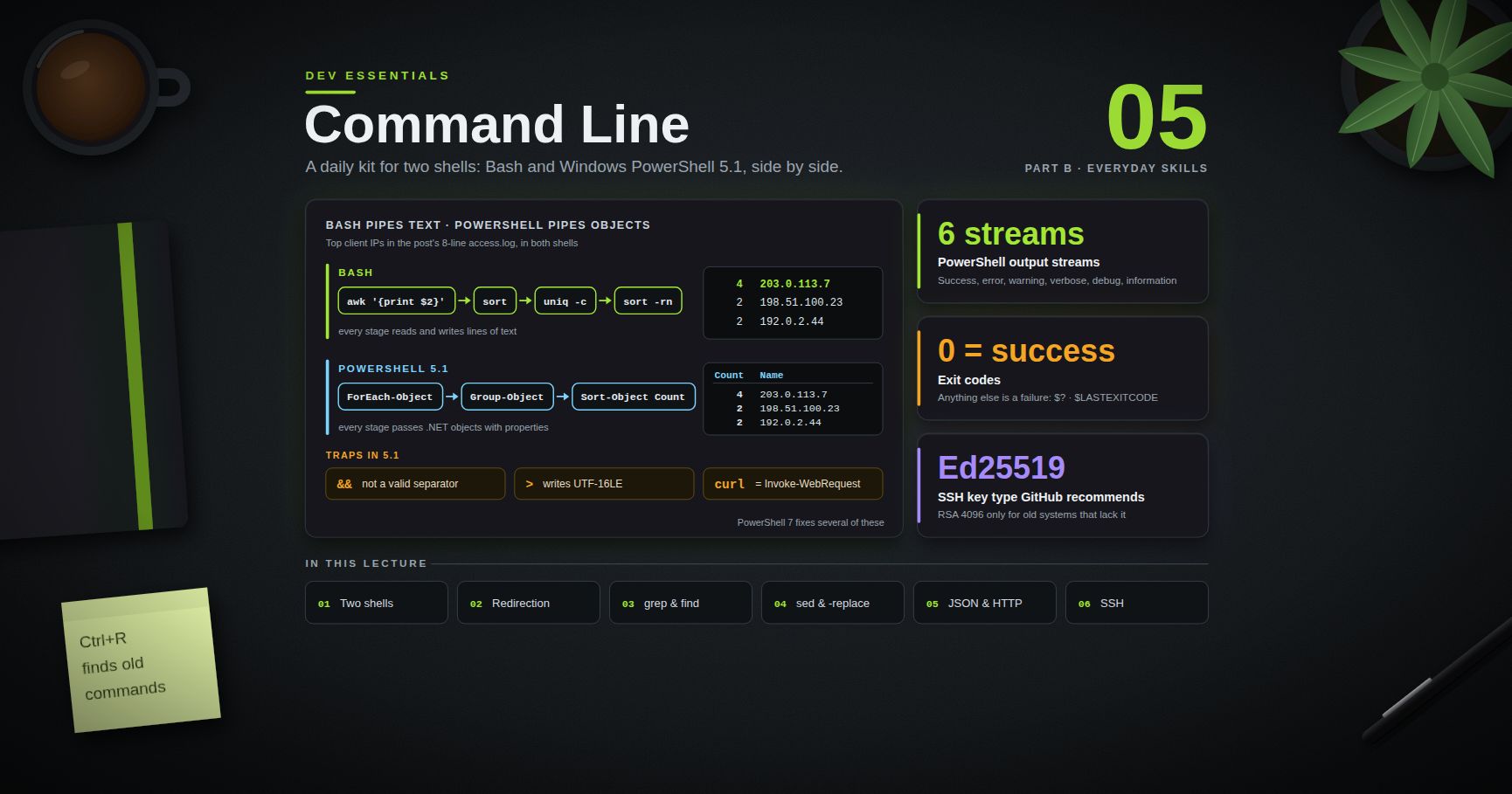
Dev Essentials — 05 · Command Line Daily Kit — Pipes, grep, find, sed, jq and ssh in Bash and PowerShell
A developer who is fast on the command line can answer "which IP hit us most?", "which files changed today?" or "is the server up?" in one line, without writing a script. This post is a daily kit for two shells side by side: Bash (Git Bash on Windows, or any Linux/macOS terminal) and Windows PowerShell 5.1 (the one built into Windows 11). For every topic you get the Bash way, the PowerShell way, and the traps between them.
> Series map: 01 Text Encoding → … → 04 Line Endings → 05 Command Line (this post) → 06 Regex → … → 24 Desk Health. Part B · Everyday skills.
Learning Outcome
- Explain the core difference: Bash pipes text, PowerShell pipes objects.- Redirect stdout and stderr correctly, and avoid PowerShell 5.1's encoding traps.- Search text ( / / ), find files ( / / ), and edit in place ( / ).- Count and rank with and . Query JSON with or , and call HTTP APIs with / .- Use environment variables, exit codes, chaining and quoting correctly in both shells.- Search history, set up aliases and profiles, and use SSH keys, , and .
Chapter 1 — Two shells, two ideas
Bash passes plain text between programs. Every tool reads lines and writes lines, and you cut columns out of text with , or . PowerShell passes .NET objects. sends file objects with properties like , and , so you filter by property, not by column position. "Files over 1 MB" in each shell:
| Bash — parse column 5 of text | PowerShell — filter a property ||------|------|| | |
On Windows, Git Bash comes with Git for Windows: real Bash plus GNU tools (, , , , …). It shows drives as ; converts a path to Windows form. Windows PowerShell 5.1 is built into Windows. The newer PowerShell 7 () is a separate install and fixes several traps shown below; this post targets 5.1 because it is always there.
> Watch out: in Windows PowerShell 5.1, , , and are aliases for cmdlets (, , , ). They look like the Unix tools but take different options. shows what a name really runs.
Terminology
| Term | Meaning ||------|---------|| Shell / terminal | The program that reads your commands (Bash, PowerShell) / the window that hosts it || stdin / stdout / stderr | Standard input, normal output, error output (streams 0, 1, 2) || Pipe | Sends one command's output into the next command's input || Exit code | Number a program returns: 0 = success, anything else = failure || Cmdlet | A PowerShell command named , e.g. || Environment variable | A named value every child process inherits, e.g. |
Chapter 2 — Moving around, and a sample file
| Task | Bash | PowerShell 5.1 ||------|------|----------------|| Where am I | | () || List, including hidden | | || Enter, then come back | … | … || Make nested folders | | || Copy a folder / move | / | / || Delete a folder | | || Which program runs? | | or (plain is ) |
Most examples below use this small web-server log (fields: time, client IP, method, path, status, bytes; the IPs are from ranges reserved for documentation). Create it once:
Chapter 3 — Pipes and redirection
| Goal | Bash | PowerShell 5.1 ||------|------|----------------|| stdout to file (overwrite / append) | / | / || stderr to file | | || Both into one file | | || Throw errors away | | || Throw everything away | | or || Show and save | | |
PowerShell has six redirectable streams (1 success, 2 error, 3 warning, 4 verbose, 5 debug, 6 information); redirects all of them.
> Common pitfall: order matters in Bash. sends both streams to the file. sends stderr to the terminal, because copies where stdout pointed at that moment.
> Watch out: Windows PowerShell 5.1 does not write UTF-8 by default. and write UTF-16LE; and write the ANSI code page; adds a BOM. See Dev Essentials 01 · Text Encoding for safe patterns.
> Watch out: in 5.1, redirecting a native program's stderr () wraps each stderr line in an . It prints like an error, and becomes , even when the program succeeded (checked on 5.1.26100). Judge native programs by (Chapter 9).
Chapter 4 — Searching text: , ,
| Goal | Bash () | PowerShell () ||------|---------------|------------------------------|| Matching lines, numbered | | || Ignore case | | the default ( turns it off) || Lines without a match | | || Count matching lines | | || Fixed text, not a regex | | || Only the matched part | | || Context lines | | || Search a tree | | || File names only | | || Error lines (4xx/5xx) | | |
The last row prints the , and lines in both shells. Two differences bite often. Case: is case-sensitive by default; is not. Regex flavor: uses .NET regex, so works. and use POSIX regex, where is not a digit — write , or use for Perl-style patterns. Dev Essentials 06 · Regex covers the flavors.
> Trick: if in Git Bash says , set a UTF-8 locale for that one command: .
ripgrep () is a fast, modern . By default it respects and skips hidden and binary files — usually what you want in a code base: , , . Install on Windows with .
Chapter 5 — Finding files: , , ,
> Watch out: Windows has its own , a text-search tool from the DOS era. In Git Bash, wins. In PowerShell and cmd, means , which does something completely different.
fd is a friendlier : regex patterns, smart case, and it skips hidden files and matches by default. lists Markdown files; includes hidden ones. Install with .
turns input lines into arguments, for tools that do not read file names from stdin:
PowerShell does not need : objects flow into the next cmdlet, and names with spaces never split. Example: .
Chapter 6 — Editing text in place: and
In-place editing is where GNU and BSD differ:
| Command | GNU sed (Linux, Git Bash) | BSD sed (FreeBSD, macOS) ||---------|---------------------------|--------------------------|| | edits in place, no backup | takes as the backup extension — fails || | takes as the script — | edits in place, no backup || | in place, backup | in place, backup |
So the portable form is . (extended regex) works on both and is now part of POSIX too.
PowerShell reads, replaces and writes:
The parentheses read the whole file before opens it for writing. takes a regex and is case-insensitive ( is case-sensitive). Keep the replacement in single quotes so reaches the regex engine: gives . With double quotes, PowerShell expands to nothing first.
In 5.1, writes a BOM. To write UTF-8 without a BOM, go through .NET:
> Common pitfall: bulk edits on Windows can also flip line endings. Check after a mass replace; Dev Essentials 04 · Line Endings explains why a file can show "every line changed".
Chapter 7 — Counting, sorting and watching
The classic ranking pipeline: pull out a field, sort, count duplicates, sort by count.
only merges duplicates that sit next to each other, so the first is required. then sorts by number, biggest first. PowerShell groups objects instead (first table row).
| Goal | Bash | PowerShell 5.1 ||------|------|----------------|| Rank a column | see above | || Count lines | | || First / last 5 lines | / | / || Follow a growing log | | || Follow, errors only | | || Unique sorted lines | | || Sum a column | | |
checks the file once per second until you press Ctrl+C. The byte sum for the sample log is in both shells.
Chapter 8 — JSON and HTTP
Sample :
(Windows: ) is a small language for JSON:
PowerShell turns JSON into objects, then you use the normal object commands:
> Watch out: in PowerShell 5.1, sends a JSON array down the pipe as one object, so returns nothing (checked on 5.1). Assign to a variable first, as above, or wrap it in parentheses. Going the other way, stops at depth 2 by default and prints deeper levels as type names like — pass .
HTTP. In Bash, is the standard tool:
In Windows PowerShell 5.1, is an alias for , so Unix options fail. Windows 10 and 11 ship the real curl as — type the . Or use the native cmdlets:
parses a JSON reply into objects for you. Since the Windows updates of 9 December 2025, in 5.1 shows a security prompt when it would parse a page with the old Internet Explorer engine. Microsoft's advice is to add , which also keeps scripts non-interactive.
> Common pitfall: PowerShell 5.1 strips inner double quotes when it passes arguments to native programs. sends (checked on 5.1). Use , escape the quotes (), or send a file with . PowerShell 7.3 changed this behavior.
Chapter 9 — Variables, exit codes and chaining
| Goal | Bash | PowerShell 5.1 ||------|------|----------------|| Read a variable | | (always the prefix) || Set for this session | | || Set for one command only | | set it, run, then || Remove / list all | / | / || Set permanently | add the line to | |
Exit codes. 0 means success; anything else means failure.
and do not exist in Windows PowerShell 5.1. Typing them gives the parser error They arrived in PowerShell 7 as pipeline chain operators. In 5.1, use plus an on or . Also, stops on cmdlet errors, but a native program's non-zero exit code still needs an explicit check.
Chapter 10 — Quoting rules
Rules that save hours:
- Prefer single quotes for regexes, JSON and anything with in it — in both shells.- Braces are special in PowerShell. breaks in 5.1; write (see Dev Essentials 03 · Git Rescue Kit).- The stop-parsing token passes the rest of the line to a native program almost as-is: . (Backslash is not an escape in PowerShell, so is just a path.)
Chapter 11 — History, aliases and profiles
History search. In Bash, press Ctrl+R and type part of an old command; press Ctrl+R again for older matches. PowerShell's PSReadLine module (bundled with 5.1) uses the same Ctrl+R, and F8 finds history entries that start with what you already typed. To grep old commands: in Bash. In PowerShell, only shows the current session; the full saved history lives in , so search it with .
Aliases and functions.
Profiles. Git Bash starts as a login shell, so it reads . If you only have , Git for Windows prints a warning and creates a that loads it. Reload after edits with . PowerShell's profile path is in (for 5.1: ):
> Watch out: the default execution policy on Windows client editions is , which blocks all scripts — profiles included. allows your own local scripts while still requiring signatures on downloaded ones. Microsoft notes that the policy is a safety net, not a security boundary.
Chapter 12 — SSH: keys, config, copying files
Make a key. Ed25519 is the type GitHub's docs recommend; they keep RSA 4096 only for old systems that lack Ed25519.
Accept the default path and set a passphrase. Two files appear: (private — never share it) and (public — paste it into GitHub or a server's ). The comment is only a label.
Load it into an agent so you type the passphrase once:
On Windows there are two programs: Git Bash runs its own , and PowerShell runs . Both read the same folder, but each has its own agent.
Name your servers in :
SSH uses the first value it finds for each setting, so put specific hosts at the top and any defaults at the bottom. Now replaces .
copies only what changed. The trailing slash matters: means "the contents of site", means "the folder itself". removes files on the target that are gone from the source, so always preview first. Git Bash does not include ; use it from Linux, macOS or WSL, or fall back to . Test GitHub access with .
Chapter 13 — Ten one-liners worth memorizing
| # | Job | Bash | PowerShell 5.1 ||---|-----|------|----------------|| 1 | Top IPs in a log | | || 2 | Find TODOs in code | or | || 3 | 10 biggest files | | || 4 | Changed in last 24 h | | || 5 | Follow a log for errors | | || 6 | HTTP status of a URL | | || 7 | Pretty-print JSON | | (works in both) || 8 | Serve this folder over HTTP | | || 9 | Who uses port 8080? | Linux: ; Git Bash: | || 10 | Find an old command | Ctrl+R | Ctrl+R (or F8 for prefix search) |
and are built-in PowerShell aliases for and . They are fine at the prompt; write the full names in scripts.
Practice Exercises
Use the from Chapter 2. Solve each one in both shells.
Exercise 1 — Requests per status code
Print how many requests each status code got, most common first.
<details><summary>Solution</summary>
</details>
Exercise 2 — Save the error lines as clean UTF-8
Write every 4xx/5xx line to as plain UTF-8 without a BOM, so Linux tools read it cleanly.
<details><summary>Solution</summary>
in PowerShell 5.1 would have written UTF-16LE.
</details>
Exercise 3 — Portable in-place replace
In a copy of the log, replace every with in place, with a command that works on both GNU and BSD. Then do it in PowerShell.
<details><summary>Solution</summary>
keeps the match case-sensitive, like .
</details>
Exercise 4 — JSON query
From (Chapter 8), print the names of people who know Python, sorted A–Z.
<details><summary>Solution</summary>
Both print and .
</details>
Exercise 5 — An SSH host entry
Write a entry named for host , user , port , key . Which command then copies to on it?
<details><summary>Solution</summary>
reads the same config, so the port, user and key come along automatically.
</details>
Cheat-sheet
| Task | Bash | PowerShell 5.1 ||------|------|----------------|| Search text | / | || Find files | / | || Replace in file | | || Rank values | | || Follow a log | | || Discard output | | || JSON | | || HTTP GET | | / || Env variable | / | / || Exit code / run B if A worked | / | / || History / profile | Ctrl+R / (via ) | Ctrl+R, F8 / || SSH key / copy | / , | / |
What's next
Dev Essentials 06 · Regex goes deep on the patterns you have been passing to , , and : character classes, groups, lookarounds, the differences between flavors, and how one bad pattern can freeze a server.
References
- GNU grep manual, GNU sed options, FreeBSD sed(1)- PowerShell docs: aboutRedirection (5.1), aboutCharacterEncoding (5.1), aboutPipelineChainOperators, aboutParsing, aboutExecutionPolicies (5.1)- PSReadLine key functions, Get-Content (5.1), ConvertTo-Json (5.1)- Microsoft — PowerShell 5.1 Invoke-WebRequest security prompt and curl shipped by Microsoft- jq manual, ripgrep, fd- GitHub Docs — Generating a new SSH key, sshconfig(5), OpenSSH for Windows
> Note: this post is in progress. Planned additions: in more depth, and Windows Terminal panes, a PowerShell 7 differences table, and / as task runners.
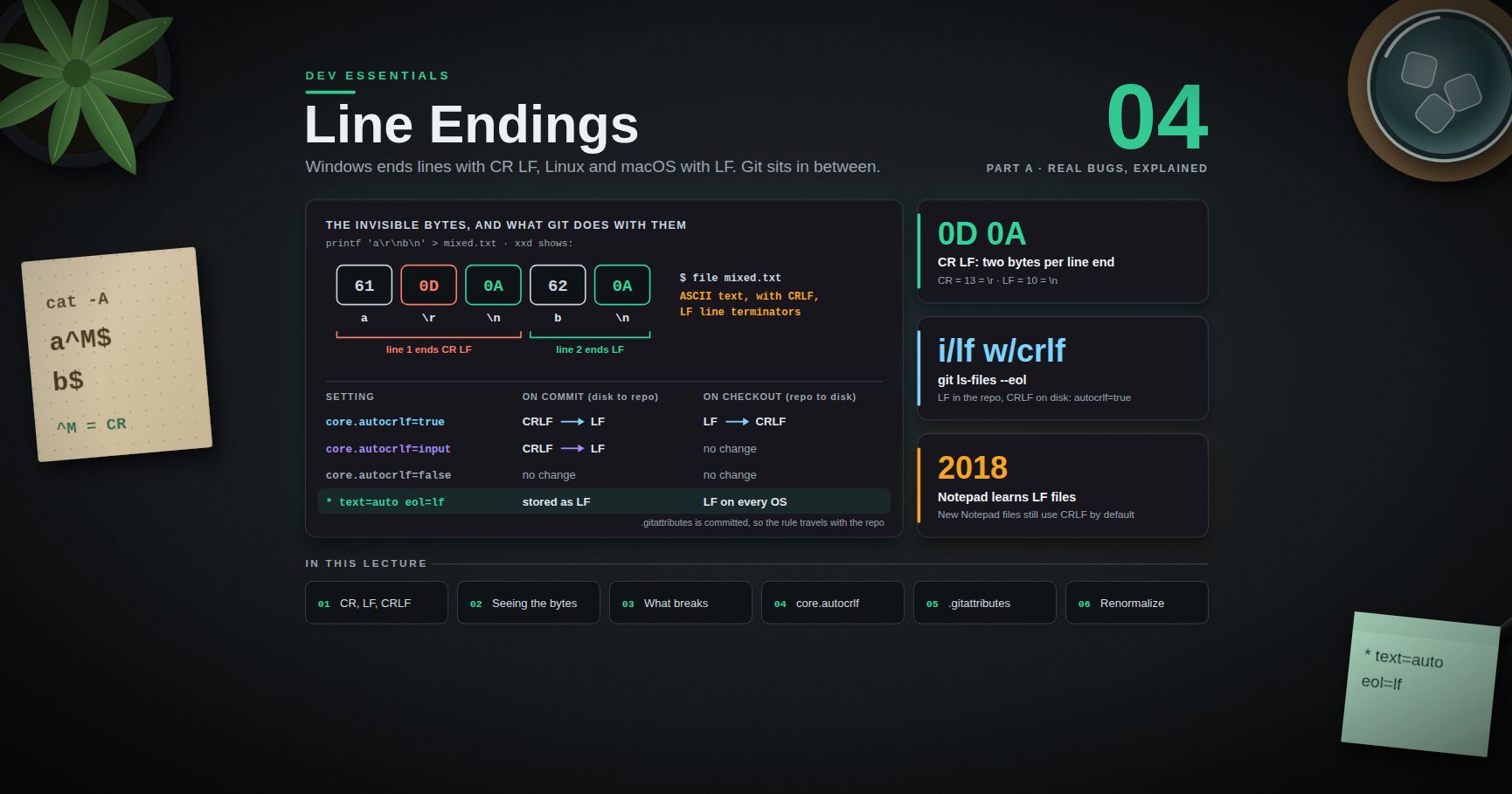
Dev Essentials — 04 · Line Endings — CRLF vs LF, autocrlf and .gitattributes
Every line in a text file ends with one or two invisible bytes. Windows usually writes two (CR LF); Linux and macOS write one (LF). Most of the time nobody notices. Then a shell script fails in a Linux container, a pull request shows every line changed, or a test fails only on one machine. This post explains where CR and LF came from, how to see them, how Git converts them (), and how to fix the rules once for everyone with and . It ends with this blog's own repository settings.
> Series map: 01 Text Encoding → 02 Dates & Time Zones → 03 Git Rescue Kit → 04 Line Endings (this post) → 05 Command Line → … → 24 Desk Health. Part A · Real bugs, explained.
Learning Outcome
- Explain CR, LF and CRLF, and why Windows and Unix differ.- See line endings with , , in bash and in PowerShell.- Recognise the bugs they cause: broken shebangs, whole-file diffs, regex and CSV surprises.- Choose a value and explain what each one does.- Write a file that makes line endings the same on every machine.- Renormalize an existing repository safely with .- Read output and the "LF will be replaced by CRLF" warning.
Chapter 1 — CR, LF and CRLF
Terminology
| Term | Byte | Escape | Shown by tools as | Meaning ||------|------|--------|-------------------|---------|| CR (carriage return) | (13) | | | Move to the start of the line || LF (line feed) | (10) | | in | Move down one line || CRLF | | | | Both, in that order || EOL | — | — | — | "End of line": whichever of the above a file uses |
Where they came from
On a typewriter or an old teleprinter, two separate motions start a new line. The carriage return moves the print head back to the left margin. The line feed rolls the paper up one line. Teleprinters needed both codes, so early systems stored both.
The choice then split:
| System | Line ending ||--------|-------------|| CP/M, MS-DOS, Windows | CRLF || Unix, Linux, macOS (since Mac OS X) | LF || Classic Mac OS (before Mac OS X) | CR |
Unix stores only LF in files and lets the terminal driver add the CR when printing. Windows kept the CP/M and MS-DOS habit of storing both.
Many internet protocols still use CRLF on the wire, whatever the operating system. HTTP/1.1 (RFC 9112) defines a message as , and CSV (RFC 4180) ends each record with CRLF. That is the protocol's business; your library handles it. This post is about files in your repository.
> Watch out: Windows Notepad only understood CRLF until 2018. Microsoft then added support for LF and CR files. New files in Notepad still use CRLF by default.
Chapter 2 — Seeing the invisible bytes
Line endings are invisible in an editor. Look at the bytes instead.
Bash (Git Bash, Linux, macOS)
is the quick check. It reports "with CRLF line terminators", "with CRLF, LF line terminators" (mixed), or nothing extra (LF only).
PowerShell 5.1
Python
In your editor
VS Code shows or in the status bar; click it to change the current file. Most editors have a similar switch.
Two invisible byte problems
Dev Essentials 01 · Text Encoding covered the BOM: three invisible bytes at the start of a file. CRLF is the same kind of problem: an invisible before every . One file can have both, and reports both:
Both come from a tool that used a system default instead of a project rule. Both are fixed the same way: write the rule into the repository.
Chapter 3 — How line endings break things
1. Shell scripts in Linux, containers and CI
A script saved with CRLF has a first line of . The system looks for an interpreter literally named , which does not exist.
What you see depends on where you run it:
| Where | Message ||-------|---------|| Ubuntu 24.04, bash 5.2 (tested) | || Older bash versions | || Git Bash on Windows (tested, bash 5.2 MSYS) | runs and prints |
The last row is the trap. The script works on the Windows machine where it was written, then fails in Docker or on a Linux CI runner. Even when bash starts (for example ), the stays at the end of every command:
2. Diffs where every line changed
If one person commits a file with LF and the next commits it with CRLF, Git sees a change on every line. The real one-line change is hidden, reviews become useless, and now points every line at the wrong commit. (or ) hides CR-only changes so you can find the real one.
3. Regex, split and CSV
A value such as then fails an equality check, a dictionary lookup or a hash comparison. The last field of each CSV row is the usual victim.
4. Tests and checksums
A test that compares output with a saved "golden" file, or a checksum of a text file, passes on one OS and fails on another. The bytes differ even though the text looks the same.
> Common pitfall: Python's text mode on Windows writes CRLF by default. The docs say: "if newline is None, any '\n' characters written are translated to the system default line separator, os.linesep." Pass when a file must have LF: .
Chapter 4 — Git's conversion:
Git keeps two copies of each file: the one in the repository (index and commits) and the one in your working tree. It can convert line endings when it moves a file between them.
| | On commit (working tree → repo) | On checkout (repo → working tree) | Typical use ||-----------------|--------------------------------|-----------------------------------|-------------|| | CRLF → LF | LF → CRLF | Windows (GitHub's docs recommend it there) || | CRLF → LF | no change | macOS / Linux (GitHub's recommendation) || | no change | no change | You manage endings yourself, or with |
The git-config docs describe as "the same as setting the attribute to on all files and to ". So with , the repository holds LF and your working tree holds CRLF.
The Git for Windows installer asks about this. Its option "Checkout Windows-style, commit Unix-style line endings" sets , usually in the system config file. That is why helps when you do not remember setting it.
The warning
With , adding a file that has LF endings prints:
This is information, not an error. The file goes into the repository with LF, as intended; the next checkout will write it to your working tree with CRLF. (Older Git versions worded it as ) The check is controlled by , which defaults to . With , Git refuses instead: .
The weakness: it is per machine
lives in each person's config, not in the repository. Every clone behaves the way its own machine is set up. One teammate with on Windows can commit CRLF files, and the repository has no defence. The fix is to put the rule in the repository.
Chapter 5 — : rules that travel with the repo
A file at the root of the repository sets per-path attributes. It is committed, so every clone follows it. GitHub's docs say: "When you commit this file to a repository, it overrides the setting for all repository contributors."
A good default for most projects
What each attribute means, from the gitattributes docs:
| Attribute | Effect ||-----------|--------|| | Normalize line endings to LF in the repository on every commit. || | Git decides if the file is text. If it is, convert it as above. || | Never convert. || / | The line ending to use in the working tree on checkout. It "automatically sets if was left unspecified". || | A built-in macro for . |
together has been supported since Git 2.10 (per the docs).
LF everywhere, or native endings?
- : LF in the repository and in every working tree, Windows included. Best when the project has shell scripts or Docker files, or builds on Linux CI. Modern Windows editors (VS Code, Notepad since 2018) handle LF.- alone: LF in the repository, native endings in each working tree. The docs: if is set but neither nor is, "the default is on Windows and on all other platforms".
Either way the repository content is LF and the same for everyone. That is what stops the whole-file diffs.
> Trick: put per-type exceptions below the line. When more than one line matches a path, the later line wins, one attribute at a time.
Chapter 6 — Fixing an existing repository
Adding does not rewrite files already committed. To convert them, renormalize. Start from a clean working tree (commit or stash your work first; Dev Essentials 03 · Git Rescue Kit covers stashing safely).
This is the sequence from the gitattributes docs and GitHub's line-ending guide. If a file that should not change shows up in , give it the or attribute and run the add again.
Two follow-ups:
- Working copies. Files already on disk keep their old endings until Git writes them again. The simplest way to get a working tree that matches the new rules is a fresh clone.- Blame noise. The normalize commit touches many lines. List its hash in a file at the repository root. GitHub's blame view reads that file, and locally you can run .
Checking the result:
Each line shows three facts about a tracked file. Typical output:
| Column | Meaning ||--------|---------|| | Line endings in the index (what will be committed): , , , , or for binary || | Line endings in the working tree || | The attributes that apply (, , or empty) |
The first line is what with no looks like: LF in the repository, CRLF on disk, and no attribute. Any or on a text file is a file that was committed with CR bytes.
Chapter 7 — Editors:
controls what Git stores and checks out. It does not stop your editor from saving CRLF into a new file before Git sees it. EditorConfig is a small, widely supported file that tells editors how to save:
From the EditorConfig spec: accepts , or ; accepts , , , or ; and stops the search for more files in parent folders. Visual Studio and JetBrains IDEs read it with no plugin. VS Code needs the EditorConfig extension.
Note the line: the same file also guards against the encoding problems of Dev Essentials 01.
Chapter 8 — Converting files by hand
Sometimes you just need to fix one file.
In Windows PowerShell 5.1, go through .NET so neither the encoding nor the endings change by accident:
> Common pitfall: in Windows PowerShell 5.1 changes two things at once. splits the text into lines and drops the endings. writes each line back followed by a Windows newline (CRLF), and by default in the ANSI code page. One harmless-looking line changes both the line endings and the encoding.
In Python, work in bytes. Then there is no newline translation and no decoding step:
Chapter 9 — Case study: this blog's repository
The facts:
- The author's Windows machine has .- The blog repository has no and no .
What follows from the Git docs, and what shows on the working copy:
- The repository holds LF. With , text files are normalized to LF when added. The Linux build on GitHub Actions checks out LF files.- The working copy is mixed. A post checked out by Git shows "with CRLF line terminators" in . A file written later by a tool that saves LF shows no CRLF. Both are fine locally, because Git converts them to LF on commit. Adding such an LF file prints the "LF will be replaced by CRLF the next time Git touches it" warning.- The protection lives on one machine. A clone on another Windows machine with would commit CRLF, and the next diff of that post would show every line changed. Nothing in the repository prevents it.
A small change would move the rule into the repository:
Add an with and , then run in one dedicated commit.
The link to Dev Essentials 01 is direct. The encoding damage and the CRLF question have the same root: a tool used a machine default (the ANSI code page, the platform newline) where the project needed an explicit rule. The fix is the same too: write the rule down in the repository, where every tool and every machine can see it.
Practice Exercises
Exercise 1 — Read the bytes
prints . What does report, and what does show?
<details><summary>Solution</summary>
The file is mixed: one CRLF line and one LF line. reports . shows:
</details>
Exercise 2 — Works on my machine
runs in Git Bash on Windows but fails in a Linux Docker container with . Explain, and fix it twice: once now, once for good.
<details><summary>Solution</summary>
The file has CRLF endings, so the shebang names . Git Bash tolerated it; Linux does not.
Now: (or ), then commit.
For good: add (or ) to , run , and commit. Every checkout, on every OS, then gets LF.
</details>
Exercise 3 — Write the attributes
A repository has , , , and files. The CI runs on Linux. Write its .
<details><summary>Solution</summary>
, and are covered by the first line; PowerShell reads LF scripts without trouble. Only needs CRLF, and the later line wins for it.
</details>
Exercise 4 — Predict
A file is stored in the repository with LF. What line endings does the working tree get on Windows with set to , and (no )?
<details><summary>Solution</summary>
: CRLF (converted on checkout). : LF (no conversion on checkout). : LF (no conversion at all). Only changes the working tree; and both convert CRLF to LF on commit.
</details>
Exercise 5 — LF from Python on Windows
This code writes CRLF on Windows. Fix it so the file always has LF.
<details><summary>Solution</summary>
With (the default), Python translates each to , which is on Windows. (or ) turns the translation off.
</details>
Exercise 6 — Read
What does tell you, and what should you do?
<details><summary>Solution</summary>
The rules say LF (), but the file was committed with CRLF () before the rules existed, and the working copy is CRLF too. Run and commit. After a fresh checkout, the file shows .
</details>
Cheat-sheet
| Task | How ||------|-----|| Check a file (bash) | , , || Check a file (PowerShell) | (look for ) || CRLF → LF (bash) | or || CRLF → LF (Python) | || LF when writing (Python) | || Where autocrlf is set | || Windows default | (or rely on ) || macOS / Linux default | || Repo-wide rule | : || Keep CRLF for batch files | || Never convert | || Re-apply rules | || Inspect endings in Git | || Diff without CR noise | || Editor rule | : |
What's next
Dev Essentials 05 · Command Line starts Part B · Everyday skills: pipes, , , , and , side by side in bash and PowerShell. Several tools from this post (, , ) appear there again in a wider kit.
References
- Git — gitattributes- Git — git-config (core.autocrlf, core.eol, core.safecrlf)- Git — git-ls-files (--eol)- Git — git-diff (--ignore-cr-at-eol)- GitHub Docs — Configuring Git to handle line endings- GitHub Docs — Ignore commits in the blame view- EditorConfig specification- Python — open() and the newline parameter- Microsoft DevBlogs — Extended line endings support in Notepad- RFC 9112 — HTTP/1.1 message format- RFC 4180 — CSV format
> Note: this post is in progress. Planned additions: line endings inside Docker builds ( and ), vs edge cases, and a pre-commit hook that rejects CRLF.
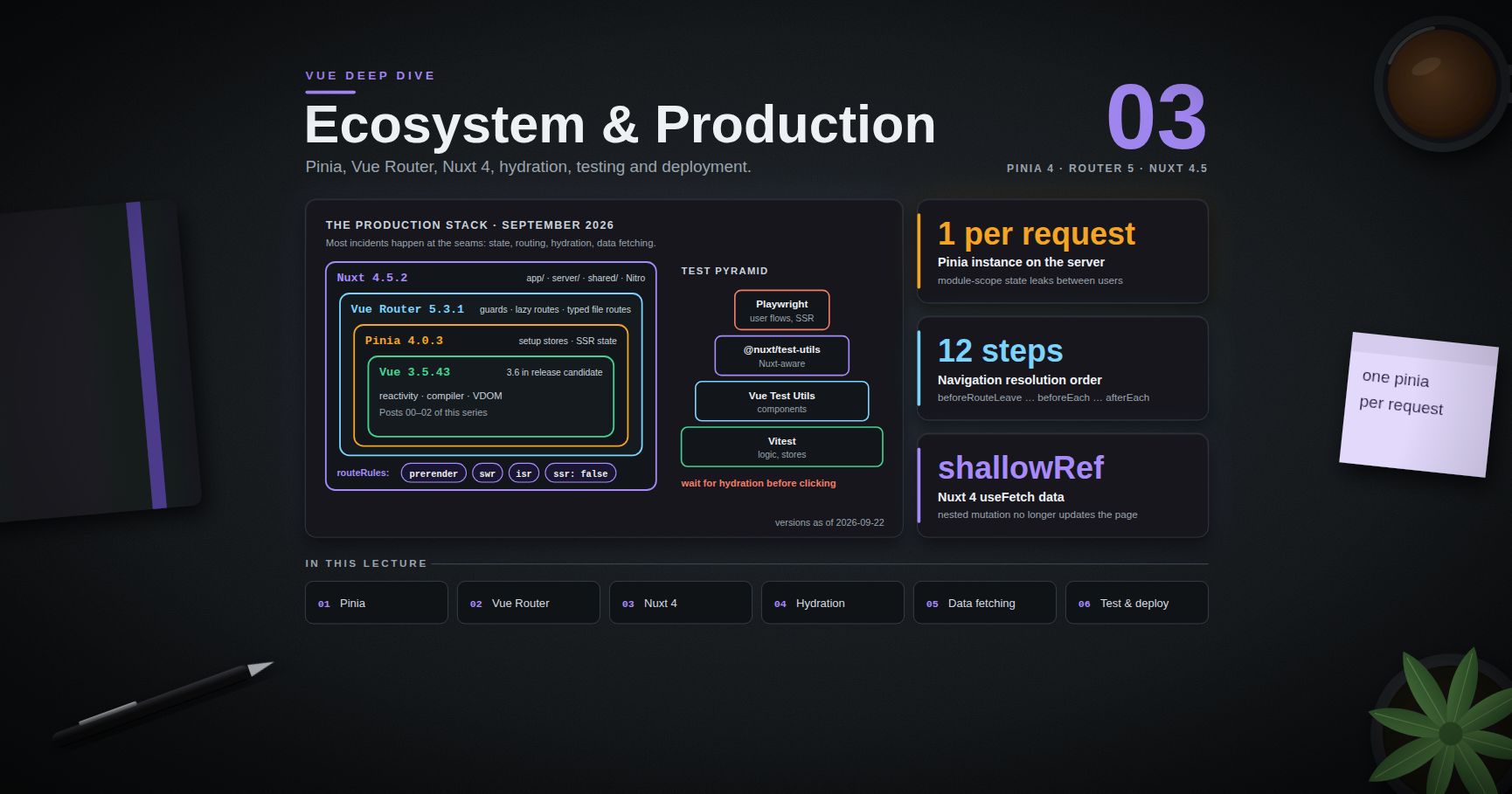
Vue Deep Dive — 03 · Ecosystem & Production (Pinia, Router, Nuxt)
The first three posts in this series were about Vue itself. A production Vue application is Vue plus a store, a router, usually a meta-framework for server rendering, a test stack and a deployment target — and most production incidents happen at those seams: state that leaks between SSR requests, a navigation guard that loops, a hydration mismatch that only appears in one time zone, a page that fetches its data twice. This post covers the stack as it stands in September 2026: Pinia 4 (setup stores, SSR state, testing), Vue Router 5 (guards, lazy routes, and the typed file-based routing that moved into core), Nuxt 4.5 (directory structure, rendering modes, hydration, / , Nitro), testing with Vitest, Vue Test Utils and Playwright, and deployment. Versions at the time of writing: Vue 3.5.43 (3.6 in release candidate), Pinia 4.0.3, Vue Router 5.3.1, Nuxt 4.5.2.
> Series map: 00 Reactivity Internals → 01 Composition API at Scale → 02 Compiler, Virtual DOM & Vapor Mode → 03 Ecosystem & Production (Pinia, Router, Nuxt) (this post). Future: see the extensions table at the end of this post.
Learning Outcome
- Write Pinia setup stores that work with SSR, devtools and plugins, and explain why every piece of state must be returned.- Explain how Pinia avoids cross-request state pollution and how its state is serialised and hydrated.- Order Vue Router's navigation guards, write guards that return values instead of calling , and split routes into lazy chunks.- Set up Vue Router 5's file-based typed routes, and migrate from .- Navigate a Nuxt 4 project: , , , and what each context may import.- Choose a rendering mode per route with : SSR, prerender, SWR, ISR, client-only.- Diagnose and fix hydration mismatches.- Use , and correctly, including the Nuxt 4 changes (shared keys, shallow , defaults).- Test components, composables and stores with Vitest and Vue Test Utils, Nuxt code with , and full flows with Playwright.- Deploy an SPA, a Node SSR server and a static or edge build.
Chapter 1 — Pinia
Terminology
- Option store — , the Options API shape.- Setup store — : s become state, s become getters, functions become actions.- Pinia instance — the object created by and installed with . It holds the state of every store in .- Hydration (of stores) — on the client, initialising from the state the server serialised into the HTML.
Setup stores done right
The rules that bite:
- Return every piece of state. The Pinia docs are explicit: state that is not returned breaks SSR, devtools and plugins, because Pinia only knows about what it can see. You cannot have private state in a store; keep private values in a separate, internal store or in a closure that is not state.- is not generated for setup stores. Pinia cannot know the initial value of a you created; write your own, as above.- Destructure with . A store is a object, so loses reactivity (Post 00, Chapter 8). keeps state and getters as refs; take actions directly from the store: .- works inside setup stores, because Pinia runs them within the app's context. Use it for app-level provided values; do not return things such as the router or route from the store.
Setup stores run inside an owned by Pinia, so and inside them live as long as the store. Composables from Post 01 that clean up with behave correctly inside a store; composables that use do not.
SSR: one Pinia per request
On the server, a module-scope object is shared by every request (Post 00, Chapter 8). Pinia's design avoids that: stores are bound to the instance, and you create one per request together with the app. The per-request state is then serialised into the HTML and restored on the client before any store is used:
Nuxt's module does all of this for you. Two SSR traps remain:
- Calling outside setup on the server (in a plain module, or in a router guard defined outside ) must receive the pinia instance: . Otherwise it may pick up the wrong request's pinia or none.- Client-only values in state. A that reads (for example VueUse's ) must not be overwritten by the server's value during hydration. Wrap it: .
Pinia 4
Pinia 4.0 (July 2026) is a small major: the package is ESM-only, it requires Vue and TypeScript ≥ 5.6 for users who type-check, and v8 is now a peer dependency. Its release notes also describe a rework of errors and development warnings. The store API above is unchanged from Pinia 2 and 3.
> Trick: for server data (lists, details, anything with a cache lifetime) use a data-fetching layer — Nuxt's , TanStack Query, or Pinia Colada — and keep Pinia for client state (cart, UI preferences, wizard progress). Putting API caches in Pinia by hand means reimplementing deduplication, invalidation and staleness.
Chapter 2 — Vue Router
Navigation guards return values
A guard returns to cancel, a route location to redirect, or nothing / to continue. Throwing cancels and calls . Guards can be . The older third argument, , is still accepted, but the docs describe it as a common source of mistakes — calling it twice, or not at all on one branch — so new code should return values.
> Common pitfall: a redirect guard that does not exclude its own target. on every route, including , loops; in development Vue Router aborts it with a "possibly infinite redirection" warning. Check or mark public routes in .
The full resolution order
1. Navigation triggered.2. in components being left.3. Global .4. in components being reused (same component, new params).5. in route records.6. Async route components are resolved (lazy chunks downloaded).7. in components being entered.8. Global .9. Navigation confirmed.10. Global .11. DOM updated.12. Callbacks passed to in run with the new instance.
(step 8) is the right place for checks that need the resolved components, such as permissions stored in a page's or data that must exist before the page renders. cannot change the navigation; use it for analytics and document titles.
Lazy routes
A function that returns a dynamic makes the route a separate chunk, downloaded at step 6. Do not use for route components; the router handles the laziness itself. Group rarely used routes into one chunk with your bundler's manual chunk configuration only when you have measured that per-route chunks are too many.
Typed, file-based routes in Vue Router 5
Vue Router 5 merged into core. For projects that did not use that plugin, the migration guide states there are no breaking changes; the IIFE build no longer bundles . File-based routing is opt-in:
The plugin scans , turns into , and, when TypeScript is installed, generates with a that lists every route, its path and its params. Route names, params in and , and in a page are then type-checked. Import paths changed for former plugin users: → , data loaders → , Volar plugins → . The router team has said Vue Router 6 will be ESM-only and remove deprecated APIs; v5 is the transition release.
> Watch out: data loaders (fetching route data during navigation) live under . The name says what it means: fine to evaluate, but the API may change in a minor release.
Chapter 3 — Nuxt 4: structure and rendering
Directory structure
Nuxt 4 (July 2025) moved application code into :
The split is not cosmetic. Nuxt 4 generates separate TypeScript projects for app, server, shared and build contexts, so importing a server-only module into a component, or using a browser global in , is a type error instead of a production crash. Keeping app code out of the root also stops file watchers from scanning and .
Rendering modes per route
Nuxt renders universally by default: HTML on the server for the first request, then a client-side SPA after hydration. changes that per route:
| Mode | HTML produced | Good for | Watch for ||---|---|---|---|| Universal SSR (default) | Per request | Personalised pages, SEO | Server cost, per-request state || | At build | Marketing, docs | Stale until rebuilt || | Per request, then cached on the server or proxy | Catalogues, listings | Users may see content up to one TTL old || | Per request, cached by the CDN | Same, on Vercel / Netlify | Platform-specific || | Empty shell, rendered in the browser | Dashboards behind login | No SEO, slower first paint |
Hydration mismatches
Hydration walks the server's DOM and attaches the client app to it, assuming both renders produced the same result. When they did not, Vue logs a mismatch warning in development and patches the difference, which costs time and can leave the page in a wrong state. The causes are few and always the same:
| Cause | Example | Fix ||---|---|---|| Values that differ per environment | , , in the template | Compute once on the server and pass through state (), or render in / || Time zone or locale differences | Server in UTC, user in Hong Kong | Format on the client, or format with an explicit time zone on both || Browser-only checks during render | in a template | Use to switch after hydration; with a fallback || Invalid HTML nesting | inside , inside | The browser's parser rewrites the server HTML before Vue sees it: fix the markup || Generated ids | Counters for | (Vue 3.5), stable across server and client || Genuinely unavoidable differences | A server-rendered timestamp | on that element (3.5) |
In production builds the mismatch details are compiled out. To debug one in production, set in the build, reproduce, and turn it off again.
> Watch out: browser extensions that inject markup (translators, password managers) cause mismatches you cannot fix. Reproduce in a clean profile before chasing one.
Chapter 4 — Data fetching in Nuxt
The problem: fetching twice
Code in a page's runs twice: on the server to produce HTML, then in the browser to hydrate. A bare in setup therefore requests the data on the server and again in the browser, and if the two responses differ, the hydration check fails. and solve this: on the server they fetch and store the result in the payload (serialised into the HTML, available as ); during hydration they read the payload instead of fetching.
is shorthand for with a key generated from the URL and the call site.
The rules
- / in setup, in event handlers. The Nuxt docs recommend for client-side, event-based interactions: a form submit or a button click has no server render to reuse.- blocks navigation. Awaiting in a page uses Vue's under the hood (Post 01, Chapter 8), so the page renders with its data. (or ) navigates immediately; show a state from ().- fetches only in the browser — for data that depends on client-only state or does not matter for SEO.- Reactive inputs refetch. A getter URL or reactive values are watched; add for other sources.- Keep payloads small. or before the data is serialised. A 2 MB API response copied into every HTML page is a performance bug.
What changed in Nuxt 4
| Change | Nuxt 3 | Nuxt 4 ||---|---|---|| Same key in several components | Separate refs | Shared , and refs; options such as , , , must match || reactivity | Deep | ; opt back in with || Default / | | || | First load only | Called on every fetch, with a context giving the cause (, , , ) || | Boolean | or |
The change is the one that breaks code: no longer updates the page. Replace the object () or pass for that call. This is the same trade-off as Post 00's advice, made the default.
Nitro: the server side
is compiled by Nitro (the 2.x line in Nuxt 4; Nitro 3 is in beta at the time of writing) into a standalone server for the chosen deployment target:
During SSR, from a page calls this handler in-process, without an HTTP round trip. Types flow too: infers the handler's return type.
Configuration that must differ per environment goes in , overridable by environment variables at run time without a rebuild:
> Common pitfall: putting a secret under . Everything under is serialised into the page for every visitor.
Chapter 5 — Testing
The pyramid for a Vue app
| Layer | Tool | What it proves ||---|---|---|| Pure functions, stores, composables | Vitest | Logic, in milliseconds || Components | Vitest + Vue Test Utils (or Testing Library) | Rendering, events, props, slots || Nuxt-aware components | with the environment | Auto-imports, plugins, with mocked endpoints || User flows | Playwright | The real app in real browsers, including SSR and hydration |
Components with Vue Test Utils
Points that save hours:
- , and return a promise that resolves after the next DOM update. Await them, or the assertion runs against the old DOM (Post 00, Chapter 6).- resolves pending promises such as a mocked ; only waits for Vue's flush.- stubs actions by default (they become spies that do nothing). Pass to run the real actions, and to seed stores.- Test behaviour through the DOM (, text, emitted events) rather than internals. components are closed (Post 01), so internals are not even reachable without .
Composables
A composable that only uses reactivity can be tested inside an :
A composable that uses lifecycle hooks or needs a host component: mount a tiny component whose calls it, and provide what it injects through .
Nuxt
mounts inside the Nuxt runtime with async setup and plugins; replaces an auto-import such as ; mocks a Nitro route.
End to end with Playwright
Waiting for hydration matters for any SSR app: before hydration the button is visible in the server HTML but has no listener, so an early click does nothing and the test flakes. Outside Nuxt, wait for a signal your app sets after .
Chapter 6 — Deployment
An SPA (Vite + Vue Router)
- writes hashed assets to . Serve with , and with so a new deploy is picked up.- History fallback. With , a reload on asks the server for that path. Configure it to return for unknown paths, and render a 404 page from a catch-all route (). Without the fallback, every deep link 404s.- Sub-path hosting. Set Vite's and pass the same value to .
Nuxt
| Target | Command | Output ||---|---|---|| Node server | | ; run || Static site (all routes prerendered) | | , upload to any static host || Platform (Vercel, Netlify, Cloudflare, …) | with a preset (often auto-detected; or ) | Platform-specific functions + static assets |
Before going live with SSR:
1. No per-user state at module scope, anywhere (Post 00, Chapter 8): stores via Pinia, shared composable state via .2. Runtime config from the environment, secrets outside .3. Payload size checked on the heaviest pages (, ).4. reviewed: which routes can be prerendered or cached with — every cached route is server CPU you do not spend.5. Hydration warnings at zero in development, and Playwright tests that wait for hydration.6. Error pages: for Nuxt, and with correct status codes in server routes so crawlers and monitors see real 404s and 500s.
Practice Exercises
Exercise 1 — The leaking store
An SSR app shows one user's cart to another user for a split second after deploys. The cart lives in . Explain the bug and fix it with Pinia.
<details><summary>Solution</summary>
On the server the module is evaluated once per process, so every request shares . Move it into a Pinia setup store, create per request with the app (Nuxt's does this), and let the serialised state hydrate the client. Any code that runs outside on the server must call with that request's instance.
</details>
Exercise 2 — Guard loop
This guard hangs navigation to . Fix it, and use so new public pages do not need guard changes.
<details><summary>Solution</summary>
Declare types by augmenting in a file so is typed.
</details>
Exercise 3 — Nuxt 4 upgrade bug
After upgrading to Nuxt 4, after a purchase no longer updates the page, and checks stopped working. Explain both and fix them.
<details><summary>Solution</summary>
from is now a , so nested mutation is not tracked: replace the object () or pass . The default of changed from to : test with or .
</details>
Exercise 4 — Find the mismatch
A product page shows "Offer ends in 2:59:59" and logs a hydration text mismatch. Give two correct fixes.
<details><summary>Solution</summary>
The countdown is computed from on the server and again, a moment later, on the client. Fix 1: render the countdown only after mount ( sets a ref, or wrap it in with a placeholder of the same size). Fix 2: compute the end time once on the server, share it through , and render a static end time ("Offer ends 18:00 HKT") during SSR, starting the ticking countdown in . silences the warning but leaves a visible jump.
</details>
Exercise 5 — Payload diet
A category page's HTML is 1.8 MB because of the payload, though the page shows name, price and thumbnail. Fix it without changing the API.
<details><summary>Solution</summary>
. For a single object, does the same. Also consider pagination, and caching of the page in .
</details>
Exercise 6 — Flaky e2e
A Playwright test clicks "Add to cart" right after and fails about one run in ten. Explain and fix.
<details><summary>Solution</summary>
The server HTML shows the button before hydration attaches its listener; a click in that window does nothing. Use from , or wait for an app-set signal after mount. Assert with web-first assertions (), never fixed sleeps.
</details>
Cheat-sheet
| Need | Use ||---|---|| Store with composables | || Destructure a store | for state/getters; actions directly || Reset a setup store | Write your own || Client-only store value | || Store outside setup on the server | || Auth guard | returning , a location, or nothing || Lazy route | || Typed file routes | plugin + from (Router 5) || Per-route rendering | etc. || SSR-safe fetch in setup | || Fetch on click | || Nested update of fetched data | Replace the object, or (Nuxt 4) || Shared SSR state | || Stable ids | || Wait for DOM in tests | , || Nuxt component test | , , || E2E on SSR | || Node deploy | → |
What's next
This post closes the first run of the Vue Deep Dive. The Next.js Deep Dive series covers the same production questions — rendering modes per route, caching, data fetching, hydration — for React's meta-framework, and comparing Nuxt's with Next.js's caching model is a useful exercise in its own right. The JavaScript Deep Dive series covers the runtime underneath all of it. The table below lists the Vue topics planned for later posts.
Planned future extensions
| # | Topic | Scope ||---|---|---|| 04 | Vapor mode in practice | Migrating a hot component, interop with VDOM components, benchmarks, what changes for libraries (after 3.6 stable) || 05 | Advanced TypeScript for Vue | Generic components in depth, typed slots and events, in CI, library type patterns || 06 | Forms at scale | patterns, validation libraries, schema-driven forms, accessibility || 07 | State and server data | Pinia Colada and TanStack Query, cache invalidation, optimistic updates, offline || 08 | Nuxt performance | Payload tuning, lazy hydration strategies, caching, Nitro storage and cache APIs || 09 | Building component libraries | Headless components, provide/inject contexts, theming, publishing ESM packages || 10 | Testing strategy in depth | Component vs browser-mode tests, visual regression, contract tests for Nitro APIs || 11 | Micro-frontends and large codebases | Nuxt layers, module federation, monorepo boundaries || 12 | Vue and AI features | Streaming responses into components, server routes for model calls, UX for partial results |
References
- Pinia: Defining a store · SSR · Testing — setup stores, , , .- Pinia releases — 4.0 notes.- Vue Router: Navigation guards — return values and the full resolution flow.- Vue Router: Lazy loading routes · File-based routing · Migrating from v4 to v5.- Nuxt: Upgrade guide (3 → 4) — directory structure, data fetching changes.- Nuxt: Rendering modes · Data fetching · .- Nuxt: Testing — , Playwright integration.- Vue: Server-Side Rendering guide — cross-request state pollution, hydration mismatch.- Vue Test Utils · Vitest · Playwright.- Nitro — server routes, presets, deployment.
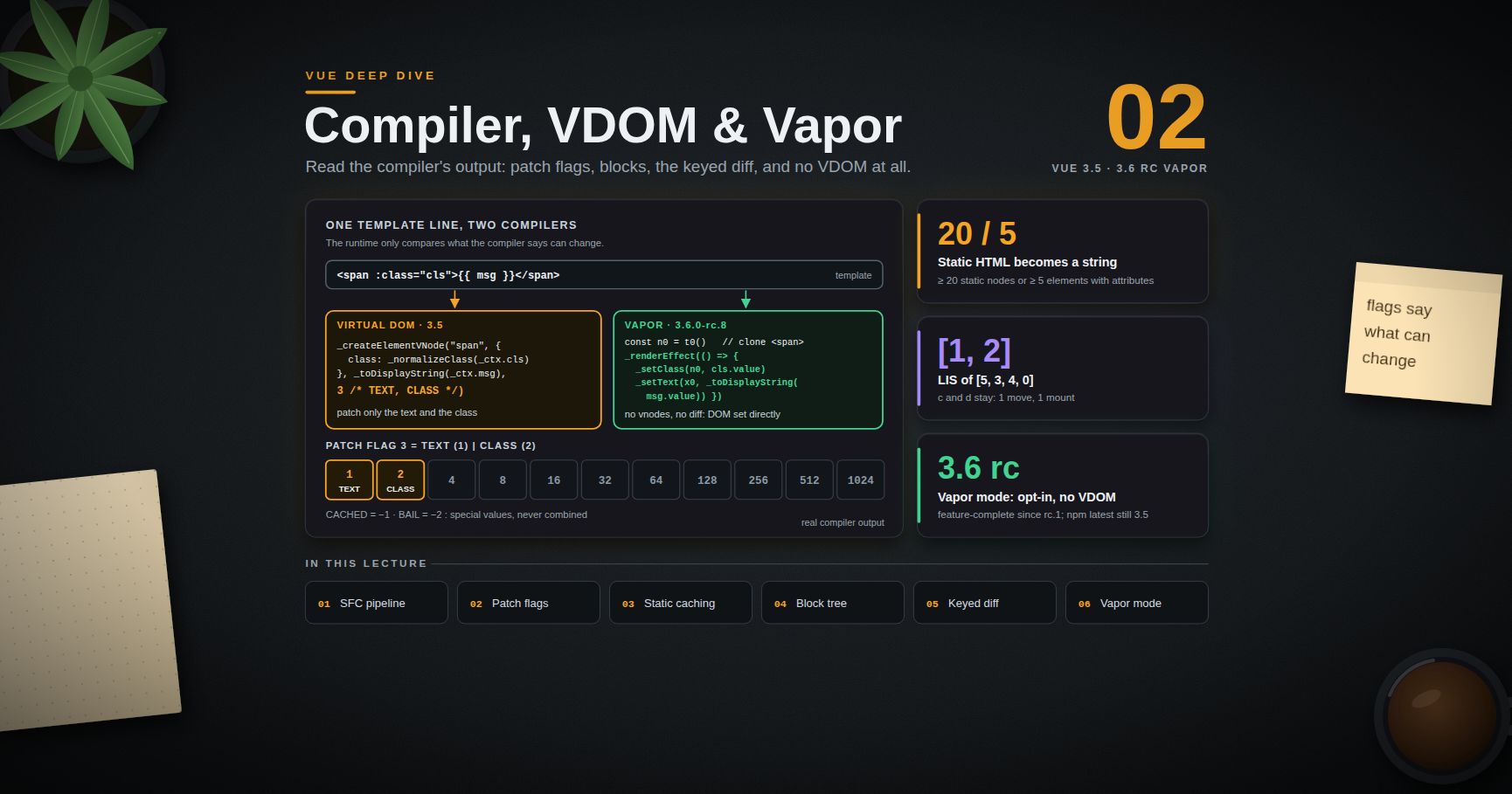
Vue Deep Dive — 02 · Compiler, Virtual DOM & Vapor Mode
Vue's answer to "virtual DOM is slow" has always been the compiler. A template is not interpreted at run time: it is compiled into a render function that tells the runtime, node by node, which parts can ever change and how. That information — patch flags, cached static subtrees, blocks with flat lists of dynamic nodes — is why a Vue re-render usually skips most of the tree without comparing it. Vapor mode takes the idea to its end: compile the template straight to DOM operations and drop the virtual DOM entirely. This post reads real compiler output. It walks the SFC pipeline, decodes patch flags, explains static caching and the block tree, works through the keyed diff and its longest-increasing-subsequence step, shows what and compile to, and compares a component compiled both ways. Every code sample marked as output was produced by / 3.5, or 3.6.0-rc.8 for Vapor.
> Series map: 00 Reactivity Internals → 01 Composition API at Scale → 02 Compiler, Virtual DOM & Vapor Mode (this post) → 03 Ecosystem & Production (Pinia, Router, Nuxt). Future: see the extensions table in 03.
Learning Outcome
- Trace an file through : descriptor, script, template, styles, and what the Vite plugin does with each.- Read a compiled render function: , , , , hoisted props objects.- Decode any patch flag number and say what the runtime will and will not compare.- Explain the 3.5 switch from static hoisting to static caching, and when the compiler stringifies static HTML.- Explain the block tree and why structural directives start new blocks.- Execute the keyed diff by hand, including the longest increasing subsequence that minimises DOM moves.- Choose between , and plain reactivity fixes.- Explain what Vapor mode compiles to, how to opt in, what it does not support, and its status in 3.6.- Apply the compiler-aware performance checklist.
Chapter 1 — The SFC pipeline
Terminology
- Descriptor — the parsed file: , , , , , each with its source and location.- AST — the tree the template parser produces; transforms rewrite it before code generation.- Transform — a compiler pass for one feature: , , , slots, static analysis, patch flags.- Codegen — turning the transformed AST into JavaScript source.- Binding metadata — what declares (, , , …). The template compiler uses it to emit or instead of a generic lookup.- Inline template — the template compiled into the function as a closure, instead of as a separate function.
The stages
1. splits the file into a descriptor. Nothing is compiled yet.2. processes : removes macros (Post 01), resolves prop types, analyses bindings, and — in production — inlines the compiled template.3. calls : parse → transforms → codegen, producing a render function.4. runs PostCSS for styles (adds attribute selectors, , ), CSS modules, and in CSS (compiled to CSS custom properties set from the component).
drives these stages. It uses the inline-template mode only when all of these hold: not the dev server, devtools support not enabled for production, the component has , and the template is not loaded from . Inline mode lets the render closure read bindings directly () without going through the proxy; the dev server keeps a separate render function so hot reload can swap the template alone.
> Watch out: compiling templates at run time needs the full build ( with the compiler). The default import in a Vite app is the runtime-only build. A string option in a component object silently renders nothing and logs a warning in that setup.
Chapter 2 — From template to render function
This template:
compiles with 3.5 (module mode, and on, as in an SFC build) to:
Each line carries a decision the runtime would otherwise make by comparing:
| In the output | Meaning ||---|---|| | A static props object, created once per module and shared by every instance || | A fully static element, created once per component instance and reused on every render || | Only the text and the class of this can change || | The handler is cached, so the has no patch flag: its props never change identity || … | The list is a fragment of keyed children, diffed by key || | produces a new block, or a placeholder comment |
> Trick: paste any template into the Vue SFC Playground (play.vuejs.org) and open the "JS" tab to see this output for your own code. It is the fastest way to answer "will this re-render?" questions.
Chapter 3 — Patch flags
A patch flag is a bitmask on a vnode that lists the only things that can differ between two renders of it. The runtime checks the flag and skips everything else. The values in 3.5 ():
| Flag | Value | What the runtime patches ||---|---|---|| | 1 | Text children only || | 2 | only || | 4 | only || | 8 | Only the props named in the array passed after the flag || | 16 | All props, full diff (dynamic keys such as or ) || | 32 | Needs props during hydration (e.g. event listeners) || | 64 | Fragment whose children order never changes || | 128 | Fragment of keyed children ( with ) || | 256 | Fragment of unkeyed children || | 512 | Non-prop work: template , custom directives, vnode hooks || | 1024 | Slots that must be updated on every render || | 2048 | Development only: root fragment created by comments || | −1 | Cached static vnode; hydration can skip the whole subtree || | −2 | Leave optimised mode and do a full diff |
Positive flags combine with bitwise OR: means text plus the listed props. Negative flags are special values and never combined. Two real examples from the 3.5 compiler:
In the second line, the child component receives two props, but only is listed as dynamic. When the parent re-renders, the runtime compares only to decide whether must update. If is the same object, the child does not re-render at all.
> Common pitfall: creates a new object on every parent render. is dynamic (it is an expression), its identity always changes, and re-renders every time its parent does. Hoist the literal into a constant in or a .
Hand-written render functions with get no patch flags: the runtime must diff them fully. That is one reason templates are the recommended default in Vue, not only a style preference.
Chapter 4 — Static caching and stringification
Hoisting became caching in 3.5
The same compiled by 3.4 and by 3.5:
In 3.4 a static vnode was hoisted to module scope and shared by every instance of the component. In 3.5 it is created on first render and kept in the instance's array. The flag name changed from to with the same value (−1). Static props objects () are still hoisted to module scope, because a plain object with no DOM reference is safe to share.
The practical effect is the same — static nodes are created once and skipped by the diff — but nothing is shared between instances any more. A hoisted vnode kept a reference () to the DOM element it was last mounted to, which was a known way to retain detached DOM trees (vuejs/core issue #5256). A per-instance cache avoids that shared state.
Stringification
When enough static content sits together, the compiler goes further and emits it as an HTML string that the runtime inserts with :
The threshold in 3.5 is 20 or more consecutive static nodes, or 5 or more static elements with attributes. The same template with four elements instead of five produced four separate vnodes. Stringified chunks create no vnodes per element at all, which matters for large static sections such as documentation pages and legal text.
What is never static
Anything with a binding, a directive, a component, a , or a child that is dynamic. A single inside a large block makes that element dynamic, but its static siblings and static descendants are still cached separately. Keep dynamic bits in small leaf elements and the static structure around them stays free.
Chapter 5 — The block tree
Blocks collect dynamic descendants
starts collecting; every vnode created with a patch flag while the block is open is pushed into the block's array; closes it. On update, the runtime calls , which walks this flat array and patches each dynamic node against its counterpart. The static structure between them is never visited.
For the Chapter 2 template, the root block's holds the (flag 3), the fragment, and the branch. The cached and , the with its cached handler, and the itself are not in it. A re-render after changes touches one text node's comparison, not the whole tree.
Why structural directives start new blocks
A flat array works only if the set of dynamic nodes has a fixed shape. and change the shape: a branch may exist or not, a list may have 3 or 300 items. So each branch is its own block (with a so the runtime knows when the branch switched), and each produces a fragment whose children are diffed as a list (Chapter 6), each child being a block of its own. Inside each block, the flat fast path applies again.
on the fragment disables collection for that fragment: its children are diffed through the keyed algorithm, not through .
Chapter 6 — The keyed diff and the longest increasing subsequence
The five steps of
Given old children and new children :
1. Sync from the start. While the heads have the same type and key, patch them and advance.2. Sync from the end. Same from the tails.3. Only new nodes left (old range exhausted): mount the remaining new nodes.4. Only old nodes left (new range exhausted): unmount the remaining old nodes.5. Unknown middle sequence:1. Build from the new middle.2. Walk the old middle. For each old node, find its new index by key. Not found: unmount it. Found: patch it, and record (0 is reserved for "new node"). If a found new index is smaller than the largest seen so far, set .3. If anything moved, compute the longest increasing subsequence (LIS) of . Nodes in the LIS are already in the right relative order and stay where they are. Walk the new middle backwards: a 0 entry is mounted, a node outside the LIS is moved, each before the node after it.
A worked example
Old: . New: .
- Step 1 patches , . Step 2 patches , .- Middle: old (old indices 2, 3, 4), new (new indices 2–5).- Step 5.2: → new index 3, map slot 1 = 2 + 1 = 3. → new index 4, slot 2 = 4. → new index 2, which is smaller than 4, so ; slot 0 = 4 + 1 = 5. is never found in the old list, so slot 3 stays 0.- Map: . Its LIS, as positions, is — the values 3 and 4, i.e. and . (Checked by running Vue's own , which returns .)- Step 5.3, backwards: (0) is mounted before ; and are in the LIS and stay; is moved before .
Result: one insertion, one move, and no work at all for the six other nodes beyond patching them. The LIS is what makes the number of moves minimal: the nodes that can stay are exactly the longest run that is already in order. computes it in O(n log n) with patience sorting and binary search.
Without keys
A without compiles to (256) and uses : patch old and new by index for the common length, then mount or unmount the tail. Inserting at the front of an unkeyed list re-patches every item with its neighbour's data and moves no DOM, so component state and DOM state (focus, input values, animations) stay at their old positions while the data shifts.
> Common pitfall: is the same as no key for this purpose. Keys must be stable identities from the data (). Random keys () are worse: every render remounts every item.
Chapter 7 — and
compiles to:
The subtree is rendered once, stored in , and keeps it out of the parent's . Later changes to are ignored on purpose. Use it for content that depends on data but must never update, such as a value captured at mount.
compiles to (inside the callback):
If the memo array is shallow-equal to last time, the previous vnode is returned and the whole subtree is skipped — no render, no diff. For a 1,000-row list where only the selected row changes, changing re-renders two rows (the old and the new selection) instead of all of them.
Rules and traps:
- Inside , must be on the same element as the , and the needs a .- The memo array must list everything the subtree reads that can change. In the example above, if changes, the row does not update: is not in the memo. That is the classic bug.- An empty array, , is equivalent to .- is not supported in Vapor mode (Chapter 8).
> Trick: before reaching for , check whether the list re-renders for a reactivity reason — a computed that returns a new array every time, an inline object prop (Chapter 3), a deep watcher. Fixing the cause is cheaper and cannot go stale.
Chapter 8 — Vapor mode
What it is
Vapor mode is an alternative compilation target for SFCs. Instead of a render function that creates vnodes, the component compiles to code that builds the DOM once from an HTML template and then binds the dynamic parts to small reactive effects. There is no virtual DOM, no diff and no patch flags. The 3.6 release notes describe it as "100% opt-in", supporting "a subset of existing Vue APIs with mostly identical behavior", and report the same level of performance as Solid and Svelte 5 in third-party benchmarks.
The same component, compiled by Vapor
3.6.0-rc.8 output (setup body):
Read it top to bottom:
- holds static HTML as a string; calling it clones a prepared DOM fragment. All static structure is created in one browser-native operation.- / / walk to the nodes that have bindings, once.- Dynamic bindings are wrapped in small s. Bindings on the same element share one: compiles (rc.8) to a single effect that calls and . When changes, only the button's effect runs and sets one text node. No component re-render happens.- becomes with a source getter, a per-item render function and a key function. List reconciliation still exists, but at the level of DOM blocks, not vnodes.- The component definition carries .
This is the reactivity graph from Post 00 wired directly to the DOM, which is what signal-based frameworks such as Solid do. It also leans much harder on the reactivity core — many small effects instead of one per component — which is why the 3.6 work on that core (alien-signals) matters for Vapor.
Opting in
| Where | How ||---|---|| One component | (or ) || A whole app, no virtual DOM runtime | — the VDOM runtime is not pulled into the bundle || Vapor components inside an existing app | — Vapor and VDOM components can nest |
What it does not support
The rc notes list: the Options API, , , component template refs that expose , , and similar instance properties, and per-element lifecycle events. Custom directives have a different interface in Vapor (the binding value arrives as a reactive getter). Libraries that reach into component instances are the most likely to break.
Status (September 2026)
- 3.6.0-alpha.1 (July 2025) introduced Vapor mode and the alien-signals reactivity refactor; at that point SSR hydration, async components, Transition, KeepAlive and Suspense were not yet supported.- 3.6.0-rc.1 (July 2026) declared the intended Vapor feature set complete. The rc changelogs since then are mostly Vapor fixes, including hydration, KeepAlive, Transition and Suspense.- At the time of writing the latest is 3.6.0-rc.8, and on npm is still 3.5.x.
The rc notes recommend two uses for now: performance-sensitive parts of existing apps, and small new apps built entirely in Vapor mode. For an existing app, the interop plugin allows adopting it one hot component at a time and measuring.
Chapter 9 — A compiler-aware performance checklist
1. Keep props stable. No inline object or array literals as component props. Stable props let the check skip child updates (Chapter 3).2. Keep computed values stable. A computed that returns an equal primitive stops propagation; one that returns a fresh array does not (Post 00, Chapter 4).3. Use for large lists you replace, and virtualise long lists (only render visible rows). No compiler optimisation beats not rendering.4. Always key with a data identity.5. Split big components where a small part updates often. A component is the unit of re-render in the VDOM model; a ticking clock inside a 2,000-node page component re-renders the page's block.6. for frequent toggles, for rare ones. keeps the subtree mounted and flips ; unmounts and remounts.7. only for measured hot lists, with a complete memo array.8. Build flags. Set if no component uses the Options API (smaller bundle). Keep and false in production unless you need them.9. Measure. Vue DevTools' performance timeline and (development only: component init, compile, render and patch timings in the browser's performance panel) come before any of the above.10. Consider Vapor for a hot subtree once it is stable enough for your risk appetite: a live dashboard or a data grid is the best-case workload.
Practice Exercises
Exercise 1 — Decode the flags
What do , , and tell the runtime?
<details><summary>Solution</summary>
= TEXT (1) | PROPS (8): compare the text child and only the prop. = FULLPROPS: dynamic keys, diff all props. = NEEDPATCH: nothing prop-related changes, but the vnode has a ref, directive or vnode hook that must run. = CACHED: a static vnode from , never diffed, skippable during hydration.
</details>
Exercise 2 — Why does the child re-render?
re-renders every time the parent does, though did not change. Why, and what is the fix?
<details><summary>Solution</summary>
is an expression that builds a new object on every parent render, so the comparison always finds a change. Move into a constant in . is not the problem: the compiler caches handlers.
</details>
Exercise 3 — Run the diff
Old , new , all keyed. Which nodes move?
<details><summary>Solution</summary>
No common prefix ( vs ) and no common suffix ( vs ), so the whole list is the middle. Walking the old list: → new index 1, → 2, → 3, then → 0, which is smaller than the largest index seen (3), so . The map from new position to old index + 1 is ; returns positions (). Only is outside the LIS: one DOM move, to the front.
</details>
Exercise 4 — The stale memo
A list uses and renders and . After a price update over WebSocket, prices on screen stay old. Fix it two ways.
<details><summary>Solution</summary>
The memo does not include , so memoised rows are reused. Either add it: , or remove and fix the real re-render cause (for example a list replaced immutably, so unchanged rows keep their identity).
</details>
Exercise 5 — Hoisting vs caching
Your library generates thousands of short-lived component instances. Explain what 3.5's change from hoisted to cached static vnodes costs and what it buys.
<details><summary>Solution</summary>
Cost: each instance creates its static vnodes once on its first render (in 3.4 they were created once per module), so first render does a little more work and each instance holds its own entries. Buys: no vnode, and therefore no reference, is shared across instances, which removes a known source of retained detached DOM. Static props objects are still hoisted and the diff still skips cached nodes, so update performance is unchanged.
</details>
Exercise 6 — Vapor adoption plan
A large Options API app has one slow real-time table. Outline how to try Vapor mode on it and what could block you.
<details><summary>Solution</summary>
Rewrite the table (and its row component) with , install on the existing , and measure. Blockers from the rc notes: any Options API inside the Vapor components, , , parent code that reads or through a template ref to the table, -style vnode events, and custom directives written for the VDOM interface. Keep everything outside the table on the VDOM runtime.
</details>
Cheat-sheet
| Question | Answer ||---|---|| See compiled output | play.vuejs.org → JS tab || Text only changes | || Specific props change | || Dynamic prop keys | || Keyed list | || Static vnode | in (3.5; in 3.4) || Big static HTML | at ≥ 20 nodes or ≥ 5 elements with attributes || Flat dynamic list | of a block || New block | root, each branch, each item || Minimal moves | LIS of || Render once | || Skip a subtree conditionally | (not in Vapor) || Opt a component into Vapor | || Vapor-only app | || Mix Vapor and VDOM | |
What's next
Post 03 moves from the engine to the production stack: Pinia setup stores and SSR state, Vue Router's guards, lazy routes and typed routes, Nuxt 4's structure, rendering modes, hydration mismatches and data fetching, testing with Vitest, Vue Test Utils and Playwright, and deployment. For the React side of the same trade-offs — a compiler that memoises instead of a compiler that flags — see the React Deep Dive series; the JavaScript Deep Dive series covers the DOM and event-loop costs that all of these optimisations are trying to avoid.
References
- Rendering Mechanism — compiler-informed virtual DOM, patch flags, tree flattening.- Performance — props stability, , , large lists.- Built-in Directives: v-memo — rules and the requirement.- patchFlags source — the flag definitions.- renderer source — , .- Vue SFC Playground — compile any template and read the output.- vuejs/core v3.6.0-alpha.1 and v3.6.0-rc.1 release notes — Vapor mode scope, limits and recommendations.- Compile-time flags — and friends.
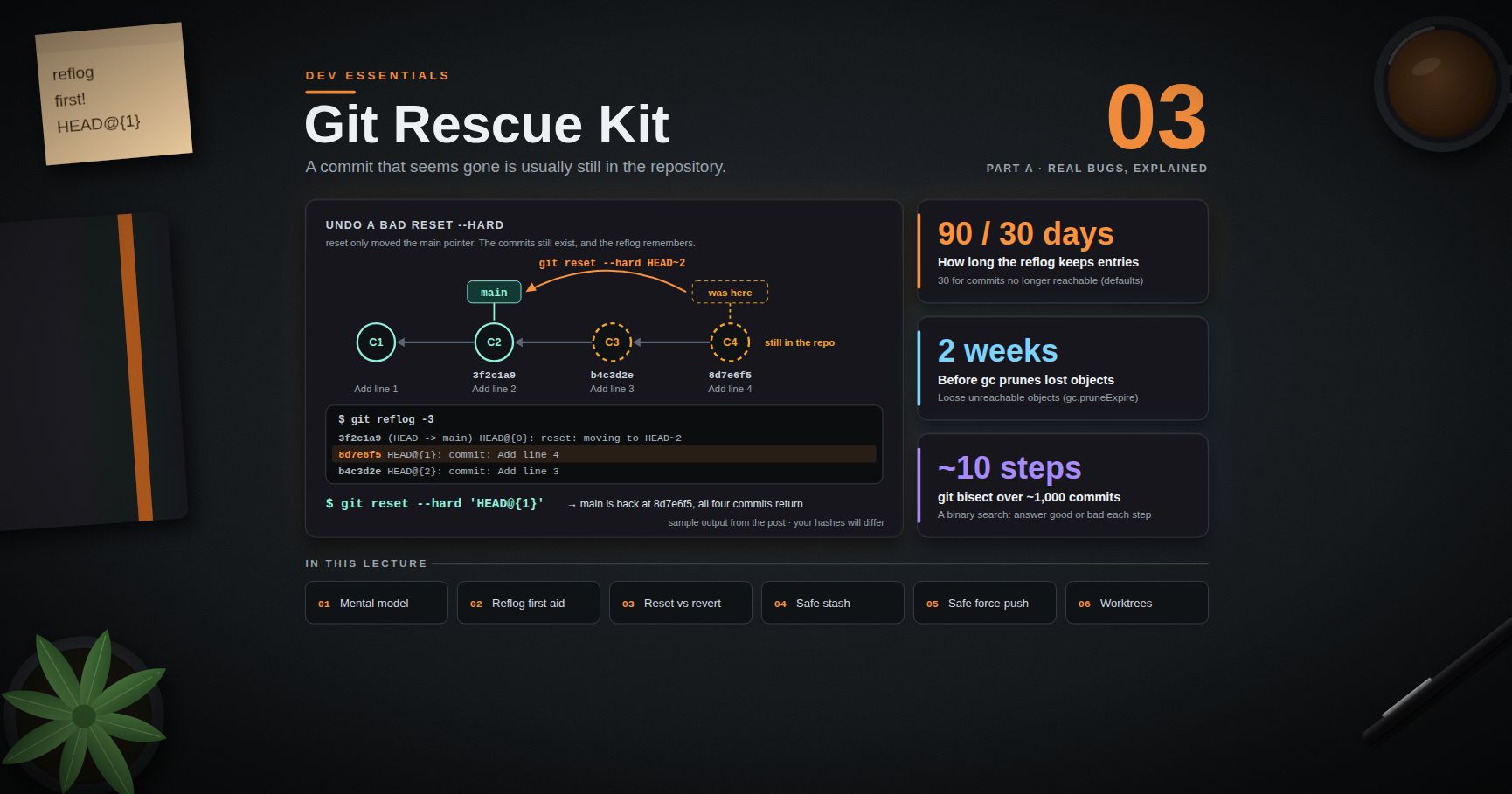
Dev Essentials — 03 · Git Rescue Kit — Reflog, Restore, Reset, Revert, Rebase and Worktrees
Most Git "disasters" are not disasters. A commit that seems gone is usually still inside the repository, and Git keeps a private log of every place a branch has pointed. This post gives you a small mental model first, then a kit of recipes, each written as symptom → command → why it works: undo a bad , get a deleted branch back, stash without surprises, leave detached HEAD safely, force-push without wiping a teammate's work, and use worktrees without tripping over their sharp edges.
> Series map: 01 Text Encoding → 02 Dates & Time Zones → 03 Git Rescue Kit (this post) → 04 Line Endings → … → 24 Desk Health. Part A · Real bugs, explained.
Learning Outcome
- Explain commits, branches, and the index well enough to predict what a command will do.- Use to undo a bad , a bad rebase, or a deleted branch.- Choose correctly between , and .- Stash with a tag, apply by SHA, and explain why bare is risky in a shared repository.- Keep commits made in detached HEAD.- Copy commits with and tidy them with + .- Force-push with (and ) instead of .- Find dangling commits with , and use without falling into its pitfalls.
Chapter 1 — The mental model
Four ideas explain almost every rescue.
1. A commit is a snapshot. It stores the full state of the tracked files, a message, an author, and the ID of its parent commit(s). The ID is a hash of all of that, so a commit can never change. "Changing" a commit always means making a new one.2. A branch is a movable pointer. is only a name that holds one commit ID. When you commit, Git moves that pointer forward. Deleting a branch deletes the name, not the commits.3. means "where you are". Normally points to a branch, and the branch points to a commit. If points straight at a commit, you are in detached HEAD (Chapter 6).4. The index is the next commit, in draft. copies a file version into the index (also called the staging area). turns the index into a snapshot.
Each commit points back to its parent, and each branch points at one commit. The key word is reachable. A commit is reachable if you can walk to it from a branch, a tag, or another ref. Git's garbage collector only deletes objects that are unreachable and old. The reflog (Chapter 3) keeps recently left commits reachable for weeks. That is why most mistakes can be undone.
Terminology
| Term | Meaning ||------|---------|| Commit | Unchangeable snapshot of all tracked files, plus parent link(s) || Ref | A name that points to a commit: branch, tag, , || Branch | A ref under that moves forward when you commit || | "Current position"; usually points to a branch || Index / staging area | The draft of the next commit || Working tree | The files you edit on disk || Reflog | Local history of every value a ref had || Dangling commit | A commit that no ref points to; Git may delete it later || Worktree | An extra working folder attached to the same repository |
> Trick: draws the pointers. Run it before and after each rescue step, and you will see exactly which pointer moved.
Chapter 2 — A throwaway lab repository
Practice on a repository you do not care about. Git Bash:
Windows PowerShell 5.1:
You now have four commits on . Every exercise starts from this state; to reset the lab, delete the folder and run the script again.
> Watch out: in PowerShell, is special. Unquoted is turned into a script block, and Git receives garbage. Always quote refs with braces: , . All commands below use quotes, so they work in both shells.
Chapter 3 — First aid with
Every time or a branch moves — commit, reset, rebase, checkout, merge, pull — Git adds a line to that ref's reflog. The reflog is local to your clone and is never pushed. By default, entries are kept for 90 days, and entries for commits that are no longer reachable are kept for 30 days ( and ).
Sample output (your hashes will differ):
means "where was one move ago". Other forms work too: , and for "the branch I was on before".
Recipe 3.1 — Undo a bad
Symptom. You ran , and two commits disappeared from .
Command.
Why it works. only moved the pointer. The two commits still exist. The reflog remembers the old position, and a second moves the pointer back.
> Watch out: the reflog stores commits, not loose edits. Changes that were never committed and never staged are gone after . If you had run on them, their contents may still exist as dangling blobs — see Chapter 9.
Recipe 3.2 — Undo a rebase
Symptom. A rebase finished, but the result is wrong: lost changes or a bad conflict fix.
Command.
Why it works. A rebase writes new commits, then moves the branch pointer once, at the end. The old commits are untouched, and the branch's previous reflog entry is the old tip — Git's rebase docs point to exactly this entry. is set when the rebase starts, but commands such as overwrite it, so trust the reflog first. If the rebase is still running, simply stop it: .
Recipe 3.3 — Get a deleted branch back
Symptom. You ran , then realized it held unmerged work.
Command. Git printed the old tip when it deleted the branch — — so:
If that line has scrolled away, search the reflog:
Look for a line like . The entry just below it (one step older) is the last commit you had on . A commit message you remember works as a search term too.
Why it works. Deleting a branch also deletes that branch's own reflog. But the reflog still lists every commit you checked out or created.
> Common pitfall: (lowercase) refuses to delete unmerged work with . That error is a safety net. Use only when you are sure.
Chapter 4 — vs vs
The three names sound alike but do different jobs. Git's own docs put it this way: makes a new commit that undoes older commits; restores files and does not move your branch; moves your branch tip and so changes history.
| You want to… | Command | Changes history? ||---|---|---|| Throw away edits in one file | | No || Unstage a file but keep the edits | | No || Get a file as it was two commits ago | | No || Undo the last commit, keep changes staged | | Yes (local) || Undo the last commit, keep changes unstaged | ( is the default) | Yes (local) || Undo the last commit and its changes | | Yes (local) || Undo a commit that is already pushed | | No — it adds a commit |
and were added in Git 2.23 to split up the many jobs of the old . still works; the new names are simply clearer.
The three modes
always moves the current branch pointer. The mode decides what happens to the index and the working tree.
| Mode | Branch pointer | Index | Working tree ||------|----------------|-------|--------------|| | moves | unchanged | unchanged || (default) | moves | reset to match | unchanged || | moves | reset to match | overwritten |
> Trick: followed by squashes your last three local commits into one. (Windows PowerShell 5.1 has no , so run the two commands on separate lines.)
Revert for shared history
Symptom. A commit that is already on the shared broke something. Command:
Why it works. adds a new commit that applies the opposite change. History only grows, so nobody else has to repair their clone.
> Common pitfall: running on a pushed branch and then force-pushing. Everyone who already pulled now holds commits that "no longer exist". Rewrite only what nobody else has.
Chapter 5 — Stash without surprises
saves your uncommitted changes and cleans the working tree. Under the hood, each stash entry is a special commit. The newest one is ; older ones live in that ref's reflog as , , and so on.
The problem. There is one stash stack per repository. Git's worktree docs state that refs under are shared by all worktrees, and is one of them. If two terminals, two tools, an editor extension and an AI agent all work in one repository, they all push to and pop from the same stack. means "whoever stashed last" — maybe not you. A bare can apply someone else's changes and remove them from the list.
The safe pattern
Why each step matters:
- (): without it, new files are not saved and stay in the working tree.- : Git stores the message as , so you can find it later.- : accepts any stash-like commit, so a SHA always means your entry, even if others stashed on top.- Drop by position, found fresh: does not accept a raw SHA (). It needs , so look up the current position by tag just before you drop. (Dropped the wrong one? See Chapter 9.)- , not : removes the entry as soon as it applies. leaves it until you have checked the result.
> Watch out: if or hits a conflict, the entry stays in the list. Fix the conflict, then drop the entry yourself.
> Trick: for a short break, skip the stash. Make a work-in-progress commit (, then ) and later undo it with , which keeps the changes. A commit lives on your branch, so no other session can take it.
Chapter 6 — Detached HEAD
What it is. points straight at a commit instead of a branch. You get there with , , by checking out a tag, or during a rebase or bisect. Git tells you with the line and a hint to use .
Looking around is harmless. Committing is allowed too — but no branch points to those new commits. When you switch away, they become unreachable, and garbage collection may delete them later.
Symptom. "I committed, switched branches, and my commit is gone." Git even warned you: , followed by a hint.
Command.
Why it works. A commit is safe as soon as a ref points to it. Creating a branch or a tag creates that ref. takes you back to the branch you were on before.
Chapter 7 — Moving and cleaning commits
Cherry-pick: copy one commit
Symptom. A fix landed on the wrong branch, or a release branch needs one fix from .
Command.
Why it works. Cherry-pick takes the change that a commit introduced and applies it as a new commit on the current branch, with a new SHA. To move a commit you made on the wrong branch (and never pushed), cherry-pick it onto the right branch, then run on the wrong one.
Fixup commits + autosquash: tidy history before review
Symptom. Review found a typo in a commit three steps back. You want the fix inside that commit, not as "fix typo" on top.
Command.
Why it works. The prefix tells rebase which commit the fix belongs to. Rebase moves the fixup right after its target and changes its action from to , which merges the change and keeps the target's message. Variants: also replaces the message; changes only the message.
> Watch out: opens an editor and waits for you. Scripts, CI jobs and AI coding agents have no one to close that editor, so they hang or fail. Use the non-interactive form (Git 2.44+), and set an editor you know for yourself: . Remember that rewriting gives commits new SHAs — do it only on commits nobody else has, or push with care (next chapter).
Chapter 8 — Force-push without wiping others' work
After a rebase or , your local branch and the remote branch have split apart, and a normal push is rejected. overwrites the remote branch no matter what is there — including commits a teammate pushed five minutes ago.
adds a check: "overwrite only if the remote branch is still where my remote-tracking ref () says it is". If someone pushed in between, the push is rejected with , and you fetch and look before deciding.
The catch. The lease compares against your remote-tracking ref. Many editors run in the background. A background fetch moves to include the teammate's commit without you ever looking at it — and then the lease passes. Git's push docs warn about exactly this. closes the gap: it also checks that the remote tip appears in your local branch's reflog, meaning you actually integrated it. If not, the push is rejected with .
> Trick: make the safe form your default with an alias: , then use .
Chapter 9 — Last resort: for dangling objects
When the reflog has nothing — a dropped stash, an expired reflog, staged content lost to — ask Git's checker which objects no ref points to.
also copies them into and . For blobs it writes the file contents, so you can open them in an editor. For a commit, inspect it with and keep it with .
- By default, treats reflog entries as roots, so a commit that is still in a reflog is not listed as dangling. Add to see those too.- A dropped stash is a merge-like commit. Git's stash docs suggest searching unreachable commits for it. With a tagged stash (Chapter 5), search for the tag:
Then brings it back. Dangling objects survive until garbage collection prunes them; by default, prunes loose unreachable objects older than two weeks ( = ).
> Watch out: never run in the middle of a rescue. It deletes exactly the objects you are looking for.
Chapter 10 — Worktrees
A worktree is an extra working folder attached to the same repository. Each worktree has its own , its own index and its own files on disk. All worktrees share one object database, the branches and tags, the config — and, as Chapter 5 showed, the stash. Good uses: review a pull request while your own branch is half-edited; run a long test on one branch while you keep editing another; build an old release.
Pitfalls
1. One branch, one worktree. A branch that is checked out in one worktree cannot be checked out in another. Current Git refuses with ; older versions word it as . The same rule blocks deleting the branch (). The reason: two checkouts moving one branch pointer would leave one of them with a stale index. Fix it by using a different branch there, using , or removing the other worktree first.
2. Ignored files do not come along. A new worktree is a fresh checkout of tracked files only. files, virtual environments (), , build caches — anything in — are missing. The app often will not start there until you reinstall dependencies and copy local config. Budget for that, or do the work in the main checkout.
3. GUI tools show every worktree. For example, VS Code (since version 1.103) scans the repository for worktrees and lists each one in the Source Control Repositories view; the setting turns this off. Other Git GUIs list them too. Many leftover worktrees mean a cluttered sidebar, and it becomes easy to open a file from the wrong checkout.
4. Deleting the folder by hand leaves a stale entry. Git keeps admin files for each worktree inside the main repository. If you delete the folder in Explorer, marks it , and its branch can still count as "in use" until you run . Prefer . It refuses when there is unsaved work: .
5. Shared state still leaks across. Stash, config and hooks are shared. A in one worktree can take an entry that was made in another.
Case study: the posts that "disappeared"
On this blog, a batch of drafts was once written into a worktree folder instead of the main checkout. The files were real and correct. But the dev server and the editor were running from the main checkout, so the new posts did not show up there, and it looked like the work was lost. Nothing was lost — it was simply in the other folder. The fix was plain: write content in the main checkout, and keep worktrees for short, clearly named, throwaway tasks. Before you hunt for "missing" files, run and check which folder the file was written to.
Chapter 11 — in one paragraph
When something worked last month and is broken now, does a binary search over the commits in between. Run , mark the broken commit with and a known-good one with ; Git checks out the middle commit; you test it and answer or ; repeat. About 1,000 commits need only about 10 steps. Automate it with : exit code 0 means good, 125 means "cannot test, skip", and any other code from 1 to 127 means bad. Finish with . Dev Essentials 10 · Debugging covers bisect as part of a full debugging method.
Practice Exercises
Each exercise starts from a fresh lab (Chapter 2). Break it on purpose, then rescue it. In PowerShell, create or change files with / instead of , because in Windows PowerShell 5.1 writes UTF-16 (see Dev Essentials 01 · Text Encoding).
Exercise 1 — Undo
Run . now shows one commit. Get all four back.
<details><summary>Solution</summary>
</details>
Exercise 2 — Delete an unmerged branch, then recover it
Create a branch with one commit, go back to , force-delete , then recover it.
<details><summary>Solution</summary>
Lost the message? (PowerShell: ) shows the commit's hash.
</details>
Exercise 3 — Revert on a shared branch, and see a lease protect a teammate
Create a local "remote", push to it, let a "teammate" push, then try to force-push without fetching.
<details><summary>Solution</summary>
A plain at the second push would have deleted the teammate's README commit from the remote.
</details>
Exercise 4 — Stash safely while "another session" stashes too
Stash your change with a tag. Then make and stash a second change with a different tag (pretend another tool did it). Restore your change by SHA and drop only your entry.
<details><summary>Solution</summary>
A bare at the apply step would have applied and dropped the other entry.
</details>
Exercise 5 — Fixup + autosquash
On a new branch, add a file with a typo, add another commit, then fold a typo fix into the first commit.
<details><summary>Solution</summary>
</details>
Exercise 6 — Worktree pitfalls, hands-on
Add a worktree, try to check out in it, remove it while dirty, then clean up a hand-deleted worktree. Finally, commit in detached HEAD and rescue that commit.
<details><summary>Solution</summary>
</details>
Cheat-sheet
| Symptom | Command ||---------|---------|| Commits vanished after | → || Rebase went wrong | (or right after) || Deleted a branch | (sha from "Deleted branch … (was …)" or reflog) || Discard edits / unstage a file | / || Undo last local commit, keep work | || Undo a pushed commit | || Stash safely | → → drop by re-found index || Commits made in detached HEAD | (or from reflog) || Copy a commit to another branch | || Fold a fix into an older commit | → || Force-push safely | || Nothing in the reflog | (add to widen) || Branch "already used by worktree" | → work elsewhere or || Stale worktree entry | || Find the commit that broke it | / / / / |
What's next
Dev Essentials 04 · Line Endings explains why a file can show "every line changed" when nothing really changed: CRLF vs LF, , and — another Git surprise with a clean fix.
References
- git-reflog, git-reset, git-revert- git-restore and git — "Reset, restore and revert"- git-stash and git-checkout — Detached HEAD- git-rebase and git-commit ()- git-push (, )- git-fsck and git-gc- git-worktree and git-bisect- Pro Git — Reset Demystified- Highlights from Git 2.44 (GitHub Blog)- VS Code — Git branches and worktrees
> Note: this post is in progress. Planned additions: for repeated conflicts, a full / flag reference, and a diagram of the three trees during each mode.
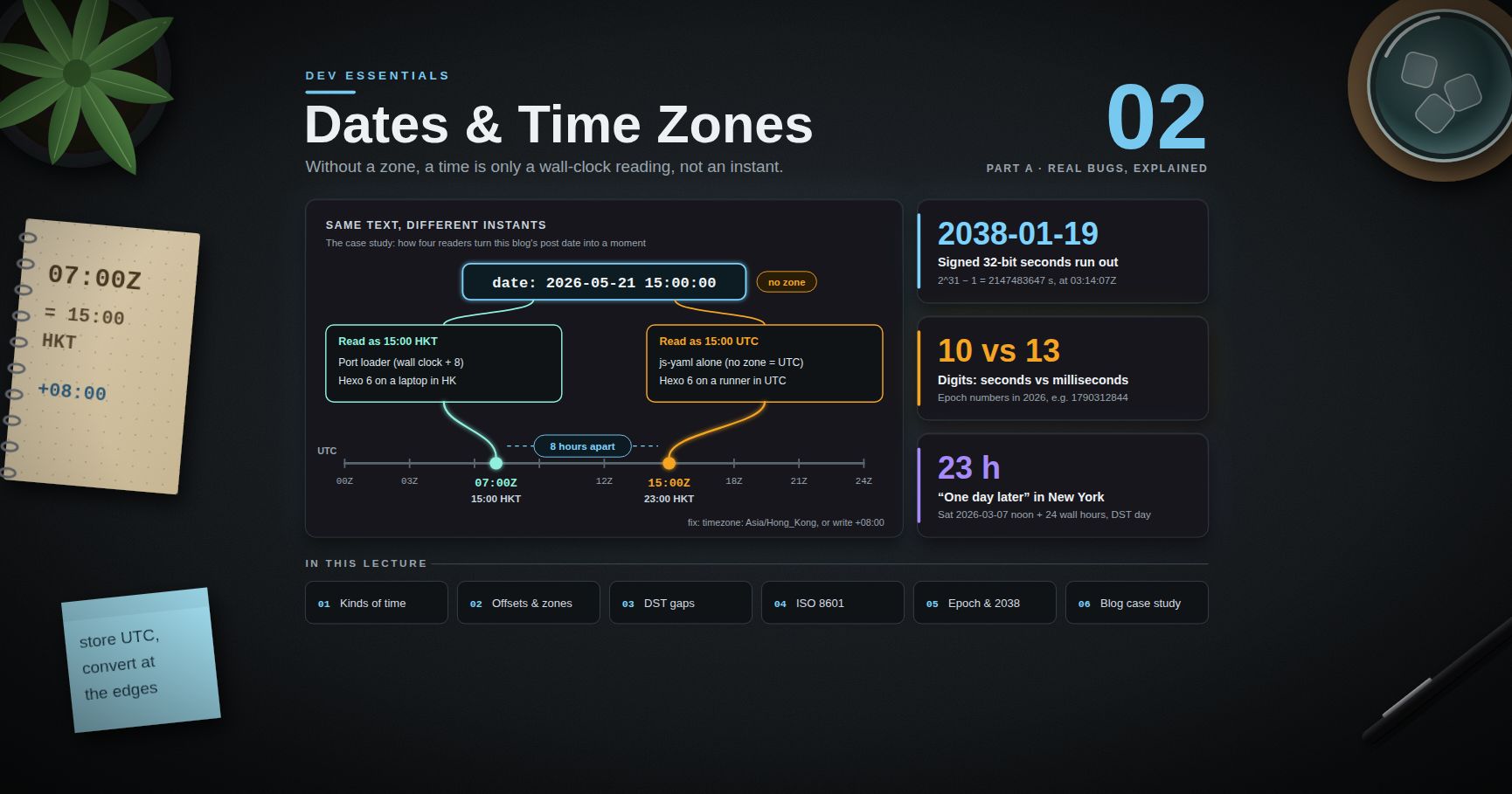
Dev Essentials — 02 · Dates and Time Zones — UTC, ISO 8601, DST and Offsets
looks like a clear moment in time. It is not. Without a time zone it is only a wall-clock reading, and different programs turn it into different instants, hours apart. This post explains the three kinds of "time", UTC, offsets vs IANA zones, daylight saving gaps and overlaps, ISO 8601, Unix epoch numbers, and the date APIs in Python, JavaScript and Java. It ends with a real case: how this blog's own post dates are read by three different tools.
> Series map: 01 Text Encoding → 02 Dates & Time Zones (this post) → 03 Git Rescue Kit → 04 Line Endings → 05 Command Line → … → 24 Desk Health. Part A · Real bugs, explained.
Learning Outcome
- Tell an instant, a wall-clock time and a calendar date apart, and store each one correctly.- Explain why an IANA zone such as carries more information than an offset such as .- Predict what happens in a DST gap and a DST overlap, with real 2026 dates.- Write and read ISO 8601 / RFC 3339 timestamps, and Unix epoch seconds vs milliseconds.- Use aware datetimes and in Python, and avoid the JavaScript parsing traps.- Know the real shipping status of the JavaScript Temporal API in September 2026.- Schedule cron jobs that survive DST.
Chapter 1 — Three kinds of "time"
Terminology
| Term | Meaning | Example ||------|---------|---------|| Instant | One exact point on the global timeline. Same for everyone on Earth. | || Wall-clock time | What a clock on a wall shows. Means nothing until you add a place. | || Calendar date | A day on the calendar, with no time and no zone. | a birthday, || UTC | Coordinated Universal Time. The reference clock. Has no DST. | suffix || Offset | Difference from UTC at one moment. | , || Time zone | A region's full history and future of offsets. | || DST | Daylight saving time: clocks move forward in spring and back in autumn. | New York, London || Epoch time | A count of seconds (or milliseconds) since . | |
What to store for each
| You have | Store | Why ||----------|-------|-----|| Something that happened (log line, payment, login) | The instant, in UTC | It is a fact about the timeline. || A future event people attend ("09:00 in London") | Wall-clock time + IANA zone | Offset rules can change before the event. || A pure date (birthday, due date, holiday) | Date only | Converting it to an instant can move it to another day. |
> Common pitfall: storing a birthday as midnight UTC. A user in New York then sees the day before, because midnight UTC is 20:00 the previous evening there.
Chapter 2 — UTC, offsets and IANA zones
Offsets
An offset says how far a clock is from UTC at one moment. and are the same instant. To convert to UTC, subtract the offset: 15:00 − 8 h = 07:00.
Zones are more than offsets
The IANA time zone database (also called tzdata or the Olson database) names zones as : , , . Each zone stores every offset change in that region's history, plus the current rules for the future.
Today is shared by several zones. Their histories differ. From the tzdata files:
| Zone | Offset today | History that alone cannot tell you ||------|--------------|---------------------------------------------|| | +08:00 | Used summer time until 1979; the last change was on 1979-10-21. || | +08:00 | Was +07:30 until 1982-01-01. || | +08:00 | Ran a DST trial from 2006-12-03 to 2009-03-29 (+09:00 in summer). |
So an offset tells you about one moment. A zone tells you about every moment, including next year. Governments change the rules, and tzdata is updated when they do, so keep your OS, language runtime and packages current.
> Watch out: Windows uses its own zone IDs. This Windows machine reports ("Beijing, Chongqing, Hong Kong, Urumqi"), and Node.js on it reports the IANA zone , not . The two zones agree today but not in 1979. Pass an explicit IANA zone to your code rather than trusting the machine.
Chapter 3 — DST gaps and overlaps
When clocks jump forward, one hour of wall-clock time does not exist (a gap). When clocks go back, one hour happens twice (an overlap).
Real 2026 transitions
| Zone | Change | Local clock | Result ||------|--------|-------------|--------|| | Sun 2026-03-08 | 02:00 EST → 03:00 EDT | Gap: 02:00–02:59 never happens || | Sun 2026-11-01 | 02:00 EDT → 01:00 EST | Overlap: 01:00–01:59 happens twice || | Sun 2026-03-29 | 01:00 GMT → 02:00 BST | Gap: 01:00–01:59 never happens || | Sun 2026-10-25 | 02:00 BST → 01:00 GMT | Overlap: 01:00–01:59 happens twice |
(US rule: second Sunday in March to first Sunday in November. UK rule, per GOV.UK: forward at 1am on the last Sunday in March, back at 2am on the last Sunday in October.)
What a library does with a gap or overlap
Python's attribute (added in 3.6) picks which of the two moments you mean: is the earlier, the later.
"One day later" is not always "24 hours later"
> Trick: in Python, arithmetic between aware datetimes in the same zone works on the wall clock. For elapsed time (timeouts, durations, billing), convert to UTC first.
Chapter 4 — Writing timestamps: ISO 8601 and RFC 3339
ISO 8601 is the international standard for dates and times. RFC 3339 is a strict, simple profile of it for the internet. Use it for every timestamp you send or store as text.
| Form | Meaning ||------|---------|| | A calendar date || | A wall-clock time, no zone (ambiguous as an instant) || | An instant in UTC || | The same instant, written with Hong Kong's offset || | The same instant plus the zone name (RFC 9557) |
Notes from the RFCs:
- RFC 3339's grammar uses between date and time. A note allows a space "for the sake of readability", but many parsers only accept .- RFC 3339 used to mean "UTC time known, local offset unknown". RFC 9557 (2024) updates this: now carries that meaning too.- RFC 9557 adds bracketed suffixes such as . Temporal in JavaScript (Chapter 7) prints this format.
> Common pitfall: is 6 May in the US and 5 June in the UK. Never use a local display format for storage or APIs. ISO 8601 also sorts correctly as plain text.
Chapter 5 — Unix epoch time
Unix time counts seconds since . It ignores leap seconds: the ECMAScript spec says its time values "do not account for UTC leap seconds", and POSIX time works the same way.
| Unit | Who uses it | Digits in 2026 | Example ||------|-------------|----------------|---------|| Seconds | Unix tools, Python , most APIs, JWT | 10 | || Milliseconds | JavaScript , Java , MongoDB | 13 | |
Both examples are . Mixing them up is a classic bug:
The year 2038 problem
A signed 32-bit count of seconds tops out at , which is . One second later it wraps to a negative number (a date in 1901). Old C code with a 32-bit , file formats and database columns are at risk. For example, MySQL documents its type range as UTC to UTC. Use 64-bit integers or proper date types.
For comparison, a JavaScript holds milliseconds in a range of exactly ±100,000,000 days around 1970 (±8.64 × 10^15 ms), so it reaches the year 275760.
Chapter 6 — The storage rule
1. Store instants in UTC. Use a real date-time type ( in PostgreSQL, BSON Date in MongoDB, in Java) or ISO 8601 text with .2. Keep the zone when the user's local time matters. For a future meeting or a "every day at 09:00" rule, store the wall-clock time and the IANA zone name. Work out the instant when you need it, so new DST rules are picked up.3. Convert to local time only at the edges: when you display, and when you read user input.4. Store pure dates as dates.
Why rule 2 matters: a meeting at 09:00 is on 2026-12-07 but on 2026-06-08. A stored UTC instant would put the June meeting at the wrong local hour.
MongoDB
MongoDB's docs say a BSON Date "is a 64-bit integer that represents the number of milliseconds since the Unix epoch". It is signed, so dates before 1970 work. It stores no zone. If you need the user's zone, put it in its own field:
See MongoDB Course 00 · Foundations for BSON types, and MongoDB Course 28 · Time-Series for time-based data at scale.
Chapter 7 — The APIs: Python, JavaScript, Java
Python: aware vs naive
The Python docs define an aware object as one that "represents a specific moment in time that is not open to interpretation". A naive object has no zone, and whether it means UTC or local time "is purely up to the program".
- is deprecated since Python 3.12. It returns a naive value that looks like local time to other code. Use (the alias needs Python 3.11+; on older versions use ).- reads the system tz database. Windows has none, so install the first-party package: . Without it, raises on Windows.
JavaScript: parsing traps
A is one instant (milliseconds since the epoch). Its getters then show that instant in local time or in UTC. The trouble is in parsing. The ECMAScript spec says: "When the UTC offset representation is absent, date-only forms are interpreted as a UTC time and date-time forms are interpreted as a local time." Strings outside the spec's format "may fall back to any implementation-specific heuristics".
| Input | Spec rule | Result with TZ | Result with TZ ||-------|-----------|-----------------------------------|---------------------------------|| | Date-only → UTC | | || | Date-time → local | | || | Not the spec format → engine decides | V8 (Node/Chrome): local, as above | V8: local, as above || | Explicit UTC | | |
(Tested in Node.js 20 with the environment variable set.) The first row surprises people: in New York, returns 20, because UTC midnight is still 20 May there.
Display in a chosen zone with :
JavaScript: Temporal
Temporal is the new built-in date/time API. It separates the concepts: , , , and more. Status as of September 2026:
- It reached Stage 4 at TC39 in March 2026 and is listed for ECMAScript 2027.- Shipped in Chrome 144 (and Edge), Firefox 139, Node.js 26 and Deno 2.7, per MDN's compatibility data.- Safari has it only in Technology Preview. MDN marks Temporal "Limited availability". For websites, use a polyfill ( or ) until Safari ships.
Unlike Python's same-zone arithmetic, Temporal keeps "1 day" (calendar) and "24 hours" (exact time) apart. (Outputs above checked in Chromium 152.)
Java:
Java 8 added , with one class per concept (see Java Development p1 and p2 for the language basics):
The docs give the rules: in a gap the local time is "shifted forwards by the length of the Gap"; in an overlap the earlier offset is used unless you call .
Chapter 8 — Cron jobs and DST
Classic cron runs jobs by the machine's local clock. On a machine in a DST zone, a job at meets the gap in spring and the overlap in autumn. The Debian manual describes its behaviour for clock changes of less than 3 hours:
- Moving forward: "those jobs which would have run in the time that was skipped will be run soon after the change."- Moving back: "those jobs that fall into the repeated time will not be re-run."- Jobs with in the hour or minute field "are run based on the new time immediately".
Other schedulers behave differently, so check yours. Safe habits:
- Run servers in UTC. Then there is no DST at all.- If a job must follow local time, avoid 01:00–03:00 local in zones with DST.- GitHub Actions: cron runs in UTC by default. You can add an IANA ; for zones with DST, GitHub's docs say a schedule inside the skipped hour advances to the next valid time (a 2:30 AM schedule runs at 3:00 AM). More in Dev Essentials 16 · CI/CD.
Chapter 9 — Case study: when is this blog's post published?
Every post on this blog starts with frontmatter like this:
There is no zone. The author means 15:00 Hong Kong time. Three readers turn this text into an instant.
Reader 1 — gray-matter / js-yaml (YAML 1.1 rule)
The Next.js port of the blog parses frontmatter with gray-matter, which uses js-yaml. The YAML 1.1 timestamp type says: "If the time zone is omitted, the timestamp is assumed to be specified in UTC." So js-yaml returns , which is 23:00 in Hong Kong. (Checked with gray-matter 4.0.3 and js-yaml 3.14.)
Reader 2 — the port's post loader
The port corrects this. Its loader reads the wall-clock fields back out of that Date and anchors them to Hong Kong time with a fixed offset. Simplified from the source:
Result: (15:00 HKT), and the URL uses the Hong Kong calendar date. accepts an hour below 0 and rolls back to the previous day, so a post at 03:00 HKT still gets the right instant. A fixed is safe here only because Hong Kong has had no DST since 1979. The same trick would be wrong for London.
Reader 3 — Hexo
The original Hexo site has in . The Hexo docs say: "Hexo uses the setting on your computer by default." In Hexo 6, the front-matter parser (hexo-front-matter 3.x) reads each zone-less date as the build machine's local wall-clock time, and Hexo then re-anchors it only if is set. The Hexo site builds on a GitHub Actions runner. GitHub-hosted runners run in UTC in practice (GitHub states UTC explicitly for scheduled workflows; add a step to see it).
Same text, different instants
| Reader | Rule | Instant | Hong Kong time ||--------|------|---------|----------------|| js-yaml alone | No zone = UTC | | 23:00 || Port loader | Wall clock in HKT (+8) | | 15:00 || Hexo 6, , runner in UTC | Wall clock in machine zone | | 23:00 || Hexo 6, , laptop in HK | Wall clock in machine zone | | 15:00 |
The URL date is the same in all four, because each reader keeps the written calendar date. The instant is not, and anything that shows or compares instants (a feed timestamp, a "published" tag, a future-post filter) can differ by 8 hours.
Where fits
The Hexo config also has . The docs describe it as "Display future posts?", default . With , a post dated later than the build time is still published. With , it is skipped until a later build, and "later than now" is judged with whatever instant the build machine computed. Near the boundary, the zone decides.
The lesson: pin the zone
- Say the zone once, in config. For Hexo: (an IANA name; the docs give as an example). Then the build machine's zone no longer matters.- Or write the offset in the data, such as . This is the portable fix for YAML readers. Check each consumer first: the current hexo-front-matter source honours an explicit offset, but version 3.x (Hexo 6) reads every date's UTC fields as local wall-clock time, so the offset does not survive there.
> Watch out: the port's loader is written for zone-less dates. It reads the UTC fields of whatever js-yaml returns and treats them as HKT. If posts ever gain an explicit offset, update the loader in the same change, or those dates will move by 8 hours.
Practice Exercises
Exercise 1 — Classify
For each, say instant, wall-clock + zone, or calendar date: (a) a server log line, (b) a user's birthday, (c) a weekly 09:00 team call in Singapore, (d) a payment's time, (e) a public holiday.
<details><summary>Solution</summary>
(a) instant (UTC). (b) calendar date. (c) wall-clock + zone: + + a weekly rule. (d) instant (UTC). (e) calendar date (and it may differ by country).
</details>
Exercise 2 — The London gap
What does Python print for after a round trip through UTC?
<details><summary>Solution</summary>
01:30 does not exist on that day (01:00 GMT jumps to 02:00 BST). With , Python uses the offset from before the jump (+00:00), which is 01:30Z, and that is 02:30 BST.
</details>
Exercise 3 — Seconds or milliseconds?
An API returns . Another returns . Convert both to ISO 8601 in Python.
<details><summary>Solution</summary>
10 digits means seconds and 13 digits means milliseconds, for dates between 2001 and 2286.
</details>
Exercise 4 — Predict the JavaScript
With , what do and return?
<details><summary>Solution</summary>
and . The date-only string is parsed as UTC midnight, which is 20:00 on 20 May in New York (UTC−4 in May). The date-time string is parsed as local midnight on 21 May. To get a plain date safely, use , or split the string yourself.
</details>
Exercise 5 — Store a recurring meeting
A team meets every Monday at 09:00 in London. Design the stored fields and compute the UTC instants for 2026-06-08 and 2026-12-07.
<details><summary>Solution</summary>
Store . Compute each instant when needed:
</details>
Exercise 6 — Pin this blog's dates
Give two ways to make mean 15:00 Hong Kong time for every reader, and one risk of each.
<details><summary>Solution</summary>
1. Set in the Hexo config. Risk: it only fixes Hexo. Other readers (plain js-yaml, scripts) still read the text as UTC, so the port keeps its own +8 correction.2. Write . Risk: every reader must honour offsets. Hexo 6's front-matter parser and the port's current loader do not, so both would need changing together.
</details>
Cheat-sheet
| Task | How ||------|-----|| Store an event that happened | UTC instant: || Store a future local event | wall-clock + IANA zone: + || Store a birthday | date only: || Now, aware (Python) | || Attach a zone (Python) | || Zone data on Windows (Python) | || Pick the second 01:30 (Python) | || Elapsed time (Python) | convert both to UTC, then subtract || Parse safely (JS) | always include or an offset || Show in a zone (JS) | || Plain date (JS) | || Seconds → Date (JS) | || Epoch → ISO (bash) | || Epoch → ISO (PowerShell) | || 32-bit limit | || Hexo site zone | |
What's next
Dev Essentials 03 · Git Rescue Kit covers reflog, restore, reset, revert and rebase: the tools that made the repair in Dev Essentials 01 a routine job instead of a disaster.
References
- RFC 3339 — Date and Time on the Internet: Timestamps- RFC 9557 — Timestamps with Additional Information- IANA — Time Zone Database- ECMAScript — Date Time String Format and Date.parse- MDN — Date.parse()- MDN — Temporal- TC39 — Temporal proposal- Python — datetime- Python — zoneinfo- Java — ZonedDateTime (Java SE 21)- MongoDB — BSON Types (Date)- MySQL 8.4 — DATE, DATETIME and TIMESTAMP- YAML 1.1 — Timestamp type- Hexo — Configuration (timezone, future)- GitHub Docs — Events that trigger workflows (schedule)- GOV.UK — When do the clocks change?- Debian — cron(8) manual
> Note: this post is in progress. Planned additions: time zones in PostgreSQL ( vs ), leap seconds and clock sync (NTP), and a diagram of the three readers in the case study.
3D Printing Course — 06 · CAD for Printing
Post 05 established that a printed part's dimensions differ from its nominal dimensions in ways you can measure and partly compensate. This post is about the tool where those decisions get encoded. Choosing a CAD paradigm, understanding what happens when a solid becomes a triangle mesh, picking an interchange format that carries units, and writing a model whose clearances are named parameters rather than typed numbers — these are the things that determine whether a design can be revised in five minutes or has to be rebuilt from scratch. The theme throughout: a model is a program that produces geometry, and it should be written with the same discipline as any other program.
> Series map: 00 How 3D Printing Works → 01 First Print and Calibration → 02 Slicing in Depth → 03 Orientation, Supports and Design for Printing → 04 Materials → 05 Dimensional Accuracy and Tolerances → 06 CAD for Printing (this post) → 07 Strength, Failure Modes and Functional Parts.
Learning Outcome
- Choose between parametric history-based, direct, code-CAD and mesh/sculpting paradigms based on what the part is for.- Explain the difference between a BREP solid and a triangle mesh, and state exactly what is lost when one becomes the other.- Build a fully-constrained parametric part driven by a parameter table, so a single value change propagates correctly.- Pick a file format deliberately: STEP for interchange, 3MF for printing, STL only when nothing else is accepted, and know why STL causes 25.4× scaling errors.- Set mesh export tolerances so faceting does not become the chord error of Post 05.- Diagnose and repair non-manifold edges, flipped normals and self-intersections.- Encode Post 05's measured clearances as named variables, and apply printing-aware modelling rules for chamfers and wall thickness.- Select correctly between printed threads, heat-set inserts, captive nuts and tapping.- Version-control CAD work, and know why code-CAD is structurally better at it.
Chapter 1 — The paradigms, and what each is for
Terminology
- Parametric, history-based modelling — the model is a recorded sequence of operations (a feature tree) driven by named dimensions. Editing a dimension replays the tree. Fusion 360, Onshape, SolidWorks, FreeCAD, Solid Edge.- Direct (explicit) modelling — you push and pull faces of the geometry directly; there is no history to replay. Fast for edits to imported geometry that has no tree. Plasticity, SpaceClaim, Fusion's direct-edit mode, most of FreeCAD's Part workbench.- Code-CAD (script-CAD) — the model is source code that evaluates to geometry. OpenSCAD, CadQuery, build123d, JSCAD, ImplicitCAD, Zoo/KittyCAD's KCL.- Mesh / sculpting — you manipulate a triangle mesh directly, or a voxel/dynamic-topology proxy of one. Blender, ZBrush, Nomad Sculpt, Meshmixer.- Design intent — the reasons behind the geometry, encoded so that later edits respect them. "This hole is centred on that boss" is design intent; "this hole is at X = 17.5" is a coincidence that happens to be true today.- Feature tree — the ordered list of operations that builds a parametric model.- Constraint — a geometric or dimensional relationship in a sketch (coincident, tangent, horizontal, equal, or a driving dimension) that removes a degree of freedom.
Comparison
| Paradigm | Strength | Weakness | Right for ||---|---|---|---|| Parametric history-based | design intent survives editing; dimensions are first-class; assemblies and drawings | tree can break on edit ("topological naming"); GUI-heavy; files are opaque binaries | functional mechanical parts — the default for this course || Direct | fast, no tree to break, excellent on imported dumb solids | edits are not repeatable or parameterised; no design intent recorded | modifying a downloaded STEP; quick one-off geometry || Code-CAD | exact parameterisation, diffable text, real version control, loops and libraries, scriptable batch generation | no interactive dragging; steeper entry; fillets on complex geometry can be awkward | parts with families of sizes; anything you will regenerate; anything you want in git || Mesh / sculpting | organic, artistic, unlimited form | no dimensions, no constraints, no solid guarantee, hard to make anything fit | figurines, characters, artistic objects, decorative surfaces |
Why mesh tools are the wrong default for functional parts
Blender is superb software and the wrong tool for a bracket. The reasons are structural, not stylistic:
1. No dimensions. A mesh stores vertex coordinates. It does not store "this face is 20 mm from that face because a bearing is 20 mm wide". Change one thing and you re-derive everything by hand.2. No constraints. Nothing enforces that two faces stay parallel or that a hole stays centred. Move a vertex and the design intent is silently gone.3. No solid guarantee. A mesh can be non-manifold, self-intersecting or open, and Blender will happily let you build and export one. A BREP kernel refuses to produce an invalid solid.4. Curves are already discretised. A "cylinder" in Blender is already a fixed polygon count. In BREP it is an exact analytic surface until you export it, which is precisely the distinction that controls hole accuracy (Chapter 4).5. Fillets and chamfers are approximations. Blender's bevel modifier is a mesh operation; a CAD fillet is an exact tangent surface.
Where mesh tools are right: sculpting an organic shape, retopologising a scan, or artistic detailing. And there is a legitimate hybrid — sculpt the organic form, export it, and use it as a body inside a parametric model that handles the functional interfaces.
Browser-based CAD
Onshape runs entirely in the browser with a genuine cloud-native document model and built-in versioning and branching; its free tier makes documents public, which is fine for hobby work and disqualifying for anything confidential. Fusion 360 has a browser client with a reduced feature set. TinkerCAD is excellent for teaching and simple assemblies, but is constructive-solid-geometry-on-a-mesh underneath and does not scale to functional design work.
Chapter 2 — BREP solids and triangle meshes
This is the single most important technical idea in the post, because every accuracy problem in Post 05's Chapter 4 traces back to it.
Two ways to describe a shape
BREP (boundary representation) describes a solid by its boundary, as a topological structure of faces, edges and vertices, where each face carries an exact analytic surface — a plane, a cylinder, a cone, a sphere, a torus, or a NURBS patch — and each edge an exact curve. A cylindrical hole is stored as "cylindrical surface, axis here, radius 3.0". That radius is exact at every scale. Zoom in a million times and it is still a perfect circle.
Triangle mesh describes a surface as a list of vertices and a list of triangles. There are no analytic surfaces. A cylindrical hole is stored as some number of flat facets approximating a circle. The approximation is fixed at the moment of export.
| | BREP | Mesh ||---|---|---|| Curved surfaces | exact analytic / NURBS | flat facets approximating the surface || Precision | resolution-independent | fixed at export || Topology | faces, edges, vertices with adjacency | triangles that may or may not connect properly || Validity | kernel enforces a watertight solid | nothing enforces anything || Booleans | exact | approximate, fragile, and can fail || Fillet a 3 mm edge | one operation, exact | rebuild the surrounding topology by hand || File size for a smooth shape | small | large — smoothness costs triangles || Units | carried in the format (STEP) | not carried by STL at all || What the slicer wants | not this | this |
The conversion, and what it destroys
The slicer needs a mesh. It slices by intersecting planes with triangles, which is a fast, robust, well-understood operation. So somewhere between CAD and printer, tessellation happens: the BREP's analytic surfaces are approximated by triangles.
What is lost:
1. Exactness on curves. A cylinder becomes a prism. This is the polygonal chord error of Post 05: because tessellation places vertices on the true surface, an internal cylinder becomes an inscribed polygon and prints undersize, while an external cylinder becomes inscribed too and prints undersize on its outer dimension. The error is controllable but never zero.2. Feature identity. "This is a hole for an M3 screw" becomes anonymous triangles. Nothing downstream knows it was a hole.3. The feature tree. All design intent, all parameters, all constraints. Gone.4. Editability. You can push a mesh around; you cannot change the diameter of a hole that no longer exists as a concept.5. Exact adjacency, if the tessellator is sloppy — producing the mesh-integrity problems of Chapter 4.
The practical rule that follows: keep the BREP as the master. Export a mesh as a build artefact, the way a compiler emits a binary. Never edit the mesh and treat it as the source. If you find yourself repairing an STL, the real fix is upstream.
> Watch out: this is why "I downloaded an STL and want to change the hole size" is a hard problem and "I downloaded a STEP and want to change the hole size" is a two-minute job. When choosing what to publish or archive, publish both — the STEP so people can modify it, the mesh so people can print it immediately.
Chapter 3 — A parametric workflow that survives editing
Sketch discipline
A sketch is the 2D profile that features are built from, and it is where most parametric models go wrong.
- Fully constrain every sketch. A fully-constrained sketch has zero degrees of freedom; every entity is locked by constraints and dimensions. Most CAD packages colour it differently when it is. An under-constrained sketch will silently change shape when you edit something else — the single largest source of "my model exploded when I changed one number".- Prefer geometric constraints over dimensions. Coincident, collinear, tangent, symmetric, equal. These express intent; a dimension expresses a value. A hole constrained symmetric about the origin stays centred when the part gets wider. A hole dimensioned at 17.5 mm from the left edge does not.- Sketch on planes and on datums, not on model faces, where you can. Sketching on a face creates a dependency on that face's identity; if a later edit removes or splits the face, the sketch loses its reference. This is topological naming, and it is why parametric trees break.- Keep sketches small. One sketch per feature is easier to debug than one heroic sketch containing everything.- Sketch the design intent, not the picture. If two features must always be the same size, constrain them equal rather than dimensioning both to the same number.
The feature vocabulary
| Feature | What it does | Printing note ||---|---|---|| Extrude | sweeps a profile along a straight path | the workhorse || Revolve | sweeps a profile around an axis | good for anything round; watch orientation (Post 03) || Sweep / Loft | profile along a path / blend between profiles | powerful and easy to make unprintable overhangs with || Fillet | rounds an edge with a tangent radius | on vertical and top edges: excellent. On bottom edges: a 45°-and-worse overhang that prints badly || Chamfer | cuts an edge at an angle | on bottom edges: the correct choice — a 45° chamfer is self-supporting and also cures elephant foot (Post 05) || Shell | hollows a solid to a wall thickness | set the thickness to a multiple of extrusion width (Chapter 5) || Pattern (linear / circular / mirror) | repeats a feature | drive the count from a parameter || Draft | tapers a face | a moulding concept; occasionally useful to make a face self-supporting || Hole (as a dedicated feature) | parameterised hole with a standard | records intent — "M3 clearance" — rather than a number |
Design intent, stated as a rule
Before adding any dimension, ask: what is this number a consequence of?
- A hole diameter is a consequence of the fastener plus your measured clearance. It is not "3.4".- A wall thickness is a consequence of the extrusion width times an integer. It is not "1.2".- A pocket depth is a consequence of the component that goes in it plus a clearance. It is not "6".- A part length is a consequence of the things it must span. It is not "80".
Every number that is a consequence should be an expression referencing a parameter, not a literal. That is the whole discipline.
A parameter table driving a real part
Most parametric CAD packages have a parameters/variables dialogue where you define named user parameters and then use them in dimension fields. Here is the same idea expressed three ways.
In a parameters table (Fusion 360 / Onshape / FreeCAD spreadsheet style):
| Name | Expression | Value | Comment ||---|---|---|---|| | | 0.4 | extrusion width basis || | | 2.4 | 6 perimeters — never a fraction of a width || | | 0.2 | Z dimensions should be multiples of this || | | 8.0 | measured diameter of the actual shaft || | | 0.20 | from your Post 05 fit gauge || | | 8.20 | consequence, not a literal || | | 3.0 | M3 || | | 0.40 | from the fit gauge || | | 3.40 | || | | 4.0 | heat-set insert nominal — from its datasheet || | | 6.0 | multiple of layer height || | | 6.0 | || | | 0.5 | elephant-foot cure (Post 05) || | | 2.4 | stress-concentration relief (Post 07) |
Change after re-running the fit gauge and every bore in the model updates. That is the entire point.
In OpenSCAD:
In CadQuery (Python, BREP kernel — so exports STEP as well as mesh):
> Trick: put a block at the top of every code-CAD file and nothing else editable below it. Six months later, that comment is the difference between a two-minute revision and re-reading your own model.
Chapter 4 — Formats, export settings, and mesh integrity
The formats
| Format | Carries | Units | Use it for ||---|---|---|---|| STEP (ISO 10303, AP242) | exact BREP solids, assemblies, colours, and PMI in AP242 | yes | interchange between CAD packages; archival master; anything you want someone else to be able to modify || 3MF | triangle mesh plus units, colour, materials, transforms, build items, metadata, and slicer settings via extensions | yes | sending a model to the printer; sharing something ready to print; the modern replacement for STL || STL | triangles. That is the entire format | no | only when the recipient accepts nothing else || OBJ | triangles plus UVs, materials via , vertex colours by convention | not reliably | mesh interchange with graphics and texturing tools || glTF / GLB | mesh + PBR materials, optimised for real-time delivery | yes (metres) | viewing a model on the web — not for printing |
Why STL causes 25.4× scaling errors
The STL format is a list of triangles with floating-point coordinates and per-facet normals. It has no header field for units, no metadata section, no colour, no scale. A vertex at means twenty somethings. If the author worked in inches and the recipient's slicer assumes millimetres, the part arrives 1/25.4 of its intended size — or 25.4× too large in the other direction. This is not a bug in any particular tool; it is a consequence of information the format simply does not carry.
The fix is not to be careful. The fix is to use a format that carries units:
- Export 3MF for printing. Its attribute makes the question unanswerable-by-guessing.- Export STEP for interchange. Units are part of the file.- Reach for STL only under duress, and when you do, put the unit in the filename: .
3MF additionally solves the problem that an STL cannot represent multi-part plates, per-object print settings, modifier meshes, or colour. Most modern slicers use 3MF as their own project format for exactly this reason — a saved project is a 3MF containing the geometry and the settings that produced a known-good print. That is a far better thing to share than a naked STL.
> Common pitfall: publishing only an STL for a functional part. The recipient cannot change a clearance, cannot adapt it to their printer's measured offsets, and cannot even be sure of the units. Publish STEP and 3MF; add the source (, , ) if you can.
Mesh export settings — where Post 05's chord error is decided
Every tessellator is controlled by two tolerances, whatever the UI calls them:
- Chord / linear / deviation tolerance — the maximum distance between the flat facet and the true surface. Smaller ⇒ more triangles ⇒ closer to the real shape. This is the setting that controls hole undersizing.- Angular tolerance — the maximum angle between adjacent facet normals. Controls how many facets a curve gets regardless of its size, which matters on large-radius surfaces where the chord tolerance alone would produce visible flats.
Naming across tools:
| Tool | Chord tolerance | Angular tolerance ||---|---|---|| Fusion 360 (Refinement: custom) | Surface Deviation | Normal Deviation || SolidWorks | Deviation | Angle || Onshape | Chordal tolerance | Angular tolerance || FreeCAD (mesh export) | Surface deviation | Angular deviation || CadQuery | | || OpenSCAD | (minimum fragment size) | (minimum fragment angle); overrides both |
The geometry of the error. For a circle of radius r approximated by an inscribed regular polygon of n sides, the maximum deviation (sagitta) is . Two consequences follow immediately:
1. The error grows as n falls — obvious, and the reason the default facet count is usually too low.2. For a fixed facet count, the error scales with r — so a coarse hurts big circles more in absolute terms, while a fixed chord tolerance produces the same absolute error at every size.
Because the polygon is inscribed, an internal cylinder — a hole — is always printed smaller than nominal. That is Cause A from Post 05, and it is entirely eliminated by exporting at a tight chord tolerance. Cause B (the extrusion overlap on concave paths) is not — but there is no reason to add a self-inflicted error on top of an unavoidable one.
Practical guidance:
- Set chord tolerance to roughly an order of magnitude below the accuracy you care about. If you are chasing 0.05 mm, export at 0.005 mm or tighter. Triangle count is cheap; slicers handle multi-megabyte meshes without difficulty.- Do not use OpenSCAD's globally. A fixed gives a 3 mm hole a wastefully high facet count and a 100 mm cylinder a visibly faceted one. Set and instead and let the facet count adapt per feature. Use only as a local override on a specific object.- Preview the result. Import the exported mesh back and look at a hole edge-on. If you can see flats, the tolerance was too loose.
> Trick: the fastest way to see whether the chord tolerance is right is to slice the exported mesh and look at the toolpath around a small hole in the slicer's preview. If the path is visibly a polygon rather than a circle, re-export.
Mesh integrity
A valid mesh for printing is manifold (watertight, "2-manifold"): every edge is shared by exactly two triangles, no more and no less; the surface is closed, with a well-defined inside and outside; and all normals point outward consistently.
| Defect | What it means | Symptom ||---|---|---|| Non-manifold edge | an edge shared by 1, 3 or more faces | slicer cannot decide what is inside; missing or spurious walls || Hole / open boundary | a gap in the surface | the "solid" is not closed; slicer either repairs it or produces nonsense || Flipped normals | a face pointing inward | inverted regions; the slicer may print the negative of what you wanted || Self-intersection | the surface passes through itself | ambiguous interior; strange internal walls || Duplicate / coincident faces | two triangles in the same place | zero-thickness regions; unpredictable slicing || Zero-area / degenerate triangles | three collinear vertices | numerical failures in slicing || Disjoint shells | multiple separate closed volumes in one file | legitimate sometimes, a bug other times — decide deliberately |
Repair tooling, roughly in order of how much you should want to need it:
1. Fix it upstream. A BREP kernel cannot produce a non-manifold solid. If your mesh is broken, either the source model was a mesh, or the tessellator failed, or a boolean produced a degenerate result. Fixing the source is the real fix.2. The slicer's own repair. PrusaSlicer, Cura, OrcaSlicer and Bambu Studio all detect and auto-repair simple errors, and report what they found. Read the report rather than dismissing it.3. Blender — the 3D Print Toolbox add-on checks manifoldness, thin faces, sharp edges, overhangs and intersections, and offers targeted fixes. Free and effective.4. Meshmixer (legacy but still widely used), Netfabb, MeshLab — dedicated inspection and repair.5. — command-line, scriptable, good for CI checks on a repository of models.
> Watch out: a slicer's "auto-repair succeeded" is not the same as "the model is correct". Repair heuristics guess at what you meant. If the model has a genuine 0.02 mm gap where two bodies were supposed to join, the repair will close it silently and you will never learn that your boolean failed.
Chapter 5 — Modelling for what Post 05 measured
The measurements from Post 05 are only useful if they are encoded somewhere durable. Three rules do most of the work.
Rule 1 — Clearances are named variables, never literals
Never type into a hole diameter for an M3 screw. Type , where both are parameters. The reasons compound:
- Re-run the fit gauge after a nozzle change and update one number.- Print the same part in PETG instead of PLA and update one number.- Someone else on a different printer changes one number and it works for them.- Six months later you can see why the hole is 3.4, which is information the literal destroys.
Keep a shared parameter block — a spreadsheet in the CAD document, an included file, or a Python module — that holds your machine's measured constants. Every model imports it.
Rule 2 — Chamfer bottom edges, fillet everything else
| Edge | Feature | Why ||---|---|---|| Bottom perimeter (touching the plate) | chamfer, 0.4–0.6 mm at 45° | self-supporting; cures elephant foot (Post 05); no support needed || Vertical edges | fillet, freely | prints perfectly; reduces stress concentration (Post 07) || Top edges | fillet or chamfer | both print acceptably; a fillet on a top edge is a shallow dome and is fine || Internal corners under load | fillet, generously | the cheapest strength upgrade available (Post 07) || Bottom edge as a fillet | avoid | the tangent point approaches vertical then goes past 45° — it droops and needs support |
Rule 3 — Wall thickness is a multiple of extrusion width
A wall the slicer cannot fill with an integer number of perimeters is a wall with a gap or a wall the slicer silently thickens. Both are bad, and both are avoidable.
| Target | Expression | With a 0.4 mm nozzle ||---|---|---|| Thin cosmetic wall | | 0.8 mm || Standard wall | | 1.2 mm || Structural wall | to | 1.6–2.4 mm || Solid-through boss or rib | + | 2.4 mm+ |
The same logic applies in Z: make Z dimensions multiples of layer height. A 6.05 mm boss at 0.2 mm layers becomes 6.0 or 6.2, whichever way the slicer rounds. A 6.0 mm boss is exactly 30 layers, every time.
Additional printing-aware modelling habits worth building in:
- Design overhangs to 45° or shallower where you can (Post 03), so support becomes optional rather than mandatory.- Model the fastener hole for the orientation you will print it in. A vertical-axis hole and a horizontal-axis hole are different features with different errors (Post 05).- Add a relief at the bottom of a blind pocket — a small chamfer or a slightly deeper pocket — so elephant foot and stray first-layer material do not prevent seating.- Never model a zero-clearance mating pair and hope. If two parts must touch exactly, one of them needs a clearance and the other needs a stop.
Chapter 6 — Threads, fasteners, assemblies
Five ways to get a thread, and when each is right
| Method | Strength | Reusability | Cost | Use when ||---|---|---|---|---|| Printed thread | low — the thread crest is layer-bonded plastic and strips easily | poor; a few assembly cycles | free | large coarse threads (lids, caps, adjusters), light load, no repeated assembly || Heat-set insert | high — brass threads in a melted-in pocket | excellent | inserts + a soldering iron with the right tip | the default for a functional part with a machine screw; anything assembled and disassembled || Captive nut (hex pocket or slot) | high — a real steel nut carries the load | excellent | a nut, and a pocket in the model | when you can design a pocket, especially in a wall printed vertically || Tapping into printed plastic | moderate — real thread form cut into a solid boss | fair; better than a printed thread, worse than an insert | a tap | a boss thick enough to take it, no insert on hand || Self-tapping / thread-forming screw | moderate — screw cuts its own thread in a pilot hole | poor; degrades each cycle | a screw | quick assembly, one-time |
Design notes for each:
- Printed threads. Use a proper thread library rather than modelling a helix by hand — OpenSCAD's BOSL2 (, ), Fusion's built-in Thread feature with Modeled checked. Add clearance: the nominal thread pair will not assemble. Print with the axis vertical so the thread flanks are not overhangs. Prefer coarse pitches; anything finer than about M8 coarse is unlikely to be worth printing.- Heat-set inserts. Model the pocket per the insert manufacturer's datasheet — the required hole diameter and depth are specified, and guessing produces either a loose insert or a bulged boss. Give the boss enough surrounding wall (a wall thickness of at least the insert's radius is a reasonable rule) and add a small lead-in chamfer at the top so the insert self-centres. Install with a temperature-controlled iron and a proper insert tip, pressing slowly and straight — the plastic must melt and flow around the knurling, not be pushed aside. Check squareness before the plastic freezes.- Captive nuts. Model the hexagonal pocket with your or slightly more. If the pocket opens upward, the print will bridge over it — which works, but leaves a rough ceiling; if it opens sideways, the nut slides in cleanly. A tiny retaining bump or a slight interference on one flat stops the nut falling out during assembly.
> Trick: design the heat-set-insert boss and the captive-nut pocket as reusable modules or components in your library, parameterised by screw size, so you build them once and never re-derive the dimensions.
Assemblies, mating features and alignment
For a printed assembly, alignment features are far more effective than tight tolerances.
- Pin-and-socket. A pin on one part, a socket on the other, with your measured . Three pins overconstrain; two pins and one slot is the correct kinematic answer — one pin locates, the slot allows for the pitch error between them.- Tongue-and-groove / lip-and-recess. Aligns two shells, adds stiffness, and hides the parting line.- Dovetails and keyed profiles. Prevent assembly in the wrong orientation. Asymmetry is a feature: if a part can be assembled backwards, someone will.- Counterbores and countersinks. Model them explicitly; do not expect a screw head to sit flush against a printed surface.- Boss-and-recess with generous lead-ins. Every mating feature should have a chamfer at its entry so it self-centres rather than jamming on the first layer's elephant foot.- One adjustable dimension per chain. Post 05's stack-up rule, expressed in geometry: a slot instead of a hole somewhere in every chain of mating parts.
Model the assembly in CAD before printing it. Parametric packages give you real joints and interference detection; even in code-CAD you can render both parts in place and inspect the interface visually. A five-minute check catches errors that cost a six-hour print.
Scan-to-CAD and reverse engineering
Reverse engineering an existing object — to make a bracket that fits a specific part, or to replace something discontinued — has two routes.
Measure and remodel. Calipers, a straight edge, a radius gauge, a printed profile gauge, and a fresh parametric model. Slow, and it produces a clean, editable, parameterised solid. This is usually the right answer for anything mechanical.
3D scan. Photogrammetry, structured light, or laser. Produces a mesh, which you then use as a reference body to model against — not as the part itself. The mesh is noisy, and it has no flat planes, no true cylinders and no design intent.
> Watch out: treat scanner accuracy claims sceptically, and apply Post 05's vocabulary. A scanner advertising "0.05 mm accuracy" is usually quoting a point accuracy under ideal conditions on an ideal target — often a single-shot figure that says nothing about the accumulated error across a full multi-scan alignment of a real object. Volumetric accuracy over a whole part is the number that matters and is rarely the number advertised. Dark, shiny, transparent and thin features scan badly or not at all. If a scan must produce a dimension you will rely on, verify that dimension with calipers.
The workflow that works: scan for form, measure for dimensions. Use the scan to capture the organic shape you cannot measure, and override the critical dimensions with values you took by hand.
Chapter 7 — Version control, and viewing on the web
Why CAD version control is hard, and where code-CAD wins
Git is built for text. It stores line-based diffs, merges independent changes, and lets you see exactly what changed between two revisions.
| | Binary CAD (, , ) | Code-CAD (, ) ||---|---|---|| | useless — "binary files differ" | shows exactly which parameter changed || Merge two people's edits | impossible; one must win | ordinary text merge || Repository size | grows fast; every save is a full new blob | tiny || Code review | screenshots and description | read the diff || Blame ("why is this 3.4?") | nothing | names the commit and its message || Automated builds | difficult | trivial — regenerate meshes in CI || Interactive modelling | excellent | not the point |
Practical approaches, in ascending order of rigour:
1. Binary CAD with dated files. . Everyone starts here; nobody should stay.2. Binary CAD in git, with git-lfs for the large files, and disciplined commit messages carrying the information the diff cannot. Works; the history is a list of opaque snapshots.3. The CAD tool's own versioning. Onshape has genuine branching, merging and version history built into its document model, and it is the strongest answer available inside a GUI tool. Fusion 360 keeps a linear cloud version history.4. Code-CAD in git. The model is source, the mesh is a build artefact. Put , and in , and regenerate on demand:
Run that in CI and every commit produces a fresh, correctly-tessellated mesh. A pull request against a mechanical design that shows / in the diff is a genuinely reviewable engineering change, which no binary CAD workflow can offer.
A pragmatic hybrid many people land on: interactive parametric CAD for the shape, with all driving dimensions in an exported parameter spreadsheet that is committed as CSV alongside the binary. The diff then shows what changed even though the geometry file does not.
Viewing models on the web
If you want to show a model in a browser — documentation, a project page, a shop listing — the format is glTF/GLB, not STL. glTF carries materials, is compact, streams well, and every web 3D stack loads it natively.
The path from CAD to web:
1. Export a mesh from CAD at a coarser tolerance than you would for printing. Visual smoothness needs far fewer triangles than dimensional accuracy does.2. Convert to glTF (Blender imports STL/STEP-via-mesh and exports glTF; and various CLI converters do it headlessly).3. Compress and optimise — Draco or Meshopt for geometry, KTX2 for textures.4. Render it with for a drop-in embed, or with Three.js for full control.
This blog's Three.js course covers exactly that pipeline. Post 05 of that series, Asset Pipeline — glTF, Draco, KTX2, Meshopt, is the direct continuation: it walks through , the three compression layers, and the CLI that automates the whole optimisation pass. If you want your printed designs viewable and rotatable on a web page, start there.
> Common pitfall: uploading a print-quality mesh to a web page. A model exported at 0.005 mm chord tolerance can be tens of megabytes of triangles that render identically to a 200 KB version. Export twice, for two different purposes — which is exactly the "mesh is a build artefact" principle applied a second time.
Practice Exercises
Exercise 1 — Break a model on purpose
Build a simple parametric part (a plate with two holes) with a deliberately under-constrained sketch. Change the plate width. Observe what happens to the holes. Then fully constrain the sketch — holes symmetric about the origin, equal diameters — and repeat. Write one sentence on what "design intent" bought you.
Exercise 2 — Watch the chord error appear
Export the same model with a cylindrical 5 mm hole three times: at a very coarse chord tolerance, a moderate one, and a very fine one. For each: record the file size, count the visible facets on the hole, and measure the hole diameter in a mesh viewer. Then slice all three and compare the toolpath around the hole.
<details><summary>Solution</summary>
</details>
Exercise 3 — Prove the STL units problem
Model a 20 mm cube. Export it as STL and as 3MF. Open both in a text editor (3MF is a ZIP — extract it first and read ). Find the unit declaration in the 3MF. Find it in the STL. Then set your CAD document to inches, re-export both, and load both into your slicer.
<details><summary>Solution</summary>
</details>
Exercise 4 — Build a parameter library and use it
Create your (or a Python module, or a CAD parameter spreadsheet) holding the four clearances you measured in Post 05, plus nozzle and layer height. Build a part that uses all of them. Then change one clearance and confirm every dependent dimension updates without you editing anything else.
Exercise 5 — Repair a broken mesh, then fix it upstream
Take a model, deliberately break it in a mesh editor (delete a face, flip a normal). Run and Blender's 3D Print Toolbox on it and record what each reports. Repair it. Then rebuild the same shape in a BREP modeller and confirm the defect cannot be created there.
<details><summary>Solution</summary>
</details>
Exercise 6 — Three ways to a thread
Design the same M3 mounting boss three ways: as a printed thread, as a heat-set insert pocket sized per an insert datasheet, and as a captive hex-nut pocket. Print all three on one plate. Assemble and disassemble each ten times. Record which still holds.
Exercise 7 — Put a model under version control
Put a code-CAD model in a git repository. Commit. Change one clearance parameter. Commit again with a message that explains why. Run and on the parameter. Then add a that regenerates the mesh, and the outputs. Write one sentence on what this workflow gives you that a folder of files does not.
Cheat-sheet
| What | How ||------|-----|| Functional parts | parametric history-based CAD, or code-CAD || Organic / artistic shapes | mesh sculpting — then bring it into CAD for the interfaces || Family of sizes, or anything in git | code-CAD (OpenSCAD, CadQuery, build123d) || BREP | exact analytic surfaces, valid solid guaranteed, editable || Mesh | triangles, fixed approximation, no design intent || Master file | the BREP — the mesh is a build artefact || Interchange format | STEP (ISO 10303 AP242) — exact solids, units included || Print/share format | 3MF — mesh plus units, colour, settings, metadata || STL | triangles only, no units — source of 25.4× scaling errors || Sketch rule | fully constrain everything; geometric constraints over dimensions || Design intent | every dimension is an expression referencing a parameter, never a literal || Bottom edges | chamfer 0.4–0.6 mm — self-supporting, cures elephant foot || Internal loaded corners | fillet generously (Post 07) || Wall thickness | an integer multiple of extrusion width || Z dimensions | multiples of layer height || Chord tolerance | 10× tighter than the accuracy you care about; 0.005 mm is cheap || Circle facet error | — inscribed, so holes come out small || Valid mesh | manifold, closed, outward-consistent normals || Mesh checking | slicer report · Blender 3D Print Toolbox · in CI || Default thread method | heat-set insert, pocket sized per the insert datasheet || Printed threads | coarse pitches only, axis vertical, add clearance || Alignment | two pins and one slot — not three pins || Scanner accuracy claims | point accuracy under ideal conditions — verify critical dimensions by hand || Version control | code-CAD in git; binary CAD needs git-lfs or the tool's own versioning |
What's next
Post 07 closes the base course: Strength, Failure Modes and Functional Parts. It covers the mechanics you need to reason about a printed part — stress and strain, stiffness versus strength versus toughness, fatigue and the creep that quietly destroys loaded PLA parts — the anisotropy that makes orientation the highest-leverage decision in the whole workflow, a failure-mode catalogue mapping symptom to cause to fix, and an honest section on when not to 3D print at all. The fillets and wall-thickness rules from this post are where that mechanics shows up in CAD.
References
- ISO 10303-242 (STEP AP242) — managed model based 3D engineering — the interchange standard.- 3MF Consortium — specification and open source — the format's core spec, including the attribute and the production, slice and materials extensions.- ISO/ASTM 52900:2021 — Additive manufacturing: fundamentals and vocabulary- OpenSCAD user manual — including , and semantics.- CadQuery documentation and build123d documentation — the two Python BREP toolkits; CadQuery's carries the tolerance parameters used above.- Autodesk Fusion help and Onshape help — mesh export refinement settings, and Onshape's version-control model.- BOSL2 library for OpenSCAD — threading, attachments, rounding and screw standards.- Blender manual — 3D Print Toolbox add-on- on GitHub — command-line STL inspection and repair.- This blog's Three.js course, Post 05 — Asset Pipeline (glTF, Draco, KTX2, Meshopt) — the continuation for putting models on the web.
> Note: this post is in progress. Planned additions: a full worked CadQuery part with an assembly and interference check, a comparison of code-CAD kernels (CGAL vs Manifold vs OCCT) and what each means for boolean reliability, a heat-set-insert boss library with tested pocket dimensions, and a CI pipeline that regenerates and validates meshes on every commit.
3D Printing Course — 05 · Dimensional Accuracy and Tolerances
This is the post the rest of the series is built around. A CAD model contains a number — 20.000 mm — that is exact in the sense that a mathematical object is exact. The part that comes off the plate is not that number. It is a physical object with a size that depends on the filament batch, the flow calibration, the extrusion width, the first-layer squish, the cooling history, the motion system, the geometry itself, and the temperature of the room when you measured it. The gap between those two things is not a defect to be eliminated; it is the normal condition of manufacturing, and the entire discipline of tolerancing exists because of it.
The goal of this post is not to hand you numbers. It is to give you the vocabulary to describe the problem precisely, an honest accounting of where the error comes from, and a reproducible procedure that produces numbers for your machine, your material and your profile — because those are the only numbers that are true.
> Series map: 00 How 3D Printing Works → 01 First Print and Calibration → 02 Slicing in Depth → 03 Orientation, Supports and Design for Printing → 04 Materials → 05 Dimensional Accuracy and Tolerances (this post) → 06 CAD for Printing → 07 Strength, Failure Modes and Functional Parts.
Learning Outcome
- State the difference between accuracy, precision (repeatability and reproducibility) and resolution, and explain why an advertised "0.05 mm resolution" says essentially nothing about accuracy.- Measure a printed part defensibly: right instrument, controlled force, controlled temperature, repeated readings, recorded uncertainty.- Build an error budget for a printed dimension and name which contributions are systematic and which are random.- Recognise and correct the standard systematic errors: elephant foot, hole undersizing, external-large/internal-small, and X/Y versus Z asymmetry.- Run a test-artefact procedure that produces a machine-and-material-specific offset table you fill in yourself.- Design fits using clearance/transition/interference as a concept, with a printed sweep gauge determining the actual value.- Choose between compensating in CAD and compensating in the slicer, and know which is correct when.- Design so that tolerance stack-up is absorbed by an adjustable dimension rather than demanded of every dimension.
Chapter 1 — Saying what you mean
Most confusion about printer accuracy is vocabulary confusion. These terms are not synonyms and the rest of the post keeps them strictly distinct.
Terminology
- Nominal size — the number in the CAD model. A design intent, not a prediction.- Actual size — what a specific physical feature measures, on a specific instrument, at a specific time and temperature.- Deviation (error) — actual minus nominal, signed. Sign matters: a hole 0.15 mm undersize and a hole 0.15 mm oversize are opposite problems with opposite fixes.- Accuracy (formally, trueness) — how close the mean of many measurements is to the true value. Accuracy is about the centre of the distribution.- Precision — how tightly repeated results cluster, independent of whether they cluster in the right place. Precision is about the spread.- Repeatability — spread when the same operator measures the same feature with the same instrument under the same conditions, or when the same machine prints the same part repeatedly without changes.- Reproducibility — spread when something legitimately changes: a different operator, a different instrument, a different day, a new spool of the same filament, the same model on a different printer.- Resolution — the smallest increment an instrument can display, or the smallest increment a machine can command. It is a property of the readout or the motion system, and it bounds nothing else.- Uncertainty — the interval within which the true value plausibly lies, given the instrument, the method and the operator. Always larger than the resolution.- Tolerance — the permitted deviation, decided by the designer from the function of the part. A tolerance is a requirement, not a measurement.- Systematic error (bias) — a repeatable, signed offset. Can be measured and compensated.- Random error — scatter with no fixed sign. Can be characterised statistically and reduced by averaging, but not compensated away.
The four-quadrant picture, stated plainly
| | Precise | Not precise ||---|---|---|| Accurate | every part right, every time — the goal | on average right, individually unpredictable || Not accurate | every part wrong by the same amount — compensable | every part wrong by a different amount — the hard case |
The bottom-left quadrant is the most important thing in this post. A machine that is precise but not accurate is a good machine: the error is systematic, you measure it once, and you compensate for it. A machine that is imprecise cannot be fixed by compensation, because there is no single number to compensate by. So the first diagnostic question is never "is it accurate?" — it is "is it repeatable?"
Why "0.05 mm resolution" is a meaningless accuracy claim
Marketing copy quotes numbers like "0.0125 mm XY resolution". That figure is a motion increment: the linear distance corresponding to one microstep of a stepper motor, derived from the motor's step angle, the microstepping setting, and the belt pitch or lead screw pitch. It is arithmetic on the kinematics.
It says nothing about:
- whether the belt is tensioned identically in both directions (backlash),- whether the frame is square,- whether the extruder delivers the commanded volume of plastic (flow),- whether the extrusion width matches what the slicer assumed,- whether the filament is the diameter the slicer was told,- how much the part shrinks as it cools,- whether the motor actually reaches every commanded microstep under load, which at high microstepping ratios it frequently does not.
A stepper motor's ability to command a 0.0125 mm move does not mean the toolhead goes there, and even if it did, the plastic that ends up on the plate is not the toolhead path. Treat advertised resolution as a specification of the controller, not of the part.
> Watch out: the same confusion appears on the CAD side. A modeller displaying 20.0000 mm is showing you the precision of a floating-point representation, not a claim about anything physical. Digits in a CAD field are free; micrometres on a plate are not.
Chapter 2 — The instrument is part of the experiment
Before measuring error, establish that the measurement itself is not the largest source of error. On printed polymer parts, it very often is.
Calipers versus micrometers
| | Digital calipers | Micrometer ||---|---|---|| Typical display resolution | 0.01 mm | 0.001 mm || Realistic uncertainty in normal use | far worse than the display — commonly a few hundredths of a mm | roughly an order of magnitude better || Measuring force | uncontrolled, entirely operator-dependent | controlled by a ratchet or friction thimble || Reach | external, internal, depth, step | external only (for a standard outside micrometer) || Cost | low | moderate || Right for | almost everything in this post | verifying a critical dimension, or calibrating your calipers' bias |
The decisive difference is measuring force. Calipers have no force control at all: how hard you squeeze determines the reading. On steel this barely matters. On a printed polymer part — a material with a modulus orders of magnitude below steel, and a surface made of rounded extrusion beads rather than a plane — it matters enormously. Squeezing calipers hard on a PLA cube can easily change the reading by more than the deviation you are trying to measure, and on TPU it is hopeless.
A micrometer's ratchet applies a repeatable force. That is why a micrometer is more precise, not the extra digit.
> Trick: to find out how much your grip is worth, measure the same feature ten times deliberately gently and ten times deliberately firmly. The difference between the two means is your personal measuring-force error. Everyone should know this number about themselves. It is usually larger than expected.
The other things that move the reading
- Zero. Close the jaws, check zero, re-zero, before every measurement session and again if you drop the tool. A caliper that drifted 0.03 mm off zero produces a beautifully repeatable, entirely wrong dataset.- Temperature. Polymers have a coefficient of thermal expansion roughly an order of magnitude larger than steel. A part measured warm off the plate and the same part measured cold are different sizes, and your steel calipers are not expanding with it. Let parts equilibrate to room temperature — a couple of hours for anything substantial — and record the room temperature with the data.- Where on the feature. Printed surfaces are not planes. A measurement across the middle of a face, across a corner, at the first layer, and at the top of a 40 mm pillar are four different measurements of the same nominal dimension. Decide a location convention and record it.- Seam and blob. The layer seam is a local bulge. Measuring across a seam gives a systematically larger reading. Either measure away from the seam and say so, or measure across it deliberately and say that.- Bead geometry. The outer surface is a stack of rounded beads, not a flat face. Calipers contact bead crowns; a flat contact averages differently than a knife-edge contact.- Internal features are harder. Caliper internal jaws are stubby and imprecise, and on a hole they measure a chord, not necessarily the diameter. Pin gauges (or, adequately, drill bit shanks of known size, or ground dowel pins) measure a hole far better: the largest pin that enters is a real, functional, repeatable answer.
The measurement protocol
The whole of the rest of this post depends on measurements taken like this:
1. Let the part reach room temperature. Record the temperature.2. Zero the instrument. Verify against a known reference if you have one (a gauge block, a ground dowel pin, a new drill bit shank).3. Deburr nothing and clean nothing that changes the dimension; do remove obvious stringing and the brim.4. Take at least five readings of each feature, re-seating the instrument each time. Rotate the part between readings where the feature allows.5. Record every reading, not just the one you like.6. Report the mean and the spread (range or standard deviation). The mean estimates the bias; the spread estimates your precision.7. If the spread is comparable to the deviation you are chasing, stop — improve the measurement before drawing any conclusion about the printer.
> Common pitfall: measuring once, getting 19.86 on a 20 mm nominal, and concluding "my printer prints 0.14 mm small". One reading contains no information about its own reliability. It could be bias, it could be grip, it could be a seam, it could be the caliper's zero. Five readings tell you which.
Chapter 3 — The error budget
Here is the honest thesis of this post: the deviation of a printed dimension is a sum of contributions, most of which you can name, several of which you can measure, and a few of which you cannot control at all. Chasing accuracy without knowing which term dominates is how people spend weeks tuning the wrong thing.
| # | Contribution | Nature | Sign / effect | What to do about it ||---|---|---|---|---|| 1 | Filament diameter variation | random, batch-systematic | flow varies ⇒ width varies | measure the filament in several places with a micrometer; set the slicer's diameter to the measured mean, not the printed label || 2 | Flow / extrusion multiplier calibration | systematic | too much flow ⇒ external features large, holes small | calibrate flow (Post 01) before anything in this post || 3 | Extrusion width vs slicer geometry | systematic | the toolpath is offset by half the assumed width; if actual ≠ assumed, every wall is offset | verify extrusion width from a single-wall test; set it explicitly rather than leaving it "auto" || 4 | First-layer squish / elephant foot | systematic, local to Z ≈ 0 | first layers bulge outward | first-layer Z offset (Post 01); elephant-foot compensation in the slicer; chamfer the bottom edge in CAD || 5 | Thermal contraction on cooling | systematic, material-dependent | part ends smaller than nominal, and roughly proportional to size | measure the proportional term (Chapter 5); apply as a scale factor, not an offset || 6 | Warping / residual stress | systematic in tendency, variable in magnitude | flatness and squareness errors more than size errors | Post 04, Chapter 3 — thermal environment || 7 | Layer-height quantisation in Z | systematic, discrete | Z heights land on multiples of the layer height; a 10.05 mm feature at 0.2 mm layers becomes 10.0 or 10.2 | design Z dimensions as multiples of layer height where they matter || 8 | Motion-system accuracy, belt tension, backlash | systematic per axis, plus hysteresis | X and Y can differ from each other; direction-dependent error | check steps/mm per axis, belt tension, and frame squareness; measure a long dimension in X and in Y separately || 9 | Part geometry | systematic per feature type | small holes err more than large ones; tall thin features lean; large flat parts warp | the reason Chapter 5's artefact sweeps sizes rather than testing one cube || 10 | Nozzle wear | slow drift | accuracy degrades over weeks on abrasive filaments | Post 04, Chapter 5 — track it, and re-calibrate after a nozzle change || 11 | Post-processing (annealing, sanding, vapour smoothing) | systematic, sometimes large | annealing shrinks anisotropically | measure before and after; Post 04, Chapter 6 || 12 | The measurement itself | random plus operator bias | often the largest single term for a beginner | Chapter 2 |
Note the structural distinction in row 5 versus row 4: thermal contraction scales with size, elephant foot does not. A contraction of 0.3 % is 0.06 mm on a 20 mm feature and 0.6 mm on a 200 mm feature. Elephant foot is roughly a fixed bulge regardless of part size. This is why a single global offset cannot fix both, and it is why Chapter 5's procedure sweeps a range of nominal sizes: only by looking at how error varies with size can you separate the offset term from the scale term.
The general model worth carrying in your head:
Fit that model to your own data and you know which knob to turn. Measure one cube and you cannot separate the terms at all.
Chapter 4 — The systematic errors, and their actual causes
These four account for the large majority of real-world fit failures.
Elephant foot
Symptom: the bottom one to three layers bulge outward. A part that measures correctly at mid-height is oversize at the base, and it will not sit flat in a recess or slide into a slot.
Cause: two things at once. The first layer is deliberately squashed into the plate for adhesion, which displaces material sideways. And the first layers cool against a heated bed that keeps them soft, under the weight and pressure of everything printed above.
Fixes, in the order to try them:
1. Get the first-layer Z offset right (Post 01). Over-squish is the root cause; everything else is compensation.2. Chamfer the bottom edge in CAD — a 0.4–0.6 mm chamfer on the bottom perimeter. This is the most robust fix because it survives moving the model to a different printer, a different slicer or a different profile. It costs one CAD feature.3. Slicer elephant-foot compensation — shrinks the first layer's perimeter by a set amount. Effective, but it is a profile setting that does not travel with the model.4. Reduce bed temperature slightly if the material allows.
Holes come out undersize
Symptom: a 5 mm hole measures under 5 mm, and a 3 mm hole is proportionally worse. This is the single most reported dimensional complaint in FDM, and it has two independent causes that add.
Cause A — polygonal chord error. The slicer works on a triangle mesh. A cylindrical hole in CAD becomes an N-sided polygon on export, and the toolpath follows that polygon. Because the mesh vertices sit on the true circle and the polygon edges cut inside it, the printed hole is inscribed in the nominal circle and is therefore smaller. The error grows as the facet count falls and as the hole gets smaller relative to the facet size. This error is created in CAD export, not in the printer — see Post 06 on chord/deviation tolerance.
Cause B — extrusion overlap on a concave path. When the nozzle traverses a concave (inward-curving) path, the deposited bead's outer material is compressed toward the inside of the curve. The bead does not simply lie along the commanded centreline; it bulges into the hole. Small holes have tighter curvature, so the effect is larger — which is why a 3 mm hole is proportionally worse than a 12 mm one. This is a real physical effect of extruding a finite-width bead along a curve, and it cannot be fixed in CAD export.
Fixes:
1. Export with a tight chord tolerance so the facets are fine (Post 06). This removes Cause A entirely and costs nothing but file size.2. Print, measure, and compensate. Because Cause B depends on hole size, the compensation is a curve, not a constant — hence the sweep in Chapter 5.3. For holes that must fit a fastener or a shaft, drill or ream to size after printing. A printed hole reamed with a standard drill or reamer is dramatically more accurate than any compensation scheme, and this is a legitimate professional answer, not a cop-out.4. Slicer hole compensation where available (Cura's Hole Horizontal Expansion, OrcaSlicer's X-Y hole compensation). Note that PrusaSlicer's XY size compensation is not hole-specific: it grows or shrinks all perimeters, so a positive value that enlarges the outside simultaneously shrinks holes.
> Watch out: never design a hole at exactly the nominal shaft size and expect it to fit. A 3 mm hole for a 3 mm shaft will not accept the shaft on any FDM printer without help. Clearance is designed in, not hoped for — Chapter 6.
External dimensions large, internal features small
Symptom: the outside of the box is 20.15 on a 20 nominal, and the pocket inside it is 19.85 on a 20 nominal. Both errors are the same sign of material excess.
Cause: any excess deposited material grows the part outward from the toolpath in both cases. On an external wall that means larger; on an internal wall it means the cavity is smaller. Over-extrusion, an extrusion width larger than the slicer assumed, or a too-hot first layer all produce this signature.
This is the diagnostic signature of over-extrusion, and it is why both an external and an internal feature must be in the test artefact. Measuring only external features and compensating them makes internal features worse.
X/Y and Z behave differently
Z is not the same problem as X and Y and should never be lumped with them.
| | X / Y | Z ||---|---|---|| Feature size determined by | extrusion width and toolpath geometry | layer height and the number of layers || Quantisation | effectively continuous | discrete — heights land on multiples of layer height || Typical accuracy | worse — the error budget above | often better, because Z steps are mechanically direct (lead screws) and there is no bead-width term || Error mechanism | flow, width, curvature, compensation | first-layer offset (a fixed error on every Z dimension), plus quantisation || Compensation | XY size compensation / hole compensation | design to layer-height multiples; correct the first-layer offset |
The important asymmetry: your first-layer Z offset applies a constant error to every Z dimension in the part, in the same direction, regardless of height. Squish the first layer 0.05 mm extra and every Z dimension is 0.05 mm short. That is a systematic, easily measured, easily corrected error — and it is a completely different animal from the size-proportional errors in X and Y.
> Trick: measure a tall feature's height and a short feature's height on the same print. If both are short by the same amount, it is first-layer offset. If the tall one is short by proportionally more, it is steps/mm or thermal contraction. The pattern of the error tells you the cause.
Chapter 5 — The calibration-cube fallacy, and what to do instead
Why the 20 mm cube proves almost nothing
The 20 mm calibration cube is the most-printed object in the hobby and one of the least informative. Consider what it can and cannot tell you.
What it does test: whether a 20 mm external dimension in X and in Y comes out near 20 mm, once.
What it cannot tell you:
- Anything about internal features. It has no holes. It therefore cannot detect the over-extrusion signature above, which is the most common real cause of fit failure.- Anything about size dependence. One nominal size cannot separate the offset term from the scale term of the error model. A cube that measures 20.10 could be a +0.10 mm offset or a +0.5 % scale error; those need completely different fixes and the cube cannot distinguish them.- Anything about repeatability. One cube is n = 1. It contains no information about spread.- Anything about fits. The actual engineering question is almost never "is a 20 mm face 20 mm?" It is "does this 3 mm pin go into this 3 mm hole with the right amount of friction?" The cube is silent on that.- Anything about your other materials or profiles. The result is specific to the filament, temperature, speed and layer height used.
A printer can produce a perfect 20 mm cube and still fail to produce a hole a shaft will enter. A 20 mm cube validates a 20 mm cube.
The artefact that does the job
The replacement is a test artefact that sweeps a range of nominal sizes, in both internal and external features, in all three axes. Here is one in OpenSCAD; it is deliberately parametric so you can adapt the ranges to your work.
Print it once. Then print it three times — repeatability is a separate question from accuracy and the artefact answers both.
The table you fill in
This is the deliverable. The cells are empty on purpose. Numbers printed here would be numbers for someone else's machine, and the whole argument of this post is that those are worthless to you.
Sheet 1 — external features (X/Y)
| Nominal (mm) | r1 | r2 | r3 | r4 | r5 | Mean | Deviation | Range ||---|---|---|---|---|---|---|---|---|| 4 | | | | | | | | || 6 | | | | | | | | || 10 | | | | | | | | || 16 | | | | | | | | || 25 | | | | | | | | || platew (long X) | | | | | | | | || plated (long Y) | | | | | | | | |
Sheet 2 — internal features (holes)
| Nominal (mm) | r1 | r2 | r3 | r4 | r5 | Mean | Deviation | Range | Largest pin that enters ||---|---|---|---|---|---|---|---|---|---|| 3 | | | | | | | | | || 4 | | | | | | | | | || 5 | | | | | | | | | || 6 | | | | | | | | | || 8 | | | | | | | | | || 10 | | | | | | | | | || 12 | | | | | | | | | |
Sheet 3 — Z
| Nominal (mm) | r1 | r2 | r3 | r4 | r5 | Mean | Deviation | Range ||---|---|---|---|---|---|---|---|---|| 5 (plate) | | | | | | | | || 15 (plate + pillar) | | | | | | | | |
Sheet 4 — reproducibility across three prints
| Feature | Print A mean | Print B mean | Print C mean | Spread between prints ||---|---|---|---|---|| external 10 | | | | || hole 6 | | | | || Z 15 | | | | |
Reading your own results
Interpretation, and this is the payoff of the whole chapter:
| What the fit shows | What it means | Where to fix it ||---|---|---|| Large offset, scale ≈ 0, external positive and internal negative | over-extrusion or extrusion width mismatch | flow calibration; then slicer XY size compensation || Large offset, external and internal same sign | toolpath/compensation offset, not flow | slicer XY size compensation || Offset ≈ 0, significant negative scale | thermal contraction, or steps/mm slightly low | scale factor, or fix steps/mm — not an offset || Internal deviation grows sharply as holes get smaller | curvature/overlap effect (Cause B above) | hole-specific compensation, or ream to size || Range comparable to deviation | you are measuring noise | fix the measurement (Chapter 2) before compensating anything || Print A/B/C means differ as much as the deviation | the machine is not repeatable | compensation cannot help — find the mechanical cause first |
> Common pitfall: adjusting steps/mm to fix a dimensional error. Steps/mm is determined by belt pitch, pulley tooth count and microstepping — it is arithmetic, and on a correctly built machine it is already right. If a 25 mm feature is 0.15 mm off, that is almost certainly flow, width or contraction, not steps/mm. Changing steps/mm to compensate for a flow error introduces a scale error to cancel an offset error, which cancels correctly at exactly one size and is wrong everywhere else.
Chapter 6 — Designing fits
The concept, borrowed correctly
Mechanical engineering has a mature vocabulary for how two mating features relate. ISO 286 ("Geometrical product specifications (GPS) — ISO code system for tolerances on linear sizes") defines it: a hole and a shaft each get a tolerance zone, described by a letter (position of the zone relative to nominal) and a grade number (width of the zone, IT01 through IT18). The classic designations — H7/g6, H7/p6 — come from that system, and fits fall into three classes:
- Clearance fit — the hole is always larger than the shaft. There is always a gap. Parts assemble by hand and can move or rotate.- Transition fit — the tolerance zones overlap. Depending where each part lands within its zone, the assembly may be slightly loose or slightly tight. Used for accurate location with hand assembly.- Interference (press) fit — the shaft is always larger than the hole. Assembly requires force, heating or cooling, and the joint transmits torque by friction.
Now the honest part: ISO 286 fit classes are not directly applicable to FDM printing. Borrow the three concepts; do not copy the values. The reasons are specific:
1. The IT grades assume machining processes with characterised, stable capability. FDM's capability is not that, and it is different for every machine, material and profile.2. The system assumes tolerance zones roughly symmetric about a predictable process centre. FDM's bias is strongly feature-dependent — external and internal features err in opposite directions, and small holes err differently from large ones.3. FDM surfaces are made of rounded beads with layer-scale texture. "Size" on such a surface is less well-defined than on a machined one, which undermines the measurement the system is built on.4. The material is compliant and viscoelastic. A polymer press fit relaxes over time (creep — Post 07); a steel one does not.
So: use "I want a clearance fit here and an interference fit there" as design language. Then determine the actual clearance experimentally.
The fit-test gauge
The right tool is a printed gauge that sweeps clearance in known steps against a known reference. Use a real reference object rather than another printed part, so you are measuring one unknown instead of two: a ground dowel pin, a drill bit shank, an M3 screw, a 608 bearing, a specific connector.
Record the result as a judgement, not a number, because the judgement is what you actually want to reproduce:
| Clearance | Result | Classification ||---|---|---|| 0.00 | | won't enter / needs force / press || 0.05 | | || 0.10 | | || 0.15 | | || 0.20 | | || 0.25 | | || 0.30 | | || 0.40 | | || 0.50 | | free / sloppy |
From one gauge you get your machine's four working numbers: press fit, tight locating fit, sliding fit, free-running fit. Write them into your CAD parameter file as named variables (Post 06) and stop guessing.
Three things that change the answer and must be held constant or re-tested:
- Material. PETG and PLA do not give the same clearances. Neither do two colours (Post 04).- Engagement depth. A 2 mm-deep hole and a 20 mm-deep hole with identical diameters behave completely differently. Test at a realistic depth.- Orientation. A hole printed with its axis vertical (a circle in the layer plane) and one printed horizontally (an arch, with bridging at the top) are different features with different errors. Test the orientation you will use.
> Trick: design a deliberately adjustable interface where you can — a slot instead of a hole, a screw-clamped collar instead of a press fit, a shim pocket. One adjustable feature absorbs the whole tolerance stack of the assembly and turns a metrology problem into a five-second assembly step.
Compensating in CAD versus in the slicer
Both are legitimate. They belong in different places, and mixing them without noticing is how people end up double-compensating.
| Compensate in CAD | Compensate in the slicer ||---|---|| The correction is a design decision: a functional clearance, a bottom chamfer, a wall thickness set to a multiple of extrusion width | The correction is a machine/process characteristic: your printer's systematic offset for this material and profile || Travels with the model to any printer, slicer or person | Lives in the profile; correctly re-applied to every model you print with that profile || Correct for: fit clearances, chamfers, thread reliefs, features sized to nozzle geometry | Correct for: global XY size compensation, hole compensation, elephant-foot compensation || Wrong for: your machine's private bias — you would bake a local defect into a shared file | Wrong for: functional clearances — the slicer setting applies to every feature, including the ones that were already fine |
The rule: design intent goes in CAD, machine bias goes in the slicer. A clearance of 0.2 mm because a shaft must rotate is design intent — it belongs in the model and should be a named parameter. A −0.06 mm XY compensation because your extruder runs slightly hot is machine bias — it belongs in the profile, and it should not follow the model to someone else's printer.
> Watch out: if you compensate in the slicer and then adjust the model because parts still do not fit, you now have two corrections that must be maintained together, and neither is documented. Pick one place per cause, and write down what you did.
Chapter 7 — Stack-up, standards, and the argument
Tolerance stack-up
Errors add along an assembly path. Three parts stacked, each within ±0.15 mm, can be ±0.45 mm out at the end in the worst case. Design a mechanism as a chain of five tightly-toleranced printed features and you have designed something that will not assemble.
Two ways to add up the contributions:
- Worst case (arithmetic sum). Add all the tolerances. Guarantees assembly, and is conservative — it assumes every part is simultaneously at its extreme, which is unlikely.- Statistical (root-sum-square). If the individual errors are independent and roughly centred, the combined spread grows like the square root of the sum of squares — much smaller than the arithmetic sum. Valid only when the errors really are independent and centred, and FDM errors often are neither: a whole batch printed from one spool on one day shares the same bias, which is precisely the correlated case RSS is invalid for.
For hobby and small-batch printing, the honest position is: use worst-case reasoning, and design so that the worst case is absorbed rather than resisted.
Techniques that absorb stack-up, roughly in order of usefulness:
1. Make one dimension in the chain adjustable. A slot, an oversized clearance hole with a washer, a screw-adjusted stop, a shim. One adjustable feature is worth ten tight tolerances.2. Shorten the chain. Print two mating features as one part rather than three parts that must align. This is FDM's genuine superiority over machining — arbitrary geometry is free, so consolidate.3. Locate on a datum, not on an accumulation. Reference every feature to one face rather than each to the previous one, so errors do not accumulate down the chain.4. Use compliance deliberately. A printed snap-fit, a flexure, a slightly springy tab tolerates variation that a rigid interface will not.5. Post-process the one critical feature. Ream the bearing hole. Tap the thread. Face the mating surface flat with sandpaper on a granite tile. One machined feature on an otherwise printed part is cheap and effective.
Where the standards fit
| Standard | What it is | Applicability to FDM ||---|---|---|| ISO/ASTM 52900:2021 | Additive manufacturing — general principles, fundamentals and vocabulary | Directly applicable. The terminology standard for the field; use its vocabulary in anything you write for others || ISO 286-1 / -2:2010 | GPS — ISO code system for tolerances on linear sizes; the H7/g6 system | Concepts applicable, values not. Borrow clearance/transition/interference as language; determine values experimentally || ISO 2768-1 | General tolerances for linear and angular dimensions — the "f / m / c / v" classes on a title block | A useful comparison point, not a specification you can claim. It was written for machined and formed parts; a printed part is not automatically within any of its classes, and claiming a class on a drawing means you have demonstrated capability || ISO 22081:2021 | General geometrical specifications; supersedes ISO 2768-2 (geometrical part), and supplies rules rather than values | Relevant if you produce drawings to a modern GPS framework || ISO 10303 (STEP) AP242 | Product data interchange | Post 06 — the format for exchanging solid geometry with units intact |
The reason ISO 2768's "medium" class is worth looking at is calibration of expectations: it gives a sense of what a workshop-grade general tolerance looks like at each size range. Compare your measured spread against it and you learn something honest about where your machine sits. What you must not do is print the class in a title block and imply conformance you have not demonstrated.
> Watch out: none of these standards will make your printer more accurate. Their value is in giving you a precise, shared way to say what you require and what you achieved. That is not nothing — most disagreement about printed part quality is people using the same words to mean different things.
The closing argument
Everything above converges on one position, and it is the same position the planned furniture-CAD series will argue about woodworking:
CAD precision does not survive contact with the physical world.
The number in the model is exact. The part is not, and the material is not, and the machine is not, and the measurement is not. Every physical process has a distribution of outcomes, and the designer's job is not to eliminate that distribution — that is impossible — but to design something that works across it.
Three consequences follow, and they are the practical content of the whole post:
1. A design that only works if a tolerance is met is a fragile design. If the assembly requires a 0.1 mm clearance and the process delivers ±0.15 mm, it will fail, and no amount of care changes that. Redesign the interface — make it adjustable, make it compliant, or consolidate the parts — rather than demanding a capability the process does not have.2. Measure your own process, then design inside what it can do. The offset and scale you fit in Chapter 5, and the clearances you found in Chapter 6, are your process capability. They are the design constraint. Someone else's numbers are not data about your machine.3. Where precision is genuinely required, get it from a process that has it. Ream the hole. Tap the thread. Press in a heat-set insert. Use a bought bearing, a bought shaft, a bought fastener. FDM's strength is arbitrary geometry produced quickly and cheaply, not precision — and combining it with a precise process at the two or three points that need precision is a better engineering answer than fighting the printer for a capability it does not have.
The most valuable skill in this entire course is not making an accurate print. It is knowing which dimensions need to be accurate — usually far fewer than beginners assume — and designing so the rest do not have to be.
Practice Exercises
Exercise 1 — Quantify your measurement
Before measuring anything else, measure yourself. Take one printed feature. Record ten readings taken gently and ten taken firmly. Compute the mean and standard deviation of each set. Report the difference between the two means, and the larger of the two standard deviations, as your personal measurement uncertainty.
<details><summary>Solution</summary>
</details>
Exercise 2 — Print and fill in the artefact table
Print the Chapter 5 artefact in your usual material and profile. Fill in Sheets 1, 2 and 3 completely — five readings per feature, no shortcuts. Compute mean, deviation and range for every row.
Exercise 3 — Separate the offset from the scale
Run on your Sheet 1 and Sheet 2 data separately. Report offset and scale for external and for internal features. Then answer, in one sentence each: is the dominant term an offset or a scale? Do internal and external errors have the same sign or opposite signs? What does the answer imply about your flow calibration?
<details><summary>Solution</summary>
</details>
Exercise 4 — Reproducibility
Print the same artefact three times: back to back, then after a filament change to a new spool of the same product, then on a different day from a cold start. Fill in Sheet 4. Report the between-print spread and compare it against the deviations from Exercise 2.
<details><summary>Solution</summary>
</details>
Exercise 5 — Build your fit gauge
Print the Chapter 6 fit gauge against a known reference you actually use (an M3 screw, a 3 mm dowel, a 608 bearing's outer race). Fill in the judgement table. Write your four working clearances — press, tight, sliding, free — into a parameter file you will reuse.
Exercise 6 — Depth and orientation dependence
Reprint the fit gauge at two engagement depths (say 3 mm and 15 mm) and in two orientations (hole axis vertical, and hole axis horizontal). Compare the clearance that gives a sliding fit in each of the four cases. Explain the horizontal-hole result in terms of bridging.
Exercise 7 — Redesign a fragile interface
Find something you have printed that only assembles if the tolerance comes out right. Redesign the interface so it tolerates ±0.3 mm on every feature — using an adjustable dimension, compliance, part consolidation, or a post-processed critical feature. Print both and compare assembly experience.
Cheat-sheet
| What | How ||------|-----|| Accuracy | closeness of the mean to truth — the centre || Precision | tightness of the spread — repeatability and reproducibility || Advertised "0.05 mm resolution" | a motion increment; not an accuracy claim || First diagnostic question | is it repeatable? — not "is it accurate?" || Precise but inaccurate | good news — systematic, therefore compensable || Imprecise | compensation cannot help; find the mechanical cause || Instrument for a critical dimension | micrometer (ratchet = repeatable force) || Instrument for a hole | pin gauges or a known-diameter shank, not caliper internal jaws || Minimum readings per feature | five, re-seated each time; record all of them || Error model | || Scale term | thermal contraction, steps/mm || Elephant foot fix that travels | a 0.4–0.6 mm chamfer on the bottom edge in CAD || Holes undersize, cause A | polygonal chord error from mesh export — fix at export (Post 06) || Holes undersize, cause B | bead overlap on a concave path — fix by compensation or reaming || Over-extrusion signature | external features large and internal features small || Z error signature | constant short/tall on every Z dimension ⇒ first-layer offset || Calibration cube | validates a 20 mm cube; sweep a range of sizes instead || ISO 286 | borrow clearance / transition / interference as concepts, not values || ISO 2768 | a comparison point for expectations, not a class you may claim || Fit clearance | determined by a printed sweep gauge, per material and orientation || Compensate in CAD | design intent: clearances, chamfers, wall thickness || Compensate in slicer | machine bias: XY size compensation, hole compensation, elephant foot || Stack-up | assume worst case; absorb it with one adjustable dimension || Where precision is required | ream, tap, press in an insert, or buy the precise part || The thesis | a design that only works if the tolerance is met is a fragile design |
What's next
Post 06 covers CAD for Printing — the modelling paradigms and what each is for, BREP solids versus triangle meshes and what the conversion destroys, the file formats and the unit metadata that STL famously lacks, the mesh export settings that directly control the chord error of Chapter 4, and how to encode this post's measured clearances as named parameters so a change propagates instead of being retyped in fourteen places.
References
- ISO/ASTM 52900:2021 — Additive manufacturing: general principles, fundamentals and vocabulary- ISO 286-1:2010 — GPS: ISO code system for tolerances on linear sizes, Part 1: basis of tolerances, deviations and fits- ISO 286-2:2010 — Part 2: tables of standard tolerance classes and limit deviations for holes and shafts- ISO 2768-2:1989 — General tolerances, Part 2 (superseded by ISO 22081:2021)- ISO 22081:2021 — GPS: general geometrical specifications and general size specifications- JCGM 200 — International vocabulary of metrology (VIM) — the authoritative definitions of accuracy, trueness, precision, repeatability, reproducibility and uncertainty.- JCGM 100 — Guide to the expression of uncertainty in measurement (GUM) — how to combine uncertainty contributions properly.- OrcaSlicer wiki — precision settings (XY compensation, hole compensation, elephant foot)- PrusaSlicer documentation — XY size compensation and elephant foot compensation- UltiMaker Cura — official support and settings documentation — Horizontal Expansion and Hole Horizontal Expansion live under the Walls settings category.
> Note: this post is in progress. Planned additions: a downloadable spreadsheet template for the artefact tables, a repeatability study across three different machines running the same file, a worked GD&T-style example for a printed bracket, and photographs of the four hole-error signatures under raking light.
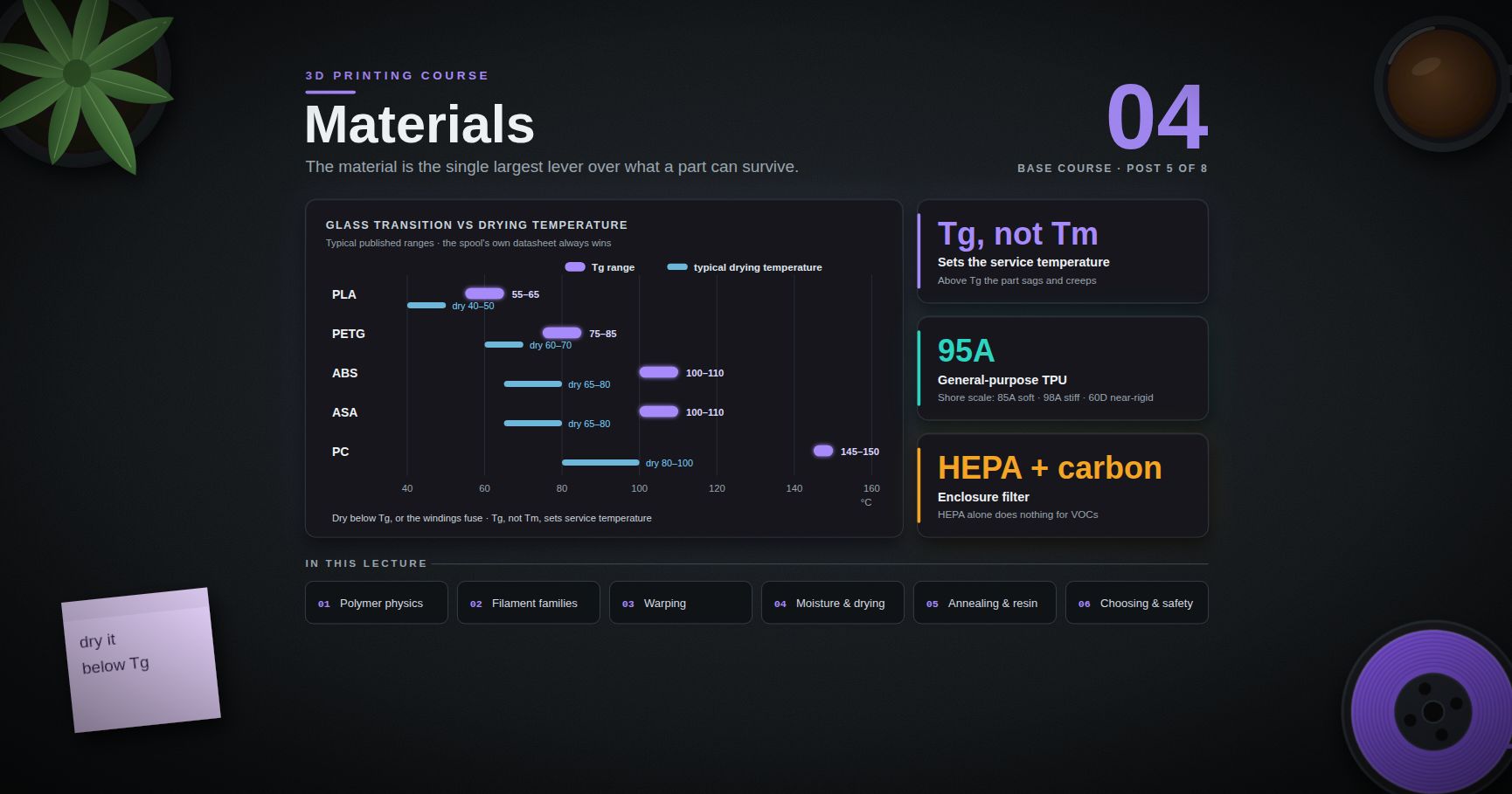
3D Printing Course — 04 · Materials
Posts 01–03 treated filament as an undifferentiated grey thread that melts. It is not. The material is the single largest lever over what a printed part can survive, and most of the surprises beginners hit — a bracket that sags in a car, a case that cracks on the bench, a print that curls off the plate at layer 40, a spool that spits and pops — are material physics, not printer faults. This post covers the polymer science that actually predicts printing behaviour, a family-by-family comparison of the common filaments and resins, and the operational side that nobody puts on the label: moisture, abrasion, annealing, pigment, and emissions.
> Series map: 00 How 3D Printing Works → 01 First Print and Calibration → 02 Slicing in Depth → 03 Orientation, Supports and Design for Printing → 04 Materials (this post) → 05 Dimensional Accuracy and Tolerances → 06 CAD for Printing → 07 Strength, Failure Modes and Functional Parts.
Learning Outcome
- Explain glass transition temperature (Tg) and melting behaviour, and state why Tg — not the melting point — sets a printed part's real service temperature.- Distinguish amorphous from semi-crystalline polymers and predict warping, shrinkage and enclosure requirements from that distinction alone.- Read a filament comparison table as typical published ranges and know that the spool's own datasheet overrides every table, including this one.- Diagnose wet filament by sound, surface and cross-section, and dry and store it correctly.- Choose nozzle hardware for abrasive filaments and pick a soluble support material that is compatible with the model material.- Decide whether annealing helps or ruins a given part, and account for the shrinkage it causes.- Select a material from a stated requirement rather than from habit, and print it with appropriate ventilation.
Chapter 1 — The polymer physics that predicts printing behaviour
Almost everything a filament does on the machine follows from two thermal transitions and one question about molecular order.
Terminology
- Glass transition temperature (Tg) — the temperature range over which an amorphous polymer (or the amorphous fraction of a semi-crystalline one) changes from a rigid, glassy solid into a soft, rubbery one. It is not a phase change with latent heat; it is a change in molecular mobility. Tg is a range, and the number a datasheet reports depends on the measurement method (DSC, DMA) and the heating rate.- Melting temperature (Tm) — the temperature at which crystalline regions melt. Only semi-crystalline polymers have a true Tm. Purely amorphous polymers soften progressively and have no sharp melting point.- Amorphous polymer — chains arranged with no long-range order, frozen in a tangle. Examples used in printing: ABS, ASA, PC, PETG (largely amorphous by design), most photopolymer resins after cure.- Semi-crystalline polymer — contains ordered crystalline domains embedded in amorphous regions. Examples: PLA (slow-crystallising, usually printed nearly amorphous), the nylons (PA6, PA12), PP, PEEK.- Heat deflection temperature (HDT) — the temperature at which a standard test bar deflects a specified amount under a specified load. A load-dependent engineering figure, not a material constant; always quoted with its stress level (commonly 0.45 MPa or 1.8 MPa).- Crystallinity — the mass fraction of the polymer that is in ordered crystalline domains. It changes with cooling rate and with annealing, and it drives stiffness, chemical resistance, opacity and shrinkage.
Why Tg, not Tm, sets the service temperature
A printed part carries load through solid polymer. Above Tg the amorphous fraction becomes rubbery: modulus drops by orders of magnitude, and a part that was rigid at room temperature will sag, creep and lose dimensional stability long before anything melts. This is why a PLA phone mount fails in a car parked in the sun even though PLA does not melt until far higher: the interior of a closed car in direct sun readily reaches the low end of PLA's Tg range.
Three consequences worth internalising:
1. Compare service temperature against Tg, with margin. Treat Tg as the ceiling, and derate further if the part is loaded — polymers creep faster as they approach Tg (Post 07).2. Tm is a printing parameter, not a service parameter. It tells you roughly where the extruder must operate. It tells you nothing useful about whether a bracket survives on an engine bay.3. HDT is closer to what you want but still not it. HDT is measured at a specific stress on a specific bar geometry, in a solid moulded specimen — not a 3-perimeter, 15 %-infill print with anisotropic layer bonding.
> Watch out: the Tg values circulating in the hobby community for a given material vary by 10–20 °C between sources, because different grades, different additives and different measurement methods genuinely give different numbers. Use them as a family ranking (PLA < PETG < ABS/ASA < PC), and use the specific spool's technical datasheet for anything that matters.
Amorphous vs semi-crystalline, and what it predicts
| Behaviour | Amorphous (ABS, ASA, PC, PETG) | Semi-crystalline (PA, PP, PLA when crystallised, PEEK) ||---|---|---|| Transition on cooling | gradual stiffening through Tg | crystallisation, with a volume step || Shrinkage on cooling | lower, mostly thermal contraction | higher — crystallisation densifies the material || Warping tendency | moderate to high (ABS) | high (PA, PP), or low if crystallisation is suppressed (PLA) || Chamber/enclosure benefit | large — keeps the part above the stress-relief range | large, and often needed for even crystallisation || Optical | typically transparent-capable | typically opaque or translucent || Solvent resistance | lower (ABS dissolves in acetone) | usually higher || Layer bonding | good — chains interdiffuse readily near Tg | can be poorer; crystals resist interdiffusion |
PLA is the instructive special case: it is chemically semi-crystalline but crystallises slowly, so a normally-printed PLA part is mostly amorphous. That is exactly why PLA barely warps and why annealing (Chapter 6) can change its properties so dramatically — annealing is what finally lets the crystals form.
Chapter 2 — The filament families
Everything below is a published typical range across common grades, not a specification. Different vendors, different additives and different colours of nominally the same material move these numbers. The datasheet supplied with the spool overrides this table without exception. Where you need a number for a design decision, take it from the datasheet; where the datasheet is silent, measure (Post 05 gives the procedure for dimensions; Post 07 for strength).
Process window
| Material | Nozzle (°C, typical) | Bed (°C, typical) | Enclosure | Cooling fan | Notes ||---|---|---|---|---|---|| PLA | 190–220 | 50–60 | not required; a hot enclosure can cause heat creep | high, often 100 % | most forgiving material in existence || PETG | 230–250 | 70–85 | optional | low–moderate (30–50 %) | too much cooling kills layer adhesion || ABS | 235–260 | 90–110 | strongly recommended | off or minimal | warps badly without one || ASA | 240–265 | 90–110 | strongly recommended | off or minimal | ABS-like, formulated for UV || TPU (85A–95A) | 210–240 | 30–60 | not required | low–moderate | slow, direct drive strongly preferred || Nylon / PA12 | 240–270 | 60–100 | recommended | low | extremely hygroscopic || Nylon / PA6 blends | 250–290 | 80–110 | recommended | low–off | higher Tm, worse moisture behaviour || PC / PC blends | 260–310 | 100–120 | required | off | high temperature, high warp || CF / GF composites | base polymer's window, often +5–15 | as base polymer | as base polymer | as base polymer | hardened nozzle mandatory |
Character
| Material | Tg (typical range) | Shrinkage / warp | Stiff vs tough | UV | Chemical | Contact caveats ||---|---|---|---|---|---|---|| PLA | 55–65 °C | very low | stiff, low impact, notch-sensitive | poor long-term outdoors | poor vs solvents; hydrolyses when hot+wet | often food-safe as a polymer; the printed part is not — see below || PETG | 75–85 °C | low–moderate | moderately stiff, noticeably tougher than PLA | fair | good vs water and dilute acids | same caveat; PET family is common in food packaging || ABS | 100–110 °C | high | moderate stiffness, good impact | poor — yellows and embrittles | soluble in acetone (feature for smoothing) | not for food contact; styrene emissions || ASA | 100–110 °C | high | similar to ABS | good — the reason ASA exists | similar to ABS | outdoor parts || TPU | varies widely with hardness | low | flexible; energy-absorbing, high elongation | fair | good vs oils/greases (grade-dependent) | skin contact grades exist; verify per grade || Nylon / PA | grade-dependent, and drops sharply when wet | high | tough, ductile, abrasion-resistant | fair | excellent vs oils/fuels | absorbs water in service, not just on the spool || PC | 145–150 °C | high | very stiff and strong, good impact | poor unless UV-stabilised | attacked by some solvents; stress-cracks | high service temperature || CF composite | base polymer's Tg | lower than base — fibre restrains contraction | much stiffer, less ductile, more brittle | as base | as base | abrasive; fibres at broken edges || GF composite | base polymer's Tg | lower than base | stiffer than base, less brittle than CF | as base | as base | abrasive |
> Watch out — "food safe" is a system property, not a material property. Even where the base polymer is approved for food contact, a printed part is not: the layer lines are a colonisable surface that cannot be reliably cleaned, the brass in a standard nozzle may contain lead, and the pigments and processing aids in a hobby spool are rarely documented to food-contact standards. If a part must contact food or skin, the defensible routes are a documented food-contact-certified filament plus a food-safe coating or liner, or printing a mould and casting the contact part in a certified material. "PLA is made from corn" is not an argument.
> Trick: TPU is sold by Shore hardness, not by a trade name — the scale is what to shop by. Shore 85A is soft and gasket-like and is genuinely hard to print; 95A is the common general-purpose grade; 98A prints almost like a stiff plastic; Shore 60D is harder still and behaves close to a rigid filament. If a TPU print fails on retraction and stringing, the fix is usually a lower Shore number needing a shorter, more constrained filament path — or moving up in hardness.
Chapter 3 — Warping, shrinkage and the enclosure question
Warping is not a mystery and it is not a bed-adhesion problem in origin — bed adhesion is only where the symptom appears.
The physics
Every polymer contracts as it cools. In a printed part, that contraction happens unevenly in time: the layer being deposited is at nozzle temperature, the layer below is somewhere between, and the first layer has been sitting on a heated plate for an hour. Each new layer solidifies and then tries to contract while bonded to a layer beneath that has already finished contracting and will not move. The result is a stress field locked into the part, tensile in the newer material, and it grows with every layer.
That locked-in stress has to go somewhere. It is relieved by:
- Curling — the free edges of the part lift, which is geometrically the cheapest way to relieve it. Corners lift first because they have two free directions.- Delamination — a layer interface splits, usually on a tall thin part or at a stress raiser.- Bed release — the whole part peels off the plate.
Two independent quantities drive the magnitude: the total contraction from nozzle to room temperature (roughly the coefficient of thermal expansion times the temperature drop, plus any crystallisation shrinkage) and the temperature gradient through the part while printing.
Why ABS needs an enclosure and PLA does not
Run the comparison:
- PLA is printed around 200 °C and, being effectively amorphous as printed, contracts modestly. Its Tg is around 55–65 °C, so the part becomes rigid at a temperature only a little above the bed, meaning the stress-accumulating window is short and the accumulated stress is small. An enclosure adds nothing and can hurt: it raises the temperature around the heatsink and hotend, promoting heat creep and jams.- ABS is printed around 250 °C, has a Tg around 100–110 °C, and contracts substantially. Its Tg is far above room temperature, so the part spends a long stretch of its cooling path below Tg — rigid, storing stress rather than relaxing it. An enclosure holds the chamber high enough that the part stays near or above Tg — mobile, able to relax stress — for longer, and it removes the gradients caused by room draughts. That is the mechanism: the enclosure is a stress-relief oven, not a heater for the plastic.
Consequences that follow directly:
| Symptom | Mechanism | Fix in order of leverage ||---|---|---|| Corners lift on a large flat ABS part | high contraction plus draught-driven gradients | enclosure; raise chamber temperature; brim; reduce part footprint or split the part || Part releases mid-print, PLA | adhesion, not warp | clean the plate (IPA, then soap and water for oils); first-layer squish (Post 01) || Tall PC part delaminates near the top | chamber cools with height; interface bonding falls | enclosure with an actively warm chamber; raise nozzle temperature; reduce cooling || Nylon curls despite an enclosure | crystallisation shrinkage plus moisture | dry the filament (Chapter 4) before blaming warp || Fibre-filled version of the same polymer warps less | fibres restrain matrix contraction | expected — this is a genuine benefit of CF/GF grades |
> Common pitfall: adding a brim or raft to fight ABS warp. It buys a little and hides the cause. The stress is still in the part; you have merely bonded it harder to the plate, which converts corner lift into internal stress or a delamination crack higher up. Fix the thermal environment.
> Trick: you can see the locked-in stress. Print a thin ABS bar without an enclosure, let it cool fully, then cut it lengthwise with a sharp blade. The two halves spring apart. A bar printed in a warm enclosure moves much less. This is a five-minute experiment that makes the whole chapter concrete.
Chapter 4 — Moisture, the invisible variable
Which polymers care
Hygroscopic means the polymer absorbs water from air into its bulk, not just onto its surface. In rough order of severity for printing filaments:
| Severity | Materials | Practical consequence ||---|---|---|| Extreme | PVA, PA (nylon), PC | unprintable within hours to days of open-air exposure in a humid room || High | TPU, PETG, ASA | visible surface and strength degradation over days to weeks || Moderate | ABS, PLA | degrades over weeks to months; PLA additionally hydrolyses when hot and wet, permanently shortening chains || Low | dried, sealed, unopened spools of anything | the state you want to maintain |
The hydrolysis point matters and is often missed: for PLA and the polyesters, water is not just a bubble source. At extrusion temperature, absorbed water chemically cleaves the polymer chains. Drying removes the water but does not undo the chain scission. Wet-then-dried PLA prints acceptably and is measurably weaker than it should be.
What wet filament looks and sounds like
| Sense | Signature ||---|---|| Sound | intermittent popping, crackling, hissing at the nozzle — steam escaping || Extrusion | visible steam or micro-bubbles; the strand from a hand-purge is foamy or wavy rather than smooth || Surface | rough, matte, pitted; PETG turns hazy and blistered rather than glossy || Stringing | dramatically worse, and unresponsive to retraction tuning || Dimensions | inconsistent extrusion width; unpredictable flow calibration (this contaminates the Post 05 measurements) || Strength | reduced, often severely, especially interlayer || Cross-section | cut a purged strand: voids and bubbles inside the bead |
> Common pitfall: tuning retraction for hours to chase stringing that is caused by moisture. Before any retraction tuning session, do the hand-purge test: extrude 100 mm by hand and look and listen. If it pops, dry the spool first and start the tuning session over.
Drying
Drying is a diffusion process: temperature sets the rate, time lets the water get out of the core of the spool. Getting the temperature wrong in the other direction fuses the spool.
Published starting points — again, the spool's own datasheet wins, especially for filled and specialty grades:
| Material | Typical drying temperature | Typical time | Note ||---|---|---|---|| PLA | 40–50 °C | 4–8 h | stay well below Tg or the spool welds to itself || PETG | 60–70 °C | 4–8 h | || ABS / ASA | 65–80 °C | 4–6 h | || TPU | 45–55 °C | 4–8 h | soft; low temperature, longer time || PVA | 45–55 °C | 6–12 h | re-wets almost immediately after || Nylon / PA | 70–90 °C | 8–12 h+ | manufacturers commonly specify the upper end || PC | 80–100 °C | 6–12 h | |
The universal rule that makes those numbers safe: dry below the material's Tg, with margin, or the spool deforms and the windings fuse. That is why nylon tolerates 80–90 °C and PLA does not — nylon's amorphous fraction is not the load-bearing part of a spool wound from a semi-crystalline polymer, while PLA at 70 °C is above Tg and structurally soft.
Equipment, ranked by how well it works:
1. Purpose-built filament dryer — controlled temperature, adequate airflow, can print directly from the box. The right answer if you print hygroscopic materials at all.2. Food dehydrator — cheap, good airflow, often needs the shelves cut out to fit a spool. Verify the actual temperature with a separate thermometer; dial markings on cheap units are frequently wrong by 10 °C or more.3. Convection oven — workable if it can hold a low temperature accurately. Many domestic ovens cannot regulate below 70–80 °C and cycle far above the setpoint. Verify with a thermometer before trusting it with a spool.4. The printer's heated bed with a box over it — a last resort, poorly controlled.
Silica gel in a sealed box maintains dryness; it does not dry a wet spool in any reasonable time. Dry first, then store.
Storage that actually works
- Sealed container (vacuum bag or gasketed box) with indicating desiccant, plus a cheap hygrometer inside so you can see whether the system works. Target the lowest relative humidity you can maintain and hold; single digits is achievable in a good sealed box with fresh desiccant.- Regenerate desiccant on a schedule (bake per its instructions) — spent desiccant looks identical to fresh unless it is the indicating kind.- Dry boxes that feed the printer directly, for nylon, PC, PVA and TPU. For these materials, "dry it before printing" is not enough; a 20-hour print will re-absorb moisture from the room.- Sealed bags on unopened spools are only as good as the desiccant packed with them. A spool that has sat in a warehouse for two years is not automatically dry.
Chapter 5 — Abrasives, multi-material adhesion, and soluble supports
Abrasive filaments and nozzle wear
Carbon fibre, glass fibre, metal-filled, wood-filled, glow-in-the-dark (glass or strontium aluminate particles) and many "sparkle" or "silk-matte" filaments contain hard particles. A standard brass nozzle is soft; those particles cut it. The failure is insidious: the orifice grows and goes out-of-round gradually, so extrusion width drifts, first layers degrade, and dimensional accuracy quietly gets worse over weeks — exactly the sort of slow drift that invalidates the calibration you did in Post 01.
| Nozzle material | Abrasion resistance | Thermal conductivity | Notes ||---|---|---|---|| Brass | poor | excellent | fine for PLA/PETG/ABS; wears fast on any filled filament || Hardened steel | good | lower — may need +5–10 °C | the common budget answer || Steel with wear coating | good | lower | varies enormously by product || Tungsten carbide / ruby-tipped | excellent | varies by construction | expensive; the long-run answer for a fibre-heavy workflow |
> Trick: keep one nozzle dedicated to abrasives and one to everything else, and label them. Swapping a nozzle is a ten-minute job; re-running the whole flow and dimension calibration because a nozzle silently opened up is not.
Glow-in-the-dark filament deserves a specific warning: it is often more abrasive than carbon fibre, and it is frequently bought by beginners who have no idea it is abrasive at all.
Adhesion between materials
Multi-material printing (two extruders, a tool-changer, or a single-nozzle multi-material unit) only works if the two polymers bond at their interface, and polymer-to-polymer bonding is chemistry, not wishing.
| Pair | Bonding | Use ||---|---|---|| PLA + PLA (different colour) | perfect | colour changes || PLA + PETG | poor — bonds weakly | exploited deliberately: PETG makes a good breakaway support interface for PLA, and vice versa || PETG + PETG | perfect | || ABS + ABS / ASA | perfect | || TPU + PLA/PETG | moderate; mechanical interlocking helps more than chemistry | overmoulded grips — design a dovetail or through-hole so the bond is mechanical || PLA + PVA | good | soluble supports for PLA || ABS/HIPS | good | HIPS is the classic soluble support for ABS || Nylon + almost anything else | poor | nylon bonds well to nylon and little else |
> Trick: the poor PLA/PETG bond is the single most useful multi-material trick available. Print a support interface layer in the other material and supports peel off by hand with a genuinely clean surface underneath — no solvent, no dissolving tank.
Soluble supports and their own moisture problems
- PVA (polyvinyl alcohol) — dissolves in plain water. Compatible with PLA and (with care) PETG. It is the most hygroscopic common filament by a wide margin: it will absorb enough moisture to become unprintable within hours in a humid room, and wet PVA foams, oozes, jams and clogs. PVA requires a dry box feeding the printer, not merely a dried spool. It also degrades in the hotend if held hot and idle.- HIPS (high-impact polystyrene) — dissolves in d-limonene, not water. Compatible with ABS, and prints under ABS-like conditions. The solvent is flammable, has a strong odour, and needs ventilation and a sealed dissolving container.- Breakaway supports — proprietary non-soluble support filaments designed to bond weakly and snap off. No solvent, no tank, no moisture management; they cost geometry flexibility versus a truly soluble support.
Practical decision: soluble supports are worth their cost and hassle when the geometry is genuinely internal — enclosed channels, captive mechanisms, deep undercuts. For everything else, revisit orientation (Post 03) first. Support material is a solution to a geometry problem you may not need to have.
Chapter 6 — Properties you set after the print: annealing, post-cure, pigment
Annealing
Annealing is holding a printed part at an elevated temperature — above Tg but below the melting/softening point — for a period, then cooling it slowly. For a semi-crystalline polymer printed too fast to crystallise (PLA is the archetype), it does three things at once:
1. Increases crystallinity. Chains gain mobility above Tg and organise into crystalline domains. Stiffness, heat resistance and chemical resistance rise. Annealed PLA can retain useful stiffness meaningfully above its as-printed service ceiling — how much depends on the grade, the additives (nucleating agents in "HT" PLA grades are there specifically to make this work) and the schedule.2. Relieves internal stress. The locked-in stress from Chapter 3 relaxes. Good for stability, and it is why the part changes shape.3. Improves interlayer bonding somewhat. Chains interdiffuse across layer interfaces given mobility and time, reducing the Z-direction weakness of Post 07 — reducing, not eliminating.
The cost is dimensional change, and it is not small. Crystallisation densifies the polymer, so the part shrinks — and it shrinks anisotropically, because the print's own layer structure and residual stress field are anisotropic. Parts also sag under their own weight if unsupported above Tg.
Practical annealing procedure, if you decide the part needs it:
1. Decide first whether it does. Annealing is worth it for heat-exposed and stiffness-critical PLA parts. It is not worth it for anything that has to fit something else, unless you are prepared to re-measure and iterate.2. Support the part fully — bury it in dry sand, salt or plaster, or lay it on a flat plate with nothing overhanging.3. Hold above Tg but below softening: a common starting window for PLA is roughly 80–110 °C. Longer at a lower temperature is safer than shorter at a higher one.4. Cool slowly in the oven. Quenching re-introduces the stress you just removed.5. Measure the same features before and after and record the change as a percentage. That percentage is your machine-plus-material-plus-schedule constant, and you scale the CAD model by it next time. It is not a number anyone can give you — Post 05 gives the measurement discipline.
> Watch out: annealing an amorphous polymer (ABS, PETG, PC) does not increase crystallinity, because there is no crystalline phase to grow. It still relieves stress, which can be useful, and it still causes dimensional change. Do not expect the stiffness gain that PLA shows.
Resin families and post-cure
Vat photopolymerisation (Post 08 in the extension plan will go deep) has a materials landscape of its own. The critical structural fact: for photopolymer resin, a large share of the part's final mechanical properties is set by post-processing, not by printing. A green part straight out of the vat is under-polymerised, soft, and full of uncured monomer. Wash and post-cure are part of the process, not optional finishing.
| Family | Character | Typical use ||---|---|---|| Standard / "general purpose" | high detail, hard, brittle | display models, miniatures, figures || Tough / "ABS-like" | more impact energy absorbed, lower detail fidelity, softer | prototype functional parts || Water-washable | cleans in water instead of IPA | convenience — but generally lower mechanical properties, and the wash water is contaminated waste, not drain-safe || Engineering (high-temp, rigid, castable, flexible, dental) | narrow, specified properties | the specified job, per the vendor's validated workflow |
Post-cure variables that change the result: cure time, cure temperature (warm post-cure typically outperforms room-temperature cure), wavelength, whether the part is cured in water or in air (oxygen inhibits surface cure — curing submerged is a common trick), and part thickness. Vendors publish validated schedules; deviating from them makes their published mechanical data inapplicable to your part.
> Common pitfall: treating resin mechanical datasheets as if they described your part. Those numbers come from specimens cured on the vendor's validated schedule. An under-cured part is dramatically weaker; an over-cured part is more brittle. Post-cure is the variable, and it is yours to control.
Colour, pigment and additives
The single most under-appreciated fact about filament: colour is not cosmetic. The pigments, fillers and processing aids change the polymer's behaviour.
- Thermal behaviour. Pigment loading changes melt viscosity and thermal conductivity. It is normal for two colours from the same vendor and the same product line to want different nozzle temperatures — sometimes by 10 °C or more.- Crystallisation. Some pigments act as nucleating agents. This changes crystallisation rate, which changes shrinkage and warping. Black and white parts of the same nominal material genuinely do not always behave the same.- Abrasion. Metallics, "silk", glitter and glow additives are abrasive. See Chapter 5.- Strength. High filler loading dilutes the polymer matrix. Heavily filled decorative filaments are usually weaker than the plain version of the same material.- Surface finish. Matte finishes come from filler particles that scatter light; they also hide layer lines, which is genuinely useful and is a materials effect, not a slicer effect.- UV behaviour. Carbon black is an effective UV absorber; black parts often outlast light-coloured ones of the same polymer outdoors. This is not a reason to skip ASA for an outdoor part, but it is a real effect.
> Trick: when you switch colour within the same product line, re-run a temperature tower and a flow check before assuming your profile transfers. It costs twenty minutes and explains a surprising number of "the printer suddenly got worse" reports.
Chapter 7 — Choosing a material, and printing it safely
The decision tree
Start from the requirement, not the material. Read down until a branch matches.
Two meta-rules that outrank the tree:
1. Prototype in PLA regardless of the final material. Iterate the geometry cheaply and fast, then reprint the final version in the material the job needs. Changing material changes dimensions, so re-verify the fit (Post 05) — but do the geometry iteration in the easy material.2. Prefer the easiest material that meets the requirement. Every step up in material difficulty costs enclosure, drying, nozzle hardware, tuning time and failed prints. Only pay that when the requirement demands it.
Safety
Printing polymers releases ultrafine particles (UFPs) and volatile organic compounds (VOCs). This is measured, published science, not speculation. Peer-reviewed work characterising desktop FDM printers (Azimi et al., Environmental Science & Technology, 2016) found that emission rates and species depend strongly on filament and nozzle temperature: styrene dominates for ABS and HIPS, caprolactam for nylon-based and composite filaments, and lactide for PLA — with ABS emitting substantially more overall than PLA, and lower nozzle temperatures producing lower emission rates. ANSI/CAN/UL 2904 is the standard test method for characterising these emissions, and some printers and filaments are certified against it.
The proportionate response:
| Situation | Measure ||---|---|| Any printer, any material | do not print in a bedroom or an unventilated occupied room || PLA/PETG in a well-ventilated workshop | adequate room ventilation is a reasonable baseline || ABS/ASA/nylon/PC, or any long print | enclosure with a filter (HEPA for particles plus activated carbon for VOCs — a HEPA filter alone does nothing for VOCs), or vent the enclosure outdoors || Printing near where people sleep or work all day | vent outdoors, or move the printer || Any material, any enclosure | run the fan, and note that an enclosure without filtration concentrates emissions and then releases them when opened |
Resin adds a different and more direct hazard class:
- Uncured resin is a skin sensitiser. Nitrile gloves, always. Sensitisation is cumulative and can be permanent: people who handled resin carelessly for a year and then developed a reaction do not get to go back.- Eye protection when handling resin or IPA.- Ventilation — resin and IPA vapour both need it.- Never pour uncured resin, resin-contaminated IPA, or water-washable rinse water down a drain. Cure the waste solid under UV or sunlight first, then dispose of it as solid plastic waste, per local rules.- Cure everything, including failed prints, supports, drips and the paper towels. Cured resin is inert; uncured resin is not.
Also mechanical and thermal, and easy to forget: hotends run at 200–300 °C, beds at up to 120 °C, and a printer with an unattended thermal runaway is a fire source. Verify that thermal runaway protection is enabled in firmware, keep the machine off carpet and away from anything flammable, and treat a smoke alarm in the print room as mandatory equipment rather than an optional extra.
Practice Exercises
Exercise 1 — Locate and read a real datasheet
Take a spool you own. Find the manufacturer's technical datasheet (TDS) for that exact product, not a generic material page. Extract: recommended nozzle range, bed range, Tg or HDT (with its load), drying schedule, and any mechanical data with the test standard cited. Compare each entry against Chapter 2's table and note every disagreement.
<details><summary>Solution</summary>
</details>
Exercise 2 — The wet-filament A/B
Take a small quantity of PETG or nylon. Deliberately leave part of it exposed in the most humid place available for several days while the rest stays sealed with fresh desiccant. Print the same small test object from each. Record: audible popping (yes/no), surface finish, stringing, and whether the two objects measure the same. Then dry the wet sample per Chapter 4 and print a third.
Exercise 3 — Make the residual stress visible
Print the same thin bar (roughly 100 × 10 × 3 mm) in PLA and in ABS, both without an enclosure. Cool fully. Slit each lengthwise with a sharp blade and observe how far the halves spring apart. Repeat the ABS bar inside an enclosure (or a cardboard box over the printer) and compare. Write one sentence explaining the result in terms of Tg.
<details><summary>Solution</summary>
</details>
Exercise 4 — Anneal and measure
Print two identical PLA parts with at least one dimension over 50 mm and at least one hole. Measure every feature on both, five times each (Post 05 gives the method). Anneal one, supported, per Chapter 6. Re-measure. Tabulate percentage change per axis (X, Y and Z separately). Then check whether the annealed part still fits whatever the original fitted.
<details><summary>Solution</summary>
</details>
Exercise 5 — Pigment is not cosmetic
Take two colours of the same product line from the same vendor. Run an identical temperature tower on each. Note the temperature at which each first bridges cleanly and each first shows stringing. Then print an identical 20 mm cube in each and compare measured dimensions.
Exercise 6 — Write a selection memo
Pick a real part you want to print — describe its actual loads, temperatures, environment and lifetime in one paragraph. Walk Chapter 7's decision tree and write down which branch you landed on and why. Then name the second choice and state the specific trade-off that made you reject it. If you cannot name a second choice, the requirement is not yet specified precisely enough.
Exercise 7 — Audit your ventilation
Write down: where the printer is, what shares that air, how many hours a day it runs, who is in the room, and what materials you print. Compare against Chapter 7's table and name the one change with the biggest effect. Implement it.
Cheat-sheet
| What | How ||------|-----|| Real service temperature ceiling | the material's Tg, with margin — not Tm, not the nozzle temperature || Predict warping | high print temperature + high Tg + high contraction ⇒ needs an enclosure || Why an enclosure works | keeps the part near/above Tg so contraction stress relaxes instead of locking in || PLA does not need an enclosure | low print temperature, low contraction, low Tg — and a hot chamber causes heat creep || Wet filament, fastest test | hand-purge 100 mm and listen for popping / look for foam || Drying rule that never fails | dry below Tg, with margin, for hours not minutes || Storage that works | dry first, then sealed box + indicating desiccant + a hygrometer you actually read || PVA / nylon / PC | dry box feeding the printer, not just a dried spool || Abrasive filaments | CF, GF, metal-fill, wood-fill, glow, glitter, some silks ⇒ hardened nozzle || Nozzle wear symptom | gradual loss of dimensional accuracy and first-layer quality over weeks || Soluble supports | PVA dissolves in water (PLA); HIPS dissolves in d-limonene (ABS) || Free breakaway trick | PLA and PETG bond poorly — use one as the other's support interface || TPU is sold by | Shore hardness: 85A soft · 95A general · 98A stiff · 60D near-rigid || Annealing | raises crystallinity and heat resistance in PLA; always changes dimensions anisotropically || Annealing amorphous polymers | relieves stress, does not add crystallinity — no stiffness gain || Resin properties are set by | post-cure, not printing — follow the vendor's validated schedule || Colour changes behaviour | pigment alters melt viscosity, crystallisation, abrasion and strength || Outdoor part | ASA. Not PLA, not plain ABS || Food or skin contact | a system problem: certified filament + certified coating, or print a mould || Prototype material | PLA, always, whatever the final material will be || Emissions | UFPs + VOCs; enclosure with HEPA and activated carbon, or vent outdoors || Resin handling | nitrile gloves, eye protection, ventilation, cure all waste before disposal |
What's next
Post 05 is the intellectual core of the series: Dimensional Accuracy and Tolerances. It separates accuracy from precision from resolution, builds an honest error budget for a printed dimension, and gives a reproducible procedure for deriving your own machine's offsets rather than trusting anyone else's numbers — including the ones in this post. Everything in Chapter 6 about annealing shrinkage, and everything in Chapter 3 about material contraction, feeds directly into that error budget.
References
- ISO/ASTM 52900:2021 — Additive manufacturing: general principles, fundamentals and vocabulary — the terminology standard for the field.- ANSI/CAN/UL 2904 — standard method for testing and assessing particle and chemical emissions from 3D printers.- Azimi, P. et al., "Emissions of Ultrafine Particles and Volatile Organic Compounds from Commercially Available Desktop Three-Dimensional Printers with Multiple Filaments", Environmental Science & Technology (2016) — DOI 10.1021/acs.est.5b04983.- NIOSH / CDC research on reducing ultrafine particulate emission from 3D printers — occupational-hygiene perspective and control measures.- Prusa Knowledge Base — materials — per-material printing guidance from a printer vendor with published profiles.- Voron Design documentation — materials selection — a well-reasoned engineering comparison written for printer parts under thermal load.- Your filament's own technical datasheet (TDS) and safety data sheet (SDS) — the only sources that describe the material actually on your spool.
> Note: this post is in progress. Planned additions: a measured warp-test artefact with a printable STL, a comparison of desiccant regeneration methods with measured RH curves, a survey of high-temperature engineering filaments (PPS, PEI, PEEK) and the hardware they demand, and a worked food-contact coating evaluation.
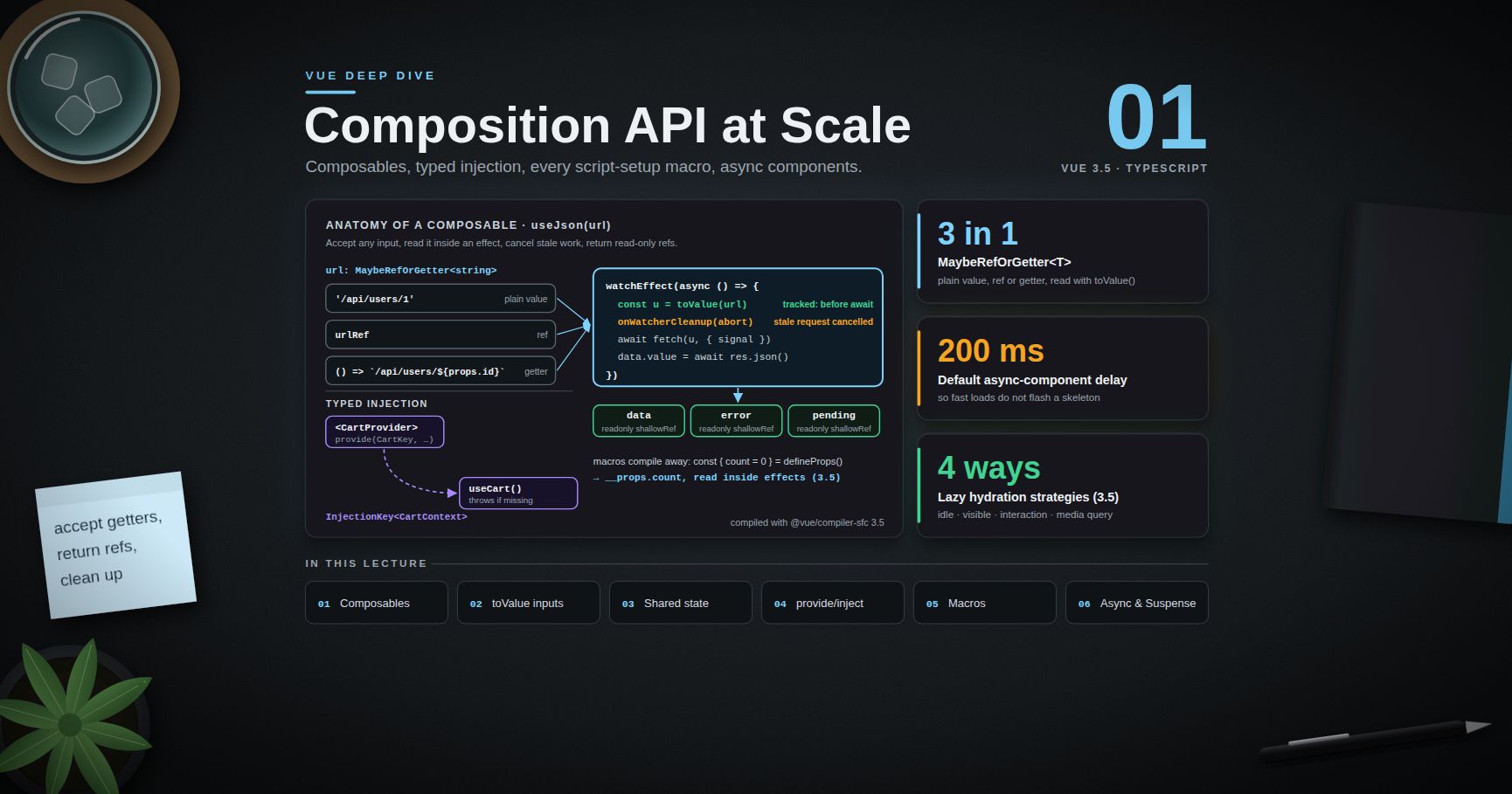
Vue Deep Dive — 01 · Composition API at Scale
The Composition API is easy to start with and easy to misuse at scale. In a codebase with two hundred components and forty composables, the questions change: which inputs should a composable accept, who stops its watchers, how does a deeply nested component get a typed service without prop drilling, what exactly does compile to, and how do you type a generic table component so that its slot props know the row type. This post answers those questions with the reactivity model from Post 00 as the foundation. It covers composable design (refs and getters as inputs, , cleanup, shared state), typed /, every macro including reactive props destructure and , generic components, , and async components with and lazy hydration. Examples target Vue 3.5; compiled output shown in this post was produced by 3.5.
> Series map: 00 Reactivity Internals → 01 Composition API at Scale (this post) → 02 Compiler, Virtual DOM & Vapor Mode → 03 Ecosystem & Production (Pinia, Router, Nuxt). Future: see the extensions table in 03.
Learning Outcome
- Write composables that accept refs, getters or plain values through and , and explain why the read must happen inside an effect.- Decide what a composable returns (refs, readonly refs, functions) so that callers can destructure it safely.- Attach cleanup with and build a shared, reference-counted composable with a detached .- Type / with , expose read-only state plus mutation functions, and fail loudly on a missing provider.- Explain what each macro compiles to: (with destructure), , , , , .- Build a generic component with the attribute and typed slots.- Use for element and component refs.- Configure , and the 3.5 lazy hydration strategies, and know which parts are still experimental.
Chapter 1 — What a composable is
Terminology
- Composable — a function that uses Composition API features to encapsulate stateful logic. By convention named . A pure helper () is not a composable.- Setup context — the synchronous window in which Vue knows the "current instance": or . Lifecycle hooks, and automatic effect collection depend on it.- — .- — . The type for "any reactive or plain input".- (3.3+) — normalises a : calls a getter, unwraps a ref, returns anything else as-is.- — a typed used as a / key.- Compiler macro — a function like that exists only at compile time inside . It needs no import and cannot be called at run time.
The contract
A composable called inside gets three things for free:
1. Every , and it creates is collected by the component's effect scope and stopped on unmount (Post 00, Chapter 7).2. Lifecycle hooks it registers (, ) attach to the calling component.3. resolves against the calling component's ancestors.
All three depend on the current instance, which Vue sets while runs synchronously. That gives the first rule: call composables synchronously at the top of , not in event handlers, callbacks or after an arbitrary .
softens the part. The compiler wraps each top-level so the instance is restored afterwards. This source:
compiles (3.5) to:
puts the instance back, so after the still works. A plain in an component, or an function you wrote yourself, gets no such help. The top-level also turns the component into an async dependency that needs a ancestor (Chapter 8).
Return refs, not a reactive object
Returning would make every caller that destructures lose reactivity (Post 00, Chapter 8). If a caller wants the object form, it can wrap the result itself: unwraps the refs.
> Trick: return for state the composable owns and a function for each allowed mutation. Callers cannot bypass your invariants, and a code search for finds every writer.
Chapter 2 — Inputs: refs, getters and plain values
Accept , read with inside an effect
A composable that takes a string snapshot freezes at its first value. One that accepts only forces callers to wrap props and computed values. Accept all three:
Callers can now pass anything:
Three details in that composable are deliberate:
- runs inside and before the first , so the dependency is tracked (Post 00, Chapter 5).- aborts the previous request when changes and when the component unmounts, so a slow old response can never overwrite a newer one.- for : API responses are replaced, not mutated, and a deep proxy over a large JSON tree is wasted work. Nuxt 4 made the same choice for (Post 03).
with a getter
When a composable needs a real ref (for example to hand to a library that expects ), (3.3+) creates a read-only ref backed by a getter, with no overhead:
Options objects
For more than two parameters, take an options object and make only the fields that may change at run time (), keeping set-once flags plain ().
> Common pitfall: passes a snapshot of the prop. Pass .
Chapter 3 — Cleanup, ownership and shared state
over
runs when the component unmounts and when a standalone stops, so the composable also works in a store, a test, or another composable's scope. The guard avoids a development warning when the function is called outside any scope; returning gives such callers a way to clean up by hand.
> Watch out: does not exist during SSR. A composable that touches browser APIs at call time crashes the server render. Do browser work in (which never runs on the server) or guard with .
A shared composable with reference counting
Some state should exist once for all components that use it: one listener, one WebSocket, one media-query watcher. A detached scope owns it, and reference counting disposes it when the last user unmounts:
Without , the listener and any watchers would be collected by the first component that called , and would stop when that component unmounted even though others still use them. VueUse ships a production version of this helper under the same name.
Global state: module scope vs provide
A at module scope is fine in a client-only SPA, but in SSR it is shared by every request on the server (Post 00, Chapter 8). Per-user state goes through , Pinia or Nuxt's ; module scope holds only constants and truly global caches.
Chapter 4 — Typed /
is now typed as . The provider exposes read-only state and named mutations, which keeps writes in one place, the same shape as the composable return in Chapter 1.
Fail loudly on a missing provider
checks at every call site are noise. Wrap the pair once:
Defaults and factories
gives a plain default. treats the default as a factory (third argument), so the expensive object is built only when no provider exists; without , a function default is returned as-is, not called.
Where injection works
- Inside / of a descendant, including after a top-level (Chapter 1).- makes a value available to every component in the app, and to (3.3+), which router guards and plugins use to call outside components.- (3.3+) returns whether can be called right now without a warning. Libraries use it to support both component and non-component callers; in Vue Router is the example the Vue type definitions give.
> Watch out: a component can from ancestors only. A sibling or a component in another subtree cannot see the value, and Teleport does not change this: injection follows the component tree, not the DOM.
Chapter 5 — The macros
and reactive destructure (3.5)
Since 3.5, destructuring is stable and enabled by default, with native default values:
The compiler rewrites every use of a destructured name into a property read on the props proxy. The relevant part of the 3.5 output:
So is not a local variable at run time; it is , read inside the getter and tracked. Two consequences:
- Passing the name itself to would pass a number. The compiler rejects it:- Passing it to a composable passes a snapshot. Use ; with inputs (Chapter 2) this is free.
still works and remains the way to declare defaults without destructuring.
The 3.3+ named-tuple syntax is the most readable typed form:
It compiles to . Declaring emits is not only for types: an event listener for a declared event is removed from , so it does not fall through to the root element as a native listener.
(stable since 3.4)
declares a prop and its update event in one line and returns a ref that reads the prop and emits on write:
The 3.5 compiler turns this into a prop, a prop, a prop, a prop, the events and , and two calls. Modifiers can be applied in a transformer:
> Watch out: a on is used when the parent does not bind . The child then works as local state while the parent's own value (if it has one but did not bind it) stays different. The Vue docs warn about this desynchronisation. Give a default only to models that are genuinely optional.
, ,
(3.3+) is type-only: it types and the slot props that parents receive. matters because components are closed by default: a parent holding a template ref to the child sees only what was exposed. (3.3+) is spread into the component definition; in the output it appears as .
| Macro | Since | Compiles to ||---|---|---|| | 3.0 (destructure stable 3.5) | option; destructured names → || | 3.0 (tuple syntax 3.3) | option; returns || | 3.4 | model prop + modifiers prop + event + || | 3.3 | Types only || | 3.0 | in setup || | 3.3 | Options spread into the component |
Chapter 6 — Generic components and TypeScript
The attribute (3.3+)
A table, a select or a virtual list should know the row type from its prop. The attribute on declares type parameters, with constraints and defaults written as in TypeScript:
At run time there are no types: the compiled option is . All the checking happens in and the editor (Vue - Official extension), which is why CI should run ; the Vite build does not type-check.
Typing refs to generic or exposed components
does not work for generic components, because their default export is a function type. The package (from the Vue language tools) provides for exactly this.
> Trick: type-based generates runtime options only from types it can resolve; a union of object shapes becomes or , so runtime validation is weaker than the type. Keep prop interfaces local or in a file imported by relative path — the SFC compiler resolves imported types itself (3.3+), but complex conditional or mapped types from third-party packages can fail to resolve and stop the build.
Chapter 7 — Template refs with (3.5)
Why it replaced the old pattern of a whose variable name matched the attribute:
- The ref name is a string, so it can be dynamic (row-${id}) and can come from a composable that does not own the template.- A composable can accept the key: .- The returned ref is read-only, which prevents accidental writes.
Timing: template refs are set in the post-flush phase (Post 00, Chapter 6). They are before mount and during a watcher that runs before the first render; read them in or a watcher. A ref on a element holds an array, and the docs note that its order is not guaranteed to match the source array.
A ref on a component gives the instance's exposed surface only — whatever listed.
Chapter 8 — Async components, and lazy hydration
The loader becomes a separate chunk. The 200 ms exists so fast loads do not flash a skeleton. If the async component is inside a , it is controlled by that boundary by default () and its own loading, error, delay and timeout options are ignored.
(still experimental)
waits for async dependencies in its subtree — components with an (including any with a top-level ) and suspensible async components — and shows its slot until all resolve:
- On the first render, the fallback shows until everything resolves. On later changes, Suspense keeps showing the previous content until the new branch resolves, and only switches to the fallback after ms.- Events: , , .- Errors in async setup are not handled by Suspense. Catch them with in a parent or with the app-level .- Nested boundaries need the prop (3.3+) on the inner one to join the parent's resolution.
The Vue docs still mark as experimental, with an API that may change. Nuxt relies on it for every page, which is a practical sign that it is dependable, but in a plain Vue app keep its use to route-level boundaries.
Lazy hydration (3.5)
In an SSR app, every component normally hydrates as soon as the client bundle runs. 3.5 lets an async component delay its hydration:
The server still renders the full HTML, so the content is visible and indexable. Only the JavaScript work of attaching listeners and effects is deferred. Nuxt exposes the same strategies as and similar props on components (Post 03).
Practice Exercises
Exercise 1 — Fix the composable signature
sets once. Rewrite it so that , and ${n.value} new all work and stay in sync.
<details><summary>Solution</summary>
reads inside the effect, so a ref or getter is tracked; a plain string is simply read once. In SSR, move the body into or use Unhead / Nuxt's .
</details>
Exercise 2 — Who stops the watcher?
A composable is called from a Pinia setup store instead of a component. Its never stops, and its logs a warning. Explain both, and fix the composable.
<details><summary>Solution</summary>
There is no component instance, so has nothing to attach to (warning). The store's setup runs inside Pinia's own effect scope, so the is collected by that scope and lives as long as the store — usually the app. Replace with , which attaches to whichever scope is active: the component, the store, or a test's .
</details>
Exercise 3 — Typed context
Write an and / helpers for a service with , such that a missing provider throws with a clear message.
<details><summary>Solution</summary>
</details>
Exercise 4 — Predict the compiler
What does the 3.5 compiler do with each line, and which one fails to compile?
<details><summary>Solution</summary>
Line 1 becomes a option with and . Line 2 becomes (tracked). Line 3 fails: a destructured prop passed directly to is a compile error; use . Line 4 passes a getter that reads and is fine.
</details>
Exercise 5 — A generic select
Sketch a with that takes , a , and of type .
<details><summary>Solution</summary>
Using the index as is acceptable only because the option list is static; with a dynamic list, add a prop.
</details>
Cheat-sheet
| Need | Use ||---|---|| Any reactive or plain input | + inside an effect || Cleanup that works everywhere | || One instance for all users | with || Typed DI | + / wrapped in that throws || Inject outside components | (3.3+) || Props with defaults | (3.5) || Watch a destructured prop | || Two-way binding | (3.4+), for modifiers || Typed slots | || Generic component | || Template ref | (3.5) || Code-split component | || Defer hydration | etc. (3.5) || Type-check in CI | |
What's next
Post 02 goes one layer down: what the SFC compiler produces from a template. It covers the compile pipeline, patch flags (the numbers you saw in this post's compiled output), static caching, the block tree, the keyed diff with its longest-increasing-subsequence step, and , and Vapor mode, which compiles the same components to direct DOM operations. For the same questions in the React world — hooks as composables, context as /, generic components — see the React Deep Dive series.
References
- Composables — conventions, , return values.- Provide / Inject and TypeScript with Composition API — , typing props, emits, refs.- — every macro, , top-level .- Component v-model — , modifiers, the default-value caveat.- Composition API helpers — , , .- Async Components — options and lazy hydration strategies.- Suspense — experimental status, events, nesting.- Announcing Vue 3.5 — props destructure, , lazy hydration.- VueUse — production versions of , and many more.




