Dev Essentials — 24 · Desk Health — Eye Strain, Posture, Movement and Setup
Developers spend thousands of hours a year at a screen. Dry, tired eyes, a stiff neck and sore wrists are common, and mostly avoidable. This last post of the series covers eye strain, desk and chair setup, movement and breaks, simple stretches, warning signs, and sleep. Each recommendation carries an evidence label, because some advice rests on solid research and some is just sensible habit. It ends with a checklist and a small script to measure your own setup, then looks back over the whole series.
Series map: 01 Text Encoding → … → 22 Design Docs → 23 Money Basics → 24 Desk Health (this post). Part E · Growth outside code.
Watch out: this post is educational, not medical advice. See a doctor, physiotherapist or eye-care professional if you have pain that does not go away, numbness or tingling, weakness, or any change in your vision. Do not wait for a checklist to tell you something is wrong.
Learning Outcome
- Read the evidence labels and know what each one means.
- Explain what causes digital eye strain and apply the 20-20-20 rule.
- Set screen distance, screen height, lighting and text size to published targets.
- Set chair, desk, keyboard and mouse for a neutral posture, including on a laptop.
- Explain why movement matters more than one "perfect" posture.
- Say what the Cochrane review found about sit-stand desks.
- Recognise the warning signs of repetitive strain injury (RSI).
- Measure your own setup and check it with a short script.
Chapter 1 — Evidence labels
| Label | Meaning |
|---|---|
| Strong evidence | Many good studies agree; systematic reviews support it |
| Moderate evidence | Some good studies or a review, but with limits (short follow-up, mixed results) |
| Limited evidence | Few, small or low-quality studies; could change with better research |
| Expert guidance | Recommended by official or professional bodies (OSHA, AOA, AAO, NHS), mostly on ergonomic principles rather than trials |
| Rule of thumb | A handy simplification; useful, but the exact numbers are not research results |
| Anecdotal | People report it helps; no good evidence either way |
Most desk advice is expert guidance. That is not a weakness; it just means you should adjust it to your body instead of treating the numbers as exact.
Chapter 2 — Digital eye strain
Terminology
- Digital eye strain (also called computer vision syndrome) — tired, dry, sore or blurry eyes and headaches after long screen use.
- Accommodation — the eye's focusing effort. Near work keeps the focusing muscles working.
- Glare — bright light reflecting off the screen or shining into your eyes.
Causes
- Less blinking. The American Academy of Ophthalmology (AAO) says people normally blink about 15 times a minute, but only about 5 to 7 times a minute while using computers. The eye surface dries.
- Long near focus without a break.
- Glare and poor lighting.
- Screen too close, too high or too far.
- Uncorrected vision problems. The American Optometric Association (AOA) lists them as a cause. An eye test can fix what no desk setup can.
The AAO states that eye strain does not injure the eye and does not cause permanent damage. It is still worth fixing: it is uncomfortable and makes work harder.
The 20-20-20 rule — expert guidance; one small trial
Every 20 minutes, look at something at least 20 feet (about 6 m) away for at least 20 seconds. Both the AAO and the AOA recommend it. The AOA also suggests resting the eyes for 15 minutes after two hours of continuous computer use (expert guidance).
What does research say? A 2023 study in Contact Lens and Anterior Eye (Talens-Estarelles and colleagues) gave 29 computer users break-reminder software for two weeks. Eye strain and dry-eye symptoms improved while they used it, but the gains were gone one week after they stopped. Binocular vision and tear-film measures did not change. The study is small and short, so treat it as limited evidence that the habit helps while you keep it up.
Screen distance and height — expert guidance
| Source | Distance | Height |
|---|---|---|
| OSHA computer workstations eTool | 20-40 in (50-100 cm), eye to screen | Top of the screen at or slightly below eye level; centre of the screen 15-20° below horizontal eye level |
| AOA | 20-28 in (about 51-71 cm) | Centre of the screen 15-20° below eye level (about 4-5 in, 10-13 cm) |
| AAO | About 25 in (about 64 cm), roughly arm's length | Gaze slightly downward |
They agree: about an arm's length away, top edge near eye level, and you look slightly down. OSHA adds that people with bifocals may need the screen lower, so they do not tilt their head back to read through the bottom of the lens.
Lighting and glare — expert guidance
- Place the monitor side-on to windows (OSHA: perpendicular to the window), not facing them or with them behind it. Use blinds (AOA).
- Match screen brightness to the room (AAO). A bright screen in a dark room, or a dim screen in a bright room, both strain.
- Tilting the screen back too far can catch overhead lights (OSHA). Tilt it so it faces your line of sight.
- A matte screen filter can cut glare (AAO).
Text size — rule of thumb
If you lean in to read, the text is too small. Increase the zoom or the system scaling instead of moving closer. OSHA notes text may need to be bigger on smaller monitors.
Blue light and dry eyes
- Blue-light glasses — moderate evidence against. The AAO does not recommend them and says there is no scientific evidence that light from computer screens damages the eyes. A 2023 Cochrane review (17 studies, 619 people) found blue-light filtering lenses may not reduce eye strain from computer use in the short term.
- Dry eyes — blink on purpose during breaks, and the AAO suggests artificial tears when eyes feel dry (expert guidance).
- Dark mode — anecdotal. Many people find it comfortable, especially at night. There is no strong reason to choose one theme over the other; use what feels better.
Common pitfall: buying gadgets before booking an eye test. An out-of-date prescription, or none at all, is a common cause that no filter can fix.
Chapter 3 — Posture and setup
OSHA's neutral posture — expert guidance
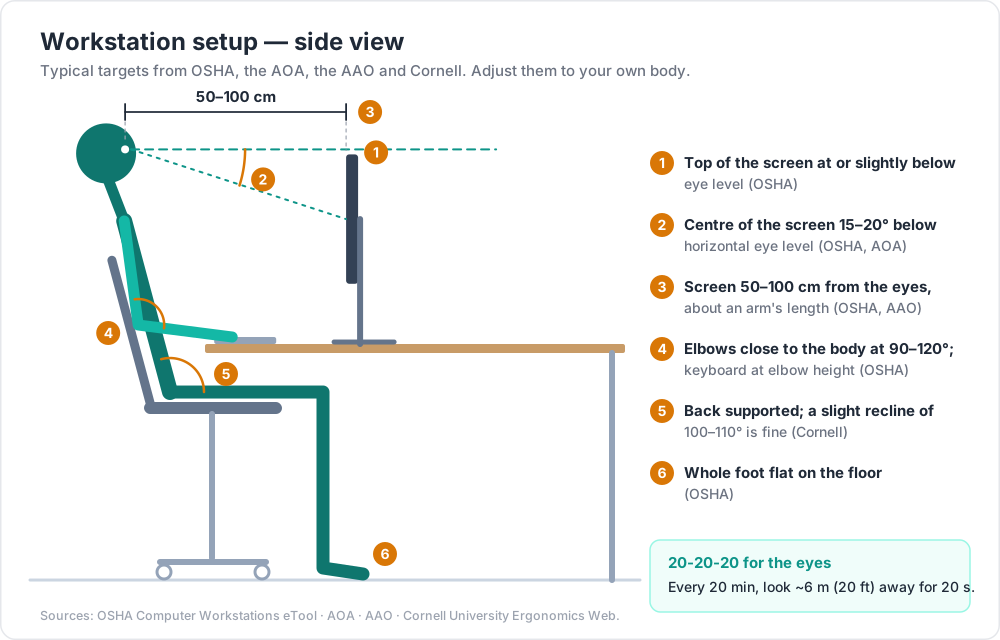
OSHA's eTool describes a neutral working posture:
- Hands, wrists and forearms straight, in line, roughly parallel to the floor.
- Elbows close to the body, bent between 90 and 120 degrees.
- Shoulders relaxed, upper arms hanging normally.
- Feet fully supported by the floor, or by a footrest if the desk is not adjustable.
- Thighs supported and roughly parallel to the floor; knees about level with the hips.
- Back fully supported, with lumbar (lower-back) support, upright or leaning back slightly.
- Head level, facing forward, balanced over the torso.
Set up in this order
- Chair first. Set the height so your whole foot rests on the floor and the back of the knee is slightly higher than the seat (OSHA). The seat should support most of your thigh without pressing into the back of the knee. Move the lumbar support to fit the small of your back.
- Keyboard at elbow height. OSHA: elbows about the same height as the keyboard, wrists straight, not bent up, down or sideways. Put the mouse right next to the keyboard to avoid reaching.
- If the desk is too high, raise the chair and add a footrest. If it is too low, raise the desk.
- Screen last, using Chapter 2's targets.
Cornell University's ergonomics guide adds that a slightly reclined seated posture of about 100-110 degrees is better than a bolt-upright 90 degrees (expert guidance).
Laptops — expert guidance
Cornell's guide calls laptop design "inherently" problematic: when the screen is at a good height, the keyboard is not, and the other way round. For regular long sessions:
- Raise the laptop on a stand so the top of the screen is near eye level.
- Use an external keyboard and mouse at elbow height.
- Or use an external monitor and keep the laptop as a second screen.
The best posture is the next posture — expert guidance
No single position is safe for eight hours. Workplace-safety bodies such as WorkSafeNB (Canada) use the phrase "the best posture is your next posture", and OSHA advises changing position through small adjustments, stretching, standing and walking. A 2019 viewpoint in the Journal of Orthopaedic & Sports Physical Therapy (Slater and colleagues, expert opinion) argues there is little strong evidence that "sitting up straight" prevents back pain. The practical message: set up a comfortable, supported base position, then move often.
Chapter 4 — Sitting time, breaks and standing desks
What the Cochrane review found — limited evidence
The Cochrane review "Workplace interventions for reducing sitting at work" (Shrestha and colleagues, 2018; searches up to August 2017) is the latest version found for this post. It included 34 studies with 3,397 office workers from high-income countries.
- Sit-stand desks reduced workplace sitting by about 84 to 116 minutes per workday in the short term, and about 57 minutes a day at 3-12 months.
- The quality of evidence was low to very low for most interventions, mainly due to study design limits and small samples.
- The effects of policies, information and counselling were mostly inconsistent.
- There was no evidence on longer-term effects, and the review did not show health benefits such as less disease.
So: a sit-stand desk probably helps you sit less, at least at first. Whether that improves long-term health is not proven.
Break patterns
- Cornell's 20-8-2 pattern — rule of thumb. About 20 minutes sitting, 8 minutes standing, 2 minutes moving and stretching. Cornell presents it as a "ball park goal", not an exact prescription.
- Cornell's break types — expert guidance: short eye breaks, micro-breaks (under 2 minutes), and a rest break every 30-60 minutes where you stand up and move.
- Standing all day is not the goal. Long, still standing has its own discomfort. Alternate.
A tiny reminder script (stop with Ctrl+C):
1
2
3
4
5
6
7
8
9
10
11
12
13
14
15
16
17
"""breaks.py - simple 20-20-20 and move reminders. Stop with Ctrl+C."""
import time
from datetime import datetime
EYE_BREAK_MIN = 20 # minutes between eye breaks
MOVE_EVERY = 3 # every 3rd eye break (about once an hour), stand up and move
count = 0
while True:
time.sleep(EYE_BREAK_MIN * 60)
count += 1
now = datetime.now().strftime("%H:%M")
if count % MOVE_EVERY == 0:
print(f"\a{now} Stand up, walk, stretch for 2-5 minutes.")
else:
print(f"\a{now} 20-20-20: look at something about 6 m away for 20 seconds.")
1
2
python breaks.py
1
2
python breaks.py
\a rings the terminal bell where the terminal supports it. A timer app or an OS focus feature does the same job.
Chapter 5 — Simple stretches — expert guidance
These are from the NHS "sitting exercises" guide, adapted for a desk break. Move slowly, stay within a comfortable range, and stop if anything hurts. The NHS advises a stable chair without wheels for these, so push your office chair against a wall or use another chair.
| Stretch | How | Dose (NHS) |
|---|---|---|
| Chest stretch | Sit tall, away from the backrest. Pull shoulders back and down, arms out to the sides, gently push the chest forward and up | Hold 5-10 s, 5 times |
| Upper-body twist | Sit tall, feet flat, arms crossed to opposite shoulders. Turn the upper body to one side without moving the hips, then the other | Hold 5 s, 5 each side |
| Neck rotation | Sit tall, shoulders down. Turn the head slowly towards one shoulder as far as comfortable, back to centre, then the other side | Hold 5 s, 3 each side |
| Ankle stretch | Hold the chair, straighten one leg off the floor, point the toes away, then pull them back towards you | 2 sets of 5 per foot |
| Hip marching | Hold the chair sides, lift one bent knee, lower it with control, then the other | 5 per leg |
Stretching during breaks mainly helps you feel less stiff. This post does not claim it prevents injury; the evidence for that is not established here.
Chapter 6 — RSI warning signs — expert guidance
Repetitive strain injury (RSI) is pain in muscles, nerves and tendons from repeated movement and overuse. Typing is one of the listed causes, along with poor posture at work. The NHS lists symptoms that usually start gradually:
- Pain that may feel burning, aching or throbbing
- Stiffness and weakness
- Tingling, pins and needles, or numbness
- Muscle cramps
- Swelling
The NHS advises seeing a GP (a family doctor) if symptoms do not go away or get worse. Numbness, tingling or weakness deserve a professional look sooner rather than later.
Common pitfall: pushing through wrist or forearm pain to finish a sprint. Early, mild symptoms are the cheap time to change your setup, take breaks and get advice. Do not self-diagnose from the internet.
Chapter 7 — Sleep and learning
- Sleep helps memory — strong evidence (mainly lab studies). A major review (Rasch and Born, Physiological Reviews, 2013) sums up over a century of research: sleep after learning helps you keep what you learned, and memories are actively consolidated during sleep.
- How much — expert guidance. The American Academy of Sleep Medicine and the Sleep Research Society (2015 consensus) recommend 7 or more hours per night on a regular basis for adults aged 18 to 60.
- Practical rule — rule of thumb. Study or learn a new tool earlier in the day, then sleep, instead of cutting sleep to cram late at night. A tired brain also writes more bugs (see Dev Essentials 10 · Debugging).
Chapter 8 — Measure your own setup
This post gives no formula for desk or screen height from body height. No official source verified for this post gives one, and bodies differ (long legs, short torso, and so on). Measure instead. Sit in your normal work position and use a tape measure. Measure in centimetres from the floor.
| # | Check | Target | Source |
|---|---|---|---|
| 1 | Feet | Flat on floor or footrest; back of knee slightly above seat | OSHA |
| 2 | Thighs | Roughly parallel to floor, supported | OSHA |
| 3 | Back | Supported; lumbar support in the small of the back; 100-110° recline is fine | OSHA, Cornell |
| 4 | Elbows | Close to body, 90-120° | OSHA |
| 5 | Keyboard | About elbow height; wrists straight | OSHA |
| 6 | Mouse | Right next to the keyboard | OSHA |
| 7 | Screen distance | 50-100 cm (about arm's length) | OSHA, AAO |
| 8 | Screen top | At or slightly below eye level | OSHA |
| 9 | Screen centre | 15-20° below horizontal eye level | OSHA, AOA |
| 10 | Windows | Screen side-on to windows | OSHA |
| 11 | Brightness | Matches the room | AAO |
| 12 | Breaks | 20-20-20 for eyes; stand and move every 30-60 min | AAO, AOA, Cornell |
The script below checks the measurable items. Replace the numbers with yours.
1
2
3
4
5
6
7
8
9
10
11
12
13
14
15
16
17
18
19
20
21
22
23
24
25
26
27
28
29
30
31
32
33
34
35
36
37
38
39
40
41
42
43
44
45
46
47
48
"""desk_check.py - compare YOUR measured desk setup with published guidance.
Measure sitting in your normal work position, in centimetres, from the floor
(except distance). This script does not guess from body height; it only
checks numbers you measured. The tolerances for "slightly below" and
"about elbow height" are this script's rule of thumb, not official numbers.
"""
import math
setup = {
"eye_height": 118, # floor to your eyes
"screen_top": 116, # floor to top edge of the visible screen
"screen_center": 98, # floor to middle of the visible screen
"eye_to_screen": 65, # eyes to screen surface
"elbow_height": 68, # floor to elbow, upper arm hanging relaxed
"keyboard_height": 70, # floor to the home row of keys
"seat_height": 47, # floor to front edge of seat
"knee_crease_height": 48, # floor to back of knee, feet flat, shin vertical
}
def check(s):
rows = []
d = s["eye_to_screen"]
rows.append(("screen distance", f"{d} cm", "50-100 cm (OSHA)", 50 <= d <= 100))
top_gap = s["eye_height"] - s["screen_top"]
rows.append(("screen top vs eyes", f"{top_gap:+} cm below",
"at or slightly below eye level (OSHA)", 0 <= top_gap <= 10))
drop = s["eye_height"] - s["screen_center"]
angle = math.degrees(math.atan2(drop, d))
rows.append(("gaze to screen centre", f"{angle:.0f} deg down",
"15-20 deg below horizontal (OSHA, AOA)", 15 <= angle <= 20))
kb = s["keyboard_height"] - s["elbow_height"]
rows.append(("keyboard vs elbow", f"{kb:+} cm",
"about elbow height (OSHA)", -5 <= kb <= 3))
seat = s["knee_crease_height"] - s["seat_height"]
rows.append(("seat vs back of knee", f"{seat:+} cm",
"knee slightly above seat, feet flat (OSHA)", seat >= 0))
return rows
for name, value, target, ok in check(setup):
print(f"{'OK ' if ok else 'FIX'} {name:<22} {value:<14} target: {target}")
Output for the example desk with an external monitor:
1
2
3
4
5
6
OK screen distance 65 cm target: 50-100 cm (OSHA)
OK screen top vs eyes +2 cm below target: at or slightly below eye level (OSHA)
OK gaze to screen centre 17 deg down target: 15-20 deg below horizontal (OSHA, AOA)
OK keyboard vs elbow +2 cm target: about elbow height (OSHA)
OK seat vs back of knee +1 cm target: knee slightly above seat, feet flat (OSHA)
The same person working on a laptop flat on the desk (screen_top=95, screen_center=85, eye_to_screen=55, keyboard_height=75):
1
2
3
4
5
6
OK screen distance 55 cm target: 50-100 cm (OSHA)
FIX screen top vs eyes +23 cm below target: at or slightly below eye level (OSHA)
FIX gaze to screen centre 31 deg down target: 15-20 deg below horizontal (OSHA, AOA)
FIX keyboard vs elbow +7 cm target: about elbow height (OSHA)
OK seat vs back of knee +1 cm target: knee slightly above seat, feet flat (OSHA)
That is Cornell's laptop problem in numbers: the screen is far too low and the keyboard too high at the same time. A stand plus an external keyboard fixes both.
Practice Exercises
Exercise 1 — Measure and check
Measure the eight values in desk_check.py for your own desk and run it.
Solution
Measure while sitting normally, not sitting up extra straight for the tape measure. Fix items in the order of Chapter 3: chair, then keyboard, then screen. Changing the chair height changes every other number, so re-measure after each change.
Exercise 2 — Screen height from the angle
Your eyes are 120 cm from the floor and the screen is 60 cm away. At what heights should the screen centre be for a 15° and a 20° downward gaze?
Solution
1
2
3
4
5
import math
for deg in (15, 20):
drop = 60 * math.tan(math.radians(deg))
print(deg, round(120 - drop, 1)) # 15 -> 103.9 cm, 20 -> 98.2 cm
The screen centre belongs about 98-104 cm from the floor, which is 16-22 cm below the eyes.
Exercise 3 — Label the evidence
Label each claim: (a) "a sit-stand desk makes you sit less", (b) "blue-light glasses cure eye strain", (c) "look 6 m away every 20 minutes", (d) "20 minutes sitting, 8 standing, 2 moving".
Solution
(a) Limited evidence for less sitting in the short term (Cochrane: low to very low quality); health benefits unproven. (b) The evidence points the other way: the AAO does not recommend them, and a Cochrane review found they may not reduce eye strain. (c) Expert guidance from the AAO and AOA, plus one small trial that found benefits only while people kept doing it. (d) Rule of thumb (Cornell calls it a ball-park goal).
Exercise 4 — Glare audit
Sit at your desk at the time of day you work most. Turn the screen off and look at the black glass. What do you see reflected?
Solution
Windows or ceiling lights in the reflection are glare sources. Turn the desk so the screen is side-on to windows, close blinds, reduce the backward tilt, or move the light. Turn the screen on again and match its brightness to the room.
Exercise 5 — Break routine
Run breaks.py for one working day. Count how many reminders you actually followed.
Solution
If you ignored most, the interval or the action is wrong for you, not the idea. Try linking breaks to natural pauses instead: after each commit, each test run, or each meeting. The 2023 trial suggests the benefit lasts only while the habit does, so choose something you can keep.
Exercise 6 — Laptop fix plan
Using the laptop output in Chapter 8, what is the smallest change that fixes all three FIX lines?
Solution
A laptop stand that raises the screen by about 13-18 cm, plus an external keyboard and mouse placed at elbow height. Check it with the script: raising by 15 cm gives a screen top 8 cm below the eyes and a centre about 18° down. Raising by 23 cm would put the top at eye level but the centre only about 10° down, which is too high. Raising the chair instead would fix the keyboard line but make the screen angle worse.
Cheat-sheet
| Area | Target | Evidence |
|---|---|---|
| Eye breaks | 20-20-20; 15 min rest after 2 h continuous (AOA) | Expert guidance; one small trial |
| Screen distance | 50-100 cm; about arm's length | Expert guidance |
| Screen height | Top at or slightly below eye level; centre 15-20° down | Expert guidance |
| Glare | Screen side-on to windows; brightness matches room | Expert guidance |
| Blue-light glasses | Not recommended by the AAO | Moderate evidence of no benefit |
| Elbows / keyboard | 90-120°, keyboard at elbow height, wrists straight | Expert guidance |
| Chair | Feet flat, knee slightly above seat, lumbar support | Expert guidance |
| Laptop | Stand + external keyboard and mouse | Expert guidance |
| Posture | Move often; "the best posture is the next posture" | Expert guidance |
| Sit-stand desk | Less sitting short term (84-116 min/day) | Limited evidence |
| 20-8-2 | Sit 20, stand 8, move 2 | Rule of thumb |
| RSI signs | Pain, stiffness, weakness, tingling, numbness, cramps, swelling → see a professional | Expert guidance |
| Sleep | 7+ hours for adults 18-60; sleep helps memory | Expert guidance; strong evidence |
What's next
This post closes Dev Essentials. The five parts fit together:
- Part A · Real bugs, explained (01-04): Text Encoding, Dates & Time Zones, Git Rescue Kit, Line Endings — the bugs that waste the most hours.
- Part B · Everyday skills (05-10): Command Line, Regex, HTTPS, Floating Point, Versions & Dependencies, Debugging — the tools you use every day.
- Part C · Building safely (11-16): Auth, OWASP Top 10, Caching, API Reliability, Testing, CI/CD — how to ship code you can trust.
- Part D · AI tools (17-19): How LLMs Work, Coding with AI Agents, RAG — working well with the new tools.
- Part E · Growth outside code (20-24): Reading Papers, Estimating, Design Docs, Money Basics, Desk Health — the skills that make a long career work.
A good way to revisit the series: pick the one post whose topic bit you most recently, and do its exercises again.
Planned follow-up series: precise measurement, CAD and building your own furniture, for example designing and building a standing desk fitted to the measurements you took in Chapter 8.
Planned future extensions
| Idea | Would fit in | What it would cover |
|---|---|---|
| Docker basics | Part B · Everyday skills | Images, containers, volumes, Compose; running a dev database locally |
| SQL fundamentals | Part B · Everyday skills | SELECT, JOIN, GROUP BY, indexes, reading a query plan |
| Linux permissions | Part B · Everyday skills | Users, groups, chmod, chown, sudo, file modes |
| Observability | Part C · Building safely | Logs, metrics, traces; what to alert on |
| Accessibility | Part C · Building safely | Semantic HTML, keyboard use, contrast, screen-reader testing |
| Web performance profiling | Part C · Building safely | Browser dev tools, Core Web Vitals, finding slow code |
| Public speaking | Part E · Growth outside code | Structuring a tech talk, slides, practice, handling questions |
References
- AAO — Computers, Digital Devices and Eye Strain
- AAO — Eye Strain (20-20-20 rule)
- AAO — Are Blue Light-Blocking Glasses Worth It?
- AOA — Computer Vision Syndrome (Digital Eye Strain)
- Talens-Estarelles et al. (2023), Testing the 20-20-20 rule, Contact Lens and Anterior Eye 46(2):101744 (DOI)
- Singh et al. (2023), Blue-light filtering spectacle lenses, Cochrane Library
- OSHA eTool — Computer Workstations: Monitors
- OSHA eTool — Good Working Positions
- OSHA eTool — Chairs · Keyboards
- Cornell University — Computer Workstation Ergonomics Guidelines
- Cornell University — Sit-stand programs (20-8-2)
- WorkSafeNB — Why the best posture is your next posture
- Slater et al. (2019), "Sit Up Straight": Time to Re-evaluate, JOSPT
- Cochrane — Workplace interventions for reducing sitting at work (2018)
- NHS — Sitting exercises
- NHS — Repetitive strain injury (RSI)
- Rasch and Born (2013), About Sleep's Role in Memory, Physiological Reviews (PMC)
- AASM and SRS — adult sleep duration consensus (2015)
Note: this post is in progress. Planned additions: photos of a measured setup before and after, a standing-desk height section tied to the furniture/CAD follow-up series, and a short guide to choosing a chair.