Dev Essentials — 02 · Dates and Time Zones — UTC, ISO 8601, DST and Offsets
2026-05-21 15:00:00 looks like a clear moment in time. It is not. Without a time zone it is only a wall-clock reading, and different programs turn it into different instants, hours apart. This post explains the three kinds of "time", UTC, offsets vs IANA zones, daylight saving gaps and overlaps, ISO 8601, Unix epoch numbers, and the date APIs in Python, JavaScript and Java. It ends with a real case: how this blog's own post dates are read by three different tools.
Series map: 01 Text Encoding → 02 Dates & Time Zones (this post) → 03 Git Rescue Kit → 04 Line Endings → 05 Command Line → … → 24 Desk Health. Part A · Real bugs, explained.
Learning Outcome
- Tell an instant, a wall-clock time and a calendar date apart, and store each one correctly.
- Explain why an IANA zone such as
Asia/Hong_Kongcarries more information than an offset such as+08:00. - Predict what happens in a DST gap and a DST overlap, with real 2026 dates.
- Write and read ISO 8601 / RFC 3339 timestamps, and Unix epoch seconds vs milliseconds.
- Use aware datetimes and
zoneinfoin Python, and avoid the JavaScriptDateparsing traps. - Know the real shipping status of the JavaScript Temporal API in September 2026.
- Schedule cron jobs that survive DST.
Chapter 1 — Three kinds of "time"
Terminology
| Term | Meaning | Example |
|---|---|---|
| Instant | One exact point on the global timeline. Same for everyone on Earth. | 2026-05-21T07:00:00Z |
| Wall-clock time | What a clock on a wall shows. Means nothing until you add a place. | 2026-05-21 15:00 |
| Calendar date | A day on the calendar, with no time and no zone. | a birthday, 2026-05-21 |
| UTC | Coordinated Universal Time. The reference clock. Has no DST. | Z suffix |
| Offset | Difference from UTC at one moment. | +08:00, -04:00 |
| Time zone | A region's full history and future of offsets. | Asia/Hong_Kong |
| DST | Daylight saving time: clocks move forward in spring and back in autumn. | New York, London |
| Epoch time | A count of seconds (or milliseconds) since 1970-01-01T00:00:00Z. |
1779346800 |
What to store for each
| You have | Store | Why |
|---|---|---|
| Something that happened (log line, payment, login) | The instant, in UTC | It is a fact about the timeline. |
| A future event people attend ("09:00 in London") | Wall-clock time + IANA zone | Offset rules can change before the event. |
| A pure date (birthday, due date, holiday) | Date only | Converting it to an instant can move it to another day. |
Common pitfall: storing a birthday as midnight UTC. A user in New York then sees the day before, because midnight UTC is 20:00 the previous evening there.
Chapter 2 — UTC, offsets and IANA zones
Offsets
An offset says how far a clock is from UTC at one moment. 15:00+08:00 and 07:00Z are the same instant. To convert to UTC, subtract the offset: 15:00 − 8 h = 07:00.
Zones are more than offsets
The IANA time zone database (also called tzdata or the Olson database) names zones as Area/Location: Asia/Hong_Kong, Europe/London, America/New_York. Each zone stores every offset change in that region's history, plus the current rules for the future.
Today +08:00 is shared by several zones. Their histories differ. From the tzdata files:
| Zone | Offset today | History that +08:00 alone cannot tell you |
|---|---|---|
Asia/Hong_Kong |
+08:00 | Used summer time until 1979; the last change was on 1979-10-21. |
Asia/Singapore |
+08:00 | Was +07:30 until 1982-01-01. |
Australia/Perth |
+08:00 | Ran a DST trial from 2006-12-03 to 2009-03-29 (+09:00 in summer). |
So an offset tells you about one moment. A zone tells you about every moment, including next year. Governments change the rules, and tzdata is updated when they do, so keep your OS, language runtime and tzdata packages current.
Watch out: Windows uses its own zone IDs. This Windows machine reports
China Standard Time("Beijing, Chongqing, Hong Kong, Urumqi"), and Node.js on it reports the IANA zoneAsia/Shanghai, notAsia/Hong_Kong. The two zones agree today but not in 1979. Pass an explicit IANA zone to your code rather than trusting the machine.
Chapter 3 — DST gaps and overlaps
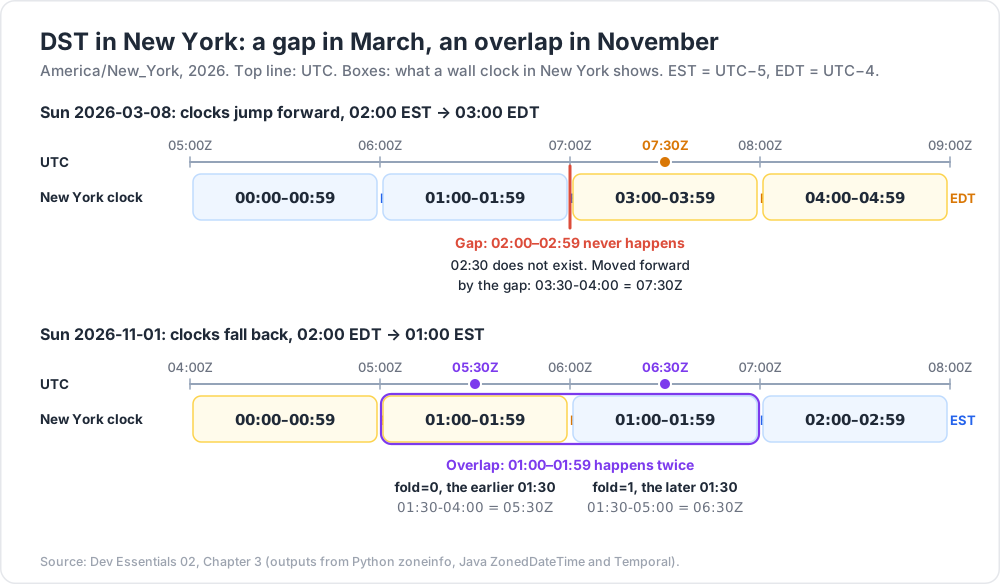
When clocks jump forward, one hour of wall-clock time does not exist (a gap). When clocks go back, one hour happens twice (an overlap).
Real 2026 transitions
| Zone | Change | Local clock | Result |
|---|---|---|---|
America/New_York |
Sun 2026-03-08 | 02:00 EST → 03:00 EDT | Gap: 02:00–02:59 never happens |
America/New_York |
Sun 2026-11-01 | 02:00 EDT → 01:00 EST | Overlap: 01:00–01:59 happens twice |
Europe/London |
Sun 2026-03-29 | 01:00 GMT → 02:00 BST | Gap: 01:00–01:59 never happens |
Europe/London |
Sun 2026-10-25 | 02:00 BST → 01:00 GMT | Overlap: 01:00–01:59 happens twice |
(US rule: second Sunday in March to first Sunday in November. UK rule, per GOV.UK: forward at 1am on the last Sunday in March, back at 2am on the last Sunday in October.)
What a library does with a gap or overlap
1
2
3
4
5
6
7
8
9
10
11
12
13
14
15
from datetime import datetime, UTC
from zoneinfo import ZoneInfo
ny = ZoneInfo("America/New_York")
gap = datetime(2026, 3, 8, 2, 30, tzinfo=ny) # does not exist
print(gap.astimezone(UTC).astimezone(ny).isoformat())
# 2026-03-08T03:30:00-04:00 (moved forward by the gap)
for fold in (0, 1): # happens twice
t = datetime(2026, 11, 1, 1, 30, tzinfo=ny, fold=fold)
print(fold, t.isoformat(), t.astimezone(UTC).isoformat())
# 0 2026-11-01T01:30:00-04:00 2026-11-01T05:30:00+00:00 (first time, EDT)
# 1 2026-11-01T01:30:00-05:00 2026-11-01T06:30:00+00:00 (second time, EST)
Python's fold attribute (added in 3.6) picks which of the two moments you mean: 0 is the earlier, 1 the later.
"One day later" is not always "24 hours later"
1
2
3
4
5
6
7
8
9
10
11
12
13
from datetime import datetime, timedelta, UTC
from zoneinfo import ZoneInfo
ny = ZoneInfo("America/New_York")
start = datetime(2026, 3, 7, 12, 0, tzinfo=ny) # Saturday noon, EST
wall = start + timedelta(hours=24) # same-zone math = wall clock
print(wall.isoformat()) # 2026-03-08T12:00:00-04:00
print(wall.astimezone(UTC) - start.astimezone(UTC)) # 23:00:00 (real time!)
real = (start.astimezone(UTC) + timedelta(hours=24)).astimezone(ny)
print(real.isoformat()) # 2026-03-08T13:00:00-04:00
Trick: in Python, arithmetic between aware datetimes in the same zone works on the wall clock. For elapsed time (timeouts, durations, billing), convert to UTC first.
Chapter 4 — Writing timestamps: ISO 8601 and RFC 3339
ISO 8601 is the international standard for dates and times. RFC 3339 is a strict, simple profile of it for the internet. Use it for every timestamp you send or store as text.
| Form | Meaning |
|---|---|
2026-05-21 |
A calendar date |
2026-05-21T15:00:00 |
A wall-clock time, no zone (ambiguous as an instant) |
2026-05-21T07:00:00Z |
An instant in UTC |
2026-05-21T15:00:00+08:00 |
The same instant, written with Hong Kong's offset |
2026-05-21T15:00:00+08:00[Asia/Hong_Kong] |
The same instant plus the zone name (RFC 9557) |
Notes from the RFCs:
- RFC 3339's grammar uses
Tbetween date and time. A note allows a space "for the sake of readability", but many parsers only acceptT. - RFC 3339 used
-00:00to mean "UTC time known, local offset unknown". RFC 9557 (2024) updates this:Znow carries that meaning too. - RFC 9557 adds bracketed suffixes such as
[Asia/Hong_Kong]. Temporal in JavaScript (Chapter 7) prints this format.
Common pitfall:
05/06/2026is 6 May in the US and 5 June in the UK. Never use a local display format for storage or APIs. ISO 8601 also sorts correctly as plain text.
Chapter 5 — Unix epoch time
Unix time counts seconds since 1970-01-01T00:00:00Z. It ignores leap seconds: the ECMAScript spec says its time values "do not account for UTC leap seconds", and POSIX time works the same way.
| Unit | Who uses it | Digits in 2026 | Example |
|---|---|---|---|
| Seconds | Unix tools, Python time.time(), most APIs, JWT exp |
10 | 1790312844 |
| Milliseconds | JavaScript Date.now(), Java System.currentTimeMillis(), MongoDB |
13 | 1790312844000 |
Both examples are 2026-09-25T05:07:24Z. Mixing them up is a classic bug:
1
2
3
new Date(1790312844 * 1000).toISOString(); // "2026-09-25T05:07:24.000Z" (seconds → ms)
new Date(1790312844).toISOString(); // "1970-01-21T17:18:32.844Z" (forgot * 1000)
1
2
date -u -d @1790312844 +%Y-%m-%dT%H:%M:%SZ # GNU date (Git Bash, Linux): 2026-09-25T05:07:24Z
1
2
3
[DateTimeOffset]::FromUnixTimeSeconds(1790312844).UtcDateTime.ToString('o') # 2026-09-25T05:07:24.0000000Z
[DateTimeOffset]::UtcNow.ToUnixTimeSeconds() # now, as Int64
The year 2038 problem
A signed 32-bit count of seconds tops out at 2^31 − 1 = 2147483647, which is 2038-01-19T03:14:07Z. One second later it wraps to a negative number (a date in 1901). Old C code with a 32-bit time_t, file formats and database columns are at risk. For example, MySQL documents its TIMESTAMP type range as '1970-01-01 00:00:01' UTC to '2038-01-19 03:14:07' UTC. Use 64-bit integers or proper date types.
For comparison, a JavaScript Date holds milliseconds in a range of exactly ±100,000,000 days around 1970 (±8.64 × 10^15 ms), so it reaches the year 275760.
Chapter 6 — The storage rule
- Store instants in UTC. Use a real date-time type (
timestamptzin PostgreSQL, BSON Date in MongoDB,Instantin Java) or ISO 8601 text withZ. - Keep the zone when the user's local time matters. For a future meeting or a "every day at 09:00" rule, store the wall-clock time and the IANA zone name. Work out the instant when you need it, so new DST rules are picked up.
- Convert to local time only at the edges: when you display, and when you read user input.
- Store pure dates as dates.
Why rule 2 matters: a meeting at 09:00 Europe/London is 09:00Z on 2026-12-07 but 08:00Z on 2026-06-08. A stored UTC instant would put the June meeting at the wrong local hour.
MongoDB
MongoDB's docs say a BSON Date "is a 64-bit integer that represents the number of milliseconds since the Unix epoch". It is signed, so dates before 1970 work. It stores no zone. If you need the user's zone, put it in its own field:
1
2
3
4
5
6
7
db.meetings.insertOne({
title: "Standup",
startsAt: ISODate("2026-12-07T09:00:00Z"), // instant, for queries and sorting
localTime: "09:00", // what the user chose
tz: "Europe/London" // how to recompute it
});
See MongoDB Course 00 · Foundations for BSON types, and MongoDB Course 28 · Time-Series for time-based data at scale.
Chapter 7 — The APIs: Python, JavaScript, Java
Python: aware vs naive
The Python docs define an aware object as one that "represents a specific moment in time that is not open to interpretation". A naive object has no zone, and whether it means UTC or local time "is purely up to the program".
1
2
3
4
5
6
7
8
9
10
11
12
13
14
15
from datetime import datetime, UTC
from zoneinfo import ZoneInfo # Python 3.9+
now = datetime.now(UTC) # aware, UTC. Not datetime.utcnow()
hk = ZoneInfo("Asia/Hong_Kong")
meeting = datetime(2026, 5, 21, 15, 0, tzinfo=hk)
print(meeting.isoformat()) # 2026-05-21T15:00:00+08:00
print(meeting.astimezone(UTC).isoformat()) # 2026-05-21T07:00:00+00:00
print(datetime.fromisoformat("2026-05-21 15:00:00").tzinfo) # None: naive!
print(datetime.fromisoformat("2026-05-21T07:00:00Z")) # aware (Python 3.11+)
datetime(2026, 5, 21, 15) < now
# TypeError: can't compare offset-naive and offset-aware datetimes
datetime.utcnow()is deprecated since Python 3.12. It returns a naive value that looks like local time to other code. Usedatetime.now(UTC)(theUTCalias needs Python 3.11+; on older versions usedatetime.now(timezone.utc)).zoneinforeads the system tz database. Windows has none, so install the first-party package:pip install tzdata. Without it,ZoneInfo("Asia/Hong_Kong")raisesZoneInfoNotFoundErroron Windows.
JavaScript: Date parsing traps
A Date is one instant (milliseconds since the epoch). Its getters then show that instant in local time or in UTC. The trouble is in parsing. The ECMAScript spec says: "When the UTC offset representation is absent, date-only forms are interpreted as a UTC time and date-time forms are interpreted as a local time." Strings outside the spec's format "may fall back to any implementation-specific heuristics".
| Input | Spec rule | Result with TZ America/New_York |
Result with TZ Asia/Hong_Kong |
|---|---|---|---|
new Date("2026-05-21") |
Date-only → UTC | 2026-05-21T00:00:00.000Z |
2026-05-21T00:00:00.000Z |
new Date("2026-05-21T00:00") |
Date-time → local | 2026-05-21T04:00:00.000Z |
2026-05-20T16:00:00.000Z |
new Date("2026-05-21 00:00") |
Not the spec format → engine decides | V8 (Node/Chrome): local, as above | V8: local, as above |
new Date("2026-05-21T00:00Z") |
Explicit UTC | 2026-05-21T00:00:00.000Z |
2026-05-21T00:00:00.000Z |
(Tested in Node.js 20 with the TZ environment variable set.) The first row surprises people: in New York, new Date("2026-05-21").getDate() returns 20, because UTC midnight is still 20 May there.
Display in a chosen zone with Intl:
1
2
3
4
5
6
const d = new Date("2026-05-21T07:00:00Z");
new Intl.DateTimeFormat("en-GB", {
timeZone: "Asia/Hong_Kong", dateStyle: "medium", timeStyle: "short",
}).format(d); // "21 May 2026, 15:00"
d.toLocaleString("en-US", { timeZone: "America/New_York" }); // "5/21/2026, 3:00:00 AM"
JavaScript: Temporal
Temporal is the new built-in date/time API. It separates the concepts: Temporal.Instant, Temporal.ZonedDateTime, Temporal.PlainDate, Temporal.PlainDateTime and more. Status as of September 2026:
- It reached Stage 4 at TC39 in March 2026 and is listed for ECMAScript 2027.
- Shipped in Chrome 144 (and Edge), Firefox 139, Node.js 26 and Deno 2.7, per MDN's compatibility data.
- Safari has it only in Technology Preview. MDN marks Temporal "Limited availability". For websites, use a polyfill (
@js-temporal/polyfillortemporal-polyfill) until Safari ships.
1
2
3
4
5
6
7
8
9
10
11
12
13
14
15
16
const gap = Temporal.ZonedDateTime.from("2026-03-08T02:30[America/New_York]");
gap.toString(); // "2026-03-08T03:30:00-04:00[America/New_York]"
Temporal.ZonedDateTime.from("2026-03-08T02:30[America/New_York]",
{ disambiguation: "reject" }); // throws RangeError
const later = Temporal.ZonedDateTime.from("2026-11-01T01:30[America/New_York]",
{ disambiguation: "later" });
later.toString(); // "2026-11-01T01:30:00-05:00[America/New_York]"
const sat = Temporal.ZonedDateTime.from("2026-03-07T12:00[America/New_York]");
sat.add({ days: 1 }).toString(); // "2026-03-08T12:00:00-04:00[America/New_York]"
sat.add({ hours: 24 }).toString(); // "2026-03-08T13:00:00-04:00[America/New_York]"
Temporal.PlainDateTime.from("2026-05-21T15:00:00")
.toZonedDateTime("Asia/Hong_Kong").toInstant().toString(); // "2026-05-21T07:00:00Z"
Unlike Python's same-zone arithmetic, Temporal keeps "1 day" (calendar) and "24 hours" (exact time) apart. (Outputs above checked in Chromium 152.)
Java: java.time
Java 8 added java.time, with one class per concept (see Java Development p1 and p2 for the language basics):
1
2
3
4
5
6
7
8
9
10
11
12
13
14
15
16
17
18
19
20
21
import java.time.*;
public class TimeDemo {
public static void main(String[] args) {
Instant now = Instant.now(); // an instant
LocalDate due = LocalDate.of(2026, 5, 21); // a calendar date
ZoneId ny = ZoneId.of("America/New_York");
ZonedDateTime gap = ZonedDateTime.of(2026, 3, 8, 2, 30, 0, 0, ny);
System.out.println(gap); // 2026-03-08T03:30-04:00[America/New_York]
ZonedDateTime overlap = ZonedDateTime.of(2026, 11, 1, 1, 30, 0, 0, ny);
System.out.println(overlap); // ...T01:30-04:00[...]
System.out.println(overlap.withLaterOffsetAtOverlap()); // ...T01:30-05:00[...]
ZonedDateTime hk = LocalDateTime.of(2026, 5, 21, 15, 0)
.atZone(ZoneId.of("Asia/Hong_Kong"));
System.out.println(hk.toInstant()); // 2026-05-21T07:00:00Z
}
}
The ZonedDateTime docs give the rules: in a gap the local time is "shifted forwards by the length of the Gap"; in an overlap the earlier offset is used unless you call withLaterOffsetAtOverlap().
Chapter 8 — Cron jobs and DST
Classic cron runs jobs by the machine's local clock. On a machine in a DST zone, a job at 30 2 * * * meets the gap in spring and the overlap in autumn. The Debian cron(8) manual describes its behaviour for clock changes of less than 3 hours:
- Moving forward: "those jobs which would have run in the time that was skipped will be run soon after the change."
- Moving back: "those jobs that fall into the repeated time will not be re-run."
- Jobs with
*in the hour or minute field "are run based on the new time immediately".
Other schedulers behave differently, so check yours. Safe habits:
- Run servers in UTC. Then there is no DST at all.
- If a job must follow local time, avoid 01:00–03:00 local in zones with DST.
- GitHub Actions:
on.schedulecron runs in UTC by default. You can add an IANAtimezone:; for zones with DST, GitHub's docs say a schedule inside the skipped hour advances to the next valid time (a 2:30 AM schedule runs at 3:00 AM). More in Dev Essentials 16 · CI/CD.
1
2
3
4
5
on:
schedule:
- cron: "30 5 * * 1-5" # 05:30 on weekdays
timezone: "America/New_York" # optional; UTC if omitted
Chapter 9 — Case study: when is this blog's post published?
Every post on this blog starts with frontmatter like this:
1
2
date: 2026-05-21 15:00:00
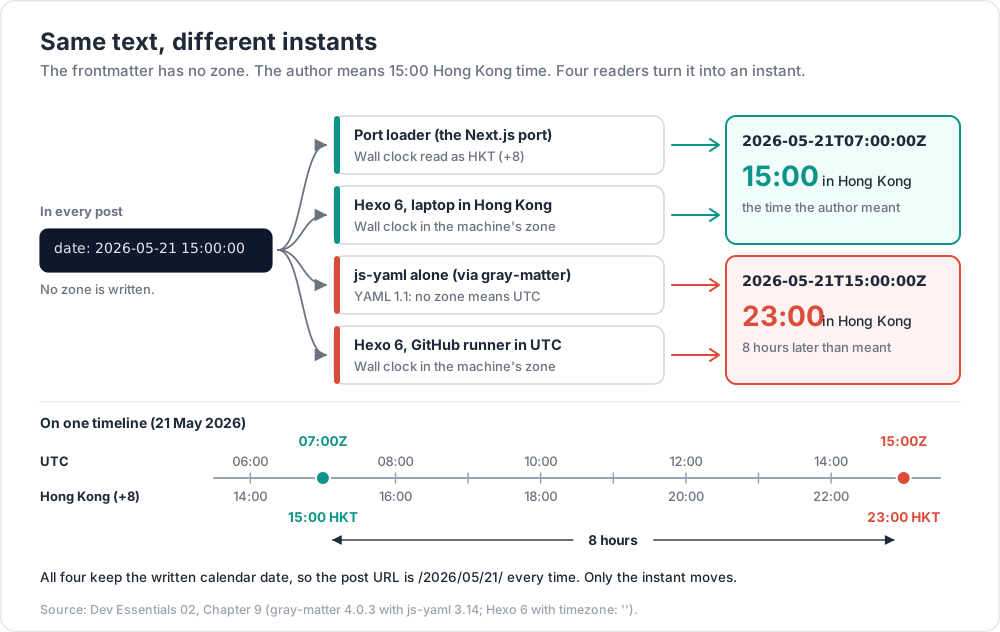
There is no zone. The author means 15:00 Hong Kong time. Three readers turn this text into an instant.
Reader 1 — gray-matter / js-yaml (YAML 1.1 rule)
The Next.js port of the blog parses frontmatter with gray-matter, which uses js-yaml. The YAML 1.1 timestamp type says: "If the time zone is omitted, the timestamp is assumed to be specified in UTC." So js-yaml returns 2026-05-21T15:00:00.000Z, which is 23:00 in Hong Kong. (Checked with gray-matter 4.0.3 and js-yaml 3.14.)
Reader 2 — the port's post loader
The port corrects this. Its loader reads the wall-clock fields back out of that Date and anchors them to Hong Kong time with a fixed offset. Simplified from the source:
1
2
3
4
5
6
7
8
9
10
11
12
13
14
const TZ_OFFSET_HOURS = 8; // Hexo blog built in Asia/Hong_Kong.
const pad = (n: number) => String(n).padStart(2, "0");
function parseFrontmatterDate(v: Date): Date {
const y = v.getUTCFullYear(), mo = v.getUTCMonth(), d = v.getUTCDate();
const h = v.getUTCHours(), mi = v.getUTCMinutes(), s = v.getUTCSeconds();
return new Date(Date.UTC(y, mo, d, h - TZ_OFFSET_HOURS, mi, s));
}
function postPath(date: Date, slug: string) {
const d = new Date(date.getTime() + TZ_OFFSET_HOURS * 3600_000); // shift to HKT
return `${d.getUTCFullYear()}/${pad(d.getUTCMonth() + 1)}/${pad(d.getUTCDate())}/${slug}/`;
}
Result: 2026-05-21T07:00:00Z (15:00 HKT), and the URL /2026/05/21/slug/ uses the Hong Kong calendar date. Date.UTC accepts an hour below 0 and rolls back to the previous day, so a post at 03:00 HKT still gets the right instant. A fixed +8 is safe here only because Hong Kong has had no DST since 1979. The same trick would be wrong for London.
Reader 3 — Hexo
The original Hexo site has timezone: '' in _config.yml. The Hexo docs say: "Hexo uses the setting on your computer by default." In Hexo 6, the front-matter parser (hexo-front-matter 3.x) reads each zone-less date as the build machine's local wall-clock time, and Hexo then re-anchors it only if timezone is set. The Hexo site builds on a GitHub Actions ubuntu-latest runner. GitHub-hosted runners run in UTC in practice (GitHub states UTC explicitly for scheduled workflows; add a run: date step to see it).
Same text, different instants
| Reader | Rule | Instant | Hong Kong time |
|---|---|---|---|
| js-yaml alone | No zone = UTC | 2026-05-21T15:00:00Z |
23:00 |
| Port loader | Wall clock in HKT (+8) | 2026-05-21T07:00:00Z |
15:00 |
Hexo 6, timezone: '', runner in UTC |
Wall clock in machine zone | 2026-05-21T15:00:00Z |
23:00 |
Hexo 6, timezone: '', laptop in HK |
Wall clock in machine zone | 2026-05-21T07:00:00Z |
15:00 |
The URL date is the same in all four, because each reader keeps the written calendar date. The instant is not, and anything that shows or compares instants (a feed timestamp, a "published" <time> tag, a future-post filter) can differ by 8 hours.
Where future fits
The Hexo config also has future: true. The docs describe it as "Display future posts?", default true. With true, a post dated later than the build time is still published. With false, it is skipped until a later build, and "later than now" is judged with whatever instant the build machine computed. Near the boundary, the zone decides.
The lesson: pin the zone
- Say the zone once, in config. For Hexo:
timezone: Asia/Hong_Kong(an IANA name; the docs giveAmerica/New_Yorkas an example). Then the build machine's zone no longer matters. - Or write the offset in the data, such as
date: 2026-05-21T15:00:00+08:00. This is the portable fix for YAML readers. Check each consumer first: the current hexo-front-matter source honours an explicit offset, but version 3.x (Hexo 6) reads every date's UTC fields as local wall-clock time, so the offset does not survive there.
Watch out: the port's loader is written for zone-less dates. It reads the UTC fields of whatever js-yaml returns and treats them as HKT. If posts ever gain an explicit offset, update the loader in the same change, or those dates will move by 8 hours.
Practice Exercises
Exercise 1 — Classify
For each, say instant, wall-clock + zone, or calendar date: (a) a server log line, (b) a user's birthday, (c) a weekly 09:00 team call in Singapore, (d) a payment's time, (e) a public holiday.
Solution
(a) instant (UTC). (b) calendar date. (c) wall-clock + zone: 09:00 + Asia/Singapore + a weekly rule. (d) instant (UTC). (e) calendar date (and it may differ by country).
Exercise 2 — The London gap
What does Python print for datetime(2026, 3, 29, 1, 30, tzinfo=ZoneInfo("Europe/London")) after a round trip through UTC?
Solution
1
2
3
4
5
6
7
from datetime import datetime, UTC
from zoneinfo import ZoneInfo
lon = ZoneInfo("Europe/London")
t = datetime(2026, 3, 29, 1, 30, tzinfo=lon)
print(t.astimezone(UTC).astimezone(lon).isoformat()) # 2026-03-29T02:30:00+01:00
01:30 does not exist on that day (01:00 GMT jumps to 02:00 BST). With fold=0, Python uses the offset from before the jump (+00:00), which is 01:30Z, and that is 02:30 BST.
Exercise 3 — Seconds or milliseconds?
An API returns 1779346800. Another returns 1779346800000. Convert both to ISO 8601 in Python.
Solution
1
2
3
4
5
from datetime import datetime, UTC
print(datetime.fromtimestamp(1779346800, tz=UTC).isoformat()) # 2026-05-21T07:00:00+00:00
print(datetime.fromtimestamp(1779346800000 / 1000, tz=UTC).isoformat()) # same instant
10 digits means seconds and 13 digits means milliseconds, for dates between 2001 and 2286.
Exercise 4 — Predict the JavaScript
With TZ=America/New_York, what do new Date("2026-05-21").getDate() and new Date("2026-05-21T00:00").getDate() return?
Solution
20 and 21. The date-only string is parsed as UTC midnight, which is 20:00 on 20 May in New York (UTC−4 in May). The date-time string is parsed as local midnight on 21 May. To get a plain date safely, use Temporal.PlainDate.from("2026-05-21"), or split the string yourself.
Exercise 5 — Store a recurring meeting
A team meets every Monday at 09:00 in London. Design the stored fields and compute the UTC instants for 2026-06-08 and 2026-12-07.
Solution
Store { "weekday": "MO", "localTime": "09:00", "tz": "Europe/London" }. Compute each instant when needed:
1
2
3
4
5
6
7
8
9
from datetime import datetime, UTC
from zoneinfo import ZoneInfo
lon = ZoneInfo("Europe/London")
for day in (datetime(2026, 6, 8, 9, 0, tzinfo=lon), datetime(2026, 12, 7, 9, 0, tzinfo=lon)):
print(day.astimezone(UTC).isoformat())
# 2026-06-08T08:00:00+00:00 (BST, UTC+1)
# 2026-12-07T09:00:00+00:00 (GMT, UTC+0)
Exercise 6 — Pin this blog's dates
Give two ways to make date: 2026-05-21 15:00:00 mean 15:00 Hong Kong time for every reader, and one risk of each.
Solution
- Set
timezone: Asia/Hong_Kongin the Hexo config. Risk: it only fixes Hexo. Other readers (plain js-yaml, scripts) still read the text as UTC, so the port keeps its own +8 correction. - Write
date: 2026-05-21T15:00:00+08:00. Risk: every reader must honour offsets. Hexo 6's front-matter parser and the port's current loader do not, so both would need changing together.
Cheat-sheet
| Task | How |
|---|---|
| Store an event that happened | UTC instant: 2026-05-21T07:00:00Z |
| Store a future local event | wall-clock + IANA zone: 09:00 + Europe/London |
| Store a birthday | date only: 2026-05-21 |
| Now, aware (Python) | datetime.now(UTC) |
| Attach a zone (Python) | datetime(..., tzinfo=ZoneInfo("Asia/Hong_Kong")) |
| Zone data on Windows (Python) | pip install tzdata |
| Pick the second 01:30 (Python) | fold=1 |
| Elapsed time (Python) | convert both to UTC, then subtract |
| Parse safely (JS) | always include Z or an offset |
| Show in a zone (JS) | Intl.DateTimeFormat(locale, { timeZone }) |
| Plain date (JS) | Temporal.PlainDate.from("2026-05-21") |
| Seconds → Date (JS) | new Date(sec * 1000) |
| Epoch → ISO (bash) | date -u -d @1790312844 |
| Epoch → ISO (PowerShell) | [DateTimeOffset]::FromUnixTimeSeconds(n).UtcDateTime |
| 32-bit limit | 2038-01-19T03:14:07Z |
| Hexo site zone | timezone: Asia/Hong_Kong |
What's next
Dev Essentials 03 · Git Rescue Kit covers reflog, restore, reset, revert and rebase: the tools that made the repair in Dev Essentials 01 a routine job instead of a disaster.
References
- RFC 3339 — Date and Time on the Internet: Timestamps
- RFC 9557 — Timestamps with Additional Information
- IANA — Time Zone Database
- ECMAScript — Date Time String Format and Date.parse
- MDN — Date.parse()
- MDN — Temporal
- TC39 — Temporal proposal
- Python — datetime
- Python — zoneinfo
- Java — ZonedDateTime (Java SE 21)
- MongoDB — BSON Types (Date)
- MySQL 8.4 — DATE, DATETIME and TIMESTAMP
- YAML 1.1 — Timestamp type
- Hexo — Configuration (timezone, future)
- GitHub Docs — Events that trigger workflows (schedule)
- GOV.UK — When do the clocks change?
- Debian — cron(8) manual
Note: this post is in progress. Planned additions: time zones in PostgreSQL (
timestamptzvstimestamp), leap seconds and clock sync (NTP), and a diagram of the three readers in the case study.