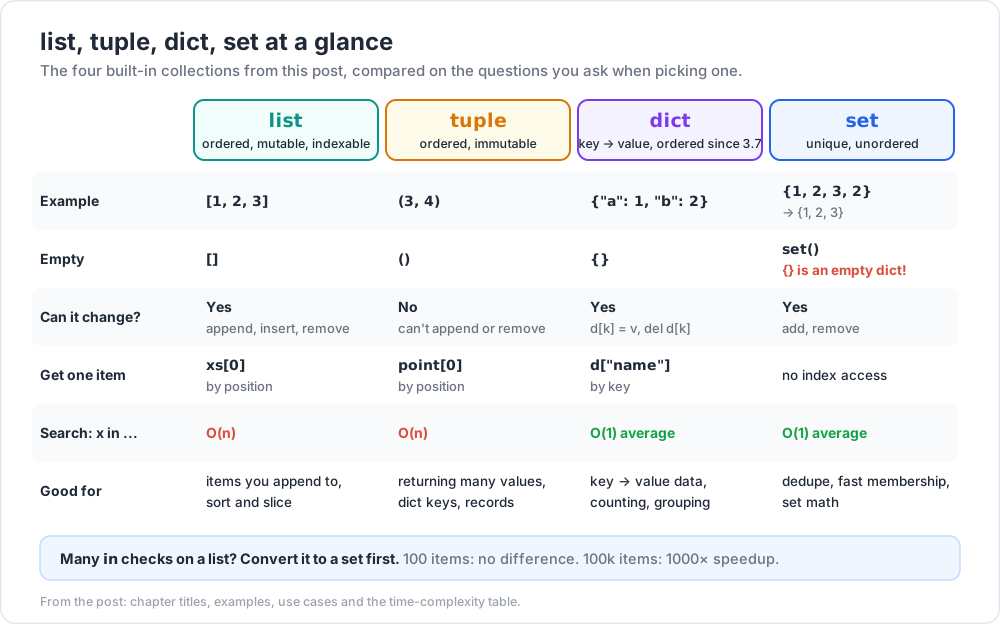
Python's built-in collections — list, tuple, dict, set — handle 90% of real-world data shaping. Mastering them (plus their comprehension sugar) means most data-munging scripts end up being 5–10 lines rather than 50. This post is the core of practical Python; spend extra time on the exercises.
Slicing produces a new list; mutating the slice doesn't affect the original.
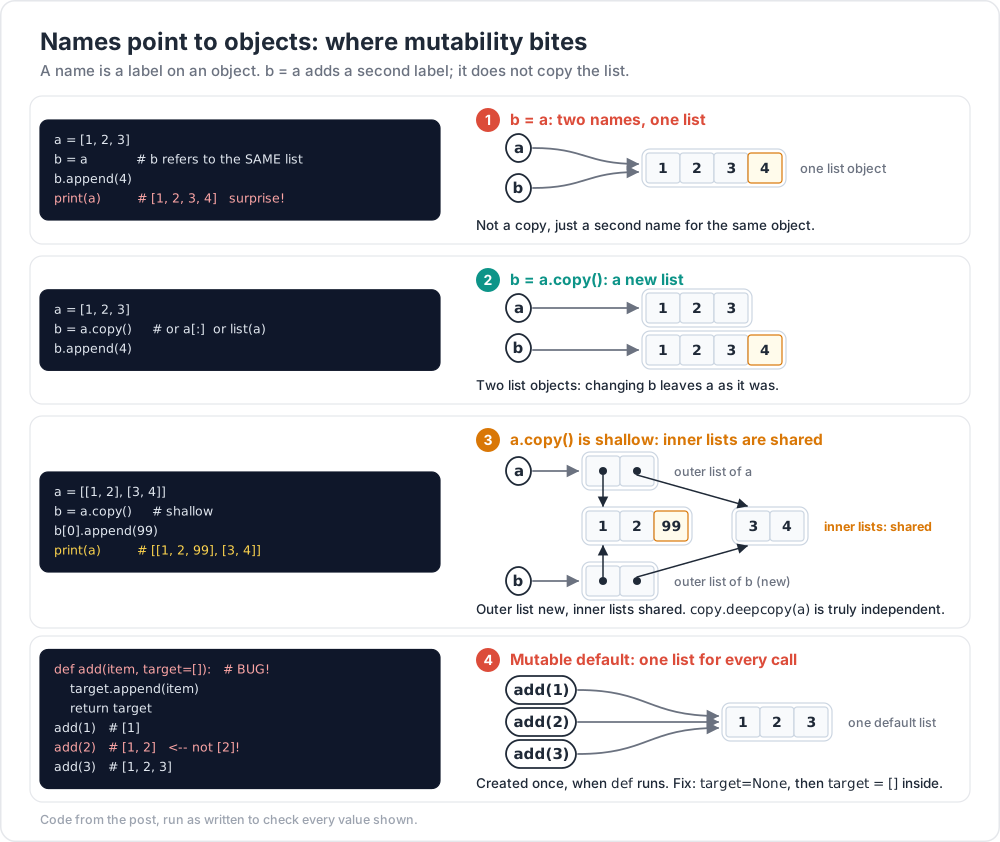
Copy gotcha
1 2 3 4 5
a = [1, 2, 3] b = a # b refers to the SAME list b.append(4) print(a) # [1, 2, 3, 4] surprise!
To copy: b = a.copy() or b = a[:] or b = list(a).
Where I got stuck: I once "duplicated" a list for safety, then watched the original change anyway. The fix took 5 seconds once I saw b = a for what it was — not a copy, just a second name for the same object.
Chapter 2 — tuple (ordered, immutable)
1 2 3 4 5
point = (3, 4) x, y = point # tuple unpacking point[0] # 3 len(point) # 2
Tuples are immutable: you can't append, remove, or change items. Use when:
You return multiple values from a function.
You want a key in a dict (lists can't be dict keys; tuples can).
The data is conceptually a "record", not a collection of similar items.
Singleton tuple
1 2 3
t = (5,) # tuple with one element — note the trailing comma not_t = (5) # this is just int 5 in parentheses
Named tuples (slight upgrade)
1 2 3 4 5 6
from collections import namedtuple Point = namedtuple("Point", ["x", "y"]) p = Point(3, 4) p.x # 3 p[0] # 3 (still indexable)
For modern code, prefer dataclasses (Post 04).
Chapter 3 — dict (key → value, ordered since 3.7)
1 2 3 4 5 6 7 8 9
d = {"name": "Ada", "age": 30} d["name"] # "Ada" d["email"] = "a@x"# add or update del d["age"] # remove key "name"in d # True d.get("missing") # None (no exception) d.get("missing", "?") # "?" (default) len(d) # number of keys
Iteration
1 2 3 4 5 6 7 8 9
for k in d: # iterate keys print(k) for v in d.values(): # iterate values print(v) for k, v in d.items(): # iterate pairs print(k, v)
# count occurrences counts = {} for word in ["a", "b", "a", "c", "a"]: counts[word] = counts.get(word, 0) + 1 # {"a": 3, "b": 1, "c": 1} # even simpler: collections.Counter from collections import Counter Counter(["a", "b", "a", "c", "a"]) # Counter({'a': 3, 'b': 1, 'c': 1}) # default to a list from collections import defaultdict groups = defaultdict(list) for n inrange(10): groups[n % 3].append(n) # {0: [0,3,6,9], 1: [1,4,7], 2: [2,5,8]}
Trick:Counter and defaultdict from collections save you get(..., default) boilerplate in 80% of cases. Worth memorising on day 1.
Chapter 4 — set (unique, unordered)
1 2 3 4 5 6 7 8 9 10 11 12 13 14
s = {1, 2, 3, 2} # {1, 2, 3} — duplicates dropped s.add(4) s.remove(2) 3in s # O(1) len(s) # set operations a = {1, 2, 3} b = {3, 4, 5} a | b # union {1, 2, 3, 4, 5} a & b # intersect {3} a - b # difference {1, 2} a ^ b # symmetric difference {1, 2, 4, 5}
Use cases
Deduplication: unique = list(set(items)) (loses order; use dict.fromkeys if order matters).
Membership testing: if x in big_set is O(1) vs O(n) for list.
Set math: filtering by overlap, exclusion.
Empty set
1 2
empty = set() # NOT {} — that's an empty dict!
Chapter 5 — Comprehensions (the superpower)
A comprehension transforms one iterable into a new collection in one line.
List comprehension
1 2 3 4 5 6 7 8 9
squares = [n * n for n inrange(10)] # [0, 1, 4, 9, 16, 25, 36, 49, 64, 81] evens = [n for n inrange(20) if n % 2 == 0] # [0, 2, 4, ..., 18] # nested pairs = [(i, j) for i inrange(3) for j inrange(3) if i != j]
General form: [expression for var in iterable if condition].
Dict comprehension
1 2 3 4 5 6
square_map = {n: n * n for n inrange(5)} # {0: 0, 1: 1, 2: 4, 3: 9, 4: 16} # invert a dict inv = {v: k for k, v in d.items()}
Set comprehension
1 2 3
unique_lengths = {len(word) for word in ["hi", "hello", "ok"]} # {2, 5}
Generator expression (lazy)
1 2
total = sum(n * n for n inrange(1_000_000)) # no list built — memory-efficient
Use generator (round-brackets) when you only need to consume once.
Trick: if a comprehension is more than ~2 lines or has a complicated condition, rewrite it as a regular loop. Clever one-liners that take 3 minutes to read aren't actually clever.
Chapter 6 — Built-in functions on collections
Function
What
len(x)
length
sum(x)
sum of numbers
min(x), max(x)
extremes (works on strings too — lexicographic)
sorted(x)
new sorted list; original untouched
reversed(x)
iterator in reverse
any(x)
True if any element truthy
all(x)
True if all elements truthy
zip(a, b)
pair elements
enumerate(x)
(index, value) pairs
map(f, x)
apply f to each (lazy; usually use comprehension instead)
filter(pred, x)
keep where pred(x) truthy (lazy)
sorted with key
1 2 3 4 5 6
words = ["banana", "fig", "apple"] sorted(words) # alphabetical sorted(words, key=len) # by length sorted(words, key=str.lower) # case-insensitive sorted(records, key=lambda r: r["age"]) # by dict field
Chapter 7 — Mutability bugs
The shared default argument trap
1 2 3 4 5 6 7 8
defadd(item, target=[]): # BUG! default list shared across calls target.append(item) return target add(1) # [1] add(2) # [1, 2] <-- not [2]! add(3) # [1, 2, 3]
The default list is created once when the function is defined. Fix:
from collections import defaultdict groups = defaultdict(list) for w in words: key = "".join(sorted(w)) groups[key].append(w) print(list(groups.values()))
Cheat-sheet
What
Example
List append
xs.append(x)
List slice
xs[a:b:c]
List sort (in-place)
xs.sort()
New sorted list
sorted(xs, key=..., reverse=True)
Tuple unpack
a, b = (1, 2)
Dict get with default
d.get(k, default)
Dict items loop
for k, v in d.items():
Dict merge
d1 | d2 (3.9+)
Set empty
set() (not {})
Set ops
| & - ^
List comp
[expr for x in xs if cond]
Dict comp
{k: v for ... }
Counter
Counter(iterable)
defaultdict
defaultdict(list)
Deep copy
copy.deepcopy(x)
Avoid mutable default
use None sentinel
What's next
Post 03 covers functions and modules: how to define functions with positional / keyword / variadic arguments, scope rules (LEGB), lambda, and how to organise code into reusable modules + packages.