Python Course — 03 · Functions, Scope, Modules, and Packages
Functions are how you turn 50 lines of scripted code into reusable building blocks. Modules and packages are how you split a 500-line file into a project. This post covers everything you need to write professional-shaped Python: def, argument styles, scope, lambda, modules, packages, import, and pip-installable libraries.
Series map: 00 Setup → 01 Syntax → 02 Data Structures → 03 Functions & Modules (this post) → 04 OOP → 05 Files & Exceptions → (future).
Learning Outcome
- Define functions with positional, keyword, default,
*args,**kwargs. - Understand scope (LEGB rule) and the
global/nonlocalkeywords. - Use
lambdafor short anonymous functions. - Organise code into modules + packages with
__init__.py. - Use
import,from ... import, and aliasing. - Understand
if __name__ == "__main__". - Install and use third-party packages from PyPI.
Chapter 1 — Defining functions
Basic
1
2
3
4
5
6
def greet(name):
"""Return a greeting string."""
return f"Hello, {name}!"
print(greet("Ada")) # Hello, Ada!
defintroduces a function.- Indented body required.
- Triple-quoted string at the top is the docstring.
returnexits and gives back a value. Noreturn= returnsNone.
Default arguments
1
2
3
4
5
6
def power(base, exp=2):
return base ** exp
power(5) # 25
power(5, 3) # 125
Keyword arguments
1
2
3
4
5
6
7
def make_url(host, path="/", port=80, secure=False):
scheme = "https" if secure else "http"
return f"{scheme}://{host}:{port}{path}"
make_url("example.com", secure=True, port=443)
# 'https://example.com:443/'
Keyword args make calls self-documenting. Prefer them over positional when 3+ args.
Chapter 2 — Variadic arguments
*args — extra positional args
1
2
3
4
5
6
def total(*nums):
return sum(nums)
total(1, 2, 3) # 6
total(*[1, 2, 3]) # 6 (unpacked from list)
Inside the function, nums is a tuple.
**kwargs — extra keyword args
1
2
3
4
5
6
def configure(**options):
for k, v in options.items():
print(k, "=", v)
configure(host="localhost", port=8080, debug=True)
Inside, options is a dict.
Combining everything
1
2
3
4
5
6
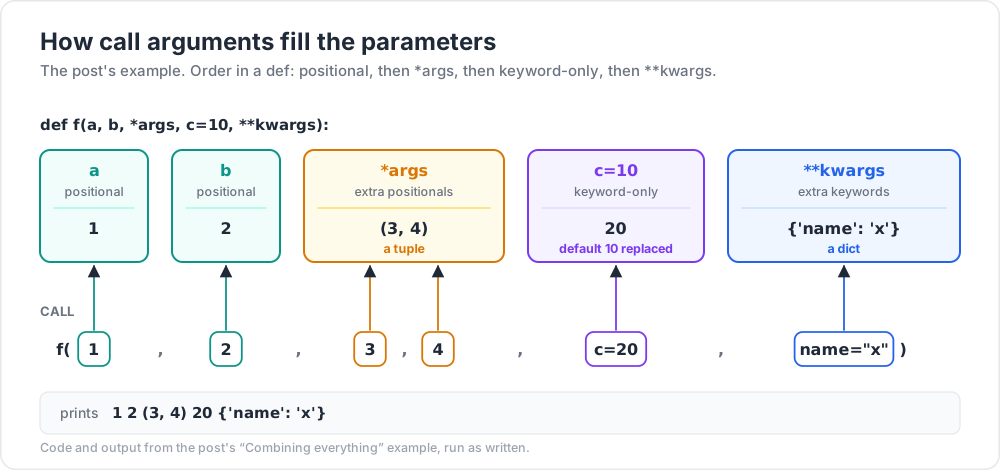
def f(a, b, *args, c=10, **kwargs):
print(a, b, args, c, kwargs)
f(1, 2, 3, 4, c=20, name="x")
# 1 2 (3, 4) 20 {'name': 'x'}
Order: positional → *args → keyword-only → **kwargs.
Keyword-only and positional-only
1
2
3
def func(pos_only, /, normal, *, kw_only):
...
- Before
/— must be positional. - After
*— must be keyword.
Trick: using
*to force keyword-only args (def f(*, debug=False)) prevents callers from passingTruemysteriously without context. Great for boolean flags.
Chapter 3 — Scope (LEGB rule)
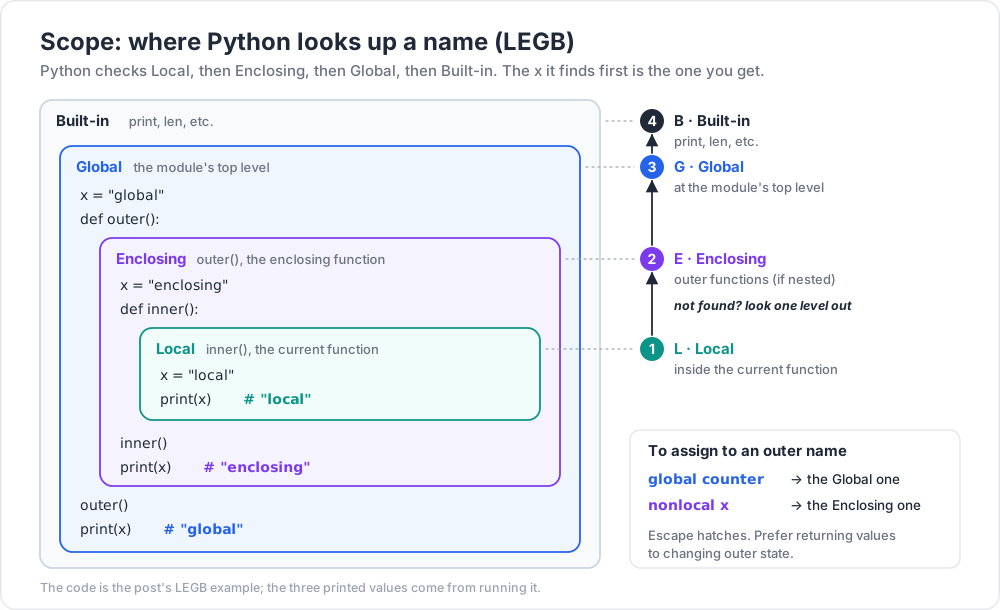
When Python looks up a name, it checks in this order:
- Local — inside the current function.
- Enclosing — outer functions (if nested).
- Global — at the module's top level.
- Built-in —
print,len, etc.
1
2
3
4
5
6
7
8
9
10
11
12
13
x = "global"
def outer():
x = "enclosing"
def inner():
x = "local"
print(x) # "local"
inner()
print(x) # "enclosing"
outer()
print(x) # "global"
Modifying outer scope
1
2
3
4
5
6
counter = 0
def increment():
global counter
counter += 1 # without `global`, raises UnboundLocalError
1
2
3
4
5
6
7
8
def outer():
x = 1
def inner():
nonlocal x
x += 1 # modifies outer function's x
inner()
print(x) # 2
global and nonlocal are escape hatches. Prefer returning values to mutating outer state.
Chapter 4 — lambda (anonymous functions)
A lambda is a single-expression function without a name.
1
2
3
add = lambda a, b: a + b
add(3, 4) # 7
Usually used inline:
1
2
3
4
sorted(words, key=lambda w: len(w))
sorted(records, key=lambda r: r["age"])
list(filter(lambda n: n > 0, nums))
Don't assign a lambda to a name — define a proper function instead. Lambdas are for passing simple functions inline.
Chapter 5 — Modules
A module is just a .py file. The file math_helpers.py:
1
2
3
4
5
6
7
8
9
# math_helpers.py
PI = 3.14159
def area_circle(r):
return PI * r * r
def area_square(s):
return s * s
In another file:
1
2
3
4
5
import math_helpers
print(math_helpers.area_circle(5))
print(math_helpers.PI)
Or import specific names:
1
2
3
from math_helpers import area_circle, PI
print(area_circle(5))
Or rename:
1
2
3
4
5
import math_helpers as mh
from math_helpers import area_circle as circle_area
import numpy as np # canonical alias
import pandas as pd # canonical alias
Avoid from module import *
It pollutes your namespace and makes it impossible to tell where a name came from. Only acceptable in REPL exploration.
Chapter 6 — The if __name__ == "__main__" block
When you run python script.py, Python sets __name__ == "__main__" inside that file. When you import script from elsewhere, __name__ == "script".
1
2
3
4
5
6
7
# script.py
def main():
print("doing work")
if __name__ == "__main__":
main()
This lets the file be both importable (no side effects on import) and runnable (executes when run directly).
Trick: every executable script should have this block. Tests and other modules can then import its functions without triggering the whole script.
Chapter 7 — Packages
A package is a directory of modules with an __init__.py file.
1
2
3
4
5
6
7
8
mypkg/
__init__.py
math_helpers.py
string_helpers.py
utils/
__init__.py
files.py
Import:
1
2
3
from mypkg import math_helpers
from mypkg.utils.files import read_file
__init__.py
Often empty (it just marks the directory as a package). Sometimes used to re-export key names:
1
2
3
4
# mypkg/__init__.py
from .math_helpers import area_circle, PI
from .string_helpers import slugify
Now from mypkg import area_circle works directly.
Relative imports inside a package
1
2
3
4
# mypkg/utils/files.py
from ..math_helpers import PI # .. = parent package
from . import other # . = same package
Chapter 8 — Third-party packages from PyPI
1
2
3
4
pip install requests
pip install rich
pip install numpy pandas matplotlib
(Always inside a venv — see Post 00!)
Then use them:
1
2
3
4
import requests
resp = requests.get("https://api.github.com")
print(resp.json()["current_user_url"])
requirements.txt
1
2
3
4
requests>=2.28
rich>=13.0
numpy
Install:
1
2
pip install -r requirements.txt
Modern alternative: pyproject.toml
Tools like Poetry, Hatch, uv use pyproject.toml instead of requirements.txt. For your first projects, stick with requirements.txt. Migrate later.
Chapter 9 — Function design tips
- One purpose per function. If you can't name it cleanly, it does too much.
- Return values, don't print (except for genuinely user-facing functions). Lets the caller decide what to do.
- Keep parameter count low. 5+ args = it's time to wrap them in a dataclass or dict.
- Document with a docstring. Even one line beats nothing.
- Avoid hidden side effects. A function called
calculate_totalshouldn't write to the DB.
Where I got stuck: I once wrote a 200-line function that did 12 things. Refactoring it to 12 small functions took 30 minutes and the test failures dropped 80% because each piece was independently testable.
Practice Exercises
Exercise 1 — Variadic mean
Write mean(*nums) that returns the average of any number of arguments. Return 0 for empty input.
Solution
1
2
3
def mean(*nums):
return sum(nums) / len(nums) if nums else 0
Exercise 2 — Higher-order: apply
Write apply(fn, *args, **kwargs) that calls fn(*args, **kwargs) and returns the result. (Pointless? Yes. But it's the world's smallest higher-order function.)
Solution
1
2
3
4
5
6
def apply(fn, *args, **kwargs):
return fn(*args, **kwargs)
apply(max, 1, 5, 3) # 5
apply(sorted, [3, 1, 2], reverse=True) # [3, 2, 1]
Exercise 3 — Build a small module
Create text_utils.py with three functions:
word_count(s)→ intreverse_words(s)→ str (reverses order of words, not letters)is_palindrome(s)→ bool (case + space insensitive)
Then write main.py that imports and tests each.
Solution sketch
1
2
3
4
5
6
7
8
9
10
11
# text_utils.py
def word_count(s):
return len(s.split())
def reverse_words(s):
return " ".join(reversed(s.split()))
def is_palindrome(s):
cleaned = "".join(c.lower() for c in s if c.isalnum())
return cleaned == cleaned[::-1]
Exercise 4 — Recursive factorial
Write a recursive function fact(n) that returns n!. Add a guard for n < 0.
Solution
1
2
3
4
5
def fact(n):
if n < 0:
raise ValueError("n must be non-negative")
return 1 if n <= 1 else n * fact(n - 1)
Exercise 5 — Decorator preview (advanced)
Write a function timed(fn) that takes another function, and returns a new function that prints how long fn takes when called.
Solution
1
2
3
4
5
6
7
8
9
10
11
12
13
14
15
import time
def timed(fn):
def wrapper(*args, **kwargs):
start = time.perf_counter()
result = fn(*args, **kwargs)
elapsed = time.perf_counter() - start
print(f"{fn.__name__} took {elapsed:.4f}s")
return result
return wrapper
# usage
slow_sum = timed(sum)
slow_sum(range(10_000_000))
This is the foundation of decorators — covered in a future advanced post.
Cheat-sheet
| What | Example |
|---|---|
| Define function | def f(x): return x |
| Default arg | def f(x=0): |
*args |
tuple of extra positionals |
**kwargs |
dict of extra keywords |
| Keyword-only | def f(*, name): |
| Unpacking call | f(*list, **dict) |
| Global modify | global x inside function |
| Nonlocal modify | nonlocal x inside nested fn |
| Lambda | lambda x: x + 1 |
| Import module | import mod |
| Import name | from mod import name |
| Alias | import mod as m |
| Relative import | from .sibling import x |
| Main guard | if __name__ == "__main__": |
| Install package | pip install name |
What's next
Post 04 covers object-oriented Python: classes, instances, __init__, methods, inheritance, properties, dunder methods, and the modern @dataclass decorator.
References
- docs.python.org tutorial §4, §6
- PEP 257 — docstring conventions
- Fluent Python — Ch. 5–8.
Note: this post is in progress. Planned additions: closures explained visually,
functools.partial, type hints for functions.