C++ Course — 00 · Setup, Compiler, and Hello World
C++ is the language that trades safety for control. You manage memory directly. You touch hardware closer. You pay for speed by accepting that one wrong pointer can crash everything. In exchange, your code can outrun every garbage-collected language by 10–100×, run on the smallest microcontroller, and live inside browsers, game engines, databases, operating systems, and trading systems. This post is the first step of a step-by-step C++ course. Future posts extend into templates, concurrency, modules, and modern (C++17/20/23) features.
Series map: 00 Setup (this post) → 01 Syntax & Types → 02 Pointers & Memory → 03 Classes & OOP → 04 Templates & STL → 05 Modern C++ → (future) concurrency · modules · ranges · coroutines.
Learning Outcome
- Install a modern C++ compiler on Windows / macOS / Linux.
- Understand the compile + link model and the role of headers.
- Write, compile, and run "Hello, World" using
g++,clang++, or MSVC. - Use a basic build flow (single file → multi-file → CMake glimpse).
- Pick a sensible editor / IDE.
Chapter 1 — What C++ is (and isn't)
Terminology
- Compiler — translates
.cppsource into machine code (object files). - Linker — combines object files + libraries into a runnable executable.
- Standard library (STL/
std::) — the language's built-in collections, algorithms, I/O. - Header file (
.h/.hpp) — declarations imported by other files via#include. - Source file (
.cpp) — implementations + themain()function. - Standard — the language version: C++11, C++14, C++17, C++20, C++23. Newer = more features.
C++ vs Python (one paragraph)
Python is interpreted, dynamically typed, garbage-collected, and slow. C++ is compiled, statically typed, manually memory-managed (with smart-pointer helpers), and fast. Python code reads cleanly with little ceremony; C++ code can be more verbose but exposes what's happening at the machine level. Use C++ when you need raw speed, low memory footprint, hardware access, or you're building infrastructure that other languages will call into.
Trick: don't pick a language; pick a problem. Most real engineers use both — Python for orchestration and analysis, C++ (or Rust) for the hot inner loop.
Chapter 2 — Compiler installation
You need one of: g++ (GCC), clang++ (LLVM), or MSVC (Microsoft Visual C++). Each can compile standards-conforming code.
Windows
Option A — MSYS2 / MinGW (gives you g++):
- Install MSYS2 from msys2.org.
- In the MSYS2 terminal:
pacman -S mingw-w64-ucrt-x86_64-gcc. - Add
C:\msys64\ucrt64\binto PATH. - New terminal:
g++ --versionshould show GCC 13+.
Option B — Visual Studio (gives you MSVC):
- Download Visual Studio Community (free) from visualstudio.microsoft.com.
- During install, tick "Desktop development with C++".
- Open x64 Native Tools Command Prompt for VS;
clis the compiler.
Option C — clang-cl + LLVM: similar to MSVC but using clang.
macOS
1
2
3
xcode-select --install # installs clang + headers
clang++ --version
That's it. macOS ships with a recent clang.
Linux (Debian/Ubuntu)
1
2
3
4
5
sudo apt update
sudo apt install -y g++ clang make cmake
g++ --version
clang++ --version
Fedora: sudo dnf install gcc-c++ clang make cmake.
Arch: sudo pacman -S gcc clang make cmake.
Chapter 3 — Your first program
Create hello.cpp:
1
2
3
4
5
6
7
#include <iostream>
int main() {
std::cout << "Hello, World!" << std::endl;
return 0;
}
Compile + run
1
2
3
4
5
6
7
8
# GCC / clang
g++ hello.cpp -o hello
./hello # or hello.exe on Windows
# MSVC
cl hello.cpp # produces hello.exe
hello.exe
Expected output:
1
2
Hello, World!
What's happening
| Line | Meaning |
|---|---|
#include <iostream> |
Preprocessor pulls in standard I/O declarations. |
int main() { ... } |
The program entry point. |
std::cout |
Standard output stream object. |
<< |
Stream insertion operator — sends right operand to left stream. |
"Hello, World!" |
String literal (const char[]). |
std::endl |
Newline + flush the buffer. (Tip: "\n" is faster — no forced flush.) |
return 0; |
Exit code 0 = success. |
Chapter 4 — A slightly bigger program
1
2
3
4
5
6
7
8
9
10
11
#include <iostream>
#include <string>
int main() {
std::string name;
std::cout << "What is your name? ";
std::getline(std::cin, name);
std::cout << "Hi, " << name << "!\n";
return 0;
}
New pieces:
#include <string>— pulls instd::string.std::getline(std::cin, name)— reads a whole line from standard input.- Stream operator
<<chains naturally.
Compile flags worth knowing
1
2
g++ -std=c++20 -Wall -Wextra -O2 hello.cpp -o hello
| Flag | Meaning |
|---|---|
-std=c++20 |
Use C++20 standard (use c++23 if your compiler supports it). |
-Wall |
Most warnings on. |
-Wextra |
Extra warnings (off by default but recommended). |
-O2 |
Optimisation level 2 (release builds). For debugging use -O0 -g. |
-g |
Embed debug info for gdb / lldb. |
Trick: always compile with
-Wall -Wextrafrom day 1. Warnings catch 80% of beginner bugs before they crash at runtime.
Chapter 5 — Two-file build
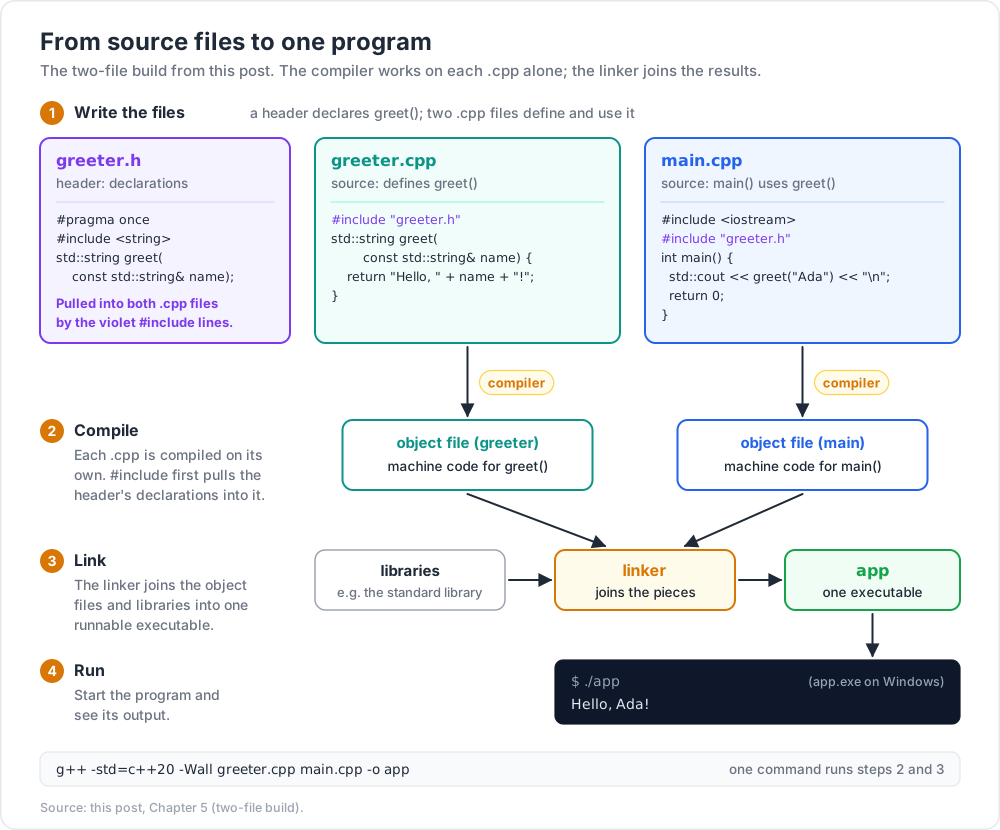
Bigger projects split declarations into headers (.h) and implementations into source files (.cpp).
greeter.h
1
2
3
4
5
#pragma once
#include <string>
std::string greet(const std::string& name);
greeter.cpp
1
2
3
4
5
6
#include "greeter.h"
std::string greet(const std::string& name) {
return "Hello, " + name + "!";
}
main.cpp
1
2
3
4
5
6
7
8
#include <iostream>
#include "greeter.h"
int main() {
std::cout << greet("Ada") << "\n";
return 0;
}
Compile both .cpp files:
1
2
g++ -std=c++20 -Wall greeter.cpp main.cpp -o app
The compiler builds each .cpp into an object file, then the linker combines them into one executable.
#pragma once
A modern shorthand for include guards. It tells the compiler to include this header at most once per translation unit. Older style:
1
2
3
4
5
#ifndef GREETER_H
#define GREETER_H
// ... header content ...
#endif
Use #pragma once — it's universally supported by g++, clang++, and MSVC.
Chapter 6 — CMake (one minute glimpse)
For more than 3–4 files, hand-running g++ becomes painful. CMake generates the build for you.
CMakeLists.txt in your project root:
1
2
3
4
5
6
7
8
9
10
11
cmake_minimum_required(VERSION 3.20)
project(MyApp CXX)
set(CMAKE_CXX_STANDARD 20)
set(CMAKE_CXX_STANDARD_REQUIRED ON)
add_executable(app
main.cpp
greeter.cpp
)
Then:
1
2
3
4
cmake -B build
cmake --build build
./build/app
We'll return to CMake in a future post. For now: know it exists.
Chapter 7 — Editor / IDE choice
| Tool | Notes |
|---|---|
| VS Code + C/C++ extension + CMake Tools | Free, fast, works everywhere. Recommended starting point. |
| CLion | JetBrains. Best refactoring; paid but free for students. |
| Visual Studio (Windows) | The MSVC-native IDE. Best Windows integration. |
| Qt Creator | Slick if you're doing Qt UI work. |
| Neovim + clangd + LSP | Terminal-native; powerful once configured. |
| Sublime Text + LSP | Fast, light. |
Use VS Code if undecided. The C/C++ extension (Microsoft) gives you completion, jump-to-definition, and integrated debugging.
Practice Exercises
Exercise 1 — Echo
Write echo.cpp that reads a line of input and prints it back uppercased.
Hint: #include <algorithm> and std::transform(s.begin(), s.end(), s.begin(), ::toupper);.
Solution
1
2
3
4
5
6
7
8
9
10
11
12
#include <iostream>
#include <string>
#include <algorithm>
int main() {
std::string s;
std::getline(std::cin, s);
std::transform(s.begin(), s.end(), s.begin(),
[](unsigned char c){ return std::toupper(c); });
std::cout << s << "\n";
}
Exercise 2 — Sum two numbers
Read two integers from input, print their sum.
Solution
1
2
3
4
5
6
7
8
#include <iostream>
int main() {
int a, b;
std::cin >> a >> b;
std::cout << a + b << "\n";
}
Exercise 3 — Multi-file project
Split your "echo" exercise into:
text_utils.hdeclaringstd::string to_upper(const std::string& s);text_utils.cppimplementing itmain.cppreading + calling
Build with g++ text_utils.cpp main.cpp -o echo.
Exercise 4 — CMake build
Convert Exercise 3 to a CMake project. Verify cmake -B build && cmake --build build produces a working binary.
Cheat-sheet
| What | How |
|---|---|
| Compile single file | g++ -std=c++20 -Wall x.cpp -o x |
| Compile multi-file | g++ a.cpp b.cpp -o app |
| MSVC compile | cl x.cpp |
std::cout << x << "\n"; |
|
| Read line | std::getline(std::cin, s); |
| Read whitespace-separated | std::cin >> x; |
| Include standard header | #include <iostream> |
| Include local header | #include "file.h" |
| One-include guard | #pragma once |
| Comment | // line or /* block */ |
| Useful flags | -std=c++20 -Wall -Wextra -O2 -g |
| CMake build | cmake -B build && cmake --build build |
What's next
Post 01 covers syntax, types, references, and control flow: int/double/bool, variable declarations, references vs pointers (first taste), if, for, while, switch, and an intro to functions.
References
- cppreference.com — the indispensable C++ reference. Bookmark it.
- isocpp.org/get-started
- A Tour of C++ by Bjarne Stroustrup — the language designer's 200-page walk-through. Best modern intro.
- Programming: Principles and Practice Using C++ by Stroustrup — fuller textbook.
Note: this post is in progress. Planned additions: Windows path setup screenshots, clangd LSP setup guide, debugger first-steps.