Python Course — 00 · Setup, REPL, and Hello World
Python is the most popular first programming language in the world right now — for good reasons: clean syntax, batteries-included standard library, huge ecosystem, and you can be productive in an afternoon. This post is the first step of a step-by-step course written like a university lecture series. Each post adds one well-scoped layer; by Post 05 you'll be comfortable with files, exceptions, and modules. Future posts extend into stdlib, async, typing, and beyond.
Series map: 00 Setup (this post) → 01 Syntax → 02 Data Structures → 03 Functions & Modules → 04 OOP → 05 Files & Exceptions → (future) stdlib · async · typing · packaging.
Learning Outcome
- Install Python 3 on Windows / macOS / Linux.
- Run the REPL (interactive interpreter) and a script file.
- Understand the difference between interpreter, script, and REPL.
- Write and run "Hello, World" + an interactive greeting program.
- Set up a basic project folder +
venv(virtual environment).
Chapter 1 — What Python is (and isn't)
Terminology
- Interpreter — the program (
pythonorpython3) that reads and executes Python code line by line. - REPL — Read-Eval-Print Loop: an interactive shell where each line you type is executed immediately.
- Script — a
.pyfile containing Python code, run withpython script.py. - Module — a
.pyfile imported by another file. - Package — a directory of modules with an
__init__.py. - PEP — Python Enhancement Proposal. The language's design documents. PEP 8 is the style guide everyone follows.
Python vs other languages (one paragraph)
Python is interpreted (no compile step), dynamically typed (you don't declare types, though you can hint them), and garbage-collected (no manual memory management). The trade-off vs C++/Rust: Python is 10–100× slower in raw computation but 5–10× faster to write. For data work, web back-ends, scripts, automation, and ML, the slowness almost never matters.
Trick: don't compare languages by speed in isolation. Compare by time-to-correct-program. Python wins almost every "write something useful by Friday" race.
Chapter 2 — Installation
Windows
- Visit python.org/downloads.
- Download the latest Python 3.12+ installer.
- Critical: tick "Add Python to PATH" on the first installer screen.
- Click "Install Now".
- Open a new Command Prompt or PowerShell. Run:
1
2
python --version
Should print Python 3.12.x. If "command not found", you missed step 3 — reinstall.
macOS
1
2
3
4
5
# Option 1: official installer from python.org
# Option 2: Homebrew (recommended)
brew install python@3.12
python3 --version
Trick: macOS ships with an old
pythonthat points to Python 2 or a system Python. Always usepython3(andpip3) on macOS unless you've set up aliases.
Linux (Debian/Ubuntu)
1
2
3
4
sudo apt update
sudo apt install -y python3 python3-pip python3-venv
python3 --version
Fedora / Arch: similar — use your package manager.
Chapter 3 — The REPL
Open a terminal and type python (or python3 on macOS/Linux):
1
2
3
4
5
6
7
8
9
10
$ python
Python 3.12.4 (main, ...) on darwin
Type "help", "copyright", "credits" or "license" for more information.
>>> 1 + 1
2
>>> name = "Ada"
>>> f"Hello, {name}"
'Hello, Ada'
>>> exit()
The >>> prompt waits for input; each expression's result is printed automatically. Indented blocks use ... as the continuation prompt:
1
2
3
4
5
6
7
>>> for i in range(3):
... print(i)
...
0
1
2
The REPL is your calculator + sandbox. Use it to test snippets, explore stdlib, check syntax.
Trick: the underscore
_in the REPL holds the last result.2 + 2then_ * 10gives40. Useful for chained quick math.
Chapter 4 — Your first script
Create a file hello.py:
1
2
3
# hello.py
print("Hello, World!")
Run it:
1
2
python hello.py
Output: Hello, World!
Interactive version
1
2
3
4
# greet.py
name = input("What is your name? ")
print(f"Hi, {name}!")
Run, type your name, get greeted. Two concepts introduced:
input(prompt)reads a line of text from the user.f"..."is an f-string: any{expression}inside is evaluated and substituted.
Shebang (Linux / macOS only)
Add #!/usr/bin/env python3 as the first line of a script, then chmod +x hello.py, and run with ./hello.py. The OS reads the shebang to know which interpreter to use.
Chapter 5 — Virtual environments (venv)
Each Python project should have its own isolated package list. This prevents "global pip install" chaos.
1
2
3
4
5
6
7
8
9
10
11
12
13
14
15
16
17
# create a venv in a folder named .venv
python -m venv .venv
# activate it
# Windows (PowerShell):
.venv\Scripts\Activate.ps1
# Windows (cmd):
.venv\Scripts\activate.bat
# macOS / Linux:
source .venv/bin/activate
# install something
pip install requests
# deactivate when done
deactivate
After activation, your shell prompt usually shows (.venv) as a prefix. Any pip install only affects this venv, not the system Python.
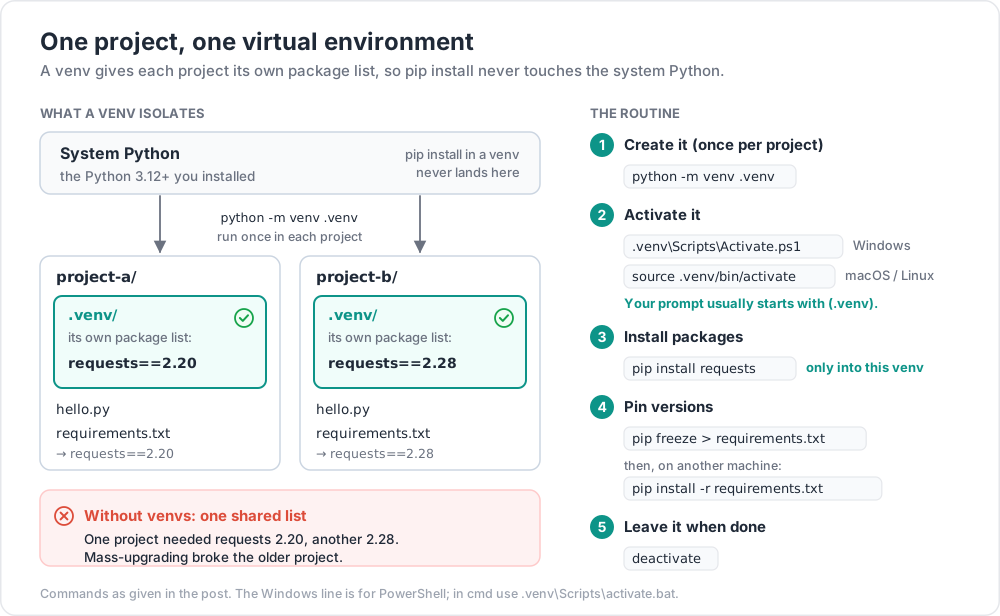
Where I got stuck: I skipped venvs for a year. Then one project needed
requests==2.20and another neededrequests==2.28. Mass-upgrading broke the older project. The fix took an hour; the fix would have taken 0 hours with venvs. Always use a venv.
requirements.txt
Pin your dependencies:
1
2
3
4
pip freeze > requirements.txt
# later, on another machine:
pip install -r requirements.txt
Chapter 6 — Editor / IDE choice
| Tool | Notes |
|---|---|
| VS Code + Python extension | Free, fast, huge ecosystem. Recommended for beginners. |
| PyCharm Community | Heavier, more "IDE feel", excellent refactoring. |
| Jupyter Notebook / Lab | Notebooks for data work. Use pip install jupyterlab. |
| Neovim / Vim + plugins | For terminal lovers. Slow to set up well. |
| IDLE | Ships with Python. Fine for first hour, then upgrade. |
Pick one. Don't tool-shop for weeks — pick VS Code if undecided.
Practice Exercises
Exercise 1 — Hello, Self
Write intro.py that prints three lines:
- Your name
- Today's date (hard-code or use the
datetimemodule — peek ahead!) - One thing you want to learn from this course
Exercise 2 — Temperature converter
Write temp.py that:
- Asks the user for a temperature in Celsius.
- Converts to Fahrenheit:
F = C * 9/5 + 32. - Prints both.
Sample run:
1
2
3
Celsius: 25
25.0°C = 77.0°F
Hint: input() returns a string; convert with float(...).
Solution
1
2
3
4
c = float(input("Celsius: "))
f = c * 9 / 5 + 32
print(f"{c}°C = {f}°F")
Exercise 3 — Set up a project
- Create folder
python-course/. cdinto it.- Create a venv called
.venvand activate it. - Install
rich(pip install rich). - Run this script:
1
2
3
from rich import print
print("[bold green]It works![/bold green]")
If you see green bold text, your venv setup is correct.
Cheat-sheet
| What | How |
|---|---|
| Run REPL | python or python3 |
| Run script | python script.py |
| Check version | python --version |
| Create venv | python -m venv .venv |
| Activate venv (Win) | .venv\Scripts\Activate.ps1 |
| Activate venv (Unix) | source .venv/bin/activate |
| Install package | pip install <name> |
| Freeze deps | pip freeze > requirements.txt |
| Restore deps | pip install -r requirements.txt |
| Exit REPL | exit() or Ctrl+D (Unix) / Ctrl+Z + Enter (Win) |
What's next
Post 01 covers Python's syntax basics: variables, types, operators, control flow (if, for, while), and the indentation rule that makes Python visually distinct.
References
- docs.python.org — official docs (the only one you'll need long-term).
- PEP 8 — style guide.
- Real Python — well-written tutorials.
- Fluent Python by Luciano Ramalho — the best "I know basics, now teach me deeply" book.
Note: this post is in progress. Planned additions: install screenshots, Windows PATH troubleshooting, REPL keyboard shortcuts cheatsheet.