Python Course — 05 · Files, Paths, and Exception Handling
Reading from and writing to files — and handling the things that go wrong in the process — is what turns a script into a useful tool. This post covers Python's open() function, the with context manager, the modern pathlib API, exception handling, and how to define your own exceptions. It closes the base Python course; future posts extend into stdlib deep-dives, typing, async, and packaging.
Series map: 00 Setup → 01 Syntax → 02 Data Structures → 03 Functions & Modules → 04 OOP → 05 Files & Exceptions (this post) → (future: stdlib, typing, async, packaging, testing).
Learning Outcome
- Open, read, and write text and binary files.
- Use the
withstatement (context manager) — and understand why it matters. - Use
pathlib.Pathfor cross-platform path manipulation. - Read structured formats:
csv,json. - Handle exceptions with
try/except/else/finally. - Raise built-in and custom exceptions.
- Avoid the classic "catch everything" anti-pattern.
Chapter 1 — open() and the with statement
Reading
1
2
3
4
5
6
7
8
9
10
11
12
13
# Read entire file into a string
with open("notes.txt", encoding="utf-8") as f:
text = f.read()
# Read line by line (memory-efficient for big files)
with open("log.txt", encoding="utf-8") as f:
for line in f:
print(line.rstrip()) # rstrip removes trailing \n
# Read all lines into a list
with open("notes.txt", encoding="utf-8") as f:
lines = f.readlines()
Writing
1
2
3
4
with open("out.txt", "w", encoding="utf-8") as f:
f.write("hello\n")
f.write("world\n")
Modes
| Mode | Meaning |
|---|---|
"r" |
read (default) — file must exist |
"w" |
write — truncates existing, creates if missing |
"a" |
append — adds to end, creates if missing |
"x" |
exclusive create — fails if file exists |
"b" |
binary (combine: "rb", "wb") |
"+" |
read + write ("r+", "w+") |
Why with?
1
2
3
4
5
6
7
8
9
10
# WITHOUT with — must remember to close
f = open("x.txt")
data = f.read()
f.close() # easy to forget; missed on exceptions
# WITH — auto-closes even on exception
with open("x.txt") as f:
data = f.read()
# closed here, no matter what
The with block is a context manager: the file is guaranteed to be closed when the block exits. Always use it for files.
Where I got stuck: an early script of mine kept thousands of files open until the OS refused new ones. The fix was 5 characters: wrap the
open(...)in awith. I never forgot again.
Chapter 2 — Encoding
Always pass encoding="utf-8" when opening text files. Without it, Python uses the OS default (cp1252 on Windows, utf-8 on macOS/Linux) → cross-platform bugs.
1
2
3
with open("name.txt", "w", encoding="utf-8") as f:
f.write("São Paulo\n")
For binary files (images, executables, etc.), use "rb" / "wb" — no encoding needed:
1
2
3
with open("image.png", "rb") as f:
data = f.read() # bytes
Chapter 3 — pathlib (the modern way)
Avoid string concatenation for paths. Use pathlib.Path:
1
2
3
4
5
6
7
8
9
10
11
12
13
14
15
16
17
18
19
20
21
22
23
24
25
26
27
from pathlib import Path
p = Path("data") / "users" / "ada.json"
# Path('data/users/ada.json') — works on every OS
p.exists() # bool
p.is_file() # bool
p.is_dir() # bool
p.name # 'ada.json'
p.stem # 'ada'
p.suffix # '.json'
p.parent # Path('data/users')
p.read_text(encoding="utf-8")
p.write_text("hello", encoding="utf-8")
p.read_bytes()
p.write_bytes(b"\x00\xff")
# iterate directory
for child in Path(".").iterdir():
print(child)
# recursive glob
for f in Path(".").rglob("*.py"):
print(f)
Path operations
1
2
3
4
5
6
7
p.absolute() # absolute path
p.resolve() # absolute + follow symlinks
p.relative_to("/home") # path relative to another
p.mkdir(parents=True, exist_ok=True)
p.unlink() # delete file
p.rename("new_name")
Trick:
Path.read_text()andPath.write_text()are perfect for small files. No need foropen()at all.data = Path("config.json").read_text(encoding="utf-8")is a one-liner.
Chapter 4 — Structured formats
JSON
1
2
3
4
5
6
7
8
9
10
11
12
13
14
15
import json
# write
data = {"name": "Ada", "tags": ["mathematician", "engineer"]}
with open("user.json", "w", encoding="utf-8") as f:
json.dump(data, f, indent=2, ensure_ascii=False)
# read
with open("user.json", encoding="utf-8") as f:
loaded = json.load(f)
# str <-> dict
text = json.dumps(data, indent=2)
parsed = json.loads(text)
CSV
1
2
3
4
5
6
7
8
9
10
11
12
13
14
import csv
# write
rows = [["name", "age"], ["Ada", 30], ["Bob", 25]]
with open("users.csv", "w", newline="", encoding="utf-8") as f:
writer = csv.writer(f)
writer.writerows(rows)
# read with header → dict per row
with open("users.csv", encoding="utf-8") as f:
reader = csv.DictReader(f)
for row in reader:
print(row["name"], row["age"])
Trick: always pass
newline=""to CSVopen()calls. Without it, Windows can write extra blank lines. Trust me, that bug is a 30-minute mystery the first time.
Chapter 5 — Exceptions: what they are
An exception is an error event that interrupts normal flow. Python signals problems by raising exceptions.
1
2
3
4
5
6
7
8
9
10
11
12
13
1 / 0
# ZeroDivisionError: division by zero
int("abc")
# ValueError: invalid literal for int() with base 10: 'abc'
open("missing.txt")
# FileNotFoundError: [Errno 2] No such file or directory: 'missing.txt'
d = {"a": 1}
d["b"]
# KeyError: 'b'
If unhandled, the exception propagates up the call stack and (eventually) crashes the program with a traceback.
Chapter 6 — Handling exceptions
1
2
3
4
5
6
7
8
9
10
11
12
13
14
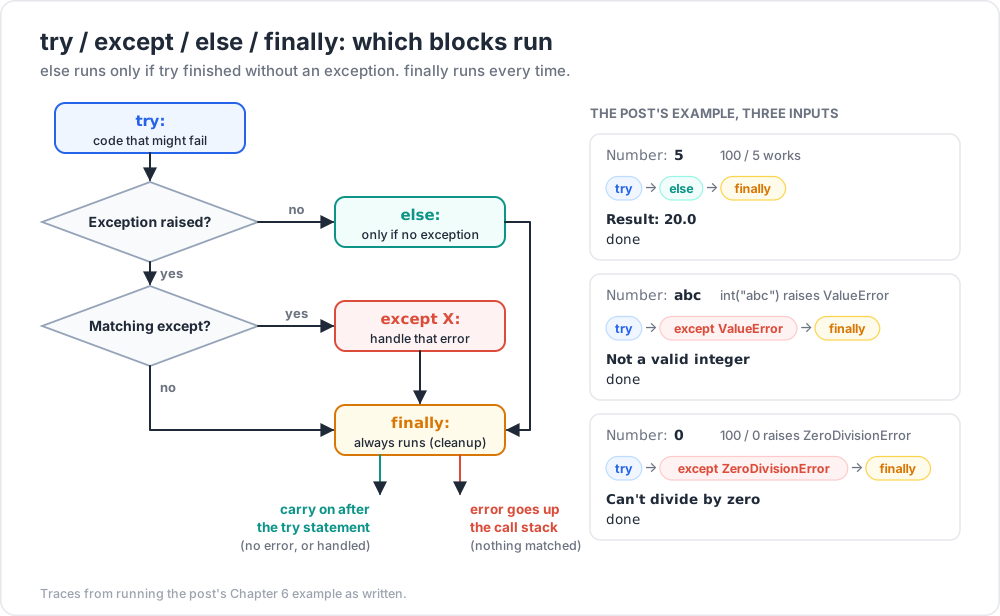
try:
n = int(input("Number: "))
result = 100 / n
except ValueError:
print("Not a valid integer")
except ZeroDivisionError:
print("Can't divide by zero")
except (TypeError, OverflowError) as e:
print(f"Other error: {e}")
else:
print(f"Result: {result}") # runs only if no exception
finally:
print("done") # runs always
Parts:
try:— code that might fail.except XError:— handle a specific exception.except (A, B) as e:— multiple types + bind to name.else:— runs iftrycompleted without exception.finally:— always runs (cleanup).
Catching too much
1
2
3
4
5
6
7
8
9
10
try:
do_stuff()
except: # NEVER do this
pass
try:
do_stuff()
except Exception: # better, but still wide
log_error()
A bare except: catches everything, including KeyboardInterrupt (Ctrl+C) and SystemExit. You will eventually trap a signal you wanted to receive.
Rule of thumb: catch the narrowest exception type that addresses the failure. If you don't know the type, run the code, see the traceback, then catch that type.
Chapter 7 — Raising exceptions
1
2
3
4
5
6
7
def withdraw(account, amount):
if amount <= 0:
raise ValueError("amount must be positive")
if amount > account.balance:
raise ValueError("insufficient funds")
account.balance -= amount
Use built-in exceptions when they fit:
| Exception | Use when |
|---|---|
ValueError |
A value is wrong type/range |
TypeError |
An argument has wrong type |
KeyError / IndexError |
Missing dict key / out-of-range index |
FileNotFoundError |
File not found |
RuntimeError |
Generic runtime issue |
NotImplementedError |
Method must be overridden |
Re-raising
1
2
3
4
5
6
7
8
9
10
try:
do_risky()
except ValueError as e:
log.error("Risky failed", exc_info=e)
raise # propagate up unchanged
# or chain a different exception
except ValueError as e:
raise RuntimeError("higher-level explanation") from e
The from e chains the original — the traceback shows both.
Chapter 8 — Custom exceptions
Just subclass Exception:
1
2
3
4
5
6
7
8
9
10
11
class InsufficientFunds(Exception):
pass
class AccountFrozen(Exception):
def __init__(self, account_id):
super().__init__(f"account {account_id} is frozen")
self.account_id = account_id
# usage
raise InsufficientFunds("balance too low")
Pattern: define one base exception per package, then specific subclasses.
1
2
3
4
5
6
7
8
9
class BankError(Exception):
pass
class InsufficientFunds(BankError):
pass
class AccountFrozen(BankError):
pass
Callers can except BankError: to catch any of them, or pick specific ones.
Chapter 9 — Context managers (your own)
You've used with open(...). You can write your own context manager — useful for resource setup/teardown (DB connections, locks, temp directories).
1
2
3
4
5
6
7
8
9
10
11
12
13
14
15
from contextlib import contextmanager
@contextmanager
def timer(label):
import time
start = time.perf_counter()
try:
yield # block body runs here
finally:
elapsed = time.perf_counter() - start
print(f"{label}: {elapsed:.3f}s")
with timer("load"):
data = Path("big.csv").read_text()
The block runs at the yield. Whatever's before/after runs as setup/teardown — even on exceptions thanks to the try/finally.
Practice Exercises
Exercise 1 — Word frequency from file
Read a text file, return a dict of word counts. Handle the missing-file case gracefully.
Solution
1
2
3
4
5
6
7
8
9
10
from pathlib import Path
from collections import Counter
def word_counts(path):
p = Path(path)
if not p.exists():
print(f"File not found: {path}")
return Counter()
return Counter(p.read_text(encoding="utf-8").lower().split())
Exercise 2 — Safe int parser
Write parse_int(s, default=None) that returns int(s) if valid, else default. Don't crash on bad input.
Solution
1
2
3
4
5
6
def parse_int(s, default=None):
try:
return int(s)
except (ValueError, TypeError):
return default
Exercise 3 — JSON config loader
Write load_config(path) that reads a JSON file and returns its content. Define a custom ConfigError for missing-file or invalid-JSON cases.
Solution
1
2
3
4
5
6
7
8
9
10
11
12
13
14
15
import json
from pathlib import Path
class ConfigError(Exception):
pass
def load_config(path):
p = Path(path)
if not p.exists():
raise ConfigError(f"config not found: {path}")
try:
return json.loads(p.read_text(encoding="utf-8"))
except json.JSONDecodeError as e:
raise ConfigError(f"invalid JSON: {e}") from e
Exercise 4 — Find duplicates across files
Given a directory, find all .txt files. For each line that appears in more than one file, print the line and the files it appears in.
Exercise 5 — Tiny banking system
Use @dataclass for Account, custom exceptions for InsufficientFunds and AccountNotFound, and a Bank class with transfer(from_id, to_id, amount). Persist accounts to a JSON file on each operation.
Cheat-sheet
| What | How |
|---|---|
| Read text | Path("f.txt").read_text(encoding="utf-8") |
| Write text | Path("f.txt").write_text("...", encoding="utf-8") |
| Read lines | for line in open(p): ... |
| Open binary | open(p, "rb") |
| Auto-close | with open(p) as f: |
| JSON read | json.loads(s) / json.load(f) |
| JSON write | json.dumps(o, indent=2) / json.dump(o, f) |
| CSV read | csv.DictReader(f) |
| Path join | Path("a") / "b" / "c.txt" |
| Path exists | p.exists() |
| Glob | Path(".").rglob("*.py") |
| Try / except | try: ... except X as e: ... |
| Raise | raise ValueError("msg") |
| Chain raise | raise X("...") from original |
| Custom exception | class MyError(Exception): pass |
| Always-run | finally: block |
| Custom context manager | @contextmanager + yield |
Course base complete — what's next
You now know enough Python to write real scripts: parse files, manipulate data, structure code into modules and classes, handle errors gracefully. That covers ~90% of day-to-day Python work.
Planned future posts (extensions):
- Python 06: standard library tour (
itertools,functools,collections,datetime,re) - Python 07: typing + static analysis (
mypy,pyright) - Python 08: testing (
pytest, fixtures, mocking) - Python 09: virtual environments + packaging deep-dive (
pyproject.toml,uv) - Python 10: async (
asyncio,async/await, concurrent futures) - Python 11: data tools (
numpy,pandasessentials) - Python 12: web (
fastapiorflaskquick build)
References
- docs.python.org tutorial §7–8
- pathlib
- json
- Fluent Python — Ch. 14 (context managers).
Note: this post is in progress. Planned additions: encoding deep dive (BOM, latin-1, etc.),
csv.DictWriterexamples, JSON streaming for huge files.