This post covers the core syntax every Python program uses: variables, primitive types, operators, conditionals, and loops. Python's defining visual feature — meaningful indentation — is introduced and explained. By the end, you can write any control-flow logic you'd expect from a beginner book.
Use the six core primitive types: int, float, bool, str, None, bytes.
Use arithmetic, comparison, logical, and assignment operators.
Write if/elif/else, for, and while blocks.
Understand indentation as syntax (not decoration).
Use break, continue, and else on loops.
Chapter 1 — Variables and dynamic typing
Terminology
Variable — a name bound to a value.
Dynamic typing — variable types are checked at runtime, not declaration time.
Type hint — optional annotation (x: int = 5) — ignored at runtime, used by tools.
Mutable / immutable — whether a value can be changed in place.
Assignment
1 2 3 4 5 6
x = 5# int pi = 3.14159# float name = "Ada"# str is_ready = True# bool nothing = None# NoneType
No type declaration required. You can rebind to a different type:
1 2 3
x = 5 x = "now a string"# legal in Python
Type hints (optional but recommended)
1 2 3
x: int = 5 name: str = "Ada"
These are hints — Python ignores them at runtime. Tools like mypy, pyright, and your IDE use them for static analysis. Use them in real code; skip them in throwaway scripts.
Trick: if you print(type(x)), Python tells you the runtime type. Great for debugging "wait, why is this a string?" surprises.
Chapter 2 — Primitive types
Type
Example
Note
int
42, -7, 0, 10_000
Arbitrary precision — no overflow! 2**100 works fine.
float
3.14, 1e-5, 2.0
IEEE 754 double.
bool
True, False
A subclass of int: True == 1, False == 0.
str
"hello", 'world', """multi-line"""
Immutable, Unicode by default.
None
None
The "no value" singleton.
bytes
b"raw", b"\x00\xff"
Immutable sequence of 8-bit values.
String highlights
1 2 3 4 5 6 7 8 9 10
s = "Hello" len(s) # 5 s.upper() # "HELLO" s[0] # "H" s[-1] # "o" (negative = from end) s[1:4] # "ell" (slice) "He"in s # True s + " World"# "Hello World" s * 3# "HelloHelloHello"
f-strings (the preferred way to format)
1 2 3 4 5 6 7 8
name = "Ada" age = 30 f"{name} is {age}"# "Ada is 30" f"{age * 2}"# "60" f"{3.14159:.2f}"# "3.14" (2 decimal places) f"{42:>5}"# " 42" (right-align width 5) f"{name=}"# "name='Ada'" (debug form, Python 3.8+)
Trick: the {var=} debug form is the single most-used Python 3.8+ feature. f"{user_id=} {total=}" gives "user_id=42 total=99.50" — perfect for logging.
a = [1, 2, 3] b = [1, 2, 3] a == b # True (same content) a is b # False (different objects) a isNone# idiomatic way to check for None — use `is`, not `==`
Chapter 4 — Indentation is syntax
This is the rule that shocks beginners coming from C-family languages. Python uses indentation (not {} or begin/end) to define blocks.
1 2 3 4 5
if x > 0: print("positive") # this line is inside the if print("still inside") # this too print("outside the if") # this is after
Rules:
All lines in the same block must have exactly the same indentation.
Standard is 4 spaces per level (PEP 8).
Never mix tabs and spaces. Most editors auto-convert.
A colon : introduces a new block (after if, for, while, def, class, try, etc.).
Where I got stuck: I once spent 30 minutes debugging a script that "just didn't run the loop". The culprit: a tab character on one line where the rest used spaces. Python silently disagrees about whether they're equal. Modern editors highlight whitespace; turn it on.
Chapter 5 — Conditionals
1 2 3 4 5 6 7 8 9 10 11
age = int(input("Age: ")) if age < 13: print("child") elif age < 20: print("teen") elif age < 65: print("adult") else: print("senior")
Ternary expression
1 2
status = "adult"if age >= 18else"minor"
Read it left-to-right: "value, if condition, else alternative".
match (Python 3.10+, like switch but better)
1 2 3 4 5 6 7 8
match command: case"start": print("starting") case"stop" | "halt": print("stopping") case _: print("unknown")
The _ is a catch-all. match also supports pattern destructuring — covered in a future advanced post.
Chapter 6 — Loops
for loop
Python's for always iterates over an iterable (sequence, generator, etc.). It is not the C-style for(i=0; i<10; i++).
1 2 3 4 5 6 7 8 9 10 11 12
for fruit in ["apple", "banana", "cherry"]: print(fruit) for i inrange(5): # 0, 1, 2, 3, 4 print(i) for i inrange(2, 8): # 2..7 print(i) for i inrange(0, 20, 3): # 0, 3, 6, 9, 12, 15, 18 (step=3) print(i)
enumerate (index + value)
1 2 3 4 5 6
for i, name inenumerate(["Ada", "Bob", "Cy"]): print(i, name) # 0 Ada # 1 Bob # 2 Cy
zip (parallel iteration)
1 2 3 4 5
names = ["Ada", "Bob"] ages = [30, 25] for name, age inzip(names, ages): print(name, age)
while loop
1 2 3 4 5
n = 0 while n < 5: print(n) n += 1
break, continue, loop-else
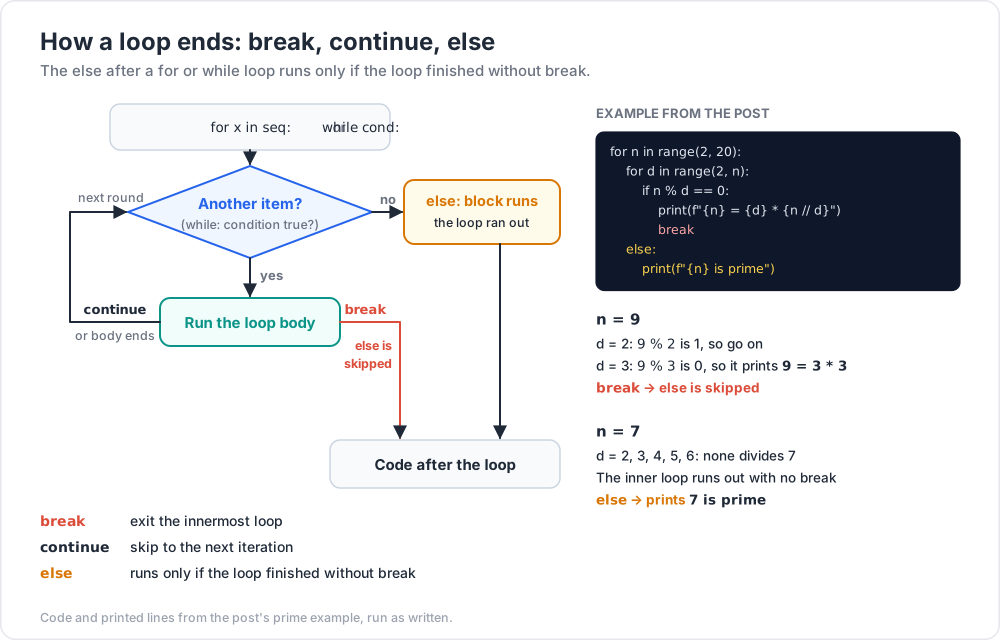
break — exit the innermost loop.
continue — skip to next iteration.
else after for/while — runs only if the loop finished without break.
1 2 3 4 5 6 7 8
for n inrange(2, 20): for d inrange(2, n): if n % d == 0: print(f"{n} = {d} * {n // d}") break else: print(f"{n} is prime")
The else runs only when the inner for completes without finding a divisor → the number is prime. This is a Python-unique idiom worth memorising.
Chapter 7 — Comments and docstrings
1 2 3 4 5 6 7 8 9 10 11 12 13
# single-line comment """ This is a triple-quoted string. When it's the first thing in a function, class, or module, it becomes the *docstring* — accessible via help() or __doc__. """ defadd(a, b): """Return the sum of a and b.""" return a + b help(add) # shows the docstring
Practice Exercises
Exercise 1 — FizzBuzz
The legendary interview problem. Print numbers 1–100. For multiples of 3, print "Fizz". For multiples of 5, print "Buzz". For multiples of both, print "FizzBuzz".
Solution
1 2 3 4 5 6 7 8 9 10
for i inrange(1, 101): if i % 15 == 0: print("FizzBuzz") elif i % 3 == 0: print("Fizz") elif i % 5 == 0: print("Buzz") else: print(i)
Exercise 2 — Sum of digits
Given a positive integer (input from user), print the sum of its digits. Example: 123 → 6.
Solution
1 2 3 4 5 6 7
n = int(input("Number: ")) total = 0 while n > 0: total += n % 10 n //= 10 print(total)
Exercise 3 — Number guessing game
The computer picks a random number 1–100. The user guesses; you print "too high", "too low", or "correct!". Limit to 7 guesses.
Solution
1 2 3 4 5 6 7 8 9 10 11
import random target = random.randint(1, 100) for attempt inrange(1, 8): g = int(input(f"Guess {attempt}/7: ")) if g == target: print(f"Correct in {attempt} guesses!") break print("too low"if g < target else"too high") else: print(f"Out of guesses. It was {target}.")
Exercise 4 — Average of inputs
Keep asking for numbers until the user enters an empty line. Print the count and average.
Solution
1 2 3 4 5 6 7 8 9 10 11
nums = [] whileTrue: s = input("Number (empty to stop): ") if s == "": break nums.append(float(s)) if nums: print(f"Count: {len(nums)}, average: {sum(nums) / len(nums):.2f}") else: print("No numbers entered.")
Cheat-sheet
What
How
Variable assign
x = 5
Type check
type(x) or isinstance(x, int)
f-string
f"{name} is {age}"
String slice
s[1:4], s[::-1] (reverse)
Integer divide
//, modulo %, power **
Chained compare
0 < x < 10
Conditional
if ... elif ... else:
Ternary
a if cond else b
Range
range(start, stop, step)
Enumerate
for i, v in enumerate(seq):
Loop with else
runs if no break
Falsy values
False, 0, "", [], {}, None
Indent
4 spaces, no tabs
What's next
Post 02 covers Python's data structures: list, tuple, dict, set, and the powerful comprehension syntax that lets you transform one structure into another in a single line.