Dev Essentials — 08 · Floating Point — Why 0.1 + 0.2 Is Not 0.3 and How to Store Money
Sooner or later every developer types 0.1 + 0.2 and gets 0.30000000000000004. This is not a bug in Python or JavaScript. It is how almost every computer stores fractional numbers: in binary, with a fixed number of bits. This post opens up that format (IEEE 754 binary64), shows exactly where the error comes from, and gives you the practical rules: how to compare floats, where integers stop being exact, how to add many numbers, how to store money, which rounding rule your language uses, and why 3D scenes jitter far from the origin.
Series map: 01 Text Encoding → … → 07 HTTPS → 08 Floating Point (this post) → 09 Versions & Dependencies → … → 24 Desk Health. Part B · Everyday skills.
Learning Outcome
- Explain why
0.1has no exact binary form, and read the bits of afloatin Python. - Describe the IEEE 754 binary64 layout: 1 sign bit, 11 exponent bits, 52 fraction bits.
- Compare floats with a tolerance (
math.isclose), and know when absolute vs relative tolerance fits. - Know the 2^53 limit for exact integers, and handle
NaN,-0.0and infinities without surprises. - Reduce summation error with
math.fsumor Kahan summation. - Store money as integer minor units or a decimal type, and pick a rounding mode on purpose.
- Explain float32 precision loss on GPUs and the Three.js depth-buffer options.
Chapter 1 — The famous result
1
2
3
4
5
>>> 0.1 + 0.2
0.30000000000000004
>>> 0.1 + 0.2 == 0.3
False
JavaScript prints the same 0.30000000000000004, and 0.1 + 0.2 === 0.3 is false. Both languages use the same number format, so both give the same answer.
Why 0.1 cannot be stored exactly
In decimal, 1/3 never ends: 0.3333…. The reason is that 3 does not divide any power of 10. Binary has the same problem with any fraction whose denominator has a factor other than 2. And 1/10 = 1/(2 × 5) has a 5, so in binary it repeats forever:
1
2
0.1 (decimal) = 0.0001100110011001100110011… (binary, "0011" repeats)
A float keeps only 53 significant bits, so the computer stores the nearest representable number. You can see that number exactly:
1
2
3
4
5
6
7
from decimal import Decimal
from fractions import Fraction
print(f"{0.1:.20f}") # 0.10000000000000000555
print(Decimal(0.1)) # 0.1000000000000000055511151231257827021181583404541015625
print(Fraction(0.1)) # 3602879701896397/36028797018963968 (the denominator is 2**55)
So 0.1 is really a bit more than 0.1, 0.2 is a bit more than 0.2, and their sum lands on a different double than the one nearest to 0.3.
Why does print(0.1) show 0.1 then? Python and JavaScript print the shortest decimal string that reads back to the same double. 0.1 is shorter than the long exact value and maps to the same bits, so it is chosen. The stored value did not change; only the printout is short.
Fractions whose denominator is a power of two are exact: 0.5, 0.25, 0.375. Therefore 0.5 + 0.25 == 0.75 is True.
Chapter 2 — The IEEE 754 binary64 layout
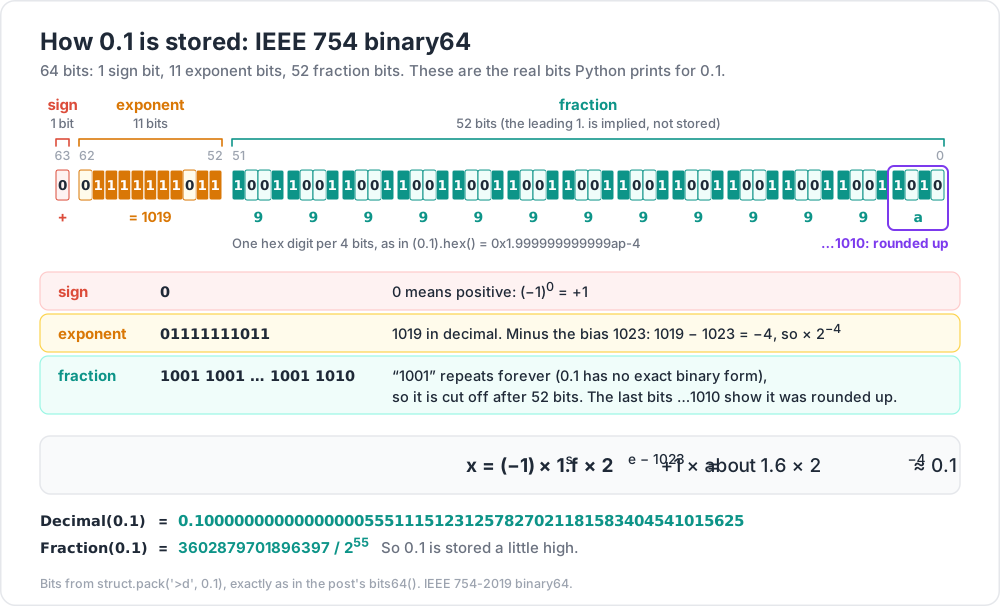
Python float, JavaScript number, Java/C/C++ double and MongoDB double all use binary64 from IEEE 754 (current edition: IEEE 754-2019). It has 64 bits:
1
2
3 1 bit   11 bits      52 bits
[sign][ exponent ][          fraction          ]
For normal numbers the value is:
- sign
s: 0 is positive, 1 is negative. - exponent
e: stored with a bias of 1023, so stored 1023 means 2^0. - fraction
f: the bits after the binary point. The leading1.is implied and not stored, so you get 53 significant bits from 52 stored ones.
Look at real bits:
1
2
3
4
5
6
7
8
9
10
import struct
def bits64(x: float) -> str:
(n,) = struct.unpack(">Q", struct.pack(">d", x))
b = f"{n:064b}"
return f"{b[0]} {b[1:12]} {b[12:]}"
for x in [1.0, 0.5, 0.1, -2.0]:
print(f"{x:>5} {bits64(x)} {x.hex()}")
1
2
3
4
5  1.0  0 01111111111 0000000000000000000000000000000000000000000000000000  0x1.0000000000000p+0
  0.5  0 01111111110 0000000000000000000000000000000000000000000000000000  0x1.0000000000000p-1
  0.1  0 01111111011 1001100110011001100110011001100110011001100110011010  0x1.999999999999ap-4
 -2.0  1 10000000000 0000000000000000000000000000000000000000000000000000  -0x1.0000000000000p+1
For 0.1 the exponent bits are 01111111011 = 1019, and 1019 − 1023 = −4. The fraction is the repeating 1001 pattern, and the last bits …1010 show it was rounded up. So 0.1 is stored as about 1.6 × 2^−4, just a little high.
Special exponent values
| Exponent bits | Fraction | Meaning |
|---|---|---|
| all 0 | 0 | +0.0 or -0.0 |
| all 0 | not 0 | Subnormal: tiny numbers near zero, with less precision |
| all 1 | 0 | +inf or -inf |
| all 1 | not 0 | NaN (not a number) |
sys.float_info in Python lists the limits: max is 1.7976931348623157e+308, the smallest normal positive value min is 2.2250738585072014e-308, mant_dig is 53 bits, and dig is 15 (decimal digits that always survive a round trip). Rule of thumb: a double carries about 15 to 17 significant decimal digits.
Terminology
| Term | Meaning |
|---|---|
| Significand (mantissa) | The 1.f part: the significant bits. |
| Exponent / bias | Power of two, stored as e + 1023. |
| ULP | "Unit in the last place": the gap between a float and the next one up. |
| Machine epsilon | ULP of 1.0: 2**-52 ≈ 2.22e-16. |
| Round-to-nearest-even | Default IEEE rounding for every arithmetic result. |
Chapter 3 — Epsilon, ULP and comparing floats
Doubles are not evenly spaced. The gap between neighbours grows with the size of the number:
1
2
3
4
5
6
import math, sys
print(sys.float_info.epsilon) # 2.220446049250313e-16 (= math.ulp(1.0))
print(math.ulp(1.0)) # 2.220446049250313e-16
print(math.ulp(1e6)) # 1.1641532182693481e-10
print(math.ulp(1e16)) # 2.0 -> above 1e16 you cannot even store odd integers
JavaScript has the same epsilon (Number.EPSILON). Because every operation may round, never compare computed floats with ==. Compare with a tolerance:
1
2
3
4
5
import math
math.isclose(0.1 + 0.2, 0.3) # True
math.isclose(1e-10, 0.0) # False (!)
math.isclose(1e-10, 0.0, abs_tol=1e-9) # True
math.isclose(a, b, *, rel_tol=1e-09, abs_tol=0.0) returns abs(a-b) <= max(rel_tol * max(abs(a), abs(b)), abs_tol).
- Relative tolerance scales with the size of the numbers. The default
1e-09means "same to about 9 significant digits". Use it for values of any size. - Absolute tolerance is a fixed band. You need it near zero: a relative tolerance of anything times 0 is 0, so
isclose(x, 0)isFalsefor every non-zeroxunless you passabs_tol.
JavaScript has no built-in, so write the same rule:
1
2
3
4
5
6
function isClose(a, b, relTol = 1e-9, absTol = 0) {
return Math.abs(a - b) <= Math.max(relTol * Math.max(Math.abs(a), Math.abs(b)), absTol);
}
console.log(isClose(0.1 + 0.2, 0.3)); // true
console.log(isClose(1e-10, 0, 1e-9, 1e-9)); // true
Trick: in tests, use your framework's helper instead of
==:pytest.approxin Python,toBeCloseToin Jest/Vitest (see Dev Essentials 15 · Testing). Pick the tolerance from the problem, not from habit: sensor readings in metres might needabs_tol=1e-3.
Chapter 4 — Integers past 2^53
A double has 53 significant bits, so every integer up to 2^53 = 9,007,199,254,740,992 is exact. Past that, the gap between doubles is 2, then 4, and so on:
1
2
3
4
5
6
7
>>> 2**53
9007199254740992
>>> float(2**53) + 1 == float(2**53)
True
>>> int(float(9007199254740993))
9007199254740992
Python int has arbitrary precision, so this only bites when an integer passes through float (division with /, float(), JSON parsers, NumPy, pandas). In JavaScript every plain number is a double, so it bites all the time:
1
2
3
4
5
6
7
console.log(Number.MAX_SAFE_INTEGER); // 9007199254740991 (2**53 - 1)
console.log(Number.isSafeInteger(2 ** 53)); // false
console.log(2 ** 53 + 1); // 9007199254740992
console.log(9007199254740993n + 1n); // 9007199254740994n (BigInt is exact)
console.log(JSON.parse('{"id": 1234567890123456789}').id); // 1234567890123456800 (!)
try { 1n + 1; } catch (e) { console.log(e.message); } // Cannot mix BigInt and other types, use explicit conversions
Common pitfall: 64-bit database IDs sent as JSON numbers. A browser silently changes
1234567890123456789to1234567890123456800, and then you update the wrong record. Send large IDs as strings, and convert them toBigIntonly if you must do arithmetic.
Chapter 5 — NaN, negative zero and infinity
1
2
3
4
5
6
7
8
import math
nan = float("nan")
print(nan == nan, nan != nan, math.isnan(nan)) # False True True
print(sorted([3.0, nan, 1.0, 2.0])) # [3.0, nan, 1.0, 2.0] -- not sorted!
print(-0.0 == 0.0, math.copysign(1, -0.0)) # True -1.0
print(f"{-0.4:.0f}") # -0
print(1e308 * 10, float("inf") - float("inf")) # inf nan
- NaN is not equal to anything, including itself. Test with
math.isnan(x)(Python) orNumber.isNaN(x)(JavaScript). Any comparison with NaN isFalse, so sorting a list that contains NaN gives garbage without an error. - Negative zero equals
0.0, but it keeps its sign:1 / -0is-Infinityin JavaScript, and formatting-0.4with no decimals prints-0. UseObject.is(x, -0)in JavaScript ormath.copysign(1, x)in Python to detect it. - Overflow gives
inf, not an error.inf - infand0 * infgive NaN. - Division by zero differs by language: Python raises
ZeroDivisionErrorfor1 / 0.0; JavaScript returnsInfinity.
Chapter 6 — Summation error
Each + rounds. Add many numbers and the small errors pile up:
1
2
3
4
5
6
7
8
9
10
11
12
13
14
15
16
17
18
19
20
21
import math
def naive_sum(xs):
total = 0.0
for x in xs:
total += x
return total
def kahan_sum(xs):
total = 0.0
c = 0.0 # compensation: the low-order bits lost so far
for x in xs:
y = x - c # put back what was lost last time
t = total + y # big + small: low bits of y may be lost ...
c = (t - total) - y # ... so measure them (algebraically 0, numerically not)
total = t
return total
xs = [0.1] * 1_000_000
print(naive_sum(xs), kahan_sum(xs), sum(xs), math.fsum(xs))
| Method | Python 3.11 | Python 3.13 |
|---|---|---|
plain loop total += x |
100000.00000133288 |
100000.00000133288 |
| Kahan (above) | 100000.0 |
100000.0 |
built-in sum() |
100000.00000133288 |
100000.0 |
math.fsum() |
100000.0 |
100000.0 |
Two things to learn from this table:
math.fsumtracks exact partial sums and returns the correctly rounded total. Use it when accuracy matters.sum()changed in Python 3.12. The 3.12 "What's New" sayssum()now uses Neumaier summation, a refined form of Kahan. Sosum([0.1] * 10)is0.9999999999999999on 3.11 but1.0on 3.12 and later. Code that "worked" can change results on upgrade, in either direction. Know your version.
Kahan has a known weak spot: when a huge value cancels out, as in [1e16, 1.0, -1e16], plain Kahan still returns 0.0. Neumaier (Python 3.12+ sum) and fsum both return 1.0.
In JavaScript, [0.1, 0.2, 0.3].reduce((a, b) => a + b, 0) gives 0.6000000000000001. Math.sumPrecise fixes this. It is a finished TC39 proposal (ES2026), and MDN marks it "Baseline 2026, newly available since April 2026". Older runtimes such as Node 20 do not have it, so check before you rely on it:
1
2
3
4
const xs = [1e20, 0.1, -1e20];
console.log(xs.reduce((a, b) => a + b, 0)); // 0
if (typeof Math.sumPrecise === "function") console.log(Math.sumPrecise(xs)); // 0.1
Chapter 7 — Storing money
Rule: never store or calculate money in binary floating point. Amounts like 19.99 cannot be stored exactly, and the errors show up as cents that do not add up. There are two safe designs.
Option A — integer minor units
Store the amount as an integer count of the smallest unit: 19.99 → 1999 cents. Integers are exact, and addition is exact.
- Store the currency next to the amount. Currencies have different minor units under ISO 4217: JPY has 0 decimal places, USD and EUR have 2, and KWD and BHD have 3.
- Division needs a remainder policy. Splitting 100.00 three ways must still add up to 100.00:
1
2
3
4
5
6
7
def split_cents(total_cents: int, people: int) -> list[int]:
base, extra = divmod(total_cents, people)
return [base + 1 if i < extra else base for i in range(people)]
shares = split_cents(10000, 3) # 100.00 split three ways
print(shares, sum(shares)) # [3334, 3333, 3333] 10000
Option B — decimal types
A decimal type stores base-10 digits, so 0.1 is exact.
Python Decimal — always construct from strings (or integers), never from floats:
1
2
3
4
5
6
7
8
9
10
11
12
13
14
15
16
from decimal import Decimal, ROUND_HALF_UP, getcontext
print(Decimal("0.1") + Decimal("0.2")) # 0.3
print(Decimal(0.1) + Decimal(0.2)) # 0.3000000000000000166533453694 (float error copied in)
print(getcontext().prec, getcontext().rounding) # 28 ROUND_HALF_EVEN
CENT = Decimal("0.01")
prices = [Decimal("19.99"), Decimal("5.25"), Decimal("0.10")]
qty = [3, 2, 7]
rate = Decimal("0.0825") # 8.25 % sales tax
subtotal = sum(p * q for p, q in zip(prices, qty))
tax_once = (subtotal * rate).quantize(CENT, rounding=ROUND_HALF_UP)
tax_lines = sum((p * q * rate).quantize(CENT, rounding=ROUND_HALF_UP) for p, q in zip(prices, qty))
print(subtotal, tax_once, tax_lines) # 71.17 5.87 5.88
Notice the last line: rounding tax per line gives 5.88, rounding once on the total gives 5.87. Both are "correct". Your business rules (or tax law) must say which one to use, and the code must follow it every time.
Java BigDecimal — the Javadoc warns that new BigDecimal(0.1) equals 0.1000000000000000055511151231257827021181583404541015625. Use the String constructor or BigDecimal.valueOf(double):
1
2
3
4
5
6
7
// import java.math.BigDecimal; import java.math.RoundingMode;
BigDecimal total = new BigDecimal("19.99").multiply(BigDecimal.valueOf(3)); // 59.97
BigDecimal tax = total.multiply(new BigDecimal("0.0825"))
.setScale(2, RoundingMode.HALF_UP); // 4.95
new BigDecimal("2.0").equals(new BigDecimal("2.00")); // false: scale differs
new BigDecimal("2.0").compareTo(new BigDecimal("2.00")); // 0: numerically equal
Common pitfall: using
BigDecimal.equalsor puttingBigDecimalkeys in aHashMap.2.0and2.00are notequals. Compare withcompareTo. (Java basics: Java Development [Basic] Part 1.)
MongoDB Decimal128 — IEEE 754 decimal128, with 34 decimal digits of precision. MongoDB's "Model Monetary Data" guide recommends it, and its mongosh examples build values from strings:
1
2
db.gasprices.insertOne({ date: ISODate(), price: Decimal128("2.099"), station: "Quikstop" })
The same guide also describes the integer "scale factor" option (store 9.99 as 9990 with a scale of 1000). Types are introduced in MongoDB Course 00 · Foundations.
SQL NUMERIC(p, s) — p total digits, s digits after the point, so amount NUMERIC(12, 2) holds up to 9,999,999,999.99. Add a currency char(3) column for the ISO 4217 code. PostgreSQL's docs say numeric "is especially recommended for storing monetary amounts".
JavaScript has no built-in decimal type. Keep integer cents (use BigInt for very large totals) or use a well-maintained decimal library. Format only for display with Intl.NumberFormat:
1
2
new Intl.NumberFormat("en-US", { style: "currency", currency: "USD" }).format(1234.5); // "$1,234.50"
Chapter 8 — Rounding modes
"Round 2.5" has more than one right answer. It depends on the rounding mode:
Mode (Python decimal name) |
2.5 | −2.5 | 2.4 | Typical use |
|---|---|---|---|---|
ROUND_HALF_EVEN ("banker's") |
2 | −2 | 2 | IEEE default, Python round(), Decimal default |
ROUND_HALF_UP (ties away from zero) |
3 | −3 | 2 | School rounding, many invoices, SQL numeric |
ROUND_HALF_DOWN |
2 | −2 | 2 | Rare |
ROUND_UP (away from zero) |
3 | −3 | 3 | "Never undercharge" rules |
ROUND_DOWN (toward zero, truncate) |
2 | −2 | 2 | Truncating fees |
ROUND_CEILING / ROUND_FLOOR |
3 / 2 | −2 / −3 | 3 / 2 | Toward +∞ / −∞ |
Half-to-even sends ties up half the time and down half the time, so a long column of rounded numbers does not drift upward. That is why it is the IEEE default.
What your language actually does
1
2
3
4
5
>>> round(2.5), round(3.5), round(0.5), round(-0.5), round(1.5)
(2, 4, 0, 0, 2)
>>> round(2.675, 2)
2.67
Python's docs confirm: ties go "toward the even choice". And round(2.675, 2) gives 2.67, which the docs note "is not a bug": the stored double is 2.67499999999999982236431605997495353221893310546875, which is below the tie. When you need a specific mode, use Decimal built from a string:
1
2
3
4
from decimal import Decimal, ROUND_HALF_UP
Decimal("2.675").quantize(Decimal("0.01"), rounding=ROUND_HALF_UP) # Decimal('2.68')
Decimal("2.665").quantize(Decimal("0.01")) # Decimal('2.66') half-even
JavaScript is different again:
1
2
3
4
5
Math.round(2.5); // 3
Math.round(-2.5); // -2 (ties go toward +Infinity)
(2.5).toFixed(0); // "3"
(1.005).toFixed(2); // "1.00" (1.005 is stored as 1.00499999999999989...)
PostgreSQL rounds numeric ties away from zero, but double precision ties to even ("on most machines", says its manual): round(2.5::numeric) is 3, round(2.5::float8) is 2. The same ROUND() call can give different answers depending on the column type.
Chapter 9 — Formatting is not the stored value
1
2
3
4
5
x = 0.1 + 0.2
print(x) # 0.30000000000000004 (repr: shortest round-trip string)
print(f"{x:.2f}") # 0.30 (display only)
print(x == 0.3) # False (the stored value did not change)
Formatting with .2f or toFixed(2) changes the text, not the number. Some rules:
- Round on purpose, at boundaries: when you store, when you send to an API, when you show to a user. Do not round in the middle of a calculation "to clean it up".
- Never compare formatted strings, and never parse your own display output back into numbers. Keep the raw value.
- Formatting for humans is locale-dependent (
1,234.50vs1.234,50). UseIntl.NumberFormator Python'slocale/ Babel for display, and a fixed machine format ("1234.50") in files and APIs.
Chapter 10 — float32 on GPUs
GPUs mostly compute in binary32 ("float32"): 1 sign bit, 8 exponent bits, 23 fraction bits, so 24 significant bits and about 7 decimal digits. WebGL vertex buffers are usually Float32Array. The gap between neighbouring values grows fast:
1
2
3
4
5
6
7
8
9
10
11
12
13
import math, struct
def f32(x): # round a Python float to the nearest float32
return struct.unpack("<f", struct.pack("<f", x))[0]
def f32_step(x): # gap to the next float32 above x
bits = struct.unpack("<I", struct.pack("<f", x))[0]
return struct.unpack("<f", struct.pack("<I", bits + 1))[0] - f32(x)
for v in [1.0, 1_000.0, 100_000.0, 1_000_000.0, 6_371_000.0, 10_000_000.0]:
print(f"{v:>12,.0f} float32 step = {f32_step(v):.10g} float64 step = {math.ulp(v):.3g}")
print(f32(16_777_217.0)) # 16777216.0 -> 2**24 + 1 is not representable
1
2
3
4
5
6
7           1  float32 step = 1.192092896e-07   float64 step = 2.22e-16
       1,000  float32 step = 6.103515625e-05   float64 step = 1.14e-13
     100,000  float32 step = 0.0078125   float64 step = 1.46e-11
   1,000,000  float32 step = 0.0625   float64 step = 1.16e-10
   6,371,000  float32 step = 0.5   float64 step = 9.31e-10
  10,000,000  float32 step = 1   float64 step = 1.86e-09
If one unit is one metre, an object 6,371 km from the origin (Earth's radius) can only sit on a 0.5 m grid in float32. The camera and models snap between grid points, and you see jitter. The usual fixes:
- Keep the action near the origin. Move the world instead of the camera ("floating origin"), or rebase coordinates when the camera travels far.
- Camera-relative rendering. Compute positions relative to the camera in float64 on the CPU (JavaScript numbers are float64), then send small float32 offsets to the GPU.
Depth precision and z-fighting
The depth buffer has the same problem in the depth direction. With a perspective camera most depth precision sits near the near plane. Far away, two nearly touching surfaces get the same depth value and flicker through each other: z-fighting. In Three.js:
1
2
3
4
5
6
// Rule 1: keep near as large and far as small as the scene allows.
const camera = new THREE.PerspectiveCamera(50, innerWidth / innerHeight, 0.5, 5000);
// Rule 2: for huge scale ranges, change how depth is stored.
const renderer = new THREE.WebGLRenderer({ logarithmicDepthBuffer: true });
The Three.js docs say logarithmicDepthBuffer "may be necessary" for "huge differences in scale". They also note that it uses gl_FragDepth, which turns off the early fragment test and can cost performance. The docs list a newer reversedDepthBuffer option too. It needs the EXT_clip_control extension, and the docs call it faster and more accurate than the logarithmic buffer. The near/far rule of thumb is covered in Three.js Course 02 · Cameras, Controls, and Coordinate Systems.
Practice Exercises
Exercise 1 — Predict, then run
Which of these print True? 0.1 * 3 == 0.3, 0.5 + 0.25 == 0.75, 0.1 + 0.7 == 0.8, 1.1 * 3 == 3.3.
Solution
Only 0.5 + 0.25 == 0.75, because 0.5, 0.25 and 0.75 are exact binary fractions. The others give 0.30000000000000004, 0.7999999999999999 and 3.3000000000000003.
Exercise 2 — Find 2^53 yourself
Without typing 2**53, write a loop that finds the smallest power of two n (as a float) where n + 1.0 == n.
Solution
1
2
3
4
5
n = 1.0
while n + 1.0 != n:
n *= 2
print(n, int(n) == 2**53) # 9007199254740992.0 True
At 2^53 the gap between doubles becomes 2, so adding 1 rounds back to n (ties go to even).
Exercise 3 — Split a restaurant bill
Split a bill of 250.00 among 7 people using integer cents. Every share must be within 1 cent of every other, and the shares must add up to exactly 25000.
Solution
1
2
3
4
5
6
7
def split_cents(total_cents, people):
base, extra = divmod(total_cents, people)
return [base + 1 if i < extra else base for i in range(people)]
s = split_cents(25000, 7)
print(s, sum(s)) # [3572, 3572, 3572, 3571, 3571, 3571, 3571] 25000
With floats, 250 / 7 rounded to cents is 35.71, and 7 × 35.71 = 249.97: three cents vanish.
Exercise 4 — Why is this invoice off by one cent?
A system stores prices as float, computes round(price * qty * 1.0825, 2) per line, and the total differs from the accountant's figure by 0.01. List two separate causes.
Solution
- Binary floats:
price * qty * 1.0825is not exact, so a value that "should" be a tie likex.xx5may be stored a hair below it, and then it rounds down. - Rounding mode and place: Python
round()uses half-to-even, while accounting rules often want half-up. Rounding per line vs once on the total can also differ (the Chapter 7 example: 5.88 vs 5.87).
Fix: Decimal built from strings, an explicit ROUND_HALF_UP (or whatever the rules say), and one agreed place to round.
Exercise 5 — GPU grid size
A flight-simulator scene uses metres with the origin at the airport. At what distance does float32 spacing reach 1 cm, 10 cm and 1 m? Use f32_step from Chapter 10.
Solution
1
2
3
4
5
6
for target in [0.01, 0.1, 1.0]:
d = 1.0
while f32_step(d) < target:
d *= 2
print(f"step >= {target} m from about {d:,.0f} m")
1
2
3
4
step >= 0.01 m from about 131,072 m
step >= 0.1 m from about 1,048,576 m
step >= 1.0 m from about 8,388,608 m
At 131 km from the origin a vertex can only move in 1.5 cm steps, which is enough to see a cockpit shake. Use a floating origin or camera-relative coordinates.
Cheat-sheet
| Task | Python | JavaScript |
|---|---|---|
| See exact stored value | Decimal(0.1), (0.1).hex() |
(0.1).toPrecision(25) |
| Compare floats | math.isclose(a, b, rel_tol=1e-9, abs_tol=…) |
own isClose helper |
| Machine epsilon | sys.float_info.epsilon |
Number.EPSILON |
| Gap at a value | math.ulp(x) |
— |
| Largest exact integer | any int is exact; floats: 2**53 |
Number.MAX_SAFE_INTEGER (2^53 − 1), BigInt beyond |
| NaN test | math.isnan(x) |
Number.isNaN(x) |
| Accurate sum | math.fsum(xs) (and sum on 3.12+ is compensated) |
Math.sumPrecise(xs) where supported |
| Money | Decimal("19.99") or integer cents |
integer cents / BigInt |
| Round half-up | d.quantize(Decimal("0.01"), rounding=ROUND_HALF_UP) |
own helper on integer cents |
Default round() |
half-to-even: round(2.5) == 2 |
Math.round(2.5) === 3, Math.round(-2.5) === -2 |
| Display | f"{x:,.2f}" |
Intl.NumberFormat(...).format(x) |
| Storage | Exact decimals? | Notes |
|---|---|---|
binary64 double |
No | ~15-17 digits; 2^53 integer limit |
binary32 float |
No | ~7 digits; GPU default |
Java BigDecimal |
Yes | Build from String; compare with compareTo |
MongoDB Decimal128 |
Yes | 34 digits; build from strings |
SQL NUMERIC(p,s) |
Yes | Postgres rounds ties away from zero |
What's next
Post 09 · Versions & Dependencies covers another quiet source of bugs: the numbers in package.json and requirements.txt. It explains SemVer, ^ and ~ ranges, lockfiles, safe upgrades, and supply-chain attacks.
References
- IEEE 754-2019 — Standard for Floating-Point Arithmetic
- Python tutorial — Floating-Point Arithmetic: Issues and Limitations
- Python docs:
round()andsum()·math(isclose,fsum,ulp) ·decimal· What's New in 3.12 (sum()uses Neumaier summation) - MDN:
Number.MAX_SAFE_INTEGER·Math.sumPrecise·BigInt - Java
BigDecimalAPI - MongoDB — Model Monetary Data
- PostgreSQL — Numeric Types
- Three.js — WebGLRenderer
- David Goldberg, What Every Computer Scientist Should Know About Floating-Point Arithmetic, ACM Computing Surveys, 1991.
Note: this post is in progress. Planned additions: fused multiply-add and why results differ between CPUs and GPUs, float16/bfloat16 in machine learning, and a visual ULP explorer.