Dev Essentials — 10 · Debugging Method — Stack Traces, Reproduce, Bisect, Debuggers and Profilers
Debugging is not guessing. It is a loop you can learn: look at what actually happened, make one guess, test it with one change, and write down the result. This post teaches that loop and the tools that make it fast: stack traces in Python, Java and Node, minimal reproducible examples, logging, debuggers, git bisect run, profilers, and race conditions. It ends with a real case from this blog, where corrupted characters in 44 posts were traced to one commit and fixed. This is the last post of Part B.
Series map: 01 Text Encoding → … → 09 Versions & Dependencies → 10 Debugging (this post) → 11 Auth → … → 24 Desk Health. Part B · Everyday skills.
Learning Outcome
- Run the debugging loop: observe → hypothesize → test one change → record.
- Read a Python traceback, a Java stack trace with
Caused by:, and a Node.js stack, and find the useful line fast. - Build a minimal reproducible example, ask "what changed?", and binary-search inputs and config.
- Use
logginglevels, and drive a debugger inpdband VS Code. - Find the commit that broke something with
git bisect run. - Find slow code with
cProfile,snakeviz,py-spyand Chrome DevTools, and hunt race conditions.
Chapter 1 — The debugging loop
Most wasted debugging time comes from changing things at random. The fix is a loop borrowed from the scientific method:
- Observe. What exactly happened? Copy the full error text. Note the input, the time, the version.
- Hypothesize. Make one specific guess: "one order item has no
qtykey". - Test one change. Design a check that proves or kills the guess. Change one thing only.
- Record. Write down what you tried and what happened. Then loop.
A tiny log in a text file is enough. It stops you testing the same idea twice, and it becomes your bug report or commit message:
1
2
3
4
5
14:05 Symptom: report crashes with KeyError: 'qty' on orders.json (prod copy).
14:08 Guess: one item uses a different key name. Test: print keys of each item.
14:10 Result: order A-2, item 2 has "quantity" not "qty". Confirmed.
14:12 Next: where does "quantity" come from? Check the export script.
Watch out: if you change two things and the bug vanishes, you learn nothing. You do not know which change fixed it, or if one of them only hid it.
Terminology
| Term | Meaning |
|---|---|
| Root cause | The first wrong thing in the chain that leads to the symptom you see. |
| Regression | Something that used to work and now does not. Perfect for git bisect. |
| Repro | A reliable way to make the bug happen again. |
| MRE | Minimal reproducible example: the smallest code and input that still show the bug. |
| Heisenbug | A bug that changes or disappears when you try to observe it. |
| Stack trace | The list of function calls that were active when an error was raised. |
Chapter 2 — Read the error first
The error message is the most valuable data you have. Read all of it before you touch the code.
Python tracebacks
1
2
3
4
5
6
7
8
9
10
11
12
13
14
Traceback (most recent call last):
File "/work/shop/orders.py", line 20, in <module>
report("orders.json")
~~~~~~^^^^^^^^^^^^^^^
File "/work/shop/orders.py", line 16, in report
print(order["id"], order_total(order))
~~~~~~~~~~~^^^^^^^
File "/work/shop/orders.py", line 10, in order_total
return sum(item["price"] * item["qty"] for item in order["items"])
File "/work/shop/orders.py", line 10, in <genexpr>
return sum(item["price"] * item["qty"] for item in order["items"])
~~~~^^^^^^^
KeyError: 'qty'
- Start at the last line.
KeyError: 'qty'is the exception type and message. "Most recent call last" means the newest call is at the bottom. - Walk up to the lowest frame that is your code: line 10 of
orders.py. - The
~~~^^^markers (fine-grained error locations, Python 3.11+, PEP 657) point at the exact sub-expression:item["qty"]. - Walk further up only to learn how you got there.
Since Python 3.13, tracebacks are coloured in the terminal. NO_COLOR=1 or PYTHON_COLORS=0 turns that off before you paste output into a bug report.
A chained exception prints two tracebacks with a line between them. "The above exception was the direct cause of the following exception" comes from raise NewError(...) from exc: the first traceback is the root cause. "During handling of the above exception, another exception occurred" means a second error happened inside an except block, often a bug in the error handling itself.
Java stack traces
Java prints the newest call at the top, the opposite of Python. Wrapped exceptions follow as Caused by: blocks (shortened example):
1
2
3
4
5
6
7
8
9
10
11
12
Exception in thread "main" java.lang.IllegalStateException: Could not load settings
at app.Settings.load(Settings.java:41)
at app.Main.main(Main.java:12)
Caused by: java.io.UncheckedIOException: settings.json unreadable
at app.Settings.readFile(Settings.java:58)
at app.Settings.load(Settings.java:38)
... 1 more
Caused by: java.nio.file.NoSuchFileException: /etc/app/settings.json
at java.base/sun.nio.fs.UnixException.translateToIOException(UnixException.java:92)
at app.Settings.readFile(Settings.java:55)
... 2 more
- The last
Caused by:is usually the root cause: the file does not exist. - In each block, read the top frame from your package:
app.Settings.readFile, line 55. ... 2 moremeans "the rest of the frames match the block above", so Java does not repeat them.
Node.js stacks
Node also puts the newest frame at the top. An error made with new Error("...", { cause }) prints its cause below, marked [cause] (shortened; wording varies by Node version):
1
2
3
4
5
6
7
8
Error: config load failed
at load (/work/app/config.js:4:11)
at main (/work/app/index.js:9:3) {
[cause]: SyntaxError: Expected property name or '}' in JSON at position 1
at JSON.parse (<anonymous>)
at load (/work/app/config.js:2:17)
}
V8 keeps only 10 frames by default. For deep call chains, set Error.stackTraceLimit = 50; at the top of your entry file.
| Language | Newest frame | Root cause is… |
|---|---|---|
| Python | bottom | the first traceback in a "direct cause" chain |
| Java | top | the last Caused by: block |
| Node.js | top | the [cause] block |
Trick: search for the exception type plus the fixed part of the message (not your paths or IDs). Someone has often seen it before.
Chapter 3 — Reproduce, then shrink
You cannot fix what you cannot trigger. First get a repro, then make it small.
Minimal reproducible example. Copy the failing case into a new file or a failing test. Delete code, data and settings one piece at a time, checking after each delete that the bug is still there. Stop when every line is needed. You often find the bug while shrinking. If not, you now have a perfect thing to share.
"What changed?" Most bugs in code that used to work come from a change:
| Layer | Questions |
|---|---|
| Code | Which commits went in since it last worked? (git log --since="3 days ago") |
| Dependencies | Did the lockfile change? A new major version? (see Dev Essentials 09 · Versions & Dependencies) |
| Config | New env vars, feature flags, secrets, paths? |
| Data | New kinds of input? Empty values, huge files, non-ASCII text? |
| Environment | New OS, runtime, container image, time zone, locale? |
| Time and load | Only at month end? Only under many users? Only after midnight UTC? |
Binary search on inputs and config. Bisection works on more than commits. If a 1,000-line file crashes the parser, test each half and keep the half that fails:
1
2
3
4
5
6
7
8
9
10
11
12
13
14
def shrink(lines, fails):
"""Halve the input until one small piece still fails."""
assert fails(lines), "start from an input that fails"
while len(lines) > 1:
half = len(lines) // 2
left, right = lines[:half], lines[half:]
if fails(left):
lines = left
elif fails(right):
lines = right
else:
break # the bug needs lines from both halves
return lines
With 1,000 lines this finds a single bad line in about 10 rounds. The same idea works for config: turn off half the plugins or settings, check, repeat. A smarter version is called delta debugging (see the Debugging Book in References).
Chapter 4 — Logging instead of print
print is fine for a two-minute check you delete right away. For anything that stays, use logging: it adds levels, timestamps and module names, and you turn detail on or off without editing code.
1
2
3
4
5
6
7
8
9
10
11
12
13
14
import logging
logging.basicConfig(
level=logging.DEBUG,
format="%(asctime)s %(levelname)-8s %(name)s: %(message)s",
)
log = logging.getLogger("shop.orders")
log.debug("loaded %d orders", 2)
try:
{}["qty"]
except KeyError:
log.exception("order %s has no qty", "A-2") # logs at ERROR and adds the traceback
| Level | Value | Use for |
|---|---|---|
DEBUG |
10 | Details you only want while hunting a bug. |
INFO |
20 | Normal events: "server started", "job finished". |
WARNING |
30 | Something odd, but the program continues. The default threshold. |
ERROR |
40 | An operation failed. |
CRITICAL |
50 | The program may not be able to continue. |
- Pass values as arguments (
log.debug("x=%s", x)), not f-strings: the string is only built if the level is on. - Use
logging.getLogger(__name__)in each module, so each line shows where it came from. - Never log passwords, tokens or full personal data. Logs get copied everywhere.
Common pitfall:
logging.basicConfigdoes nothing if the root logger already has handlers. Call it once, early, in your entry point, or passforce=True.
Chapter 5 — Debuggers
A debugger pauses your program so you can look inside. Every IDE has the same core actions:
| Action | What it does | pdb | VS Code |
|---|---|---|---|
| Continue | Run until the next breakpoint | c |
F5 |
| Step over | Run this line; do not enter the functions it calls | n |
F10 |
| Step into | Go inside the function called on this line | s |
F11 |
| Step out | Finish this function, pause in its caller | r |
Shift+F11 |
| Breakpoint | Pause when a line is about to run | b 10 |
click the gutter |
| Conditional breakpoint | Pause only if an expression is true | b 10, total > 100 |
right-click → condition / hit count |
| Watch | Show an expression at every pause | display total |
WATCH panel |
| Call stack | See and switch frames | w, u, d |
CALL STACK panel |
Python: breakpoint() and pdb
Put breakpoint() in your code (Python 3.7+) and run the program. You get a (Pdb) prompt. Besides the table above: p expr prints a value, ll lists the whole function, interact opens a shell with the local variables, q quits.
1
2
3
4
python -m pdb orders.py # run under pdb; on a crash you land at the error (post-mortem)
PYTHONBREAKPOINT=0 python app.py # make every breakpoint() do nothing
python -m pdb -p 12345 # Python 3.14+: attach to a running process by PID
In PowerShell, set the variable first: $env:PYTHONBREAKPOINT = "0"; python app.py. After a crash in the interactive shell, import pdb; pdb.pm() opens the debugger at the frame that raised.
Watch out: a forgotten
breakpoint()freezes a server or a CI job while it waits for input. Search for it before you commit, or setPYTHONBREAKPOINT=0in CI.
VS Code (and Node.js)
With the Python Debugger extension, a minimal .vscode/launch.json is:
1
2
3
4
5
6
7
8
{
"version": "0.2.0",
"configurations": [
{ "name": "Python Debugger: Current File", "type": "debugpy", "request": "launch",
"program": "${file}", "console": "integratedTerminal", "justMyCode": true }
]
}
Right-click a breakpoint to add an expression, a hit count (for example >5), or to turn it into a logpoint, which prints a message without pausing. Triggered breakpoints ("wait for breakpoint") only wake up after another breakpoint was hit. For Node.js, node --inspect-brk app.js pauses before the first line; attach from chrome://inspect or from VS Code.
Chapter 6 — git bisect in depth
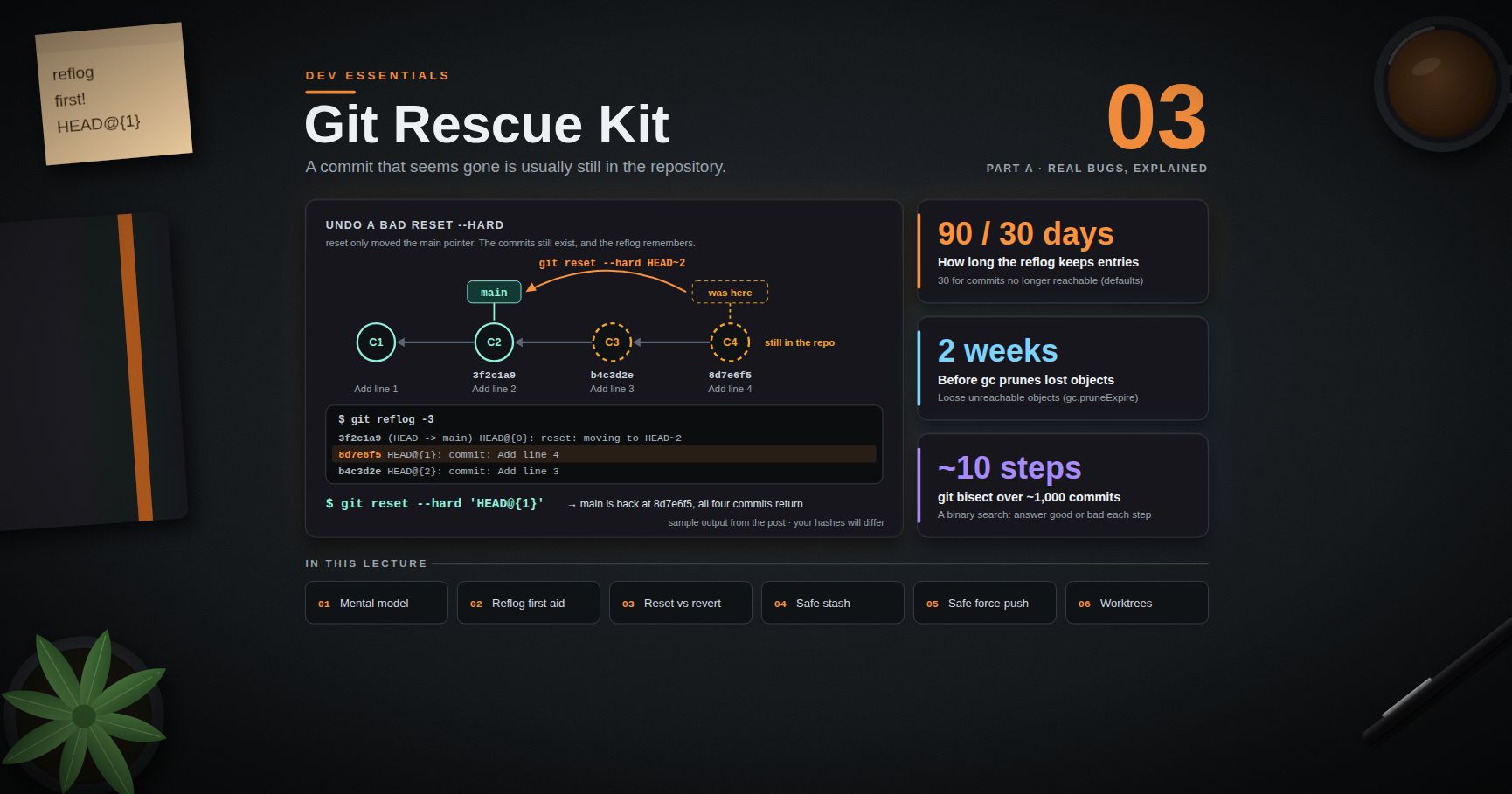
git bisect binary-searches your history for the first bad commit. Dev Essentials 03 · Git Rescue Kit introduces it; here we go deeper. With N commits to search you need about log2(N) tests: about 10 for 1,000 commits.
1
2
3
4
5
6
git bisect start HEAD v1.4.0 # <bad> <good>: HEAD is broken, tag v1.4.0 was fine
# Git checks out a middle commit. Test it, then answer:
git bisect good # or: git bisect bad
# ... repeat until Git prints "<sha> is the first bad commit"
git bisect reset # go back to where you started
| Command | Use |
|---|---|
git bisect skip |
This commit cannot be tested (does not build). Git picks another. |
git bisect log |
Show what you marked so far. |
git bisect replay file |
After a mistake: save the log, delete the wrong line, reset, then replay. |
git bisect start --term-old=fast --term-new=slow |
Hunt a change that is not a bug ("when did this get slow?"); mark with git bisect fast / slow. |
git bisect start --first-parent |
Follow only first parents; a merged branch is blamed on its merge commit. |
Automate it with git bisect run
If a script can tell good from bad, Git does the whole search. The script's exit code is the answer:
| Exit code | Meaning to bisect |
|---|---|
0 |
good |
1–127, except 125 |
bad |
125 |
cannot test this commit: skip it |
anything else (for example 128+) |
abort the bisect |
A Python check script works the same in Git Bash and PowerShell:
1
2
3
4
5
6
7
8
9
10
11
12
13
14
15
16
# check.py: exit 0 if with_tax(100) is 108.0, 1 if not, 125 if price.py does not compile
import sys
from pathlib import Path
source = Path("price.py").read_text(encoding="utf-8")
try:
code = compile(source, "price.py", "exec")
except SyntaxError:
sys.exit(125) # cannot test this commit: tell bisect to skip it
namespace = {}
exec(code, namespace)
result = namespace["with_tax"](100)
print("with_tax(100) =", result)
sys.exit(0 if result == 108.0 else 1) # 0 = good, 1 = bad
1
2
3
4
git bisect start HEAD v1.4.0
git bisect run python ../check.py
git bisect reset
Your test suite can be the script: git bisect run python -m pytest -x tests/test_price.py. pytest exits 1 when tests fail. Its other codes (for example 5, "no tests collected") also count as bad, so the test file must exist in every commit you search.
Watch out: keep the check script outside the repository, or untracked. If it is tracked, old commits have an old version of it, or none.
Common pitfall: exit code
127means "command not found" in most shells, and bisect counts it as bad. A typo makes every commit "bad". Run the script once by hand first.
Chapter 7 — Profilers: measure, then optimise
A slow program is a bug too. Do not guess where the time goes; measure. This slow.py takes about 2 seconds:
1
2
3
4
5
6
7
8
9
10
11
12
13
14
15
16
import random
def find_common(a, b):
common = []
for x in a:
if x in b:
common.append(x)
return common
random.seed(1)
a = [random.randrange(1_000_000) for _ in range(20_000)]
b = [random.randrange(1_000_000) for _ in range(20_000)]
print(len(find_common(a, b)))
cProfile and snakeviz
cProfile is in the standard library. It records every call (a deterministic profiler), which adds overhead, but the relative numbers are what you need.
1
2
3
4
5
python -m cProfile -s tottime slow.py | head -8 # PowerShell: | Select-Object -First 8
python -m cProfile -o slow.prof slow.py # save to a file
pip install snakeviz
snakeviz slow.prof # interactive chart in the browser
1
2
3
4   ncalls  tottime  percall  cumtime  percall filename:lineno(function)
        1    2.191    2.191    2.192    2.192 slow.py:4(find_common)
    40000    0.013    0.000    0.036    0.000 random.py:295(randrange)
tottime is time inside the function itself; cumtime includes everything it calls. High tottime means the function's own body is slow. High cumtime with low tottime means: look at what it calls. You can also read a saved file with pstats.Stats("slow.prof").sort_stats("cumulative").print_stats(10).
py-spy: a sampling profiler
py-spy samples a running Python process from the outside, many times per second. It does not change your code and adds little overhead, so it is safe to point at a live service.
1
2
3
4
5
pip install py-spy
py-spy record -o profile.svg -- python slow.py # flame graph of a new process
py-spy top --pid 12345 # live "top" view of a running process
py-spy dump --pid 12345 # current stack of every thread
py-spy dump is the fastest way to see where a hung program is stuck. On Linux and macOS, attaching to an existing PID usually needs sudo. The README (checked September 2026, release 0.4.2) lists CPython 2.3–2.7 and 3.3–3.14 as supported. Python 3.15 (scheduled for 2026-10-01) adds a standard profiling package: profiling.tracing (the new home of cProfile, which stays as an alias) and profiling.sampling (PEP 799).
Chrome DevTools Performance panel
- Open DevTools (F12) and pick the Performance panel.
- In the capture settings, set CPU: 4x slowdown to act like a slower phone.
- Click Record, do the slow action, click Stop.
- In the Main track, look for wide blocks and red triangles (long tasks). Click one; Summary, Bottom-Up and Call Tree show which functions used the time.
Trick: profile with realistic data. Code that is fine with 100 rows can be quadratic and die with 100,000.
Chapter 8 — Heisenbugs and race conditions
A heisenbug changes when you observe it: a log line, a debugger or a debug build changes the timing, and the bug hides. The usual cause is a race condition, where the result depends on which thread runs first.
1
2
3
4
5
6
7
8
9
10
11
12
13
14
15
16
17
18
19
20
21
import threading
import time
balance = 0
def deposit(times):
global balance
for _ in range(times):
current = balance # read
time.sleep(0) # let another thread run (widens the race window)
balance = current + 1 # write
threads = [threading.Thread(target=deposit, args=(1000,)) for _ in range(4)]
for t in threads:
t.start()
for t in threads:
t.join()
print(balance, "(expected 4000)") # one run printed 1582; it changes every run
Two threads read the same value, both add one, and one update is lost. The fix makes read-and-write one step:
1
2
3
4
5
6
7
lock = threading.Lock()
# inside the loop:
with lock:
current = balance
time.sleep(0)
balance = current + 1 # now always 4000
How to hunt these bugs:
- Make it happen more often: run the test in a loop (commands below), add threads, or add
time.sleep(0)at suspect spots. - Log with thread names and timestamps (
%(threadName)s). Logging disturbs timing less than a debugger that pauses one thread. - Look for shared mutable state: globals, class attributes, caches, files, database rows.
- Fix the design, not the timing: a lock, a queue, an atomic database update, or no sharing. A
sleepthat "fixes" it only makes the window smaller. - For hangs, dump every thread's stack:
py-spy dump --pid <PID>, orfaulthandler.dump_traceback_later(60)in the program.
1
2
for i in $(seq 200); do python -m pytest -x -q tests/test_bank.py || break; done
1
2
foreach ($i in 1..200) { python -m pytest -x -q tests/test_bank.py; if ($LASTEXITCODE -ne 0) { break } }
Chapter 9 — Timebox, then ask for help well
Set a timebox before you start: "I will try alone for 45 minutes." When it ends, stop and choose: take a break, explain the problem out loud (rubber-duck debugging), or ask someone. The number is a rule of thumb; the habit of checking is what matters.
A help request people can answer:
1
2
3
4
5
6
7
8
Goal: Export monthly orders to CSV.
Expected: export.py writes 1,204 rows.
Actual: It stops after 611 rows with UnicodeEncodeError (full traceback below).
Repro: python export.py --month 2026-08 (MRE attached: 15 lines + 3-row sample file)
Tried: 1) Input file is UTF-8 (checked). 2) Same error on Python 3.13 and 3.14.
Env: Windows 11, Python 3.13, pandas 2.x, run from PowerShell 5.1.
Question: Why does writing fail at row 612, and what is the right encoding setting?
Paste errors as text, not screenshots. Remove secrets and personal data. Say what you already tried. When it is solved, post the answer where you asked.
Chapter 10 — Case study: 44 corrupted posts
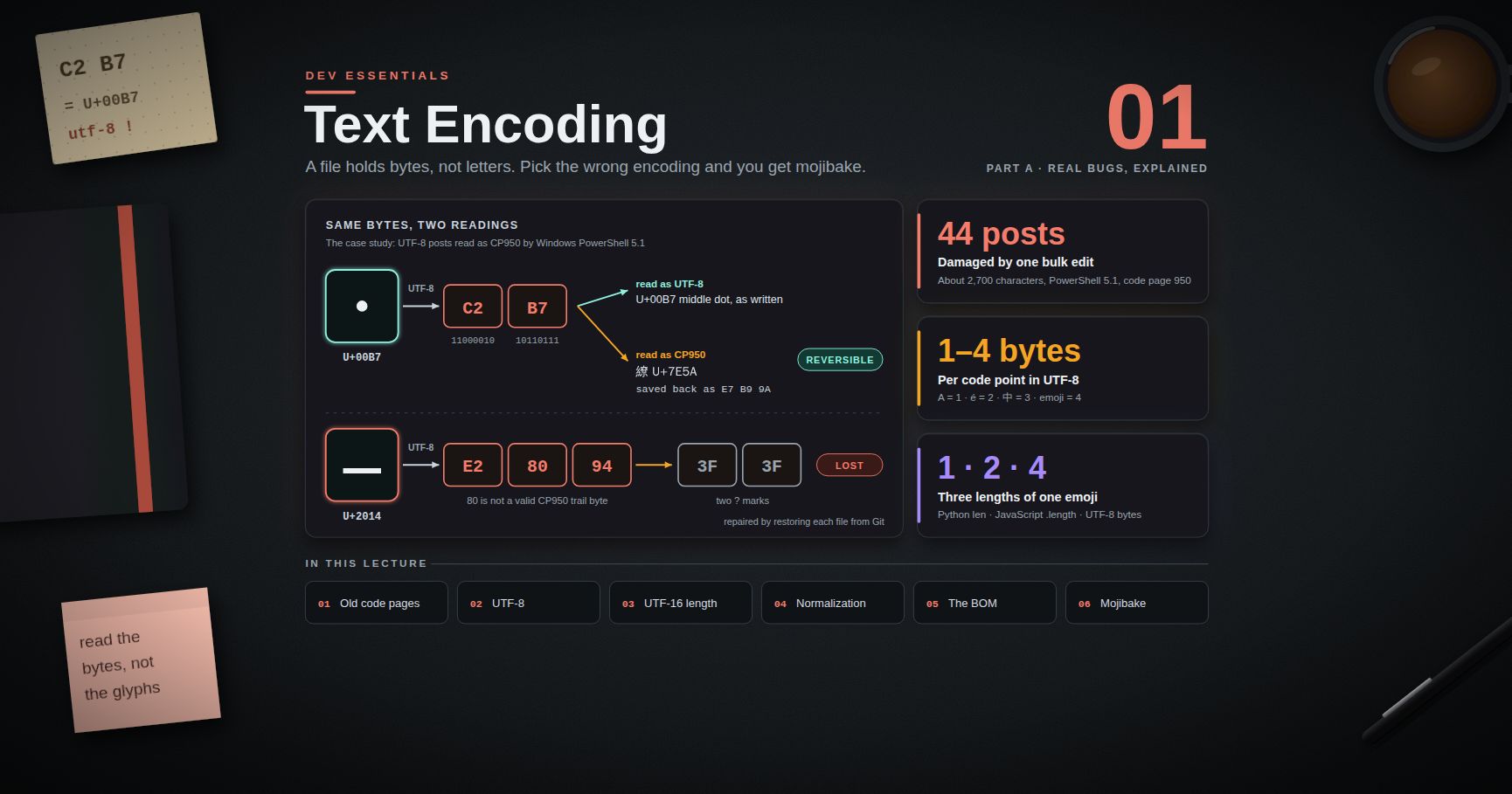
A real bug from this blog, told with the loop from Chapter 1. The encoding background is in Dev Essentials 01 · Text Encoding.
Observe. Many posts showed two question marks where an em dash — should be, and the odd character 繚 (U+7E5A) where a middle dot · should be. In total 44 posts were damaged and about 2,700 characters destroyed. (This page writes that character as an HTML entity, so the blog's own marker check below does not flag this post.)
Hypothesize. Such a regular pattern suggests one bulk rewrite with the wrong encoding, not 44 separate typos.
Test. The strange character is a perfect marker. First, list every affected file:
1
2
grep -l $'\u7E5A' content/posts/*.md
1
2
3
Select-String -Path content\posts\*.md -Pattern ([string][char]0x7E5A) -Encoding UTF8 -List |
Select-Object -ExpandProperty Path
Then ask Git which commit added the marker. One way is the "pickaxe", git log -S<text>, which lists commits that change how many times a string appears:
1
2
3
git log -S $'\u7E5A' --oneline -- content/posts/
git show --stat <sha> # which files did that commit touch?
Watch out: in Windows PowerShell 5.1, non-ASCII arguments to native programs can get mangled. Run the pickaxe search from Git Bash.
The history pointed to one commit: a cover-image script had rewritten the posts with the system ANSI code page instead of UTF-8. The bytes confirm it: · in UTF-8 is C2 B7, and in code page 950 (the ANSI code page of Traditional Chinese Windows) those two bytes are the character 繚 (U+7E5A).
Fix. The parent of the bad commit still has the good text:
1
2
3
git log --oneline <sha>..HEAD -- content/posts/ # did anything touch these files later?
git restore --source=<sha>^ -- content/posts/a.md content/posts/b.md
If later commits edited the same files, re-apply those edits. If the bad commit also made wanted changes, redo them with a tool that writes UTF-8.
Record and prevent. The marker search became a standing check after every bulk edit: it must return nothing. The project notes now warn that Windows PowerShell 5.1 Set-Content defaults to the ANSI code page, and show the UTF-8-safe way to write files.
What made this fast: a unique marker, a search over files, a search over history, and a known-good parent to restore from.
Practice Exercises
Exercise 1 — Read a traceback
For the KeyError: 'qty' traceback in Chapter 2: which line failed, what was the exception, and what is your first hypothesis? Then do the same for the Java trace: which file is missing, and which line of your code tried to read it?
Solution
Python: line 10 of orders.py raised KeyError: 'qty' at item["qty"]. Hypothesis: one item has no qty key, maybe a different spelling. Test: break at line 10 with the condition "qty" not in item.
Java: the last Caused by: is the root, NoSuchFileException: /etc/app/settings.json, raised under app.Settings.readFile(Settings.java:55). The two blocks above only add context.
Exercise 2 — Debug a small program
Save as grades.py and run it. Find every bug with a debugger or breakpoint(), not by guessing. Expected output: average: 88.5 and top: Grace.
1
2
3
4
5
6
7
8
9
10
11
12
13
14
15
16
17
18
19
20
21
22
23
24
25
26
27
28
29
30
31
32
33
34
"""grades.py - print the class average and the top student."""
DATA = ["Ada,78", "Linus,91", "Grace,100", "Alan,85"]
def parse(lines):
rows = []
for line in lines:
name, score = line.strip().split(",")
rows.append((name, score))
return rows
def average(rows):
total = 0
for i in range(1, len(rows)):
total += rows[i][1]
return total / len(rows)
def top_student(rows):
best = rows[0]
for row in rows:
if row[1] > best[1]:
best = row
break
return best[0]
if __name__ == "__main__":
rows = parse(DATA)
print("average:", average(rows)) # expected 88.5
print("top:", top_student(rows)) # expected Grace
Solution
- Crash:
TypeError: unsupported operand type(s) for +=: 'int' and 'str'.p rowsshows('Ada', '78'): scores are strings. Fix:rows.append((name, int(score))). (As strings,"100" > "91"isFalsetoo.) - Wrong average: now
69.0. Watchiinaverage: it starts at1, so Ada is skipped. Fix:return sum(s for _, s in rows) / len(rows). - Wrong top: now
Linus. Step throughtop_student:breakstops at the first higher score. Fix: removebreak, orreturn max(rows, key=lambda r: r[1])[0].
Exercise 3 — Automate a bisect
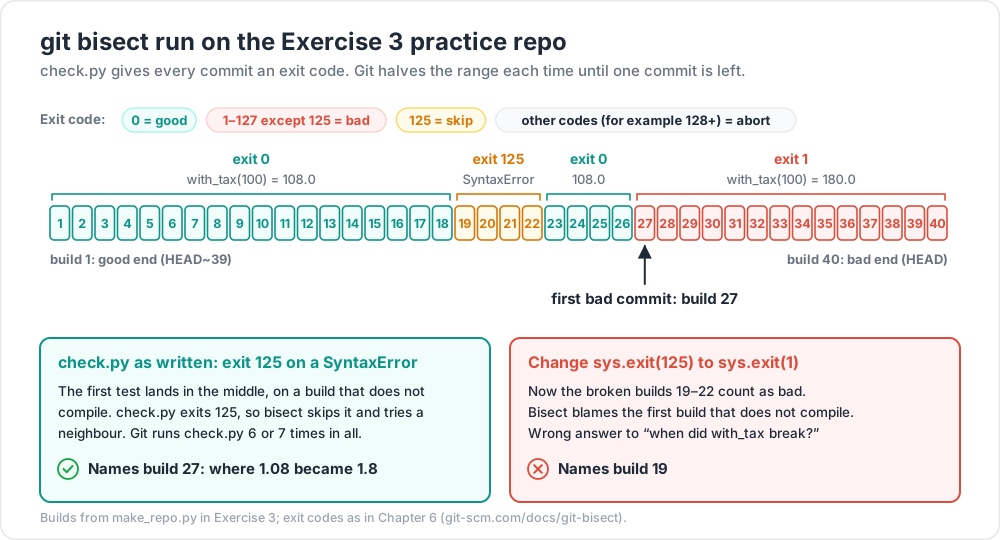
This script builds a practice repo with 40 commits. One commit breaks with_tax, and builds 19 to 22 do not even compile. Run python make_repo.py, save check.py from Chapter 6 next to it (outside the new repo), and find the first bad commit with git bisect run.
1
2
3
4
5
6
7
8
9
10
11
12
13
14
15
16
17
18
19
20
21
22
23
24
25
# make_repo.py: builds ./bisect-lab with 40 commits
import pathlib
import subprocess
REPO = pathlib.Path("bisect-lab")
GOOD = "def with_tax(amount):\n return round(amount * 1.08, 2)\n"
BAD = "def with_tax(amount):\n return round(amount * 1.8, 2)\n"
BROKEN = "def with_tax(amount)\n return round(amount * 1.08, 2)\n" # missing colon
def git(*args):
subprocess.run(["git", *args], cwd=REPO, check=True, capture_output=True)
REPO.mkdir()
git("init", "-q")
git("config", "user.name", "Lab")
git("config", "user.email", "lab@example.com")
for n in range(1, 41):
body = BROKEN if 19 <= n <= 22 else BAD if n >= 27 else GOOD
(REPO / "price.py").write_text(f"# build {n}\n{body}", encoding="utf-8")
git("add", "price.py")
git("commit", "-q", "-m", f"build {n}")
print("created", REPO.resolve())
Solution
1
2
3
4
5
cd bisect-lab
git bisect start HEAD HEAD~39 # build 40 is bad, build 1 is good
git bisect run python ../check.py # on Windows, use "py" if "python" is not on PATH
git bisect reset
Git runs check.py six or seven times and names build 27 as the first bad commit. Its first test lands in the middle, on a build that does not compile; check.py exits 125, so bisect skips it and tries a neighbour.
Now change sys.exit(125) to sys.exit(1) and bisect again. The broken builds now count as bad, and bisect blames build 19, the first one that does not compile. That is the wrong answer to "when did with_tax break?", and it is why exit code 125 exists.
Exercise 4 — Profile and fix
Profile slow.py from Chapter 7, fix the hot spot, and measure again.
Solution
The profile puts almost all the time in the tottime of find_common itself. The cost is x in b: b is a list, so each check scans up to 20,000 items. A set lookup takes about constant time:
1
2
3
4
def find_common(a, b):
b_set = set(b)
return [x for x in a if x in b_set]
On one test machine (anecdotal measurement) this went from about 2.5 s to about 3 ms, with the same 439 results.
Exercise 5 — Reproduce a race
Turn the race from Chapter 8 into a pytest test that fails, then fix it. Why is assert balance == 4000 a poor test before the fix?
Solution
Put the thread code in a function run() that returns balance, and write def test_deposit(): assert run() == 4000. Before the fix it fails most runs but may pass sometimes, so a green run proves nothing. Loop it (Chapter 8) to see the failure rate. After adding the lock it passes every time. Keep the loop test in your notes, not in CI: tests must be fast and deterministic (see Dev Essentials 15 · Testing).
Cheat-sheet
| Task | Command / habit |
|---|---|
| Loop | observe → hypothesize → test one change → record |
| Python traceback | read the bottom line, then your lowest frame |
| Java / Node stack | newest at top; root cause = last Caused by: / [cause] |
| Shrink | delete until every line is needed; halve inputs and config |
| Logging | logging.basicConfig(level=logging.DEBUG); log.exception(...) in except |
| Pause in Python | breakpoint(); turn off with PYTHONBREAKPOINT=0 |
| Post-mortem / attach | python -m pdb script.py; pdb.pm(); python -m pdb -p <PID> (3.14+) |
| VS Code keys | F5 continue, F10 over, F11 into, Shift+F11 out |
| Bisect | git bisect start <bad> <good> … git bisect reset |
| Bisect run | git bisect run <cmd>: 0 good, 1–127 bad, 125 skip |
| Profile | python -m cProfile -o out.prof app.py + snakeviz out.prof |
| Live / hung process | py-spy top --pid <PID> / py-spy dump --pid <PID> |
| Web profile | DevTools → Performance → 4x CPU slowdown → Record |
| Text in history | git log -S "<text>" --oneline -- <path> |
| Restore from before | git restore --source=<sha>^ -- <files> |
What's next
That ends Part B · Everyday skills. Part C starts with Dev Essentials 11 · Auth: password hashing, sessions versus JWT, OAuth 2 and OpenID Connect. Dev Essentials 15 · Testing builds on this post: every bug you fix should leave a test behind.
References
- Python —
pdbandsys.breakpointhook/PYTHONBREAKPOINT - PEP 657 — fine-grained error locations
- PEP 768 — safe external debugger interface (
pdb -p) - What's New in Python 3.13 — coloured tracebacks
- Python Logging HOWTO
- Python — the profilers (
cProfile,pstats) and PEP 799 — theprofilingpackage - Java SE 21 —
Throwable.printStackTrace - Node.js — Errors and Debugging guide
- VS Code — Python debugging and Debugging
- Git —
git bisect,git log,git restore - py-spy and SnakeViz
- Chrome DevTools — Analyze runtime performance
- Stack Overflow — How to create a minimal, reproducible example
- The Debugging Book (Andreas Zeller) — Reducing failure-inducing inputs
Note: this post is in progress. Planned additions: a debugging session recorded step by step in VS Code, memory profiling with
tracemalloc, and remote debugging inside Docker containers.