Dev Essentials — 06 · Regex from Zero to Useful
A regular expression (regex) is a tiny language for describing text patterns: "four digits, a dash, two digits", "a line that starts with date:", "the same word twice in a row". You meet regexes in grep, sed, editors, Python, JavaScript, PowerShell and every log tool. This post builds them up from single characters to lookarounds, shows where the flavors differ, gives recipes you will reuse, and ends with the dark side: a regex that can freeze a server.
Series map: 01 Text Encoding → … → 05 Command Line → 06 Regex (this post) → 07 HTTPS → … → 24 Desk Health. Part B · Everyday skills.
Learning Outcome
- Read and write patterns with literals, character classes, quantifiers, anchors, groups and alternation.
- Explain greedy vs lazy matching, backreferences, named groups, and lookahead/lookbehind.
- Use flags (ignore case, multiline, dot-all, verbose) in Python, JavaScript and PowerShell.
- Know what changes between POSIX BRE/ERE, PCRE, Python
re, JavaScript and .NET. - Use Python's
remodule with raw strings, and apply regexes to logs, dates, frontmatter and file names. - Explain why a regex should not fully validate email addresses.
- Recognize catastrophic backtracking (ReDoS) and fix it.
Chapter 1 — What a regex is, and how to test one
A regex engine walks through the text and tries to match your pattern at each position. Most characters match themselves. A few metacharacters have special jobs: . ^ $ * + ? ( ) [ ] { } | \.
Test patterns before you trust them. Two good ways:
- regex101.com — paste a pattern and sample text, pick the flavor (PCRE2, ECMAScript, Python, Golang, Java, .NET, Rust), and it explains every token and shows every match.
- A Python prompt:
1
2
3
4
import re
re.findall(r"\d{4}-\d{2}-\d{2}", "Released 2026-03-14, patched 2026-04-02.")
# ['2026-03-14', '2026-04-02']
Terminology
| Term | Meaning |
|---|---|
| Pattern | The regex itself, e.g. \d{4} |
| Match | A piece of text the pattern fits |
| Flavor | One engine's dialect (POSIX, PCRE, Python, JavaScript, .NET…) |
| Metacharacter | A character with a special meaning, like . or * |
| Character class | A set of allowed characters, like [a-z] |
| Quantifier | "How many": *, +, ?, {2,5} |
| Anchor | A position, not a character: ^, $, \b |
| Group | Parentheses that bundle part of a pattern and (usually) capture it |
| Backtracking | The engine going back to try another way after a dead end |
Chapter 2 — Literals and escaping
cat matches the three letters c, a, t — anywhere, including inside concatenate. To match a metacharacter literally, put a backslash before it: \. is a real dot, \$ a real dollar sign, \( a real parenthesis.
1
2
re.findall(r"\$\d+\.\d{2}", "Coffee $4.50, cake $12.00") # ['$4.50', '$12.00']
When the text to match comes from a user or a file, never paste it into a pattern raw. Escape it: re.escape(text) in Python, [regex]::Escape($text) in PowerShell. Both turn price (USD) $5.00? into price\ \(USD\)\ \$5\.00\?. JavaScript added RegExp.escape() in ECMAScript 2025; older runtimes such as Node.js 20 do not have it yet.
Chapter 3 — Character classes
| Pattern | Matches |
|---|---|
[aeiou] |
one vowel |
[a-z], [A-Za-z0-9] |
one character from a range |
[^0-9] |
one character that is not a digit (^ first inside [] means "not") |
. |
any character except newline (unless the dot-all flag is on) |
\d / \D |
a digit / a non-digit |
\w / \W |
a "word" character (letter, digit, underscore) / anything else |
\s / \S |
whitespace (space, tab, newline…) / anything else |
[[:digit:]], [[:space:]], [[:alpha:]] |
POSIX classes, for grep and sed |
Inside [], most metacharacters lose their power: [.$] matches a dot or a dollar. Only ], \, ^ (at the start) and - (between two characters) are special there.
Watch out: "digit" is not the same everywhere. In Python (for
strpatterns) and .NET,\dmatches any Unicode decimal digit, including Arabic-Indic٣٤. In JavaScript,\dis only0-9. If you mean ASCII digits, write[0-9]or passre.ASCIIin Python.
1
2
3
re.findall(r"\d+", "Price: ٣٤ and 56") # ['٣٤', '56']
re.findall(r"\d+", "Price: ٣٤ and 56", re.ASCII) # ['56']
Chapter 4 — Quantifiers, greedy and lazy
* means 0 or more, + 1 or more, ? 0 or 1 (optional), {3} exactly 3, {2,} 2 or more, {2,5} 2 to 5. A quantifier applies to the thing right before it: ab+ is a then one or more b; (ab)+ repeats ab.
Greedy vs lazy. By default, quantifiers are greedy: they take as much as they can, then give back only if the rest of the pattern fails. Add ? to make them lazy: take as little as possible.
1
2
3
4
5
html = "<b>bold</b>"
re.findall(r"<.+>", html) # ['<b>bold</b>'] greedy: one huge match
re.findall(r"<.+?>", html) # ['<b>', '</b>'] lazy: shortest matches
re.findall(r"<[^>]+>", html) # ['<b>', '</b>'] negated class: often clearest and fastest
Trick: "anything up to the next
X" is best written as[^X]*X. It cannot run past the firstX, so it never needs to backtrack.
Chapter 5 — Anchors, boundaries and alternation
| Anchor | Meaning |
|---|---|
^ |
start of the string (or of each line, in multiline mode) |
$ |
end of the string (or of each line, in multiline mode) |
\b |
word boundary: between a \w and a \W character |
\B |
not a word boundary |
\A, \Z (Python) / \A, \z (.NET, PCRE) |
the very start / the very end of the whole string |
\bcat\b matches cat in "the cat sat" but not in "concatenate".
Watch out: in Python and .NET,
$also matches just before a final newline.re.match(r"^\d+$", "123\n")succeeds. To demand "nothing after", usere.fullmatch(r"\d+", s)in Python or\zin .NET. In JavaScript,$(without themflag) means the true end.
Alternation | means "or", and it has the lowest priority of all operators. ^cat|dog$ means "cat at the start" or "dog at the end":
1
2
3
4
5
6
for s in ["cat food", "hotdog", "cat"]:
print(s, bool(re.search(r"^cat|dog$", s)), bool(re.search(r"^(?:cat|dog)$", s)))
# cat food True False
# hotdog True False
# cat True True
Wrap alternatives in a group when they belong together: ^(?:cat|dog)$.
Chapter 6 — Groups, backreferences and named groups
Parentheses do two jobs: they group (so a quantifier or | applies to the whole part) and they capture (so you can read the matched text later).
1
2
3
4
m = re.search(r"(\d{4})-(\d{2})-(\d{2})", "Due 2026-09-24.")
m.group(0), m.group(1), m.groups() # ('2026-09-24', '2026', ('2026', '09', '24'))
re.sub(r"(\d{4})-(\d{2})-(\d{2})", r"\3/\2/\1", "Due 2026-09-24.") # 'Due 24/09/2026.'
(?:...)groups without capturing. Use it when you only need grouping — it keeps group numbers tidy andfindalloutput simple.- A backreference
\1matches the same text that group 1 matched. Find doubled words:
1
2
re.findall(r"\b(\w+)\s+\1\b", "This is the the test of of words", re.I) # ['the', 'of']
Named groups make long patterns readable. The syntax differs by flavor:
| Define | Backreference in pattern | In replacement | |
|---|---|---|---|
| Python | (?P<year>\d{4}) |
(?P=year) |
\g<year> |
| JavaScript | (?<year>\d{4}) |
\k<year> |
$<year> |
| .NET / PowerShell | (?<year>\d{4}) |
\k<year> |
${year} |
PCRE (grep -P) |
(?<year>\d{4}) or (?P<year>…) |
\k<year> |
— |
In Python, re.search(r"(?P<y>\d{4})-(?P<m>\d{2})-(?P<d>\d{2})", s) gives a match where m["y"] is '2026' and m.groupdict() is {'y': '2026', 'm': '09', 'd': '24'}. In PowerShell:
1
2
'2026-09-24' -replace '(?<y>\d{4})-(?<m>\d{2})-(?<d>\d{2})', '${d}.${m}.${y}' # 24.09.2026
Common pitfall: in PowerShell, write the replacement in single quotes. In double quotes, PowerShell expands
$1or${d}as its own variables first —'2026-09-24' -replace '(\d{4})-(\d{2})-(\d{2})', "$3/$2/$1"returns//.
Chapter 7 — Lookahead and lookbehind
Lookarounds check what is next to the current position without consuming it. They match a position, like \b does.
| Syntax | Name | Meaning |
|---|---|---|
X(?=Y) |
lookahead | X, only if followed by Y |
X(?!Y) |
negative lookahead | X, only if not followed by Y |
(?<=Y)X |
lookbehind | X, only if preceded by Y |
(?<!Y)X |
negative lookbehind | X, only if not preceded by Y |
1
2
3
4
re.findall(r"(?<=\$)\d+(?:\.\d{2})?", "Coffee $4.50, cake $12, tax 8%") # ['4.50', '12']
re.sub(r"\B(?=(\d{3})+(?!\d))", ",", "1234567") # '1,234,567'
re.findall(r"^(?!.*healthcheck).*$", "GET /\nGET /healthcheck\nPOST /x", re.M) # ['GET /', 'POST /x']
The middle one reads: "at a position that is not a word boundary, where a multiple of three digits follows up to the end of the number, insert a comma".
Watch out: Python's lookbehind must be fixed width.
(?<=\$\s*)\d+raiseslook-behind requires fixed-width pattern. JavaScript and .NET accept variable-length lookbehind. POSIXgrep/sedhave no lookarounds at all — usegrep -Por another tool.
Chapter 8 — Flags
| Effect | Python | JavaScript | .NET / PowerShell | Inline |
|---|---|---|---|---|
| Ignore case | re.I |
i |
IgnoreCase (on by default for -match) |
(?i) |
^/$ per line |
re.M |
m |
Multiline |
(?m) |
. matches newline |
re.S |
s |
Singleline |
(?s) |
Spaces and # comments allowed |
re.X |
— | IgnorePatternWhitespace |
(?x) |
| All matches | findall/finditer |
g |
[regex]::Matches / -AllMatches |
— |
JavaScript has a few more: u and v turn on full Unicode handling, y is "sticky" (match only at lastIndex), and d returns match indices.
Verbose mode lets you lay a pattern out like code:
1
2
3
4
5
6
7
DATE = re.compile(r"""
(?P<year>\d{4}) - # year
(?P<month>\d{2}) - # month
(?P<day>\d{2}) # day
""", re.VERBOSE)
DATE.search("Due 2026-09-24.").groupdict() # {'year': '2026', 'month': '09', 'day': '24'}
Watch out: PowerShell's
-match,-replaceandSelect-Stringare case-insensitive by default. Use-cmatch,-creplaceorSelect-String -CaseSensitivewhen case matters, or start the pattern with(?-i).
Chapter 9 — Flavors: what changes where
| Feature | POSIX BRE (grep, sed) |
POSIX ERE (grep -E, sed -E) |
PCRE (grep -P) |
Python re |
JavaScript | .NET (PowerShell) |
|---|---|---|---|---|---|---|
+ ? ( ) { } and alternation special |
only with a backslash: \+, \?, \(…\) (GNU) |
yes | yes | yes | yes | yes |
\d |
no — use [0-9] |
no — use [0-9] |
yes | yes (Unicode) | yes (ASCII) | yes (Unicode) |
| Named groups | no | no | yes | (?P<n>…) |
(?<n>…) |
(?<n>…) |
| Lookbehind | no | no | yes | fixed width only | yes | yes |
| Atomic groups / possessive | no | no | both | both (3.11+) | neither | atomic only |
| Group in replacement | \1 |
\1 |
— | \1, \g<n> |
$1, $<n> |
$1, ${n} |
The classic trap is \d in grep:
1
2
3
4
5
6
echo 'abc123' | grep -E '\d' # no match: \d is not a digit here
echo 'dad 123' | grep -oE '\d' # prints "d" twice: GNU grep treats \d as a plain d
echo 'abc123' | grep -oE '[0-9]+' # 123
echo 'abc123' | grep -oP '\d+' # 123 (PCRE)
echo 'abbbc' | grep -o 'ab\+c' # BRE (GNU): \+ means "one or more"
Newer GNU grep (3.8 and later) also prints a warning about the "stray" backslash. In Git Bash, grep -P may need a UTF-8 locale: LC_ALL=en_US.UTF-8 grep -P ... (see Dev Essentials 05 · Command Line).
Python needs raw strings. In a normal string, "\n" is a newline and "\b" is a backspace character, so the regex engine never sees the backslash. Write r"\b\d+\b". The re docs themselves recommend raw string notation for patterns.
Chapter 10 — Python's re in practice
| Function | Returns |
|---|---|
re.search(p, s) |
first match anywhere, or None |
re.match(p, s) |
a match only at the start of s, or None |
re.fullmatch(p, s) |
a match only if the whole s matches |
re.findall(p, s) |
list of matched strings — or of groups, if the pattern has groups |
re.finditer(p, s) |
iterator of match objects (positions, named groups) |
re.sub(p, repl, s) |
new string with replacements; repl can be a function |
re.split(p, s) |
list of pieces between matches |
re.compile(p) |
reusable pattern object with the same methods |
1
2
3
4
re.split(r"\s*[,;]\s*", "a, b;c ,d") # ['a', 'b', 'c', 'd']
re.sub(r"\s+", " ", " too many\t spaces ").strip() # 'too many spaces'
re.sub(r"_([a-z])", lambda m: m.group(1).upper(), "snake_case_name") # 'snakeCaseName'
Common pitfall:
findallwith capturing groups returns the groups, not the whole match.re.findall(r"(\d{4})-(\d{2})", "2026-09")gives[('2026', '09')]. Use(?:...)for groups you do not need, orfinditerandm.group(0).
Chapter 11 — Practical recipes
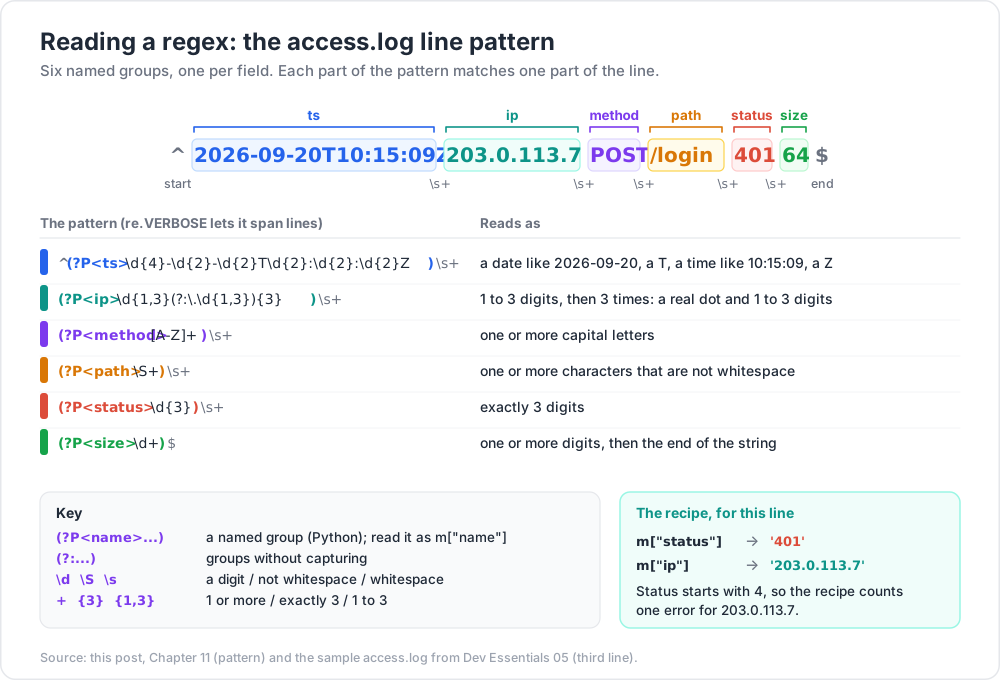
Parse log lines with named groups
Using the sample access.log from Dev Essentials 05:
1
2
3
4
5
6
7
8
9
10
11
12
13
14
15
16
17
18
19
20
21
22
23
import re
from collections import Counter
LINE = re.compile(r"""
^(?P<ts>\d{4}-\d{2}-\d{2}T\d{2}:\d{2}:\d{2}Z)\s+
(?P<ip>\d{1,3}(?:\.\d{1,3}){3})\s+
(?P<method>[A-Z]+)\s+
(?P<path>\S+)\s+
(?P<status>\d{3})\s+
(?P<size>\d+)$
""", re.VERBOSE)
errors = Counter()
with open("access.log", encoding="utf-8") as f:
for n, line in enumerate(f, 1):
m = LINE.match(line.rstrip("\r\n"))
if not m:
print(f"line {n}: no match: {line!r}")
continue
if m["status"][0] in "45":
errors[m["ip"]] += 1
print(errors.most_common()) # [('203.0.113.7', 2), ('198.51.100.23', 1)]
Always report lines that do not match. Silent skips hide format changes.
Match ISO dates — then let a real parser decide
1
2
3
4
ISO = re.compile(r"\b\d{4}-(?:0[1-9]|1[0-2])-(?:0[1-9]|[12]\d|3[01])\b")
ISO.findall("Released 2026-03-14; typo 2026-99-99; review 2026-10-01")
# ['2026-03-14', '2026-10-01']
The regex still accepts 2026-02-30. Use it to find candidates, then check each with datetime.date.fromisoformat(), which raises ValueError for impossible dates. Dev Essentials 02 · Dates & Time Zones covers the rest.
Pull a field from Markdown frontmatter
1
2
3
4
5
6
7
8
text = "---\ntitle: Regex notes\ndate: 2026-09-24 10:30:00\n---\n\ndate: this line is in the body\n"
re.findall(r"^date: (.+)$", text, re.M)
# ['2026-09-24 10:30:00', 'this line is in the body'] <- body line matched too!
fm = re.search(r"\A---\n(.*?)\n---\n", text, re.S).group(1) # isolate the frontmatter first
re.search(r"^date: (.+)$", fm, re.M).group(1) # '2026-09-24 10:30:00'
Two lessons: scope the search to the frontmatter block first, and beware Windows line endings. With CRLF files, (.+)$ captures a trailing \r ('2026-09-24 10:30:00\r'). Use ^date:\s*(.+?)\s*$ or strip the result (see Dev Essentials 04 · Line Endings).
Rename files with a preview
Goal: IMG_20260920_101502.jpg → 2026-09-20_101502.jpg. Always dry-run first.
1
2
3
4
5
6
from pathlib import Path
pat = re.compile(r"^IMG_(\d{4})(\d{2})(\d{2})_")
for p in Path(".").glob("IMG_*.jpg"):
new = pat.sub(r"\1-\2-\3_", p.name)
print(p.name, "->", new) # when happy: p.rename(p.with_name(new))
1
2
3
Get-ChildItem -Filter 'IMG_*.jpg' |
Rename-Item -NewName { $_.Name -replace '^IMG_(\d{4})(\d{2})(\d{2})_', '$1-$2-$3_' } -WhatIf
1
2
3
4
5
for f in IMG_*.jpg; do
new=$(printf '%s\n' "$f" | sed -E 's/^IMG_([0-9]{4})([0-9]{2})([0-9]{2})_/\1-\2-\3_/')
echo mv -- "$f" "$new" # remove "echo" to really rename
done
Editor find and replace with groups
In VS Code, turn on the .* (regex) toggle in the Find widget. The replacement refers to groups as $1, $2; \u / \l change the case of the next character and \U / \L of the rest of the group. Example — turn getUserName calls into get_user_name: find ([a-z])([A-Z]), replace $1_\l$2. Test on one file before "Replace All".
Chapter 12 — Don't fully validate email with a regex
Real email syntax (RFC 5322) allows quoted local parts, comments and other rare forms, so a "complete" regex is huge, hard to read and still does not tell you whether the mailbox exists. The HTML standard itself does not follow RFC 5322 for <input type="email">: it calls its own simpler rule a "willful violation" of that RFC, because the RFC grammar is too strict in some places and too loose in others to be practical.
A sensible approach:
- Do a light sanity check: one
@, no spaces, a dot in the domain part. - Send a confirmation email. Only a click on the link proves the address works.
1
2
3
4
5
EMAIL_SANITY = re.compile(r"[^@\s]+@[^@\s]+\.[^@\s]+")
for e in ["ada@example.com", "a.b+tag@sub.example.co.uk", "no-at.example.com", "two@@example.com"]:
print(e, bool(EMAIL_SANITY.fullmatch(e)))
# True, True, False, False
This check rejects some legal but odd addresses (such as user@localhost) and accepts some that bounce. That is fine: its only job is to catch typos early.
Chapter 13 — Catastrophic backtracking and ReDoS
Most engines (Python, JavaScript, .NET, PCRE, Java) are backtracking engines. When part of a pattern fails, they go back and try the other ways the earlier parts could have matched. Usually there are only a few ways. But nested or overlapping quantifiers create an exponential number of ways, and on text that almost matches, the engine tries them all.
The textbook case is (a+)+$ against aaaa…ab. The inner and outer + can split the as in about 2ⁿ ways, and the final b makes every split fail. A timing on one Windows 11 laptop with Python 3.11.9 (one run each — an informal measurement, not a benchmark; your numbers will differ, the doubling will not):
1
2
3
4
5
6
7
import re, time
for n in (18, 20, 22, 24):
s = "a" * n + "b"
t = time.perf_counter()
re.match(r"(a+)+$", s)
print(n, f"{time.perf_counter() - t:.3f}s")
n (number of as) |
18 | 20 | 22 | 24 |
|---|---|---|---|---|
| Time | 0.012 s | 0.055 s | 0.221 s | 0.802 s |
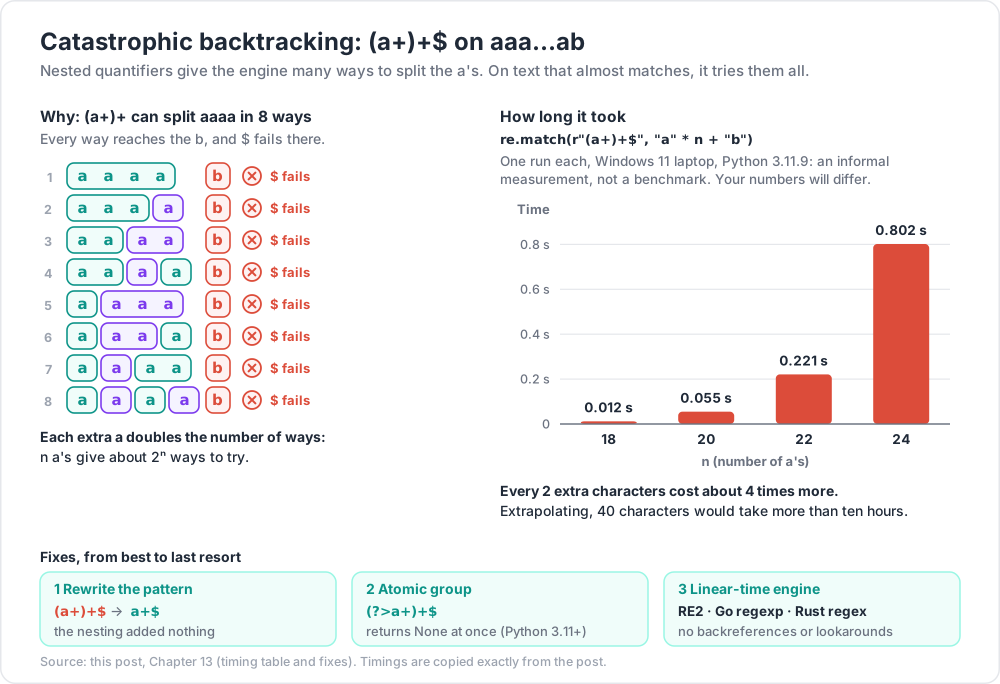
Every 2 extra characters cost about 4 times more. Extrapolating, 40 characters would take more than ten hours. That is ReDoS (regular expression denial of service): one short, crafted input keeps a CPU core busy. OWASP lists typical "evil" shapes: (a+)+, ([a-zA-Z]+)*, (a|aa)+, (a|a?)+. Real-life versions look innocent, like ^(\w+\s?)*$ for "words separated by spaces" — in the same test, 22 letters plus a ! took 0.25 s.
This is not theory. On 2 July 2019, one Cloudflare WAF rule with a badly backtracking regex (the part .*(?:.*=.*)) exhausted CPUs across Cloudflare's network and caused about 27 minutes of downtime.
Fixes, from best to last resort
1. Rewrite the pattern so each character can be matched only one way.
| Evil | Safe | Why |
|---|---|---|
(a+)+$ |
a+$ |
the nesting added nothing |
^(\d+)*$ |
^\d*$ |
same language, one way to split |
^(\w+\s?)*$ |
^(?:\w+\s)*\w*$ |
each repeat must end with a space, so splits are fixed |
On 100,000 characters, the rewritten ^(?:\w+\s)*\w*$ finished in about 1 ms in the same test. It also gave the same yes/no answer as the original on every test string tried ("hello world", "hello world", "hello world ", "", " lead", "x!").
2. Forbid backtracking into a part with an atomic group (?>...) or a possessive quantifier (*+, ++, ?+). Once matched, the engine will not try other splits. Python supports both since 3.11; PCRE and Java support both; .NET supports atomic groups only; JavaScript supports neither.
1
2
re.match(r"(?>a+)+$", "a" * 100_000 + "b") # returns None at once (Python 3.11+)
3. Use a linear-time engine for untrusted patterns or input. Google's RE2, Go's regexp and Rust's regex crate guarantee time linear in the input size (Rust documents O(m × n) for pattern size m and text size n). The price: no backreferences and no lookarounds. .NET 7 and later offer RegexOptions.NonBacktracking with the same kind of guarantee; Windows PowerShell 5.1 runs on .NET Framework and does not have it. After its outage, Cloudflare planned to move to RE2 or the Rust engine for exactly this reason.
4. Limit the damage. Cap input length before matching. In .NET, pass a timeout — the default is infinite:
1
2
3
$re = [regex]::new('^(a+)+$', 'None', [TimeSpan]::FromMilliseconds(100))
$re.IsMatch(('a' * 40) + 'b') # error after ~100 ms: "The RegEx engine has timed out..."
Python's built-in re has no timeout, so rewrite the pattern or run risky matching in a separate process you can stop.
Practice Exercises
Exercise 1 — Real dates only
From "Released 2026-03-14, patched 2026-04-02. Ticket 2026-99-99 is a typo. Next review: 2026-10-01.", extract the dates with valid month and day ranges. Make sure findall returns whole dates, not tuples.
Solution
1
2
3
4
text = "Released 2026-03-14, patched 2026-04-02. Ticket 2026-99-99 is a typo. Next review: 2026-10-01."
re.findall(r"\b\d{4}-(?:0[1-9]|1[0-2])-(?:0[1-9]|[12]\d|3[01])\b", text)
# ['2026-03-14', '2026-04-02', '2026-10-01']
With capturing groups (0[1-9]|1[0-2]), findall would return tuples like ('2026', '03', '14').
Exercise 2 — Client errors per path
From the access.log lines (Dev Essentials 05), count 4xx responses per path using named groups.
Solution
1
2
3
4
5
6
7
from collections import Counter
from pathlib import Path
log = Path("access.log").read_text(encoding="utf-8")
pat = re.compile(r"^\S+ \S+ (?P<method>[A-Z]+) (?P<path>\S+) (?P<status>4\d\d) \d+$", re.M)
Counter(m["path"] for m in pat.finditer(log))
# Counter({'/login': 1, '/missing': 1, '/admin': 1})
Exercise 3 — "Last, First" to "First Last"
Turn Lovelace, Ada / Hopper, Grace / Torvalds, Linus (one per line) into Ada Lovelace etc. — in Python, PowerShell and sed.
Solution
1
2
3
names = "Lovelace, Ada\nHopper, Grace\nTorvalds, Linus"
print(re.sub(r"^(\w+),\s*(\w+)$", r"\2 \1", names, flags=re.M))
1
2
'Lovelace, Ada' -replace '^(\w+),\s*(\w+)$', '$2 $1' # Ada Lovelace
1
2
printf 'Lovelace, Ada\nHopper, Grace\n' | sed -E 's/^([A-Za-z]+), *([A-Za-z]+)$/\2 \1/'
sed -E has no \w or \s in POSIX terms, so the bracket classes spell it out.
Exercise 4 — Frontmatter title, CRLF-safe
Get the title from "---\r\ntitle: Regex from Zero to Useful\r\ndate: 2026-09-24 10:30:00\r\n---\r\nBody text\r\n" without a trailing \r.
Solution
1
2
3
post = "---\r\ntitle: Regex from Zero to Useful\r\ndate: 2026-09-24 10:30:00\r\n---\r\nBody text\r\n"
re.search(r"^title:\s*(.+?)\s*$", post, re.M).group(1) # 'Regex from Zero to Useful'
The lazy (.+?) stops as early as it can, and \s*$ swallows the \r before the line end. The naive ^title: (.+)$ returns 'Regex from Zero to Useful\r'.
Exercise 5 — Defuse a slow pattern
^(\d+)*$ is used to check "only digits". Time it on "1" * 24 + "x", then rewrite it.
Solution
1
2
3
4
5
import time
s = "1" * 24 + "x"
t = time.perf_counter(); re.match(r"^(\d+)*$", s); print(time.perf_counter() - t) # ~0.5 s on the test laptop
t = time.perf_counter(); re.match(r"^\d*$", s); print(time.perf_counter() - t) # microseconds
^\d*$ accepts exactly the same strings, with one way to match each. Better still for this job: re.fullmatch(r"[0-9]+", s) — ASCII digits only, at least one, and nothing after (not even a newline).
Exercise 6 — CSS hex colors
In "color: #fff; bg: #1a2b3c; bad: #ffff; also #ABCDEF; nope #12345678.", match 3- or 6-digit hex colors only.
Solution
1
2
3
css = "color: #fff; bg: #1a2b3c; bad: #ffff; also #ABCDEF; nope #12345678."
re.findall(r"#(?:[0-9a-fA-F]{3}){1,2}\b", css) # ['#fff', '#1a2b3c', '#ABCDEF']
The \b at the end stops #ffff and #12345678 from matching a shorter prefix.
Cheat-sheet
| Need | Pattern |
|---|---|
| Any digit / word char / space | \d \w \s (ASCII only: [0-9], or re.ASCII) |
| One of / none of | [abc] / [^abc] |
| Repeat | * + ? {n} {n,m} — add ? for lazy |
| Anything up to X | [^X]*X |
| Start / end / word edge | ^ $ \b (whole string: fullmatch, \A…\z) |
| Group / no capture / or | (...) / (?:...) / a|b |
| Same text again | \1, (?P=name) (Python), \k<name> |
| Named group | (?P<n>...) Python, (?<n>...) JS/.NET/PCRE |
| Replacement refs | Python \1 \g<n> · JS $1 $<n> · .NET $1 ${n} · sed \1 |
| Followed / not followed by | (?=...) / (?!...) |
| Preceded / not preceded by | (?<=...) / (?<!...) |
| Flags | (?i) ignore case, (?m) multiline, (?s) dot-all, (?x) verbose |
| Escape user text | re.escape, [regex]::Escape, RegExp.escape (ES2025) |
| Stop runaway backtracking | rewrite, (?>...), a++, RE2/Rust/Go, .NET timeout |
What's next
Dev Essentials 07 · HTTPS follows a request from DNS lookup through TCP, the TLS 1.3 handshake and the certificate chain — the plumbing under every curl call from Dev Essentials 05.
References
- Python
re— regular expression operations and Regular Expression HOWTO - MDN — Regular expressions (JavaScript) and lookbehind assertion
- .NET — regular expression options and best practices (timeouts)
- GNU grep manual — regular expressions
- RE2 syntax, Go
regexp, Rustregexcrate - OWASP — Regular expression Denial of Service (ReDoS) and Cloudflare — Details of the outage on July 2, 2019
- WHATWG HTML — valid email address
- VS Code — basic editing (regex find/replace) and regex101
Note: this post is in progress. Planned additions: Unicode property classes (
\p{L}), a visual walk-through of how backtracking explores a pattern, and regex use in SQL (LIKEvsREGEXP) and MongoDB ($regex).