Dev Essentials — 07 · How HTTPS Works — DNS, TCP, TLS 1.3 and the Certificate Chain
You type https://example.com and press Enter. Moments later the page is on screen. In those moments your computer found an IP address, opened a TCP connection, agreed on encryption keys with a server it has never met, and checked that server's identity against a chain of certificates. Only then did it send the first HTTP request. This post walks through each step and shows the commands that let you watch it happen, in Bash and PowerShell. It ends with a field guide to the HTTPS errors you will actually meet.
Series map: 01 Text Encoding → … → 06 Regex → 07 HTTPS (this post) → 08 Floating Point → … → 24 Desk Health. Part B · Everyday skills.
Learning Outcome
- List, in order, the steps between typing a URL and getting the first byte: DNS, TCP, TLS, HTTP.
- Trace a DNS lookup with
dig,nslookupandResolve-DnsName, and explain TTL. - Describe the TLS 1.3 handshake message by message, and why it needs only one round trip.
- Read a certificate chain (leaf → intermediate → root) with
openssland PowerShell. - Explain SNI, ALPN, HTTP/2, HTTP/3 over QUIC, HSTS and Encrypted Client Hello.
- Know today's certificate lifetime rules and how Let's Encrypt and ACME automate renewal.
- Diagnose the classic errors: expired certificate, name mismatch, missing intermediate, clock skew.
Chapter 1 — The big picture
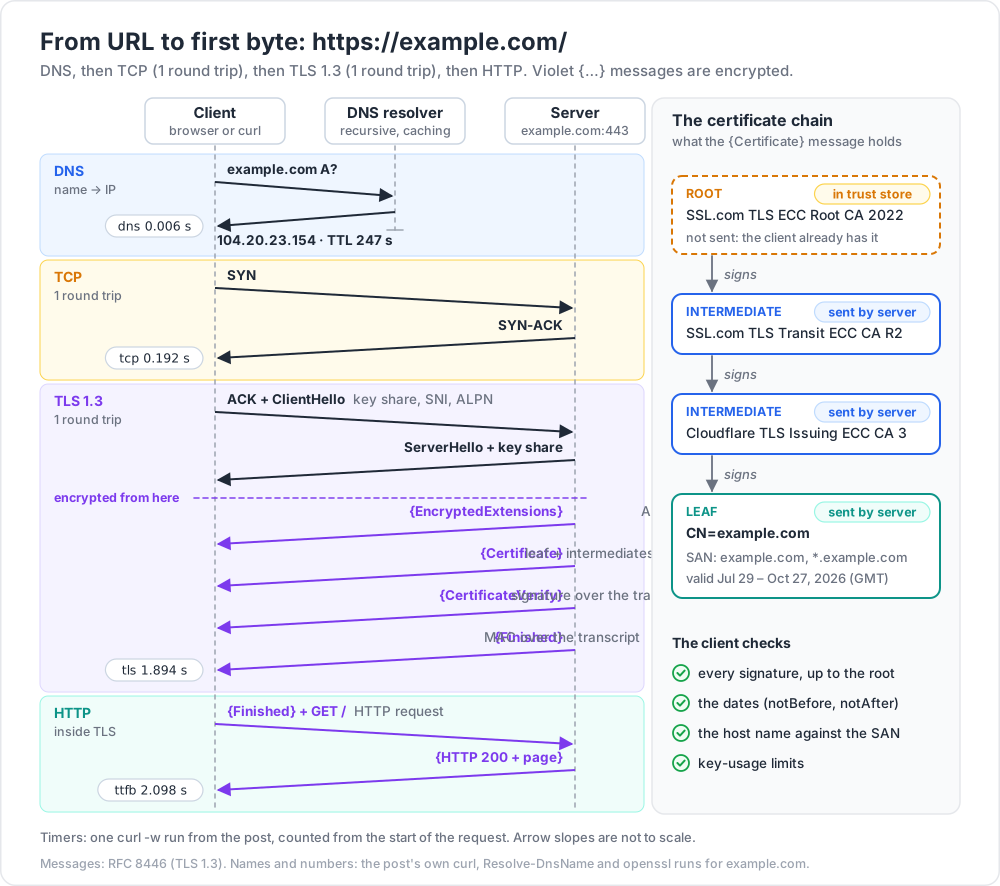
The whole trip for https://example.com/:
- Parse the URL. Scheme
https, hostexample.com, default port443, path/. - HSTS check. If the browser has a Strict-Transport-Security rule for this host, it never uses plain
http://(Chapter 7). - DNS. Turn
example.cominto an IP address (Chapter 2). - TCP. Open a reliable connection to that IP on port 443 (Chapter 3).
- TLS. Agree on keys, check the certificate, switch to encryption (Chapters 4-5).
- HTTP. Send
GET /inside the encrypted channel and read the response.
1
2
3
4
5
6
7
8
9
client server
|--- DNS "example.com A?" --> resolver --> 104.20.23.154 (TTL 247 s)
|--- TCP SYN --------------------------------------> | 1 round trip
|<-- SYN-ACK --------------------------------------- |
|--- ACK + TLS ClientHello (key share, SNI, ALPN) -> | 1 round trip
|<-- ServerHello + cert + Finished (encrypted) ----- |
|--- Finished + HTTP GET / (encrypted) ------------> |
|<-- HTTP 200 + page (encrypted) ------------------- |
A round trip time (RTT) is the time for a packet to reach the server and come back. Every handshake costs round trips. Round trips are what make a far-away server feel slow.
curl can print a timer for each phase, measured from the start of the request:
1
2
3
# Git Bash / Linux / macOS
curl -s -o /dev/null -w "dns=%{time_namelookup}s tcp=%{time_connect}s tls=%{time_appconnect}s ttfb=%{time_starttransfer}s\n" https://example.com/
1
2
3
# Windows PowerShell 5.1: "curl" is an alias for Invoke-WebRequest, so call curl.exe
curl.exe -s -o NUL -w "dns=%{time_namelookup}s tcp=%{time_connect}s tls=%{time_appconnect}s ttfb=%{time_starttransfer}s\n" https://example.com/
1
2
dns=0.006468s tcp=0.192066s tls=1.894353s ttfb=2.098498s
DNS took about 6 ms (it was cached). TCP was done at 192 ms, TLS at 1.89 s, and the first response byte (TTFB, time to first byte) came at 2.10 s. To get the length of one phase, subtract the value before it.
Chapter 2 — DNS: from name to IP address
Packets are routed by IP address, not by name. DNS (RFC 1034/1035) is the distributed phone book that turns names into addresses.
1
2
3
4
5
6
7
your app ─► stub resolver (small client in the OS; cache hit? answer at once)
▼
recursive resolver (ISP, router, 1.1.1.1, 8.8.8.8; does the walking, caches everything)
├─► root server "who handles .com?" → the .com TLD servers
├─► .com TLD server "who handles example.com?" → its authoritative servers
└─► authoritative "example.com A?" → 104.20.23.154, TTL 300
There are 13 named root server identities (a.root-servers.net to m.root-servers.net), each served from many sites by anycast. The authoritative server holds the real records, and is usually run by your DNS host or CDN.
Every answer carries a TTL (time to live) in seconds. Caches may reuse the answer until the TTL runs out. That is why a DNS change takes time to reach everyone: old answers live until their TTL ends.
Trick: before you move a site to a new IP, lower the TTL (for example to 300 s) a day ahead. After the move, raise it again.
1
2
3
4
5
6
# Linux / macOS (dig comes with BIND tools; Git Bash does not include it)
dig example.com A +noall +answer
dig example.com CAA +short # which CAs may issue certificates for this domain
dig +trace example.com # walk root → TLD → authoritative yourself
nslookup -type=A example.com # works everywhere, including Git Bash on Windows
1
2
3
4
5
6
# Windows PowerShell 5.1
Resolve-DnsName example.com -Type A
Resolve-DnsName example.com -Type NS # the authoritative servers
ipconfig /displaydns | Select-String example.com -Context 0,5 # what the OS has cached
Clear-DnsClientCache # same as ipconfig /flushdns
1
2
3
4
5
Name Type TTL Section IPAddress
---- ---- --- ------- ---------
example.com A 247 Answer 172.66.147.243
example.com A 247 Answer 104.20.23.154
Run it again a minute later and the TTL is lower: the answer came from a cache that is counting down. Resolve-DnsName in PowerShell 5.1 and the Windows nslookup do not know the CAA type, so use dig (Linux, macOS, WSL) for that one.
| Type | Holds | Why it matters for HTTPS |
|---|---|---|
A / AAAA |
IPv4 / IPv6 address | Where to connect. |
CNAME |
Alias to another name | Common for CDNs (www → xyz.cdn.net). |
CAA |
CAs allowed to issue for the domain (RFC 8659) | A CA must check it before issuing. |
TXT |
Free text | Used by the ACME dns-01 challenge (Chapter 8). |
HTTPS / SVCB |
Connection hints: ALPN list, ECH keys (RFC 9460) | Tells the browser about HTTP/3 and ECH before it connects. |
Watch out: classic DNS is plain text, so anyone on the path can see which names you look up. DNS over HTTPS (DoH, RFC 8484) and DNS over TLS (DoT, RFC 7858) encrypt the query between you and the recursive resolver.
Chapter 3 — TCP: the three-way handshake
HTTP/1.1 and HTTP/2 run over TCP, which gives an ordered, reliable byte stream. Opening it takes three packets:
1
2
3
4
client → server SYN "I want to talk. My starting sequence number is x."
server → client SYN-ACK "OK. Mine is y. I got your x."
client → server ACK "I got your y." (data can follow right away)
That is one full round trip before any data flows. To test only the TCP step:
1
2
Test-NetConnection example.com -Port 443 # look for TcpTestSucceeded : True
1
2
curl -sv telnet://example.com:443 --max-time 3 # telnet:// opens TCP only, no TLS
A timeout usually means a firewall, a wrong IP (stale DNS), or a server that is down. A fast connection refused means the host is reachable but nothing listens on that port. If TCP fails, TLS never starts.
Chapter 4 — The TLS 1.3 handshake
TLS (Transport Layer Security) gives three things: confidentiality (only the two ends can read), integrity (changes on the way are detected), and authentication (you reached the real example.com).
TLS 1.3 was defined in RFC 8446 (August 2018). In July 2026 the IETF published RFC 9846, which obsoletes RFC 8446. It calls itself a minor update that keeps the version number 1.3 and stays backward compatible. It also obsoletes RFC 5246, the TLS 1.2 spec.
1
2
3
4
5
6
7
8
9
10
11
12
13
14
15
Client Server
ClientHello
+ supported_versions (1.3) + key_share (ephemeral public key, e.g. X25519)
+ server_name (SNI) + ALPN ("h2", "http/1.1") + signature_algorithms
-------->
ServerHello + key_share (server's ephemeral public key)
── everything below is encrypted ──
{EncryptedExtensions} ALPN choice, ...
{Certificate} leaf + intermediates
{CertificateVerify} signature over the transcript
{Finished} MAC over the transcript
<--------
{Finished} + [HTTP request] ----->
<-------- [HTTP response]
- ClientHello. The client guesses which key-exchange group the server accepts and sends a public key for it at once. This guess is what saves a round trip compared with TLS 1.2.
- ServerHello. The server sends its own public key. Both sides now run ECDHE (Elliptic-Curve Diffie-Hellman, Ephemeral): each mixes its private key with the other's public key and gets the same shared secret. Someone watching the wire cannot compute it.
- Keys are derived from that secret. Everything after ServerHello is encrypted, including the certificate.
- CertificateVerify. The server signs a hash of all handshake messages so far with the private key of its certificate. This proves it owns the certificate, not just a copy.
- Finished. Each side sends a MAC over the whole transcript. If an attacker changed any earlier message, the MACs do not match and the connection dies.
- The client sends its HTTP request together with its Finished. Total: one round trip (1-RTT).
The key pairs are ephemeral: new for each connection, then thrown away. So stealing the server's certificate key later does not decrypt recorded old sessions. This is forward secrecy.
1
2
3
# Git Bash ships OpenSSL
openssl s_client -connect example.com:443 -servername example.com -brief < /dev/null
1
2
3
4
5
6
7
CONNECTION ESTABLISHED
Protocol version: TLSv1.3
Ciphersuite: TLS_AES_256_GCM_SHA384
Peer certificate: CN=example.com
Verification: OK
Server Temp Key: X25519, 253 bits
TLS_AES_256_GCM_SHA384 means AES-256 in GCM mode (an AEAD cipher: it encrypts and checks integrity in one step) with SHA-384 for key derivation. Server Temp Key is the ephemeral ECDHE group. That output came from OpenSSL 3.2. From OpenSSL 3.5 on, the default key shares offer the hybrid post-quantum group X25519MLKEM768 (classic X25519 plus ML-KEM-768) as well as X25519, so you may see that name instead.
Resumption and 0-RTT
After a handshake the server can send a session ticket. Next time the client presents it as a pre-shared key (PSK) and may send data in its very first flight: 0-RTT early data.
Watch out: 0-RTT data can be replayed. An attacker who records the first flight can send it again, and the server may act on it twice. RFC 8446 says 0-RTT data has no non-replay guarantee between connections, and it is not forward secret either. Allow it only for safe, idempotent requests such as
GET. RFC 8470 defines theEarly-Data: 1header and the425 Too Earlystatus for HTTP servers that want to refuse it.
Terminology
| Term | Meaning |
|---|---|
| Key share | Public key sent in a hello message for key exchange. |
| ECDHE | Key agreement: both sides derive the same secret from their key pairs. |
| Forward secrecy | Old sessions stay safe even if the long-term key leaks later. |
| AEAD | Cipher giving confidentiality and integrity together (AES-GCM, ChaCha20-Poly1305). |
| Transcript | All handshake messages so far; signed and MAC'd to stop tampering. |
| PSK / 0-RTT | Resumption key / data sent before the handshake finishes. |
Chapter 5 — Certificates and the chain of trust
Key exchange gives encryption, but encryption with whom? The certificate answers that. It is a statement, "this public key belongs to example.com", signed by a Certificate Authority (CA).
1
2
3
openssl s_client -connect example.com:443 -servername example.com < /dev/null 2>/dev/null \
| openssl x509 -noout -subject -issuer -dates -ext subjectAltName
1
2
3
4
5
6
7
subject=CN=example.com
issuer=C=US, O=SSL Corporation, CN=Cloudflare TLS Issuing ECC CA 3
notBefore=Jul 29 22:10:08 2026 GMT
notAfter=Oct 27 22:17:21 2026 GMT
X509v3 Subject Alternative Name:
DNS:example.com, DNS:*.example.com
- Subject Alternative Name (SAN) — the host names the certificate is valid for. Clients check the SAN, not the old Common Name.
- notBefore / notAfter — the validity window. Outside it, the certificate is rejected.
- Issuer — who signed it. The issuer has its own certificate, and so on up the chain.
1
2
3
4
5
6
7
8
[root] SSL.com TLS ECC Root CA 2022 ← already in your OS / browser trust store
│ signs
[intermediate] SSL.com TLS Transit ECC CA R2 ← sent by the server
│ signs
[intermediate] Cloudflare TLS Issuing ECC CA 3 ← sent by the server
│ signs
[leaf] CN=example.com ← sent by the server
The server sends the leaf plus the intermediates. It does not send the root: the client must already have it in its trust store. The client builds a path from the leaf to a trusted root and checks every signature, the dates, the host name against the SAN, and key-usage limits. On Windows you can build the same chain with .NET (PowerShell 5.1):
1
2
3
4
5
6
7
8
9
10
11
$h = "example.com"
$tcp = New-Object System.Net.Sockets.TcpClient($h, 443)
$ssl = New-Object System.Net.Security.SslStream($tcp.GetStream(), $false)
$ssl.AuthenticateAsClient($h)
$cert = New-Object System.Security.Cryptography.X509Certificates.X509Certificate2($ssl.RemoteCertificate)
$chain = New-Object System.Security.Cryptography.X509Certificates.X509Chain
[void]$chain.Build($cert)
"Protocol: $($ssl.SslProtocol) NotAfter: $($cert.NotAfter)" # NotAfter is in local time
$chain.ChainElements | ForEach-Object { " -> " + $_.Certificate.Subject }
$ssl.Dispose(); $tcp.Dispose()
It prints Tls13 and the same four names, leaf first. Trust stores differ by client: Windows and Chrome/Edge on Windows use the Windows certificate store (Get-ChildItem Cert:\LocalMachine\Root); macOS uses the keychain; Firefox has its own Mozilla store; Linux tools use a distro bundle; Python requests uses the certifi bundle. So one site can pass in one tool and fail in another.
How long a certificate may live — the rules today
Public TLS certificates follow the CA/Browser Forum Baseline Requirements. Ballot SC-081v3, adopted on April 11, 2025, shrinks the maximum validity in steps (Baseline Requirements, section 6.3.2):
| Certificate issued on or after | Issued before | Maximum validity |
|---|---|---|
| — | 2026-03-15 | 398 days |
| 2026-03-15 | 2027-03-15 | 200 days ← applies now |
| 2027-03-15 | 2029-03-15 | 100 days |
| 2029-03-15 | — | 47 days |
The same ballot cuts how long a CA may reuse a domain-validation result: 200 days from 2026-03-15, 100 days from 2027-03-15, 10 days from 2029-03-15. So a certificate issued today lives at most 200 days, and yearly manual renewal is already gone.
Revocation. If a key leaks, the CA can revoke the certificate and publish that in a CRL (signed list of revoked serial numbers) or via OCSP (ask about one certificate). Let's Encrypt turned off its OCSP service on August 6, 2025, and now publishes revocation data only through CRLs. Short lifetimes also limit damage: a leaked short-lived certificate soon stops working anyway.
Trick: every publicly trusted certificate is recorded in public Certificate Transparency logs. Search your domain on a CT search site such as crt.sh to see every certificate ever issued for it.
Chapter 6 — SNI, ECH, ALPN, HTTP/2 and HTTP/3
SNI. One IP often serves thousands of sites (think of a CDN). The server must pick a certificate before any HTTP Host header exists. So the client puts the host name in the ClientHello: the Server Name Indication extension (RFC 6066). That is why openssl s_client needs -servername. Without it you may get a default certificate for another name.
ECH. SNI is plain text, so the network can see which site you visit. Encrypted Client Hello encrypts the real ClientHello under a public key the site publishes in its HTTPS DNS record.
- RFC 9849, TLS Encrypted Client Hello, was published in March 2026 (Standards Track). RFC 9848, the same month, defines how ECH settings travel in SVCB/HTTPS DNS records.
- Chrome Platform Status lists ECH as enabled by default since Chrome 117. Firefox 119 release notes say ECH "is now available to Firefox users".
- OpenSSL 4.0, released April 14, 2026, added ECH support.
- The site's server or CDN must support it too. Where it does not, the connection falls back to normal SNI.
ALPN. Application-Layer Protocol Negotiation (RFC 7301) lets the client list protocols such as h2 and http/1.1 in the ClientHello. The server picks one in its reply, with no extra round trip.
1
2
3
openssl s_client -connect example.com:443 -servername example.com -alpn h2,http/1.1 < /dev/null 2>/dev/null | grep ALPN
# ALPN protocol: h2
| HTTP/1.1 | HTTP/2 (RFC 9113) | HTTP/3 (RFC 9114) | |
|---|---|---|---|
| Transport | TCP + TLS | TCP + TLS | QUIC over UDP (RFC 9000) |
| Requests per connection | One at a time | Many streams | Many streams |
| One lost packet stalls | That connection | All streams (TCP head-of-line blocking) | Only its own stream |
| Setup | TCP 1 RTT + TLS 1 RTT | Same | Transport + TLS 1.3 together, 1 RTT |
QUIC carries TLS 1.3 inside its own handshake (RFC 9001). A browser learns that a site speaks HTTP/3 from the HTTPS DNS record or from an Alt-Svc response header. The one from google.com begins with Alt-Svc: h3=":443"; ma=2592000 ("HTTP/3 on port 443, remember this for 30 days").
Watch out:
curl --http3works only if your curl build has HTTP/3. Check the Features line ofcurl -VforHTTP3. Neither the Git Bash curl nor the Windowscurl.exeused for this post had it.
Chapter 7 — HSTS: never talk plain HTTP again
A user types example.com with no scheme. The browser tries http://, and the server redirects to https://. That first plain request can be intercepted. An attacker on public Wi-Fi can keep the user on HTTP ("SSL stripping").
HTTP Strict Transport Security (RFC 6797) closes the gap. The server sends, over HTTPS:
1
2
Strict-Transport-Security: max-age=31536000; includeSubdomains; preload
(That exact header comes from github.com.) For max-age seconds (here one year) the browser turns every http:// URL for the host into https:// before sending anything. It also stops users from clicking through certificate errors. includeSubDomains applies the rule to every subdomain. preload agrees to be built into browsers' preload list, which also protects the very first visit. To join that list, hstspreload.org requires a valid certificate, an HTTP → HTTPS redirect, HTTPS on all subdomains, and a header with max-age of at least 31536000, includeSubDomains and preload.
Common pitfall: adding
includeSubDomains; preloadwhile some old subdomain (an intranet box, a printer page) only speaks HTTP. Browsers will refuse it. The preload site warns that removal takes months to reach users. Start with a shortmax-age, check every subdomain, then raise it.
Chapter 8 — Let's Encrypt and ACME
Let's Encrypt is a free, automated CA. Clients talk to it with ACME (Automatic Certificate Management Environment, RFC 8555):
- The client creates an account key and places an order for names, e.g.
example.comandwww.example.com. - For each name the CA sets a challenge to prove control:
http-01— serve a token athttp://<name>/.well-known/acme-challenge/<token>.dns-01— publish aTXTrecord at_acme-challenge.<name>. Needed for wildcard certificates.tls-alpn-01— answer a special TLS handshake on port 443 (RFC 8737).
- The client finalizes with a CSR (certificate signing request) holding its public key.
- The CA issues the certificate; the client installs it and reloads the server.
1
2
3
sudo certbot --nginx -d example.com -d www.example.com # typical Linux + nginx
sudo certbot renew --dry-run # prove that auto-renewal works
On Windows servers, win-acme does the same job. Caddy, and hosts such as GitHub Pages, Cloudflare and AWS Certificate Manager, run ACME for you.
Let's Encrypt profiles today (from its profiles page):
| Profile | Validity | Notes |
|---|---|---|
classic |
90 days | The default. |
tlsserver |
45 days | For subscribers who "fully embrace automation". |
shortlived |
160 hours (just over 6 days) | Generally available since January 15, 2026; opt-in; required for IP-address certificates. |
The announced plan for the default: on February 10, 2027, classic moves to 64-day certificates with a 10-day authorization reuse period. On February 16, 2028 it moves to 45 days with a 7-hour reuse period. That stays under the 47-day cap that starts March 15, 2029.
ACME Renewal Information (ARI), RFC 9773 (June 2025), lets the CA tell your client when to renew, for example early during an incident. Let's Encrypt recommends ARI and renewing about two-thirds of the way through a certificate's life.
Trick: alert when any certificate has less than a third of its life left. Automation fails quietly: a changed firewall rule, an expired DNS API token. Exercise 3 builds a checker.
Chapter 9 — Common HTTPS errors and how to diagnose them
| Symptom (Chrome) | openssl verify result |
Usual cause | Fix |
|---|---|---|---|
NET::ERR_CERT_DATE_INVALID |
10 (certificate has expired) |
Renewal did not run, or the server was not reloaded | Renew, reload, find out why automation failed |
NET::ERR_CERT_COMMON_NAME_INVALID |
62 (hostname mismatch) |
Name not in SAN; wrong virtual host; no SNI | Add the name; check server_name / SNI |
| Fails in some clients only | 21 (unable to verify the first certificate) |
Server sends the leaf without intermediates | Serve the full chain (fullchain.pem) |
NET::ERR_CERT_AUTHORITY_INVALID |
18 (self-signed certificate) / 19 (self-signed certificate in certificate chain) |
Self-signed cert, private CA, TLS-inspecting proxy | Public CA, or install the private root on purpose |
NET::ERR_CERT_DATE_INVALID on a good site |
9 (certificate is not yet valid) |
Your clock is wrong | Fix the system time |
The site badssl.com hosts broken endpoints on purpose, so you can practise safely:
1
2
3
4
5
6
for h in expired wrong.host incomplete-chain self-signed; do
printf "%-18s " "$h"
openssl s_client -connect $h.badssl.com:443 -servername $h.badssl.com \
-verify_hostname $h.badssl.com < /dev/null 2>/dev/null | grep "Verify return code"
done
1
2
3
4
5
expired Verify return code: 10 (certificate has expired)
wrong.host Verify return code: 62 (hostname mismatch)
incomplete-chain Verify return code: 21 (unable to verify the first certificate)
self-signed Verify return code: 18 (self-signed certificate)
The same check in Python, with days left:
1
2
3
4
5
6
7
8
9
10
11
12
13
14
15
16
17
18
19
import socket, ssl
from datetime import datetime, timezone
def check(host, port=443):
ctx = ssl.create_default_context()
try:
with socket.create_connection((host, port), timeout=5) as sock:
with ctx.wrap_socket(sock, server_hostname=host) as tls:
cert = tls.getpeercert()
end = datetime.fromtimestamp(ssl.cert_time_to_seconds(cert["notAfter"]), tz=timezone.utc)
days = (end - datetime.now(timezone.utc)).days
print(f"{host}: OK {tls.version()} expires {end:%Y-%m-%d} ({days} days left)")
except ssl.SSLCertVerificationError as e:
print(f"{host}: FAIL {e.verify_message}")
for h in ["example.com", "expired.badssl.com", "wrong.host.badssl.com",
"incomplete-chain.badssl.com", "self-signed.badssl.com"]:
check(h)
1
2
3
4
5
6
example.com: OK TLSv1.3 expires 2026-10-27 (32 days left)
expired.badssl.com: FAIL certificate has expired
wrong.host.badssl.com: FAIL Hostname mismatch, certificate is not valid for 'wrong.host.badssl.com'.
incomplete-chain.badssl.com: OK TLSv1.2 expires 2026-10-26 (31 days left)
self-signed.badssl.com: FAIL self-signed certificate
Why the missing intermediate is so confusing. openssl failed on incomplete-chain, but Python on Windows said OK, and so did the Windows curl (Schannel). Windows can download a missing intermediate itself, from the "CA Issuers" (AIA) URL inside the leaf, and it caches the result. Python on Windows loads certificates from the Windows stores, so it most likely found that cached copy. Many clients never do this: openssl, many Linux tools, Java, some mobile apps. So the site "works on my machine" and fails for others.
Common pitfall: testing only in your desktop browser. Always test the chain with
openssl s_client, which does not fetch missing intermediates, or with an online SSL checker.
Clock skew. A certificate is valid only between notBefore and notAfter. A clock that is a year behind makes every new certificate "not yet valid". A clock that is ahead makes them look expired. Suspects: dead CMOS battery, fresh VMs, devices without network time. Check with w32tm /query /status on Windows (w32tm /resync in an admin shell forces a sync) or timedatectl status on Linux ("System clock synchronized: yes"). More in Dev Essentials 02 · Dates & Time Zones.
In the browser. In Chrome or Edge, click the icon left of the address and open the connection details to view the certificate. DevTools has a Security panel (called "Privacy and security" in some recent versions) with the protocol, key exchange, cipher and a View certificate button. In Firefox: padlock → Connection secure → More information → View Certificate.
Watch out: never "fix" an error by turning verification off:
curl -k,requests.get(url, verify=False),NODE_TLS_REJECT_UNAUTHORIZED=0. That removes the authentication part of TLS, and any man-in-the-middle can then read and change your traffic. Fix the certificate, or add your private CA to the trust store on purpose.
Practice Exercises
Exercise 1 — Time each phase
Run curl -w against three sites: one near you, one far away, one behind a CDN. Work out DNS, TCP and TLS time separately. Which phases grow with distance?
Solution
1
2
3
4
for u in https://example.com https://www.gov.uk https://www.cloudflare.com; do
curl -s -o /dev/null -w "$u dns=%{time_namelookup} tcp=%{time_connect} tls=%{time_appconnect}\n" "$u"
done
TCP time is tcp - dns, and TLS time is tls - tcp. Each costs about one RTT, so both grow with distance. DNS is often near zero after the first run because of caching. A CDN cuts TCP and TLS time because the handshake ends at an edge server near you.
Exercise 2 — Read a chain
Run openssl s_client -showcerts against github.com. Which certificates did the server send, and which one did it not send?
Solution
1
2
3
openssl s_client -connect github.com:443 -servername github.com -showcerts < /dev/null 2>/dev/null \
| grep -E "^ [0-9] s:|^ i:"
1
2
3
4
5
6
7 0 s:CN=github.com
   i:C=GB, O=Sectigo Limited, CN=Sectigo Public Server Authentication CA DV E36
 1 s:C=GB, O=Sectigo Limited, CN=Sectigo Public Server Authentication CA DV E36
   i:C=GB, O=Sectigo Limited, CN=Sectigo Public Server Authentication Root E46
 2 s:C=GB, O=Sectigo Limited, CN=Sectigo Public Server Authentication Root E46
   i:C=US, ST=New Jersey, L=Jersey City, O=The USERTRUST Network, CN=USERTrust ECC Certification Authority
Line 0 is the leaf and line 1 the intermediate. Line 2 is the newer Sectigo E46 root cross-signed by the older USERTrust root, which helps older clients that only trust USERTrust. The top root (USERTrust) is not sent: the client must already trust it, and an untrusted root would not help.
Exercise 3 — Expiry monitor
Change the Chapter 9 checker so it reads host names from a file and exits with code 1 if any certificate fails or has fewer than 30 days left. A scheduled task or CI job can then alert on it.
Solution
1
2
3
4
5
6
7
8
9
10
11
12
13
14
15
16
17
18
19
20
21
import socket, ssl, sys
from datetime import datetime, timezone
def days_left(host):
ctx = ssl.create_default_context()
with socket.create_connection((host, 443), timeout=5) as sock:
with ctx.wrap_socket(sock, server_hostname=host) as tls:
end = ssl.cert_time_to_seconds(tls.getpeercert()["notAfter"])
return (datetime.fromtimestamp(end, tz=timezone.utc) - datetime.now(timezone.utc)).days
bad = False
for host in open(sys.argv[1], encoding="utf-8").read().split():
try:
d = days_left(host)
bad |= d < 30
print(f"{'WARN' if d < 30 else 'ok':4} {host:30} {d} days")
except (ssl.SSLError, OSError) as e:
bad = True
print(f"FAIL {host:30} {e}")
sys.exit(1 if bad else 0)
Run python certwatch.py hosts.txt, then check $? (Bash) or $LASTEXITCODE (PowerShell). A fixed 30 days is too long for 6-day certificates. A threshold of one-third of the lifetime scales better.
Exercise 4 — Design an HSTS header
shop.example is fully HTTPS, except legacy.shop.example, an HTTP-only admin box that will be retired in three months. What HSTS header should shop.example send today?
Solution
1
2
Strict-Transport-Security: max-age=31536000
Leave out includeSubDomains and preload until legacy is gone or on HTTPS. Otherwise browsers that visited shop.example would refuse plain HTTP to legacy.shop.example. After the retirement, add includeSubDomains, test, then think about preload.
Exercise 5 — 0-RTT risk
A banking API accepts 0-RTT early data. Why is POST /transfer?to=alice&amount=100 in early data dangerous, and what should the server do?
Solution
Early data can be replayed: an attacker who captured the first flight can send it again, and the transfer may run twice. The server should accept only idempotent requests (such as GET) as early data. For anything else it should refuse early data, for example with 425 Too Early (RFC 8470), so the client retries after the full handshake. The request should also carry an idempotency key (see Dev Essentials 14 · API Reliability).
Cheat-sheet
| Task | Bash / Git Bash | PowerShell 5.1 |
|---|---|---|
| DNS lookup | nslookup -type=A host, dig host +short |
Resolve-DnsName host -Type A |
| Walk the DNS tree | dig +trace host |
— |
| Flush DNS cache | (depends on OS) | Clear-DnsClientCache |
| TCP only | curl -sv telnet://host:443 |
Test-NetConnection host -Port 443 |
| Phase timings | curl -s -o /dev/null -w "...%{time_appconnect}..." URL |
same with curl.exe and -o NUL |
| Handshake summary | openssl s_client -connect host:443 -servername host -brief |
.NET SslStream (Chapter 5) |
| Certificate fields | pipe into openssl x509 -noout -subject -issuer -dates -ext subjectAltName |
$cert.Subject, $cert.NotAfter |
| Chain the server sent | openssl s_client ... -showcerts |
X509Chain.Build |
| ALPN result | openssl s_client ... -alpn h2,http/1.1 |
— |
| Clock status | timedatectl status |
w32tm /query /status |
| Fact (September 2026) | Value |
|---|---|
| TLS 1.3 spec | RFC 8446 (2018), obsoleted by RFC 9846 (July 2026); still version 1.3 |
| Max public cert lifetime | 200 days now; 100 days from 2027-03-15; 47 days from 2029-03-15 |
| Let's Encrypt default | classic, 90 days; OCSP off since 2025-08-06; CRLs only |
| ECH | RFC 9849 (March 2026) |
| HTTP/3 | RFC 9114, over QUIC (RFC 9000) |
What's next
Post 08 · Floating Point leaves the network. It explains why 0.1 + 0.2 prints 0.30000000000000004, how IEEE 754 doubles are laid out, how to compare floats safely, and how to store money without losing cents.
References
- RFC 8446 — TLS 1.3 (2018); RFC 9846 — TLS 1.3 (July 2026, obsoletes 8446)
- RFC 1034 / RFC 1035 — DNS; RFC 9460 — SVCB and HTTPS records
- RFC 6066 — TLS extensions, incl. SNI; RFC 7301 — ALPN
- RFC 9849 — TLS Encrypted Client Hello; RFC 9848 — ECH in DNS
- RFC 9113 — HTTP/2; RFC 9000 — QUIC; RFC 9114 — HTTP/3
- RFC 6797 — HSTS; HSTS preload list
- RFC 8555 — ACME; RFC 9773 — ACME Renewal Information; RFC 8470 — Early Data in HTTP
- CA/Browser Forum Ballot SC-081v3; Baseline Requirements source
- Let's Encrypt: Profiles · Certificate lifetimes · From 90 to 45 days · OCSP end of life · 6-day certificates GA
- OpenSSL 4.0 release; Chrome Platform Status — ECH
- Chrome DevTools — Security panel; badssl.com
Note: this post is in progress. Planned additions: a Wireshark walkthrough of a TLS 1.3 handshake (with
SSLKEYLOGFILE), mutual TLS with client certificates, and a closer look at post-quantum key exchange.