Dev Essentials — 11 · Authentication Done Right — Password Hashing, Sessions vs JWT, OAuth 2 and OIDC
Almost every app has a login box, and almost every data breach story has a login box somewhere in it. This post teaches the parts you must get right: how to store passwords (slow hashing, never encryption), which password rules the current NIST guideline asks for, how to harden a login form, how sessions and JWTs really differ, and what OAuth 2.0 and OpenID Connect are for. It ends with a small FastAPI app that does session login with Argon2id hashes. Every example runs on localhost only.
Series map: 01 Text Encoding → … → 10 Debugging → 11 Auth (this post) → 12 OWASP Top 10 → … → 24 Desk Health. Part C · Building safely.
Learning Outcome
- Tell authentication from authorization, and pick 401 vs 403 correctly.
- Store passwords with Argon2id (or scrypt / bcrypt / PBKDF2) and the current OWASP parameters; explain salt vs pepper.
- Apply the password rules of NIST SP 800-63B-4: length, no composition rules, no forced rotation, blocklists.
- Harden a login: rate limits, generic errors, TOTP (RFC 6238) and passkeys (WebAuthn).
- Build server-side sessions with safe cookie flags, and know when a JWT is the better tool.
- Describe the OAuth 2.0 authorization code flow with PKCE, and the difference between an ID token and an access token.
Chapter 1 — Who are you, and what may you do?
Two questions sit behind every protected request:
- Authentication (AuthN) — who are you? The user proves an identity, for example with a password plus a code.
- Authorization (AuthZ) — what may you do? The app checks whether this identity may read or change this thing.
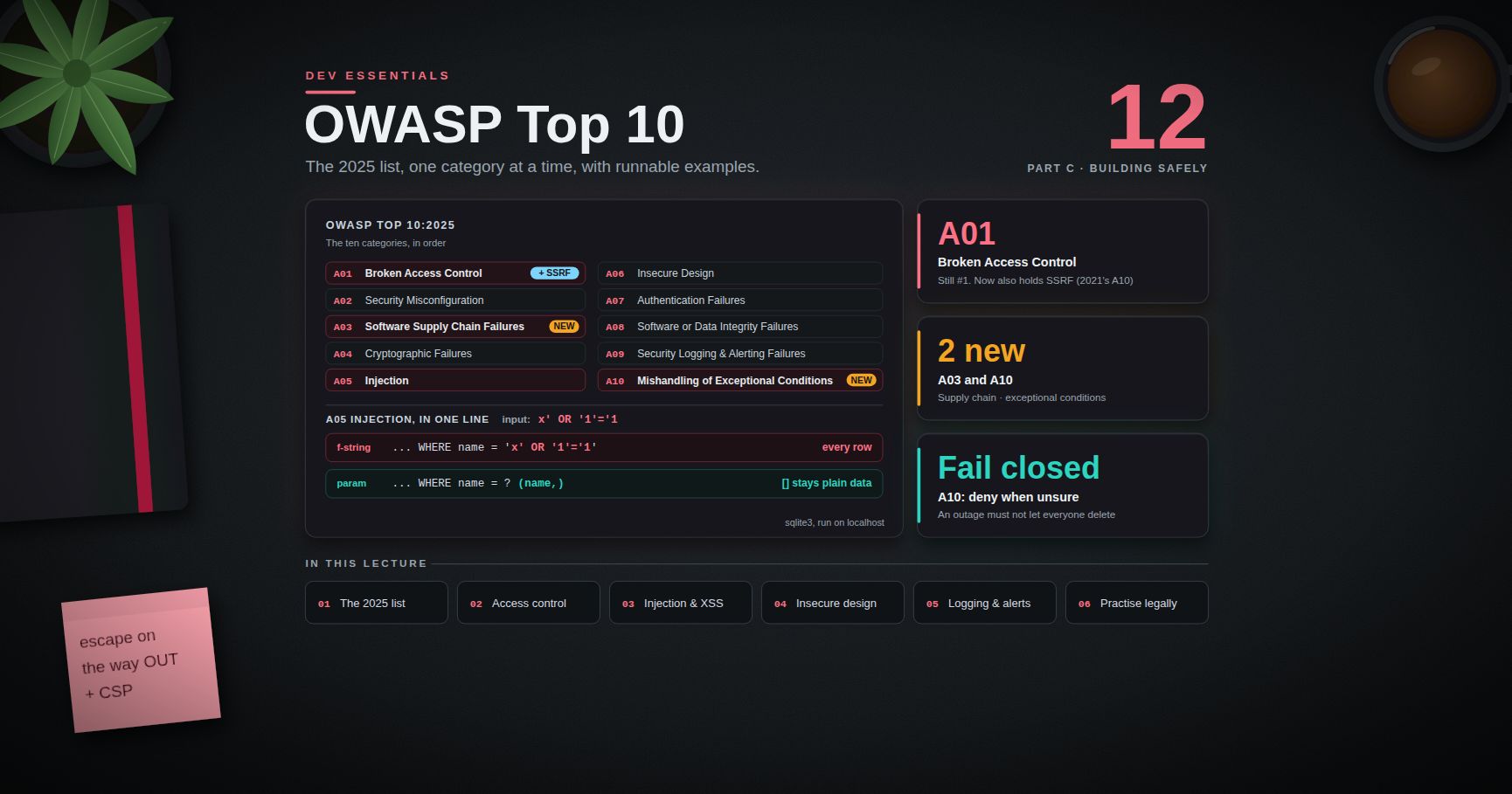
They fail in different ways. A perfect login does not help if any logged-in user can open /invoices/42 that belongs to someone else. That second bug is authorization, and Dev Essentials 12 · OWASP Top 10 shows it as "Broken Access Control".
HTTP has a status code for each. 401 Unauthorized means "I do not know who you are" (not logged in, or a bad token). 403 Forbidden means "I know who you are, and you may not do this". A 404 is also fine for "not yours" when you do not want to reveal that the thing exists.
Terminology
- Credential — the thing that proves identity: a password, a private key, a code.
- Factor — a kind of proof: something you know (password), have (phone, security key), or are (fingerprint). MFA means two or more different kinds.
- Session — the server remembers "this browser is logged in as Ada" after the login step.
- Token — a string the client sends with each request to show it is logged in. It can be a random ID (a reference) or a signed document such as a JWT (a value).
- Identity provider (IdP) — a service that logs users in for other apps (Google, Microsoft Entra ID, Okta, Keycloak).
Chapter 2 — Storing passwords
Never plain text, never reversible encryption
If you store passwords as plain text, one database leak exposes every user — and most users reuse passwords on other sites. Encryption is not the answer either. Encrypted data can be decrypted, so whoever steals the key gets every password back. You want a one-way function: easy to check a guess, impossible to reverse. That is a hash. But not any hash.
Why SHA-256 is the wrong hash
SHA-256 and MD5 are built to be fast. A modern GPU can compute billions of them per second. If an attacker steals your table of SHA-256 password hashes, they hash every word from a big list of leaked passwords and compare. Password hashing functions are built to be slow and memory-hungry on purpose. One login costs your server a fraction of a second. For an attacker trying billions of guesses, the same cost becomes enormous. Being memory-hard matters too: GPUs have many cores but little memory per core, so a hash that needs many MiB per guess slows them down.
Salt and pepper
- Salt — a random value, different for every password, stored next to the hash. Two users with the same password get different hashes, and precomputed tables ("rainbow tables") become useless. Modern libraries make and store the salt for you.
- Pepper — one secret value shared by all passwords, stored outside the database (a secrets manager or an HSM). OWASP says a pepper "should not be stored along with the generated hash". If only the database leaks, the hashes cannot be cracked without it. A pepper is defence in depth, not a replacement for a slow hash.
The algorithms and the current OWASP parameters
The OWASP Password Storage Cheat Sheet (checked September 2026) gives this order of preference. The quotes are exact:
| Algorithm | When | OWASP parameters |
|---|---|---|
| Argon2id | First choice | "a minimum configuration of 19 MiB of memory, an iteration count of 2, and 1 degree of parallelism" |
| scrypt | If Argon2id is not available | "a minimum CPU/memory cost parameter of (2^17), a minimum block size of 8 (1024 bytes), and a parallelization parameter of 1" |
| bcrypt | Legacy systems | "a work factor of 10 or more and with a password limit of 72 bytes" |
| PBKDF2 | When FIPS-140 compliance is required | "PBKDF2-HMAC-SHA256: 600,000 iterations"; "PBKDF2-HMAC-SHA512: 220,000 iterations" |
OWASP also lists Argon2id settings that give about the same protection. You can trade memory for iterations: m=47104 (46 MiB), t=1, p=1, m=19456 (19 MiB), t=2, p=1, m=12288 (12 MiB), t=3, p=1, m=9216 (9 MiB), t=4, p=1, m=7168 (7 MiB), t=5, p=1.
Watch out: bcrypt only uses the first 72 bytes of the input in most implementations. Longer passwords are silently cut, so two different long passwords can match. OWASP says to "enforce a maximum password length of 72 bytes". Note that 72 bytes can be fewer than 72 characters in UTF-8 (see Dev Essentials 01 · Text Encoding). Pre-hashing the password before bcrypt has its own traps (null bytes, "password shucking"), so for new systems just choose Argon2id.
The work factor (or cost) is how much CPU time, and for Argon2 and scrypt how much memory, one hash takes. You raise it as hardware gets faster.
Chapter 3 — Argon2id in Python with argon2-cffi
argon2-cffi is the standard Argon2 library for Python (version 25.1.0 at the time of writing). Install it with pip install argon2-cffi inside a virtual environment (Chapter 7 shows the setup for both shells). The whole API is three methods on PasswordHasher:
1
2
3
4
5
6
7
8
9
10
11
12
13
14
15
16
17
18
# hash_demo.py
from argon2 import PasswordHasher
from argon2.exceptions import VerifyMismatchError
ph = PasswordHasher() # Argon2id, library defaults
h = ph.hash("correct horse battery staple") # new random salt every call
print(h) # $argon2id$v=19$m=65536,t=3,p=4$...$...
print(ph.verify(h, "correct horse battery staple")) # True (constant-time compare)
try:
ph.verify(h, "wrong guess")
except VerifyMismatchError:
print("wrong password")
print(ph.check_needs_rehash(h)) # False: same parameters as ph
stronger = PasswordHasher(time_cost=4)
print(stronger.check_needs_rehash(h)) # True: re-hash at next login
The output is an encoded hash: one string that holds the algorithm, parameters, salt and hash. Store the whole string. hash returns a different string each time for the same password; that is the salt at work. verify reads the parameters and salt back out of the string. check_needs_rehash tells you when a stored hash used older, weaker parameters. The only moment you have the plain password is during login, so that is when you upgrade it.
The library default is the RFC 9106 "low memory" profile: time_cost=3, memory_cost=65536 (KiB, so 64 MiB), parallelism=4. That is above the OWASP minimum. On a small server you can set the OWASP minimum explicitly with PasswordHasher(time_cost=2, memory_cost=19456, parallelism=1).
Trick: measure before you choose. Run
python -m timeit -s "from argon2 import PasswordHasher; ph=PasswordHasher()" "ph.hash('x')"on the real server. Pick the strongest setting whose time and memory your login traffic can afford.
Common pitfall: comparing hashes yourself with
==. Always call the library'sverify. It does the constant-time compare and handles every parameter set that is stored in the string.
Chapter 4 — Password rules from NIST SP 800-63B-4
NIST SP 800-63B-4 is the US government guideline on authentication. The final version was published on 31 July 2025. It supersedes SP 800-63B (revision 3). Many companies follow it, and it drops several old habits. The key rules, quoted:
| Rule | NIST 800-63B-4 text |
|---|---|
| Minimum length, password alone | "SHALL require passwords that are used as a single-factor authentication mechanism to be a minimum of 15 characters in length" |
| Minimum length, with MFA | may be shorter "but SHALL require them to be a minimum of eight characters in length" |
| Maximum length | "SHOULD permit a maximum password length of at least 64 characters" |
| Composition rules | "SHALL NOT impose other composition rules (e.g., requiring mixtures of different character types)" |
| Rotation | "SHALL NOT require subscribers to change passwords periodically" — but "SHALL force a change if there is evidence that the authenticator has been compromised" |
| Blocklist | compare new passwords "against a blocklist that contains known commonly used, expected, or compromised passwords" |
| Unicode | "Each Unicode code point SHALL be counted as a single character" |
| Password managers | "SHALL allow the use of password managers and autofill functionality"; "SHOULD permit" paste |
| No truncation | "SHALL verify the entire submitted password (e.g., not truncate it)" |
NIST also says the blocklist should cover breach corpuses, dictionary words, and "context-specific words, such as the name of the service, the username, and derivatives thereof". Hints and security questions are out.
A small checker that follows these rules:
1
2
3
4
5
6
7
8
9
10
11
12
13
14
15
16
17
18
19
20
21
22
23
24
# password_policy.py
import unicodedata
# In real life, load a large list of breached passwords from a file.
BLOCKLIST = {"password1234567", "123456789012345", "qwertyuiopasdfgh"}
SERVICE_NAME = "examplebank"
def password_problems(password: str, username: str) -> list[str]:
pw = unicodedata.normalize("NFC", password) # NIST suggests NFC normalization
low = pw.lower()
problems = []
if len(pw) < 15: # len() counts code points
problems.append("Use at least 15 characters. A few random words work well.")
if len(pw) > 256: # local cap: stops huge inputs to a slow hash
problems.append("Please keep it under 256 characters.")
if low in BLOCKLIST:
problems.append("This password is too common or has appeared in a data breach.")
if username.lower() in low or SERVICE_NAME in low:
problems.append("Do not include your username or the site name.")
return problems
print(password_problems("Tr0ub4dor&3", "ada")) # too short
print(password_problems("correct horse battery staple", "ada")) # []
Trick: the Have I Been Pwned "Pwned Passwords" range API lets you check a password against real breach data without sending it. You send only the first 5 hex characters of its SHA-1 hash (a k-anonymity model) and compare the returned suffixes locally. No API key is needed.
Chapter 5 — Hardening the login
Rate limiting
Without a limit, an attacker can try thousands of passwords per minute. NIST requires that the verifier "SHALL limit consecutive failed authentication attempts using a specific authenticator on a single subscriber account to no more than 100". Most apps choose a much lower number, plus a limit per IP address. The app in Chapter 7 allows 5 failures per account per 15 minutes. Dev Essentials 14 · API Reliability covers rate-limit algorithms in depth.
Watch out: a hard lockout per account lets anyone lock a real user out on purpose. Prefer growing delays or a temporary block, and give the real user a way to recover.
Generic error messages
Say "Invalid username or password" in both cases. If "no such user" and "wrong password" give different messages, attackers can find which accounts exist (user enumeration). Watch the timing too. If unknown users return instantly while real users take 50 ms to hash, the delay leaks the same fact. The Chapter 7 code hashes a dummy value for unknown users to keep the timing close. Registration and "forgot password" pages leak the same way, so give them neutral replies such as "If that account exists, we sent an email".
MFA with TOTP (RFC 6238)
A Time-based One-Time Password is the 6-digit code in an authenticator app. Server and app share a secret. Both compute HMAC(secret, current_time // 30) and cut the result down to 6 digits. RFC 6238 builds on HOTP (RFC 4226) and recommends a 30-second time step. It needs only the standard library:
1
2
3
4
5
6
7
8
9
10
11
12
13
14
15
16
17
18
19
20
21
22
23
24
25
26
27
# totp.py — RFC 6238 TOTP, standard library only
import base64, hashlib, hmac, secrets, struct, time
def hotp(key: bytes, counter: int, digits: int = 6) -> str:
mac = hmac.new(key, struct.pack(">Q", counter), hashlib.sha1).digest()
offset = mac[-1] & 0x0F # dynamic truncation
code = struct.unpack(">I", mac[offset:offset + 4])[0] & 0x7FFFFFFF
return str(code % 10 ** digits).zfill(digits)
def totp(key: bytes, at: float | None = None, step: int = 30, digits: int = 6) -> str:
t = time.time() if at is None else at
return hotp(key, int(t // step), digits)
def verify(key: bytes, code: str, window: int = 1) -> bool:
now = time.time() # accept one step of clock drift each way
return any(hmac.compare_digest(totp(key, now + i * 30), code)
for i in range(-window, window + 1))
if __name__ == "__main__":
rfc_key = b"12345678901234567890" # RFC 6238 Appendix B test key
print(totp(rfc_key, at=59, digits=8)) # 94287082
print(totp(rfc_key, at=1111111109, digits=8)) # 07081804
secret = base64.b32encode(secrets.token_bytes(20)).decode()
print("secret for the app:", secret) # shown to the user as a QR code
key = base64.b32decode(secret)
print("valid:", verify(key, totp(key))) # True
Real systems also remember the last accepted time step, so the same code cannot be used twice, and they rate-limit code guesses. In production you would use a tested library such as pyotp. NIST marks SMS codes as a "restricted" authenticator because of risks such as SIM swaps and number porting.
Passkeys and WebAuthn
TOTP codes can still be phished: a fake site asks for the code and replays it within 30 seconds. Passkeys fix this. A passkey is a key pair created by the user's device or password manager through the WebAuthn browser API. The server stores only the public key. At login, the device signs a random challenge with the private key. The browser ties each credential to the site's origin, so a look-alike domain cannot use it. WebAuthn Level 3 became a W3C Recommendation in 2026, and NIST 800-63B-4 requires phishing-resistant authenticators at its highest level (AAL3). Use a maintained WebAuthn server library rather than writing the checks yourself.
Chapter 6 — Sessions and cookies
After a good login, the server must remember the user. The classic way is a server-side session. Make a long random session ID (secrets.token_urlsafe(32) gives 256 random bits). Store {session_id: {user, created, last_seen}} on the server, in memory, Redis or a database table. Send only the ID to the browser, in a cookie. On each request, look up the ID. On logout, delete the server record: the session is gone at once, even if someone copied the cookie.
The cookie flags matter:
| Flag | What it does |
|---|---|
HttpOnly |
JavaScript cannot read the cookie, so an XSS bug cannot steal it directly. |
Secure |
Sent only over HTTPS. Most browsers and curl allow it on http://localhost for development. |
SameSite=Lax |
Not sent on most cross-site requests (cross-site POSTs, images, iframes), which blocks most CSRF. It is still sent when the user follows a link to your site. |
SameSite=Strict |
Never sent cross-site, not even on links. Safest, but the user looks logged out when arriving from another site. |
SameSite=None |
Always sent. Must be combined with Secure. Only for real cross-site needs. |
__Host- name prefix |
The browser rejects the cookie unless it has Secure and Path=/ and no Domain. This locks it to one host. |
Some browsers treat a missing SameSite as Lax, others do not. Always set it yourself.
Two session rules that stop real attacks:
- Rotate the ID at login. Never keep a session ID that existed before login. Otherwise an attacker who planted an ID in the victim's browser shares the logged-in session. This attack is called session fixation.
- Two timeouts. An idle timeout (for example 30 minutes without activity) and an absolute timeout (for example 8 hours after login).
Chapter 7 — A complete session login in FastAPI
This app has register, login, "who am I", and logout. It uses Argon2id hashes, a rate limit per account, generic errors, ID rotation, and both timeouts. The data sits in dicts so the example stays small. A real app uses a database or Redis.
1
2
3
4
python -m venv .venv
source .venv/Scripts/activate # Git Bash on Windows; .venv/bin/activate on Linux/macOS
pip install fastapi uvicorn argon2-cffi
1
2
3
4
python -m venv .venv
.\.venv\Scripts\Activate.ps1
pip install fastapi uvicorn argon2-cffi
1
2
3
4
5
6
7
8
9
10
11
12
13
14
15
16
17
18
19
20
21
22
23
24
25
26
27
28
29
30
31
32
33
34
35
36
37
38
39
40
41
42
43
44
45
46
47
48
49
50
51
52
53
54
55
56
57
58
59
60
61
62
63
64
65
66
67
68
69
70
71
72
73
74
75
76
77
78
79
80
81
82
83
84
85
86
87
88
89
90
91
# auth_app.py — session login with Argon2id password hashes (localhost demo)
import secrets
import time
from argon2 import PasswordHasher
from argon2.exceptions import InvalidHashError, VerificationError
from fastapi import Depends, FastAPI, HTTPException, Request, Response
from pydantic import BaseModel
app = FastAPI()
ph = PasswordHasher() # Argon2id, library defaults
USERS: dict[str, str] = {} # username -> Argon2 hash (use a real DB)
SESSIONS: dict[str, dict] = {} # session id -> session record
FAILS: dict[str, list[float]] = {} # username -> recent failure times
COOKIE = "sid"
IDLE_TIMEOUT = 30 * 60 # 30 min without activity
ABSOLUTE_TIMEOUT = 8 * 60 * 60 # 8 h after login, no matter what
MAX_FAILS, FAIL_WINDOW = 5, 15 * 60 # 5 failures per 15 min per account
DUMMY_HASH = ph.hash("not-a-real-password-just-for-timing")
class Credentials(BaseModel):
username: str
password: str
def check_password(username: str, password: str) -> bool:
stored = USERS.get(username)
try:
ph.verify(stored or DUMMY_HASH, password) # same work if user is unknown
except (VerificationError, InvalidHashError):
return False
if stored is None:
return False
if ph.check_needs_rehash(stored): # parameters were raised
USERS[username] = ph.hash(password)
return True
def too_many_failures(username: str) -> bool:
now = time.time()
recent = [t for t in FAILS.get(username, []) if now - t < FAIL_WINDOW]
FAILS[username] = recent
return len(recent) >= MAX_FAILS
@app.post("/register", status_code=201)
def register(c: Credentials):
if len(c.password) < 15:
raise HTTPException(400, "Use at least 15 characters")
if c.username in USERS:
raise HTTPException(409, "Username not available")
USERS[c.username] = ph.hash(c.password)
return {"ok": True}
@app.post("/login")
def login(c: Credentials, request: Request, response: Response):
if too_many_failures(c.username):
raise HTTPException(429, "Too many attempts, try again later")
if not check_password(c.username, c.password):
FAILS.setdefault(c.username, []).append(time.time())
raise HTTPException(401, "Invalid username or password")
FAILS.pop(c.username, None)
SESSIONS.pop(request.cookies.get(COOKIE, ""), None) # never reuse an old id
sid = secrets.token_urlsafe(32) # 256 random bits
now = time.time()
SESSIONS[sid] = {"user": c.username, "created": now, "seen": now}
response.set_cookie(COOKIE, sid, max_age=ABSOLUTE_TIMEOUT, path="/",
httponly=True, secure=True, samesite="lax")
return {"ok": True}
def current_user(request: Request) -> str:
sid = request.cookies.get(COOKIE, "")
s = SESSIONS.get(sid)
now = time.time()
if (s is None or now - s["seen"] > IDLE_TIMEOUT
or now - s["created"] > ABSOLUTE_TIMEOUT):
SESSIONS.pop(sid, None)
raise HTTPException(401, "Not logged in")
s["seen"] = now
return s["user"]
@app.get("/me")
def me(user: str = Depends(current_user)):
return {"user": user}
@app.post("/logout")
def logout(request: Request, response: Response):
SESSIONS.pop(request.cookies.get(COOKIE, ""), None) # server forgets it
response.delete_cookie(COOKIE, path="/", httponly=True, secure=True,
samesite="lax")
return {"ok": True}
Run it with uvicorn auth_app:app --port 8000, then try it from a second terminal. Use localhost, not 127.0.0.1, so every client treats the Secure cookie as allowed.
1
2
3
4
5
6
7
printf '{"username":"ada","password":"correct horse battery staple"}' > ada.json
curl -s -X POST localhost:8000/register -H "Content-Type: application/json" -d @ada.json
curl -s -c jar.txt -X POST localhost:8000/login -H "Content-Type: application/json" -d @ada.json
curl -s -b jar.txt localhost:8000/me # {"user":"ada"}
curl -s -b jar.txt -X POST localhost:8000/logout
curl -s -b jar.txt localhost:8000/me # {"detail":"Not logged in"}
1
2
3
4
5
6
Set-Content -Path ada.json -Encoding ascii -Value '{"username":"ada","password":"correct horse battery staple"}'
curl.exe -s -X POST localhost:8000/register -H "Content-Type: application/json" -d "@ada.json"
curl.exe -s -c jar.txt -X POST localhost:8000/login -H "Content-Type: application/json" -d "@ada.json"
curl.exe -s -b jar.txt localhost:8000/me
curl.exe -s -b jar.txt -X POST localhost:8000/logout
Watch out: in Windows PowerShell 5.1,
curlis an alias forInvoke-WebRequest, so typecurl.exe. Also,Invoke-WebRequest -WebSessionin 5.1 does not send aSecurecookie over plainhttp://, even tolocalhost. That is why this demo usescurl.exe.
Because the session ID is only a random reference, logout is instant and complete. Keep that in mind for the next chapter.
Chapter 8 — JWT: signed tokens without a session store
A JSON Web Token (RFC 7519) is three base64url parts joined by dots: header.payload.signature. The payload holds claims such as sub (subject, the user), exp (expiry time), iat (issued at), iss (issuer) and aud (audience). The server signs it. Any service with the key can check the signature and trust the claims without a database lookup. That is the whole appeal: it is stateless.
The payload is encoded, not encrypted. For example, the middle part eyJzdWIiOiJhZGEiLCJyb2xlIjoidXNlciIsImV4cCI6MTc5MDAwMDAwMH0 decodes with base64.urlsafe_b64decode(part + "==") to {"sub":"ada","role":"user","exp":1790000000}. Anyone can read it, so never put secrets in a JWT payload.
The revocation problem
Stateless has a price. Once a JWT is issued, it stays valid until exp. Logout, a password change, or "block this account" cannot cancel it, unless you add a denylist, and then you have a server-side store again. The usual answer is short-lived access tokens (minutes) plus a long-lived refresh token that is tracked server-side, so it can be revoked. With refresh token rotation, each use returns a new refresh token and invalidates the old one. If an old one shows up again, revoke the whole chain.
Validate it properly (RFC 8725, the JWT BCP)
Most JWT bugs come from trusting the token's own header. RFC 8725 "JSON Web Token Best Current Practices" (BCP 225, February 2020) lists the traps:
alg: none— an unsigned token. Some old libraries accepted it if the header asked for it. Your code must decide the allowed algorithms, not the token.- Key confusion — the server expects RS256 (RSA public key). The attacker sends
alg: HS256and signs with the public key as an HMAC secret. A library that picks the algorithm from the header then "verifies" it. Pin one algorithm per key. - Missing
aud/isschecks — a token issued for service A gets accepted by service B. - Weak HMAC secrets — HS256 secrets can be brute-forced offline. Use at least 256 random bits.
With PyJWT (pip install pyjwt), all of this fits in one call:
1
2
3
4
5
6
7
8
9
10
11
12
13
14
15
16
17
# jwt_demo.py
import datetime as dt, secrets
import jwt # PyJWT
KEY = secrets.token_bytes(32) # 256-bit secret; load from a vault in real life
now = dt.datetime.now(dt.timezone.utc)
token = jwt.encode({"sub": "ada", "iss": "https://auth.localhost", "aud": "orders-api",
"iat": now, "exp": now + dt.timedelta(minutes=10)},
KEY, algorithm="HS256")
claims = jwt.decode(token, KEY,
algorithms=["HS256"], # never read this from the token
audience="orders-api",
issuer="https://auth.localhost",
options={"require": ["exp", "iat", "sub"]})
print(claims["sub"]) # ada
jwt.decode raises ExpiredSignatureError, InvalidAudienceError, InvalidIssuerError or MissingRequiredClaimError when a check fails.
Sessions or JWT?
| Question | Server-side session | JWT access token |
|---|---|---|
| Instant logout / ban | Yes, delete the record | Only with short expiry or a denylist |
| Lookup per request | Yes (fast in Redis) | No, just a signature check |
| Best fit | A normal website with its own backend | Many APIs or services trusting one issuer |
| Storage in a browser | HttpOnly cookie |
HttpOnly cookie is safer than localStorage (XSS can read localStorage) |
For a single web app with its own backend, sessions are simpler and safer. JWTs pay off when many separate services must trust one login without a shared store.
Chapter 9 — OAuth 2.0 and OpenID Connect
What OAuth 2.0 is for
OAuth 2.0 (RFC 6749) is about delegated authorization. It answers: "may this app act on my behalf at that API?" For example, a printing site asks to read your photos from a cloud drive, without ever seeing your cloud password. The four roles are the resource owner (you), the client (the printing site, a mobile app or a single-page app), the authorization server (the cloud's login and consent service, which issues tokens) and the resource server (the photo API, which accepts access tokens).
The authorization code flow with PKCE
This is the flow to use for web apps, single-page apps and mobile apps:
- The client makes a random code verifier and its hash, the code challenge.
- The client sends the browser to the authorization server with
response_type=code,client_id, the exactredirect_uri,scope, a randomstate, andcode_challenge+code_challenge_method=S256. - The user logs in there and agrees.
- The authorization server redirects back to
redirect_uri?code=...&state=.... The client checks thatstatematches what it sent (this blocks CSRF on the callback). - The client posts the
codeplus the originalcode_verifierto the token endpoint. - The server hashes the verifier, compares it with the challenge from step 2, and returns an access token (and maybe a refresh token).
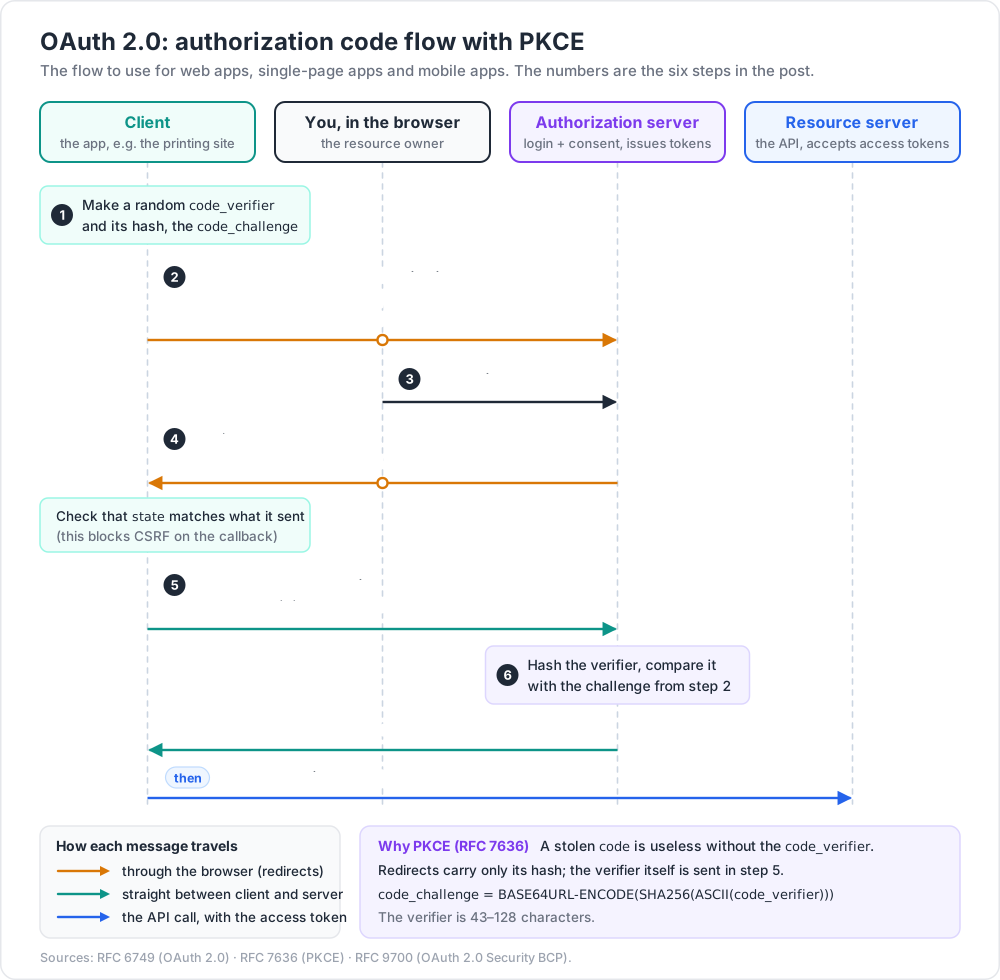
PKCE (RFC 7636) means a stolen code is useless without the verifier, which never left the client. The verifier is 43–128 characters, and code_challenge = BASE64URL-ENCODE(SHA256(ASCII(code_verifier))):
1
2
3
4
5
6
7
8
9
10
11
12
# pkce.py
import base64, hashlib, secrets
def b64url(data: bytes) -> str:
return base64.urlsafe_b64encode(data).rstrip(b"=").decode()
verifier = b64url(secrets.token_bytes(32)) # 43 characters
challenge = b64url(hashlib.sha256(verifier.encode("ascii")).digest())
print(verifier, challenge)
# RFC 7636 Appendix B check, prints E9Melhoa2OwvFrEMTJguCHaoeK1t8URWbuGJSstw-cM
print(b64url(hashlib.sha256(b"dBjftJeZ4CVP-mB92K27uhbUJU1p1r_wW1gFWFOEjXk").digest()))
The rules today: RFC 9700 and OAuth 2.1
RFC 9700, "Best Current Practice for OAuth 2.0 Security" (BCP 240, January 2025), updates the old advice:
- Public clients MUST use PKCE; it is recommended for confidential clients too.
- Do not use the implicit grant (
response_type=token). Use the code flow. - The resource owner password credentials grant "MUST NOT be used". Apps should never collect the user's password for another service.
- Authorization servers MUST use exact string matching for redirect URIs (with a port exception for localhost in native apps).
- Refresh tokens for public clients must be sender-constrained or rotated.
- Do not put access tokens in URL query strings.
OAuth 2.1 gathers these rules into one document. As of September 2026 it is still an IETF Internet-Draft (draft-ietf-oauth-v2-1), not an RFC. Treat it as a strong guide, not a final standard.
OpenID Connect: login on top of OAuth
OAuth alone does not tell the client who the user is. OpenID Connect (OIDC) adds that. The client asks for the openid scope and gets an extra ID token:
| ID token | Access token | |
|---|---|---|
| Defined by | OpenID Connect Core 1.0 | OAuth 2.0 |
| Format | Always a JWT | Opaque string or JWT; the client should not care |
| Audience | The client (aud = your client_id) |
The API (resource server) |
| Purpose | "Ada logged in at 13:02 via this IdP" | "The bearer may call these APIs with these scopes" |
| Send it to APIs? | No | Yes, in Authorization: Bearer ... |
The client validates the ID token like any JWT (signature from the IdP's published keys, iss, aud, exp) and checks the nonce it sent. Then it usually starts its own session (Chapter 6). In practice you use a certified OIDC client library and a hosted or self-hosted IdP, not hand-written flows.
Practice Exercises
Exercise 1 — Spot the storage bug
A team stores hashlib.sha256(password.encode()).hexdigest(). List two problems and the fix.
Solution
SHA-256 is fast, so a stolen table can be cracked with billions of guesses per second on GPUs. And there is no salt, so equal passwords get equal hashes and precomputed tables work. Fix: use Argon2id through argon2-cffi (PasswordHasher().hash(pw)), which is slow, memory-hard and salts every hash. Migrate old users at their next login: verify with SHA-256 once, then store the Argon2id hash.
Exercise 2 — Upgrade parameters safely
Your app used PasswordHasher(time_cost=2, memory_cost=19456, parallelism=1). You now want the library defaults. How do you upgrade existing users without a password reset?
Solution
Switch ph to PasswordHasher(). verify still works on old hashes because the parameters are stored in each hash string. After a successful verify, call ph.check_needs_rehash(stored). If it is True, save ph.hash(password). Users upgrade one by one as they log in. This is exactly what check_password does in Chapter 7.
Exercise 3 — Fix the policy
A login page requires "8+ characters, one uppercase, one digit, one symbol, change every 90 days". Rewrite it to match NIST SP 800-63B-4 for a site where the password is the only factor.
Solution
Require at least 15 characters (8 is only allowed when the password is part of MFA). Allow at least 64 characters, spaces, Unicode, paste and password managers. Drop the composition rules. Drop the 90-day change; force a change only when there is evidence of compromise. Reject passwords found in a blocklist of breached and common passwords, dictionary words, and the site name or username.
Exercise 4 — Why is this JWT check wrong?
1
2
3
header = jwt.get_unverified_header(token)
claims = jwt.decode(token, KEY, algorithms=[header["alg"]])
Solution
It lets the attacker choose the algorithm. With alg: none, or HS256 signed with a public RSA key, a weak library can accept a forged token. Pin the list in code, for example algorithms=["RS256"], and also pass audience= and issuer=. RFC 8725 says libraries must let callers choose the allowed algorithms and must check that the key fits the algorithm.
Exercise 5 — Session fixation
In Chapter 7, imagine login did not drop the old ID and instead reused the incoming cookie value as the session ID. Describe the attack this allows.
Solution
An attacker gets a session ID (or picks one) and plants it in the victim's browser, for example through a subdomain that can set cookies. The victim logs in, and the server marks that same ID as logged in. The attacker, who knows the ID, is now logged in as the victim. Always issue a fresh random ID at login and drop the old one.
Cheat-sheet
| Topic | Do this |
|---|---|
| Password hash | Argon2id; OWASP minimum m=19 MiB, t=2, p=1; argon2-cffi defaults are m=64 MiB, t=3, p=4 |
| Fallbacks | scrypt N=2^17, r=8, p=1; bcrypt cost ≥ 10 and max 72 bytes; PBKDF2-HMAC-SHA256 600,000 |
| Salt / pepper | Salt per hash (automatic); optional pepper kept outside the DB |
| Upgrade | verify → check_needs_rehash → store new hash at login |
| NIST 800-63B-4 | ≥ 15 alone, ≥ 8 with MFA, allow ≥ 64; blocklist; no composition rules, rotation, hints or truncation |
| Login errors | "Invalid username or password" + equal timing |
| Rate limit | Per account and per IP; NIST cap 100 consecutive failures |
| MFA | TOTP (RFC 6238, 30 s) or better: passkeys (WebAuthn) |
| Session ID | secrets.token_urlsafe(32), new at login, deleted at logout |
| Cookie | HttpOnly; Secure; SameSite=Lax; Path=/, maybe __Host- prefix |
| JWT | Pin algorithms, check aud, iss, exp; short life + rotating refresh tokens |
| OAuth | Authorization code + PKCE (S256), exact redirect URIs, no implicit, no password grant |
| OIDC | ID token is for the client; access token is for the API |
What's next
Dev Essentials 12 · OWASP Top 10 takes the ten risk categories of the 2025 list and shows a tiny vulnerable example and its fix for each. That includes injection, XSS, broken access control, and the authentication failures you just learned to prevent.
References
- OWASP Password Storage Cheat Sheet
- OWASP Session Management Cheat Sheet
- NIST SP 800-63B-4 (final, July 2025) — HTML version
- argon2-cffi documentation
- RFC 9106 — Argon2
- RFC 6238 — TOTP
- W3C Web Authentication Level 3
- MDN — Set-Cookie
- RFC 7519 — JSON Web Token
- RFC 8725 — JWT Best Current Practices
- RFC 6749 — OAuth 2.0
- RFC 7636 — PKCE
- RFC 9700 — Best Current Practice for OAuth 2.0 Security
- OAuth 2.1 draft (IETF datatracker)
- OpenID Connect Core 1.0
- Have I Been Pwned — Pwned Passwords API
Note: this post is in progress. Planned additions: a passkey (WebAuthn) registration and login walk-through with a server library, a Redis-backed session store, and an OIDC login against a local Keycloak.