Dev Essentials — 01 · Text Encoding — Bytes, Unicode, UTF-8, BOM and Mojibake
A file on disk holds bytes, not letters. Text only appears when a program picks an encoding and turns those bytes into characters. Pick the wrong one and you get "mojibake": garbled text such as café, or a middle dot that turns into a Chinese character. This post explains the whole chain, from bits to UTF-8 to grapheme clusters, and ends with a real case: a bulk edit that damaged 44 posts on this blog. It is the first post of the Dev Essentials series and opens Part A, where each post explains a class of real bugs.
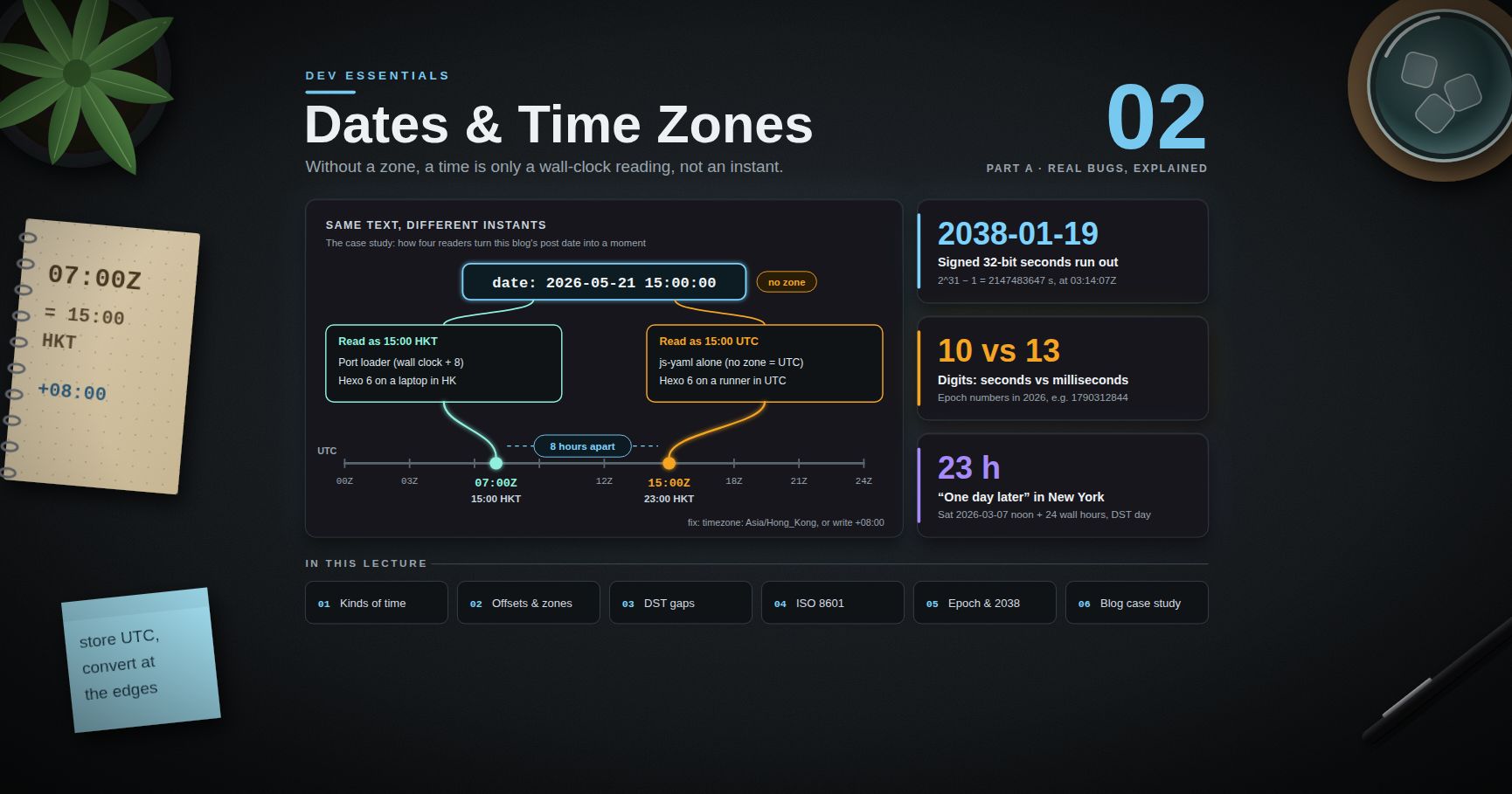
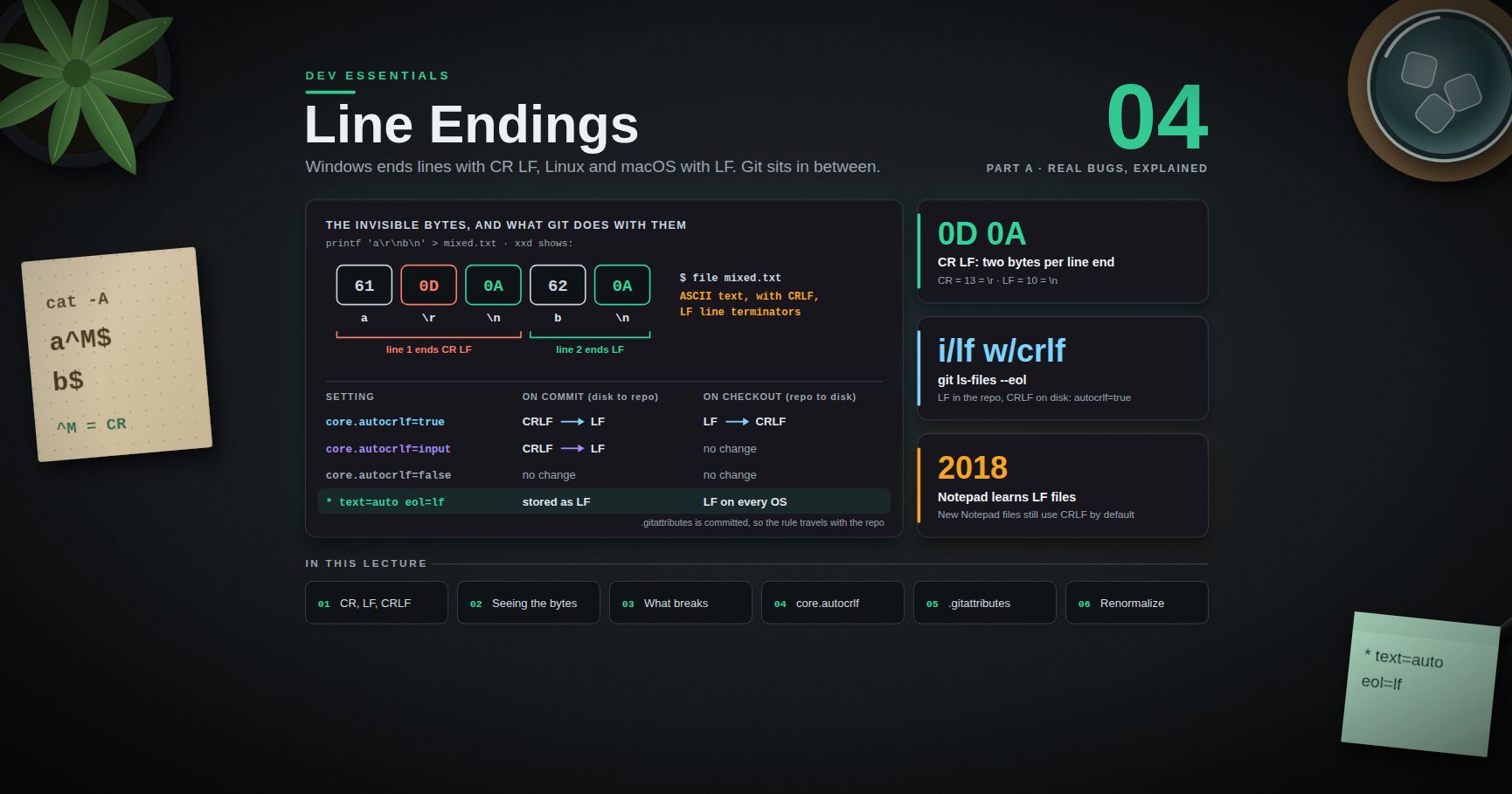
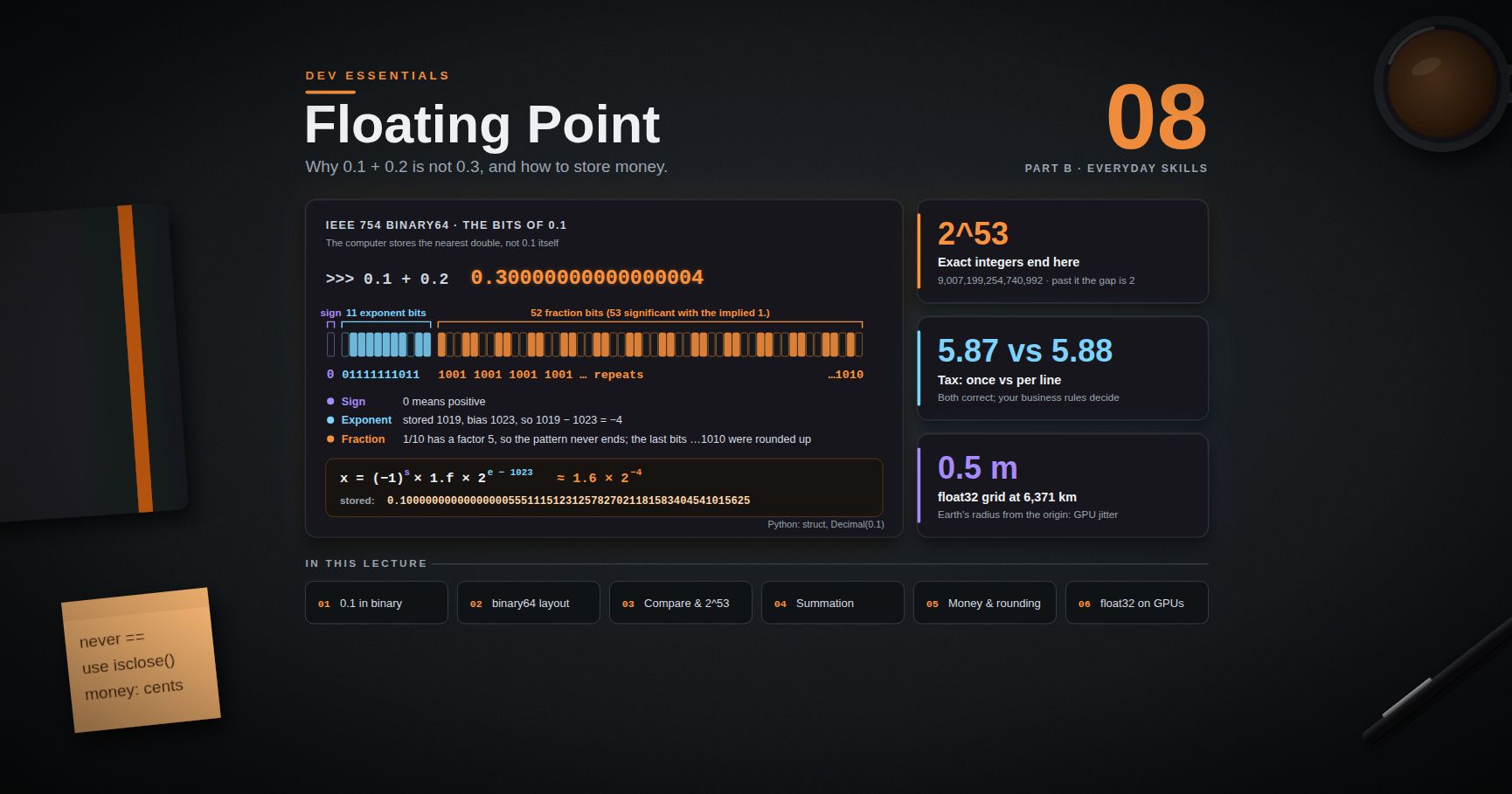
Series map: 01 Text Encoding (this post) → 02 Dates & Time Zones → 03 Git Rescue Kit → 04 Line Endings → 05 Command Line → … → 24 Desk Health. Part A · Real bugs, explained.
Learning Outcome
- Explain the difference between a byte, a code point, a code unit and a grapheme.
- Read and write the UTF-8 bit patterns by hand, and say why UTF-8 is ASCII-compatible.
- Know what ASCII, Latin-1, Windows-1252 and CP950 (Big5) are, and why the Windows "ANSI code page" matters.
- Explain UTF-16 surrogate pairs and why
"😀".length === 2in JavaScript. - Use Unicode normalization (NFC/NFD) and count user-visible characters correctly.
- Handle
bytesvsstrin Python and always passencoding=. - Inspect raw bytes with
xxd/odin bash andFormat-Hexin PowerShell. - Tell reversible mojibake from destroyed text, and repair each kind.
Chapter 1 — Bits, bytes and characters
Terminology
| Term | Meaning |
|---|---|
| Byte | 8 bits. A value from 0x00 to 0xFF (0–255). Files and network packets are made of bytes. |
| Character set | A list of characters, each with a number. |
| Code point | The number Unicode gives a character, written U+ plus hex. A is U+0041, · is U+00B7. |
| Encoding | The rule that turns code points into bytes and back. UTF-8, UTF-16 and CP950 are encodings. |
| Code unit | The smallest chunk an encoding works in: 1 byte in UTF-8, 2 bytes in UTF-16. |
| Grapheme cluster | What a reader sees as one character. It may be several code points. |
| Encode / decode | Encode: text → bytes. Decode: bytes → text. |
| Mojibake | Garbled text from decoding bytes with the wrong encoding. |
The one rule
Bytes do not carry a label that says which encoding made them. The reader must know, or guess.
1
2  text  --encode(UTF-8)-->  bytes on disk  --decode(???)-->  text again
If the decoder uses the same encoding as the encoder, you get your text back. If not, you get mojibake, an error, or silent data loss. Every bug in this post is a version of that one mismatch.
1
2
3
4
5
6
text = "Café 中"
data = text.encode("utf-8")
print(data) # b'Caf\xc3\xa9 \xe4\xb8\xad'
print(len(text), len(data)) # 6 9 (6 code points, 9 bytes)
print(data.decode("utf-8")) # Café 中 (same encoding both ways: safe)
Chapter 2 — Old encodings: ASCII, Latin-1, Windows-1252, CP950
ASCII, Latin-1 and Windows-1252
ASCII defines 128 characters, codes 0x00–0x7F: English letters, digits, punctuation and control codes such as 0x0A (line feed). It uses only 7 bits, so the top bit of every ASCII byte is 0. One byte can hold 256 values, so many "8-bit" encodings added 128 more characters on top of ASCII:
- ISO-8859-1 (Latin-1) maps bytes
0x00–0xFFstraight toU+0000–U+00FF. - Windows-1252 is the same for most bytes, but fills
0x80–0x9Fwith printable characters. For example,0x80is€.
Watch out: browsers treat the labels
iso-8859-1,latin1and evenasciias windows-1252. The WHATWG Encoding Standard maps them that way on purpose, because real web pages labelled "Latin-1" were usually Windows-1252.
CP950 (Big5) — a double-byte encoding
Chinese needs thousands of characters, so one byte is not enough. Big5 uses one byte for ASCII and two bytes for each Chinese character. Microsoft's version is code page 950 (CP950). Microsoft lists it as "ANSI/OEM Traditional Chinese (Taiwan; Hong Kong SAR, PRC); Chinese Traditional (Big5)".
- A lead byte (
0x81–0xFE) starts a two-byte character. - A trail byte (
0x40–0x7Eor0xA1–0xFE) finishes it. - A byte below
0x80on its own is plain ASCII.
For example, "中".encode("cp950") gives b'\xa4\xa4' (2 bytes), while "中".encode("utf-8") gives b'\xe4\xb8\xad' (3 bytes).
The Windows "ANSI code page"
Windows keeps a system-wide legacy code page. Microsoft calls it the "ANSI code page" (the name is historical). It depends on the system locale: 1252 on a US or Western European setup, 950 for Traditional Chinese, 936 for Simplified Chinese, 932 for Japanese. Programs that do not ask for a specific encoding often fall back to it. Check it on your own machine:
1
2
3
4
5
# Windows PowerShell 5.1
[System.Text.Encoding]::Default.CodePage # e.g. 950
(Get-Culture).Name # e.g. zh-HK
python -c "import locale; print(locale.getpreferredencoding(False))" # e.g. cp950
Watch out: in PowerShell 7 (built on modern .NET),
[System.Text.Encoding]::Defaultis always UTF-8. Only Windows PowerShell 5.1 reports the ANSI code page there. Microsoft's own docs warn: "ANSI code pages can be different on different computers, or can be changed for a single computer, leading to data corruption."
Chapter 3 — Unicode and UTF-8
Unicode gives one code point to every character in every script, plus symbols and emoji. The code space runs from U+0000 to U+10FFFF, a 21-bit range. Unicode itself is only the numbering. UTF-8, UTF-16 and UTF-32 are the encodings that turn those numbers into bytes.
UTF-8: 1 to 4 bytes
RFC 3629 defines UTF-8 with this table. The x bits hold the code point.
| Code point range | Bytes | Bit pattern |
|---|---|---|
U+0000–U+007F |
1 | 0xxxxxxx |
U+0080–U+07FF |
2 | 110xxxxx 10xxxxxx |
U+0800–U+FFFF |
3 | 1110xxxx 10xxxxxx 10xxxxxx |
U+10000–U+10FFFF |
4 | 11110xxx 10xxxxxx 10xxxxxx 10xxxxxx |
| Char | Code point | UTF-8 bytes | Bits |
|---|---|---|---|
A |
U+0041 | 41 |
01000001 |
é |
U+00E9 | C3 A9 |
11000011 10101001 |
· |
U+00B7 | C2 B7 |
11000010 10110111 |
中 |
U+4E2D | E4 B8 AD |
11100100 10111000 10101101 |
😀 |
U+1F600 | F0 9F 98 80 |
11110000 10011111 10011000 10000000 |
Encode 中 by hand
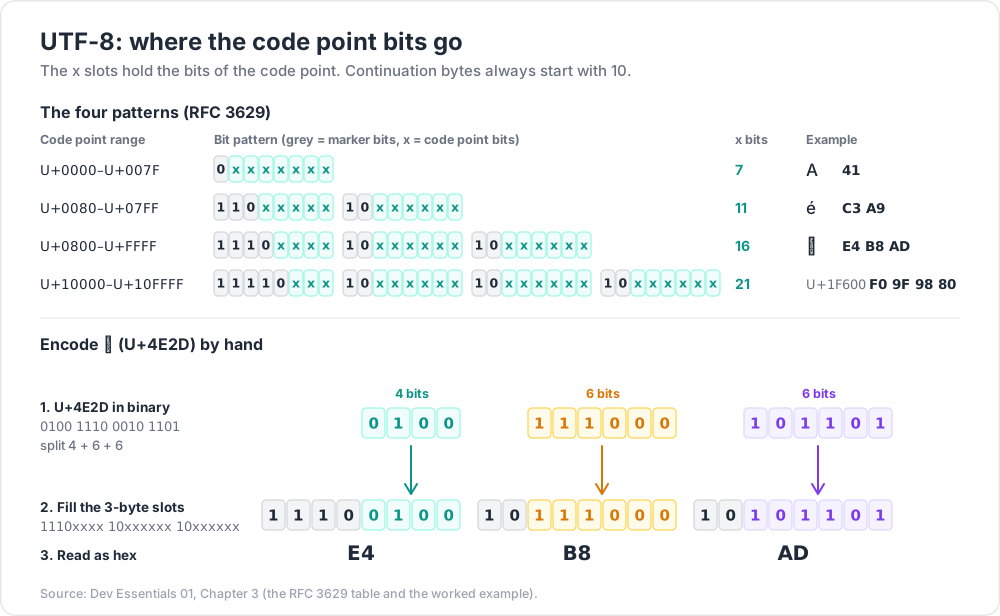
U+4E2Din binary is0100 1110 0010 1101(16 bits).- It is between
U+0800andU+FFFF, so it needs 3 bytes:1110xxxx 10xxxxxx 10xxxxxx. - Split the 16 bits as 4 + 6 + 6:
0100·111000·101101. - Fill the slots:
111001001011100010101101=E4 B8 AD. Check with" ".join(f"{b:08b}" for b in "中".encode("utf-8")).
Why UTF-8 won
- ASCII-compatible. Every ASCII file is already valid UTF-8, byte for byte. RFC 3629 also guarantees that ASCII byte values never appear inside a multi-byte character. So a
/or"byte always means/or", and old tools that split on ASCII still work. - Self-synchronising. Continuation bytes always start with
10. From any position you can step back to the start of a character. - No byte-order problem. UTF-8 works in single bytes, so there is no big-endian vs little-endian question.
- Required for new formats. The WHATWG Encoding Standard says new protocols and formats "must use the UTF-8 encoding exclusively".
Chapter 4 — UTF-16, surrogate pairs and "length"
UTF-16 uses 16-bit code units. Code points up to U+FFFF (the Basic Multilingual Plane) take one unit. Anything above takes two units, called a surrogate pair:
- Subtract
0x10000from the code point. You get a 20-bit number. - The top 10 bits plus
0xD800give the high surrogate (D800–DBFF). - The low 10 bits plus
0xDC00give the low surrogate (DC00–DFFF).
1
2
3
4
v = 0x1F600 - 0x10000 # 😀 is U+1F600
print(hex(0xD800 + (v >> 10)), hex(0xDC00 + (v & 0x3FF))) # 0xd83d 0xde00
print("😀".encode("utf-16-be").hex(" ")) # d8 3d de 00
JavaScript, Java, C# and the Windows API store strings as UTF-16. Their "length" counts code units, not characters:
1
2
3
4
"😀".length; // 2 (two UTF-16 code units)
[..."😀"].length; // 1 (the string iterator walks code points)
"😀".slice(0, 1); // a lone high surrogate: broken text
Python's len("😀") is 1, because a Python str counts code points. The UTF-8 form is 4 bytes. One emoji, three different "lengths".
Common pitfall: cutting a JavaScript string with
.slice()or.substring()to fit a length limit can split a surrogate pair. The result holds half an emoji and may show as�.
Chapter 5 — Normalization and grapheme clusters
Two ways to write é
é can be one code point, U+00E9, or two: e + U+0301 (combining acute accent). Both look the same. They are not equal as strings. Python's \N{...} escape lets you write a character by its Unicode name:
1
2
3
4
5
6
7
8
9
import unicodedata
a = "caf\N{LATIN SMALL LETTER E WITH ACUTE}" # precomposed U+00E9
b = "cafe\N{COMBINING ACUTE ACCENT}" # e + U+0301
print(a == b) # False
print(len(a), len(b)) # 4 5
nfc = lambda s: unicodedata.normalize("NFC", s)
print(nfc(a) == nfc(b)) # True
Unicode Standard Annex #15 defines the normal forms:
| Form | What it does | Use for |
|---|---|---|
| NFC | Compose where possible (e + accent → é) |
Storing and comparing text. The usual choice. |
| NFD | Decompose (é → e + accent) |
Stripping accents, some search tasks |
| NFKC / NFKD | Also fold "compatibility" forms (fi → fi, full-width A → A) |
Identifiers and search keys. It changes meaning, so not for display. |
Trick: normalize to NFC at the edge of your system, when input arrives, and before you hash, compare or use text as a database key. In JavaScript:
s.normalize("NFC").
Grapheme clusters
A grapheme cluster is what a person calls "one character". Unicode Standard Annex #29 defines the rules. Many visible characters are several code points:
1
2
3
4
5
6
const family = "👨👩👧"; // man + ZWJ + woman + ZWJ + girl
family.length; // 8 UTF-16 units
[...family].length; // 5 code points
const seg = new Intl.Segmenter("en", { granularity: "grapheme" });
[...seg.segment(family)].length; // 1 grapheme
The same string is 5 code points in Python and 18 bytes in UTF-8. A flag such as 🇭🇰 is two "regional indicator" code points but one grapheme. Python has no built-in grapheme splitter; the third-party regex module supports \X for one grapheme cluster.
Watch out: a "max 20 characters" rule needs a definition. Bytes (database column size), code points, UTF-16 units (JavaScript
.length), and graphemes (what the user sees) give four different answers.
Chapter 6 — The BOM (byte order mark)
The character U+FEFF at the very start of a file is a byte order mark. In UTF-16 it tells the reader the byte order. In UTF-8 it is only a signature.
| Encoding | BOM bytes |
|---|---|
| UTF-8 | EF BB BF |
| UTF-16 big-endian | FE FF |
| UTF-16 little-endian | FF FE |
The Unicode FAQ warns that where UTF-8 is used in 8-bit environments, "the use of a BOM will interfere with any protocol or file format that expects specific ASCII characters at the beginning". Real cases:
- A shell script must start with the bytes
#!. With a BOM in front, the system does not see a shebang. - A CSV read without BOM handling gets a first column name that starts with an invisible
U+FEFF, sorow["id"]fails. - RFC 8259 says a JSON text sent over a network must not start with a BOM.
- Windows PowerShell 5.1 is the opposite case. Microsoft's docs say scripts with non-ASCII characters should be saved as UTF-8 with BOM, or 5.1 reads them in the ANSI code page.
1
2
3
4
5
6
7
8
9
import json
raw = b'\xef\xbb\xbf{"id": 1}' # UTF-8 BOM + JSON
try:
json.loads(raw.decode("utf-8"))
except json.JSONDecodeError as e:
print(e.msg) # Unexpected UTF-8 BOM (decode using utf-8-sig)
print(json.loads(raw.decode("utf-8-sig"))) # {'id': 1}
Trick: Python's
utf-8-sigcodec reads files with or without a BOM and strips it if present. Use it for input that may come from Windows tools. Write plainutf-8(no BOM) unless a consumer needs one.
Chapter 7 — Python: bytes vs str, and always pass encoding=
Python 3 keeps the two worlds apart. str is a sequence of code points. bytes is a sequence of numbers 0–255. You cross between them only with .encode() and .decode().
1
2
3
4
5
6
7
from pathlib import Path
p = Path("note.txt")
p.write_text("Dev Essentials — 01 · Text Encoding\n", encoding="utf-8")
text = p.read_text(encoding="utf-8") # str
raw = p.read_bytes() # bytes: b'Dev Essentials \xe2\x80\x94 01 ...'
With open(), the same rule applies: open(p, encoding="utf-8") in text mode, open(p, "rb") for raw bytes.
Why encoding= matters
Without encoding=, open() uses the locale encoding. On a Windows machine with code page 950 that is cp950. The same script then reads UTF-8 files correctly on Linux and wrongly on that PC.
- PEP 686 turns on UTF-8 mode by default from Python 3.15, so text I/O without
encoding=becomes UTF-8 everywhere. PEP 790 schedules 3.15.0 for 2026-10-01. You can opt out withPYTHONUTF8=0or-X utf8=0. - Your code will still meet Python 3.14 and older for years. Keep passing
encoding="utf-8". - To find calls that forget it, run
python -X warn_default_encoding script.py(Python 3.10+). It prints anEncodingWarningfor each one.
The errors= argument
1
2
3
4
5
6
7
8
9
raw = b"Course \xe2\x80\x94 03" # UTF-8 bytes for "Course — 03"
print(raw.decode("utf-8")) # Course — 03
print(raw.decode("ascii", errors="replace")) # Course ��� 03
print(raw.decode("ascii", errors="backslashreplace")) # Course \xe2\x80\x94 03
try:
raw.decode("cp950")
except UnicodeDecodeError as e:
print(e.reason) # illegal multibyte sequence
errors= |
Behaviour |
|---|---|
"strict" (default) |
Raise an error. Best default: you learn about the problem. |
"replace" |
Put U+FFFD (�) on decode, ? on encode. Loses data. |
"ignore" |
Drop bad bytes silently. Loses data. |
"backslashreplace" |
Show bad bytes as \xNN. Good for logs. |
"surrogateescape" |
Keep bad bytes so they can be written back unchanged. |
Common pitfall:
errors="ignore"makes the error go away, and the data too. Only use it when losing characters is truly fine.
Chapter 8 — Look at the bytes
Bash (Git Bash, Linux, macOS)
1
2
3
4
5
6
7
xxd -g1 post.md | head -3 # hex + ASCII view
od -An -tx1 -c post.md | head # hex, with characters under them
file post.md # "Unicode text, UTF-8 text" or "UTF-8 (with BOM) text"
printf '\xc2\xb7\n' | xxd -g1 # 00000000: c2 b7 0a
iconv -f CP950 -t UTF-8 old.txt > new.txt # convert a real Big5 file
grep -n $'\xe7\xb9\x9a' content/posts/*.md # search for the UTF-8 bytes of U+7E5A
PowerShell 5.1
1
2
3
4
5
6
7
Format-Hex -Path .\post.md | Select-Object -First 3
# Bytes of one character, as UTF-8:
[System.Text.Encoding]::UTF8.GetBytes([string][char]0x00B7) |
ForEach-Object { '{0:X2}' -f $_ } # C2 B7
# Code points of a string you have read into $text:
($text.ToCharArray() | ForEach-Object { 'U+{0:X4}' -f [int]$_ }) -join ' '
Python
1
2
3
4
5
def cps(s: str) -> str:
return " ".join(f"U+{ord(c):04X}" for c in s)
print(cps("— ·"), "·".encode("utf-8").hex(" ")) # U+2014 U+0020 U+00B7 c2 b7
Trick: when text looks wrong, stop guessing and read the bytes. A code-point dump such as
cps()shows exactly what a string holds, whatever font or console you have. Two strings that look the same but dump differently are the bug.
Chapter 9 — Mojibake: reversible or destroyed?
Mojibake happens in one of two ways. The difference decides whether you can fix the file.
Case A — nothing was lost (reversible)
The bytes were decoded with the wrong table, but every byte became some character. Walk the same steps backwards:
1
2
3
4
5
good = "café"
bad = good.encode("utf-8").decode("cp1252")
print(bad) # café
print(bad.encode("cp1252").decode("utf-8")) # café
The library ftfy (pip install ftfy) automates this for common cases: ftfy.fix_text("café") gives café. Its docs list the single-byte encodings it detects (Latin-1, Windows-125x, MacRoman, cp437 and others).
Watch out: ftfy's docs say it cannot handle the legacy Chinese, Japanese and Korean encodings. For CP950 mojibake, reverse it by hand:
s.encode("cp950").decode("utf-8").
Case B — information destroyed (not reversible)
If the decoder hit bytes it could not read and put in ? or U+FFFD, the original bytes are gone. Many different inputs map to the same ?, so no function can go back. The only fix is an older copy: a backup or version control.
Why detection can only guess
Tools such as charset-normalizer take unknown bytes and try many encodings. They throw away tables that cannot decode the bytes, then score the rest for "mess" and for how natural the letters look. That works well on long text. It cannot be certain, because the same bytes are often valid in more than one encoding:
1
2
3
4
5
6
7
8
import unicodedata
data = b"\xc2\xb7"
for enc in ("utf-8", "cp950"):
ch = data.decode(enc)
print(enc, f"U+{ord(ch):04X}", unicodedata.name(ch))
# utf-8 U+00B7 MIDDLE DOT
# cp950 U+7E5A CJK UNIFIED IDEOGRAPH-7E5A
Both answers are "valid". Only the writer knows which one was meant. The safe design is to not need detection: agree on UTF-8 and state it (the HTTP charset, <meta charset="utf-8">, encoding= in code).
Chapter 10 — Case study: a bulk edit that damaged 44 posts
This blog stores posts as UTF-8 Markdown without a BOM. The post titles use — (em dash) and · (middle dot) as separators.
What happened
A script updated the frontmatter of many posts at once, to add cover images. It rewrote 44 posts and corrupted about 2,700 characters. It ran in Windows PowerShell 5.1 on a Windows machine with system ANSI code page 950 (Big5) and culture zh-HK.
Microsoft's docs for 5.1 explain the trap. When a file has no BOM, Get-Content "uses the Default ANSI encoding". Set-Content also writes Default (ANSI) unless told otherwise. So on this machine, BOM-less UTF-8 is read as CP950.
What each character became
| Character | UTF-8 bytes | Read as CP950 | Saved back as UTF-8 | Reversible? |
|---|---|---|---|---|
· U+00B7 |
C2 B7 |
one character, U+7E5A (繚) | E7 B9 9A |
Yes |
— U+2014 |
E2 80 94 |
no valid reading | 3F 3F (two ?) |
No |
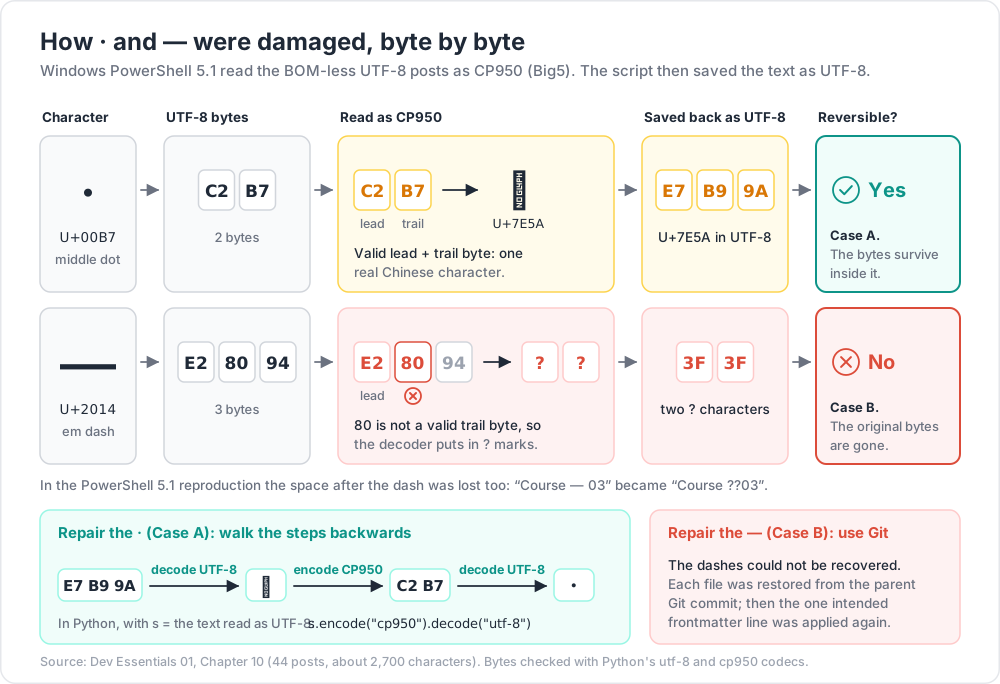
C2 is a valid CP950 lead byte and B7 a valid trail byte, so the middle dot became a real Chinese character. That is Case A: the bytes survive inside it.
1
2
3
4
5
6
7
8
dot = "\N{MIDDLE DOT}"
wrong = dot.encode("utf-8").decode("cp950")
print(f"U+{ord(wrong):04X}") # U+7E5A
on_disk = wrong.encode("utf-8")
print(on_disk.hex(" ")) # e7 b9 9a
fixed = on_disk.decode("utf-8").encode("cp950").decode("utf-8")
print(fixed == dot) # True
E2 80 94 is different: 80 is not a valid trail byte, so CP950 has no reading for it. The decoder put in ? marks. A reproduction in Windows PowerShell 5.1 also shows the space after the dash disappearing: Course — 03 was read as Course, a space, two ?, then 03. That is Case B. The original bytes are no longer in the file.
The repair. The dashes could not be recovered from the damaged files. So each file was restored from the parent Git commit, and the one intended frontmatter line was applied again. Version control turned an impossible repair into a routine one (see Dev Essentials 03 · Git Rescue Kit).
How to detect it next time
Search for the two fingerprints: U+7E5A anywhere, and a double ? outside code fences. (JavaScript's nullish operator is two question marks too, so matches inside code are fine.)
1
2
3
4
5
6
7
8
9
10
11
12
13
14
15
16
17
18
19
20
21
from pathlib import Path
MARK = chr(0x7E5A) # CP950 reading of the UTF-8 bytes for "·"
FENCE = "`" * 3 # a Markdown code fence
def scan(path: Path) -> list[str]:
hits, in_code = [], False
for n, line in enumerate(path.read_text(encoding="utf-8").splitlines(), 1):
if line.lstrip().startswith(FENCE):
in_code = not in_code
continue
if MARK in line:
hits.append(f"{path.name}:{n}: U+7E5A")
if not in_code and "??" in line:
hits.append(f"{path.name}:{n}: double ? outside code")
return hits
for p in sorted(Path("content/posts").glob("*.md")):
for hit in scan(p):
print(hit)
How to prevent it
In Windows PowerShell 5.1, never rely on the defaults. Read and write through .NET with an explicit encoding:
1
2
3
4
5
$p = (Resolve-Path .\content\posts\example.md).Path # .NET needs a full path
$t = [System.IO.File]::ReadAllText($p, [System.Text.Encoding]::UTF8)
$t = $t -replace '(?m)^cover:[^\r\n]*', 'cover: /assets/example/cover.png'
[System.IO.File]::WriteAllText($p, $t, (New-Object System.Text.UTF8Encoding($false)))
UTF8Encoding($false)means "UTF-8, no BOM". In 5.1,Set-Content -Encoding UTF8writes UTF-8 with a BOM, andOut-Fileand the>/>>operators write UTF-16LE. Do not redirect text into project files there.- PowerShell 7+ defaults to
utf8NoBOMfor all output. Usingpwshfor scripts removes most of this risk. So does doing bulk edits in Python withencoding="utf-8". - Commit before any bulk edit. Then
git diffshows the damage at once, and the old bytes are one command away.
Common pitfall: .NET methods such as
ReadAllTextresolve relative paths against the process's working folder, which is not always PowerShell's current location. Pass a full path, asResolve-Pathdoes above.
The system-wide UTF-8 option
Windows has a setting: Settings → Time & language → Language & region → Administrative language settings → Change system locale → "Beta: Use Unicode UTF-8 for worldwide language support". It switches the system code page to 65001 (UTF-8) and needs a restart. Caveats before you turn it on:
- It is still labelled Beta.
- It affects every program on the machine, not one project.
- Older programs written for a double-byte code page such as 950 may show broken text.
- Old files saved in the previous code page (Big5 text files, old CSV exports) will now be read as UTF-8 and look broken. The mismatch moves; it does not disappear.
For your own programs, Microsoft offers a narrower switch. The activeCodePage manifest property (Windows 10 version 1903 and later) makes one process use UTF-8. Either way, an explicit encoding in code remains the reliable fix.
Practice Exercises
Exercise 1 — Bytes by hand
Write the UTF-8 bytes of € (U+20AC) by hand, then check in Python.
Solution
U+20AC is in the 3-byte range. Binary: 0010 0000 1010 1100. Split 4 + 6 + 6: 0010 · 000010 · 101100. Fill 1110xxxx 10xxxxxx 10xxxxxx: 11100010 10000010 10101100 = E2 82 AC.
1
2
print("€".encode("utf-8").hex(" ")) # e2 82 ac
Exercise 2 — Four lengths
Take the string "e\N{COMBINING ACUTE ACCENT}\U0001F44D\U0001F3FD": é written with a combining accent, then a thumbs-up with a skin tone. Predict the Python len(), the JavaScript .length, the UTF-8 byte count, and the number of graphemes.
Solution
Code points: e, U+0301, U+1F44D, U+1F3FD, so Python len() = 4. UTF-16 units: 1 + 1 + 2 + 2 = 6. UTF-8 bytes: 1 + 2 + 4 + 4 = 11. Graphemes: é and the toned thumbs-up = 2.
1
2
3
s = "e\N{COMBINING ACUTE ACCENT}\U0001F44D\U0001F3FD"
print(len(s), len(s.encode("utf-16-le")) // 2, len(s.encode("utf-8"))) # 4 6 11
Exercise 3 — Fix mojibake of both kinds
A CSV shows José Müller. A Markdown line reads Python Course — 03 X Functions, where X is the character U+7E5A. Repair both. Can you repair everything in such files?
Solution
1
2
3
4
5
6
7
print("José Müller".encode("cp1252").decode("utf-8")) # José Müller
MARK = chr(0x7E5A)
line = f"Python Course \N{EM DASH} 03 {MARK} Functions"
print(line.replace(MARK, MARK.encode("cp950").decode("utf-8")))
# Python Course — 03 · Functions
The CSV was UTF-8 decoded as Windows-1252; U+7E5A encodes back to C2 B7 in CP950, which is · in UTF-8. Both are Case A. Any — that already became two ? is Case B: it cannot be repaired from the file. Restore that file from Git.
Exercise 4 — Who is right?
Two teammates open the same 2-byte file. One sees a middle dot, the other sees a Chinese character. Which one is right, and how would you settle it for good?
Solution
Neither can prove it from the bytes alone: C2 B7 is valid UTF-8 (·) and valid CP950 (U+7E5A). Settle it by agreement, not detection. Declare UTF-8 for the project (.editorconfig charset = utf-8, encoding="utf-8" in code, <meta charset="utf-8"> on pages), and treat any tool that uses a system default as a bug.
Exercise 5 — Safe bulk edit in PowerShell 5.1
Change katex: true to katex: false in every .md file of a folder, without changing the encoding.
Solution
1
2
3
4
5
6
7
8
9
$utf8NoBom = New-Object System.Text.UTF8Encoding($false)
Get-ChildItem -Path .\content\posts -Filter *.md | ForEach-Object {
$t = [System.IO.File]::ReadAllText($_.FullName, [System.Text.Encoding]::UTF8)
$new = $t -replace '(?m)^katex: true(?=\r?$)', 'katex: false'
if ($new -ne $t) {
[System.IO.File]::WriteAllText($_.FullName, $new, $utf8NoBom)
}
}
$_.FullName is already a full path. The lookahead (?=\r?$) leaves any \r in place, so line endings do not change either (see Dev Essentials 04 · Line Endings). Then check in Git Bash: grep -l $'\xe7\xb9\x9a' content/posts/*.md should print nothing, and git diff --stat should list only the files you meant to change.
Cheat-sheet
| Task | How |
|---|---|
| Text → bytes / bytes → text (Python) | s.encode("utf-8") / b.decode("utf-8") |
| Open a text file (Python) | open(p, encoding="utf-8") |
| Read with or without BOM | encoding="utf-8-sig" |
Find missing encoding= |
python -X warn_default_encoding app.py |
| Normalize before comparing | unicodedata.normalize("NFC", s) / s.normalize("NFC") |
| Count graphemes (JS) | [...new Intl.Segmenter("en", {granularity: "grapheme"}).segment(s)].length |
| Hex dump / file type (bash) | xxd -g1 file, od -An -tx1 -c file, file file |
| Hex dump (PowerShell) | Format-Hex -Path file |
| ANSI code page (PS 5.1) | [System.Text.Encoding]::Default.CodePage |
| Safe write (PS 5.1) | [System.IO.File]::WriteAllText($p, $t, (New-Object System.Text.UTF8Encoding($false))) |
| Undo Latin mojibake | s.encode("cp1252").decode("utf-8") or ftfy.fix_text(s) |
| Undo CP950 mojibake | s.encode("cp950").decode("utf-8") |
| Magic numbers | UTF-8 BOM EF BB BF; UTF-16 surrogates D800–DBFF + DC00–DFFF |
What's next
Dev Essentials 02 · Dates & Time Zones looks at another kind of text that means different things to different readers: a timestamp without a zone. It covers UTC, offsets vs IANA zones, DST gaps, ISO 8601, and how this blog's own post dates are read.
References
- RFC 3629 — UTF-8, a transformation format of ISO 10646
- Unicode FAQ — UTF-8, UTF-16, UTF-32 & BOM
- Unicode Standard Annex #15 — Normalization Forms
- Unicode Standard Annex #29 — Text Segmentation
- WHATWG Encoding Standard
- Microsoft — Code Page Identifiers
- Microsoft — about_Character_Encoding (PowerShell 5.1)
- Microsoft — Use UTF-8 code pages in Windows apps
- Python — Unicode HOWTO
- PEP 686 — Make UTF-8 mode default
- PEP 790 — Python 3.15 release schedule
- RFC 8259 — JSON, section 8.1 (character encoding)
- charset-normalizer documentation
- ftfy — encodings it can handle
Note: this post is in progress. Planned additions: a diagram of the encode/decode round trip, UTF-8 in databases (MySQL
utf8mb4vsutf8mb3), and encoding labels in HTTP headers and email.