JavaScript Deep Dive — 05 · Performance, Memory & Production Debugging
The earlier posts explained how the engine, the event loop, objects, async code and modules work. This one is about what happens when they misbehave in front of real users: a page that feels sluggish on a mid-range phone, a tab that grows to 2 GB over an afternoon, a Node service whose p99 latency doubles after a deploy, a stack trace that points at main.3f9a1c.js:1:48213. The tools are mature: Core Web Vitals for what users feel, the Performance and Memory panels for why, V8's profilers for Node, source maps, and real-user monitoring for how often. The skill is using them in the right order, measuring before changing anything, and not being fooled by your own benchmark.
Series map: 00 Engines & Runtime → 01 Event Loop & Concurrency → 02 Objects, Prototypes & Metaprogramming → 03 Async Engineering → 04 Modules, Packaging & TypeScript at Scale → 05 Performance, Memory & Production Debugging (this post) (future: see the extensions table at the end).
Learning Outcome
- State the Core Web Vitals thresholds, the percentile they are judged at, and the sub-parts of LCP and INP.
- Collect field metrics with attribution, and explain why lab tools cannot measure INP.
- Read a Performance panel recording: flame chart, self vs total time, long tasks, forced layouts.
- Break up long tasks with
scheduler.yield()and find their causes with the Long Animation Frames API. - Find a memory leak with heap snapshots, the comparison view and the allocation timeline, and name the four usual retainers.
- Profile Node in development and production:
--inspect,--cpu-prof,--heap-prof, heap snapshots on signal. - Ship source maps safely, capture production errors and RUM data, and avoid the classic benchmarking mistakes.
Chapter 1 — Core Web Vitals
Terminology
- Field data — measurements from real users (RUM, or Chrome's CrUX data set). Core Web Vitals are judged on field data.
- Lab data — a synthetic run (Lighthouse, a DevTools recording) on one device and network. Good for debugging, not for judging.
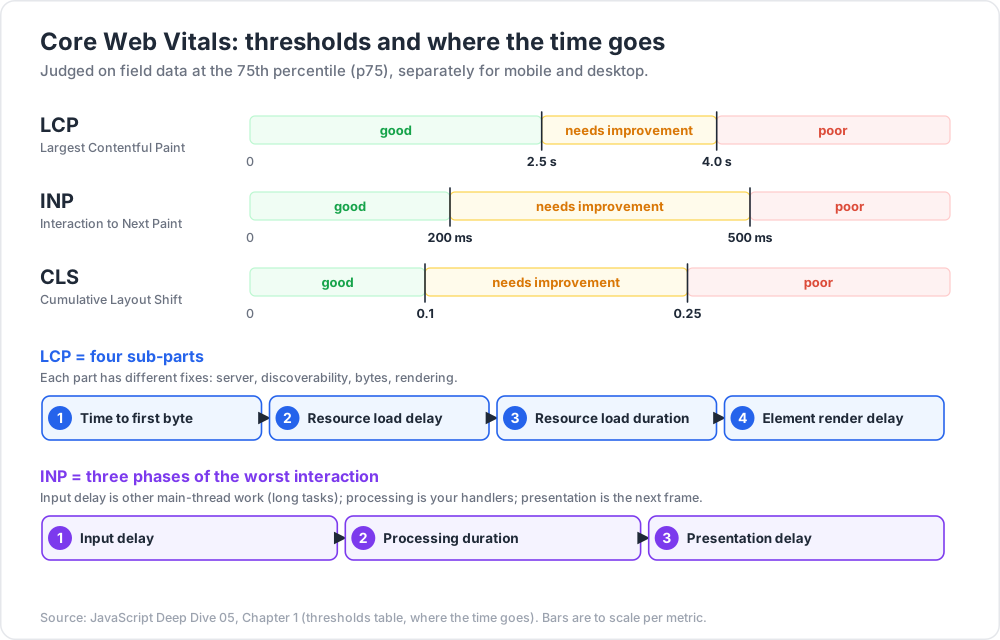
- p75 — the 75th percentile. A page "passes" a metric when at least 75% of page views are good, judged separately for mobile and desktop.
- LCP — Largest Contentful Paint — when the largest image or text block in the viewport was rendered.
- INP — Interaction to Next Paint — roughly the worst latency from a click, tap or key press to the next frame, over the whole page visit. It replaced FID as a Core Web Vital on 12 March 2024.
- CLS — Cumulative Layout Shift — the largest burst of unexpected layout shifts. Shifts are grouped into session windows of at most 5 s, with gaps under 1 s. Shifts within 500 ms of user input do not count.
Thresholds
| Metric | Good | Needs improvement | Poor |
|---|---|---|---|
| LCP | ≤ 2.5 s | 2.5 s – 4.0 s | > 4.0 s |
| INP | ≤ 200 ms | 200 ms – 500 ms | > 500 ms |
| CLS | ≤ 0.1 | 0.1 – 0.25 | > 0.25 |
Where the time goes
Each metric breaks down into parts, and each part has different fixes:
| Metric | Sub-part | Typical fix |
|---|---|---|
| LCP | Time to first byte (TTFB) | CDN, caching, faster server rendering |
| LCP | Resource load delay | Make the LCP image discoverable in the HTML; fetchpriority="high"; no lazy-loading above the fold |
| LCP | Resource load duration | Right-sized, modern image formats; fewer competing downloads |
| LCP | Element render delay | Less render-blocking CSS/JS; do not hide content until hydration |
| INP | Input delay | Other work already running on the main thread: long tasks, hydration, third-party scripts |
| INP | Processing duration | The event handlers themselves: less work, yield early, defer non-visual work |
| INP | Presentation delay | Rendering the next frame: DOM size, style and layout cost, forced layouts |
Common pitfall: optimising a Lighthouse score. Lighthouse runs without a user, so it cannot measure INP at all. It reports Total Blocking Time as a lab proxy. A page can score 100 and still fail INP for real users who click during hydration.
Measuring in the field
1
2
3
4
5
6
7
8
9
10
11
12
13
14
15
16
17
18
19
20
21
22
23
24
import { onLCP, onINP, onCLS } from 'web-vitals/attribution';
function report(metric) {
const body = JSON.stringify({
name: metric.name, value: metric.value, rating: metric.rating,
id: metric.id, navigationType: metric.navigationType,
page: location.pathname, attribution: summarize(metric),
});
// sendBeacon survives page unload; fall back to a keepalive fetch.
if (!navigator.sendBeacon('/rum', body)) {
fetch('/rum', { method: 'POST', body, keepalive: true });
}
}
function summarize({ name, attribution: a }) {
if (name === 'INP') {
return { target: a.interactionTarget, inputDelay: a.inputDelay,
processing: a.processingDuration, presentation: a.presentationDelay };
}
return undefined; // add LCP / CLS attribution the same way
}
onLCP(report); onINP(report); onCLS(report);
The web-vitals library (maintained by the Chrome team) deals with the edge cases for you: back/forward-cache restores, prerendering, tabs opened in the background, and reporting the final CLS and INP values when the page is hidden. Write your own PerformanceObserver code only if you have a reason to.
Chapter 2 — Reading the Performance panel
Record with the CPU throttled (a 4× slowdown is a common starting point) and with a realistic network profile. Your laptop is several times faster than a median phone. Then read the recording top-down:
- Tracks overview — FPS, CPU activity (yellow = scripting, purple = rendering/layout, green = painting), network requests.
- Main track flame chart — the x-axis is time; the y-axis is call-stack depth (callers on top, callees below). Width is duration.
- Tasks with a red corner — long tasks, over 50 ms.
- Bottom panels — Summary, Bottom-up (where self time is spent, aggregated), Call tree (top-down total time), Event log.
Terminology
- Self time — time spent in a function's own code, excluding the functions it calls.
- Total time — self time plus all callees. A function with high total but low self time is a coordinator; look underneath it.
- Long task — a task that runs on the main thread for over 50 ms. Input that arrives meanwhile has to wait.
- Forced (synchronous) layout — JavaScript reads layout (
offsetHeight,getBoundingClientRect()) after writing styles, so the browser must lay out immediately, inside your task. Repeating it in a loop is layout thrashing.
1
2
3
4
5
6
7
// Thrashing: one forced layout per item.
for (const el of items) el.style.height = `${el.offsetWidth / 2}px`;
// Batched: all reads, then all writes. One layout.
const widths = items.map((el) => el.offsetWidth);
items.forEach((el, i) => { el.style.height = `${widths[i] / 2}px`; });
DevTools marks forced layouts with a purple Layout bar and a red warning, and links to the line that caused them.
Trick: add your own spans.
performance.mark('filter:start')andperformance.measure('filter', 'filter:start')appear in the Timings track, next to the flame chart, and are also available to RUM code throughPerformanceObserver. Name them after user-visible operations, not after functions.
Watch out: the flame chart shows the minified names unless source maps are loaded, and in development builds React, Vue and others add checks that change the profile. Profile a production build with source maps.
Chapter 3 — Long tasks and yielding
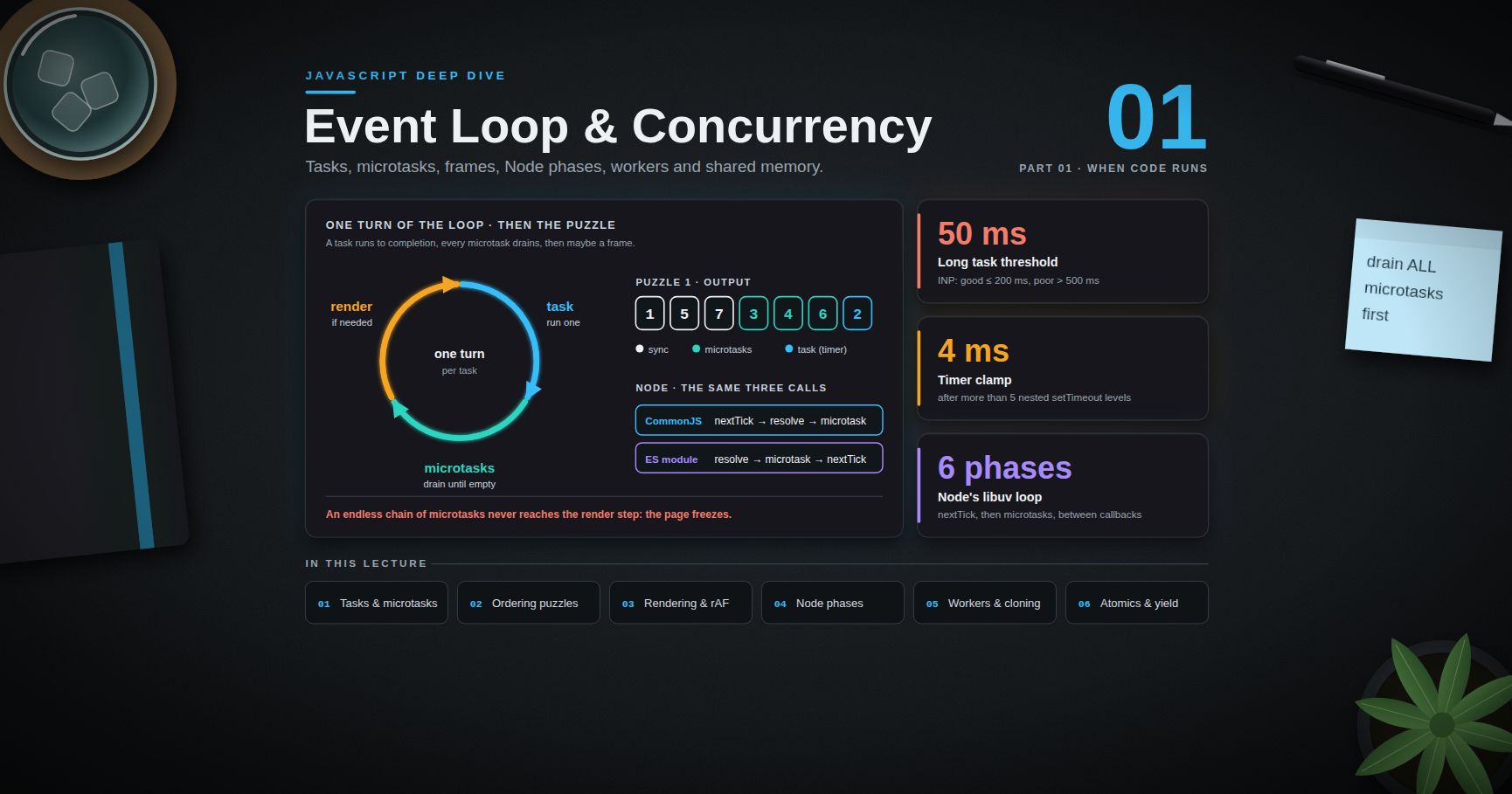
The main thread runs one task at a time (Post 01). A 300 ms task means any click during it waits up to 300 ms before its handler even starts. That wait is INP's input delay. The fix is to split work and yield between the pieces, so that the browser can handle input and paint.
1
2
3
4
5
6
7
8
9
10
11
12
13
14
15
16
17
function yieldToMain() {
if (globalThis.scheduler?.yield) return scheduler.yield(); // Chrome 129+, Firefox 142+
return new Promise((resolve) => setTimeout(resolve, 0)); // fallback: back of the task queue
}
async function processAll(items, { signal } = {}) {
let deadline = performance.now() + 50;
for (const item of items) {
process(item);
if (performance.now() >= deadline) {
await yieldToMain();
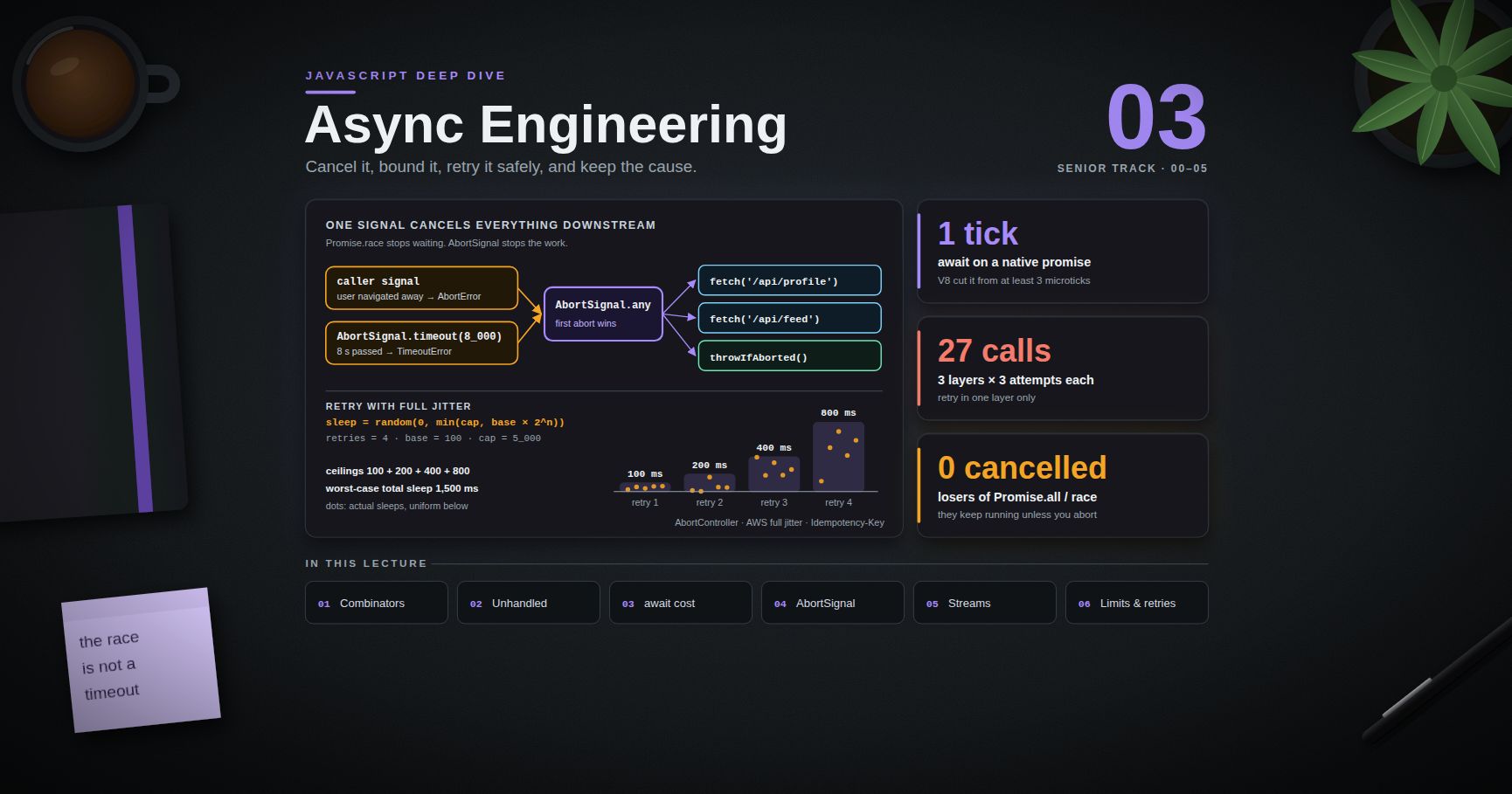
signal?.throwIfAborted(); // the user may have moved on (Post 03)
deadline = performance.now() + 50;
}
}
}
scheduler.yield() is better than setTimeout(0) because its continuation is prioritised: it resumes ahead of other queued tasks of the same priority, instead of going to the back of the queue behind third-party scripts. It is not yet Baseline, so keep the fallback.
For event handlers, give the user feedback before the heavy work:
1
2
3
4
5
6
button.addEventListener('click', async () => {
button.classList.add('busy'); // visible change: gets into the next frame
await yieldToMain(); // let the browser paint it
runExpensiveFilter(); // the remaining work no longer counts against this interaction's paint
});
Finding the culprit: Long Animation Frames
Long tasks tell you that the main thread was blocked. The Long Animation Frames API (LoAF, Chrome 123+) tells you which scripts did it, in the field:
1
2
3
4
5
6
7
8
9
10
11
12
13
new PerformanceObserver((list) => {
for (const frame of list.getEntries()) {
if (frame.duration < 150) continue;
for (const s of frame.scripts) {
sendToRum({
frameDuration: frame.duration, blocking: frame.blockingDuration,
invoker: s.invoker, source: s.sourceURL, fn: s.sourceFunctionName,
duration: s.duration, forcedLayout: s.forcedStyleAndLayoutDuration,
});
}
}
}).observe({ type: 'long-animation-frame', buffered: true });
Aggregated over thousands of sessions, sourceURL quickly separates "our bundle" from "the chat widget" and "the A/B testing snippet". The web-vitals attribution build attaches the relevant LoAF entries to INP reports for you.
Common pitfall: moving work into
requestIdleCallbackor asetTimeoutwithout splitting it. A 400 ms task started from idle time is still a 400 ms task. It just blocks a different interaction.
Chapter 4 — Memory leaks in the browser
JavaScript is garbage-collected: an object is freed once nothing reachable from a root (globals, the stack, active handles) references it. A leak is therefore not "forgotten free()". It is an unintended reference path from a root. Four paths cause most real leaks:
| Leak | Retaining path | Fix |
|---|---|---|
| Detached DOM | A removed element still referenced from JS: an array, a Map, a closure, a component instance |
Drop references on unmount; hold elements in WeakMap/WeakRef if you must |
| Listeners and subscriptions | window/document/an event bus holds the listener, the listener closes over a component |
Remove in cleanup; addEventListener(…, { signal }) plus one abort() |
| Closures | A long-lived callback captures a large scope: the whole response, not the one field it needs | Capture only what you use; null out big locals |
| Unbounded caches | A module-level Map keyed by request, user or URL, never evicted |
LRU with a size bound, TTLs, WeakMap for object keys |
Timers (setInterval never cleared) and global stores that keep every past page's data are variants of the same idea.
Terminology
- Shallow size — memory held by the object itself.
- Retained size — memory that would be freed if this object were collected: itself plus everything only it keeps alive. Sort by this.
- Retainers — the chain of references from a GC root to the object. The fix is almost always to break one link in this chain.
- Distance — the number of references from the nearest root. Many objects at an unexpectedly large distance often point to a growing structure.
The three-snapshot technique
- Load the page, do the action once to warm caches, take snapshot 1.
- Repeat the suspect action (open and close the dialog, navigate away and back) several times. Take snapshot 2.
- Repeat the same number of times again. Take snapshot 3.
- In snapshot 3, choose Objects allocated between snapshots 1 and 2. Objects created then and still alive after another round are leak candidates. Anything that belongs to a closed dialog should be gone.
Useful filters: type Detached in the class filter to list detached DOM trees, and open Retainers on one of them. The first entry under your own code (not framework internals) is usually the bug.
The Allocation instrumentation on timeline profile records allocations over time. Blue bars are allocations still alive at the end, grey bars were collected. Blue bars that keep appearing on every repeat of an action are the leak, and selecting one shows the allocating stack. Allocation sampling has much lower overhead and suits long sessions.
1
2
3
4
5
6
7
8
9
10
11
12
13
14
// A leak in four lines: every open() adds a listener that retains `panel`, forever.
function open(panel) {
window.addEventListener('resize', () => layout(panel));
document.body.append(panel);
}
// Fixed: the listener's lifetime is tied to the panel's.
function open(panel) {
const ctl = new AbortController();
window.addEventListener('resize', () => layout(panel), { signal: ctl.signal });
document.body.append(panel);
return () => { ctl.abort(); panel.remove(); }; // close()
}
Watch out:
console.log(obj)in DevTools retainsobjwhile the console is open, so leaks can appear only with DevTools attached. Clear the console before a snapshot. Taking a snapshot also forces a full GC, so "memory drops after snapshot" is not proof of a fix.
Trick: in production,
performance.measureUserAgentSpecificMemory()(Chromium, cross-origin isolated pages only) reports memory per frame. Sample it rarely and send it to RUM. A median that rises with session length is a leak you have not reproduced yet.
Chapter 5 — Profiling Node
Attaching a debugger
1
2
3
4
node --inspect server.js # listens on 127.0.0.1:9229
node --inspect-brk script.js # stop before the first line
kill -USR1 <pid> # Linux/macOS: turn on the inspector in a running process
Open chrome://inspect for the same Performance and Memory tools as in the browser. Never bind the inspector to a public interface (--inspect=0.0.0.0): it gives anyone who can reach the port full code execution. On a remote host, use an SSH tunnel.
Profiles without a debugger
1
2
3
4
5
node --cpu-prof --cpu-prof-dir=./prof server.js # writes a .cpuprofile when the process exits
node --heap-prof server.js # sampling heap profile: which stacks allocate
node --heapsnapshot-signal=SIGUSR2 server.js # kill -USR2 <pid> writes a .heapsnapshot
node --heapsnapshot-near-heap-limit=2 server.js # up to 2 snapshots as the heap nears its limit
Load .cpuprofile and .heapsnapshot files into DevTools (Performance and Memory panels), or turn a CPU profile into a flame graph with tools like speedscope. --cpu-prof-interval sets the sampling interval in microseconds (default 1000).
Watch out: writing a heap snapshot is synchronous and needs roughly twice the current heap size in extra memory. On a container that is close to its memory limit, the snapshot itself can get the process OOM-killed. Take snapshots on a canary instance, or with a raised limit.
Runtime signals worth graphing
1
2
3
4
5
6
7
8
9
10
11
12
13
import { monitorEventLoopDelay } from 'node:perf_hooks';
const h = monitorEventLoopDelay({ resolution: 20 });
h.enable();
setInterval(() => {
const m = process.memoryUsage();
metrics.gauge('eventloop.delay.p99_ms', h.percentile(99) / 1e6); // histogram is in ns
metrics.gauge('heap.used_mb', m.heapUsed / 2 ** 20);
metrics.gauge('rss_mb', m.rss / 2 ** 20);
metrics.gauge('external_mb', (m.external + m.arrayBuffers) / 2 ** 20);
h.reset();
}, 10_000).unref();
How to read them together:
heapUsedclimbs across GCs and never returns — a JS leak. Take two heap snapshots some time apart and compare them.rssclimbs whileheapUsedstays flat — memory outside the JS heap:Buffers, native addons, fragmentation. Heap snapshots will not show it.- Event loop delay p99 spikes — something synchronous is blocking: a large
JSON.parse, a sync crypto or zlib call, a pathological regex. A CPU profile taken during the spike shows it.
--max-old-space-size (in MB) sets the old-generation heap limit. In containers, set it deliberately below the container's memory limit, so that V8 collects garbage harder before the kernel kills the process.
Chapter 6 — Source maps
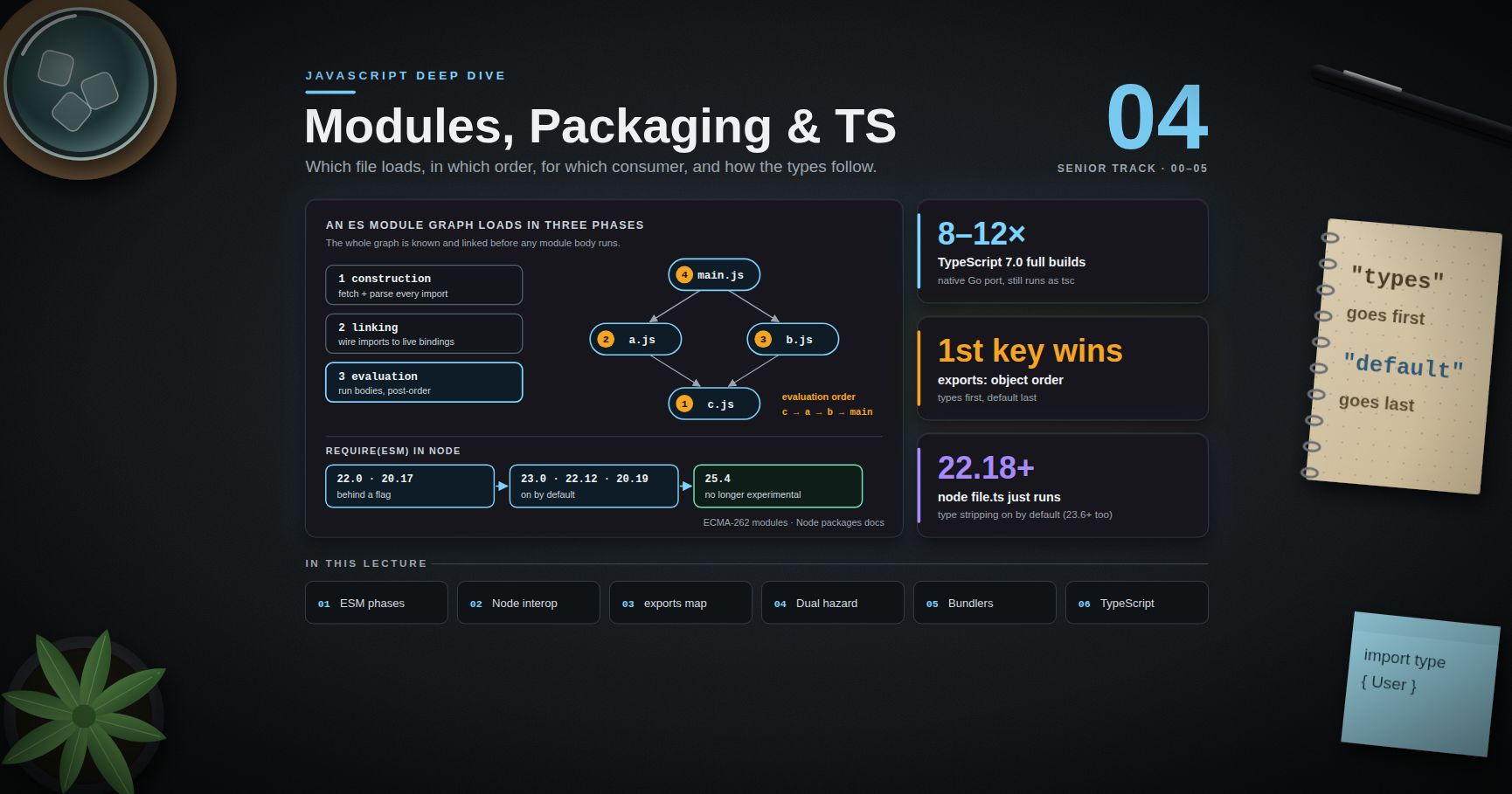
A source map links positions in generated code to positions in the original source. The format was standardised as ECMA-426 (first edition, December 2024). The generated file points to its map with a trailing comment:
1
2
//# sourceMappingURL=main.3f9a1c.js.map
Deployment choices:
| Strategy | Browser DevTools | Error tracker | Source exposed publicly |
|---|---|---|---|
Public maps with sourcesContent |
Yes | Yes | Yes |
| Hidden maps: generate, upload to the tracker, do not deploy, no comment | No | Yes | No |
| Maps behind auth / VPN only | For staff | Yes | No |
Most teams choose hidden maps. In Vite: build.sourcemap: 'hidden'. Upload the maps in CI together with the release identifier your runtime reports, so that the tracker can match an error from main.3f9a1c.js to the map from the same build.
In Node, --enable-source-maps (or process.setSourceMapsEnabled(true)) rewrites stack traces to original TypeScript locations. It has a cost: building error.stack becomes much more expensive, which matters in code that creates many errors. Measure before turning it on for a hot service.
Common pitfall: the map uploaded to the tracker does not match the deployed file, for example because it came from a rebuild with a different hash. Every frame then maps to the wrong line, and nobody notices for weeks. Build once and deploy that exact artifact.
Chapter 7 — Production error monitoring and RUM
Capturing errors
1
2
3
addEventListener('error', (e) => capture(e.error ?? e.message, { src: e.filename, line: e.lineno }));
addEventListener('unhandledrejection', (e) => capture(e.reason, { kind: 'unhandledrejection' }));
Checklist for useful reports:
- Cross-origin scripts report only
"Script error."unless the<script>hascrossorigin="anonymous"and the CDN sendsAccess-Control-Allow-Origin. - Tag every event with the release, route, browser and a session ID. Without the release you cannot tell a new regression from an old error.
- Group errors by normalised stack (the fingerprint), not by message. Messages contain IDs and user data.
- Walk
error.causeand include the chain (Post 03), after removing secrets. - Collect browser reports with the Reporting API: the
Reporting-Endpointsheader plusreport-toin CSP collects CSP violations, deprecation warnings and intervention reports without any script. - In Node,
process.on('uncaughtException')is for logging, then exiting. The process state is unknown after an uncaught exception. Let the supervisor restart it.
RUM
Real-user monitoring means aggregating Chapter 1's metrics plus your own spans (performance.measure) from real sessions. Guidelines:
- Look at distributions, not averages: p75 for Web Vitals, and p95/p99 for your own spans. Always split by device class and connection. A median desktop user tells you nothing about a low-end Android phone.
- Sample the high-volume events (e.g. 10% of sessions). Send errors and poor-rated vitals at 100%.
- Send on
visibilitychangetohiddenwithsendBeacon.unloadis unreliable, and on mobile often never fires. - Correlate RUM with backend traces (OpenTelemetry's
traceparent), so that a slow LCP can be traced to the slow API call behind it. - Treat RUM as personal data: no raw URLs with tokens, no text from input fields, and only what your privacy notice covers.
Chapter 8 — Benchmarking without fooling yourself
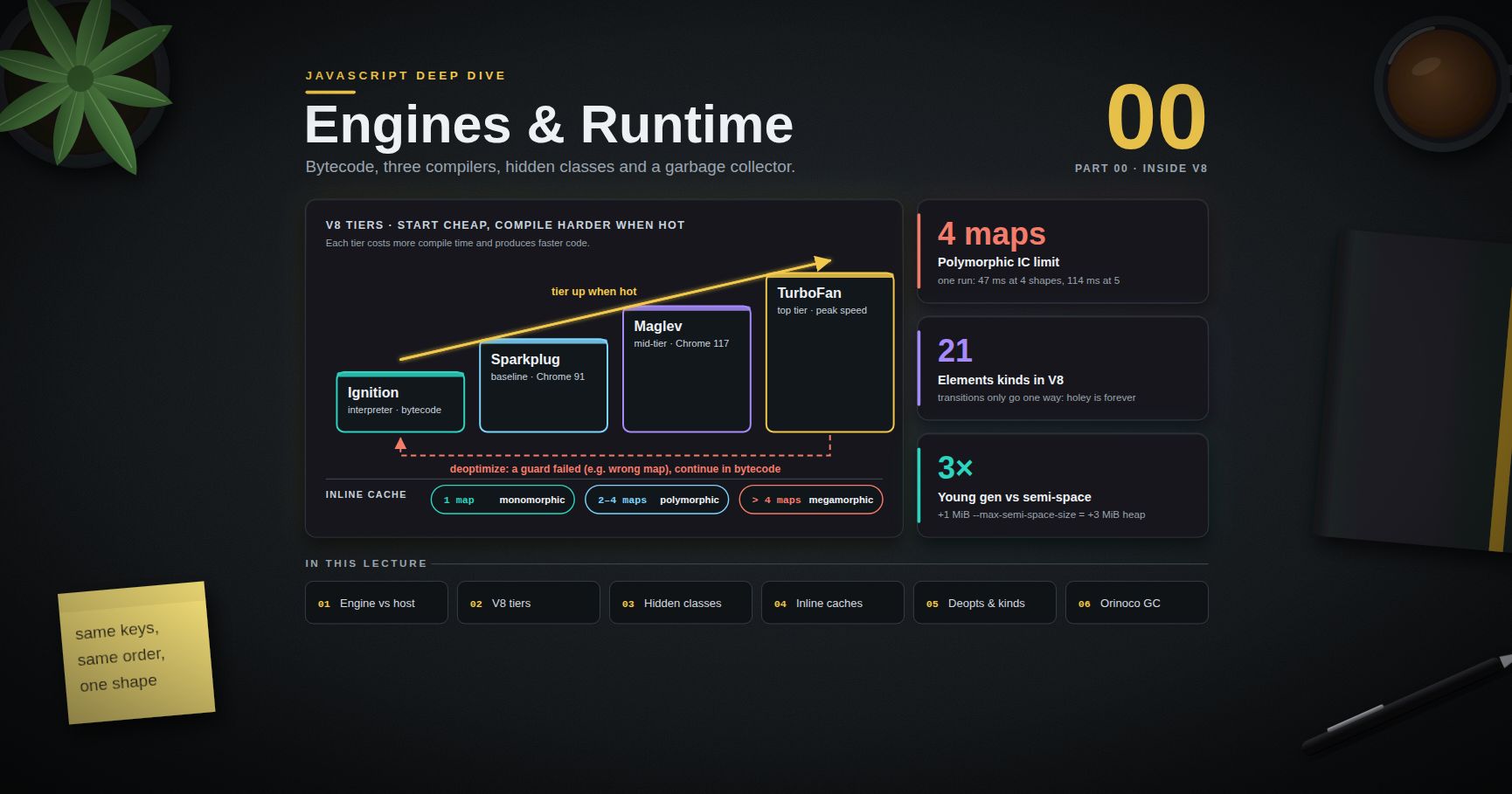
Micro-benchmarks in JavaScript are unusually easy to get wrong, because a JIT compiler (Post 00) sits between your code and the CPU.
1
2
3
4
5
// Broken: the result is unused, the input is constant, and there is no warm-up.
const t0 = performance.now();
for (let i = 0; i < 1e6; i++) Math.sqrt(144);
console.log(performance.now() - t0);
What goes wrong, and how to avoid it:
| Pitfall | What happens | Countermeasure |
|---|---|---|
| Dead-code elimination | Unused result → the optimiser may remove the work | Consume results (accumulate and print, or use a "black hole") |
| Constant folding | Constant input → computed once | Vary inputs; read them from an array built at runtime |
| No warm-up | You measure the interpreter and the compiler, not optimised code | Warm-up iterations; discard the first samples |
| Unrealistic type feedback | The benchmark feeds one shape, production feeds five → monomorphic vs megamorphic (Post 02) | Use production-like data |
| GC noise | A collection lands inside one sample | Many samples; report median and spread, not the best run |
| Timer resolution | performance.now() is coarsened to 100 µs (5 µs when cross-origin isolated) |
Time batches, not single calls; process.hrtime.bigint() in Node |
| Machine noise | CPU frequency scaling, thermal throttling, other processes | Same machine, idle, several runs; compare A/B in the same process run |
Use a harness that handles most of this (tinybench, mitata), and hyperfine for whole commands. Most importantly, prefer macro-benchmarks: the real endpoint under realistic load, or the real interaction in a throttled Performance recording. A 10× gain on a function that takes 0.5% of the request is a 0.45% gain.
Trick: before optimising anything, write down the metric, its current p75/p99, and the target. After the change, compare the same percentile from the same source. Anything else tends to become "it feels faster".
Practice Exercises
Exercise 1 — Classify the metrics
A product page has p75 LCP 3.1 s, p75 INP 180 ms and p75 CLS 0.27 on mobile. Rate each, and say which you would work on first and why.
Solution
LCP 3.1 s is needs improvement (2.5–4.0 s). INP 180 ms is good (≤ 200 ms). CLS 0.27 is poor (> 0.25). Start with CLS: it is the only poor rating, and the usual causes are cheap to fix (images without dimensions, late-injected banners, web fonts swapping sizes). Then LCP, starting with its sub-parts from the attribution data.
Exercise 2 — Read the INP breakdown
RUM attribution for a poor INP shows input delay 380 ms, processing 40 ms, presentation 30 ms, on interactions during the first 5 s. What is happening, and what do you look at next?
Solution
The handler is fast. The interaction waited behind other main-thread work, and the time window points at start-up: hydration, bundle evaluation, or third-party scripts. Next, look at the LoAF scripts entries attached to those interactions (sourceURL, invoker) to see whose code it was. Then break up or defer that work: yield during hydration, lazy-load third parties after interaction, and split large bundles.
Exercise 3 — Find the leak
A single-page app's tab grows by about 8 MB each time a user opens and closes a report dialog. Describe the exact DevTools steps to find the retaining path.
Solution
Memory panel: warm up once, take snapshot 1. Open and close the dialog 5 times, take snapshot 2. Another 5 times, take snapshot 3. In snapshot 3, view objects allocated between snapshots 1 and 2, sort by retained size, and filter the class list by Detached. Pick a detached dialog root and read its Retainers from the top until the first frame in your own code. That is usually a listener on window, a store subscription, or a cache entry. Fix it, repeat the three snapshots, and confirm that the between-snapshot set no longer contains dialog objects.
Exercise 4 — RSS vs heap
A Node image-resizing service's RSS grows from 300 MB to 1.8 GB over a day, while heapUsed stays around 120 MB. Where is the memory, and how do you confirm it?
Solution
Outside the JS heap: Buffer/ArrayBuffer memory (external and arrayBuffers in process.memoryUsage()), native allocations in the image library, or allocator fragmentation. Graph external + arrayBuffers next to rss. If they track RSS, find who holds the Buffers: search a heap snapshot for ArrayBuffer/Buffer, and look for a cache of image bytes. If they do not, suspect the native library or fragmentation. Try a different allocator (e.g. jemalloc via LD_PRELOAD) and limit the library's own caches.
Exercise 5 — Fix the benchmark
Rewrite the broken Math.sqrt benchmark from Chapter 8 so that it measures something real.
Solution
1
2
3
4
5
6
7
8
9
10
11
12
13
14
const inputs = Float64Array.from({ length: 1_000 }, () => Math.random() * 1e6);
let sink = 0;
function run(n) { for (let i = 0; i < n; i++) sink += Math.sqrt(inputs[i % inputs.length]); }
for (let i = 0; i < 20; i++) run(100_000); // warm-up
const samples = [];
for (let i = 0; i < 30; i++) {
const t0 = process.hrtime.bigint();
run(1_000_000);
samples.push(Number(process.hrtime.bigint() - t0) / 1e6);
}
samples.sort((a, b) => a - b);
console.log({ median_ms: samples[15], p90_ms: samples[27], sink });
The inputs vary at runtime, the result goes into sink, which is printed, there is a warm-up phase, and the output reports a distribution from 30 samples. Even then, the number describes only this loop on this machine. Whether Math.sqrt matters in your app is a question for a profile of the real workload.
Exercise 6 — Source map hygiene
Your error tracker shows the correct file names but lines that are off by dozens of lines. List two likely causes.
Solution
(1) The uploaded map belongs to a different build of the same file name, for example a rebuild after the upload, or non-deterministic output. Build once, and upload and deploy that exact artifact, keyed by release. (2) A later step changed the file after the map was generated (a CDN "optimiser", a banner injector, a second minifier) without updating the map. Turn off the post-processing or make it produce a composed map.
Cheat-sheet
| Question | Tool / rule |
|---|---|
| Is the page fast for users? | Field p75: LCP ≤ 2.5 s, INP ≤ 200 ms, CLS ≤ 0.1 |
| Collect vitals | web-vitals/attribution → sendBeacon |
| Why is LCP slow? | TTFB / load delay / load duration / render delay |
| Why is INP slow? | input delay / processing / presentation |
| Which scripts block? | PerformanceObserver type long-animation-frame |
| Break up work | await scheduler.yield() with a setTimeout fallback |
| Custom spans | performance.mark / performance.measure |
| Layout thrashing | Batch reads before writes |
| Leak hunting | Three snapshots, "allocated between 1 and 2", filter Detached, read Retainers |
| Allocation source | Allocation instrumentation on timeline / allocation sampling |
| Node debugger | node --inspect (localhost only), kill -USR1 <pid> |
| Node CPU profile | node --cpu-prof → load .cpuprofile in DevTools |
| Node heap snapshot | --heapsnapshot-signal=SIGUSR2, needs about 2× heap free |
| Blocked event loop | monitorEventLoopDelay() p99 |
| Heap flat, RSS growing | Buffers / native memory, not a JS leak |
| Private source maps | build.sourcemap: 'hidden' + upload per release |
| Node stack traces in TS | --enable-source-maps (costly for error.stack) |
| Cross-origin errors | crossorigin="anonymous" + CORS header |
| Trustworthy benchmark | Warm-up, varied input, consume results, many samples, median + spread |
What's next
This post closes the core of the JavaScript Deep Dive. The framework series build directly on it: the React Deep Dive (rendering, reconciliation, the compiler, Server Components), the Next.js Deep Dive (routing, caching, streaming and deployment), and the Vue Deep Dive (the reactivity system, compiler-informed rendering, Nuxt). Each of them comes back to what this series covered: the event loop behind scheduling, cancellation in data fetching, module boundaries in bundling, and INP and memory in production.
Planned future extensions
| # | Planned topic | Why it belongs here |
|---|---|---|
| 06 | Workers, SharedArrayBuffer and Atomics |
Real parallelism once yielding is not enough; cross-origin isolation |
| 07 | WebAssembly from JavaScript | When a hot path should leave JS entirely; the costs of crossing the boundary |
| 08 | Security for JavaScript engineers | Prototype pollution, supply-chain attacks, CSP and Trusted Types |
| 09 | Testing at scale | Test runners, fake timers, testing async and streams, flaky-test forensics |
| 10 | The Temporal API and Intl |
Dates, time zones and formatting done right, now that Temporal has reached stage 4 |
| 11 | Node in production | Clustering, graceful shutdown, AsyncLocalStorage, diagnostics channels |
| 12 | Language updates | A yearly post on the new ECMAScript edition and what is worth adopting |
References
- web.dev — Web Vitals, LCP, INP and CLS — definitions and thresholds.
- web.dev — Optimize long tasks and MDN —
Scheduler.yield(). - Chrome for Developers — Long Animation Frames API.
- GoogleChrome/web-vitals — the field measurement library and its attribution build.
- Chrome DevTools — Performance panel reference and Fix memory problems.
- Node.js — Command-line options (
--cpu-prof,--heap-prof,--heapsnapshot-signal), Debugging guide andperf_hooks. - ECMA-426 — Source map format specification.
- MDN — Reporting API and
Performance.now()precision.