JavaScript Deep Dive — 04 · Modules, Packaging & TypeScript at Scale
Most "it works on my machine" bugs in modern JavaScript are module bugs. A library works from import but not from require. The same class fails an instanceof check against itself. The bundle ships a 400 KB date library for one helper. The type checker is happy while Node throws ERR_PACKAGE_PATH_NOT_EXPORTED. This post goes through the module systems as the spec and Node define them, then how a package tells each consumer which file to load, what bundlers do with the result, and how TypeScript fits in when the codebase has hundreds of packages. It is written against Node 24 LTS, Vite 8, TypeScript 6.0 and 7.0.
Series map: 00 Engines & Runtime → 01 Event Loop & Concurrency → 02 Objects, Prototypes & Metaprogramming → 03 Async Engineering → 04 Modules, Packaging & TypeScript at Scale (this post) → 05 Performance, Memory & Production Debugging (future: see the extensions table in 05).
Learning Outcome
- Explain ESM's three phases, live bindings, hoisting, cycles and top-level
await, and contrast them with CommonJS. - Predict what Node does for every mix of
import,require,.mjs,.cjsand"type", includingrequire(esm). - Write a
package.jsonexports/importsmap with conditions in the right order, and check it with tools. - Recognise the dual-package hazard and choose a publishing strategy that avoids it.
- Use import maps, and know what tree-shaking needs from your code (
sideEffects, pure annotations, no barrels in hot paths). - Describe the 2026 bundler landscape: Vite 8 on Rolldown and Oxc, esbuild, Rollup, and where each fits.
- Configure TypeScript for a large codebase: strict flags,
moduleResolution, declaration output, project references, and Node's built-in type stripping. - Read and write core type-level code: generics with constraints, conditional types with
infer, mapped types with key remapping.
Chapter 1 — ES modules as the spec defines them
Terminology
- Module record — the engine's parsed representation of one module: its imports, exports and code.
- Linking — connecting every import to the exporting module's binding, before any code runs.
- Binding — a named slot in a module's environment. An import is a read-only view of the exporter's binding, not a copy of its value.
- Module namespace object — the object you get from
import * as nsorawait import(): a frozen-shaped, live view of all exports. - TDZ (temporal dead zone) — the window between a
let/const/classbinding being created and being initialised. Reading it throwsReferenceError.
Three phases
A module graph is loaded in three separate phases:
- Construction — fetch and parse every module reachable through static
import/export … fromdeclarations. The whole graph is known before anything runs. This is why static imports must be at top level with string-literal specifiers. - Linking — create each module's bindings and wire imports to exports. A missing named export is a
SyntaxErrorat this point, before any code runs. - Evaluation — run each module body once, in post-order depth-first order: dependencies before dependents, siblings in source order. If
main.jsimportsa.jsand thenb.js, and both importc.js, the bodies run in the orderc.js,a.js,b.js,main.js.
Consequences:
- Imports are hoisted. An
importon line 50 is linked before line 1 runs. - Each module runs once per realm, keyed by its resolved URL.
./a.js?v=2is a different module from./a.js. - Modules are strict mode, top-level
thisisundefined, and top-level declarations are module-scoped, not global.
Live bindings
1
2
3
4
5
6
7
8
9
10
11
// counter.js
export let count = 0;
export function increment() { count++; }
// main.js
import { count, increment } from './counter.js';
console.log(count); // 0
increment();
console.log(count); // 1 (the import is a view of counter.js's binding)
count = 5; // TypeError: Assignment to constant variable (imports are read-only)
CommonJS has no bindings. require() returns whatever module.exports was, and destructuring copies the values:
1
2
3
4
5
6
7
8
// counter.cjs
let count = 0;
module.exports = { count, increment() { count++; } };
// main.cjs
const { count, increment } = require('./counter.cjs');
increment();
console.log(count); // 0 (a copy made when the object was created)
Cycles
Both systems allow cycles and both can surprise you, in different ways.
| ESM | CommonJS | |
|---|---|---|
| Module in the cycle not finished yet | Its bindings exist but are uninitialised: reading a let/const/class export throws ReferenceError (TDZ). function declarations are hoisted and usable. |
require returns the partial module.exports object as it is at that moment. Missing properties are undefined, and no error is raised. |
| Typical symptom | ReferenceError: Cannot access 'X' before initialization |
TypeError: x is not a function far from the cause |
| Fix | Break the cycle, move shared code into a third module, or only use cyclic imports inside functions called later | Same, or require inside the function that needs it |
Trick:
madge --circular src/ordpdmlists cycles. Run one in CI. Cycles through barrel files (index.tsre-exporting a whole folder) are the most common source in large apps.
Top-level await
A module that uses top-level await (ES2022) makes its evaluation asynchronous. Every module that imports it, directly or indirectly, waits for it. Siblings that do not depend on it can still evaluate. The cost is easy to miss: one await fetchConfig() in a shared config.js delays the start of every module above it in the graph.
1
2
3
// db.js
export const pool = await createPool(process.env.DATABASE_URL); // importers wait for this
Use it for real start-up dependencies (config, WASM instantiation, a connection pool) in applications. Avoid it in libraries. It forces an async graph on every consumer, and in Node it makes the module impossible to require() (Chapter 2).
Dynamic import and import.meta
import(specifier) works in both module systems. It returns a promise of the namespace object and is how code-splitting points are expressed. import.meta.url is the module's own URL. Node adds import.meta.dirname and import.meta.filename (Node 20.11+), which replace __dirname/__filename in ESM, and import.meta.resolve(specifier).
Chapter 2 — ESM and CommonJS in Node
How Node decides a file's format
| File | Format |
|---|---|
.mjs |
ESM, always |
.cjs |
CommonJS, always |
.js with nearest package.json "type": "module" |
ESM |
.js with "type": "commonjs" |
CommonJS |
.js with no "type" |
CommonJS, unless the file contains ESM syntax, in which case Node re-parses it as ESM ("syntax detection") |
Watch out: syntax detection costs a second parse and hides mistakes. Always set
"type"explicitly in everypackage.jsonyou own.
ESM importing CommonJS
import x from './legacy.cjs' always works: the default export is module.exports. Named imports (import { a } from './legacy.cjs') work only if Node's static analyser (cjs-module-lexer) can see the names in the source, for example as exports.a = … or module.exports = { a, b }. Exports computed at runtime are invisible to it, so you get a SyntaxError at link time.
CommonJS requiring ESM: require(esm)
For years require() of an ES module threw ERR_REQUIRE_ESM, and that single error drove a decade of dual-publishing. That has changed:
| Node version | require(esm) status |
|---|---|
| 22.0, 20.17 | Added behind --experimental-require-module |
| 23.0, 22.12, 20.19 | Enabled by default (no flag) |
| 23.5, 22.13, 20.19 | No experimental warning by default |
| 25.4 | No longer experimental |
Rules:
- The ES module graph must be fully synchronous: no top-level
awaitanywhere in it. Otherwise you getERR_REQUIRE_ASYNC_MODULE. require()returns the namespace object. If it has a default export, the namespace also includes__esModule: true, so transpiled CJS consumers see the default export correctly.- An ES module can choose what
require()returns withexport { thing as 'module.exports' }. - Detect it with
process.features.require_module. Disable it with--no-require-module.
1
2
3
4
5
6
7
8
// lib/point.mjs
export default class Point { constructor(x, y) { this.x = x; this.y = y; } }
export { Point as 'module.exports' }; // require('./point.mjs') returns the class itself
// app.cjs
const Point = require('./lib/point.mjs');
new Point(1, 2);
With Node 20 now past end-of-life and every supported Node line able to require() synchronous ESM, publishing ESM-only is a reasonable default for new libraries. It still depends on your support matrix, as Chapter 4 explains.
Chapter 3 — package.json: exports, imports and conditions
Terminology
- Entry point — the file a bare specifier (
import 'pkg') or subpath (import 'pkg/utils') resolves to. exports— the public map from subpaths to files. Once present, only listed subpaths can be imported. Anything else throwsERR_PACKAGE_PATH_NOT_EXPORTED.- Condition — a key inside an
exportsentry that matches the environment (import,require,node,browser,types, …). - Subpath pattern — a
*in both key and target, e.g."./features/*": "./dist/features/*.js". imports— a private map for the package's own code. Keys must start with#.
A realistic exports map
1
2
3
4
5
6
7
8
9
10
11
12
13
14
15
16
17
18
19
20
21
22
{
"name": "@acme/sdk",
"type": "module",
"exports": {
".": {
"types": "./dist/index.d.ts",
"browser": "./dist/index.browser.js",
"import": "./dist/index.js",
"require": "./dist/index.cjs"
},
"./features/*": {
"types": "./dist/features/*.d.ts",
"default": "./dist/features/*.js"
},
"./package.json": "./package.json"
},
"imports": {
"#internal/*": "./src/internal/*.js"
},
"sideEffects": false
}
Object key order is the priority order. The resolver walks the keys in the order written and takes the first one that is in its set of active conditions. The order of the active conditions does not matter. Node documents its built-in conditions from most to least specific: node-addons, node, import, require, module-sync, default. default must come last, and types must come first.
| Consumer | Active conditions (main ones) | Resolves @acme/sdk to |
|---|---|---|
TypeScript (nodenext / bundler) |
types, plus import or require |
./dist/index.d.ts |
| Vite 8, client build | module, browser, development|production, plus import |
./dist/index.browser.js |
Node, import |
node, import, module-sync, default |
./dist/index.js |
Node, require() |
node, require, module-sync, default |
./dist/index.cjs |
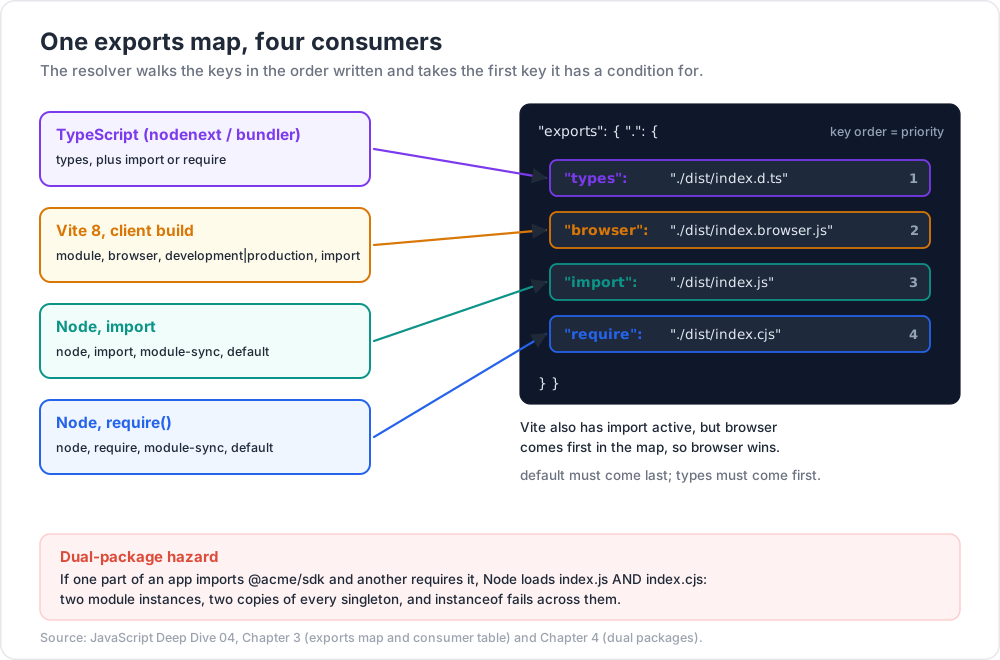
module-sync matches for import and require() in Node versions that support require(esm). It exists so that a package can point both at one ESM file, which removes the dual-package hazard described next. Custom conditions come from node --conditions=development (or -C development), and bundlers have their own setting (resolve.conditions in Vite).
Common pitfall: putting
"types"after"import". TypeScript stops at the first matching key, which isimport, and then looks for./dist/index.d.tsnext to the JS file by extension. That may or may not exist. Runnpx @arethetypeswrong/cli --packandnpx publintbefore every release. Between them they catch mostexportsmistakes.
Subpath imports
1
2
3
// anywhere inside @acme/sdk
import { hash } from '#internal/crypto'; // → ./src/internal/crypto.js
imports replaces fragile ../../../ paths and tsconfig paths aliases with something Node, bundlers and TypeScript all understand natively. Entries can have conditions too, e.g. a node and a default implementation of #internal/fs.
Chapter 4 — Dual packages and the hazard
A dual package ships both an ESM build and a CJS build. The dual-package hazard: in one process, some code imports the package and some requires it. Node then loads both files, creating two module instances with two copies of every piece of module state.
Symptoms:
err instanceof SdkErrorisfalsefor an error thrown by "the same" class.- A singleton registry, cache or plugin list exists twice, and registrations go missing.
- Two copies of a framework runtime complain that hooks or context are being called from a different copy.
Strategies, from most to least preferred in 2026:
| Strategy | How | Trade-off |
|---|---|---|
| ESM-only | Ship ESM; CJS consumers use require(esm) |
Needs Node 20.19+ / 22.12+ for CJS consumers; no top-level await in the graph |
| One ESM file for everyone | "module-sync" and "import" point at the ESM file, "require" points at a fallback only for old Node |
Old Node still gets two copies, which is acceptable if old Node never mixes the two |
| CJS core + thin ESM wrapper | index.mjs does import cjs from './index.cjs'; export const { a, b } = cjs; |
One instance of state; ESM consumers lose tree-shaking |
| Stateless dual build | Two full builds, no module-level state, no instanceof across the API |
Works only if you can keep that discipline forever |
Trick: use
Symbol.for('@acme/sdk.Registry')onglobalThisfor state that must be a true singleton, and a brand check (static [Symbol.hasInstance]or anisSdkError()function) instead ofinstanceof. This survives two copies and even two different versions innode_modules.
Chapter 5 — Modules in the browser
Browsers load ESM natively: <script type="module"> is deferred by default, runs in strict mode, and is fetched with CORS. What they cannot do by themselves is resolve bare specifiers like 'lit'. Import maps (Baseline since 2023) fill that gap:
1
2
3
4
5
6
7
8
9
10
11
12
13
14
15
<script type="importmap">
{
"imports": {
"lit": "https://cdn.jsdelivr.net/npm/lit@3/index.js",
"lit/": "https://cdn.jsdelivr.net/npm/lit@3/",
"#app/": "/static/app/"
},
"scopes": {
"/static/legacy/": { "lit": "https://cdn.jsdelivr.net/npm/lit@2/index.js" }
}
}
</script>
<link rel="modulepreload" href="/static/app/main.js">
<script type="module" src="/static/app/main.js"></script>
Import maps are enough for small apps, internal tools, and micro-frontends that share one copy of a framework. For large apps, bundling still wins: fewer round trips, dead-code removal, minification, and hashed file names that can be cached for a long time. modulepreload fixes the discovery waterfall (A imports B imports C) only when you list the deep modules yourself.
Chapter 6 — Tree-shaking and bundlers
What tree-shaking needs
Tree-shaking removes exports nobody imports. It relies on ESM being static: the bundler can see every import and export without running code. It fails when:
- Code is CommonJS.
module.exportsis a runtime object, so bundlers must keep all of it (with a few heuristics). - A module might have side effects. A top-level
polyfill(), aclasswith static initialisers, orObject.defineProperty(window, …)must be kept even if nothing is imported from the module. The bundler has to assume that side effects exist unless told otherwise. - The code uses namespace objects dynamically.
ns[key]with a computed key keeps the whole namespace.
Tell the bundler what is safe:
1
2
{ "sideEffects": ["*.css", "./dist/polyfills.js"] }
1
2
3
export const theme = /*#__PURE__*/ createTheme({ … }); // this call may be dropped if unused
/*#__NO_SIDE_EFFECTS__*/ export function defineComponent(o) { return o; } // every call is droppable
"sideEffects": false claims that no file in the package does anything on import, so the bundler may skip whole modules. Lying here breaks CSS imports and polyfills silently.
Watch out: barrel files (
index.tsthat re-exports 300 components) are cheap in production builds with correctsideEffects, but expensive everywhere else. The dev server, test runner and type checker all load and transform every re-exported module. Large codebases import from the leaf module (@acme/ui/button), and expose subpathexportsto allow it.
The 2026 landscape
| Tool | What it is | Where it fits |
|---|---|---|
| Vite 8 (March 2026) | Dev server + build, now on Rolldown (Rust bundler) and Oxc (Rust parser/transformer/minifier) | Default for SPAs and many frameworks. Needs Node 20.19+ / 22.12+. esbuild is no longer a direct dependency |
| Rolldown | Rust bundler with a Rollup-compatible plugin API | Under Vite, or on its own for libraries |
| Rollup | The original ESM-first bundler, JS | Library builds; its plugin API is the ecosystem standard |
| esbuild | Go bundler/transpiler, still 0.x, extremely fast | Scripts, CLIs, Lambda bundles, and as a transformer inside other tools |
| webpack / Rspack | webpack is the mature JS original; Rspack is a Rust reimplementation with a compatible API | Large legacy configs; Module Federation |
| Turbopack | Next.js's Rust bundler | Next.js only; see the Next.js Deep Dive series |
Before Vite 8, the dev server used esbuild and production builds used Rollup. The two could transform code differently, and occasionally a bug appeared only in vite build. Vite 8 uses one bundler for both, which removes that whole class of problem. It also opens the way to a full-bundle dev mode and module-level persistent caching.
Trick: measure before tuning.
vite buildwithrollup-plugin-visualizer(ornpx vite-bundle-visualizer) shows what is actually in each chunk. The usual big wins are a duplicated dependency, a locale-data import, or a CJS-only library that cannot be tree-shaken.
Chapter 7 — TypeScript at scale
Where TypeScript is in 2026
- TypeScript 6.0 (March 2026) is the last release built on the JavaScript codebase. It changed defaults:
strict: true,module: esnext,target: es2025,types: [](no more automatic inclusion of every@typespackage), androotDir: ".". It also deprecated a long list of legacy options:moduleResolution: node/node10andclassic,target: es5,--downlevelIteration,--outFile,baseUrlas a lookup root, and theamd/umd/systemjsmodule formats. - TypeScript 7.0 (July 2026) is the native port, written in Go. The announcement reports typical full-build speed-ups of 8–12×. It still installs as
typescriptand runs astsc. The deprecated 6.0 options are now hard errors. 7.0 ships without a programmatic API, which is planned for 7.1. So tools that drive the compiler through its API (Vue, Svelte, Astro and MDX language tooling, some lint rules) may need to stay on 6.0 for now.
A strict baseline
1
2
3
4
5
6
7
8
9
10
11
12
13
14
15
{
"compilerOptions": {
"strict": true, // default in 6.0, keep it explicit
"noUncheckedIndexedAccess": true, // arr[i] is T | undefined
"exactOptionalPropertyTypes": true, // {a?: string} does not accept a: undefined
"noImplicitOverride": true,
"noFallthroughCasesInSwitch": true,
"verbatimModuleSyntax": true, // imports are emitted exactly as written
"isolatedModules": true, // every file transpilable on its own
"module": "nodenext", // or "preserve" + "moduleResolution": "bundler"
"target": "es2024",
"skipLibCheck": true
}
}
noUncheckedIndexedAccess is the flag that finds the most real bugs in existing code, and it is also the noisiest to turn on. Enable it per package through project references rather than all at once.
module / moduleResolution: pick by runtime
| Code runs in | Setting | Effect |
|---|---|---|
| Node (apps and libraries) | "module": "nodenext" |
Follows Node's real rules: "type", exports, conditions, file extensions required in relative ESM imports |
| A bundler (Vite, Next.js, …) | "module": "preserve", "moduleResolution": "bundler" |
Supports exports, allows extensionless relative imports as bundlers do |
| A library published for both | nodenext |
The strictest option; if it type-checks under nodenext it works in bundlers too |
Declaration files
Libraries publish .d.ts files ("declaration": true, plus "declarationMap": true so that "go to definition" lands in the source). isolatedDeclarations (TS 5.5) requires explicit return and export types, so that each file's declarations can be produced without the type checker. Fast tools such as Oxc can then emit .d.ts files in parallel. In a monorepo this removes the slowest step from the build graph.
Project references
1
2
3
4
5
6
7
8
9
// tsconfig.json (root): a solution file that only lists packages
{ "files": [], "references": [{ "path": "packages/core" }, { "path": "packages/web" }] }
// packages/web/tsconfig.json
{
"compilerOptions": { "composite": true, "outDir": "dist", "rootDir": "src" },
"references": [{ "path": "../core" }]
}
tsc -b builds packages in dependency order and skips any whose inputs have not changed, using .tsbuildinfo files. composite forces the settings that make this safe: declarations on, and every file listed. TypeScript 7 adds --builders to build independent references in parallel. Editors also load only the projects you open, which is what keeps a 500-package monorepo responsive.
Node's built-in type stripping
Node runs .ts files directly by replacing type syntax with whitespace:
| Version | Change |
|---|---|
| 22.6 | --experimental-strip-types added |
| 23.6, 22.18 | Type stripping enabled by default |
| 25.2, 24.12 | Type stripping stable |
| 26.0 | --experimental-transform-types removed |
It does no type checking, ignores tsconfig.json, refuses files under node_modules, and only handles erasable syntax. enum, namespace with runtime code, parameter properties and import = aliases need a transform and fail. Imports must use the real extension (import './util.ts'), and type-only imports must say import type. The matching compiler settings:
1
2
3
4
5
6
7
8
9
10
{
"compilerOptions": {
"noEmit": true,
"module": "nodenext",
"rewriteRelativeImportExtensions": true, // TS 5.7: emit .js for './x.ts' if you do build
"erasableSyntaxOnly": true, // TS 5.8: error on enums, namespaces, …
"verbatimModuleSyntax": true
}
}
Then node src/server.ts runs, and tsc --noEmit (or tsc -b) type-checks in CI.
Chapter 8 — Type-level programming essentials
Types are a small functional language that runs at compile time. Four features cover most real code.
1
2
3
4
5
6
7
8
9
10
11
12
13
14
15
16
17
18
19
20
21
22
23
// 1. Generics with constraints: relate inputs to outputs.
function pick<T extends object, K extends keyof T>(obj: T, keys: readonly K[]): Pick<T, K> {
const out = {} as Pick<T, K>;
for (const k of keys) out[k] = obj[k];
return out;
}
const p = pick({ id: 1, name: 'a', admin: true }, ['id', 'name']); // { id: number; name: string }
// 2. Conditional types with infer: pattern-match on a type.
type ElementOf<T> = T extends readonly (infer E)[] ? E : never;
type UnwrapPromise<T> = T extends PromiseLike<infer U> ? UnwrapPromise<U> : T; // like built-in Awaited
// 3. Distribution: a naked type parameter distributes over a union.
type ToArray<T> = T extends unknown ? T[] : never;
type A = ToArray<string | number>; // string[] | number[]
type ToArrayNoDist<T> = [T] extends [unknown] ? T[] : never;
type B = ToArrayNoDist<string | number>; // (string | number)[]
// 4. Mapped types with key remapping and template literal types.
type Getters<T> = { [K in keyof T & string as `get${Capitalize<K>}`]: () => T[K] };
type G = Getters<{ id: number; name: string }>; // { getId: () => number; getName: () => string }
type Mutable<T> = { -readonly [K in keyof T]: T[K] };
Two operators that keep type-level code small:
satisfieschecks a value against a type without widening it:const routes = { home: '/', user: '/u/:id' } satisfies Record<string, string>;keeps the literal keys.consttype parameters (function f<const T>(x: T)) infer['a', 'b']as a readonly tuple instead ofstring[].
Watch out: deep recursive conditional types slow down the checker for everyone who imports them. If
tsc --extendedDiagnosticsshows check time dominated by one file, ortsc --generateTracepoints at one type, simplify that type. Clever types are a cost the whole team pays on every keystroke.
Practice Exercises
Exercise 1 — Live binding or copy?
Given export let n = 1; export function bump() { n++; }, what do an ESM importer and a CJS consumer using require(esm) each see after calling bump()?
Solution
Both see 2 through ns.n or a named import. require(esm) returns the module namespace object, which is a live view. The CJS consumer loses liveness only if it destructures: const { n, bump } = require('./m.mjs') copies n at that moment, and it stays 1.
Exercise 2 — Fix the exports map
A package has "exports": { ".": { "import": "./dist/index.mjs", "types": "./dist/index.d.ts", "require": "./dist/index.cjs" } }. TypeScript users with moduleResolution: nodenext who import it report missing types, while require users are fine. Why, and what is the fix?
Solution
Key order is priority. For an ESM consumer, TypeScript matches import first and never reaches types. It resolves ./dist/index.mjs and looks for the sibling declaration file ./dist/index.d.mts, which does not exist. A require consumer skips import, so it reaches types. Put types first. If the ESM and CJS builds need different declarations, nest them: "import": { "types": "./dist/index.d.ts", "default": "./dist/index.js" }, "require": { "types": "./dist/index.d.cts", "default": "./dist/index.cjs" }. Verify with npx @arethetypeswrong/cli --pack.
Exercise 3 — Diagnose the double singleton
An app registers plugins with @acme/sdk, but plugins registered from a CJS config file never show up. The app code uses import. Explain the bug and give two fixes.
Solution
This is the dual-package hazard. The app loads dist/index.js and the config loads dist/index.cjs: two module instances, two registries. Fixes: (1) publish ESM-only, or point module-sync/require at the ESM file, so that require(esm) loads the same instance; (2) store the registry on globalThis under Symbol.for('@acme/sdk.registry') so that both copies share it.
Exercise 4 — Why is it in the bundle?
A 3 KB feature ships 180 KB. The bundle visualiser shows all of @acme/icons, imported as import { Check } from '@acme/icons'. List three possible causes.
Solution
(1) @acme/icons ships CommonJS only, so it cannot be tree-shaken. (2) It has no "sideEffects": false, so the bundler keeps every module the barrel re-exports. (3) Its icons are built by top-level calls (createIcon(…)) without /*#__PURE__*/, so each call counts as a possible side effect. Fix at the source, or import from a subpath (@acme/icons/check) if the package exports one.
Exercise 5 — Strip-types readiness
Which of these lines fail under Node's type stripping, and why? enum Color { Red }, import { User } from './types.ts' (User is a type), class A { constructor(private x: number) {} }, const x = y as unknown as Z;
Solution
The enum fails: it needs code generation. The parameter property private x fails for the same reason. The import { User } fails at runtime because it is treated as a value import of a name that types.ts does not export at runtime. Write import type { User }. The as casts are erasable and fine. erasableSyntaxOnly plus verbatimModuleSyntax catch all three failures at compile time.
Exercise 6 — Write a type
Write DeepReadonly<T> that makes nested objects and arrays readonly, but leaves functions alone.
Solution
1
2
3
4
5
6
type DeepReadonly<T> =
T extends (...args: any[]) => unknown ? T :
T extends readonly (infer E)[] ? ReadonlyArray<DeepReadonly<E>> :
T extends object ? { readonly [K in keyof T]: DeepReadonly<T[K]> } :
T;
The function check comes first, because functions are objects and would otherwise be mapped. Arrays are handled before plain objects, so that they become ReadonlyArray rather than objects with numeric keys.
Cheat-sheet
| Task | How |
|---|---|
| Force a file's format | .mjs / .cjs, or "type" in the nearest package.json |
__dirname in ESM |
import.meta.dirname (Node 20.11+) |
require an ES module |
Works by default in Node 20.19+ / 22.12+ if the graph has no top-level await |
Control what require(esm) returns |
export { x as 'module.exports' } |
| Public entry points only | "exports" map; add "./package.json" if tools need it |
| Condition order | Object key order: types first, default last |
| One file for import and require | "module-sync" condition |
| Private aliases | "imports": { "#internal/*": "./src/internal/*.js" } |
| Check a package before publishing | npx @arethetypeswrong/cli --pack, npx publint |
| Tree-shake safely | ESM output, "sideEffects", /*#__PURE__*/ |
| Find import cycles | madge --circular or dpdm |
| Bare specifiers without a bundler | <script type="importmap"> |
| TS for Node code | "module": "nodenext" |
| TS for bundled code | "module": "preserve", "moduleResolution": "bundler" |
| Monorepo builds | composite + references + tsc -b (--builders in TS 7) |
Fast .d.ts output |
isolatedDeclarations |
Run .ts in Node |
node file.ts (22.18+ / 23.6+), with erasableSyntaxOnly |
What's next
Post 05 closes the series with production concerns: Core Web Vitals and their thresholds, the Performance panel and flame charts, long tasks and scheduler.yield(), finding memory leaks with heap snapshots and allocation timelines, profiling Node with --inspect and --cpu-prof, source maps, production error monitoring and RUM, and why most micro-benchmarks lie.
References
- ECMAScript® Language Specification — Modules — module records, linking and evaluation.
- MDN — JavaScript modules and import maps.
- Node.js — Modules: packages —
exports,imports, conditions, the dual-package hazard. - Node.js — Loading ECMAScript modules using
require()— the version history above. - Node.js — Modules: TypeScript — type stripping and its limits.
- Vite 8.0 is out! and Vite — shared options:
resolve.conditions. - Announcing TypeScript 6.0 and Announcing TypeScript 7.0.
- TypeScript — Modules reference and Project references.
- Are the Types Wrong? and publint.