JavaScript Deep Dive — 01 · Event Loop & Concurrency
"JavaScript is single-threaded" is true of your code on one thread and false of everything around it. The browser runs networking, parsing, compositing and garbage collection on other threads; Node runs file-system work on a thread pool; and both let you start real parallel threads of JavaScript with workers. What is single-threaded is each agent's event loop: one call stack, fed by queues of tasks and microtasks, in an order that is precisely specified — by the HTML standard in browsers and by libuv plus Node's own rules on the server. This post makes that order exact: tasks vs microtasks, where rendering and requestAnimationFrame fit, the ordering puzzles that come out of it, Node's phases with process.nextTick and setImmediate, and then true parallelism with workers, structured clone, transferables, SharedArrayBuffer and Atomics. It ends with the production view: long tasks, INP and yielding with scheduler.yield().
Series map: 00 Engines & Runtime → 01 Event Loop & Concurrency (this post) → 02 Objects, Prototypes & Metaprogramming → 03 Async Engineering → 04 Modules, Packaging & TypeScript at Scale → 05 Performance, Memory & Production Debugging. Future: see the extensions table in 05.
Learning Outcome
- Describe one turn of the browser event loop: task, microtask checkpoint, and the "update the rendering" steps.
- Predict the output of any mix of synchronous code,
setTimeout, promises,queueMicrotaskandasync/await, including extra promise ticks. - Place
requestAnimationFrame,ResizeObserverandIntersectionObservercallbacks correctly in a frame. - Name Node's six event-loop phases and order
process.nextTick, promise callbacks,setTimeoutandsetImmediate, in CommonJS and ES modules. - Choose between Web Workers,
worker_threads,SharedArrayBufferand plain message passing, and know what structured clone can and cannot copy. - Use
Atomicscorrectly and explain why cross-origin isolation is required in browsers. - Find and break up long tasks with
scheduler.yield()and a fallback, to improve INP.
Chapter 1 — The model
Terminology
- Agent — a call stack, a set of queues and one event loop. A window (with its same-origin iframes), each worker, and each Node
worker_threadsworker are separate agents. - Task (often "macrotask") — a unit of work queued by the host: a timer firing, an input event, a network response, a
postMessage. Browsers keep several task queues (by task source) and may choose which queue to serve next — this is how input can be prioritised over timers. - Microtask — a smaller unit queued by promise reactions,
queueMicrotask, andMutationObserver. There is one microtask queue per agent. - Microtask checkpoint — the step that runs microtasks until the queue is empty, including microtasks queued by microtasks.
- Rendering opportunity — a moment when the browser can present a new frame, typically aligned with the display refresh (about every 16.7 ms at 60 Hz). Browsers may skip frames or throttle hidden pages.
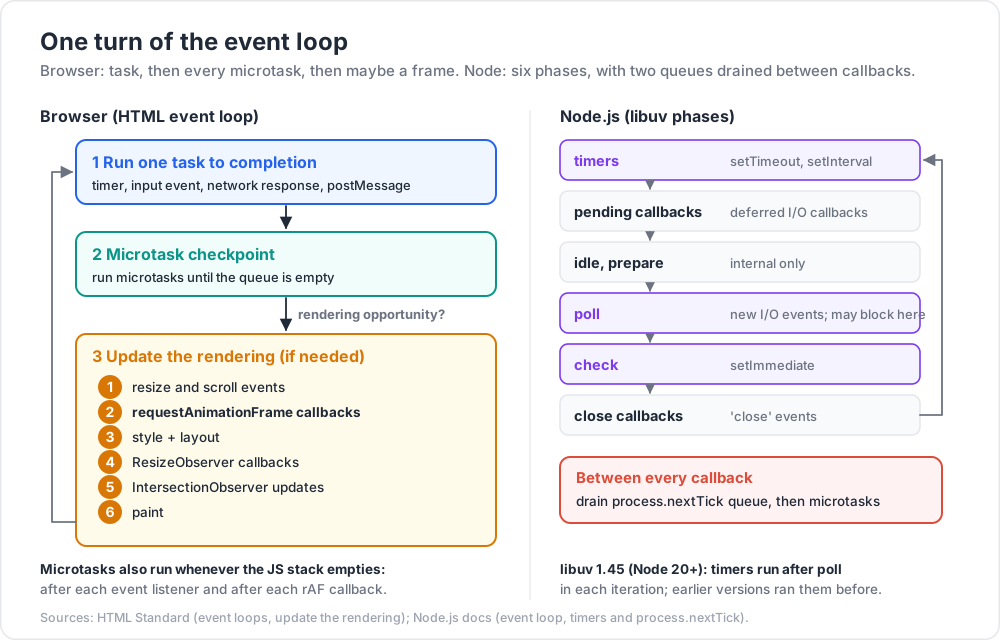
One turn of the browser loop
- Pick the oldest task from a task queue the browser chooses, and run it to completion. The call stack empties.
- Perform a microtask checkpoint: run microtasks until none remain.
- If this is a rendering opportunity and there is something to render, update the rendering (Chapter 3).
- Repeat.
Two rules produce nearly every "surprising" order:
- Microtasks run whenever the JavaScript stack becomes empty, not only between tasks. The HTML spec's "clean up after running script" step performs a microtask checkpoint whenever the JavaScript execution context stack becomes empty — after a task, but also after each event listener the browser invokes and after each
requestAnimationFramecallback. - The checkpoint drains the queue completely. A microtask that queues another microtask keeps the loop in step 2. An infinite chain of microtasks freezes the page as surely as
while (true)— rendering and input never get a turn.
Watch out:
setTimeout(fn, 0)is not "run next". HTML clamps the delay to at least 4 ms once timers are nested more than 5 levels deep, browsers throttle timers in background tabs heavily, and a timer is only a task — everything already queued, and the rendering step, can run first.
Chapter 2 — Ordering puzzles
Work each one out before reading the answer. All outputs below were checked in Node 22 (the same rules apply in browsers for these cases).
Puzzle 1 — the basics
1
2
3
4
5
6
7
console.log('1');
setTimeout(() => console.log('2'), 0);
Promise.resolve().then(() => console.log('3'));
queueMicrotask(() => console.log('4'));
(async () => { console.log('5'); await null; console.log('6'); })();
console.log('7');
Output: 1 5 7 3 4 6 2.
1,5,7are synchronous. The body of anasyncfunction runs synchronously up to its firstawait.- Three microtasks are queued in order: the
thencallback (3), thequeueMicrotaskcallback (4), the continuation afterawait null(6). - The timer is a task, so
2comes after the microtask checkpoint.
Puzzle 2 — async functions calling async functions
1
2
3
4
5
6
7
8
async function a1() { console.log('a1 start'); await a2(); console.log('a1 end'); }
async function a2() { console.log('a2'); }
console.log('script start');
setTimeout(() => console.log('setTimeout'), 0);
a1();
new Promise(r => { console.log('p1'); r(); }).then(() => console.log('p2'));
console.log('script end');
Output: script start, a1 start, a2, p1, script end, a1 end, p2, setTimeout.
The promise executor (p1) runs synchronously. a2() returns an already-fulfilled native promise; since ES2019, await on a native promise takes a single microtask hop, so a1 end is queued before p2. (Older engines needed three hops and printed p2 first — a well-known behaviour change, which is why old blog posts disagree.)
Puzzle 3 — returning a promise from then
1
2
3
4
5
6
7
8
9
Promise.resolve()
.then(() => { console.log('a'); return Promise.resolve('x'); })
.then(v => console.log('b', v));
Promise.resolve()
.then(() => console.log('c'))
.then(() => console.log('d'))
.then(() => console.log('e'))
.then(() => console.log('f'));
Output: a c d e b x f.
Returning a thenable from a then callback does not resolve the outer promise directly. The spec queues a NewPromiseResolveThenableJob, which calls x.then(resolveOuter), which queues another job when x is already fulfilled. Two extra hops, so b lands after e.
| Microtask queue after each step | Queue contents |
|---|---|
| start | a, c |
run a (returns a promise) |
c, thenable job |
run c |
thenable job, d |
run thenable job (x.then(resolve)) |
d, resolve outer |
run d |
resolve outer, e |
resolve outer (queues b) |
e, b |
run e |
b, f |
Trick: in an
asyncfunction,return await pinsidetryis needed for thecatchto see a rejection, but plainreturn pcosts the same extra hops as Puzzle 3. The difference in hops almost never matters; the difference in error handling often does. Choose by semantics.
Puzzle 4 — user click vs el.click()
1
2
3
4
5
6
7
8
9
button.addEventListener('click', () => {
Promise.resolve().then(() => console.log('micro 1'));
console.log('listener 1');
});
button.addEventListener('click', () => {
Promise.resolve().then(() => console.log('micro 2'));
console.log('listener 2');
});
- Real user click:
listener 1,micro 1,listener 2,micro 2. The browser calls each listener from the event loop, the stack empties after each, and a microtask checkpoint runs in between. button.click()from script:listener 1,listener 2,micro 1,micro 2. The listeners run inside your script's call stack, which is not empty untilclick()returns and your script finishes.
This is why tests that dispatch synthetic events can pass while the real UI behaves differently — for example when a listener relies on a microtask (such as a framework's batched update) having run before the next listener.
Chapter 3 — Rendering and requestAnimationFrame
When the loop decides to render, the HTML standard's update the rendering step runs, per document, in this order (abridged):
- Run the resize steps (fire
resize), then the scroll steps (firescroll). - Evaluate media queries; update animations and send animation events; fullscreen steps.
- Run the animation frame callbacks — every
requestAnimationFramecallback registered before this frame began. - Recalculate styles and update layout, then deliver
ResizeObservercallbacks; if they changed layout, recalculate and deliver again (to a depth limit, after which the browser reports a "ResizeObserver loop" error). - Run the
IntersectionObserverupdate steps. - Paint — "update the rendering or user interface".
Consequences for engineers:
- rAF is the place for visual writes. Code in a rAF callback runs just before style and layout, so the frame shows its result. A
setTimeout(…, 16)animation drifts against the display's refresh and may run twice or zero times per frame. - A rAF callback that calls rAF schedules for the next frame, not the current one. That is what makes rAF loops work.
- Microtasks run between rAF callbacks (the stack empties after each one), so a promise resolved in one rAF callback settles before the next callback runs.
- Layout thrashing: reading layout (
offsetHeight,getBoundingClientRect()) after writing styles forces the browser to do style and layout synchronously, in the middle of your task. Doing it in a loop — write, read, write, read — can force a layout per iteration. Batch all reads first, then all writes.
1
2
3
4
5
6
7
8
9
10
11
// Thrashes: forced synchronous layout on every iteration
for (const el of items) {
el.style.width = (el.offsetWidth + 10) + 'px';
}
// Reads first, then writes: at most one layout, done by the browser at the right time
const widths = items.map(el => el.offsetWidth);
requestAnimationFrame(() => {
items.forEach((el, i) => { el.style.width = (widths[i] + 10) + 'px'; });
});
Common pitfall: using rAF in a background tab to keep "real-time" work going. Browsers stop or heavily throttle rAF in hidden documents (the HTML spec removes hidden documents from rendering). Anything that must keep running — a WebSocket heartbeat, a timer for session expiry — belongs in a timer or a worker, not rAF.
Chapter 4 — The Node.js event loop
Node's loop is libuv's loop plus two queues Node adds on top.
| Phase | Runs |
|---|---|
| timers | Expired setTimeout / setInterval callbacks |
| pending callbacks | Some system I/O callbacks deferred from the previous iteration (e.g. certain TCP errors) |
| idle, prepare | Internal only |
| poll | Retrieves new I/O events and runs their callbacks; the loop blocks here when there is nothing else to do |
| check | setImmediate callbacks |
| close callbacks | 'close' events such as socket.on('close', …) |
The Node documentation notes one change: starting with libuv 1.45.0 (Node 20), timers are run after the poll phase in each iteration; earlier versions ran them before polling.
On top of the phases:
process.nextTickqueue — drained after the current operation completes, before the loop moves on, regardless of phase.- Microtask queue (promises,
queueMicrotask) — drained right after the nextTick queue. Every time Node drains the nextTick queue, it drains the microtask queue immediately after. - Since Node 11, both queues are drained between every individual callback (after each timer, each immediate), matching browser behaviour. Older Node drained them only between phases.
setTimeout vs setImmediate
1
2
3
setTimeout(() => console.log('timeout'), 0);
setImmediate(() => console.log('immediate'));
From the main module the order is not guaranteed — it depends on how quickly the loop starts relative to the 1 ms minimum timer. Inside an I/O callback it is deterministic: the loop is in the poll phase, so the check phase (immediate) always comes before the next timers phase.
1
2
3
4
5
6
7
8
const fs = require('node:fs');
fs.readFile(__filename, () => {
setTimeout(() => console.log('timeout'), 0);
setImmediate(() => console.log('immediate'));
process.nextTick(() => console.log('nextTick'));
});
// nextTick, immediate, timeout — always
nextTick vs promises: CommonJS vs ES modules
1
2
3
4
Promise.resolve().then(() => console.log('resolve'));
queueMicrotask(() => console.log('microtask'));
process.nextTick(() => console.log('nextTick'));
| File type | Output | Why |
|---|---|---|
.cjs (CommonJS) |
nextTick, resolve, microtask |
The main script is an ordinary operation; the nextTick queue drains first, then microtasks |
.mjs (ES module) |
resolve, microtask, nextTick |
ES module evaluation already runs as part of the microtask queue, so microtasks queued there run before Node gets back to the nextTick queue |
This is the example from the Node documentation, and it is the reason code that relied on nextTick ordering changes behaviour after a CommonJS-to-ESM migration.
Trick: Node's own advice is to prefer
queueMicrotask()overprocess.nextTick()for deferring work in userland, andsetImmediate()oversetTimeout(fn, 0)for "after I/O". Reach fornextTickonly when you need its specific guarantee — for example, emitting an event after the caller has had a chance to attach listeners, in a constructor.
Watch out: a recursive
process.nextTick(or a recursive microtask) starves I/O. The poll phase never runs, so sockets are not read and timers never fire. A recursivesetImmediatedoes not starve I/O: each round waits for the next check phase.
What runs off the main thread in Node
The event loop is single-threaded, but libuv has a thread pool (default 4 threads, UV_THREADPOOL_SIZE) for work without a good asynchronous OS API: most fs operations, dns.lookup, and CPU-heavy crypto and zlib calls. Network sockets do not use the pool; they use the OS's readiness APIs (epoll, kqueue, IOCP). A burst of fs calls or crypto.pbkdf2 calls can therefore queue behind four busy threads — a classic hidden bottleneck.
Chapter 5 — Parallelism: workers
When work is CPU-bound — parsing a large file, image processing, compression, heavy validation — no scheduling trick helps; it must run on another thread.
| Web Worker (browser) | worker_threads (Node) |
|
|---|---|---|
| Create | new Worker(url, { type: 'module' }) |
new Worker(file, { workerData }) |
| Communicate | postMessage / onmessage, MessageChannel |
postMessage / 'message', MessageChannel, workerData |
| DOM access | None | Not applicable |
| Shared memory | SharedArrayBuffer, only when cross-origin isolated |
SharedArrayBuffer, always |
| Memory limits | Browser-managed | resourceLimits option (e.g. maxOldGenerationSizeMb) |
Each worker is a separate agent: its own isolate, its own heap, its own event loop. Starting one costs milliseconds and several megabytes, so create a pool once and reuse it rather than spawning a worker per request.
1
2
3
4
5
6
7
8
9
10
11
12
13
14
// main.js (browser, module worker)
const worker = new Worker(new URL('./hash-worker.js', import.meta.url), { type: 'module' });
const { promise, resolve } = Promise.withResolvers();
worker.onmessage = e => resolve(e.data);
const bytes = await file.arrayBuffer();
worker.postMessage(bytes, [bytes]); // transfer, do not copy
console.log('sha-256:', await promise); // `bytes` is now detached here (byteLength 0)
// hash-worker.js
self.onmessage = async e => {
const digest = await crypto.subtle.digest('SHA-256', e.data);
self.postMessage([...new Uint8Array(digest)].map(b => b.toString(16).padStart(2, '0')).join(''));
};
Structured clone and transferables
postMessage copies its argument with the structured clone algorithm (the same one behind structuredClone()):
| Copied | Not copied (throws DataCloneError or is lost) |
|---|---|
Primitives except symbols; BigInt |
Functions, symbols → DataCloneError |
Plain objects, arrays, Map, Set, Date, RegExp |
DOM nodes → DataCloneError |
ArrayBuffer, typed arrays, DataView, Blob, File |
Prototypes: a class instance arrives as a plain object |
Error objects (Error, RangeError, …) |
Private #fields, getters/setters (only the current value is copied) |
| Circular references (preserved) | Property descriptors (everything becomes writable, enumerable) |
Copying a 100 MB buffer costs time and doubles memory. Transferring moves ownership instead: the sender's ArrayBuffer becomes detached (byteLength 0) and the receiver gets the same memory with no copy. Transferable types include ArrayBuffer, MessagePort, ImageBitmap, OffscreenCanvas, and the stream types ReadableStream, WritableStream and TransformStream.
1
2
3
4
const buf = new ArrayBuffer(8);
const moved = structuredClone(buf, { transfer: [buf] });
console.log(buf.byteLength, moved.byteLength); // 0 8
Trick:
OffscreenCanvaslets a worker own a canvas and render without touching the main thread:const off = canvas.transferControlToOffscreen(); worker.postMessage({ off }, [off]);. Charting and map libraries use this to keep the main thread free for input.
Chapter 6 — Shared memory and Atomics
Message passing shares nothing, which is why it is safe. SharedArrayBuffer shares memory: both threads see the same bytes, with all the hazards of real threads.
Why browsers require cross-origin isolation
Shared memory plus a busy-loop counter gives a high-resolution timer, which is enough to mount Spectre-style side-channel attacks that read memory across origins. Browsers therefore expose SharedArrayBuffer only to cross-origin isolated documents, which requires two response headers on the top-level document:
1
2
3
Cross-Origin-Opener-Policy: same-origin
Cross-Origin-Embedder-Policy: require-corp (or: credentialless)
Check crossOriginIsolated at run time. require-corp blocks every cross-origin subresource that does not opt in with CORS or Cross-Origin-Resource-Policy — third-party scripts, images and iframes break — so adopting it is a project, not a header change. Without isolation, postMessage of a SharedArrayBuffer throws. Node has no such restriction.
Data races and Atomics
1
2
3
4
// race.mjs — four threads, 100 000 plain increments each
a[0]++; // read, add, write: not atomic
// printed "non-atomic = 231356" in one run, not 400000
Atomics operations are indivisible and sequentially consistent:
1
2
3
4
5
6
7
8
9
10
11
12
13
14
// main.mjs (Node)
import { Worker } from 'node:worker_threads';
const sab = new SharedArrayBuffer(Int32Array.BYTES_PER_ELEMENT * 2);
const shared = new Int32Array(sab); // [0] = counter, [1] = workers finished
const workers = Array.from({ length: 4 }, () =>
new Worker(new URL('./counter-worker.mjs', import.meta.url), { workerData: sab }));
// Block until all four have finished (allowed in Node; not on a browser main thread)
while (Atomics.load(shared, 1) < 4) Atomics.wait(shared, 1, Atomics.load(shared, 1));
console.log('counter =', Atomics.load(shared, 0)); // counter = 400000
await Promise.all(workers.map(w => w.terminate()));
1
2
3
4
5
6
7
8
// counter-worker.mjs
import { workerData } from 'node:worker_threads';
const shared = new Int32Array(workerData);
for (let i = 0; i < 100_000; i++) Atomics.add(shared, 0, 1);
Atomics.add(shared, 1, 1);
Atomics.notify(shared, 1);
| Operation | Use |
|---|---|
Atomics.load / store |
Read / write with ordering guarantees |
Atomics.add, sub, and, or, xor, exchange |
Read-modify-write, returns the old value |
Atomics.compareExchange(ta, i, expected, replacement) |
The building block for locks and lock-free structures |
Atomics.wait(ta, i, value, timeout?) |
Sleep while ta[i] === value. Throws on a browser main thread; fine in workers and Node |
Atomics.waitAsync(…) |
Non-blocking wait that returns { async, value } (a promise when async is true); usable on the main thread; Baseline since November 2025 |
Atomics.notify(ta, i, count?) |
Wake waiters |
Watch out:
SharedArrayBuffergives you raw bytes, not objects. You cannot share a JavaScript object graph between threads; you design a binary layout (a ring buffer, a struct of typed-array fields) and serialise into it. That is the right tool for audio, video, physics or WASM threads — and the wrong tool for sharing application state, where message passing is simpler and safer.
Chapter 7 — Long tasks, INP and yielding
Terminology
- Long task — any task that occupies the main thread for more than 50 ms. Input that arrives during it waits.
- INP (Interaction to Next Paint) — the Core Web Vital for responsiveness: roughly the worst latency from a user interaction to the next frame, across the page's life. Good is 200 ms or less; poor is above 500 ms.
- Yielding — ending the current task deliberately so the browser can handle input and render, then continuing in a new task.
Yielding the right way
Splitting work with setTimeout(0) works, but the continuation goes to the back of the task queue, behind every other queued task (and third-party scripts). scheduler.yield() returns a promise whose continuation is queued with priority above other tasks of the same priority, so your work resumes promptly after the browser has handled input and rendering:
1
2
3
4
5
6
7
8
9
10
11
12
13
14
15
16
function yieldToMain() {
if (globalThis.scheduler?.yield) return scheduler.yield();
return new Promise(resolve => setTimeout(resolve, 0)); // fallback
}
async function processAll(items) {
let deadline = performance.now() + 50;
for (const item of items) {
processItem(item);
if (performance.now() > deadline) { // yield about every 50 ms, not every item
await yieldToMain();
deadline = performance.now() + 50;
}
}
}
scheduler.yield() shipped in Chrome 129 and Firefox 142; at the time of writing it is not Baseline, so always feature-detect. scheduler.postTask(fn, { priority: 'user-blocking' | 'user-visible' | 'background' }) is the companion API for scheduling new work with a priority. Microtasks are not a way to yield: await Promise.resolve() resumes before the browser can render or handle input.
Finding the long tasks
- DevTools Performance panel: long tasks are flagged with a red corner; the flame chart shows which function owns the time.
- Long Animation Frames API (LoAF):
new PerformanceObserver(cb).observe({ type: 'long-animation-frame', buffered: true })reports frames that took longer than 50 ms, with script attribution (source URL, function, invoker). It is the field-data tool for explaining a bad INP. - Node:
perf_hooks.monitorEventLoopDelay()gives a histogram of event-loop delay; a p99 in the hundreds of milliseconds means a synchronous hot spot (JSON parsing a huge body, a sync crypto call, a regex with catastrophic backtracking).
Common pitfall: "we moved it into a promise, so it's async now". Wrapping CPU-bound work in
new Promise(...)or anasyncfunction changes nothing — the executor and the code before the firstawaitrun synchronously, and the rest runs in microtasks on the same thread. Only yielding (new tasks) or a worker (new thread) keeps the page responsive.
Practice Exercises
Exercise 1 — Order this
1
2
3
4
5
6
7
8
setTimeout(() => console.log('A'), 0);
Promise.resolve().then(() => {
console.log('B');
setTimeout(() => console.log('C'), 0);
queueMicrotask(() => console.log('D'));
});
console.log('E');
Solution
E B D A C. E is synchronous. The checkpoint runs B, which queues timer C (after timer A) and microtask D; the checkpoint keeps draining, so D runs before any task. Then the two timers in the order they were queued: A, C.
Exercise 2 — Starve the page
Write a four-line snippet that freezes a page forever using only promises, and explain why rendering never happens. Then change one call so the page stays responsive.
Solution
1
2
3
function spin() { Promise.resolve().then(spin); }
spin();
Each microtask queues another, and the checkpoint only ends when the queue is empty, so the loop never reaches the rendering step or the next task. Replace Promise.resolve().then(spin) with setTimeout(spin, 0) (or scheduler.postTask(spin)): each iteration becomes a separate task, and rendering and input can happen between them.
Exercise 3 — Node, inside an I/O callback
1
2
3
4
5
6
7
8
const fs = require('node:fs');
fs.readFile(__filename, () => {
setTimeout(() => console.log('timeout'), 0);
setImmediate(() => console.log('immediate'));
Promise.resolve().then(() => console.log('promise'));
process.nextTick(() => console.log('tick'));
});
Solution
tick promise immediate timeout. After the I/O callback returns, Node drains the nextTick queue, then microtasks. The loop is in the poll phase, so the check phase (immediate) comes before the next timers phase.
Exercise 4 — The module-format bug
A library emits 'ready' from its constructor with process.nextTick. The application attaches the listener one microtask later:
1
2
3
4
5
6
class Lib extends EventEmitter {
constructor() { super(); process.nextTick(() => this.emit('ready')); }
}
const lib = new Lib();
Promise.resolve().then(() => lib.on('ready', () => console.log('ready')));
In the ESM application this logs ready. The same code in the CommonJS test suite never does. Explain, and fix the library.
Solution
In a .mjs file the top-level code already runs inside the microtask queue, so the promise callback (which attaches the listener) runs before Node returns to the nextTick queue, and the event is caught. In a .cjs file the nextTick queue drains first: 'ready' is emitted before anyone listens, and it is lost (both outputs checked in Node 22). The code only ever worked by accident of queue order. Fix the library so late listeners cannot miss the state: expose it (lib.ready as a promise that stays resolved, or an isReady flag the caller checks first), instead of a one-shot event fired on a timing guess.
Exercise 5 — Worker or not?
For each, choose main thread with yielding, a worker, or a worker with SharedArrayBuffer: (a) filtering a 5 000-row table as the user types; (b) parsing a 200 MB CSV upload; (c) a real-time audio effect exchanging samples with an AudioWorklet; (d) rendering 50 000 points to a canvas at 60 fps.
Solution
(a) Main thread; the work is small — debounce input and yield if it grows. (b) Worker: transfer the ArrayBuffer from file.arrayBuffer() in, stream results back in chunks. (c) SharedArrayBuffer + Atomics ring buffer: audio needs lock-free, copy-free exchange with hard deadlines (requires cross-origin isolation). (d) Worker with OffscreenCanvas, so drawing never blocks input.
Exercise 6 — Break up a long task
A click handler runs items.forEach(render) over 20 000 items and takes about 400 ms. Rewrite it so input stays responsive and the first results appear quickly.
Solution
1
2
3
4
5
6
7
8
9
10
11
button.addEventListener('click', async () => {
showSpinner();
await yieldToMain(); // let the spinner paint first
let deadline = performance.now() + 50;
for (const item of items) {
render(item);
if (performance.now() > deadline) { await yieldToMain(); deadline = performance.now() + 50; }
}
hideSpinner();
});
Each chunk stays under about 50 ms, so no long task blocks input for longer than that; the first yield lets the spinner render. For much larger lists, virtualise the list instead of rendering every item.
Cheat-sheet
| What | Rule |
|---|---|
| Browser turn | Task → drain microtasks → maybe render → next task |
| Microtask checkpoint | Whenever the JS stack empties; drains until empty |
| Microtask sources | then/catch/finally, await, queueMicrotask, MutationObserver |
| Task sources | Timers, input events, network, postMessage, MessageChannel |
| Render step order | resize/scroll → rAF → style & layout → ResizeObserver → IntersectionObserver → paint |
setTimeout clamp |
≥ 4 ms after 5 nested levels; throttled in background tabs |
await native promise |
1 microtask hop (since ES2019) |
Return a promise from then |
2 extra hops |
| Node phases | timers → pending → idle/prepare → poll → check → close |
| Node queues | nextTick queue, then microtasks, between every callback |
| CJS vs ESM | CJS: nextTick first; ESM: promises first |
setImmediate vs setTimeout(0) |
Unordered from main module; immediate first inside I/O callbacks |
| libuv pool | 4 threads by default (UV_THREADPOOL_SIZE): fs, dns.lookup, some crypto/zlib |
| Transfer, don't copy | postMessage(buf, [buf]), structuredClone(v, { transfer }) |
| SAB in browsers | COOP: same-origin + COEP: require-corp / credentialless; check crossOriginIsolated |
| Long task | > 50 ms; yield with scheduler.yield() + setTimeout fallback |
What's next
Post 02 turns from when code runs to what it runs on: scopes, closures and the TDZ in precise terms, the four this binding rules, the prototype chain and what class really desugars to, private fields and static blocks, property descriptors, symbols and the iteration protocols, Proxy and Reflect with their invariants, and the weak collections that make caches safe. Post 03 then returns to async code — cancellation, backpressure, concurrency limits and error handling — building on this post's queue model.
References
- HTML Standard — Event loops — tasks, microtask checkpoint, update the rendering.
- HTML Standard — Timers — the nesting-level clamp.
- Jake Archibald — Tasks, microtasks, queues and schedules — the click vs
click()example. - V8 blog — Faster async functions and promises — the
awaithop change. - Node.js — The event loop, timers and
process.nextTick() - Node.js —
process.nextTickvsqueueMicrotask - Node.js —
worker_threads - MDN — Structured clone algorithm · Transferable objects
- MDN —
SharedArrayBuffersecurity requirements ·Atomics - Chrome for Developers — Use
scheduler.yield()to break up long tasks - web.dev — Interaction to Next Paint · Long Animation Frames API