AWS Course — 07 · Observability & Security Baseline
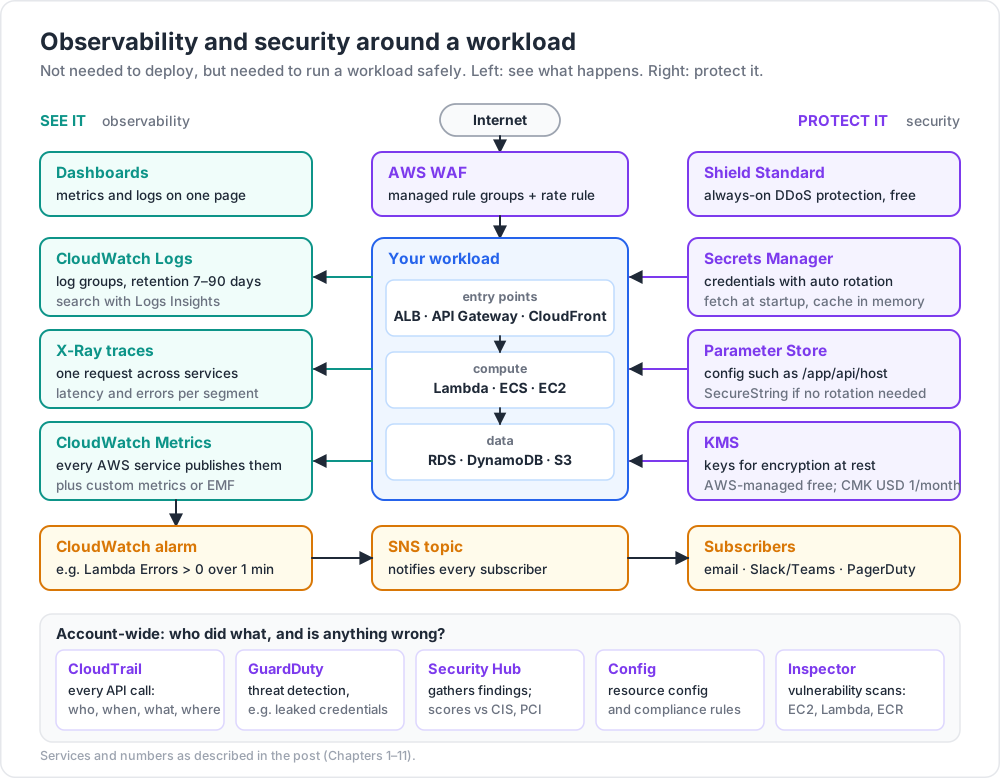
A workload that runs but can't be observed is unmaintainable; a workload without a security baseline is a liability. This post covers the production-ready ops layer every AWS account needs: CloudWatch (metrics, logs, alarms, dashboards), CloudTrail (API audit log), Systems Manager (Parameter Store, Patch Manager, Run Command), KMS (encryption keys), Secrets Manager (credentials), WAF (web firewall), and GuardDuty (threat detection). None of these were strictly required to deploy a workload in the previous posts — they're required to run one safely.
Series map: 00 Foundations → 01 Network First → 02 Compute & Storage → 03 Scale & Survive → 04 Managed Data → 05 Serverless & Events → 06 Workflow Orchestration → 07 Observability & Security (this post) → 08 IaC.
Learning Outcome
- Read CloudWatch metrics, write logs, create alarms + dashboards.
- Use CloudTrail to find "who did what when" in your account.
- Store config in Parameter Store, secrets in Secrets Manager.
- Use KMS to encrypt at rest with customer-managed keys.
- Attach AWS WAF to ALB / API Gateway / CloudFront for L7 protection.
- Enable GuardDuty + Security Hub for baseline threat detection.
- Set up the minimum production observability checklist.
Chapter 1 — CloudWatch metrics
Every AWS service publishes metrics to CloudWatch automatically:
- EC2 — CPU, network in/out, status checks.
- ALB — request count, target response time, 5XX count, healthy host count.
- Lambda — invocations, errors, throttles, duration, concurrent executions.
- RDS — CPU, free memory, IOPS, replica lag.
- DynamoDB — consumed read/write capacity, throttles.
Metrics are stored per namespace (e.g., AWS/Lambda) with dimensions (e.g., FunctionName=hello). Each is a time series of values.
Custom metrics
1
2
3
4
5
6
7
8
9
10
11
12
import boto3
cw = boto3.client("cloudwatch")
cw.put_metric_data(
Namespace="MyApp",
MetricData=[{
"MetricName": "OrderProcessed",
"Value": 1,
"Unit": "Count",
"Dimensions": [{"Name": "Region", "Value": "ap-east-1"}]
}]
)
For Lambdas, Embedded Metric Format (EMF) is cheaper — write a specific JSON line to logs, CloudWatch extracts it as a metric automatically.
Chapter 2 — CloudWatch Logs
Every Lambda, ECS task, EC2 (with CloudWatch Agent), API Gateway, RDS (optional), and ALB (optional) writes logs to log groups.
- Group:
/aws/lambda/<function>or/aws/ecs/<service>. - Stream: one per execution / container / day.
- Each log event has a timestamp + message.
Retention
The default retention is forever — costly over time. Set retention on every log group: 7, 14, 30, or 90 days are typical.
1
2
3
4
aws logs put-retention-policy \
--log-group-name /aws/lambda/hello \
--retention-in-days 30
Querying
CloudWatch Logs Insights is a powerful query language:
1
2
3
4
5
fields @timestamp, @message
| filter @message like /ERROR/
| sort @timestamp desc
| limit 50
Trick: the most-overlooked CloudWatch cost is log ingest. A chatty Lambda producing 5 MB/min over a month = ~USD 1.30/GB × 200 GB = USD 260. Demote
infotodebugfor prod, sample noisy lines, and set short retention.
Chapter 3 — Alarms
A CloudWatch alarm watches a metric and notifies (usually via SNS) when a threshold is breached.
Minimum production alarms:
| Resource | Alarm |
|---|---|
| Every Lambda | Errors > 0 over 1 min |
| Every Lambda | Throttles > 0 over 1 min |
| Every ALB | HTTPCode_Target_5XX_Count > N over 5 min |
| Every ALB | UnHealthyHostCount > 0 |
| Every RDS | CPUUtilization > 80 over 10 min |
| Every RDS | FreeableMemory < 100 MB |
| Every RDS | DatabaseConnections > limit*0.8 |
| Every DLQ | ApproximateNumberOfMessagesVisible > 0 |
| Every NAT gateway | ErrorPortAllocation > 0 |
| Account | EstimatedCharges > USD threshold (in us-east-1) |
1
2
3
4
5
6
7
8
9
aws cloudwatch put-metric-alarm \
--alarm-name lambda-hello-errors \
--metric-name Errors --namespace AWS/Lambda \
--statistic Sum --period 60 --threshold 0 \
--comparison-operator GreaterThanThreshold \
--evaluation-periods 1 \
--dimensions Name=FunctionName,Value=hello \
--alarm-actions arn:aws:sns:...
The SNS topic typically subscribes email + a Slack/Teams webhook + PagerDuty.
Chapter 4 — Dashboards
CloudWatch dashboards combine metrics + logs widgets into a single page. Reasonable starter set:
- Service KPI tile: request rate, p50 / p95 latency, 5xx count.
- Resource utilisation row: CPU, memory, errors per service.
- Cost tile: estimated charges + month-over-month.
- Dependency row: DB CPU, queue depth, cache hit rate.
For multi-account visibility, CloudWatch cross-account observability lets one monitoring account aggregate metrics + logs from many workload accounts.
Alternatives
Datadog, Grafana / Prometheus, New Relic, Honeycomb — all integrate with CloudWatch. Pick whichever your team uses if it's already paid for. Pure-AWS dashboards are fine to start.
Chapter 5 — X-Ray (distributed tracing)
X-Ray traces a request as it hops between services (API Gateway → Lambda → DynamoDB → SNS). For each segment: start time, end time, latency, errors. Find bottlenecks in seconds.
Enable per service:
- Lambda: tick "Active tracing" or
--tracing-config Mode=Active. - API Gateway: enable in stage settings.
- ECS: add the X-Ray daemon container.
In the SDK, instrument client calls:
1
2
3
from aws_xray_sdk.core import patch_all
patch_all() # auto-instruments boto3, requests, sqlalchemy, etc.
X-Ray is being superseded by the newer AWS Distro for OpenTelemetry (ADOT) for cross-cloud + OSS compatibility. For pure AWS, X-Ray is still the simplest start.
Chapter 6 — CloudTrail (audit log)
CloudTrail records every API call in your account: who, when, what, from where.
By default, a free 90-day event history is available in the console. For longer retention and analytical use, configure a trail that writes to S3 + optionally CloudWatch Logs.
1
2
3
4
5
6
7
8
aws cloudtrail create-trail \
--name account-trail \
--s3-bucket-name my-audit-bucket-2026 \
--is-multi-region-trail \
--enable-log-file-validation
aws cloudtrail start-logging --name account-trail
What CloudTrail tells you
- Who created / deleted resources.
- Who assumed a role.
- Failed authentication attempts.
- Console logins (with MFA status).
- Source IPs of API calls.
Couple with Athena to query CloudTrail logs in S3 cheaply.
Chapter 7 — Systems Manager (SSM)
SSM is a Swiss-army-knife. Four parts everyone uses:
| Part | What |
|---|---|
| Parameter Store | hierarchical key-value config; free for standard parameters |
| Secrets Manager (technically separate but adjacent) | rotating secrets, KMS-encrypted |
| Session Manager | shell on EC2 without SSH (Post 02) |
| Patch Manager | scheduled OS patching of EC2 / on-prem |
| Run Command | execute scripts across fleets |
| State Manager | enforce config (cron-like maintenance) |
| Inventory | what's installed where |
Parameter Store quick start
1
2
3
4
5
6
aws ssm put-parameter --name /app/api/host --type String --value api.example.com
aws ssm get-parameter --name /app/api/host
# secret
aws ssm put-parameter --name /app/db/password --type SecureString --value "s3cr3t"
Apps fetch with the SDK at startup. Or use Lambda Extensions / EC2 user-data to pre-pull.
Chapter 8 — Secrets Manager
Specialised for credentials with automatic rotation. AWS rotates RDS / DocumentDB / Redshift passwords without app-code changes when wired correctly.
1
2
3
4
5
6
aws secretsmanager create-secret \
--name prod/db/postgres \
--secret-string '{"username":"app","password":"initialvalue"}'
aws secretsmanager get-secret-value --secret-id prod/db/postgres
| Trait | Parameter Store SecureString | Secrets Manager |
|---|---|---|
| Cost | free | USD 0.40 / secret / month |
| Rotation | manual | built-in (RDS, custom Lambda) |
| Cross-account | manual | native sharing |
| Versioning | yes | yes |
For non-rotating config, Parameter Store SecureString is cheaper. For real credentials with rotation, use Secrets Manager.
Trick: never store secrets in environment variables visible in the Lambda console / CloudFormation. Fetch from Secrets Manager at startup and cache in memory.
Chapter 9 — KMS (encryption keys)
KMS (Key Management Service) manages cryptographic keys for AWS services + your own code. Two key kinds:
| Kind | Use |
|---|---|
| AWS-managed | each service has a default (aws/s3, aws/rds, etc.); free |
| Customer-managed (CMK) | you control rotation, key policy, deletion; USD 1 / month / key |
For most workloads, the default AWS-managed key is enough. Move to CMKs when:
- Compliance demands it (HIPAA, FedRAMP).
- You want to deny access to specific principals via key policy.
- You want to enforce annual rotation.
1
2
3
aws kms create-key --description "prod app data"
aws kms enable-key-rotation --key-id <key-id>
Then use the key when creating an S3 bucket, RDS instance, EBS volume, etc., via the --kms-key-id flag.
Chapter 10 — WAF and Shield
| Service | Protects | Cost |
|---|---|---|
| AWS WAF | ALB / API Gateway / CloudFront — application-layer (L7) | per-WebACL + per-rule + per-million requests |
| AWS Shield Standard | always-on DDoS protection for all AWS resources | free |
| AWS Shield Advanced | enhanced DDoS + 24/7 DRT support + cost protection | USD 3,000 / month / org |
Minimum WAF setup
A WebACL with these managed rule groups attached:
AWSManagedRulesCommonRuleSet— OWASP top 10 staples.AWSManagedRulesKnownBadInputsRuleSet— known exploit payloads.AWSManagedRulesAmazonIpReputationList— known bad IPs.AWSManagedRulesBotControlRuleSet(paid) — bot detection.- A per-IP rate-based rule (e.g., block IP at 2000 req / 5 min).
Cost: USD 5 / WebACL + USD 1 / rule + USD 0.60 / million requests + USD 10 / rule for Bot Control. Affordable for most production sites.
Chapter 11 — GuardDuty and Security Hub
| Service | What |
|---|---|
| GuardDuty | continuous threat detection (DNS exfil, crypto mining, unusual API patterns, leaked credentials) |
| Security Hub | aggregates findings from GuardDuty + Inspector + Macie + 3rd parties; scores against standards (CIS, PCI) |
| Config | tracks resource config + compliance against rules |
| Inspector | EC2 / Lambda / ECR vulnerability scanning |
A modern baseline enables GuardDuty + Security Hub + Config in every region of every account, ideally via an AWS Organizations delegated-admin pattern. Cost is modest relative to a single breach.
Chapter 12 — The production observability + security checklist
For each new workload:
Observability
- [ ] Every Lambda / service writes structured logs with correlation IDs.
- [ ] Every log group has retention ≤ 90 days.
- [ ] Every service has dashboards for KPI + utilisation.
- [ ] Every critical metric has an alarm with paging SNS subscribers.
- [ ] X-Ray (or OpenTelemetry) is on across the request path.
- [ ] Cost alarms exist at account level.
Security
- [ ] Root user MFA enabled; root credentials in a vault.
- [ ] CloudTrail multi-region trail to encrypted S3, log validation on.
- [ ] GuardDuty enabled in all regions.
- [ ] Security Hub aggregating findings.
- [ ] No long-lived IAM access keys for code; everything uses roles.
- [ ] Secrets in Secrets Manager, not in env vars or code.
- [ ] S3 buckets: Block Public Access on, encryption on.
- [ ] WAF in front of every internet-facing ALB / API Gateway.
- [ ] Critical resources protected with deletion-protection / S3 Object Lock for backups.
- [ ] Backup retention reviewed (RDS, EBS snapshots, DynamoDB PITR, S3 versioning).
Practice Exercises
Exercise 1 — Lambda error alarm
For the Lambda from Post 05, create an alarm on Errors > 0 over 1 min. Send notifications to an SNS topic. Subscribe your email. Force an error; confirm the alarm + email fire.
Exercise 2 — Log Insights query
Write a CloudWatch Logs Insights query that finds the 10 slowest invocations of a Lambda over the last hour.
Exercise 3 — Parameter Store + Secrets Manager
Move all the configuration (DB host, API keys, secrets) for one of your previous-post Lambdas out of environment variables: non-secret → Parameter Store, secrets → Secrets Manager. The function fetches at cold start, caches in module-level vars.
Exercise 4 — CloudTrail audit
In the CloudTrail event history console, find the API call that created your first VPC. Note the user, source IP, and timestamp.
Exercise 5 — WAF baseline
Attach a WebACL to the ALB from Post 03 with AWSManagedRulesCommonRuleSet and a per-IP rate rule of 100 req / 5 min. Test with ab or wrk that the rate rule actually blocks.
Exercise 6 — Enable GuardDuty
Enable GuardDuty in one region. Create a deliberate "suspicious" trigger (e.g., resolve a known-bad domain from an EC2). Wait for the finding to appear.
Cheat-sheet
| What | How |
|---|---|
| Metric publish | cloudwatch:PutMetricData or EMF JSON line |
| Log group retention | put-retention-policy --retention-in-days N |
| Alarm | put-metric-alarm → SNS topic → email/Slack/PagerDuty |
| Dashboard | console widgets, or JSON via put-dashboard |
| Distributed tracing | X-Ray / OpenTelemetry |
| Audit log | CloudTrail multi-region trail to S3 |
| Config / non-secret | SSM Parameter Store |
| Secret with rotation | Secrets Manager |
| Customer-managed key | KMS CMK with annual rotation |
| L7 firewall | WAF managed rule groups + rate rule |
| DDoS basic | Shield Standard (free, always on) |
| Threat detection | GuardDuty + Security Hub |
| Vulnerability scan | Inspector |
| Resource config | Config rules + conformance packs |
| Log noise = cost | demote info, sample, short retention |
What's next
Post 08 — the final base post — covers Infrastructure as Code: CloudFormation foundations, Terraform deep dive, and a survey of CDK / Pulumi / SAM so you can codify the entire architecture from Posts 01-07 into version-controlled, repeatable templates.
References
- CloudWatch User Guide
- CloudTrail User Guide
- Systems Manager User Guide
- KMS Developer Guide
- WAF Developer Guide
- GuardDuty User Guide
- AWS Whitepaper — AWS Well-Architected Security Pillar.
Note: this post is in progress. Planned additions: CloudWatch synthetics, AWS Config conformance pack examples, IAM Access Analyzer walkthrough, OpenTelemetry collector deployment.