AWS Course — 01 · Network First — VPC, Subnets, Routing, Security Groups
Real AWS workloads start with the network, not the server. Where a workload lives — which VPC, which subnet, behind which gateway, allowed by which security rules — decides far more about its security posture, cost, and failure behaviour than the choice of instance type. This post is the deep dive on VPC, the virtual data centre that hosts almost everything else in the series.
Series map: 00 Foundations → 01 Network First (this post) → 02 Compute & Storage → 03 Scale & Survive → 04 Managed Data → 05 Serverless & Events → 06 Workflow Orchestration → 07 Observability & Security → 08 Infrastructure as Code.
Why network before compute
A tempting shortcut is to "just launch an EC2" and figure out the network later. The cost: every later change (adding a database, fronting with a load balancer, going multi-AZ, locking down for security review) becomes a re-architecture. Network-first means picking a small set of decisions once and reusing them for the next decade.
The decisions:
- Which region.
- VPC CIDR range (which private IPs you'll own).
- Subnet layout (how many AZs, public/private/isolated).
- Internet egress path (IGW + NAT or VPC endpoints).
- Security group baseline (who can talk to whom).
Learning Outcome
- Design a VPC CIDR that won't collide with other accounts you might peer with.
- Lay out public / private / isolated subnets across 3 AZs.
- Configure route tables, internet gateways, NAT gateways, and VPC endpoints.
- Write security groups and (rarely) NACLs that are tight without being painful.
- Recognise the cost levers: NAT gateway, cross-AZ traffic, data egress.
Chapter 1 — VPC anatomy
A VPC is a software-defined private network inside one AWS region. Each AWS account gets a default VPC per region (172.31.0.0/16); production accounts almost always create custom ones.
| Construct | What |
|---|---|
| VPC | the boundary; one or more CIDR ranges (IPv4 + optional IPv6) |
| Subnet | a CIDR slice of the VPC, lives in exactly one AZ |
| Route table | per-subnet (or default) rules: "for destination X, next hop is Y" |
| Internet Gateway (IGW) | one per VPC; enables inbound + outbound public internet |
| NAT Gateway | enables outbound-only public internet from private subnets |
| VPC endpoint | reach AWS services privately, no IGW/NAT needed |
| Security group | stateful per-ENI firewall |
| NACL | stateless per-subnet firewall |
CIDR sizing
A /16 (e.g., 10.0.0.0/16) gives 65,536 addresses — enough for a serious production environment. A /24 subnet (e.g., 10.0.1.0/24) gives 256 addresses minus 5 reserved by AWS → 251 usable.
Trick: pick non-overlapping ranges across all your AWS accounts and on-prem networks. Once you peer two VPCs or set up a Transit Gateway / Direct Connect, overlapping CIDRs become an immediate migration project. Conventional starting layouts:
- Account
prod—10.0.0.0/16 - Account
staging—10.1.0.0/16 - Account
dev—10.2.0.0/16 - Account
tools / shared services—10.10.0.0/16 - On-prem —
192.168.0.0/16or172.16.0.0/12
Chapter 2 — The 3-AZ subnet layout
1
2
3
4
5
6
7
8
9
10
11
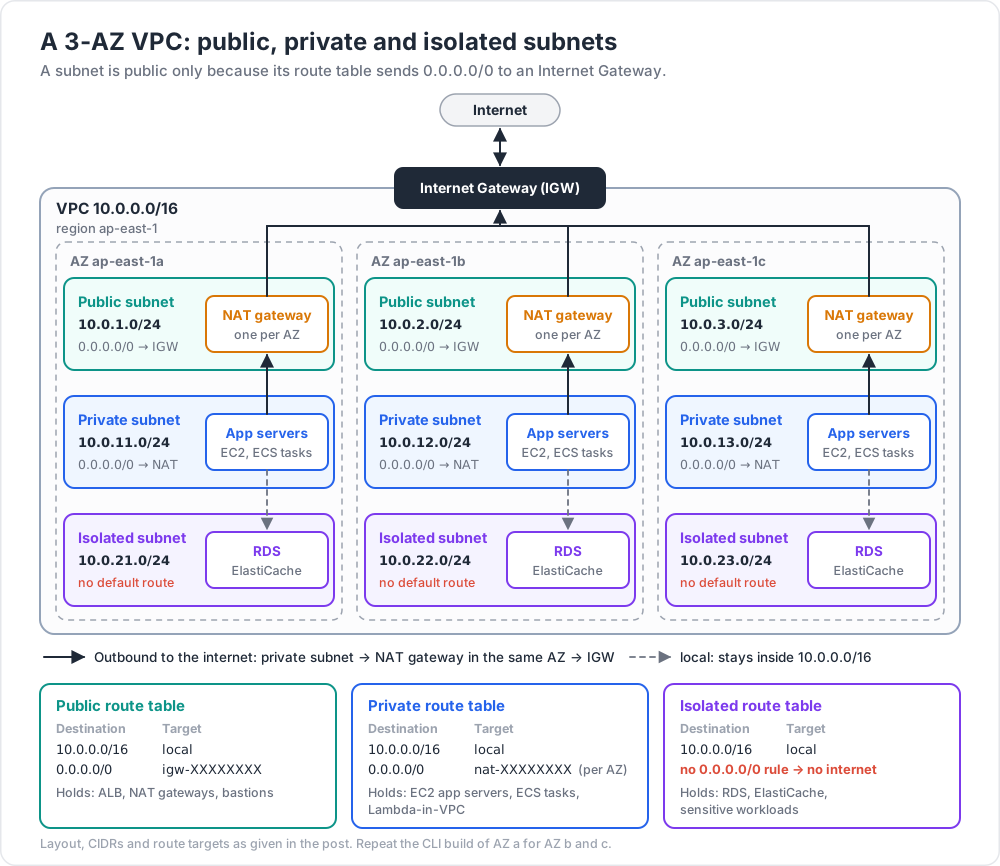
VPC 10.0.0.0/16 (region: ap-east-1)
├── Public subnets (one per AZ): 10.0.1.0/24, 10.0.2.0/24, 10.0.3.0/24
│ route 0.0.0.0/0 → IGW
│ holds: ALB, NAT gateways, bastions
├── Private subnets (one per AZ): 10.0.11.0/24, 10.0.12.0/24, 10.0.13.0/24
│ route 0.0.0.0/0 → NAT gateway (per AZ)
│ holds: EC2 app servers, ECS tasks, Lambda-in-VPC
└── Isolated subnets (one per AZ): 10.0.21.0/24, 10.0.22.0/24, 10.0.23.0/24
no default route
holds: RDS, ElastiCache, sensitive workloads
Three reasons this shape is the industry default:
- Failure isolation. An AZ outage takes down at most a third of capacity. Combined with a load balancer (Post 03), the service stays up.
- Blast radius for security. Public subnets only host things designed to face the internet. Application servers and data live one or two hops inward.
- Cost vs availability tradeoff. One NAT gateway is cheaper but a single point of failure; one per AZ doubles or triples cost but removes the SPoF. Production prefers per-AZ.
A subnet is "public" because its route table sends 0.0.0.0/0 to an Internet Gateway. There is no checkbox — it is the routing that defines the type.
Chapter 3 — Route tables
A route table is an ordered list of (destination CIDR, target) rules. Each subnet associates with one route table.
Example public-subnet route table:
| Destination | Target |
|---|---|
10.0.0.0/16 |
local (intra-VPC; implicit) |
0.0.0.0/0 |
igw-XXXXXXXX (Internet Gateway) |
Example private-subnet route table:
| Destination | Target |
|---|---|
10.0.0.0/16 |
local |
0.0.0.0/0 |
nat-XXXXXXXX (NAT Gateway) |
Example isolated-subnet route table:
| Destination | Target |
|---|---|
10.0.0.0/16 |
local |
(No 0.0.0.0/0 rule → no internet access at all.)
Chapter 4 — Internet egress: IGW vs NAT vs VPC endpoints
| Path | Where allowed | Inbound from internet? | Outbound to internet? |
|---|---|---|---|
| IGW | public subnets only | yes (with public IP) | yes |
| NAT Gateway | private subnets | no | yes |
| VPC endpoint (Gateway) | S3, DynamoDB | n/a | private to those services |
| VPC endpoint (Interface) | most AWS services | n/a | private to those services |
VPC endpoints — the cost saver
By default, an EC2 in a private subnet calling s3.ap-east-1.amazonaws.com routes out via the NAT gateway — and you pay NAT data charges (~USD 0.045 / GB). With a Gateway VPC endpoint for S3, the traffic stays inside AWS, free.
Watch out: Interface endpoints cost about USD 7 / endpoint / AZ / month plus per-GB. Useful when bandwidth is high; not always cheaper than NAT for occasional access. Always estimate before adding.
Chapter 5 — Security groups (your everyday firewall)
A security group is stateful: if a request matches an outbound rule, the reply is automatically allowed (and vice versa). You only configure one direction, not both.
Default behaviour: no inbound, all outbound.
Rules contain:
- Protocol (TCP / UDP / ICMP / all)
- Port range
- Source / destination (CIDR, another security group, or a prefix list)
Reference SGs by ID, not by IP
When both ends are AWS resources, reference the other side's security group rather than its IP range. As IPs change (autoscaling, recreation), the SG reference stays correct.
1
2
3
4
5
6
7
8
9
10
11
12
sg-alb (load balancer)
Inbound 443 from 0.0.0.0/0
Outbound all to 0.0.0.0/0
sg-app (app tier)
Inbound 8080 from sg-alb ← reference by SG
Outbound all to 0.0.0.0/0
sg-db (database tier)
Inbound 5432 from sg-app ← reference by SG
Outbound: none required
Chapter 6 — NACLs (the backup layer)
A Network ACL is stateless and applied per subnet. Default rules allow all inbound + outbound. Custom NACLs default to deny.
NACLs are evaluated in order (rule numbers); the first match wins.
In practice most teams don't touch NACLs — security groups do all the real work. Reserve NACLs for blanket per-subnet rules (e.g., "isolated subnets reject any outbound traffic at all") or defence-in-depth against compromised SG state.
Chapter 7 — Naming + tagging conventions
A VPC project survives for years; the names you pick now are the names every dashboard, alert, and IaC variable inherits.
Recommended tags on every resource:
| Tag | Example |
|---|---|
Name |
prod-vpc-public-1a |
Environment |
prod / staging / dev |
Owner |
team-platform |
CostCenter |
cc-1234 |
ManagedBy |
terraform |
Standardised tags drive Cost Explorer breakdowns, automated cleanups, and access policies.
Chapter 8 — Reference build (CLI walkthrough)
A minimal 3-AZ network you can recreate:
1
2
3
4
5
6
7
8
9
10
11
12
13
14
15
16
17
18
19
20
21
22
23
24
25
26
27
28
29
30
31
32
# create VPC
VPC=$(aws ec2 create-vpc --cidr-block 10.0.0.0/16 --query Vpc.VpcId --output text)
# attach IGW
IGW=$(aws ec2 create-internet-gateway --query InternetGateway.InternetGatewayId --output text)
aws ec2 attach-internet-gateway --vpc-id $VPC --internet-gateway-id $IGW
# public subnet in AZ a
PUB_A=$(aws ec2 create-subnet --vpc-id $VPC --cidr-block 10.0.1.0/24 \
--availability-zone ap-east-1a --query Subnet.SubnetId --output text)
# private subnet in AZ a
PRIV_A=$(aws ec2 create-subnet --vpc-id $VPC --cidr-block 10.0.11.0/24 \
--availability-zone ap-east-1a --query Subnet.SubnetId --output text)
# public route table
PUB_RT=$(aws ec2 create-route-table --vpc-id $VPC --query RouteTable.RouteTableId --output text)
aws ec2 create-route --route-table-id $PUB_RT --destination-cidr-block 0.0.0.0/0 --gateway-id $IGW
aws ec2 associate-route-table --route-table-id $PUB_RT --subnet-id $PUB_A
# allocate Elastic IP for NAT
EIP=$(aws ec2 allocate-address --domain vpc --query AllocationId --output text)
# NAT gateway in public-A
NAT=$(aws ec2 create-nat-gateway --subnet-id $PUB_A --allocation-id $EIP \
--query NatGateway.NatGatewayId --output text)
# private route table
PRIV_RT=$(aws ec2 create-route-table --vpc-id $VPC --query RouteTable.RouteTableId --output text)
aws ec2 create-route --route-table-id $PRIV_RT --destination-cidr-block 0.0.0.0/0 --nat-gateway-id $NAT
aws ec2 associate-route-table --route-table-id $PRIV_RT --subnet-id $PRIV_A
Repeat for AZ b and c. In Post 08 the same network appears as a 30-line Terraform module.
Chapter 9 — Cost levers in a VPC
| Item | Approx (us-east-1) | Note |
|---|---|---|
| VPC itself | free | the construct costs nothing |
| Subnet | free | also free |
| Route table, IGW | free | |
| NAT Gateway | USD 32 / month + USD 0.045 / GB processed | the main cost driver |
| Elastic IP attached | free | |
| Elastic IP idle (unattached) | USD 3.60 / month | always release unused |
| VPC Interface endpoint | ~USD 7 / month / AZ + per-GB | |
| VPC Gateway endpoint (S3, DynamoDB) | free | |
| Cross-AZ traffic | USD 0.01 / GB each direction | adds up at scale |
| Inter-region traffic | USD 0.02 / GB | |
| Internet egress | USD 0.09 / GB (after free) |
Trick: when in doubt about NAT cost, look at the
BytesOutToDestinationCloudWatch metric on the NAT gateway. Multiply by0.045to get the monthly USD bill. If it's painful, add a Gateway endpoint for S3 / DynamoDB first — usually a 30 – 60% NAT bill reduction with zero risk.
Practice Exercises
Exercise 1 — Pick a CIDR
Design CIDR blocks for these accounts so they can all peer without overlap:
prod(large)staging(medium)dev(small)shared-tools(medium)
Solution
- prod:
10.0.0.0/16 - staging:
10.1.0.0/16 - dev:
10.2.0.0/16 - shared-tools:
10.10.0.0/16
Or use /20 slices of a single /12 (10.0.0.0/12) if you want larger headroom.
Exercise 2 — Build the 3-AZ VPC
Recreate Chapter 8's CLI build for all three AZs of your default region. Verify by launching a t3.micro into a private subnet and confirming curl https://example.com works (proves NAT egress).
Exercise 3 — Cut the NAT bill
Add an S3 Gateway endpoint to the private route tables of the VPC from Exercise 2. Run aws s3 cp from the private instance. Confirm in CloudWatch that the NAT gateway's outbound bytes did not increase.
Exercise 4 — Security-group chain
Build three SGs:
sg-web→ 443 from0.0.0.0/0sg-app→ 8080 fromsg-websg-db→ 5432 fromsg-app
Verify the chain works end-to-end and that nothing else can reach the DB.
Cheat-sheet
| What | How |
|---|---|
| VPC CIDR | private range like 10.0.0.0/16, non-overlapping |
| Subnet AZ | each subnet is in one AZ |
| Public subnet | route 0.0.0.0/0 → IGW |
| Private subnet | route 0.0.0.0/0 → NAT |
| Isolated subnet | no default route |
| NAT cost | per-hour + per-GB; biggest VPC cost |
| Free egress to S3/DynamoDB | use Gateway VPC endpoints |
| Security group | stateful, default deny inbound |
| NACL | stateless, default allow; rarely modified |
| Cross-AZ | costs $0.01/GB each direction |
| Tag everything | Name, Env, Owner, CostCenter, ManagedBy |
| Multi-AZ rule | always ≥ 2 AZs for production |
What's next
Post 02 covers compute and storage — EC2 instances, EBS volumes, and S3 object storage — the workhorse trio that runs on top of the network from this post.
References
- VPC User Guide
- AWS Networking Workshop
- VPC endpoints overview
- AWS Whitepaper — Building a Scalable and Secure Multi-VPC AWS Network Infrastructure.
Note: this post is in progress. Planned additions: IPv6 dual-stack, VPC peering vs Transit Gateway decision, PrivateLink for SaaS, flow-log analytics.