AWS Course — 04 · Managed Data — RDS, Aurora, DynamoDB, ElastiCache
Now that compute can scale and survive (Post 03), the next question is where the data lives. AWS offers a long catalogue of managed data services. This post focuses on the four most common: RDS (managed relational), Aurora (RDS's cloud-native superset), DynamoDB (managed NoSQL key-value / document), and ElastiCache (managed Redis / Memcached). For each: when to choose it, the high-availability patterns, the backup story, and the most common cost surprises. A quick comparison to S3, Redshift, OpenSearch, and Neptune appears at the end so the decision tree is complete.
Series map: 00 Foundations → 01 Network First → 02 Compute & Storage → 03 Scale & Survive → 04 Managed Data (this post) → 05 Serverless & Events → 06 Workflow Orchestration → 07 Observability & Security → 08 IaC.
Learning Outcome
- Choose between RDS, Aurora, DynamoDB, ElastiCache for a given workload.
- Configure RDS Multi-AZ for HA and read replicas for read scaling.
- Use Aurora's storage layer and serverless V2 mode.
- Design a DynamoDB table with a sensible partition key + sort key + secondary indexes.
- Configure DynamoDB capacity mode (on-demand vs provisioned + auto-scaling).
- Place caching tiers correctly.
- Recognise the major cost levers per service.
Chapter 1 — Pick the right data store
Quick decision tree:
1
2
3
4
5
6
7
8
9
10
11
12
Do you need SQL + ACID transactions across rows?
├── Yes
│ ├── Open-source engine compatibility matters? → RDS (Postgres/MySQL/MariaDB/etc.)
│ └── Cloud-native performance + scale matters? → Aurora (Postgres or MySQL compatible)
└── No
├── Key-value / document, single-row ops? → DynamoDB
├── Hot in-memory cache? → ElastiCache (Redis or Memcached)
├── Object/file blobs? → S3 (Post 02)
├── Analytics on TB-PB scale? → Redshift / Athena
├── Full-text / log search? → OpenSearch
└── Graph? → Neptune
The biggest mistake is choosing by familiarity rather than fit. Postgres on RDS is a fine default; DynamoDB is a much better fit for high-write key-value patterns. Picking wrong locks you into a costly migration later.
Chapter 2 — RDS
RDS (Relational Database Service) runs PostgreSQL, MySQL, MariaDB, Oracle, or SQL Server on EC2 + EBS, managed by AWS. You get:
- Daily automated backups + point-in-time recovery (1-35 days).
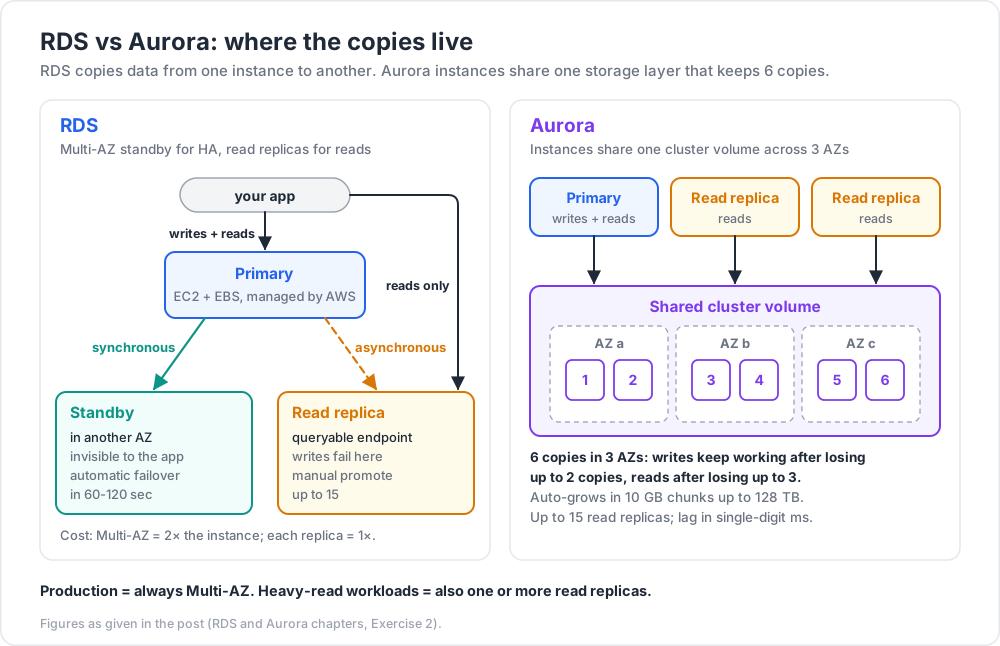
- Multi-AZ failover (synchronous replica in another AZ; automatic promotion).
- Up to 15 read replicas for read scaling.
- Maintenance windows for patching.
- IAM authentication, KMS encryption at rest, TLS in transit.
What you give up: full OS access. You can't run sudo on an RDS host or install custom Postgres extensions outside AWS's approved list.
Engines and versions
| Engine | Typical use |
|---|---|
| Postgres | most modern apps; richest feature set |
| MySQL | legacy or compatibility |
| MariaDB | MySQL drop-in |
| Oracle / SQL Server | licensed workloads |
Pick the most recent LTS major version for production unless a specific older feature is needed.
Multi-AZ vs read replica
| Feature | Multi-AZ | Read replica |
|---|---|---|
| Purpose | HA: automatic failover | Read scaling |
| Replication | synchronous | asynchronous |
| Visible? | invisible standby | endpoint queryable |
| Failover time | 60-120 sec | manual promote |
| Cost | 2× the instance | 1× per replica |
Production = always Multi-AZ. Heavy-read workloads = also one or more read replicas.
Backups
- Automated snapshots — every day, retained 1-35 days, free for active DBs.
- Manual snapshots — kept until you delete them.
- Point-in-time restore — recover to any second within the retention window (writes go to transaction logs in S3).
Trick: RDS lets you spin up a new DB from a snapshot in seconds for testing. Great for "show me prod data from yesterday in a sandbox" workflows. Just remember to delete it after.
Chapter 3 — Aurora
Aurora is AWS's cloud-native rewrite of MySQL and PostgreSQL. Compatible at the wire level, but with a custom storage engine that:
- Replicates data across 6 copies in 3 AZs automatically.
- Keeps working for writes after losing up to 2 copies, and for reads after losing up to 3.
- Auto-grows storage in 10 GB chunks up to 128 TB.
- Provides up to 15 read replicas that share the same storage layer (lag in single-digit ms).
Aurora vs RDS
| Trait | RDS | Aurora |
|---|---|---|
| Engines | many | Postgres / MySQL compatible only |
| Storage | EBS (provisioned) | shared cluster volume, auto-grow |
| Throughput vs vanilla | baseline | up to 3-5× MySQL, 2-3× Postgres |
| Cost | cheaper at small scale | costlier baseline, cheaper at scale |
| Best for | low-traffic apps, small teams | production OLTP at scale, SaaS |
Aurora Serverless V2
Aurora Serverless V2 scales the compute capacity (ACU — Aurora Capacity Units) up and down with load, in fractions of an ACU. Used to be best for unpredictable workloads; in 2026 it's mature enough to be a viable default for new Aurora clusters.
Chapter 4 — DynamoDB
DynamoDB is a fully managed NoSQL key-value + document store. Single-digit millisecond latency at any scale. No servers to provision, no AZ design — AWS handles all of it.
Trade-offs vs SQL:
- No joins (denormalise instead).
- Limited transactional support (single-region transactions OK; multi-region eventual).
- Query patterns must be designed first — DynamoDB tables are not "queried like SQL"; you access by key.
Table schema
A table has:
- A partition key (mandatory) — determines which physical partition stores the item.
- An optional sort key — orders items within a partition.
- Items are JSON-like documents with arbitrary attributes.
- Secondary indexes (Global or Local) let you query by other attributes.
1
2
3
4
5
6
7
8
9
10
11
# write
table.put_item(Item={"user_id": "u123", "ts": 1700000000, "action": "login"})
# strongly-consistent get by key
table.get_item(Key={"user_id": "u123", "ts": 1700000000})
# query by partition key + sort key range
table.query(
KeyConditionExpression=Key("user_id").eq("u123") & Key("ts").between(t_start, t_end)
)
Capacity modes
| Mode | When |
|---|---|
| On-demand | unpredictable traffic, dev, low-traffic |
| Provisioned + auto-scaling | steady traffic with daily curve |
Start with on-demand; switch to provisioned once you have a stable traffic profile and the cost gap matters.
Streams + change capture
DynamoDB Streams publishes every item-level change for 24 hours. Wire to Lambda for:
- replication to another store (S3, OpenSearch, another region),
- audit trails,
- triggering downstream workflows.
Single-table design
Power users put multiple entity types in one table with carefully designed key patterns. Higher learning curve but lower cost and faster queries. Worth reading Alex DeBrie's The DynamoDB Book when ready.
Chapter 5 — ElastiCache
ElastiCache runs Redis or Memcached as a managed service. Two flavours:
| Engine | Best for |
|---|---|
| Redis (ElastiCache for Redis) | rich data structures, pub/sub, persistence, replicas, cluster mode |
| Memcached | pure cache, multi-threaded, simpler |
Modern AWS also offers MemoryDB for Redis — Redis-compatible with multi-AZ durable storage (effectively Redis-as-a-database). Use when you need Redis semantics plus durability.
Cache patterns
- Cache-aside (lazy loading) — app reads from cache first; on miss, query DB and populate.
- Write-through — every DB write also updates the cache.
- TTL eviction — auto-expire entries after a duration.
- Session store — sticky-session alternative for stateless app servers.
- Rate limiting / leaderboards — natural Redis use cases.
Trick: when adding a cache to fix a slow query, set a short TTL (60-300 sec) at first. Lets you measure hit rate and roll back without stale-data risk. Expand TTL once you're confident the data tolerates it.
Chapter 6 — Choosing between RDS, Aurora, DynamoDB
| Scenario | Pick |
|---|---|
| Small SaaS, < 1k req/s, SQL | RDS Postgres Multi-AZ |
| Larger SaaS, 5k+ req/s, SQL | Aurora Postgres |
| Mobile app backend, key-value | DynamoDB on-demand |
| User-session store | ElastiCache Redis |
| Time-series IoT writes | DynamoDB or TimeStream |
| Reporting / analytics | Redshift or S3 + Athena |
| Search | OpenSearch |
| Caching API responses | ElastiCache Redis |
There is no universal best. Match the access pattern.
Chapter 7 — Costs and gotchas
| Item | Typical cost driver | Saver |
|---|---|---|
| RDS / Aurora instance | per-hour by class | reserved instance / 1-3 yr commit |
| RDS storage | per GB-month gp3 | rightsize; gp3 not gp2 |
| RDS backup beyond DB size | per GB-month | shorter retention or move old to S3 |
| RDS Multi-AZ | 2× the instance | required for production |
| DynamoDB on-demand | per request (read + write units) | provisioned + auto-scale at scale |
| DynamoDB storage | per GB-month | TTL old items |
| DynamoDB GSI | extra reads/writes | only create needed indexes |
| ElastiCache nodes | per-hour by class | reserved nodes; right-size |
| Cross-AZ traffic | per GB | keep app + DB in same AZ where safe |
Watch out: turning on performance insights, enhanced monitoring, automated backups at long retention, and many secondary indexes adds line items that double a small DB's bill quietly.
Chapter 8 — Migration shortcuts
- DMS (Database Migration Service) — continuous replication from one DB to another (on-prem → RDS, MySQL → Aurora, RDS → DynamoDB).
- AWS Schema Conversion Tool (SCT) — convert schemas + stored procedures between engines.
pg_dump/mysqldumpstill work fine for small one-shot loads.
For production cut-overs, the DMS "ongoing-replication then cut" pattern is the safe playbook.
Practice Exercises
Exercise 1 — RDS Postgres Multi-AZ
Create an RDS Postgres db.t4g.micro Multi-AZ in the isolated subnets of the VPC from Post 01. Confirm:
- the standby in another AZ exists,
- the master endpoint resolves to the active node,
- a forced failover (
reboot-db-instance --force-failover) flips traffic within 60-120 sec.
Exercise 2 — Read replica
Add a read replica to the Exercise 1 DB. Point a read-only client (e.g., psql --readonly) at the replica endpoint. Verify writes fail on the replica, succeed on the primary.
Exercise 3 — DynamoDB design
Design a DynamoDB table for a simple URL shortener:
- partition key:
short_code(string) - attributes:
long_url,created_at,hits - secondary requirement: list 100 most recent short codes
What partition/sort key and (if needed) GSI satisfies both access patterns?
One valid answer
- Table partition key:
short_code(for direct lookup). - GSI: partition key
gsi_pk(always literal"ALL"), sort keycreated_at. Query the GSI withpk = "ALL", sorted descending, limit 100.
Note the GSI pattern: cramming everything into one partition is fine at low scale but won't scale to massive write throughput; that's where you'd shard gsi_pk (e.g., by date).
Exercise 4 — Cache-aside
Add ElastiCache Redis in front of the RDS from Exercise 1. Implement a simple Python service that:
- on
GET /user/{id}checks Redis first, - on miss, queries Postgres, populates Redis with TTL 60 sec,
- on
POST /user/{id}writes Postgres and invalidates the Redis key.
Measure hit-rate after warm-up.
Exercise 5 — DynamoDB Streams to Lambda
Enable Streams on the table from Exercise 3. Hook up a Lambda that logs every change. Confirm in CloudWatch Logs.
Cheat-sheet
| What | How |
|---|---|
| Default SQL | RDS Postgres Multi-AZ |
| SQL at scale | Aurora Postgres / MySQL |
| Key-value at scale | DynamoDB on-demand |
| Hot cache | ElastiCache Redis |
| Multi-AZ RDS | always for production |
| Read replicas | up to 15; async lag |
| RDS backup window | retain 1-35 days; PITR auto |
| Aurora storage | shared, auto-grows, 6 copies / 3 AZ |
| Aurora Serverless V2 | new clusters default candidate |
| DynamoDB key design | partition + optional sort |
| DynamoDB query model | by key, not arbitrary SQL |
| Streams | 24-hour change log → Lambda |
| Cache pattern | lazy load + TTL |
| Cost saver | RI for steady DBs, on-demand for spikes |
What's next
Post 05 introduces serverless and event-driven AWS — Lambda, API Gateway, SQS, SNS, EventBridge — the glue that connects everything from Posts 02-04 into asynchronous, scalable architectures.
References
- RDS docs
- Aurora docs
- DynamoDB Developer Guide
- ElastiCache docs
- The DynamoDB Book by Alex DeBrie — the canonical DynamoDB modelling guide.
- AWS Whitepaper — Choosing the Right Database for Your Workload.
Note: this post is in progress. Planned additions: Aurora Global Database walkthrough, DynamoDB single-table design example, OpenSearch + Redshift overview.