AWS Course — 02 · Compute & Storage — EC2, EBS, S3
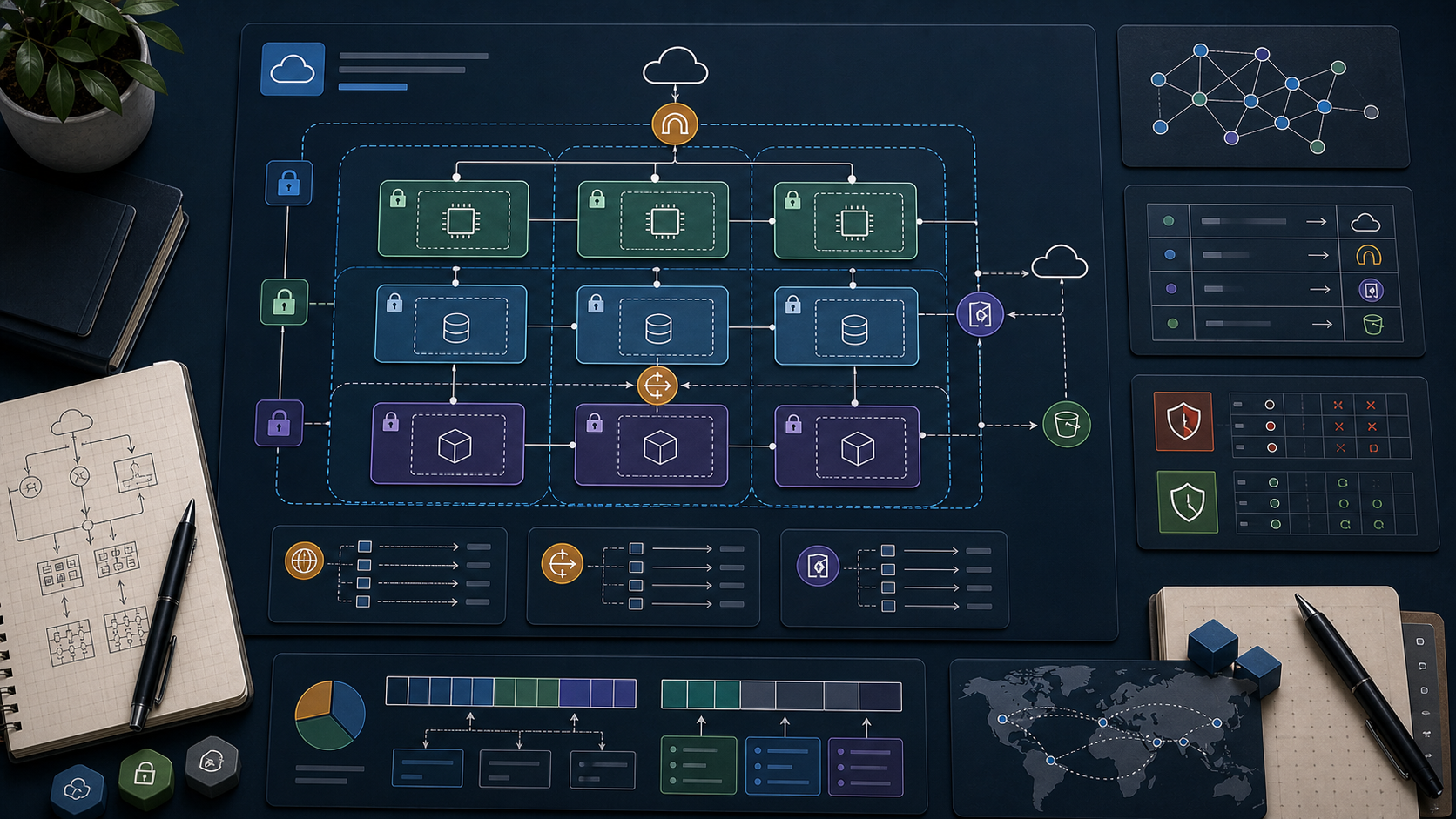
With the network in place (Post 01), the next step is to put workloads onto it. AWS's workhorse trio for "run code + keep data" is EC2 (virtual machines), EBS (block storage attached to them), and S3 (object storage anyone in the account can use over HTTPS). Understanding the cost, durability, and access characteristics of each is the foundation for every later service — RDS sits on EBS, Lambda packages and container images live in S3, and the load balancer in Post 03 fronts EC2.
Series map: 00 Foundations → 01 Network First → 02 Compute & Storage (this post) → 03 Scale & Survive → 04 Managed Data → 05 Serverless & Events → 06 Workflow Orchestration → 07 Observability & Security → 08 IaC.
Learning Outcome
- Launch an EC2 instance into the right subnet using the right instance type, AMI, and key pair / SSM access.
- Pick the right EBS volume type (gp3 / io2 / st1) and understand snapshot lifecycle.
- Use S3 for static assets, backups, logs, and data exchange.
- Choose between S3 storage classes (Standard, IA, One Zone, Glacier).
- Apply bucket policies, ACL alternatives, and the modern S3 Block Public Access default.
- Move data between EC2/EBS/S3 sanely.
Chapter 1 — EC2 in 200 words
An EC2 instance is a virtual machine running on AWS's hypervisor. You pick an AMI (the OS image), an instance type (CPU/RAM/network spec), a subnet (decides which AZ and whether public or private), one or more security groups, an optional key pair for SSH, and EBS volumes for storage. AWS bills per-second (1-minute minimum) for most types.
Instance families at a glance
| Letter | Optimised for | Example | Use |
|---|---|---|---|
t |
bursty | t3.micro, t4g.small |
dev, light web |
m |
general | m6i.large |
balanced workloads |
c |
compute | c7g.xlarge |
batch, encode, HPC |
r |
memory | r7i.large |
caches, in-memory DB |
i |
NVMe local SSD | i4i.xlarge |
OLTP, big local IO |
g/p |
GPU | g5.xlarge |
ML, graphics |
a / g suffix |
Graviton ARM | m7g, c7g |
up to 40% cheaper |
large = 2 vCPU; xlarge = 4 vCPU; pattern doubles. RAM scales proportionally within a family.
Trick: for any new Linux workload, try a Graviton (g) instance first. Same performance, 20-40% cheaper. Skip only if you depend on x86-only binaries.
Chapter 2 — AMI choice
| AMI | Notes |
|---|---|
| Amazon Linux 2023 | AWS-curated, default in many tutorials, secure-by-default |
| Ubuntu LTS | Most popular elsewhere; biggest community |
| Debian / RHEL / Rocky / SUSE | When ecosystem dictates |
| Windows Server | Higher per-hour due to licensing |
| Custom AMI | Built with Packer or aws ec2 create-image from a snapshot |
| Marketplace | Pre-built appliances (security, monitoring, database vendors); some carry per-hour licence fees |
Find the latest Amazon Linux 2023 AMI in the current region:
1
2
3
4
aws ec2 describe-images --owners amazon \
--filters "Name=name,Values=al2023-ami-2023*-x86_64" "Name=state,Values=available" \
--query 'sort_by(Images, &CreationDate)[-1].ImageId' --output text
Chapter 3 — Connection: SSH vs SSM Session Manager
| Method | Inbound port 22? | Key pair needed? | Audit trail | Preferred |
|---|---|---|---|---|
| SSH | yes | yes | from your own logging | legacy / Linux admin habits |
| SSM Session Manager | no | no | CloudTrail + Session logs | production |
SSM tunnels the shell through AWS APIs — no public IP, no open SSH port, every session logged. Setup:
- Attach the IAM role with the
AmazonSSMManagedInstanceCoremanaged policy. - The SSM Agent is pre-installed on Amazon Linux 2/2023 and Ubuntu 20.04+.
- Connect:
aws ssm start-session --target i-....
Closing port 22 to the world eliminates the entire brute-force attack surface in one configuration change.
Chapter 4 — Pricing models
| Model | Use | Saving vs on-demand |
|---|---|---|
| On-Demand | unpredictable, dev, short-lived | baseline |
| Savings Plans | steady 24/7 workloads | up to 72%, 1 or 3 year commitment |
| Reserved Instances | older flavour of commit-for-discount | similar to SP |
| Spot Instances | fault-tolerant batch, CI, ML training | up to 90% — 2-min eviction notice |
| Dedicated Host | licensing / compliance | premium |
Production mix: Savings Plans for the steady base + Spot for elastic burst is the modern playbook.
Chapter 5 — EBS (block storage for EC2)
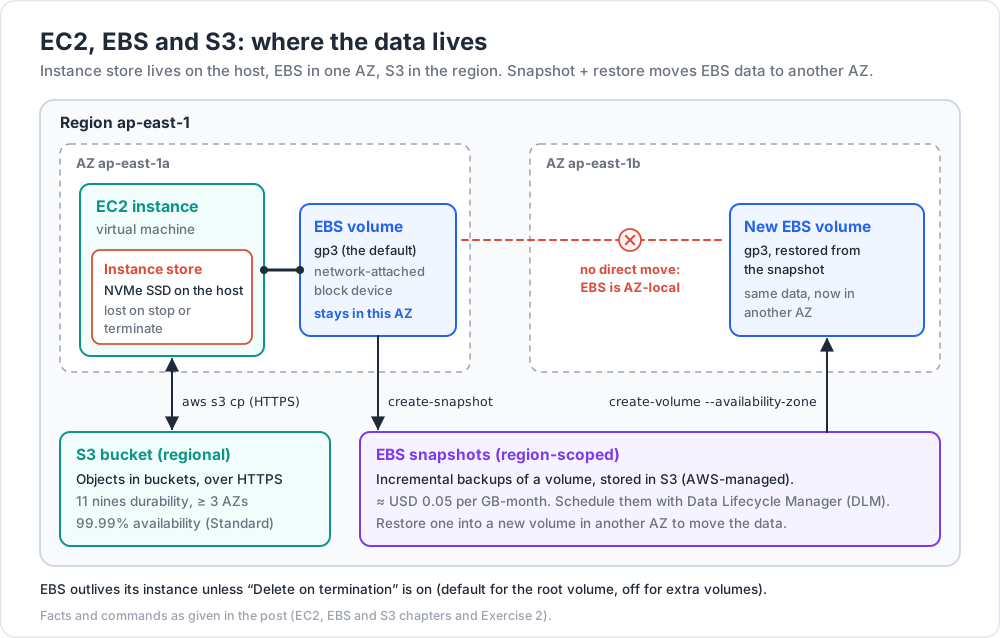
An EBS volume is a network-attached block device. It survives instance stop/terminate unless you tick "Delete on termination = yes" at launch (default for the root volume; default off for additional volumes).
| Type | Underlying | When |
|---|---|---|
| gp3 | SSD, balanced | default — most workloads |
| gp2 | SSD, older balanced | use gp3 instead |
| io2 / io2 Block Express | SSD, high IOPS | production OLTP, demanding DB |
| st1 | HDD, throughput | big sequential workloads, data lakes |
| sc1 | HDD, cold | archive, infrequent access |
Snapshots
A snapshot is an incremental backup of a volume, stored in S3 (AWS-managed). Snapshots are billed per GB-month (≈ USD 0.05) and are cheap.
1
2
3
4
5
6
aws ec2 create-snapshot --volume-id vol-XXXXXXXX \
--description "nightly db snapshot"
aws ec2 create-volume --snapshot-id snap-XXXXXXXX \
--availability-zone ap-east-1a --volume-type gp3
Use Data Lifecycle Manager (DLM) to schedule snapshot creation and retention automatically.
Common EBS mistakes
- Orphaned volumes after instance terminate — easy to leave hundreds of GB billed forever. Run
aws ec2 describe-volumes --filters Name=status,Values=availablemonthly. - gp2 when gp3 is cheaper and faster — migrate with
modify-volume. - Forgetting that EBS is AZ-local — to move data to another AZ, snapshot + restore.
Chapter 6 — Instance store (the ephemeral cousin)
Some instance types (i, r5d, c5d) include physical NVMe SSDs directly on the host. Massive IOPS and bandwidth, no network hop — perfect for caches, scratch, and shard-local data on databases like Cassandra. Catch: all data is lost on instance stop or terminate. Treat as ephemeral.
Chapter 7 — S3 (object storage)
S3 stores objects (files) inside buckets (containers). Each object is accessed by its key path (s3://bucket-name/folder/file.png). S3 is:
- Regional (each bucket lives in one region).
- 99.999999999% (11 nines) durability — replicated across ≥ 3 AZs by default.
- 99.99% availability for Standard tier.
- Practically unlimited size (objects up to 5 TB; multipart upload for > 5 GB).
- Billed per GB-month + per-request + per-GB egress (within region: free; cross-region or internet: per-GB).
Bucket naming
Bucket names are global across all AWS accounts (a leftover from when S3 used the bucket as a hostname). Make them long and unique: mycorp-prod-images-2026.
Common operations (CLI)
1
2
3
4
5
6
aws s3 mb s3://my-unique-bucket-2026 # make bucket
aws s3 cp file.txt s3://my-unique-bucket-2026/
aws s3 cp s3://my-unique-bucket-2026/file.txt .
aws s3 sync ./build s3://my-unique-bucket-2026/site --delete
aws s3 rb s3://my-unique-bucket-2026 --force # delete bucket
Chapter 8 — S3 storage classes
| Class | Use | Cost (us-east-1, per GB-mo) | Retrieval |
|---|---|---|---|
| Standard | hot data | ~USD 0.023 | immediate |
| Standard-IA | rarely accessed but quickly needed | ~USD 0.0125 | immediate; per-GB retrieval fee |
| One Zone-IA | re-creatable, IA, single AZ | ~USD 0.01 | immediate |
| Intelligent-Tiering | unknown access patterns | tier-based, auto | immediate |
| Glacier Instant Retrieval | archive but need ms access | ~USD 0.004 | immediate |
| Glacier Flexible Retrieval | archive, minutes-hours retrieval | ~USD 0.0036 | 1 min – 12 hrs |
| Glacier Deep Archive | true cold archive (years) | ~USD 0.00099 | 12 hrs |
Use Lifecycle policies to move objects between classes automatically (e.g., "after 30 days move to IA, after 365 days move to Glacier Deep Archive").
Trick: for unknown access patterns, Intelligent-Tiering is usually the right answer. AWS moves objects between tiers based on observed access. Minor monthly monitoring fee, no retrieval fee for the IA tier.
Chapter 9 — S3 security
S3 used to have a reputation for accidental data leaks. AWS responded with Block Public Access, on by default for new buckets — preventing public ACLs and policies entirely.
Access control mechanisms
| Mechanism | When |
|---|---|
| IAM policies | per-user / per-role permission to S3 actions |
| Bucket policies | resource-level policy attached to the bucket |
| Block Public Access | meta-control: blocks any policy/ACL that opens to the public |
| Object Ownership / ACLs disabled | the modern default (2023+); ignore ACLs entirely |
| Pre-signed URLs | time-limited HTTPS link generated by your code, allows direct access |
| VPC endpoint policy | restrict which buckets can be reached from your VPC |
Pre-signed URL pattern
For "let a user download this private object for the next 5 minutes" without giving them AWS credentials:
1
2
3
aws s3 presign s3://my-bucket/file.zip --expires-in 300
# prints a long https://...&X-Amz-Signature=... URL
In code (Python):
1
2
3
4
5
6
7
import boto3
url = boto3.client("s3").generate_presigned_url(
"get_object",
Params={"Bucket": "my-bucket", "Key": "file.zip"},
ExpiresIn=300
)
Encryption
S3 encrypts at rest by default (SSE-S3 with AES-256). For tighter control, use SSE-KMS with a Customer Managed Key (Post 07).
Chapter 10 — S3 in real architectures
Common patterns you'll see everywhere:
- Static website hosting — bucket holds HTML/JS/CSS, fronted by CloudFront (CDN). The "no servers" website.
- Log archive — application + ALB + CloudFront → S3 for long-term query via Athena.
- Data lake — Parquet files in S3, queried by Athena / Redshift Spectrum / EMR.
- Backup tier — RDS snapshots, EBS snapshots, EC2 AMIs all live in S3 internally.
- Inter-service exchange — service A drops file in S3, S3 event triggers Lambda or SQS for service B (covered in Post 05).
- Code artifacts — Lambda zip packages, container layers, Terraform state files.
Practice Exercises
Exercise 1 — Launch with SSM only
In the VPC you built in Post 01, launch a t3.micro Amazon Linux 2023 instance:
- in a private subnet,
- with no security-group inbound rules,
- attached to an IAM role with
AmazonSSMManagedInstanceCore.
Connect via aws ssm start-session --target i-... and verify curl https://example.com works (proves NAT egress) but ssh from your laptop fails (no port 22 open).
Exercise 2 — gp3 + snapshot
Attach a 10 GB gp3 volume to the instance. Format and mount it at /data. Write a file. Take a snapshot. Detach + delete the volume. Restore from snapshot into a new volume in a different AZ. Verify the file is still there.
Exercise 3 — Static site bucket
Create a bucket. Enable static website hosting. Upload index.html + error.html. Make the website index URL work without making the bucket itself public — use a bucket policy that allows only s3:GetObject on the website objects.
Exercise 4 — Lifecycle policy
For the bucket from Exercise 3, add a lifecycle rule:
- transition objects to Standard-IA after 30 days,
- transition to Glacier Deep Archive after 180 days,
- expire (delete) versions older than 365 days.
Exercise 5 — Pre-signed URL
Generate a pre-signed URL for a private object that expires in 60 seconds. Confirm it works immediately, fails after the minute.
Cheat-sheet
| What | How |
|---|---|
| Launch EC2 | aws ec2 run-instances --image-id ... --instance-type t3.micro |
| Find latest AL2023 AMI | filter on al2023-ami-2023* owned by amazon |
| Connect privately | SSM Session Manager — no port 22 needed |
| Pricing | Savings Plan for base + Spot for burst |
| ARM saving | Graviton (g suffix) |
| EBS default | gp3 |
| EBS snapshot | incremental, lives in S3, region-scoped |
| Move EBS across AZ | snapshot + restore |
| Find orphaned EBS | describe-volumes --filters Name=status,Values=available |
| S3 bucket name | globally unique, prefer long descriptive |
| S3 default | Block Public Access on |
| S3 unknown access | Intelligent-Tiering |
| Time-limited download | pre-signed URL |
| Encryption at rest | on by default (SSE-S3); upgrade to SSE-KMS for control |
| Static site | S3 + CloudFront |
What's next
Post 03 covers Scale & Survive — load balancers, Auto Scaling Groups, and the multi-AZ patterns that let the compute + storage from this post survive an AZ outage and traffic spike.
References
- EC2 User Guide
- EBS User Guide
- S3 User Guide
- AWS pricing pages per service.
Note: this post is in progress. Planned additions: EFS deep dive, FSx for Windows / Lustre, S3 Object Lambda, multipart-upload tuning.