AWS Course — 06 · Workflow Orchestration — Step Functions and Patterns
Once you have many Lambdas + events (Post 05), the next problem is coordination: "run A, then B in parallel with C, then if A succeeded do D, retry B up to 3 times, and if anything fails roll back". Wiring this with raw Lambdas and SQS is possible but quickly turns into spaghetti. AWS Step Functions provides a managed state-machine service exactly for this purpose. This post covers the basics of Step Functions, the two workflow types (Standard vs Express), the common patterns (sequence, parallel, choice, map, wait, retry, catch), the Saga pattern for distributed transactions, and when to reach for Step Functions vs simpler alternatives.
Series map: 00 Foundations → 01 Network First → 02 Compute & Storage → 03 Scale & Survive → 04 Managed Data → 05 Serverless & Events → 06 Workflow Orchestration (this post) → 07 Observability & Security → 08 IaC.
Learning Outcome
- Write a state machine in Amazon States Language (ASL).
- Pick between Standard and Express workflows.
- Use the core state types:
Task,Pass,Choice,Wait,Parallel,Map,Succeed,Fail. - Configure retries, catches, and timeouts.
- Implement a Saga (compensating-action rollback) for distributed transactions.
- Decide between Step Functions, EventBridge Pipes, and SQS-chained Lambdas.
Chapter 1 — Why state machines
A workflow is a graph of steps with branches, parallelism, error handling, and (sometimes) human approval. Hand-rolled, this turns into a tangle of Lambdas invoking other Lambdas, with retry logic copied in each, error-handling baked into each step, and no central view of "where is this execution right now?".
Step Functions externalises the orchestration:
- The state machine definition is a JSON document — version-controlled, auditable.
- Step Functions runs each execution: tracks position, retries, errors, history.
- The console shows a visual diagram of every execution — which step succeeded, which failed, what data flowed where.
- Each step is small and stateless (your Lambdas or AWS service calls); orchestration logic lives in one place.
Chapter 2 — Workflow types
| Type | Duration | Pricing | Execution history | Use |
|---|---|---|---|---|
| Standard | up to 1 year | per state transition | full history, queryable | long-running, audit-required, occasional |
| Express | up to 5 min | per execution time | CloudWatch Logs only | high-throughput, short |
Standard suits business workflows (order fulfilment, ETL, approvals). Express suits per-request orchestration (an API call that needs to fan out, gather, return).
Chapter 3 — Amazon States Language (ASL)
A state machine is a JSON document with StartAt + States:
1
2
3
4
5
6
7
8
9
10
11
12
{
"Comment": "minimal example",
"StartAt": "Greet",
"States": {
"Greet": {
"Type": "Task",
"Resource": "arn:aws:lambda:ap-east-1:123456789012:function:hello",
"End": true
}
}
}
Run:
1
2
3
4
aws stepfunctions start-execution \
--state-machine-arn arn:aws:states:... \
--input '{"name":"Ada"}'
Every state has a Type. The major ones follow.
Chapter 4 — Core state types
Task
Invokes an AWS service action. The most common is a Lambda, but Step Functions can call > 200 AWS service actions directly without a Lambda:
1
2
3
4
5
6
7
8
9
10
11
12
13
"WriteToDdb": {
"Type": "Task",
"Resource": "arn:aws:states:::dynamodb:putItem",
"Parameters": {
"TableName": "Orders",
"Item": {
"order_id": { "S.$": "$.order_id" },
"status": { "S": "received" }
}
},
"Next": "ChargeCard"
}
The .$ suffix tells the engine "use the value from the execution state at this JSONPath". This service integration avoids a Lambda hop entirely — faster + cheaper + simpler.
Pass
Manipulates the state (filter, add, rename fields) without invoking anything.
Choice
Conditional branching.
1
2
3
4
5
6
7
8
9
"CheckPriority": {
"Type": "Choice",
"Choices": [
{ "Variable": "$.priority", "StringEquals": "high", "Next": "RushDeliver" },
{ "Variable": "$.priority", "StringEquals": "low", "Next": "Queue" }
],
"Default": "Standard"
}
Wait
Pauses for a duration or until a timestamp.
1
2
3
4
5
6
"WaitADay": {
"Type": "Wait",
"Seconds": 86400,
"Next": "FollowUp"
}
Parallel
Runs multiple branches at once; collects all results into an array.
1
2
3
4
5
6
7
8
9
"FanOut": {
"Type": "Parallel",
"Branches": [
{ "StartAt": "FetchPricing", "States": { "FetchPricing": { "Type": "Task", "Resource": "...", "End": true } } },
{ "StartAt": "FetchInventory", "States": { "FetchInventory": { "Type": "Task", "Resource": "...", "End": true } } }
],
"Next": "Combine"
}
Map
Like Parallel, but for a dynamic-size array — the same workflow runs once per item.
1
2
3
4
5
6
7
8
9
10
11
"ProcessAll": {
"Type": "Map",
"ItemsPath": "$.orders",
"MaxConcurrency": 10,
"Iterator": {
"StartAt": "ProcessOne",
"States": { "ProcessOne": { "Type": "Task", "Resource": "...", "End": true } }
},
"End": true
}
The 2023+ Distributed Map scales Map up to 10,000 parallel iterations (good for fanning out over big S3 lists, large arrays).
Succeed / Fail
Terminal states. Fail records an error + cause that the parent can Catch.
Chapter 5 — Retry and Catch
Every Task can declare retries and error catchers:
1
2
3
4
5
6
7
8
9
10
11
12
13
14
15
16
17
18
19
20
21
22
23
24
25
26
27
28
29
"ChargeCard": {
"Type": "Task",
"Resource": "arn:aws:lambda:...:function:charge",
"Retry": [
{
"ErrorEquals": ["PaymentService.Timeout"],
"IntervalSeconds": 2,
"BackoffRate": 2.0,
"MaxAttempts": 3
},
{
"ErrorEquals": ["States.ALL"],
"IntervalSeconds": 1,
"MaxAttempts": 1
}
],
"Catch": [
{
"ErrorEquals": ["PaymentService.Declined"],
"Next": "NotifyDeclined"
},
{
"ErrorEquals": ["States.ALL"],
"Next": "Rollback"
}
],
"Next": "ShipOrder"
}
Retries multiply: first the most specific error block runs, then States.ALL as a catch-all.
Trick: put exponential backoff (
BackoffRate: 2.0) on Retries that hit external APIs — the third-party will recover; instant retries waste your throttling budget.
Chapter 6 — The Saga pattern
In a distributed system, you can't have ACID across services. The Saga pattern fakes it: every step has a compensating action, and if a later step fails, the workflow runs the prior compensating actions in reverse.
Example: order placement.
1
2
3
4
5
Reserve Inventory → Charge Card → Schedule Delivery → Done
│ │ │
(compensate: (compensate: (compensate:
release inv) refund) cancel delivery)
If Schedule Delivery fails, the workflow:
- Cancels delivery (n/a, never scheduled).
- Refunds the card.
- Releases the inventory.
- Returns the user a coherent failure response.
In Step Functions, model it as a Try block with Catch that routes to a compensating sub-workflow.
Chapter 7 — Express vs Standard pricing
| Standard | Express |
|---|---|
| USD 0.025 per 1,000 state transitions | USD 1 per 1M executions + GB-second compute time |
A long-running workflow with 50 transitions costs ~USD 0.00125 per execution on Standard. A 200-ms Express execution at 100 MB costs ~USD 0.0000004 per execution. Express wins for high-volume; Standard wins for long-running / fewer / audit-required.
Many production systems use both: Standard for the business workflow, Express for inner high-frequency loops.
Chapter 8 — When NOT to use Step Functions
| Scenario | Better fit |
|---|---|
| Single Lambda, no branching | just use Lambda |
| Pure pub/sub fanout | SNS or EventBridge |
| Pure queue + worker | SQS + Lambda |
| Stream processing | Kinesis + Lambda |
| Simple event chain across AWS services without transformations | EventBridge Pipes (newer, lighter than Step Functions for source → enrich → target) |
| Always-on long-running daemon | ECS / EC2 |
EventBridge Pipes deserves a special mention: launched 2022, ideal for "read from queue/stream → optional Lambda enrich → write to target". For pure pipelines without branching, Pipes is cheaper and simpler than Step Functions.
Chapter 9 — A worked example: image-processing pipeline
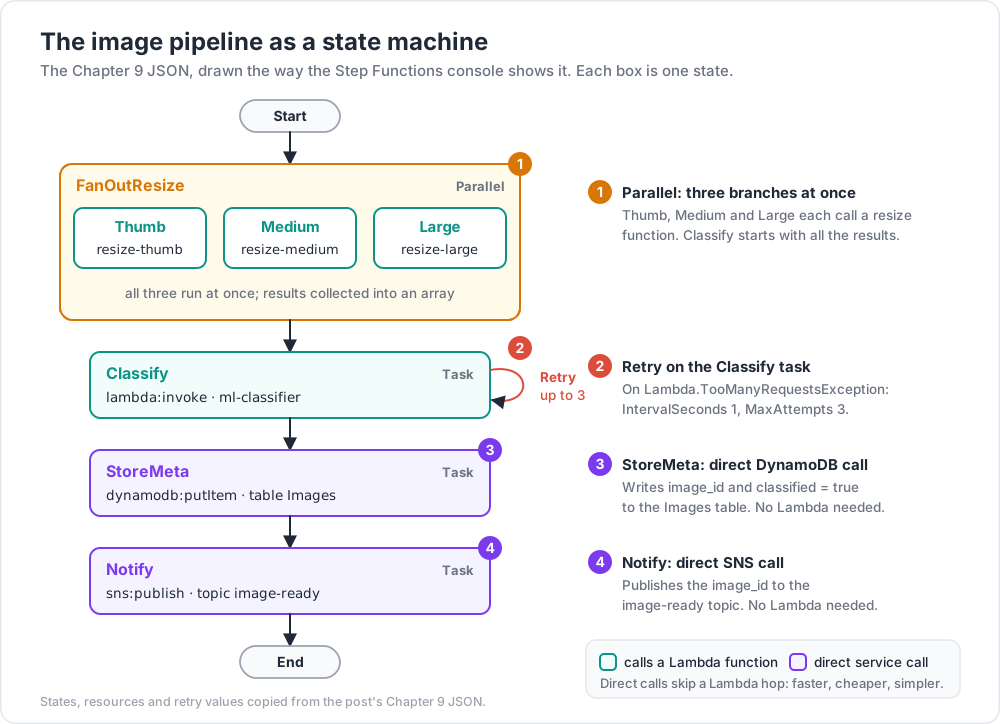
Workflow: user uploads photo → resize multiple variants in parallel → run ML classifier → store metadata → notify user.
1
2
3
4
5
6
7
8
9
10
11
12
13
14
15
16
17
18
19
20
21
22
23
24
25
26
27
28
29
30
31
32
33
34
35
36
37
38
39
40
41
42
43
44
45
46
47
{
"Comment": "Image pipeline",
"StartAt": "FanOutResize",
"States": {
"FanOutResize": {
"Type": "Parallel",
"Branches": [
{ "StartAt": "Thumb", "States": { "Thumb": { "Type": "Task", "Resource": "...:resize-thumb", "End": true } } },
{ "StartAt": "Medium", "States": { "Medium": { "Type": "Task", "Resource": "...:resize-medium", "End": true } } },
{ "StartAt": "Large", "States": { "Large": { "Type": "Task", "Resource": "...:resize-large", "End": true } } }
],
"Next": "Classify"
},
"Classify": {
"Type": "Task",
"Resource": "arn:aws:states:::lambda:invoke",
"Parameters": {
"FunctionName": "ml-classifier",
"Payload.$": "$"
},
"Retry": [{ "ErrorEquals": ["Lambda.TooManyRequestsException"], "IntervalSeconds": 1, "MaxAttempts": 3 }],
"Next": "StoreMeta"
},
"StoreMeta": {
"Type": "Task",
"Resource": "arn:aws:states:::dynamodb:putItem",
"Parameters": {
"TableName": "Images",
"Item": {
"image_id": { "S.$": "$.image_id" },
"classified": { "BOOL": true }
}
},
"Next": "Notify"
},
"Notify": {
"Type": "Task",
"Resource": "arn:aws:states:::sns:publish",
"Parameters": {
"TopicArn": "arn:aws:sns:...:image-ready",
"Message.$": "$.image_id"
},
"End": true
}
}
}
What this gains over hand-wired Lambdas:
- Visual diagram for every execution.
- Built-in retries with backoff.
- Direct SDK integration for DynamoDB + SNS — no Lambda wrappers.
- Full execution history queryable in the console.
- Easy modification — add a step in JSON, no code change.
Chapter 10 — Standard workflow + human approval
A common pattern: wait for a human approval mid-workflow. Step Functions supports callback tokens — pause until an out-of-band call resumes.
1
2
3
4
5
6
7
8
9
10
11
12
13
"AwaitApproval": {
"Type": "Task",
"Resource": "arn:aws:states:::sqs:sendMessage.waitForTaskToken",
"Parameters": {
"QueueUrl": "https://sqs...",
"MessageBody": {
"approval_url": "https://my-app/approve",
"token.$": "$$.Task.Token"
}
},
"Next": "Continue"
}
The workflow pauses (up to a year on Standard). A human (or webhook) calls SendTaskSuccess / SendTaskFailure with the token to resume.
Practice Exercises
Exercise 1 — Hello state machine
Create a Standard workflow with three Lambdas in sequence: A → B → C. Start an execution; watch the visual diagram in the console.
Exercise 2 — Choice branch
Add a Choice state after A:
- if
$.priority == "high"→ Lambda X - else → Lambda Y
Test both inputs.
Exercise 3 — Retry + Catch
Make Lambda B fail intermittently (raise an exception 50% of the time). Add Retry (3 attempts, backoff 2) and Catch (→ a "Notify failure" Lambda). Observe behaviour.
Exercise 4 — Saga
Implement the order-placement Saga from Chapter 6 with three real Lambdas (each can be a stub that prints + returns). Force the third step to fail; verify compensating actions run in reverse.
Exercise 5 — Direct service integration
Replace one of your Task Lambdas with a direct DynamoDB putItem. Confirm the workflow shrinks by one Lambda and runs faster.
Exercise 6 — Express vs Standard
Convert a workflow that runs 1000+ times/day to Express. Compare costs over a week.
Cheat-sheet
| What | How |
|---|---|
| Workflow types | Standard (long, audit) vs Express (high-volume, short) |
| Definition | JSON (Amazon States Language) |
| Run | aws stepfunctions start-execution |
| Task state | invokes Lambda or AWS service directly |
| Choice | conditional branch |
| Parallel | run branches concurrently |
| Map | per-item iteration (Distributed Map for big arrays) |
| Wait | pause for time or until timestamp |
| Retry | per-Task; supports exponential backoff |
| Catch | route on error to recovery branch |
| Direct integrations | 200+ AWS service actions without Lambda |
| Callback token | pause for human approval / external system |
| Saga | every step has a compensating action |
| EventBridge Pipes | simpler source→enrich→target pipelines |
| Visual diagram | every execution; jump from console to details |
What's next
Post 07 introduces Observability & Security Baseline — CloudWatch, CloudTrail, Systems Manager, KMS, Secrets Manager, WAF. Now that the workload runs across compute, data, events, and workflows, you need to see what's happening and protect it.
References
- Step Functions Developer Guide
- Amazon States Language spec
- The AWS Workflow Studio — visual designer.
- EventBridge Pipes overview
- Serverless Land — Step Functions patterns
Note: this post is in progress. Planned additions: Distributed Map example over a big S3 dataset; callback-token approval UI walkthrough; nested state machines; cost comparison Standard vs Express on a real workload.