AWS Course — 00 · Cloud Fundamentals, Regions, IAM, and First Steps
AWS is the largest public cloud provider, offering over 200 services from raw compute and storage to managed databases, ML training, IoT, and satellite ground stations. For a beginner, that menu is overwhelming. This first post grounds the rest of the series in the core mental model: what the cloud actually is, how AWS organises its physical world (regions and AZs), how you authenticate (IAM), and how you avoid an unwanted bill in week one. The remaining posts go service by service.
Series map: 00 Fundamentals (this post) → 01 EC2 & VPC → 02 Load Balancers & Auto Scaling → 03 Lambda & Serverless → 04 Step Functions → 05 Terraform IaC → (future: S3 deep dive · RDS · DynamoDB · ECS/EKS · CloudWatch · CI/CD · cost optimisation · security best practices).
Learning Outcome
- Explain what "cloud computing" means and the IaaS / PaaS / SaaS layers.
- Locate AWS regions and availability zones; understand why they matter for latency and failure isolation.
- Create an AWS account with billing alerts in place.
- Understand IAM: users, groups, roles, policies — and the rule "never use the root account".
- Use the AWS CLI to make your first API call.
- Recognise the free tier and the most common surprise-bill traps.
Chapter 1 — What the cloud is
Terminology
- Cloud computing — renting compute, storage, network, and services from a provider on-demand, billed by usage rather than capital purchase.
- Region — a geographic area (e.g.,
us-east-1in Northern Virginia,ap-east-1in Hong Kong). Each region is fully independent. - Availability Zone (AZ) — one or more isolated data centres inside a region, connected by low-latency links. Each region has ≥ 3 AZs.
- Edge location — smaller PoPs (point of presence) used by CloudFront (CDN) and Route 53 (DNS). Hundreds worldwide.
- Service — a single AWS product. EC2, S3, Lambda are services.
- API — every AWS service is driven by an HTTPS API. Console, CLI, SDKs, and IaC tools all call the same APIs underneath.
Service-model layers
| Layer | What the provider runs | What you run | Example AWS |
|---|---|---|---|
| IaaS (Infrastructure) | hardware, virtualisation, network | OS + everything above | EC2, EBS, VPC |
| PaaS (Platform) | OS + runtime | your app code | Elastic Beanstalk, App Runner |
| FaaS (Functions) | runtime + scheduling | a single function | Lambda |
| SaaS (Software) | everything | only data + config | WorkMail, Connect |
Trick: when picking a service, ask "how much do I want to manage?". The deeper you go (IaaS → SaaS), the less control and the less ops work. There is no universal best — pick the layer that matches your team's appetite.
Chapter 2 — Regions and AZs
Each AWS service runs in a particular region. Resources in us-east-1 are not visible from eu-west-1 by default — they're separate accounts of the same service.
Choosing a region
| Criterion | Example |
|---|---|
| Latency to users | Hong Kong users → ap-east-1 |
| Data sovereignty / regulation | EU customer data → eu-central-1 (Frankfurt) |
| Service availability | newest services launch first in us-east-1, us-west-2 |
| Price | us-east-1 and us-west-2 are usually cheapest |
Watch out: us-east-1 is the "default region" for many global services (IAM, CloudFront, Route 53 hosted-zone APIs). Many tutorials assume us-east-1 implicitly.
Multi-AZ for high availability
A region has at least 3 AZs (e.g., us-east-1a, us-east-1b, us-east-1c). Each AZ is a separate building with separate power. Production workloads spread across ≥ 2 AZs so a single-AZ outage doesn't take down the system.
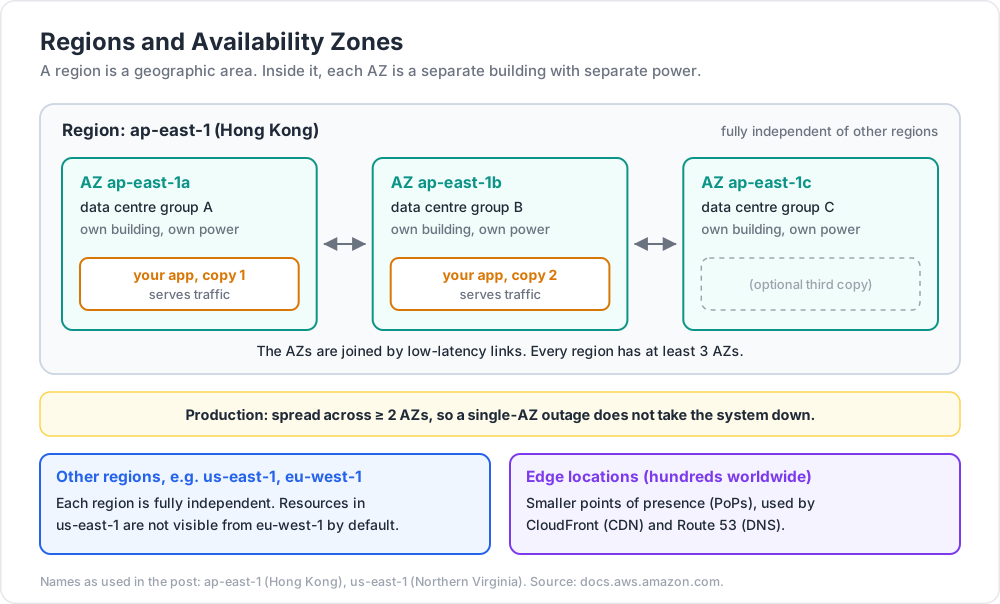
Diagram in words:
1
2
3
4
5
Region: ap-east-1 (Hong Kong)
├── AZ ap-east-1a (data centre group A)
├── AZ ap-east-1b (data centre group B)
└── AZ ap-east-1c (data centre group C)
Chapter 3 — Account, billing, and the root user
When you sign up at aws.amazon.com, you create the root user — an account-wide super-admin tied to your email + credit card.
The rules everyone learns the hard way
- Never use the root user for daily work. Log in once, set up MFA, create an IAM admin user, then log out.
- Enable MFA on the root user immediately — preferably a hardware key or a TOTP app.
- Set a billing alert before deploying anything. AWS has no built-in spending cap; you can rack up $5,000 in a misconfigured stack overnight.
- Tag every resource with at least an owner and environment tag — for cost allocation later.
Billing alert (5-minute setup)
- Console → Billing → Billing preferences → enable "Receive Billing Alerts".
- CloudWatch → Alarms → create a billing alarm at, say, USD 10 / month.
- Subscribe your email to the SNS topic.
The alarm needs to be created in us-east-1 (billing metrics live there).
Chapter 4 — IAM (Identity and Access Management)
IAM is how AWS knows who you are and what you're allowed to do. Five concepts:
| Concept | What |
|---|---|
| User | A human (or app key pair). Has a password and/or access keys. |
| Group | A bag of users sharing permissions (e.g., developers, auditors). |
| Role | An identity that a service (EC2, Lambda, etc.) or a federated user assumes temporarily. The modern way. |
| Policy | A JSON document listing allowed/denied actions. Attached to users, groups, or roles. |
| Permission boundary | A meta-policy that caps what a user/role can be granted, regardless of inline policies. |
A minimal policy (JSON)
1
2
3
4
5
6
7
8
9
10
11
12
13
14
{
"Version": "2012-10-17",
"Statement": [
{
"Effect": "Allow",
"Action": ["s3:GetObject", "s3:ListBucket"],
"Resource": [
"arn:aws:s3:::my-bucket",
"arn:aws:s3:::my-bucket/*"
]
}
]
}
Parts:
Effect—AlloworDeny.Action— service:operation. Wildcards allowed (s3:Get*).Resource— ARN(s) the actions apply to.*means "all resources".- Optional:
Condition,Principal,NotAction,NotResource.
Roles vs users — modern guidance
Use roles for code (EC2, Lambda, ECS tasks). The service automatically gets short-lived credentials via the EC2 instance metadata service or the Lambda runtime; you never store access keys on disk.
Use users only for humans, and prefer federation (SSO, Okta, Azure AD) over local IAM users in serious accounts.
Common pitfall: committing long-lived AWS access keys to a public repo. Bots scan GitHub for keys constantly; expect crypto-mining within minutes. Never commit AKIA... strings. If exposed, rotate immediately and audit.
Chapter 5 — The AWS CLI
1
2
3
4
5
6
7
8
9
10
11
# install (macOS)
brew install awscli
# Linux
sudo apt install awscli
# or download the official bundle from aws.amazon.com/cli
# Windows
# download MSI from aws.amazon.com/cli, or:
winget install Amazon.AWSCLI
Configure:
1
2
3
4
5
6
aws configure
# AWS Access Key ID: ...
# AWS Secret Access Key: ...
# Default region name: ap-east-1
# Default output format: json
Credentials are stored at ~/.aws/credentials (Linux/macOS) or %USERPROFILE%\.aws\credentials (Windows). Profiles let you switch contexts:
1
2
3
4
aws configure --profile work
aws s3 ls --profile work
export AWS_PROFILE=work # default for the shell
First API call
1
2
3
4
5
6
aws sts get-caller-identity
# { "UserId": "...", "Account": "123456789012", "Arn": "arn:aws:iam::..." }
aws s3 ls
aws ec2 describe-regions --query 'Regions[].RegionName'
Trick: --query runs a JMESPath expression on the JSON output to trim it. Combine with --output table for human-readable summaries.
Chapter 6 — The Free Tier and how to avoid surprise bills
AWS gives a 12-month free tier on many services for new accounts, plus "always free" tiers for some.
| Resource | Free tier (per month) |
|---|---|
| EC2 (t2.micro / t3.micro) | 750 hours |
| S3 | 5 GB storage + 20k GET + 2k PUT |
| Lambda | 1M requests + 400k GB-seconds |
| DynamoDB | 25 GB + 200M requests |
| CloudWatch | 10 metrics + 5 GB logs |
Surprise-bill traps to avoid:
- NAT Gateway — runs 24/7 at ≈ USD 32 / month, charges for data through it. Easy to leave running.
- Elastic IPs not attached — costs while idle.
- EBS volumes not deleted with their instances — keep paying for storage.
- CloudWatch Logs without retention — defaults to forever. Set retention to 7 or 30 days.
- Cross-region data transfer — between regions costs around USD 0.02 / GB. Adds up.
- Public S3 traffic — if your bucket goes viral, you pay for the egress.
Trick: create a separate AWS account for learning — nothing else lives there. When done with a tutorial, run
aws ec2 terminate-instances ...or use AWS Nuke to wipe everything.
Chapter 7 — How to read AWS documentation
The official docs (docs.aws.amazon.com) are the only authoritative source. Tips:
- Use the service landing page as your roadmap — every service has one.
- The API Reference lists every operation, parameter, and response. Use when scripting.
- CloudFormation user guide describes every resource property — even if you use Terraform, the CFN docs are sometimes the most detailed.
- The Well-Architected Framework describes the five pillars (Operational excellence, Security, Reliability, Performance efficiency, Cost optimisation, plus newer Sustainability). Read once per year.
Practice Exercises
Exercise 1 — Account setup
- Create an AWS account (or use an existing learning account).
- Enable MFA on the root user.
- Create an IAM user
admin-cliwith theAdministratorAccesspolicy attached. - Configure
aws configurewith that user. - Set a CloudWatch billing alarm at USD 10.
Exercise 2 — Explore your account
Using only the CLI:
- List all S3 buckets:
aws s3 ls. - List all regions:
aws ec2 describe-regions. - Get current identity:
aws sts get-caller-identity. - Write a one-line shell that prints the count of EC2 instances in your default region.
Solution
1
2
aws ec2 describe-instances --query 'length(Reservations[].Instances[])'
Exercise 3 — Write a minimal IAM policy
Write a JSON policy that allows the holder to list all S3 buckets and read (GetObject) from a single bucket named course-notes, but nothing else.
Solution
1
2
3
4
5
6
7
8
9
{
"Version": "2012-10-17",
"Statement": [
{ "Effect": "Allow", "Action": "s3:ListAllMyBuckets", "Resource": "*" },
{ "Effect": "Allow", "Action": "s3:ListBucket", "Resource": "arn:aws:s3:::course-notes" },
{ "Effect": "Allow", "Action": "s3:GetObject", "Resource": "arn:aws:s3:::course-notes/*" }
]
}
Exercise 4 — Cost discipline check
Audit your account:
- Are there any unused Elastic IPs (
aws ec2 describe-addresses)? - Are there orphaned EBS volumes (
aws ec2 describe-volumes --filters Name=status,Values=available)? - Are there CloudWatch log groups without retention (
aws logs describe-log-groups)?
Note the cost of each before moving on.
Cheat-sheet
| What | How |
|---|---|
| Region selector | top-right in console; --region flag in CLI |
| Default region | set in ~/.aws/config under your profile |
| Switch profile | export AWS_PROFILE=work |
| Whoami | aws sts get-caller-identity |
| List S3 | aws s3 ls |
| List EC2 | aws ec2 describe-instances |
| MFA on root | Console → security credentials |
| Billing alarm | CloudWatch in us-east-1 |
| Lock root user | use IAM admin for everything else |
| Free tier limits | Console → Billing → Free Tier |
| Tag everything | --tags Key=Owner,Value=alice Key=Env,Value=dev |
| ARN format | arn:aws:service:region:account-id:resource |
What's next
Post 01 introduces EC2 and VPC: how to spin up a virtual machine, where it lives in your network, how security groups work, and the cost/architecture trade-offs between EC2 and the managed alternatives.
References
- docs.aws.amazon.com — official documentation index.
- AWS Certified Solutions Architect – Associate study guides (Sybex / Stephane Maarek course on Udemy / Adrian Cantrill course) — best structured intros.
- AWS Well-Architected Framework — the canonical "how should I build this" doc.
- AWS Pricing Calculator — estimate before you build.
Note: this post is in progress. Planned additions: SSO / Identity Center setup walkthrough; cross-account role assumption; common IAM-policy traps; cost-explorer screenshots.