Vue Deep Dive — 03 · Ecosystem & Production (Pinia, Router, Nuxt)
The first three posts in this series were about Vue itself. A production Vue application is Vue plus a store, a router, usually a meta-framework for server rendering, a test stack and a deployment target — and most production incidents happen at those seams: state that leaks between SSR requests, a navigation guard that loops, a hydration mismatch that only appears in one time zone, a page that fetches its data twice. This post covers the stack as it stands in September 2026: Pinia 4 (setup stores, SSR state, testing), Vue Router 5 (guards, lazy routes, and the typed file-based routing that moved into core), Nuxt 4.5 (directory structure, rendering modes, hydration, useFetch / useAsyncData, Nitro), testing with Vitest, Vue Test Utils and Playwright, and deployment. Versions at the time of writing: Vue 3.5.43 (3.6 in release candidate), Pinia 4.0.3, Vue Router 5.3.1, Nuxt 4.5.2.
Series map: 00 Reactivity Internals → 01 Composition API at Scale → 02 Compiler, Virtual DOM & Vapor Mode → 03 Ecosystem & Production (Pinia, Router, Nuxt) (this post). Future: see the extensions table at the end of this post.
Learning Outcome
- Write Pinia setup stores that work with SSR, devtools and plugins, and explain why every piece of state must be returned.
- Explain how Pinia avoids cross-request state pollution and how its state is serialised and hydrated.
- Order Vue Router's navigation guards, write guards that return values instead of calling
next, and split routes into lazy chunks. - Set up Vue Router 5's file-based typed routes, and migrate from
unplugin-vue-router. - Navigate a Nuxt 4 project:
app/,server/,shared/, and what each context may import. - Choose a rendering mode per route with
routeRules: SSR, prerender, SWR, ISR, client-only. - Diagnose and fix hydration mismatches.
- Use
useFetch,useAsyncDataand$fetchcorrectly, including the Nuxt 4 changes (shared keys, shallowdata,undefineddefaults). - Test components, composables and stores with Vitest and Vue Test Utils, Nuxt code with
@nuxt/test-utils, and full flows with Playwright. - Deploy an SPA, a Node SSR server and a static or edge build.
Chapter 1 — Pinia
Terminology
- Option store —
defineStore('id', { state, getters, actions }), the Options API shape. - Setup store —
defineStore('id', () => { … return { … } }):refs become state,computeds become getters, functions become actions. - Pinia instance — the object created by
createPinia()and installed withapp.use(pinia). It holds the state of every store inpinia.state.value. - Hydration (of stores) — on the client, initialising
pinia.state.valuefrom the state the server serialised into the HTML.
Setup stores done right
1
2
3
4
5
6
7
8
9
10
11
12
13
14
15
16
17
18
19
20
21
22
23
24
// stores/cart.ts
import { defineStore, acceptHMRUpdate } from 'pinia'
export const useCartStore = defineStore('cart', () => {
const items = ref<CartItem[]>([])
const coupon = ref<string | null>(null)
const total = computed(() => items.value.reduce((s, i) => s + i.price * i.qty, 0))
function add(item: CartItem) {
const hit = items.value.find((i) => i.id === item.id)
hit ? hit.qty++ : items.value.push({ ...item, qty: 1 })
}
function $reset() { // setup stores do not get $reset() for free
items.value = []
coupon.value = null
}
return { items, coupon, total, add, $reset }
})
if (import.meta.hot) import.meta.hot.accept(acceptHMRUpdate(useCartStore, import.meta.hot))
The rules that bite:
- Return every piece of state. The Pinia docs are explicit: state that is not returned breaks SSR, devtools and plugins, because Pinia only knows about what it can see. You cannot have private state in a store; keep private values in a separate, internal store or in a closure that is not state.
$reset()is not generated for setup stores. Pinia cannot know the initial value of arefyou created; write your own, as above.- Destructure with
storeToRefs. A store is areactiveobject, soconst { total } = useCartStore()loses reactivity (Post 00, Chapter 8).const { items, total } = storeToRefs(store)keeps state and getters as refs; take actions directly from the store:const { add } = store. inject()works inside setup stores, because Pinia runs them within the app's context. Use it for app-level provided values; do not return things such as the router or route from the store.
Setup stores run inside an effectScope owned by Pinia, so watch and computed inside them live as long as the store. Composables from Post 01 that clean up with onScopeDispose behave correctly inside a store; composables that use onUnmounted do not.
SSR: one Pinia per request
On the server, a module-scope reactive object is shared by every request (Post 00, Chapter 8). Pinia's design avoids that: stores are bound to the pinia instance, and you create one pinia per request together with the app. The per-request state is then serialised into the HTML and restored on the client before any store is used:
1
2
3
4
5
6
7
8
9
10
11
12
// server entry (simplified)
const app = createSSRApp(App)
const pinia = createPinia()
app.use(pinia)
const html = await renderToString(app)
const state = devalue(pinia.state.value) // serialise safely, not JSON.stringify into a <script>
// client entry
const pinia = createPinia()
app.use(pinia)
pinia.state.value = window.__PINIA_STATE__ // before the first useStore()
Nuxt's @pinia/nuxt module does all of this for you. Two SSR traps remain:
- Calling
useStore()outside setup on the server (in a plain module, or in a router guard defined outsidesetup) must receive the pinia instance:useCartStore(pinia). Otherwise it may pick up the wrong request's pinia or none. - Client-only values in state. A
refthat readslocalStorage(for example VueUse'suseLocalStorage) must not be overwritten by the server's value during hydration. Wrap it:const theme = skipHydrate(useLocalStorage('theme', 'light')).
Pinia 4
Pinia 4.0 (July 2026) is a small major: the package is ESM-only, it requires Vue ^3.5.11 and TypeScript ≥ 5.6 for users who type-check, and @vue/devtools-api v8 is now a peer dependency. Its release notes also describe a rework of errors and development warnings. The store API above is unchanged from Pinia 2 and 3.
Trick: for server data (lists, details, anything with a cache lifetime) use a data-fetching layer — Nuxt's
useFetch, TanStack Query, or Pinia Colada — and keep Pinia for client state (cart, UI preferences, wizard progress). Putting API caches in Pinia by hand means reimplementing deduplication, invalidation and staleness.
Chapter 2 — Vue Router
Navigation guards return values
1
2
3
4
5
6
7
8
router.beforeEach((to, from) => {
const auth = useAuthStore()
if (to.meta.requiresAuth && !auth.user) {
return { name: 'login', query: { redirect: to.fullPath } } // redirect
}
// return nothing (or true) to continue; return false to cancel
})
A guard returns false to cancel, a route location to redirect, or nothing / true to continue. Throwing cancels and calls router.onError. Guards can be async. The older third argument, next, is still accepted, but the docs describe it as a common source of mistakes — calling it twice, or not at all on one branch — so new code should return values.
Common pitfall: a redirect guard that does not exclude its own target.
if (!user) return '/login'on every route, including/login, loops; in development Vue Router aborts it with a "possibly infinite redirection" warning. Checkto.name !== 'login'or mark public routes inmeta.
The full resolution order
- Navigation triggered.
beforeRouteLeavein components being left.- Global
beforeEach. beforeRouteUpdatein components being reused (same component, new params).beforeEnterin route records.- Async route components are resolved (lazy chunks downloaded).
beforeRouteEnterin components being entered.- Global
beforeResolve. - Navigation confirmed.
- Global
afterEach. - DOM updated.
- Callbacks passed to
nextinbeforeRouteEnterrun with the new instance.
beforeResolve (step 8) is the right place for checks that need the resolved components, such as permissions stored in a page's meta or data that must exist before the page renders. afterEach cannot change the navigation; use it for analytics and document titles.
Lazy routes
1
2
3
4
5
const routes = [
{ path: '/', component: Home }, // in the main bundle
{ path: '/reports', component: () => import('./pages/Reports.vue') }, // own chunk
]
A function that returns a dynamic import() makes the route a separate chunk, downloaded at step 6. Do not use defineAsyncComponent for route components; the router handles the laziness itself. Group rarely used routes into one chunk with your bundler's manual chunk configuration only when you have measured that per-route chunks are too many.
Typed, file-based routes in Vue Router 5
Vue Router 5 merged unplugin-vue-router into core. For projects that did not use that plugin, the migration guide states there are no breaking changes; the IIFE build no longer bundles @vue/devtools-api. File-based routing is opt-in:
1
2
3
4
5
6
7
8
// vite.config.ts
import VueRouter from 'vue-router/vite'
import Vue from '@vitejs/plugin-vue'
export default defineConfig({
plugins: [VueRouter({ /* routesFolder: 'src/pages' */ }), Vue()], // VueRouter before Vue
})
1
2
3
4
5
6
// router.ts
import { createRouter, createWebHistory } from 'vue-router'
import { routes } from 'vue-router/auto-routes'
export const router = createRouter({ history: createWebHistory(), routes })
The plugin scans src/pages/, turns users/[id].vue into /users/:id, and, when TypeScript is installed, generates typed-router.d.ts with a RouteNamedMap that lists every route, its path and its params. Route names, params in router.push and RouterLink, and useRoute() in a page are then type-checked. Import paths changed for former plugin users: unplugin-vue-router/vite → vue-router/vite, data loaders → vue-router/experimental, Volar plugins → vue-router/volar/*. The router team has said Vue Router 6 will be ESM-only and remove deprecated APIs; v5 is the transition release.
Watch out: data loaders (fetching route data during navigation) live under
vue-router/experimental. The name says what it means: fine to evaluate, but the API may change in a minor release.
Chapter 3 — Nuxt 4: structure and rendering
Directory structure
Nuxt 4 (July 2025) moved application code into app/:
1
2
3
4
5
6
7
8
9
10
11
12
13
14
my-app/
├─ app/ ← runs in the browser and during SSR
│ ├─ app.vue
│ ├─ pages/ ← file-based routes (Vue Router under the hood)
│ ├─ layouts/ components/ composables/ utils/
│ ├─ middleware/ ← route middleware (client + SSR navigation)
│ └─ plugins/
├─ server/ ← Nitro only: never shipped to the browser
│ ├─ api/ routes/ middleware/ plugins/
├─ shared/ ← code and types imported by both app/ and server/
├─ public/ ← static files served as-is
├─ layers/ modules/
└─ nuxt.config.ts
The split is not cosmetic. Nuxt 4 generates separate TypeScript projects for app, server, shared and build contexts, so importing a server-only module into a component, or using a browser global in server/, is a type error instead of a production crash. Keeping app code out of the root also stops file watchers from scanning node_modules/ and .git/.
Rendering modes per route
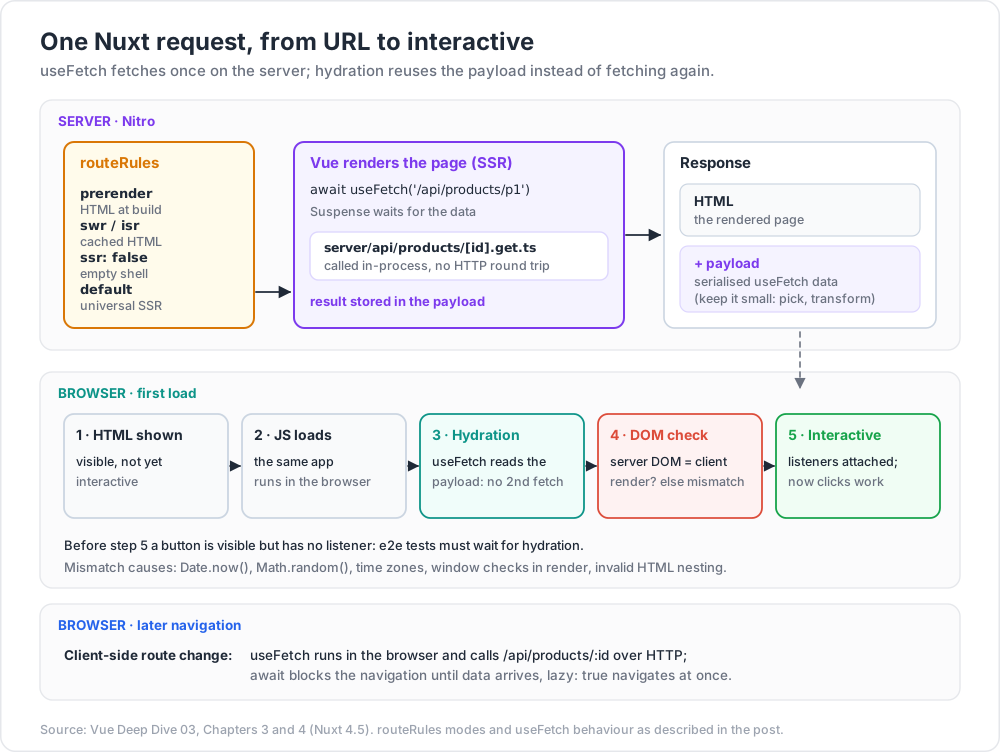
Nuxt renders universally by default: HTML on the server for the first request, then a client-side SPA after hydration. routeRules changes that per route:
1
2
3
4
5
6
7
8
9
10
11
12
// nuxt.config.ts
export default defineNuxtConfig({
routeRules: {
'/': { prerender: true }, // HTML generated at build time
'/products/**': { swr: 3600 }, // server-rendered, cached for 3600 s, revalidated in the background
'/blog/**': { isr: true }, // like swr, but the platform's CDN caches it
'/admin/**': { ssr: false }, // client-only SPA section
'/api/**': { cors: true },
'/old-page': { redirect: '/new-page' },
},
})
| Mode | HTML produced | Good for | Watch for |
|---|---|---|---|
| Universal SSR (default) | Per request | Personalised pages, SEO | Server cost, per-request state |
prerender |
At build | Marketing, docs | Stale until rebuilt |
swr |
Per request, then cached on the server or proxy | Catalogues, listings | Users may see content up to one TTL old |
isr |
Per request, cached by the CDN | Same, on Vercel / Netlify | Platform-specific |
ssr: false |
Empty shell, rendered in the browser | Dashboards behind login | No SEO, slower first paint |
Hydration mismatches
Hydration walks the server's DOM and attaches the client app to it, assuming both renders produced the same result. When they did not, Vue logs a mismatch warning in development and patches the difference, which costs time and can leave the page in a wrong state. The causes are few and always the same:
| Cause | Example | Fix |
|---|---|---|
| Values that differ per environment | Date.now(), Math.random(), new Date().toLocaleString() in the template |
Compute once on the server and pass through state (useState), or render in onMounted / <ClientOnly> |
| Time zone or locale differences | Server in UTC, user in Hong Kong | Format on the client, or format with an explicit time zone on both |
| Browser-only checks during render | typeof window !== 'undefined' ? … : … in a template |
Use onMounted to switch after hydration; <ClientOnly> with a fallback |
| Invalid HTML nesting | <div> inside <p>, <a> inside <a> |
The browser's parser rewrites the server HTML before Vue sees it: fix the markup |
| Generated ids | Counters for aria-describedby |
useId() (Vue 3.5), stable across server and client |
| Genuinely unavoidable differences | A server-rendered timestamp | data-allow-mismatch="text" on that element (3.5) |
In production builds the mismatch details are compiled out. To debug one in production, set __VUE_PROD_HYDRATION_MISMATCH_DETAILS__: true in the build, reproduce, and turn it off again.
Watch out: browser extensions that inject markup (translators, password managers) cause mismatches you cannot fix. Reproduce in a clean profile before chasing one.
Chapter 4 — Data fetching in Nuxt
The problem: fetching twice
Code in a page's setup runs twice: on the server to produce HTML, then in the browser to hydrate. A bare await $fetch('/api/products') in setup therefore requests the data on the server and again in the browser, and if the two responses differ, the hydration check fails. useFetch and useAsyncData solve this: on the server they fetch and store the result in the payload (serialised into the HTML, available as useNuxtApp().payload); during hydration they read the payload instead of fetching.
1
2
3
4
5
6
7
8
<script setup lang="ts">
const route = useRoute()
const { data: product, status, error, refresh } = await useFetch(
() => `/api/products/${route.params.id}`,
{ pick: ['id', 'name', 'price'] } // only these fields go into the payload
)
</script>
useFetch(url, opts) is shorthand for useAsyncData(key, () => $fetch(url, opts)) with a key generated from the URL and the call site.
The rules
useFetch/useAsyncDatain setup,$fetchin event handlers. The Nuxt docs recommend$fetchfor client-side, event-based interactions: a form submit or a button click has no server render to reuse.awaitblocks navigation. AwaitinguseFetchin a page uses Vue'sSuspenseunder the hood (Post 01, Chapter 8), so the page renders with its data.lazy: true(oruseLazyFetch) navigates immediately; show a state fromstatus('idle' | 'pending' | 'success' | 'error').server: falsefetches only in the browser — for data that depends on client-only state or does not matter for SEO.- Reactive inputs refetch. A getter URL or reactive
queryvalues are watched; addwatch: [...]for other sources. - Keep payloads small.
pickortransformbefore the data is serialised. A 2 MB API response copied into every HTML page is a performance bug.
What changed in Nuxt 4
| Change | Nuxt 3 | Nuxt 4 |
|---|---|---|
| Same key in several components | Separate refs | Shared data, error and status refs; options such as deep, transform, pick, getCachedData must match |
data reactivity |
Deep ref |
shallowRef; opt back in with deep: true |
Default data / error |
null |
undefined |
getCachedData |
First load only | Called on every fetch, with a context giving the cause ('initial', 'refresh:hook', 'refresh:manual', 'watch') |
refresh({ dedupe }) |
Boolean | 'cancel' or 'defer' |
The shallowRef change is the one that breaks code: product.value.price = 10 no longer updates the page. Replace the object (product.value = { ...product.value, price: 10 }) or pass deep: true for that call. This is the same trade-off as Post 00's shallowRef advice, made the default.
Nitro: the server side
server/ is compiled by Nitro (the nitropack 2.x line in Nuxt 4; Nitro 3 is in beta at the time of writing) into a standalone server for the chosen deployment target:
1
2
3
4
5
6
7
8
// server/api/products/[id].get.ts → GET /api/products/:id
export default defineEventHandler(async (event) => {
const id = getRouterParam(event, 'id')
const product = await db.product.findUnique({ where: { id } })
if (!product) throw createError({ statusCode: 404, statusMessage: 'Product not found' })
return product // serialised as JSON
})
During SSR, $fetch('/api/products/1') from a page calls this handler in-process, without an HTTP round trip. Types flow too: useFetch('/api/products/1') infers the handler's return type.
Configuration that must differ per environment goes in runtimeConfig, overridable by environment variables at run time without a rebuild:
1
2
3
4
5
runtimeConfig: {
dbUrl: '', // server only; env NUXT_DB_URL
public: { apiBase: '/api' }, // also sent to the browser; env NUXT_PUBLIC_API_BASE
}
Common pitfall: putting a secret under
runtimeConfig.public. Everything underpublicis serialised into the page for every visitor.
Chapter 5 — Testing
The pyramid for a Vue app
| Layer | Tool | What it proves |
|---|---|---|
| Pure functions, stores, composables | Vitest | Logic, in milliseconds |
| Components | Vitest + Vue Test Utils (or Testing Library) | Rendering, events, props, slots |
| Nuxt-aware components | @nuxt/test-utils with the nuxt environment |
Auto-imports, plugins, useFetch with mocked endpoints |
| User flows | Playwright | The real app in real browsers, including SSR and hydration |
Components with Vue Test Utils
1
2
3
4
5
6
7
8
9
10
11
12
13
14
15
16
17
import { mount, flushPromises } from '@vue/test-utils'
import { createTestingPinia } from '@pinia/testing'
import { vi, test, expect } from 'vitest'
import CartButton from './CartButton.vue'
import { useCartStore } from '@/stores/cart'
test('adds the product and shows the count', async () => {
const wrapper = mount(CartButton, {
props: { product: { id: 'p1', name: 'Pen', price: 3 } },
global: { plugins: [createTestingPinia({ createSpy: vi.fn })] },
})
const cart = useCartStore()
await wrapper.get('button').trigger('click') // trigger() returns nextTick: await it
expect(cart.add).toHaveBeenCalledWith(expect.objectContaining({ id: 'p1' }))
})
Points that save hours:
trigger,setValueandsetPropsreturn a promise that resolves after the next DOM update. Await them, or the assertion runs against the old DOM (Post 00, Chapter 6).flushPromises()resolves pending promises such as a mockedfetch;nextTick()only waits for Vue's flush.createTestingPiniastubs actions by default (they become spies that do nothing). PassstubActions: falseto run the real actions, andinitialStateto seed stores.- Test behaviour through the DOM (
get('button'), text, emitted events) rather thanwrapper.vminternals.<script setup>components are closed (Post 01), so internals are not even reachable withoutdefineExpose.
Composables
A composable that only uses reactivity can be tested inside an effectScope:
1
2
3
4
5
6
7
8
test('useCounter', () => {
const scope = effectScope()
const { count, inc } = scope.run(() => useCounter())!
inc()
expect(count.value).toBe(1)
scope.stop() // runs onScopeDispose cleanups
})
A composable that uses lifecycle hooks or inject needs a host component: mount a tiny component whose setup calls it, and provide what it injects through global.provide.
Nuxt
1
2
3
4
5
6
7
8
9
10
// vitest.config.ts: one project with environment 'node', one with environment 'nuxt'
import { mountSuspended, registerEndpoint } from '@nuxt/test-utils/runtime'
registerEndpoint('/api/products/p1', () => ({ id: 'p1', name: 'Pen', price: 3 }))
test('product page', async () => {
const page = await mountSuspended(ProductPage, { route: '/products/p1' })
expect(page.text()).toContain('Pen')
})
mountSuspended mounts inside the Nuxt runtime with async setup and plugins; mockNuxtImport replaces an auto-import such as useState; registerEndpoint mocks a Nitro route.
End to end with Playwright
1
2
3
4
5
6
7
8
import { expect, test } from '@nuxt/test-utils/playwright'
test('checkout', async ({ page, goto }) => {
await goto('/products/p1', { waitUntil: 'hydration' }) // wait until Nuxt has hydrated
await page.getByRole('button', { name: 'Add to cart' }).click()
await expect(page.getByTestId('cart-count')).toHaveText('1')
})
Waiting for hydration matters for any SSR app: before hydration the button is visible in the server HTML but has no listener, so an early click does nothing and the test flakes. Outside Nuxt, wait for a signal your app sets after app.mount().
Chapter 6 — Deployment
An SPA (Vite + Vue Router)
vite buildwrites hashed assets todist/. Serveassets/*withCache-Control: public, max-age=31536000, immutable, andindex.htmlwithno-cacheso a new deploy is picked up.- History fallback. With
createWebHistory(), a reload on/reports/42asks the server for that path. Configure it to returnindex.htmlfor unknown paths, and render a 404 page from a catch-all route (/:pathMatch(.*)*). Without the fallback, every deep link 404s. - Sub-path hosting. Set Vite's
baseand pass the same value tocreateWebHistory(import.meta.env.BASE_URL).
Nuxt
| Target | Command | Output |
|---|---|---|
| Node server | nuxt build |
.output/; run node .output/server/index.mjs |
| Static site (all routes prerendered) | nuxt generate |
.output/public/, upload to any static host |
| Platform (Vercel, Netlify, Cloudflare, …) | nuxt build with a preset (often auto-detected; or NITRO_PRESET) |
Platform-specific functions + static assets |
Before going live with SSR:
- No per-user state at module scope, anywhere (Post 00, Chapter 8): stores via Pinia, shared composable state via
useState. - Runtime config from the environment, secrets outside
public. - Payload size checked on the heaviest pages (
pick,transform). routeRulesreviewed: which routes can be prerendered or cached withswr— every cached route is server CPU you do not spend.- Hydration warnings at zero in development, and Playwright tests that wait for hydration.
- Error pages:
app/error.vuefor Nuxt, andcreateErrorwith correct status codes in server routes so crawlers and monitors see real 404s and 500s.
Practice Exercises
Exercise 1 — The leaking store
An SSR app shows one user's cart to another user for a split second after deploys. The cart lives in export const cart = reactive({ items: [] }). Explain the bug and fix it with Pinia.
Solution
On the server the module is evaluated once per process, so every request shares cart. Move it into a Pinia setup store, create pinia per request with the app (Nuxt's @pinia/nuxt does this), and let the serialised state hydrate the client. Any code that runs outside setup on the server must call useCartStore(pinia) with that request's instance.
Exercise 2 — Guard loop
This guard hangs navigation to /login. Fix it, and use meta so new public pages do not need guard changes.
1
2
router.beforeEach(() => { if (!auth.user) return '/login' })
Solution
1
2
3
4
5
6
router.beforeEach((to) => {
if (to.meta.public) return
if (!auth.user) return { name: 'login', query: { redirect: to.fullPath } }
})
// routes: { path: '/login', name: 'login', component: Login, meta: { public: true } }
Declare meta types by augmenting RouteMeta in a .d.ts file so to.meta.public is typed.
Exercise 3 — Nuxt 4 upgrade bug
After upgrading to Nuxt 4, product.value.stock-- after a purchase no longer updates the page, and if (data.value === null) checks stopped working. Explain both and fix them.
Solution
data from useFetch is now a shallowRef, so nested mutation is not tracked: replace the object (product.value = { ...product.value, stock: product.value.stock - 1 }) or pass deep: true. The default of data changed from null to undefined: test with if (!data.value) or === undefined.
Exercise 4 — Find the mismatch
A product page shows "Offer ends in 2:59:59" and logs a hydration text mismatch. Give two correct fixes.
Solution
The countdown is computed from Date.now() on the server and again, a moment later, on the client. Fix 1: render the countdown only after mount (onMounted sets a ref, or wrap it in <ClientOnly> with a placeholder of the same size). Fix 2: compute the end time once on the server, share it through useState, and render a static end time ("Offer ends 18:00 HKT") during SSR, starting the ticking countdown in onMounted. data-allow-mismatch="text" silences the warning but leaves a visible jump.
Exercise 5 — Payload diet
A category page's HTML is 1.8 MB because of the useFetch('/api/products') payload, though the page shows name, price and thumbnail. Fix it without changing the API.
Solution
useFetch('/api/products', { transform: (list) => list.map(({ id, name, price, thumb }) => ({ id, name, price, thumb })) }). For a single object, pick: ['id', 'name', 'price'] does the same. Also consider pagination, and swr caching of the page in routeRules.
Exercise 6 — Flaky e2e
A Playwright test clicks "Add to cart" right after page.goto('/products/p1') and fails about one run in ten. Explain and fix.
Solution
The server HTML shows the button before hydration attaches its listener; a click in that window does nothing. Use goto('/products/p1', { waitUntil: 'hydration' }) from @nuxt/test-utils/playwright, or wait for an app-set signal after mount. Assert with web-first assertions (await expect(locator).toHaveText(...)), never fixed sleeps.
Cheat-sheet
| Need | Use |
|---|---|
| Store with composables | defineStore('id', () => { …; return { every, piece, of, state } }) |
| Destructure a store | storeToRefs(store) for state/getters; actions directly |
| Reset a setup store | Write your own $reset() |
| Client-only store value | skipHydrate(useLocalStorage(…)) |
| Store outside setup on the server | useStore(pinia) |
| Auth guard | beforeEach((to) => …) returning false, a location, or nothing |
| Lazy route | component: () => import('./Page.vue') |
| Typed file routes | vue-router/vite plugin + routes from vue-router/auto-routes (Router 5) |
| Per-route rendering | routeRules: { '/x/**': { swr: 3600 } } etc. |
| SSR-safe fetch in setup | await useFetch(url, { pick, transform }) |
| Fetch on click | $fetch(url, { method: 'POST', body }) |
| Nested update of fetched data | Replace the object, or deep: true (Nuxt 4) |
| Shared SSR state | useState('key', () => init) |
| Stable ids | useId() |
| Wait for DOM in tests | await wrapper.trigger(…), flushPromises() |
| Nuxt component test | mountSuspended, registerEndpoint, mockNuxtImport |
| E2E on SSR | goto(url, { waitUntil: 'hydration' }) |
| Node deploy | nuxt build → node .output/server/index.mjs |
What's next
This post closes the first run of the Vue Deep Dive. The Next.js Deep Dive series covers the same production questions — rendering modes per route, caching, data fetching, hydration — for React's meta-framework, and comparing Nuxt's routeRules with Next.js's caching model is a useful exercise in its own right. The JavaScript Deep Dive series covers the runtime underneath all of it. The table below lists the Vue topics planned for later posts.
Planned future extensions
| # | Topic | Scope |
|---|---|---|
| 04 | Vapor mode in practice | Migrating a hot component, interop with VDOM components, benchmarks, what changes for libraries (after 3.6 stable) |
| 05 | Advanced TypeScript for Vue | Generic components in depth, typed slots and events, vue-tsc in CI, library type patterns |
| 06 | Forms at scale | defineModel patterns, validation libraries, schema-driven forms, accessibility |
| 07 | State and server data | Pinia Colada and TanStack Query, cache invalidation, optimistic updates, offline |
| 08 | Nuxt performance | Payload tuning, lazy hydration strategies, routeRules caching, Nitro storage and cache APIs |
| 09 | Building component libraries | Headless components, provide/inject contexts, theming, publishing ESM packages |
| 10 | Testing strategy in depth | Component vs browser-mode tests, visual regression, contract tests for Nitro APIs |
| 11 | Micro-frontends and large codebases | Nuxt layers, module federation, monorepo boundaries |
| 12 | Vue and AI features | Streaming responses into components, server routes for model calls, UX for partial results |
References
- Pinia: Defining a store · SSR · Testing — setup stores,
storeToRefs,skipHydrate,createTestingPinia. - Pinia releases — 4.0 notes.
- Vue Router: Navigation guards — return values and the full resolution flow.
- Vue Router: Lazy loading routes · File-based routing · Migrating from v4 to v5.
- Nuxt: Upgrade guide (3 → 4) — directory structure, data fetching changes.
- Nuxt: Rendering modes · Data fetching ·
useFetch. - Nuxt: Testing —
@nuxt/test-utils, Playwright integration. - Vue: Server-Side Rendering guide — cross-request state pollution, hydration mismatch.
- Vue Test Utils · Vitest · Playwright.
- Nitro — server routes, presets, deployment.