MongoDB Course — 25 · Testing Strategies — Testcontainers, In-Memory, Fixtures, Snapshots
Mocking MongoDB lies about behaviour. Real MongoDB in tests gives correctness without the brittleness. Testcontainers spins up a throwaway Mongo container per test run; in-memory binaries (mongo-memory-server / EphemeralMongo) run a local mongod against /tmp or memory; fixtures seed known state; snapshot tests lock down query results. This post covers the practical setup for Jest, Vitest, and pytest, plus the strategy decisions (unit / integration / contract / e2e split, isolation per test, CI parallelism, secrets, time freezing).
Series map: 23 SQL→Mongo migration → 24 Kafka + Debezium → 25 Testing (this post) → 26 OpenTelemetry → 27 Geo → 28 Time-series extreme → 29 K8s + mongosync + cost.
Learning Outcome
- Pick the right test type per scenario (unit / integration / e2e).
- Set up Testcontainers for MongoDB in Jest, Vitest, pytest.
- Use mongo-memory-server when Docker isn't available.
- Build fixtures + factories cleanly.
- Isolate tests (per-test DB, per-test collection drop, transactions+rollback).
- Snapshot test aggregation outputs.
- Speed up CI with shared containers + parallelism.
Chapter 1 — Test types — the right tool for each job
| Level | Mongo involvement | Speed | When |
|---|---|---|---|
| Unit | none (pure logic) | < 1 ms | business rules, calculations, formatting |
| Integration | real Mongo (container or in-memory) | 10-100 ms | data-access code, queries, aggregations |
| Contract | real Mongo + fake external services | 10-100 ms | service boundaries |
| End-to-end (e2e) | full stack incl. Mongo + downstream | seconds | smoke / critical-path |
2026 split heuristic: 70% unit + 20% integration + 10% e2e for most apps. The "integration" slice is where real-Mongo testing earns its keep.
Avoid mocking the Mongo driver itself — you'll write tests that pass while the real DB returns different results. Mock at boundaries above the driver (repository / service interfaces).
Chapter 2 — Testcontainers — the modern default
Testcontainers programmatically spins up a real Mongo container in Docker for the test run, then tears it down. Same image as production = same behaviour.
Node.js — official package
1
2
npm install -D @testcontainers/mongodb mongodb
1
2
3
4
5
6
7
8
9
10
11
12
13
14
15
16
17
18
// test/setup.ts
import { MongoDBContainer, StartedMongoDBContainer } from '@testcontainers/mongodb';
import { MongoClient } from 'mongodb';
export let mongoContainer: StartedMongoDBContainer;
export let mongoClient: MongoClient;
export async function setupMongo() {
mongoContainer = await new MongoDBContainer('mongo:8').start();
mongoClient = new MongoClient(mongoContainer.getConnectionString(), { directConnection: true });
await mongoClient.connect();
}
export async function teardownMongo() {
await mongoClient?.close();
await mongoContainer?.stop();
}
Use as Jest global setup:
1
2
3
4
5
6
7
// jest.config.js
export default {
globalSetup: './test/global-setup.ts',
globalTeardown: './test/global-teardown.ts',
setupFilesAfterEach: ['./test/cleanup.ts'],
};
1
2
3
4
5
6
7
// test/global-setup.ts
import { setupMongo, mongoContainer } from './setup';
export default async () => {
await setupMongo();
process.env.TEST_MONGO_URI = mongoContainer.getConnectionString() + '?directConnection=true';
};
In tests:
1
2
3
4
5
6
7
8
9
10
11
12
13
14
15
16
17
18
19
20
21
22
23
24
import { MongoClient } from 'mongodb';
let client: MongoClient;
let db;
beforeAll(async () => {
client = new MongoClient(process.env.TEST_MONGO_URI!);
await client.connect();
db = client.db('test');
});
afterAll(async () => { await client.close(); });
afterEach(async () => {
// drop all collections between tests
const cs = await db.collections();
await Promise.all(cs.map(c => c.deleteMany({})));
});
test('insert + find', async () => {
await db.collection('users').insertOne({ name: 'Ada' });
expect(await db.collection('users').findOne({ name: 'Ada' })).toBeDefined();
});
Vitest — same pattern
1
2
3
4
5
6
7
8
9
10
// vitest.config.ts
import { defineConfig } from 'vitest/config';
export default defineConfig({
test: {
globalSetup: ['./test/global-setup.ts'],
setupFiles: ['./test/cleanup.ts'],
},
});
Python — testcontainers-python
1
2
pip install pytest testcontainers pymongo
1
2
3
4
5
6
7
8
9
10
11
12
13
14
15
16
17
18
19
20
21
22
23
24
# conftest.py
import pytest
from testcontainers.mongodb import MongoDbContainer
from pymongo import MongoClient
@pytest.fixture(scope="session")
def mongo_uri():
with MongoDbContainer("mongo:8") as mongo:
yield mongo.get_connection_url()
@pytest.fixture()
def db(mongo_uri):
client = MongoClient(mongo_uri)
db = client.test
yield db
# cleanup between tests
for name in db.list_collection_names():
db[name].delete_many({})
client.close()
def test_insert(db):
db.users.insert_one({"name": "Ada"})
assert db.users.find_one({"name": "Ada"}) is not None
Performance
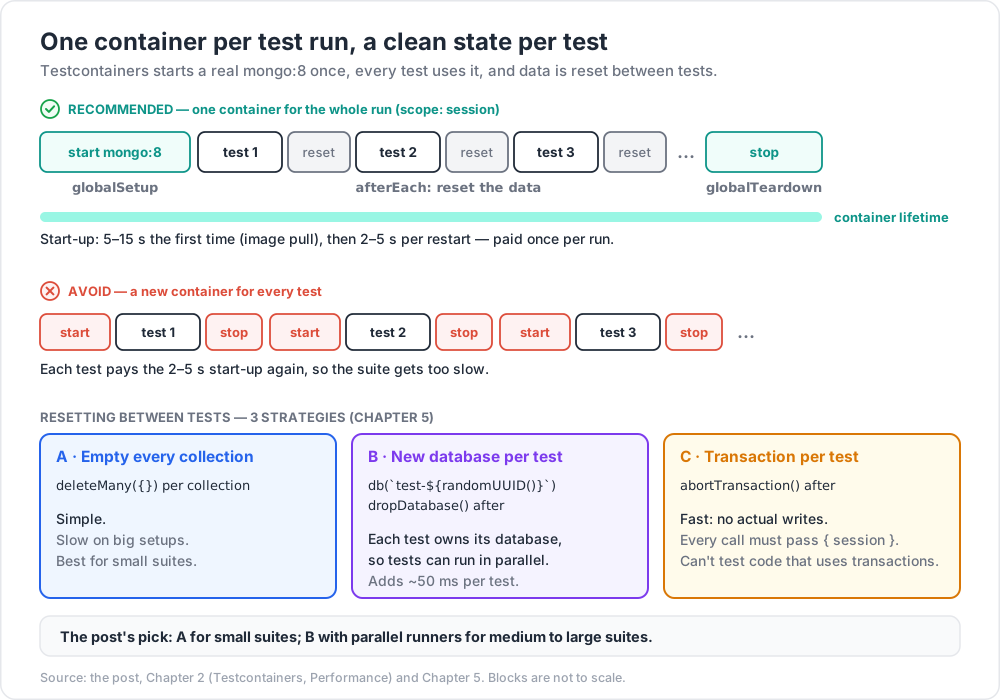
Container start: 5-15 seconds first time (image pull) + 2-5 seconds per restart. One container per test run (scope session) is the right default; per-test containers are too slow.
For replica-set features (transactions, change streams), use MongoDbContainer with replica-set mode or compose multiple containers. Recent versions of the npm + Python packages support this directly.
Chapter 3 — In-memory MongoDB
When Docker isn't available (some CI runners, restricted environments), use mongo-memory-server (Node) or EphemeralMongo (.NET). Both download the matching mongod binary, run it against a temp dir or tmpfs, tear down after.
1
2
npm install -D mongodb-memory-server
1
2
3
4
5
6
7
8
9
import { MongoMemoryServer, MongoMemoryReplSet } from 'mongodb-memory-server';
const mongo = await MongoMemoryServer.create({ binary: { version: '8.0.0' } });
const uri = mongo.getUri();
// for transactions + change streams:
const rs = await MongoMemoryReplSet.create({ replSet: { count: 1 }, binary: { version: '8.0.0' } });
const rsUri = rs.getUri();
Pros: no Docker dependency. Cons: binary downloads first run (cache for CI); subtle differences from real mongod over time.
Pick Testcontainers when Docker is available; in-memory as fallback.
Chapter 4 — Fixtures + factories
1
2
3
4
5
6
7
8
9
10
11
12
13
14
15
16
17
18
19
// factories/user.ts
import { ObjectId } from 'mongodb';
export const userFactory = (overrides = {}) => ({
_id: new ObjectId(),
name: 'Ada',
email: `ada-${Date.now()}@example.com`,
age: 30,
created_at: new Date(),
...overrides,
});
// in test
await db.collection('users').insertMany([
userFactory(),
userFactory({ name: 'Bob', age: 25 }),
userFactory({ name: 'Cy', age: 41, role: 'admin' }),
]);
Factory functions over static JSON files: easier to override, type-safe, no merging hassle.
Avoid using Date.now() directly in tests — see Chapter 7 (time freezing).
For Python, pytest-factoryboy or faker are the equivalents.
Chapter 5 — Test isolation strategies
Strategy A — Drop collections after each test
1
2
3
4
5
afterEach(async () => {
const cs = await db.collections();
await Promise.all(cs.map(c => c.deleteMany({})));
});
Simple, slow on big setups. Best for small test suites.
Strategy B — Unique DB per test
1
2
3
4
5
6
7
beforeEach(async () => {
db = client.db(`test-${randomUUID()}`);
});
afterEach(async () => {
await db.dropDatabase();
});
Stronger isolation; supports parallel test execution (each test owns its DB). Adds ~50 ms per test.
Strategy C — Transaction-per-test (rollback)
1
2
3
4
5
6
7
8
9
10
11
12
13
14
15
let session;
beforeEach(async () => {
session = client.startSession();
session.startTransaction();
});
afterEach(async () => {
await session.abortTransaction();
await session.endSession();
});
test('insert + query', async () => {
await db.collection('users').insertOne({ name: 'Ada' }, { session });
// ... assertions using { session } on every op
});
Fast (no actual writes), but every test must thread { session } everywhere — easy to forget. Tests can't exercise code paths that themselves use transactions.
Strategy D — Snapshot + restore
For very large fixture state, dump once, restore between tests. Rarely worth it for unit-level tests.
Recommendation: Strategy A for small suites; Strategy B with parallel runners for medium-large.
Chapter 6 — Snapshot tests for aggregations
Aggregation pipelines are easy to break subtly. Snapshot the output to lock down the contract:
1
2
3
4
5
6
7
8
9
10
11
12
test('daily revenue rollup', async () => {
await seedOrders();
const result = await db.collection('orders').aggregate([
{ $match: { status: 'paid' } },
{ $group: { _id: { $dateTrunc: { date: '$at', unit: 'day' } }, revenue: { $sum: '$total' } } },
{ $sort: { _id: 1 } },
]).toArray();
expect(result).toMatchSnapshot();
});
Jest / Vitest store the result; future runs compare. On intentional change, update snapshot.
For Python: syrupy or pytest-snapshot.
Chapter 7 — Time freezing
Many queries depend on new Date() / Date.now(). Real time produces flaky tests.
Jest / Vitest
1
2
3
4
5
6
7
import { vi } from 'vitest';
beforeAll(() => vi.useFakeTimers());
afterAll(() => vi.useRealTimers());
beforeEach(() => vi.setSystemTime(new Date('2026-06-01T12:00:00Z')));
Python
1
2
3
4
5
6
7
from freezegun import freeze_time
@freeze_time("2026-06-01 12:00:00")
def test_with_frozen_time(db):
db.events.insert_one({"at": datetime.utcnow()})
# asserts about timestamps are deterministic
Freeze time for tests involving created_at, TTL behaviour, age calculations.
Chapter 8 — CI optimisation
| Tip | Saves |
|---|---|
| Cache the Mongo image in CI | 5-10 s per run |
Reuse one container across all test files (globalSetup) |
minutes |
| Parallelise with unique DBs per worker | wall-clock |
| Tag tests unit vs integration; run unit on every commit, integration on push | feedback time |
| Run integration with lower replica count (1 node) | startup faster |
| Pre-build a fixture-loaded image for huge seed | bypass per-run seed |
GitHub Actions example:
1
2
3
4
5
services:
mongo:
image: mongo:8
ports: ['27017:27017']
GitHub-Actions-managed service containers are an alternative to Testcontainers — simpler config for one-shot CI runs. Testcontainers wins for local dev where you also want the same setup.
Chapter 9 — Secrets + credentials in tests
- Tests should never use production credentials.
- Testcontainers generates ephemeral root + temp user; pass through env to test code.
- For Atlas integration tests against a real cluster, use a test-only project with restricted IAM and isolated data.
Chapter 10 — Testing change streams
Change streams require a replica set. Testcontainers + replica-set mode:
1
2
3
import { MongoDBContainer } from '@testcontainers/mongodb';
// recent versions auto-enable replica set; check the version of the package
Or MongoMemoryReplSet. Then test:
1
2
3
4
5
6
7
8
9
10
11
test('change stream sees insert', async () => {
const cs = db.collection('events').watch();
const seen = (async () => {
for await (const ch of cs) return ch;
})();
await db.collection('events').insertOne({ x: 1 });
const change = await Promise.race([seen, sleep(2000).then(() => { throw new Error('timeout'); })]);
expect(change.operationType).toBe('insert');
await cs.close();
});
Test consumer logic similarly — feed events through your handler, assert side effects.
Chapter 11 — Testing transactions
1
2
3
4
5
6
7
8
9
test('transfer rolls back on error', async () => {
await accounts.insertMany([{ _id: 'A', balance: 100 }, { _id: 'B', balance: 0 }]);
await expect(transfer('A', 'B', 200)).rejects.toThrow('insufficient');
expect((await accounts.findOne({ _id: 'A' })).balance).toBe(100);
expect((await accounts.findOne({ _id: 'B' })).balance).toBe(0);
});
Transactions require replica set — same Testcontainers / in-memory replica-set setup as change streams.
Chapter 12 — Common pitfalls
| Pitfall | Cause | Fix |
|---|---|---|
| Container takes 30+ seconds to start | first-run image pull | pre-pull in CI cache |
| Tests pass locally fail in CI | different Mongo version | pin mongo:8 in both |
| Replica-set features fail in test | container in standalone mode | use replica-set container or MongoMemoryReplSet |
| Flaky tests | shared state / shared time | per-test isolation + frozen time |
| Test "X" passes alone fails in suite | leaked state from earlier test | better cleanup |
| In-memory MongoDB binary download blocked | corporate firewall | mirror the binary; or use Testcontainers |
| Slow CI | one container per test instead of per session | scope session |
| Mocking driver gives false confidence | mocks lie | always use real DB for data-access tests |
db.dropDatabase() slow on big seed |
unnecessary if you isolate by collection | deleteMany({}) per collection |
Practice Exercises
Exercise 1 — First Testcontainers test
In your favourite repo, add Testcontainers + write one test that inserts + finds a doc. Confirm pass + CI green.
Exercise 2 — Cleanup strategy
Pick Strategy A or B from Chapter 5. Implement. Add 20 tests. Confirm independence (each passes alone + in sequence).
Exercise 3 — Factory pattern
Build a userFactory + orderFactory. Use across 5 tests. Confirm no copy-paste.
Exercise 4 — Snapshot pipeline
Write an aggregation; snapshot the output; intentionally break a stage; observe snapshot diff failure.
Exercise 5 — Frozen time
Add expireAfterSeconds index on a field. Freeze time. Insert + advance time + verify TTL behaviour deterministically.
Exercise 6 — Replica-set container
Switch to a replica-set container. Write a test exercising a change stream + transaction.
Cheat-sheet
| What | How |
|---|---|
| Default approach | real Mongo in Docker via Testcontainers |
| Node | @testcontainers/mongodb |
| Python | testcontainers[mongodb] |
| In-memory fallback | mongodb-memory-server (Node) |
| Replica-set features | MongoMemoryReplSet or replica-set container |
| Session-scoped container | one container per test run |
| Per-test isolation | DB-per-test or deleteMany({}) per collection |
| Avoid | mocking the driver; flaky time-based tests |
| Snapshot | aggregation outputs |
| Frozen time | vi.setSystemTime / freezegun |
| CI speed | cache image, parallelise, single container per worker |
| Secret | never prod creds; use test-only project for Atlas integration |
| Test types | 70 % unit / 20 % integration / 10 % e2e |
| Don't | mock Mongo; bypass real query semantics |
What's next
Post 26 covers observability — wiring OpenTelemetry traces + metrics + logs into your MongoDB-using services, instrumenting drivers, slow-query correlation, and the dashboards / alerts that matter.
References
- @testcontainers/mongodb (npm)
- Testcontainers Node docs
- testcontainers-python
- mongodb-memory-server
- Reliable Integration Testing for MongoDB Atlas Search with Testcontainers and Jest (2026)
- Testcontainers MongoDB official Docker integration
Note: this post is in progress. Planned additions: contract testing with Pact for Mongo service boundaries; performance regression tests; mutation testing for query logic.