MongoDB Course — 02 · Query Operators, Projections, Range Pagination
The CRUD operations from Post 01 take a filter as the first argument. The filter is where MongoDB's query expressiveness lives — comparison, logical, element-existence, array, regex, full-text, and geospatial operators all compose into one JSON-like predicate. This post covers every operator family, projection extras ($elemMatch, $slice, $), the right sort/limit/skip discipline, and the range pagination pattern that scales to millions of rows where .skip() collapses.
Series map: 00 Foundations → 01 CRUD → 02 Query Operators (this post) → 03 Indexes → 04 Query Optimization → 05 Aggregation Basics → … → 17 Drivers & Case Studies.
Learning Outcome
- Use every comparison operator:
$eq,$ne,$gt,$gte,$lt,$lte,$in,$nin. - Combine with logical operators:
$and,$or,$nor,$not. - Use element operators:
$exists,$type. - Match arrays correctly:
$all,$elemMatch,$size. - Use
$regex,$text, and$exprfor advanced predicates. - Use projection extras:
$elemMatch,$slice, the positional$. - Paginate with range queries instead of
.skip()at scale.
Chapter 1 — Comparison operators
| Operator | Meaning |
|---|---|
$eq |
equals |
$ne |
not equals |
$gt / $gte |
greater than / or equal |
$lt / $lte |
less than / or equal |
$in |
value in array of options |
$nin |
value NOT in array |
1
2
3
4
db.users.find({ age: { $gt: 25, $lte: 40 } }) // 25 < age ≤ 40
db.products.find({ category: { $in: ["book", "pen"] } })
db.users.find({ status: { $nin: ["banned", "deleted"] } })
Bare equality is the most common form:
1
2
db.users.find({ name: "Ada" }) // same as { name: { $eq: "Ada" } }
Equality on arrays
1
2
3
db.users.find({ tags: "math" }) // matches if "math" is an element of tags
db.users.find({ tags: ["math", "eng"] }) // matches if tags EQUALS exactly ["math","eng"]
Subtle and important. The first form is "contains"; the second is "exactly equals this array". Use $all (Chapter 4) for "contains all of".
Chapter 2 — Logical operators
| Operator | Form |
|---|---|
$and |
{ $and: [ filterA, filterB ] } (implicit when conditions are on different fields) |
$or |
{ $or: [ filterA, filterB ] } |
$nor |
{ $nor: [ filterA, filterB ] } (none match) |
$not |
{ field: { $not: { $gt: 10 } } } (negate a sub-expression) |
1
2
3
4
5
6
7
8
9
10
11
12
13
14
15
db.users.find({
$or: [
{ age: { $lt: 18 } },
{ age: { $gt: 65 } }
]
})
db.orders.find({
status: "paid",
$and: [
{ total: { $gte: 50 } },
{ at: { $gte: ISODate("2026-05-20") } }
]
})
Most simple AND queries don't need $and explicitly — multiple keys at the top level are AND-ed automatically:
1
2
db.orders.find({ status: "paid", total: { $gte: 50 } }) // implicit AND
Use explicit $and when you need multiple conditions on the same field:
1
2
3
4
5
6
7
8
9
db.orders.find({
$and: [
{ total: { $gte: 50 } },
{ total: { $lte: 200 } }
]
})
// or equivalently
db.orders.find({ total: { $gte: 50, $lte: 200 } })
Chapter 3 — Element operators
$exists
1
2
3
4
db.users.find({ email: { $exists: true } }) // field present (any value, even null)
db.users.find({ email: { $exists: false } }) // field absent
db.users.find({ deleted_at: { $exists: false } }) // not soft-deleted
$type
1
2
3
4
5
db.users.find({ age: { $type: "number" } })
db.users.find({ tags: { $type: "array" } })
db.users.find({ joined: { $type: "date" } })
db.misc.find({ x: { $type: ["int", "long", "double"] } }) // multiple types
Useful in legacy / dirty collections where a field might be a string in some docs, number in others.
Chapter 4 — Array operators
$all — contains all of these values
1
2
3
db.users.find({ tags: { $all: ["math", "eng"] } })
// matches docs where tags has both "math" AND "eng" (any order, may have more)
$size — array length exactly N
1
2
db.users.find({ tags: { $size: 3 } })
No $lt/$gt variants on $size. For "more than N elements" use an indexed counter field (tag_count) updated alongside writes.
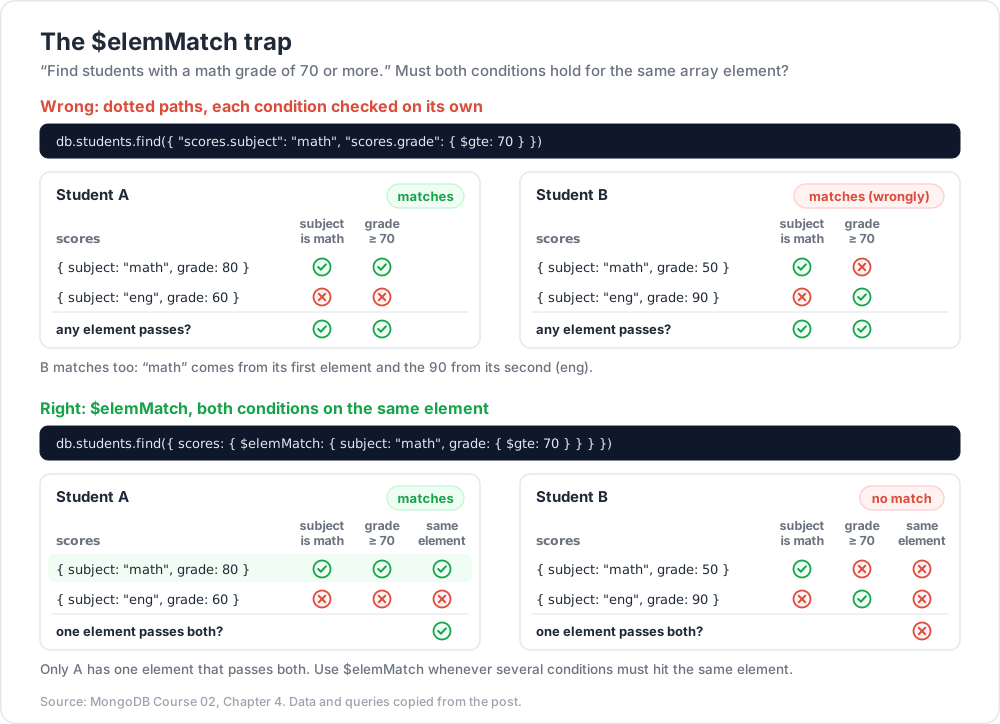
$elemMatch — match a single array element against multiple criteria
This one trips beginners. Consider:
1
2
3
4
5
db.students.insertMany([
{ name: "A", scores: [{ subject: "math", grade: 80 }, { subject: "eng", grade: 60 }] },
{ name: "B", scores: [{ subject: "math", grade: 50 }, { subject: "eng", grade: 90 }] },
])
"Find students with a single subject scoring math ≥ 70":
1
2
3
4
5
6
7
8
9
10
// WRONG — matches students where any subject is math AND any subject ≥ 70
db.students.find({ "scores.subject": "math", "scores.grade": { $gte: 70 } })
// matches both A and B (B has eng=90 ≥ 70 + math elsewhere)
// RIGHT — both conditions must hold for the SAME array element
db.students.find({
scores: { $elemMatch: { subject: "math", grade: { $gte: 70 } } }
})
// matches only A
Use $elemMatch whenever multiple conditions must apply to the same array element.
Chapter 5 — Regex
1
2
3
db.users.find({ email: /@example\.com$/ })
db.users.find({ name: { $regex: "^Ad", $options: "i" } }) // case-insensitive prefix
$options flag |
Meaning |
|---|---|
i |
case-insensitive |
m |
multiline ^ / $ |
s |
. matches newlines |
x |
ignore whitespace + allow # comments in pattern |
Index use
A left-anchored regex (/^Ad/) can use a B-tree index on the field. Anything else does a scan within the index range or a full collection scan.
1
2
3
4
5
db.users.find({ name: /^Ad/ }) // index-friendly
db.users.find({ name: /Ada$/ }) // not index-friendly
db.users.find({ name: /Ada/ }) // not index-friendly (no left anchor)
db.users.find({ name: /^Ada/i }) // index-friendly only if collation matches
For substring + fuzzy + multi-language matching, prefer text indexes (next) or Atlas Search (Post 16).
Chapter 6 — Text search (built-in)
A text index enables $text queries:
1
2
3
4
5
6
7
8
9
db.articles.createIndex({ title: "text", body: "text" })
db.articles.find({ $text: { $search: "mongodb tutorial" } })
db.articles.find({ $text: { $search: "\"exact phrase\" -excluded" } })
db.articles.find(
{ $text: { $search: "mongodb" } },
{ score: { $meta: "textScore" } }
).sort({ score: { $meta: "textScore" } })
Limits:
- One text index per collection.
- No phrase scoring nuance, no language-aware stemming beyond a basic set.
- No autocomplete / fuzzy out of the box.
For serious search → Atlas Search (Lucene-based, faceted, autocomplete, fuzzy, multi-language) — Post 16.
Chapter 7 — $expr (use aggregation expressions in queries)
$expr lets you reference other fields in the same document or use aggregation operators inside a find filter:
1
2
3
4
5
// orders where total > 10 × number of items
db.orders.find({
$expr: { $gt: ["$total", { $multiply: [10, { $size: "$items" }] }] }
})
Useful for cross-field predicates without a full aggregation pipeline. $expr doesn't always use indexes the same way; check .explain() (Post 04).
Chapter 8 — Geospatial (overview)
1
2
3
4
5
6
7
8
9
10
11
12
13
14
15
16
17
18
19
db.places.createIndex({ location: "2dsphere" })
db.places.find({
location: {
$near: {
$geometry: { type: "Point", coordinates: [-0.1, 51.5] },
$maxDistance: 5000 // metres
}
}
})
db.places.find({
location: {
$geoWithin: {
$geometry: { type: "Polygon", coordinates: [[ [...], [...], ... ]] }
}
}
})
Operators: $near, $nearSphere, $geoWithin, $geoIntersects. Indexes: 2dsphere (spherical), 2d (legacy planar).
Skip the deep dive unless your app needs it — full coverage in dedicated docs.
Chapter 9 — Projection extras
Include / exclude
1
2
3
db.users.find({}, { name: 1, email: 1, _id: 0 }) // include name+email, drop _id
db.users.find({}, { password: 0 }) // exclude only password
You can't mix include + exclude except for _id.
$elemMatch in projection — return only matching array elements
1
2
3
4
5
6
db.students.find(
{ name: "A" },
{ name: 1, scores: { $elemMatch: { subject: "math" } } }
)
// returns only the math entry from scores
$slice in projection — return only N array elements
1
2
3
4
db.users.find({}, { tags: { $slice: 5 } }) // first 5
db.users.find({}, { tags: { $slice: -3 } }) // last 3
db.users.find({}, { tags: { $slice: [10, 5] } }) // skip 10, take 5
Positional $ in projection — first matched element
1
2
3
4
5
6
db.students.find(
{ "scores.subject": "math" },
{ "scores.$": 1 }
)
// returns scores array containing only the matched element
Chapter 10 — Sort, limit, skip — and what doesn't scale
1
2
3
4
5
db.orders.find({ status: "paid" })
.sort({ at: -1 })
.limit(20)
.skip(40)
For small offsets this is fine. Cost of .skip(N): server scans N + limit documents in sort order, then discards the N. For N = 10,000 on a million-row collection that's painful even with an index.
Range pagination — the production pattern
Sort by a unique-enough field (often _id or a timestamp). Use the last seen value as a cursor for the next page.
1
2
3
4
5
6
7
8
9
10
11
12
13
14
15
16
17
// page 1
const first = await db.collection('orders').find({ status: "paid" })
.sort({ at: -1 })
.limit(20)
.toArray();
const last = first[first.length - 1];
// page 2
const next = await db.collection('orders').find({
status: "paid",
at: { $lt: last.at } // strictly less than last seen
})
.sort({ at: -1 })
.limit(20)
.toArray();
Always O(limit) per page — independent of how deep into the list you've gone.
For non-unique sort keys (multiple rows with the same at), tiebreak on _id:
1
2
3
4
5
6
7
{
$or: [
{ at: { $lt: last.at } },
{ at: last.at, _id: { $lt: last._id } }
]
}
With a compound index on { at: -1, _id: -1 }, this stays O(limit).
Trick: any "Load more" / infinite-scroll UI must use range pagination. Server-side render-time pagination (offset for SEO) tolerates
.skip()only up to a few hundred items.
Chapter 11 — Hint, comment, maxTimeMS
1
2
3
4
db.orders.find({ user_id: 1 }).hint({ user_id: 1, at: -1 }) // force this index
db.orders.find({ user_id: 1 }).comment("dashboard-recent-orders") // tag for profiler
db.orders.find({ user_id: 1 }).maxTimeMS(500) // abort if > 500 ms
comment surfaces in db.currentOp() + the slow-query profiler — invaluable for tracking which app code issued a given query in production.
maxTimeMS is a safety net against runaway queries. Always set it in user-facing paths.
Chapter 12 — Distinct, count
1
2
3
4
5
6
db.users.distinct("country") // [ "UK", "US", "JP" ]
db.users.distinct("country", { age: { $gte: 30 } })
db.users.countDocuments({ active: true }) // accurate
db.users.estimatedDocumentCount() // fast, metadata only
distinct returns an array (max 16 MB BSON). For huge distinct sets, use the aggregation $group (Post 05).
Chapter 13 — Common pitfalls
| Symptom | Cause | Fix |
|---|---|---|
find({ tags: ["a"] }) returns nothing |
exact-array match | use tags: "a" (contains) or $all: ["a"] |
find slow on large collection |
no index | Post 03 |
| Multi-condition array filter matches wrong docs | conditions applied independently | use $elemMatch |
| Regex full-scan | not left-anchored | anchor /^…/ or use text/Atlas Search |
.skip(50000) painfully slow |
offset cost | range pagination |
$or slow despite indexes |
each branch needs its own index | create one index per branch |
find returns sub-document with full fields |
no projection | always project for big docs |
| App appears to ignore some results | iterating cursor twice | re-issue query or .toArray() once |
Practice Exercises
Exercise 1 — Operator drill
Using the shop dataset, write find queries for:
a) Users aged 30-40 inclusive.
b) Products costing under USD 10 OR over USD 50.
c) Orders for users 1 or 2, status "paid".
d) Users where the address field doesn't exist.
Solutions
1
2
3
4
5
db.users.find({ age: { $gte: 30, $lte: 40 } })
db.products.find({ $or: [{ price: { $lt: 10 } }, { price: { $gt: 50 } }] })
db.orders.find({ user_id: { $in: [1, 2] }, status: "paid" })
db.users.find({ address: { $exists: false } })
Exercise 2 — $elemMatch trap
Insert sample students from Chapter 4. Write the query for "students with math grade ≥ 70" both the WRONG and RIGHT way. Confirm they return different results.
Exercise 3 — Range pagination
Implement a function getPage(beforeAt, limit) for orders that returns limit paid orders strictly older than beforeAt, sorted desc by at. Test with a Node script paging through 1000 synthetic orders.
Exercise 4 — Projection slim
find all users, returning only name, email, and the first 2 elements of tags. No _id.
Solution
1
2
db.users.find({}, { _id: 0, name: 1, email: 1, tags: { $slice: 2 } })
Exercise 5 — Regex anchored vs not
On a 100k-document collection (synthesise), measure find({ name: /^Ad/ }) vs find({ name: /Ad/ }) execution time. Confirm only the first uses the index efficiently (preview of Post 04 explain).
Exercise 6 — Text search
Build a text index over articles.title + body. Query "mongodb tutorial". Sort by text score.
Cheat-sheet
| What | How |
|---|---|
| Equals | { field: value } |
| Range | { field: { $gt: a, $lte: b } } |
| One of | { field: { $in: [a, b] } } |
| Multi-cond OR | { $or: [{ a: 1 }, { b: 2 }] } |
| Field present | { field: { $exists: true } } |
| Array contains x | { tags: "x" } |
| Array contains all | { tags: { $all: ["x", "y"] } } |
| Array elem multi-cond | { arr: { $elemMatch: { a: 1, b: { $gt: 2 } } } } |
| Array size N | { arr: { $size: N } } |
| Regex (anchored, indexable) | { s: /^prefix/ } |
| Cross-field compare | { $expr: { $gt: ["$a", "$b"] } } |
| Project include | { name: 1, email: 1, _id: 0 } |
| Project array slice | { arr: { $slice: 5 } } |
| Project matched array elem | { "arr.$": 1 } (with matched filter) |
| Pagination at scale | range (< lastSeen) not .skip() |
| Force index | .hint({ index }) |
| Tag for profiler | .comment("...") |
| Timeout safety | .maxTimeMS(500) |
| Distinct | db.c.distinct("field", filter?) |
What's next
Post 03 covers indexes — single, compound, multikey, text, geo, partial, sparse, TTL, wildcard, hashed; the ESR rule (Equality, Sort, Range) for compound index ordering; index intersection; covered queries; and the explain output that ties everything together.
References
Note: this post is in progress. Planned additions:
$jsonSchemafor query-time validation, collation deep dive,$where(and why to avoid it), Atlas Search vs$text.