MongoDB Course — 06 · Aggregation Advanced — $facet, $bucket, $graphLookup, Window Functions, $merge
The aggregation basics from Post 05 cover ~80 % of real pipelines. The remaining 20 % needs the advanced stages: $facet (parallel sub-pipelines on the same input), $bucket / $bucketAuto (histograms), $graphLookup (recursive joins for trees + graphs), $merge (incremental materialised views), $setWindowFields (rolling sums, ranks, leads/lags, percentiles), $densify + $fill (gap-fill time series), $expr in $match, and $function (server-side JS). This post covers all of them with worked examples.
Series map: 00 Foundations → 01 CRUD → 02 Query Operators → 03 Indexes → 04 Query Optimization → 05 Aggregation Basics → 06 Aggregation Advanced (this post) → 07 Schema Design → … → 17 Drivers & Case Studies.
Learning Outcome
- Run multiple sub-pipelines in parallel with
$facet. - Build histograms with
$bucketand$bucketAuto. - Walk hierarchies with
$graphLookup. - Build incremental materialised views with
$merge. - Compute rolling sums, ranks, lead/lag with
$setWindowFields. - Fill missing time-series rows with
$densify+$fill. - Use
$functionfor custom JS only when the operator library can't. - Pass
{ allowDiskUse: true }for huge aggregations.
Chapter 1 — $facet — multiple sub-pipelines in parallel
$facet runs multiple sub-pipelines on the same input stream and returns one document with one key per pipeline.
1
2
3
4
5
6
7
8
9
10
11
12
13
14
15
16
17
db.products.aggregate([
{ $facet: {
by_category: [
{ $group: { _id: "$category", count: { $sum: 1 } } },
{ $sort: { count: -1 } }
],
price_buckets: [
{ $bucket: { groupBy: "$price", boundaries: [0, 10, 50, 100, 500], default: "500+" } }
],
top_10: [
{ $sort: { sales: -1 } },
{ $limit: 10 },
{ $project: { name: 1, sales: 1 } }
]
}}
])
Returns one document:
1
2
3
4
5
6
{
"by_category": [{ "_id": "books", "count": 50 }, ...],
"price_buckets": [{ "_id": 0, "count": 12 }, ...],
"top_10": [{ "name": "...", "sales": 999 }, ...]
}
Perfect for dashboard endpoints that need many statistics from one collection in one round-trip.
Chapter 2 — $bucket and $bucketAuto — histograms
$bucket — manual boundaries
1
2
3
4
5
6
7
8
9
10
{ $bucket: {
groupBy: "$age",
boundaries: [0, 18, 30, 45, 60, 120],
default: "out_of_range",
output: {
count: { $sum: 1 },
avg_age: { $avg: "$age" }
}
}}
Documents get assigned to the bucket whose range contains the groupBy value ([boundary[i], boundary[i+1]) — half-open). Documents outside all ranges go to default.
$bucketAuto — automatic equal-sized buckets
1
2
3
4
5
6
{ $bucketAuto: {
groupBy: "$price",
buckets: 5,
output: { count: { $sum: 1 } }
}}
Server chooses boundaries so each bucket holds roughly the same number of documents — handy when distribution is unknown.
Chapter 3 — $graphLookup — recursive join
For hierarchies (employees → managers → CEO; categories → sub-categories; comment threads):
1
2
3
4
5
6
7
8
9
10
11
12
13
14
15
16
17
18
19
20
db.employees.insertMany([
{ _id: 1, name: "Ada", manager: null },
{ _id: 2, name: "Bob", manager: 1 },
{ _id: 3, name: "Cy", manager: 2 },
{ _id: 4, name: "Dora", manager: 2 },
])
db.employees.aggregate([
{ $match: { _id: 3 } }, // start from Cy
{ $graphLookup: {
from: "employees",
startWith: "$manager",
connectFromField: "manager",
connectToField: "_id",
as: "chain",
depthField: "level"
}}
])
// Cy → chain: [{Bob, level: 0}, {Ada, level: 1}]
Use cases:
- Org charts (find all reports).
- Comment threads (find all descendants of a post).
- Category trees (find all sub-categories).
- Graph traversal up to N hops (set
maxDepth).
Performance
$graphLookup can explode in size and time. Always:
- Set
maxDepthto bound traversal. - Index
connectToField(foreign side). - Filter with
restrictSearchWithMatchto skip whole sub-trees.
For really large hierarchies, denormalise via the materialised-path or array-of-ancestors patterns (Post 07).
Chapter 4 — $merge — incremental materialised view
$merge writes pipeline output into a target collection with upsert / merge semantics. Use for incremental refresh of pre-computed reports.
1
2
3
4
5
6
7
8
9
10
11
12
13
14
15
db.orders.aggregate([
{ $match: { status: "paid" } },
{ $group: {
_id: { $dateTrunc: { date: "$at", unit: "day" } },
revenue: { $sum: "$total" },
orders: { $sum: 1 }
}},
{ $merge: {
into: "daily_revenue",
on: "_id", // unique key
whenMatched: "merge", // merge | replace | keepExisting | fail | pipeline
whenNotMatched: "insert" // insert | discard | fail
}}
])
Schedule the pipeline via a cron job / Atlas Trigger / change-stream-driven Lambda — every run brings the daily summary up to date without rebuilding from scratch.
$out vs $merge
$out |
$merge |
|
|---|---|---|
| Mode | replace entire collection | upsert / merge per doc |
| Indexes preserved | no (collection recreated) | yes |
| Sharded target | not supported | supported |
| Cross-DB | yes (recent) | yes |
| Use | full rebuild | incremental update |
For modern pipelines, prefer $merge — preserves indexes + supports sharding.
Chapter 5 — $setWindowFields — window functions (5.0+)
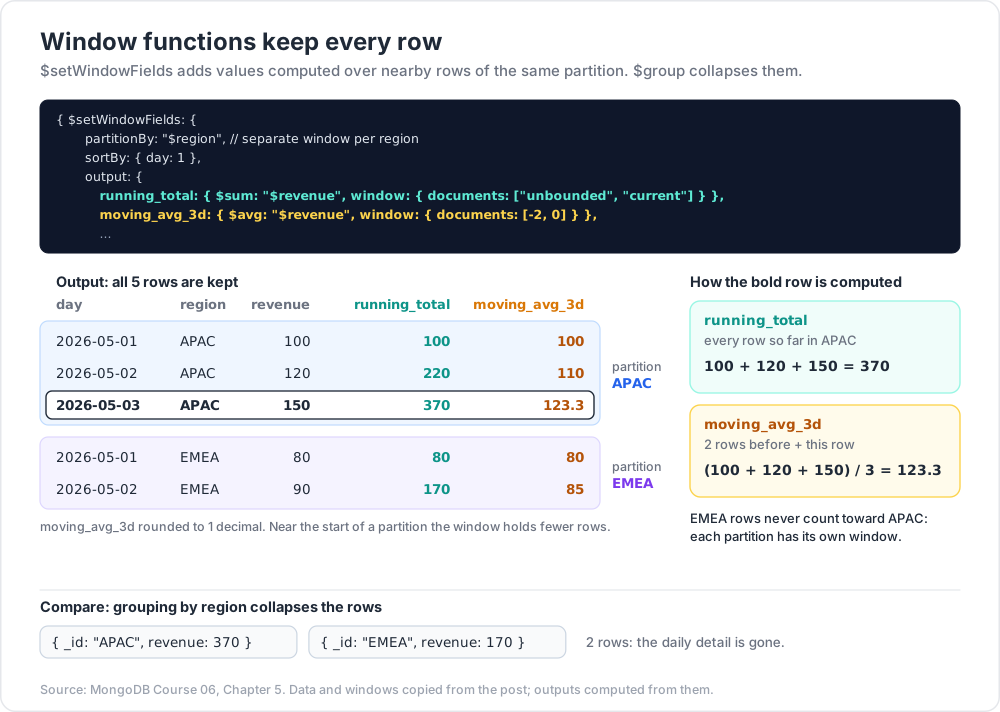
Window functions compute values over a sliding window of related rows without collapsing them (unlike $group).
1
2
3
4
5
6
7
8
9
10
11
12
13
14
15
16
17
18
19
20
db.sales.insertMany([
{ day: "2026-05-01", region: "APAC", revenue: 100 },
{ day: "2026-05-02", region: "APAC", revenue: 120 },
{ day: "2026-05-03", region: "APAC", revenue: 150 },
{ day: "2026-05-01", region: "EMEA", revenue: 80 },
{ day: "2026-05-02", region: "EMEA", revenue: 90 },
])
db.sales.aggregate([
{ $setWindowFields: {
partitionBy: "$region", // separate window per region
sortBy: { day: 1 },
output: {
running_total: { $sum: "$revenue", window: { documents: ["unbounded", "current"] } },
moving_avg_3d: { $avg: "$revenue", window: { documents: [-2, 0] } },
pct_of_total: { $sum: "$revenue", window: { documents: ["unbounded", "unbounded"] } }
}
}}
])
Window types:
documents: [-2, 0]— last 2 rows + current.documents: ["unbounded", "current"]— all rows up to and including current.range: [-86400, 0], unit: "second"— time-based window.
Common window operators
$sum,$avg,$min,$max,$count,$first,$last(as accumulators)$rank,$denseRank,$documentNumber$shift(offset within partition — lead/lag)$derivative,$integral$expMovingAvg
Use cases
- Running totals (cumulative revenue).
- Rolling averages (last 7-day moving average).
- Rank within group (top product per category by rank).
- Pct-of-total per row.
- Lead / lag for change detection.
Trick: before window functions (5.0), every such query needed
$lookupself-joins or app-side computation. They're the single biggest aggregation upgrade of the last few years.
Chapter 6 — $densify + $fill — gap-fill time series
Time-series data often has gaps (no rows for days with zero events). $densify inserts placeholder documents at regular intervals; $fill fills missing field values from neighbours or with constants.
1
2
3
4
5
6
7
8
9
10
11
12
13
14
15
db.sales.aggregate([
{ $densify: {
field: "day",
range: { step: 1, unit: "day", bounds: ["2026-05-01", "2026-05-07"] },
partitionByFields: ["region"]
}},
{ $fill: {
output: {
revenue: { value: 0 }
},
sortBy: { day: 1 },
partitionByFields: ["region"]
}}
])
Charts that need a complete date axis (line chart with zero-revenue gaps shown as zero, not skipped) use this.
Fill from neighbours
1
2
3
4
5
6
{ $fill: {
output: { revenue: { method: "linear" } }, // linear interpolation
sortBy: { day: 1 },
partitionByFields: ["region"]
}}
Methods: value: X, method: "linear", method: "locf" (last observation carried forward).
Chapter 7 — $expr in $match — cross-field predicates
$expr lets aggregation operators appear inside a query filter:
1
2
3
4
{ $match: {
$expr: { $gt: ["$total", { $multiply: [10, { $size: "$items" }] }] }
}}
Cross-field predicates that find can't express directly — without leaving the aggregation framework.
Also useful inside $lookup pipeline form:
1
2
3
4
5
6
7
8
9
{ $lookup: {
from: "comments",
let: { post_id: "$_id" },
pipeline: [
{ $match: { $expr: { $eq: ["$post", "$$post_id"] } } }
],
as: "comments"
}}
Chapter 8 — $function — server-side JavaScript
Last resort when no operator combination expresses the logic:
1
2
3
4
5
6
7
8
9
10
{ $project: {
custom: {
$function: {
body: function (a, b) { return a * 2 + Math.log(b); },
args: ["$x", "$y"],
lang: "js"
}
}
}}
Limits:
- Far slower than native operators.
- Disabled by default in some Atlas tiers.
- Sandboxed but still a security consideration in shared environments.
Use only when truly necessary. Native operators almost always exist for everyday math.
$accumulator is the equivalent for custom $group reductions — same caveats.
Chapter 9 — allowDiskUse and memory
By default each pipeline stage is limited to 100 MB of memory. Exceeding it returns an error.
1
2
db.orders.aggregate(pipeline, { allowDiskUse: true })
Spills to disk → slower but allowed. Drivers expose this as an option.
Stages that often need it: $sort over big inputs without index support, big $group, $lookup returning many docs.
Production tip: fix the index design first. allowDiskUse: true masks a missing index — the query works but stays slow.
Chapter 10 — Composing it all — worked example
"Per-region daily revenue with running total, ranked vs same day other regions, with zero-fill for missing days":
1
2
3
4
5
6
7
8
9
10
11
12
13
14
15
16
17
18
19
20
21
22
23
24
25
26
27
28
29
30
31
32
db.sales.aggregate([
{ $match: { day: { $gte: ISODate("2026-05-01"), $lt: ISODate("2026-06-01") } } },
{ $densify: {
field: "day",
range: { step: 1, unit: "day", bounds: ["2026-05-01", "2026-06-01"] },
partitionByFields: ["region"]
}},
{ $fill: { output: { revenue: { value: 0 } }, sortBy: { day: 1 }, partitionByFields: ["region"] } },
{ $setWindowFields: {
partitionBy: "$region",
sortBy: { day: 1 },
output: {
running: { $sum: "$revenue", window: { documents: ["unbounded", "current"] } },
ma7: { $avg: "$revenue", window: { documents: [-6, 0] } }
}
}},
{ $setWindowFields: {
partitionBy: "$day",
sortBy: { revenue: -1 },
output: {
rank_today: { $rank: {} }
}
}},
{ $sort: { day: 1, rank_today: 1 } },
{ $merge: { into: "region_daily_stats", on: ["region", "day"], whenMatched: "merge", whenNotMatched: "insert" } }
])
This kind of pipeline used to require multiple round-trips, app-side post-processing, or a separate analytics warehouse. Now it's one pipeline.
Chapter 11 — Patterns + anti-patterns
| Pattern | Use |
|---|---|
$match → $group → $sort → $limit |
most reports |
$facet |
one round-trip for dashboard with many widgets |
$bucket(Auto) |
histograms / distribution charts |
$graphLookup |
trees + graphs up to small depth |
$lookup (pipeline form) |
filtered + sorted + limited joins |
$merge to a summary collection |
precomputed reports, run nightly |
$setWindowFields |
rolling / ranking |
$densify + $fill |
gap-fill before charting |
Anti-patterns:
$groupfollowed by another$groupon the same key (combine accumulators in one).- Large
$lookupfollowed by$unwindfollowed by$group(data shape problem; consider denormalising). $functionfor trivial math (use native operators).$graphLookupwith nomaxDepthover a cyclic graph (infinite work).
Chapter 12 — Indexes for advanced aggregations
$facetdoesn't push$matchinto its sub-pipelines for index use — put a$matchbefore the$facet.$lookupforeignFieldmust be indexed.$graphLookupconnectToFieldmust be indexed.$mergeonfields must be indexed unique.$outrecreates the target collection — original indexes are lost.$mergepreserves them.
Practice Exercises
Exercise 1 — Faceted dashboard
For orders, return in one query: revenue per status, top 5 customers by spend, count per month.
Exercise 2 — Histogram
Build a price histogram of products with buckets [0, 10, 50, 100, 500].
Exercise 3 — Graph lookup
Build an employee → manager hierarchy. Find Cy's full management chain up to CEO.
Exercise 4 — Materialised view
Compute daily revenue with $merge into daily_revenue. Run twice (insert + new orders); confirm only changed days re-write.
Exercise 5 — Window function
For sales, compute a 7-day moving average per region.
Exercise 6 — Gap fill
Use $densify + $fill to ensure every day in May has a row per region (zero where missing).
Cheat-sheet
| What | How |
|---|---|
| Parallel sub-pipelines | $facet: { a: [...], b: [...] } |
| Histogram manual | $bucket: { groupBy, boundaries, default, output } |
| Histogram auto | $bucketAuto: { groupBy, buckets, output } |
| Recursive join | $graphLookup: { from, startWith, connectFromField, connectToField, maxDepth, as } |
| Materialised view | $merge: { into, on, whenMatched, whenNotMatched } |
| Replace collection | $out: "name" (full rebuild) |
| Window function | $setWindowFields: { partitionBy, sortBy, output: { f: { acc, window } } } |
| Window types | documents: [-N, 0] / range: [...] / "unbounded" |
| Ranks | $rank, $denseRank, $documentNumber |
| Lead / lag | $shift: { output, by, default } |
| Time-series gap fill | $densify + $fill |
| Cross-field predicate | $expr inside $match |
| Custom JS | $function (last resort) |
| Custom group | $accumulator (last resort) |
| Big pipeline | { allowDiskUse: true } |
What's next
Post 07 covers schema design — embed vs reference; the canonical patterns (Polymorphic, Bucket, Computed, Extended Reference, Attribute, Tree, Outlier); schema versioning; when to denormalise; and the tree-storage variants for hierarchies.
References
- Aggregation Pipeline Operators
$setWindowFields$graphLookup$merge$densify+$fill- Practical MongoDB Aggregations by Paul Done.
Note: this post is in progress. Planned additions: tumbling-window time-series example;
$searchMetafor Atlas Search facets; recursive thread rebuild via$graphLookupUI example.