MongoDB Course — 07 · Schema Design — Embed vs Reference, Patterns, Trees, Versioning
The biggest leap from SQL to MongoDB is the way you model data. There's no "right" normalisation — schema is chosen per access pattern. Get it right and a single document satisfies the hot read with one disk seek. Get it wrong and you're stitching together with $lookup on every page load. This post covers the canonical design patterns: embed vs reference, 1:1 / 1:few / 1:many / many:many, plus the named patterns the MongoDB community has codified — Polymorphic, Bucket, Computed, Extended Reference, Attribute, Tree (4 variants), Outlier, Schema Versioning.
Series map: 00 Foundations → 01 CRUD → 02 Query Operators → 03 Indexes → 04 Query Optimization → 05 Aggregation Basics → 06 Aggregation Advanced → 07 Schema Design (this post) → 08 Connection Pool & Concurrency → … → 17 Drivers & Case Studies.
Learning Outcome
- Decide between embedding and referencing for each relationship.
- Recognise the canonical access patterns for 1:1, 1:few, 1:many, many:many.
- Apply the named patterns: Polymorphic, Bucket, Computed, Extended Reference, Attribute, Tree, Outlier, Schema Versioning.
- Store hierarchies four ways (parent ref / child ref / array of ancestors / materialised path).
- Plan schema evolution without downtime.
Chapter 1 — The mental shift
SQL: design schema first, query later.
MongoDB: start from the queries you want to run, design schema to make them efficient.
Two principles:
- Data that's accessed together should live together. Embed it.
- Data that grows unboundedly or is shared across many parents should be separated. Reference it.
That's it. The named patterns below are corollaries.
Chapter 2 — Embed vs reference
Embed (sub-document or array)
1
2
3
4
5
6
7
8
9
10
{
_id: 1,
name: "Ada",
address: { // embedded sub-document
city: "London",
country: "UK"
},
emails: ["ada@x", "ada@y"] // embedded array
}
Pros:
- One document fetch returns the whole thing.
- Atomic writes across the whole document.
- No joins.
Cons:
- Duplication if the same sub-document is shared by many parents.
- Document size cap: 16 MB.
- Updating a deeply nested value can be awkward.
Reference (foreign key style)
1
2
3
4
5
6
// users
{ _id: 1, name: "Ada" }
// orders
{ _id: "o1", user_id: 1, items: [...] }
Pros:
- Each entity is the single source of truth.
- No size limit (each is its own document).
- Many parents can reference the same entity.
Cons:
- Reads need a join (
$lookupor two round-trips). - No atomic writes across the reference unless using transactions.
Decision matrix
| Embed | Reference | |
|---|---|---|
| Always read together | ✓ | |
| Independent reads dominant | ✓ | |
| Few items per parent (< ~100) | ✓ | |
| Many items per parent (> 1000) | ✓ | |
| Item shared by many parents | ✓ | |
| Item grows unbounded | ✓ | |
| Item updated often, on its own | ✓ | |
| Items rarely change once written | ✓ |
Trick: when undecided, embed first. Schema migration from embedded to referenced is mechanical. The reverse usually requires re-engineering query paths. Embedding is the cheap default.
Chapter 3 — Cardinality patterns
1:1 — always embed
1
2
{ _id: 1, name: "Ada", profile: { bio: "...", avatar: "..." } }
1:few — embed (bounded array)
A user's emails (≤ ~10), a product's color variants (≤ ~20).
1
2
{ _id: 1, name: "Ada", emails: ["ada@x", "ada@y", "ada@z"] }
1:many — embed if bounded, reference if not
A blog post's comments (could be 1 or 10,000) → reference.
A user's purchase history (could be 1 or 10,000) → reference (separate orders collection).
A book's chapters (10-50 typically) → embed.
1
2
3
// reference: each comment its own doc
{ _id: "c1", post_id: "p1", author: "Bob", text: "..." }
Many:many — usually reference both ways
Users and tags: tags as separate documents; user has tag_ids: [...]; tag has user_count: N (denormalised count).
For small membership lists (a user's roles), embed the IDs in the user doc.
"1 to squillions" — reference parent on the child
A device with millions of telemetry events.
1
2
3
4
5
6
// device
{ _id: "d1", name: "sensor-foo" }
// readings — bucket pattern (Chapter 6) often beats raw 1-per-doc
{ device_id: "d1", at: ISODate(...), temp: 23.4 }
Never try to embed millions of children into the parent — the 16 MB cap kicks in.
Chapter 4 — Polymorphic pattern
When documents in the same collection have different shapes (different fields per type):
1
2
3
4
5
// products collection
{ _id: "p1", type: "book", title: "...", isbn: "...", pages: 320 }
{ _id: "p2", type: "shirt", title: "...", size: "M", colour: "red" }
{ _id: "p3", type: "course", title: "...", duration_hours: 12, instructor: "..." }
Common base fields (title, price, category) + a discriminator (type) + type-specific fields. Index type for filtering.
When to use: catalogue with many product kinds; events with type-specific payloads; logs with varied formats.
In code, a switch on type decides how to render / process. Trade richer schema for fewer collections + simpler queries.
Chapter 5 — Bucket pattern (pre-time-series collections, still useful)
Instead of one document per event, group events into "buckets" of N (by time or count):
1
2
3
4
5
6
7
8
9
10
11
12
13
{
_id: ObjectId(...),
device_id: "d1",
bucket_start: ISODate("2026-05-24T12:00:00Z"),
bucket_end: ISODate("2026-05-24T13:00:00Z"),
count: 60,
measurements: [
{ at: ISODate("2026-05-24T12:00:00Z"), temp: 23.1 },
{ at: ISODate("2026-05-24T12:01:00Z"), temp: 23.2 },
...
]
}
One bucket per hour per device → 24 docs/day/device instead of 86,400.
MongoDB 5.0+ ships native time-series collections that automate the bucket pattern + add columnar compression — Post 17 walks through them. Hand-rolled buckets are still useful when you need custom grouping (e.g., per session) or pre-5.0 clusters.
Chapter 6 — Computed pattern
Pre-compute aggregates and store them on the parent document — avoid repeating expensive $group aggregations on every read.
1
2
3
4
5
6
7
8
{
_id: 1,
name: "Ada",
order_count: 42, // computed
total_spent: 1234.50, // computed
last_order_at: ISODate(...) // computed
}
Update via the same write that creates the related event (transaction or bulkWrite) or via change-stream-driven background updates.
Trade-off: write amplification for read speed. Worth it when the read is hot and the computation expensive.
Chapter 7 — Extended Reference pattern
Reference an entity by ID plus duplicate a few stable fields on the referencing side — saves the join for the most common read.
1
2
3
4
5
6
7
8
9
// orders
{
_id: "o1",
user_id: 1,
user_name: "Ada", // duplicated from users
user_email: "ada@x", // duplicated
items: [...]
}
Reads listing orders don't need to $lookup users for name + email. Drawback: if the user changes their name, orders show stale.
Use when:
- The denormalised fields rarely change.
- Read frequency >> write frequency.
- Stale data for hours/days is acceptable until a background job catches up.
Chapter 8 — Attribute pattern
When documents have many similar fields you need to query over arbitrary subsets:
1
2
3
4
5
6
7
8
9
10
11
12
13
14
// hard to query: { weight_kg: 1.2, height_cm: 30, voltage_v: 5 }
// easy to query: array of typed attributes
{
_id: "p1",
attributes: [
{ k: "weight", v: 1.2, unit: "kg" },
{ k: "height", v: 30, unit: "cm" },
{ k: "voltage", v: 5, unit: "v" }
]
}
db.products.createIndex({ "attributes.k": 1, "attributes.v": 1 })
db.products.find({ attributes: { $elemMatch: { k: "weight", v: { $gte: 1 } } } })
A single multikey compound index serves all attribute-based queries.
Trade-offs: more rigid query syntax ($elemMatch), unfamiliar to SQL background. Choose when products / items have hundreds of possible attributes only some of which apply per item.
Chapter 9 — Tree patterns (4 ways to store hierarchies)
Hierarchies (org charts, comment threads, categories) have four canonical storage shapes. Pick by access pattern.
1. Parent reference
1
2
3
4
{ _id: "c1", name: "Electronics" }
{ _id: "c2", name: "Laptops", parent: "c1" }
{ _id: "c3", name: "Gaming", parent: "c2" }
- Write: simple.
- Find children:
find({ parent: "c1" })— easy. - Find ancestors / whole subtree:
$graphLookupor recursion.
Default for hierarchies you don't traverse deeply.
2. Child references
1
2
{ _id: "c1", name: "Electronics", children: ["c2", "c5"] }
- Find children: read the array.
- Find parent:
find({ children: "c2" }). - Move a node: update old + new parent.
Useful when children are bounded + you list them often.
3. Array of ancestors
1
2
{ _id: "c3", name: "Gaming", ancestors: ["c1", "c2"], parent: "c2" }
- Find ancestors: read the array (no join).
- Find subtree:
find({ ancestors: "c1" })— instant. - Move a node: update ancestors of node + all descendants.
Best when you query "all descendants" frequently.
4. Materialised path
1
2
{ _id: "c3", name: "Gaming", path: ",c1,c2," }
- Find subtree:
find({ path: /^,c1,/ }). - Find ancestors: split the string.
- Move: rewrite paths for node + descendants.
Compact; regex-prefix index works (Post 02).
Comparison
| Pattern | Find direct children | Find full subtree | Move node | Storage |
|---|---|---|---|---|
| Parent ref | easy | expensive ($graphLookup) | easy | tiny |
| Child ref | easy | expensive | medium | medium |
| Ancestors | medium | easy | medium-hard | medium |
| Path | medium | easy (regex prefix) | medium-hard | small |
Mix is fine — store parent ref and ancestors for both kinds of query.
Chapter 10 — Outlier pattern
A few documents in a collection are atypically large (a celebrity user with 50k followers; a viral post with 1M comments). Embedding fails the 16 MB limit for them.
Mark them as outliers + store the overflow elsewhere:
1
2
3
4
5
6
7
8
// most users
{ _id: 1, name: "Ada", followers: ["u2", "u3"] } // small array embedded
// celebrity
{ _id: 99, name: "Famous", has_overflow: true }
// followers in a separate collection
{ user_id: 99, followers_batch: [...], batch_index: 0 }
App reads check has_overflow and fetch from the side collection if true.
Avoids pathological queries on average users while still scaling for outliers.
Chapter 11 — Schema versioning pattern
MongoDB schema is flexible — apps must handle multiple versions during migrations. Make the version explicit:
1
2
3
{ _id: 1, _schema_v: 1, name: "Ada", emails: ["ada@x"] }
{ _id: 2, _schema_v: 2, name: "Bob", contact: { emails: ["bob@x"], phone: "..." } }
App-level:
1
2
3
4
5
6
7
function getUserContact(doc) {
switch (doc._schema_v) {
case 1: return { emails: doc.emails };
case 2: return doc.contact;
}
}
Migrate documents lazily (on read or via a background job) — never block the system for a big-bang migration. When all docs are at v2, drop the v1 code path.
Chapter 12 — Schema validation (optional but recommended)
MongoDB doesn't require a schema, but you can enforce one with $jsonSchema:
1
2
3
4
5
6
7
8
9
10
11
12
13
14
15
16
db.createCollection("users", {
validator: {
$jsonSchema: {
bsonType: "object",
required: ["name", "email"],
properties: {
name: { bsonType: "string" },
email: { bsonType: "string", pattern: "^.+@.+$" },
age: { bsonType: "int", minimum: 0, maximum: 150 }
}
}
},
validationLevel: "moderate", // strict | moderate | off
validationAction: "error" // error | warn
})
moderate validates new docs + updated existing docs but allows old docs through. Good for gradual rollout.
Mongoose (Post 17) adds schema enforcement in the application layer with richer types + defaults + middleware.
Chapter 13 — Avoiding pathological growth
Unbounded arrays are the single biggest schema pitfall:
1
2
3
// danger: comments grow forever, may exceed 16 MB
{ _id: "p1", title: "...", comments: [/* could be 1M elements */] }
Symptoms: slow updates (CoW on the whole doc), index bloat, eventual 16 MB cap.
Fixes in priority order:
- Cap the array —
$push: { items: { $each: [x], $slice: -100 } }keeps last 100. - Move to a child collection with
parent_id. - Use the bucket pattern (Chapter 5) or time-series collection.
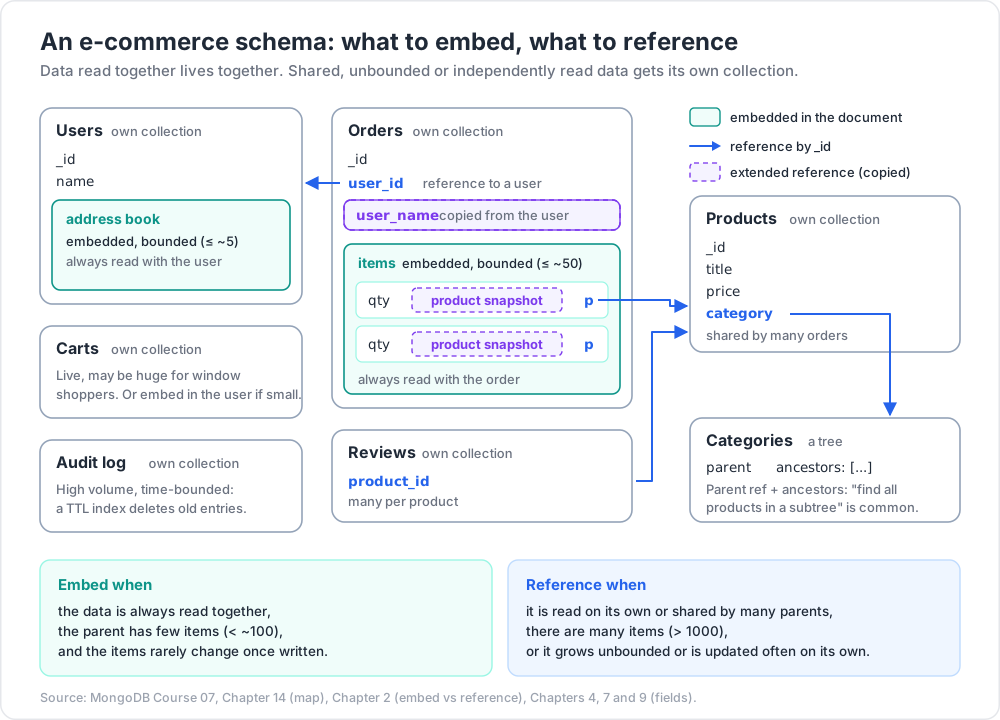
Chapter 14 — Worked example — e-commerce
| Entity | Storage | Why |
|---|---|---|
| Product (catalogue) | own collection | shared by many orders, listed independently |
| Category tree | parent ref + ancestors | "find all products in subtree" is common |
| User | own collection | independent |
| User address book | embedded (bounded ≤ ~5) | always read with user |
| Order | own collection | unbounded number per user, queried independently |
| Order items | embedded in order | always read with order, bounded ≤ ~50 |
| Item product snapshot | extended reference | catalogue may change after order placed |
| Cart | own collection | live, may be huge for window shoppers; or embedded in user if small |
| Review | own collection with product_id |
many per product, queried by product or user |
| Audit log | own collection, TTL-indexed | high volume, time-bounded |
This is the kind of map to draw before any project — for each entity, "where does it live, how is it linked".
Chapter 15 — Common pitfalls
| Pitfall | Fix |
|---|---|
| Embed unbounded array | cap with $slice or move to child collection |
| Reference everything by default | embed when always read together |
| Forget to denormalise stable fields | extended reference pattern |
| Sub-document mutation requires fetching whole doc | OK; just plan for it |
| Cross-collection consistency | use transactions (Post 09) or accept eventual |
| Schema changes break old code | schema versioning pattern |
| All-cases-in-one collection (sparse fields) | OK if polymorphic with discriminator |
| 16 MB doc cap hit | outlier pattern + side collection |
Practice Exercises
Exercise 1 — Embed vs reference quiz
For each, pick embed or reference and justify:
a) Blog post + author name + author bio (rarely changes).
b) Blog post + comments (unbounded, paginated separately).
c) Order + line items (typically 1-20 per order).
d) User + login history (years of logins).
Answers
a) Extended reference — duplicate name + author_id; bio on the author doc (rare reads).
b) Reference (separate comments collection).
c) Embed line items.
d) Reference (logins collection with TTL).
Exercise 2 — Build a category tree
Choose any approach from Chapter 9. Insert a 3-level tree (Electronics → Laptops → Gaming). Query for "all categories under Electronics".
Exercise 3 — Computed pattern
Add order_count + total_spent to each user. Use change streams (Post 12 preview) or a one-time aggregate + $merge to populate.
Exercise 4 — Outlier
In users, give one user a followers array of 100k IDs. Profile insert time + read time. Refactor as outlier pattern.
Exercise 5 — Schema validation
Apply $jsonSchema validation to users: name (string, required), email (matches regex, required), age (int 0-150). Try to insert an invalid doc.
Exercise 6 — Schema versioning
Migrate the users collection: rename email to contact.email. Use _schema_v: 2 to distinguish; write app code that handles both versions.
Cheat-sheet
| Pattern | When |
|---|---|
| Embed | always read together; small + bounded |
| Reference | unbounded / shared / independent |
| Polymorphic | many types in one collection + discriminator field |
| Bucket | time-series before TSC; high-volume small events |
| Computed | pre-aggregate hot read on parent |
| Extended Reference | duplicate stable fields to skip join |
| Attribute | many sparse fields → array of {k, v, unit} |
| Tree: parent ref | default; cheap writes |
| Tree: ancestors array | subtree queries |
| Tree: materialised path | small + regex-prefix friendly |
| Outlier | a few docs much larger than rest |
| Schema versioning | track _schema_v per doc; migrate lazily |
| Validation | $jsonSchema in createCollection |
| Default | embed first, refactor later if needed |
| 16 MB cap | hard limit per document |
| Unbounded array | always cap or move out |
What's next
Post 08 covers connection pool, write concern, read concern, read preference, retryability — the driver options and durability settings that decide how many concurrent operations your app sustains and how much data loss it tolerates.
References
- MongoDB Schema Design Best Practices
- Building With Patterns: A Summary
- Data Modeling Introduction
- Schema Validation
- Model Tree Structures
Note: this post is in progress. Planned additions: anti-pattern detector script, schema-evolution from production case studies, multi-tenant patterns (shared collection vs collection-per-tenant vs database-per-tenant).