MongoDB Course — 17 · Drivers + Modeling Case Studies (Time-Series, IoT, E-commerce, Social, Multi-Tenant)
The final base post wraps up the series with two practical halves. First — a quick tour of the major drivers (Node official + Mongoose vs Prisma, Python pymongo + Motor, Go, Rust, .NET) so you can match idioms to the language you actually ship in. Second — end-to-end modelling case studies for the five workloads that show up most often: native time-series collections, IoT telemetry, e-commerce catalogue + orders, social feed, and multi-tenant SaaS.
Series map: 00 Foundations → … → 16 Atlas → 17 Drivers & Case Studies (this post — final base).
Learning Outcome
- Use the official Node driver + know when to layer Mongoose vs Prisma.
- Switch idioms between pymongo / Motor for sync vs async Python.
- Recognise driver patterns in Go, Rust, .NET.
- Apply native time-series collections correctly.
- Model IoT telemetry, e-commerce, social feed, multi-tenant SaaS end to end.
Chapter 1 — Node.js — official driver
1
2
npm install mongodb
1
2
3
4
5
6
7
8
9
10
11
12
13
14
15
16
17
18
19
20
21
22
23
24
import { MongoClient, ObjectId } from 'mongodb';
const client = new MongoClient(process.env.MONGO_URI);
await client.connect();
const db = client.db('shop');
const orders = db.collection('orders');
await orders.insertOne({
_id: new ObjectId(),
user_id: 1,
total: 99.0,
status: 'paid',
at: new Date()
});
const recent = await orders
.find({ user_id: 1, status: 'paid' })
.sort({ at: -1 })
.limit(10)
.toArray();
await client.close();
Strengths:
- Thin, no opinion.
- TypeScript first-class.
- Fastest driver in the JS ecosystem.
Combine with zod / valibot for runtime schema validation if you want types without a heavier ORM/ODM.
Chapter 2 — Node.js — Mongoose ODM
1
2
npm install mongoose
1
2
3
4
5
6
7
8
9
10
11
12
13
14
15
16
17
18
19
20
import mongoose, { Schema, model } from 'mongoose';
await mongoose.connect(process.env.MONGO_URI);
const UserSchema = new Schema({
name: { type: String, required: true },
email: { type: String, unique: true, required: true, match: /@/ },
age: { type: Number, min: 0, max: 150 },
tags: [String],
created_at: { type: Date, default: Date.now }
});
UserSchema.methods.greet = function () { return `Hi, ${this.name}`; };
UserSchema.pre('save', function (next) { /* hook */ next(); });
const User = model('User', UserSchema);
const u = await User.create({ name: 'Ada', email: 'ada@x' });
u.greet();
Mongoose adds:
- Schemas + types + validation at the app layer.
- Pre/post hooks (lifecycle middleware).
- Population (
ref+populate—$lookupfrom the app side). - Virtuals + getters/setters.
- Methods + statics.
Trade-off: extra abstraction, ~30 % slower than the raw driver, sometimes opaque. Many teams pick the official driver + Zod for new projects in 2026 — leaner.
Chapter 3 — Node.js — Prisma + MongoDB
Prisma (originally Postgres-only) has supported MongoDB since 2022. Schema-first ORM with TypeScript types generated for you.
1
2
3
4
5
6
7
8
9
10
11
12
13
14
// schema.prisma
datasource db {
provider = "mongodb"
url = env("DATABASE_URL")
}
model User {
id String @id @default(auto()) @map("_id") @db.ObjectId
name String
email String @unique
age Int?
createdAt DateTime @default(now())
}
1
2
3
4
5
6
import { PrismaClient } from '@prisma/client';
const prisma = new PrismaClient();
const u = await prisma.user.create({ data: { name: 'Ada', email: 'ada@x' } });
const all = await prisma.user.findMany({ where: { age: { gte: 18 } }, orderBy: { createdAt: 'desc' } });
Strengths: type-safe queries (compile-time errors on wrong fields), excellent DX.
Weaknesses (vs Postgres Prisma):
- Relations on MongoDB use references-with-IDs (not native foreign keys). Joins via
includeare app-side. - Some Prisma features are SQL-only.
Choose Prisma if the rest of your stack uses Prisma + you value the TypeScript ergonomics. Choose the official driver if you want raw control or you write a lot of aggregation pipelines (Prisma's aggregation API is less expressive).
Chapter 4 — Python — pymongo + Motor
pymongo (synchronous)
1
2
pip install pymongo
1
2
3
4
5
6
7
8
9
10
11
12
13
14
15
16
17
18
19
from pymongo import MongoClient
from bson import ObjectId
client = MongoClient(os.environ['MONGO_URI'])
db = client['shop']
db.orders.insert_one({
'_id': ObjectId(),
'user_id': 1,
'total': 99.0,
'status': 'paid',
'at': datetime.utcnow()
})
for doc in db.orders.find({'user_id': 1}).sort('at', -1).limit(10):
print(doc)
client.close()
Motor (async)
1
2
pip install motor
1
2
3
4
5
6
7
8
9
10
from motor.motor_asyncio import AsyncIOMotorClient
client = AsyncIOMotorClient(os.environ['MONGO_URI'])
db = client.shop
await db.orders.insert_one({...})
async for doc in db.orders.find({...}).sort('at', -1).limit(10):
print(doc)
ODMs
- Beanie — async ODM on top of Motor + Pydantic. Excellent if you're on FastAPI + Pydantic.
- MongoEngine — older, sync, less popular in 2026.
- ODMantic — modern Pydantic-based.
For new FastAPI projects, Beanie is the modern choice. For scripts + ETL, raw pymongo.
Chapter 5 — Go
1
2
go get go.mongodb.org/mongo-driver/v2/mongo
1
2
3
4
5
6
7
8
9
10
11
12
13
14
15
16
17
18
19
20
ctx := context.Background()
client, err := mongo.Connect(options.Client().ApplyURI(uri))
defer client.Disconnect(ctx)
orders := client.Database("shop").Collection("orders")
_, err = orders.InsertOne(ctx, bson.M{
"user_id": 1,
"total": 99.0,
"status": "paid",
"at": time.Now(),
})
cur, err := orders.Find(ctx, bson.M{"user_id": 1}, options.Find().SetSort(bson.M{"at": -1}).SetLimit(10))
for cur.Next(ctx) {
var doc bson.M
cur.Decode(&doc)
fmt.Println(doc)
}
Idiomatic Go: pass context.Context to every op; use struct tags for marshalling.
1
2
3
4
5
6
7
8
type Order struct {
ID primitive.ObjectID `bson:"_id,omitempty"`
UserID int `bson:"user_id"`
Total float64 `bson:"total"`
Status string `bson:"status"`
At time.Time `bson:"at"`
}
Chapter 6 — Rust
1
2
3
4
[dependencies]
mongodb = "3.0"
tokio = { version = "1", features = ["full"] }
1
2
3
4
5
6
7
8
9
10
11
12
13
14
15
16
use mongodb::{Client, bson::{doc, Document}};
let client = Client::with_uri_str(&uri).await?;
let orders = client.database("shop").collection::<Document>("orders");
orders.insert_one(doc! {
"user_id": 1,
"total": 99.0,
"status": "paid"
}).await?;
let mut cur = orders.find(doc! { "user_id": 1 }).await?;
while let Some(doc) = cur.try_next().await? {
println!("{:?}", doc);
}
Async via Tokio. For typed collections, derive Serialize + Deserialize from serde on your struct + collection::<MyType>(...).
Chapter 7 — .NET / C#
1
2
3
4
5
6
7
8
var client = new MongoClient(uri);
var orders = client.GetDatabase("shop").GetCollection<Order>("orders");
await orders.InsertOneAsync(new Order { UserId = 1, Total = 99, Status = "paid", At = DateTime.UtcNow });
var filter = Builders<Order>.Filter.Eq(o => o.UserId, 1) & Builders<Order>.Filter.Eq(o => o.Status, "paid");
var recent = await orders.Find(filter).SortByDescending(o => o.At).Limit(10).ToListAsync();
Builders<T>.Filter provides typed query construction. LINQ also supported for queries + aggregations.
Chapter 8 — Driver picking rules of thumb
| Project | Pick |
|---|---|
| TypeScript backend, type-safety priority | Prisma OR official driver + Zod |
| Node.js with traditional ODM/hooks expectations | Mongoose |
| FastAPI + Pydantic | Beanie |
| Python scripts + ETL | raw pymongo |
| Async Python service | Motor (with or without Beanie) |
| Go service | official driver + struct tags |
| Rust service | official driver + serde |
| .NET / Unity | official driver |
All drivers use the same wire protocol. Pool, write/read concern, retryability options are identical across — Post 08 applies everywhere.
Chapter 9 — Case study A: time-series collections
For metrics, IoT telemetry, financial ticks: MongoDB 5.0+ ships native time-series collections that auto-bucket + columnar-compress data.
1
2
3
4
5
6
7
8
9
10
11
12
13
14
15
db.createCollection("sensor_readings", {
timeseries: {
timeField: "ts",
metaField: "device_id", // groups buckets by device
granularity: "seconds" // seconds | minutes | hours
},
expireAfterSeconds: 60 * 60 * 24 * 90 // auto-delete after 90 days
})
db.sensor_readings.insertMany([
{ ts: new Date(), device_id: "d1", temp: 23.4, humid: 55 },
{ ts: new Date(), device_id: "d1", temp: 23.5, humid: 55 },
// ...
])
Inserts look like a normal collection. Internally documents are bucketed by metaField + time, compressed columnarly. Reads use the same query API, with optimisations for time ranges.
Pros:
- 70-90 % storage reduction vs naive 1-doc-per-event.
- Faster time-range queries.
- Built-in TTL.
- Works with
$setWindowFields,$densify,$fill.
Limits:
- No updates of individual events (delete + insert if needed).
- No unique indexes on data fields (other than
timeField+metaField). - Schema-on-insert is strict for the meta + time fields.
For high-volume telemetry (IoT, observability, finance), time-series collections beat hand-rolled bucket patterns (Post 07 Ch 5) in storage + performance + simplicity.
Chapter 10 — Case study B: IoT device telemetry
End-to-end model:
1
2
3
4
5
6
7
8
9
10
11
12
13
14
15
16
17
18
19
20
21
// devices — slow-changing dimension
db.devices.insertOne({
_id: "d1",
name: "kitchen-temp",
location: { lat: 51.5, lon: -0.1 },
installed_at: new Date(),
status: "active"
});
// telemetry — time-series collection (Chapter 9)
db.createCollection("telemetry", {
timeseries: { timeField: "ts", metaField: "device_id", granularity: "seconds" },
expireAfterSeconds: 60 * 60 * 24 * 30
});
// rollup collection — pre-aggregated minute / hour / day
db.createCollection("telemetry_5m", {
timeseries: { timeField: "bucket_start", metaField: "device_id", granularity: "minutes" },
expireAfterSeconds: 60 * 60 * 24 * 365
});
Ingest path: device → MQTT broker → ingest service → telemetry.insertMany([...]) in batches.
Rollup: scheduled aggregation every 5 minutes, $merge into telemetry_5m. Old raw data drops at TTL; rollups persist a year.
Real-time queries: vector dashboard reads telemetry_5m for the chart, drills into raw telemetry only when investigating an incident.
Alerting: change stream on telemetry triggers a function when temp > threshold.
This pattern (raw TS + pre-aggregated rollups + dashboards on rollups) is the canonical IoT architecture in 2026.
Chapter 11 — Case study C: e-commerce
Collections + relationships:
1
2
3
4
5
6
7
8
9
10
11
12
13
14
15
16
17
18
19
20
21
22
23
24
25
26
27
28
29
30
31
32
33
34
35
36
37
38
39
40
41
42
43
44
45
46
47
48
49
50
51
52
53
54
55
56
// products — small enough for catalogue queries
db.products.insertOne({
_id: "p1",
type: "shirt", // polymorphic discriminator
title: "Cotton Tee",
price: 19.99,
stock: 120,
attributes: [ // attribute pattern (Post 07)
{ k: "size", v: "M" },
{ k: "colour", v: "red" }
],
category_path: ["clothing", "tops", "tshirts"] // materialised path
});
// category tree — parent ref + ancestors hybrid
db.categories.insertOne({
_id: "tshirts",
name: "T-shirts",
parent: "tops",
ancestors: ["clothing", "tops"]
});
// users
db.users.insertOne({
_id: 1, name: "Ada", email: "ada@x",
addresses: [{ label: "home", line1: "...", city: "London" }] // 1:few embed
});
// carts — small, per-user, may be soft-deleted
db.carts.insertOne({
_id: 1, user_id: 1, items: [{ p: "p1", qty: 2 }],
updated_at: new Date()
});
// orders — immutable + extended reference for snapshots
db.orders.insertOne({
_id: ObjectId(),
user_id: 1,
user_email_at_order: "ada@x", // extended ref — survives email change
items: [
{ p: "p1", title_at_order: "Cotton Tee", price_at_order: 19.99, qty: 2 }
],
total: 39.98,
status: "paid",
at: new Date()
});
// reviews — separate collection, queried both ways
db.reviews.insertOne({
product_id: "p1", user_id: 1, rating: 5, body: "..."
});
// audit_log — TTL'd
db.createCollection("audit_log", { capped: false });
db.audit_log.createIndex({ at: 1 }, { expireAfterSeconds: 60 * 60 * 24 * 90 });
Hot paths:
- Catalogue search → Atlas Search index on
products. - Personalised recommendations → Atlas Vector Search over product embeddings.
- Cart updates → single-doc atomic
$incon stock + push to cart. - Order placement → single-doc transaction (Post 09) covering stock decrement + order insert.
- Reporting →
$mergematerialised views (daily_revenue,top_products).
Chapter 12 — Case study D: social feed
1
2
3
4
5
6
7
8
9
10
11
12
13
14
15
16
17
18
19
20
21
22
23
24
25
26
27
28
29
30
31
// users — basic profile
db.users.insertOne({ _id: 1, handle: "ada", display_name: "Ada", followers_count: 0, following_count: 0 });
// follows — separate edge collection (many:many)
db.follows.createIndex({ follower: 1, followee: 1 }, { unique: true });
db.follows.createIndex({ followee: 1, since: -1 });
db.follows.insertOne({ follower: 2, followee: 1, since: new Date() });
// posts — immutable + indexed by author + time
db.posts.createIndex({ author: 1, at: -1 });
db.posts.insertOne({ _id: ObjectId(), author: 1, text: "hello", at: new Date(), likes: 0 });
// likes — separate edge
db.likes.createIndex({ user: 1, post: 1 }, { unique: true });
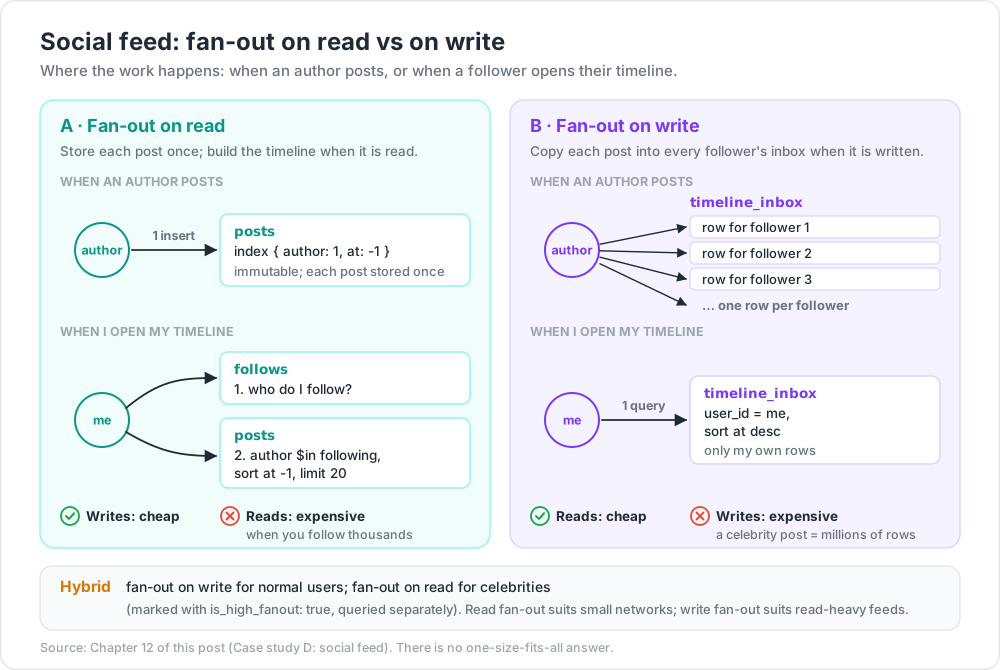
// timeline approaches:
// (A) Fan-out on READ — query at read time
function timeline(userId, before) {
const following = await db.follows.find({ follower: userId }).map(d => d.followee).toArray();
return db.posts.find({
author: { $in: following },
at: { $lt: before }
}).sort({ at: -1 }).limit(20).toArray();
}
// (B) Fan-out on WRITE — push to each follower's inbox at post time
// timeline_inbox: { user_id, post_id, author, at }
// On post: insert one row per follower
// Read: query inbox where user_id = me, sort at desc
Trade-offs:
- Read fan-out — cheap writes, expensive reads (especially for users following thousands). Good for small networks.
- Write fan-out — cheap reads, expensive writes (a celebrity's post inserts millions of rows). Good for read-heavy feeds.
- Hybrid — fan-out on write for normal users; fan-out on read for celebrities (mark with
is_high_fanout: true, query separately).
This is the Twitter/Mastodon problem. There's no one-size-fits-all answer.
Chapter 13 — Case study E: multi-tenant SaaS
Three patterns. Pick by tenant count + isolation needs + per-tenant size.
Pattern 1 — Shared collection, tenant field
1
2
3
4
5
// users collection holds users for all tenants
{ _id: ObjectId, tenant_id: "acme", name: "..." }
db.users.createIndex({ tenant_id: 1, _id: 1 })
Every query includes tenant_id: X. Compound indexes start with tenant_id.
Pros: minimal overhead; easy to add a tenant; queries simple.
Cons: noisy-neighbour effects; per-tenant operations (drop) are app-side; less isolation.
Best for: thousands of small tenants.
Pattern 2 — Collection per tenant
1
2
3
db['users_acme'].find({})
db['users_globex'].find({})
Pros: per-tenant indexes + backup + drop possible.
Cons: many collections per database (limit: a few thousand before metadata strain); harder to query across tenants.
Best for: dozens of medium tenants needing some isolation.
Pattern 3 — Database per tenant
1
2
3
client.db('shop_acme').collection('users')
client.db('shop_globex').collection('users')
Pros: full isolation; per-tenant backup, restore, IAM; easy to off-board.
Cons: connection per DB; metadata overhead at hundreds of DBs; harder cross-tenant analytics.
Best for: a few large tenants; regulatory isolation; on-premise hosting per customer.
Sharding tie-in
In Pattern 1, sharding the collection on { tenant_id: 1, _id: 1 } keeps each tenant's data on one shard (with tagSets you can pin specific tenants to specific shards or regions).
Chapter 14 — Production-ready service skeleton (Node TypeScript + official driver)
1
2
3
4
5
6
7
8
9
10
11
12
13
14
15
16
17
18
19
20
21
22
23
24
25
26
27
28
29
30
31
32
33
34
35
36
37
38
39
40
41
import { MongoClient, ObjectId } from 'mongodb';
import { z } from 'zod';
// schema validation at app boundary
const Order = z.object({
_id: z.instanceof(ObjectId).optional(),
user_id: z.number().int().positive(),
total: z.number().positive(),
status: z.enum(['pending', 'paid', 'shipped', 'cancelled']),
at: z.date()
});
type Order = z.infer<typeof Order>;
const client = new MongoClient(process.env.MONGO_URI!, {
maxPoolSize: 50,
minPoolSize: 5,
appName: 'orders-svc',
writeConcern: { w: 'majority', j: true, wtimeout: 5000 }
});
await client.connect();
const db = client.db('shop');
const orders = db.collection<Order>('orders');
export async function createOrder(input: Omit<Order, '_id'>) {
const parsed = Order.omit({ _id: true }).parse(input);
const r = await orders.insertOne({ ...parsed, at: new Date() });
return { _id: r.insertedId, ...parsed };
}
export async function findRecentByUser(user_id: number, limit = 20) {
return orders
.find({ user_id, status: 'paid' })
.sort({ at: -1 })
.limit(limit)
.maxTimeMS(500)
.toArray();
}
// graceful shutdown
process.on('SIGTERM', async () => { await client.close(); process.exit(0); });
Recipe summary:
- One client per process; explicit pool + concerns + appName.
- Validate at the app boundary (Zod) — runtime + types.
.maxTimeMS()on user-facing queries.- Graceful shutdown.
Drop into a Fastify / Express / Hono handler — done.
Chapter 15 — Common pitfalls in driver code
| Pitfall | Fix |
|---|---|
| Connecting per request | one client per process |
Mongoose lean() not used |
reads return heavy documents; use .lean() for plain JS objects |
Forgetting await on .toArray() |
Promise leaks; lint with no-floating-promises |
ObjectId vs string mismatch in filter |
careful: new ObjectId(str) when querying |
No appName tag |
hard to debug which service issued a query |
| BSON types lost in JSON | EJSON.stringify for safe serialisation |
| Missing index in dev → slow query in prod | run .explain in CI |
| Pool stress under bursty workload | add waitQueueTimeoutMS; rightsize pool |
Practice Exercises
Exercise 1 — Pick a driver
For the shop application throughout the series, pick a driver + ODM in your preferred language. Build createOrder, findRecent, cancelOrder.
Exercise 2 — Time-series collection
Create a sensor_readings time-series collection. Bulk-insert 100k synthetic readings across 10 devices over 1 hour. Query last-hour avg per device.
Exercise 3 — IoT rollup
Build a scheduled aggregation that rolls sensor_readings into a 5-minute summary collection via $merge. Confirm subsequent runs only touch new buckets.
Exercise 4 — E-commerce checkout
Implement placeOrder(userId, cartId) that atomically decrements stock for each item + inserts the order. Test concurrent runs for the same user shouldn't double-charge.
Exercise 5 — Social feed
For the social model, implement both read-fan-out and write-fan-out timelines. Benchmark each at 1k follows, 100k follows.
Exercise 6 — Multi-tenant
Implement all three multi-tenant patterns for a tasks collection. Discuss when each is right for your team.
Cheat-sheet
| What | How |
|---|---|
| Node official | npm install mongodb; one MongoClient per process |
| Node + types | official driver + Zod (or Prisma) |
| Node + ODM | Mongoose (rich) |
| Python sync | pymongo |
| Python async | Motor (+ Beanie for FastAPI) |
| Go | official driver + struct tags |
| Rust | official driver + serde |
| .NET | official driver + Builders<T> |
| Time-series | db.createCollection(name, { timeseries: { timeField, metaField, granularity } }) |
| TTL on TS | expireAfterSeconds in createCollection |
| IoT pattern | TS → rollups → dashboards |
| E-commerce | catalogue / category tree / orders (extended ref) / reviews |
| Social timeline | read fan-out (small) / write fan-out (read-heavy) / hybrid |
| Multi-tenant | shared collection (small tenants) / collection-per-tenant (medium) / DB-per-tenant (large) |
| Sharded multi-tenant | shard key starts with tenant_id |
Course base complete
You've covered:
- Foundations + document model.
- Full CRUD + query operators.
- Indexes + query optimisation.
- Aggregation basics + advanced (windows, facets, graph, merge).
- Schema design patterns.
- Connection pool + concurrency + write/read concern.
- Multi-document transactions.
- Replica sets + sharding.
- Change streams (CDC).
- Security (auth, RBAC, TLS, CSFLE, Queryable Encryption).
- Backup + ops + PITR + restore drills.
- Performance deep (WiredTiger, working set, hot keys, GridFS).
- Atlas Search + Vector Search + Triggers + Stream Processing.
- Drivers + modelling case studies.
That's the working knowledge of a senior MongoDB engineer. Future extensions slot in:
| Topic | Why |
|---|---|
MongoDB + Kubernetes operators (mongodb-kubernetes-operator) |
self-hosted on K8s |
| Migration patterns (SQL → Mongo) | concrete walkthroughs |
| Multi-cloud Atlas | regions, latency, cost |
| Mongo + LangChain / LlamaIndex | RAG framework integrations |
| Performance benchmarks vs Postgres / DynamoDB / Cassandra | when each wins |
| GeoSpatial deep dive | maps, navigation, geofencing |
| Time-series at extreme scale | columnar engines, ClickHouse comparison |
References
- MongoDB Node Driver docs
- Mongoose docs
- Prisma + MongoDB
- pymongo
- Motor
- Beanie (FastAPI + Mongo)
- MongoDB Go driver
- Time Series Collections
- Building With Patterns: A Summary
Note: this post — and the base course — is in progress. Planned additions: end-to-end RAG sample app; Mongoose-vs-Prisma migration walkthrough; multi-tenant case study at 10,000 tenants; benchmarks page per workload pattern.