Three.js Course — 00 · Foundations, WebGL/WebGPU, First Scene
Three.js is the most-used JavaScript library for 3D graphics on the web. It wraps WebGL (and, since 2024-2025, WebGPU) into a friendly scene-graph API and ships with materials, lights, loaders, controls, post-processing, and animation built in. This 14-post course covers it from first scene to AI-assisted asset pipelines. Post 00 introduces the mental model, the rendering backends, and the boilerplate every Three.js app reuses.
Series map: 00 Foundations (this post) → 01 Geometry & Materials → 02 Cameras & Controls → 03 Lighting & Shadows → 04 Textures & PBR → 05 Asset Pipeline (GLTF/Draco/KTX2/Meshopt) → 06 Animation → 07 Instancing & Batching → 08 Low-End Performance → 09 Shaders (GLSL + TSL) → 10 Post-Processing & Color → 11 Physics & Interactivity → 12 React Three Fiber + Drei → 13 AI-Assisted 3D + NavMesh + Procedural.
Learning Outcome
- Describe what Three.js is, what WebGL / WebGPU are, and how they fit together.
- Set up a Vite project with Three.js installed at the right version.
- Build the canonical "spinning cube" scene from scratch.
- Understand the scene → camera → renderer trio and the animation loop.
- Pick between WebGLRenderer and WebGPURenderer in 2026.
- Use a perf overlay (
stats-glorr3f-perf) from day one.
Chapter 1 — What Three.js is
Terminology
- WebGL — a browser API exposing OpenGL ES 2.0 (WebGL1) or 3.0 (WebGL2) for GPU rendering on a
<canvas>. - WebGPU — modern successor to WebGL; lower overhead, compute shaders, parallel command encoding. Supported in every major browser since Safari 26 (September 2025).
- Three.js — open-source JS library (Mr.doob et al., since 2010) on top of WebGL/WebGPU. Provides scene graph, cameras, lights, materials, geometry, animation, loaders, controls, post-processing.
- Scene graph — tree of
Object3Dnodes (meshes, groups, lights, cameras) representing the 3D world. - Render loop — a function called every browser frame (
requestAnimationFrame) that updates state and tells the renderer to draw.
Why Three.js (not raw WebGL)
Raw WebGL requires hundreds of lines of boilerplate to draw a single textured cube: shaders, buffers, uniforms, projection math, all hand-rolled. Three.js collapses that into ~10 lines and adds dozens of features (PBR materials, GLTF loader, shadow maps, OrbitControls, post-processing, animation mixers) that would each take days to implement.
Where Three.js sits
1
2
3
4
5
6
7
8
9
10
11
Application code
▲
│
Three.js ← scene graph, materials, lights, controls, loaders
▲
│
WebGL2 / WebGPU ← browser graphics API
▲
│
GPU driver + hardware
Chapter 2 — Project setup
Standard setup uses Vite + npm. Single-file scripts also work via the import map below.
Option A — Vite project (recommended)
1
2
3
4
5
6
7
npm create vite@latest threejs-hello -- --template vanilla
cd threejs-hello
npm install
npm install three
npm install -D vite-plugin-glsl # only if you'll write shaders later
npm run dev # opens http://localhost:5173
Pin the Three.js version in package.json ("three": "^0.184.0" at time of writing) — Three.js evolves fast and minor versions sometimes break things.
Option B — Import map (no build)
For a one-page demo without a bundler:
1
2
3
4
5
6
7
8
9
10
<script type="importmap">
{
"imports": {
"three": "https://cdn.jsdelivr.net/npm/three@0.184.0/build/three.module.js",
"three/addons/": "https://cdn.jsdelivr.net/npm/three@0.184.0/examples/jsm/"
}
}
</script>
<script type="module" src="main.js"></script>
Then in main.js:
1
2
3
import * as THREE from 'three';
import { OrbitControls } from 'three/addons/controls/OrbitControls.js';
Folder layout (recommended)
1
2
3
4
5
6
7
8
9
10
11
threejs-hello/
├── index.html
├── package.json
├── public/ # static assets served as-is
│ └── models/ # .glb files
└── src/
├── main.js # entry: instantiate scene
├── scene.js # scene + lights
├── controls.js
└── shaders/ # .glsl files (once we reach Post 09)
Chapter 3 — The scene-camera-renderer trio
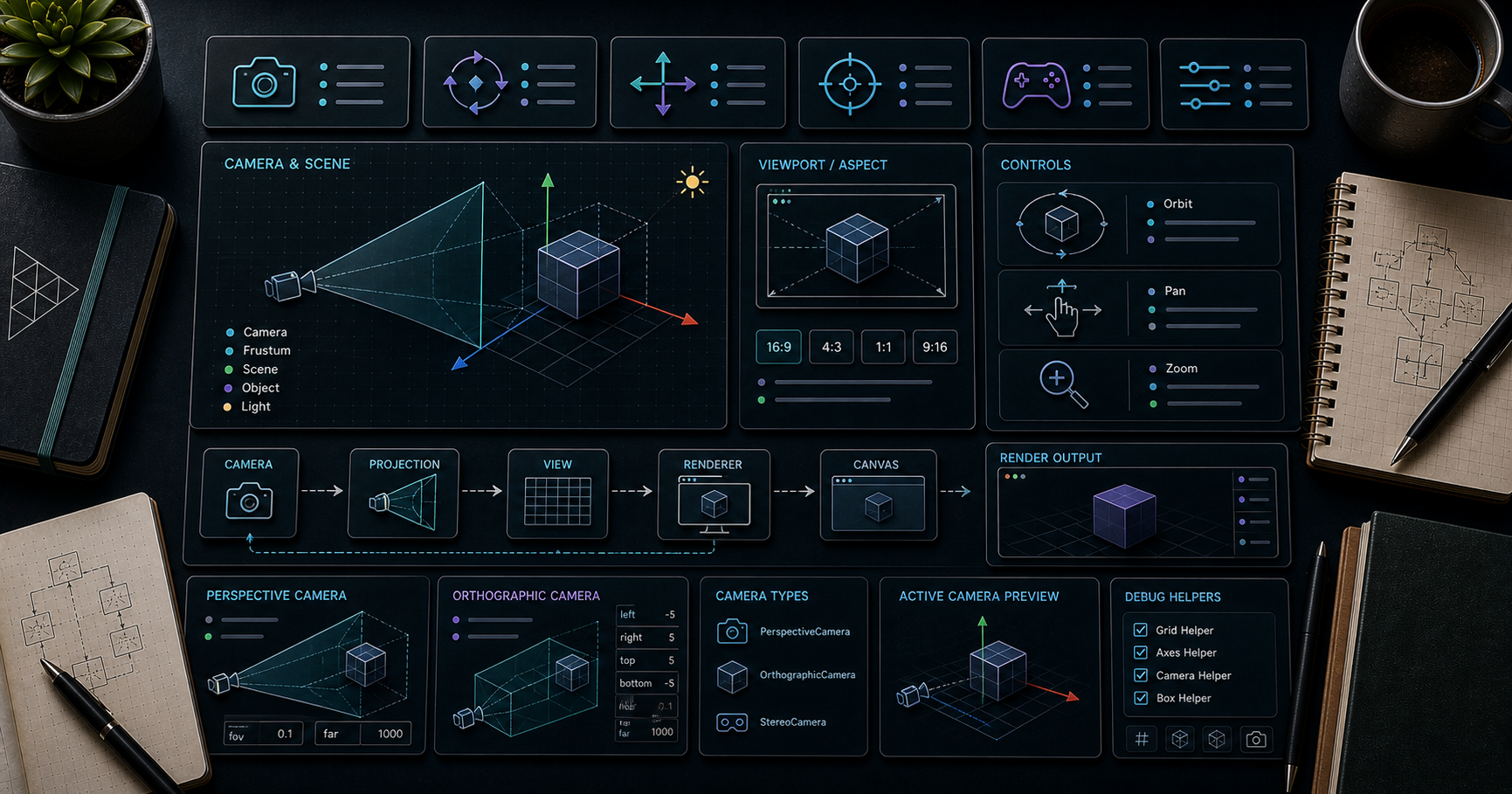
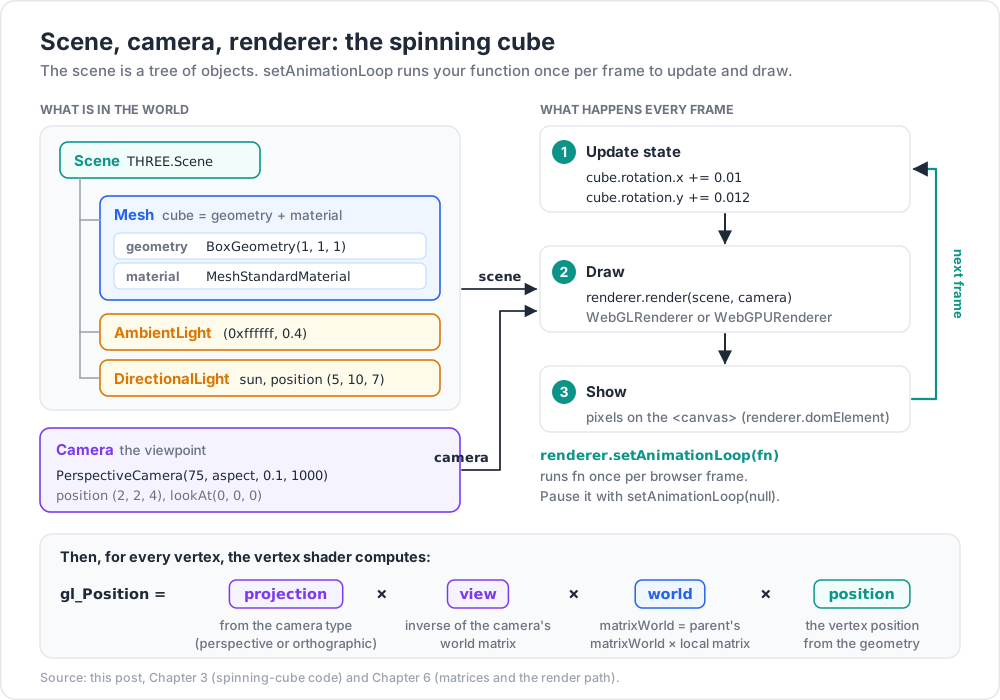
Every Three.js app needs three things:
- Scene — the container of objects (
THREE.Scene). - Camera — the viewpoint (
THREE.PerspectiveCameraorTHREE.OrthographicCamera). - Renderer — produces pixels from scene + camera (
THREE.WebGLRendererorTHREE.WebGPURenderer).
Plus:
- Mesh = geometry + material — what you actually see.
- Render loop — drives
renderer.render(scene, camera)once per frame.
First scene — the spinning cube
src/main.js:
1
2
3
4
5
6
7
8
9
10
11
12
13
14
15
16
17
18
19
20
21
22
23
24
25
26
27
28
29
30
31
32
33
34
35
36
37
38
39
40
41
42
43
44
45
46
47
48
49
import * as THREE from 'three';
// 1. scene
const scene = new THREE.Scene();
scene.background = new THREE.Color(0x101820);
// 2. camera
const camera = new THREE.PerspectiveCamera(
75, // field of view (deg)
window.innerWidth / window.innerHeight, // aspect
0.1, // near plane
1000 // far plane
);
camera.position.set(2, 2, 4);
camera.lookAt(0, 0, 0);
// 3. renderer
const renderer = new THREE.WebGLRenderer({ antialias: true });
renderer.setPixelRatio(Math.min(window.devicePixelRatio, 2));
renderer.setSize(window.innerWidth, window.innerHeight);
document.body.appendChild(renderer.domElement);
// 4. mesh
const cube = new THREE.Mesh(
new THREE.BoxGeometry(1, 1, 1),
new THREE.MeshStandardMaterial({ color: 0x66ccff, roughness: 0.4 })
);
scene.add(cube);
// lights (MeshStandardMaterial needs them)
scene.add(new THREE.AmbientLight(0xffffff, 0.4));
const sun = new THREE.DirectionalLight(0xffffff, 1.0);
sun.position.set(5, 10, 7);
scene.add(sun);
// 5. animation loop
renderer.setAnimationLoop(() => {
cube.rotation.x += 0.01;
cube.rotation.y += 0.012;
renderer.render(scene, camera);
});
// handle resize
window.addEventListener('resize', () => {
camera.aspect = window.innerWidth / window.innerHeight;
camera.updateProjectionMatrix();
renderer.setSize(window.innerWidth, window.innerHeight);
});
That is the canonical "hello, world" of Three.js. The remaining 13 posts deepen each part.
setAnimationLoop vs requestAnimationFrame
renderer.setAnimationLoop(fn) is preferred over a manual requestAnimationFrame loop because:
- It works automatically inside WebXR sessions (the XR runtime drives the loop).
- The WebGPURenderer requires it.
- Pausing is one call:
renderer.setAnimationLoop(null).
Chapter 4 — WebGLRenderer vs WebGPURenderer (2026)
WebGPU shipped in Chrome 113 (2023), Firefox 141, and Safari 26 (Sept 2025). Roughly 95 % of users now have a WebGPU-capable browser; the remaining 5 % should fall back to WebGL2.
| WebGLRenderer | WebGPURenderer | |
|---|---|---|
| Backend | WebGL2 | WebGPU |
| Performance | baseline | 2-10× speedup on draw-call-heavy scenes |
| Compute shaders | no | yes |
| Storage buffers | no | yes |
| Shader language | GLSL | WGSL (via TSL) |
| Material system | classic + TSL compat layer | TSL NodeMaterial (Three.js Shading Language) |
| Stability (2026) | mature | stable since r184 |
Practical guidance:
- New project in 2026: start with WebGPURenderer + a WebGL2 fallback.
- Need TSL / NodeMaterial / compute: WebGPURenderer required (no new node features land in WebGL).
- Stuck on old browsers / wide reach: WebGLRenderer still ships and is fine.
Pattern: detect + fall back
1
2
3
4
5
6
7
8
9
10
11
12
13
14
15
16
import * as THREE from 'three';
import WebGPU from 'three/addons/capabilities/WebGPU.js';
import WebGL from 'three/addons/capabilities/WebGL.js';
let renderer;
if (await WebGPU.IsAvailableAsync()) {
const { WebGPURenderer } = await import('three/webgpu');
renderer = new WebGPURenderer({ antialias: true });
await renderer.init();
} else if (WebGL.isWebGL2Available()) {
renderer = new THREE.WebGLRenderer({ antialias: true });
} else {
document.body.append(WebGL.getWebGL2ErrorMessage());
throw new Error('no GPU available');
}
TSL compatibility layer
Three.js r184+ ships NodeMaterial for both backends — WebGPU is preferred but WebGL2 can render TSL materials via a glsl translator. New node features only land on the WebGPU path.
Chapter 5 — Performance overlay from day one
Add a perf monitor to every learning project. You will catch problems early.
stats-gl (vanilla Three.js)
1
2
npm install stats-gl
1
2
3
4
5
6
7
8
9
10
11
import Stats from 'stats-gl';
const stats = new Stats({ trackGPU: true });
document.body.appendChild(stats.dom);
renderer.setAnimationLoop(() => {
stats.begin();
// ... update + render ...
stats.end();
stats.update();
});
Shows FPS, CPU ms, and GPU ms (WebGL timer extension or WebGPU timestamp queries).
renderer.info (programmatic counters)
1
2
3
4
5
console.log(renderer.info);
// { calls: 12, triangles: 14580, points: 0, lines: 0,
// memory: { geometries: 8, textures: 12 },
// programs: [...] }
Watch calls (draw calls — target < ~100 for 60 fps on mobile) and triangles.
Spector.js (browser extension)
A Chrome/Firefox extension that captures a single frame and dumps every WebGL command + GPU state — the debugger for "why is my scene broken". Install from the Chrome Web Store; alt + click the extension icon on your page.
Chapter 6 — Mental model: matrices, transforms, the render path
Three.js hides almost all the math, but understanding the pipeline helps debug:
- Local transform — each Object3D has
position,rotation(Euler or Quaternion),scale. These compose into a 4×4matrix. - World transform —
matrixWorld= parent'smatrixWorld× localmatrix. Updated automatically before rendering. - View matrix — inverse of the camera's world matrix.
- Projection matrix — derived from camera type (perspective or orthographic).
- The vertex shader does
gl_Position = projection × view × world × position.
Practical implications:
- Move a parent group → all children move with it.
object.position.set(...)is in local space. For world coordinates, useobject.getWorldPosition(target).- Rotation order matters with Euler (
object.rotation.order = 'YXZ'for camera-like). - Use quaternions for safe interpolation and avoiding gimbal lock.
Practice Exercises
Exercise 1 — Spinning cube
Reproduce Chapter 3's code in a fresh Vite project. Confirm a blue cube rotates on a dark background.
Exercise 2 — Add OrbitControls
1
2
3
4
5
6
7
8
9
import { OrbitControls } from 'three/addons/controls/OrbitControls.js';
const controls = new OrbitControls(camera, renderer.domElement);
controls.enableDamping = true;
renderer.setAnimationLoop(() => {
controls.update(); // required when damping is on
renderer.render(scene, camera);
});
Drag, scroll, right-drag — full orbit / dolly / pan. Covered properly in Post 02.
Exercise 3 — Stats + draw call check
Add stats-gl. Confirm draw calls ≈ 2 (cube + clear). Add 100 cubes in a for loop, observe draw calls explode to ~100. Foreshadows Post 07 (Instancing).
Exercise 4 — WebGPU swap
Refactor to the WebGPURenderer detection pattern in Chapter 4. Open in Chrome / Edge — should use WebGPU. Open in a WebGPU-disabled browser to confirm WebGL fallback.
Exercise 5 — Resize fix
Resize the browser window. Confirm the scene fills the canvas correctly (no stretching). If broken, check the resize handler.
Cheat-sheet
| What | How |
|---|---|
| Install | npm install three |
| Scene | const scene = new THREE.Scene() |
| Perspective camera | new THREE.PerspectiveCamera(75, w/h, 0.1, 1000) |
| Renderer (WebGL) | new THREE.WebGLRenderer({ antialias: true }) |
| Renderer (WebGPU) | new (await import('three/webgpu')).WebGPURenderer() + await renderer.init() |
| Mesh | new THREE.Mesh(geometry, material) |
| Add to scene | scene.add(mesh) |
| Render loop | renderer.setAnimationLoop(() => { renderer.render(scene, camera) }) |
| Resize | update camera.aspect, camera.updateProjectionMatrix(), renderer.setSize() |
| Pixel ratio cap | renderer.setPixelRatio(Math.min(devicePixelRatio, 2)) |
| Counters | renderer.info.{calls, triangles, memory} |
| Perf overlay | stats-gl (vanilla) or r3f-perf (R3F, Post 12) |
What's next
Post 01 covers geometry and materials: BufferGeometry, the built-in shapes, and the material family from MeshBasicMaterial to MeshPhysicalMaterial. After that, cameras + controls + the math of looking around (Post 02), then lighting and shadows (Post 03).
References
- Three.js official docs — start here.
- Three.js manual — gentle topic-by-topic tutorial.
- Three.js examples — runnable code for every feature; the fastest way to find "how do I do X".
- Three.js Journey by Bruno Simon — paid course, considered the canonical learning path.
- Migrate Three.js to WebGPU (2026)
- 100 Three.js Tips That Actually Improve Performance (2026)
Note: this post is in progress. Planned additions: animated diagram of the render pipeline; comparison of project starters (Vite vanilla / R3F starter / threlte).