Three.js Course — 06 · Animation — Mixer, Clips, Morph Targets, Skinned Meshes
Three.js animates in three main ways: per-frame property updates inside the render loop, AnimationMixer playing back authored clips (from glTF, FBX, etc.), and morph targets / skinned meshes for character rigs. This post covers all three plus the tween libraries (@tweenjs/tween.js, GSAP) that make property animation pleasant, frame timing rules (always use delta time, never frame count), and the standard mixer recipes — cross-fade, additive blends, time-scale, weights.
Series map: 00 Foundations → 01 Geometry & Materials → 02 Cameras & Controls → 03 Lighting & Shadows → 04 Textures & PBR → 05 Asset Pipeline → 06 Animation (this post) → 07 Instancing & Batching → 08 Low-End Perf → 09 Shaders → 10 Post-Processing → 11 Physics → 12 R3F → 13 AI 3D.
Learning Outcome
- Animate properties safely with
requestAnimationFrame+ delta time. - Play glTF animation clips using
AnimationMixer. - Cross-fade, blend, weight multiple clips.
- Use morph targets (blend shapes) for facial / shape interpolation.
- Use skinned meshes with bones (
SkeletonHelper). - Use
@tweenjs/tween.jsor GSAP for declarative property animation.
Chapter 1 — Delta-time fundamentals
The animation loop runs at the browser's frame rate — usually 60 Hz, sometimes 120 Hz on modern displays, sometimes 30 Hz on a struggling phone. Animation logic must be frame-rate independent.
1
2
3
4
5
6
7
8
9
10
import * as THREE from 'three';
const clock = new THREE.Clock();
renderer.setAnimationLoop(() => {
const dt = clock.getDelta(); // seconds since last frame
cube.rotation.y += 1.0 * dt; // 1 radian per second, every device
renderer.render(scene, camera);
});
Never write cube.rotation.y += 0.01 — that's "0.01 radians per frame", which means twice as fast at 120 Hz and half as fast at 30 Hz. Always multiply by dt.
clock.getElapsedTime() returns total seconds since the clock started — great for sin-wave motion:
1
2
3
const t = clock.getElapsedTime();
cube.position.y = Math.sin(t * 2) * 0.5;
Chapter 2 — Direct property animation
For simple effects, mutate properties each frame:
1
2
3
4
5
6
7
8
9
renderer.setAnimationLoop(() => {
const t = clock.getElapsedTime();
cube.rotation.x = t * 0.5;
cube.rotation.y = t * 0.7;
light.position.x = Math.cos(t) * 5;
light.position.z = Math.sin(t) * 5;
renderer.render(scene, camera);
});
Cheap, no library needed. Right answer for one-off effects.
Chapter 3 — Tween libraries
For declarative "go from A to B over T seconds with easing", a tween library is cleaner:
1
2
npm install @tweenjs/tween.js
1
2
3
4
5
6
7
8
9
10
11
12
import { Tween, Easing, update as updateTweens } from '@tweenjs/tween.js';
new Tween(cube.position)
.to({ x: 5, y: 2, z: 0 }, 1500) // ms
.easing(Easing.Quadratic.InOut)
.start();
renderer.setAnimationLoop(() => {
updateTweens(); // tween.js needs a heartbeat
renderer.render(scene, camera);
});
GSAP is the heavyweight alternative — more features (timelines, scroll triggers, plugins) but a paid Club license for some features. For Three.js scenes, @tweenjs/tween.js is usually enough.
Common easings
Linear, Quadratic.In/Out/InOut, Cubic.*, Quartic.*, Quintic.*, Sinusoidal.*, Exponential.*, Circular.*, Elastic.*, Back.*, Bounce.*.
Quadratic.InOut (s-curve, slow ends, fast middle) is the safe default for UI motion. Cubic.Out (fast start, slow end) is good for "object arrives at destination".
Chapter 4 — AnimationMixer + Clips
Authored animation (in Blender, Maya, etc.) comes back from GLTFLoader as gltf.animations — an array of AnimationClip objects. Play them with AnimationMixer:
1
2
3
4
5
6
7
8
9
10
11
12
13
14
15
import * as THREE from 'three';
import { GLTFLoader } from 'three/addons/loaders/GLTFLoader.js';
const gltf = await new GLTFLoader().loadAsync('/character.glb');
scene.add(gltf.scene);
const mixer = new THREE.AnimationMixer(gltf.scene);
const idle = mixer.clipAction(THREE.AnimationClip.findByName(gltf.animations, 'Idle')).play();
const clock = new THREE.Clock();
renderer.setAnimationLoop(() => {
mixer.update(clock.getDelta());
renderer.render(scene, camera);
});
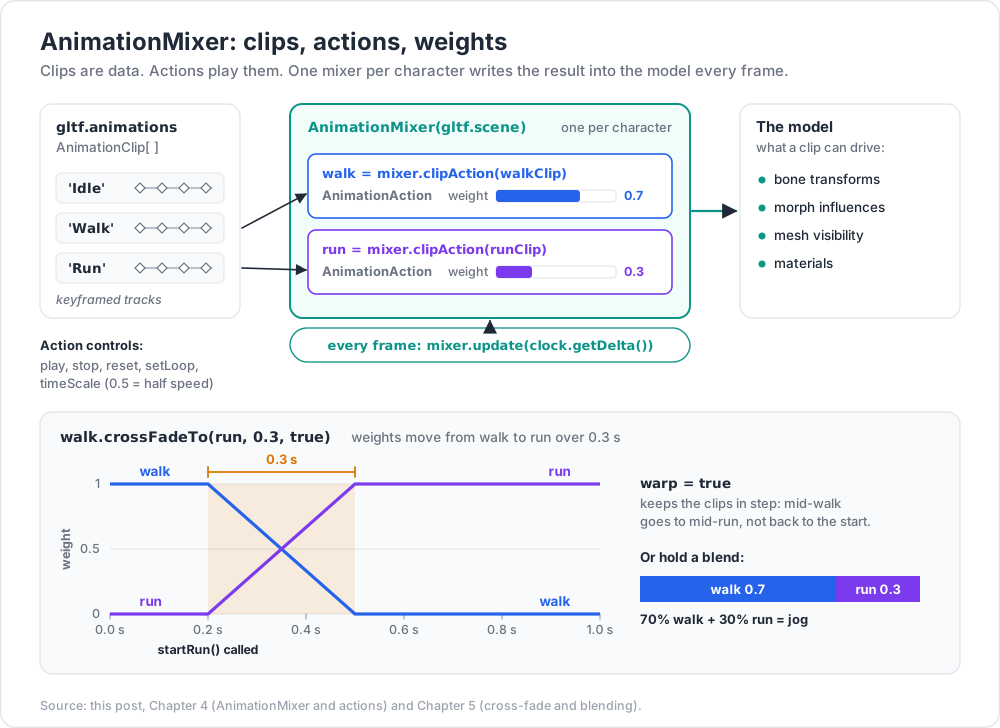
One AnimationMixer per character. It animates whatever properties the clip targets — bone transforms, morph influences, mesh visibility, even materials.
AnimationAction methods
1
2
3
4
5
6
7
8
9
10
11
const action = mixer.clipAction(clip);
action.play();
action.stop();
action.reset();
action.setLoop(THREE.LoopOnce); // or LoopRepeat (default) / LoopPingPong
action.clampWhenFinished = true; // hold last frame after finishing
action.timeScale = 0.5; // half speed
action.weight = 0.7; // 0-1 contribution when blending
action.setEffectiveTimeScale(...);
action.setEffectiveWeight(...);
Chapter 5 — Cross-fade between clips
The bread-and-butter character pattern:
1
2
3
4
5
6
7
8
9
10
11
12
13
14
const walk = mixer.clipAction(walkClip);
const run = mixer.clipAction(runClip);
walk.play();
function startRun() {
run.reset().play();
walk.crossFadeTo(run, 0.3, true); // 0.3 s, warp time
}
function stopRun() {
walk.reset().play();
run.crossFadeTo(walk, 0.3, true);
}
crossFadeTo(other, duration, warp) — warp = true synchronises clip phase (a footstep mid-walk transitions to mid-run, not back to start).
Blending multiple weights
1
2
3
4
5
walk.play();
run.play();
walk.weight = 0.7;
run.weight = 0.3; // 70% walk + 30% run = jog
Common for run/walk transitions driven by a movement-speed value.
Listening for end
1
2
3
4
mixer.addEventListener('finished', (e) => {
console.log('action finished', e.action);
});
Chapter 6 — Morph targets (blend shapes)
A morph target is an alternate version of a mesh — same vertex count, different positions. Interpolating between morphs animates facial expressions, mouth shapes, body deformations.
A glTF with morph targets exposes mesh.morphTargetInfluences (array of 0-1 weights) and mesh.morphTargetDictionary (name → index).
1
2
3
4
5
6
7
const face = gltf.scene.getObjectByName('FaceMesh');
console.log(face.morphTargetDictionary);
// { mouthOpen: 0, smile: 1, eyesClosed: 2 }
face.morphTargetInfluences[face.morphTargetDictionary.smile] = 1.0;
face.morphTargetInfluences[face.morphTargetDictionary.mouthOpen] = 0.3;
Animate manually or via AnimationMixer (glTF animations target morph influences automatically when authored to).
Costs
Morph targets multiply geometry size by (1 + N) where N = number of targets. A 10k-vertex mesh with 20 expressions = 210k vertices' worth of data. Manageable for a single character; not for crowds.
Use cases
- Lip-sync for talking characters (a basic phoneme set is 8-12 shapes).
- Body shape sliders ("character creator").
- Procedural deformation (wave on a flag — though shaders do this better).
Chapter 7 — Skinned meshes (bones / armature)
A skinned mesh deforms based on a skeleton (a hierarchy of bones). Each vertex is weighted against up to 4 bones; transforming bones deforms the surface.
glTF embeds skin + skeleton + animation clips together; GLTFLoader reconstructs them as THREE.SkinnedMesh + THREE.Skeleton.
1
2
3
4
5
6
gltf.scene.traverse((c) => {
if (c.isSkinnedMesh) {
scene.add(new THREE.SkeletonHelper(c)); // visualise bones for debug
}
});
Skinned animation is what makes characters walk, fight, dance. Authoring happens in Blender / Maya / Houdini; Three.js mostly plays back.
Inverse kinematics (IK)
Three.js has CCDIKSolver (Cyclic Coordinate Descent) for runtime IK — useful for "foot stays planted" or "hand reaches at a target":
1
2
3
4
5
6
7
8
9
import { CCDIKSolver } from 'three/addons/animation/CCDIKSolver.js';
const ikSolver = new CCDIKSolver(skinnedMesh, iks); // iks: bone chain config
renderer.setAnimationLoop(() => {
mixer.update(dt);
ikSolver.update();
renderer.render(scene, camera);
});
For more advanced IK (FABRIK, multi-effector, retargeting), use three-ik or a runtime like Mixamo + retarget tools.
Chapter 8 — Animation retargeting
A clip authored for one skeleton plays on a different skeleton via the SkeletonUtils.retargetClip helper:
1
2
3
4
5
6
import { SkeletonUtils } from 'three/addons/utils/SkeletonUtils.js';
const retargeted = SkeletonUtils.retargetClip(
targetSkeletonRoot, sourceSkeletonRoot, clip, { hip: 'mixamorigHips' }
);
Useful for: applying Mixamo animations to your own characters; reusing one walking animation across many character models.
Chapter 9 — Animation libraries beyond the mixer
| Library | Use |
|---|---|
@tweenjs/tween.js |
declarative tweens; cheap, simple |
gsap |
feature-rich tweens, timelines |
motion (formerly Framer Motion 3D) |
physics-spring animations, declarative |
theatre.js |
timeline-based, in-browser animation editor |
popmotion |
low-level animation primitives |
For complex sequenced animation (cutscenes), theatre.js is impressive — a real animation editor that runs inside your page.
Chapter 10 — Performance tips
- One mixer per character. Many characters = many mixers + one shared scene; cheap.
- Cache
clipAction— calling it repeatedly with the same clip returns the same action but allocates lookups. - Pause off-screen characters —
mixer.timeScale = 0while not in frustum. - Skip animations far away — at distance, snap to a single pose; the player won't notice.
- For huge crowds, use InstancedMesh (Post 07) with GPU-driven animation via a vertex shader sampling a baked animation texture. Three.js doesn't ship this but the pattern is common (see
BatchedAnimation/ GPU skinning libraries). - Cull unused bones — characters often ship with bones for hair / cloth that aren't used; remove in the exporter.
Practice Exercises
Exercise 1 — Delta-time sanity
Rotate a cube with 0.5 * dt. Toggle setTimeout(() => fakeSlow(), ...) to make frames slow. Confirm the cube keeps the same wall-clock rotation speed.
Exercise 2 — Tween a position
Tween a cube from (0, 0, 0) to (5, 2, 0) over 2 s with Cubic.Out easing. On complete, tween back.
Exercise 3 — Play a glTF animation
Load a Mixamo character (free, mixamo.com). Play its "Idle" clip via AnimationMixer.
Exercise 4 — Cross-fade
Same character, two clips: Idle + Run. Press W to start crossFadeTo(run), release to fade back. Use warp: true.
Exercise 5 — Morph targets
Load any model with morphs (Khronos RobotExpressive is good). Drive the morph weights from sliders (HTML range inputs). Confirm shapes blend.
Exercise 6 — Skeleton helper
Add SkeletonHelper to your character. Watch bones move while the animation plays.
Cheat-sheet
| What | How |
|---|---|
| Clock | const clock = new THREE.Clock(); const dt = clock.getDelta() |
| Frame-rate independent | always multiply by dt |
| Tween library | @tweenjs/tween.js — call TWEEN.update() each frame |
| Common easing | Cubic.Out, Quadratic.InOut |
| Play glTF clip | mixer = new THREE.AnimationMixer(scene); mixer.clipAction(clip).play() |
| Update mixer | mixer.update(dt) |
| Find clip by name | THREE.AnimationClip.findByName(clips, 'Walk') |
| Loop | action.setLoop(THREE.LoopOnce/Repeat/PingPong) |
| Hold last frame | action.clampWhenFinished = true |
| Cross-fade | from.crossFadeTo(to, duration, warp) |
| Blend weights | set action.weight on both |
| Morph target | mesh.morphTargetInfluences[i] = weight |
| Skinned helpers | new THREE.SkeletonHelper(mesh) for debug |
| IK | CCDIKSolver from addons |
| Retarget animation | SkeletonUtils.retargetClip |
| Big crowds | GPU-skinned InstancedMesh (Post 07 + custom shader) |
What's next
Post 07 covers instancing and batching — InstancedMesh, BatchedMesh, geometry merging, LOD, and the draw-call budget that decides whether your scene runs at 60 fps or 12 fps. This is the answer to "I have 10,000 trees and the framerate died".
References
- Three.js docs — AnimationMixer
- Three.js manual — Animation
- @tweenjs/tween.js docs
- theatre.js — visual animation editor
- Mixamo — free character animations
- SkeletonUtils.retargetClip
Note: this post is in progress. Planned additions: GPU-skinned crowd recipe; lip-sync from audio (Rhubarb); root-motion handling; physics-cloth.