Three.js Course — 04 · Textures & PBR (Color Space, IBL, KTX2)
Textures are the data-rich half of a 3D material — colour, roughness, normal detail, AO, emission, displacement. Done right they make a low-poly model look fully detailed; done wrong they look washed-out, banded, or blurry. This post covers loading textures, the colour-space rules every modern Three.js project must follow, mipmaps + anisotropy, the full PBR map set, environment maps and image-based lighting (IBL), and KTX2 compressed textures for shipping mobile-friendly builds.
Series map: 00 Foundations → 01 Geometry & Materials → 02 Cameras & Controls → 03 Lighting & Shadows → 04 Textures & PBR (this post) → 05 Asset Pipeline → 06 Animation → 07 Instancing & Batching → 08 Low-End Perf → 09 Shaders → 10 Post-Processing → 11 Physics → 12 R3F → 13 AI 3D.
Learning Outcome
- Load textures with
TextureLoader(and async / Suspense in R3F). - Apply the correct colour space (sRGB for colour, Linear for data maps).
- Configure wrap, repeat, offset, anisotropy, mipmaps.
- Use the full PBR map set on
MeshStandardMaterial/MeshPhysicalMaterial. - Add environment maps (HDR / EXR) for image-based lighting.
- Ship KTX2 compressed textures with
basis-universalfor 10× GPU memory savings.
Chapter 1 — Loading a texture
1
2
3
4
5
6
7
import * as THREE from 'three';
const loader = new THREE.TextureLoader();
const tex = loader.load('/textures/wood/diffuse.jpg');
const mat = new THREE.MeshStandardMaterial({ map: tex });
Loading is asynchronous, but the texture object is returned synchronously — the renderer simply skips it until pixels arrive. To know when ready:
1
2
loader.loadAsync('/textures/wood/diffuse.jpg').then((tex) => { /* ... */ });
In R3F (Post 12), useLoader + Suspense wraps this pattern.
Chapter 2 — Colour space (the bug that ruins your scene)
PBR shading does its math in linear light space. Image files (JPG, PNG) are stored in sRGB (gamma-encoded for storage efficiency, perception-uniform on monitors).
If you load an sRGB image without telling Three.js, the shader treats the gamma-encoded values as linear → washed-out, oversaturated, wrong-coloured result.
The rule (since r152, default)
1
2
3
4
5
6
7
8
9
const colorMap = loader.load('/diffuse.jpg');
colorMap.colorSpace = THREE.SRGBColorSpace; // colour textures
const normalMap = loader.load('/normal.png');
normalMap.colorSpace = THREE.NoColorSpace; // data textures (default)
const roughnessMap = loader.load('/rough.png');
roughnessMap.colorSpace = THREE.NoColorSpace;
GLTFLoader sets colour spaces correctly for you. Hand-loaded TextureLoader does not — you must set them.
Renderer side:
1
2
renderer.outputColorSpace = THREE.SRGBColorSpace; // default since r152
This converts the linear render back to sRGB for the monitor.
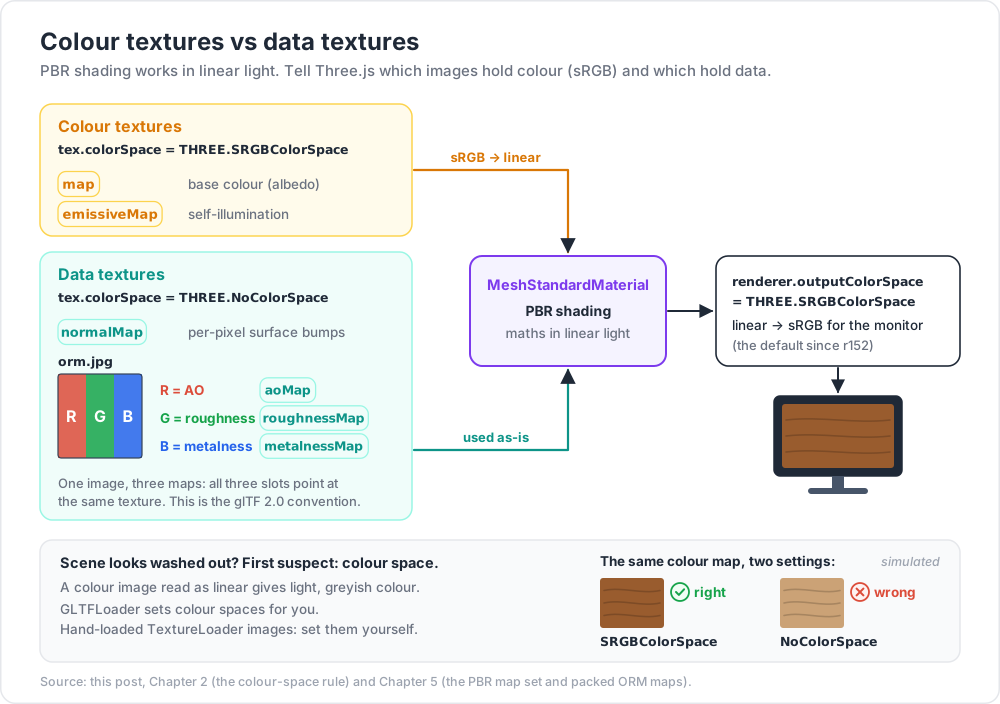
Trick: if your scene looks washed-out (light grey instead of vibrant), the first suspect is colour space. Set
colorSpace = SRGBColorSpaceon every colour texture and the output back to sRGB. The fix is one line per file.
Chapter 3 — Wrap, repeat, offset
1
2
3
4
5
6
7
tex.wrapS = THREE.RepeatWrapping; // U-axis
tex.wrapT = THREE.RepeatWrapping; // V-axis
tex.repeat.set(4, 4); // tile 4× in each direction
tex.offset.set(0.25, 0); // shift
tex.rotation = Math.PI / 4; // 45° rotation around (0.5, 0.5)
tex.center.set(0.5, 0.5); // rotation centre
Wrap modes:
| Mode | Effect outside 0-1 |
|---|---|
RepeatWrapping |
tile |
ClampToEdgeWrapping |
clamp to last pixel (default) |
MirroredRepeatWrapping |
tile with mirror reflection |
For repeating textures across large surfaces (floor, terrain, brick walls), RepeatWrapping + repeat.set(N, N) is the standard pattern.
After changing repeat / offset / rotation on a texture already used, you may need tex.needsUpdate = true (rarely; usually automatic).
Chapter 4 — Mipmaps + anisotropy
A mipmap is a chain of pre-downscaled copies of the texture (1024 → 512 → 256 → 128 → ... → 1). The GPU samples the right level for the distance, avoiding flicker and improving cache use.
Mipmaps generate automatically as long as texture dimensions are powers of two (256, 512, 1024, 2048...) and the wrap mode is RepeatWrapping. Otherwise:
1
2
3
tex.minFilter = THREE.LinearFilter; // no mipmaps
tex.generateMipmaps = false;
Anisotropic filtering
Default mipmapping looks blurry on surfaces seen at glancing angles (floors viewed from afar). Anisotropic filtering samples more along the view direction:
1
2
3
const max = renderer.capabilities.getMaxAnisotropy(); // typically 16
tex.anisotropy = Math.min(8, max);
Set anisotropy to 4-8 for ground textures, 1 (default) for most others. Cost is small but not free.
Trick: if your "muddy" texture on a distant floor turns sharp when you crank
tex.anisotropy = 16, anisotropy was the problem — not the texture resolution.
Chapter 5 — The PBR map set
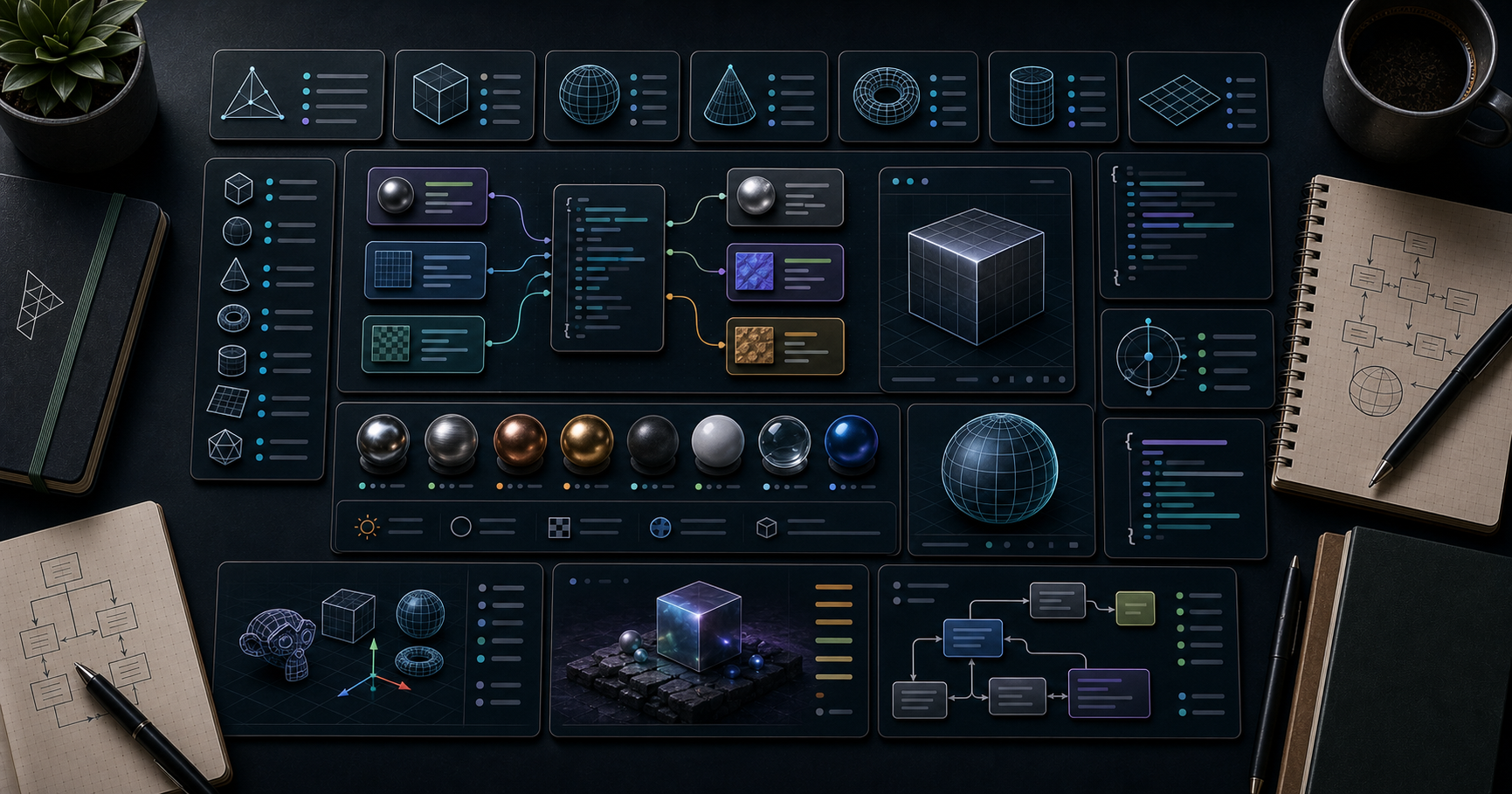
MeshStandardMaterial (and Physical) accept these maps:
| Map | Type | sRGB? | Purpose |
|---|---|---|---|
map |
colour | sRGB | base albedo / diffuse colour |
normalMap |
RGB | linear | per-pixel surface bumps |
roughnessMap |
grayscale (G channel) | linear | how rough each pixel is |
metalnessMap |
grayscale (B channel) | linear | metal vs dielectric per pixel |
aoMap |
grayscale (R channel) | linear | ambient occlusion |
emissiveMap |
colour | sRGB | self-illumination |
displacementMap |
grayscale | linear | actual vertex displacement |
bumpMap |
grayscale | linear | older alternative to normalMap |
envMap |
cube / equirect | inherits | reflection environment |
lightMap |
colour | linear (or sRGB) | baked diffuse lighting |
alphaMap |
grayscale | linear | transparency |
Packed maps (the modern convention)
Roughness, metalness, and AO are each single-channel. Packing them into one RGB image saves a texture slot:
- R = AO
- G = Roughness
- B = Metalness
This is the glTF 2.0 convention. Both roughnessMap and metalnessMap can point at the same texture; Three.js reads the right channel.
1
2
3
4
5
6
7
const orm = loader.load('/wood/orm.jpg'); // ao + rough + metal
orm.colorSpace = THREE.NoColorSpace;
mat.aoMap = orm;
mat.roughnessMap = orm;
mat.metalnessMap = orm;
Trick: glTF authoring tools (Substance Painter, Blender, Mixer) export ORM packed by default. Save a draw call by packing.
aoMap requires a second UV set
aoMap reads from geometry.attributes.uv2 (second UV channel), not uv. Most authoring tools generate it; if not, set explicitly:
1
2
geometry.setAttribute('uv2', new THREE.BufferAttribute(geometry.attributes.uv.array, 2));
Chapter 6 — Normal maps (the detail multiplier)
A normal map encodes a surface normal per pixel as RGB. The shader fakes high-frequency detail without geometry.
1
2
3
4
5
6
const normal = loader.load('/normal.png');
normal.colorSpace = THREE.NoColorSpace;
mat.normalMap = normal;
mat.normalScale.set(1.0, 1.0); // y can be negated for some authoring tools
Two normal-map conventions
- OpenGL convention: green channel is +Y up. (Three.js default.)
- DirectX convention: green channel is +Y down.
If a normal map looks "inverted" (bumps look like dents), flip the green channel: mat.normalScale.set(1, -1).
Most glTF normal maps follow OpenGL. Substance exports either; check the export setting.
Chapter 7 — Environment maps + IBL
A MeshStandardMaterial reflects its surroundings via an environment map (a panoramic image of "what the object sees"). Without one, metals look black and dielectrics look flat.
Loading an HDR / EXR
1
2
3
4
5
6
7
8
import { RGBELoader } from 'three/addons/loaders/RGBELoader.js';
new RGBELoader().load('/env/studio.hdr', (tex) => {
tex.mapping = THREE.EquirectangularReflectionMapping;
scene.environment = tex; // applied to every PBR material in scene
scene.background = tex; // optional — also render as the sky
});
scene.environment is the modern way — every PBR material picks it up automatically. No more setting mat.envMap on every material individually.
Pre-filtered environment (PMREM)
Sharp HDRs are aliased when used directly. The PMREM (Pre-filtered Mipmapped Radiance Environment) generator pre-blurs the env map at multiple roughness levels:
1
2
3
4
5
6
const pmrem = new THREE.PMREMGenerator(renderer);
const envMap = pmrem.fromEquirectangular(hdr).texture;
hdr.dispose();
pmrem.dispose();
scene.environment = envMap;
GLTFLoader handles PMREM automatically when a glTF has an embedded env. For hand-loaded HDRs, do it explicitly.
Free HDR sources
- polyhaven.com — CC0, hundreds of HDRIs at every resolution.
- hdri-haven.com — similar.
- Use 1K / 2K HDRIs for runtime; 8K is overkill for most scenes.
Chapter 8 — KTX2 / Basis Universal (the cost saver)
JPG / PNG textures decompress fully on the GPU. A 1024² PNG = 4 MB of GPU memory regardless of file size on disk. A scene with 50 textures can blow the GPU budget on phones.
KTX2 with Basis Universal stays compressed on the GPU — ~10× smaller in GPU memory. Two flavours:
| Mode | Use | Notes |
|---|---|---|
| UASTC | hero textures, normal maps | higher quality, slightly larger |
| ETC1S | secondary textures, background | smaller, lower quality |
Generate KTX2
gltf-transform CLI is the workflow:
1
2
3
4
5
npm install -g @gltf-transform/cli
gltf-transform uastc model.glb model.uastc.glb # normal maps, hero
gltf-transform etc1s model.glb model.etc1s.glb # everything else
gltf-transform optimize model.glb model.opt.glb # combined pipeline
Or with toktx directly:
1
2
3
toktx --bcmp out.ktx2 input.png # ETC1S
toktx --uastc 4 out.ktx2 input.png # UASTC
Loading in Three.js
1
2
3
4
5
6
7
8
import { KTX2Loader } from 'three/addons/loaders/KTX2Loader.js';
const ktx2 = new KTX2Loader()
.setTranscoderPath('https://unpkg.com/three@0.184.0/examples/jsm/libs/basis/')
.detectSupport(renderer);
const tex = await ktx2.loadAsync('/textures/wood/diffuse.ktx2');
GLTFLoader chains in KTX2Loader automatically when a glTF references KTX2 textures:
1
2
gltfLoader.setKTX2Loader(ktx2);
Compression ratios (rule of thumb)
| Texture (1024²) | PNG on disk | GPU memory uncompressed | KTX2 ETC1S | KTX2 GPU memory |
|---|---|---|---|---|
| Colour | ~1 MB | 4 MB | ~100 KB | ~700 KB |
| Normal (UASTC) | ~2 MB | 4 MB | ~500 KB | ~1 MB |
GPU memory savings are the headline. Network savings are secondary (PNG is already compressed; KTX2 ETC1S beats it).
Chapter 9 — Texture atlases
Combining many small textures into one big "atlas" saves texture-binding overhead. With UV remapping per object, you can render many meshes that share the atlas in fewer draw calls.
Authoring tools (Blender → UV Editor, gltf-transform dedup, custom packers like MaxRectsBin) generate atlases. At runtime, every mesh references the same atlas texture with different UV ranges.
Pairs naturally with InstancedMesh (Post 07) and texture arrays (one texture sampler, N layers).
Practice Exercises
Exercise 1 — Wood plank
Download a wood material from polyhaven.com. Apply Color + Normal + Roughness + AO maps to a PlaneGeometry(4, 4). Set colour spaces correctly. Repeat 4× in each direction.
Exercise 2 — Colour-space comparison
Same mesh, two versions side by side:
colorMap.colorSpace = THREE.SRGBColorSpacecolorMap.colorSpace = THREE.NoColorSpace
Note how the second one washes out under PBR lighting.
Exercise 3 — IBL via HDR
Load a 1K HDRI from polyhaven. Set scene.environment. A MeshStandardMaterial chrome sphere should now reflect the environment realistically.
Exercise 4 — KTX2 round-trip
Convert one of your PNG textures to KTX2 with toktx. Load with KTX2Loader. Compare renderer.info.memory.textures before/after.
Exercise 5 — Tile a wall
A large wall with a brick texture set tiling 8×4. Add a normal map and roughness map. Tweak anisotropy for sharp viewing at grazing angles.
Cheat-sheet
| What | How |
|---|---|
| Load texture | new THREE.TextureLoader().load(url) |
| Colour space (colour) | tex.colorSpace = THREE.SRGBColorSpace |
| Colour space (data) | tex.colorSpace = THREE.NoColorSpace |
| Tile | tex.wrapS = tex.wrapT = THREE.RepeatWrapping; tex.repeat.set(N, N) |
| Mipmaps | auto if pow-2; otherwise tex.minFilter = LinearFilter |
| Anisotropy | tex.anisotropy = Math.min(8, renderer.capabilities.getMaxAnisotropy()) |
| PBR maps | map / normalMap / roughnessMap / metalnessMap / aoMap |
| Packed ORM | one image, all three maps point to it |
aoMap UV |
needs uv2 |
| Env map (scene-wide) | scene.environment = pmremTexture |
| HDR loader | RGBELoader |
| Pre-filter HDR | PMREMGenerator.fromEquirectangular(hdr) |
| KTX2 loader | KTX2Loader + transcoder path + detectSupport(renderer) |
| Free HDRIs | polyhaven.com |
| Output | renderer.outputColorSpace = THREE.SRGBColorSpace (default) |
What's next
Post 05 covers the asset pipeline — loading glTF 2.0 models with Draco compression, Meshopt, KTX2 textures, gltf-transform CLI for optimisation, and the scene-graph traversal you need to wire up loaded models.
References
- Three.js docs — Texture
- Three.js docs — KTX2Loader
- glTF PBR spec
- PolyHaven free HDRIs
- Basis Universal docs
- Compression sample (forum)
Note: this post is in progress. Planned additions: tri-planar mapping for terrain, virtual texturing intro, displacement vs parallax maps, anisotropy direction maps for fabric/brushed metal.