Three.js Course — 05 · Asset Pipeline — glTF, Draco, KTX2, Meshopt
Hand-built geometry (Post 01) is great for primitives; real production work loads 3D models authored in Blender, Maya, Houdini, ZBrush, Substance, or exported from CAD. The standard interchange format for the web is glTF 2.0 ("the JPEG of 3D"). This post covers loading glTF, the three compression layers that should be on every production model (Draco for geometry, KTX2 for textures, Meshopt as a Draco alternative), the gltf-transform CLI that automates the whole pipeline, and the scene-graph traversal patterns that come up every project.
Series map: 00 Foundations → 01 Geometry & Materials → 02 Cameras & Controls → 03 Lighting & Shadows → 04 Textures & PBR → 05 Asset Pipeline (this post) → 06 Animation → 07 Instancing & Batching → 08 Low-End Perf → 09 Shaders → 10 Post-Processing → 11 Physics → 12 R3F → 13 AI 3D.
Learning Outcome
- Load
.glb/.gltfmodels withGLTFLoader. - Configure Draco + KTX2 + Meshopt decoders correctly.
- Run a full optimisation pass with the
gltf-transformCLI. - Traverse the loaded scene graph to wire shadows, materials, picking.
- Pick between embedded
.glband separate.gltf+ assets. - Avoid the common pitfalls (wrong colour space, broken animations, missing draco decoder).
Chapter 1 — glTF in one paragraph
glTF 2.0 (Khronos, 2017) is the standard 3D delivery format for the web. It's a JSON file (*.gltf) describing scene graph + materials, plus binary buffers for geometry/textures. A .glb is the same data packed into a single binary file. Materials follow the metallic-roughness PBR model. Extensions add advanced features (KHR_draco_mesh_compression, KHR_texture_basisu, EXT_meshopt_compression, KHR_materials_clearcoat, etc.).
Why glTF over alternatives:
- Designed for web/real-time (compact, GPU-friendly buffers).
- Comprehensive material support that maps onto Three.js
MeshStandardMaterial/MeshPhysicalMaterialexactly. - Animations, skins, morph targets all standardised.
- First-class exporters from every major DCC (Blender, Maya, 3ds Max, Houdini, Cinema 4D, Substance, ZBrush).
.glb (binary, single file) is the right default unless you have a specific reason to split.
Chapter 2 — Loading the simple case
1
2
3
4
5
6
7
8
9
10
11
12
import { GLTFLoader } from 'three/addons/loaders/GLTFLoader.js';
const loader = new GLTFLoader();
loader.load('/models/chair.glb', (gltf) => {
scene.add(gltf.scene);
// gltf.animations — AnimationClip[] (Post 06)
// gltf.cameras — Camera[] embedded in the file
// gltf.scenes — Scene[] if multiple
// gltf.userData — extras
});
Or async / Suspense-friendly:
1
2
3
const gltf = await loader.loadAsync('/models/chair.glb');
scene.add(gltf.scene);
GLTFLoader handles colour spaces correctly (Post 04), sets up materials, attaches animations. No manual colorSpace calls needed for textures embedded in the glTF.
Chapter 3 — The three compressions you should enable
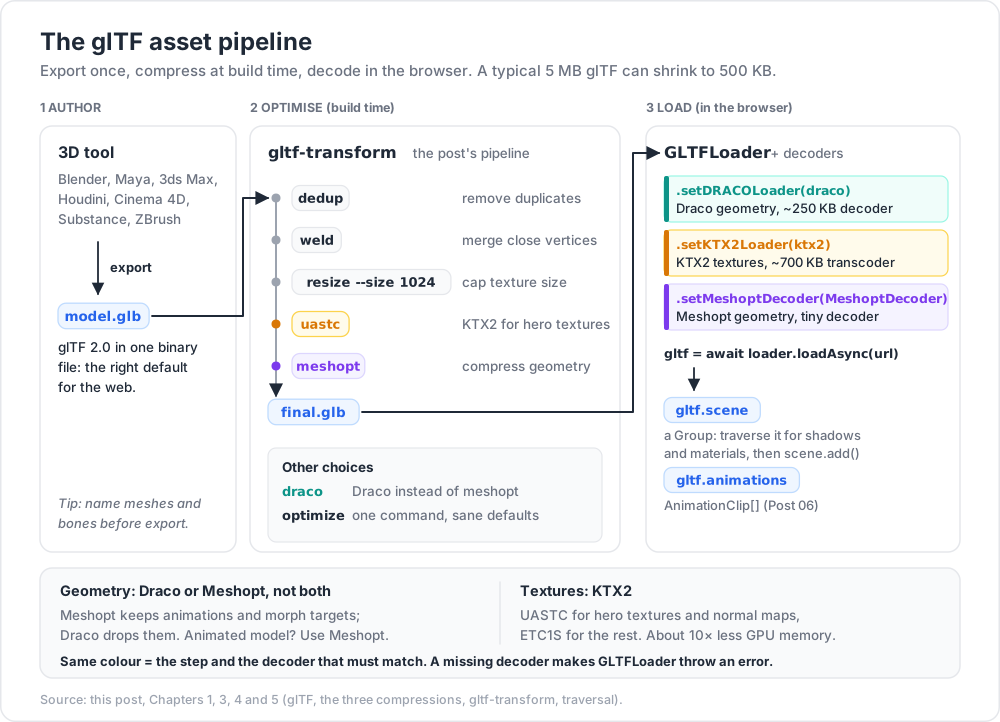
A typical 5 MB glTF can shrink to 500 KB with the right compression — and load 5× faster.
| Layer | What it compresses | Decoder bytes | Ratio |
|---|---|---|---|
| Draco | mesh geometry | ~250 KB (lazy loaded) | up to 10× |
| Meshopt | mesh geometry + animations + morph targets | tiny (no separate decoder) | similar to Draco, sometimes better |
| KTX2 / Basis | textures (GPU + disk) | ~700 KB transcoder | ~10× GPU memory |
You'll usually pick either Draco or Meshopt for geometry (not both), plus KTX2 for textures.
Draco setup
1
2
3
4
5
6
7
8
import { GLTFLoader } from 'three/addons/loaders/GLTFLoader.js';
import { DRACOLoader } from 'three/addons/loaders/DRACOLoader.js';
const draco = new DRACOLoader()
.setDecoderPath('https://unpkg.com/three@0.184.0/examples/jsm/libs/draco/');
const loader = new GLTFLoader().setDRACOLoader(draco);
KTX2 setup
1
2
3
4
5
6
7
8
import { KTX2Loader } from 'three/addons/loaders/KTX2Loader.js';
const ktx2 = new KTX2Loader()
.setTranscoderPath('https://unpkg.com/three@0.184.0/examples/jsm/libs/basis/')
.detectSupport(renderer);
loader.setKTX2Loader(ktx2);
Meshopt setup
1
2
3
4
import { MeshoptDecoder } from 'three/addons/libs/meshopt_decoder.module.js';
loader.setMeshoptDecoder(MeshoptDecoder);
All three together
1
2
3
4
5
const loader = new GLTFLoader()
.setDRACOLoader(new DRACOLoader().setDecoderPath(dracoPath))
.setKTX2Loader(new KTX2Loader().setTranscoderPath(basisPath).detectSupport(renderer))
.setMeshoptDecoder(MeshoptDecoder);
If a model uses a compression and the decoder isn't set, GLTFLoader throws a clear error. Add the decoder and reload.
Draco vs Meshopt
| Draco | Meshopt | |
|---|---|---|
| Compression | very good | comparable |
| Decode speed | slower (CPU-heavy) | faster |
| Animations / morph targets | dropped | preserved |
| Bundle cost | ~250 KB decoder (lazy) | tiny |
| Status | mature | modern, recommended for animated models |
For static models, either works. For models with skinned animation or morph targets, prefer Meshopt so the animation data survives compression.
Chapter 4 — gltf-transform (the optimisation Swiss-army knife)
gltf-transform is a command-line + Node library for inspecting + transforming glTF. Install:
1
2
npm install -g @gltf-transform/cli
Inspect
1
2
3
gltf-transform inspect chair.glb
# prints scene tree, materials, textures, sizes, draw call estimate
One-shot optimise (recommended for most users)
1
2
3
4
gltf-transform optimize chair.glb chair.opt.glb \
--texture-compress webp \
--simplify-error 0.001
The optimize command runs a sane default pipeline: dedup materials and textures, prune unused, weld vertices, quantise positions/uvs/normals, simplify lightly, compress textures.
Granular pipeline
1
2
3
4
5
6
7
8
9
10
11
12
gltf-transform draco in.glb out.glb # add Draco mesh compression
gltf-transform meshopt in.glb out.glb # add Meshopt instead
gltf-transform uastc in.glb out.glb # KTX2 / UASTC for hero textures
gltf-transform etc1s in.glb out.glb # KTX2 / ETC1S for secondary textures
gltf-transform dedup in.glb out.glb # remove duplicate geometries/materials/textures
gltf-transform prune in.glb out.glb # remove unused
gltf-transform weld in.glb out.glb # merge close vertices
gltf-transform simplify in.glb out.glb --ratio 0.5 # reduce poly count
gltf-transform quantize in.glb out.glb # reduce positions/normals/uvs precision
gltf-transform resize in.glb out.glb --size 1024 # cap texture resolution
gltf-transform metalrough in.glb out.glb # convert spec/gloss → metal/rough
A realistic production pipeline:
1
2
3
4
5
6
7
gltf-transform dedup model.glb a.glb
gltf-transform weld a.glb b.glb
gltf-transform resize --size 1024 b.glb c.glb
gltf-transform uastc c.glb d.glb # for normal/hero
# (separately handle baseColor/emissive with etc1s if you split)
gltf-transform meshopt d.glb final.glb
Or just gltf-transform optimize for sane defaults.
Chapter 5 — Scene-graph traversal after load
A loaded glTF is a normal THREE.Group. To wire shadows, swap materials, find named nodes:
1
2
3
4
5
6
7
8
9
10
11
12
13
14
15
16
gltf.scene.traverse((c) => {
if (c.isMesh) {
c.castShadow = true;
c.receiveShadow = true;
// optionally override material
if (c.name === 'glass_panel') {
c.material = new THREE.MeshPhysicalMaterial({
transmission: 1, roughness: 0, thickness: 0.5
});
}
}
if (c.isLight) {
c.castShadow = true;
}
});
Common finders:
1
2
3
4
const head = gltf.scene.getObjectByName('head');
const cams = gltf.cameras;
const clips = gltf.animations;
Trick: name your meshes and bones in Blender / Maya. Renaming after export is painful; well-named scene graph is gold.
Chapter 6 — Materials gotcha: overriding correctly
If you replace a material with a fresh one, you typically want to preserve maps + colour space:
1
2
3
4
5
6
7
8
9
10
11
12
13
14
15
16
17
18
gltf.scene.traverse((c) => {
if (c.isMesh && c.material.isMeshStandardMaterial) {
const old = c.material;
c.material = new THREE.MeshPhysicalMaterial({
map: old.map,
normalMap: old.normalMap,
roughnessMap: old.roughnessMap,
metalnessMap: old.metalnessMap,
aoMap: old.aoMap,
color: old.color,
// add Physical features
clearcoat: 1.0,
clearcoatRoughness: 0.1,
});
old.dispose();
}
});
Wholesale c.material = new MeshStandardMaterial() without preserving textures gives plain-coloured meshes — common surprise.
Chapter 7 — Embedded vs split glTF
| Layout | When |
|---|---|
.glb (everything in one binary) |
default — one HTTP request, no path mistakes |
.gltf + .bin + textures separately |
when textures change independently or shared across models |
.gltf with data-URIs (textures base64-inlined) |
rare — bloats parse |
For the web, .glb is the right default 99 % of the time.
Chapter 8 — Common pitfalls
| Symptom | Cause | Fix |
|---|---|---|
| Model loads but is invisible | scale mismatch (model in mm; scene in m) | export at correct unit; or gltf.scene.scale.setScalar(0.001) |
| Materials wrong colour | colour space mishandled (rare with glTFLoader; common if you bypass it) | trust GLTFLoader; don't post-process colour textures |
| Animations not playing | forgot to attach to AnimationMixer |
Post 06 |
| Console: "no DRACOLoader instance" | model uses Draco compression but decoder not configured | add DRACOLoader |
| Textures black on iOS Safari < 26 | KTX2 not supported in older Safari | ship JPG fallback or accept Safari 26+ baseline |
| Wrong winding / inside-out | left-handed exporter (rare); material.side = DoubleSide to test |
|
| Massive bundle on first load | decoders pulled into main bundle | use dynamic import to lazy-load decoders only when needed |
Lazy-loading decoders
1
2
3
4
5
6
7
8
9
async function loadModel(url) {
const { GLTFLoader } = await import('three/addons/loaders/GLTFLoader.js');
const { DRACOLoader } = await import('three/addons/loaders/DRACOLoader.js');
const loader = new GLTFLoader().setDRACOLoader(
new DRACOLoader().setDecoderPath('/draco/')
);
return loader.loadAsync(url);
}
The decoders aren't in your initial JS bundle — they download only when the first model loads.
Chapter 9 — Free models for learning
| Source | Notes |
|---|---|
| Khronos sample assets | canonical test models — bring this on every project |
| Sketchfab | free CC0 / CC-BY models; filter for glTF |
| Poly Pizza | low-poly CC0 assets |
| Quaternius | free low-poly packs |
| Kenney | huge free game-asset packs (some not glTF — convert in Blender) |
| Polyhaven | textures + HDRIs; some 3D models |
For learning Post 03's lighting, Post 04's PBR, Post 06's animation: use Khronos sample assets first. They're built specifically to exercise every glTF feature correctly.
Practice Exercises
Exercise 1 — Load + add
Download DamagedHelmet.glb from Khronos sample assets. Load with GLTFLoader. Add lighting + an HDR environment. Should look photorealistic.
Exercise 2 — Wire shadows on a loaded model
After load, traverse and castShadow / receiveShadow = true on every mesh. Add a ground plane that receives. Verify shadows render.
Exercise 3 — Optimise with gltf-transform
Take a 5+ MB glTF (search Sketchfab). Run gltf-transform inspect. Apply gltf-transform optimize. Compare sizes + load times. Confirm visually identical.
Exercise 4 — All three compressions
Apply Draco (or Meshopt) + KTX2 (UASTC for normal map, ETC1S for colour). Configure all three loaders in Three.js. Confirm renderer.info.memory.textures is way down.
Exercise 5 — Lazy decoders
Refactor your loader setup so DRACOLoader and KTX2Loader are dynamically imported. Confirm the initial bundle (npm run build) shrinks substantially.
Cheat-sheet
| What | How |
|---|---|
| Format default | .glb (binary, single file) |
| Loader | new GLTFLoader().setDRACOLoader(...).setKTX2Loader(...).setMeshoptDecoder(...) |
| Draco decoder path | three/examples/jsm/libs/draco/ |
| Basis transcoder path | three/examples/jsm/libs/basis/ |
| Optimise CLI | gltf-transform optimize in.glb out.glb |
| Geometry compression | Draco (static) or Meshopt (animated) |
| Texture compression | KTX2 UASTC (hero) + ETC1S (secondary) |
| Add to scene | scene.add(gltf.scene) |
| Find by name | gltf.scene.getObjectByName('foo') |
| Wire shadows | traverse + castShadow / receiveShadow = true |
| Get animations | gltf.animations (Post 06) |
| Preserve textures when swapping material | copy all map references explicitly |
| Lazy decoder | dynamic import() of GLTFLoader + DRACOLoader |
| Sample models | Khronos glTF-Sample-Assets repo |
What's next
Post 06 covers animation — AnimationMixer, glTF animation clips, morph targets, skinned meshes, frame-based vs delta-based timing, and the tween libraries that make non-skinned property animation pleasant.
References
- Three.js docs — GLTFLoader
- glTF 2.0 spec
- gltf-transform docs
- Khronos glTF Sample Assets
- glTF online optimisation tools (forum)
Note: this post is in progress. Planned additions: USDZ for AR, Blender export checklist, model size benchmarks, gltf-transform script-mode (use as a Node library).