Three.js Course — 03 · Lighting & Shadows (PCF, PCFSoft, VSM, CSM, Contact)
Lighting decides whether a 3D scene looks alive or flat. Shadows decide whether objects look grounded or floating. Three.js ships six light types, three shadow-map algorithms, an add-on for cascaded shadow maps, and several "fake" shadow techniques (contact shadow, baked AO, shadow catcher). This post covers all of them, plus the bias / map-size / camera tuning that makes shadows actually look good rather than buggy.
Series map: 00 Foundations → 01 Geometry & Materials → 02 Cameras & Controls → 03 Lighting & Shadows (this post) → 04 Textures & PBR → 05 Asset Pipeline → 06 Animation → 07 Instancing & Batching → 08 Low-End Perf → 09 Shaders → 10 Post-Processing → 11 Physics → 12 R3F → 13 AI 3D.
Learning Outcome
- Use all six light types:
AmbientLight,HemisphereLight,DirectionalLight,PointLight,SpotLight,RectAreaLight. - Enable + configure shadow maps without artefacts.
- Choose between
BasicShadowMap,PCFShadowMap,PCFSoftShadowMap,VSMShadowMap. - Tune
shadow.bias,normalBias,radius,mapSize, and the shadow camera frustum. - Use Cascaded Shadow Maps (
three-csm) for large outdoor terrains. - Pick when to use a "contact shadow" (cheap fake) or a baked AO map instead.
Chapter 1 — Light types
| Light | Direction | Cast shadow? | Cost | When |
|---|---|---|---|---|
AmbientLight |
uniform from all directions | no | free | scene "fill" so dark sides aren't black |
HemisphereLight |
sky colour above + ground colour below | no | very cheap | outdoor fill (sky → blue, ground → green) |
DirectionalLight |
parallel rays (like the sun) | yes | cheap-ish | sun, key light |
PointLight |
omni from a single point | yes (6-face cube map) | medium | lamps, fires |
SpotLight |
cone from a point | yes | medium | flashlights, stage lights |
RectAreaLight |
rectangle (area light) | no (yet) | medium | windows, softboxes; needs RectAreaLightUniformsLib init |
1
2
3
import { RectAreaLightUniformsLib } from 'three/addons/lights/RectAreaLightUniformsLib.js';
RectAreaLightUniformsLib.init(); // one-time
Intensity in 2026
Since Three.js r155, physically-correct lighting is the default. Intensity is in candela (point/spot) or lumens, and MeshStandardMaterial interprets it physically. A DirectionalLight intensity of 1.0 ≈ noon sun. A small PointLight for a desk lamp might be ~20-100.
To opt back into the old non-physical mode (for compatibility with older tutorials):
1
2
renderer.useLegacyLights = true; // discouraged
Chapter 2 — Enabling shadows (the three-step ritual)
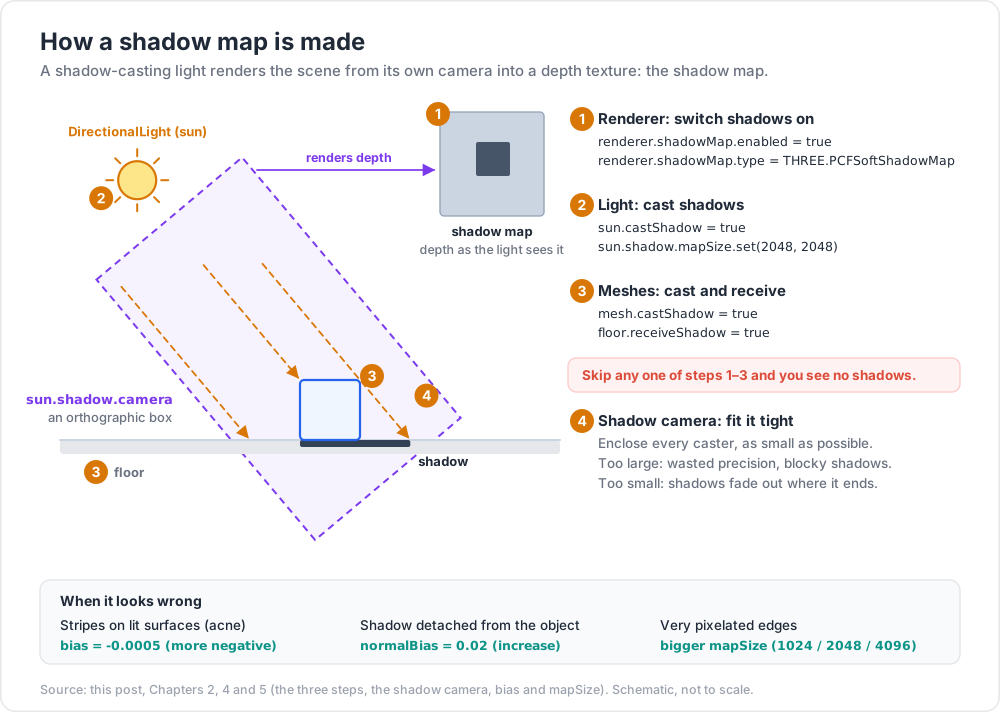
Shadows are off by default. Three steps to turn them on:
1
2
3
4
5
6
7
8
9
10
11
12
13
14
15
16
17
18
19
20
21
22
23
24
25
26
// 1. Renderer
renderer.shadowMap.enabled = true;
renderer.shadowMap.type = THREE.PCFSoftShadowMap;
// 2. Lights that cast
const sun = new THREE.DirectionalLight(0xffffff, 1.0);
sun.position.set(10, 15, 10);
sun.castShadow = true;
sun.shadow.mapSize.set(2048, 2048);
sun.shadow.camera.near = 0.5;
sun.shadow.camera.far = 50;
sun.shadow.camera.left = -20;
sun.shadow.camera.right = 20;
sun.shadow.camera.top = 20;
sun.shadow.camera.bottom = -20;
sun.shadow.bias = -0.0005;
sun.shadow.normalBias = 0.02;
scene.add(sun);
scene.add(new THREE.CameraHelper(sun.shadow.camera)); // debug
// 3. Meshes that cast / receive
model.traverse((c) => {
if (c.isMesh) { c.castShadow = true; c.receiveShadow = true; }
});
floor.receiveShadow = true;
Forget any one of these three and you'll see no shadows.
Chapter 3 — Shadow map types
| Type | Cost | Edge quality | Notes |
|---|---|---|---|
THREE.BasicShadowMap |
cheapest | hard, pixelated | rarely used |
THREE.PCFShadowMap |
medium | softer than basic, default | OK |
THREE.PCFSoftShadowMap |
medium-high | much softer, blurry | good default |
THREE.VSMShadowMap |
high (but blurrable for free) | very soft, can light-bleed | needs shadow.blurSamples + radius tuning |
Set globally on the renderer (above). For VSM, additionally:
1
2
3
sun.shadow.blurSamples = 25;
sun.shadow.radius = 4;
VSM has a unique benefit: the blur happens in screen space, so blur radius doesn't cost more shadow-map texture. Watch for light-bleeding artefacts at corners — usually fixed by adjusting shadow.bias and vsm parameters or by mixing with a tiny shadow.radius.
Chapter 4 — The shadow camera
A shadow-casting light renders the scene from its own viewpoint into a depth texture (the shadow map). That viewpoint is a camera — orthographic for DirectionalLight, perspective for SpotLight.
The frustum must:
- Be as small as possible while enclosing every shadow caster.
- Not crop the receiving floor / walls.
If too large → wasted precision → blocky shadows. If too small → shadows fade out where the frustum ends.
1
2
3
4
5
6
7
const cam = sun.shadow.camera;
cam.near = 1;
cam.far = 50;
cam.left = cam.bottom = -25;
cam.right = cam.top = 25;
cam.updateProjectionMatrix(); // required after changes
Trick: add
scene.add(new THREE.CameraHelper(sun.shadow.camera))while tuning. You see the shadow camera frustum in real time. Remove for production.
Chapter 5 — Bias, normalBias, radius, mapSize
Four knobs decide whether shadows look right or covered in stripes / floating / pixelated.
| Knob | What | Typical |
|---|---|---|
mapSize |
resolution of the shadow texture | 1024 / 2048 / 4096 (powers of 2) |
bias |
offsets depth to prevent shadow acne (self-shadowing artefacts) | -0.0005 |
normalBias |
offsets along surface normal — fixes "peter panning" (shadows detached from feet) | 0.02 |
radius |
softening radius (PCF / VSM) | 1-8 |
Classic recipe:
1
2
3
4
5
sun.shadow.mapSize.set(2048, 2048);
sun.shadow.bias = -0.0005;
sun.shadow.normalBias = 0.02;
sun.shadow.radius = 4;
Symptoms / fixes:
| Symptom | Fix |
|---|---|
| Banding / stripes on lit surfaces ("shadow acne") | increase bias magnitude (more negative) |
| Shadows detached from objects ("peter pan") | increase normalBias |
| Edges very pixelated | bigger mapSize (cost: GPU memory + fill rate) |
| Shadows fade to nothing at distance | enlarge shadow camera frustum |
| Light-bleeding at corners (VSM) | reduce radius, or fall back to PCFSoft |
Chapter 6 — Cascaded Shadow Maps (CSM)
For huge outdoor terrains, a single shadow map is either pixelated everywhere (too big a frustum) or sharp near and gone far (too small). CSM splits the camera frustum into N slices (cascades), each with its own shadow map at decreasing resolution as distance grows.
Three.js doesn't ship CSM; use three-csm (or its r3f cousin react-three-csm):
1
2
npm install three-csm
1
2
3
4
5
6
7
8
9
10
11
12
13
14
15
import { CSM } from 'three-csm';
const csm = new CSM({
maxFar: 200,
cascades: 4,
shadowMapSize: 2048,
lightDirection: new THREE.Vector3(-1, -1, -1).normalize(),
camera: camera,
parent: scene,
});
csm.update(); // call each frame
// Materials must be updated to read the cascade uniforms:
mesh.material = csm.setupMaterial(mesh.material);
Use CSM whenever the visible terrain is much larger than the camera's close-up area — landscape games, open worlds, architectural visualisations of city blocks.
Chapter 7 — Contact shadows + AO + shadow-catcher tricks
Real-time shadows aren't always needed. Cheaper effects often look better.
Contact shadow ("AccumulativeShadows" / soft ground shadow)
A pre-baked or accumulated render of the object from above, splatted onto a transparent plane under it. Looks gorgeous, costs nearly nothing per frame.
- Drei:
<AccumulativeShadows>+<RandomizedLight>— a one-liner in R3F. - Vanilla: render the object N times with jittered light, composite into a render target.
Ambient occlusion (AO)
The "darkening in corners + crevices" effect that ground objects in shadow without computing every light.
Two paths:
- Baked AO — bake in Blender / Substance, export as
aoMaptexture, apply viamaterial.aoMap = ...; material.aoMapIntensity = 1. - Screen-space AO (SSAO) — runtime post-processing pass (Post 10).
Baked is cheaper + higher quality where the geometry is static.
Shadow catcher
A plane that only displays the shadow of objects above it (transparent everywhere else). Useful for product viewers on a transparent background:
- Drei:
<ShadowMaterial>on a plane. - Vanilla:
new THREE.ShadowMaterial({ opacity: 0.5 }).
1
2
3
4
5
6
7
8
const plane = new THREE.Mesh(
new THREE.PlaneGeometry(20, 20),
new THREE.ShadowMaterial({ opacity: 0.4 })
);
plane.rotation.x = -Math.PI / 2;
plane.receiveShadow = true;
scene.add(plane);
Chapter 8 — Performance budget for shadows
Shadows are often the most expensive part of a Three.js scene. Rough budget:
| Setup | Frame cost (mid-range desktop) |
|---|---|
| No shadows | ~0 |
| 1 DirectionalLight, 1024 map, PCF | ~0.5-1 ms |
| 1 DirectionalLight, 2048 map, PCFSoft | ~1-3 ms |
| 1 DirectionalLight, 4096 map, VSM | ~3-8 ms |
| 4-cascade CSM, 2048 each | ~6-15 ms |
| PointLight shadow (6-face cube) | ~3-5× a DirectionalLight |
| 3+ shadow-casting lights | quickly exceeds budget on mobile |
Mobile cuts these costs in half on optimistic GPUs and 3× on bad ones. Plan for ≤ 1 shadow-casting light + 1024 map on phones.
Trick: for indoor scenes with many lights, bake the lightmap (Blender → Cycles → bake → export texture → assign as
lightMap). Static lighting becomes a texture — zero per-frame cost. Real-time lights are only used for dynamic objects.
Chapter 9 — frustumCulled, matrixAutoUpdate, and shadow update modes
Two perf flags worth knowing in the lighting context:
1
2
3
sun.shadow.autoUpdate = false; // freeze the shadow map (static scene)
sun.shadow.needsUpdate = true; // ask for a one-shot re-render
For mostly-static scenes (architectural visualisations), turning off autoUpdate and only flagging needsUpdate when something moves is a free speed boost.
1
2
3
4
mesh.frustumCulled = true; // default — meshes outside camera are skipped
mesh.matrixAutoUpdate = false; // if mesh never moves
mesh.updateMatrix(); // call once after final transform
These also help shadow rendering: the shadow camera does its own frustum culling, so meshes with stale matrices waste work.
Practice Exercises
Exercise 1 — Basic shadow setup
A cube on a plane. One DirectionalLight. Walk through the three-step ritual. Confirm a shadow appears.
Exercise 2 — Compare shadow types
Same scene, cycle through BasicShadowMap, PCFShadowMap, PCFSoftShadowMap, VSMShadowMap. Note difference in edges + framerate.
Exercise 3 — Tune bias
Deliberately set bias = 0. Observe acne. Lower to -0.001 until it disappears. Then experiment with normalBias on a slanted surface.
Exercise 4 — Cascaded shadow maps
Build a 200×200 terrain (PlaneGeometry(200, 200)). Place 100 trees (cubes for now) on it. Compare a single 4096 shadow map vs a 4-cascade CSM. Note the close-up shadow sharpness.
Exercise 5 — Shadow catcher
Load a single product model (any GLB) on a transparent ShadowMaterial plane. Render with renderer.setClearAlpha(0). The result: model + soft shadow, no ground visible.
Exercise 6 — Lightmap workflow
In Blender, build a simple room (4 walls + floor), bake AO, export the AO texture. In Three.js, load the room as GLB, attach the AO texture as aoMap. Compare with and without.
Cheat-sheet
| What | How |
|---|---|
| Enable shadows | renderer.shadowMap.enabled = true |
| Soft shadow type | renderer.shadowMap.type = THREE.PCFSoftShadowMap |
| Cast | light.castShadow = true + mesh.castShadow = true |
| Receive | mesh.receiveShadow = true (and floor) |
| Shadow camera frustum | tighten via shadow.camera.{left,right,top,bottom,near,far} |
| After frustum change | shadow.camera.updateProjectionMatrix() |
| Shadow resolution | light.shadow.mapSize.set(2048, 2048) |
| Bias defaults | bias = -0.0005, normalBias = 0.02 |
| Debug | new THREE.CameraHelper(light.shadow.camera) |
| Cascaded shadows | three-csm library, 2-4 cascades |
| Contact shadow | accumulated splat or Drei <AccumulativeShadows> |
| AO | bake to aoMap for static; SSAO in post for dynamic |
| Static scene speedup | shadow.autoUpdate = false; flag needsUpdate on change |
| Physically correct in 2026 | default since r155; tune intensities accordingly |
What's next
Post 04 covers textures and PBR: how to load and configure colour, normal, roughness, metallic, AO maps; the sRGB / linear colour pipeline; mipmaps + anisotropy; environment maps (IBL); and KTX2 compressed textures.
References
- Three.js docs — Lights
- Three.js docs — LightShadow
- three-csm — cascaded shadow maps
- Mastering Shadows in Three.js (dev.to)
- Shadow optimisation forum thread
Note: this post is in progress. Planned additions: ESM (Exponential Shadow Map) plugin survey; baking lightmaps in Blender step-by-step; cubeUV reflections lighting.