MongoDB Course — 16 · Atlas — Search, Vector Search (RAG), Triggers, Stream Processing
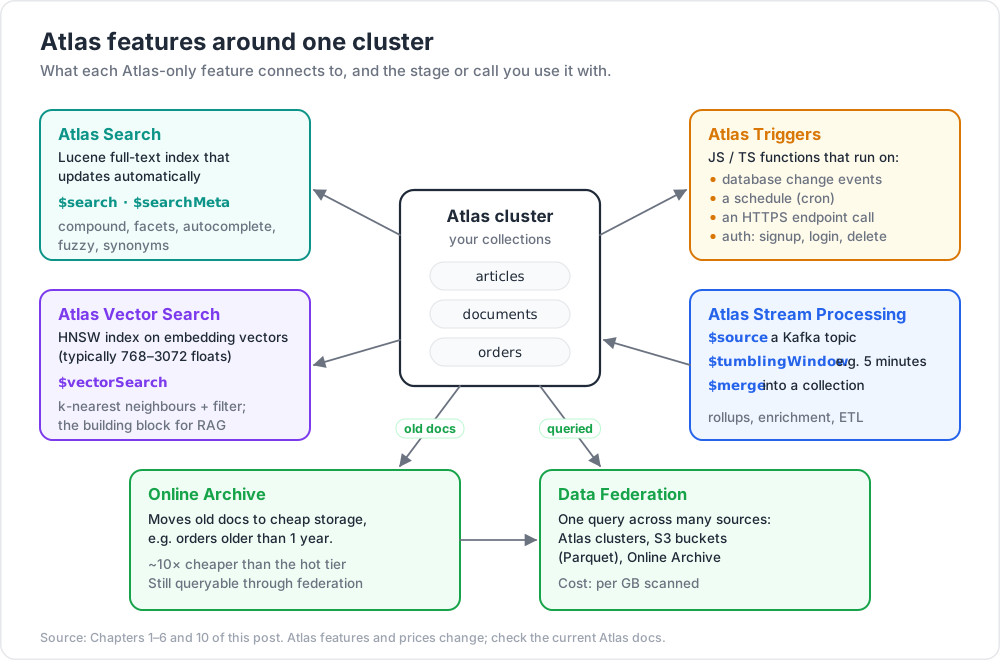
Atlas is MongoDB Inc.'s managed cloud service. Beyond hosting Mongo for you, Atlas ships features the open-source core doesn't have: Atlas Search (Lucene-based full-text), Atlas Vector Search (k-NN over embeddings — the building block of every RAG system in 2026), Atlas Triggers (serverless functions on database events / schedules / HTTP), Atlas Stream Processing (real-time pipelines over Kafka streams + Mongo collections), Atlas Online Archive (tier old data to cheap storage), and Data Federation (one query over Mongo + S3 + more). This post covers all of them with the patterns that show up in production.
Series map: 00 Foundations → … → 15 Performance Deep → 16 Atlas (this post) → 17 Drivers & Case Studies.
Learning Outcome
- Build an Atlas Search index + run full-text queries with facets, autocomplete, fuzzy.
- Build an Atlas Vector Search index + run k-NN over embeddings (RAG basics).
- Wire up Atlas Triggers — database / scheduled / HTTP / authentication.
- Run an Atlas Stream Processing pipeline over a Kafka source.
- Use Online Archive + Data Federation for cost-effective long-term data.
Chapter 1 — Atlas Search (Lucene full-text)
Atlas Search runs a Lucene index alongside your Mongo collection. Updates propagate automatically; queries use the new $search aggregation stage.
Create the index (UI or db.createSearchIndex since 7.0)
1
2
3
4
5
6
7
8
9
10
11
12
13
14
15
db.articles.createSearchIndex({
name: "default",
definition: {
mappings: {
dynamic: false,
fields: {
title: { type: "string", analyzer: "lucene.standard" },
body: { type: "string", analyzer: "lucene.english" },
tags: { type: "string", analyzer: "keyword" },
created: { type: "date" }
}
}
}
})
dynamic: true auto-indexes every string field; useful for prototyping, costly at scale.
Search
1
2
3
4
5
6
7
8
9
10
11
12
13
db.articles.aggregate([
{ $search: {
index: "default",
text: {
query: "mongodb tutorial",
path: ["title", "body"],
fuzzy: { maxEdits: 1 }
}
}},
{ $project: { _id: 1, title: 1, score: { $meta: "searchScore" } } },
{ $limit: 20 }
])
Compound queries with must / should / mustNot / filter:
1
2
3
4
5
6
7
8
9
10
{ $search: {
index: "default",
compound: {
must: [{ text: { query: "mongo", path: "body" } }],
should: [{ text: { query: "atlas", path: "title", score: { boost: { value: 3 } } } }],
filter: [{ range: { path: "created", gte: ISODate("2026-01-01") } }],
mustNot: [{ text: { query: "deprecated", path: "tags" } }]
}
}}
Facets — counts per dimension
1
2
3
4
5
6
7
8
9
10
11
{ $searchMeta: {
index: "default",
facet: {
operator: { text: { query: "mongo", path: "body" } },
facets: {
tag_facet: { type: "string", path: "tags" },
year_facet: { type: "date", path: "created", boundaries: [ISODate("2024"), ISODate("2025"), ISODate("2026")] }
}
}
}}
Produces counts per facet bucket — perfect for filtered search UIs.
Autocomplete
1
2
3
4
5
6
7
8
9
{ $search: {
index: "default",
autocomplete: {
query: "mongo",
path: "title",
fuzzy: { maxEdits: 1 }
}
}}
Add an autocomplete field type in the index definition (type: "autocomplete").
Atlas Search replaces $text (Post 02) for any serious search workload — scoring, autocomplete, fuzzy, facets, multi-language, synonyms.
Chapter 2 — Atlas Vector Search — the RAG building block
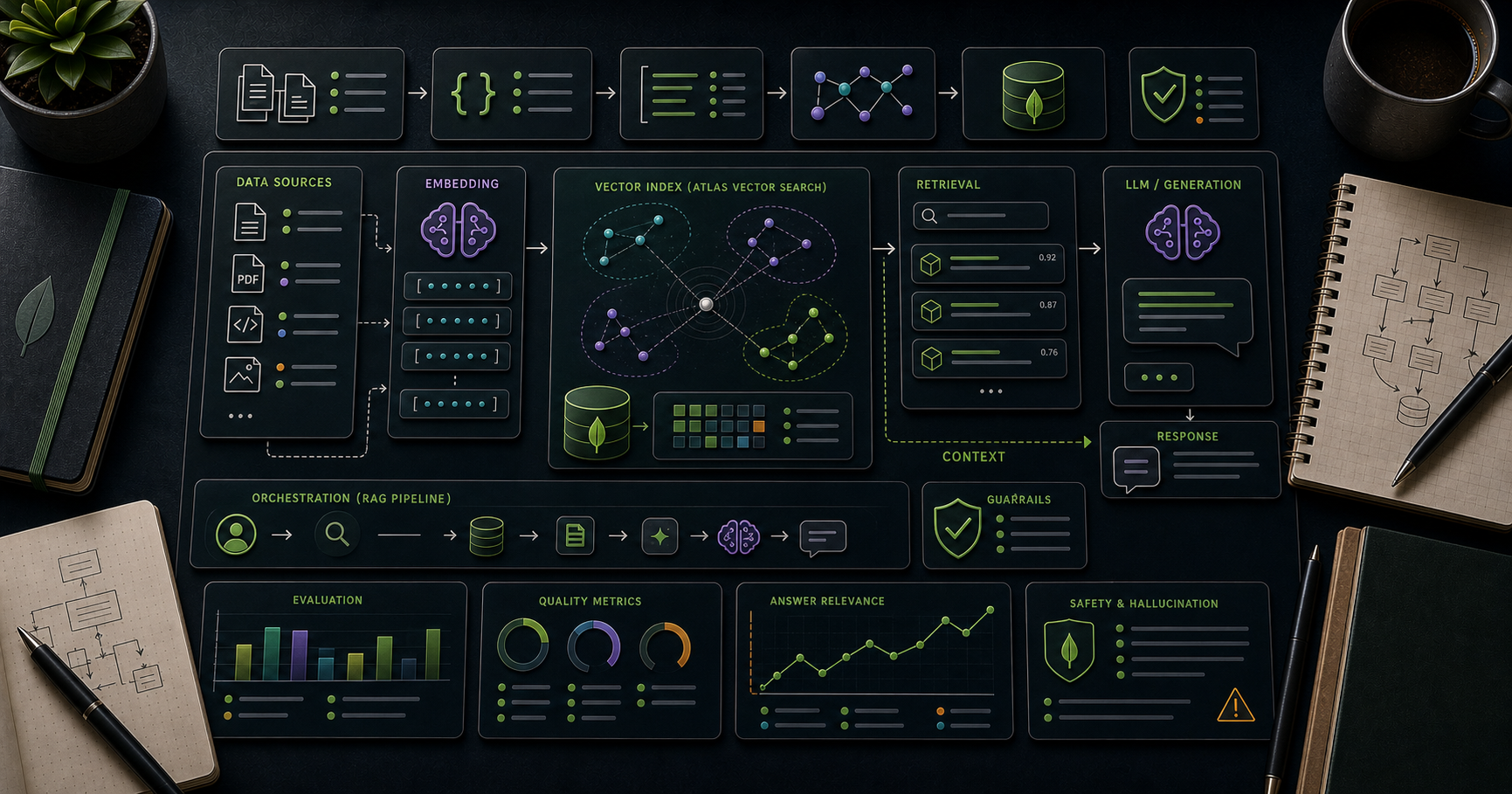
Vector Search stores embedding vectors (typically 768-3072 floats) alongside documents and answers k-nearest-neighbour queries. Building block for RAG (Retrieval-Augmented Generation), semantic search, recommendation engines.
Create the index
1
2
3
4
5
6
7
8
9
10
11
12
13
14
15
16
17
18
19
db.documents.createSearchIndex({
name: "vector_index",
type: "vectorSearch",
definition: {
fields: [
{
type: "vector",
path: "embedding",
numDimensions: 1536, // matches your embedding model
similarity: "cosine" // cosine | euclidean | dotProduct
},
{
type: "filter",
path: "category" // can filter alongside vector search
}
]
}
})
The index is HNSW (Hierarchical Navigable Small World) under the hood — fast approximate nearest neighbour at scale.
Query
1
2
3
4
5
6
7
8
9
10
11
12
db.documents.aggregate([
{ $vectorSearch: {
index: "vector_index",
path: "embedding",
queryVector: [/* 1536-dim float array from your embedder */],
numCandidates: 200, // search width (recall vs latency trade-off)
limit: 10,
filter: { category: "tech" } // optional pre-filter
}},
{ $project: { _id: 1, title: 1, score: { $meta: "vectorSearchScore" } } }
])
RAG pipeline (end-to-end)
1
2
3
4
5
6
7
8
9
10
11
1. Document ingest:
text → embedder (OpenAI, Cohere, Mistral, voyage-ai, etc.) → vector
insert { text, embedding: vector, metadata } into Atlas
2. Query time:
user question → embedder → query_vector
$vectorSearch retrieves top-K relevant chunks
stuff into LLM prompt:
"Answer this question using only the following context: ..."
stream LLM response to user
Two Mongo features make this natural:
- One database for the documents + their embeddings + their metadata.
- Vector + filter combined (e.g., "semantic search restricted to this tenant's documents only").
Common 2026 embedding choices:
- OpenAI
text-embedding-3-small(1536 dim) /text-embedding-3-large(3072 dim). - Cohere
embed-multilingual-v3(1024 dim). - Open-source on-prem:
gte-large,bge-large,voyage-3(varies).
Dimension + similarity must match your embedder.
Hybrid search
Combine Atlas Search (lexical) + Vector Search (semantic) for the best of both:
1
2
3
4
5
6
7
8
[
{ $search: { ... lexical ... } },
{ $unionWith: { coll: "documents", pipeline: [{ $vectorSearch: { ... semantic ... } }] } },
{ $group: { _id: "$_id", score: { $sum: "$score" }, doc: { $first: "$$ROOT" } } },
{ $sort: { score: -1 } },
{ $limit: 20 }
]
Production RAG systems usually combine both signals + rerank with a small model.
Chapter 3 — Atlas Triggers — serverless events
Triggers run JavaScript / TypeScript functions in response to events. Three trigger types:
Database trigger (change-stream-driven)
1
2
3
4
5
6
7
8
// runs on every insert/update/delete on shop.orders
exports = async function(changeEvent) {
const order = changeEvent.fullDocument;
if (changeEvent.operationType !== 'insert') return;
await context.functions.execute('sendOrderConfirmationEmail', order);
};
Equivalent to running a change-stream consumer yourself (Post 12) but with no infrastructure to manage.
Scheduled trigger (cron)
1
2
3
4
5
6
7
8
9
10
Schedule: 0 1 * * * # 01:00 UTC daily
exports = async function() {
const db = context.services.get('mongodb-atlas').db('shop');
await db.collection('daily_revenue').aggregate([
/* ... refresh pipeline ... */,
{ $merge: { into: 'daily_revenue', on: '_id', whenMatched: 'merge', whenNotMatched: 'insert' } }
]).toArray();
};
HTTPS endpoint
Expose your function as an HTTPS API. Standard for lightweight webhooks, integrations.
Authentication trigger
Run on user signup / login / delete in Atlas App Services (Realm) auth.
Triggers are billed per invocation + per millisecond of compute. Free tier covers light workloads. Atlas Functions support npm packages, secrets, HTTPS calls, MongoDB driver built-in.
Chapter 4 — Atlas Stream Processing
Real-time pipelines that combine streams (Kafka) + Atlas collections + sinks (Kafka, collections, S3). Use SQL-like aggregation pipelines over windows of events.
1
2
3
4
5
6
7
8
9
10
11
12
13
14
15
16
17
18
19
const sp = [
{ $source: {
connectionName: "kafka-cluster",
topic: "orders.events"
}},
{ $tumblingWindow: {
interval: { size: 5, unit: "minute" },
pipeline: [
{ $group: { _id: "$region", count: { $sum: 1 }, revenue: { $sum: "$total" } } }
]
}},
{ $merge: {
into: { connectionName: "atlas-cluster", db: "analytics", coll: "region_revenue_5m" },
on: "_id"
}}
];
sp.processor("orders_5m_rollup").start();
Use cases:
- Real-time aggregation (per-region revenue per 5-minute window).
- Stream enrichment (join Kafka clickstream with user profiles in Mongo).
- ETL into a warehouse.
Stream Processing is GA in 2026; competes with managed Flink / Kafka Streams. Compelling when your data lives in Atlas anyway.
Chapter 5 — Online Archive
Move old documents to cheap blob storage, queryable via the same connection.
1
2
3
4
Cluster policy:
- Archive orders older than 1 year → S3-style storage
- Still queryable transparently via federated query
Set up via Atlas UI: pick a collection, define a date-based filter, choose retention. After archive, documents are gone from the primary collection but reachable via the federated database.
Cost: archived data is ~10× cheaper than hot tier.
Use cases: compliance retention; lifecycle management; right-sizing the hot cluster.
Chapter 6 — Data Federation
Run one query across Atlas clusters + S3 + other federated sources:
1
2
3
4
5
6
Federated database = virtual DB
- Source 1: Atlas cluster A
- Source 2: Atlas cluster B
- Source 3: S3 bucket of Parquet files
- Source 4: Online Archive
1
2
3
4
5
6
// queries from any driver — the federation layer routes + merges
db.federated_db.federated_orders.aggregate([
{ $match: { at: { $gte: ISODate("2020-01-01") } } }, // covers archived + live
{ $group: { _id: { $year: "$at" }, revenue: { $sum: "$total" } } }
])
For analytics over years of mixed-tier data, much simpler than ETL + a warehouse.
Chapter 7 — Atlas Charts
A built-in BI tool for visualising MongoDB data. Drag fields, build dashboards, embed via iframe / API. Skips the need for a separate BI tool for small to medium projects.
Pair with $merge-built materialised views (Post 06) for fast dashboard reads.
Chapter 8 — Atlas App Services (formerly Realm)
A serverless backend platform: auth, functions, GraphQL endpoint, HTTPS rules. Pairs naturally with Atlas Triggers + Mongo for full-stack apps without managing servers.
In 2026 the focus shifted toward leaner primitives (Triggers + Functions + HTTPS endpoints) rather than the full Realm stack. Check current docs for the supported feature set.
Chapter 9 — When to lean on Atlas vs DIY
Lean on Atlas when:
- Search + vector + serverless triggers + monitoring are all needed.
- Small / medium ops team — managed > self-hosted.
- Multi-region HA + automatic backups + PITR are required.
- Workloads benefit from one provider (less integration).
DIY (self-hosted Mongo + Elasticsearch + Kafka + cron + S3) when:
- Existing infra investment.
- On-prem or sovereign cloud requirement.
- Cost optimisation at very large scale.
Most teams below 100-engineer scale benefit from Atlas. Most teams above can justify either way.
Chapter 10 — Cost notes (rough, 2026)
| Resource | Cost driver |
|---|---|
| Atlas cluster | tier hours (M0 free → M700+ enterprise) |
| Atlas Search | search node hours + index storage |
| Atlas Vector Search | same nodes; cost scales with vectors + dims |
| Triggers / Functions | invocations + compute ms |
| Stream Processing | processor hours + Kafka egress |
| Online Archive | storage GB-month + queries |
| Data Federation | per-GB scanned |
| Backups | retention storage |
Always check current Atlas pricing page — values shift. Use the Atlas billing dashboard + alerts.
Chapter 11 — Common pitfalls
| Pitfall | Cause | Fix |
|---|---|---|
$search returns 0 — fresh index |
indexing in progress | wait + check index status |
| Vector dim mismatch | model changed; index didn't | rebuild index for new dim |
| Vector search slow + low recall | numCandidates too small |
raise (cost trade-off) |
| Trigger silent failure | exception in function | check Atlas Function logs |
| Stream processor lag | sink slow / window too big | profile sink; smaller windows |
| Federation query super slow | large S3 scan | partition source data by date / key |
| Charts dashboard slow | querying raw events | precompute via $merge materialised view |
| Search costs surprise | dynamic mapping indexing everything | narrow mappings.fields explicitly |
Practice Exercises
Exercise 1 — Search index
On a sample articles collection, create an Atlas Search index. Query for "mongodb" with fuzzy + autocomplete.
Exercise 2 — Vector search RAG
Generate embeddings (OpenAI / Cohere / local model) for a handful of documents. Store in Mongo. Build a vector index. Run k-NN for a user query embedding. Confirm relevant docs returned.
Exercise 3 — Trigger on insert
Write an Atlas Database trigger on orders that posts a webhook with the new order. Test by inserting; confirm webhook receives the payload.
Exercise 4 — Scheduled refresh
Build a scheduled trigger that refreshes daily_revenue via $merge every hour.
Exercise 5 — Hybrid search
Combine lexical search + vector search with $unionWith (Chapter 2). Compare top 10 results vs lexical-only vs vector-only.
Exercise 6 — Online Archive
Set up archive on a synthetic events collection — move data > 30 days old. Query via federation across hot + archive; confirm transparency.
Cheat-sheet
| What | How |
|---|---|
| Search index | UI or db.coll.createSearchIndex({ name, definition }) |
| Text search | $search: { index, text: { query, path } } |
| Compound | must / should / mustNot / filter |
| Facets | $searchMeta: { facet: { operator, facets } } |
| Autocomplete | autocomplete field type + $search.autocomplete |
| Vector index | type: "vectorSearch", fields: vector + filter |
| Vector query | $vectorSearch: { queryVector, numCandidates, limit, filter } |
| Similarity | cosine / euclidean / dotProduct |
| RAG pipeline | embed → store → query embed → $vectorSearch → LLM prompt |
| Hybrid | $search + $unionWith + $vectorSearch + rerank |
| Database trigger | runs on change events |
| Scheduled trigger | cron form |
| HTTPS endpoint | trigger + URL |
| Stream Processing | $source → $tumblingWindow → $merge |
| Online Archive | tier old data to cheap storage; still queryable |
| Data Federation | one query across many sources |
| Charts | built-in dashboards |
| When Atlas | small/mid teams; broad managed feature need |
What's next
Post 17 — the final base post — covers drivers + modelling case studies: Node official + Mongoose vs Prisma, Python pymongo + Motor, Go, Rust, and end-to-end models for time-series, IoT telemetry, e-commerce catalogue, social feed, multi-tenant SaaS.
References
- Atlas Search
- Atlas Vector Search
- Atlas Triggers
- Atlas Stream Processing
- Online Archive
- Data Federation
Note: this post is in progress. Planned additions: end-to-end RAG sample app (Next.js + OpenAI + Atlas Vector); benchmark of HNSW recall vs
numCandidates; cost case studies.