MongoDB Course — 00 · Foundations, Document Model, Install, Tools
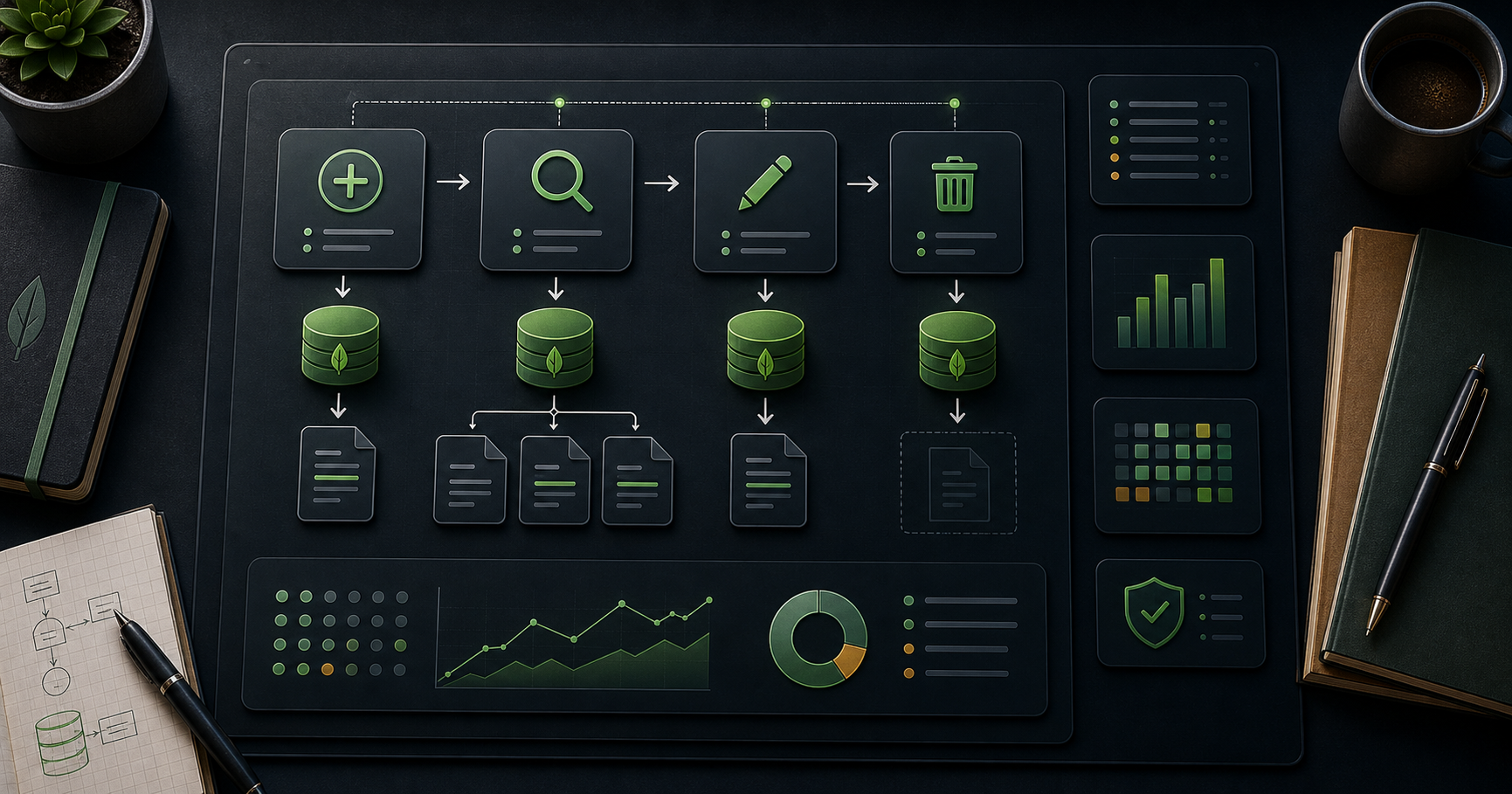
MongoDB is the most popular general-purpose document database. It stores JSON-like documents (BSON on disk), scales horizontally via sharding, and trades the rigid schema + joins of relational databases for flexible schemas, fast denormalised reads, and rich nested queries. This 18-post course covers it from "what is a document" through CRUD, indexes, aggregation, schema design, connection pools, transactions, replication, sharding, security, backups, performance, Atlas, drivers, and modelling case studies. Post 00 grounds the rest in the mental model + tooling every project reuses.
Series map: 00 Foundations (this post) → 01 CRUD → 02 Query Operators → 03 Indexes → 04 Query Optimization → 05 Aggregation Basics → 06 Aggregation Advanced → 07 Schema Design → 08 Connection Pool & Concurrency → 09 Transactions → 10 Replica Sets → 11 Sharding → 12 Change Streams → 13 Security → 14 Backup & Ops → 15 Performance Deep → 16 Atlas Search + Vector + Triggers → 17 Drivers & Modelling Case Studies.
Learning Outcome
- Explain the document model and how it differs from relational.
- Define database, collection, document, field, BSON.
- Install MongoDB locally and connect with
mongosh. - Connect to a free MongoDB Atlas cluster.
- Use Compass (GUI) and the official driver landscape.
- Recognise when MongoDB is the right (or wrong) tool.
Chapter 1 — What MongoDB is
Terminology
- MongoDB — distributed document database; open-source core + commercial Atlas service.
- Document — a BSON object: ordered key-value pairs, nested arrays + sub-documents. Conceptually a JSON object with extra types (ObjectId, Date, Binary, Decimal128).
- Collection — a group of documents (analogous to a SQL table; no enforced schema by default).
- Database — a group of collections.
- BSON — Binary JSON, the on-disk + on-wire format. Adds types JSON lacks (ObjectId, Date, Binary, etc.) and length-prefixes for fast traversal.
_id— every document has one. Auto-generatedObjectId(12 bytes: timestamp + machine + pid + counter) unless you supply your own.- Replica set — a group of
mongodprocesses that maintain the same data; provides HA + read scaling. - Sharded cluster — multiple replica sets partitioned by a shard key; provides horizontal write scaling.
Document example
1
2
3
4
5
6
7
8
9
10
11
12
{
"_id": ObjectId("65e1c1e7f3b6a1b2c3d4e5f6"),
"name": "Ada Lovelace",
"email": "ada@example.com",
"tags": ["mathematician", "engineer"],
"address": {
"city": "London",
"country": "UK"
},
"created_at": ISODate("2026-05-24T09:00:00Z")
}
One document holds the user, their tags array, and a nested address — no joins, no separate tables.
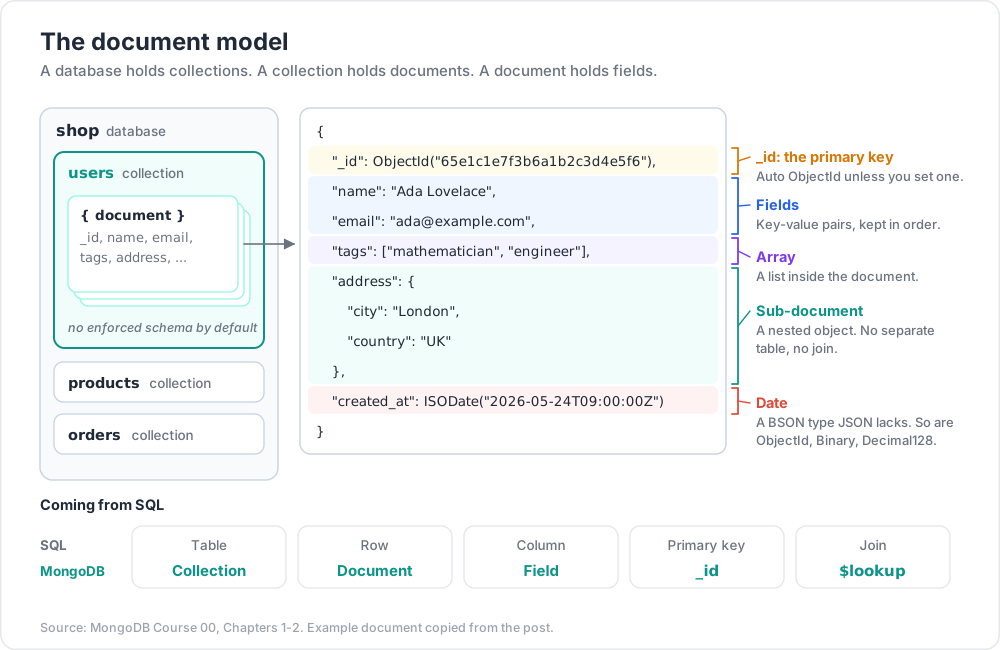
Chapter 2 — Document vs relational mental model
| Relational | MongoDB |
|---|---|
| Database | Database |
| Table | Collection |
| Row | Document |
| Column | Field |
| Primary key | _id |
| Foreign key | Reference (manual or $lookup) |
| Join | $lookup aggregation stage |
| Schema enforced by DDL | Optional schema validation ($jsonSchema) |
| Transactions | Multi-document transactions (since 4.0) |
| Index | Index (B-tree, hashed, text, geo, vector) |
The shift in thinking:
- Relational: normalise first, denormalise for performance.
- Document: denormalise first (embed related data) for read locality; reference only when reuse + size dictate.
Post 07 (Schema Design) covers this decision deeply.
When MongoDB fits
- Document-shaped data (catalogue items, user profiles, content items).
- High write throughput with sharding.
- Flexible / evolving schema (early product, multi-tenant SaaS with per-tenant variation).
- Geographic + full-text + vector queries on the same data.
- Real-time change streams.
When MongoDB doesn't fit (consider alternatives)
- Heavy multi-row ACID transactions → Postgres / CockroachDB.
- Complex relational reporting + ad-hoc joins → relational + warehouse.
- Pure key-value at giant scale → Redis / DynamoDB.
- Strict tabular columnar analytics → ClickHouse / BigQuery.
Chapter 3 — Versions in 2026
MongoDB ships major versions yearly; current as of 2026 is 8.x. LTS-friendly defaults:
| Version | Notable |
|---|---|
| 4.0 (2018) | multi-document transactions |
| 4.2 | sharded transactions, wildcard indexes |
| 5.0 | resharding, time-series collections, window functions |
| 6.0 | queryable encryption (preview), Atlas Vector Search foundations |
| 7.0 | queryable encryption GA, large change-stream events |
| 8.0+ | continued perf + TSL-era features |
For new projects in 2026, target 8.x (latest GA). Atlas Free Tier runs the current version automatically.
Chapter 4 — Install
Local — three paths
Docker (recommended for learning):
1
2
3
docker run -d --name mongo -p 27017:27017 mongo:8
docker exec -it mongo mongosh
macOS:
1
2
3
4
brew tap mongodb/brew
brew install mongodb-community@8.0
brew services start mongodb-community@8.0
Linux (Ubuntu):
1
2
3
4
5
6
curl -fsSL https://www.mongodb.org/static/pgp/server-8.0.asc | sudo gpg -o /usr/share/keyrings/mongodb.gpg --dearmor
echo "deb [arch=amd64,arm64 signed-by=/usr/share/keyrings/mongodb.gpg] https://repo.mongodb.org/apt/ubuntu jammy/mongodb-org/8.0 multiverse" \
| sudo tee /etc/apt/sources.list.d/mongodb.list
sudo apt update && sudo apt install -y mongodb-org
sudo systemctl enable --now mongod
Windows:
Use the official MSI from mongodb.com/try/download/community, or Docker Desktop.
Atlas (cloud, free tier)
- Sign up at cloud.mongodb.com.
- Create an M0 free cluster (512 MB storage, shared, free forever).
- Add your IP to the access list.
- Create a database user.
- Copy the connection string (
mongodb+srv://...).
Atlas is faster to start than local for anything beyond toy demos and is where everything from Post 16 (Search + Vector + Triggers) lives.
Chapter 5 — mongosh (the shell)
mongosh is the modern JavaScript REPL replacing the legacy mongo shell.
1
2
3
4
mongosh # localhost
mongosh "mongodb://user:pass@localhost:27017/mydb"
mongosh "mongodb+srv://user:pass@cluster0.abcd.mongodb.net/mydb"
Inside:
1
2
3
4
5
6
7
8
9
show dbs // list databases
use shop // switch (auto-creates on first write)
show collections
db.users.insertOne({ name: "Ada", age: 30 })
db.users.find({ age: { $gt: 25 } })
db.users.countDocuments()
db.users.drop()
exit
The shell is a real JS environment — for loops, async/await, file I/O via load("script.js"). Tab-completion works on databases, collections, and operators.
Trick: put your reusable shell helpers in
~/.mongoshrc.js. Sample:
2
3globalThis.cls = () => console.clear();
globalThis.pretty = (cur) => cur.forEach((d) => print(JSON.stringify(d, null, 2)));
Chapter 6 — Compass (the GUI)
MongoDB Compass is the official desktop client. Useful for:
- Schema discovery — sample documents + auto-detect field types + distributions.
- Visual query builder.
- Aggregation pipeline editor with stage-by-stage preview.
- Performance tab — explain + index hints.
- Connection-string + Atlas integration.
Beginners learn faster with Compass open beside mongosh. Compass writes the same commands mongosh does — copy and paste between them.
Chapter 7 — Drivers (official languages)
| Language | Package | Notes |
|---|---|---|
| Node.js | mongodb (official), mongoose (ODM) |
most popular; Mongoose adds schemas + middleware |
| Python | pymongo (sync), motor (async) |
both maintained by MongoDB Inc. |
| Java / Kotlin | mongodb-driver-sync / mongodb-driver-reactivestreams |
enterprise default |
| C# / .NET | MongoDB.Driver |
first-class LINQ support |
| Go | mongo-go-driver |
popular for backend services |
| Rust | mongodb (official) |
async via tokio |
| PHP, Ruby, Swift, Scala, Perl | official drivers | maintained |
A connection string is identical across drivers; idioms differ. Post 17 contrasts the major drivers + Mongoose vs Prisma trade-offs.
Minimal Node.js connection
1
2
3
4
5
6
7
8
9
10
11
12
import { MongoClient } from 'mongodb';
const client = new MongoClient('mongodb://localhost:27017');
await client.connect();
const db = client.db('shop');
const users = db.collection('users');
await users.insertOne({ name: 'Ada', age: 30 });
const all = await users.find({}).toArray();
await client.close();
Chapter 8 — A 30-second sanity check
After install, connect and run:
1
2
3
4
5
6
7
8
9
10
11
use mytest
db.things.insertMany([
{ name: "alpha", value: 1 },
{ name: "beta", value: 2 },
{ name: "gamma", value: 3 }
])
db.things.find({ value: { $gte: 2 } })
db.things.updateOne({ name: "beta" }, { $set: { value: 20 } })
db.things.deleteMany({ value: { $lt: 2 } })
db.things.find().pretty()
If those four operations return what you expect, your install is correct and you're ready for Post 01.
Chapter 9 — Architecture in one diagram
1
2
3
4
5
6
7
8
9
10
11
12
13
14
Application
│ driver (mongodb-node, pymongo, etc.)
▼
mongos / direct connection
│
▼
Replica set (1 PRIMARY + N SECONDARY)
│
▼
mongod processes — WiredTiger storage engine
│
▼
Local disk (data files, journal, oplog)
For a sharded cluster:
1
2
3
4
5
Application → mongos router → Config Servers (cluster metadata)
→ Shard 1 (replica set)
→ Shard 2 (replica set)
→ Shard N (replica set)
Posts 10 (replica sets) and 11 (sharding) go deep. For learning, a single mongod instance is plenty.
Chapter 10 — Conventions used in this course
- Examples use
mongoshsyntax (db.collection.method(...)); the Node driver usescollection.method(...)with the same arguments — easy mental swap. - All
_ids shown asObjectId("...")are illustrative; real ones are 24-character hex strings. - Sample dataset for many later posts: a
shopdatabase withusers,products,orderscollections. You can seed it with the snippet in Exercise 3.
Practice Exercises
Exercise 1 — Install + connect
Install MongoDB 8.x locally (Docker or native). Connect via mongosh. Run db.version() — confirms the server version.
Exercise 2 — Atlas free tier
Create an Atlas M0 cluster. Connect from mongosh with the SRV connection string. Run show dbs.
Exercise 3 — Seed the course dataset
1
2
3
4
5
6
7
8
9
10
11
12
13
14
15
16
17
use shop
db.users.insertMany([
{ _id: 1, name: "Ada", email: "ada@x", age: 30, tags: ["math", "eng"] },
{ _id: 2, name: "Bob", email: "bob@x", age: 25, tags: ["design"] },
{ _id: 3, name: "Cy", email: "cy@x", age: 41, tags: ["math"] },
])
db.products.insertMany([
{ _id: "p1", name: "Notebook", price: 4.50, stock: 120 },
{ _id: "p2", name: "Mech keyboard", price: 89.00, stock: 14 },
{ _id: "p3", name: "USB cable", price: 6.00, stock: 200 },
])
db.orders.insertMany([
{ _id: "o1", user_id: 1, items: [{ p: "p1", qty: 3 }, { p: "p3", qty: 2 }], total: 25.50, status: "paid", at: ISODate("2026-05-20") },
{ _id: "o2", user_id: 1, items: [{ p: "p2", qty: 1 }], total: 89.00, status: "shipped", at: ISODate("2026-05-22") },
{ _id: "o3", user_id: 2, items: [{ p: "p3", qty: 5 }], total: 30.00, status: "paid", at: ISODate("2026-05-23") },
])
This dataset reappears throughout the series.
Exercise 4 — Compass tour
Open Compass; connect to your local server. Browse shop.users. Click "Schema" tab — note the auto-detected types.
Exercise 5 — Node driver hello
Write a Node script that connects, inserts a pings document with timestamp, counts the collection, and disconnects.
Cheat-sheet
| What | How |
|---|---|
| Document | JSON-like; BSON on disk; nested arrays + sub-docs |
| Collection | bag of documents, schema-flexible |
| Database | bag of collections |
| Primary key | _id (auto ObjectId if not supplied) |
| Local install | docker run -d -p 27017:27017 mongo:8 |
| Atlas | free M0 at cloud.mongodb.com |
| Shell | mongosh "<connection-string>" |
| GUI | Compass |
| Driver pattern | MongoClient(uri).connect() → db(name).collection(name) |
| When to use Mongo | flexible schema, doc shape, horizontal scale |
| When not to | strict relational, OLAP, pure key-value |
| Version target 2026 | 8.x |
What's next
Post 01 covers CRUD basics — every insertOne / insertMany / findOne / find / updateOne / updateMany / replaceOne / deleteOne / deleteMany / bulkWrite operation, with all the standard update operators ($set, $inc, $push, $pull, $addToSet, $rename, $unset, $mul) and the upsert + write-concern patterns.
References
- MongoDB official docs — canonical reference.
- MongoDB University — free courses.
- The Little MongoDB Book — short open-source intro.
- MongoDB: The Definitive Guide (Bradshaw / Brazil / Chodorow, O'Reilly).
- BSON spec.
Note: this post is in progress. Planned additions: ObjectId anatomy diagram, Atlas vs DocumentDB vs CosmosDB Mongo API comparison, server-side scripting risks (
db.evaldeprecation), embedded-MongoDB for tests.