MongoDB Course — 04 · Query Optimization — explain, Planner, Plan Cache, $indexStats
You've built indexes (Post 03). Now you need to know which queries are actually using them, which aren't, and why. The answers all come from one command — .explain('executionStats') — plus a few supporting tools ($indexStats, $planCacheStats, slow-query profiler). This post is the diagnostic flow every MongoDB developer reaches for when a query is slow.
Series map: 00 Foundations → 01 CRUD → 02 Query Operators → 03 Indexes → 04 Query Optimization (this post) → 05 Aggregation Basics → … → 17 Drivers & Case Studies.
Learning Outcome
- Read
.explain()output:winningPlan,rejectedPlans,executionStats. - Distinguish
IXSCAN(good) fromCOLLSCAN(often bad). - Use
totalKeysExamined,totalDocsExamined,nReturnedto measure index quality. - Use
hint()to test alternative indexes. - Inspect the plan cache and force re-evaluation.
- Find unused indexes with
$indexStats. - Enable the database profiler for slow queries.
- Apply the standard "why is this slow?" diagnostic flow.
Chapter 1 — explain — the main tool
1
2
3
4
db.orders.find({ user_id: 1, status: "paid" })
.sort({ at: -1 })
.explain("executionStats")
Verbosity levels:
| Level | What |
|---|---|
queryPlanner (default) |
the chosen plan + rejected plans, no execution |
executionStats |
runs the query and reports stats |
allPlansExecution |
runs all candidate plans (rare; debugging planner choices) |
Use executionStats for the everyday "is this fast enough?" check.
explain on aggregations + updates + deletes
1
2
3
4
5
6
db.orders.aggregate([...]).explain("executionStats")
db.orders.find(filter).explain("executionStats")
db.orders.explain("executionStats").updateMany(filter, { $set: { ... } }) // doesn't execute the update
db.orders.explain("executionStats").deleteMany(filter)
For mutations, explain mode reports what the plan would do without performing the write. Safe in production.
Chapter 2 — Reading the output
Sample (trimmed):
1
2
3
4
5
6
7
8
9
10
11
12
13
14
15
16
17
18
19
20
21
22
23
24
25
{
"queryPlanner": {
"winningPlan": {
"stage": "FETCH",
"inputStage": {
"stage": "IXSCAN",
"indexName": "user_id_1_status_1_at_-1",
"keyPattern": { "user_id": 1, "status": 1, "at": -1 },
"indexBounds": {
"user_id": ["[1, 1]"],
"status": ["[\"paid\", \"paid\"]"],
"at": ["[MaxKey, MinKey]"]
}
}
},
"rejectedPlans": [ ... ]
},
"executionStats": {
"nReturned": 12,
"executionTimeMillis": 1,
"totalKeysExamined": 12,
"totalDocsExamined": 12
}
}
Key fields:
| Field | What it means | Good value |
|---|---|---|
winningPlan.stage |
top stage of the plan tree | IXSCAN → FETCH (or just IXSCAN for covered queries) |
IXSCAN |
index scan | want this |
COLLSCAN |
collection scan (no index used) | almost always bad |
FETCH |
fetched documents after index hit | normal unless query is covered |
SORT |
in-memory sort | bad if large; means no index serves the sort |
executionTimeMillis |
how long the query took | < 100 ms ideal; alarm at > 500 ms |
nReturned |
documents returned | application-dependent |
totalKeysExamined |
index entries scanned | ideally close to nReturned |
totalDocsExamined |
documents fetched | ideally close to nReturned |
The selectivity ratio
1
2
3
totalKeysExamined / nReturned
totalDocsExamined / nReturned
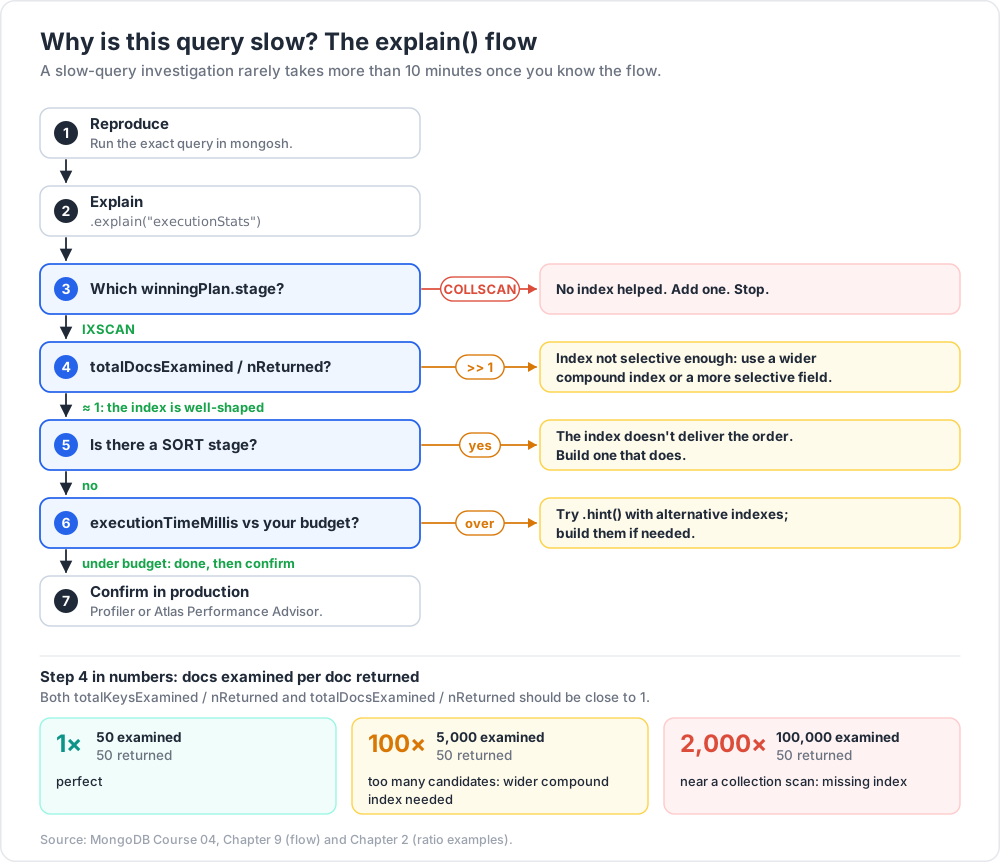
Both should be close to 1.0. If they balloon (10×, 100×), the index isn't selective enough — the query examined many entries to find a few matches.
Example:
nReturned: 50,totalDocsExamined: 50→ perfect.nReturned: 50,totalDocsExamined: 5000→ index returns too many candidates → wider compound index needed.nReturned: 50,totalDocsExamined: 100000→ near-collection-scan; missing index.
Chapter 3 — IXSCAN vs COLLSCAN — the binary signal
IXSCAN = used an index. Cost: O(log n) for the seek + O(matches) for the scan.
COLLSCAN = scanned every document. Cost: O(n) for n documents in the collection.
A COLLSCAN on a 10k-row collection is fast (a few ms). A COLLSCAN on a 10M-row collection is a multi-second outage.
1
2
3
4
5
"winningPlan": {
"stage": "COLLSCAN",
"filter": { "status": { "$eq": "paid" } }
}
Means: no index helped; the server read every document and filtered in memory. Add an index on status (or a compound covering this + other filters).
Acceptable COLLSCANs
- Tiny collections (< few thousand docs).
- Analytical jobs running off-peak.
- One-time admin queries.
For user-facing endpoints, never accept COLLSCAN.
Chapter 4 — Sort stage — the silent killer
1
2
3
4
5
"stage": "SORT",
"sortPattern": { "at": -1 },
"memLimit": 33554432,
"limitAmount": 20
A SORT stage means the documents came out in the wrong order, and the server is sorting them in RAM after retrieval. For large result sets:
- Slow (sort is O(n log n) on documents not index entries).
- Fails entirely if sort exceeds 32 MB by default (
OperationFailed: Sort exceeded memory limit).
Fix: build an index that delivers documents in sort order.
1
2
3
4
db.orders.createIndex({ user_id: 1, at: -1 })
db.orders.find({ user_id: 1 }).sort({ at: -1 }) // no SORT stage in plan
For aggregations exceeding sort memory, pass { allowDiskUse: true } (slower, uses disk).
Chapter 5 — Hint — force a specific index
1
2
3
4
db.orders.find({ user_id: 1, status: "paid" })
.hint({ user_id: 1, status: 1, at: -1 })
.explain("executionStats")
Use cases:
- Testing whether a different index would do better.
- Working around a bad plan cache decision.
- Forcing covered-query behaviour.
In production code, avoid permanent hint() — the planner usually gets it right and adapts as data changes. Use only after .explain confirms the planner chose poorly.
Force a collection scan (rare, for benchmarking):
1
2
db.orders.find({ ... }).hint({ $natural: 1 })
Chapter 6 — Plan cache
The query planner picks an index by sampling each candidate's first few results and choosing the winner. For repeat queries with the same query shape (same fields with same operators), the chosen plan is cached.
If data distribution changes (a field becomes much more selective), the cached plan may become wrong. The planner re-evaluates every ~1000 query executions; you can force it:
1
2
3
4
5
db.orders.getPlanCache().clear() // clear all
db.orders.getPlanCache().clearPlansByQuery({ // clear specific shape
query: { user_id: 1, status: "paid" }
})
Inspect:
1
2
db.orders.aggregate([{ $planCacheStats: {} }])
In most production systems you don't touch the plan cache — but knowing it exists explains "why was this query fast last week and slow today?".
Chapter 7 — $indexStats — find unused indexes
1
2
db.orders.aggregate([{ $indexStats: {} }])
Returns each index with usage counters since process start:
1
2
3
{ "name": "user_id_1", "accesses": { "ops": 18253, "since": ... } }
{ "name": "stale_idx", "accesses": { "ops": 0, "since": ... } }
ops: 0 over a long observation window = likely safe to drop. Hide first (Post 03 Chapter 15), confirm no regression, then drop.
Trick: unused indexes are the #1 source of write-amplification bloat in long-running MongoDB systems. Run
$indexStatsquarterly per collection. The savings on big collections add up.
Chapter 8 — Database profiler — slow query log
Enable slow-query capture on a specific database:
1
2
3
4
5
6
7
use shop
db.setProfilingLevel(1, { slowms: 100 }) // capture ops > 100 ms
db.setProfilingLevel(2) // capture EVERYTHING (dev only)
db.setProfilingLevel(0) // off
db.getProfilingStatus()
Captures land in system.profile (a capped collection in the same DB):
1
2
3
db.system.profile.find({ millis: { $gt: 100 } })
.sort({ ts: -1 }).limit(10)
Each entry includes the query shape, the chosen plan, execution time, locks held, comments — invaluable for post-mortem.
For production, capture from logs instead (mongod logs slow queries at slowOpThresholdMs automatically). Atlas surfaces these in the Performance Advisor.
Chapter 9 — Common diagnostic flow
Step-by-step when a query is slow:
1
2
3
4
5
6
7
8
9
10
11
12
13
14
15
1. Reproduce. Run the exact query in mongosh.
2. .explain("executionStats")
3. Look at winningPlan.stage:
COLLSCAN → no index. Add one. Stop.
IXSCAN → check selectivity ratios.
4. Check totalDocsExamined / nReturned:
≈ 1 → index is well-shaped.
>> 1 → wider compound index or more selective field.
5. Check for SORT stage:
present → index doesn't deliver order. Build one that does.
6. Check executionTimeMillis vs business budget:
under budget → done.
over → try .hint() with alternative indexes; build them if needed.
7. Confirm in production with the profiler / Atlas Performance Advisor.
A "slow query investigation" rarely takes more than 10 minutes once you know the flow.
Chapter 10 — Atlas Performance Advisor
Atlas surfaces:
- Suggested indexes — based on actual slow queries observed.
- Suggested redundant indexes — overlap or unused.
- Query Insights — slow queries grouped by shape with sample explains.
- Real-time / historical performance — CPU, memory, query rate, ticket queue.
Use it heavily in production. For local / self-hosted, the equivalent is the profiler + log aggregation.
Chapter 11 — .hint, .maxTimeMS, .comment — the safety trio
1
2
3
4
5
db.orders.find({ user_id: 1 })
.hint({ user_id: 1, at: -1 })
.maxTimeMS(500)
.comment("dashboard-orders-list")
hint— force index when the planner needs a nudge.maxTimeMS— abort runaway queries (always set for user-facing endpoints).comment— tag in the profiler /currentOpfor traceability.
Production endpoint pattern: always set maxTimeMS; add comment per endpoint; only hint after explain justifies.
Chapter 12 — Currentop / killop
See in-flight operations:
1
2
3
4
db.currentOp() // all ops
db.currentOp({ "secs_running": { $gt: 5 } }) // long-running
db.currentOp({ "command.comment": "dashboard-orders-list" }) // your tagged ops
Kill a runaway:
1
2
db.killOp(opid)
(opid from currentOp output.) Reactive triage tool when something is consuming the cluster.
Chapter 13 — Common pitfalls
| Symptom | Cause | Fix |
|---|---|---|
| COLLSCAN on a key query | no index covering it | add compound index ESR-style |
IXSCAN but totalDocsExamined huge |
index not selective enough | add more fields to the compound |
| In-memory SORT stage | sort doesn't match any index | build index that matches sort order |
| Query fast in mongosh slow from app | different connection settings; or driver-side serialisation | profile the app path; check driver pool |
| Query slow only sometimes | plan flip-flop; data skew | check plan cache; analyse selectivity per parameter |
| New index "doesn't help" | wrong order (violates ESR); or planner chose old cached plan | check explain; clear plan cache |
| Sort exceeded memory | unindexed sort over big result | index; or { allowDiskUse: true } for aggregation |
| Slow without obvious reason | hot collection lock or saturation elsewhere | check currentOp + server-status metrics |
Practice Exercises
Exercise 1 — Force COLLSCAN
Take any query on the seed orders collection (which has no extra indexes yet). Run .explain("executionStats"). Confirm COLLSCAN.
Exercise 2 — Add + verify
Create { user_id: 1, at: -1 } on orders. Repeat the query. Confirm IXSCAN, totalDocsExamined ≈ nReturned.
Exercise 3 — Sort stage
Run find({ user_id: 1 }).sort({ status: 1 }). Check for a SORT stage. Build the compound { user_id: 1, status: 1 }. Re-explain — no SORT.
Exercise 4 — Selectivity ratio
Insert 100k synthetic orders. Query find({ status: "paid" }) without an index — note totalDocsExamined. With a { status: 1 } index but paid is 80% of data — note the ratio is still close to 1 but nReturned is large (the index is correct but the query just matches a lot).
Exercise 5 — Find unused
Run db.orders.aggregate([{ $indexStats: {} }]). Hide any with ops: 0. Wait a few hours of normal traffic. Drop those without regression.
Exercise 6 — Profiler
Enable profiler at slowms: 50 on the shop DB. Run various queries. Inspect system.profile. Identify the slowest query shapes.
Cheat-sheet
| What | How |
|---|---|
| Explain | cursor.explain("executionStats") |
| Want | IXSCAN, no SORT, totalDocsExamined ≈ nReturned |
| Avoid | COLLSCAN, SORT, big totalDocsExamined / nReturned |
| Force index | .hint({ field: 1, ... }) |
| Kill runaway | db.killOp(opid) |
| Find slow ops | db.currentOp({ secs_running: { $gt: 5 } }) |
| Tag a query | .comment("name") |
| Abort safety | .maxTimeMS(500) |
| Plan cache | db.c.getPlanCache().clear() |
| Index usage | aggregate([{ $indexStats: {} }]) |
| Plan cache stats | aggregate([{ $planCacheStats: {} }]) |
| Slow log on | db.setProfilingLevel(1, { slowms: 100 }) |
| Slow log read | db.system.profile.find({ ... }) |
| Atlas | Performance Advisor + Query Insights |
| Diagnostic flow | reproduce → explain → IXSCAN? → ratio? → sort? → hint/index |
What's next
Post 05 covers the aggregation framework — pipelines, $match, $project, $group, $sort, $lookup, $unwind — the engine that handles everything beyond simple CRUD: reporting, joins, transformations, computed fields. Post 06 extends with the advanced operators ($facet, $bucket, $graphLookup, window functions).
References
Note: this post is in progress. Planned additions:
explainable()cursor (3.6+) for repeated explains, server-status metrics worth alerting on,tcmalloc/ WiredTiger ticket exhaustion symptoms.