MongoDB Course — 05 · Aggregation Basics — Pipeline, $match, $group, $project, $lookup
The aggregation framework is MongoDB's "everything beyond CRUD" engine. A pipeline is a sequence of stages, each transforming the stream of documents flowing through it — filter, group, project, sort, join, unwind, compute. This post covers the core stages every project uses: $match, $project, $addFields, $group, $sort, $limit, $skip, $count, $unwind, $lookup. Post 06 follows with advanced stages ($facet, $bucket, $graphLookup, $merge, window functions).
Series map: 00 Foundations → 01 CRUD → 02 Query Operators → 03 Indexes → 04 Query Optimization → 05 Aggregation Basics (this post) → 06 Aggregation Advanced → … → 17 Drivers & Case Studies.
Learning Outcome
- Write an aggregation pipeline composed of stages.
- Use
$matchearly to leverage indexes. - Group + reduce with
$groupand accumulators ($sum,$avg,$first,$last,$push,$addToSet,$min,$max). - Reshape with
$project,$addFields,$set,$unset. - Sort, limit, skip, count results.
- Flatten arrays with
$unwind. - Join collections with
$lookup(left outer join).
Chapter 1 — Pipeline basics
1
2
3
4
5
6
7
db.orders.aggregate([
{ $match: { status: "paid" } },
{ $group: { _id: "$user_id", total: { $sum: "$total" } } },
{ $sort: { total: -1 } },
{ $limit: 10 }
])
A pipeline is an array of stage objects. Each stage takes the previous stage's output documents as input and emits its own. Order matters.
Mental model:
1
2
collection → [stage 1] → docs → [stage 2] → docs → ... → results
Field references
Inside aggregation stages, prefix field names with $ to reference document values:
1
2
{ $project: { full: { $concat: ["$first", " ", "$last"] } } }
A double-dollar $$variable references a named variable (NOW, ROOT, CURRENT, or pipeline-defined).
Chapter 2 — $match — filter
Same syntax as find filter:
1
2
{ $match: { status: "paid", total: { $gte: 50 } } }
Always put $match as early as possible in the pipeline. When $match is the first stage, MongoDB can use indexes to skip non-matching documents entirely. Later in the pipeline it can't.
1
2
3
4
5
6
7
8
9
10
11
12
// GOOD — index on status used
db.orders.aggregate([
{ $match: { status: "paid" } },
{ $group: { ... } }
])
// BAD — has to run group on all docs, then filter
db.orders.aggregate([
{ $group: { ... } },
{ $match: { status: "paid" } }
])
The query planner sometimes pushes $match up automatically, but don't rely on it — write the pipeline correctly.
Chapter 3 — $project, $addFields, $set, $unset — reshape
$project — include + transform
1
2
3
4
5
6
7
8
9
db.users.aggregate([
{ $project: {
name: 1,
email: 1,
_id: 0,
age_group: { $cond: [{ $lt: ["$age", 18] }, "minor", "adult"] }
}}
])
Excludes everything not mentioned (except for computed fields). For mostly-keep-but-tweak, prefer $addFields.
$addFields / $set — add or override fields
1
2
3
{ $addFields: { name_upper: { $toUpper: "$name" }, processed_at: "$$NOW" } }
{ $set: { discounted: { $multiply: ["$price", 0.9] } } } // alias for addFields
Doesn't remove other fields.
$unset — remove fields
1
2
{ $unset: ["password", "internal_notes"] }
Common transformation operators
| Operator | Purpose |
|---|---|
| Arithmetic | $add, $subtract, $multiply, $divide, $mod, $pow, $abs, $ceil, $floor |
| String | $concat, $substr, $substrCP, $toUpper, $toLower, $split, $trim, $strLenCP, $indexOfCP, $regexFind, $regexFindAll, $replaceOne, $replaceAll |
| Date | $year, $month, $dayOfMonth, $dayOfWeek, $hour, $dateAdd, $dateDiff, $dateTrunc, $dateToString, $toDate |
| Logic | $cond, $ifNull, $switch, $and, $or, $not |
| Comparison | $cmp, $eq, $ne, $gt, $gte, $lt, $lte |
| Array | $size, $arrayElemAt, $first, $last, $slice, $map, $filter, $reduce, $reverseArray, $concatArrays, $in |
| Type | $type, $convert, $toString, $toInt, $toDouble, $toBool, $toObjectId |
Example: format an order summary
1
2
3
4
5
6
7
8
9
10
11
12
13
14
db.orders.aggregate([
{ $project: {
user_id: 1,
item_count: { $size: "$items" },
total: 1,
month: { $dateTrunc: { date: "$at", unit: "month" } },
summary: { $concat: [
"$status", " ",
{ $toString: "$total" }, " — ",
{ $dateToString: { date: "$at", format: "%Y-%m-%d" } }
]}
}}
])
Chapter 4 — $group — reduce / aggregate
$group collapses input documents into one document per group key.
1
2
3
4
5
6
7
8
9
{ $group: {
_id: "$user_id", // group key
total_spent: { $sum: "$total" },
order_count: { $sum: 1 },
avg_total: { $avg: "$total" },
first_order: { $min: "$at" },
last_order: { $max: "$at" }
}}
_id is the group key. It can be:
- a field reference:
_id: "$user_id" - a compound:
_id: { user: "$user_id", month: { $dateTrunc: { date: "$at", unit: "month" } } } - a literal:
_id: null(collapse to a single global aggregate)
Accumulators
| Accumulator | What |
|---|---|
$sum: <expr> |
sum (use $sum: 1 for count) |
$avg: <expr> |
average |
$min, $max |
min, max |
$first, $last |
first / last value (requires sort first to be meaningful) |
$push: <expr> |
accumulate into array |
$addToSet: <expr> |
accumulate into deduplicated array |
$mergeObjects |
merge sub-documents |
$stdDevPop, $stdDevSamp |
standard deviation |
$accumulator |
custom (JS-defined, slower) |
Example: revenue per user
1
2
3
4
5
6
7
8
9
10
11
db.orders.aggregate([
{ $match: { status: "paid" } },
{ $group: {
_id: "$user_id",
revenue: { $sum: "$total" },
orders: { $sum: 1 }
}},
{ $sort: { revenue: -1 } },
{ $limit: 10 }
])
Top-N by group — pattern
"Top product per category":
1
2
3
4
5
6
7
8
9
db.products.aggregate([
{ $sort: { category: 1, sales: -1 } },
{ $group: {
_id: "$category",
top: { $first: "$$ROOT" }
}},
{ $replaceRoot: { newRoot: "$top" } }
])
$$ROOT references the whole current document.
Chapter 5 — $sort, $limit, $skip, $count
1
2
3
4
5
{ $sort: { total: -1, at: -1 } }
{ $limit: 20 }
{ $skip: 40 }
{ $count: "matching_count" }
$sort followed by $limit is optimised — the server only keeps the top-N in memory instead of sorting everything.
$count returns a single document { matching_count: N }. For aggregations, this is cleaner than countDocuments.
Trick: for sort + limit to be efficient over big collections, the sort field needs an index. Otherwise the entire input is sorted in memory (subject to the 100 MB stage memory limit; pass
{ allowDiskUse: true }to spill).
Chapter 6 — $unwind — flatten arrays
$unwind deconstructs an array, emitting one document per element.
1
2
3
4
5
6
7
8
9
10
11
12
13
14
15
16
17
db.orders.insertOne({
_id: "ox",
user_id: 1,
items: [
{ p: "p1", qty: 3 },
{ p: "p2", qty: 1 }
]
})
db.orders.aggregate([
{ $match: { _id: "ox" } },
{ $unwind: "$items" }
])
// emits:
// { _id: "ox", user_id: 1, items: { p: "p1", qty: 3 } }
// { _id: "ox", user_id: 1, items: { p: "p2", qty: 1 } }
Options
1
2
3
{ $unwind: { path: "$items", preserveNullAndEmptyArrays: true } }
{ $unwind: { path: "$items", includeArrayIndex: "items_idx" } }
preserveNullAndEmptyArrays: true keeps documents where the array is missing or empty (otherwise dropped).
Use case: per-item revenue
1
2
3
4
5
6
7
8
9
10
db.orders.aggregate([
{ $match: { status: "paid" } },
{ $unwind: "$items" },
{ $group: {
_id: "$items.p", // product id
units_sold: { $sum: "$items.qty" }
}},
{ $sort: { units_sold: -1 } }
])
$unwind followed by $group is the canonical pattern for "compute totals across array elements".
Chapter 7 — $lookup — left outer join
1
2
3
4
5
6
7
8
9
10
11
db.orders.aggregate([
{ $match: { status: "paid" } },
{ $lookup: {
from: "users", // collection to join
localField: "user_id", // field in orders
foreignField: "_id", // field in users
as: "user" // result key (an array)
}},
{ $unwind: "$user" } // flatten the array to a single doc
])
Result includes a user field — an array of matching documents (or empty). Unwind to flatten when you expect one match.
Pipeline form — more powerful
1
2
3
4
5
6
7
8
9
10
11
12
{ $lookup: {
from: "orders",
let: { uid: "$_id" },
pipeline: [
{ $match: { $expr: { $eq: ["$user_id", "$$uid"] } } },
{ $match: { status: "paid" } },
{ $sort: { at: -1 } },
{ $limit: 5 }
],
as: "recent_orders"
}}
The pipeline form lets you filter/sort/limit the joined documents — far more efficient than fetching all then dropping.
Performance
$lookupis not free — for every input doc, it queries the foreign collection.- The foreign-collection field (the
foreignField) should be indexed. - Avoid
$lookupin hot user-facing paths; prefer embedded documents (Post 07). - Acceptable for reporting / dashboards where latency is less critical.
$lookup limits
- Result document size capped at 16 MB (the BSON doc limit).
- For huge joins, consider denormalisation or pre-aggregation into a materialised view (
$merge, Post 06).
Chapter 8 — $out and $merge (preview)
These terminal stages write the pipeline result back to a collection.
1
2
3
4
5
6
7
8
9
// $out — fully replaces target collection
db.orders.aggregate([ /* ... */, { $out: "daily_revenue" } ])
// $merge — upsert/merge into existing collection
db.orders.aggregate([
/* ... */,
{ $merge: { into: "daily_revenue", on: ["day"], whenMatched: "merge", whenNotMatched: "insert" } }
])
$merge is the way to build incremental materialised views — Post 06.
Chapter 9 — Putting it together — worked examples
Top 10 spenders this month
1
2
3
4
5
6
7
8
9
10
11
12
13
db.orders.aggregate([
{ $match: {
status: "paid",
at: { $gte: ISODate("2026-05-01"), $lt: ISODate("2026-06-01") }
}},
{ $group: { _id: "$user_id", spent: { $sum: "$total" } } },
{ $sort: { spent: -1 } },
{ $limit: 10 },
{ $lookup: { from: "users", localField: "_id", foreignField: "_id", as: "user" } },
{ $unwind: "$user" },
{ $project: { _id: 0, user_name: "$user.name", spent: 1 } }
])
Daily revenue chart
1
2
3
4
5
6
7
8
9
10
db.orders.aggregate([
{ $match: { status: "paid" } },
{ $group: {
_id: { $dateTrunc: { date: "$at", unit: "day" } },
revenue: { $sum: "$total" },
orders: { $sum: 1 }
}},
{ $sort: { _id: 1 } }
])
Most-sold product
1
2
3
4
5
6
7
8
9
10
db.orders.aggregate([
{ $match: { status: "paid" } },
{ $unwind: "$items" },
{ $group: { _id: "$items.p", qty: { $sum: "$items.qty" } } },
{ $sort: { qty: -1 } },
{ $limit: 1 },
{ $lookup: { from: "products", localField: "_id", foreignField: "_id", as: "product" } },
{ $unwind: "$product" }
])
Chapter 10 — Performance + indexing for aggregations
- The first
$matchand the first$sort(if both at the top) can use indexes. $lookup'sforeignFieldshould be indexed.- Large
$groupresults consume memory; pass{ allowDiskUse: true }for big aggregations. - Avoid expensive transformations before
$matchreduces the dataset. - Use
.explain("executionStats")on aggregations (Post 04).
Aggregation result size cap: 16 MB per document. For huge outputs, write to a collection with $out / $merge and query separately.
Trick:
$countis faster than$group: { _id: null, c: { $sum: 1 } }. The dedicated stage is optimised internally.
Chapter 11 — Common pitfalls
| Symptom | Cause | Fix |
|---|---|---|
| Aggregation slow | $match not first |
always start with $match |
$lookup very slow |
no index on foreignField |
add it |
| OOM / "Sort exceeded memory limit" | big $sort without index |
index the sort field; or allowDiskUse: true |
$group reduces too much |
wrong _id shape |
check group key includes the dimensions you need |
| Result doc > 16 MB | trying to fit everything in one row | $out / $merge to a collection |
Field references missing $ |
$group: { _id: "user_id" } instead of "$user_id" |
always prefix with $ |
$unwind produces too many rows |
unwinding before reducing | filter first, unwind later, group again |
null joined docs after $lookup + $unwind |
dropping no-match docs | preserveNullAndEmptyArrays: true |
Practice Exercises
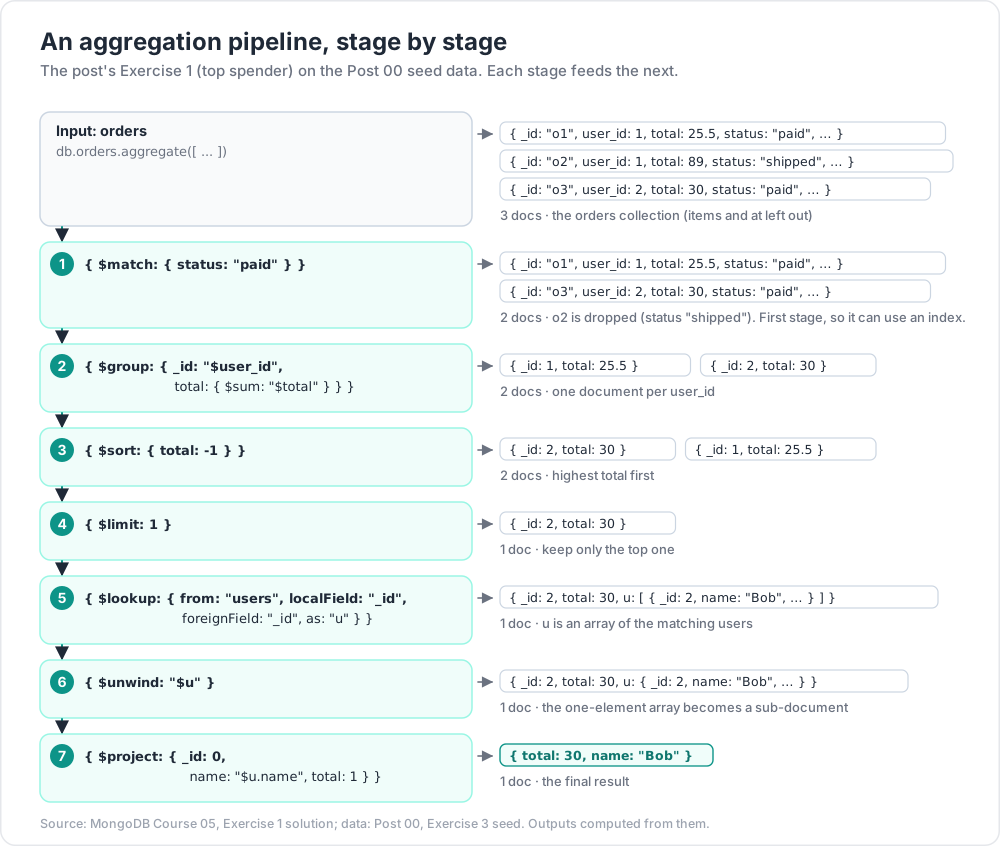
Exercise 1 — Top spender
Using the shop seed, return the top spending user (paid orders only), name + total.
Solution
1
2
3
4
5
6
7
8
9
10
db.orders.aggregate([
{ $match: { status: "paid" } },
{ $group: { _id: "$user_id", total: { $sum: "$total" } } },
{ $sort: { total: -1 } },
{ $limit: 1 },
{ $lookup: { from: "users", localField: "_id", foreignField: "_id", as: "u" } },
{ $unwind: "$u" },
{ $project: { _id: 0, name: "$u.name", total: 1 } }
])
Exercise 2 — Daily revenue
Revenue per calendar day for the last 7 days.
Exercise 3 — Per-item bestseller
Use $unwind + $group to find which product p has the highest total qty sold.
Exercise 4 — Reshape
For each user, return { name, order_count, avg_order_value, last_order_at }.
Exercise 5 — Pipeline $lookup
For each user, attach their last 3 paid orders (sorted desc by at) using the pipeline form of $lookup.
Exercise 6 — Materialise
Compute daily revenue with $out to a daily_revenue collection. Then change to $merge so subsequent runs update incrementally.
Cheat-sheet
| What | How |
|---|---|
| Run | db.c.aggregate([ stages ]) |
| Always | $match first to use indexes |
| Filter | $match: { ... } (find-style filter) |
| Reshape | $project, $addFields, $set, $unset |
| Group | $group: { _id, accumulators } |
| Accumulators | $sum, $avg, $min, $max, $first, $last, $push, $addToSet |
| Sort / limit / skip | $sort: { f: -1 }, $limit: N, $skip: N |
| Count | $count: "name" |
| Flatten array | $unwind: "$arr" (preserve empty with options) |
| Join | $lookup: { from, localField, foreignField, as } |
| Pipeline join | $lookup: { from, let, pipeline, as } |
| Write back | $out (replace) / $merge (upsert) |
| Memory | 100 MB per stage; { allowDiskUse: true } to spill |
| Field ref | "$field" |
| Whole doc | "$$ROOT" |
| Variables | "$$NOW", "$$CURRENT", custom via let |
| Explain | db.c.aggregate([...]).explain("executionStats") |
What's next
Post 06 covers advanced aggregation — $facet (multi-pipeline parallel), $bucket / $bucketAuto (histograms), $graphLookup (recursive joins), $merge (materialised views), $setWindowFields (window functions: rolling sums, ranks), $dateTrunc / $dateDiff, $expr, $function (server-side JS), allowDiskUse.
References
- Aggregation Pipeline
- Pipeline Operators
- Aggregation Operators
- Practical MongoDB Aggregations by Paul Done — free book covering patterns.
Note: this post is in progress. Planned additions:
$densify+$fill(time-series gap fill),$outvs$mergesemantics, aggregation framework in drivers vs Compass pipeline builder, performance of$lookupat scale.