MongoDB Course — 01 · CRUD Basics — Insert, Find, Update, Delete, Bulk
CRUD — Create, Read, Update, Delete — is the daily 95 % of MongoDB. This post covers every standard operation (insertOne / insertMany / findOne / find / updateOne / updateMany / replaceOne / deleteOne / deleteMany / bulkWrite), all the update operators ($set / $inc / $push / $pull / $addToSet / $rename / $unset / $mul / $min / $max / $pop), the upsert pattern, and the write-concern + return-value behaviour you need to know to use them safely.
Series map: 00 Foundations → 01 CRUD (this post) → 02 Query Operators → 03 Indexes → 04 Query Optimization → 05 Aggregation Basics → … → 17 Drivers & Case Studies.
Learning Outcome
- Insert single and many documents; understand
_idgeneration. - Read with
findOne,find(cursor), projection, sort, skip, limit. - Update with
$set,$inc,$push,$pull,$addToSet,$rename,$unset,$mul,$min,$max,$pop. - Use
replaceOnevsupdateOnecorrectly. - Use upsert to "insert or update".
- Delete safely with
deleteOne/deleteMany. - Use
bulkWritefor batched mixed operations. - Understand write concern (
w,j,wtimeout) and return values.
Chapter 1 — Insert
insertOne
1
2
3
4
5
6
7
8
9
const r = db.users.insertOne({
name: "Ada",
email: "ada@x",
age: 30,
tags: ["math"],
created_at: new Date(),
})
// { acknowledged: true, insertedId: ObjectId("...") }
Auto-generated _id (ObjectId) is returned. Supply your own to override:
1
2
db.users.insertOne({ _id: "ada-001", name: "Ada" })
insertMany
1
2
3
4
5
6
7
const r = db.users.insertMany([
{ name: "Bob", age: 25 },
{ name: "Cy", age: 41 },
{ name: "Dora", age: 33 },
])
// { acknowledged: true, insertedIds: { 0: ObjectId(...), 1: ObjectId(...), 2: ObjectId(...) } }
By default insertMany is ordered — stops at the first error. Use { ordered: false } to keep going + report all failures together (faster bulk loads):
1
2
db.users.insertMany(docs, { ordered: false })
Duplicate _id → error
1
2
3
4
db.users.insertOne({ _id: 1, name: "Ada" })
db.users.insertOne({ _id: 1, name: "Bob" })
// MongoServerError: E11000 duplicate key error
Avoid by letting MongoDB generate _id, or use upsert (Chapter 5).
Chapter 2 — Find
findOne — first match
1
2
3
db.users.findOne({ name: "Ada" })
// returns the document, or null
find — cursor over all matches
1
2
db.users.find({ age: { $gte: 30 } })
find returns a cursor. In mongosh, it auto-iterates and prints. In code, materialise to an array:
1
2
const arr = await db.collection('users').find({ age: { $gte: 30 } }).toArray();
Or iterate stream-style for large results:
1
2
for await (const doc of cursor) { /* ... */ }
Projection — pick fields
1
2
3
4
5
db.users.find(
{ age: { $gte: 30 } },
{ name: 1, email: 1, _id: 0 } // include name+email, exclude _id
)
1= include;0= exclude.- Cannot mix include + exclude in one projection except to exclude
_id. - Default returns the whole document.
Sort, limit, skip
1
2
3
4
5
db.orders.find({ status: "paid" })
.sort({ at: -1 }) // -1 desc, 1 asc
.limit(20)
.skip(40)
Chained on the cursor. Order applied during the server-side query.
Watch out:
.skip(N)walks N documents before discarding — costs O(N). For pagination beyond a few hundred rows, prefer range pagination (find({ at: { $lt: lastSeenAt } })) — covered in Post 02.
countDocuments + estimatedDocumentCount
1
2
3
db.users.countDocuments({ age: { $gte: 30 } }) // accurate, runs the filter
db.users.estimatedDocumentCount() // metadata count, no filter, fast
For "how many total" use estimatedDocumentCount (instant). For "how many match X" use countDocuments.
Chapter 3 — Update — the operators
Update operations take (filter, update document, options). The update document uses operators that mutate the matched documents.
$set — assign field values
1
2
3
4
5
db.users.updateOne(
{ name: "Ada" },
{ $set: { age: 31, "address.city": "Cambridge" } }
)
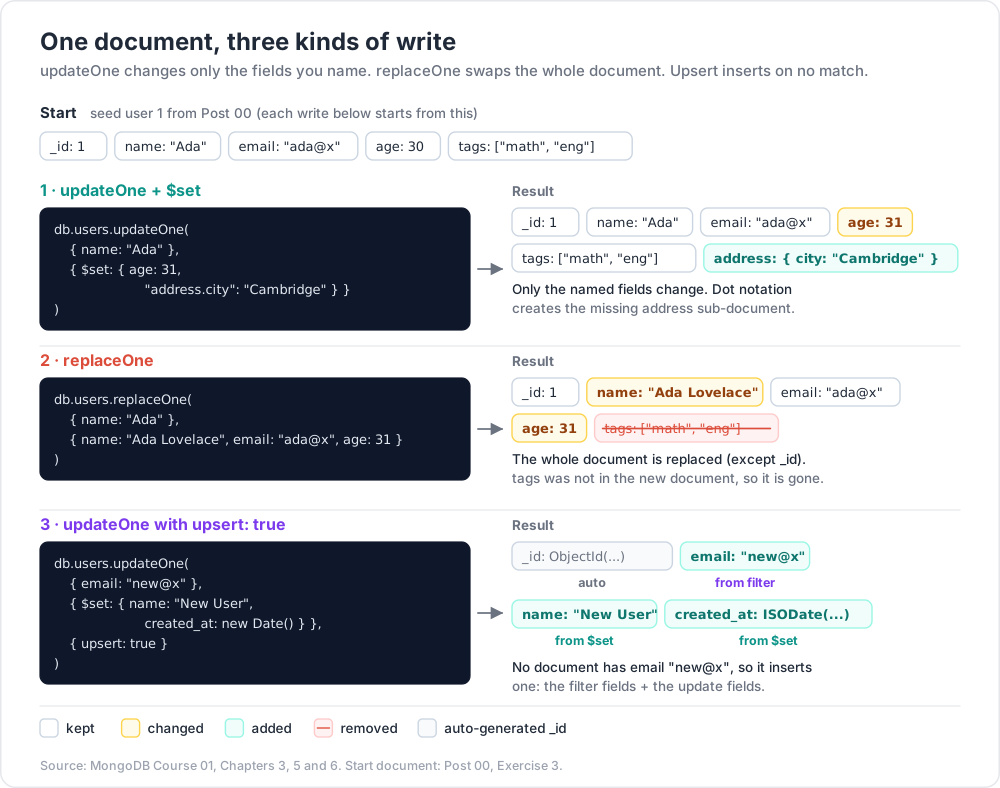
Dot notation reaches into sub-documents. Missing intermediate fields are auto-created.
$unset — remove fields
1
2
db.users.updateOne({ name: "Ada" }, { $unset: { temporary_flag: "" } })
The value passed to $unset is ignored; convention is empty string.
$inc — increment numeric
1
2
db.products.updateOne({ _id: "p1" }, { $inc: { stock: -1, sold: 1 } })
Negative values decrement. Creates the field if absent (starts from the increment value).
$mul — multiply
1
2
db.products.updateMany({}, { $mul: { price: 0.9 } }) // 10% off all
$min / $max — only if better
1
2
3
4
db.products.updateOne({ _id: "p1" }, { $min: { lowest_price: 4.20 } })
// sets if 4.20 < current; no-op otherwise
db.users.updateOne({ _id: 1 }, { $max: { last_seen_at: new Date() } })
Useful for high-water-mark tracking without a read-then-write race.
$rename — change field name
1
2
db.users.updateMany({}, { $rename: { "addr": "address" } })
$set + array fields
1
2
3
4
5
db.users.updateOne(
{ name: "Ada" },
{ $set: { "tags.0": "mathematician" } } // set first element
)
For more powerful array updates, the dedicated array operators below.
Chapter 4 — Update — array operators
$push — append
1
2
db.users.updateOne({ name: "Ada" }, { $push: { tags: "engineer" } })
Push multiple with $each:
1
2
3
4
5
db.users.updateOne(
{ name: "Ada" },
{ $push: { tags: { $each: ["engineer", "writer"] } } }
)
Combined with $slice, $sort, $position:
1
2
3
4
5
6
7
8
9
10
11
12
db.users.updateOne(
{ name: "Ada" },
{
$push: {
recent_views: {
$each: ["p3"],
$slice: -10 // keep last 10
}
}
}
)
$addToSet — push only if not present
1
2
3
db.users.updateOne({ name: "Ada" }, { $addToSet: { tags: "engineer" } })
// adds only if "engineer" not already in tags
Use when the array must contain unique values.
$pull — remove matching elements
1
2
3
4
5
6
db.users.updateOne({ name: "Ada" }, { $pull: { tags: "math" } })
db.users.updateOne(
{ name: "Ada" },
{ $pull: { scores: { $lt: 50 } } } // remove all scores below 50
)
$pullAll — remove specific values
1
2
db.users.updateOne({ name: "Ada" }, { $pullAll: { tags: ["math", "writer"] } })
$pop — remove first or last
1
2
3
db.users.updateOne({ name: "Ada" }, { $pop: { tags: 1 } }) // last
db.users.updateOne({ name: "Ada" }, { $pop: { tags: -1 } }) // first
Positional operators — $ and $[<id>]
Update the first matched element of an array:
1
2
3
4
5
db.orders.updateOne(
{ _id: "o1", "items.p": "p1" },
{ $set: { "items.$.qty": 5 } }
)
Update all matched elements ($[]):
1
2
db.users.updateMany({}, { $inc: { "scores.$[]": 1 } }) // +1 to every score
Update matched by arrayFilters ($[<id>]):
1
2
3
4
5
6
db.users.updateMany(
{},
{ $set: { "scores.$[low]": 50 } },
{ arrayFilters: [{ "low": { $lt: 50 } }] }
)
Chapter 5 — Upsert (insert-or-update)
1
2
3
4
5
6
db.users.updateOne(
{ email: "new@x" },
{ $set: { name: "New User", created_at: new Date() } },
{ upsert: true }
)
If the filter matches a document → updates it. If no match → inserts a new document combining the filter fields + update fields.
Use cases: idempotent upserts from a job; "first-seen / last-seen" tracking; counters per key.
Counter-per-key idiom:
1
2
3
4
5
6
db.metrics.updateOne(
{ day: "2026-05-24", event: "signup" },
{ $inc: { count: 1 } },
{ upsert: true }
)
Increments the counter; creates the document with count: 1 if the key didn't exist.
Trick: when upserting on a unique field, ensure there's a unique index on that field. Otherwise two simultaneous upserts can race and produce two documents.
Chapter 6 — updateOne vs updateMany vs replaceOne
| Operation | Filter matches | What it changes |
|---|---|---|
updateOne |
first match only | applies update operators |
updateMany |
all matches | applies update operators |
replaceOne |
first match only | replaces the entire document (except _id) |
findOneAndUpdate |
first match | applies operators + returns the doc (before or after) |
findOneAndReplace |
first match | replaces + returns |
findOneAndDelete |
first match | deletes + returns |
1
2
3
4
5
db.users.replaceOne(
{ name: "Ada" },
{ name: "Ada Lovelace", email: "ada@x", age: 31 } // whole new doc; old fields gone
)
replaceOne is dangerous if you forget to include existing fields — they vanish. Prefer updateOne + $set unless you really mean "wipe and re-create".
1
2
3
4
5
6
const doc = await db.collection('users').findOneAndUpdate(
{ _id: 1 },
{ $inc: { visits: 1 } },
{ returnDocument: 'after' } // 'before' (default) or 'after'
);
returnDocument: 'after' returns the post-update version — common for atomic counters.
Chapter 7 — Delete
1
2
3
4
db.users.deleteOne({ name: "Bob" })
db.users.deleteMany({ status: "deactivated" })
db.users.deleteMany({}) // ⚠ ALL documents
Returns:
1
2
{ acknowledged: true, deletedCount: 12 }
There is no built-in undo. For safety:
- Use a "soft delete" pattern:
$set: { deleted_at: new Date() }instead of physical delete. - Or move to an "archive" collection first.
- Backups (Post 14) save you when those fail.
1
2
3
db.collection.drop() // drops the entire collection (metadata + data)
db.dropDatabase() // drops current database
These are irreversible. Use only in scripts you trust.
Watch out:
deleteMany({})with the empty filter deletes everything in the collection. The shell prompts for confirmation; drivers don't. Always pass a real filter.
Chapter 8 — Bulk writes
bulkWrite batches mixed operations into one network round-trip — much faster than N separate calls.
1
2
3
4
5
6
7
8
db.users.bulkWrite([
{ insertOne: { document: { name: "Eve", age: 28 } } },
{ updateOne: { filter: { name: "Ada" }, update: { $inc: { visits: 1 } } } },
{ updateMany: { filter: { age: { $lt: 18 } }, update: { $set: { minor: true } } } },
{ deleteOne: { filter: { name: "Bob" } } },
{ replaceOne: { filter: { _id: 99 }, replacement: { _id: 99, ... }, upsert: true } },
], { ordered: false })
ordered: true (default) — stop on first error. ordered: false — try all, report errors together.
Use for: data migrations, batch sync from another system, periodic clean-ups.
Driver-specific batching limits
- Single bulk op limited to 1000 operations / 16 MB BSON payload (server defaults). Larger batches split server-side automatically.
- For huge loads, chunk into batches of ~500-1000 yourself for memory predictability.
Chapter 9 — Write concern (w, j, wtimeout)
Every write has a write concern controlling how durable the acknowledgement is.
1
2
3
4
5
db.users.insertOne(
{ name: "Frank" },
{ writeConcern: { w: "majority", j: true, wtimeout: 5000 } }
)
| Field | Meaning |
|---|---|
w: 0 |
fire-and-forget — no ack |
w: 1 |
primary acked the write (default for single-node) |
w: "majority" |
majority of replica-set voters acked (default in replica sets) |
w: N |
exactly N members acked |
j: true |
ack only after write is journaled to disk |
wtimeout: ms |
give up waiting for w after this many ms |
Trade-off: stricter concern = safer + slower. w: "majority", j: true is the production-correct default; the driver and Atlas pick it for you in replica sets.
Read concern (preview — full in Post 08)
| Read concern | When |
|---|---|
local |
default — read from local memory; may see uncommitted-on-majority writes |
majority |
read only data acked by majority — survives elections |
linearizable |
strongest consistency; slow |
snapshot |
inside transactions |
Chapter 10 — Common pitfalls
| Symptom | Cause | Fix |
|---|---|---|
replaceOne wiped half the fields |
passed new doc without old fields | use updateOne + $set |
| Upsert created two duplicates under load | no unique index on filter | add unique index on the filter field |
find({}) slow on big collection |
full collection scan | add an index (Post 03); use a filter |
find({ tags: ["a", "b"] }) matches nothing |
[a,b] looks like exact-array match, not contains-both |
use $all: { tags: { $all: ["a","b"] } } |
| Updates silently no-op | filter doesn't match | print result.matchedCount and modifiedCount |
| Deleted production accidentally | deleteMany({}) typo |
always pass a real filter; consider soft-delete |
$push on huge array → slow / bloated doc |
unbounded array growth | cap with $slice; or move to a child collection |
Practice Exercises
Exercise 1 — Insert + read
Reload the shop seed from Post 00 Exercise 3. Insert one new user with insertOne. Find users with age ≥ 30, projecting only name + age, sorted by age desc.
Exercise 2 — Atomic stock decrement
Write an update that decrements products.stock by 1 for p1 only if stock > 0 (so it never goes negative).
Solution
1
2
3
4
5
6
db.products.updateOne(
{ _id: "p1", stock: { $gt: 0 } },
{ $inc: { stock: -1 } }
)
// matchedCount = 0 means stock was already 0; handle in app code
Exercise 3 — Tag toggle
For user 1 (Ada), add "physicist" to her tags only if not already present, then remove "math".
Solution
1
2
3
db.users.updateOne({ _id: 1 }, { $addToSet: { tags: "physicist" } })
db.users.updateOne({ _id: 1 }, { $pull: { tags: "math" } })
Exercise 4 — Daily counter via upsert
Build a function bump(day, event) that increments a per-day-per-event counter using upsert. Call it 100 times concurrently from a Node script.
Exercise 5 — Bulk migration
Use bulkWrite with ordered: false to: insert 5 new users, increment visits by 1 for everyone over 30, delete users marked inactive: true, in one call.
Exercise 6 — Soft delete
Replace your deleteOne calls in any past exercise with $set: { deleted_at: new Date() }. Then write a query that excludes soft-deleted docs.
Cheat-sheet
| What | How |
|---|---|
| Insert one | db.c.insertOne(doc) |
| Insert many | db.c.insertMany([docs], { ordered: false }) |
| Find first | db.c.findOne(filter) |
| Find all | db.c.find(filter).toArray() |
| Project | find(filter, { name: 1, _id: 0 }) |
| Sort / limit / skip | .sort({ field: -1 }).limit(N).skip(M) |
| Cursor stream | for await (const d of cursor) |
| Set fields | { $set: { f: v } } |
| Remove field | { $unset: { f: "" } } |
| Increment | { $inc: { n: 1 } } |
| Append array | { $push: { arr: x } } or { $each: [...] } |
| Append unique | { $addToSet: { arr: x } } |
| Remove array elements | { $pull: { arr: x } } |
| Pop first/last | { $pop: { arr: -1 } } / { arr: 1 } |
| Update positional | "arr.$" after match condition |
| Update by filter | $[<id>] + arrayFilters |
| Upsert | third arg { upsert: true } |
| Replace entire doc | replaceOne |
| Atomic return | findOneAndUpdate({}, {}, { returnDocument: 'after' }) |
| Soft delete | $set: { deleted_at: new Date() } |
| Bulk | bulkWrite([ops], { ordered: false }) |
| Write concern | { w: "majority", j: true, wtimeout: 5000 } |
What's next
Post 02 covers query operators — $eq / $ne / $gt / $lt / $in / $nin / $exists / $type, logical $and / $or / $nor / $not, $regex, $text, $elemMatch, $size, $all, projection details, and the range pagination pattern that scales where .skip() doesn't.
References
- MongoDB docs — CRUD Operations
- MongoDB docs — Update Operators
- MongoDB docs — Bulk Write Operations
- MongoDB docs — Write Concern
Note: this post is in progress. Planned additions:
$bitfor bitwise updates,$currentDate, write-concern math for replica sets, JSON Schema validation tie-in.