3D Printing Course — 03 · Orientation, Supports and Design for Printing
There is one decision in 3D printing that outweighs every slicer setting combined, and it is made in about two seconds by dragging a model around a build plate. Orientation simultaneously determines which direction the part is strong in, which surfaces come out smooth, how much support material is needed, how long the print takes, and how accurate the holes are — and those five objectives conflict with each other, so there is no orientation that wins on all of them. This post makes that trade-off explicit by working a real part through it, then covers the machinery of overhangs, bridging, holes and supports, and finishes with the design habits that let you avoid most of the problem in the first place.
Series map: 00 How 3D Printing Works → 01 First Print and Calibration → 02 Slicing in Depth → 03 Orientation, Supports and Design for Printing (this post) → 04 Materials → 05 Dimensional Accuracy and Tolerances → 06 CAD for Printing → 07 Strength, Failure Modes and Functional Parts.
Learning Outcome
- Evaluate a part's orientation against five conflicting objectives and defend the choice you make.
- Apply the anisotropy rule — load along layers, never across them — to a real bracket in three orientations.
- State the 45-degree overhang guideline properly, derive where it comes from, and compute how it shifts with layer height and extrusion width.
- Explain what makes a bridge succeed, and run a bridging test to find your machine's usable span.
- Explain why horizontal holes come out undersized and egg-shaped, and apply the teardrop and chamfer fixes.
- Choose between normal and tree supports, and set the Z-gap that decides whether supports snap off or fuse on.
- Design overhangs out of a part rather than supporting them.
- Apply the minimum wall, minimum feature, bottom-chamfer and text rules relative to your own extrusion width.
- Split a part sensibly and join it with the right method for the material.
- Design a print-in-place mechanism and know what determines its clearance.
Chapter 1 — Orientation as the master decision
Terminology
- Build orientation — the rotation of the part relative to the build plate. Three rotational degrees of freedom, and every one of them matters.
- Strength axis — the direction in which the part's layers run continuously, and therefore the direction it is strongest in.
- Overhang — a downward-facing surface with nothing directly beneath it.
- Bridge — an unsupported horizontal span with both ends anchored in solid material.
- Support — sacrificial structure printed to hold up overhangs, then removed.
- Interface layer — the dense top layers of a support, which form the surface the part rests on.
- Z-gap / contact distance — vertical clearance between support top and part underside.
- Self-supporting — geometry whose every downward face is shallow enough to print without support.
- Scar — the rough surface left where support touched the part.
The five conflicting objectives
Every orientation is a bet across these:
- Strength. The service load should run along the layers, not across them (post 00, Chapter 3).
- Surface quality. Vertical walls get layer lines; top faces get skin; downward faces get support scars; sloped faces get stepping.
- Support volume. More overhangs means more sacrificial material, more time, more cleanup, more scars.
- Print time. Roughly, taller means more layers means longer — but a tall thin part also has short layers with long minimum-layer-time waits, so it is not linear.
- Dimensional accuracy. XY features are accurate in a different way than Z features; holes behave completely differently depending on axis; the first layer is squashed.
They conflict. The orientation that makes a bracket strongest usually also makes it tallest, slowest, and puts its bolt holes on their sides. Rank the objectives for this specific part before you rotate anything. For a functional bracket, strength and hole accuracy outrank surface finish. For a display model, the reverse.
A worked part: the L-bracket
Take a concrete part. An L-shaped bracket: two legs, 60 mm and 40 mm, each 4 mm thick and 30 mm wide, with two clearance holes through each leg. In service it is bolted to a wall by the short leg, and a load hangs from the end of the long leg, bending the bracket about the inside corner.
Three orientations, all of which someone will suggest:
Orientation A — flat on its back. The short leg lies on the plate, the long leg stands vertically. Layers are horizontal planes stacked up the long leg.
Orientation B — L-profile flat on the plate. The L profile lies in the plane of the bed and the 30 mm width becomes the build height. Each layer is a complete L outline, 4 mm thick, repeated 30 mm tall.
Orientation C — standing on the corner. The bracket balanced at 45°, corner down, both legs rising.
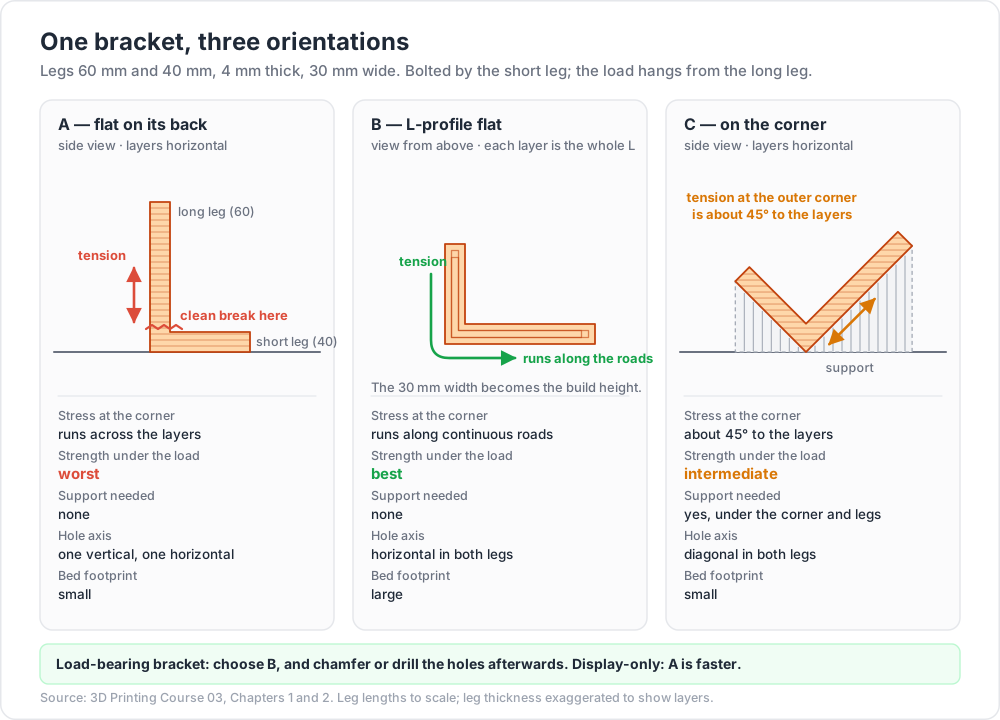
| A — flat on its back | B — L-profile flat | C — on the corner | |
|---|---|---|---|
| Layer direction relative to the service load | tensile stress at the corner runs across layers | tensile stress runs along continuous roads that wrap the corner | stress at roughly 45° to layers |
| Strength under the design load | worst — a clean interlayer break at the inside corner is the predicted failure | best — the corner is a continuous loop of material every layer | intermediate |
| Support needed | none | none | yes, under the corner and the underside of both legs |
| Print time | short — 60 mm tall, big cross-sections | moderate — 30 mm tall, small L cross-sections, many layers of little material | longest — support plus a tall diagonal envelope |
| Bed footprint | small | large — the whole L profile | small |
| Hole axis | vertical through the short leg, horizontal through the long leg | horizontal through both legs | diagonal through both |
| Hole quality | mixed: one good, one egg-shaped | both need teardrop or chamfer treatment, or drilling | worst — diagonal holes are both overhung and stepped |
| Visible surface quality | good on the outer faces; layer lines up the long leg | layer lines wrap the profile; the two big flat faces are top-skin and bed-face | support scars on the underside of both legs |
| Adhesion risk | good — a big flat first layer | good — a long thin first layer, watch corner lift | poor — small contact area, needs a brim |
The decision. For a load-bearing bracket, orientation B, with the holes handled by chamfering (Chapter 4) or by drilling them out afterwards. The strength difference between A and B is the largest single effect available in this entire course, and it costs nothing but bed space and a hole-detailing decision.
For a bracket that carries nothing and just needs to look tidy on a shelf, orientation A is faster, uses less bed, and gives one good hole for free.
That is the shape of the reasoning. It is not "which orientation is correct" but "which objective am I optimising, and what am I paying for it".
Trick: before rotating a part, write down in one sentence how it will be loaded in service. Half of all orientation mistakes are made by people who have not consciously answered that question.
Chapter 2 — The anisotropy rule
The rule: load should run along layers, never peel them apart.
Everything in post 00, Chapter 3 reduces to this. Material along a road is continuous polymer. Material across a layer interface is held together only by the chains that diffused across during the moments the interface was hot. The interface is always the weaker path.
The failure modes even look different, which makes diagnosis easy:
| In-plane failure | Interlayer failure | |
|---|---|---|
| Fracture surface | ragged, drawn, fibrous | flat, follows a single layer line, often glassy |
| Warning before failure | visible yielding, whitening, deformation | usually none — it goes suddenly |
| Fracture path | wanders through the section | perfectly planar and horizontal |
If you snap a printed part and the break is a flat horizontal plane, the part was oriented wrong. That is the whole diagnosis.
Three orientations of the same bracket, mechanically
Return to the L-bracket. The load bends the long leg about the inside corner. Bending puts the outside of the corner in tension.
- Orientation A: the tensile stress at the outer corner is vertical, i.e. perpendicular to the horizontal layers. The load is directly peeling the interfaces apart, one at a time, starting at the outermost fibre where the stress is highest. Failure is a clean horizontal snap at the corner, at a load far below what the material could take.
- Orientation B: the tensile stress runs around the L profile, which is exactly the direction the perimeter roads run. Continuous polymer carries the load. The interfaces are loaded in shear rather than tension, and shear is a far more favourable loading for a weld.
- Orientation C: the stress is at roughly 45° to the interfaces, giving a mixed mode. Better than A, worse than B, and it costs support material and surface quality on top.
Two corrections to the rule
It is not "print everything standing up" or "print everything flat". The rule is about the load, not about the part. A hook loaded in its own plane wants that plane flat on the bed; a hook loaded out of its plane wants the opposite. Reason from the load path every time.
Walls do more than infill. As post 02 noted, in bending, material far from the neutral axis dominates. A part in the right orientation with four walls and 15 % infill will usually beat the same part in the wrong orientation at 60 % infill. Orientation first, walls second, infill third.
Chapter 3 — Overhangs and bridging
The 45-degree guideline, stated properly
The number 45 is a rule of thumb, not a physical constant, and it is worth knowing where it comes from because that tells you when it moves.
Let α be the overhang angle measured from vertical — 0° is a vertical wall, 90° is a flat horizontal ceiling. Each layer is offset horizontally from the one below by:
1
2
offset per layer = layer_height × tan(α)
The fraction of each new road that hangs out over nothing is offset / extrusion_width. The geometric cliff — the angle at which the new road is entirely unsupported and the process becomes bridging rather than overhanging — is where the offset equals the road width:
1
2
tan(α_critical) = extrusion_width / layer_height
Put numbers in it:
| Extrusion width | Layer height | α_critical (from vertical) |
|---|---|---|
| 0.45 mm | 0.30 mm | ≈ 56° |
| 0.45 mm | 0.20 mm | ≈ 66° |
| 0.45 mm | 0.10 mm | ≈ 77° |
So thinner layers support steeper overhangs — a directly useful result, and a good reason to drop layer height locally rather than add support.
That is only the geometric limit. Quality degrades well before it, because the unsupported portion of a road droops under gravity and surface tension before it solidifies. How much it droops depends on:
- Cooling. More airflow means faster solidification and better overhangs. This is the same trade against layer adhesion as always.
- Speed. A slower overhang perimeter gives each road time to set before the next lands on it.
- Material. PLA solidifies quickly and overhangs well; PETG stays soft longer; ABS and ASA in a hot enclosure are the worst case.
- Extrusion width. A wider road has more supported area relative to its overhang.
45° is simply an angle that is comfortably inside every one of these limits for common settings, which is why it survived as folklore.
Watch out: slicers do not agree on which end of the angle they measure from. PrusaSlicer's support threshold is stated with 90° meaning vertical; Cura's overhang angle is measured such that 0° supports everything and 90° supports nothing. The two conventions are complementary, and 45 is the one value where they happen to agree — which is exactly why the confusion goes unnoticed until you type 60. Check your slicer's tooltip before trusting the number.
Measuring your own overhang threshold
Print a stepped overhang test model with faces at 30°, 40°, 45°, 50°, 55°, 60°, 65° and 70° from vertical, with your normal profile and material. Inspect the undersides in raking light and pick the steepest angle whose underside you would accept on a real part. Then set your slicer's support threshold a few degrees conservative of that value.
Repeat per material. The answer for PLA is not the answer for PETG.
Bridging
A bridge is different from an overhang: it is a road spanning from one anchor to another with nothing beneath any of it. It works because the extrudate is laid under tension — the nozzle is moving away from an anchored end, drawing the strand taut — and cools enough to hold its own weight before it sags appreciably.
What a successful bridge needs:
- Both ends anchored in solid material. A bridge to nowhere is a string.
- Slicer detection. Slicers identify bridging regions and apply dedicated bridge settings: full cooling, a specific bridge speed, and often a reduced bridge flow so the strand is drawn thinner and tauter.
- Unidirectional first layer. The first bridging layer is printed as parallel lines aligned with the span, not at the usual infill angle. Slicers do this automatically; when a bridge fails oddly, check the preview to see whether the slicer detected it as a bridge at all.
- Cooling. Bridging is the one place where maximum fan is nearly always right, whatever the material.
Span limits depend on material, cooling, speed and width, so measure rather than quote. Print a bridging test with steadily increasing spans, and record the span at which sag becomes unacceptable for each material you use. PLA with strong cooling bridges impressively; PETG less so; ABS or ASA in a warm enclosure least of all — which is one more reason enclosed materials benefit from support-free design.
Bridge failure modes and what they mean:
| Symptom | Cause |
|---|---|
| Strands sag into a curve | too hot, too slow, or too little cooling |
| Strands snap mid-span | bridge flow too low, or speed too high |
| Strands pull the anchor walls inward | bridge speed too high with too much tension; slow it down |
| Surface above the bridge is lumpy | normal — the layer above a bridge is always the worst layer; add one more solid layer over it |
Chapter 4 — Holes
Vertical holes (axis parallel to Z)
Each layer contains a circular inner contour, and the hole is formed by perimeter loops following it. This is the good case, but it is not perfect:
- Consistently undersized. Roads following a concave inner curve are compressed on their inner edge, so material bulges into the bore. Add die swell and elastic recovery and vertical holes come out reliably a little small. This is systematic and repeatable, which means it is correctable — post 05 covers the compensation.
- Polygonal. The hole is only as round as the mesh's tessellation. A coarsely exported 5 mm hole can be a visible dodecagon.
- Seamed. The perimeter loop's start/stop lands somewhere in the bore, leaving a small ridge. Painted seam placement helps.
Horizontal holes (axis parallel to the bed)
This is the problem case, and the mechanism is worth seeing clearly.
Walk up a horizontal cylindrical bore layer by layer. At the widest point of the circle the bore wall is vertical. As you climb toward the crown, the wall angle sweeps continuously from vertical through 45° and on to horizontal at the very top. So the upper part of every horizontal hole is an increasingly severe overhang, and the last stretch before the crown is effectively an unsupported bridge across the bore.
The results are consistent:
- The top of the bore sags into the hole, so the hole is undersized at the top.
- The cross-section becomes egg-shaped or D-shaped rather than circular.
- The overhanging surface is rough, so a shaft binds even where the hole is nominally large enough.
- The effect worsens with larger diameters (longer unsupported span) and with taller layers.
The fixes, in order of preference
1. Reorient so the hole is vertical. Always consider this first. It is free and it is the best result. It is also why hole axes should be part of the orientation decision in Chapter 1, not an afterthought.
2. Teardrop the hole. Replace the top arc of the circle with two straight faces at 45° from vertical, meeting at a point — the classic teardrop profile. Every surface then satisfies the self-supporting criterion and nothing droops. Cost: the hole is no longer a true circle, so it suits clearance holes, cable passes and bolt shanks rather than precision bearing seats.
3. Chamfer the top of the hole. A less intrusive variant: replace only the top of the arc with a short flat roof and two 45° chamfers, giving a hexagon-topped bore. Preserves more of the circular profile than a full teardrop, still self-supporting, and the flat roof is a short, reliable bridge.
4. Print undersize and machine to size. Model the hole a little small, then drill or ream it. This is the accurate answer for anything that must actually be round and on-size, and it is the standard practice for bearing seats and dowel holes.
5. Leave it and rely on bridging. For large holes with a well-tuned bridging profile, the crown can be acceptable. Check the slicer preview to confirm the crown is being treated as a bridge.
Common pitfall: teardropping a hole that a bolt head or a bearing has to sit in. The teardrop's point is above the nominal circle, so the hole is larger than nominal at the top and a press fit will be loose there. Teardrops belong on clearance features, not on fits.
Chapter 5 — Supports
Normal versus tree/organic
| Normal (linear/grid) supports | Tree / organic supports | |
|---|---|---|
| Structure | vertical columns or a grid extruded straight down from every overhang | branching trunks that grow up from the plate or the model and reach out to touch only the points that need it |
| Material use | high | much lower |
| Print time | high | lower |
| Removal | often difficult, especially in deep pockets; comes off in fragments | usually snaps away in a few large pieces |
| Rigidity | high — good for very large flat overhangs | lower — branches can flex or topple on wide flat ceilings |
| Compute time | fast | can be slow on complex parts |
| Best for | large flat overhangs, tall parts needing stabilisation | organic shapes, figurines, parts with scattered small overhangs |
Tree supports originated in the Cura engine; PrusaSlicer added its organic support implementation in version 2.6, and the PrusaSlicer-lineage slicers carry it. Both types are worth having in your repertoire — tree supports are not a strict upgrade.
Interface layers
The top few layers of a support can be printed denser than the body — the interface. A dense interface gives the part's downward face something continuous to land on, so the underside is smoother. The trade is direct: more interface density and more interface layers means a better underside and a harder removal.
Where the machine allows it, an interface printed in a different material solves this outright. Water-soluble PVA or BVOH dissolves away completely. Alternatively, an interface in a material that bonds poorly to the part material — PETG under PLA is the classic pairing, and vice versa — releases cleanly with no dissolution needed.
The Z-gap: the parameter that decides everything
The Z-gap (contact distance, top contact Z distance) is the vertical clearance left between the top of the support and the part's underside. It is the single parameter that determines whether supports snap off or fuse on.
- Too large: the part's first layer over the support has nothing to sit on, and droops badly. You get an ugly underside and, at the extreme, a failed region.
- Too small, or zero: the support welds to the part. Removal tears the surface, or is simply not possible without damaging the part.
A common starting point is one layer height. The correct value is a material property in practice, because it depends on how aggressively the material bonds to itself — PETG self-bonds far more strongly than PLA and generally needs a larger gap for the same removability.
Procedure: find your Z-gap
- Model or download a small test block with a flat overhanging ledge, and put four copies on the plate.
- Use per-object settings (post 02) to give each copy a different Z-gap: 0, 0.5×, 1.0× and 1.5× layer height.
- Print in the material you care about, with your normal profile.
- Remove the supports from each and judge two things: how hard removal was, and how good the resulting underside is.
- Choose the largest gap that still gives an acceptable underside. Record it in your material profile.
- Repeat per material. Do not carry a PLA value into a PETG profile.
There is a matching XY separation parameter controlling horizontal clearance between support and vertical part walls; the same logic applies, and it matters most for supports inside pockets and against tall walls.
Support strategy options
- Support on build plate only. Supports are generated only where they can reach the plate, so nothing ever touches the model's own surfaces except the underside of true overhangs above the plate. No scars on model faces. It fails whenever an overhang sits above the part itself.
- Painted supports (enforcers and blockers). Paint directly on the model where you want support and where you forbid it. Almost always better than adjusting the global angle threshold, which is a blunt instrument that adds support everywhere the threshold catches.
- Support blockers as modifier volumes. Drop a box over a region that must stay clean.
The scar
Supports always leave a mark. The interface never separates perfectly cleanly, so a supported face is rougher than an unsupported one and dimensionally less reliable. Three responses, in order of quality:
- Design the overhang away (Chapter 6). Best answer.
- Orient so the scar lands on a face nobody sees or measures. Second best.
- Accept it and post-process — knife, file, sanding. Real, but it is manual labour on every copy.
Chapter 6 — Support-free design
Support is a workaround. The superior answer, wherever the part's function permits, is geometry that does not need it.
Chamfers instead of overhangs
Under a horizontal ledge, boss or shelf, add a 45° chamfer rather than leaving a square underside. The chamfer is self-supporting, prints cleanly and adds material exactly where a bending stress concentration would otherwise sit.
Note the asymmetry with fillets: a fillet under a ledge is not a good substitute, because a fillet's surface becomes tangent to horizontal at its lower end — the worst possible overhang, right where the geometry starts. Chamfer downward-facing transitions; fillet upward-facing ones.
Self-supporting geometry throughout
Once you have measured your machine's overhang threshold (Chapter 3), design to it. Cones instead of cylinders on downward faces, pyramidal instead of rectangular bosses, sloped instead of flat undersides. On a part designed this way, the support setting is simply "off", and that is worth a great deal of cleanup time over a print run.
Sacrificial bridge layers
Over a large horizontal internal hole or pocket, a single sacrificial layer of bridging material gives the layers above something to build on. Many slicers can add this automatically for internal features; it can also be modelled deliberately as a thin membrane to be drilled out afterwards.
Split the part
If a part cannot be made support-free in any single orientation, cut it. Two halves, each oriented for its own loads and each printing support-free, glued or bolted together, will often beat one supported part on strength, surface and time simultaneously. See Chapter 7 for where to cut and how to join.
Print in place
Sometimes the correct answer to "how do I assemble this" is "don't". Print-in-place hinges, captive nuts, chain links and compliant mechanisms remove assembly entirely. They are clearance problems, and that is the topic of Chapter 7's last section.
Put text and detail where the process can print it
Embossed text on a top or vertical face prints legibly. Engraved text on a top face prints legibly. Text on a downward face is a support problem and will be a mess. Move it.
Chapter 7 — Designing for the process
Minimum wall thickness relative to extrusion width
A wall is built from an integer number of roads. If your extrusion width is 0.45 mm, then:
1
2
3
4
5
0.45 mm → 1 road (fragile, but printable)
0.90 mm → 2 roads (practical structural minimum)
1.35 mm → 3 roads
1.80 mm → 4 roads
A wall of 1.0 mm asks for 2.22 roads. Classic perimeter generation lays two roads and dumps the remaining 0.10 mm into gap fill; variable-width extrusion (post 02) instead widens both roads to 0.50 mm, which is better but still a compromise.
The rule: design walls as whole multiples of your extrusion width, and treat two roads as the practical structural minimum for anything that carries load or needs to survive handling. Single-road walls exist and are useful for vase-mode parts and light enclosures, but they are not structure.
Note the dependency: this rule is tied to your nozzle and profile. If you design a 0.90 mm wall and later print with a 0.6 mm nozzle, the wall becomes an awkward 1.5 roads. Parametrise the wall thickness in CAD (post 06) rather than hard-coding it.
Minimum feature size
- Nothing narrower than one extrusion width can exist. A 0.3 mm rib on a 0.45 mm profile is simply not printed, or is printed at 0.45 mm and is therefore wrong.
- Embossed or engraved detail should be at least two extrusion widths wide and at least two layers deep or tall to be legible. Below that it disappears into the surface texture.
- Small holes close up. A 1 mm vertical hole in a 0.4 mm nozzle profile has room for barely one road around it; expect it to be undersized and rough, and plan to drill it.
Chamfer the bottom edge
Elephant foot (post 01) bulges the bottom edge outward. Slicers offer a compensation setting that shrinks the first layer inward, but the better fix lives in the model: put a small chamfer — typically a few tenths of a millimetre at 45° — on every bottom edge.
The chamfer gives the squashed first layer somewhere to bulge into rather than past the nominal footprint. The part still sits flat, the base dimension is preserved, and the fix travels with the model into any slicer, on any printer, forever. This is one of the highest value-per-effort habits in the whole discipline.
Text
- Cap height of roughly 4–5 mm and above reads reliably; below that, legibility depends heavily on the font and on your extrusion width.
- Stroke width should be at least two extrusion widths. Thin serif and script fonts do not survive; a bold sans-serif does.
- Relief depth of at least two layers, both for embossed and engraved.
- Embossed text generally reads better than engraved on FDM, because engraved text's fine channels get partially filled.
- On a vertical face, vertical resolution of the glyph is limited by layer height, so curves and thin horizontals suffer.
Thin unsupported pillars
A tall, thin pillar is the classic failed feature, and there are three separate reasons:
- It has no time to cool. Each layer is tiny, so the nozzle returns before the previous layer has solidified, and the pillar turns into a soft blob.
- It has no rigidity. The nozzle's drag and the travel moves knock it around.
- It is unstable. A tall narrow column has a small base and a high aspect ratio.
Fixes, in order: taper it (a cone is stronger and cools better than a cylinder); enable minimum layer time or slow down for short layers; print several parts at once so each pillar has time to cool between visits; add a sacrificial cooling tower next to it; or reorient so the pillar lies down.
Splitting and joining
Where to cut. Choose a plane that (a) lets each half print support-free, (b) puts each half's layers in the right direction for its own loads, (c) does not pass through the region of highest stress, and (d) leaves a joint you can align. Cutting straight through a bending corner puts the joint exactly where the part is trying hardest to break.
Alignment features. Never rely on a plain butt joint plus glue for alignment. Add:
- Dowel pins — printed pins and matching holes, or bought steel/brass pins in reamed holes (more accurate).
- Dovetails or keyed slots — self-aligning and carry shear load without relying on the adhesive.
- Lip and groove — a step around the joint that locates the halves and increases bonded area.
- A screw plus a heat-set insert — a mechanical joint that can be taken apart again.
Adhesives by material. Surface preparation dominates joint strength: abrade the mating faces, degrease them, and clamp. Published bond-strength figures do not transfer between filaments, so test on scrap from the same spool.
| Material | Best practical option | Notes |
|---|---|---|
| PLA | cyanoacrylate for speed; two-part epoxy for strength and gap filling | no convenient hobby solvent; CA is brittle, epoxy is tougher |
| PETG | two-part epoxy | CA bonds indifferently to PETG; roughen the surfaces thoroughly |
| ABS / ASA | acetone solvent welding | dissolves and re-fuses the polymer, giving the closest thing to a parent-strength joint available in hobby printing. An acetone/ABS slurry fills gaps. Ventilate properly |
| Nylon (PA) | mechanical fastening, or a nylon-specific primer with CA | notoriously difficult to bond; plan a screwed or dovetailed joint instead |
| TPU | flexible cyanoacrylate or polyurethane adhesive | rigid adhesives crack out of a flexing joint |
| Any | screws, heat-set inserts, dovetails | the answer that always works and can be disassembled |
Print-in-place mechanisms
A print-in-place mechanism is one whose moving parts are printed already assembled, separated only by a designed gap that the process does not bridge. Hinges (a pin printed inside a barrel), chain links, ball joints, captive nuts and compliant flexures all work this way.
Two design considerations that are not about the gap:
Orient flexures correctly. A living hinge or compliant flexure is a thin web that bends repeatedly. If the web's thin dimension lies along Z, bending it peels the layers apart and it will delaminate within a few cycles. Orient the part so the web's thin dimension lies in the XY plane, so bending loads run along the roads instead. This is the anisotropy rule applied to a fatigue problem, and post 07 returns to it.
You cannot post-process the inside. Mating faces inside a print-in-place mechanism are whatever the process left them. If they need to be smooth, the mechanism needs to be assembled rather than printed in place.
Clearance
The gap is the whole design. Too small and the parts fuse into a solid lump; too large and the mechanism is sloppy. The right value is not a single universal number, because it depends on:
- extrusion width and layer height,
- whether the gap is vertical (between layers) or horizontal (between roads) — these behave differently,
- material shrinkage, which differs enormously between PLA and ABS,
- the accuracy of your flow and dimensional calibration,
- whether the mating surfaces are curved or flat.
Watch out: the numeric treatment of clearances, fits and tolerances — including the measurement procedure for finding your machine's numbers, and how to compensate for systematic hole and dimensional error — is the subject of post 05, Dimensional Accuracy and Tolerances. Do not take a clearance figure from a forum post and design a mechanism around it. Print a clearance ladder — a test coupon with a series of gaps stepping across a range — measure what your machine actually produces, and design from that.
Practice Exercises
Exercise 1 — Compute your overhang cliff
Your profile uses 0.42 mm extrusion width. Compute the geometric critical overhang angle (measured from vertical) at layer heights 0.28 mm, 0.20 mm and 0.12 mm. Then state, in one sentence, why the practically usable angle is lower than each of these.
Solution
1
2
3
4
5
6
7
8
9
10
11
12
tan(α_critical) = extrusion_width / layer_height
0.28 mm: tan α = 0.42 / 0.28 = 1.500 → α = 56.3°
0.20 mm: tan α = 0.42 / 0.20 = 2.100 → α = 64.5°
0.12 mm: tan α = 0.42 / 0.12 = 3.500 → α = 74.1°
Why the usable angle is lower: the critical angle is the point at which a road
has ZERO support beneath it. Long before that, the partially unsupported
portion of each road droops under gravity and surface tension before it
solidifies — how much depends on cooling, print speed and the material — so
surface quality becomes unacceptable well below the geometric limit.
Exercise 2 — Orient a part, and defend it
A pulley bracket is a flat plate 50 × 30 × 5 mm with a 20 mm tall boss on one face carrying a horizontal 8 mm shaft hole. In service, belt tension pulls the shaft sideways, bending the boss where it meets the plate. Choose an orientation and justify it against all five objectives from Chapter 1.
Solution
1
2
3
4
5
6
7
8
9
10
11
12
13
14
15
16
17
18
19
20
21
22
23
24
25
26
27
28
29
Load path: belt tension → shaft → boss → bending moment at the boss/plate
junction. Tensile stress is at the base of the boss, running along the boss
axis (i.e. perpendicular to the plate).
Orientation: plate FLAT on the bed, boss pointing UP.
Strength — the bending stress at the boss root runs vertically, which is
ACROSS the layers. This is the weak direction, so this needs a
design response, not just an orientation response: add a
generous chamfer or gusset at the boss root to spread the
stress over more layers, and increase wall count so the boss
is solid at its base (a modifier mesh, post 02).
Supports — none. Plate on the bed, boss self-supporting if the root
transition is a chamfer rather than a square shoulder.
Time — short. 25 mm tall, large first layer.
Surface — plate bottom is bed-finished and flat; boss shows layer lines.
Holes — the 8 mm shaft hole is HORIZONTAL in this orientation and will
come out egg-shaped. Teardrop it if it is a clearance hole; if
a bearing or a precise shaft fit is required, model it
undersize and ream it, or accept a second orientation.
Rejected alternative: standing the plate on edge so the shaft hole becomes
vertical. It fixes the hole but puts the boss root's tensile stress across
layers just as badly, needs support under the plate, and gives a small,
warp-prone footprint. The hole is the cheaper problem to solve.
The general lesson: when orientation cannot fix the strength axis, fix it
with geometry (gussets, chamfers, wall count) instead.
Exercise 3 — Wall thickness audit
Your profile uses a 0.4 mm nozzle at 0.45 mm extrusion width. A model has walls specified at 1.0 mm, 1.2 mm and 2.0 mm. For each, state how many full roads fit, what the leftover is, and what you would change the CAD dimension to.
Solution
1
2
3
4
5
6
7
8
9
10
11
12
13
14
15
16
17
18
1.0 mm : 1.0 / 0.45 = 2.22 roads
2 roads = 0.90 mm, leftover 0.10 mm → gap fill, or two 0.50 mm
roads under variable-width extrusion.
Change to 0.90 mm (2 roads) if the wall is non-structural,
or 1.35 mm (3 roads) if it carries load.
1.2 mm : 1.2 / 0.45 = 2.67 roads
Awkward: too much leftover for two roads, not enough for three.
Change to 1.35 mm (3 roads).
2.0 mm : 2.0 / 0.45 = 4.44 roads
4 roads = 1.80 mm, leftover 0.20 mm.
Change to 1.80 mm (4 roads) or 2.25 mm (5 roads).
General rule: pick the nearest whole multiple of extrusion width, rounding
UP if the wall is structural. And parametrise it in CAD so a change of
nozzle does not silently invalidate the design.
Exercise 4 — Overhang test
Print a stepped overhang test model in each material you own, with your normal profile. Record the steepest acceptable angle for each. Then set each material's slicer profile support threshold a few degrees conservative of that value, and note the values in your calibration log from post 01.
Exercise 5 — Z-gap ladder
Run the Chapter 5 procedure: four copies of an overhang test block with Z-gaps of 0, 0.5×, 1.0× and 1.5× layer height, set via per-object settings. Record removal difficulty and underside quality for each. Repeat for a second material and compare the answers.
Exercise 6 — Design the supports out
Take any model you have previously printed with supports. Redesign it: chamfers under ledges, self-supporting transitions, teardropped horizontal holes, and a split if necessary. Slice both versions and compare print time, material use, and the number of surfaces that will need post-processing.
Exercise 7 — Split and join
Take a part that does not fit your build volume, or one that cannot be printed support-free in any orientation. Choose a cut plane, justify it against the four criteria in Chapter 7, add alignment features, and state which adhesive or mechanical joint you would use for your chosen material and why.
Cheat-sheet
| What | How |
|---|---|
| The first question | how is this part loaded in service? |
| The anisotropy rule | load along layers, never peeling them apart |
| Interlayer failure signature | a flat, planar break following one layer line |
| Orientation trades | strength, surface, support, time, accuracy — they conflict; rank them first |
| Geometric overhang cliff | tan(α_critical) = extrusion_width / layer_height |
| Thinner layers | support steeper overhangs |
| Slicer angle convention | check the tooltip — PrusaSlicer and Cura measure from opposite ends |
| Bridge requirements | both ends anchored, detected as a bridge, unidirectional first layer, full cooling |
| Horizontal holes | undersized and egg-shaped — the crown is an unsupported overhang |
| Horizontal hole fixes | reorient → teardrop → chamfered top → drill/ream → tuned bridging |
| The decisive support setting | Z-gap / contact distance |
| Z-gap rule | the largest gap that still gives an acceptable underside; per material |
| Under a ledge | chamfer, not a fillet |
| Wall design rule | whole multiples of extrusion width; parametrise it in CAD |
| Defeat elephant foot | model a small 45° chamfer on every bottom edge |
| Tall thin pillars | taper them, enable minimum layer time, or print several parts at once |
| Strongest hobby joint | acetone solvent welding, ABS/ASA only |
| Flexure orientation | thin dimension in XY, so bending runs along the roads |
| Clearance numbers | measure them yourself with a clearance ladder — post 05 |
What's next
Post 04 covers materials: what PLA, PETG, ABS/ASA, TPU, nylon, PC and the filled composites actually are, how their thermal and mechanical properties differ, what each one's failure behaviour looks like, how moisture affects them and how to dry them, which need an enclosure and why, and how to choose a material from a part's requirements rather than from what is on the shelf. It supplies the property data that this post's orientation and design decisions have been leaning on.
References
- PrusaSlicer knowledge base — including Organic supports and the support-parameter articles.
- Ultimaker Cura documentation — tree support and overhang-angle settings, and the convention used for the overhang angle.
- OrcaSlicer wiki — support parameters, painted supports and per-object settings.
- Hubs knowledge base — design for 3D printing — process-by-process design guidelines, including FDM feature-size guidance.
- Protolabs design tips — manufacturability guidance covering additive alongside machining and moulding.
- Ellis' Print Tuning Guide — practical overhang, bridging and support-parameter tuning.
- ISO/ASTM 52900 — Additive manufacturing, general principles, terminology — the standard vocabulary for build orientation and process terms.
Note: this post is in progress. Planned additions: photographs of the L-bracket printed and broken in all three orientations; a printable overhang-and-bridging test coupon; a gallery of horizontal holes with and without teardrop and chamfer treatment.