3D Printing Course — 01 · First Print and Calibration
Almost every dramatic 3D printing failure is a boring first-layer failure that was allowed to continue for six hours. Post 00 established what the machine does physically; this post makes it do it repeatably. The organising idea is that calibration is not a ritual you perform once and forget, but a short ordered sequence of measurements — each one produces a number you write down, and each one must be done before the next because the next depends on it. Copying settings from a forum post skips the measurement and therefore skips the calibration entirely.
Series map: 00 How 3D Printing Works → 01 First Print and Calibration (this post) → 02 Slicing in Depth → 03 Orientation, Supports and Design for Printing → 04 Materials → 05 Dimensional Accuracy and Tolerances → 06 CAD for Printing → 07 Strength, Failure Modes and Functional Parts.
Learning Outcome
- State the first-layer doctrine and explain mechanically why the first layer determines most print outcomes.
- Tram a bed, set a Z-offset by the paper method and by feeler gauge, and explain what mesh bed levelling does and does not fix.
- Compare probe technologies (inductive, BLTouch-style, eddy current, strain gauge) by what each actually senses.
- Choose a build surface and a cleaning regime, and explain why a fingerprint is an adhesion failure.
- Read a first-layer test print and say precisely whether the nozzle is too high, too low, or correct.
- Execute the calibration sequence in the correct order, taking a real measurement at each step: rotation distance/e-steps, temperature, flow, retraction, pressure advance, maximum volumetric flow, cooling.
- Explain which settings belong to the printer and which belong to the spool.
- Diagnose the common first-week failures from their visual signature.
Chapter 1 — The first layer: doctrine, tramming and Z-offset
Terminology
- Tramming — physically adjusting the bed so its plane is parallel to the plane the nozzle travels in. Often loosely called "levelling", which is misleading: gravity is irrelevant, parallelism is everything.
- Z-offset — the distance between the point the printer calls Z = 0 and the point where the nozzle actually touches the bed. A single scalar, and the most consequential number on the machine.
- Nozzle-to-bed gap — the physical clearance while printing the first layer. Deliberately smaller than the first-layer height, so that material is squashed.
- Squish — the intentional compression of the first layer. It is what converts a round extrudate into a flat road with a wide contact patch.
- Mesh bed levelling — probing a grid of points and compensating for bed shape by modulating Z during the print.
- Probe repeatability — the spread of readings when the probe measures the same point many times. The floor on how good your mesh can be.
- Elephant foot — the outward bulge at the bottom of a part caused by excessive first-layer squish, excessive bed temperature, or both.
Why the first layer decides everything
Three separate mechanisms, all rooted in the same event:
- Adhesion is contact area. A squashed road has a wide flat contact patch against the plate; an unsquashed one touches along a line. Adhesion force scales with that contact patch, so a nozzle 50 µm too high can halve it.
- The first layer is the datum for every layer above it. Layer 2 is deposited onto layer 1 at a fixed Z step. If layer 1 is thinner than commanded, layer 2 is deposited into empty space and the error propagates upward as under-extrusion that never recovers. If layer 1 is thicker than commanded, layer 2 collides with it.
- Warping starts at the corners of the first layer. As upper layers cool and contract, they pull inward on the part. That force is resisted only by the bond between first layer and plate. A weak first layer does not resist it, so the corner lifts, and once a corner lifts the nozzle starts hitting the raised edge.
The operational rule: watch the first layer finish before you leave the room. Nothing else in this hobby has a better ratio of attention spent to failures avoided.
Step 1: mechanical prerequisites, before any of this
Levelling compensates for shape. It cannot compensate for movement. Before touching Z-offset:
- Check that the bed does not rock. Press each corner; if it moves, springs are too loose or the mounts are worn.
- Check belt tension (X and Y): a belt should feel taut, and plucking it should give a defined note rather than a dull thud. Loose belts show up later as ringing and dimensional error that no calibration will fix.
- Check that the gantry is square and, on dual-Z machines, that both Z motors are synchronised — Marlin's
G34and Klipper'sZ_TILT_ADJUST/QUAD_GANTRY_LEVELexist for exactly this. - Check the nozzle is clean and cold-pulled free of debris. A blob of burnt plastic on the nozzle tip makes every subsequent measurement meaningless.
- Heat everything to printing temperature before probing. Beds change shape by a measurable amount between cold and 60 °C; probes drift with temperature. Probing cold and printing hot is a common self-inflicted wound.
Step 2: tram the bed
Even with automatic levelling, the bed should be physically parallel to within a few tenths of a millimetre. On a four-screw bed the classic procedure is manual and works:
- Heat bed and nozzle to the temperatures you will print at.
- Home all axes, then disable the steppers' Z compensation (
M420 S0on Marlin, or simply skip mesh loading). - Move the nozzle over screw 1, drop to Z = 0, adjust the screw until a sheet of paper drags with light, consistent friction.
- Repeat for screws 2, 3, 4, then repeat the whole cycle at least twice — adjusting one corner moves the others.
- Check the centre. If the centre is markedly high or low relative to all four corners, the bed is dished or crowned; that is what mesh compensation is for.
Some machines use screw-tilt-calibrate helpers (SCREWS_TILT_CALCULATE in Klipper, G35 in Marlin) that probe and tell you how far and which way to turn each screw. Use them if available — they replace a subjective feel with a number.
Step 3: set the Z-offset
Two methods, both legitimate:
The paper method. A sheet of ordinary office paper is roughly 0.1 mm thick, which is conveniently close to a good first-layer gap. Lower Z in 0.02–0.05 mm steps until the paper can still be moved but drags noticeably. The weakness is that "drags noticeably" is subjective, that paper thickness varies by brand, and that the paper compresses under the nozzle.
A feeler gauge. A 0.1 mm feeler gauge is a known, incompressible thickness. Same procedure, but the result is a number you can reproduce next month. If you intend to be systematic, buy a feeler gauge set.
Live adjustment during the first layer. The most practical method on a machine that supports baby-stepping: start a large first-layer test, and adjust Z live while watching the extrusion until it looks correct (Chapter 3), then save. This is the method that converges fastest because it optimises the thing you actually care about — the printed result — rather than a proxy.
Trick: record your Z-offset in your notes with the build plate it belongs to. Every plate has a different thickness, and swapping a smooth PEI sheet for a textured one changes the correct offset by an amount you will otherwise rediscover by scraping the plate.
Step 4: mesh bed levelling, and its limits
A probe measures the bed at a grid of points and builds a height map. During printing, the firmware adds a small Z correction as a function of X and Y so the nozzle follows the bed's actual shape.
Probe technologies differ in what they physically sense:
| Probe type | Senses | Strengths | Limitations |
|---|---|---|---|
| Inductive (proximity sensor) | proximity of a conductive/ferrous target | no moving parts, fast, cheap | only works over a metal bed; readings drift with the sensor's own temperature; senses the metal plate, not the print surface on top of it |
| BLTouch / CRTouch style | mechanical contact of a deployed pin | works over any surface material, well understood | deploying mechanism is a moving part that eventually fails; has an X/Y offset from the nozzle, so it cannot probe the bed edges |
| Eddy current | distance to a conductive plate, continuously | very fast, can scan while moving, no deployment | needs temperature compensation and calibration against a known reference; conductive plate required |
| Strain gauge / load cell | the force when the nozzle itself touches the bed | zero X/Y offset because the probe point is the nozzle; senses the real print surface | sensitive to what is on the nozzle tip; needs a clean nozzle every time |
Whatever the type, measure its repeatability: PROBE_ACCURACY in Klipper, M48 in Marlin. Probe the same point ten times and look at the standard deviation. If repeatability is worse than a few tens of micrometres, your mesh is noise and you should fix that before trusting it.
What auto-levelling does not fix
This list saves more time than anything else in the chapter.
- It does not set your Z-offset. A mesh describes the bed's shape; the offset describes the gap. You still set the gap yourself.
- It does not fix a tilted bed. Compensation is applied by moving Z during motion, which skews the part's geometry and, on a badly tilted bed, can exceed the compensation range or run the Z motor at absurd speeds. Tram first, compensate second.
- It does not fix a bed that moves. If the bed rocks, the mesh you measured is not the bed you print on.
- It does not fix a warped plate beyond mesh resolution. A sharp local dent between probe points is invisible to a 5×5 grid.
- It does not fix a dirty plate. Grease under the first layer defeats any Z value.
- It does not fix an unsquare gantry. If X sags in the middle, the correction changes as Z increases, and a mesh probed at Z ≈ 0 does not know that.
- It does not persist automatically. Check whether your start G-code actually loads the mesh (
M420 S1/BED_MESH_PROFILE LOAD). A probed-but-not-loaded mesh is a common silent failure.
Chapter 2 — Build surfaces and adhesion
The surfaces
| Surface | Adhesion mechanism | Grip | Release | Best for | Watch out |
|---|---|---|---|---|---|
| Smooth PEI (spring steel) | chemical/polar interaction with the hot polymer | strong | good once cool, by flexing the sheet | PLA, PETG with a release agent, glossy first-layer finish | PETG can bond hard enough to tear the PEI off; use a glue-stick release layer |
| Textured PEI (powder-coated) | mechanical keying into the texture | strong but distributed | excellent — parts often pop free as the bed cools | the general-purpose default; PLA, PETG, TPU, ABS/ASA | texture is imprinted into the part's bottom face; hides first-layer imperfections, which cuts both ways when diagnosing |
| Glass | mostly adhesive-assisted; very flat | weak bare, strong with glue/hairspray | excellent as glass cools | perfectly flat bottom faces | heavy, can chip; needs an adhesive for most materials |
| Garolite / FR4 | mechanical + surface chemistry | strong for nylon specifically | good | nylon (PA), which sticks to garolite and to little else | mediocre for PLA |
| Adhesive sheets (PET/BuildTak-style) | tack | strong | varies | budget option, replaceable | consumable; gouges easily |
Cleaning: soap and water beats IPA
Isopropyl alcohol is a fine solvent for the last print's release agent, but it is a poor degreaser for skin oils — it dissolves them and then, as it flashes off, redeposits a thin film across the whole plate. Washing the removable sheet in a sink with warm water and ordinary dish soap, then drying with a clean paper towel, physically carries the oil away.
Practical regime:
- Every few prints: wipe with IPA (99 % if you can get it; the water in 70 % dries slowly).
- When adhesion drops, or every 10–20 prints: soap and water wash in the sink.
- Never: aggressive solvents, abrasive scourers, or metal tools on PEI. Scrape stuck plastic with a plastic scraper, or reheat the bed and let the plastic release.
Why fingerprints matter
PEI's adhesion is chemical. Skin oil is a non-polar film sitting between the polymer and the plate — it is a release agent, and a very effective one. A single fingerprint in the middle of the plate produces a print that adheres everywhere except a palm-sized region, and lifts there. Handle the sheet by its edges. This is not fussiness; it is the most common cause of "my bed suddenly stopped working".
Chapter 3 — Reading a first-layer test print
Print a large single-layer patch — most slicers can do this, and dedicated first-layer test models are common. Look at it in raking light and, if in doubt, put a caliper on it.
Too high (gap too large)
- Individual extrusion lines are visibly separate, with valleys between them; you can see the plate through the gaps.
- Each road is round-topped rather than flat-topped.
- Poor adhesion: the patch can be lifted with a fingernail, or curls at the corners.
- The surface feels ribbed.
- Measured thickness is approximately the commanded first-layer height (no squish) or slightly less.
Too low (gap too small)
- Roads are pressed so wide they overlap, and excess material is pushed up as ridges between the lines.
- Surface looks translucent, burnished or scratched; on textured plates the texture is smeared.
- Audible scraping, and a visible line on the plate.
- Extrusion becomes inconsistent because back-pressure is fighting the extruder — sometimes with under-extrusion appearing several centimetres later.
- Downstream: pronounced elephant foot on real parts.
- Measured thickness is noticeably below the commanded first-layer height.
Correct
- Adjacent roads have merged into a continuous sheet with no gaps and no raised ridges.
- Line boundaries are faintly visible but the surface is flat.
- The patch is uniformly matte (textured plate) or uniformly glossy (smooth plate) — uniformity is the signal, not the finish itself.
- The patch peels off the cooled plate in one piece with moderate effort and shows a clean, evenly-textured underside.
- Caliper reading is close to, and slightly under, the commanded first-layer height.
Common pitfall: judging the first layer at the centre of the plate only. Check all four corners and the centre. Uniformly wrong is a Z-offset problem; wrong in one region only is a tram/mesh problem. They have completely different fixes.
Chapter 4 — The calibration sequence
Do these in order. Each step's result depends on all the previous ones, so a step done out of order will have to be redone.
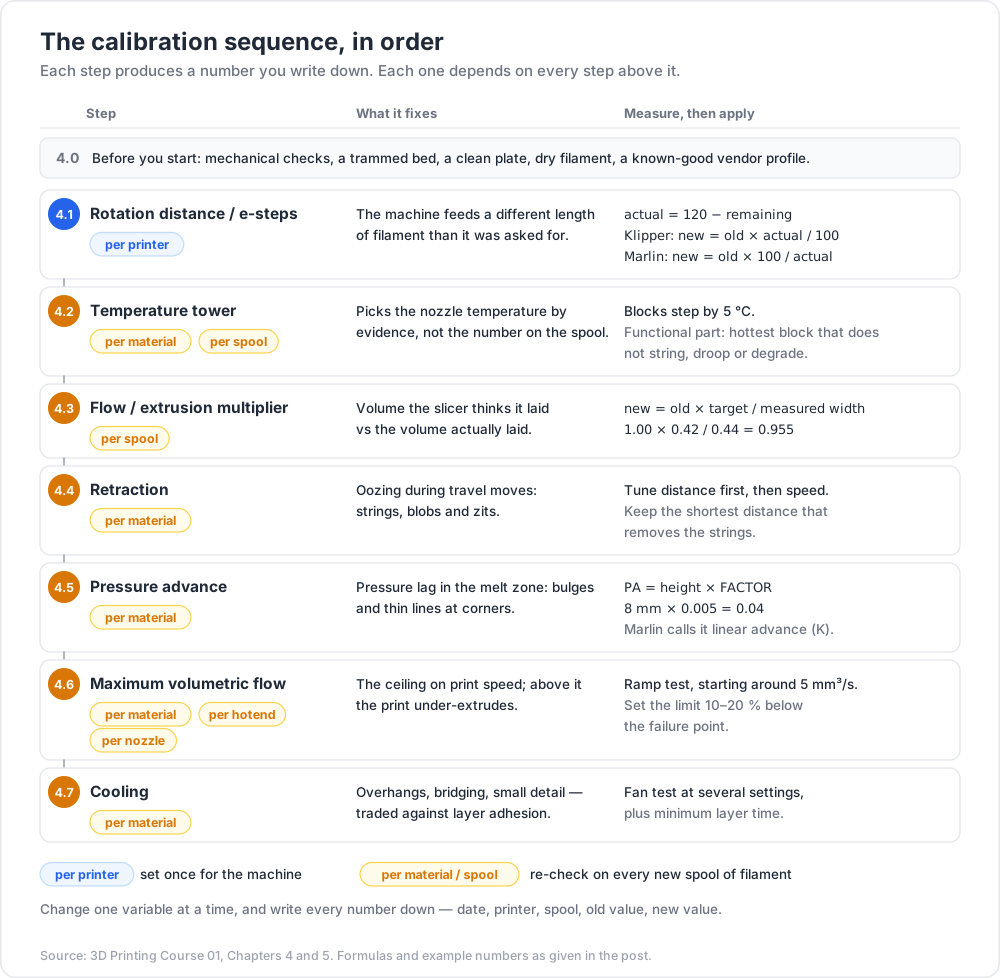
4.0 — Prerequisites
Mechanical checks from Chapter 1, a trammed bed, a clean plate, dry filament, and a known-good vendor profile as the starting point. Do not begin with a profile you found on the internet.
4.1 — Extruder rotation distance / e-steps
What it fixes: the machine delivering a different length of filament than it was asked for. Everything downstream is scaled by this error, so it is first.
Procedure:
- Heat the nozzle to printing temperature (the extruder must be able to actually push).
- Put the extruder in relative mode and disable any modifiers.
- Mark the filament at a known distance above the extruder inlet — 120 mm is convenient because it leaves 20 mm after a 100 mm extrusion.
- Command a slow 100 mm extrusion. Slow matters: fast extrusion can skip or grind and will corrupt the measurement.
- Measure the remaining distance from the inlet to the mark with calipers. Actual extruded = 120 − remaining.
- Repeat three times and average.
1
2
3
M83 ; relative extrusion
G1 E100 F60 ; extrude 100 mm at 1 mm/s — deliberately slow
Applying the result:
1
2
3
4
5
6
Marlin (steps per mm, read with M503, set with M92 E<value>, save with M500):
new_esteps = old_esteps × (100 / actual_extruded)
Klipper ([extruder] rotation_distance in printer.cfg):
new_rotation_distance = old_rotation_distance × (actual_extruded / 100)
Note the inversion: e-steps are steps per millimetre, rotation distance is millimetres per rotation, so the correction goes the opposite way. Getting this backwards doubles your error, which is an obvious enough result that you will notice.
Acceptance: repeat the test after applying. Actual extruded should land within roughly a millimetre of 100 mm. If it does not converge, the drive gear is slipping, the tension is wrong, or the filament path has a restriction.
Scope: this is a per-printer value. It does not change with filament brand.
4.2 — Temperature tower
What it fixes: picking a nozzle temperature by evidence rather than by the number printed on the spool.
Procedure: print a tower whose temperature drops (or rises) by 5 °C per block, using either a pre-built model with embedded temperature changes or a slicer height-triggered custom G-code (M104 S<temp> at the layer where each block starts).
What you evaluate on each block, and what each tells you:
| Observation | Meaning |
|---|---|
| Layer separation when you try to snap the block | too cold — insufficient interdiffusion (post 00, Chapter 3) |
| Stringing between features | too hot, or a retraction problem (isolate later, not now) |
| Blobbing, drooping overhangs, glossy over-melted surface | too hot |
| Poor bridging, curled bridge strands | too cold, or too little cooling |
| Rough, matte, under-fused surface | too cold |
Decision rule: do not just pick the prettiest block. Pick for the property the part needs. Functional part → the hottest temperature that does not string, droop or degrade, because layer bonding improves with temperature. Visual part → the coolest temperature that still fuses cleanly. Write the choice and the reason down.
Scope: per material, per spool. Pigment loading alone shifts the optimum; a black and a white PLA from the same manufacturer regularly want different temperatures.
4.3 — Flow / extrusion multiplier
What it fixes: the difference between the volume the slicer thinks it deposited and the volume actually deposited. Causes include filament diameter variation, nozzle wear, and material-specific die swell.
Procedure (single-wall cube):
- Slice a simple cube (or the standard single-wall calibration cube) with one perimeter, zero top layers, zero infill, and no gap fill. Vase mode also works.
- Note the extrusion width the slicer used for that wall — this is the target, and it is not the nozzle diameter (post 02 explains why).
- Print it at your chosen temperature.
- Measure the wall thickness with calipers at eight or more places — different heights, different faces, avoiding the seam and the corners. Use light, consistent pressure; plastic deforms under a caliper jaw.
- Average the measurements.
Applying the result:
1
2
3
4
5
new_flow = old_flow × (target_extrusion_width / measured_average_width)
example: target 0.42 mm, measured average 0.44 mm, current flow 1.00
new_flow = 1.00 × 0.42 / 0.44 = 0.955
Acceptance: reprint and remeasure. The spread between your individual measurements tells you how much precision you actually have — if measurements vary by more than a couple of hundredths of a millimetre, your measurement technique or the machine is the limiting factor, not the flow number.
Modern slicers ship guided flow calibrations (OrcaSlicer's two-pass flow-rate test, for example) that use a printed surface-quality judgement instead of a caliper. They are faster and less prone to caliper-pressure error; the single-wall method remains the one that produces a number you can defend.
Scope: per spool. This is the setting most worth re-checking on every new roll.
4.4 — Retraction
What it fixes: oozing during travel moves, which shows as stringing, blobs and zits.
Procedure: print a retraction tower or a two-pillar stringing test, stepping one variable per tower. Tune in this order: distance, then speed, then extra restart distance / wipe / Z-hop if still needed.
Typical starting ranges — these depend on melt-zone volume, extruder architecture and Bowden tube length, so treat them as where to begin the tower, not as answers:
| Setup | Retraction distance, typical starting range |
|---|---|
| Direct drive | roughly 0.5–2 mm |
| Bowden | roughly 3–7 mm, longer with a longer tube |
Acceptance: the shortest retraction distance that eliminates strings. Over-retraction is not free: it pulls molten material back into the cold zone where it can jam, grinds a groove into the filament on repeated retractions at the same point, and causes gaps at the start of each extrusion.
Watch out: stringing has three plausible causes — too little retraction, too high a temperature, and wet filament. Wet filament strings and pops audibly and will defeat every retraction value you try. If you hear crackling from the nozzle, dry the filament before tuning anything.
Scope: per material.
4.5 — Pressure advance / linear advance
What it fixes: the lag between commanded flow and actual flow caused by pressure building and releasing in the melt zone. Symptoms are bulges after a deceleration and thin, starved lines after an acceleration — most visible at corners and at the start of each line.
Klipper calls it pressure advance; Marlin calls it linear advance with a K factor. Same physics, different scaling, so the numbers are not interchangeable.
Procedure (Klipper): use the tuning-tower mechanism, which ramps the parameter continuously with height:
1
2
TUNING_TOWER COMMAND=SET_PRESSURE_ADVANCE PARAMETER=ADVANCE START=0 FACTOR=.005
Print the standard tuning tower object, then find the height where corners are sharpest and line width is most uniform through the corner. The value is height × FACTOR — with the factor above, a good band at 8 mm means a pressure advance of 0.04.
Procedure (Marlin): use the K-factor test pattern (Marlin publishes a generator) and set with M900 K<value>. Read the pattern for the K where the fast-to-slow transition shows no bulge and the slow-to-fast transition shows no gap.
Reported typical values span a wide range and depend strongly on architecture — direct-drive setups sit far lower than Bowden ones, because Bowden systems store much more compliance. Do not carry a number across from a different machine; run the tower.
Scope: per material (and re-check if you change hotend or extruder).
4.6 — Maximum volumetric flow
What it fixes: the ceiling on print speed. Above it, the hotend cannot melt filament fast enough and the print silently under-extrudes.
Procedure: print a flow-ramp test that increases volumetric flow with height — OrcaSlicer's "Max Volumetric Speed" test does this directly, and equivalent speed towers exist for other slicers. A typical sweep starts around 5 mm³/s and climbs in small steps.
Reading it: find the height where the surface changes character — extrusion becomes visibly inconsistent, the finish shifts from even to rough or unevenly glossy, or the wall thins. That height's flow is the point of failure, not the working limit.
Applying the result: set your profile's maximum volumetric speed 10–20 % below the failure point. The test is a best case: it does not include retractions, sharp corners, small layers or an already-hot enclosure.
Dependency: this number moves with nozzle temperature. If you later raise the temperature, the ceiling rises too — and if you re-run 4.2, re-run this.
Scope: per material, per hotend, per nozzle.
4.7 — Cooling
What it fixes: overhang quality, bridging, small-feature definition — traded directly against layer adhesion (post 00, Chapter 3).
Procedure: print an overhang/bridging test at several fan settings, or a small tower where fan speed steps with height. Also set minimum layer time (or "slow down for short layers"), which forces small cross-sections to print slowly enough to solidify.
Starting points by material, all subject to measurement:
| Material | Part cooling, typical starting point | Reason |
|---|---|---|
| PLA | high, often near maximum | crystallises quickly; benefits from fast solidification; layer adhesion stays adequate |
| PETG | moderate | needs some cooling for overhangs, but too much visibly weakens layer bonding |
| ABS / ASA | minimal or none, in an enclosure | high shrinkage; rapid cooling causes warping and delamination |
| TPU | low to moderate | slow-flowing; cooling helps definition but the material is tolerant |
| Nylon (PA) | low | strong, hygroscopic, and very sensitive to rapid cooling |
| PC | low | high glass transition; needs a warm environment to bond |
Trick: cooling is the one setting where "more is better" is actively wrong for functional parts. If a bracket keeps snapping along a layer line, drop the fan before you change anything else.
Scope: per material.
Chapter 5 — Discipline: per spool, and one variable at a time
Why calibration is per spool, not per printer
Split your settings into two buckets:
| Belongs to the printer | Belongs to the spool / material |
|---|---|
| e-steps / rotation distance | nozzle temperature |
| XY and Z steps per mm | bed temperature |
| input shaper frequencies | flow / extrusion multiplier |
| bed mesh | retraction distance and speed |
| probe offsets | pressure advance |
| kinematic limits (max accel, jerk/square corner velocity) | maximum volumetric flow |
| — | cooling and minimum layer time |
The right-hand column moves because filament varies. Diameter tolerance differs between manufacturers and between batches. Pigments and fillers change melt viscosity, thermal conductivity and optimum temperature. Moisture content changes everything at once. Even two spools of nominally identical material from one vendor can want a different flow number.
Practically: create a slicer filament profile per spool type you buy, not per material category, and put the measured numbers in it.
The tuning-order rule
Never chase two variables at once. If you change temperature and flow together and the result improves, you have learned nothing you can reuse. The sequence in Chapter 4 is ordered by dependency: rotation distance scales all extrusion, temperature changes flow behaviour and the flow ceiling, flow changes how corners look, pressure advance is judged on corner appearance, and cooling changes both bonding and overhang quality.
Keep a notebook — a text file is fine. For each change record: date, printer, spool, the setting changed, the old value, the new value, the test used, and the observation. Six months later this file is the only thing that distinguishes "my printer got worse" from "I changed something in March".
Chapter 6 — Common first-print failures
| Symptom | Most likely causes | First thing to check |
|---|---|---|
| First layer not sticking | Z-offset too high; greasy plate; bed too cold; unsuitable surface for the material; draught | Wash the plate with soap and water, then print a first-layer patch and read it per Chapter 3 |
| Elephant foot (bulged bottom edge) | Z-offset too low; bed temperature too high; heavy part squashing a still-soft first layer | Raise Z-offset a few hundredths; enable the slicer's elephant-foot compensation only after fixing the offset |
| Warping / corners lifting | material shrinkage (ABS, ASA, PC, nylon) plus insufficient adhesion or cool ambient air | Enclosure or draught shield; raise bed temperature; add a brim; reduce part cooling |
| Stringing | wet filament; temperature too high; insufficient retraction; long travel moves over open space | Listen for crackling and check filament dryness before changing retraction |
| Under-extrusion (thin, gappy walls) | flow ceiling exceeded; partial clog; extruder slipping; flow multiplier too low; nozzle worn or filament diameter mis-set | Slow the print by half — if it improves, it is a flow-rate/clog problem, not a settings problem |
| Layer shifts | belt slipping or loose pulley grub screw; acceleration beyond what the mechanics support; nozzle collided with a warped part; stepper driver overheating | Check the pulley grub screws on the shifted axis; then belt tension; then reduce acceleration |
| Clogs | wet or contaminated filament; heat creep in an all-metal hotend; over-retraction; debris; PTFE liner degraded | Cold pull; check the heatsink fan actually spins; reduce retraction distance |
| Zits and blobs on the surface | seam placement; pressure advance untuned; retraction restart error | Set seam to "aligned" or "rear" and tune pressure advance (post 02 covers seams) |
| Rough/inconsistent top surface | under-extrusion; too few top layers; flow multiplier low | Increase top solid thickness, then re-check flow |
| Ringing / ghosting after corners | mechanical resonance excited by acceleration | Measure resonance with an accelerometer and enable input shaping; check belt tension |
Chapter 7 — Firmware and maintenance
Firmware landscape, at orientation level
| Firmware | Where the work happens | Configuration | Notable for |
|---|---|---|---|
| Marlin | entirely on the printer's microcontroller | compile-time C++ headers (Configuration.h, Configuration_adv.h); reflash to change most things |
the reference implementation; runs on an enormous range of boards; recent versions include input shaping |
| Klipper | kinematics and planning on a host computer (usually an SBC); the MCU only executes precisely timed steps | a plain-text printer.cfg, editable live, no reflash for config changes |
resonance measurement with an accelerometer, input shaping, pressure advance, macros; the strongest tuning toolset |
| RepRapFirmware | on the controller board (Duet and compatibles) | G-code macro configuration plus a web interface | strong on multi-tool and industrial-style setups |
| Vendor forks | on the printer | vendor UI, sometimes closed | Prusa maintains a well-documented Marlin fork; many consumer machines ship a fork whose sources may or may not be published. Check before buying if firmware freedom matters (post 00, Chapter 7) |
The practical question is not "which is best" but "can I measure and change what I need to measure and change". Klipper is popular among people who tune because it makes every value in Chapter 4 adjustable from a text file and re-loadable in seconds.
Maintenance schedule
| Interval | Task |
|---|---|
| Every print | Confirm the plate is clean and the first layer looks right; confirm the model is where you think it is |
| Weekly (or per ~20 h) | Wipe the plate; check the nozzle for accumulated plastic; visually check belts and the filament path |
| Monthly | Soap-and-water wash the plate; check belt tension; check pulley grub screws; check that the hotend heatsink fan spins freely; check bed screws for rock |
| Quarterly | Clean and lightly re-lubricate linear rails or rods with the manufacturer's recommended lubricant; check for Z-lead-screw binding; re-check e-steps; check nozzle wear if you print composites |
| On material change | Re-check temperature, flow, retraction, pressure advance, cooling for the new spool |
| On hardware change (nozzle, hotend, extruder, plate) | Re-run the affected calibrations; a new plate always means a new Z-offset |
| Annually, or on symptoms | Replace the nozzle; inspect PTFE liner if fitted; inspect wiring at flex points, especially the heated-bed cable |
Watch out: do not lubricate belts, and do not put grease on a bed-adhesion surface or on the nozzle. Also do not over-lubricate rails: excess lubricant collects dust and becomes an abrasive paste.
Practice Exercises
Exercise 1 — Probe repeatability
Run your probe's repeatability test ten times at the bed centre and record the standard deviation. Then repeat with the bed and nozzle at printing temperature. Compare. State whether your mesh resolution is limited by the probe or by the bed.
Exercise 2 — Rotation distance from a measurement
You command 100 mm of extrusion. Your mark was at 120 mm; after extruding, the mark sits 26.4 mm above the inlet. Your Klipper rotation_distance is currently 22.6, and a friend with the same extruder running Marlin has e-steps of 397. Compute the corrected value for both firmwares.
Solution
1
2
3
4
5
6
7
8
9
10
11
12
actual_extruded = 120 − 26.4 = 93.6 mm (under-extruding by 6.4 %)
Klipper: new_rotation_distance = 22.6 × (93.6 / 100) = 21.15
Marlin: new_esteps = 397 × (100 / 93.6) = 424.1
Sanity check on direction: the extruder delivered LESS than commanded.
- rotation_distance is mm per rotation → it must go DOWN. 22.6 → 21.15 ✓
- e-steps is steps per mm → it must go UP. 397 → 424 ✓
A 6.4 % error is large; re-run the test after applying, and inspect the
drive gear for slipping if it does not converge.
Exercise 3 — Flow from a single-wall cube
Your slicer used an extrusion width of 0.45 mm for the single wall. Eight caliper readings, away from the seam: 0.47, 0.48, 0.47, 0.49, 0.47, 0.48, 0.48, 0.47 mm. Current flow is 0.98. Compute the new flow, and state one thing about the spread of the measurements.
Solution
1
2
3
4
5
6
7
8
9
10
mean = (0.47+0.48+0.47+0.49+0.47+0.48+0.48+0.47) / 8 = 3.81 / 8 = 0.47625 mm
new_flow = 0.98 × (0.45 / 0.47625) = 0.926
Spread: readings range 0.47–0.49, i.e. ±0.01 mm about the mean. That is
roughly 2 % of the value, which is the practical precision of this method
with hand-held calipers. So a computed change of 5.5 % is meaningful, but
chasing the third decimal place of the flow number is not — the measurement
cannot support it. Reprint and remeasure to confirm.
Exercise 4 — Diagnose from a description
A print adheres perfectly at the front-left of the bed, and the first layer at the back-right is a set of separate round strands that lift. The Z-offset was set at the bed centre and looks correct there. Name the fault and the fix, and say why changing Z-offset is the wrong move.
Solution
1
2
3
4
5
6
7
8
9
10
11
12
Fault: the bed is not parallel to the nozzle's travel plane — it is tilted,
low at the back-right (or the gantry is not square). The centre is correct,
which is exactly what you would expect from a tilt pivoting near the middle.
Fix: physically tram the bed (Chapter 1, step 2), hot, and re-probe the mesh
afterwards. Use the screw-tilt helper if the firmware has one.
Why not Z-offset: Z-offset is a single scalar applied everywhere. Lowering it
to fix the back-right makes the front-left too low, producing elephant foot
and a burnished plate there. One number cannot correct a two-dimensional
tilt — that is what tramming (physical) and the mesh (compensation) are for.
Exercise 5 — Temperature tower with a purpose
Print a temperature tower for a spool you own. Then answer in writing: which block would you choose for a decorative model, which for a load-bearing bracket, and why they are different blocks.
Exercise 6 — Build your calibration notebook
Create a text file with one section per spool you own. Fill in nozzle temperature, bed temperature, flow, retraction distance and speed, pressure advance, maximum volumetric flow and fan settings, marking each as measured or inherited from the vendor profile. Every "inherited" line is a task on your list.
Exercise 7 — Break the tuning-order rule on purpose
Take a known-good profile, change both temperature (+15 °C) and flow (+5 %) at once, and print your standard test part. Then change them back one at a time and print again. Write down how many prints it took to work out which change caused which effect. This is the argument for the rule, delivered by experience rather than assertion.
Cheat-sheet
| What | How |
|---|---|
| Tram, then mesh — never the reverse | physical parallelism first, compensation second |
| Probe hot | heat bed and nozzle to printing temperature before probing |
| Z-offset reference | 0.1 mm feeler gauge, or live baby-stepping during a first-layer patch |
| First layer too high | separate round strands, visible gaps, lifts at corners |
| First layer too low | ridges between lines, burnished look, scraping sound, elephant foot |
| First layer correct | continuous merged sheet, flat, uniform finish, no ridges |
| Handle the plate | by the edges only — a fingerprint is a release agent |
| Calibration order | rotation distance → temperature → flow → retraction → pressure advance → max flow → cooling |
| E-step correction (Marlin) | new = old × 100 / actual, set with M92 E, save with M500 |
| Rotation distance (Klipper) | new = old × actual / 100 |
| Flow correction | new_flow = old_flow × target_width / measured_width |
| Pressure advance (Klipper) | TUNING_TOWER COMMAND=SET_PRESSURE_ADVANCE PARAMETER=ADVANCE START=0 FACTOR=.005, then PA = height × factor |
| Max volumetric flow | ramp test, find the failure point, set 10–20 % below it |
| Cooling for strength | less fan — it trades directly against layer adhesion |
| Stringing checklist | dry filament → temperature → retraction, in that order |
| Layer shift first check | pulley grub screws on the shifted axis |
| Probe repeatability | PROBE_ACCURACY (Klipper) / M48 (Marlin) |
| Per-printer settings | e-steps, steps/mm, input shaper, mesh, probe offsets |
| Per-spool settings | temperature, flow, retraction, pressure advance, max flow, cooling |
| Tuning rule | one variable at a time, and write it down |
What's next
Post 02 opens the slicer and works out what it is actually computing: mesh to per-layer polygons to perimeters, infill, skins and supports, then toolpaths, then G-code. It covers layer height and its relationship to nozzle diameter, why extrusion width is decoupled from nozzle diameter, perimeter count and ordering, seam placement, solid-layer thickness, an honest comparison of infill patterns, speeds and accelerations, and the profile discipline that keeps all of it reproducible.
References
- Klipper documentation — in particular Rotation distance, Pressure advance, Resonance compensation and Bed mesh.
- Marlin firmware documentation — G-code reference including
M48,M92,M500,M900, and the linear advance guide. - OrcaSlicer calibration wiki — documented procedures for flow rate, pressure advance and maximum volumetric speed.
- Ellis' Print Tuning Guide — the most methodical community tuning reference, including determining maximum volumetric flow rate.
- Prusa Knowledge Base — first-layer calibration, bed surface care and troubleshooting articles.
- RepRap wiki — G-code — command reference across firmwares.
Note: this post is in progress. Planned additions: annotated macro photographs of too-high, too-low and correct first layers; a printable one-page calibration log sheet; a worked example of reading a Marlin K-factor pattern.