Three.js Course — 12 · React Three Fiber + Drei Ecosystem
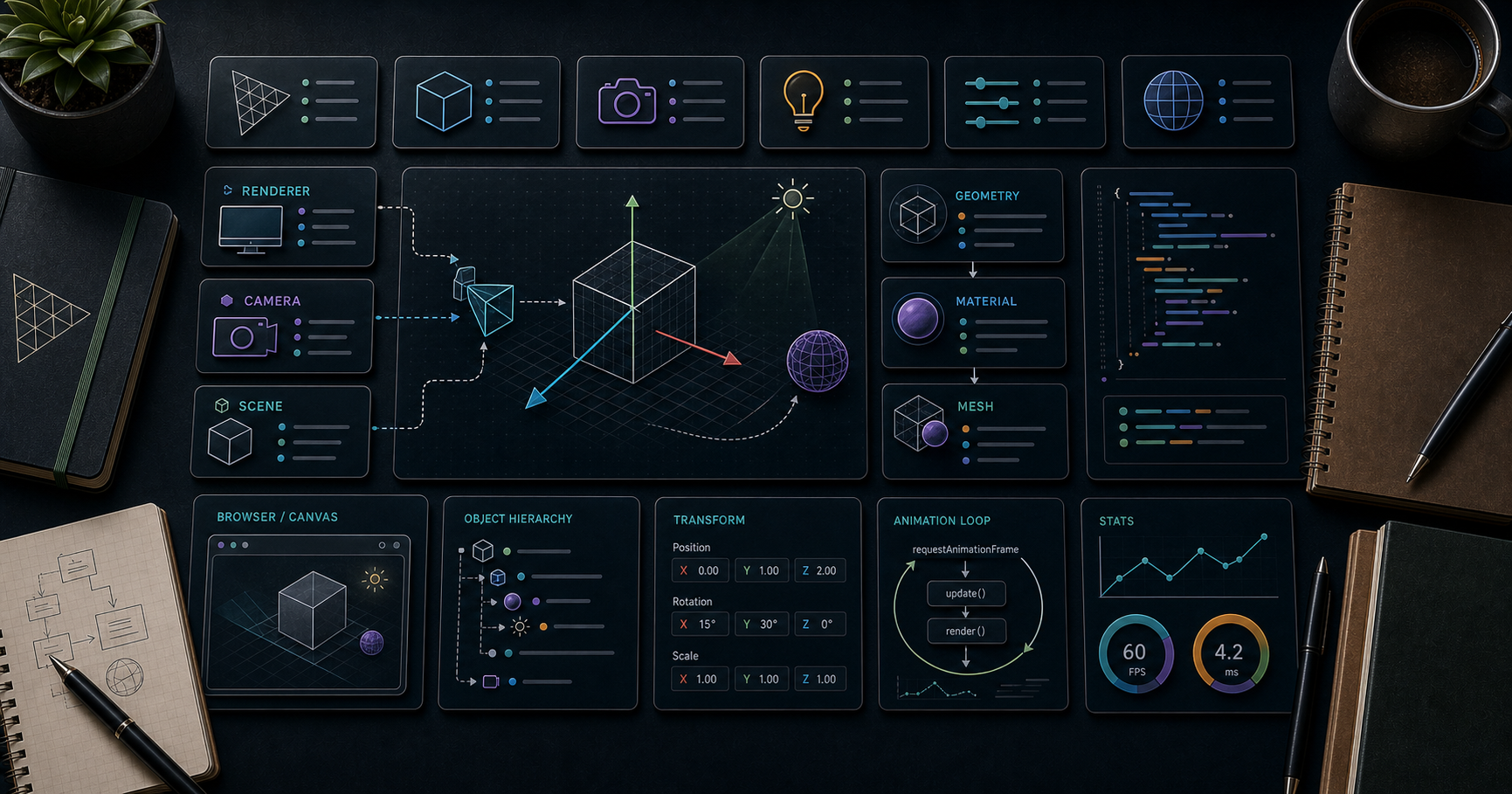
In 2026, most React shops doing 3D use React Three Fiber (R3F) instead of vanilla Three.js. R3F is a thin renderer that maps Three.js objects to JSX — every <mesh>, <group>, <perspectiveCamera> you'd write imperatively becomes a React component. Around it has grown the pmndrs ecosystem: drei (a giant helper library), @react-three/postprocessing, @react-three/rapier, @react-three/xr, plus utilities for state (zustand), animation (framer-motion-3d), and more. This post covers all the essentials so you can port the previous 11 posts' patterns into React.
Series map: 00 Foundations → 01 Geometry & Materials → 02 Cameras & Controls → 03 Lighting & Shadows → 04 Textures & PBR → 05 Asset Pipeline → 06 Animation → 07 Instancing & Batching → 08 Low-End Perf → 09 Shaders → 10 Post-Processing → 11 Physics → 12 R3F + Drei (this post) → 13 AI 3D.
Learning Outcome
- Set up a Vite + React + R3F project.
- Build scenes declaratively with
<Canvas>,<mesh>,<directionalLight>etc. - Use the core hooks:
useFrame,useThree,useLoader. - Use drei helpers (OrbitControls, Environment, Sky, Stage, Html, Instances, Preload, ContactShadows, ...).
- Add physics with
@react-three/rapier. - Add post-processing with
@react-three/postprocessing. - Profile with
r3f-perf. - Avoid the standard R3F performance traps.
Chapter 1 — Why R3F
The same scene, two ways:
1
2
3
4
5
6
7
// vanilla Three.js
const geo = new THREE.BoxGeometry(1, 1, 1);
const mat = new THREE.MeshStandardMaterial({ color: 'orange' });
const cube = new THREE.Mesh(geo, mat);
cube.position.set(0, 1, 0);
scene.add(cube);
1
2
3
4
5
6
// R3F
<mesh position={[0, 1, 0]}>
<boxGeometry args={[1, 1, 1]} />
<meshStandardMaterial color="orange" />
</mesh>
Same output. R3F wins when:
- The scene composition is data-driven (mapping over an array of items → list of meshes).
- You want React idioms: state, effects, suspense, context, hooks, refs.
- You're already on React for the rest of the app.
R3F doesn't make Three.js faster; it makes the codebase more maintainable for React teams.
Chapter 2 — Setup
1
2
3
4
5
6
npm create vite@latest my-scene -- --template react-ts
cd my-scene
npm install three @react-three/fiber @react-three/drei
npm install -D @types/three
npm run dev
Three.js is a peer dependency of R3F — keep them version-aligned.
App skeleton
1
2
3
4
5
6
7
8
9
10
11
12
13
14
15
16
17
18
19
20
21
22
23
24
25
26
27
28
29
30
// src/App.tsx
import { Canvas } from '@react-three/fiber';
import { OrbitControls, Environment } from '@react-three/drei';
export default function App() {
return (
<Canvas
camera={{ position: [3, 3, 5], fov: 60 }}
dpr={[1, 2]} // capped pixel ratio
shadows
>
<ambientLight intensity={0.3} />
<directionalLight position={[5, 10, 5]} intensity={1.2} castShadow />
<mesh position={[0, 1, 0]} castShadow>
<boxGeometry args={[1, 1, 1]} />
<meshStandardMaterial color="orange" />
</mesh>
<mesh rotation-x={-Math.PI / 2} receiveShadow>
<planeGeometry args={[20, 20]} />
<meshStandardMaterial color="#888" />
</mesh>
<Environment preset="city" />
<OrbitControls />
</Canvas>
);
}
That's a fully-set-up Three.js scene with shadows, environment lighting, controls — in 25 lines of JSX.
JSX naming convention
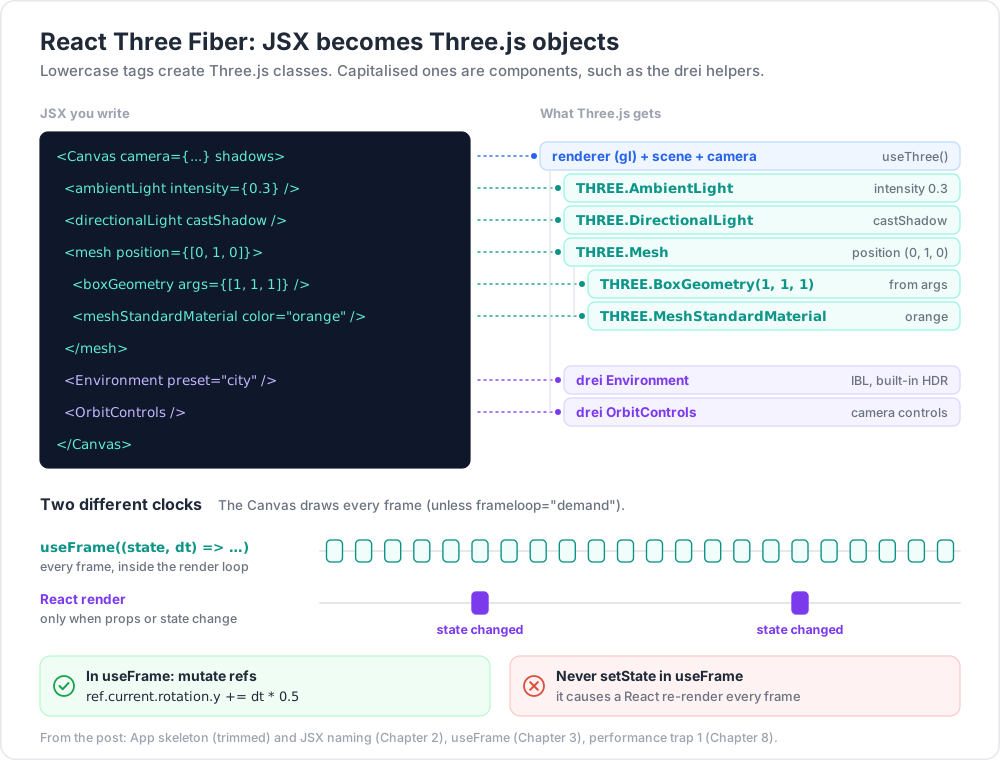
Lowercase tag = a Three.js class. <mesh> → THREE.Mesh, <boxGeometry> → THREE.BoxGeometry, <directionalLight> → THREE.DirectionalLight.
Property style:
- Constructor args →
args={[...]}. - Object properties (vectors, colours) → flat strings/arrays:
position={[0, 1, 0]}. - Sub-properties via dash notation:
rotation-x={Math.PI / 2},material-color="red".
Chapter 3 — The core hooks
useFrame — per-frame logic
1
2
3
4
5
6
7
8
9
10
11
12
13
14
15
16
17
import { useRef } from 'react';
import { useFrame } from '@react-three/fiber';
import * as THREE from 'three';
function SpinningCube() {
const meshRef = useRef<THREE.Mesh>(null!);
useFrame((state, dt) => {
meshRef.current.rotation.y += dt * 0.5;
});
return (
<mesh ref={meshRef}>
<boxGeometry />
<meshStandardMaterial color="orange" />
</mesh>
);
}
useFrame runs outside React's render cycle — directly inside the render loop. Mutate refs; never call setState here unless you really want a React re-render (almost always a bug).
useThree — access the renderer / scene / camera
1
2
3
import { useThree } from '@react-three/fiber';
const { gl, scene, camera, size, viewport } = useThree();
For reading: fine. For modifying: prefer refs.
useLoader — async asset loading with Suspense
1
2
3
4
5
6
7
8
9
10
11
12
13
14
15
import { useLoader } from '@react-three/fiber';
import { GLTFLoader } from 'three-stdlib'; // or 'three/addons/loaders/GLTFLoader.js'
function Model() {
const gltf = useLoader(GLTFLoader, '/models/chair.glb');
return <primitive object={gltf.scene} />;
}
// wrap consumers in Suspense
<Canvas>
<Suspense fallback={null}>
<Model />
</Suspense>
</Canvas>
Drei provides nicer wrappers: useGLTF, useTexture, useFBX, etc.
Chapter 4 — Drei (the helper library)
@react-three/drei ships dozens of components that bundle common patterns. The headline ones:
Controls
<OrbitControls />, <MapControls />, <TrackballControls />, <PointerLockControls />, <FirstPersonControls />, <FlyControls />, <TransformControls object={ref} />, <DragControls items={...} />.
Cameras / staging
<PerspectiveCamera makeDefault />, <OrthographicCamera makeDefault />, <Stage /> (auto-light + ground + camera framing for product viewers), <CameraShake />, <CameraControls /> (better OrbitControls).
Environment / lighting
<Environment preset="sunset" /> — one-line IBL with a built-in HDR.
<Sky distance={450000} sunPosition={[0, 1, 0]} /> — procedural sky.
<Stars />, <Cloud />, <Sparkles />.
Shadows
<ContactShadows position={[0, 0, 0]} opacity={0.4} blur={2.5} far={4} /> — soft fake shadow under an object.
<AccumulativeShadows> + <RandomizedLight> — high-quality baked-look shadows.
Loaders
useGLTF('/model.glb'), useTexture('/diffuse.jpg'), useFBX, useKTX2, useVideoTexture.
Geometry / Mesh helpers
<Box />, <Sphere />, <Plane />, <Torus /> (lighter syntax than <mesh><boxGeometry/></mesh>).
<Instances> + <Instance /> — declarative InstancedMesh.
<Merged> — declarative geometry merge.
Text / HTML
<Text>Hello</Text> — high-quality SDF text.
<Html> — DOM nodes attached to a 3D position.
<Center> — centre child object on origin.
Performance
<Preload all /> — preload textures + models before fade-in.
<AdaptiveDpr pixelated /> — auto-downgrade pixel ratio under load.
<AdaptiveEvents /> — pause pointer events under load.
<BakeShadows /> — bake shadows on first render then freeze.
Misc
<Bounds> + <useBounds()> — zoom to fit children.
<Outlines /> — toon-style outline.
<MeshReflectorMaterial> — reflective floor.
<MeshDistortMaterial> — distorted blob material.
Read the full list at the drei docs.
Chapter 5 — State management with Zustand
For app-level state (selected object, settings, scores), use Zustand. It plays well with R3F because mutations don't force the canvas to re-render.
1
2
npm install zustand
1
2
3
4
5
6
7
8
9
10
11
12
13
// store.ts
import { create } from 'zustand';
interface GameState {
score: number;
inc: () => void;
}
export const useGame = create<GameState>((set) => ({
score: 0,
inc: () => set((s) => ({ score: s.score + 1 })),
}));
1
2
3
4
5
6
7
8
9
10
function Cube() {
const inc = useGame((s) => s.inc); // selector — no re-render on irrelevant state
return <mesh onClick={inc}><boxGeometry /><meshStandardMaterial /></mesh>;
}
function Score() {
const score = useGame((s) => s.score);
return <h1 style={{ position: 'absolute', top: 10, left: 10 }}>{score}</h1>;
}
Pattern: use Zustand selectors so components only re-render when their slice changes. Subscribe to transient updates inside useFrame for high-frequency values:
1
2
3
4
5
useFrame(() => {
const score = useGame.getState().score; // no subscription, just a read
// ...
});
Chapter 6 — Physics with @react-three/rapier
1
2
npm install @react-three/rapier
1
2
3
4
5
6
7
8
9
10
11
12
13
14
15
16
17
18
19
20
21
22
import { Physics, RigidBody, CuboidCollider } from '@react-three/rapier';
<Canvas shadows>
<Physics gravity={[0, -9.81, 0]}>
<RigidBody type="fixed">
<mesh receiveShadow>
<boxGeometry args={[20, 0.1, 20]} />
<meshStandardMaterial color="#888" />
</mesh>
</RigidBody>
{Array.from({ length: 20 }).map((_, i) => (
<RigidBody key={i} position={[Math.random()*4-2, 5 + i*1.5, 0]}>
<mesh castShadow>
<boxGeometry />
<meshStandardMaterial color="orange" />
</mesh>
</RigidBody>
))}
</Physics>
</Canvas>
Each <RigidBody> wraps its children in a Rapier body. Collider shape is auto-derived from the child mesh; override with explicit <CuboidCollider /> / <BallCollider />.
<Physics updateLoop="independent" /> runs physics in its own rAF, invalidating the canvas only when bodies are moving — significant battery savings for idle scenes.
Chapter 7 — Post-processing with @react-three/postprocessing
1
2
npm install @react-three/postprocessing
1
2
3
4
5
6
7
8
9
10
11
import { EffectComposer, Bloom, Vignette, SMAA } from '@react-three/postprocessing';
<Canvas>
{/* scene */}
<EffectComposer multisampling={4}>
<SMAA />
<Bloom intensity={0.7} luminanceThreshold={0.85} />
<Vignette eskil={false} offset={0.3} darkness={0.4} />
</EffectComposer>
</Canvas>
This wraps the pmndrs/postprocessing library (Post 10), composed into one efficient pass.
Chapter 8 — Performance traps
R3F is fast when used correctly; slow when used like React. Key rules:
- Never call
setStateinuseFrame— causes a React re-render every frame. Mutate refs instead. - Don't create objects inline in render —
<mesh material={new MeshStandardMaterial({...})} />allocates per render. Memoize withuseMemo:1
2const mat = useMemo(() => new THREE.MeshStandardMaterial({ color: 'red' }), []);
- Use Drei's
<Instances>for many similar objects:1
2
3
4
5
6<Instances limit={1000} range={1000}>
<boxGeometry />
<meshStandardMaterial />
{data.map((d, i) => <Instance key={i} position={d.pos} color={d.color} />)}
</Instances>
- Suspense +
<Preload all />to avoid pop-in. frameloop="demand"if the scene isn't constantly animating.- Use Zustand selectors so components only re-render when their slice changes.
<AdaptiveDpr />for automatic quality scaling under load.
1
2
3
4
5
6
7
<Canvas dpr={[1, 2]} frameloop="demand">
<AdaptiveDpr pixelated />
<AdaptiveEvents />
<Preload all />
{/* scene */}
</Canvas>
Chapter 9 — Profiling with r3f-perf
1
2
npm install r3f-perf
1
2
3
4
5
6
7
import { Perf } from 'r3f-perf';
<Canvas>
<Perf position="top-left" />
{/* scene */}
</Canvas>
In-scene overlay showing: FPS, CPU ms, GPU ms, memory, draw calls, triangles, geometry/texture counts, slowest objects. Standard tool in every R3F project during development.
Chapter 10 — Full small example
1
2
3
4
5
6
7
8
9
10
11
12
13
14
15
16
17
18
19
20
21
22
23
24
25
26
27
28
29
30
31
32
33
34
35
36
37
38
39
40
41
42
43
44
45
46
47
48
49
50
51
52
import { Canvas, useFrame } from '@react-three/fiber';
import { OrbitControls, Environment, ContactShadows, Float, Html } from '@react-three/drei';
import { Physics, RigidBody } from '@react-three/rapier';
import { EffectComposer, Bloom, SMAA } from '@react-three/postprocessing';
import { Perf } from 'r3f-perf';
import { useRef, Suspense } from 'react';
function SpinningCube() {
const ref = useRef(null);
useFrame((s, dt) => { ref.current.rotation.y += dt * 0.5; });
return (
<RigidBody position={[0, 5, 0]}>
<mesh ref={ref} castShadow>
<boxGeometry />
<meshStandardMaterial color="orange" emissive="#330000" emissiveIntensity={1.5} />
</mesh>
</RigidBody>
);
}
export default function App() {
return (
<Canvas camera={{ position: [4, 4, 6], fov: 50 }} dpr={[1, 2]} shadows>
<Suspense fallback={<Html center>Loading...</Html>}>
<Physics updateLoop="independent">
<RigidBody type="fixed">
<mesh rotation-x={-Math.PI / 2} receiveShadow>
<planeGeometry args={[40, 40]} />
<meshStandardMaterial color="#888" />
</mesh>
</RigidBody>
<Float speed={2}>
<SpinningCube />
</Float>
<Environment preset="sunset" />
<ContactShadows position={[0, 0.01, 0]} opacity={0.5} blur={2} far={5} />
<EffectComposer>
<SMAA />
<Bloom intensity={0.6} luminanceThreshold={0.95} />
</EffectComposer>
<OrbitControls />
<Perf position="top-left" />
</Physics>
</Suspense>
</Canvas>
);
}
A full physics + IBL + bloom + ContactShadows + Drei Float animation app in ~50 lines.
Practice Exercises
Exercise 1 — Rebuild Post 00 cube in R3F
A spinning cube in <Canvas> with OrbitControls + Environment.
Exercise 2 — Drei tour
Use <Stage>, <ContactShadows>, <Float>, <Environment preset="sunset">. Drop a Sketchfab model in.
Exercise 3 — Drei <Instances>
10,000 small cubes scattered randomly using <Instances> + <Instance>. Confirm draw calls stay low via <Perf>.
Exercise 4 — Physics
Wrap a stack of 20 cubes in <RigidBody> over a fixed floor with <Physics>. Click a cube → apply an upward impulse (via the body ref).
Exercise 5 — Post-processing
Add <EffectComposer> with Bloom + Vignette + SMAA. Compare visually with/without.
Exercise 6 — Optimise with the traps
Build a scene that violates trap 1-3 (setState in useFrame, inline materials, no instancing). Measure FPS in Perf. Refactor to fix all three. Measure again.
Cheat-sheet
| What | How |
|---|---|
| Canvas | <Canvas camera={{ position, fov }} dpr={[1, 2]} shadows> |
| Mesh | <mesh position={[x, y, z]}><boxGeometry /><meshStandardMaterial color="red" /></mesh> |
| Per-frame | useFrame((state, dt) => { ref.current.rotation.y += dt }) |
| Access scene | const { gl, scene, camera } = useThree() |
| Load asset | useLoader(GLTFLoader, url) or useGLTF(url) |
| Controls | <OrbitControls /> from drei |
| Environment | <Environment preset="sunset" /> |
| Shadows fake | <ContactShadows /> |
| Many instances | <Instances> + <Instance /> |
| Physics | <Physics><RigidBody>{...}</RigidBody></Physics> |
| Post | <EffectComposer><Bloom /></EffectComposer> |
| Profile | <Perf position="top-left" /> from r3f-perf |
| State | Zustand + selectors |
| On-demand render | frameloop="demand" |
| Adaptive quality | <AdaptiveDpr pixelated /> + <AdaptiveEvents /> |
| Preload | <Preload all /> |
| Don't | setState in useFrame; allocate objects inline |
What's next
Post 13 — the final base post — covers AI-assisted 3D: text-to-3D and image-to-3D tools (Meshy, Tripo, Luma Genie, TripoSR, Hunyuan3D, CSM), NavMesh + pathfinding for AI-driven characters (recast-navigation-js), Gaussian Splatting overview, and procedural generation (noise terrain, L-systems, wave-function collapse). It's the "what 3D becomes when generative AI shows up" post.
References
- React Three Fiber docs
- Drei docs / storybook
- @react-three/rapier docs
- @react-three/postprocessing
- r3f-perf
- Wawa Sensei R3F tutorial
- R3F vs Three.js (2026 comparison)
- R3F best practices skill
Note: this post is in progress. Planned additions: react-three-xr (WebXR),
<MeshReflectorMaterial>deep dive, framer-motion-3d for spring animations, Drei's<KeyboardControls>for input.