Three.js Course — 10 · Post-Processing, Tone Mapping, Color Management
Post-processing is the cinematic polish — bloom on bright highlights, depth of field on out-of-focus regions, ambient occlusion in crevices, anti-aliasing on jagged edges. Three.js does it via the EffectComposer pipeline: render the main scene into a texture, then pass that texture through one or more screen-space passes that read in / write out. This post covers EffectComposer, the standard passes, anti-aliasing options, tone mapping, the colour management pipeline, and the postprocessing library (pmndrs/postprocessing) that ships better-quality effects than the built-ins.
Series map: 00 Foundations → 01 Geometry & Materials → 02 Cameras & Controls → 03 Lighting & Shadows → 04 Textures & PBR → 05 Asset Pipeline → 06 Animation → 07 Instancing & Batching → 08 Low-End Perf → 09 Shaders → 10 Post-Processing (this post) → 11 Physics → 12 R3F → 13 AI 3D.
Learning Outcome
- Build an EffectComposer with
RenderPass+ one or more effect passes. - Use the standard passes: Bloom, SSAO, DOF, Outline, FXAA / SMAA / TAA.
- Pick a tone-mapping operator (ACES, Filmic, Neutral, Cineon, Reinhard).
- Understand the linear → tone-map → sRGB pipeline.
- Use
pmndrs/postprocessingfor higher-quality effects with better performance. - Be disciplined about postprocess cost on mobile.
Chapter 1 — Why postprocess
The raw render is "physically correct" but rarely cinematic. Postprocess passes simulate camera and human-vision effects:
- Bloom — bright pixels bleed into surrounding area; mimics camera lens glare.
- Depth of field (DOF) — pixels at the focus distance are sharp; others blurred.
- Screen-space ambient occlusion (SSAO) — darken creases the global lighting missed.
- Outline — highlight selected objects with a coloured edge.
- God rays / volumetric light — visible shafts of light through atmosphere.
- Motion blur — fast objects smear.
- Anti-aliasing — smooth jagged edges (geometry AA in WebGL is limited).
- Tone mapping — squash HDR values into the displayable 0-1 range.
- Colour grading — LUT / curve adjustments for a chosen mood.
Each is a full-screen pass. Each costs ms. Use sparingly on mobile (Post 08).
Chapter 2 — EffectComposer basics
1
2
3
4
5
6
7
8
9
10
11
12
13
14
15
16
17
18
19
20
21
22
23
24
25
26
27
28
29
30
31
import * as THREE from 'three';
import { EffectComposer } from 'three/addons/postprocessing/EffectComposer.js';
import { RenderPass } from 'three/addons/postprocessing/RenderPass.js';
import { UnrealBloomPass } from 'three/addons/postprocessing/UnrealBloomPass.js';
import { OutputPass } from 'three/addons/postprocessing/OutputPass.js';
const composer = new EffectComposer(renderer);
composer.setSize(innerWidth, innerHeight);
composer.setPixelRatio(Math.min(devicePixelRatio, 2));
composer.addPass(new RenderPass(scene, camera));
const bloom = new UnrealBloomPass(
new THREE.Vector2(innerWidth, innerHeight),
/* strength */ 0.6,
/* radius */ 0.4,
/* threshold */ 0.85
);
composer.addPass(bloom);
composer.addPass(new OutputPass()); // applies tone mapping + sRGB conversion
renderer.setAnimationLoop(() => {
composer.render(); // not renderer.render
});
window.addEventListener('resize', () => {
composer.setSize(innerWidth, innerHeight);
bloom.setSize(innerWidth, innerHeight);
});
Key points:
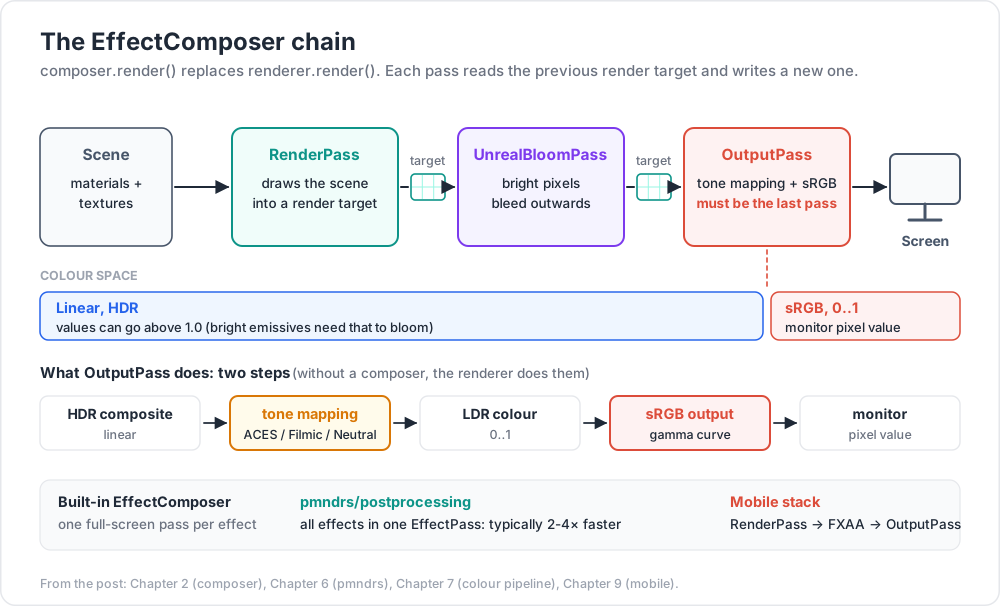
composer.render()replacesrenderer.render(scene, camera).RenderPassdraws the scene into a render target.- Each subsequent pass reads the previous target and writes a new one.
OutputPassmust be last — it applies tone mapping + sRGB. Otherwise colours look wrong.
Chapter 3 — Common passes
UnrealBloomPass
1
2
new UnrealBloomPass(resolution, strength, radius, threshold)
threshold is the brightness above which pixels bloom. radius is the blur falloff. strength is the bloom intensity. Defaults: strength ~0.6, radius ~0.4, threshold ~0.8.
For physically-correct rendering (since r155, default), bright emissives need values > 1.0 to bloom. Try material.emissive.set(0xffaa55) + material.emissiveIntensity = 3.
SSAOPass
Approximate ambient occlusion in screen space. Darkens corners.
1
2
3
4
5
6
7
import { SSAOPass } from 'three/addons/postprocessing/SSAOPass.js';
const ssao = new SSAOPass(scene, camera, innerWidth, innerHeight);
ssao.kernelRadius = 8;
ssao.minDistance = 0.001;
ssao.maxDistance = 0.1;
composer.addPass(ssao);
Expensive. Often the baked AO map (Post 04) is a better answer for static scenes.
OutlinePass
Highlight selected objects with an outline.
1
2
3
4
5
6
7
8
9
10
11
import { OutlinePass } from 'three/addons/postprocessing/OutlinePass.js';
const outline = new OutlinePass(
new THREE.Vector2(innerWidth, innerHeight), scene, camera
);
outline.edgeStrength = 3.0;
outline.edgeGlow = 0.0;
outline.edgeThickness = 1.0;
outline.visibleEdgeColor.set(0x00ffff);
outline.selectedObjects = [hoveredMesh];
composer.addPass(outline);
Common pattern: raycast on hover → set outline.selectedObjects = [hit.object].
BokehPass (depth of field)
1
2
3
4
5
6
7
8
9
10
import { BokehPass } from 'three/addons/postprocessing/BokehPass.js';
const dof = new BokehPass(scene, camera, {
focus: 5.0,
aperture: 0.025,
maxblur: 0.01,
width: innerWidth,
height: innerHeight,
});
composer.addPass(dof);
Tweak focus to the distance of your subject; smaller aperture = sharper.
Chapter 4 — Anti-aliasing
WebGL hardware multisample anti-aliasing (MSAA) is enabled by setting antialias: true on the renderer. MSAA does not work when EffectComposer is used because the render target it allocates by default is single-sample.
Three options:
| Pass | Cost | Quality |
|---|---|---|
| FXAA (FastApproximateAntiAliasing) | very cheap | OK; blurs everything slightly |
| SMAA (Subpixel Morphological) | medium | better than FXAA |
| TAA (Temporal AA) | medium-high; needs jittered camera | best static quality; ghosting on motion |
| MSAA in composer | high; depends on hardware support | best raw quality |
1
2
3
4
5
6
7
import { ShaderPass } from 'three/addons/postprocessing/ShaderPass.js';
import { FXAAShader } from 'three/addons/shaders/FXAAShader.js';
const fxaa = new ShaderPass(FXAAShader);
fxaa.uniforms.resolution.value.set(1 / innerWidth, 1 / innerHeight);
composer.addPass(fxaa);
For MSAA in a composer, allocate a multisample render target:
1
2
3
const rt = new THREE.WebGLRenderTarget(innerWidth, innerHeight, { samples: 4 });
const composer = new EffectComposer(renderer, rt);
Modern path: use pmndrs/postprocessing library (Chapter 6) — its EffectComposer supports MSAA + multiple effects in one pass.
Chapter 5 — Tone mapping
Real-world brightness has a huge dynamic range (sun = 1.6 billion lux, candle = 1 lux). Monitors display 0-1. Tone mapping is the squashing function that maps HDR scene values into displayable range.
1
2
3
renderer.toneMapping = THREE.ACESFilmicToneMapping;
renderer.toneMappingExposure = 1.0;
Options:
| Operator | Style |
|---|---|
NoToneMapping |
linear clip; blown-out highlights — usually wrong |
LinearToneMapping |
tiny boost; simple |
ReinhardToneMapping |
classic; mid-tones favoured |
CineonToneMapping |
film-stock emulation |
ACESFilmicToneMapping |
industry standard cinematic look; default recommendation |
AgXToneMapping (newer) |
Filmic's modern successor; very natural skin / sky |
NeutralToneMapping (since r166) |
Khronos PBR Neutral — preserves albedo colour for product viz |
ACES is the safe modern default. For product viewers / e-commerce, Neutral preserves base colours better.
toneMappingExposure is the equivalent of camera ISO. Increase to brighten the scene; decrease to darken.
Trick: when adopting
ACESFilmic, your existing materials may look darker/less saturated. Don't fight it — the result is more cinematic and physically plausible. Adjust light intensities, not albedo values.
Chapter 6 — The pmndrs/postprocessing library
Built by the pmndrs collective (same as react-three-fiber). Cleaner API, single-pass effect chains (one big shader rather than many small passes — much faster), better-quality effects.
1
2
npm install postprocessing
1
2
3
4
5
6
7
8
9
10
11
12
13
14
15
16
17
18
19
import {
EffectComposer, EffectPass, RenderPass,
BloomEffect, BrightnessContrastEffect, VignetteEffect, SMAAEffect, SMAAPreset
} from 'postprocessing';
const composer = new EffectComposer(renderer);
composer.addPass(new RenderPass(scene, camera));
const effectPass = new EffectPass(
camera,
new SMAAEffect({ preset: SMAAPreset.MEDIUM }),
new BloomEffect({ intensity: 0.7, luminanceThreshold: 0.85 }),
new BrightnessContrastEffect({ contrast: 0.1 }),
new VignetteEffect({ offset: 0.3, darkness: 0.4 })
);
composer.addPass(effectPass);
renderer.setAnimationLoop(() => composer.render());
Effects are composed into one big GPU pass, not chained per-pass — typically 2-4× faster than Three.js's built-in EffectComposer.
R3F has @react-three/postprocessing which wraps the same library declaratively (Post 12).
Effects shipped
SMAAEffect, FXAAEffect, BloomEffect, SelectiveBloomEffect, BokehEffect, DepthOfFieldEffect, SSAOEffect (with better quality than the built-in), OutlineEffect, ChromaticAberrationEffect, GodRaysEffect, LensDistortionEffect, NoiseEffect, VignetteEffect, ToneMappingEffect, BrightnessContrastEffect, HueSaturationEffect, LUT3DEffect, ScanlineEffect, plus custom support.
For new projects, pmndrs/postprocessing is the recommended choice over the built-in EffectComposer.
Chapter 7 — Colour management pipeline
The complete modern pipeline (since r152):
1
2
3
4
5
6
7
8
9
10
11
12
13
14
Scene materials + textures (linear colour space, HDR-capable values)
│
▼ renderer.render()
HDR scene render target (linear)
│
▼ post-process passes (all work in linear)
HDR composite (linear)
│
▼ tone mapping (ACES / Filmic / Neutral)
LDR colour (0..1, perceptually mapped)
│
▼ sRGB output conversion (gamma curve)
Monitor pixel value
Two things to set up:
1
2
3
renderer.toneMapping = THREE.ACESFilmicToneMapping;
renderer.outputColorSpace = THREE.SRGBColorSpace; // default since r152
When using EffectComposer, the OutputPass performs both steps; otherwise the renderer does them automatically.
For textures (Post 04):
- Colour textures (albedo, emissive):
tex.colorSpace = THREE.SRGBColorSpace. - Data textures (normal, roughness):
tex.colorSpace = THREE.NoColorSpace.
Get any of this wrong and the scene looks washed out, oversaturated, or weirdly dark.
Chapter 8 — LUT colour grading
For a specific "look" (warm filmic, cold thriller, vintage), apply a 3D look-up table (LUT) at the end of the pipeline.
1
2
3
4
5
6
7
import { LUTPass } from 'three/addons/postprocessing/LUTPass.js';
import { LUTCubeLoader } from 'three/addons/loaders/LUTCubeLoader.js';
const lut = await new LUTCubeLoader().loadAsync('/luts/cinematic.cube');
const lutPass = new LUTPass({ lut: lut.texture3D, intensity: 1.0 });
composer.addPass(lutPass);
Free LUTs: RocketStock 35 free LUTs, IWLTBAP.
pmndrs/postprocessing ships LUT3DEffect with the same idea.
Chapter 9 — Performance discipline (recap from Post 08)
| Desktop | Mobile | |
|---|---|---|
| Postprocess passes | 3-5 OK | 0-1 |
| Bloom | yes | sparingly |
| SSAO | yes | bake AO instead |
| DOF | yes | skip |
| AA | TAA / SMAA / MSAA | FXAA only |
| Tone map | in OutputPass or renderer |
same |
| LUT | yes | yes (cheap, single texture lookup) |
The single most expensive common pass is SSAO at full resolution. The cheapest is a LUT.
For mobile, the typical stack is RenderPass → FXAAShader → OutputPass and nothing more.
Practice Exercises
Exercise 1 — Bloom on emissives
A scene with one matte sphere + one emissive sphere (emissive: 0xff8844, emissiveIntensity: 5). Add UnrealBloomPass. Confirm the emissive glows; matte doesn't.
Exercise 2 — Outline on hover
OrbitControls scene with 5 objects. Raycast on hover → outline.selectedObjects = [hit.object]. Outline appears.
Exercise 3 — Tone-mapping comparison
Same scene 4× side by side: NoToneMapping, Reinhard, ACESFilmic, Neutral. Note the colour and contrast differences.
Exercise 4 — pmndrs/postprocessing port
Convert your bloom + FXAA pipeline from three/addons/postprocessing to pmndrs/postprocessing in a single EffectPass. Measure framerate before/after.
Exercise 5 — Colour grading
Find a free .cube LUT online; load + apply via LUTPass. Try several LUTs to see the mood shifts.
Exercise 6 — Mobile-strip-down
Take any of the above; create a mobile fallback path with no postprocess at all (just renderer.render). Switch automatically via navigator.userAgent.
Cheat-sheet
| What | How |
|---|---|
| Composer | new EffectComposer(renderer) + addPass(new RenderPass(scene, camera)) |
| Replace render call | composer.render() instead of renderer.render() |
| Last pass must be | OutputPass (tone map + sRGB) |
| Bloom | UnrealBloomPass(res, strength, radius, threshold) |
| Outline | OutlinePass(res, scene, camera).selectedObjects = [...] |
| AA cheap | FXAA ShaderPass |
| AA quality | SMAA / TAA / MSAA (samples on render target) |
| Tone mapping | renderer.toneMapping = THREE.ACESFilmicToneMapping |
| Modern alt | NeutralToneMapping for product viz |
| Output color space | renderer.outputColorSpace = THREE.SRGBColorSpace |
| Modern post lib | pmndrs/postprocessing — composed effects, faster |
| LUT grading | LUTPass or LUT3DEffect; .cube files |
| Mobile policy | ≤ 1 postprocess pass |
| Update on resize | composer.setSize(...) and pass-specific setSize |
What's next
Post 11 covers physics and interactivity — Rapier (the modern WASM physics engine), raycaster picking patterns, drag controls, gizmos, and how to plug physics into your Three.js scene.
References
- Three.js docs — EffectComposer
- Three.js manual — Post Processing
- pmndrs/postprocessing library
- @react-three/postprocessing
- ACES Filmic in Three.js
- Three.js Journey — Post-processing
Note: this post is in progress. Planned additions: custom EffectPass walkthrough, god rays via screen-space ray marching, mobile-grade SSAO alternatives.