Three.js Course — 11 · Physics & Interactivity — Rapier, Raycaster, Gizmos
Three.js does not include a physics engine — meshes don't collide, fall, or push each other by themselves. For physics + collisions you add a separate library; the modern default in 2026 is Rapier (Rust + WASM, fast, deterministic). For interaction (click / drag / hover), Three.js provides Raycaster and several controls (TransformControls, DragControls, PointerLockControls). This post covers wiring physics into a Three.js scene, the standard raycast patterns, and the gizmos you need for editor-like apps.
Series map: 00 Foundations → 01 Geometry & Materials → 02 Cameras & Controls → 03 Lighting & Shadows → 04 Textures & PBR → 05 Asset Pipeline → 06 Animation → 07 Instancing & Batching → 08 Low-End Perf → 09 Shaders → 10 Post-Processing → 11 Physics & Interactivity (this post) → 12 R3F → 13 AI 3D.
Learning Outcome
- Install and initialise the Rapier physics world.
- Sync rigid bodies with Three.js meshes each frame.
- Use colliders (box, ball, capsule, trimesh, heightfield).
- Pick objects by raycasting from screen-space pointer.
- Use
TransformControlsfor in-editor gizmos. - Use
DragControlsfor click-drag-on-plane interactions.
Chapter 1 — Pick a physics engine
Choices in 2026:
| Engine | Backend | Notes |
|---|---|---|
| Rapier | Rust → WASM | modern default — fast, deterministic, actively developed |
| Cannon-es | TypeScript | older; legacy projects |
| Ammo.js | C++ Bullet → emscripten | mature, heavy, advanced features (cloth, soft body) |
| Havok | (commercial) | game-engine grade |
For new work, Rapier. For legacy with existing Cannon code, stay there.
Install
1
2
npm install @dimforge/rapier3d-compat
The -compat build is a single CJS-compatible file — easier to bundle in Vite without WASM-loader plugins.
Chapter 2 — Initialise Rapier
1
2
3
4
5
6
7
8
import * as THREE from 'three';
import RAPIER from '@dimforge/rapier3d-compat';
await RAPIER.init(); // load WASM
const gravity = { x: 0.0, y: -9.81, z: 0.0 };
const world = new RAPIER.World(gravity);
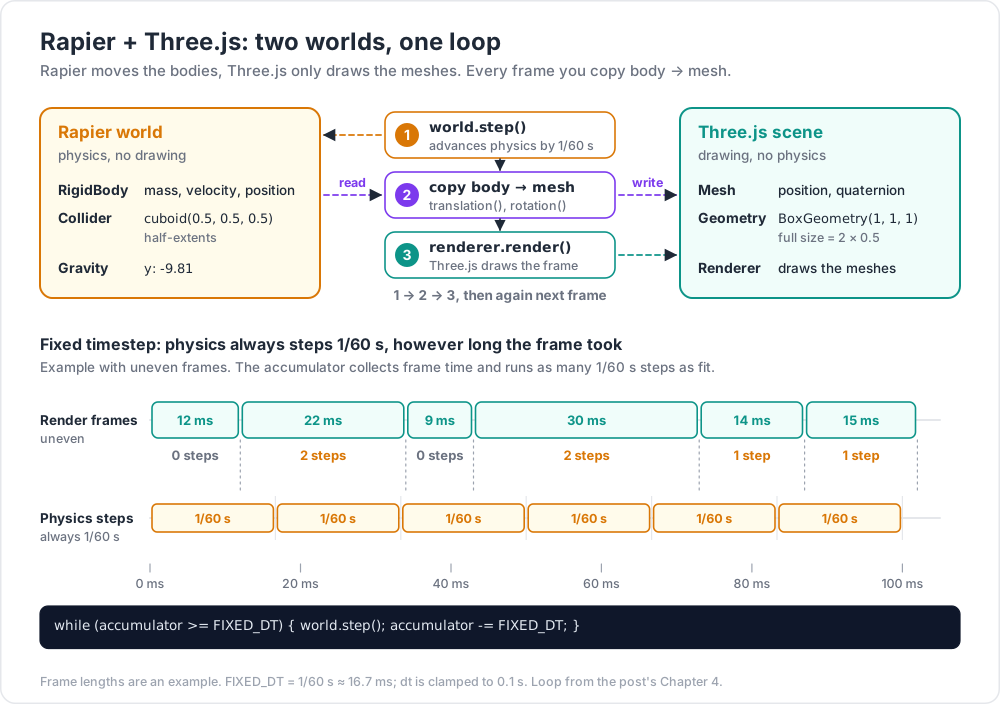
world.step() advances the simulation by a fixed time step (default 1/60 s). Call it once per render frame.
Chapter 3 — Bodies and colliders
A rigid body is the physical object (with mass, velocity, position). A collider is its shape for collision detection. Bodies can have one or more colliders.
1
2
3
4
5
6
7
8
9
10
11
12
13
14
15
16
17
18
19
20
21
22
23
24
25
26
// dynamic box
const bodyDesc = RAPIER.RigidBodyDesc.dynamic().setTranslation(0, 5, 0);
const body = world.createRigidBody(bodyDesc);
const collDesc = RAPIER.ColliderDesc.cuboid(0.5, 0.5, 0.5) // half-extents
.setRestitution(0.6)
.setFriction(0.8)
.setDensity(1.0);
world.createCollider(collDesc, body);
// matching Three.js mesh
const mesh = new THREE.Mesh(
new THREE.BoxGeometry(1, 1, 1),
new THREE.MeshStandardMaterial({ color: 0xff9966 })
);
mesh.castShadow = true;
scene.add(mesh);
// keep the mesh tied to the body
function sync() {
const t = body.translation();
const r = body.rotation();
mesh.position.set(t.x, t.y, t.z);
mesh.quaternion.set(r.x, r.y, r.z, r.w);
}
Body types:
- Dynamic — moves with physics.
- Fixed (static) — never moves, infinite mass; for floors, walls.
- Kinematic position-based — moves by setting position; collides with dynamics; doesn't react to forces. For characters/platforms.
- Kinematic velocity-based — moves by setting velocity; same idea as above.
Collider shapes:
| Shape | Constructor |
|---|---|
| Box | cuboid(hx, hy, hz) |
| Sphere | ball(r) |
| Capsule | capsule(halfHeight, r) |
| Cylinder | cylinder(halfHeight, r) |
| Cone | cone(halfHeight, r) |
| Trimesh (any 3D mesh) | trimesh(vertices, indices) |
| Heightfield (terrain) | heightfield(rows, cols, heights, scale) |
| Convex hull | convexHull(points) |
Trick: never use
trimeshfor dynamic bodies — only for static terrain. For moving objects, use a primitive (box / capsule) or convex hull. Trimesh-trimesh collisions are 10-100× slower than primitive-primitive.
Chapter 4 — The step + sync loop
1
2
3
4
5
6
7
8
9
10
11
12
13
14
15
16
17
18
19
20
21
22
23
24
25
26
27
28
29
30
31
32
33
34
35
36
37
38
39
40
41
42
43
44
const bodies = []; // { body, mesh } pairs
function spawnCube(x, y, z) {
const body = world.createRigidBody(
RAPIER.RigidBodyDesc.dynamic().setTranslation(x, y, z)
);
world.createCollider(RAPIER.ColliderDesc.cuboid(0.5, 0.5, 0.5), body);
const mesh = new THREE.Mesh(
new THREE.BoxGeometry(1, 1, 1),
new THREE.MeshStandardMaterial({ color: Math.random() * 0xffffff })
);
mesh.castShadow = true;
scene.add(mesh);
bodies.push({ body, mesh });
}
// floor
const floorBody = world.createRigidBody(RAPIER.RigidBodyDesc.fixed());
world.createCollider(RAPIER.ColliderDesc.cuboid(10, 0.1, 10), floorBody);
const floorMesh = new THREE.Mesh(
new THREE.BoxGeometry(20, 0.2, 20),
new THREE.MeshStandardMaterial({ color: 0x888888 })
);
floorMesh.position.y = -0.1;
floorMesh.receiveShadow = true;
scene.add(floorMesh);
// drop some cubes
for (let i = 0; i < 20; i++) spawnCube(Math.random() * 4 - 2, 5 + i * 1.5, Math.random() * 4 - 2);
renderer.setAnimationLoop(() => {
world.step();
for (const { body, mesh } of bodies) {
const t = body.translation();
const r = body.rotation();
mesh.position.set(t.x, t.y, t.z);
mesh.quaternion.set(r.x, r.y, r.z, r.w);
}
renderer.render(scene, camera);
});
That is the canonical loop. 20 cubes raining onto a floor — pure Rapier + pure Three.js, no helper library.
Fixed-timestep wrapper for stability
Variable timestep introduces jitter. The robust pattern:
1
2
3
4
5
6
7
8
9
10
11
12
13
14
15
const FIXED_DT = 1 / 60;
let accumulator = 0;
renderer.setAnimationLoop(() => {
const dt = Math.min(clock.getDelta(), 0.1); // clamp huge jumps
accumulator += dt;
while (accumulator >= FIXED_DT) {
world.step();
accumulator -= FIXED_DT;
}
// render with the bodies' current positions
for (const { body, mesh } of bodies) { /* sync as above */ }
renderer.render(scene, camera);
});
For perfect smoothness, also interpolate between the previous and current physics state proportional to accumulator / FIXED_DT. Most games skip that and look fine.
Chapter 5 — Forces, impulses, joints
1
2
3
4
5
6
7
8
9
body.applyImpulse({ x: 0, y: 5, z: 0 }, true); // sudden push (jump)
body.applyTorqueImpulse({ x: 0, y: 1, z: 0 }, true);
body.setLinvel({ x: 2, y: 0, z: 0 }, true); // set velocity directly
body.setAngvel({ x: 0, y: 5, z: 0 }, true);
body.lockTranslations(true, true); // freeze position
body.lockRotations(true, true); // freeze rotation
Joints connect bodies:
| Joint | What |
|---|---|
| Fixed | rigidly attached |
| Revolute | hinge (one axis rotation) |
| Prismatic | slider (one axis translation) |
| Spherical | ball joint (3-axis rotation) |
| Generic | configurable |
1
2
3
4
5
6
7
8
9
const joint = world.createImpulseJoint(
RAPIER.JointData.revolute(
/* anchor1 */ { x: 0, y: 0, z: 0 },
/* anchor2 */ { x: 0, y: 0, z: 0 },
/* axis */ { x: 0, y: 1, z: 0 }
),
bodyA, bodyB, /* wakeUp */ true
);
Joints enable: doors, hinges, ragdoll characters, vehicles (4 prismatic wheel joints), chains, ropes (sequential spherical joints).
Chapter 6 — Character controllers
For an FPS / third-person character, dynamic body + capsule collider is technically correct but feels squishy. The standard pattern: kinematic character controller that you move manually and Rapier resolves against the world.
1
2
3
4
5
6
7
8
9
10
11
12
13
14
15
16
17
const characterController = world.createCharacterController(0.01); // offset
characterController.enableAutostep(0.3, 0.1, true); // stair-step
characterController.enableSnapToGround(0.5); // stick to slopes
const playerBody = world.createRigidBody(RAPIER.RigidBodyDesc.kinematicPositionBased().setTranslation(0, 1, 0));
const playerCollider = world.createCollider(RAPIER.ColliderDesc.capsule(0.5, 0.3), playerBody);
// per frame, given a desired movement vector
characterController.computeColliderMovement(playerCollider, desiredVec);
const correctedMove = characterController.computedMovement();
const pos = playerBody.translation();
playerBody.setNextKinematicTranslation({
x: pos.x + correctedMove.x,
y: pos.y + correctedMove.y,
z: pos.z + correctedMove.z,
});
Combine with PointerLockControls for mouse-look + WASD inputs. Real character controllers usually add: jump (vertical impulse on grounded check), gravity (manual vy -= 9.81 * dt), and ground-test raycasts.
Chapter 7 — Raycaster (picking + queries)
The pattern from Post 02, complete recipe:
1
2
3
4
5
6
7
8
9
10
11
12
13
14
15
16
17
18
const raycaster = new THREE.Raycaster();
const pointer = new THREE.Vector2();
renderer.domElement.addEventListener('pointermove', (e) => {
const rect = renderer.domElement.getBoundingClientRect();
pointer.x = ((e.clientX - rect.left) / rect.width) * 2 - 1;
pointer.y = -((e.clientY - rect.top) / rect.height) * 2 + 1;
});
renderer.domElement.addEventListener('click', () => {
raycaster.setFromCamera(pointer, camera);
const hits = raycaster.intersectObjects(scene.children, true);
if (hits.length) {
const { object, point, distance } = hits[0];
console.log('clicked', object.name, 'at', point);
}
});
Per-instance picking (InstancedMesh)
1
2
3
const hits = raycaster.intersectObject(instancedMesh);
if (hits.length) console.log('instance', hits[0].instanceId);
Performance — accelerate with BVH
For scenes with > 10k triangles in raycastable meshes:
1
2
npm install three-mesh-bvh
1
2
3
4
5
6
7
8
9
import { acceleratedRaycast, computeBoundsTree, disposeBoundsTree } from 'three-mesh-bvh';
THREE.BufferGeometry.prototype.computeBoundsTree = computeBoundsTree;
THREE.BufferGeometry.prototype.disposeBoundsTree = disposeBoundsTree;
THREE.Mesh.prototype.raycast = acceleratedRaycast;
// then for each raycastable mesh:
mesh.geometry.computeBoundsTree();
Speeds raycasts up to 100× by building a BVH once per geometry. Same library accelerates physics queries when used with custom shapes.
Physics raycast (Rapier)
Independent from Three.js raycaster, for collision-based queries (line of sight, projectile trace):
1
2
3
4
5
6
7
8
9
10
const ray = new RAPIER.Ray(
{ x: origin.x, y: origin.y, z: origin.z },
{ x: dir.x, y: dir.y, z: dir.z }
);
const hit = world.castRay(ray, /* maxToi */ 100, /* solid */ true);
if (hit) {
const point = ray.pointAt(hit.toi);
console.log('hit collider', hit.collider, 'at', point);
}
Chapter 8 — TransformControls (gizmo to move objects)
Editor-style click-and-drag to translate/rotate/scale a mesh:
1
2
3
4
5
6
7
8
9
10
11
12
13
14
15
16
17
18
import { TransformControls } from 'three/addons/controls/TransformControls.js';
const transform = new TransformControls(camera, renderer.domElement);
transform.attach(mesh);
scene.add(transform.getHelper()); // r170+; older versions use `scene.add(transform)`
// disable orbit while transforming
transform.addEventListener('dragging-changed', (e) => {
orbitControls.enabled = !e.value;
});
// switch modes
window.addEventListener('keydown', (e) => {
if (e.key === 'g') transform.setMode('translate');
if (e.key === 'r') transform.setMode('rotate');
if (e.key === 's') transform.setMode('scale');
});
Useful in level editors, scene composition tools, and design viewers.
Chapter 9 — DragControls
Click-drag objects across a plane (no rotation/scale):
1
2
3
4
5
6
import { DragControls } from 'three/addons/controls/DragControls.js';
const drag = new DragControls([sphere1, sphere2, sphere3], camera, renderer.domElement);
drag.addEventListener('dragstart', () => orbit.enabled = false);
drag.addEventListener('dragend', () => orbit.enabled = true);
Cheap interactions for prototypes and UI demos.
Chapter 10 — UI overlay patterns
For mixed 2D UI + 3D scene:
| Pattern | Use |
|---|---|
HTML overlay (absolute-positioned <div> on top of <canvas>) |
text labels, modals, control panels |
CSS2DRenderer / CSS3DRenderer |
DOM nodes attached to 3D positions, projected each frame |
| Sprites + canvas textures | UI elements that live entirely in the 3D scene |
Drei <Html> (in R3F, Post 12) |
declarative HTML attached to a 3D position |
HTML overlay is simplest. CSS2DRenderer is right when labels need to follow 3D objects (think Google Earth pins).
Practice Exercises
Exercise 1 — Rapier hello world
Initialise Rapier. Drop 10 cubes onto a floor. Confirm they stack.
Exercise 2 — Click to spawn
Click anywhere on the canvas → spawn a sphere at the raycast hit on the floor. Add physics body + collider.
Exercise 3 — Character controller
Implement Chapter 6. Capsule + kinematic character + WASD + jump. Walk over a few box obstacles.
Exercise 4 — TransformControls editor
Load any model. Add TransformControls. Hotkeys G / R / S switch modes. Drag the gizmo handles.
Exercise 5 — BVH raycast on a heavy mesh
Load a 100k+ triangle model (Sketchfab statue). Implement Raycaster picking with and without three-mesh-bvh. Measure the difference.
Exercise 6 — Physics raycast (line of sight)
Place an "enemy" cube. Each frame, cast a ray from enemy to player. If a wall is in between (Rapier castRay returns a non-player collider first), enemy can't see player. Visualise the ray as a line.
Cheat-sheet
| What | How |
|---|---|
| Default engine | Rapier (@dimforge/rapier3d-compat) |
| Init | await RAPIER.init() |
| World | new RAPIER.World({ x: 0, y: -9.81, z: 0 }) |
| Step | world.step() each frame (or fixed-step accumulator) |
| Dynamic body | RAPIER.RigidBodyDesc.dynamic().setTranslation(x, y, z) |
| Static body | RAPIER.RigidBodyDesc.fixed() |
| Box collider | RAPIER.ColliderDesc.cuboid(hx, hy, hz) |
| Trimesh collider | static only |
| Sync mesh | mesh.position.set(t.x, t.y, t.z); mesh.quaternion.set(r.x,...) |
| Impulse | body.applyImpulse({...}, true) |
| Joint | world.createImpulseJoint(JointData.revolute(...), a, b, true) |
| Character controller | world.createCharacterController(offset) |
| Raycaster | raycaster.setFromCamera(ndc, camera) + intersectObjects(...) |
| Faster raycast | three-mesh-bvh library |
| Physics ray | world.castRay(ray, maxToi, true) |
| Gizmo | TransformControls (translate/rotate/scale) |
| Drag in plane | DragControls |
| Pickable per-instance | hit.instanceId |
| HTML over 3D | absolute-position div, or CSS2DRenderer |
What's next
Post 12 covers React Three Fiber + Drei — the declarative React way of writing Three.js scenes that has become the default in 2026 for React-shop frontends. Most of the patterns from this series translate cleanly into JSX.
References
- Rapier (3D, WASM) docs
- @dimforge/rapier3d-compat on npm
- Three.js docs — Raycaster
- three-mesh-bvh — fast raycasting
- Three.js docs — TransformControls
- react-three-rapier (R3F wrapper)
Note: this post is in progress. Planned additions: vehicle controller recipe, cloth + soft-body via Ammo.js, projectile-trace UI, gizmo styling.