Three.js Course — 09 · Custom Shaders — GLSL & TSL Node Material
The built-in materials cover ~90 % of what most scenes need. The other 10 % requires writing shader code — for stylised looks (cel-shading, hatching, toon outline), procedural effects (animated water, dissolves, holograms), data visualisation (heat maps, vector fields), or anything else outside the PBR / Phong / Lambert envelope. Three.js offers three paths: ShaderMaterial (classical GLSL), RawShaderMaterial (no Three.js boilerplate at all), and the modern TSL NodeMaterial (compose JS nodes that compile to GLSL or WGSL automatically). This post covers all three, plus onBeforeCompile for patching built-in shaders without rewriting them.
Series map: 00 Foundations → 01 Geometry & Materials → 02 Cameras & Controls → 03 Lighting & Shadows → 04 Textures & PBR → 05 Asset Pipeline → 06 Animation → 07 Instancing & Batching → 08 Low-End Perf → 09 Shaders (this post) → 10 Post-Processing → 11 Physics → 12 R3F → 13 AI 3D.
Learning Outcome
- Read and write simple GLSL vertex + fragment shaders.
- Pass data via attributes, uniforms, varyings.
- Use
ShaderMaterialwith built-in Three.js uniforms. - Patch the built-in materials via
material.onBeforeCompile. - Compose TSL NodeMaterials in pure JavaScript (cross-target GLSL + WGSL).
- Pick the right path for your project (GLSL when porting, TSL for new work).
Chapter 1 — Shader essentials
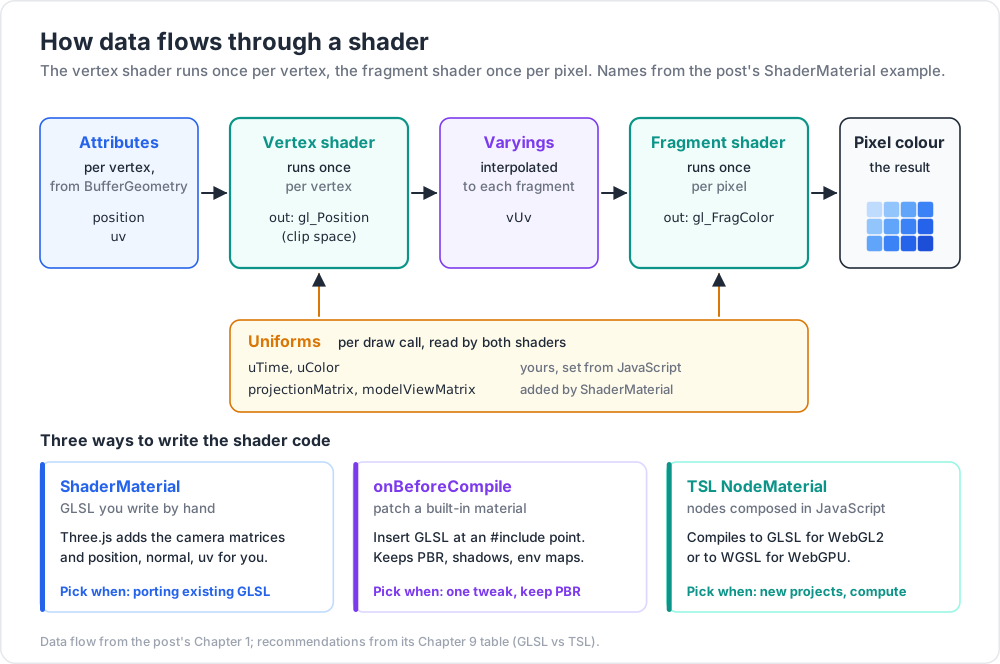
A shader is a small program the GPU runs. The classical pipeline has two:
- Vertex shader — runs once per vertex; outputs
gl_Position(clip space). - Fragment (pixel) shader — runs once per pixel; outputs
gl_FragColor(in GLSL) /@location(0)(WGSL).
Data flows:
1
2
3
4
Attributes (per vertex) ─► Vertex shader ─► Varyings (interpolated) ─► Fragment shader ─► Pixel colour
▲ ▲
Uniforms (per draw call) ─────────┴────────────────────────────────────────────┘
| Storage | Source | Per | Read in |
|---|---|---|---|
| Attribute | BufferGeometry |
vertex | vertex shader |
| Uniform | JavaScript | draw call | both |
| Varying | vertex shader | vertex, interpolated to fragment | fragment shader |
Chapter 2 — The minimal ShaderMaterial
1
2
3
4
5
6
7
8
9
10
11
12
13
14
15
16
17
18
19
20
21
22
23
24
25
26
27
28
29
30
31
32
33
34
35
36
import * as THREE from 'three';
const material = new THREE.ShaderMaterial({
uniforms: {
uTime: { value: 0 },
uColor: { value: new THREE.Color(0x88ccff) },
},
vertexShader: /* glsl */ `
varying vec2 vUv;
void main() {
vUv = uv;
vec3 pos = position;
pos.y += sin(uv.x * 10.0 + 1.0) * 0.1; // wave
gl_Position = projectionMatrix * modelViewMatrix * vec4(pos, 1.0);
}
`,
fragmentShader: /* glsl */ `
uniform vec3 uColor;
uniform float uTime;
varying vec2 vUv;
void main() {
vec3 c = uColor + 0.2 * sin(uTime + vUv.x * 6.28);
gl_FragColor = vec4(c, 1.0);
}
`,
});
const mesh = new THREE.Mesh(new THREE.PlaneGeometry(4, 4, 64, 64), material);
scene.add(mesh);
// drive the uniform
renderer.setAnimationLoop(() => {
material.uniforms.uTime.value = clock.getElapsedTime();
renderer.render(scene, camera);
});
Key automatic globals ShaderMaterial injects for you:
projectionMatrix,modelViewMatrix,viewMatrix,normalMatrix— camera math.position,normal,uv— attributes.cameraPosition— uniform.
For RawShaderMaterial, none of these are injected; you declare every attribute + uniform manually. Useful for advanced custom pipelines; usually overkill.
Chapter 3 — GLSL crash course
GLSL ES 3.00 (WebGL2) syntax:
1
2
3
4
5
6
7
8
9
10
11
12
13
14
15
16
#version 300 es
precision highp float;
uniform float uTime;
uniform vec3 uColor;
uniform sampler2D uMap;
in vec3 position; // attribute
in vec2 uv;
out vec2 vUv; // varying
void main() {
vUv = uv;
gl_Position = vec4(position, 1.0);
}
Types:
| Type | Notes |
|---|---|
float, int, bool |
scalars |
vec2, vec3, vec4 |
float vectors |
mat3, mat4 |
matrices |
sampler2D, samplerCube |
texture handles |
Built-in math: sin, cos, mix(a, b, t), smoothstep(a, b, x), clamp(x, lo, hi), step(edge, x), length, normalize, dot, cross, texture(sampler, uv).
Coordinate spaces:
| Space | What | Useful for |
|---|---|---|
| Local (model) | the geometry's own coords | wave deformations |
| World | after model matrix | global noise, world-space effects |
| View (camera) | after view matrix | fog, depth |
| Clip | after projection | the final gl_Position |
| NDC | clip ÷ w | screen-space effects |
Chapter 4 — Patching the built-in materials with onBeforeCompile
You usually don't want to rewrite PBR from scratch. To inject just one tweak into a MeshStandardMaterial:
1
2
3
4
5
6
7
8
9
10
11
12
13
14
15
16
17
18
19
20
21
22
23
24
25
26
27
28
const mat = new THREE.MeshStandardMaterial({ color: 0xffffff });
mat.onBeforeCompile = (shader) => {
// add a uniform
shader.uniforms.uTime = { value: 0 };
// expose the uniform to the shader code
shader.vertexShader = `
uniform float uTime;
${shader.vertexShader}
`.replace(
'#include <begin_vertex>',
`
#include <begin_vertex>
transformed.y += sin(uv.x * 10.0 + uTime) * 0.1;
`
);
mat.userData.shader = shader; // keep a ref to update uniform later
};
renderer.setAnimationLoop(() => {
if (mat.userData.shader) {
mat.userData.shader.uniforms.uTime.value = clock.getElapsedTime();
}
renderer.render(scene, camera);
});
You inject GLSL snippets at named #include points in Three.js's shader source (begin_vertex, output_fragment, dithering_fragment, etc.). Read the relevant file in three/src/renderers/shaders/ShaderChunk/ to find the right hook.
This pattern keeps PBR lighting, shadows, env maps — all the heavy stuff — while you customise one part. Far simpler than rewriting a full standard material.
Chapter 5 — TSL (Three.js Shading Language) — the modern path
Three.js introduced TSL as stable in r184. You compose shaders in JavaScript using nodes that compile to GLSL (for WebGL2) or WGSL (for WebGPU) automatically.
Advantages:
- One material source works on both backends.
- Type-safe in TypeScript.
- Composable — assign nodes to material properties; the renderer wires them up.
- Easier to read than long GLSL strings.
1
2
3
4
5
6
7
8
9
10
11
12
13
14
15
16
17
18
19
20
import * as THREE from 'three/webgpu';
import { time, uv, vec3, mix, sin, positionLocal, mx_noise_float } from 'three/tsl';
const material = new THREE.MeshStandardNodeMaterial();
// wave the surface based on UV.x + time
material.positionNode = positionLocal.add(
vec3(0, sin(uv().x.mul(10).add(time)).mul(0.1), 0)
);
// procedural colour mixing
material.colorNode = mix(
vec3(0.1, 0.4, 1.0),
vec3(1.0, 0.6, 0.2),
uv().y
);
const mesh = new THREE.Mesh(new THREE.PlaneGeometry(4, 4, 64, 64), material);
scene.add(mesh);
time, uv(), positionLocal, cameraPosition etc. are built-in nodes. Mathematical operations (add, mul, sin, mix, smoothstep) chain naturally.
Material classes
| TSL material | Replaces |
|---|---|
MeshBasicNodeMaterial |
MeshBasicMaterial |
MeshLambertNodeMaterial |
MeshLambertMaterial |
MeshPhongNodeMaterial |
MeshPhongMaterial |
MeshStandardNodeMaterial |
MeshStandardMaterial |
MeshPhysicalNodeMaterial |
MeshPhysicalMaterial |
NodeMaterial |
ShaderMaterial (full custom) |
You can assign nodes to colorNode, emissiveNode, roughnessNode, metalnessNode, positionNode, normalNode, opacityNode, etc.
Why this matters
In 2026, WebGPU is in every browser. WebGL2 isn't dying for years yet, but new performance + compute features land on WebGPU only. Writing TSL means your shaders work on both today, and gain WebGPU benefits transparently.
Three.js docs: legacy ShaderMaterial is still supported; new node features (compute, advanced effects) are TSL-only.
Chapter 6 — Common shader recipes
Fresnel rim light
1
2
3
4
5
6
7
8
// in fragment shader
varying vec3 vNormal;
varying vec3 vViewPosition;
float fresnel = pow(1.0 - max(dot(normalize(vNormal), normalize(vViewPosition)), 0.0), 3.0);
vec3 rim = vec3(0.4, 0.6, 1.0) * fresnel;
gl_FragColor = vec4(baseColor + rim, 1.0);
TSL equivalent (sketch):
1
2
3
4
import { normalView, positionViewDirection, pow, max, dot, vec3 } from 'three/tsl';
const fresnel = pow(max(dot(normalView, positionViewDirection).oneMinus(), 0), 3);
material.emissiveNode = vec3(0.4, 0.6, 1.0).mul(fresnel);
Animated dissolve
A noise threshold; pixels below are discarded.
1
2
3
4
5
6
7
8
9
10
uniform float uDissolve;
uniform sampler2D uNoise;
varying vec2 vUv;
void main() {
float n = texture(uNoise, vUv * 4.0).r;
if (n < uDissolve) discard;
gl_FragColor = vec4(baseColor, 1.0);
}
Vertex displacement from a heightmap
1
2
3
4
5
6
7
8
9
10
uniform sampler2D uHeight;
uniform float uAmplitude;
void main() {
vec3 pos = position;
float h = texture(uHeight, uv).r;
pos.y += h * uAmplitude;
gl_Position = projectionMatrix * modelViewMatrix * vec4(pos, 1.0);
}
Hatch / cross-hatch (sketch look)
Sample multiple noise textures based on view-space dot product with light direction → discrete bands of hatching density.
Toon outline (inverted hull)
A second pass: render the model slightly inflated along normals as a back-faces-only black material → silhouette outline.
1
2
3
4
5
6
// vertex shader for the outline pass
void main() {
vec3 pos = position + normal * 0.02;
gl_Position = projectionMatrix * modelViewMatrix * vec4(pos, 1.0);
}
1
2
3
4
material.side = THREE.BackSide;
material.depthWrite = false;
material.color = new THREE.Color(0x000000);
Chapter 7 — Compute shaders (WebGPU only)
WebGPU enables compute shaders — work that runs on the GPU outside the render pass. Use cases: particle simulation, GPU pathfinding, image processing, ML inference.
TSL exposes compute via computeNode:
1
2
3
4
5
6
7
8
9
10
import { Fn, instanceIndex, storage } from 'three/tsl';
const positionsBuffer = ...; // a storage buffer
const compute = Fn(() => {
const i = instanceIndex;
storage(positionsBuffer, 'vec3', i).x = sin(time.add(i)).mul(5);
})().compute(particleCount);
renderer.compute(compute); // run before render
This is advanced territory; the API is stabilising in 2026. For most projects, you won't need compute shaders for years.
Chapter 8 — Tooling + workflow
| Tool | What |
|---|---|
| Spector.js | inspect every shader compilation + uniform per frame |
| gl-shader-output | render a shader output to test in isolation |
vite-plugin-glsl |
import .glsl files directly: import vert from './shader.vert' |
| shadertoy.com | online GLSL playground; great for prototyping fragment shaders |
| Compute Toys (computetoys.com) | WGSL / WebGPU playground |
| shaderchunk files | live in three/src/renderers/shaders/ShaderChunk/ — read them for shader-patching |
Workflow:
- Prototype the fragment shader idea on Shadertoy or a flat plane.
- Port to ShaderMaterial / NodeMaterial.
- Add the uniforms wired from JS.
- Test in Spector.js for compilation issues.
Chapter 9 — Picking GLSL vs TSL
| Situation | Pick |
|---|---|
| New project in 2026 | TSL — cross-platform, future-proof |
| Porting from existing GLSL | ShaderMaterial — preserves your code |
| Patching one detail in a standard material | onBeforeCompile — keep PBR, add a tweak |
| Need compute shaders | TSL + WebGPU |
| Targeting only WebGL2 + you know GLSL well | ShaderMaterial is fine |
| Maximum portability | TSL (compiles to both backends) |
In practice, established Three.js shops in 2026 are gradually porting hero materials to TSL while keeping legacy ShaderMaterial code where it works.
Practice Exercises
Exercise 1 — Animated wave plane
PlaneGeometry(4, 4, 64, 64). ShaderMaterial that displaces vertices with sin(uv.x * 10 + uTime). Drive uTime from the loop.
Exercise 2 — Procedural gradient
Fragment shader that colours pixels by vUv.y interpolated between two colours.
Exercise 3 — Fresnel rim
Add a fresnel rim to a MeshStandardMaterial via onBeforeCompile. Visible bright edges from glancing angles.
Exercise 4 — TSL port
Convert Exercise 1 to a MeshStandardNodeMaterial using TSL positionNode. Run with WebGPURenderer. Confirm visually identical.
Exercise 5 — Dissolve
A model that dissolves over 2 seconds — animate a dissolve uniform from 0 to 1; discard fragments above a noise-texture threshold. Bonus: glow at the dissolve edge.
Exercise 6 — Toon outline
Duplicate a model: original with MeshToonMaterial, second with inverted hull + black BackSide. Should look cel-shaded with a clean outline.
Cheat-sheet
| What | How |
|---|---|
| Quick custom material | new THREE.ShaderMaterial({ uniforms, vertexShader, fragmentShader }) |
| Built-in uniforms | projectionMatrix, modelViewMatrix, position, normal, uv (ShaderMaterial only) |
| Uniform update | material.uniforms.uTime.value = t (no needsUpdate needed) |
| Patch built-in | material.onBeforeCompile = (shader) => { ... } |
| Inject GLSL | shader.vertexShader.replace('#include <begin_vertex>', ...) |
| TSL material | new MeshStandardNodeMaterial(); assign colorNode, positionNode, etc. |
| TSL built-ins | time, uv(), positionLocal, normalLocal, cameraPosition, mix, sin, smoothstep |
| Cross-target | TSL compiles to GLSL (WebGL2) + WGSL (WebGPU) |
| Dissolve | discard based on noise + threshold |
| Outline | inverted hull, BackSide, black, depthWrite false |
| Fresnel | pow(1 - dot(N, V), k) |
| Import .glsl files | vite-plugin-glsl |
| Compute | TSL Fn() + .compute(count) + renderer.compute(node) — WebGPU |
What's next
Post 10 covers post-processing — EffectComposer, the common passes (Bloom, SSAO, DOF, Outline, FXAA / SMAA / TAA), tone mapping (ACES, Filmic, Neutral), and the colour management pipeline that makes the final image look right.
References
- Three.js docs — ShaderMaterial
- Three.js docs — TSL
- TSL Wiki
- Field Guide to TSL and WebGPU (Maxime Heckel)
- TSL: A Better Way to Write Shaders
- Three.js Shaders Guide (LearnWithHasan)
- The Book of Shaders — gentle GLSL intro.
Note: this post is in progress. Planned additions: full TSL compute walkthrough, fluid sim with compute shaders, post-process custom passes.