
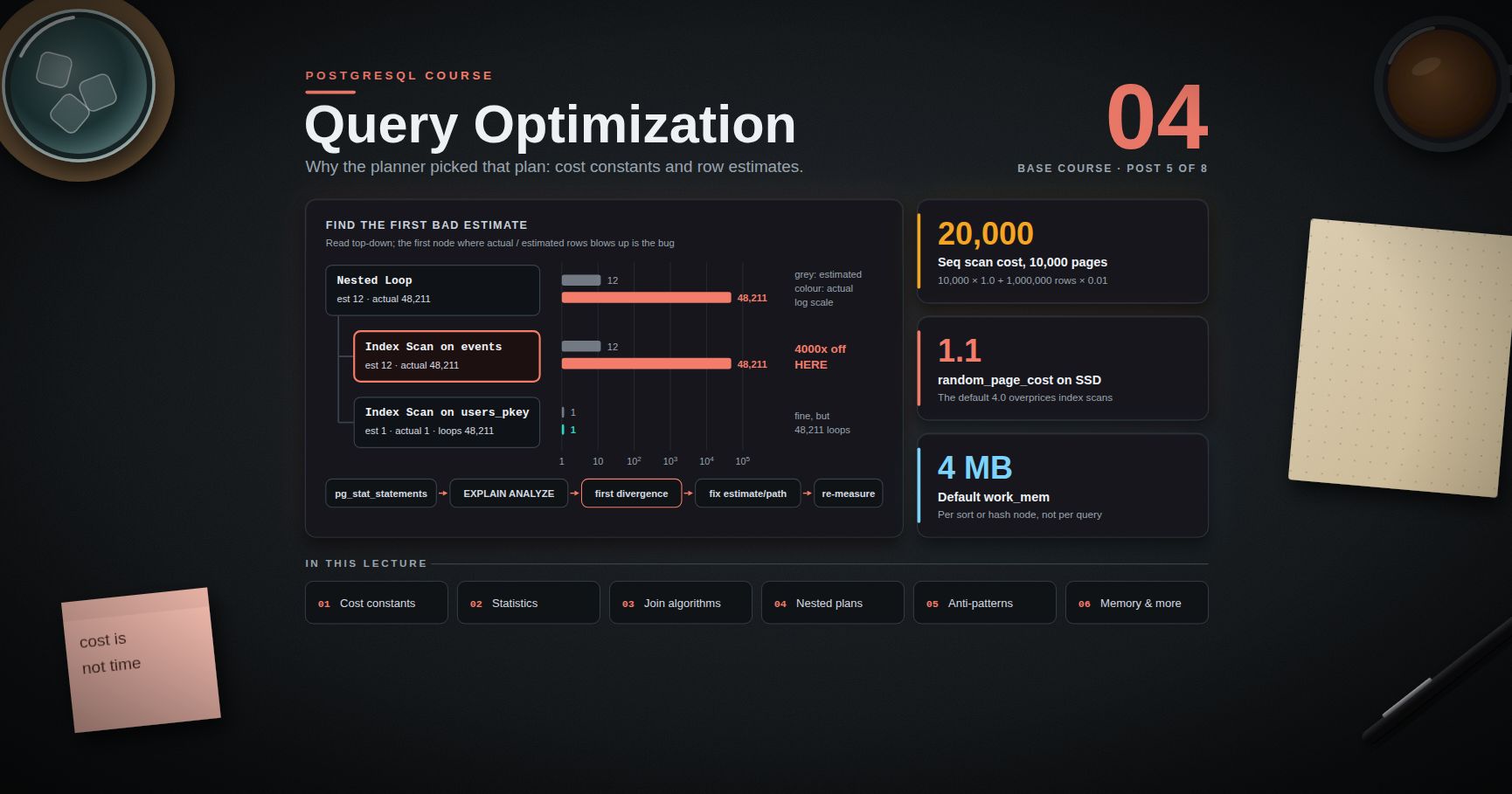
PostgreSQL Course — 04 · Query Optimization and Statistics
Post 03 covered index structures and how to read a basic plan. This post goes one level down: why the planner picked that plan. PostgreSQL's planner is a cost-based optimizer — it enumerates plan shapes, prices each one using a handful of tunable constants plus the statistics collected by , and executes the cheapest. Almost every "why is this query slow" investigation ends at one of two answers: the cost constants do not describe your hardware, or the row estimates are wrong. Everything below is about finding out which.
> Series map: 00 Foundations & Setup → 01 SQL Fundamentals & Data Types → 02 Joins, Aggregation & Window Functions → 03 Indexes & the Query Planner → 04 Query Optimization & Statistics (this post) → 05 Transactions, MVCC, Isolation & Locking → 06 Schema Design, Normalization & JSONB → 07 Operations, Backup, Replication & Security.
Learning Outcome
- Explain how the planner prices a plan using , , and the CPU cost constants, and adjust them for SSD-backed storage.- Describe what stores in , when to raise , and when to add extended statistics with .- Recognise nested loop, hash join, and merge join from a plan and say why each was chosen.- Read a nested plan top-down and locate the first bad row estimate.- Fix the classic anti-patterns: functions on indexed columns, implicit casts, chains, , and pagination.- Size from evidence instead of guesswork, and read spill/external-sort lines.- Use partitioning, parallel query, and materialized views as deliberate optimization tools.- Start any real tuning session from instead of from intuition.
Chapter 1 — How the planner prices a plan
Terminology
- Path — one candidate way to produce a result set (a sequential scan, an index scan, a particular join order). The planner builds many, keeps the cheapest per useful sort order.- Cost — an abstract number, not milliseconds. Only ratios between costs matter.- Startup cost — cost paid before the first row can be returned. Shown as the first number in .- Total cost — cost to return all rows. The second number.- Selectivity — the estimated fraction of rows a predicate keeps, from to .- Cardinality — the estimated number of rows a node emits, i.e. selectivity × input rows.
The cost constants
The planner converts work into cost with five main knobs:
| Parameter | Default | Meaning ||-----------|---------|---------|| | | Reading one 8 KB page sequentially. The unit everything else is measured against. || | | Reading one page at a random offset. || | | Processing one row. || | | Processing one index entry. || | | Evaluating one operator or function call. |
A sequential scan of a 10 000-page table holding 1 000 000 rows costs roughly:
An index scan returning 1 % of that table pays per heap page it visits — and in the worst case (no correlation between index order and physical order) that is one page per row.
Why is wrong on SSDs
The default ratio of 4:1 encodes the physics of a 7 200 RPM spinning disk, where a random read costs a seek plus rotational latency and a sequential read costs almost nothing extra. On NVMe or SSD storage there is no seek; random reads are perhaps 1.0–1.5× the cost of sequential ones, and on a well-cached instance the difference is smaller still.
Leaving the default at makes the planner systematically overprice index scans, so it falls back to sequential scans on queries where an index would win.
is not an allocation — it tells the planner how much data it can assume is cached between the shared buffers and the OS page cache. Setting it too low is another way to scare the planner off index scans.
> Trick: change one constant per session with , re-, and compare. Never edit first — prove the change helps on a real query before making it global.
> Watch out: cost is not time. A plan with half the cost can be slower if the row estimates feeding that cost are wrong. Always confirm with .
Chapter 2 — Statistics: what ANALYZE actually collects
Terminology
- — the system catalogue holding per-column statistics. Read it through the view, which is human-readable and permission-filtered.- MCV list — most common values and their frequencies.- Histogram — bucket boundaries describing the distribution of the non-MCV values.- — estimated number of distinct values. Negative values are a ratio to the table row count ( means "unique").- Correlation — how closely the physical row order matches the logical order of the column, from to . Drives the cost of an index scan's heap fetches.
Autovacuum runs automatically once roughly rows have changed (defaults: 50 rows plus 10 %). Two situations defeat that:
1. A bulk load followed immediately by queries — the statistics are still from before the load. Run explicitly at the end of any ETL job.2. A restore from — dumps do not carry statistics. is mandatory after a restore.
defaultstatisticstarget
Default : up to 100 MCV entries and 100 histogram buckets per column, sampled from roughly 300 × target rows. Raise it for columns with skewed distributions where the tail matters:
The maximum is . Higher targets make slower and planning slower, so raise them per column, not globally.
Extended statistics for correlated columns
The planner assumes predicates are independent: . When columns are functionally related that is catastrophically wrong.
teaches it the relationship:
| Kind | Since | Fixes ||------|-------|-------|| | PostgreSQL 10 | Functional dependency: knowing implies . Helps equality predicates on both columns. || | PostgreSQL 10 | Distinct count of a combination of columns. Helps estimates. || | PostgreSQL 12 | Multivariate most-common-values list. Helps non-equality and mixed predicates. |
PostgreSQL 14 added statistics on expressions, which fixes estimates for functional indexes and expression predicates:
> Common pitfall: extended statistics do not help across tables. A bad estimate on a join condition needs a different fix — usually better single-table estimates on the columns feeding the join.
Chapter 3 — Join algorithms
PostgreSQL has exactly three physical join strategies. Knowing when each wins tells you what a bad plan is missing.
| Algorithm | Shape | Chosen when | Cost profile ||-----------|-------|-------------|--------------|| Nested Loop | For each outer row, probe the inner relation | Outer side is small, inner side has an index on the join key | Low startup, cost grows linearly with outer rows || Hash Join | Build a hash table on the smaller side, stream the larger side through it | Both sides large, equality join, hash table fits in | High startup (build phase), cheap per probe || Merge Join | Sort both sides on the join key, walk them in lockstep | Both sides already sorted (index order), or sorting is cheap; also works for inequality merges | Startup dominated by the sorts |
Reading it:
- means the hash table fit in memory. or more (any value above 1) means it spilled to disk — a problem (Chapter 6).- on the inner side of a hash join is normal. On a nested loop the inner node's numbers are per loop; multiply by to get the real total.- A nested loop with and no index on the inner side is the classic accidental cross-product.
Forcing a strategy for diagnosis only
The flags (, , , , …) do not truly disable a strategy — they add a large penalty cost. They are diagnostic instruments. If disabling a join type makes the query dramatically faster, the real bug is an estimate, and that is what you fix.
Chapter 4 — Reading a nested plan and finding the poisoned estimate
Plans are trees printed with the root at the top. Data flows bottom-up, but you read top-down to find where estimates first diverge, because a bad estimate low in the tree corrupts every decision above it.
The single most useful number is the ratio at each node. Walk down until you find the deepest node where that ratio is close to 1, then look at its parent — the first node where the ratio blows up is where the trouble starts.
Diagnosis: the planner believed the scan returned 12 rows, so a nested loop looked free. It actually returned 48 211 rows, so the inner index scan ran 48 211 times. The join algorithm is not the bug; the estimate is. Two candidate fixes:
1. Expression statistics on so the planner stops guessing at the JSON predicate.2. An index on so the filter becomes an index condition.
Vocabulary that matters when reading plans:
- — work the node did and threw away. Large values mean the predicate should move into the index condition.- on an Index Only Scan — pages visited because the visibility map was not all-visible. Large values mean the table needs a vacuum.- — came from shared buffers, came from the OS or disk. is on by default with from PostgreSQL 18; add it explicitly on earlier versions.- vs — a planning time in the tens of milliseconds on a simple query points at too many partitions or a very high statistics target.
> Trick: prints any non-default planner settings alongside the plan, which makes "works on my machine" plan differences obvious.
> Watch out: runs the statement. For //, wrap it: .
Chapter 5 — Anti-patterns that defeat indexes
Function on an indexed column
The same applies to (index , or use a column) and .
Implicit casts
The rule: a btree index on column is usable only when the predicate is . Anything that wraps in a cast or function breaks that shape. Casts on the literal side are fine.
OR chains vs UNION ALL
A disjunction across different columns often cannot use one index efficiently — the planner either seq-scans or builds a BitmapOr.
Use (not ) if rows can genuinely satisfy both branches and duplicates are unacceptable — it costs a sort or hash for dedup. Check the plan: a over two bitmap index scans is already a good outcome and needs no rewrite.
SELECT
prevents index-only scans, inflates network transfer, and pulls TOASTed columns (large text/JSONB) off disk that you never look at. It also makes the query fragile — a later silently changes the result shape. Name your columns.
OFFSET pagination vs keyset pagination
makes the server produce and discard rows. Page 1 is instant; page 5 000 scans five thousand pages worth of rows before returning anything.
Keyset (a.k.a. seek) pagination carries the last row's sort key forward and seeks straight to it:
Every page costs the same. The tuple comparison is a real row-value expression in PostgreSQL and it does use a matching multicolumn index — unlike the hand-expanded , which frequently does not.
Trade-off: keyset pagination cannot jump to "page 500". If the UI requires numbered pages, keep but cap the reachable depth, or precompute page boundaries.
Chapter 6 — workmem, sorts, and spills
is the memory budget for one sort, hash, or bitmap operation — not per query and not per connection. A single query with three sorts and two hash joins running in three parallel workers can consume many multiples of it. That is why the default is a conservative .
| Sort Method | Meaning ||-------------|---------|| | Fit entirely in . Good. || | kept only n rows in memory. Very good. || | Spilled to temporary files. The figure tells you how much memory it wanted. |
Sizing from evidence: take the value, add headroom, and set for that statement or that role — not globally.
Hash nodes get (default since PostgreSQL 15). Watch on Hash nodes and growth; more than one batch means spilling.
Turn on to log every temporary file created — the cheapest way to find spilling queries in production.
> Watch out: raising global on a pooled server is a classic OOM route. is the number to fear.
Chapter 7 — Parallel query
PostgreSQL parallelises sequential scans, index scans, joins, aggregates, and (since 11) hash joins and appends. A parallel plan shows a or node with / beneath it.
| Parameter | Default | Note ||-----------|---------|------|| | | Per Gather node. Raising it to 4 is common on multi-core boxes. || | | Pool shared by all queries. || | | Hard ceiling; cannot exceed it. || | | Tables smaller than this are never scanned in parallel. || | | Fixed cost of starting workers — deliberately high. || | | Cost of shipping one row from a worker to the leader. |
when means the worker pool was exhausted — check and concurrent load. Parallel query helps analytical scans and hurts nothing else; it is not a fix for a missing index, because the cheapest parallel scan of a whole table still reads the whole table.
Chapter 8 — Partitioning as an optimization tool
Declarative partitioning (PostgreSQL 10+, mature from 12 onward) splits one logical table into physical child tables. Its value for query optimization is partition pruning: the planner discards partitions that cannot contain matching rows.
| Strategy | Use for ||----------|---------|| | Time series, monotonically increasing keys. The overwhelmingly common case. || | A small closed set — region, tenant tier, country. || | Even spread when there is no natural range or list, e.g. sharding by . |
Pruning happens at plan time when the predicate is a constant, and at execution time when it comes from a parameter or a join (, on by default). Confirm in the plan: an node listing only the partitions actually needed.
Rules that make partitioning pay off:
- The partition key must appear in the predicate. A query filtering only on touches every partition and is now slower than an unpartitioned table.- Keep the partition count sane. Hundreds are fine; tens of thousands inflate planning time and lock counts.- Detaching beats deleting. retires a month in milliseconds where would generate millions of dead tuples.- Enable and (both off by default) when joining two tables partitioned identically.
Chapter 9 — Materialized views
A materialized view stores the query result on disk. It is the right tool when an expensive aggregate is read far more often than the underlying data changes, and slightly stale results are acceptable.
computes the new contents into a temporary relation and applies the difference, so readers are never blocked. Its requirements: a unique index covering all rows, and a view that has already been populated once. It is slower in wall-clock terms than a plain refresh — it trades throughput for availability.
PostgreSQL has no built-in incremental view maintenance; if refresh cost becomes the bottleneck, the usual answer is a summary table updated by triggers or by a scheduled job that only recomputes recent partitions.
Chapter 10 — Start from pgstatstatements
Tuning by intuition finds the query you remember being slow. finds the one that actually costs the most, which is usually a 3 ms query executed two million times an hour.
The workflow:
1. → pick the top consumer by , not .2. that statement with realistic parameters.3. Find the first node where diverges.4. Fix the estimate (, statistics target, ) or the access path (index, rewrite).5. Re-measure. Reset the statistics and confirm the total time moved.
Supporting views: ( vs , ), ( means an unused index paying write cost for nothing), and to capture individual slow executions with their parameters.
> Common pitfall: normalises literals, so and collapse into one entry. That is what you want for ranking — but it means the recorded query text has placeholders and you must supply realistic values yourself when re-running .
Practice Exercises
Exercise 1 — Prove the cost constants matter
Create a 2-million-row table with an index. Find a selective query where the planner chooses a sequential scan at . Re-run with and compare both the plan and the actual execution time.
Exercise 2 — Break and fix an estimate
Build a table where two columns are functionally dependent (e.g. and ). Show the estimate error on a query filtering both, then correct it with .
<details><summary>Solution</summary>
</details>
Exercise 3 — Make an index unusable, then usable
Write a query with against a plain index on . Confirm the sequential scan, then fix it two different ways (expression index; column) and compare.
<details><summary>Solution</summary>
</details>
Exercise 4 — Keyset pagination
Convert an -based listing endpoint to keyset pagination. Measure page 1 and page 5 000 under both schemes with .
<details><summary>Solution</summary>
</details>
Exercise 5 — Force a spill
Run a over a large table with and read the line. Raise with until the method becomes , and record the smallest value that works.
Exercise 6 — Partition pruning
Partition an events table by month. Write one query that prunes to a single partition and one that scans all of them. Show both plans and explain the difference in one sentence each.
Exercise 7 — Tuning session from evidence
Enable , run a mixed workload for ten minutes, then produce the top-5-by-total-time report. Pick one entry, it, apply one fix, reset the statistics, and re-measure.
Cheat-sheet
| What | How ||------|-----|| Full plan with timings and I/O | || Plan without executing | || Safe plan for a write | || Show non-default planner settings | || SSD cost tuning | , raise || Refresh statistics | || Inspect statistics | || Deeper histogram on one column | || Correlated-column statistics | || Diagnose a join choice | then re- || Nested-loop inner totals | multiply by || Detect sort spilling | || Per-statement memory | || Log all temp files | || Parallel worker count | || Prune partitions | put the partition key in the clause || Non-blocking matview refresh | (needs a unique index) || Rank slow queries | in || Find unused indexes | where || Capture slow statements | |
What's next
Post 05 covers transactions, MVCC, isolation and locking — how PostgreSQL stores multiple row versions, what each isolation level actually guarantees here (which is not always what the SQL standard's minimum requires), how to write a serialization-failure retry loop, how to read a deadlock report, and why a forgotten session can stop vacuum across the entire cluster.
References
- Using EXPLAIN- Planner Cost Constants- How the Planner Uses Statistics- Extended Statistics —- Parallel Query- Table Partitioning--- Resource Consumption — memory settings
> Note: this post is in progress. Planned additions: a worked BRIN-vs-btree comparison on a time-series table, and when hinting is defensible, and a side-by-side of PostgreSQL plan reading against explain output.
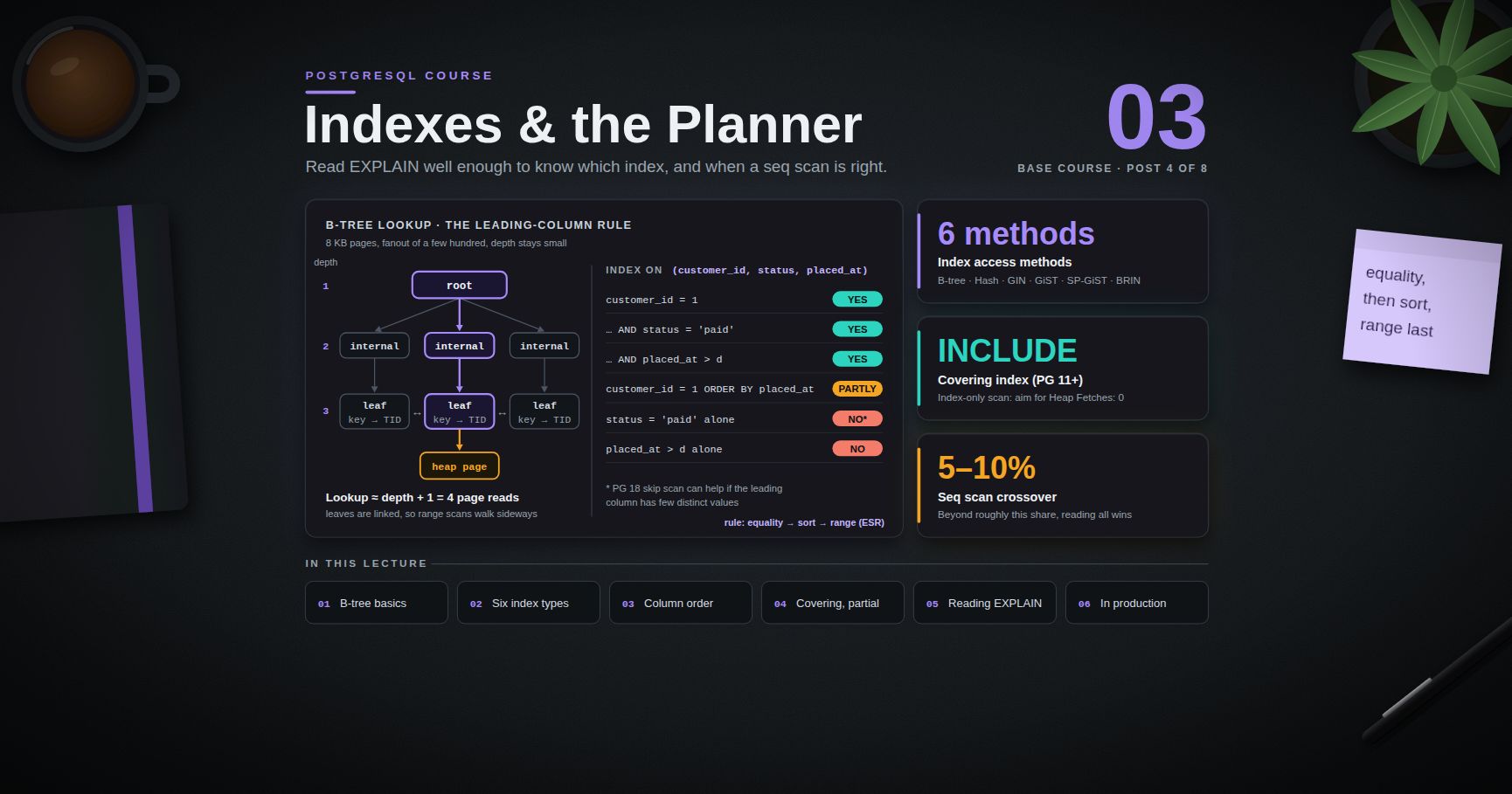
PostgreSQL Course — 03 · Indexes and the Query Planner
An index is a redundant, automatically maintained data structure that lets the server find rows without reading the whole table. Adding the right one turns a forty-second query into a two-millisecond one; adding six wrong ones slows every write, wastes gigabytes, and leaves the slow query exactly as slow. The skill worth acquiring is not "add an index" — it is reading well enough to know which index, and to recognise the cases where the planner's sequential scan is genuinely the right answer. This post covers B-tree mechanics, all six index access methods, the leading-column rule, index-only scans, and the operational side: concurrent builds, bloat, and finding indexes nobody uses. Examples target PostgreSQL 17/18.
> Series map: 00 Foundations & Setup → 01 SQL Fundamentals & Data Types → 02 Joins, Aggregation & Window Functions → 03 Indexes & the Query Planner (this post) → 04 Query Optimization & Statistics → 05 Transactions, MVCC, Isolation & Locking → 06 Schema Design, Normalization & JSONB → 07 Operations, Backup, Replication & Security.
Learning Outcome
- Describe a B-tree index at a working level: pages, fanout, depth, and what a scan actually costs.- Choose among B-tree, Hash, GIN, GiST, SP-GiST, and BRIN using a decision table.- Order the columns of a multicolumn index correctly and apply the leading-column rule.- Build covering indexes with and get genuine index-only scans, including the visibility-map requirement.- Use partial and expression indexes, and explain why needs one.- Distinguish unique indexes from unique constraints, and know when only the index will do.- Read : cost model, estimated vs actual rows, and the scan-node vocabulary.- Recognise when a sequential scan is correct and stop trying to index it away.- Build indexes on live tables with , and find bloated or unused ones.
Chapter 1 — B-tree at a working level
Terminology
- Access method — the algorithm behind an index type. PostgreSQL ships six for tables (, , , , , ) and lets extensions add more.- Operator class () — the set of operators and support functions an index uses for a given data type, e.g. , .- Heap — the table's own storage. Distinct from the index.- TID / ctid — a physical row pointer: . Index entries point at TIDs.- Visibility map (VM) — a per-table bitmap with two bits per heap page: all-visible and all-frozen. Maintained by .- Selectivity — the fraction of rows a predicate is expected to keep. The single most important number in the planner's decision.
Structure
A PostgreSQL B-tree is a Lehman–Yao B-link tree, built from 8 KB pages:
Numbers worth internalising:
- Each page holds on the order of a few hundred entries for typical key widths, so fanout is a few hundred.- Three levels therefore index roughly a hundred million rows; four levels index far more. Depth grows logarithmically and stays small.- A single-row lookup costs about depth + 1 page reads: one per level down, plus one heap page fetch — and the upper levels are almost always cached.- The maximum index entry is about one third of a page (roughly 2704 bytes at the default 8 KB ). Indexing a long column fails at insert time when a value exceeds it; index a hash or a truncation instead.- Leaf pages are doubly linked, which is why a range scan (, , ) is cheap once positioned, and why a B-tree can also satisfy without a sort — in either direction, since it can be walked backwards.
Two modern optimisations that matter operationally:
- Deduplication (PostgreSQL 13+): repeated keys are stored once with a posting list of TIDs. Indexes on low-cardinality columns became dramatically smaller.- Bottom-up index deletion (PostgreSQL 14+): before splitting a page, the index opportunistically removes entries pointing at dead tuples. This substantially slows bloat growth on tables with heavy non- updates.
What a B-tree can serve
| Query shape | Uses a B-tree? ||---|---|| , | Yes || , , | Yes || , | Yes — s are stored in PostgreSQL B-trees || (either direction) | Yes, no sort needed || | Yes only in the collation, or with a index || or | No — use GIN + || | No — needs an expression index (Chapter 5) || when is not text | No — the cast defeats it || | No — wrap the constant, not the column: |
> Common pitfall: any function or cast applied to the indexed column makes a plain index unusable. Rearrange so the column stands alone on one side of the operator, or build an index on exactly the expression you query.
Chapter 2 — The six index types
B-tree
The default and the right answer for perhaps 90% of indexes: any type with a total order, equality and range predicates, sorting, uniqueness.
Hash
Equality only. WAL-logged and crash-safe since PostgreSQL 10 (before that they were not replicated and had to be rebuilt after a crash, which is why old advice says "never use hash indexes").
Narrower than a B-tree for long keys, since it stores a 32-bit hash rather than the value. In exchange it cannot do ranges, cannot sort, cannot be unique, and cannot be multicolumn. The niche is genuinely narrow: very long keys, equality-only access, no ordering requirement. Benchmark against a B-tree on your own data before committing.
GIN — Generalized Inverted Index
For values that contain multiple searchable items: array elements, keys and values, full-text lexemes, trigrams.
GIN reads fast and writes slowly, because one row update can touch many index entries. The mechanism buffers changes in a pending list and flushes them in batches — good for write throughput, but it means a query may have to scan the unflushed pending list, producing occasional latency spikes. Tune with or set for read-latency-sensitive workloads.
GiST — Generalized Search Tree
A framework for indexing things without a natural total order: geometry, ranges, nearest-neighbour search, and the exclusion constraints from Post 01.
GiST is lossy: it returns candidate rows that the executor must recheck. That is why a GiST plan shows a .
SP-GiST — Space-Partitioned GiST
For naturally hierarchical, non-balanced partitionings: quadtrees, k-d trees, radix trees. In practice: / containment, points, and text prefix search where a radix tree beats a B-tree on space.
BRIN — Block Range INdex
Stores a summary (by default min/max) for each range of heap pages — 128 pages by default. Consequently it is minuscule: an index over a billion-row table can be a few megabytes.
BRIN only works when the physical row order correlates with the indexed value — append-only time-series data, log tables, tables loaded in key order. If rows are scattered, every block range spans the whole value domain and the index eliminates nothing. Check before building:
PostgreSQL 14 added opclasses (tolerant of a few outliers that would otherwise ruin a range's summary) and opclasses (equality on uncorrelated columns).
Decision table
| Need | Index | Notes ||---|---|---|| Equality, range, sort, uniqueness on a scalar | B-tree | The default. Start here. || Equality only, very long keys, no ordering | Hash | Narrow niche; benchmark first || Array containment (, ) | GIN | || containment / key existence | GIN ( or ) | is smaller but only supports || Full-text search on | GIN (GiST for smaller, lossier) | || , fuzzy matching | GIN + | GiST + if you also need similarity ranking || Range overlap (), exclusion constraints | GiST | Requires to mix with || Geospatial (PostGIS) | GiST (SP-GiST for points) | || Nearest-neighbour | GiST or SP-GiST | || IP/CIDR containment | SP-GiST | || Huge append-only table, correlated column, tiny index budget | BRIN | Verify first || Vector similarity | 's HNSW or IVFFlat | An extension access method; Post 07 |
Chapter 3 — Multicolumn indexes and column order
The leading-column rule
A multicolumn B-tree is sorted by its first column, then by its second within ties, and so on. It efficiently serves any prefix of its column list:
| Query predicate | Served by ? ||---|---|| | Yes — prefix || | Yes — prefix || | Yes — full use || | Partially: is skipped, so the sort is not free || alone | No efficient use (but see skip scan below) || alone | No efficient use |
Two PostgreSQL-specific refinements that MongoDB does not have:
1. Even when the leading column is missing, the planner may choose a full index scan of the multicolumn index if the index is much narrower than the table — slow, but sometimes still cheaper than a heap scan. You will see this as an with a and a large number of rows removed.2. PostgreSQL 18 adds skip scan for multicolumn B-trees: when the leading column has few distinct values, the executor can iterate over those distinct values and perform a sub-scan for each, so a query constraining only can still use the index. It is a genuine improvement, not a replacement for correct column ordering — with a high-cardinality leading column it does not help.
Ordering the columns
The rule PostgreSQL practitioners use is the same shape as MongoDB's:
> Equality columns first, then the column you sort by, then the range column last.
That is exactly the ESR rule — Equality, Sort, Range — from the MongoDB indexes post. The reasoning is identical in both engines: a B-tree can only continue using subsequent columns while preceding ones are pinned to single values. Once a range predicate opens up a span of the tree, everything after it in the index is no longer in useful order.
Where PostgreSQL and MongoDB genuinely diverge:
| | PostgreSQL | MongoDB ||---|---|---|| Column-order rule | Equality → Sort → Range | ESR — the same rule || Missing leading column | Full index scan possible; skip scan in PG 18 | Index unusable, falls back to collection scan || Combining several indexes | Bitmap / — routine and effective | Index intersection exists but is rarely chosen and usually slower || Partial-order sorts | Incremental Sort (PG 13+) can use a partially matching index and sort only within groups | No equivalent || Sort direction | also serves its exact reverse | Same rule |
The bitmap difference is the practical one. In MongoDB the guidance is firmly "build the compound index that matches the query". In PostgreSQL, several single-column indexes combined with are a legitimate design for tables queried on many unpredictable column combinations — an ad-hoc filtering UI, for example — because the planner can pick whichever subset the incoming query used. A dedicated multicolumn index is still faster for a known hot query.
Sort direction
For a single column, direction is irrelevant: a B-tree scans backwards just as cheaply. For multiple columns it matters:
Also worth knowing: / is part of the index's sort order. An index created with the default () will not provide a free sort for .
Chapter 4 — Covering indexes and index-only scans
PostgreSQL 11+ allows non-key payload columns in a B-tree:
columns are stored only in leaf pages. They cannot be searched, cannot provide ordering, and do not participate in uniqueness — they exist purely so the query can be answered without visiting the heap. Compare:
| | Key columns | ||---|---|---|| Searchable | Yes | No || Provides | Yes | No || Counts toward | Yes | No || Stored in internal pages | Yes | No — smaller tree || Type must have a B-tree opclass | Yes | No |
The last row is the sleeper feature: you can a column of a type that has no B-tree operator class at all.
Index-only scans and the visibility map
An Index Only Scan answers a query entirely from the index. Two conditions must hold:
1. Every column the query needs — in , , , and — is in the index, as a key or an column.2. The heap pages the matching entries point at are marked all-visible in the visibility map.
Condition 2 exists because index entries carry no MVCC visibility information (Post 05). If the page is not known all-visible, the executor must fetch the heap tuple to check — a heap fetch — and the "index-only" scan degrades toward an ordinary index scan.
A non-zero means the visibility map is stale for those pages. The fix is — either a manual or, for a table that keeps regressing, more aggressive autovacuum settings for that table:
> Watch out: an index-only scan on a table that is being updated constantly is unreliable by design. Heavily written tables are rarely all-visible for long. Index-only scans shine on read-mostly and append-mostly tables.
Chapter 5 — Partial, expression, and unique indexes
Partial indexes
An index with a clause, containing entries only for matching rows.
Benefits: a much smaller index, faster to build and scan, and — often more important — cheaper writes, because rows outside the predicate do not touch the index at all.
The requirement: the planner must be able to prove that the query's clause implies the index predicate. It performs this proof syntactically, so it is not clever. matches the first index above. does not, even if the two are semantically equivalent on your data. Parameterised predicates () also fail the proof, because the value is unknown at planning time under generic plans.
Expression indexes
The index is built on the result of an expression rather than a bare column.
This is why case-insensitive lookup needs one. is a different value from ; a plain index on is sorted by the original strings and cannot answer questions about their lowercased forms. The query must repeat the expression exactly as indexed.
The expression must be . , , and anything depending on or are rejected. A frequent trap:
More expression-index patterns:
Two alternatives to case-insensitive expression indexes worth knowing: the extension (a case-insensitive text type), and nondeterministic collations (PostgreSQL 12+), which make ordinary case- or accent-insensitive at the column level:
Unique indexes vs unique constraints
Both enforce uniqueness identically at runtime. The differences are in what else they can do:
| | constraint | ||---|---|---|| Can be a foreign-key target | Yes | Yes, if not partial and not on an expression || | Yes | No (use ) || Can be partial () | No | Yes || Can be on an expression | No | Yes || Can be built with | No (locks the table) | Yes || Appears in under "Indexes" | Yes, marked as a constraint | Yes |
So: conditional uniqueness and case-insensitive uniqueness are index-only territory.
> Trick (add a unique constraint without a long lock): build the unique index with , then promote it: . The is a brief catalog operation because the index already exists and is valid.
Chapter 6 — Reading
The two commands
PostgreSQL 18 includes by default whenever is used, so alone gives the I/O picture on 18; on 17 and earlier you must ask for it. reports any planner GUC that differs from its default — the first thing to check when a plan differs between two environments. (Post 00) adds real read/write times to the buffer lines.
> Watch out: runs the statement. For //, wrap it:
The cost model
- — arbitrary units, not milliseconds. They are normalised so that reading one sequential page costs . Their only purpose is to let the planner rank alternative plans against each other.- — the planner's estimate.- — estimated average row width in bytes.- in milliseconds, and the actual count.- — the node ran N times. and are per-loop averages; multiply by for the total. Missing this is the single most common misreading.
The cost constants:
| Parameter | Default | Notes ||---|---|---|| | 1.0 | The unit of measure || | 4.0 | Assumes spinning disks. On SSD/NVMe, 1.1–2.0 is more truthful and is the most impactful single planner setting to revisit || | 0.01 | Per row processed || | 0.005 | Per index entry processed || | 0.0025 | Per operator/function call || | 4 GB | Planner's assumption about total OS + PG cache; raise it on a big machine |
A of 4.0 on NVMe systematically overstates the cost of index scans, which is a recurring cause of "why is it choosing a sequential scan?".
Estimated vs actual
The gap between and is the primary diagnostic signal.
- Estimate within roughly an order of magnitude: fine.- Estimate off by 100× or more: the planner is choosing based on a fiction, and every join above that node inherits the error. Causes are stale statistics, correlated columns, and non- expressions the planner cannot estimate. Fixes — , , and for correlated columns — are Post 04.
The scan-node vocabulary
| Node | Meaning | Chosen when ||---|---|---|| Seq Scan | Read every heap page in order | No usable index, or the predicate matches a large fraction of the table, or the table is tiny || Index Scan | Walk the index, fetch each matching heap row | Few rows match; correlated physical order helps || Index Only Scan | Answer from the index alone | All needed columns indexed and pages all-visible || Bitmap Index Scan → Bitmap Heap Scan | Collect matching TIDs into a bitmap, sort by page, read each heap page once in physical order | A middle-sized result: too many rows for repeated random fetches, too few to justify a full scan || BitmapAnd / BitmapOr | Combine bitmaps from several indexes | Multi-column predicates over separate single-column indexes || Nested Loop | For each outer row, probe the inner | Small outer side, indexed inner side || Hash Join | Build a hash of one side, probe with the other | Large unsorted inputs, equality join || Merge Join | Walk two sorted inputs in step | Both sides already sorted (usually by indexes) || Sort | Explicit sort | not served by an index || Incremental Sort | Sort only within groups already ordered by a prefix | PG 13+; a partially matching index || HashAggregate / GroupAggregate | implementations | Hash for unsorted input, Group for sorted || Gather / Gather Merge | Collect rows from parallel workers | Parallel plans || Memoize | Cache inner results in a nested loop | PG 14+; repeated identical inner lookups |
A bitmap heap scan's extra lines are worth reading:
means the bitmap outgrew and degraded from per-row to per-page granularity, forcing a recheck of every row on those pages. A non-zero count is a signal to raise for that query.
Reading
- — found in . Cheap.- — had to be requested from the OS (which may itself have cached it). This is the number to reduce.- / — pages modified / flushed by this query.- — spilled to temporary files: a sort or hash exceeded . Almost always worth fixing.
Buffer counts are more stable than timings: they do not vary with cache warmth or machine load, which makes them the better metric when comparing two candidate plans.
When a sequential scan is correct
This bears stating plainly, because a great deal of wasted tuning effort comes from trying to force an index scan that would be slower.
A sequential scan is the right plan when:
1. The predicate matches a large fraction of the table — beyond roughly 5–10%, random heap fetches through an index exceed the cost of reading everything sequentially. The exact crossover depends on and physical correlation.2. The table is small. Under a few hundred pages, one sequential read beats index descent plus heap fetch. The planner knows this and is right.3. No index covers the predicate, and creating one is not justified by the query's frequency.4. The query is an aggregate over most of the table — genuinely must look at everything (or at least at the whole visibility map, via a parallel index-only scan).5. Parallelism applies. A parallel sequential scan across four workers can beat a single-threaded index scan outright.
To diagnose — never to fix in production code:
If the forced index plan is slower, the planner was right and the investigation is over. If it is much faster, you have found a cost-model or statistics problem — which is Post 04's subject.
Chapter 7 — Building and maintaining indexes in production
A plain takes a lock that blocks all writes to the table for the entire build. On a large busy table that is an outage.
What it costs you:
- Two table scans instead of one, plus a wait for all transactions that could see the table to finish. Substantially slower in wall-clock terms.- It cannot run inside a transaction block — which means migration frameworks that wrap each migration in a transaction need an explicit escape (Rails: ; Django: ; plain SQL: run it as its own statement).- If it fails — a deadlock, a unique violation discovered during the second pass, a cancelled session — it leaves behind an invalid index that is maintained on writes but never used by queries.
(PostgreSQL 12+) rebuilds an existing index without blocking writes, and removes one the same way. On a replicated setup, build indexes on standbys first only if you are using logical replication — with physical streaming replication the index arrives automatically through WAL.
Index bloat
MVCC leaves dead entries behind; reclaims space for reuse but does not return it to the operating system, and a B-tree that has churned heavily can end up substantially larger than a freshly built equivalent. Bottom-up index deletion (PG 14+) reduced this markedly, but it did not eliminate it.
The fix is . Do not schedule blanket reindexing "just in case" — it is expensive I/O, and a healthy index does not need it.
Finding unused indexes
Four caveats before dropping anything:
1. is cumulative since the last statistics reset. Check in , and remember that resets it. A "never used" index on a freshly upgraded cluster is meaningless. On PostgreSQL 16+, gives you a timestamp instead of a bare counter, which is far more actionable.2. Statistics are per-node. An index unused on the primary may be the backbone of a report running on a read replica. Check every node.3. Quarterly and annual jobs exist. Observe across a period longer than your longest reporting cycle.4. Unique and primary indexes enforce correctness regardless of scan counts. Never drop one because it looks idle.
PostgreSQL has no built-in equivalent of MongoDB's — the "hide it for a week and watch" pattern from the MongoDB course does not translate directly. A hack is widely circulated for this purpose; avoid it, because direct catalog manipulation is unsupported and interacts badly with cached plans. The honest procedure instead:
Because both the drop and the recreate are concurrent operations, the rollback costs nothing but build time. That makes dropping a suspect index a low-risk experiment rather than a commitment.
Related indexes worth pruning
An index whose column list is a prefix of another index's is usually redundant: is covered by . The exceptions are worth checking — the narrower index is smaller and may be preferred for index-only scans, and a prefix index is not redundant if the wider index is partial or has a different opclass.
Ten rules of thumb
1. Index every column used in a frequent filter, join, or sort. Not more.2. Index every foreign-key column — PostgreSQL does not do it for you, and unindexed FKs make parent deletes scan the child table.3. Order multicolumn indexes equality → sort → range (ESR).4. Prefer one well-ordered multicolumn index for a known hot query; rely on bitmap combination for unpredictable ad-hoc filtering.5. Use partial indexes whenever queries only ever touch a subset — the write saving is as valuable as the read saving.6. Reach for when a hot query needs one or two extra columns, and confirm .7. Set to something truthful for your storage before concluding the planner is wrong.8. Always build on live tables with , and check for invalid indexes afterwards.9. Verify every new index with on realistic data volumes — an index that helps at 1,000 rows may be ignored at 10 million.10. Review periodically. Every index you keep is paid for on every write, forever.
Practice Exercises
Exercise 1 — Build the data set
Create a one-million-row table with , it, and time before and after adding an index.
<details><summary>Solution</summary>
Expect Seq Scan → Bitmap Heap Scan or Index Scan, with dropping by orders of magnitude.
</details>
Exercise 2 — Column order
For , build the correct multicolumn index and justify each position. Then build a deliberately wrong one () and compare plans.
<details><summary>Solution</summary>
and are equality — they pin the scan to one contiguous span. is both the sort key and the range bound, so it goes last and carries to match the query's sort, making the free and the a partial scan. Leading with forces a range scan across all customers, and / degrade to filters.
</details>
Exercise 3 — Index-only scan
Add an index that makes an Index Only Scan with . Then a thousand rows and re-run without vacuuming. Explain what changed.
<details><summary>Solution</summary>
</details>
Exercise 4 — Case-insensitive lookup
Make use an index. Verify with , then show that a plain index on does not help.
<details><summary>Solution</summary>
</details>
Exercise 5 — Partial index
Given that fewer than 1% of orders are , build a partial index for the open-orders queue and compare its size against a full index on the same column.
<details><summary>Solution</summary>
</details>
Exercise 6 — When the seq scan wins
Find, on your own data, the selectivity threshold at which the planner switches from index scan to sequential scan. Then set and find it again.
Exercise 7 — Unused index audit
Run the query from Chapter 7 on any real database you have. For each candidate, state why it is or is not safe to drop, referencing the four caveats.
Exercise 8 — ESR across engines
Take the MongoDB compound index from the MongoDB indexes post and write the equivalent PostgreSQL index. List two things PostgreSQL can do with that index that MongoDB cannot, and one thing that is identical in both.
<details><summary>Solution</summary>
PostgreSQL-only: (1) extra payload columns for an index-only scan; (2) combine this index with others via , or use it with for a partially-matching ; (3) on PG 18, a skip scan may still use it when is unconstrained and low-cardinality. Identical in both: the leading-column/prefix rule and the equality-sort-range ordering principle, and the fact that mixed sort directions require the index to declare them.
</details>
Cheat-sheet
| What | How ||---|---|| Online build | (not inside a transaction) || Multicolumn ordering | Equality → Sort → Range (ESR) || Covering index | (PG 11+) || Partial index | || Expression index | — query must repeat the expression || Array / jsonb / full text | || | || Range overlap, geometry, KNN | || Huge correlated append-only table | — check first || Plan with real numbers | || Explain a DML safely | || Per-loop values | = total || Index-only scan is real | || Bitmap spilled | → raise || Sort spilled to disk | in || SSD cost model | || Diagnose a seq scan | (diagnosis only) || Rebuild an index online | || Find invalid indexes | || Unused indexes | where ; on PG 16+ |
What's next
Post 04 covers query optimization and statistics — the layer above indexes. How the planner estimates selectivity from , why correlated columns wreck those estimates and how fixes them, and when to raise it, autovacuum's role in keeping statistics fresh, for finding the queries that actually matter, join-order and parallelism settings, generic vs custom plans for prepared statements, and a repeatable diagnostic flow for "why did this query get slow last Tuesday?".
References
- Indexes — types, multicolumn, partial, expression, index-only scans.- — including and .- Using — the official walkthrough of plan output.- Planner Cost Constants — and friends.- B-Tree Indexes — implementation — deduplication and bottom-up deletion.- BRIN Indexes · GIN · GiST · SP-GiST- The Statistics Collector views — , .- MongoDB Course — 03 · Indexes — the ESR rule in its original formulation, for contrast.- Use The Index, Luke! by Markus Winand — engine-agnostic, and the clearest available explanation of why column order matters.
> Note: this post is in progress. Planned additions: annotated output for every scan node in Chapter 6, a fuzzy-search worked example, and a partitioned-table indexing section covering partitioned indexes and .
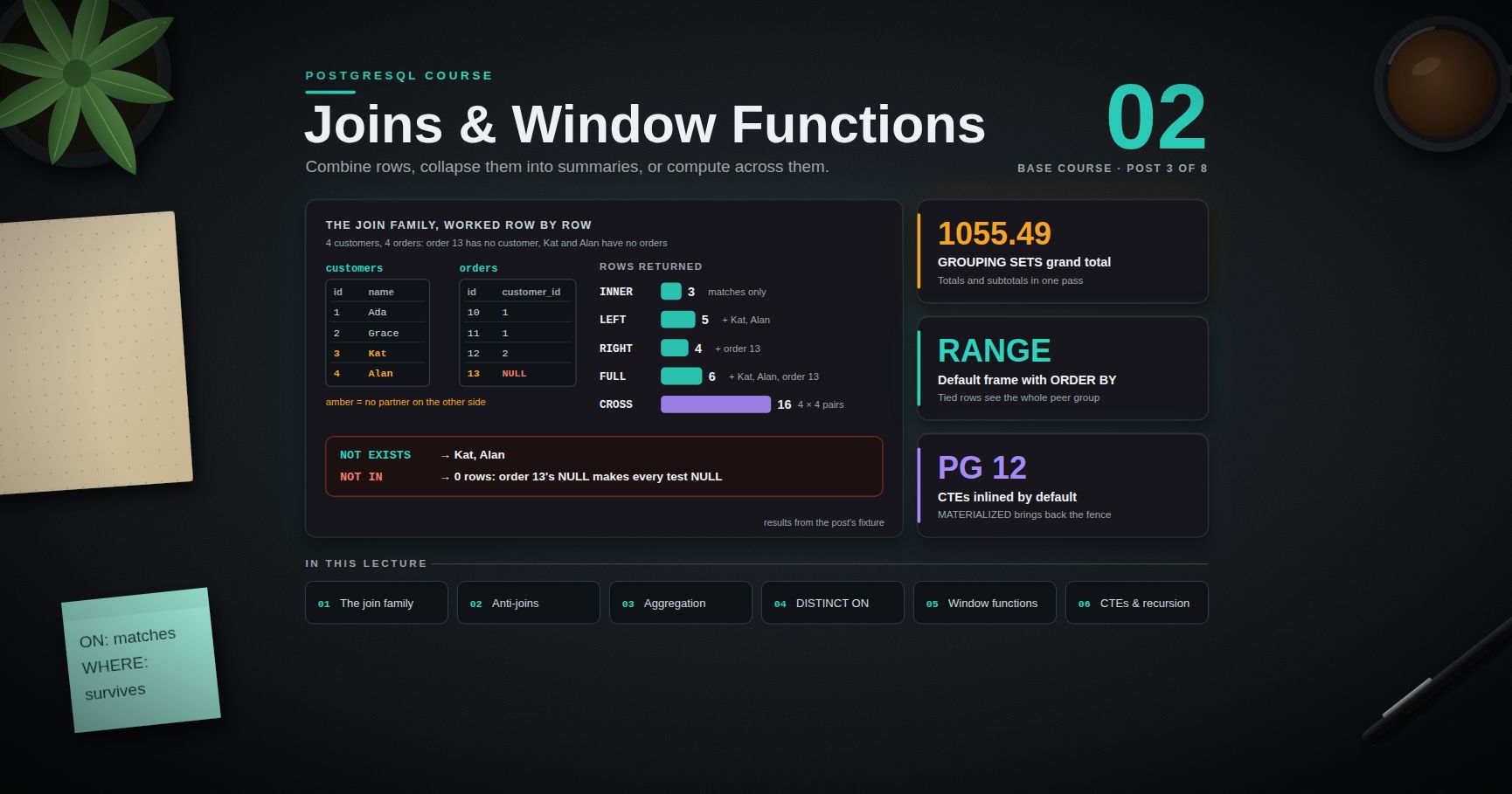
PostgreSQL Course — 02 · Joins, Aggregation and Window Functions
Everything in this post is what separates "can write " from "can answer the question the business actually asked". Joins combine rows across tables; aggregation collapses rows into summaries; window functions compute across a set of rows without collapsing them, which is the capability people most often reach for a reporting tool or an application loop to fake. Add CTEs and recursion and a very large class of problems that look like they need procedural code become a single declarative statement. Examples target PostgreSQL 17/18, with the version noted wherever behaviour changed.
> Series map: 00 Foundations & Setup → 01 SQL Fundamentals & Data Types → 02 Joins, Aggregation & Window Functions (this post) → 03 Indexes & the Query Planner → 04 Query Optimization & Statistics → 05 Transactions, MVCC, Isolation & Locking → 06 Schema Design, Normalization & JSONB → 07 Operations, Backup, Replication & Security.
Learning Outcome
- Predict the exact row output of , , , , , and joins on given inputs.- Write anti-joins correctly and explain why is a trap while is not.- Use , , the clause, and / / .- Solve greatest-n-per-group with and know when a window function is the better tool.- Use window functions in depth: , , and frame clauses in , , and mode.- Compute running totals, moving averages, rankings, and row-to-row deltas.- Write CTEs, control inlining with / , and traverse trees with .
Chapter 1 — The join family, worked row by row
Terminology
- Join — a combination of rows from two relations according to a predicate.- Join predicate — the condition. Distinct from the filter, and the distinction matters for outer joins.- Semi-join — returns rows of the left relation that have at least one match, with no duplication. , .- Anti-join — returns rows of the left relation that have no match. .- Lateral — a subquery on the right of a join that may reference columns from the left.
The fixture
Every result in this chapter comes from these exact rows. Create them and follow along.
Four customers. Four orders, one of which belongs to nobody. Customers 3 and 4 have no orders. This shape exposes every join behaviour.
— matches only
Three rows. Ada appears twice (one row per matching order — joins multiply). Kat and Alan vanish because they have no orders. Order 13 vanishes because is never true.
— keep every left row
Five rows. Every customer survives; unmatched ones get for all right-side columns. This is the workhorse join for "all X, with their Y if any".
— keep every right row
is with the tables written in the other order. Most codebases standardise on for readability; the one place earns its keep is when a long chain of joins would otherwise need reordering.
— keep everything
Six rows: the three matches, the two unmatched customers, the one unmatched order. is the reconciliation tool — "which rows exist on one side but not the other" is a with .
— every pairing
The legitimate use is generating a dense grid so that empty combinations appear as rows rather than going missing — every customer crossed with every calendar day, so zero-revenue days show up as zeroes instead of gaps:
The day condition belongs in the clause; without it, every day would repeat the customer's all-time total. (The fixture's has no timestamp, so this query assumes a column.)
Any accidental cross join is a missing clause, and shows up in as a Nested Loop with no join condition and a wildly large row estimate.
vs in an outer join
The single most common outer-join bug:
decides what matches; decides what survives. In an outer join, any predicate on the nullable side removes the padded rows and degrades the outer join to an inner one. For an inner join the two are interchangeable and the planner treats them identically.
and
is fine and produces one merged output column. should be treated as forbidden: it silently changes meaning when someone adds a column named to both tables.
Self-join
A table joined to itself — for hierarchies, adjacency, and pairwise comparison. Aliases become mandatory.
The idiom is how you get unordered pairs exactly once instead of twice plus the self-pair.
— a correlated subquery in the clause
Normally a subquery in cannot see the other items. (PostgreSQL 9.3+) lifts that restriction, which makes "top N per group" and "most recent per group" natural to express.
Use instead of if customers with no orders must still appear.
is often the fastest greatest-n-per-group formulation when an index supports the inner , because it performs one small index scan per outer row rather than sorting the whole table. Set-returning functions in are implicitly lateral:
Chapter 2 — Semi-joins, anti-joins, and the trap
Semi-join: "has at least one"
Prefer . It expresses the intent, never duplicates rows, and needs no to clean up afterwards. The form is the one to avoid: it materialises the duplicates and then sorts them away.
Anti-join: "has none"
(a) and (b) both return Kat and Alan. (c) returns zero rows, because order 13 has , so every comparison evaluates to rather than , and keeps only . No error, no warning — just an empty result that looks plausible.
The correctness argument is the important one, but there is a performance argument too: because must preserve those semantics, the planner cannot use a hash anti-join. It typically produces a over a hashed instead:
| Form | -safe? | Plans as anti-join? | Verdict ||---|---|---|---|| | Yes | Yes | Default choice || | Yes | Yes | Fine; slightly noisier to read || | No | No | Avoid unless the column is provably || | Yes (treats s as equal) | Sorts/hashes both sides | Whole-row set difference only |
> Common pitfall: "the column is so is safe" is true today. It survives until someone makes the column nullable, or the subquery grows a that introduces s. Write and stop thinking about it.
Chapter 3 — Aggregation
and
The rule that explains most errors: every column in the select list must be either in the or inside an aggregate. PostgreSQL relaxes this in exactly one case — if you group by a table's primary key, every other column of that table is functionally dependent and may be selected bare:
filters rows before grouping; filters groups after. Putting a non-aggregate condition in works but forces the aggregation to process rows it will then discard — move it to .
The aggregate list worth knowing
| Aggregate | Returns ||---|---|| / | All rows / non- values || | Distinct non- values (expensive: sorts or hashes) || , , , | The obvious; all skip inputs || , | Boolean conjunction / disjunction over a group || | Concatenated string || | Array — keeps elements || / / | JSON aggregation || , , , | Statistics || | Interpolated median || | Actual value at the 95th percentile || | Most frequent value || , | Range aggregation (PG 14+) |
— conditional aggregation done properly
(SQL:2003, PostgreSQL 9.4+) replaces the idiom. It is clearer, and unlike the form it produces rather than for an empty set — which is usually more honest. It composes with window functions too.
, ,
One query, several grouping levels, one pass over the data.
Shorthands:
- = the hierarchical sets — for drill-down along a hierarchy such as country → region → city.- = every combination: — for cross-tabulation.
The s in subtotal rows are indistinguishable from genuine data. disambiguates — it returns 1 when the column was aggregated away:
Chapter 4 —
PostgreSQL-specific, and one of the reasons people miss PostgreSQL on other databases. It keeps the first row of each group, where "first" is defined by .
Two hard rules:
1. must begin with exactly the expressions. Otherwise PostgreSQL raises an error, because "first" would be undefined.2. The remaining terms choose which row within the group wins.
If the final output needs a different order, wrap it:
vs window function vs
All three solve greatest-n-per-group:
| Approach | Best when ||---|---|| | n = 1, concise, and a matching index makes the sort free || | n > 1, or you need the rank value itself || | Few outer rows, many inner rows, and an index serves the inner |
With an index on , can walk the index and skip within each group rather than sorting the table. With a small table and a huge table, usually wins. Measure with — Post 03.
Chapter 5 — Window functions
An aggregate collapses many rows into one. A window function computes over a set of related rows and returns one value per input row, leaving the row count untouched. That single property solves running totals, rankings, row-to-row deltas, and percent-of-total without a self-join.
Anatomy
with nothing inside means "the whole result set as one partition" — the standard way to get a percent-of-total column.
Reuse a definition with the clause:
The function catalogue
| Function | Returns ||---|---|| | 1, 2, 3, 4 — no ties, arbitrary tiebreak || | 1, 2, 2, 4 — ties share a rank, then a gap || | 1, 2, 2, 3 — ties share a rank, no gap || | , in [0, 1] || | Cumulative distribution, in (0, 1] || | Bucket number, splitting the partition into roughly equal parts || | Value from rows back (default 1) || | Value from rows forward || | First value in the frame || | Last value in the frame — see the trap below || | The nth value in the frame || Any aggregate (, , , , …) | Aggregated over the frame |
Frames: vs vs
The frame decides which rows of the partition the function can see for the current row. This is where most window-function surprises live.
| Mode | counts | Use for ||---|---|---|| | Physical rows | Moving averages over the last N rows || | A value offset in the column | "Last 7 days" regardless of how many rows fall in it || | Peer groups (rows with equal values) | "The previous 3 distinct dates" |
with an offset and mode, plus the clauses, arrived in PostgreSQL 11. Before that only accepted offsets.
The default frame, and why it bites
- With no : the frame is the entire partition. gives the partition total for every row.- With an : the default frame is — which in mode includes all peers of the current row, not just the rows up to it.
The two tied rows both see the full peer group under . If you want a strict row-by-row running total, say explicitly.
The trap
does not have this problem because the default frame starts at . An alternative that avoids the whole issue: .
Running totals, moving averages, deltas
The column is the reason with an interval offset exists: a frame silently reaches further back than seven days whenever a day has no row.
Where window functions sit in evaluation order
Two consequences:
1. A window function cannot appear in , , or — those run first. To filter on one, wrap the query:
2. Window functions run after aggregation, so they can operate on aggregate results directly:
> Trick: the "gaps and islands" problem — grouping consecutive runs — is minus a second . collapses consecutive dates into ranges. Worth memorising; it appears constantly in streak, session, and uptime calculations.
Chapter 6 — CTEs and recursion
Basic CTEs
CTEs make a long query readable by naming its stages, and they can be referenced multiple times. Data-modifying CTEs are a PostgreSQL strength:
All sub-statements of one query see the same snapshot and execute atomically.
The PostgreSQL 12 fencing change
Before PostgreSQL 12, every clause was an optimisation fence: it was always materialised into a temporary result, and predicates from the outer query could never be pushed into it. That made CTEs a manual planner hint — sometimes helpful, often a performance trap.
From PostgreSQL 12, a CTE that is non-recursive, side-effect-free, and referenced exactly once is inlined by default, exactly like a subquery. Two keywords give explicit control:
| Situation | Choose ||---|---|| Expensive CTE referenced several times | — compute once || CTE contains a volatile function you must call exactly once | || Small CTE whose result you filter afterwards | or the default || Data-modifying CTE | Always materialised; the keyword is irrelevant |
> Common pitfall: code written against PostgreSQL 11 or earlier sometimes uses a CTE deliberately as a fence, with a comment saying so or with no comment at all. Upgrading to 12+ inlines it and the plan changes. If a query regresses after a major upgrade, a CTE that lost its fence is a prime suspect — add to test the hypothesis.
Recursive CTEs
Execution is iterative, not truly recursive: run the seed, put its rows in a working table, repeatedly run the recursive term against the working table until it produces no rows.
Tree traversal
The array does double duty: it produces correct depth-first ordering when used as the key, and it is the natural cycle guard.
Cycle protection
A cycle in the data — employee A managing B managing A — makes a naive recursion run until it exhausts memory. Three defences:
PostgreSQL 14 also added / , which generates the ordering column for you instead of the manual array.
> Watch out: always put a bound on a recursive CTE running against user-supplied data — a in the recursive term, or the clause. An unbounded recursion is a denial-of-service vector, and is a blunt second line of defence, not a first one.
Beyond trees: graph reachability
> Modelling note: deep hierarchies queried constantly are a case where the document model's nested-array or materialised-path patterns start to look attractive. The SQL → MongoDB migration post covers that trade-off; Post 06 covers the relational alternatives (adjacency list, materialised path, nested sets, and the extension) before you consider changing databases over it.
Practice Exercises
Exercise 1 — Predict the row counts
Using the fixture from Chapter 1, state the number of rows returned by each without running it: , , , , . Then verify.
<details><summary>Solution</summary>
3, 5, 4, 6, 16.
</details>
Exercise 2 — The trap, demonstrated
Write "customers with no orders" as , , and . Run all three against the fixture. Explain the discrepancy, then delete order 13 and re-run.
<details><summary>Solution</summary>
returns 0 rows; the other two return Kat and Alan. Order 13 has , so the list contains and every comparison yields , which discards. After , all three agree.
</details>
Exercise 3 — Conditional aggregation
Produce one row per country with: total orders, paid orders, paid revenue, and the paid share as a percentage. Use , not .
<details><summary>Solution</summary>
</details>
Exercise 4 — Greatest-n-per-group, three ways
Return the two highest-value orders per customer using (a) a window function, (b) , (c) for the single highest. Compare the plans with .
<details><summary>Solution</summary>
</details>
Exercise 5 — Running total and moving average
Build a table with 60 days of data (use and ). Add a cumulative running total, a 7-day calendar-based trailing average, and a day-over-day percentage change. Delete a few days first so the vs difference is visible.
Exercise 6 — Org chart
Using the fixture, write a recursive CTE that returns every employee with their depth, the full path from the root, and the name of their top-level manager. Then add a cycle () and make the query terminate safely.
Exercise 7 — Gaps and islands
Given a table of dates on which a user was active, collapse consecutive days into streak rows.
<details><summary>Solution</summary>
Consecutive dates share a constant ; a break in the sequence changes it.
</details>
Cheat-sheet
| What | How ||---|---|| Keep all left rows | || Filter the nullable side | Put the condition in , not || Reconcile two sets | || Correlated subquery in | || "Has at least one" | || "Has none" | — never || Conditional aggregate | || Median / p95 | || Concatenate a group | || Subtotals + grand total | || Top 1 per group | || Top N per group | in a subquery || Percent of total | || Running total | || Calendar moving average | || Previous / next row | / || Filter on a window result | Wrap in a subquery or CTE || Force / prevent CTE inlining | / (PG 12+) || Tree traversal | || Cycle guard | (PG 14+) |
What's next
Post 03 covers indexes and the query planner: B-tree internals at a working level, the six index types and a decision table for choosing between them, multicolumn column order and the leading-column rule, covering indexes with , partial and expression indexes, , and — most importantly — how to read and decide whether the plan you got is the plan you wanted.
References
- Table Expressions — joins — including .- Aggregate Functions — the full list plus and ordered-set aggregates.- , ,- Window Functions tutorial and the window function reference.- — the authoritative grammar for , frame clauses, and .- queries — inlining rules, , and .
> Note: this post is in progress. Planned additions: a /pivot section using , worked output for each anti-join form, and a performance comparison of against on a million-row table.
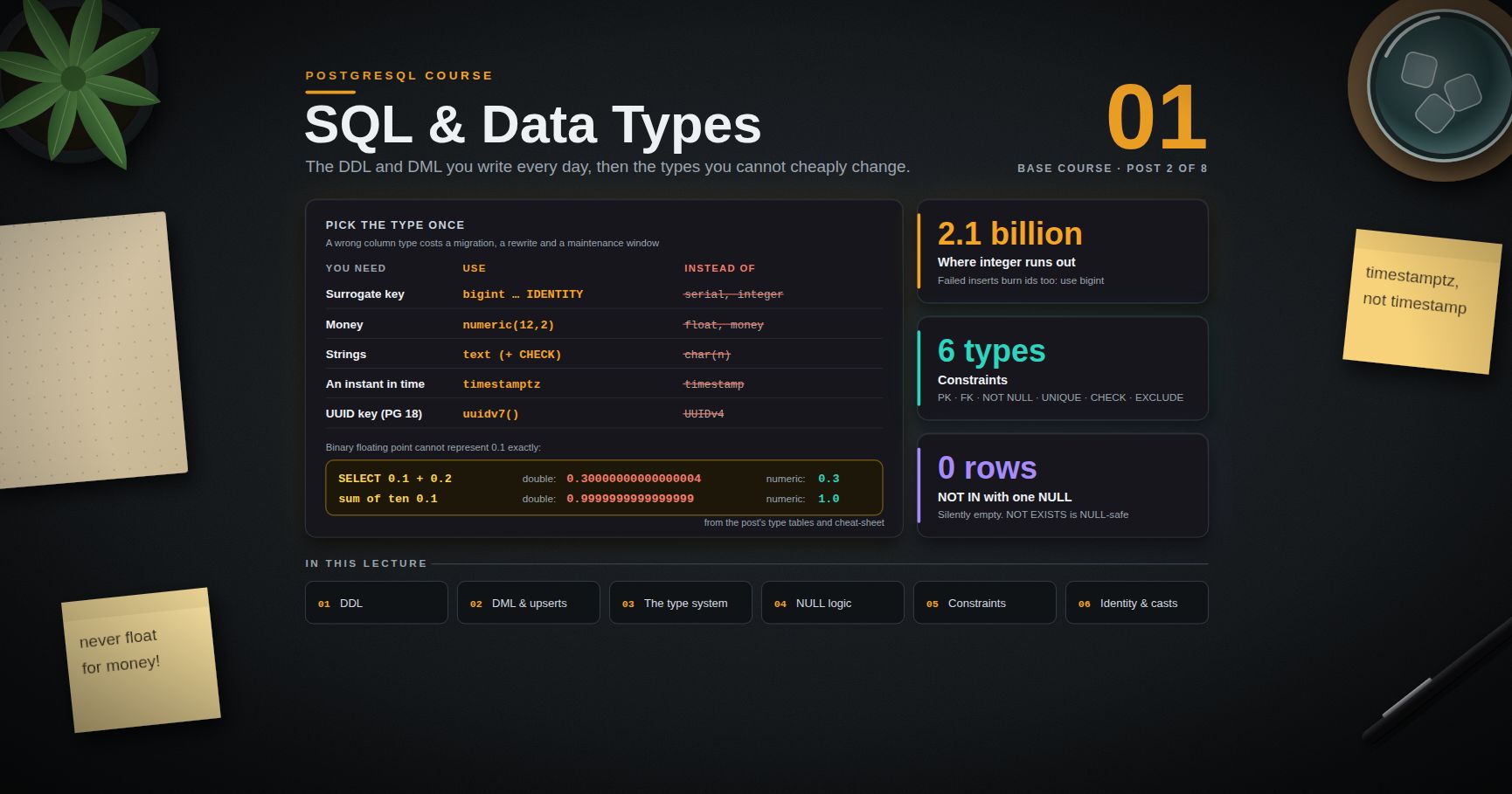
PostgreSQL Course — 01 · SQL Fundamentals and Data Types
Type choices are the most expensive decisions in a schema. A wrong index costs a ; a wrong column type costs a migration, a rewrite, a maintenance window, and — if the type was for money or for an instant — a class of bugs that ships to production and only surfaces at quarter-end or the daylight-saving boundary. This post covers the DDL and DML you will write every day, then spends most of its length on the type system, semantics, and constraints, because those are the parts you cannot cheaply change later. Examples target PostgreSQL 17/18; version-specific behaviour is called out inline.
> Series map: 00 Foundations & Setup → 01 SQL Fundamentals & Data Types (this post) → 02 Joins, Aggregation & Window Functions → 03 Indexes & the Query Planner → 04 Query Optimization & Statistics → 05 Transactions, MVCC, Isolation & Locking → 06 Schema Design, Normalization & JSONB → 07 Operations, Backup, Replication & Security.
Learning Outcome
- Write DDL: , , and , including the forms that avoid a full table rewrite.- Write DML confidently: , , , , and upserts via .- Choose correctly among the integer family, vs floating point, vs , enum vs lookup table.- Explain why is the default correct answer and almost never is.- Predict the result of any expression involving under three-valued logic.- Apply the six constraint types, including , and add them to live tables without long locks.- Explain the difference between identity columns and , and why new work uses identity.
Chapter 1 — DDL: creating and evolving tables
Terminology
- DDL — Data Definition Language: , , . Changes the shape of the database.- DML — Data Manipulation Language: , , , , . Changes or reads the contents.- Table rewrite — an variant that must rebuild every row on disk. Holds an lock for the duration, which blocks everything, including reads.- Catalog — the system tables (, , , …) describing the database to itself.- Domain — a named, reusable type with constraints attached.
Useful variants:
> Watch out: tables are truncated after a crash and are not replicated to standbys. They are correct for genuinely disposable data (materialised scratch, import staging), and a data-loss incident anywhere else.
— the operations that are cheap and the ones that are not
This is the table to memorise, because the difference between a two-millisecond and a forty-minute outage is which row you land on.
| Operation | Rewrite? | Lock | Notes ||---|---|---|---|| (no default) | No | , brief | Catalog-only || | No since PG 11 | , brief | Default stored in catalog, applied on read || | Yes | Long | e.g. — each row needs a distinct value || | No | , brief | Column is marked dead; space reclaimed by later rewrite || (binary-coercible, e.g. →) | No | , brief | || (→) | Yes | Long | The classic id-exhaustion migration || | No | Brief | || | No rewrite, but full scan | for the scan | See the trick below || | No | Brief | Then under a weaker lock || | No | | Then validate separately || / | Yes | Long | |
> Trick (zero-downtime ): adding directly scans the whole table under . Instead add an equivalent , it (weaker lock, concurrent reads and writes continue), then — PostgreSQL 12+ recognises the validated check and skips the scan. PostgreSQL 18 simplifies this further by allowing directly.
Generated columns
The expression must be immutable — no , no other tables.
is DDL, not DML: it takes an lock, does not fire row triggers, and does not produce dead tuples for to clean. It is transactional in PostgreSQL — you can roll it back, unlike in some other engines.
Chapter 2 — DML: , , , , upserts
For bulk loading, is an order of magnitude faster than row-at-a-time :
PostgreSQL 17+ adds error tolerance to :
Every one of , , (and since PostgreSQL 17) can return rows. This eliminates the read-after-write round trip that most ORMs would otherwise perform.
A pattern worth knowing — a transactional queue pop, using with (locking is Post 05):
and with joins
PostgreSQL uses / rather than the syntax of MySQL:
> Common pitfall: an where the side matches multiple rows is not an error. PostgreSQL picks one arbitrarily and applies it. If the join is not guaranteed unique, aggregate it into a subquery first.
Upsert:
Rules that matter:
- The conflict target must be backed by a unique index or constraint. requires a target; may omit one (in which case it swallows any conflict).- Inside , the proposed row is and the existing row is .- To target a partial unique index, repeat its predicate: .- in distinguishes an insert from an update — a widely used idiom, though it relies on an implementation detail.- A single statement cannot update the same row twice: . De-duplicate the input first.
arrived in PostgreSQL 15 and gained in PostgreSQL 17. It is the SQL-standard multi-action form, and unlike it does not require a unique constraint — but it also gives no built-in concurrency guarantee, so concurrent s can raise serialization failures.
Guidance: use for concurrent single-row upserts from application code; use for batch reconciliation against a staging table.
Chapter 3 — The type system
Numbers
| Type | Bytes | Range / precision | Use for ||---|---|---|---|| | 2 | ±32,767 | Small enumerated counts. Rarely worth it. || / | 4 | ±2,147,483,647 | Default integer. Counts, small ids. || | 8 | ±9.2 × 10¹⁸ | All surrogate keys. || | variable | Exact, up to 131072 digits before the point | Money, quantities, anything summed and compared for equality || | 4 | 6 decimal digits, IEEE 754 | Sensor data, approximations || | 8 | 15 decimal digits, IEEE 754 | Scientific computation || | 8 | Locale-dependent | Avoid. Its output format depends on . |
for keys, always
exhausts at 2.1 billion. That sounds distant until you learn that a sequence advances on failed inserts too — every that conflicts still burns an id. The migration on a hot table is a full rewrite with an lock. The four extra bytes per row are cheap by comparison.
vs floating point for money
Binary floating point cannot represent exactly. Financial code that sums floats produces drift that accumulates silently and fails reconciliation. Use for currency amounts, or store integer minor units (cents) in a if you need maximum arithmetic speed. is slower — it is arbitrary-precision software arithmetic, not a CPU instruction — but the correctness is non-negotiable for money.
> Watch out: in compares as equal to itself and greater than all other values, which differs from the IEEE 754 rule used for , where is false. This is documented and deliberate, so that can be sorted and indexed.
Text
| Type | Behaviour ||---|---|| | Unlimited length. The default choice. || | Same storage and performance as , plus a length check || (no ) | Identical to || | Blank-padded to on storage; comparison ignores trailing spaces. Avoid. |
In PostgreSQL there is no performance difference between and — both are varlena types with the same TOAST behaviour. is a in disguise. Since a length limit is a business rule and business rules change, prefer plus an explicit, alterable constraint:
Changing that check is a validate-only operation; changing to is cheap, but shrinking it requires a rewrite.
Values over roughly 2 KB are compressed and moved out-of-line into a TOAST table automatically. This is why a column holding a megabyte of JSON does not bloat the main heap — but it does mean any query touching that column pays an extra fetch.
Boolean
accepts //, and on input also , , , . One byte. Note that a nullable boolean is a three-state column — see Chapter 4.
Enum vs lookup table
| | | Lookup table + FK | + ||---|---|---|---|| Storage | 4 bytes | 2–8 byte FK | Full string per row || Sort order | Declaration order | Whatever column you add | Alphabetical || Add a value | | | the check constraint || Remove a value | Not supported | | the check || Rename a value | (10+) | | the check || Attach metadata (label, colour, sort key) | No | Yes | No || Readable in raw dumps | Yes | Needs a join | Yes |
Decision rule: enum for a small, genuinely closed set with a meaningful order () that changes at most yearly. Lookup table whenever values carry metadata, are managed by non-engineers, or need deleting. + as a light middle ground.
> Watch out (PostgreSQL 12+): may run inside a transaction block, but the new value cannot be used in that same transaction. Migration frameworks that wrap everything in one transaction hit this constantly. Split it into two migrations.
Date and time
| Type | Stores | Bytes ||---|---|---|| | Calendar day, no time | 4 || | Time of day, no date, no zone | 8 || | Time with zone offset | 12 — avoid, semantically incoherent || | Date + time, no zone | 8 || | An absolute instant | 8 || | A duration | 16 |
Why is almost always right
The name is misleading. does not store a timezone. It stores an absolute point in time (microseconds from an epoch, in UTC). On input, a value is converted from the session's to UTC; on output, from UTC back to the session's . It is the type that answers "when did this happen?" unambiguously anywhere on Earth.
(without time zone) stores a wall-clock reading with no anchor. Two servers in different regions will disagree about what instant it names, and it cannot represent the DST fall-back hour unambiguously.
The narrow legitimate uses of plain : a local wall-clock concept with no instant attached — "the shop opens at 09:00 in whatever timezone the shop is in", a recurring alarm, a birthday. Even then, store the IANA zone name alongside it in a separate column.
flips between the two types in both directions — which direction depends on the input type. That asymmetry catches everyone once.
An stores months, days, and microseconds separately, because a month is not a fixed number of days and a day is not always 24 hours across a DST boundary. added to January 31 gives February 28 or 29. This is correct calendar arithmetic, not a rounding bug.
UUID
16 bytes, stored binary. (UUIDv4) is built in since PostgreSQL 13 — no needed. PostgreSQL 18 adds and as standard functions.
The trade-off against identity:
- UUIDv4 is random, so inserts land at random points in the primary-key B-tree. That causes page splits, poor cache locality, and index bloat on high-insert tables.- UUIDv7 is time-ordered in its high bits, which restores the append-at-the-right-edge insert pattern of a sequence while keeping global uniqueness and non-guessability. On PG 18, is the right default when you want UUIDs.- identity remains smallest and fastest, at the cost of being guessable and requiring a central sequence.
Arrays
Arrays are genuinely useful for small, fixed-cardinality, always-read-together sets (tags, permission flags, embedding dimensions). They are a poor substitute for a join table when you need per-element metadata, referential integrity, or per-element updates. Index with GIN () if you filter with or — see Post 03.
and other types worth knowing
holds arbitrary binary. It is fine for small blobs (thumbnails, hashes, encrypted tokens); it is the wrong place for user-uploaded files — put those in object storage and keep the key in a column.
Also in the standard distribution and worth remembering: // for networking, / for full-text search, // for ranges, / for basic geometry, / (Post 06), and .
Domains
A domain is a named type plus constraints, reusable across tables. Cheaper than a composite type, and it keeps validation in one place.
> Migration note: when moving a relational schema to a document store, the type mapping is where fidelity is lost — has no exact BSON equivalent, and array/ columns collapse into the document naturally while enums do not. The SQL → MongoDB migration post walks through that mapping in both directions.
Chapter 4 — and three-valued logic
is not a value. It is a marker meaning unknown. Every comparison involving it yields (neither true nor false), and SQL's clause keeps only rows where the predicate is true — so behaves like false at filter time but not in any other context. This asymmetry is the source of an enormous share of production SQL bugs.
The surprising-results table
| Expression | Result | Why ||---|---|---|| | | Unknown compared to unknown is unknown || | | Same || | | is a test, not a comparison || | | treats as a comparable value || | | Arithmetic propagates || | | propagates || | | ignores — unlike || | | In PostgreSQL, and are different (unlike Oracle) || | | Result is determined regardless || | | Undetermined || | | Undetermined || | | Result is determined regardless || (the operator) | | || | | Not — this is the trap || | | Row is filtered out. See below || on 3 rows, one col | | Counts rows || on the same | | Aggregates skip inputs || where all values are | | Not || | Ignores s in both numerator and denominator | || | Keeps elements | Aggregates that build collections are the exception || over s | s collapse to one | treats them as equal || with s | One group | Same || | s last | sorts as larger than everything || | s first | Same rule, reversed || column with two s | Both allowed | s are distinct for uniqueness |
The trap
If any row in has a , the subquery list contains , every test evaluates to instead of , and the query returns zero rows. Silently. No error.
Three safe rewrites, in order of preference:
Post 02 compares the plans these produce.
Tools for handling
> Common pitfall: skips rows where . If "not equal to x" should include unknowns, write . This bug hides in soft-delete filters constantly.
Chapter 5 — Constraints
Constraints are the only guarantee that survives a buggy deployment, a rogue script, and the next developer. Application-level validation is a user-experience feature; a database constraint is the actual invariant.
The six types
+ + designated as the table's identity. One per table. Backed by a unique B-tree index automatically.
and the actions
| Action | Effect when the referenced row is deleted ||---|---|| (default) | Error, checked at end of statement (deferrable) || | Error, checked immediately (not deferrable) || | Delete the referencing rows too || | Set the FK column to (column must be nullable) || | Set it to the column default (which must itself satisfy the FK) |
takes the same set. PostgreSQL 15+ allows column lists: for composite keys.
> Watch out: PostgreSQL does not automatically index the referencing column. Every on the parent then triggers a sequential scan of the child to check the constraint. Index every foreign key column yourself — this is one of the most common causes of mysteriously slow deletes.
> Trick (zero-downtime FK): takes a lock and skips the existing-data scan; new rows are enforced immediately. Follow with , which scans under a lock that permits concurrent reads and writes.
Backed by a unique index. Multiple s are permitted by default because s are distinct. PostgreSQL 15+ can change that:
For conditional uniqueness — "email unique among non-deleted users" — use a partial unique index rather than a constraint, since constraints cannot carry a predicate:
Any boolean expression over the row's own columns. It must be immutable and may not reference other tables or .
A that evaluates to passes. on a nullable accepts . Add if you mean it.
The constraint type that has no equivalent in most other databases: "no two rows may both satisfy these operator comparisons". The canonical use is preventing overlapping reservations.
Now any attempt to insert a booking for the same room whose time range overlaps an existing one is rejected by the database, atomically, with no application-level locking. is in fact a special case of where every operator is .
PostgreSQL 18 generalises this further with temporal keys: and matching .
Deferrable constraints
Deferring lets you write two rows that only jointly satisfy a constraint — swapping the of two rows under a unique index is the standard example. and cannot be deferred; , , , and can.
Inspecting constraints
is primary, foreign, unique, check, exclusion, not-null (PG 18 records these in too).
Chapter 6 — Identity vs , and casting
is a macro, not a type
expands to:
Its problems: the column is only a , so anyone can insert an explicit id and desynchronise the sequence; the sequence is a separate object requiring separate for inserting roles; and it is a PostgreSQL-specific extension rather than standard SQL.
Identity columns (SQL standard, PostgreSQL 10+)
| | / | ||---|---|---|| Standard SQL | No | Yes || Explicit insert of a value | Always allowed | Blocked by (overridable) || Permissions | Needs on the sequence | Handled with the table || Sequence dropped with the column | Only via ownership | Always || Recommended for new work | No | Yes |
The escape hatch when you genuinely must insert an id into an column — during a data migration, for instance:
And the repair for a desynchronised sequence, which is the standard aftermath of a bulk load into a column:
> Watch out: sequences are not transactional for gap-freeness. A rolled-back transaction does not return its consumed values, and burns an id per conflicting row. Identity and serial columns produce ordered, unique values, never gapless ones. If a business requires gapless invoice numbers, that is an application-level counter guarded by a lock, not a sequence.
Casting
PostgreSQL recognises three cast strengths: implicit (applied automatically in any expression — deliberately rare, to prevent MySQL-style silent coercion), assignment (applied on / into a column), and explicit (only with or ). This strictness is why is an error rather than .
Safe casting of untrusted text on PostgreSQL 16+:
> Common pitfall: binds more tightly than most operators. parses as , and casts only . Parenthesise when the intent is not obvious.
Practice Exercises
Exercise 1 — Type audit
Given this table, list every type decision you would change and why:
<details><summary>Solution</summary>
Key points: for money, for an instant, and for free text are the three that cause real bugs; and are style problems that become migrations later.
</details>
Exercise 2 — Predict the results
Without running them, give the value of each: , , , , , , over three rows, over three rows. Then verify in .
<details><summary>Solution</summary>
, , , , , , , .
</details>
Exercise 3 — Upsert a daily counter
Write a single statement that records a page view for , inserting a row with count 1 if none exists, otherwise incrementing the existing count. Return the resulting count.
<details><summary>Solution</summary>
</details>
Exercise 4 — No double booking
Build a table where the database itself prevents two overlapping bookings for the same room. Prove it by attempting an overlapping insert.
<details><summary>Solution</summary>
</details>
Exercise 5 — Anti-join without the trap
Write "products never ordered" three ways: , , and . Then insert one row with a and re-run all three. Explain the difference.
Exercise 6 — Safe
Add a constraint to an existing large column without taking a long lock. Write out the statement sequence.
Exercise 7 — Time zone reasoning
With , insert a and a holding the same literal. Change the session timezone to and select both. Explain which one changed and why that is the desired behaviour.
Cheat-sheet
| What | How ||---|---|| Surrogate key | || Money | — never , never || Strings | (+ a on length if needed) || Instant in time | || Duration | || Random / sortable UUID | / (PG 18) || Add column with default | — no rewrite since PG 11 || Safe | → → || Safe FK | → || Insert and get the id | || Upsert | || Batch reconcile | (PG 15+) || Bulk load | / || Update from another table | || NULL-safe equality | || First non-NULL | || Conditional uniqueness | || No overlapping ranges | || Cast | or || Fix a desynced sequence | |
What's next
Post 02 covers joins, aggregation, and window functions: the full join family worked row by row, why produces a different plan from , with and , as PostgreSQL's greatest-n-per-group tool, and window functions in depth — frames, ranking, running totals, and moving averages — plus CTEs, the PostgreSQL 12 fencing change, and recursive tree traversal.
References
- Data Types — the complete type reference.- Date/Time Types — the semantics in full.- Constraints — including exclusion constraints.- — and .- — the notes section documents which forms rewrite.- Functions and Operators — , , , date arithmetic.- PostgreSQL 18 release notes — , virtual generated columns, temporal constraints.
> Note: this post is in progress. Planned additions: a full range-type section with operators, a composite-type and walkthrough, and a benchmark harness comparing against integer-cents arithmetic.
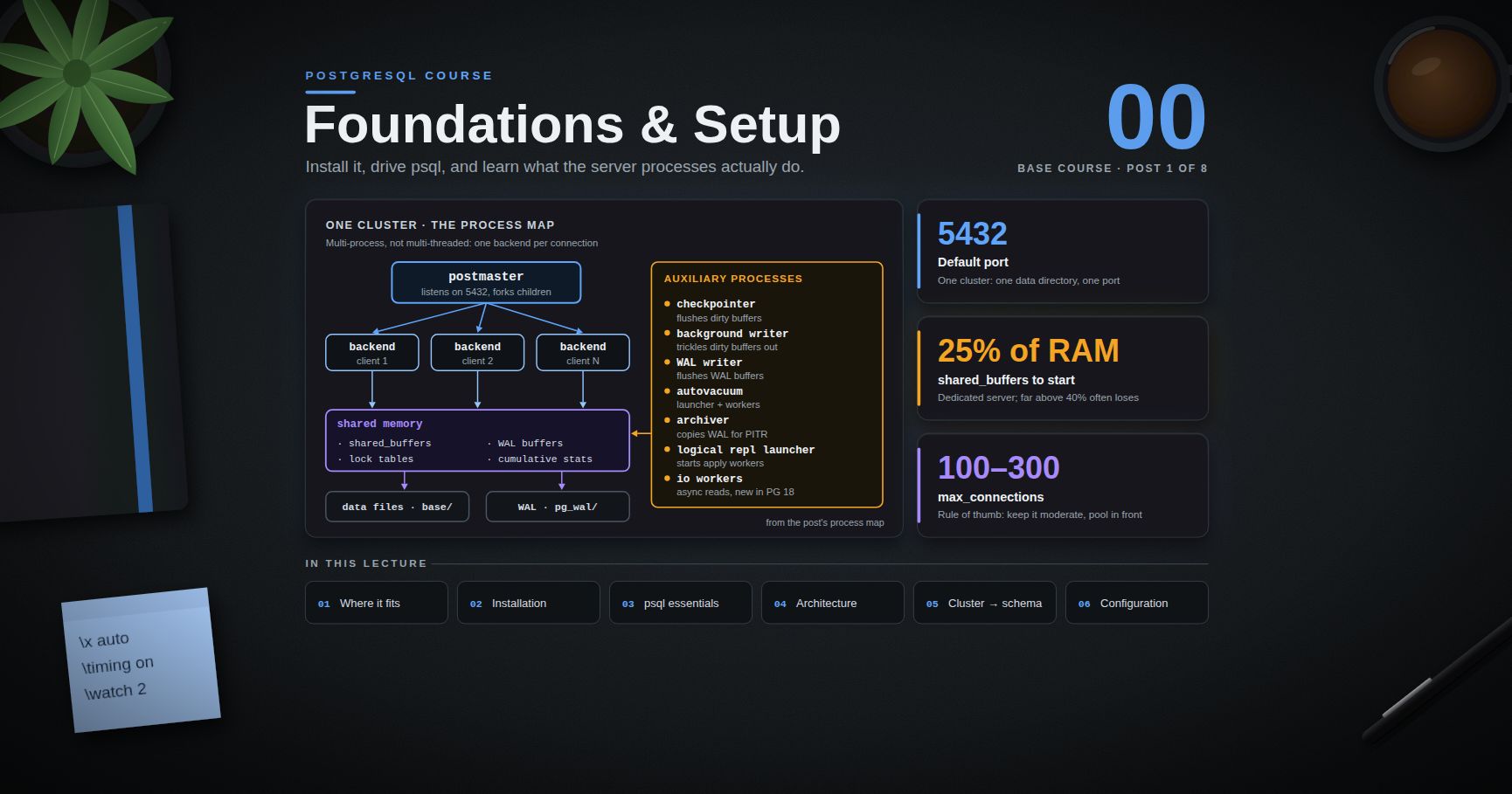
PostgreSQL Course — 00 · Foundations and Setup
PostgreSQL is the default answer for "we need a relational database and we do not want to think about it again for ten years". It is ACID-compliant, MVCC-based, extensible down to custom types and index access methods, and — unusually for something this capable — genuinely free under a permissive licence with no enterprise edition holding features hostage. This post is the entry point of an eight-post course written as lecture notes: install it, drive , understand what the server processes actually do, and learn the cluster → database → schema → table hierarchy that trips up nearly everyone arriving from MySQL or MongoDB. Everything here targets PostgreSQL 17 and 18; where behaviour changed between versions, the version is stated.
> Series map: 00 Foundations & Setup (this post) → 01 SQL Fundamentals & Data Types → 02 Joins, Aggregation & Window Functions → 03 Indexes & the Query Planner → 04 Query Optimization & Statistics → 05 Transactions, MVCC, Isolation & Locking → 06 Schema Design, Normalization & JSONB → 07 Operations, Backup, Replication & Security.
Learning Outcome
- Explain what PostgreSQL is, where it sits against MySQL, SQLite, and document stores, and when it is the wrong choice.- Install a PostgreSQL 17/18 server on Windows, macOS, or Linux, or run one from a single Docker command.- Connect with and navigate using meta-commands (, , , , , , ).- Describe the process and memory architecture: postmaster, one backend per connection, , WAL writer, checkpointer, autovacuum.- Navigate the cluster → database → schema → table hierarchy and control resolution with .- Distinguish roles from users and grant basic privileges.- Locate / , read settings with , and change them with .
Chapter 1 — What PostgreSQL is (and is not)
Terminology
- RDBMS — Relational Database Management System: data lives in tables of typed columns, related by keys, queried with SQL.- Cluster — one PostgreSQL server instance and the set of databases it manages, all sharing one data directory, one port, and one set of processes. Nothing to do with a distributed cluster.- Data directory () — the on-disk home of a cluster: table files, WAL, config, everything.- WAL — Write-Ahead Log. Every change is written to the log before it is written to the data files. WAL is the foundation of crash recovery, replication, and point-in-time recovery.- MVCC — Multi-Version Concurrency Control. Writers create new row versions instead of overwriting, so readers never block writers and writers never block readers. Covered in depth in Post 05.- Extension — a packaged bundle of SQL objects, types, functions, or index methods loadable with . PostGIS, , and are extensions.- psql — the official terminal client. Not just a query runner: it has its own meta-command language, scripting, and formatting.
Where it fits
PostgreSQL is an object-relational database: standard SQL plus a type system you can extend. The design bias is correctness first, then features, then raw speed. It will refuse to silently truncate your string, silently coerce to , or silently accept February 30th.
| Property | PostgreSQL | MySQL / MariaDB | SQLite | MongoDB ||---|---|---|---|---|| Model | Relational + extensible types | Relational | Relational | Document || Process model | Process per connection | Thread per connection | In-process library | Thread per connection || Concurrency | MVCC, readers never block writers | MVCC (InnoDB) | File lock / WAL mode | MVCC-ish, document-level || Strict typing | Strong, will error on bad input | Historically lenient | Dynamic ("type affinity") | Schema-optional || Window functions, CTEs | Full, since 8.4 / 9.4 | Since 8.0 | Since 3.25 | Aggregation framework || JSON | with GIN indexing | column | extension | Native || Extensibility | Custom types, operators, index AMs | Limited | Limited | N/A || Best at | Anything relational, mixed workloads | Simple high-read web workloads | Embedded, single-file, tests | Document-shaped, flexible schema |
When PostgreSQL is the wrong choice
Being honest about this early saves grief:
- Embedded / single-file / zero-admin. Use SQLite. A PostgreSQL cluster is a server with a lifecycle.- Petabyte analytical scans. PostgreSQL is row-oriented. A columnar warehouse (ClickHouse, BigQuery, DuckDB for local work) will beat it by an order of magnitude on wide aggregate scans. Note the escape hatch: and narrow the gap.- Truly schema-free, per-tenant custom fields, high write fan-out. The document model may genuinely fit better — see the MongoDB course's SQL → MongoDB migration post for how that decision is actually made, including the honest note that most SQL workloads should stay on SQL.- Extreme single-key throughput with no relational needs. A key-value store will win.
Everything else — the overwhelming majority of application back-ends — is squarely PostgreSQL territory.
> Trick: PostgreSQL's type covers a large fraction of "we need flexible fields" cases without leaving the relational model. Post 06 covers when the hybrid approach beats picking a side.
Chapter 2 — Installation
Version policy first: PostgreSQL ships a new major version every September and supports each major for five years. PostgreSQL 18 (released September 2025) is current; 17 is the safe choice if your tooling has not caught up. Minor releases (18.1, 18.2, …) are bug and security fixes only and are always safe to apply.
Windows
1. Open postgresql.org/download/windows and take the EDB interactive installer.2. Run it. Accept the default data directory. Set a password for the superuser and write it down — there is no recovery path that is less annoying than remembering it.3. Keep the default port . Choose your locale ( or are safe defaults).4. Stack Builder at the end is optional — skip it unless you need PostGIS today.5. Verify from a new PowerShell window:
If is not found, add to .
macOS
Homebrew's formula creates a database and a role named after your macOS user, so bare often just works.
Linux (Debian / Ubuntu)
Do not use the distribution's default package if you want a specific major version — use the PGDG repository:
Linux (RHEL / Rocky / Fedora)
Docker (the one-liner)
Then connect either from the host () or from inside:
> Watch out: that container stores its data in an anonymous volume. and the data is gone. For anything you care about, mount a named volume: .
Verifying any install
Chapter 3 — essentials
Connecting
accepts flags, a connection URI, or environment variables — all three reach the same place:
On Debian/Ubuntu the server starts with peer authentication on the local socket, which means the OS user must match the database role:
Store credentials in (mode ), one line per entry:
Meta-commands
Anything starting with a backslash is handled by the client, not the server. This is the actual reason beats a GUI for exploration.
| Meta-command | What it shows ||---|---|| | List databases || | Connect to another database || | List tables in the search path || | List tables in a specific schema || | Describe columns, indexes, constraints || | Same plus storage, stats target, description || | List schemas || / / | List indexes / views / sequences || | List functions || | List roles and their attributes || | List installed extensions || | Toggle expanded (one-column-per-line) output || | Toggle query timing || | Open the last query in || | Run a SQL file || | Client-side bulk load (no server file access needed) || | Re-run the last query every 2 seconds || | Show current connection details || | SQL syntax help || | Meta-command help || | Quit |
A worth having
alone is worth it: wide result rows flip to vertical layout automatically instead of wrapping into unreadable rubble.
> Trick: turns any diagnostic query into a live dashboard. is a poor-person's connection monitor.
Chapter 4 — Process and memory architecture
PostgreSQL is multi-process, not multi-threaded. Understanding the process map explains most of its operational behaviour: why connections are expensive, why exists, why a checkpoint can cause an I/O spike.
Terminology
- Postmaster — the supervisor process (). It listens on the port, authenticates, and forks one child per connection. It never executes queries itself.- Backend — one OS process serving exactly one client connection, for the lifetime of that connection.- Shared buffers — the cluster-wide page cache in shared memory. All backends read and write pages here.- Background worker — an auxiliary process: WAL writer, checkpointer, autovacuum, background writer, and (18+) I/O workers.
The map
What each auxiliary process does
| Process | Job | Key settings ||---|---|---|| Checkpointer | Periodically flushes all dirty shared buffers to disk and records a checkpoint in WAL, bounding crash-recovery time. | , , || Background writer | Trickles dirty buffers out between checkpoints so backends rarely have to write a page themselves. | , || WAL writer | Flushes WAL buffers to so commits do not each pay the full write. | , || Autovacuum launcher / workers | Reclaim space from dead row versions produced by MVCC, and refresh planner statistics. Not optional. | , || Archiver | Copies completed WAL segments to archive storage for PITR (Post 07). | , / || Logical replication launcher | Starts apply workers for logical subscriptions. | || I/O workers | New in PostgreSQL 18: perform asynchronous reads on behalf of backends when (the default on most platforms). | , |
Memory: shared vs per-backend
| Setting | Scope | Rough starting point | Notes ||---|---|---|---|| | Cluster-wide | 25% of RAM on a dedicated server | Going far above 40% often loses to the OS page cache. Measure. || | Planner hint only | 50–75% of RAM | Allocates nothing; tells the planner how much caching to assume. || | Per sort/hash node, per backend | 4–64 MB, workload dependent | This is the classic footgun: one query with several sorts and parallel workers can multiply it many times over. || | Per maintenance operation | 256 MB – 2 GB | Used by , , . Raising it speeds index builds substantially. || | Per backend | 8 MB default | Temporary table access only. || | Cluster-wide | (auto = 1/32 of ) | Rarely needs manual tuning. |
> Common pitfall: treating as a global budget. It is granted per sort or hash operation. A plan with three hash joins running across four parallel workers can request roughly . Set it modestly at the cluster level and raise it per-session for known-heavy reporting queries.
Why connections are expensive
Each connection is a forked OS process with its own memory context — measurably heavier than a thread. A few hundred idle connections consume real RAM and add contention. The answer is a connection pooler (PgBouncer, pgcat, or a pool in your application driver), covered in Post 07. Rule of thumb: keep moderate (100–300) and pool in front of it rather than raising it to thousands.
Chapter 5 — Cluster, database, schema, table
This four-level hierarchy is the single biggest source of confusion for people arriving from MySQL, where "database" and "schema" are synonyms.
Two rules that follow from the picture:
1. A connection belongs to exactly one database. You cannot join to in a single query if they are separate databases. In , closes the connection and opens a new one. Cross-database access requires or .2. Schemas are the real namespacing unit. If two subsystems need to live in one query's reach, make them schemas in one database, not two databases.
Unqualified names are resolved against , in order:
expands to a schema named after the current role, if one exists — a tidy per-user sandbox pattern. is implicitly searched first, which is why works without qualification.
> Watch out (PostgreSQL 15+): the schema is no longer writable by every user. Since PG 15, on is revoked from and the schema is owned by the database owner. Scripts written against PG 14 or earlier that create tables as a non-owner role will fail with . Grant explicitly:
> Common pitfall: a mutable inside functions is a privilege-escalation vector. Always pin it: .
Roles vs users
There is no separate "user" object. is literally an alias for . A role is a single concept that can act as a login account, a group, or both.
Useful attributes: , , , , , , , .
PostgreSQL also ships predefined roles so you can avoid handing out superuser: and (14+), , , , and (17+, allows // without ownership).
The full security story — , row-level security, TLS — is Post 07.
Chapter 6 — First table, first query
Four choices in there worth naming now, each unpacked in Post 01:
- rather than — identity is the SQL-standard form and avoids 's sequence-ownership surprises.- rather than — in PostgreSQL they perform identically, and avoids arbitrary length limits that later require an .- for money — never . Binary floating point cannot represent exactly.- rather than — it stores an absolute instant. stores a wall-clock reading with no timezone, which is almost never what you want.
Load a little data and query it:
is a PostgreSQL strength worth internalising immediately: the generated identity values come back from the itself, no second round trip.
Inspect what was built:
Chapter 7 — Configuration
Where the files live
Ask the server rather than guessing — packaged installs put them in surprising places (Debian keeps config in while data lives in ):
| File | Purpose ||---|---|| | Main settings. Hand-edited. || | Written by . Never hand-edit. Read last, so it overrides . || | Host-Based Authentication: who may connect, from where, over which method (, , , …). || | OS-user → database-role name mapping. |
Reading settings
The column tells you what a change costs:
| | To apply a change ||---|---|| | Fixed at time — cannot change || | Full server restart (, ) || | Reload only () || / | it in the current session, immediately |
Changing settings
> Trick: is the right tool for infrastructure automation because it is transactional-ish, auditable, and survives config-management overwrites of . But it is also the first place to look when a setting "mysteriously" ignores what says — wins.
A handful of settings worth setting on day one
is the single highest-value thing to enable before you need it — it is the workload profiler that Post 04 leans on entirely.
Practice Exercises
Exercise 1 — Install and verify
Install PostgreSQL 17 or 18 by any route above. From , report the server version, the data directory, and the config file path in one query each.
<details><summary>Solution</summary>
</details>
Exercise 2 — Build the hierarchy
Create a database , a schema inside it, and a table . Confirm that does not list it by default, then make it visible without qualifying the name.
<details><summary>Solution</summary>
</details>
Exercise 3 — Read-only role
Create a login role that can connect to and from every current and future table in , but cannot write.
<details><summary>Solution</summary>
Alternatively, on PG 14+:
</details>
Exercise 4 — Process census
With the server running, list the PostgreSQL processes at the OS level and match each to a role from Chapter 4.
Hint: on Linux/macOS, or from inside.
Exercise 5 — Settings audit
Find every setting on your cluster whose current value differs from the compiled-in default, and note which ones would need a restart to change.
<details><summary>Solution</summary>
</details>
Exercise 6 — Docker throwaway
Start a PostgreSQL 18 container with a named volume, create a table, destroy the container, start a new one on the same volume, and confirm the table survived.
Exercise 7 — psqlrc
Write a with and . Run a and observe the difference in readability against the default output.
Cheat-sheet
| What | How ||---|---|| Server version | or || Docker one-liner | || Connect | or || Local peer auth (Debian) | || List databases / schemas / tables | / / || Describe a table | || List roles / extensions | / || Vertical output, timing | , || Run a SQL file | || Live-refresh a query | || Switch database | (new connection) || Show current search path | || Set search path persistently | || Create login role | || Grant future-table reads | || Read a setting | / || Change persistently | || Find config files | || Pending restarts | || Who is connected | |
What's next
Post 01 covers SQL fundamentals and the type system: //, the full DML set including and upserts, and the type decisions that are painful to reverse later — vs for money, vs , enum vs lookup table, and why is almost always the right answer. It also confronts three-valued logic, which produces more production bugs than any other single SQL feature.
References
- PostgreSQL documentation — the canonical reference; unusually well written for a project of this size.- Server Administration — installation, configuration, and the process architecture.- psql reference — the full meta-command list.- Runtime configuration parameters — every setting, with its context.- PostgreSQL 18 release notes — asynchronous I/O, , B-tree skip scan.- Downloads — the PGDG repositories for every platform.- The Internals of PostgreSQL by Hironobu Suzuki — free online, the clearest architecture walkthrough available.
> Note: this post is in progress. Planned additions: a authentication-method walkthrough, locale and checksum options, and a systemd/service-management section for multi-version hosts.

Linear Algebra — 05 · Inner Products, the Spectral Theorem and the SVD
Linear Algebra 02 defined a vector space with only addition and scaling: an abstract vector space has no lengths and no angles until you add them. This post adds them with an inner product — the dot product of $\mathbb{R}^n$ is the model — and three big results follow. Orthogonal projection gives the best approximation from a subspace, which is the whole theory of least squares. The spectral theorem says every real symmetric matrix is diagonal in an orthonormal basis — the eigen-story of Linear Algebra 04 with no defective cases and perpendicular eigenvectors. And the singular value decomposition extends that to every matrix, square or not: any linear map is a rotation, a stretch along perpendicular axes, and another rotation. The SVD gives the best low-rank approximation, the pseudoinverse and principal component analysis. This is the last post of the base series; a table at the end lists planned extensions.
> Series map: 00 Vectors & Linear Systems → 01 Matrix Algebra, Inverses & LU → 02 Vector Spaces, Basis & Dimension → 03 Linear Maps, Change of Basis & Determinants → 04 Eigenvalues & Diagonalization → 05 Inner Products, Spectral Theorem & SVD (this post).
Learning Outcome
- State the inner product axioms, and prove the Cauchy–Schwarz and triangle inequalities.- Use orthonormal bases: coordinates by inner products, Pythagoras, Parseval.- Project onto a subspace, prove the best-approximation property, and run Gram–Schmidt to get $A = QR$.- Solve least-squares problems with the normal equations and with QR, and fit a line to data.- Recognise orthogonal matrices, state the spectral theorem, and sketch its proof.- Test a symmetric matrix for positive definiteness in four equivalent ways, and find the principal axes of a quadratic form.- State the SVD, compute it for a $2 \times 2$ example, and read it geometrically as rotate–stretch–rotate.- Use the SVD for norms, condition numbers, best low-rank approximation (Eckart–Young), the pseudoinverse and PCA.
Chapter 1 — Inner products and norms
Terminology
- Inner product on a real vector space $V$ — a function $\langle u, v\rangle \in \mathbb{R}$ that is symmetric, linear in each argument, and positive definite (axioms below).- Inner product space — a vector space together with an inner product.- Norm $\lVert v\rVert = \sqrt{\langle v, v\rangle}$ — the length of $v$. A unit vector has norm 1.- Orthogonal — $\langle u, v\rangle = 0$, written $u \perp v$.- Orthonormal list — pairwise orthogonal unit vectors.- Orthogonal complement $W^\perp = \{v : \langle v, w\rangle = 0 \text{ for all } w \in W\}$.- Orthogonal matrix — a square real matrix $Q$ with $Q^TQ = I$.
Axioms and examples
An inner product on a real vector space satisfies, for all $u, v, w$ and scalars $c$:
1. Symmetry: $\langle u, v\rangle = \langle v, u\rangle$.2. Linearity: $\langle u + cv, w\rangle = \langle u, w\rangle + c\langle v, w\rangle$ (and so, by symmetry, linear in the second slot too).3. Positive definiteness: $\langle v, v\rangle \ge 0$, with equality only for $v = 0$.
Examples:
- Dot product on $\mathbb{R}^n$: $\langle x, y\rangle = x^Ty = \sum xi yi$. This is the default in this post.- Weighted dot product: $\langle x, y\rangle = \sum wi xi yi$ with all $wi > 0$. More generally $\langle x, y\rangle = x^TMy$ for any symmetric positive definite $M$ (Chapter 6).- Functions: on $C[0,1]$, $\langle f, g\rangle = \int0^1 f(t)g(t)\,dt$. For example $\langle 1, t - \tfrac12\rangle = \int0^1 (t - \tfrac12)\,dt = 0$: the constant 1 and $t - \frac12$ are orthogonal, and $\lVert t - \tfrac12\rVert^2 = \frac{1}{12}$.- Matrices: $\langle A, B\rangle = \operatorname{tr}(A^TB) = \sum{i,j} a{ij}b{ij}$ (the Frobenius inner product).
Over $\mathbb{C}$ the symmetry axiom becomes $\langle u, v\rangle = \overline{\langle v, u\rangle}$ and the standard product is $\sum xi \overline{yi}$; everything below has a complex version with $A^T$ replaced by the conjugate transpose $A^$.
Cauchy–Schwarz and the triangle inequality
Theorem 1 (Cauchy–Schwarz). $\lvert\langle u, v\rangle\rvert \le \lVert u\rVert\,\lVert v\rVert$, with equality if and only if $u$ and $v$ are linearly dependent.
Proof. If $v = 0$ both sides are 0. Otherwise, for every real $t$,
$$0 \le \lVert u - tv\rVert^2 = \lVert u\rVert^2 - 2t\langle u, v\rangle + t^2\lVert v\rVert^2.$$
A quadratic in $t$ with positive leading coefficient that is never negative has at most one real root, so its discriminant is $\le 0$: $4\langle u, v\rangle^2 - 4\lVert u\rVert^2\lVert v\rVert^2 \le 0$. Equality means the discriminant is 0, so for some $t$ the quadratic is 0, that is $u = tv$; conversely $u = tv$ gives equality directly. ∎
Cauchy–Schwarz makes angles possible: define $\theta \in [0, \pi]$ by $\cos\theta = \frac{\langle u, v\rangle}{\lVert u\rVert\lVert v\rVert}$, a number in $[-1, 1]$. Example: $u = (1, 2, 2)$, $v = (3, 0, 4)$ have $u \cdot v = 11$, $\lVert u\rVert = 3$, $\lVert v\rVert = 5$, so $\cos\theta = 11/15$ and $\theta \approx 42.8°$.
Theorem 2 (triangle inequality). $\lVert u + v\rVert \le \lVert u\rVert + \lVert v\rVert$.
Proof. $\lVert u + v\rVert^2 = \lVert u\rVert^2 + 2\langle u, v\rangle + \lVert v\rVert^2 \le \lVert u\rVert^2 + 2\lVert u\rVert\lVert v\rVert + \lVert v\rVert^2 = (\lVert u\rVert + \lVert v\rVert)^2$, using Cauchy–Schwarz in the middle. Take square roots. ∎
The same expansion gives Pythagoras: if $u \perp v$ then $\lVert u + v\rVert^2 = \lVert u\rVert^2 + \lVert v\rVert^2$.
Chapter 2 — Orthogonality and projection
Orthonormal bases
Proposition 3. An orthogonal list of nonzero vectors is linearly independent.
Proof. If $\sum ci vi = 0$, take the inner product with $vj$: every term except $cj\langle vj, vj\rangle$ vanishes, so $cj\lVert vj\rVert^2 = 0$ and $cj = 0$. ∎
The same computation shows why orthonormal bases are so convenient. If $q1, \dots, qn$ is an orthonormal basis, then for every $v$:
$$v = \sum{i=1}^n \langle v, qi\rangle\, qi, \qquad \lVert v\rVert^2 = \sum{i=1}^n \langle v, qi\rangle^2.$$
Coordinates are just inner products — no linear system to solve. The second formula is Parseval's identity.
Orthogonal projection onto a subspace
Let $W$ be a subspace with orthonormal basis $q1, \dots, qk$. The orthogonal projection of $v$ onto $W$ is
$$PW v = \sum{i=1}^{k} \langle v, qi\rangle\, qi.$$
The residual $v - PW v$ is orthogonal to every $qj$ (take the inner product and use orthonormality), hence to all of $W$. So every $v$ splits uniquely as $v = PW v + (v - PW v)$ with the first part in $W$ and the second in $W^\perp$, and $\dim W + \dim W^\perp = \dim V$.
Theorem 4 (best approximation). $PW v$ is the unique closest point of $W$ to $v$: for every $w \in W$ with $w \neq PW v$,
$$\lVert v - w\rVert > \lVert v - PW v\rVert.$$
Proof. Write $v - w = (v - PW v) + (PW v - w)$. The first part is in $W^\perp$, the second in $W$, so by Pythagoras $\lVert v - w\rVert^2 = \lVert v - PW v\rVert^2 + \lVert PW v - w\rVert^2$, and the last term is positive when $w \neq PW v$. ∎
In matrix form. If $Q$ is the $n \times k$ matrix with orthonormal columns $qi$, then $Q^TQ = Ik$ and the projection matrix is $P = QQ^T$. If the columns of $A$ are any basis of $W$ (not orthonormal), then
$$P = A(A^TA)^{-1}A^T.$$
Every projection matrix satisfies $P^2 = P$ and $P^T = P$. Projection onto a single line through $a$ is $\frac{aa^T}{a^Ta}$; for example the projection of $b = (3, 0, 3)$ onto the line through $a = (1, 2, 2)$ is $\frac{a \cdot b}{a \cdot a}a = \frac{9}{9}a = (1, 2, 2)$, with residual $(2, -2, 1) \perp a$.
> Common pitfall: $\sum \langle v, qi\rangle qi$ is the projection only when the $qi$ are orthonormal. With a non-orthogonal basis, adding up the one-dimensional projections double-counts, and the result is not the closest point. Use $A(A^TA)^{-1}A^T$, or orthonormalise first.
Chapter 3 — Gram–Schmidt and QR
The algorithm
Given independent vectors $v1, \dots, vn$, Gram–Schmidt produces an orthonormal list $q1, \dots, qn$ with the same span at every stage: $\operatorname{span}(q1, \dots, qj) = \operatorname{span}(v1, \dots, vj)$ for each $j$. At step $j$, subtract from $vj$ its projection onto the span of the earlier $q$'s, then normalise:
$$wj = vj - \sum{i < j} \langle vj, qi\rangle\, qi, \qquad qj = \frac{wj}{\lVert wj\rVert}.$$
$wj \neq 0$ because $vj$ is not in the span of $v1, \dots, v{j-1}$. So every finite-dimensional inner product space has an orthonormal basis.
Worked example. $v1 = (1, 1, 0)$, $v2 = (1, 0, 1)$, $v3 = (0, 1, 1)$.
- $q1 = \frac{1}{\sqrt2}(1, 1, 0)$.- $\langle v2, q1\rangle = \frac{1}{\sqrt2}$, so $w2 = (1, 0, 1) - \frac12(1, 1, 0) = (\frac12, -\frac12, 1)$, with $\lVert w2\rVert = \sqrt{3/2}$. Then $q2 = \frac{1}{\sqrt6}(1, -1, 2)$.- $\langle v3, q1\rangle = \frac{1}{\sqrt2}$ and $\langle v3, q2\rangle = \frac{1}{\sqrt6}$, so $w3 = (0, 1, 1) - \frac12(1, 1, 0) - \frac16(1, -1, 2) = (-\frac23, \frac23, \frac23)$, and $q3 = \frac{1}{\sqrt3}(-1, 1, 1)$.
Check: $q1 \cdot q2 = \frac{1 - 1 + 0}{\sqrt{12}} = 0$, $q1 \cdot q3 = \frac{-1 + 1 + 0}{\sqrt6} = 0$, $q2 \cdot q3 = \frac{-1 - 1 + 2}{\sqrt{18}} = 0$.
QR factorisation
Gram–Schmidt, written as matrices, is a factorisation. Each $vj$ is a combination of $q1, \dots, qj$ only, with coefficients $r{ij} = \langle vj, qi\rangle$ ($i < j$) and $r{jj} = \lVert wj\rVert$. So
$$A = QR,$$
with $Q$ having orthonormal columns and $R$ upper triangular with positive diagonal. For the example, $R = Q^TA$:
$$R = \begin{pmatrix} \sqrt2 & 1/\sqrt2 & 1/\sqrt2 \\ 0 & \sqrt{3/2} & 1/\sqrt6 \\ 0 & 0 & 2/\sqrt3 \end{pmatrix} \approx \begin{pmatrix} 1.4142 & 0.7071 & 0.7071 \\ 0 & 1.2247 & 0.4082 \\ 0 & 0 & 1.1547 \end{pmatrix}.$$
> Watch out: Classical Gram–Schmidt loses orthogonality in floating point when the columns are nearly dependent. Libraries compute QR with Householder reflections (or use modified Gram–Schmidt, which subtracts each projection from the updated vector). The factorisation is the same; the arithmetic is more stable.
Chapter 4 — Least squares
The problem
An overdetermined system $Ax = b$ ($A$ is $m \times n$ with $m > n$) usually has no solution: $b$ is not in the column space $C(A)$. The least-squares solution $\hat x$ minimises $\lVert b - Ax\rVert$. By Theorem 4, $A\hat x$ must be the projection of $b$ onto $C(A)$, so the residual $e = b - A\hat x$ is orthogonal to every column of $A$: $A^Te = 0$. That gives the normal equations
$$A^TA\,\hat x = A^Tb.$$
If the columns of $A$ are independent, $A^TA$ is invertible (if $A^TAx = 0$ then $x^TA^TAx = \lVert Ax\rVert^2 = 0$, so $Ax = 0$, so $x = 0$), and $\hat x = (A^TA)^{-1}A^Tb$ is unique.
Worked example — fitting a line
Fit $y = c0 + c1 x$ to the points $(1, 1), (2, 2), (3, 2), (4, 5)$. Each point gives one equation $c0 + c1 xi = yi$:
$$A = \begin{pmatrix} 1 & 1 \\ 1 & 2 \\ 1 & 3 \\ 1 & 4 \end{pmatrix}, \quad b = \begin{pmatrix} 1 \\ 2 \\ 2 \\ 5 \end{pmatrix}, \quad A^TA = \begin{pmatrix} 4 & 10 \\ 10 & 30 \end{pmatrix}, \quad A^Tb = \begin{pmatrix} 10 \\ 31 \end{pmatrix}.$$
$\det(A^TA) = 120 - 100 = 20$, so
$$\hat c = \frac{1}{20}\begin{pmatrix} 30 & -10 \\ -10 & 4 \end{pmatrix}\begin{pmatrix} 10 \\ 31 \end{pmatrix} = \frac{1}{20}\begin{pmatrix} -10 \\ 24 \end{pmatrix} = \begin{pmatrix} -0.5 \\ 1.2 \end{pmatrix}.$$
The best line is $y = -0.5 + 1.2x$. The fitted values are $(0.7, 1.9, 3.1, 4.3)$ and the residuals $e = (0.3, 0.1, -1.1, 0.7)$. Checks: $A^Te = 0$, that is, the residuals sum to 0 and $\sum xi ei = 0.3 + 0.2 - 3.3 + 2.8 = 0$. The minimum sum of squared errors is $0.09 + 0.01 + 1.21 + 0.49 = 1.8$; no other line does better.
Least squares with QR
If $A = QR$ (reduced: $Q$ is $m \times n$), the normal equations $R^TQ^TQR\hat x = R^TQ^Tb$ simplify to
$$R\hat x = Q^Tb,$$
solved by back substitution. This is the method used in practice. Forming $A^TA$ squares the condition number (Chapter 7), which can destroy half the significant digits; QR avoids it.
Chapter 5 — Orthogonal matrices and the spectral theorem
Orthogonal matrices
A square $Q$ with $Q^TQ = I$ has orthonormal columns and $Q^{-1} = Q^T$. It preserves inner products, lengths and angles: $(Qx)\cdot(Qy) = x^TQ^TQy = x \cdot y$. Taking determinants, $\det(Q)^2 = 1$, so $\det Q = \pm 1$. In $\mathbb{R}^2$ the orthogonal matrices are exactly the rotations ($\det = 1$) and the reflections ($\det = -1$) of Linear Algebra 03. Products and inverses of orthogonal matrices are orthogonal.
A change of basis to an orthonormal basis uses an orthogonal $P$, so $P^{-1}AP = P^TAP$: no inverse to compute.
The spectral theorem
Theorem 5 (spectral theorem, real symmetric case). If $A$ is a real symmetric $n \times n$ matrix ($A^T = A$), then:
1. all eigenvalues of $A$ are real;2. eigenvectors for distinct eigenvalues are orthogonal;3. $A$ has an orthonormal basis of eigenvectors, so $A = Q\Lambda Q^T$ with $Q$ orthogonal and $\Lambda$ real diagonal.
Conversely, any $Q\Lambda Q^T$ is symmetric, so a real matrix is orthogonally diagonalizable if and only if it is symmetric.
Proof sketch. The key identity is $\langle Ax, y\rangle = x^TA^Ty = x^TAy = \langle x, Ay\rangle$.
(1) Let $Av = \lambda v$ with $v \in \mathbb{C}^n$ nonzero. The number $\bar v^TAv$ equals its own complex conjugate (conjugate it, use that $A$ is real, then transpose the $1 \times 1$ result and use $A^T = A$), so it is real. It also equals $\lambda\,\bar v^Tv = \lambda\sum\lvert vi\rvert^2$, and $\sum\lvert vi\rvert^2 > 0$ is real. So $\lambda$ is real.
(2) If $Av1 = \lambda1 v1$ and $Av2 = \lambda2 v2$, then $\lambda1\langle v1, v2\rangle = \langle Av1, v2\rangle = \langle v1, Av2\rangle = \lambda2\langle v1, v2\rangle$, so $(\lambda1 - \lambda2)\langle v1, v2\rangle = 0$.
(3) Induction on $n$. By (1) there is a real eigenvalue $\lambda1$ with a unit eigenvector $q1$. The complement $W = q1^\perp$ is mapped into itself: if $w \perp q1$ then $\langle Aw, q1\rangle = \langle w, Aq1\rangle = \lambda1\langle w, q1\rangle = 0$. On the $(n-1)$-dimensional space $W$, $A$ still satisfies $\langle Ax, y\rangle = \langle x, Ay\rangle$, so by induction $W$ has an orthonormal basis of eigenvectors $q2, \dots, qn$. Together with $q1$ this is an orthonormal eigenbasis of $\mathbb{R}^n$. ∎
Worked example. $B = \begin{pmatrix} 2 & 1 & 1 \\ 1 & 2 & 1 \\ 1 & 1 & 2 \end{pmatrix}$ from Linear Algebra 04 has eigenvalues $4, 1, 1$. The eigenvector $(1,1,1)$ for 4 is automatically orthogonal to the eigenplane $x + y + z = 0$ for 1. Inside that plane, Linear Algebra 04 used $(-1, 1, 0)$ and $(-1, 0, 1)$, which are not orthogonal to each other — Gram–Schmidt fixes that. An orthonormal choice is
$$q1 = \tfrac{1}{\sqrt3}(1, 1, 1), \quad q2 = \tfrac{1}{\sqrt2}(1, -1, 0), \quad q3 = \tfrac{1}{\sqrt6}(1, 1, -2), \qquad Q^TBQ = \operatorname{diag}(4, 1, 1).$$
The spectral decomposition writes $A$ as a sum of rank-one projections:
$$A = \lambda1 q1q1^T + \lambda2 q2q2^T + \dots + \lambdan qnqn^T.$$
For $B$: $B = 4q1q1^T + q2q2^T + q3q3^T$. Since $q2q2^T + q3q3^T = I - q1q1^T$, this is $B = I + 3q1q1^T$.
> Trick: For symmetric matrices, eigenvectors from different eigenvalues are orthogonal for free. You only need Gram–Schmidt inside an eigenspace of dimension 2 or more.
Chapter 6 — Positive definite matrices and quadratic forms
Four equivalent tests
A symmetric matrix $A$ is positive definite if $x^TAx > 0$ for every $x \neq 0$, and positive semidefinite if $x^TAx \ge 0$ for every $x$.
Theorem 6. For a real symmetric $n \times n$ matrix $A$, the following are equivalent:
1. $A$ is positive definite;2. every eigenvalue of $A$ is positive;3. every leading principal minor (the determinant of the top-left $k \times k$ block, $k = 1, \dots, n$) is positive (Sylvester's criterion);4. elimination without row swaps succeeds with every pivot positive;5. $A = R^TR$ for some invertible $R$ — for example the Cholesky factor, upper triangular with positive diagonal.
Proof of 1 ⇔ 2. Write $A = Q\Lambda Q^T$ and put $y = Q^Tx$ (a change to the eigenvector basis; $y \neq 0$ exactly when $x \neq 0$). Then
$$x^TAx = y^T\Lambda y = \lambda1 y1^2 + \dots + \lambdan yn^2,$$
which is positive for all $y \neq 0$ exactly when every $\lambdai > 0$. For 5 ⇒ 1: $x^TR^TRx = \lVert Rx\rVert^2 > 0$ when $x \neq 0$ because $R$ is invertible. The links to 3 and 4 go through the LU factorisation of Linear Algebra 01: the $k$-th pivot equals the ratio of the $k$-th and $(k-1)$-th leading minors. ∎
Worked example.
$$K = \begin{pmatrix} 2 & -1 & 0 \\ -1 & 2 & -1 \\ 0 & -1 & 2 \end{pmatrix}.$$
- Leading minors: $2$, $4 - 1 = 3$, $\det K = 4$. All positive.- Pivots: $2$, $\frac32$, $\frac43$ — the ratios $\frac21, \frac32, \frac43$ of consecutive minors.- Eigenvalues: $2 - \sqrt2 \approx 0.586$, $2$, $2 + \sqrt2 \approx 3.414$.- The quadratic form is a sum of squares: $x^TKx = 2x^2 - 2xy + 2y^2 - 2yz + 2z^2 = x^2 + (x - y)^2 + (y - z)^2 + z^2$, which is $0$ only when $x = y = z = 0$.
All four tests agree: $K$ is positive definite. (This matrix is the second-difference matrix that appears when a differential equation $-u'' = f$ is discretised.)
> Common pitfall: Positive entries do not make a matrix positive definite, and negative entries do not prevent it. $\begin{pmatrix} 1 & 2 \\ 2 & 3\end{pmatrix}$ has all entries positive but determinant $-1$, so its eigenvalues are $2 \pm \sqrt5$, one of them negative; $K$ above has negative entries and is positive definite.
Quadratic forms and principal axes
A quadratic form is $q(x) = x^TAx$ with $A$ symmetric (any cross term $bxy$ is split evenly between the two off-diagonal entries). The spectral theorem rotates the axes so the cross terms disappear.
Worked example. $q(x, y) = 5x^2 + 4xy + 2y^2$ has $A = \begin{pmatrix} 5 & 2 \\ 2 & 2 \end{pmatrix}$, with trace 7 and determinant 6, so eigenvalues $6$ and $1$. Unit eigenvectors: $\frac{1}{\sqrt5}(2, 1)$ for 6 and $\frac{1}{\sqrt5}(-1, 2)$ for 1. In the rotated coordinates $u = \frac{2x + y}{\sqrt5}$, $v = \frac{-x + 2y}{\sqrt5}$,
$$q = 6u^2 + v^2.$$
(Check at $(x, y) = (1, 0)$: $u = 2/\sqrt5$, $v = -1/\sqrt5$, and $6 \cdot \frac45 + \frac15 = 5 = q(1, 0)$.) The level curve $q = 6$ is the ellipse $u^2 + v^2/6 = 1$: semi-axis $1$ along $(2, 1)$ and $\sqrt6$ along $(-1, 2)$. The principal axes are the eigenvectors, and the semi-axes are $\sqrt{c/\lambdai}$ for the level $q = c$. In calculus the same idea classifies critical points: a positive definite Hessian means a local minimum.
Chapter 7 — The singular value decomposition
The theorem
Diagonalization needs a square matrix, and even then it can fail or need complex numbers. The SVD always works.
Theorem 7 (SVD). Every real $m \times n$ matrix $A$ of rank $r$ can be written as
$$A = U\Sigma V^T,$$
where $U$ ($m \times m$) and $V$ ($n \times n$) are orthogonal and $\Sigma$ is $m \times n$ with diagonal entries $\sigma1 \ge \sigma2 \ge \dots \ge \sigmar > 0$ and zeros elsewhere. The $\sigmai$ are the singular values (uniquely determined by $A$); the columns $vi$ of $V$ and $ui$ of $U$ are the right and left singular vectors, and $Avi = \sigmai ui$.
Proof. $A^TA$ is symmetric and positive semidefinite ($x^TA^TAx = \lVert Ax\rVert^2 \ge 0$), so by the spectral theorem it has an orthonormal eigenbasis $v1, \dots, vn$ with eigenvalues $\lambda1 \ge \dots \ge \lambdan \ge 0$. Exactly $r$ of them are positive, because $A^TA$ has the same null space as $A$ (shown in Chapter 4), hence rank $r$. Put $\sigmai = \sqrt{\lambdai}$ and, for $i \le r$, $ui = Avi/\sigmai$. These are orthonormal:
$$ui \cdot uj = \frac{vi^TA^TAvj}{\sigmai\sigmaj} = \frac{\lambdaj\, vi \cdot vj}{\sigmai\sigmaj} = \begin{cases} 1 & i = j \\ 0 & i \neq j. \end{cases}$$
Extend $u1, \dots, ur$ to an orthonormal basis of $\mathbb{R}^m$. Then $Avi = \sigmai ui$ for $i \le r$ and $Avi = 0$ for $i > r$, which is $AV = U\Sigma$, that is $A = U\Sigma V^T$. ∎
Dropping the zero parts gives the compact form $A = \sum{i=1}^{r}\sigmai ui vi^T$, a sum of $r$ rank-one matrices. The SVD also hands you orthonormal bases for all four fundamental subspaces of Linear Algebra 02: $v1, \dots, vr$ for the row space, $v{r+1}, \dots, vn$ for the null space, $u1, \dots, ur$ for the column space, and $u{r+1}, \dots, um$ for the left null space.
Worked example
$$A = \begin{pmatrix} 3 & 0 \\ 4 & 5 \end{pmatrix}, \qquad A^TA = \begin{pmatrix} 25 & 20 \\ 20 & 25 \end{pmatrix}.$$
$A^TA$ has trace 50 and determinant $625 - 400 = 225$, so eigenvalues $45$ and $5$, with unit eigenvectors $v1 = \frac{1}{\sqrt2}(1, 1)$ and $v2 = \frac{1}{\sqrt2}(-1, 1)$. The singular values are $\sigma1 = \sqrt{45} = 3\sqrt5 \approx 6.708$ and $\sigma2 = \sqrt5 \approx 2.236$. Then
$$u1 = \frac{Av1}{\sigma1} = \frac{(3, 9)/\sqrt2}{3\sqrt5} = \frac{1}{\sqrt{10}}(1, 3), \qquad u2 = \frac{Av2}{\sigma2} = \frac{(-3, 1)/\sqrt2}{\sqrt5} = \frac{1}{\sqrt{10}}(-3, 1),$$
$$A = \underbrace{\frac{1}{\sqrt{10}}\begin{pmatrix} 1 & -3 \\ 3 & 1 \end{pmatrix}}{U} \underbrace{\begin{pmatrix} 3\sqrt5 & 0 \\ 0 & \sqrt5 \end{pmatrix}}{\Sigma} \underbrace{\frac{1}{\sqrt2}\begin{pmatrix} 1 & 1 \\ -1 & 1 \end{pmatrix}}{V^T}.$$
Checks: $\sigma1\sigma2 = 15 = \det A$ (here $\det U = \det V = 1$), and $\sigma1^2 + \sigma2^2 = 50 = 9 + 0 + 16 + 25$, the sum of the squared entries.
> Watch out: The singular values of $A$ are not its eigenvalues. This $A$ is triangular with eigenvalues 3 and 5, but singular values $6.708$ and $2.236$. For a symmetric matrix the singular values are the absolute values of the eigenvalues (more generally this holds for normal matrices, those with $A^TA = AA^T$), and for a positive semidefinite matrix they are exactly the eigenvalues.
Geometry: rotate, stretch, rotate
Read $A = U\Sigma V^T$ from right to left as three steps applied to the unit circle:
1. $V^T$ is orthogonal: it rotates (or reflects) the plane, carrying $v1, v2$ to $e1, e2$. Here $V^T$ is rotation by $-45°$. The circle stays a circle.2. $\Sigma$ stretches along the axes by $\sigma1$ and $\sigma2$. The circle becomes an axis-aligned ellipse with semi-axes $6.708$ and $2.236$.3. $U$ rotates again, carrying $e1, e2$ to $u1, u2$. Here $U$ is rotation by about $71.6°$ (the angle of $(1, 3)$).
![The SVD of A = [[3,0],[4,5]] as three steps applied to the unit circle: V transpose rotates by -45 degrees taking v1 and v2 to e1 and e2, Sigma stretches by 3 root 5 and root 5 into an axis-aligned ellipse, and U rotates by about 71.6 degrees; the result is the image of the unit circle under A, an ellipse with semi-axes along u1 and u2.](/assets/linalg/diagram05svdgeometry.svg)
So every linear map of $\mathbb{R}^n$ sends the unit sphere to an ellipsoid (flattened when $A$ is singular); the singular values are its semi-axes, the $ui$ their directions, and the $vi$ the unit vectors that land on them. In general $U$ and $V$ may include a reflection; both can be chosen as rotations exactly when $\det A \ge 0$ (for square $A$).
Norms and conditioning
- Spectral norm: $\lVert A\rVert2 = \max{\lVert x\rVert = 1}\lVert Ax\rVert = \sigma1$ — the longest semi-axis.- Frobenius norm: $\lVert A\rVertF = \sqrt{\sum a{ij}^2} = \sqrt{\sigma1^2 + \dots + \sigmar^2}$ (orthogonal matrices do not change it).- Condition number of an invertible $A$: $\kappa(A) = \sigma1/\sigman$, the ratio of the longest to the shortest semi-axis. For the example $\kappa = 3\sqrt5/\sqrt5 = 3$. Solving $Ax = b$ can amplify relative errors in $b$ by up to $\kappa$; since $\sigmai(A^TA) = \sigmai^2$, forming the normal equations squares it. This, and not the size of $\det A$, measures closeness to singularity (Linear Algebra 03, Chapter 7).
Chapter 8 — Using the SVD
Low-rank approximation
Theorem 8 (Eckart–Young, statement). Let $A = \sum{i=1}^r \sigmai ui vi^T$ and, for $k < r$, $Ak = \sum{i=1}^k \sigmai ui vi^T$. Among all matrices $B$ of rank at most $k$,
$$\min{\operatorname{rank} B \le k}\lVert A - B\rVert2 = \lVert A - Ak\rVert2 = \sigma{k+1}, \qquad \min{\operatorname{rank} B \le k}\lVert A - B\rVertF = \lVert A - Ak\rVertF = \sqrt{\sigma{k+1}^2 + \dots + \sigmar^2}.$$
Keep the $k$ largest singular triples and drop the rest; nothing of rank $k$ does better. For the example,
$$A1 = 3\sqrt5\, u1v1^T = \frac{3}{2}\begin{pmatrix} 1 & 1 \\ 3 & 3 \end{pmatrix} = \begin{pmatrix} 1.5 & 1.5 \\ 4.5 & 4.5 \end{pmatrix}, \qquad A - A1 = \begin{pmatrix} 1.5 & -1.5 \\ -0.5 & 0.5 \end{pmatrix},$$
and $\lVert A - A1\rVertF^2 = 2.25 + 2.25 + 0.25 + 0.25 = 5 = \sigma2^2$, as the theorem says.
Storage: a rank-$k$ approximation of an $m \times n$ matrix needs $k(m + n + 1)$ numbers instead of $mn$. For a $1000 \times 1000$ greyscale image and $k = 50$, that is $100\,050$ numbers instead of $1\,000\,000$, about 10%. Whether the result looks acceptable depends on how fast the singular values decay.
The pseudoinverse
The Moore–Penrose pseudoinverse of $A = U\Sigma V^T$ is
$$A^+ = V\Sigma^+U^T,$$
where $\Sigma^+$ is $n \times m$ with $1/\sigmai$ in place of each nonzero $\sigmai$. It inverts $A$ on the row space and sends the left null space to 0. $x^+ = A^+b$ is the least-squares solution of $Ax = b$ with the smallest norm — well defined even when $A$ is rank-deficient and the normal equations have infinitely many solutions. If $A$ has independent columns, $A^+ = (A^TA)^{-1}A^T$ and $A^+b$ is the $\hat x$ of Chapter 4; for the line fit, $A^+b = (-0.5, 1.2)$. If $A$ is invertible, $A^+ = A^{-1}$.
Example. $A = \begin{pmatrix} 1 & 1 \\ 1 & 1 \end{pmatrix} = 2\,uu^T$ with $u = \frac{1}{\sqrt2}(1, 1)$, so $A^+ = \frac12 uu^T = \frac14\begin{pmatrix} 1 & 1 \\ 1 & 1\end{pmatrix}$. For $b = (1, 3)$ (not in the column space), $x^+ = A^+b = (1, 1)$. Every $x$ with $x1 + x2 = 2$ gives the same smallest residual (because $Ax = (2, 2)$, the projection of $b$), and $(1, 1)$ is the shortest of them.
Principal component analysis
Put $N$ data points in $\mathbb{R}^p$ as the rows of a matrix and subtract the mean of each column, giving a centred $N \times p$ matrix $X$. The sample covariance matrix is $C = \frac{1}{N - 1}X^TX$. If $X = U\Sigma V^T$ then $C = V\frac{\Sigma^T\Sigma}{N - 1}V^T$, so:
- the principal directions are the right singular vectors $vi$ (eigenvectors of $C$);- the variance along $vi$ is $\sigmai^2/(N - 1)$;- projecting the data onto $v1, \dots, vk$ is the best $k$-dimensional summary in the least-squares sense (Eckart–Young applied to $X$).
Worked example. The four points $(3, 3), (-3, -3), (1, -1), (-1, 1)$ already have mean zero. $X^TX = \begin{pmatrix} 20 & 16 \\ 16 & 20\end{pmatrix}$ has eigenvalues 36 and 4 with eigenvectors $(1, 1)$ and $(1, -1)$, so the singular values of $X$ are 6 and 2. The first principal direction is $\frac{1}{\sqrt2}(1, 1)$ with variance $36/3 = 12$; the second has variance $4/3$. The first component explains $36/(36 + 4) = 90\%$ of the total variance.
> Common pitfall: Forgetting to centre the data. Without subtracting the mean, the first "principal component" mostly points at the mean itself. Also scale the columns first when they are in different units, or the largest-unit variable dominates.
Practice Exercises
1. Show that $\langle f, g\rangle = \int0^1 f(t)g(t)\,dt$ satisfies the positive-definiteness axiom on $C[0,1]$. Then find the projection of $f(t) = t$ onto the constants.
<details><summary>Solution</summary>
$\langle f, f\rangle = \int0^1 f^2 \ge 0$. If $f$ is continuous and $f(t0) \neq 0$, then $f^2 > \frac12 f(t0)^2$ on some interval around $t0$, so the integral is positive; hence $\langle f, f\rangle = 0$ forces $f = 0$. (Continuity matters here.) Projection onto $\operatorname{span}(1)$: $\frac{\langle t, 1\rangle}{\langle 1, 1\rangle}\cdot 1 = \frac{1/2}{1} = \frac12$. The residual $t - \frac12$ is orthogonal to 1, as computed in Chapter 1.
</details>
2. Apply Gram–Schmidt to $a1 = (1, 1, 1, 1)$, $a2 = (0, 1, 2, 3)$.
<details><summary>Solution</summary>
$q1 = \frac12(1, 1, 1, 1)$. $\langle a2, a1\rangle / \langle a1, a1\rangle = 6/4 = \frac32$, so $w2 = (0, 1, 2, 3) - \frac32(1, 1, 1, 1) = (-\frac32, -\frac12, \frac12, \frac32)$ with $\lVert w2\rVert = \sqrt{\frac94 + \frac14 + \frac14 + \frac94} = \sqrt5$. So $q2 = \frac{1}{2\sqrt5}(-3, -1, 1, 3)$. (This is the "centred $x$" that makes line fitting at $x = 0, 1, 2, 3$ decouple.)
</details>
3. For the line fit in Chapter 4, compute the projection matrix $P = A(A^TA)^{-1}A^T$ and check $Pb$.
<details><summary>Solution</summary>
$(A^TA)^{-1} = \frac{1}{20}\begin{pmatrix} 30 & -10 \\ -10 & 4\end{pmatrix}$, and
$$P = \frac{1}{10}\begin{pmatrix} 7 & 4 & 1 & -2 \\ 4 & 3 & 2 & 1 \\ 1 & 2 & 3 & 4 \\ -2 & 1 & 4 & 7 \end{pmatrix}.$$
$Pb = \frac{1}{10}(7 + 8 + 2 - 10,\ 4 + 6 + 4 + 5,\ 1 + 4 + 6 + 20,\ -2 + 2 + 8 + 35) = (0.7, 1.9, 3.1, 4.3)$, the fitted values. Also $P^2 = P$ and $P^T = P$.
</details>
4. Is $\begin{pmatrix} 4 & 2 \\ 2 & 3\end{pmatrix}$ positive definite? Use two different tests.
<details><summary>Solution</summary>
Leading minors: $4 > 0$ and $12 - 4 = 8 > 0$: yes. Eigenvalues: trace 7, determinant 8, so $\lambda = \frac{7 \pm \sqrt{49 - 32}}{2} = \frac{7 \pm \sqrt{17}}{2}$, both positive because $\sqrt{17} < 7$. Or complete the square: $4x^2 + 4xy + 3y^2 = (2x + y)^2 + 2y^2$.
</details>
5. Find the singular values of $E = \begin{pmatrix} 2 & 2 \\ 1 & -1\end{pmatrix}$ and its condition number.
<details><summary>Solution</summary>
$E^TE = \begin{pmatrix} 5 & 3 \\ 3 & 5\end{pmatrix}$ has eigenvalues 8 and 2, so $\sigma1 = 2\sqrt2$, $\sigma2 = \sqrt2$, and $\kappa = 2$. Check: $\sigma1\sigma2 = 4 = \lvert\det E\rvert = \lvert -2 - 2\rvert$.
</details>
6. Prove that if $Q$ is orthogonal then every real eigenvalue of $Q$ is $\pm1$, and every singular value of $Q$ is 1.
<details><summary>Solution</summary>
If $Qv = \lambda v$ with $v \neq 0$, then $\lVert v\rVert = \lVert Qv\rVert = \lvert\lambda\rvert\,\lVert v\rVert$, so $\lvert\lambda\rvert = 1$. Singular values are square roots of the eigenvalues of $Q^TQ = I$, all equal to 1: an orthogonal map sends the unit sphere to itself.
</details>
7. Show that for a symmetric positive semidefinite matrix the SVD and the spectral decomposition coincide, and give a $2 \times 2$ symmetric matrix where they differ.
<details><summary>Solution</summary>
If $A = Q\Lambda Q^T$ with all $\lambdai \ge 0$ (sorted in decreasing order), then $U = V = Q$ and $\Sigma = \Lambda$ is a valid SVD. For a symmetric matrix with a negative eigenvalue, such as $\begin{pmatrix} 1 & 2 \\ 2 & 1\end{pmatrix}$ (eigenvalues $3, -1$), the singular values are $3$ and $1$: the sign moves into $U$ (take $u2 = -v2$).
</details>
Cheat-sheet
| Idea | Formula or fact ||------|-----------------|| Inner product | symmetric, linear, $\langle v, v\rangle > 0$ for $v \neq 0$ || Cauchy–Schwarz | $\lvert\langle u, v\rangle\rvert \le \lVert u\rVert\lVert v\rVert$ || Orthonormal coordinates | $v = \sum\langle v, qi\rangle qi$ || Projection | $P = QQ^T$ or $A(A^TA)^{-1}A^T$; $P^2 = P = P^T$ || Best approximation | $PWv$ is the closest point of $W$ || Gram–Schmidt | $wj = vj - \sum{i<j}\langle vj, qi\rangle qi$ || QR | $A = QR$, $R$ upper triangular || Least squares | $A^TA\hat x = A^Tb$, or $R\hat x = Q^Tb$ || Orthogonal matrix | $Q^TQ = I$, $\det Q = \pm1$, keeps lengths || Spectral theorem | $A = A^T \iff A = Q\Lambda Q^T$, real $\Lambda$ || Positive definite | eigenvalues, leading minors, pivots all $> 0$; $A = R^TR$ || Quadratic form | principal axes = eigenvectors of $A$ || SVD | $A = U\Sigma V^T$, $Avi = \sigmaiui$, $\sigmai = \sqrt{\lambdai(A^TA)}$ || Norms | $\lVert A\rVert2 = \sigma1$, $\lVert A\rVertF^2 = \sum\sigmai^2$, $\kappa = \sigma1/\sigman$ || Eckart–Young | best rank $k$: keep the top $k$ terms; error $\sigma{k+1}$ || Pseudoinverse | $A^+ = V\Sigma^+U^T$, minimum-norm least squares || PCA | centre, SVD; variance along $vi$ is $\sigmai^2/(N-1)$ |
What's next
This completes the base series: from solving $Ax = b$ by elimination (post 00) to the SVD, which describes any matrix completely by two orthonormal bases and a list of stretch factors. The table below lists the posts planned to extend the series. The most natural next step is canonical forms — the full proof of the Jordan form stated in Linear Algebra 04 — followed by the numerical side, where the algorithms behind (LU with pivoting, Householder QR, the QR eigenvalue algorithm, Golub–Kahan SVD) are studied for speed and accuracy.
Planned future extensions
| Post | Topic | What it covers ||------|-------|----------------|| 06 | Jordan form and canonical forms | generalised eigenvectors, the Jordan form proof, minimal polynomial, rational canonical form, $e^{At}$ for defective matrices || 07 | Numerical linear algebra | floating point and conditioning, LU with pivoting, Householder QR, QR eigenvalue algorithm, computing the SVD, iterative solvers (conjugate gradient, GMRES) || 08 | Linear algebra for machine learning | linear regression and ridge regression, PCA in practice, matrix calculus and gradients, low-rank methods, embeddings || 09 | Tensors and multilinear algebra | dual spaces, bilinear forms, tensor products, exterior algebra and the determinant revisited, tensor decompositions || 10 | Functional analysis preview | normed and Hilbert spaces, infinite orthonormal bases and Fourier series, bounded operators, the spectral theorem for compact self-adjoint operators |
References
- Sheldon Axler, Linear Algebra Done Right, 4th ed., Springer (2024) — Chapter 6 (inner product spaces, Gram–Schmidt, orthogonal projection, least squares) and Chapter 7 (self-adjoint operators, the spectral theorem, positive operators, SVD). Open access at linear.axler.net.- Gilbert Strang, Introduction to Linear Algebra, 6th ed., Wellesley-Cambridge Press (2023) — orthogonality, projections, least squares, Gram–Schmidt; symmetric and positive definite matrices; the SVD and PCA.- Gilbert Strang, Linear Algebra and Learning from Data, Wellesley-Cambridge Press (2019) — the SVD, Eckart–Young, PCA and low-rank approximation from the data-science side.- Lloyd N. Trefethen, David Bau III, Numerical Linear Algebra, SIAM (1997) — Lectures 4–5 (SVD), 6–11 (projectors, QR, Gram–Schmidt, Householder, least squares), 12–15 (conditioning and stability).- Gene H. Golub, Charles F. Van Loan, Matrix Computations, 4th ed., Johns Hopkins University Press (2013) — the reference for QR, SVD and least-squares algorithms.- Roger A. Horn, Charles R. Johnson, Matrix Analysis, 2nd ed., Cambridge University Press (2012) — positive definite matrices, the spectral theorem and the SVD with complete proofs.- Carl Eckart, Gale Young, "The approximation of one matrix by another of lower rank", Psychometrika 1 (1936), 211–218 — the original low-rank approximation theorem.- MIT OpenCourseWare, 18.06 Linear Algebra (Spring 2010), Gilbert Strang — lectures 14–17 (orthogonality, projections, least squares, Gram–Schmidt), 25 and 27 (symmetric and positive definite matrices) and 29 (SVD); and 18.065 Matrix Methods in Data Analysis, Signal Processing, and Machine Learning (Spring 2018).
> Note: this post is in progress. Planned additions: complex inner product spaces and unitary matrices, the spectral theorem for normal matrices, a proof of Eckart–Young, a larger PCA example on real data with a scree plot, and a total-least-squares section.

Three.js Course — 12 · React Three Fiber + Drei Ecosystem
In 2026, most React shops doing 3D use React Three Fiber (R3F) instead of vanilla Three.js. R3F is a thin renderer that maps Three.js objects to JSX — every , , you'd write imperatively becomes a React component. Around it has grown the pmndrs ecosystem: drei (a giant helper library), @react-three/postprocessing, @react-three/rapier, @react-three/xr, plus utilities for state (zustand), animation (framer-motion-3d), and more. This post covers all the essentials so you can port the previous 11 posts' patterns into React.
> Series map: 00 Foundations → 01 Geometry & Materials → 02 Cameras & Controls → 03 Lighting & Shadows → 04 Textures & PBR → 05 Asset Pipeline → 06 Animation → 07 Instancing & Batching → 08 Low-End Perf → 09 Shaders → 10 Post-Processing → 11 Physics → 12 R3F + Drei (this post) → 13 AI 3D.
Learning Outcome
- Set up a Vite + React + R3F project.- Build scenes declaratively with , , etc.- Use the core hooks: , , .- Use drei helpers (OrbitControls, Environment, Sky, Stage, Html, Instances, Preload, ContactShadows, ...).- Add physics with .- Add post-processing with .- Profile with .- Avoid the standard R3F performance traps.
Chapter 1 — Why R3F
The same scene, two ways:
Same output. R3F wins when:
- The scene composition is data-driven (mapping over an array of items → list of meshes).- You want React idioms: state, effects, suspense, context, hooks, refs.- You're already on React for the rest of the app.
R3F doesn't make Three.js faster; it makes the codebase more maintainable for React teams.
Chapter 2 — Setup
Three.js is a peer dependency of R3F — keep them version-aligned.
App skeleton
That's a fully-set-up Three.js scene with shadows, environment lighting, controls — in 25 lines of JSX.
JSX naming convention
Lowercase tag = a Three.js class. → , → , → .
Property style:
- Constructor args → .- Object properties (vectors, colours) → flat strings/arrays: .- Sub-properties via dash notation: , .
Chapter 3 — The core hooks
— per-frame logic
runs outside React's render cycle — directly inside the render loop. Mutate refs; never call here unless you really want a React re-render (almost always a bug).
— access the renderer / scene / camera
For reading: fine. For modifying: prefer refs.
— async asset loading with Suspense
Drei provides nicer wrappers: , , , etc.
Chapter 4 — Drei (the helper library)
ships dozens of components that bundle common patterns. The headline ones:
Controls, , , , , , , .
Cameras / staging, , (auto-light + ground + camera framing for product viewers), , (better OrbitControls).
Environment / lighting— one-line IBL with a built-in HDR.— procedural sky., , .
Shadows— soft fake shadow under an object.+ — high-quality baked-look shadows.
Loaders, , , , .
Geometry / Mesh helpers, , , (lighter syntax than ).+ — declarative InstancedMesh.— declarative geometry merge.
Text / HTML— high-quality SDF text.— DOM nodes attached to a 3D position.— centre child object on origin.
Performance— preload textures + models before fade-in.— auto-downgrade pixel ratio under load.— pause pointer events under load.— bake shadows on first render then freeze.
Misc+ — zoom to fit children.— toon-style outline.— reflective floor.— distorted blob material.
Read the full list at the drei docs.
Chapter 5 — State management with Zustand
For app-level state (selected object, settings, scores), use Zustand. It plays well with R3F because mutations don't force the canvas to re-render.
Pattern: use Zustand selectors so components only re-render when their slice changes. Subscribe to transient updates inside for high-frequency values:
Chapter 6 — Physics with
Each wraps its children in a Rapier body. Collider shape is auto-derived from the child mesh; override with explicit / .
runs physics in its own rAF, invalidating the canvas only when bodies are moving — significant battery savings for idle scenes.
Chapter 7 — Post-processing with
This wraps the library (Post 10), composed into one efficient pass.
Chapter 8 — Performance traps
R3F is fast when used correctly; slow when used like React. Key rules:
1. Never call in — causes a React re-render every frame. Mutate refs instead.2. Don't create objects inline in render — allocates per render. Memoize with :
3. Use Drei's for many similar objects:
4. Suspense + to avoid pop-in.5. if the scene isn't constantly animating.6. Use Zustand selectors so components only re-render when their slice changes.7. for automatic quality scaling under load.
Chapter 9 — Profiling with
In-scene overlay showing: FPS, CPU ms, GPU ms, memory, draw calls, triangles, geometry/texture counts, slowest objects. Standard tool in every R3F project during development.
Chapter 10 — Full small example
A full physics + IBL + bloom + ContactShadows + Drei animation app in 50 lines.
Practice Exercises
Exercise 1 — Rebuild Post 00 cube in R3F
A spinning cube in with OrbitControls + Environment.
Exercise 2 — Drei tour
Use , , , . Drop a Sketchfab model in.
Exercise 3 — Drei
10,000 small cubes scattered randomly using + . Confirm draw calls stay low via .
Exercise 4 — Physics
Wrap a stack of 20 cubes in over a fixed floor with . Click a cube → apply an upward impulse (via the body ref).
Exercise 5 — Post-processing
Add with Bloom + Vignette + SMAA. Compare visually with/without.
Exercise 6 — Optimise with the traps
Build a scene that violates trap 1-3 (setState in useFrame, inline materials, no instancing). Measure FPS in Perf. Refactor to fix all three. Measure again.
Cheat-sheet
| What | How ||------|-----|| Canvas | || Mesh | || Per-frame | || Access scene | || Load asset | or || Controls | from drei || Environment | || Shadows fake | || Many instances | + || Physics | || Post | || Profile | from r3f-perf || State | Zustand + selectors || On-demand render | || Adaptive quality | + || Preload | || Don't | in ; allocate objects inline |
What's next
Post 13 — the final base post — covers AI-assisted 3D: text-to-3D and image-to-3D tools (Meshy, Tripo, Luma Genie, TripoSR, Hunyuan3D, CSM), NavMesh + pathfinding for AI-driven characters (recast-navigation-js), Gaussian Splatting overview, and procedural generation (noise terrain, L-systems, wave-function collapse). It's the "what 3D becomes when generative AI shows up" post.
References
- React Three Fiber docs- Drei docs / storybook- @react-three/rapier docs- @react-three/postprocessing- r3f-perf- Wawa Sensei R3F tutorial- R3F vs Three.js (2026 comparison)- R3F best practices skill
> Note: this post is in progress. Planned additions: react-three-xr (WebXR), deep dive, framer-motion-3d for spring animations, Drei's for input.
MongoDB Course — 28 · Time-Series at Extreme Scale — vs ClickHouse, Timescale, Influx
MongoDB's native time-series collections (Post 17 Ch 9) cover small-to-medium telemetry workloads beautifully — IoT fleets in the thousands of devices, observability for a single product, financial ticks for a few symbols. Past that, dedicated columnar / time-series engines pull ahead by an order of magnitude on price-performance. This post is the comparative guide: how Mongo time-series collections actually work internally, where their limits are, and how they compare to ClickHouse, TimescaleDB, InfluxDB, QuestDB, Druid. The goal — give you the decision matrix so you know when to stay on Mongo and when to add (or move to) something else.
> Series map: 26 OpenTelemetry → 27 Geo → 28 Time-series extreme (this post) → 29 K8s + mongosync + cost.
Learning Outcome
- Explain how MongoDB time-series collections store + query data.- Recognise the workload ceiling — when Mongo time-series stops scaling.- Compare with ClickHouse, TimescaleDB, InfluxDB, QuestDB, Druid on the dimensions that matter.- Pick a stack — pure Mongo / Mongo + hot analytics engine / replace Mongo for this workload.- Design hybrid architectures (Mongo OLTP + external OLAP).
Chapter 1 — How Mongo time-series collections work
You create a TS collection with a , optional , and :
Under the hood:
- Documents you insert are invisibly bucketed by + time window. The visible API is one-doc-per-event, but on disk it's many events per bucket document.- Buckets use columnar compression — much smaller than 1-doc-per-event.- Queries by time range + metaField are fast because they touch only matching buckets.
Trade-offs vs hand-rolled bucket pattern (Post 07 Ch 5):
- No manual schema to maintain.- Better compression than naive.- TTL works out of the box.
Limits to be aware of:
- No update / delete of individual events (you can re-create the doc or delete the bucket; old events were immutable).- Indexing limited (mostly + ; partial multi-key support).- Aggregations work but cardinality-heavy is still RAM-bound.
For most telemetry use cases this is fine. Workloads where Mongo TS starts to crack: 100k+ writes/sec sustained on a single node, deep aggregations over years of data, sub-100 ms query latency on billions of rows.
Chapter 2 — Where Mongo TS shines
| Workload | Why Mongo TS fits ||----------|--------------------|| Mid-volume IoT (thousands of devices, 1-10 Hz each) | one collection; no extra infra || Observability for one product | metrics + tags fit Mongo doc model; index by host + time || Financial ticks for handful of symbols | bucket per symbol + minute || Audit / event log with TTL | TS + purges automatically || Workloads that mix transactional + analytics | one DB; no ETL |
If you're already on Mongo + the workload is in this band, don't add a new DB. The operational simplicity wins.
Chapter 3 — Where Mongo TS struggles
- Very high write throughput — single primary saturates around 50-100k writes/sec on a strong shard. Beyond that, sharding helps but costs grow.- Very deep aggregations — averaging across billions of rows with cardinality-heavy is slower than columnar engines built for it.- Sub-50ms p99 on huge ranges — columnar formats with vectorised execution win.- Compression at extreme scale — ClickHouse / Parquet typically achieves 5-20× the compression ratio of Mongo TS for time-series-shape data.- Cost per TB of cold data — Atlas hot storage isn't cheap; archive helps but specialist engines compress more aggressively.
When the workload hits any of these, look at alternatives below.
Chapter 4 — Alternatives — quick reference
| System | Storage model | Strengths | Weaknesses ||--------|----------------|-----------|------------|| MongoDB TS | document buckets w/ columnar compression | flexible schema, mixed workload, one DB | scale ceiling, slower deep analytics || ClickHouse | columnar, MergeTree variants | extreme analytics speed; great compression; SQL | append-mostly; weaker on point updates; ops complexity || TimescaleDB | Postgres extension; chunked time-partitioned tables | full SQL + Postgres tooling; PostGIS friends | not columnar core; scaling beyond 1 node harder || InfluxDB v3 | Apache Arrow + Parquet | purpose-built for metrics; PromQL-like Flux/SQL | rewrite history; ecosystem smaller || QuestDB | columnar, SIMD-vectorised | very fast ingest + queries; small footprint | newer ecosystem; less feature coverage || Apache Druid | columnar, segment-based | sub-second on huge datasets + dashboards | heavy ops; complex schema || Apache Pinot | columnar, segment-based | sub-second; ad-tech / event use cases | heavy ops || Prometheus + Mimir/Thanos | TSDB | metrics monitoring | not for arbitrary analytical queries |
For pure analytics over time-series, ClickHouse is the dominant 2026 choice for new builds. Operational complexity dropped with managed offerings (Altinity Cloud, ClickHouse Cloud).
Chapter 5 — ClickHouse — when + how
ClickHouse is a columnar OLAP database. Strengths for time-series:
- Sub-second aggregation over billions of rows.- 10-50× compression vs row-store.- Materialized views update incrementally.- Native S3 + Parquet integration for cold storage.
Inserts: millions of rows / second per node.Queries: tens of milliseconds over millions of rows.
Trade-offs:
- Append-mostly; updates + deletes are expensive (mutations queue).- Schema is rigid (vs Mongo's flexibility).- Operational complexity higher than managed Mongo.
Use ClickHouse when: pure analytical queries dominate; workload exceeds Mongo TS ceiling; you can devote eng time to running it or pay for managed.
Chapter 6 — Hybrid — Mongo for OLTP, ClickHouse for OLAP
The common 2026 pattern for serious scale:
Mongo handles user-facing reads + writes with rich queries on recent data. Events flow to ClickHouse via Kafka (Post 24) or a periodic batch ( + S3 → ClickHouse). Dashboards / BI hit ClickHouse for big analytics.
Each tool does what it's best at; you pay the cost of running two systems but neither is asked to do the other's job poorly.
Chapter 7 — When TimescaleDB fits better
If your team is already deep on Postgres + your analytical queries are still SQL-shape (joins, complex predicates, transactions over recent slices), TimescaleDB keeps you on one engine.
Strengths:
- Full Postgres feature set + PostGIS + extensions.- Multi-tier storage (recent on SSD, old compressed to columnar).- Familiar to SQL teams.
Weaknesses:
- Not as fast as pure columnar for huge analytics.- Scaling horizontally still harder than Atlas + Mongo or ClickHouse.
Pick when: SQL-first team, mixed transactional + analytical SQL workload, < 1 TB per dataset.
Chapter 8 — InfluxDB v3 — metrics-focused
InfluxDB v3 (formerly IOx) is rebuilt on Apache Arrow + Parquet. Strengths for metrics:
- Native to monitoring workflows (Prometheus-compat ingest, Grafana plugin).- Fast on time-series math (rates, moving averages, derivatives).- Self-managed or cloud.
Weaknesses:
- Less general-purpose than ClickHouse.- Schema evolution gotchas inherited from earlier versions.
Pick when: pure monitoring workload + you want a metrics-first DB rather than a general analytical engine.
Chapter 9 — QuestDB — fast + small
QuestDB is a young, fast columnar TS database. Strengths:
- Tiny footprint; runs on a laptop and on a server.- Very fast ingest + SQL queries.- Compatible with Postgres wire protocol.
Weaknesses:
- Smaller community + ecosystem than ClickHouse.- Fewer enterprise features.
Pick when: greenfield project, dev-friendliness > ecosystem.
Chapter 10 — Druid / Pinot — sub-second dashboards over huge data
For ad-tech, real-time analytics, leaderboard-style dashboards over billions of rows with millisecond response:
- Apache Druid — operational complexity high; sub-second analytical queries shine.- Apache Pinot — similar story; LinkedIn / Uber heritage.
Not the first choice for general workloads; reserve for when you genuinely need that latency at that scale.
Chapter 11 — Decision matrix
The right answer is rarely "one engine for everything" past a certain scale.
Chapter 12 — Migration paths
Mongo TS → ClickHouse
1. Continue ingesting into Mongo.2. Stream from Mongo to ClickHouse via Kafka (Post 24) or to S3 → ClickHouse S3-table.3. Switch dashboards + BI to ClickHouse.4. Optionally cut writes to Mongo if it no longer serves a transactional purpose.
Atlas Online Archive as a half-step
For "old data costs too much in Mongo", Atlas Online Archive (Post 16) moves cold data to cheap S3-like storage, still queryable via federation. Cheaper than ClickHouse for archive-then-occasionally-query patterns. Faster path than a full migration.
Chapter 13 — Common pitfalls
| Pitfall | Cause | Fix ||---------|-------|-----|| Started with Mongo TS, blew the ceiling | optimistic capacity planning | hybrid with ClickHouse for analytics || Adopted ClickHouse for OLTP | wrong tool | use it only for OLAP; keep Mongo for OLTP || Schema rigid in ClickHouse, painful to add columns | underestimated evolution cost | always design ALTER-friendly schemas || Big bills running both Mongo + ClickHouse | parallel storage of same data | smarter retention (raw in CH, summaries in Mongo) || TS collection updates rejected | by design — TS is append-only | re-architect to event-shape || Cross-engine joins required | one shouldn't be the source of truth for the other | sync via Kafka; or materialise into one || New DB before proving the need | premature optimisation | scale-test Mongo TS first |
Practice Exercises
Exercise 1 — Benchmark Mongo TS
Insert 10M rows into a Mongo TS collection (single device). Time random-time-range aggregations.
Exercise 2 — ClickHouse PoC
Stand up ClickHouse local. Insert the same 10M rows. Run the same aggregations. Compare.
Exercise 3 — Hybrid sync
Build the Mongo→Kafka→ClickHouse path for one collection. Verify rows land in both.
Exercise 4 — Compression compare
Disk size: Mongo TS 10M rows vs ClickHouse 10M rows vs raw JSONL. Note the ratios.
Exercise 5 — Atlas Online Archive
For an existing TS collection, set up Online Archive moving data older than 90 days. Query via federation; confirm transparency.
Exercise 6 — Decision exercise
Pick a real or imagined product. Walk Chapter 11's matrix. Justify the stack you'd pick.
Cheat-sheet
| What | How ||------|-----|| Mongo TS | one DB; mixed workload; up to mid-volume || Mongo TS ceiling | 50-100k writes/s per primary; sharding helps || ClickHouse | extreme analytics; OLAP only || TimescaleDB | Postgres-native; SQL team friendly || InfluxDB v3 | metrics-focused; Arrow/Parquet || QuestDB | fast, small, greenfield || Druid / Pinot | sub-second over billions; ops-heavy || Hybrid | Mongo OLTP + ClickHouse OLAP via Kafka || Atlas Online Archive | cheap cold storage; still queryable || Never | use ClickHouse as OLTP || Always | benchmark before adopting a second engine || Migration path | dual-write or stream into the new engine first |
What's next
Post 29 — the final post in the advanced series — covers Kubernetes (MongoDB Controllers + Operator), mongosync for cluster-to-cluster sync + multi-region active-active, cost optimisation on Atlas, and compliance patterns (HIPAA, PCI-DSS, GDPR, SOC 2).
References
- Time Series Collections- ClickHouse docs- TimescaleDB docs- InfluxDB v3- QuestDB docs- Apache Druid- Atlas Online Archive
> Note: this post is in progress. Planned additions: live benchmark on representative dataset; cost-comparison tables across cloud regions; dedicated migration scripts.

MongoDB Course — 27 · Geospatial Deep Dive — 2dsphere, GeoJSON, $near, Geofences
MongoDB ships first-class geospatial support — 2dsphere indexes, GeoJSON document fields, and / / operators that drive map apps, delivery dispatch, ride-share, geofencing, social location features, and fleet tracking. This post deep-dives every relevant feature: the index types, GeoJSON object format, all the query operators, geofencing patterns, sorting by distance + paginating, sharding by region, and the common pitfalls (lng/lat order, antimeridian wrap, accuracy).
> Series map: 25 Testing → 26 OpenTelemetry → 27 Geospatial deep (this post) → 28 Time-series extreme → 29 K8s + mongosync + cost.
Learning Outcome
- Pick between 2dsphere and legacy 2d indexes.- Store points + polygons + multi-polygons as GeoJSON.- Query with , , , , , .- Implement geofencing (enter / exit events).- Sort + paginate by distance.- Shard by region without breaking geo queries.- Avoid the lng/lat / antimeridian / radians-vs-metres traps.
Chapter 1 — Index types
| Index | Use ||-------|-----|| 2dsphere | spherical geometry on the Earth. The modern choice. Supports GeoJSON. || 2d | legacy planar geometry on a flat 2D plane. Use only for non-Earth coords (game maps, indoor coords). |
handles all the spherical math (great-circle distances, antimeridian wrap, polar regions) correctly. Always pick it for real-world maps.
Chapter 2 — GeoJSON
Store coordinates as GeoJSON objects, NOT as bare arrays:
Coordinate order: . Not . This is the #1 mistake — GeoJSON uses lng-first; Google Maps uses lat-first in its URLs. Get it backward and your London point lands in the Indian Ocean, off the coast of Somalia.
Polygon — closed area:
Other types: , , , , . Each has a defined shape per the GeoJSON spec.
Chapter 3 — + — nearest-K by distance
Returns documents sorted by distance ascending. requires a 2dsphere index.
For legacy 2d indexes (planar), returns distance in radians; that's why most teams ditched 2d.
is the legacy alias when working with 2d indexes for spherical results. With 2dsphere both work identically.
Limitations:
- Can't combine with .- Can't use inside aggregation — use (Chapter 6).- Implicit sort by distance — can't override.
Chapter 4 — — inside an area
doesn't sort. Faster than when you only need set membership.
radius is in radians — divide metres by Earth's radius (≈ 6,378,100 m) to convert.
> Trick: for "all delivery couriers within 5 km of this address — order doesn't matter for the dispatcher's filter", use . It's noticeably faster than .
Chapter 5 — — overlapping geometries
Pairs of geometries that touch or overlap — useful for "does this delivery route pass through any blocked zone?".
Chapter 6 — in aggregation
doesn't work in aggregation . Use — must be the first stage.
adds the computed distance per result document. Useful for "show distance in the UI".
Required: 2dsphere index on the field. Must be the first stage.
Chapter 7 — Geofencing — enter / exit events
A geofence is a polygon (or circle) you monitor — when a device enters or exits, fire an event.
Two patterns:
Pattern A — poll per location update
When a device sends :
Index as 2dsphere; the query is fast.
Pattern B — change-stream + materialised current-location collection
Devices write to a per-device document; a change-stream worker (Post 12) does the fence check + emits events. Decouples ingest from geo logic.
For high-volume telemetry (10k devices, 1 Hz each), pattern B is more scalable.
Chapter 8 — Distance + accuracy
2dsphere uses WGS84 — the standard Earth ellipsoid. Distances are accurate within centimetres of haversine over the surface.
Edge cases:
- Polar regions — geometries cross the pole; spherical math handles them but UIs often need special rendering.- Antimeridian (180° / -180° longitude in the Pacific) — polygons spanning it must be split. Tooling like (Node) helps.- Long lines — straight in 2D maps but geodesic in 3D. Use spherical ; map UIs render great-circle correctly.
Don't store as if you want geo queries. Always GeoJSON-shaped ().
Chapter 9 — Sorting + paginating by distance
returns sorted ascending — that's the easy case.
For "page 2 of nearest 20", works but pays the skip cost (Post 02). For huge result sets:
Range pagination on . Scales.
Chapter 10 — Sharding + geospatial
works on sharded clusters. Shard keys:
- For multi-region apps, shard on a region tag () — keeps each region's data on its own shard, geo queries within a region target one shard.- A hashed location shard key spreads writes evenly but scatters geo queries across all shards (bad for hot regions).
For dispatch apps where "find nearest courier" frequently hits one region, region-tagged sharding wins.
Chapter 11 — Putting it together — courier dispatch
Geofence on pickup: courier's location enters the customer's pickup zone → emit event.
Heat map of demand: on results to produce a histogram of pending orders per distance bin from the depot.
All powered by one 2dsphere index per relevant collection.
Chapter 12 — Useful tooling
| Tool | Use ||------|-----|| (Node) | client-side geometry math (buffer, simplify, intersect) || (Python) | same, server-side computation || | convert big GeoJSON → vector tiles || GeoJSON.io | visual editor — draw polygons in a browser || Mapbox / Leaflet | render maps in the UI || H3 (Uber) | hex-grid spatial indexing — useful alongside 2dsphere for batch joins |
Atlas doesn't ship H3 natively; you compute the H3 cell as a derived field + index it for fast spatial joins ("all events in this hex").
Chapter 13 — Common pitfalls
| Pitfall | Cause | Fix ||---------|-------|-----|| Point in the wrong ocean | swapped lat/lng | always || returns no results | no 2dsphere index | create the index || in aggregation | not allowed | use as first stage || Wrong unit in | radius in radians, not metres | || Polygon not closed | first ≠ last coord | repeat the first as the last || Polygon crosses antimeridian | rendered as huge wrap | split at ±180° || Slow geo queries | low-selectivity index | combine with a (status, type) filter || Distances off by huge factor | mixed 2d (planar) + 2dsphere assumptions | always 2dsphere for Earth coords || Inconsistent precision | storing as floats with 4-decimal rounding | store all 7 decimals for sub-cm || Sharded geo cross-shard | shard key doesn't include region | shard on region |
Practice Exercises
Exercise 1 — Insert + query points
Insert 100 random points around London (lng -0.4 to 0.2, lat 51.3 to 51.6). Index 2dsphere. Find the 10 nearest to King's Cross.
Exercise 2 — Polygons
Define 3 polygon zones (north, central, south). Find which zone King's Cross is in ( with the point).
Exercise 3 — Geofence pattern
Implement Chapter 7 pattern A. Simulate a device moving through the zones; emit enter / exit events to stdout.
Exercise 4 — aggregation
Find the 10 nearest restaurants within 5 km that are rated ≥ 4 stars. Include distance + name.
Exercise 5 — Range pagination by distance
Build the cursor-based geo pagination from Chapter 9. Page through 100 places.
Exercise 6 — Sharded geo
(Atlas / local sharded.) Shard a collection on . Confirm queries with target one shard.
Cheat-sheet
| What | How ||------|-----|| Index | || Point | || Polygon | || Nearest sorted | (find) || Nearest in aggregation | (first stage) || Inside polygon | || Inside circle | || Intersects | || Distance in metres | use 2dsphere; result in metres || Coordinate order | lng, lat — not lat, lng || Polygon closure | first = last coord || Antimeridian | split polygons crossing ±180 || Geofence | poll per update or change-stream-driven || Pagination by distance | cursor on || Sharding | region prefix → in-region queries hit one shard || Helper libs | , , |
What's next
Post 28 covers time-series at extreme scale — when native time-series collections hit limits, ClickHouse / TimescaleDB / InfluxDB comparison, and when to leave MongoDB for the analytics layer.
References
- Geospatial Queries- 2dsphere Indexes-- GeoJSON Specification (RFC 7946)- Turf.js — JS geometry library- Uber H3 — hex spatial index
> Note: this post is in progress. Planned additions: H3 hexagons + Mongo recipe; vector tile generation; Atlas Geospatial with charts; multi-modal queries (geo + vector).

Three.js Course — 11 · Physics & Interactivity — Rapier, Raycaster, Gizmos
Three.js does not include a physics engine — meshes don't collide, fall, or push each other by themselves. For physics + collisions you add a separate library; the modern default in 2026 is Rapier (Rust + WASM, fast, deterministic). For interaction (click / drag / hover), Three.js provides and several controls (, , ). This post covers wiring physics into a Three.js scene, the standard raycast patterns, and the gizmos you need for editor-like apps.
> Series map: 00 Foundations → 01 Geometry & Materials → 02 Cameras & Controls → 03 Lighting & Shadows → 04 Textures & PBR → 05 Asset Pipeline → 06 Animation → 07 Instancing & Batching → 08 Low-End Perf → 09 Shaders → 10 Post-Processing → 11 Physics & Interactivity (this post) → 12 R3F → 13 AI 3D.
Learning Outcome
- Install and initialise the Rapier physics world.- Sync rigid bodies with Three.js meshes each frame.- Use colliders (box, ball, capsule, trimesh, heightfield).- Pick objects by raycasting from screen-space pointer.- Use for in-editor gizmos.- Use for click-drag-on-plane interactions.
Chapter 1 — Pick a physics engine
Choices in 2026:
| Engine | Backend | Notes ||--------|---------|-------|| Rapier | Rust → WASM | modern default — fast, deterministic, actively developed || Cannon-es | TypeScript | older; legacy projects || Ammo.js | C++ Bullet → emscripten | mature, heavy, advanced features (cloth, soft body) || Havok | (commercial) | game-engine grade |
For new work, Rapier. For legacy with existing Cannon code, stay there.
Install
The build is a single CJS-compatible file — easier to bundle in Vite without WASM-loader plugins.
Chapter 2 — Initialise Rapier
advances the simulation by a fixed time step (default 1/60 s). Call it once per render frame.
Chapter 3 — Bodies and colliders
A rigid body is the physical object (with mass, velocity, position). A collider is its shape for collision detection. Bodies can have one or more colliders.
Body types:
- Dynamic — moves with physics.- Fixed (static) — never moves, infinite mass; for floors, walls.- Kinematic position-based — moves by setting position; collides with dynamics; doesn't react to forces. For characters/platforms.- Kinematic velocity-based — moves by setting velocity; same idea as above.
Collider shapes:
| Shape | Constructor ||-------|-------------|| Box | || Sphere | || Capsule | || Cylinder | || Cone | || Trimesh (any 3D mesh) | || Heightfield (terrain) | || Convex hull | |
> Trick: never use for dynamic bodies — only for static terrain. For moving objects, use a primitive (box / capsule) or convex hull. Trimesh-trimesh collisions are 10-100× slower than primitive-primitive.
Chapter 4 — The step + sync loop
That is the canonical loop. 20 cubes raining onto a floor — pure Rapier + pure Three.js, no helper library.
Fixed-timestep wrapper for stability
Variable timestep introduces jitter. The robust pattern:
For perfect smoothness, also interpolate between the previous and current physics state proportional to . Most games skip that and look fine.
Chapter 5 — Forces, impulses, joints
Joints connect bodies:
| Joint | What ||-------|------|| Fixed | rigidly attached || Revolute | hinge (one axis rotation) || Prismatic | slider (one axis translation) || Spherical | ball joint (3-axis rotation) || Generic | configurable |
Joints enable: doors, hinges, ragdoll characters, vehicles (4 prismatic wheel joints), chains, ropes (sequential spherical joints).
Chapter 6 — Character controllers
For an FPS / third-person character, dynamic body + capsule collider is technically correct but feels squishy. The standard pattern: kinematic character controller that you move manually and Rapier resolves against the world.
Combine with for mouse-look + WASD inputs. Real character controllers usually add: jump (vertical impulse on grounded check), gravity (manual ), and ground-test raycasts.
Chapter 7 — Raycaster (picking + queries)
The pattern from Post 02, complete recipe:
Per-instance picking (InstancedMesh)
Performance — accelerate with BVH
For scenes with > 10k triangles in raycastable meshes:
Speeds raycasts up to 100× by building a BVH once per geometry. Same library accelerates physics queries when used with custom shapes.
Physics raycast (Rapier)
Independent from Three.js raycaster, for collision-based queries (line of sight, projectile trace):
Chapter 8 — TransformControls (gizmo to move objects)
Editor-style click-and-drag to translate/rotate/scale a mesh:
Useful in level editors, scene composition tools, and design viewers.
Chapter 9 — DragControls
Click-drag objects across a plane (no rotation/scale):
Cheap interactions for prototypes and UI demos.
Chapter 10 — UI overlay patterns
For mixed 2D UI + 3D scene:
| Pattern | Use ||---------|-----|| HTML overlay (absolute-positioned on top of ) | text labels, modals, control panels || / | DOM nodes attached to 3D positions, projected each frame || Sprites + canvas textures | UI elements that live entirely in the 3D scene || Drei (in R3F, Post 12) | declarative HTML attached to a 3D position |
HTML overlay is simplest. is right when labels need to follow 3D objects (think Google Earth pins).
Practice Exercises
Exercise 1 — Rapier hello world
Initialise Rapier. Drop 10 cubes onto a floor. Confirm they stack.
Exercise 2 — Click to spawn
Click anywhere on the canvas → spawn a sphere at the raycast hit on the floor. Add physics body + collider.
Exercise 3 — Character controller
Implement Chapter 6. Capsule + kinematic character + WASD + jump. Walk over a few box obstacles.
Exercise 4 — TransformControls editor
Load any model. Add TransformControls. Hotkeys G / R / S switch modes. Drag the gizmo handles.
Exercise 5 — BVH raycast on a heavy mesh
Load a 100k+ triangle model (Sketchfab statue). Implement Raycaster picking with and without . Measure the difference.
Exercise 6 — Physics raycast (line of sight)
Place an "enemy" cube. Each frame, cast a ray from enemy to player. If a wall is in between (Rapier returns a non-player collider first), enemy can't see player. Visualise the ray as a line.
Cheat-sheet
| What | How ||------|-----|| Default engine | Rapier () || Init | || World | || Step | each frame (or fixed-step accumulator) || Dynamic body | || Static body | || Box collider | || Trimesh collider | static only || Sync mesh | || Impulse | || Joint | || Character controller | || Raycaster | + || Faster raycast | library || Physics ray | || Gizmo | (translate/rotate/scale) || Drag in plane | || Pickable per-instance | || HTML over 3D | absolute-position div, or |
What's next
Post 12 covers React Three Fiber + Drei — the declarative React way of writing Three.js scenes that has become the default in 2026 for React-shop frontends. Most of the patterns from this series translate cleanly into JSX.
References
- Rapier (3D, WASM) docs- @dimforge/rapier3d-compat on npm- Three.js docs — Raycaster- three-mesh-bvh — fast raycasting- Three.js docs — TransformControls- react-three-rapier (R3F wrapper)
> Note: this post is in progress. Planned additions: vehicle controller recipe, cloth + soft-body via Ammo.js, projectile-trace UI, gizmo styling.




