PostgreSQL Course — 04 · Query Optimization and Statistics
Post 03 covered index structures and how to read a basic EXPLAIN plan. This post goes one level down: why the planner picked that plan. PostgreSQL's planner is a cost-based optimizer — it enumerates plan shapes, prices each one using a handful of tunable constants plus the statistics collected by ANALYZE, and executes the cheapest. Almost every "why is this query slow" investigation ends at one of two answers: the cost constants do not describe your hardware, or the row estimates are wrong. Everything below is about finding out which.
Series map: 00 Foundations & Setup → 01 SQL Fundamentals & Data Types → 02 Joins, Aggregation & Window Functions → 03 Indexes & the Query Planner → 04 Query Optimization & Statistics (this post) → 05 Transactions, MVCC, Isolation & Locking → 06 Schema Design, Normalization & JSONB → 07 Operations, Backup, Replication & Security.
Learning Outcome
- Explain how the planner prices a plan using
seq_page_cost,random_page_cost, and the CPU cost constants, and adjust them for SSD-backed storage. - Describe what
ANALYZEstores inpg_statistic, when to raisedefault_statistics_target, and when to add extended statistics withCREATE STATISTICS. - Recognise nested loop, hash join, and merge join from a plan and say why each was chosen.
- Read a nested
EXPLAIN (ANALYZE, BUFFERS)plan top-down and locate the first bad row estimate. - Fix the classic anti-patterns: functions on indexed columns, implicit casts,
ORchains,SELECT *, andOFFSETpagination. - Size
work_memfrom evidence instead of guesswork, and read spill/external-sort lines. - Use partitioning, parallel query, and materialized views as deliberate optimization tools.
- Start any real tuning session from
pg_stat_statementsinstead of from intuition.
Chapter 1 — How the planner prices a plan
Terminology
- Path — one candidate way to produce a result set (a sequential scan, an index scan, a particular join order). The planner builds many, keeps the cheapest per useful sort order.
- Cost — an abstract number, not milliseconds. Only ratios between costs matter.
- Startup cost — cost paid before the first row can be returned. Shown as the first number in
cost=0.29..8.31. - Total cost — cost to return all rows. The second number.
- Selectivity — the estimated fraction of rows a predicate keeps, from
0.0to1.0. - Cardinality — the estimated number of rows a node emits, i.e. selectivity × input rows.
The cost constants
The planner converts work into cost with five main knobs:
| Parameter | Default | Meaning |
|---|---|---|
seq_page_cost |
1.0 |
Reading one 8 KB page sequentially. The unit everything else is measured against. |
random_page_cost |
4.0 |
Reading one page at a random offset. |
cpu_tuple_cost |
0.01 |
Processing one row. |
cpu_index_tuple_cost |
0.005 |
Processing one index entry. |
cpu_operator_cost |
0.0025 |
Evaluating one operator or function call. |
A sequential scan of a 10 000-page table holding 1 000 000 rows costs roughly:
1
2
3
4
10000 * seq_page_cost + 1000000 * cpu_tuple_cost
= 10000 * 1.0 + 1000000 * 0.01
= 10000 + 10000 = 20000
An index scan returning 1 % of that table pays random_page_cost per heap page it visits — and in the worst case (no correlation between index order and physical order) that is one page per row.
Why random_page_cost = 4 is wrong on SSDs
The default ratio of 4:1 encodes the physics of a 7 200 RPM spinning disk, where a random read costs a seek plus rotational latency and a sequential read costs almost nothing extra. On NVMe or SSD storage there is no seek; random reads are perhaps 1.0–1.5× the cost of sequential ones, and on a well-cached instance the difference is smaller still.
Leaving the default at 4.0 makes the planner systematically overprice index scans, so it falls back to sequential scans on queries where an index would win.
1
2
3
4
5
6
7
8
9
-- Cluster-wide, in postgresql.conf (needs reload):
-- random_page_cost = 1.1
-- effective_cache_size = '12GB' -- ~50-75 % of RAM on a dedicated box
-- Session-level, for an experiment:
SET random_page_cost = 1.1;
EXPLAIN (ANALYZE, BUFFERS) SELECT * FROM orders WHERE customer_id = 42;
RESET random_page_cost;
effective_cache_size is not an allocation — it tells the planner how much data it can assume is cached between the shared buffers and the OS page cache. Setting it too low is another way to scare the planner off index scans.
Trick: change one constant per session with
SET, re-EXPLAIN, and compare. Never editpostgresql.conffirst — prove the change helps on a real query before making it global.
Watch out: cost is not time. A plan with half the cost can be slower if the row estimates feeding that cost are wrong. Always confirm with
EXPLAIN (ANALYZE, BUFFERS).
Chapter 2 — Statistics: what ANALYZE actually collects
Terminology
pg_statistic— the system catalogue holding per-column statistics. Read it through thepg_statsview, which is human-readable and permission-filtered.- MCV list — most common values and their frequencies.
- Histogram — bucket boundaries describing the distribution of the non-MCV values.
n_distinct— estimated number of distinct values. Negative values are a ratio to the table row count (-1means "unique").- Correlation — how closely the physical row order matches the logical order of the column, from
-1to1. Drives the cost of an index scan's heap fetches.
1
2
3
4
5
6
7
8
9
ANALYZE orders; -- one table
ANALYZE; -- whole database
VACUUM (ANALYZE) orders; -- vacuum and re-analyze together
SELECT attname, n_distinct, correlation,
most_common_vals, most_common_freqs
FROM pg_stats
WHERE tablename = 'orders' AND attname IN ('status', 'created_at');
Autovacuum runs ANALYZE automatically once roughly autovacuum_analyze_threshold + autovacuum_analyze_scale_factor × reltuples rows have changed (defaults: 50 rows plus 10 %). Two situations defeat that:
- A bulk load followed immediately by queries — the statistics are still from before the load. Run
ANALYZEexplicitly at the end of any ETL job. - A restore from
pg_dump— dumps do not carry statistics.ANALYZEis mandatory after a restore.
default_statistics_target
Default 100: up to 100 MCV entries and 100 histogram buckets per column, sampled from roughly 300 × target rows. Raise it for columns with skewed distributions where the tail matters:
1
2
3
4
5
6
7
-- Per column (preferred - targeted, cheap):
ALTER TABLE orders ALTER COLUMN status SET STATISTICS 500;
ANALYZE orders;
-- Cluster-wide (blunt - raises ANALYZE cost everywhere):
-- default_statistics_target = 200
The maximum is 10000. Higher targets make ANALYZE slower and planning slower, so raise them per column, not globally.
Extended statistics for correlated columns
The planner assumes predicates are independent: sel(A AND B) = sel(A) × sel(B). When columns are functionally related that is catastrophically wrong.
1
2
3
4
5
-- city and postal_code are nearly 1:1. The planner does not know that.
EXPLAIN ANALYZE
SELECT * FROM addresses WHERE city = 'Kyoto' AND postal_code = '600-8216';
-- Estimated rows: 1 Actual rows: 4200
CREATE STATISTICS teaches it the relationship:
1
2
3
4
5
6
CREATE STATISTICS addr_city_zip (dependencies, ndistinct, mcv)
ON city, postal_code FROM addresses;
ANALYZE addresses;
SELECT * FROM pg_stats_ext WHERE statistics_name = 'addr_city_zip';
| Kind | Since | Fixes |
|---|---|---|
dependencies |
PostgreSQL 10 | Functional dependency: knowing postal_code implies city. Helps equality predicates on both columns. |
ndistinct |
PostgreSQL 10 | Distinct count of a combination of columns. Helps GROUP BY a, b estimates. |
mcv |
PostgreSQL 12 | Multivariate most-common-values list. Helps non-equality and mixed predicates. |
PostgreSQL 14 added statistics on expressions, which fixes estimates for functional indexes and expression predicates:
1
2
3
CREATE STATISTICS ord_month ON date_trunc('month', created_at AT TIME ZONE 'UTC') FROM orders;
ANALYZE orders;
Common pitfall: extended statistics do not help across tables. A bad estimate on a join condition needs a different fix — usually better single-table estimates on the columns feeding the join.
Chapter 3 — Join algorithms
PostgreSQL has exactly three physical join strategies. Knowing when each wins tells you what a bad plan is missing.
| Algorithm | Shape | Chosen when | Cost profile |
|---|---|---|---|
| Nested Loop | For each outer row, probe the inner relation | Outer side is small, inner side has an index on the join key | Low startup, cost grows linearly with outer rows |
| Hash Join | Build a hash table on the smaller side, stream the larger side through it | Both sides large, equality join, hash table fits in work_mem × hash_mem_multiplier |
High startup (build phase), cheap per probe |
| Merge Join | Sort both sides on the join key, walk them in lockstep | Both sides already sorted (index order), or sorting is cheap; also works for inequality merges | Startup dominated by the sorts |
1
2
3
4
5
6
EXPLAIN (ANALYZE, BUFFERS)
SELECT c.name, o.total
FROM customers c
JOIN orders o ON o.customer_id = c.id
WHERE c.country = 'JP';
1
2
3
4
5
6
7
8
9
10
11
12
Hash Join (cost=142.11..3891.02 rows=8410 width=44)
(actual time=1.884..29.117 rows=8392 loops=1)
Hash Cond: (o.customer_id = c.id)
Buffers: shared hit=2104 read=812
-> Seq Scan on orders o (cost=0.00..3102.00 rows=120000 width=12)
(actual time=0.011..12.402 rows=120000 loops=1)
-> Hash (cost=118.00..118.00 rows=1929 width=36)
(actual time=1.842..1.843 rows=1929 loops=1)
Buckets: 2048 Batches: 1 Memory Usage: 137kB
-> Seq Scan on customers c (cost=0.00..118.00 rows=1929 width=36)
Filter: (country = 'JP'::text)
Reading it:
Batches: 1means the hash table fit in memory.Batches: 2or more (any value above 1) means it spilled to disk — awork_memproblem (Chapter 6).loops=1on the inner side of a hash join is normal. On a nested loop the inner node'sactualnumbers are per loop; multiply byloopsto get the real total.- A nested loop with
loops=120000and no index on the inner side is the classic accidental cross-product.
Forcing a strategy for diagnosis only
1
2
3
4
SET enable_hashjoin = off;
EXPLAIN ANALYZE SELECT ...; -- what does it pick instead, and is it faster?
RESET enable_hashjoin;
The enable_* flags (enable_seqscan, enable_nestloop, enable_indexscan, enable_sort, …) do not truly disable a strategy — they add a large penalty cost. They are diagnostic instruments. If disabling a join type makes the query dramatically faster, the real bug is an estimate, and that is what you fix.
Chapter 4 — Reading a nested plan and finding the poisoned estimate
Plans are trees printed with the root at the top. Data flows bottom-up, but you read top-down to find where estimates first diverge, because a bad estimate low in the tree corrupts every decision above it.
The single most useful number is the ratio actual rows / estimated rows at each node. Walk down until you find the deepest node where that ratio is close to 1, then look at its parent — the first node where the ratio blows up is where the trouble starts.
1
2
3
4
5
6
7
8
9
10
11
12
13
14
15
Nested Loop (cost=0.86..1420.11 rows=12 width=68)
(actual time=0.098..4821.774 rows=48211 loops=1) <-- 4000x off
-> Index Scan using idx_events_type on events e
(cost=0.43..612.02 rows=12 width=24)
(actual time=0.041..38.902 rows=48211 loops=1) <-- 4000x off HERE
Index Cond: (event_type = 'click')
Filter: (payload ->> 'campaign' = 'summer')
Rows Removed by Filter: 3110
-> Index Scan using users_pkey on users u
(cost=0.43..0.67 rows=1 width=48)
(actual time=0.006..0.007 rows=1 loops=48211) <-- fine, but 48211 loops
Index Cond: (id = e.user_id)
Planning Time: 0.312 ms
Execution Time: 4839.610 ms
Diagnosis: the planner believed the events scan returned 12 rows, so a nested loop looked free. It actually returned 48 211 rows, so the inner index scan ran 48 211 times. The join algorithm is not the bug; the estimate is. Two candidate fixes:
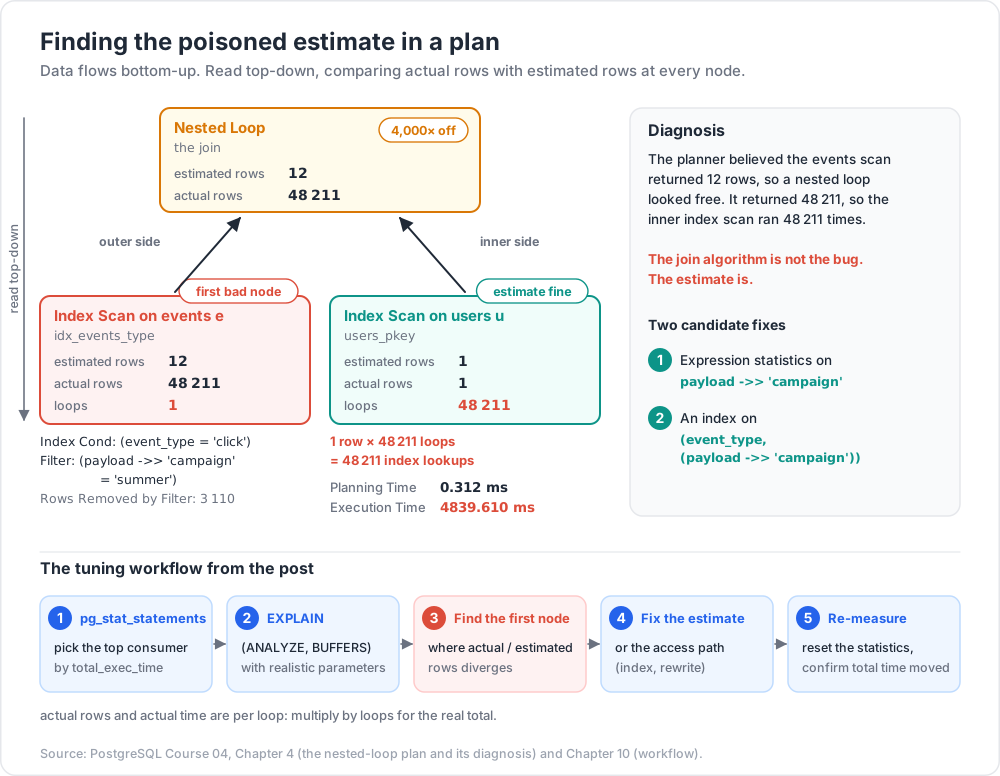
- Expression statistics on
payload ->> 'campaign'so the planner stops guessing at the JSON predicate. - An index on
(event_type, (payload ->> 'campaign'))so the filter becomes an index condition.
Vocabulary that matters when reading plans:
Rows Removed by Filter— work the node did and threw away. Large values mean the predicate should move into the index condition.Heap Fetcheson an Index Only Scan — pages visited because the visibility map was not all-visible. Large values mean the table needs a vacuum.Buffers: shared hit=… read=…—hitcame from shared buffers,readcame from the OS or disk.BUFFERSis on by default withANALYZEfrom PostgreSQL 18; add it explicitly on earlier versions.Planning TimevsExecution Time— a planning time in the tens of milliseconds on a simple query points at too many partitions or a very high statistics target.
Trick:
EXPLAIN (ANALYZE, BUFFERS, SETTINGS, FORMAT TEXT)prints any non-default planner settings alongside the plan, which makes "works on my machine" plan differences obvious.
Watch out:
EXPLAIN ANALYZEruns the statement. ForINSERT/UPDATE/DELETE, wrap it:BEGIN; EXPLAIN ANALYZE UPDATE ...; ROLLBACK;.
Chapter 5 — Anti-patterns that defeat indexes
Function on an indexed column
1
2
3
4
5
6
7
8
9
10
11
12
13
14
-- Index on created_at is unusable: the planner cannot invert the function.
SELECT * FROM orders WHERE date_trunc('day', created_at) = DATE '2026-05-01';
-- Sargable rewrite - a range that the btree can seek:
SELECT * FROM orders
WHERE created_at >= DATE '2026-05-01'
AND created_at < DATE '2026-05-02';
-- Or index the expression itself. date_trunc('day', timestamptz) depends on the
-- session TimeZone (STABLE), so fix the zone to make it IMMUTABLE:
CREATE INDEX idx_orders_day ON orders (date_trunc('day', created_at AT TIME ZONE 'UTC'));
-- the query must then use the same expression:
-- WHERE date_trunc('day', created_at AT TIME ZONE 'UTC') = DATE '2026-05-01'
The same applies to LOWER(email) = 'a@b.com' (index LOWER(email), or use a citext column) and id::text = '42'.
Implicit casts
1
2
3
4
5
6
-- account_no is varchar; the literal is numeric -> cast, index skipped
SELECT * FROM accounts WHERE account_no = 12345;
-- Match the type:
SELECT * FROM accounts WHERE account_no = '12345';
The rule: a btree index on column c is usable only when the predicate is c <op> <constant expression>. Anything that wraps c in a cast or function breaks that shape. Casts on the literal side are fine.
OR chains vs UNION ALL
A disjunction across different columns often cannot use one index efficiently — the planner either seq-scans or builds a BitmapOr.
1
2
3
4
5
6
7
8
-- Often a seq scan:
SELECT * FROM contacts WHERE email = $1 OR phone = $1;
-- Two index scans, deduplicated by the application's own semantics:
SELECT * FROM contacts WHERE email = $1
UNION ALL
SELECT * FROM contacts WHERE phone = $1 AND email IS DISTINCT FROM $1;
Use UNION (not UNION ALL) if rows can genuinely satisfy both branches and duplicates are unacceptable — it costs a sort or hash for dedup. Check the plan: a BitmapOr over two bitmap index scans is already a good outcome and needs no rewrite.
SELECT *
SELECT * prevents index-only scans, inflates network transfer, and pulls TOASTed columns (large text/JSONB) off disk that you never look at. It also makes the query fragile — a later ALTER TABLE ... ADD COLUMN silently changes the result shape. Name your columns.
OFFSET pagination vs keyset pagination
OFFSET n makes the server produce and discard n rows. Page 1 is instant; page 5 000 scans five thousand pages worth of rows before returning anything.
1
2
3
4
5
6
-- O(offset): degrades linearly, and rows shift under concurrent inserts
SELECT id, title, created_at
FROM articles
ORDER BY created_at DESC, id DESC
LIMIT 20 OFFSET 100000;
Keyset (a.k.a. seek) pagination carries the last row's sort key forward and seeks straight to it:
1
2
3
4
5
6
7
8
9
10
11
12
13
14
15
16
-- Page 1
SELECT id, title, created_at
FROM articles
ORDER BY created_at DESC, id DESC
LIMIT 20;
-- remember the last row: (created_at = '2026-04-11 09:12:03+00', id = 88121)
-- Page 2+ : row-value comparison, matches the index order exactly
SELECT id, title, created_at
FROM articles
WHERE (created_at, id) < (TIMESTAMPTZ '2026-04-11 09:12:03+00', 88121)
ORDER BY created_at DESC, id DESC
LIMIT 20;
CREATE INDEX idx_articles_seek ON articles (created_at DESC, id DESC);
Every page costs the same. The tuple comparison (a, b) < (x, y) is a real row-value expression in PostgreSQL and it does use a matching multicolumn index — unlike the hand-expanded a < x OR (a = x AND b < y), which frequently does not.
Trade-off: keyset pagination cannot jump to "page 500". If the UI requires numbered pages, keep OFFSET but cap the reachable depth, or precompute page boundaries.
Chapter 6 — work_mem, sorts, and spills
work_mem is the memory budget for one sort, hash, or bitmap operation — not per query and not per connection. A single query with three sorts and two hash joins running in three parallel workers can consume many multiples of it. That is why the default is a conservative 4MB.
1
2
3
4
-> Sort (cost=... rows=500000 width=64) (actual ...)
Sort Key: o.created_at DESC
Sort Method: external merge Disk: 41208kB <-- spilled
| Sort Method | Meaning |
|---|---|
quicksort |
Fit entirely in work_mem. Good. |
top-N heapsort |
ORDER BY ... LIMIT n kept only n rows in memory. Very good. |
external merge |
Spilled to temporary files. The Disk: figure tells you how much memory it wanted. |
Sizing from evidence: take the Disk: value, add headroom, and set work_mem for that statement or that role — not globally.
1
2
3
SET LOCAL work_mem = '64MB'; -- inside a transaction, reverts on commit
ALTER ROLE reporting SET work_mem = '256MB'; -- per role, for the BI user
Hash nodes get work_mem × hash_mem_multiplier (default 2.0 since PostgreSQL 15). Watch Batches: on Hash nodes and Buckets: … Batches: … growth; more than one batch means spilling.
Turn on log_temp_files = 0 to log every temporary file created — the cheapest way to find spilling queries in production.
Watch out: raising global
work_memon a pooled server is a classic OOM route.max_connections × work_mem × nodes_per_queryis the number to fear.
Chapter 7 — Parallel query
PostgreSQL parallelises sequential scans, index scans, joins, aggregates, and (since 11) hash joins and appends. A parallel plan shows a Gather or Gather Merge node with Workers Planned / Workers Launched beneath it.
1
2
3
4
5
6
Finalize GroupAggregate
-> Gather Merge (workers planned: 4, workers launched: 4)
-> Partial GroupAggregate
-> Sort
-> Parallel Seq Scan on events
| Parameter | Default | Note |
|---|---|---|
max_parallel_workers_per_gather |
2 |
Per Gather node. Raising it to 4 is common on multi-core boxes. |
max_parallel_workers |
8 |
Pool shared by all queries. |
max_worker_processes |
8 |
Hard ceiling; max_parallel_workers cannot exceed it. |
min_parallel_table_scan_size |
8MB |
Tables smaller than this are never scanned in parallel. |
parallel_setup_cost |
1000 |
Fixed cost of starting workers — deliberately high. |
parallel_tuple_cost |
0.1 |
Cost of shipping one row from a worker to the leader. |
Workers Launched: 0 when Workers Planned: 4 means the worker pool was exhausted — check max_parallel_workers and concurrent load. Parallel query helps analytical scans and hurts nothing else; it is not a fix for a missing index, because the cheapest parallel scan of a whole table still reads the whole table.
Chapter 8 — Partitioning as an optimization tool
Declarative partitioning (PostgreSQL 10+, mature from 12 onward) splits one logical table into physical child tables. Its value for query optimization is partition pruning: the planner discards partitions that cannot contain matching rows.
1
2
3
4
5
6
7
8
9
10
11
12
13
14
15
CREATE TABLE events (
id bigint GENERATED ALWAYS AS IDENTITY,
occurred_at timestamptz NOT NULL,
event_type text NOT NULL,
payload jsonb
) PARTITION BY RANGE (occurred_at);
CREATE TABLE events_2026_05 PARTITION OF events
FOR VALUES FROM ('2026-05-01') TO ('2026-06-01');
CREATE TABLE events_2026_06 PARTITION OF events
FOR VALUES FROM ('2026-06-01') TO ('2026-07-01');
-- Indexes declared on the parent are created on every partition:
CREATE INDEX ON events (event_type, occurred_at);
| Strategy | Use for |
|---|---|
RANGE |
Time series, monotonically increasing keys. The overwhelmingly common case. |
LIST |
A small closed set — region, tenant tier, country. |
HASH |
Even spread when there is no natural range or list, e.g. sharding by customer_id. |
Pruning happens at plan time when the predicate is a constant, and at execution time when it comes from a parameter or a join (enable_partition_pruning, on by default). Confirm in the plan: an Append node listing only the partitions actually needed.
1
2
3
4
5
EXPLAIN SELECT count(*) FROM events
WHERE occurred_at >= '2026-06-01' AND occurred_at < '2026-06-08';
-- Aggregate
-- -> Seq Scan on events_2026_06 events_1 <- only one partition
Rules that make partitioning pay off:
- The partition key must appear in the predicate. A query filtering only on
event_typetouches every partition and is now slower than an unpartitioned table. - Keep the partition count sane. Hundreds are fine; tens of thousands inflate planning time and lock counts.
- Detaching beats deleting.
ALTER TABLE events DETACH PARTITION events_2025_01;retires a month in milliseconds whereDELETEwould generate millions of dead tuples. - Enable
enable_partitionwise_joinandenable_partitionwise_aggregate(both off by default) when joining two tables partitioned identically.
Chapter 9 — Materialized views
A materialized view stores the query result on disk. It is the right tool when an expensive aggregate is read far more often than the underlying data changes, and slightly stale results are acceptable.
1
2
3
4
5
6
7
8
9
10
11
12
13
14
CREATE MATERIALIZED VIEW daily_revenue AS
SELECT date_trunc('day', created_at) AS day,
country,
sum(total) AS revenue,
count(*) AS orders
FROM orders
GROUP BY 1, 2;
-- REQUIRED for the concurrent refresh below:
CREATE UNIQUE INDEX daily_revenue_pk ON daily_revenue (day, country);
REFRESH MATERIALIZED VIEW daily_revenue; -- ACCESS EXCLUSIVE lock
REFRESH MATERIALIZED VIEW CONCURRENTLY daily_revenue; -- readers keep reading
CONCURRENTLY computes the new contents into a temporary relation and applies the difference, so readers are never blocked. Its requirements: a unique index covering all rows, and a view that has already been populated once. It is slower in wall-clock terms than a plain refresh — it trades throughput for availability.
PostgreSQL has no built-in incremental view maintenance; if refresh cost becomes the bottleneck, the usual answer is a summary table updated by triggers or by a scheduled job that only recomputes recent partitions.
Chapter 10 — Start from pg_stat_statements
Tuning by intuition finds the query you remember being slow. pg_stat_statements finds the one that actually costs the most, which is usually a 3 ms query executed two million times an hour.
1
2
3
4
5
-- postgresql.conf, requires a restart:
-- shared_preload_libraries = 'pg_stat_statements'
-- pg_stat_statements.track = all
CREATE EXTENSION IF NOT EXISTS pg_stat_statements;
1
2
3
4
5
6
7
8
9
10
11
12
13
14
-- Top 10 by total time - the ranking that matters
SELECT substr(query, 1, 90) AS query,
calls,
round(total_exec_time::numeric, 1) AS total_ms,
round(mean_exec_time::numeric, 3) AS mean_ms,
rows,
round(100.0 * shared_blks_hit
/ nullif(shared_blks_hit + shared_blks_read, 0), 1) AS hit_pct
FROM pg_stat_statements
ORDER BY total_exec_time DESC
LIMIT 10;
SELECT pg_stat_statements_reset(); -- baseline before a load test
The workflow:
pg_stat_statements→ pick the top consumer bytotal_exec_time, notmean_exec_time.EXPLAIN (ANALYZE, BUFFERS)that statement with realistic parameters.- Find the first node where
actual rows / estimated rowsdiverges. - Fix the estimate (
ANALYZE, statistics target,CREATE STATISTICS) or the access path (index, rewrite). - Re-measure. Reset the statistics and confirm the total time moved.
Supporting views: pg_stat_user_tables (seq_scan vs idx_scan, n_dead_tup), pg_stat_user_indexes (idx_scan = 0 means an unused index paying write cost for nothing), and log_min_duration_statement to capture individual slow executions with their parameters.
Common pitfall:
pg_stat_statementsnormalises literals, soWHERE id = 1andWHERE id = 2collapse into one entry. That is what you want for ranking — but it means the recorded query text has$1placeholders and you must supply realistic values yourself when re-runningEXPLAIN.
Practice Exercises
Exercise 1 — Prove the cost constants matter
Create a 2-million-row table with an index. Find a selective query where the planner chooses a sequential scan at random_page_cost = 4. Re-run with SET random_page_cost = 1.1 and compare both the plan and the actual execution time.
Exercise 2 — Break and fix an estimate
Build a table where two columns are functionally dependent (e.g. country and country_code). Show the estimate error on a query filtering both, then correct it with CREATE STATISTICS.
Solution
1
2
3
4
5
6
7
8
9
10
11
12
13
14
15
16
CREATE TABLE geo AS
SELECT (ARRAY['JP','US','DE'])[1 + (i % 3)] AS code,
(ARRAY['Japan','United States','Germany'])[1 + (i % 3)] AS country,
i AS n
FROM generate_series(1, 500000) i;
ANALYZE geo;
EXPLAIN ANALYZE SELECT * FROM geo WHERE code = 'JP' AND country = 'Japan';
-- estimated ~55000, actual 166666 (independence assumption)
CREATE STATISTICS geo_code_country (dependencies, mcv) ON code, country FROM geo;
ANALYZE geo;
EXPLAIN ANALYZE SELECT * FROM geo WHERE code = 'JP' AND country = 'Japan';
-- estimate now tracks the actual row count
Exercise 3 — Make an index unusable, then usable
Write a query with WHERE lower(email) = 'a@b.com' against a plain index on email. Confirm the sequential scan, then fix it two different ways (expression index; citext column) and compare.
Solution
1
2
3
4
5
6
7
8
9
10
-- Option A: expression index
CREATE INDEX idx_users_lower_email ON users (lower(email));
EXPLAIN ANALYZE SELECT id FROM users WHERE lower(email) = 'a@b.com';
-- Option B: case-insensitive type
CREATE EXTENSION IF NOT EXISTS citext;
ALTER TABLE users ALTER COLUMN email TYPE citext;
CREATE INDEX idx_users_email ON users (email);
EXPLAIN ANALYZE SELECT id FROM users WHERE email = 'a@b.com';
Exercise 4 — Keyset pagination
Convert an OFFSET-based listing endpoint to keyset pagination. Measure page 1 and page 5 000 under both schemes with EXPLAIN (ANALYZE, BUFFERS).
Solution
1
2
3
4
5
6
7
8
9
10
11
CREATE INDEX idx_articles_seek ON articles (created_at DESC, id DESC);
-- first page
SELECT id, title, created_at FROM articles
ORDER BY created_at DESC, id DESC LIMIT 20;
-- subsequent pages, $1/$2 = last row of the previous page
SELECT id, title, created_at FROM articles
WHERE (created_at, id) < ($1, $2)
ORDER BY created_at DESC, id DESC LIMIT 20;
Exercise 5 — Force a spill
Run a GROUP BY over a large table with work_mem = '1MB' and read the Sort Method: external merge Disk: line. Raise work_mem with SET LOCAL until the method becomes quicksort, and record the smallest value that works.
Exercise 6 — Partition pruning
Partition an events table by month. Write one query that prunes to a single partition and one that scans all of them. Show both plans and explain the difference in one sentence each.
Exercise 7 — Tuning session from evidence
Enable pg_stat_statements, run a mixed workload for ten minutes, then produce the top-5-by-total-time report. Pick one entry, EXPLAIN (ANALYZE, BUFFERS) it, apply one fix, reset the statistics, and re-measure.
Cheat-sheet
| What | How |
|---|---|
| Full plan with timings and I/O | EXPLAIN (ANALYZE, BUFFERS) SELECT ... |
| Plan without executing | EXPLAIN SELECT ... |
| Safe plan for a write | BEGIN; EXPLAIN ANALYZE UPDATE ...; ROLLBACK; |
| Show non-default planner settings | EXPLAIN (ANALYZE, SETTINGS) ... |
| SSD cost tuning | random_page_cost = 1.1, raise effective_cache_size |
| Refresh statistics | ANALYZE tablename; |
| Inspect statistics | SELECT * FROM pg_stats WHERE tablename = '...' |
| Deeper histogram on one column | ALTER TABLE t ALTER COLUMN c SET STATISTICS 500; |
| Correlated-column statistics | CREATE STATISTICS s (dependencies, mcv) ON a, b FROM t; |
| Diagnose a join choice | SET enable_hashjoin = off; then re-EXPLAIN |
| Nested-loop inner totals | multiply actual rows by loops |
| Detect sort spilling | Sort Method: external merge Disk: … |
| Per-statement memory | SET LOCAL work_mem = '64MB'; |
| Log all temp files | log_temp_files = 0 |
| Parallel worker count | max_parallel_workers_per_gather |
| Prune partitions | put the partition key in the WHERE clause |
| Non-blocking matview refresh | REFRESH MATERIALIZED VIEW CONCURRENTLY v; (needs a unique index) |
| Rank slow queries | ORDER BY total_exec_time DESC in pg_stat_statements |
| Find unused indexes | pg_stat_user_indexes where idx_scan = 0 |
| Capture slow statements | log_min_duration_statement = 500 |
What's next
Post 05 covers transactions, MVCC, isolation and locking — how PostgreSQL stores multiple row versions, what each isolation level actually guarantees here (which is not always what the SQL standard's minimum requires), how to write a serialization-failure retry loop, how to read a deadlock report, and why a forgotten idle in transaction session can stop vacuum across the entire cluster.
References
- Using EXPLAIN
- Planner Cost Constants
- How the Planner Uses Statistics
- Extended Statistics —
CREATE STATISTICS - Parallel Query
- Table Partitioning
REFRESH MATERIALIZED VIEWpg_stat_statements- Resource Consumption — memory settings
Note: this post is in progress. Planned additions: a worked BRIN-vs-btree comparison on a time-series table,
pg_hint_planand when hinting is defensible, and a side-by-side of PostgreSQL plan reading againstmongo_04_query_optimizationexplain output.